KCB-H-1000 - Radio MAAS - Free user manual and instructions
Find the device manual for free KCB-H-1000 MAAS in PDF.


| Product Type | CB Radio AM/FM |
| Brand | MAAS |
| Model | KCB-H-1000 |
| Power Supply | 12 V (via car adapter) or 7.4 V ±0.4 V (via battery) |
| Consumption | 1.3 A |
| Frequency Response | 300-3000 Hz |
| Distortion | <8% |
| Impedance | 50 Ω |
| Reception Sensitivity | 25 µV @ 12 dB |
| Interference Rejection | 60 dB |
| Transmit Power | 4 W (HI) / 1.5 W (LO) |
| Modulation | AM/FM |
| Operating Temperature | -26°C to +80°C |
| Number of Channels | 40 (according to standard) |
| Frequency Band | 26.965-27.405 MHz (EU) |
| Main Functions | Manual squelch (25 levels) and automatic (5 levels), VOX, Dual Watch, NRC, Roger Beep, TOT, key lock, scanning, emergency channels 9/19, standard selection |
| Certification | Compliant with EU 2014/53/EU and 2011/65/EC |
| Safety | Read the warnings: do not expose to moisture, extreme temperatures, avoid interference, use an identical fuse, turn off before starting the engine |
| Spare parts and repairability | Replacement fuse (same type) |
Frequently Asked Questions - KCB-H-1000 MAAS
User questions about KCB-H-1000 MAAS
0 question about this device. Answer the ones you know or ask your own.
Ask a new question about this device
Download the instructions for your Radio in PDF format for free! Find your manual KCB-H-1000 - MAAS and take your electronic device back in hand. On this page are published all the documents necessary for the use of your device. KCB-H-1000 by MAAS.
USER MANUAL KCB-H-1000 MAAS
- Read the following warnings to prevent fire, personal injury, or damage to the CB radio or antenna.
- Do not try to adjust the CB radio while driving, it is dangerous.
- Do not position the CB radio on an excessively dusty, wet or unstable surface. Do not connect the antenna during transmission, risk of burns or electric shock. Keep your distance from devices that create interference (such as: TV, generator, etc.)
- Those who use pacemakers are advised to keep their distance from the antenna during transmission and especially not to touch it.
- Do not bring metal objects close to the internal electrical part of the CB radio; danger of electric shock.
- Avoid exposing the CB radio to temperatures lower than -26^ and higher than +80^ . The temperature inside a vehicle can sometimes exceed 80^ , which can cause irreparable damage in case of prolonged exposure.
- Do not expose the CB radio to sunlight for a long time.
- Do not put anything on the CB radio, it will prevent it from cooling down. Check if you have a sufficiently charged car battery to avoid a rapid discharge.
- It is important to stop the CB radio before starting the engine, to avoid damage caused by the high voltage at start-up.
- When replacing the fuse, you must use a fuse of the same type as the original one. If an abnormal smell or smoke comes out of the CB radio, turn off the power immediately.
- Do not transmit for a long time, the CB radio may heat up and malfunction.
Important note! In some countries it may be necessary to present the license that will certify the right to use the CB band. Please check the local legislation and the table at the end of the manual.
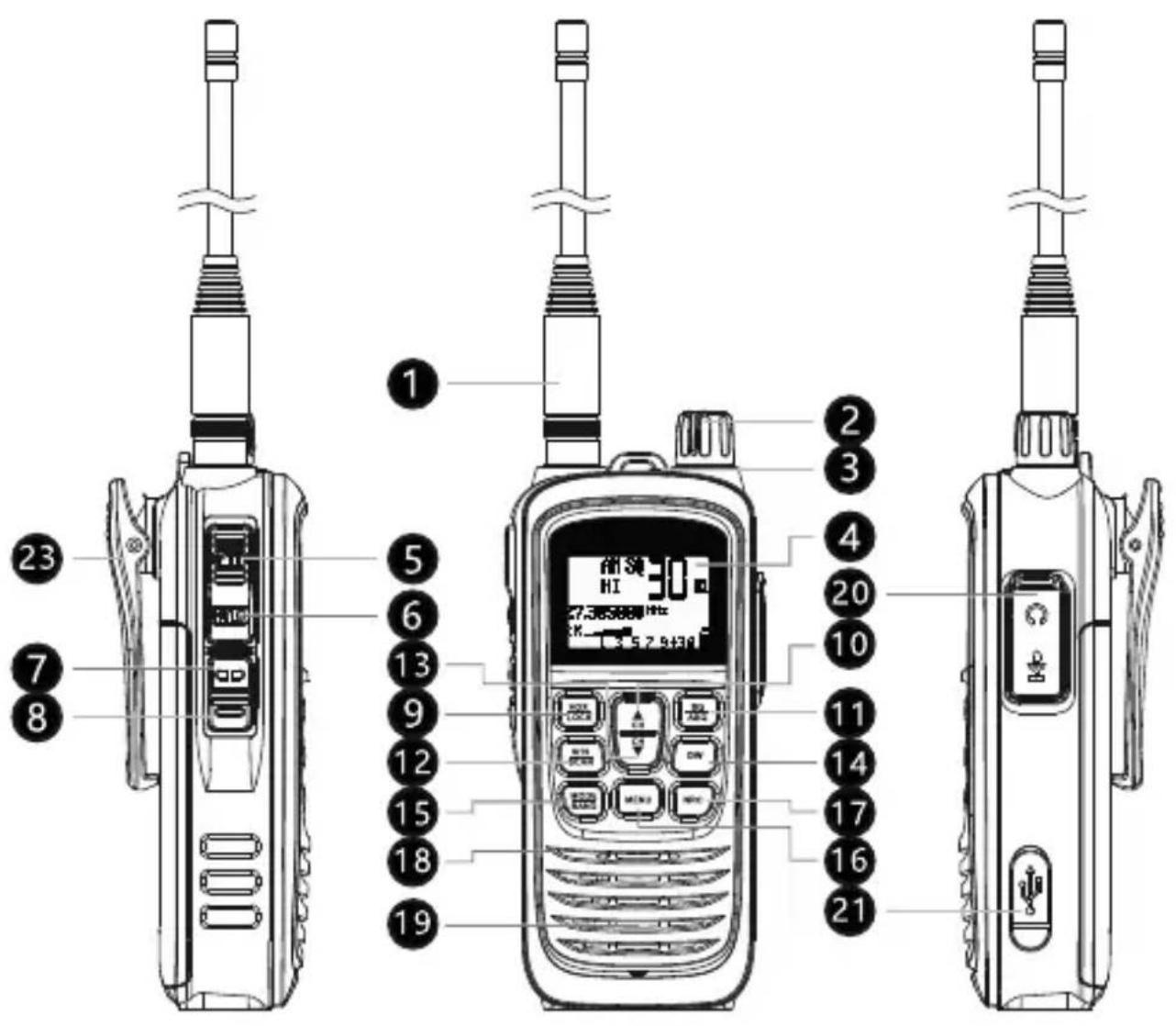
| Description Short | press Long press | ||
| 1 Antenna | |||
| 2 | Volume On/Off | ||
| 3 Status LED | |||
| 4 LCD screen | |||
| 5 PTT Transmission | |||
| 6 HI/LO High/low power | selection | ||
| 7 Backlight On/Off | |||
| 8 Monitor | |||
| 9 FUNC Menu | |||
| 10 | ▲ | Increase channel number | Continuous increase in channel number |
| 11 DW | Enable/Disable Dual Watch | Dual Watch setting | |
| 12 LCR/VOX Last channel | recall VOX control | ||
| 13 | ▼ | Decrease channel number | Continuous decrease in channel number |
| 14 SQ/ASQ SQ/ASQ level | selection | Switch between SQ/ASQ | |
| 15 NRC/LOCK | Enable/Disable NRC (Noise Reduction Circuit) | Key lock | |
| 16 AM/FM/BAND Switch | between AM/FM Band selection | ||
| 17 EMG/SC | Emergency channel | Enable/Disable channel scanning | |
| 18 MIC | |||
| 19 Speaker | |||
| 20 | 2 pins PNI-K headset connector | ||
| 21 | USB-C port for battery charging | ||
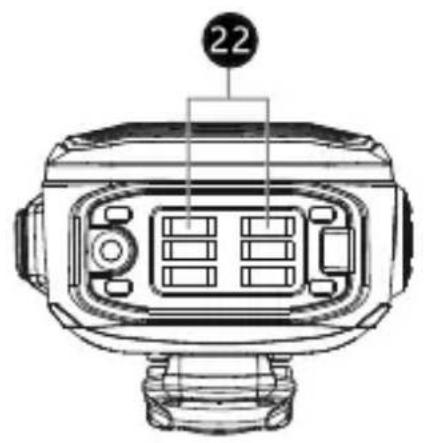
| 22 Belt clip | |||
EN
Turn the radio on/off
Turn the knob on the top of the CB radio [2] clockwise to turn it on. The CB radio starts from the previous mode of use.
Turn the knob on the top of the CB radio [2] counterclockwise to turn it off.
Volume control
After turning the CB radio on, continue to turn the knob [2] to adjust the volume to the desired level.
Channel selection
Briefly press the CH or CH key to increase or decrease the channel number, until you reach the desired channel.
Long press the CH or CH key to quickly increase or decrease the channel number.
Squelch (SQ) level selection
Briefly press the SQ/ASQ [14] key. On the screen, the SQ icon and the digits corresponding to the level flash. 25 levels of manual squelch are available, from 00 (squelch off) to 25 (highest level).
When the digits corresponding to the level are flashing, press the or keys to select the desired level.
To confirm the selection, press the SQ/ASQ key or wait 5 seconds.
Automatic squelch (ASQ) level selection
Long press the SQ/ASQ [14] key to switch to ASQ mode. On the screen, the SQ icon becomes ASQ.
On the screen, the ASQ icon and the digits corresponding to the level flash. There are 5 levels of manual squelch available, from 01 (the lowest
level) to 05 (the highest level). When the digits corresponding to the level are flashing, press the or keys to select the desired level.
To confirm the selection, press the SQ/ASQ key or wait 5 seconds.
AM/FM selection
Press the AM/FM/BAND [16] key to switch between AM and FM. The corresponding icon will appear on the screen.
Note: Not all standards support both types of modulation. If the band you are in does not support AM or FM, pressing the AM/FM/BAND key will not produce any change.
Emergency channels (9/19)
Press the EMG/SC [17] key to switch to channel 09. The EMG icon appears on the screen.
Press the EMG/SC key again to switch to channel 19.
Press the EMG/SC key again to exit Emergency mode. The EMG icon disappears from the screen.
Key lock
Long press the NRC/LOOK key to activate the key lock function. The icon appears on the screen. When pressing any key you will hear a warning beep and the icon will blink. All radio's keys are locked, except the PTT key.
Long press again the NRC/LOOK key to disable the key lock function. The icon will disappear from the screen.
Channel scan
Long press the EMG/SC [17] key. The SC icon blinks on the screen. The channel scanning starts immediately.
During scanning, you can press the or key to change the scanning direction. Long press the EMG/SC key or the PTT key to stop scanning. The SC icon disappears from the screen.
Briefly press the HI/LO [6] key on the side of the CB radio to change between high (4 W) and low (1.5 W) transmission power. The HI or LO icon will appear on the screen.
Dual Watch
Long press the DW [11] key. The DW icon and the digits corresponding to the channel blink on the screen. Press the or key to choose the second channel you want to monitor. Press the DW key again to save and exit.
To activate the Dual Wa tch mode, briefly press the DW key. The two channels set for simultaneous monitoring will be displayed successively on the screen. The DW icon is blinking. Short press the DW key to exit.
NCR (Noise Reduction Circuit)
Briefly press the NRC/LOOK [15] key to activate the background noise reduction function. The NRC icon appears on the screen.
Briefly press the NRC/LOOK key again to disable the NRC function. The NRC icon disappears from the screen.
LCR (Last Channel Recall)
Briefly press the LCR/VOX [12] key to return to the last channel you stayed on for more than 5 seconds. Press LCR/VOX again to return to the original channel.
VOX
Long press the LCR/VOX [12] key to activate the VOX function. The VOX icon appears on the screen.
By activating the VOX function, you can transmit without pressing the PTT key. The VOX sensitivity level can be set from the menu.
Long press the LCR/VOX [12] key to disable the VOX function. The VOX icon disappears from the screen.
Menu
Key beep
Briefly press the FUNC key [9] to access the menu. The icon and the current setting (On or Off) blink.
Press CH or CH to change the setting:
On - key beep enabled (the iconappears on the screen)
Off - key beep disabled (the icon disappears from the screen)
VOX level
Press the FUNC [9] key twice to access the VOX menu.
On the screen, the VOX icon and the digits corresponding to the level blink. Press the CH or CH key to change the VOX level. There are 5 levels available:
01 - low VOX sensitivity
05 - high VOX sensitivity
Roger Beep
Press the FUNC [9] key three times to access the Roger Beep menu. The icon and the current setting (On or Off) blink.
Press CH or CH to change the setting:
On - roger beep enabled (the icon appears on the screen)
Off - roger beep disabled (the icon disappears from the screen)
TOT (Timeout timer)
Turn off the CB radio.
Hold down the AM/FM/BAND key [16] while restarting the CB radio. "150 TIME OUT TIMER" appears on the screen. Use the CH or CH keys to set the maximum continuous transmission time.
With the CB radio turned off, hold down the SQ/ASQ [14] key while turning back on the radio. The message Rest Default and the firmware version will be displayed on the screen.
After the reset, the CB radio returns to the factory settings.
Standard selection
Long press the AM/FM/BAND [16] key. The icon corresponding to the current standard blinks on the screen. Press the CH or CH key to change the standard.
Short press AM/FM/BAND to save and exit or wait 5 seconds.
Check the Bands and frequency table at the end of this manual.
| Frequency range 26.965 MHz - 27.40 | 5 MHz |
| Frequency tolerance ±300 Hz | |
| Power supply | 12 V (by the car adapter) 7.4 V ±0.4 V (by battery) |
| Emission power 4 W AM/FM | |
| Consumption < 1.3 A | |
| Frequency response 300-3000 Hz | |
| Distortion < 8 % | |
| Impedance 50 Ω | |
| Reception sensitivity 0.25 uv @ 12 dB | |
| Interference rejection 60 dB | |
| Audio power 1 W | |
| Operating temperature -26 °C ~ +80 °C |
Bands and frequencies
| Norm | Frequency MHz | Channel Kanal | Country Land | EMG (9/19) |
| EU | 26.965–27.405 | 40 CH (4 W) AM/FM | AT, BE, BG, CH, CY, DK, EE, ES, FI, FR, GR, HR, HU, IE, IS, IT, LT, LU, LV, NL, NO, PT, RO, SE, SI | CH 09: 27.065 MHz AM/FM CH 19: 27.185 MHz AM/FM |
| CE | 26.965–27.405 | 40 CH (4 W) FM | RO, MT | CH 09: 27.065 MHz AM/FM CH 19: 27.185 MHz AM/FM |
| UK | 27.60125–27.99125 | 40 CH (4W) FM | UK | CH 09: 27.060 MHz AM/FM CH 19: 27.180 MHz AM/FM |
| PL | 26.960–27.400 | - 5kHz 40 CH (4W) AM/FM | PL | CH 09: 27.060 MHz AM/FM CH 19: 27.180 MHz AM/FM |
| DE | 26.965–27.405 | 01 CH-40 CH (4W) AM/FM | DE | CH 09: 27.065 MHz AM/FM CH 19: 27.185 MHz AM/FM |
| 26.965–27.405 | 41 CH-80 CH (4W) FM |

EU Declaration of Conformity
We hereby declare,
Maas Elektronik - Peter Maas
Heppendorferstr. 23
D-50189 Elsdorf (Germany)
That the following product,
Product type: CB radio AM / FM
Type designation: Maas KCB-H1000
Is in compliance with the essential requirements and other relevant provisions of directive 2014/53/EU and 2011/65/EC.
EN 301489-1 V2.2.3, EN 301489-13 V1.2.1
EN 300433 V2.1.1
EN 62368-1:2014+A11:2017
EN 62311:2008
Elsdorf 19.7.2023

Verantwortlicher:
Authorized representative:
Peter Maas
Sicherheitshinweise
DE
NCR (Noise Reduction)
LCR (Last Channel Recall)
EU-declaration of conformity

dassichdasGerat thatthe followingproduct
Geräteart: CB Funkgerät AM / FM Product type: CB radio AM / FM
Verantwortlicher:
Authorized representative:
Peter Maas
Inhaber/CEO
Verantwortlicher:
Authorized representative:
Peter Maas
Inhaber/CEO
Copyright by Maas Elektronik 2023 Subject to changes, mistakes, errors. Removing the copyright notice is prohibited.