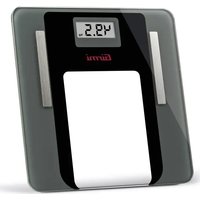
Real Fit BP75 - Scale GIRMI - Free user manual and instructions
Find the device manual for free Real Fit BP75 GIRMI in PDF.


User questions about Real Fit BP75 GIRMI
0 question about this device. Answer the ones you know or ask your own.
Ask a new question about this device
Download the instructions for your Scale in PDF format for free! Find your manual Real Fit BP75 - GIRMI and take your electronic device back in hand. On this page are published all the documents necessary for the use of your device. Real Fit BP75 by GIRMI.
USER MANUAL Real Fit BP75 GIRMI
natural_image
Digital fitness meter displaying 49.5 seconds, no visible text or symbols on the device itselfReal Fit
Safety instructions.... p. 4
Battery compartment...... p. 5
Operating....p. 5
Application Ailink.... p. 3
Switch-off.... p. 6
Cleaning.... p. 6
EU declaration of conformity....p. 6
Technical features.... p. 7
Waste of electric and electronic equipment (WEEE Directive)....p. 16
PORTUGUES:....p. 7
ESPAÑOL......p. 9
FRANCAIS p. 12
text_image
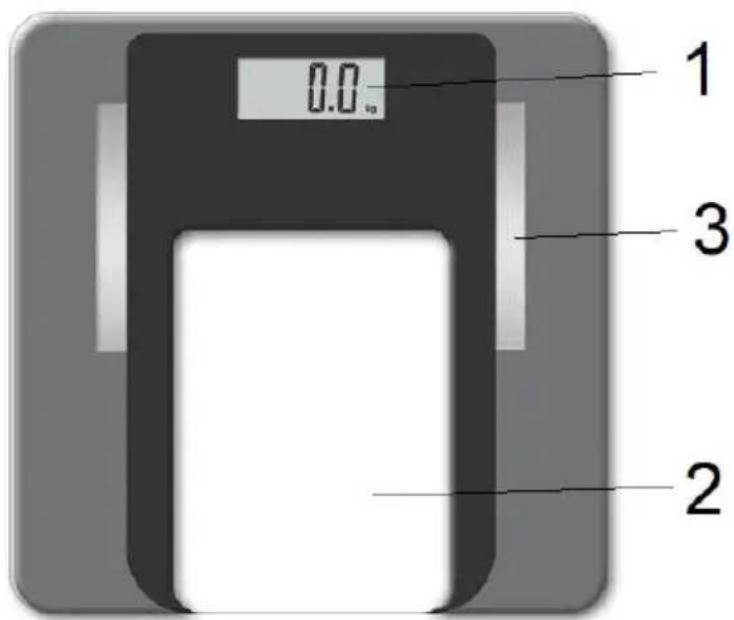
0.0 1 3 21
Display digitale - Digital display -
Visor digital - Pantalla digital -
Affichage numérique
2
Pedana di pesatura - Platform - Plataforma de pesaje - Plano de pesagem – Plate-forme de pesée
3
text_image
QR code with central blue logo containing 'AiLink' textDownload per Android

text_image
QR code with central logo containing 'AiLnk'Download per IOS
ENGLISH: SAFETY INSTRUCTIONS
The following are important notes on the installation, use and maintenance. Save this instruction manual for future reference. Use the equipment only as specified in this guide. Any other use is considered improper and dangerous. Therefore, the manufacturer cannot be held responsible in the event of damages caused by improper, incorrect or unreasonable use.
Before use, ensure the equipment is undamaged. If in doubt, do not attempt to use it and contact the authorized service center. Do not leave packing materials (i.e. plastic bags, polystyrene foam, nails, staples, etc.) within the reach of children as they are potential sources of danger; always remember that they must be separately collected.
In case of failure and / or malfunction do not tamper with the unit. To repair the appliance, always contact the service center authorized by the manufacturer and request the use of original spare parts. Failure to comply with the above may compromise the unit safety and invalidate the warranty.
- Do not expose the appliance to harmful weather conditions such as rain, moisture, frost, etc.. Store the unit in a dry place.
- Do not handle or touch the appliance with wet hands or bare feet.
- Children should be supervised to ensure that they do not play with the appliance; do not allow incapable persons to use the product without supervision.
- Place it on flat and stable surface to ensure a correct operation. Keep at a distance of 2 meters from microwave ovens in operation, which can cause malfunctions due to electromagnetic interference.
- Keep the unit out of the reach of children and away from heat sources and steam.
- After finishing weight operation, empty the scale.
- Place the food inside a containers and not directly on the scale. Gently put the containers on the scale. Failure to comply with these instructions may invalidate the warranty in case of damages.
- The buttons should be pushed gently and only with fingers. If the display does not light up, it could be a battery problem: check that they are correctly installed and they are not exhausted.
- Not suitable for commercial use. Household use only.
- Do not immerse in water or other liquids and avoid splashing of water; clean it with a damp cloth only.
- Do not subject the product to strong impacts, serious damage may result.
- Do not use as a shelf for supporting objects.
INSERT BATTERIES
The compartment for the battery is located under the scale. The scale works with 2 x AAA, 1.5V battery.
- Open the door by pulling the lock tab.
- Remove discharged batteries eventually present in the compartment.
- Insert the battery following the signs (+ -) written in the body.
- Insert batteries, lock them and close the cover.
CAUTION
- Always use batteries AAA, 1.5V type.
- Be sure to insert the battery according to the correct polarity as otherwise they may leak and damage the scale. Such damage is not covered by warranty.
- When you are going not to use unit for a long time, it is advisable to remove battery to prevent the run-out
- Whatever the type of exhausted battery, it must not be thrown in the household waste, in the fire or in the water. Each type of exhausted battery must be recycled or disposed of in the appropriate dedicated collection centers.
OPERATING THE UNIT
Before use, select the correct measuring unit by using the appropriate button on the base of the scale.
Weighing
- Place the scale on the floor, avoiding carpets or soft surfaces.
- Step on the scale and stand still for a few moments until the value flashes in the display.
- Step off the scale. The weight will stay on for a few seconds, then the scale will turn off.
Select the measurement unit
Using the key in the base, the unit of measurement can be changed from kilograms (kg) to pounds (lb) and vice versa. The display shows "kg" or "lb", depending on the unit chosen.
Exceeding load
The capacity of the scale is up to 180 Kg (400lb). Once exceeding that value, the display shows “oL”.
Do not overload the scale, since this may cause serious damage. Pay attention not exceeding the maximum
capacity (180 Kg)
Low battery indication
When the battery is running low, the display shows .LO
Replace the battery with a new one, following the steps shown in the "Insert batteries" section.
APPLICATION AILINK
The scale can be connected via Bluetooth with a device, in order to send data.
Download the application AILINK from Google Play Store or Apple App Store.

text_image
QR code with central blue logo containing the text 'AiLink'Download ndroid
In alternative scan the QR code to download the app directly. Note: in this case, since is a third party app, an alert for not safe download may appear.
The app is suitable for operative systems Android 4.3 and IOS 8.0.
At the first use you have to make registration, select the device to pair and switch on the scale. The product can be paired with several devices, but can send results to one device only. If 2 users use the scale, they cannot activate both devices together: one device must be out of range, or with Bluetooth off.
On subsequent uses, if the app is open, the scale pairs automatically.
If on the display appears “Err”, it means that there is an error in the measurement through electrodes. In this case:
- Make sure to have bare feet, and put them in good contact with the electrodes.
- Do not get off the scale for a few seconds, until the data appear on the app.
- Moisten feet if necessary.

text_image
QR code with central logo containing 'AiLink' textDownload IOS
SWITCH-OFF The switch-off is automatic: once the weighing value is displayed, after a few seconds the scale is switched off automatically.
CLEANING - Clean the unit with a damp cloth and soft and non-abrasive cleaners only.

trevidea®
GFERRARI Girmi trevi
www.g3ferrari.it
www.girmi.it
treui
www.trevidea.it
EU Declaration of Conformity (DoC)
Company name:
TREVIDEA s.r.l.
Postal address:
Strada Consolare Rimini-San Marino, 62 - 47924 - Rimini (RN)
Declares that the product:
Brand: GIRMI
Model: BP75
Technical model: SBT-10004
Object of the declaration: Personal Scale mod. GIRMI BP75
That Declaration of Conformity is issued under our sole responsibility.
The object of the declaration described above is in conformity with the relevant Union harmonisation legislation:
a. Health and Safety (Directive 2014/53/UE art.3.1(a))
EN 62479:2010
Assessment of the compliance of low power electronic and electrical equipment with the basic restrictions related to human exposure to electromagnetic fields (10 MHz to 300 GHz)
EN 62368-1:2014-A112017
Audio/video, information and communication technology equipment - Part 1: Safety requirements
b. Electromagnetic compatibility - EMC (Directive 2014/53/UE art.3.1(b))
ETSI EN 301 489-1 V2.2.3
ElectroMagnetic Compatibility (EMC) standard for radio equipment and services; Part 1: Common technical requirements; Harmonised Standard for ElectroMagnetic Compatibility
ETSI EN 301 489-17 V3.2.2
ElectroMagnetic Compatibility (EMC) standard for radio equipment and services; Part 17: Specific conditions for Broadband Data Transmission Systems; Harmonised Standard for ElectroMagnetic compatibility
c. Radio Equipment Directive – RED (Directive 2014/53/UE art.3.2)
EN 300 328 V2.2.2
Wideband transmission systems; Data transmission equipment operating in the 2,4 GHz band; Harmonised Standard for access to radio spectrum
d. RoHS (Directive 2015/863/EU)
Product is therefore marked with the with the EU conformity mark:

23 (Year 1st CE Application)
Signed for and on behalf of: TREVIDEA SRL
Rimini, 10 January 2023
Giuliano Vaccari, CEO
text_image
JewinnTECHNICAL FEATURES
• Power supply: DC 3V (2xAAA)
• Capacity: 180Kg, 400lb - Division: 100g, 0,2lb
• Digital display - Auto-power on
- Bluetooth transmission power: 0.73mW
- Bluetooth transmission frequency: 2.4GHz
PORTUGUES ADVERTÊNCIAS
text_image
QR code with central blue logo containing the text 'AiLink'Download Android

text_image
QR code with central blue logo containing 'aLink' textDownload IOS
natural_image
Simple line drawing of a pen tip with a wavy line extending from it (no text or symbols)text_image
QR code with central blue logo containing 'AiLink'Download Android

text_image
QR code with central logo containing 'aLink' textDownload IOS
text_image
Handwritten signature or scribble on a document or formFRANCAIS: MODE D'EMPLOI
text_image
Handwritten signature or scribble on white backgroundThe product is made of non-biodegradable and potentially polluting substances if not properly disposed of; other parts can be recycled. It’s our duty to contribute to the ecological health of the environment following the correct procedures for disposal. The crossed out wheelie bin symbol indicates the product complies with the requirements of the new directives introduced to protect the environment (2002/96/EC, 2003/108/EC, 2002/95/EC, 2012/19/EC) and must be properly disposed at the end of its lifetime. If you need further information, ask for the dedicated waste disposal areas at your place of residence. Who does not dispose of the product as specified in this section shall be liable according to the law.

[Non-Text]
[Non-Text]
[Non-Text]
[Non-Text]
[Non-Text]
[Non-Text]
[Non-Text]
[Non-Text]
[Non-Text]
[Non-Text]
[Non-Text]
[Non-Text]
[Non-Text]
[Non-Text]
[Non-Text]
[Non-Text]
[Non-Text]
[Non-Text]
[Non-Text]
[Non-Text]
[Non-Text]
[Non-Text]
[Non-Text]
[Non-Text]
[Non-Text]
[Non-Text]
[Non-Text]
[Non-Text]
[Non-Text]
[Non-Text]
[Non-Text]
[Non-Text]
[Non-Text]
[Non-Text]
[Non-Text]
[Non-Text]
[Non-Text]
[Non-Text]
[Non-Text]
[Non-Text]
[Non-Text]
[Non-Text]
[Non-Text]
[Non-Text]
[Non-Text]
[Non-Text]
[Non-Text]
[Non-Text]
[Non-Text]
[Non-Text]
[Non-Text]
[Non-Text]
[Non-Text]
[Non-Text]
[Non-Text]
[Non-Text]
[Non-Text]
[Non-Text]
[Non-Text]
[Non-Text]
[Non-Text]
[Non-Text]
[Non-Text]
[Non-Text]
[Non-Text]
[Non-Text]
[Non-Text]
[Non-Text]
[Non-Text]
[Non-Text]
[Non-Text]
[Non-Text]
[Non-Text]
[Non-Text]
[Non-Text]
[Non-Text]
[Non-Text]
[Non-Text]
[Non-Text]
[Non-Text]
[Non-Text]
[Non-Text]
[Non-Text]
[Non-Text]
[Non-Text]
[Non-Text]
[Non-Text]
[Non-Text]
[Non-Text]
[Non-Text]
[Non-Text]
[Non-Text]
17
17
[Non-Text]
[Non-Text]
[Non-Text]
[Non-Text]
[Non-Text]
[Non-Text]
[Non-Text]
[Non-Text]
[Non-Text]
To find the nearest service center, please call the telephone number 0541 694246, fax number 0541 756430 or contact us at assistenzatecnica@trevideo.it asking for the service centers supervisor.
Appliance is conform to the pertinent European regulation and is therefore marked with the CE mark.

www.girmi.it TREVIDEA S.r.l.
TREVIDEA S.R.L. – Strada Consolare Rimini – San Marino n. 62 – 47924 – RIMINI (RN) - ITALY
MADE IN CHINA