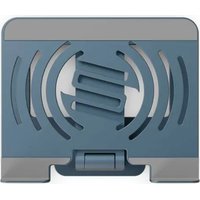
Stand Hub Pro - Multimedia dock Reloop - Free user manual and instructions
Find the device manual for free Stand Hub Pro Reloop in PDF.


| Product Type | Multimedia Docking Station |
| Brand | Reloop |
| Model | Stand Hub Pro |
| Dimensions (W x D x H) | 240 x 200 x 205 mm (45 mm folded) |
| Weight | 850 g |
| Maximum Load Capacity | 4 kg |
| Power Supply | USB-C PD port (Power Delivery 3.0, input 100W, output 85W) |
| Ports | 1x HDMI (4K@30Hz), 1x USB-C host, 3x USB-C 5Gbps, 1x USB-C PD 100W, 1x RJ45 Ethernet (up to 1000 Mbps), 2x USB-A 3.0 (5Gbps, 7.5W max), 1x SD/TF card reader (up to 2TB) |
| Support | Rotates 360°, C and Z positions |
| Maintenance | Slightly damp cloth, no solvents or aerosol products |
| Safety | Unplug before cleaning, avoid liquids, do not open the casing |
| Package Contents | Stand Hub Pro, hex key, carrying bag, USB-C to USB-C cable (30 cm), instruction manual |
| General Information | Professional laptop stand with integrated USB hub |
Frequently Asked Questions - Stand Hub Pro Reloop
User questions about Stand Hub Pro Reloop
0 question about this device. Answer the ones you know or ask your own.
Ask a new question about this device
Download the instructions for your Multimedia dock in PDF format for free! Find your manual Stand Hub Pro - Reloop and take your electronic device back in hand. On this page are published all the documents necessary for the use of your device. Stand Hub Pro by Reloop.
USER MANUAL Stand Hub Pro Reloop

Instruction Manual Bedienungsanleitung Mode d'emploi Manual de instrucciones
WARNING!
To prevent fire or avoid an electric shock do not expose the device to water or fluids! Never open the housing
WARNUNG!
Keep information for further reference!
ATTENTION! For your own safety, please read this operation manual carefully before the initial operation! All persons involved in the installation, setting-up, operation, maintenance and service of this device must be appropriately qualified and observe this operation manual in detail. This product complies with the requirements of the applicable European and national regulations. Conformity has been proven. The respective statements and documents are deposited at the manufacturer.
Before operating this equipment we ask you to carefully study and observe all instructions. Please remove the Stand Hub Pro from its packaging. Check before an initial operation to make sure that the device has not been visibly damaged during transport. If you detect any damage to the USB cable or the casing, do not operate the device. Contact your specialized dealer.
SAFETY INSTRUCTIONS
CAUTION! Please exercise particular caution when handling power voltage. This voltage rating may lead to a critical electrical shock! Any damage caused by the non-observance of this operation manual excludes any warranty claims. The manufacturer is not liable for any damage to property or for personal injury caused by improper handling or non-observance of the safety instructions.
- This device left the factory in perfect condition. To maintain this condition and to ensure a risk-free operation the user must observe the safety instructions and warnings contained in this operation manual.
- For reasons of safety and certification (CE) the unauthorized conversion and/or modification of the device is prohibited. Please note that in the event of damage caused by the manual modification to this device, any warranty claims are excluded.
- The inside of the device does not contain any parts which require maintenance, with the exception of worn parts that can be exchanged from the outside. Qualified staff must carry out maintenance, otherwise, the warranty does not apply!
- Ensure that the power will only be supplied after the device has been fully set up. Always plug in the USB plug last.
- Only use cables that comply with regulations. Observe that all jacks and bushes are tightened and correctly hooked up. Refer to your dealer if you have any questions.
- Ensure that when setting up the product the USB cable is not squashed or damaged by sharp edges.
- Disconnect the device when not in use and before cleaning! Be sure to hold the USB plug by the body. Never pull the USB cord!
- Position the device on a horizontal and stable base.
- Avoid any concussions or violent impact when installing or operating the device.
- When selecting the location of installation make sure that the device is not exposed to excessive heat, humidity, and dust. Be sure that no cables lie around openly. You will endanger your own safety and that of others!
- Do not rest any containers filled with liquid that could easily spill onto the device or its immediate vicinity. If, however, fluids should access the inside of the device, immediately disconnect the USB plug. Have the device checked by a qualified service technician before reuse. Damage caused by fluids inside the device is excluded from the warranty.
- Do not operate the device under extremely hot (in excess of 35°C ) or extremely cold (below 5°C ) conditions. Keep the device away from direct exposure to the sun and heat sources such as radiators, ovens, etc. (even during transport in a closed vehicle). Never cover the cooling fan or vents. Always ensure sufficient ventilation.
- The device must not be operated after being taken from a cold environment into a warm environment. The condensation caused at this moment may destroy your device. Do not switch on or operate the device until it has reached ambient temperature!
- Controls and switches should never be treated with spray-on cleaning agents and lubricants. This device should only be cleaned with a damp cloth. Never use solvents or cleaning fluids with a petroleum base for cleaning.
- When relocating, the device should be transported in its original packaging.
- At commercial facilities, the regulations for the prevention of accidents as stipulated by the organization of professional associations must be observed.
- At schools, training facilities, hobby and self-help workshops the operation of the device must be monitored with responsibility by trained staff.
- Keep this operation manual in a safe place for later reference in the event of questions or problems.
APPLICATION IN ACCORDANCE WITH REGULATIONS
- This device is a professional laptop stand with an integrated USB hub. To use the integrated USB hub, the stand must be connected to a laptop or smart device.
- If the device is used for other purposes than those described in the operation manual, damage can be caused to the product, leading to the exclusion of warranty rights. Moreover, any other application that does not comply with the specified purpose harbors risks such as short circuits, fires, electrical shocks, etc.
MAINTENANCE
- Check the technical safety of the device regularly for damage to the USB cable or the casing, as well as for wear out of wear parts.
- If it is to be assumed that a safe operation is no longer feasible then the device must be disconnected and secured against accidental use. Always disconnect the USB cable from the outlet!
- Disconnect the USB cable from your computer.
- It must be assumed that a safe operation is no longer feasible if the device bears visible defects, if the device no longer functions, following longer storage under unfavorable conditions or after major transport stress.
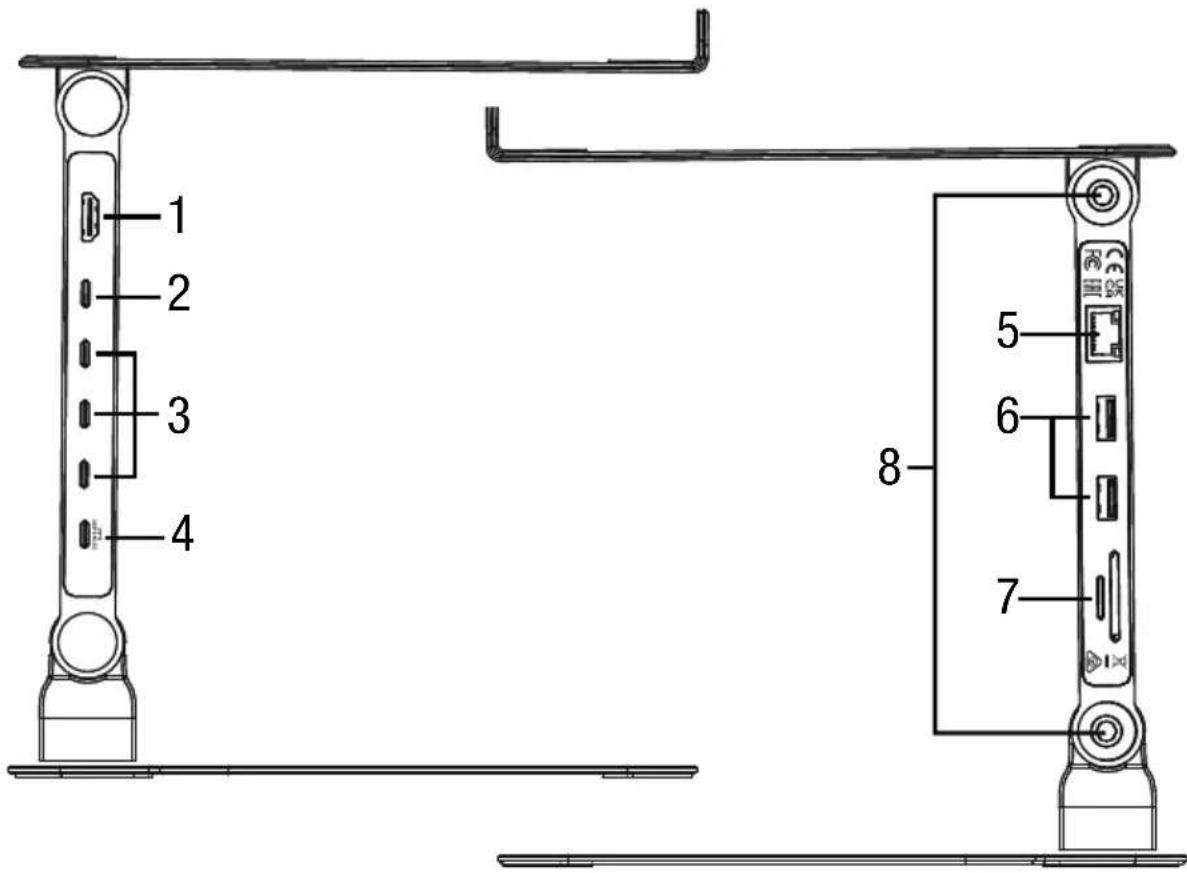
DESIGNATIONS
- HDMI Port
- USB-C Host Port
- USB-C Port 5Gbps x3
- USB-C PD Port 100 W
- RJ45 Ethernet Port
- USB-A 3.0 Port x2
- SD & TF Card Reader Port
- Hexagonal Tightening Screws
SETUP POSITIONS
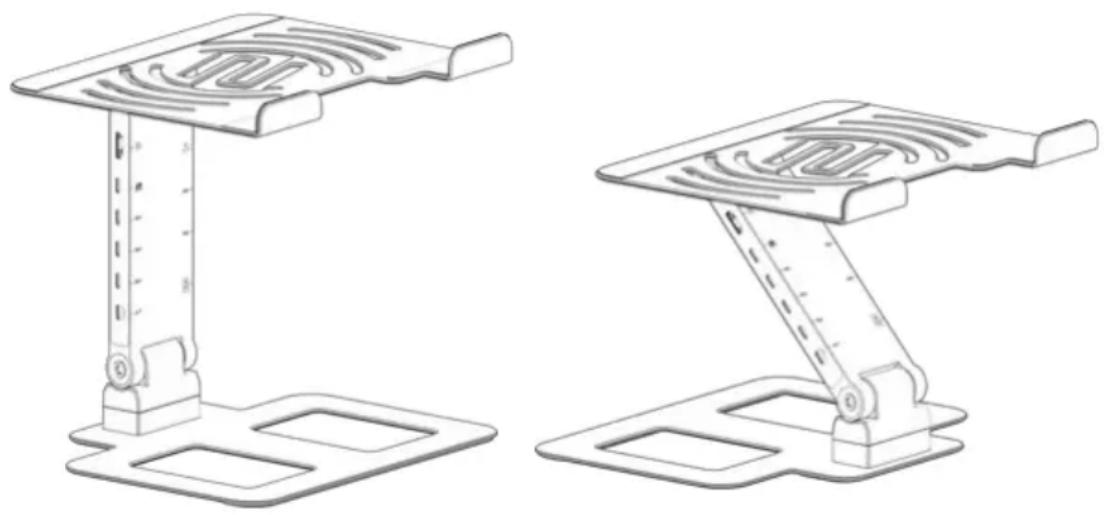
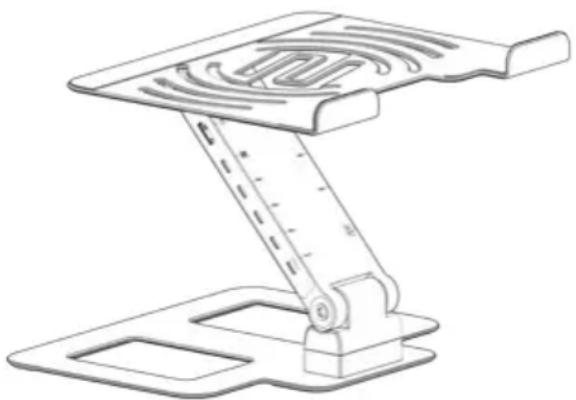
The intuitive Reloop Stand Hub Pro design allows you to set up the stand in different positions. To change the different mounting positions, you have to loosen the hexagonal screws (8) with the hexagonal wrench and adjust the stand to the appropriate position. The hexagonal wrench can be used to tighten the hexagonal screws (8) to the desired stiffness.
Note: Please be sure to place your Reloop Stand Hub Pro on a firm, horizontal and stable surface.
The Stand Hub Pro features a 360° rotatable base for flexible positioning in C- and Z-shapes:
- Classic C-shape (classic laptop stand design)
- Z-shape (stable structure at ideal operating height)
CONNECTION
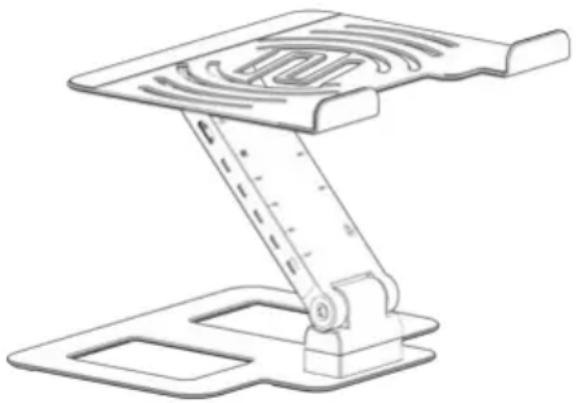
The Stand Hub Pro has a USB-C port (2) for connecting to your computer, laptop or smart device. For active use, it also has an integrated USB-C PD connector (4) that can power the laptop, smart device and/or the USB-A ports (6). Connect your computer, laptop or smart device via USB-C to USB-C for full functionality.
If your computer or tablet has a USB-C power supply, you can power your device through the USB hub (Power Delivery) by connecting the supplied power adapter to the USB-C PD port (4).
Note: The USB-C PD port supports power up to 100W input and 85W output.
In addition, the Stand Hub Pro has 3 x USB-C 5 Gbps (3) and 2 x USB-A 3.0 (6) hub ports. These can be used to connect your choice of USB peripherals and are backwards compatible.
Note: Please use the cable supplied to ensure an optimal connection. We also recommend that you always operate the USB hub in active mode with a connected USB-C power supply to ensure stable power.
For video output on HDMI, USB-C source devices must support video output. It is suggested that the device is connected to a stable power supply for proper operation.
[SETUP EXAMPLE PAGE 2-3]
TECHNICAL SPECIFICATIONS
CONNECTIONS
1x HDMI Port
- 4Kx2K (3840x2160) @30 Hz, downward compatible with 1080p, 1080i, and 720p resolution. Note: To use the HD output port, your device's USB-C port must support DisplayPort Alt Mode.
1x USB-C Host Port
3x USB-C Port
- Up to 5Gbps transfer speed
1x USB-C PD Port
- PowerDelivery 3.0; supports 100W power in, while power out (charging) is limited to 85W for safety.
1x RJ45 Ethernet Port
- Up to 1000Mbps transfer speed. Backwards compatible with 100Mbps/10Mbps
2x USB-A 3.0 Port
- Up to 5Gbps transfer speed. Backwards compatible with USB 2.0/1.x; power supply up to 7.5W max (Stand Hub Pro must be connected to a power supply/source)
Note: To ensure a stable connection, do not use this adapter with high-power devices. It will only support one hard drive at maximum.
1x SD & TF Card Reader Port
- Cards work independently. Read and write speed is 1048Mb/s (SD, TF conforms to SD3.0 protocol specifications, supports up to 2TB memory card reading and writing)
DATA
Dimensions (WxDxH): 240 x 200 x 205 mm (45 mm height when folded together)
Max. Load Capacity: 4 Kg
Weight: 850 g
SCOPE OF DELIVERY
- Reloop Stand Hub Pro
- Hexagonal wrench
- Transport bag
• USB-C to USB-C cable (30cm) - Instruction manual
ANSCHLUSS
CONNEXION
CONEXIÓN
Subject to alterations.
Illustrations similar to original Product.
Misprints excepted.
Unit B, Park 34, Collett
OX11 7WB, Didcot, Oxfordshire, UK

This device complies with Part 15 of the FCC rules. Operation is subject to the following two conditions:
(1) this device may not cause harmful Interference, and
(2) this device must accept any interference received, including interference that may cause undesired operation.


Brand : Reloop
Model : Stand Hub Pro
Category : Multimedia dock