DA-E560 - Hi-fi system SAMSUNG - Free user manual and instructions
Find the device manual for free DA-E560 SAMSUNG in PDF.


User questions about DA-E560 SAMSUNG
0 question about this device. Answer the ones you know or ask your own.
Ask a new question about this device
Download the instructions for your Hi-fi system in PDF format for free! Find your manual DA-E560 - SAMSUNG and take your electronic device back in hand. On this page are published all the documents necessary for the use of your device. DA-E560 by SAMSUNG.
USER MANUAL DA-E560 SAMSUNG
Wireless Audio with Dock user manual
imagine the possibilities
Thank you for purchasing this Samsung product.
To receive more a complete service, please register your product at www.samsung.com/register

features
Galaxy Docking Audio Speaker System
Using the system's docking station, dock, charge, and then play any Samsung Galaxy devices through the system's built-in speakers.
aptX®
aptX enables high quality Bluetooth stereo audio, delivering wired audio quality wirelessly.
safety information
Safety WarningS
TO REDUCE THE RISK OF ELECTRIC SHOCK,DO NOT REMOVE THE COVER(OR BACK). NO USER- SERVICEABLE PARTS ARE INSIDE. REFER SERVICING TO QUALIFIED SERVICE PERSONNEL.


This symbol indicates "dangerous voltage" inside the product that presents a risk of electric shock or personal injury.

This symbol indicates important instructions accompanying the product.
Warning : To reduce the risk of fire or electric shock, do not expose this appliance to rain or moisture.
CaUtiOn : TO PREVENT ELECTRIC SHOCK, MATCH WIDE BLADE OF PLUG TO WIDE SLOT, FULLY INSERT.
- This apparatus shall always be connected to a AC outlet with a protective grounding connection.
- To disconnect the apparatus from the mains, the plug must be pulled out from the mains socket, therefore the mains plug shall be readily operable.
CaUtiOn
- Do not expose this apparatus to dripping or splashing. Do not put objects filled with liquids, such as vases on the apparatus.
To turn this apparatus off completely, you must pull the power plug out of the wall socket. Consequently, the power plug must be easily and readily accessible at all times.
PreCaUtiOnS
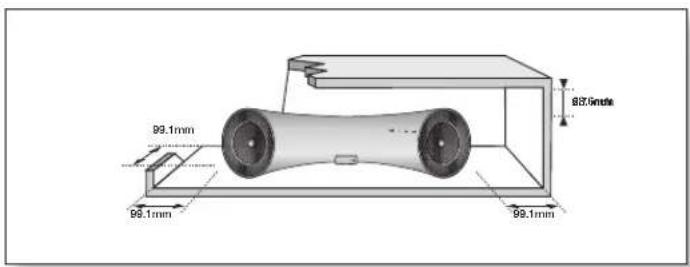
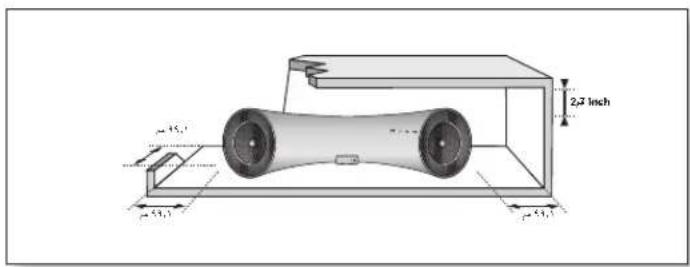
Ensure that the AC power supply in your house complies with the power requirements listed on the identification sticker located on the back of your product. Install your product horizontally, on a suitable base (furniture), with enough space around it for ventilation (70-100 mm). Make sure the ventilation slots are not covered. Do not place the unit on amplifiers or other equipment which may become hot. This unit is designed for continuous use. To fully turn off the unit, disconnect the AC plug from the wall outlet. Unplug the unit if you intend to leave it unused for a long period of time.
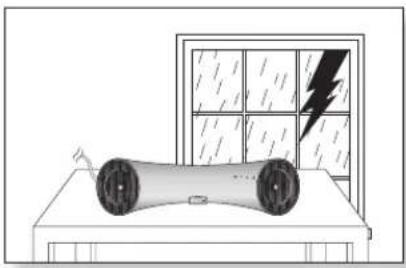
During thunderstorms, disconnect the AC plug from the wall outlet. Voltage peaks due to lightning could damage the unit.
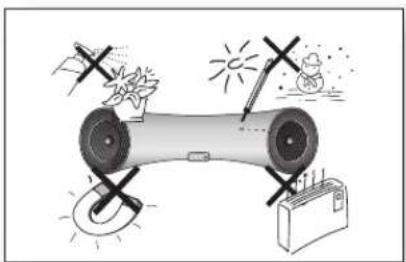
Protect the product from moisture (i.e. vases), and excess heat (e.g. fireplaces) or equipment creating strong magnetic or electric fields Disconnect the power cable from the AC supply if the unit malfunctions. Your product is not intended for industrial use. This product is for personal use only.
Condensation may occur if your product has been stored in cold temperatures. If transporting the unit during the winter, wait approximately 2 hours until the unit has reached room temperature before using.
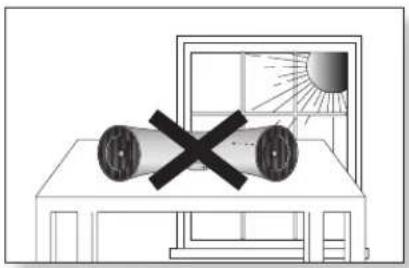
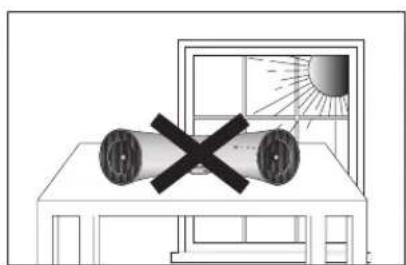
Do not expose the unit to direct sunlight or other heat sources. This could cause the unit to overheat and malfunction.
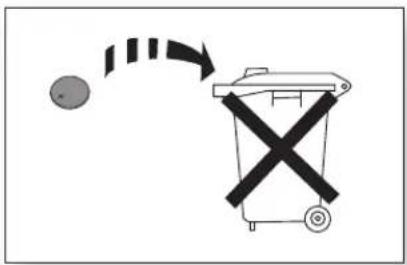
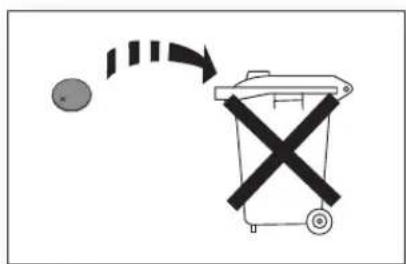
The batteries used with this product contain chemicals that are harmful to the environment.
Do not dispose of batteries in the general household trash.
feAtureS
2 Features
SAfety informAtion
3 Safety warnings
Getting StArteD
4 Precautions
6 Before reading the user's manual
6 What's included
7 Front/Rear Panel
DeScriptionS
9 Tour of the remote control
remote control
10 Turning the Power on/off
10 Adjusting the volume
power on AnD volume control
connectionS

plAynG

functionS

troubleShooting

AppendDiX

11 Using Rubber
12 Connecting a device to the Galaxy Dock
13 Connecting an audio device using AUX IN
15 Connecting to Bluetooth devices
16 Using the docking mode with Samsung Galaxy Devices
17 Using the Bluetooth mode
18 Advanced functions
19 Troubleshooting
20 Specifications
getting started
BEFORE READING THE USER'S MANUAL
Note the following terms before reading the user manual.
Icons used in this manual
| Icon Term Definition | |
| Caution Indicates a situation where a function does not operate or settings may be canceled. | |
| Note Indicates tips or instructions on the page that help a function operate. | |
Safety Instructions and Troubleshooting
1) Familiarise yourself with the Safety Instructions before using this product. (See page 3)
2) If a problem occurs, check Troubleshooting. (See page 19)
Copyright
©2012 Samsung Electronics Co., Ltd.
All rights reserved; no part or whole of this user's manual may be reproduced or copied without the prior written permission of Samsung Electronics Co., Ltd.
WHAT'S INCLUDED
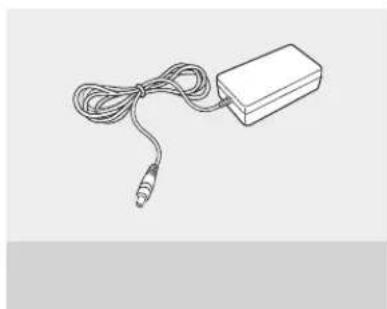
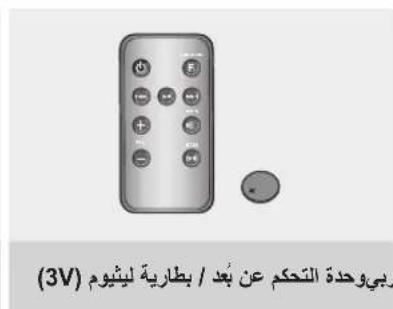
Check for the supplied accessories shown below.
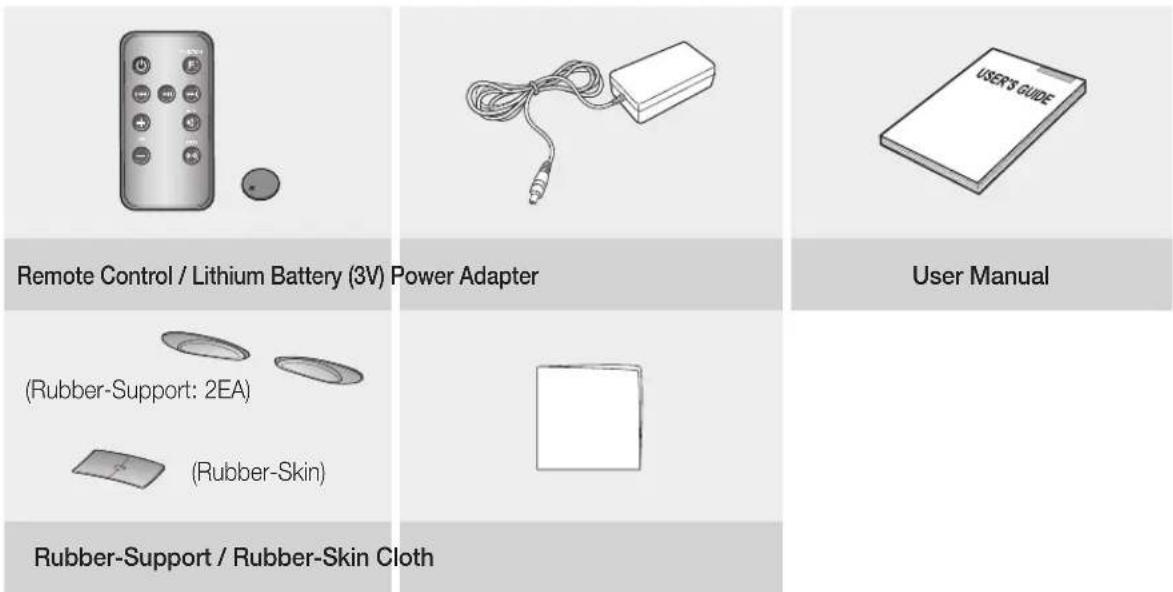

The appearance of the accessories may differ slightly from the illustrations above.
descriptions
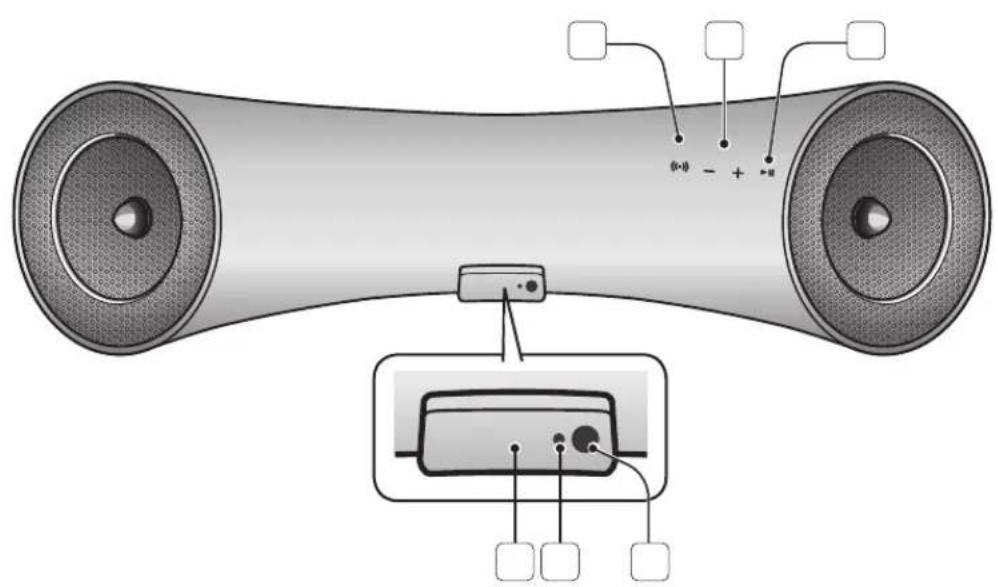
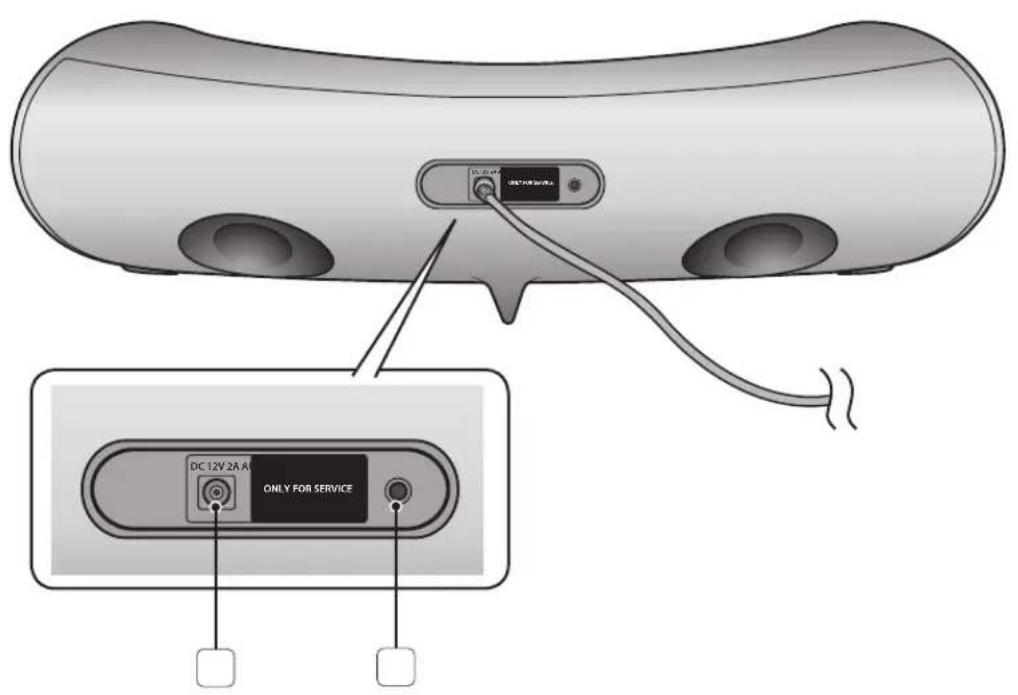
frOnt/rear Panel
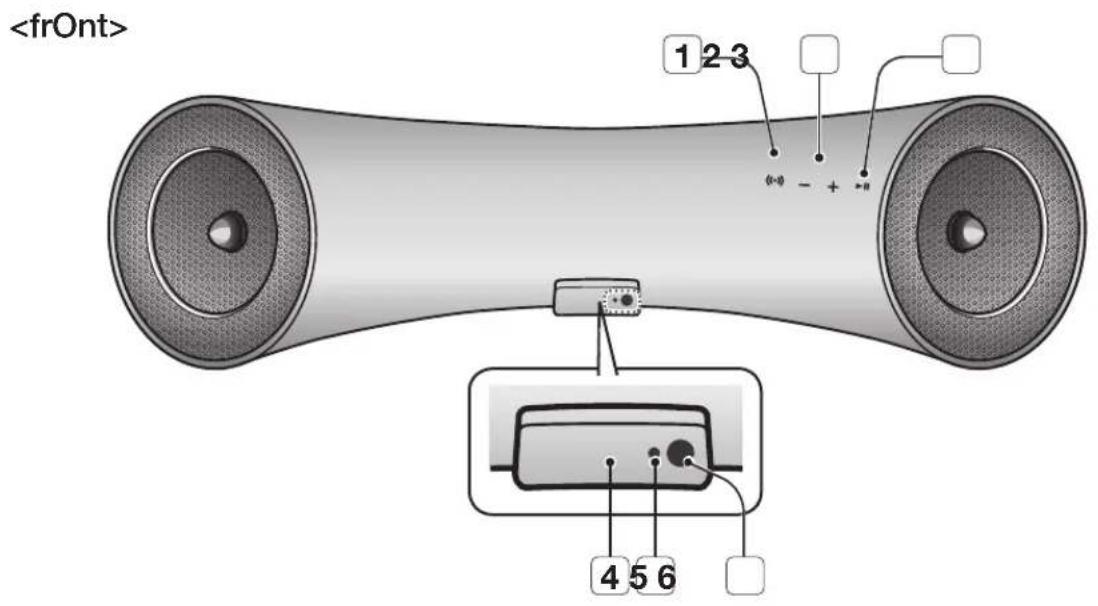
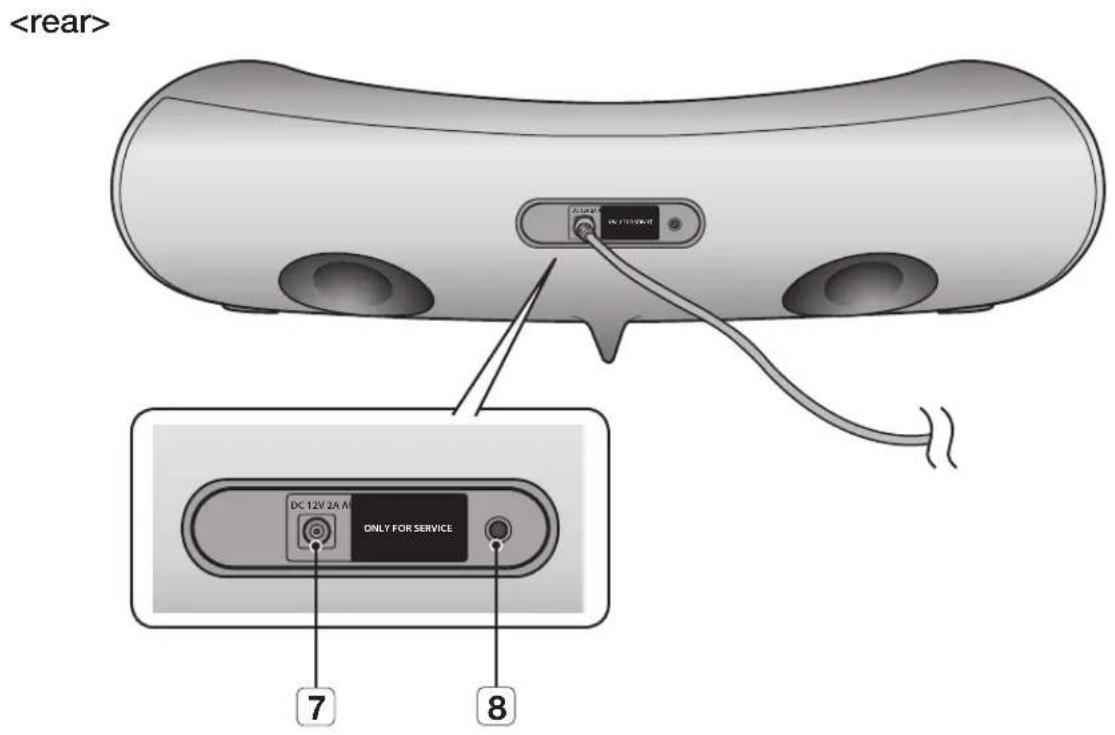
| 1 | BaSS | Optimise the sound based on your tastes. |
| 2 | VOLUME -/+ | Controls the volume level. |
| 3 | PLay/PaUSE | Play or pause a music file. |
| 4 | gaLaXy DOCK | Provides a 5-pin dock for Samsung Galaxy devices. |
| 5 | StanDBy LeD | The standby LED lights up in standby mode. The standby LED turns off when the power of the unit turned on. |
| 6 | reMOte COntrOL SenSOr | The remote control sensor which receives signals from the remote control. |
| 7 | DC 12V | Connect the unit's DC adapter to this jack. |
| 8 | aUX in | Connect to the Analog output of an external device. |

- When you turn on this unit, there will be a 4 to 5 second delay before it produces sound.

- This unit can connect to mobile devices with high audio output levels. When you connect this unit to external devices with high output levels, it may lower the audio output to protect the amp and speakers.
- When disconnecting the power cable from the wall outlet, hold the plug. Do not pull the cable.
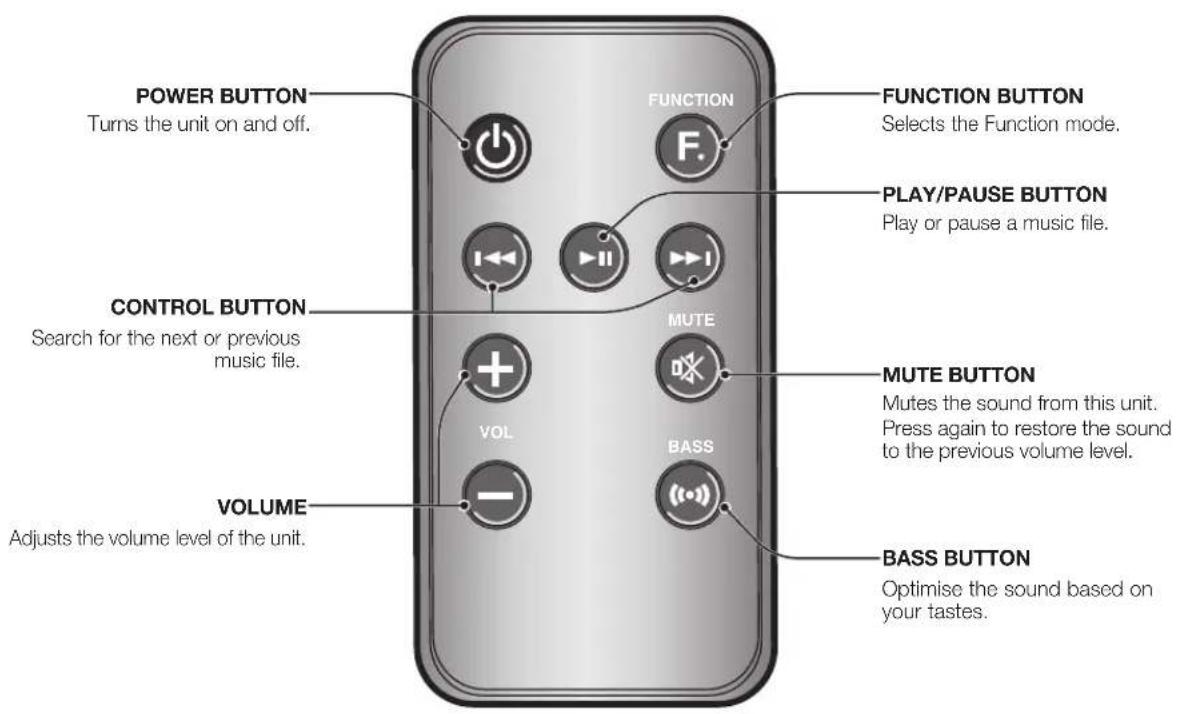
Installing battery in the Remote Control

1. Open the cover of the remote control by putting your fingernail into the gap between the cover and body of the remote control. Then, lift the cover and separate it completely.
2. Install a 3V Lithium battery. Insert the battery into the battery compartment with the + side facing up.
3. Fit the remote control's cover to the remote control. Next, lower the cover so that it is flush with the body of the remote, and then press the cover into the body by pushing the edges down with your hand.

- Be careful not to catch your fingernail in the gap when you lift the cover. You can damage your fingernail.
Operation Range of the Remote Control
You can use the remote control up to 7 meters (23 feet) in a straight line from the unit. You can also operate the remote at a horizontal angle of up to 30^ from the remote control sensor.
power on and volume control
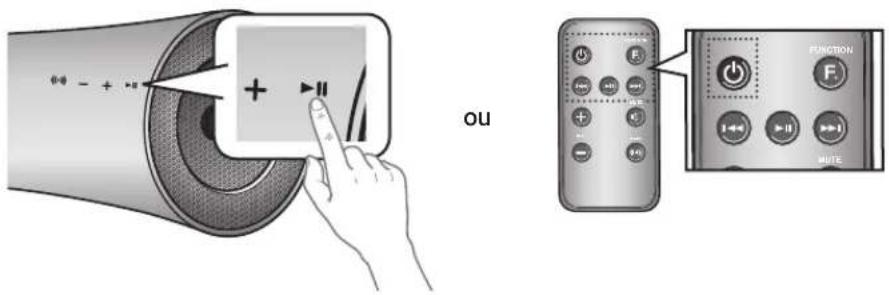
- To turn on this unit, touch any button on the unit's front panel when the unit is in Standby mode.
or,
Press power on the remote control. - To turn off this unit, touch the button on the unit's front panel for more than 3 seconds.
or,
Press power on the remote control again.

The standby LED is on when AC Plug is connected to the wall outlet and the Power of the unit is off. The standby LED is off when the power of the unit is on.
The power of the unit automatically turns off if there is no input for 20 minutes.
ADJUSTING THE VOLUME
Use ^+ - buttons to adjust the volume. As you adjust the volume, the Input mode LED blinks. The LED remains on in case you increase the volume when it has already been set to maximum, or decrease the volume when it has already been set to minimum.
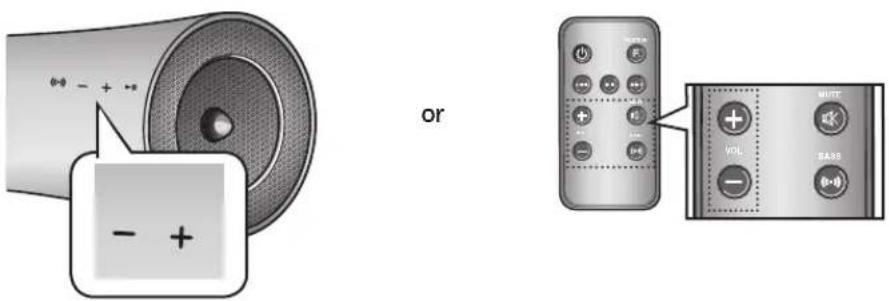
Touch the + / - button on the right side of the front panel. or, Press vol + / - on the remote control.

The volume level increases or decreases when you press VOL + / -
- You can also use the volume control of device connected using the Galaxy Dock or Bluetooth to control the volume. However, your ability to control the volume using the volume controls of devices connected using Bluetooth may be limited.
connections
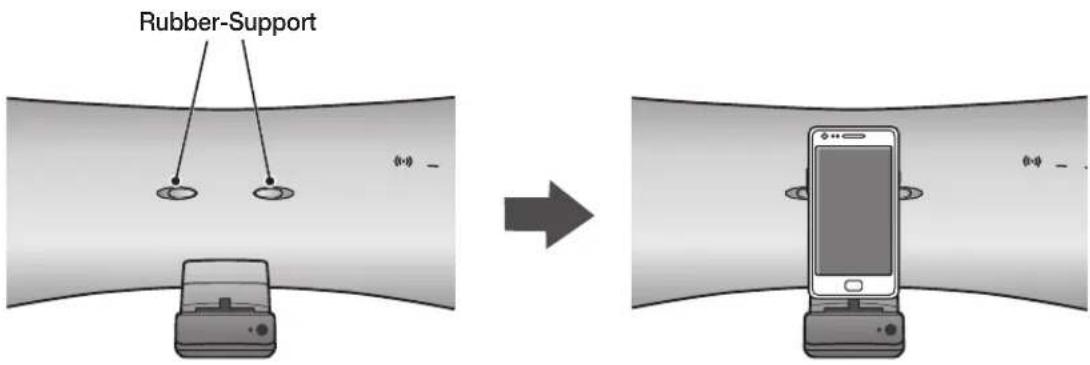
USING RUBBER
Attach the Rubber to avoid direct contact with this set when you hold Samsung Galaxy Device.
rubber-Support
- Attach the Rubber to the proper place considering the size of the device which you want to use.
- After attaching the Rubber-Support, dock your device on the Galaxy dock.
rubber-SKin
- Cover the Rubber-Skin on the Galaxy dock.
- After covering the Rubber-Skin on the Galaxy dock, dock your device on the Galaxy dock.
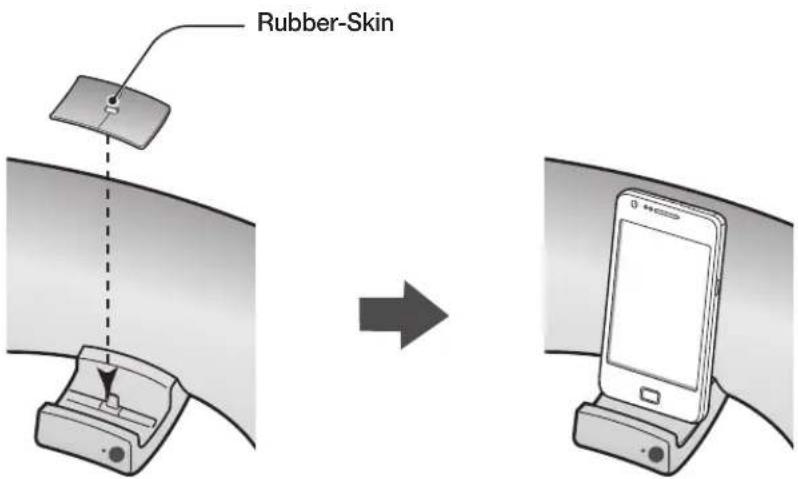

- Use the product after removing the Rubber-Skin attached to the product if you have the protection case for your device.
- You can use this product only when the thickness of the protection case is under 1.5mm when you attach the Spacer cover to your device. It is impossible to use this product when the thickness of the protection case is over 1.5mm or has special shape with round.
How to connect a device to the Galaxy Dock.
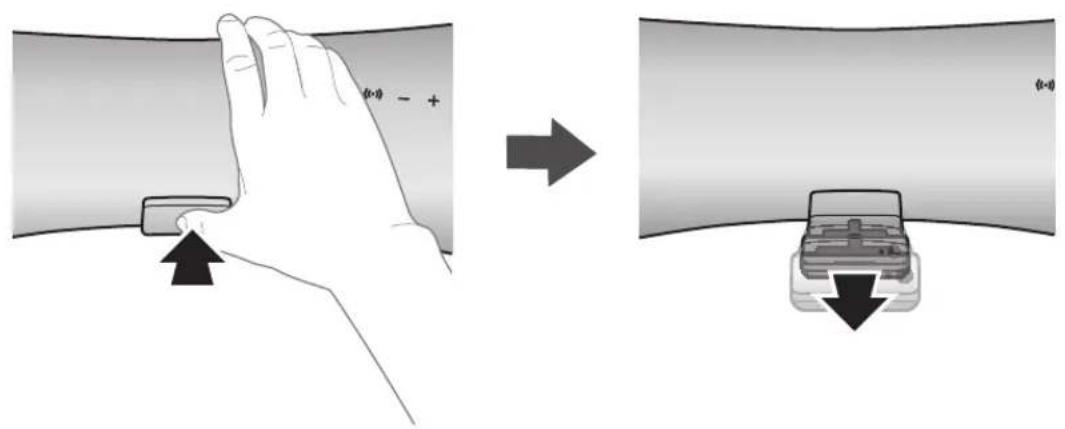
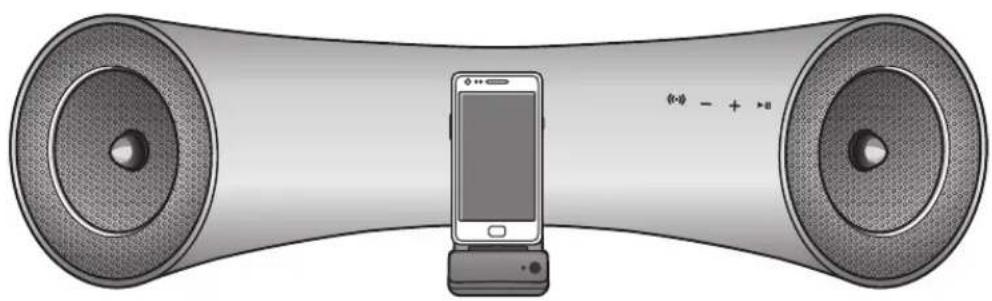
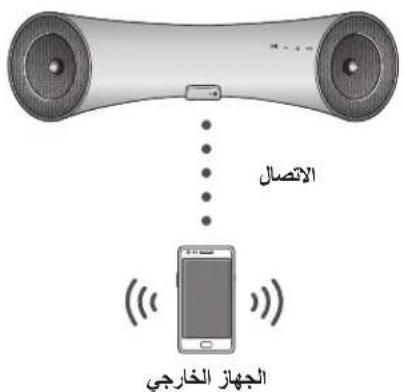
- The GALAXy DocK is located on the front of the product. To open, push it in gently.
- Connect your Samsung Galaxy device to the Galaxy Dock Connector.

- Turn on your Samsung Galaxy device before you docking it to the Galaxy Dock.
- Connect your Samsung Galaxy device to the Galaxy Dock before starting Docking mode. (See page 16)
CONNECTING AN AUDIO DEVICE USING AUX IN
This section explains how to connect the unit to an audio device.
This unit requires one analog audio jack for connecting to an audio device.
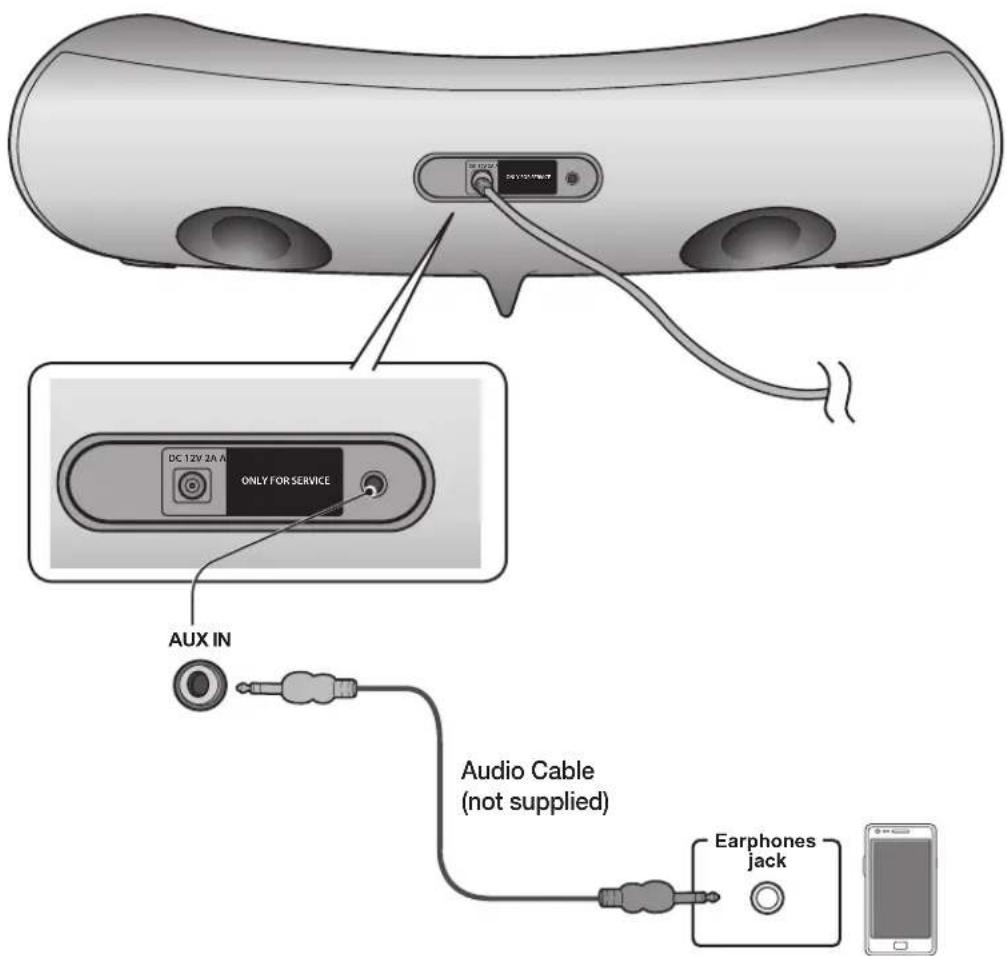
External Device
AUX IN
Connect AUX IN (Audio) on the back of the unit to the earphone jack of the external device or audio device.
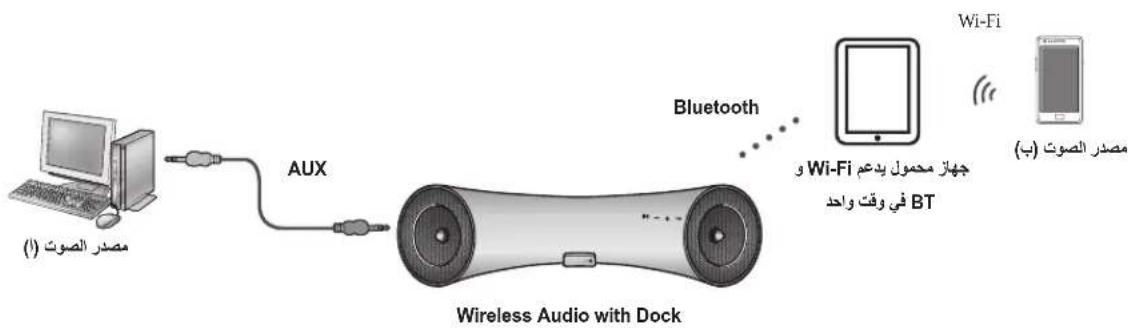
If connected to an external device via AUX input while your Samsung Galaxy device is docked or connected to a Bluetooth device at the same time, the input source switches between the AUX and Samsung Galaxy or Bluetooth device by tapping the PAUSE button on the Samsung Galaxy / Bluetooth device. Tap it again to switch to the other input source.

- Use the Function key on the remote control to switch between connected devices, if there are multiple devices connected to the Docking station.
Before moving or installing this product, be sure to turn off the power and disconnect the power cord.
You can connect the Wireless Audio with Dock to Bluetooth devices and enjoy music with high quality stereo sound, all without wires!
what is bluetooth?
Bluetooth technology lets Bluetooth-compliant devices interconnect easily with each other using a short wireless connection.
- A Bluetooth device may cause noise or malfunction, depending on usage, when:
- A part of your body is in contact with the receiving/transmitting system of the Bluetooth device on the Wireless Audio with Dock.
- It is subject to electrical variation from obstructions caused by a wall, corner, or by office partitioning.
- It is exposed to electrical interference from same frequency-band devices including medical equipment, microwave ovens, and wireless LANs.
- Keep the Wireless Audio with Dock and the Bluetooth device close together when pairing.
- The further the distance between the Wireless Audio with Dock and Bluetooth device, the worse the quality. If the distance exceeds the Bluetooth operational range, the connection is lost.
- In poor reception-sensitivity areas, the Bluetooth connection may not work properly.
- The Bluetooth connection only works when the Bluetooth device is close to the set. The connection is automatically cut off if the Bluetooth device moves out of range. Even within range, the sound quality may be degraded by obstacles such as walls or doors.
- This wireless device may cause electric interference during its operation.

- You may be required to enter a PIN code (password) when connecting the Bluetooth device to the Wireless Audio with Docks. If the PIN code input window appears, enter <0000> .
The Wireless Audio with Dock supports SBC data (44.1kHz, 48kHz).
The AVRCP feature is not supported. - Connect only to a Bluetooth device that supports the A2DP (AV) function.
- You cannot connect to a Bluetooth device that supports only the HF (Hands Free) function.
Only one Bluetooth device can be paired at a time. -
Once you have turned off the Wireless Audio with Dock and the pairing is disconnected, the pairing will not be restored automatically. To reconnect, you must pair the devices again.
The Wireless Audio with Dock may not search or connect properly in the following cases: -
If there is a strong electrical field around the Wireless Audio with Dock.
- If several Bluetooth devices are simultaneously paired to the Wireless Audio with Dock.
- If the Bluetooth device is turned off, not in place, or malfunctions
- Note that such devices as microwave ovens, wireless LAN adaptors, fluorescent lights, and gas stoves use the same frequency range as the Bluetooth device, which can cause electric interference.
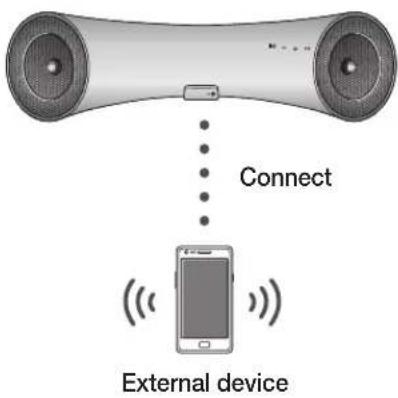
This section explains how to connect the Wireless Audio with Dock to Bluetooth compatible devices.
To connect the Wireless Audio with Dock to a Bluetooth device
Before you begin, confirm that your Bluetooth device supports the Bluetooth compliant stereo headset function.
-
Select the Bluetooth menu on your Bluetooth device. (Refer to the Bluetooth device's user manual for instructions.)
-
Scan or search for All Devices or for Headsets.
-
You will see a list of devices.
-
Select "[Samsung]W_AudioXXXXXX" from the searched list.
-
If the Bluetooth device fails to pair with the Wireless Audio with Dock, delete the "[Samsung]W_AudioXXXX" found by the Bluetooth device, and search for the Wireless Audio with Dock again, and then repeat Steps 1, 2, and 3.
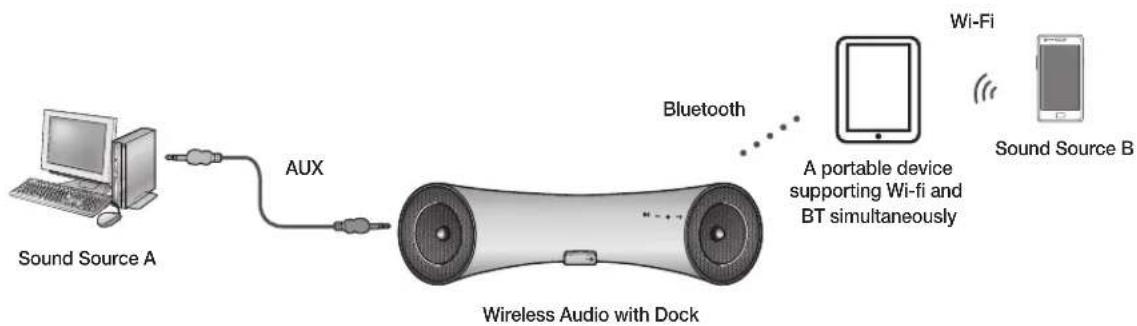

- When the AUX and Bluetooth operate at the same time as shown above, the sound may come from both simultaneously.
USing tHe DOCKing MODEwH SaMSUng gaLaXy DeViCeS
Connect the Samsung Galaxy device to the Galaxy Dock. (See page 12)
To use your Samsung Galaxy series device with the Galaxy Dock, you must download and install the Docking Mode application from the Android Market on the device. To download, follow these steps:
- Tap the Play Store (Android Market) icon on the Samsung Galaxy device's main screen
- Tap the search icon on the screen to access the search bar.
- In the search bar, type in the [Samsung Wireless Audio with Dock], and then search.
- In the search result list, find, and then tap [Samsung Wireless Audio with Dock] to start downloading.
- Tap [install].
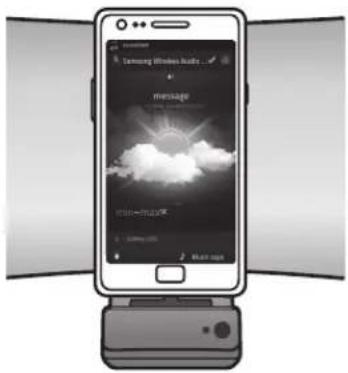
To play music, follow these steps:
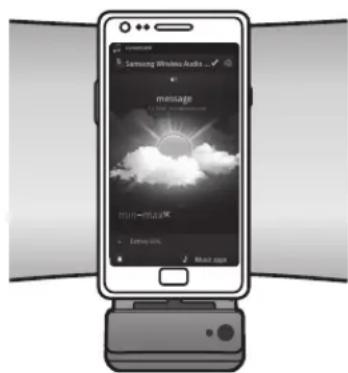
1-1. If you start the app when the Wireless Audio with Dock is the only device for the Bluetooth connection, selecting PLAY in your device automatically establishes the Bluetooth connection to the Wireless Audio with Dock and the unit plays music.
1-2. If there are multiple devices for Bluetooth connection including the Wireless Audio with Dock,
1) When you start the app, the list of the devices which you can connect to the Wireless Audio with Dock will appear.
2) Play music after connecting to the Wireless Audio With Dock by selecting it on the list of devices.
-
If there exists a Bluetooth device paired to the Wireless Audio with Dock before, it will not appear in the list and be connected automatically.
-
If you replace the Wireless Audio with Dock which you have paired to your mobile device, you should delete the remaining settings saved in your device before pairing to the new one.
-
[Clear data].

- Once you started the application, running is not disturbed by charging your mobile device with an ordinary charger.
- When you connect other device to the Wireless Audio with Dock after connecting Samsung Galaxy device in docking mode, you may have to turn off the Bluetooth mode of the Samsung Galaxy device.
If you have trouble with connecting the Samsung Galaxy device to the Galaxy Dock, turn off the device's Bluetooth mode.
USing tHe BLUetOOtH MODE
Connect the Bluetooth device to the Wireless Audio with Dock. (See page 15)
To connect your Bluetooth device when the Wireless Audio with Dock is in Bluetooth mode, search for the Wireless Audio with Dock on the device's Bluetooth list. Select the Wireless Audio with Dock, and then connect. Once the Wireless Audio with Dock has connected, select and play the desired music.
The music will play through the Wireless Audio with Dock's speakers.

- If you want to change the device which is connected through Bluetooth mode to other device, disconnect the existing device and try to connect to the other device which you want to use.
-
While in Bluetooth communication, Play/Pause/Next/Back operations may not be available depending on used mobile device and application.
-
Operating Bluetooth device paired to wireless Audio with Dock may cause stuttering if operated while the Wireless Audio with Dock is playing back from AUX input.
To disconnect the Bluetooth device from the Wireless Audio with Dock
You can cancel Bluetooth pairing from the Wireless Audio with Dock. For instructions, see the Bluetooth device's user manual.
- The Wireless Audio with Dock will be disconnected.

- The Bluetooth connection only works when the Bluetooth device is close to the set. The connection is automatically cut off if the Bluetooth device moves out of range. Even within range, the sound quality may be degraded by obstacles such as walls or doors.
- If the Bluetooth device comes back into the effective range, you can restart to restore the pairing with the Bluetooth device.
functions
aDVanCeD fUnCtiOnS
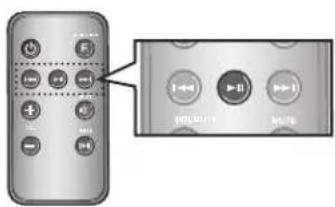
Play/Pause
During playback, press the button.
- Press the button to stop playing the file temporarily. Press the button again to play the selected file.

This function does not operate in Aux mode.
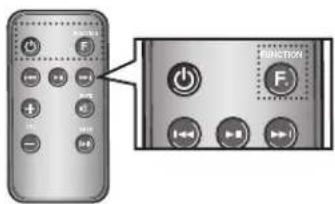
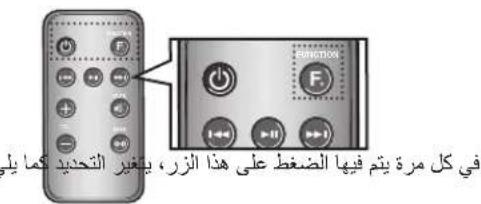
Using function
Change the mode to switch to Docking and AUX sources.
Press FUNCTION on the remote control of this unit.
Each time the button is pressed, the selection changes as follows: Galaxy (Bluetooth) AUX mode

- Check the function you want to use by pressing the Function button on the remote control when multiple devices are connected to the product simultaneously.
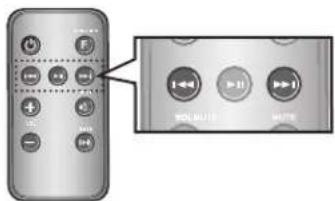
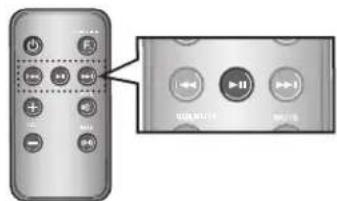
Skip Forward/Back
During playback, press the button.
- When there is more than one file and you press the button, the next file is selected.
- When there is more than one file and you press the button, the previous file is selected.

This function does not operate in Aux mode.
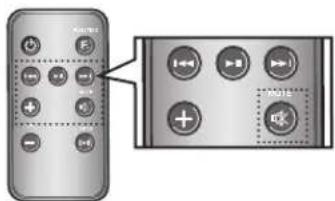
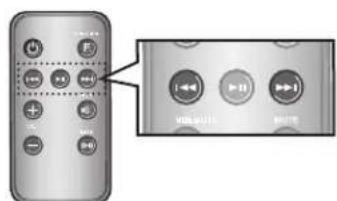
Muting the sound
This is useful when answering a doorbell or telephone call.
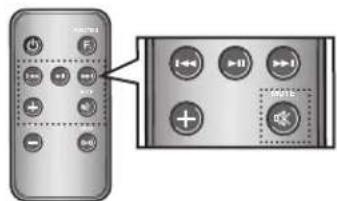
- To mute sound of this unit, press the MUTE (×) button of the remote control.
- Press MUTE ( ) on the remote control again (or press VOLUME +/-) to restore the sound.

Using the BASS function
Lets you optimise the bass sound according to your tastes.
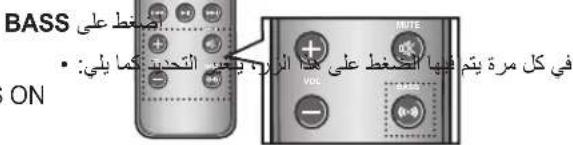
Press BASS on the remote control of this unit.
Each time the button is pressed, the selection changes as follows: BASS ON OFF
troubleshooting
Before requesting service, please check the following.
| Symptom Check Remedy | ||
| The unit will not turn on. | ·Is the power cord plugged into the outlet? | ·Connect the power plug to the outlet. |
| A function does not work when the button is pressed. | ·Has the Wireless Audio with Dock or the remote been exposed to static electricity? | ·Disconnect the power plug and connect it again. |
| Sound is not produced. | ·Is the unit properly connected to device? ·Is the Mute function on? ·Is the volume set to minimum? | ·Connect it correctly. ·Press the Mute button to cancel the function. ·Adjust the volume. |
| The remote control does not work. | ·Are the batteries drained? ·Is the distance between remote control and main unit too far? | ·Replace with new batteries. ·Operate closer to the main unit. |
SPECIFICATIONS
| Model name | DA-E560 | |
| GENERAL | Weight 1.6 kg | |
| Dimensions (W x D x H) 462.7 x 151.8 x 122.3 mm | ||
| Operating temperature range +5°C~+35°C | ||
| Operating humidity range 10 % to 75 % | ||
| AMPLIFIER | Rated output power | 5W/CH, 4OHM, THD = 10%, 1kHz |
| Input sensitivity/Impedance | 800mV/20Kohm | |
| S/N ratio (analog input) | 65 dB | |
| Separation(1kHz) 60 dB | ||
| FREQUENCY RESPONSE | Analog input | 20Hz~22kHz(±3 dB) |
| DOCKING RATING | Galaxy | 5 V 1.0 A |
- S/N ratio, distortion, separation, and usable sensitivity are based on measurement using AES (Audio Engineering Society) guidelines.
- Nominal specification
Samsung Electronics Co., Ltd reserves the right to change the specifications without notice. - Weight and dimensions are approximate.
- For the power supply and Power Consumption, refer to the label attached to the product.
Contact SAMSUNG WORLD WIDE
If you have any questions or comments relating to Samsung products, please contact the SAMSUNG customer care center.
| Area Contact Centre | # | Web Site |
| ■ Asia Pacific | ||
| AUSTRALIA 1300 362 603 www.samsung.com | ||
| NEW ZEALAND 0800 SAMSUNG (0800 726 786) www.samsung.com | ||
| CHINA 400-810-5858 www.samsung.com | ||
| HONG KONG (852) 3698 4698 | www.samsung.com/hk www.samsung.com/hk_en/ | |
| INDIA | 1800 1100 11 3030 8282 1800 3000 8282 1800 266 8282 | www.samsung.com |
| INDONESIA | 0800-112-8888 021-5699-7777 | www.samsung.com |
| MALAYSIA 1800-88-9999 www.samsung.com | ||
| PHILIPPINES | 1-800-10-SAMSUNG(726-7864) for PLDT 1-800-3-SAMSUNG(726-7864) for Digitel 1-800-8-SAMSUNG(726-7864) for Globe 02-5805777 | www.samsung.com |
| SINGAPORE 1800-SAMSUNG(726-7864) | www.samsung.com | |
| THAILAND | 1800-29-3232 02-689-3232 | www.samsung.com |
| TAIWAN | 0800-329-999 0266-026-066 | www.samsung.com |
| VIETNAM 1 800 588 889 www.samsung.com | ||
| ■ Middle East | ||
| U.A.E | 800-SAMSUNG (726-7864) | www.samsung.com |
| OMAN 800-SAMSUNG(726-7864) | www.samsung.com | |
| KUWAIT | 183-2255 | www.samsung.com |
| BAHRAIN 8000-4726 | www.samsung.com | |
| Egypt | 08000-726786 | www.samsung.com |
| JORDAN | 800-22273 | www.samsung.com |
| IRAN | 021-8255 | www.samsung.com |
| Morocco | 080 100 2255 www.samsung.com | |
| Saudi Arabia | 9200-21230 | www.samsung.com |
| ■ Africa | ||
| NIGERIA | 0800-726-7864 | www.samsung.com |
| Ghana | 0800-10077 0302-20077 | www.samsung.com |
| Cote D' Ivoire | 8000 0077 | www.samsung.com |
| Senegal | 800-00-0077 | www.samsung.com |
| Cameroon | 7095-0077 | www.samsung.com |
| KENYA | 0800 724 000 www.samsung.com | |
| UGANDA | 0800 300 300 www.samsung.com | |
| TANZANIA | 0685 88 99 00 www.samsung.com | |
| SOUTH AFRICA 0860-SAMSUNG(726-7864) | www.samsung.com | |
Wireless Audio with Dock
puiiie 1
S OQY = S QZY + S_ QXO
1
Samsung 1
www.samsung.com/register
Galaxy Docking Audio
Samsung Galaxy jss oolj pailll oolj ab
aptX®
a aaa a a a a a a a a a a a a a a





yj 1
aaii aai iaiyai aiiaai 1000000000000000000000000000000000000000000000000000
aai jai aai jai jai jai jai jai jai jai
J 1
4.1.1
jglal jg jg jg jg jg jg jg jg jg jg jg jg jg jg jg jg
y
Aa aaa aaa aaa aaa aaa aaa aaa aaa aaa aaa aaa aaa aaa aaa aaa aaa aaa aaa aaa aaa aaa aaa aaa aaa aaa aaa aaa aaa aaa aaa aaa aaa aaa aaa aaa aaa aaa aaa aaa aaa aaa aaa aaa aaa aaa aaa aaa aaa aaa aaa a aa
a 1

a 1
a a a a a a a a a a a a a a a a a




. Wireless Audio with Dock , Bluetooth Jg Jg Jg Jg Jg Jg Jg Jg -
BluethoW Wireless Audio with Dock
Wireless Audio with Bluetooth Bluetooth (RJRAK) PIN jra Jn Jn Jn Jn Jn
.0000> jz.PIN jzjzjzjzjzDock
(48, 44.1) SBC Wireless Audio with Dock
(A)AVRCP
()A2DPaB
HFF
aal aall aal baaal aal jai jai jai
Wineless Audio with Dock
a
Wireless Audio with Dock
.Wireless Audio with Dock
. Wireless Audio with Dock 100000000000000000000000000000000000000000000000000000000
J 1
a 1
y
. Bluetooth 3g Wireless Audio with Dock
Bluetooth Wireless Audio with Dock
y j 1
yj 1
()
1
.3j8y4a158
Samsung]W_AudioXXXXX"
" [Samsung]W_Audio XXXXX" ,Wireless Audio with Dock 已 _ 1 ^ 已 Bluetooth
SAMSUNG GALAXY 8
(14) Galaxy e al Samsung Galaxy
Jy,Android Market 2018.
i
Samsung jgejagaiy (Android Market) jg jn jno jge
.Galaxy
aaii aiee
[Samsung Wireless Audio with Dock]
[Samsung Wireless Audio with Dock]
jul
(1) [Install]
ailll lll
J WwWwwWwwWwwWwwWwwWwwWwwWwwWwwWwwWwwWwwWwwWwwWwwWwwWwwWwwWwwWwwWwwWwwWwwWwwWwwWwwWwwWwwWwwWwwWwwWwwWwwWwwWwwWwwWwwWwwWwwWwwWwwWwwWwwWwwWwwWwwWwwWwwWwwWwwWwww
with Dock
, Wireless Audio with Dock Leia Bluetooth - alia s s jgi dus cts by 1-
Wineless Audio with Dock Lioic Wireless Audio with Dork
5.6.2.1.4.3.4.5.6.6.7.8.9.10.11.12.13.14.15.16.17.18.19.20.21.22.23.24.25.26.27.28.29.30.31.32.33.34.35.36.37.38.39.40.41.42.43.44.45.46.47.48.49.50.51.52.53.54.55.56.57.58.59.60.61.62.63.64.65.66.67.68.69.70.71.72.73.74.75.76.77.78.79.80.81.82.83.84.85.86.87.88.89.90.91.92.93.94.95.96.97.98.99.100
Juslll llll l l 1111111111111111111111111111111111
Wireless Audio with Dock
[(Ccleardata]
Jie 1
Samsung Galaxy Wireless Audio with Dock
Samsung Galaxy jblbl Bluetooth 1
Bluetooth Galaxy Samsung Galaxy

(10 aill) . Wireless Audio with Dock Bluetooth
Wireless Audio with Dock - Bluetooth Wireless Audio with DockBluetooth
Wireless Audio with Dock Wireless Audio with Dock .Bluetooth
aal
. Wireless Audio with Dock
j j j j j j j j j j j j j j j j j j j j j j j j j j j j j j j j j j j j j j j j j j
alilil 2ji
(1/11)Play/Pause/Next/Back 1234567890123456789012345678901234567890123456789012345678901234567890123456789012345678901234567890123456789
piinail gail
Wineless Audio with Dock jjbln Bluetooth
AUX Wireless Audio with Dock
Wireless Audio with Dock - Bluetooth
Jepn Jpnnn nn nnnnnnnnnnnnnnnnnnnnnnnnnnnnnnnnnnnnnnnnnnnnnnnnnnnnnnnnnnnnnnnnnnnnnnnnnnnnnnnnnnnnnnnnnnnnnnnnnnnnnnnnnnnnnnnnnnnnnnnnnnnnnnnnnnnnnnnnnnnn
Bluetooth
. Wireless Audio with Dock Jauu Jauu Jauu
Jus Jus Jus Jus Jus Jus Jus Jus Jus Jus Jus Jus Jus Jus Jus Jus Jus Jus Jus Jus
i 1
j 1 j 1 1 1 1 1 1 1 1 1 1 1 1 1
11 jilie biinjui
gaaallll 11 jllge bai
ailll jai jai jai jll bai
(1) Aux, a

AUX,
FJNCC
AUX Galaxy (Bluetooth)
Functionjle biaal jg jg aiai y j gill aiaa gl qai iie 0 jgi liy lue 12 jge gall (ilgl)

- jil jie baii iui ci
gall llll p 14 jil bcilll clll jil jil
.()Aux

y 1000
BASS
aas Ls aal
长xuàng bai
y
aal aal alal all aal alal alal alal alal alal
SAMSUNG
Samsung
| الإستعمال | الترجمة | الترجمة |
| ■ Asia Pacific | ||
| AUSTRALIA 1300 362 603 www.samsung.com | ||
| NEW ZEALAND 0800 SAMSUNG (0800 7) 26 786) www.samsung.com | ||
| CHINA 400-810-5858 www.samsung.com | ||
| HONG KONG (852) 3698 4698 | www.samsung.com/hk www.samsung.com/hk_en/ | |
| INDIA | 1800 1100 11 3030 8282 1800 3000 8282 1800 266 8282 | www.samsung.com |
| INDONESIA | 0800-112-8888 021-5699-7777 | www.samsung.com |
| MALAYSIA 1800-88-9999 www.samsung.com | ||
| PHILIPPINES | 1-800-10-SAMSUNG(726-7864) for PLDT 1-800-3-SAMSUNG(726-7864) for Digital 1-800-8-SAMSUNG(726-7864) for Globe 02-5805777 | www.samsung.com |
| SINGAPORE 1800-SAMSUNG(726-7864) | www.samsung.com | |
| THAILAND | 1800-29-3232 02-689-3232 | www.samsung.com |
| TAIWAN | 0800-329-999 0266-026-066 | www.samsung.com |
| VIETNAM 1 800 588 889 www.samsung.com | ||
| ■ Middle East | ||
| U.A.E 800-SAMSUNG (726-7864) | www.samsung.com | |
| OMAN 800-SAMSUNG(726-7864) www.samsung.com | ||
| KUWAIT | 183-2255 | www.samsung.com |
| BAHRAIN 8000-4726 | www.samsung.com | |
| Egypt 08000-726786 | www.samsung.com | |
| JORDAN | 800-22273 | www.samsung.com |
| IRAN | 021-8255 | www.samsung.com |
| Morocco | 080 100 2255 www.samsung.com | |
| Saudi Arabia | 9200-21230 | www.samsung.com |
| ■ Africa | ||
| NIGERIA | 0800-726-7864 | www.samsung.com |
| Ghana | 0800-10077 0302-20077 | www.samsung.com |
| Cote D' Ivoire | 8000 0077 | www.samsung.com |
| Senegal | 800-00-0077 | www.samsung.com |
| Cameroon | 7095- 0077 | www.samsung.com |
| KENYA | 0800 724 000 www.samsung.com | |
| UGANDA | 0800 300 300 www.samsung.com | |
| TANZANIA | 0685 88 99 00 www.samsung.com | |
| SOUTH AFRICA 0860-SAMSUNG(726-7864) | www.samsung.com | |
DA-E560
Wireless Audio with Dock guide d'utilisation
MISE SOUS/HORS TENSION