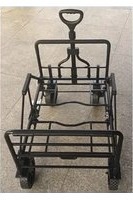
BDST3IN1CTFF - Folding cart BLACK & DECKER - Free user manual and instructions
Find the device manual for free BDST3IN1CTFF BLACK & DECKER in PDF.


| Product Type | 3-in-1 Folding Wagon |
| Brand | Black & Decker |
| Model | BDST3IN1CTFF |
| Main Functions | Wagon, platform wagon, hand truck (3 modes) |
| Load Capacity | Not specified in the manual, domestic use |
| Dimensions (approximate) | Approximately 90 cm (height) × 50 cm (width) × 80 cm (depth) unfolded |
| Weight | Approximately 10 kg |
| Main Material | Steel frame, fabric basket |
| Power Supply | None (manual product) |
| Handle | Adjustable telescopic with locking button |
| Wheels | Four wheels, two front with locking |
| Included Accessories | Removable fabric basket with straps and buckles |
| Care and Cleaning | Clean with a damp cloth and mild soap; do not machine wash the basket |
| Safety | Do not modify the product, wear protective equipment if necessary, keep children away |
| Spare Parts and Repairability | Contact an authorized BLACK+DECKER service center; use identical replacement parts |
| Warranty | 1 year for domestic use (see manual for details) |
| Intended Use | Domestic use only, by consumers |
| General Information | Manual in French, 20 pages. Online registration recommended |
Frequently Asked Questions - BDST3IN1CTFF BLACK & DECKER
User questions about BDST3IN1CTFF BLACK & DECKER
0 question about this device. Answer the ones you know or ask your own.
Ask a new question about this device
Download the instructions for your Folding cart in PDF format for free! Find your manual BDST3IN1CTFF - BLACK & DECKER and take your electronic device back in hand. On this page are published all the documents necessary for the use of your device. BDST3IN1CTFF by BLACK & DECKER.
USER MANUAL BDST3IN1CTFF BLACK & DECKER
3 IN 1 COLLAPSIBLE CART
CHARIOT PLIABLE 3 EN 1
CARRO PLEGABLE 3 EN 1
BDST3IN1CTFF
English (original instructions) 7
Components
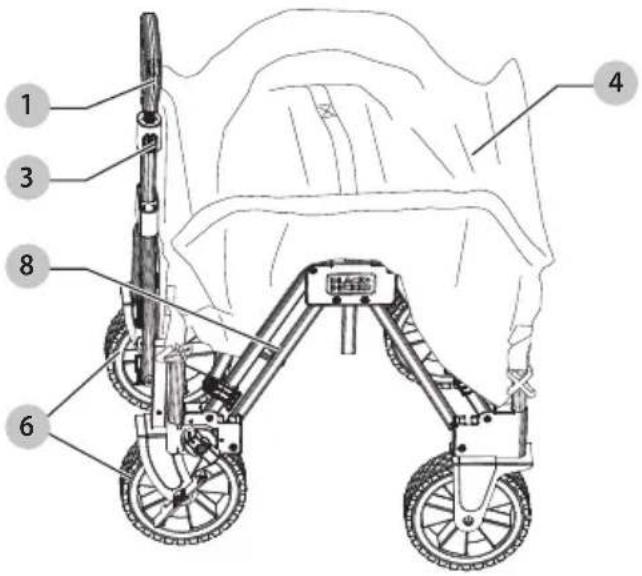
1 Handle
2 Handle clip
3 Handle button
4 Fabric basket
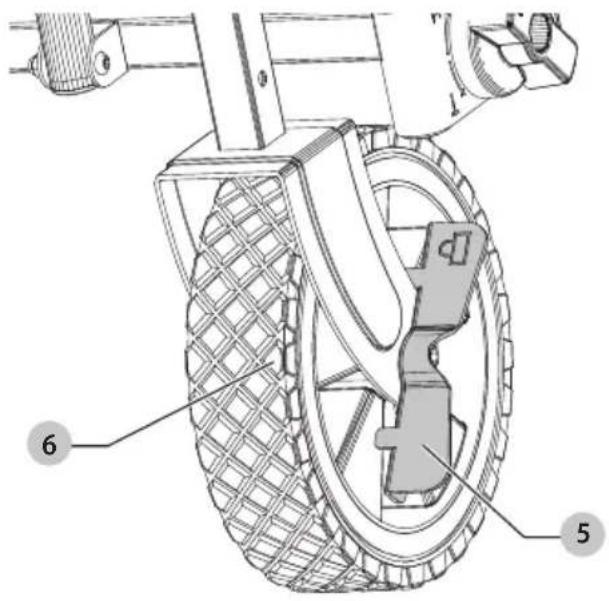
5 Wheel lock
Composants
natural_image
Line drawing of a four-wheeled cart with wheels and a handle (no text or symbols)Flat bed/Plateforme/Plataforma plana
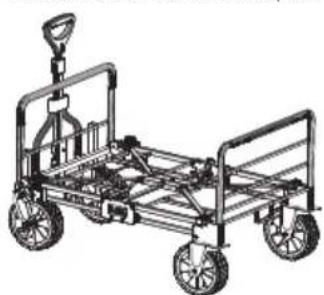
natural_image
Line drawing of a four-wheeled cart with wheels and a handle (no text or symbols)Hand truck/Diable/Carretilla
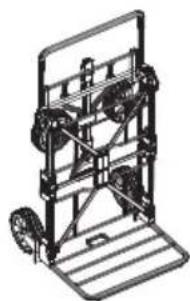
natural_image
Technical line drawing of a mechanical lifting frame with wheels and a platform (no text or symbols)Fig. B Fig. C
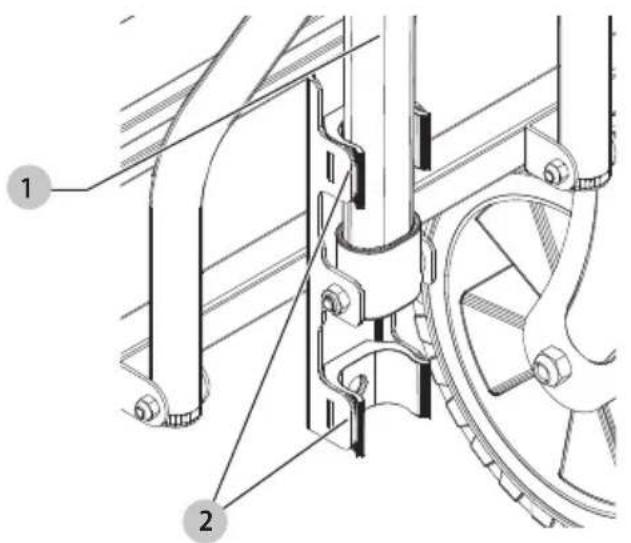
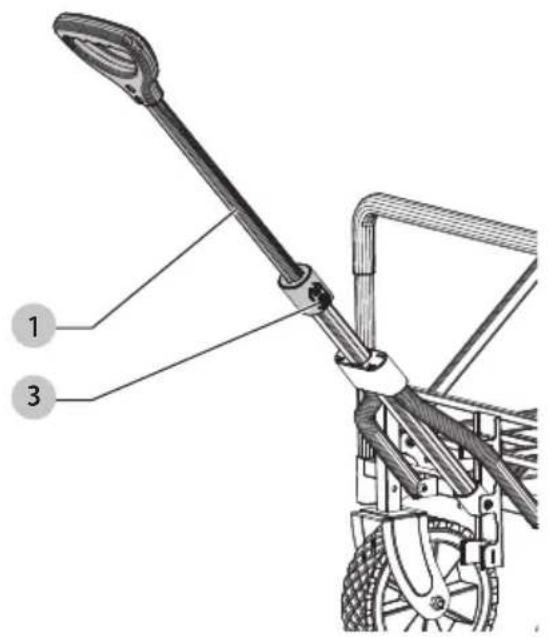
Fig. D Fig. E
natural_image
Technical line drawing of a mechanical device with two wheels and a control panel (no text or symbols)Fig. F Fig. G
natural_image
Line drawing of a four-wheeled cart with wheels and handle (no text or symbols)Fig. H Fig. I
10
4
17
22
7
Fig. J Fig. K
11
Fig. L Fig. M 8
22
12
4
17
13
Fig. N Fig. O
15
12
14
4
Fig. P Fig. Q
18
19
Fig. R Fig. S
2
1
1
22
2
22
natural_image
Technical line drawing of a wheeled cart with wheels and a handle (no text or symbols)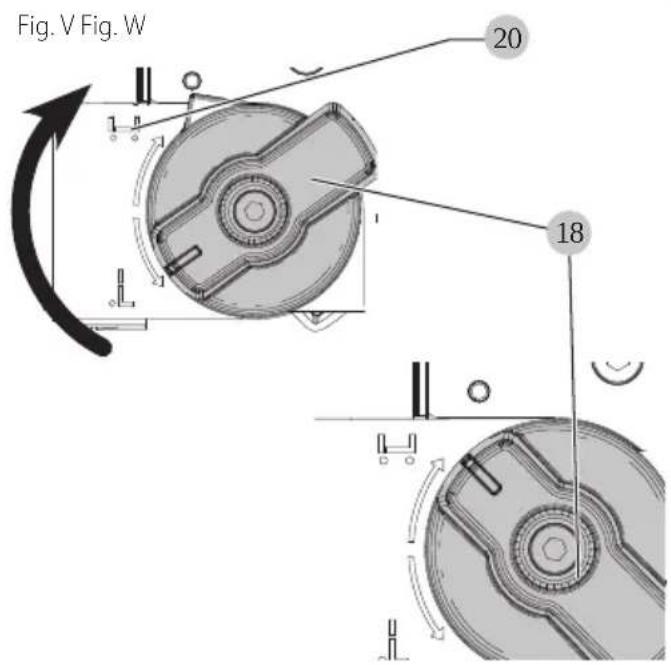
natural_image
Technical line drawing of a wheeled cart with labeled components (no text or symbols beyond label)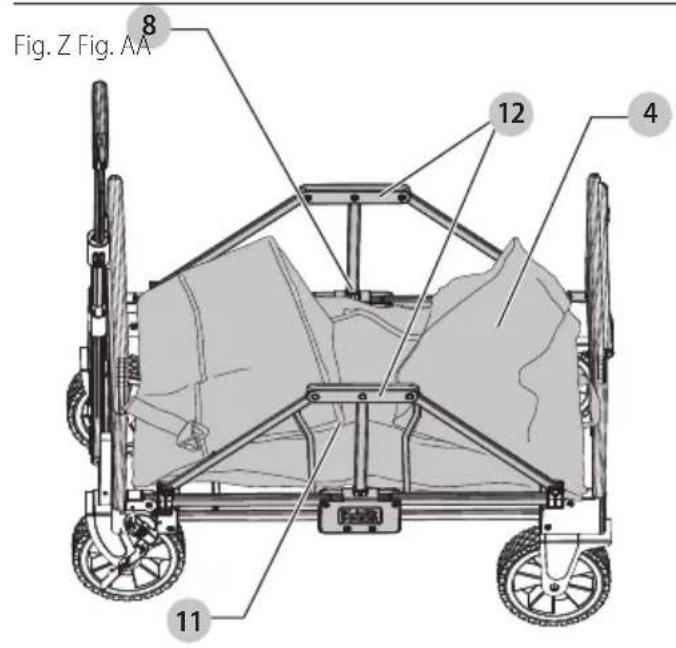
natural_image
Line drawing of a four-wheeled cart with a handle and wheels, labeled 'Fig. DD' (no other text or symbols)WARNING: Read all safety warnings and all instructions. Failure to follow the warnings and instructions may result in electric shock, fire and/or serious injury.

WARNING: To reduce the risk of injury, read the instruction manual.
Intended Use
Your BLACK+DECKER BDST3IN1CTFF has been designed for consumer use only.
DO nOT let children come into contact with the cart. Supervision is required when inexperienced operators use this cart.
Definitions: Safety Alert Symbols and Words
This instruction manual uses the following safety alert symbols and words to alert you to hazardous situations and your risk of personal injury or property damage.
DANGER: Indicates an imminently hazardous skeleton which, if not avoided, will result in death or serious injury.
WARNING: Indicates a potentially hazardous situation, if not avoided, could result in death or serious injury.
CAUTION: Indicates a potentially hazardous situation which, if not avoided, may result in minor or moderate injury.
(### without word) Indicates a safety related message.
NOTICE: Indicates a practice not related to personal injury which, if not avoided, may result in property damage.
General Safety Information
WARNING: Read instruction manual carefully and retain for future reference.
WARNING: To reduce the risk of serious personal injury, ensure clothing, long hair, fingers and other personal objects are clear of moving parts before making any adjustments or removing/installing attachments or accessories.
WARNING: Do not use as a children's ride on wagon.
a) This cart is not a childcare article and is not intended to be used to transport children. Failure to follow proper use instruction can result in personal injuries to you or others.
b) Use care when folding and converting the cart to reduce the risk of personal injury to fingers.
c) Maximum load for this cart is 150 lb (70 kg) evenly distributed. Do not overload the cart.
d) Do not use this cart on uneven ground. It can become unstable and tip.
e) Make sure the cart is locked into position (collapsed, wagon, flat bed, or hand truck configurations) before usage.
ASSEMBLY AND ADJUSTMENTS
Extending the Handle (Fig. A—C)
- Pull the handle 1 from the handle clip 2.
- Press the handle button 3 and pull on the handle 1 to extend.
- Press the handle button 3 and push in on the handle 1 to retract.
- Press the handle 1 into the handle clip 2 to store.
Locking the Wheels (Fig. D)
There are built in wheel locks 5 on the two front wheels 6. These can be used to keep the cart stationary when required.
- Twist the wheel lock 5 clockwise to engage the lock.
- Twist the wheel lock 5 counterclockwise to disengage the lock.
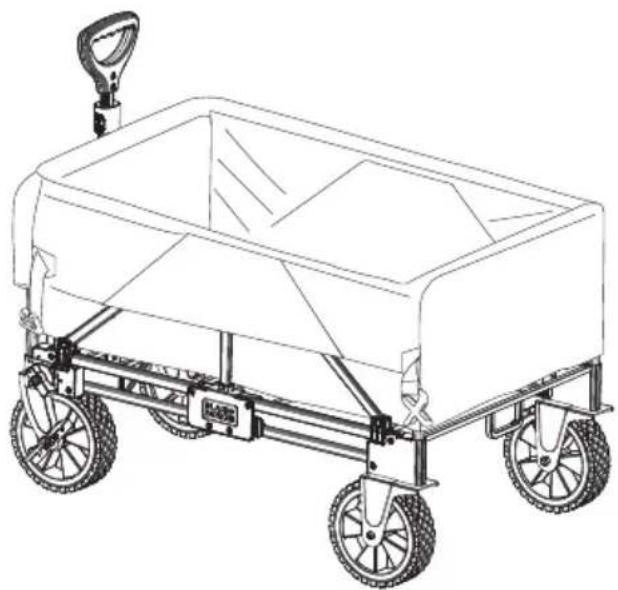
Opening Cart (Fig. E—D)
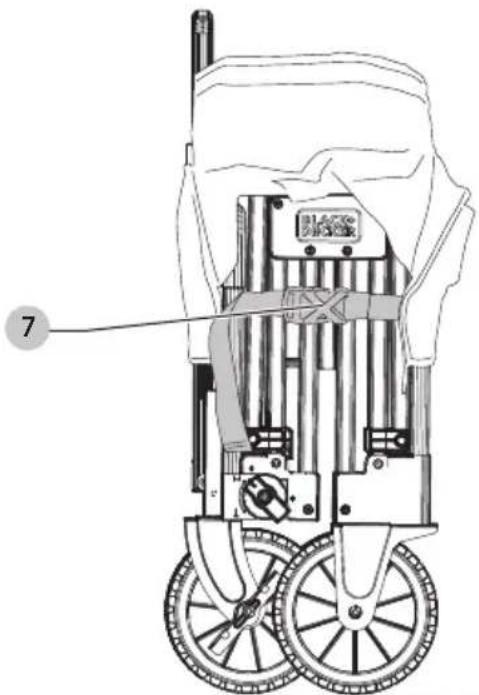
- Undo the side buckles 7 on both sides of the cart.
- Spread the cart frame 8 open.
- Press the center of the bed down to fully open the cart.
- Push handle button 3 and extend handle 1.
- The cart is now ready for use.
Collapsing Cart (Fig. H—J)
CAUTION: Ensure the fabric basket is empty before closing the cart.
NOTE: The cart can be collapsed with or without the fabric basket 4 installed.
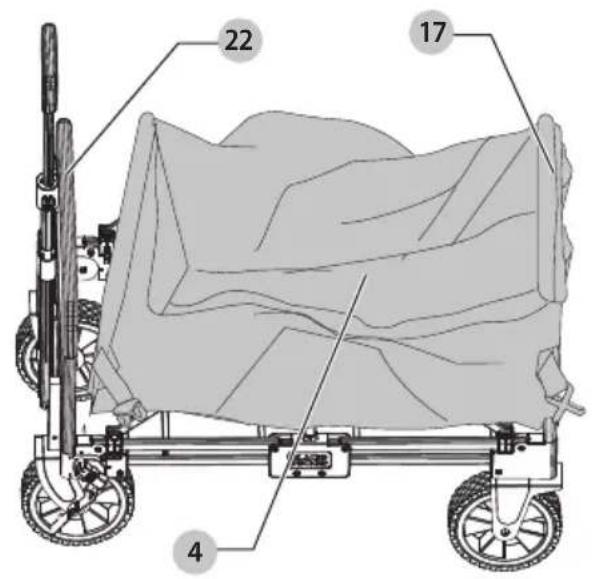
- Grab the center handle 10 on the fabric basket 4 and lift upwards to collapse the cart.
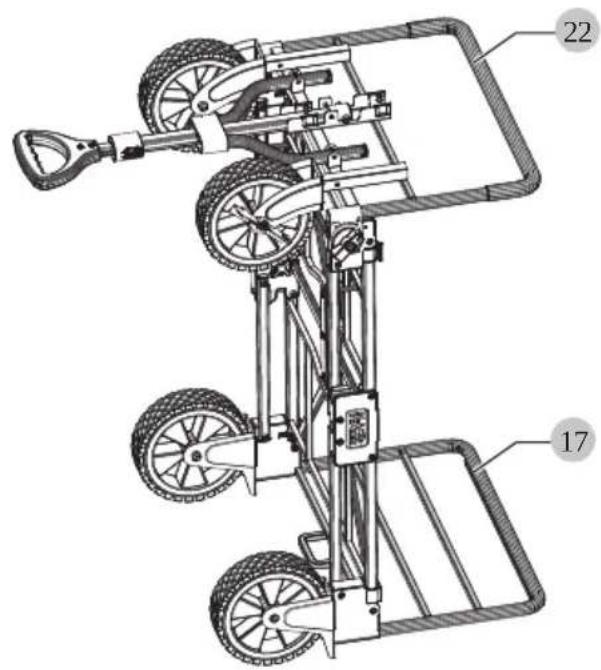
- Push the rear frame wall 17 and front frame wall 22 towards each other to collapse the cart.
- Connect the side buckles 7 to secure the cart closed.
- Collapse the handle 1.
- Push the handle 1 upright to engage the handle clip 2 to secure it into position.
Converting Cart to Flat Bed Cart (Fig. K—P)
CAUTION: Ensure the fabric basket is empty before connecting the cart.
- Start with the cart opened and ready for use.
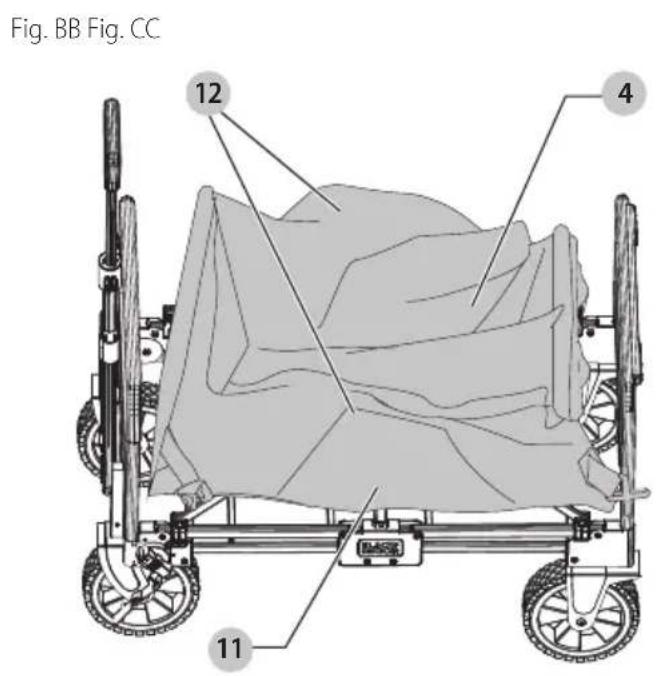
- Separate the hook and loop strip 11 and pull the fabric basket 4 from the two frame side walls 12.
- Pull the remaining fabric basket sides from the front frame wall 22 and rear frame wall 17.
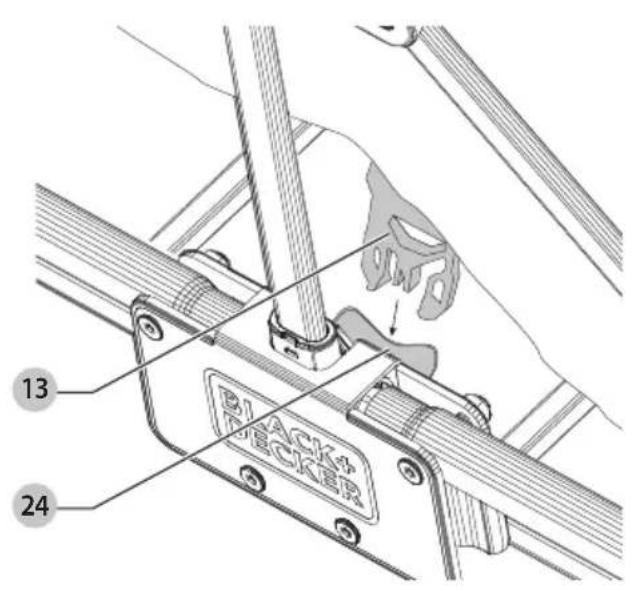
- Undo left and right side bracket buckles 13.
- Fold the fabric basket 4 as shown in Fig. N and secure it with the hook and loop strap 14.
NOTE: You can carry the removed fabric basket4 with the attached handles 15.
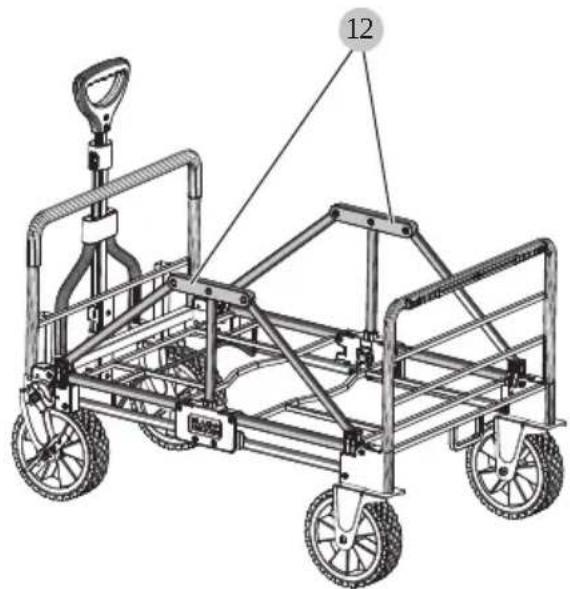
- Fold the two frame side walls 12 down and towards the center of the cart until they lock into position.
- The flat bed cart is now ready for use.
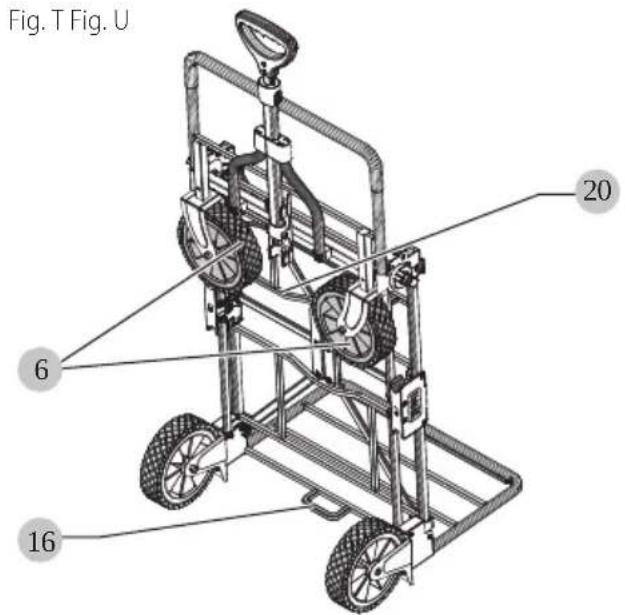
Converting Flat Bed Cart to Hand Truck (Fig. P—U)
CAUTION: Ensure the frame side walls are fully folded down and secure before converting the cart.
- Start with the flat bed cart converted and ready for use.
- Rotate the knobs 18 to the hand truck icon 19.
NOTE: You will hear an audible click as it locks into place.
- Rotate the cart onto the hand truck base as shown in Fig. R.
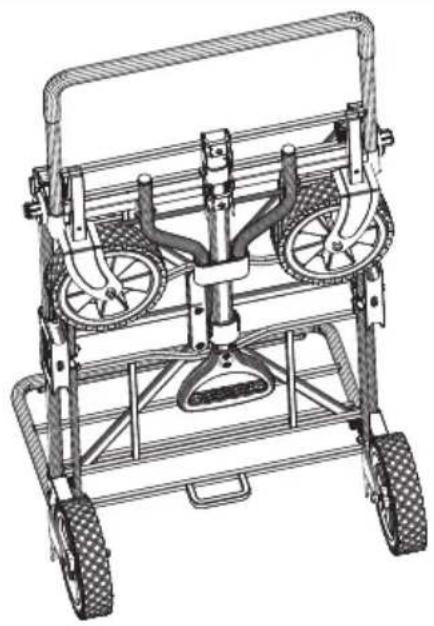
- Rotate the front frame wall 22 towards the handle 1. The front wheels 6 will slide along the wheel guide 23 as shown in Fig. U. The front frame wall 22 will make an audible click when locking into position.
- Retract the handle and fold it down into the handle clip 2 to secure the front wheels 6 in place.
- The hand truck is now ready for use.
NOTE: There is a built in foot rest 16 located between the rear wheels for easier hand truck operation.
Converting Hand Truck to Flat Bed Cart (Fig. U—X)
- Start with the hand truck converted and ready for use.
- Rotate the knobs 18 to the cart icon 20.
NOTE: You will hear an audible click as it locks into place.
- Rotate the front frame wall 22 to the cart position. The front frame wall 22 will make an audible click when locking into position.
- Lift the handle from the handle clip 2.
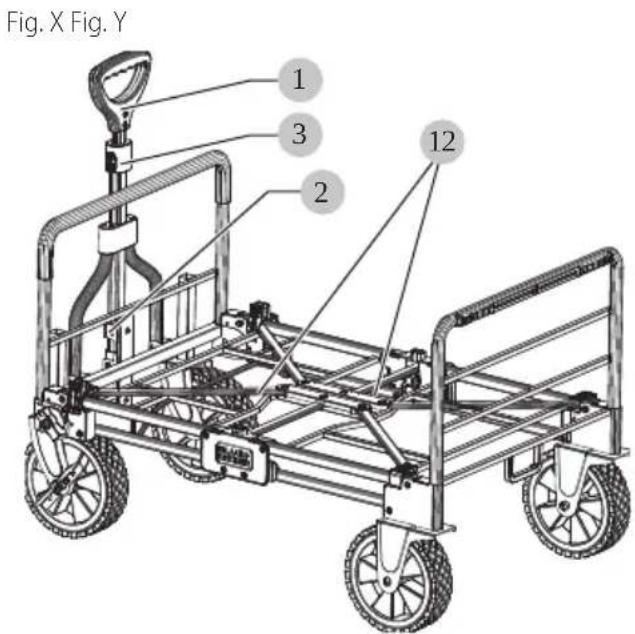
- Rotate the cart so it sits on all four wheels as shown in Fig. X.
- Press the handle button 3 and pull on the handle 1 to extend the handle.
- The flat bed cart is now ready for use.
Converting Flat Bed Cart to Cart (Fig. Y—DD)
- Start with the flat bed cart converted and ready for use.
- Fold the two frame side walls 12 upward until they lock into position.
- Place the folded fabric basket 4 in the center of the cart and then unfold it.
NOTE: The fabric basket 4 can be installed with the pockets on the front frame wall 22 towards the handle 1 or on the rear frame wall 17.
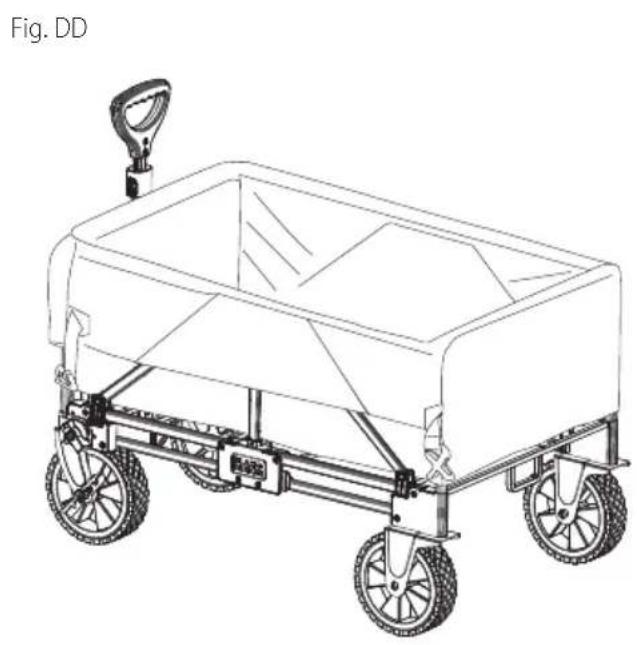
- Attach the side bracket buckles 7 to the center brackets 24.
NOTE: You will not be able to collapse the cart via the fabric handle if these buckles are not attached. - Place the fabric basket 4 over the two frame side walls 12 and secure it with the hook and loop strips 11.
- Place the fabric basket 4 over the front and rear frame wall 17, ensuring a snug fit.
- The cart is now ready for use.
MAINTENANCE
WARNING: To reduce the risk of serious personal injury, ensure clothing, long hair, fingers and other personal objects are clear of moving parts before making any adjustments or removing/installing attachments or accessories.
Your BLACK+DECKER cart has been designed to operate over a long period of time with a minimum of maintenance. Continuous satisfactory operation depends upon proper care and regular cleaning.
Cleaning
WARNING: Never use solvents or other harsh chemicals for cleaning the non-metallic parts of the cart. These chemicals may weaken the plastic materials used in these parts. Use a cloth dampened only with water and mild soap. Never immerse any part of the product into a liquid.
WARNING: Do not machine wash the fabric basket.
Accessories
WARNING: Since accessories, other than those offered by BLACK+DECKER, have not been tested with this product, use of such accessories with this product could be hazardous. To reduce the risk of injury, only BLACK+DECKER recommended accessories should be used with this product.
Recommended accessories for use with your product are available at extra cost from your local dealer or authorized service center. If you need assistance in locating any accessory, please contact BLACK+DECKER call
1-800-544-6986
Repairs
WARNING: To assure product SAFETY and RELIABILITY, reports, maintenance and adjustment should be performed by a BLACK+DECKER factory service center or a BLACK+DECKER authorized service center. Always use identical replacement parts.
Recommended accessories for use with your product are available at extra cost from your local dealer or authorized service center. If you need assistance in locating any accessory, please contact BLACK+DECKER call
1-800-544-6986
Register Online
Thank you for your purchase. Register your product now for:
- WARRANTY SERVICE: Registering your product will help you obtain more efficient warranty service in case there is a problem with your product.
- CONFIRMATION OF OWNERSHIP: In case of an insurance loss, such as fire, flood or theft, your registration of ownership will serve as your proof of purchase.
- FOR YOUR SAFETY: Registering your product will allow us to contact you in the unlikely event a safety notification is required under the Federal Consumer Safety Act.
- Register online at www.BlackandDecker.com / NewOwner
ONE-YEAR LIMITED WARRANTY
Black & Decker (U.S.) Inc. warranties this product to be free from defects in material or workmanship for a period of one(1) year following the date of purchase, provided that the product is used in a home environment. This limited warranty does not cover failures due to abuse, accidental damage or when repairs have been made or attempted by anyone other than BLACK+DECKER and its Authorized Service Centers. A defective product meeting the warranty conditions set forth herein will be replaced or repaired at no charge in either of two ways:
The first, which will result in exchanges only, is to return the product to the retailer from whom it was purchased (provided that the store is a participating retailer). Returns should be made within the time period of the retailer's policy for exchanges. Proof of purchase may be required. Please check with the retailer for its specific return policy regarding time limits for returns or exchanges. The second option is to take or send the product (prepaid) to a BLACK+DECKER owned or authorized Service Center for repair or replacement at BLACK+DECKER's option. Proof of purchase may be required. BLACK+DECKER owned and authorized service centers are listed online at www.blackanddecker.com. This warranty does not apply to accessories. This warranty gives you specific legal rights and you may have other rights which vary from state to state or province to province. Should you have any questions, contact the manager of your nearest BLACK+DECKER Service Center. This product is not intended for commercial use, and accordingly, such commercial use of this product will void this warranty. All other guarantees, express or implied, are hereby disclaimed.
IATIn AMERICA: This warranty does not apply to products sold in Latin America. For products sold in Latin America, check country specific warranty information contained in the packaging, call the local company or see the website for such information.
Imported by Black & Decker (U.S.) Inc., 701 E. Joppa Rd.
Towson, MD 21286

Chariot repliable (Fig. H-J)
GARANTIE LIMITÉE D'UN AN
Importé par, Black & Decker (U.S.) Inc.,
701 E. Joppa Rd.
Towson, MD 21286

Black & Decker (U.S.) Inc. 701East Joppa Road, Towson, MD 21286
Copyright © 2022