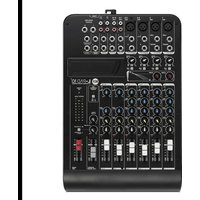
L-PAD 10C - Mixer RCF - Free user manual and instructions
Find the device manual for free L-PAD 10C RCF in PDF.


| Brand | RCF |
| Model | L-PAD 10C |
| Product type | Mixing console |
| Power supply | External 18 V AC, 1,000 mA, class I |
| Microphone inputs | 4 MIC/LINE inputs (XLR, 6.35 mm jack) with +48 V phantom power |
| Line inputs | 2 stereo line inputs (6.35 mm jack), 2 stereo line inputs (6.35 mm jack or RCA) |
| Additional input | 1 2TK input (RCA), 1 stereo return (6.35 mm jack) |
| Outputs | 1 2TK output (RCA), 1 MAIN MIX output (6.35 mm jack), 1 CONTROL ROOM output (6.35 mm jack), 1 PHONES output (6.35 mm jack), 1 AUX SEND output (6.35 mm jack) |
| Equalization | 3-band on mono channels, 2-band on stereo channels |
| Compressor | 2 compressors (channels 1 and 2) with adjustable threshold and ratio |
| Low cut filter | LOW CUT filter 75 Hz, 12 dB/octave on MIC channels |
| Optional card slot | For MP3 player card, MP3 player/recorder card, Bluetooth card |
| Included accessories | Not specified (optional card not included) |
| Maintenance and cleaning | Use a dry cloth; do not use solvents or volatile substances |
| Safety | Do not expose to moisture; unplug if not in use; do not open; only use recommended accessories |
| Spare parts and repairability | Contact authorized after-sales service for any repairs |
| General information | Versatile mixing console for professionals and sound enthusiasts |
Frequently Asked Questions - L-PAD 10C RCF
User questions about L-PAD 10C RCF
0 question about this device. Answer the ones you know or ask your own.
Ask a new question about this device
Download the instructions for your Mixer in PDF format for free! Find your manual L-PAD 10C - RCF and take your electronic device back in hand. On this page are published all the documents necessary for the use of your device. L-PAD 10C by RCF.
USER MANUAL L-PAD 10C RCF
- Read all precautions, in particular those related to safety, very carefully as they provide important information.
WARNING: to prevent the risk of fire or electric shock, never expose this product to rain or humidity.

2. POWER SUPPLY FROM MAINS
a. The mains voltage is sufficiently high to cause electrocution; install and connect the device before plugging it in.
b. Before powering up, make sure that all the connections have been made correctly and the voltage of your mains corresponds to the voltage shown on the rating plate on the unit. Contact your RCF dealer if it does not.
c. The metallic parts of the unit are earthed through the power cable. The device is a CLASS I apparatus and must be plugged into an earthed socket.
d. Protect the power cable from damage; make sure it is positioned in a way that it cannot be stepped on or crushed by objects.
e. To prevent the risk of electric shock, never open this product: there are no parts inside that the user needs to access.
3. Make sure that no objects or liquids get into the device, as this may cause a short circuit.
The device must not be exposed to drips or splashes. Do not place objects filled with liquid, such as vases, on the device. Do not place naked flames (such as lighted candles) on the device.
4. Never attempt to carry out any operations, modifications or repairs that are not expressly described in this manual.
Contact your authorized service centre or qualified personnel should any of the following occur:
- The device does not work (or works anomalously).
- The power cable has been damaged.
- Objects or liquids have got into the device.
- The device has been subject to a heavy shock.
5. Unplug the device if it will not be used for a long time.
6. Switch the device off immediately and unplug it if emission of strange odours or smoke is noticed.
7. Do not connect the device to any equipment or accessories other than those provided for the purpose.
For suspended installation, only use the dedicated anchoring points. Do not try to hang the device using unsuitable elements or elements which are not specific for this purpose. Also check the suitability of the support surface to which the product is anchored (wall, ceiling, structure, etc.), and the components used for attachment (screw anchors, screws, brackets not supplied by RCF etc.), which must guarantee the security of the system / installation over time, also considering, for example, the mechanical vibrations normally generated by transducers.
To prevent the risk of falling, do not stack multiple units of the device unless this possibility is specified in the user manual.
8. RCF S.p.A. strongly recommends this product is only installed by professional qualified installers (or specialised firms) who can ensure correct installation and certify it according to the regulations in force.
The entire audio system must comply with the current standards and regulations regarding electrical systems.
9. Supports and trolleys
The equipment should be only used on trolleys or supports of the type recommended by the manufacturer, where necessary. The equipment / support / trolley assembly must be moved with extreme caution. Sudden stops, excessive pushing force and uneven floors may cause the assembly to overturn.
10. Numerous mechanical and electrical factors must be considered when installing a professional audio system (in addition to strictly acoustic factors, such as sound pressure, coverage angles, frequency response etc.).
11. Hearing loss
Exposure to high sound levels can cause permanent hearing loss. The sound pressure level which causes hearing loss is different from person to person and depends on the exposure time. Adequate protection devices must be used to prevent potentially dangerous exposure to high sound pressure levels. Ear plugs or protective ear muffs must be worn when a transducer capable of producing high sound levels is used. See the technical specifications in the manual for the maximum sound pressure level.
IMPORTANT NOTES
- To prevent the occurrence of noise on line signal cables, use screened cables only and avoid putting them close to:
- Equipment generating high-intensity electromagnetic fields
- Power cables
- Speaker lines


OPERATING PRECAUTIONS
- Place the device away from sources of heat and always ensure an adequate air circulation around it.
- Do not overload this product for a long time.
- Never force the controls (buttons, knobs etc.).
- Do not use solvents, alcohol, benzene or other volatile substances for cleaning the external parts of the device.
IMPORTANT NOTES
Please read this instruction manual carefully and keep it on hand for future reference before connecting and using the device. The manual is an integral part of the device and must accompany it when it changes ownership as a reference for correct installation and use as well as for the safety precautions. RCF S.p.A. will not assume any responsibility for the incorrect installation and/or use of the device.

IMPORTANT NOTES
INFORMATION ON THE DEVICE
Thank you for purchasing an RCF mixing consoles mixer.
L-PAD 10C is a versatile audio mixer equipped with all the tools needed for appropriately processing multiple audio signals from a variety of sources. The features can be expanded by adding optional cards to implement MP3 audio player/recorder or Bluetooth functions.
CLEAR SOUND
RCF mixing consoles devices combine RCF's professional "sound culture" heritage with innovative design and dedicated manufacturing. RCF mixing consoles mixing consoles secure clear sound, accurate sound dynamics and extreme versatility of use by passionate professional users. RCF mixing consoles mixers are designed to combine perfectly with RCF active speakers.
RELIABILITY
All RCF mixing consoles undergo four extensive instrumental quality tests during construction. A listening test is carried out at the end of production followed by a final quality control inspection to locate any appearance defects, such as scratches or dents. The process guarantees outstanding reliability and makes sure that the device you have purchased is of the highest quality.
DESIGN
The unique design of RCF mixing consoles is an expression of typically Italian RCF creativity. RCF mixing consoles combine modern, excellent ergonomic design. In addition to their striking appearance, the original side profile of the mixers makes them easy to grasp securely.
FEATURES
Inputs
4 MIC Input XLR / line with 14 inch jack (1, 2 mono lines with insert – 3-4, 5-6 stereo lines)
2 compressors (Ch. 1 - 2)
2 stereo line inputs with ¼ inch jack (3-4, 5-6)
2 stereo line inputs with ¼ inch jack or RCA (7-8, 9-10)
1 2TK input with RCA
1 stereo return with 14 inch jack
Outputs
1 2TK output with RCA
1 MAIN MIX stereo output with 14 inch jack
1 CONTROL ROOM stereo output with ¼ inch jack
1 PHONES stereo output with 14 inch jack
1 AUX SEND outputs with 14 inch jack
Other features
Three-band EQ on mono channels
Dual-band EQ on stereo channels 9-10, 11-12
Optional card slot: MP3 player card, MP3 player/recorder card (with USB 1.1 port for USB flash drive up to 32 GB), Bluetooth connection card
Physical specifications
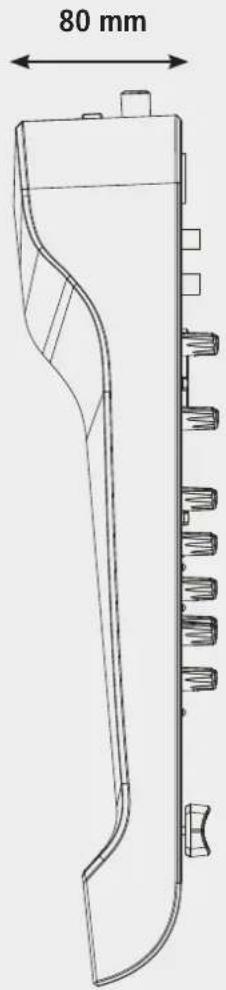
Dimensions: L = 384 mm, W = 250 mm, H = 80 mm
Weight: 2.320 kg
FunCTIONS
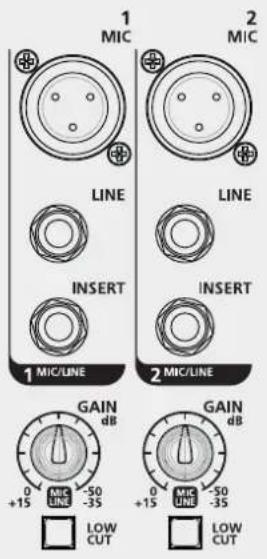
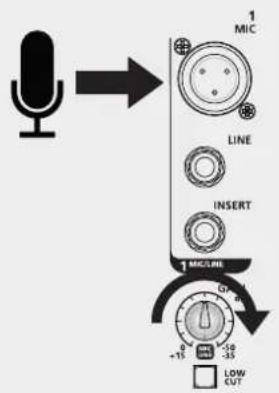
MIC input (Ch. 1 - Ch. 5/6) Connect your microphones to these balanced XLR connectors: pin1=Ground, pin2=Hot, pin3=Cold. These inputs are provided with +48 V phantom power for condenser or electret microphones. Gain scale 0 dB/-50 dB.
LINE input (Ch. 1 - Ch. 2) Connect your line level devices to these TRS jack connectors: tip=Hot, ring=Cold, sleeve=Ground. These inputs are suitable for external pre-amplifier and DI-boxes. Gain scale +15 dB/-35 dB.
INSERT. (Ch. 1 - Ch. 2) These TRS connectors: tip=send, ring=Return, sleeve=common ground allow to send the signal, thru an unbalanced line, to external devices (i.e. compressor) and return the processed signal back into the channel.
GAIN (Ch. 1 - Ch. 5/6) This controls the level gain (0 dB/-50 dB for microphone input and +15 dB/-35 dB for line input when in use).
LOW CUT switch: Press this button to cut off frequency below 75 Hz with a slope of 12 dB/oct. This is useful to prevent rumbling when using microphones.
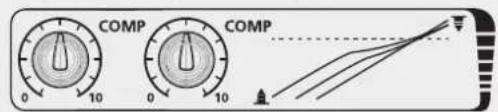
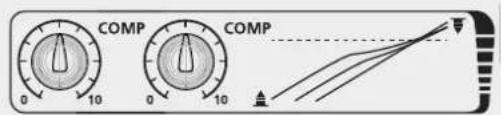
COMP (Ch. 1 - Ch. 2) A single potentiometer controls both compressor threshold and ratio.
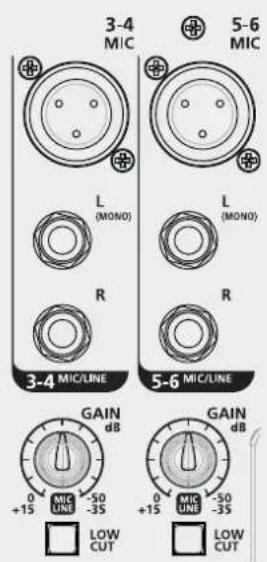
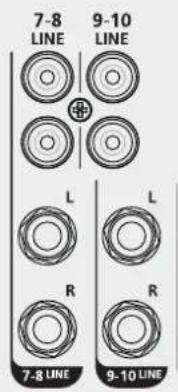
STEREO LINE INPUT (Ch. 3/4 - RCA LINE INPUT
Ch. 5/6) Plug in your keyboard, line level or stereo devices here. Gain scale +15 dB/-35 dB (Ch. 3/4 - Ch. 5/6). The corresponding channel works as a mono channel when MIC input 3/4 or 5/6 is used.
(Ch. 7/8 - Ch. 9/10) Plug in your low-level or consumer devices, like CD players, computers or mobile phones here (adapter needed). LINE INPUT Ch. 7/8 and Ch. 9/10 are replicated on a 14 inch jack.
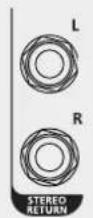
STEREO RETURN Connect signals from external devices, such as FX modules, to these unbalanced TRS jacks.
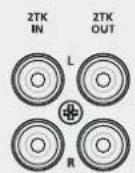
2TK IN - 2TK OUT. These unbalanced RCA connectors are suitable for connecting audio player and recorder devices.
FunCTIONS
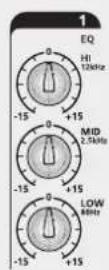
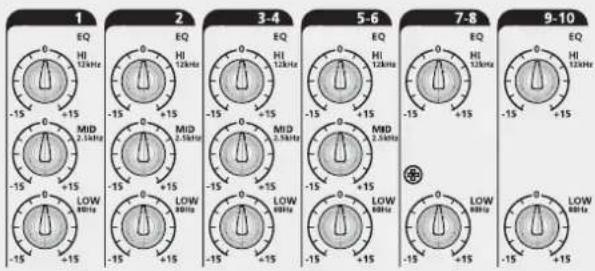
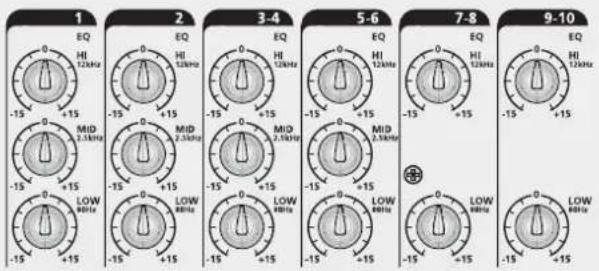
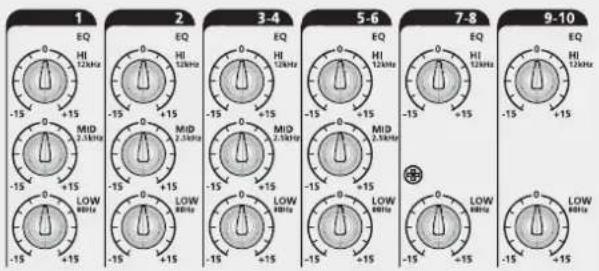
EQ: a three-band EQ is available for mono channels:
HI = ±15 dB@12 kHz
MID = ±15 dB@2.5 kHz
LOW = ±15 dB@80 Hz
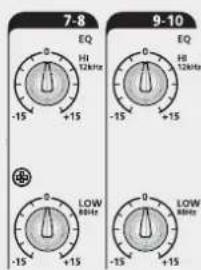
Dual-band EQ for stereo channels:
HI = ±15 dB@12 kHz
LOW = ±15 dB@80 Hz
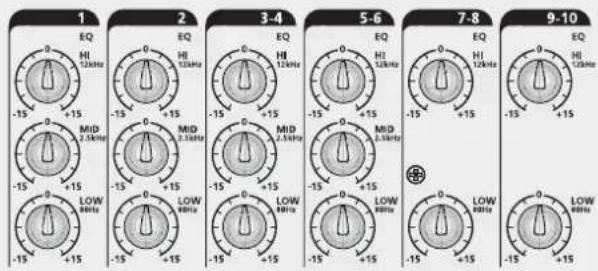
AUX Auxiliary send, level -∞ to +10 dB. The signal is routed to the AUX SEND output jack. The signal is extracted in post-fader position.

PAN or PAN/BAL: This control defines the position of the signal into the stereo image in case of a MONO channel or the balance between left and right in case of a STEREO channel.
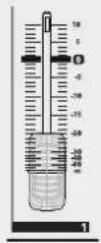
FADERS Ch. 1 - Ch. 2: MONO Channels level control
FADERS Ch. 3/4 - Ch. 5/6: MONO/STEREO channels level control
FADERS Ch. 7/8 - 9/10: STEREO channels level control

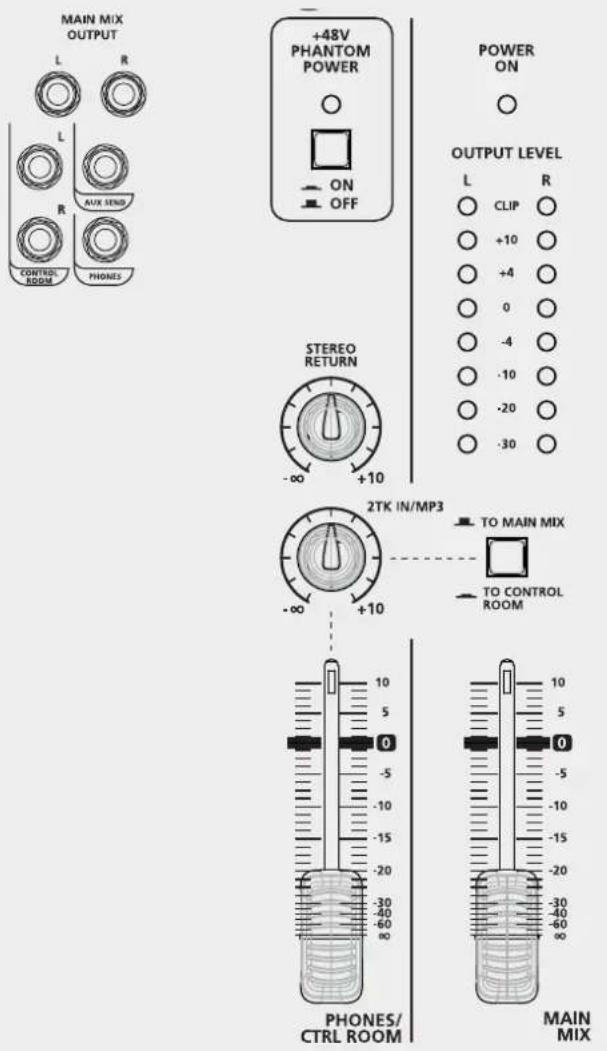
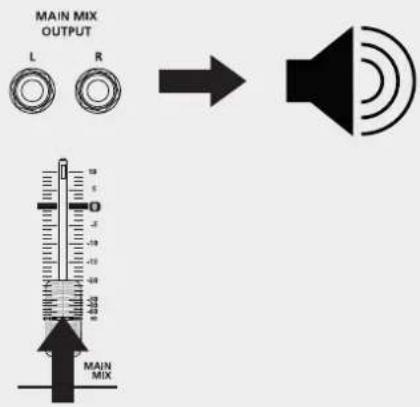
MAIN MIX output: Unbalanced TRS jacks. Plug in your active speakers or main sound reinforcement system amplifier (for passive speakers) of here.
CONTROL ROOM output: Connect to these TRS Jack your Studio Monitor or local speakers.
AUX SEND output: Connect to this TRS Jack a wedge stage monitor or an external FX device. The processed signal from the FX device is returned to the RCF mixing consoles mixer via the Stereo Return jacks.
PHONES: TRS stereo jack, Tip = Left, Ring = Right, Sleeve = Common Earth. Plug your headphone in here to listen to MAIN MIX.
+48 V PHANTOM POWER ON-OFF switch: Switches on and off the microphone input phantom power. It must be employed when condenser or electret microphones are used.
OUTPUT LEVEL: These leds show the MAIN MIX OUTPUT level. Keep under CLIP level to prevent generating distorted sounds or dangerous sound levels.
STEREO RETURN control: Defines the STEREO RETURN input signal level routed to MAIN MIX output.
2TK IN/MP3 control: This defines the signal level from the 2TK IN input or from optional cards (such as the RCF mixing consoles player, recorder or Bluetooth cards).
TO MAIN MIX/TO CONTROL ROOM switch: Defines where to route the signal coming from 2TK IN or optional cards: to MAIN MIX when in upper position, to CONTROL ROOM when pressed (lower position).
CONTROL ROOM/PHONES control: Defines the level of the signal routed to CONTROL ROOM output and PHONES output.
FADER MAIN MIX: MAIN MIX output level control.
FUNCTIONS
HOW TO GET SOUND FROM A RCF mixing consoles MIXER
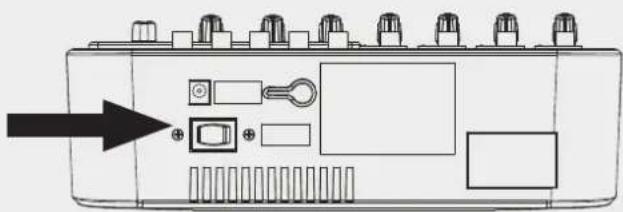
- Turn your RCF mixing consoles mixer on.
- Set all the faders and controls to minimum position (0 or -∞)
- Plug a microphone into the XLR connector - MIC input of channel 1.
- This adjusts GAIN according to microphone sensibility.
- Connect your speaker system to the MAIN MIX output and turn it on.
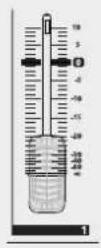
- Adjust the FADER up to "0" position.
- Carefully turn up the MAIN MIX fader to reach a reasonable sound level.
- Enjoy the quality of your RCF mixing consoles mixer.
natural_image
Diagram of an electronic device rear panel with ports, buttons, and a highlighted indicator (no text or symbols present)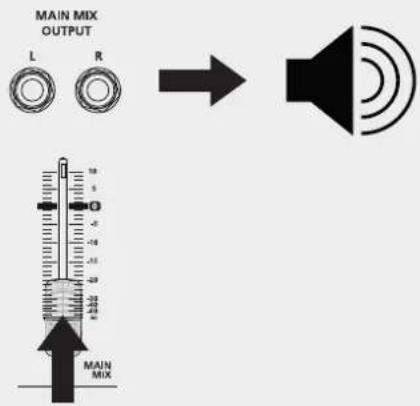
HOW TO IMPROVE THE SOUND
The RCF mixing consoles mixer implements several powerful tools to improve the sound quality of your music even more.
COMP: Turn the COMP control clockwise to add a compression effect to the signal. This allows to control the dynamic of the signal, limiting peaks and gaining level in case of low signals.
EQ: A three-band EQ is available on each mono channel, while a dual-band EQ is available on stereo channels 7-8 and 9-10. Adjust these parameters to subtract noise frequencies or magnify desired sounds.
AVAILABLE ACCESSORIES
- RCF mixing consoles PLAYER Card: USB stick based MP3 Player Card – Up to 32 GB capacity (p.n. 133 60 287)
- RCF mixing consoles recorder card: USB flash drive based MP3 player/recorder card - Max. capacity: 32 GB (p.n. 133 60 288)
- RCF mixing consoles Bluetooth card: Bluetooth connection card. This card allows to play your music playlist from Smartphone, Tablet or any Bluetooth device. (p.n. 133 60 289)
- MIC stand mount accessory (RCF Part Number: 133 60 290)
- Rack ears (RCF Part Number: 133 60 291)
MOUNT ACCESSORIES
OPTIONAL CARDS
RCF mixing consoles OPTIONAL CARDS Installation and use
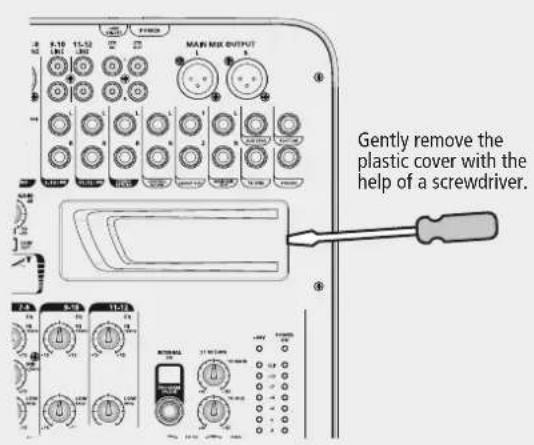
With the help of a small flat screwdriver press horizontally the plastic cover on its right side and remove it carefully.
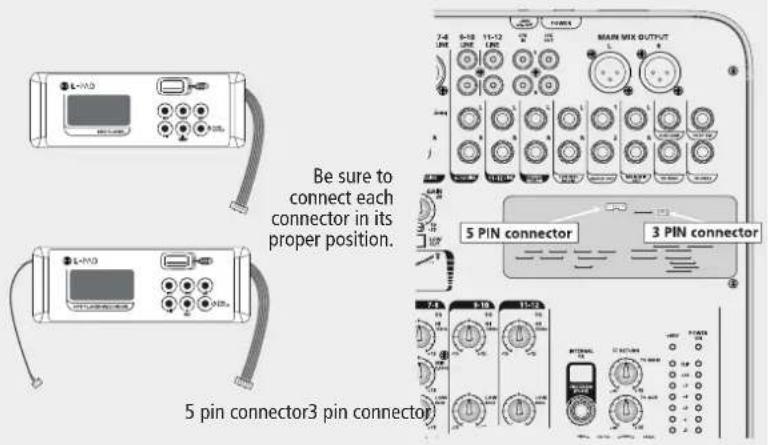
To install a RCF mixing consoles Bluetooth card or a RCF mixing consoles player card, plug the 5 pin cable into the 5 pin connector on the PCB board as shown.
To install a RCF mixing consoles player/recorder card, plug the 5 pin cable into the 5 pin connector and the 3 pin cable into the 3 pin connector on the PCB board as shown.
Now place the optional card in its site and enjoy the new functions.
RCF mixing consoles BLUETOOTH CARD: Turn the Bluetooth interface on your mobile device on and press the PAIR button on the card. Your mobile device will recognize the "BT2.1" Bluetooth device. Pair your device with the BT2.1 device. You can now play your favourite music.
Turn clockwise the knob named 2TK/MP3 up to 12 o'clock position and check if the TO MAIN MIX/TO CTRL ROOM switch is in upper position; now raise carefully the MAIN MIX fader up to the desired listening level. You can adjust the volume on the card panel also pressing the buttons VOL+ and VOL-.
RCF mixing consoles PLAYER CARD: from your computer, copy in a USB drive as many mp3 files as you want, even contained in folders (max 32 GB total), insert the USB pen in the USB dedicated connector on the card, press and hold the PUSH&HOLD button for two seconds, the card will start to play the first file of the first folder, the display will show alternatively the number of the file and the number of the folder which is playing. Press the "◀◀" or "▶◀◀" button to skip to the previous or to the following track. Hold the same buttons pressed to change the selected folder. Use the PLAY/PAUSE button to pause or restart playback. Press STOP to stop playback. Press the loop button (⇨) repeatedly to select random play, loop the current track or loop the entire programme, respectively.
Turn clockwise the knob named 2TK/MP3 up to 12 o'clock position and check if the TO MAIN MIX/TO CTRL ROOM switch is in upper position; now raise carefully the MAIN MIX fader up to the desired listening level.
RCF mixing consoles PLAYER/RECORDER CARD: from your computer, copy in a USB drive as many mp3 files as you want, even contained in folders (max 32 GB total). Insert the USB flash drive in the dedicated USB port on the card, press and hold the PUSH & HOLD button pressed for two seconds. The card will start playing the first file in the first folder. The file number and folder number which is playing will be shown on the display. Press the "◀" or "▶" buttons to skip to the previous or to the following music file. Hold the same buttons pressed to change the selected folder. The card allows you to record the program present on MAIN MIX: press the REC button once, now the board is in "rec ready status" and the display shows a flashing REC advise; press REC again to start recording; press PUSH&HOLD button once for stop recording; the card will create a new folder on the USB pen called FrE01 where the created files will find place. Use the PLAY/PAUSE button to pause or restart playback. Press the loop button (⇨) repeatedly to select random play, loop the current track or loop the entire programme, respectively.
Turn clockwise the knob named 2TK/MP3 up to 12 o'clock position and check if the TO MAIN MIX/TO CTRL ROOM switch is in upper position; now raise carefully the MAIN MIX fader up to the desired listening level.
AVVERTENZE PER LA SICUREZZA
HI = ±15 dB a 12 kHz
MID = ±15 dB a 2,5 kHz
LOW = ±15 dB a 80 Hz
HI = ±15 dB a 12 kHz
LOW = ±15 dB a 80 Hz
9. Supports et chariots
Dimensions: Long. = 384 mm, Larg. = 250 mm, Haut. = 80 mm
Poids : 2,320 kg
FOnCTIONs
LOW (graves) = ±15 dB à 80 Hz
LOW (graves) = ±15 dB à 80 Hz
natural_image
Diagram of an electronic device rear panel with ports, buttons, and a highlighted switch (no text or labels)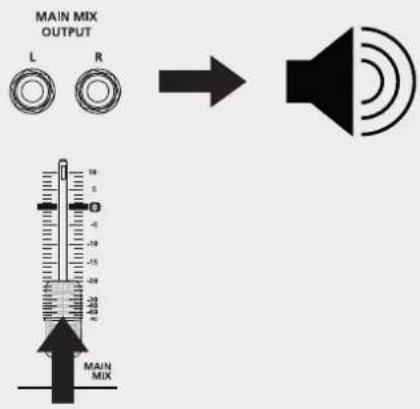
COMMENT AMÉLIORER LE SON
ACCESSOIRES DISPONIBLES
HI = ±15 dB a 12 kHz
MID = ±15 dB a 2,5 kHz
LOW = ±15 dB a 80 Hz
HI = ±15 dB a 12 kHz
LOW = ±15 dB a 80 Hz
CÓMO HACER QUE LA MESA DE MEZCLAS RCF mixing consoles FUNCIONE
natural_image
Diagram of an electronic device rear panel with ports, buttons, and a highlighted indicator (no text or symbols present)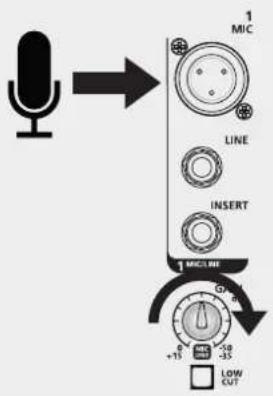
natural_image
Diagram of an electronic device rear panel with ports, buttons, and a highlighted indicator (no text or symbols present)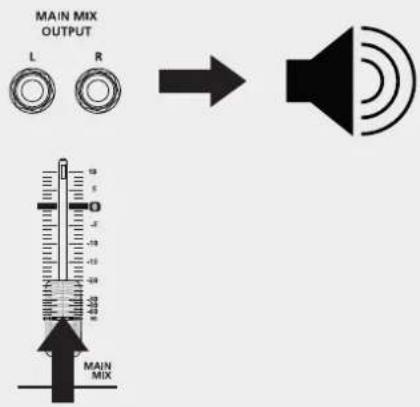
SO KÖNNEN SIE DEN SOUND VERBESSERN
ERHÄLTLICHES ZUBEHÖR
natural_image
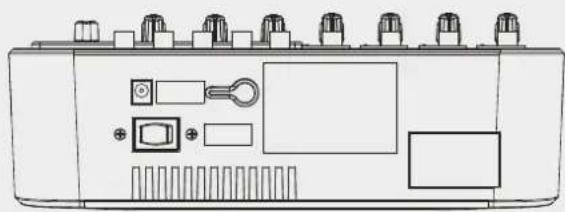
Line drawing of an electronic device rear panel with ports, buttons, and connectors (no text or symbols)Ac IN SOcKET for External Power Supply 18 V AC - 1000 mA.
ON-OFF SWITcHSwitches the mixer on and off
natural_image
Line drawing of a device rear panel with ports, buttons, and indicator lights (no text or symbols)natural_image
Front view of a device chassis with ports, buttons, and indicator lights (no text or symbols visible)natural_image
Line drawing of an electronic device rear panel with ports and buttons (no text or symbols)natural_image
Line drawing of an electronic device front panel with ports, buttons, and indicator lights (no text or symbols)natural_image
Technical line drawing of a device rear panel with ports and a 250 mm dimension label (no text or symbols beyond the scale indicator)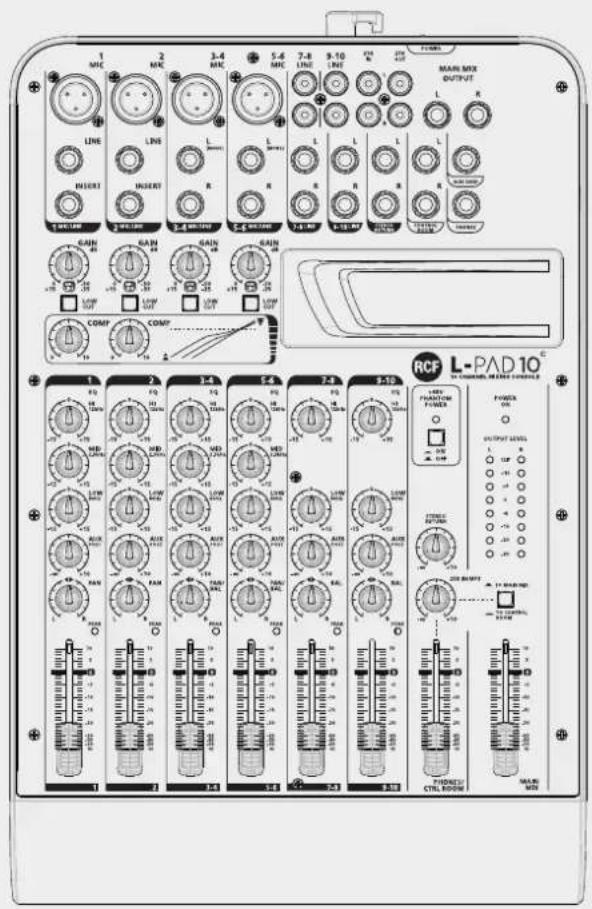
384 mm
SPECIFICATIONS / SPECIFICHE / SPÉCIFICATIONS / ESPECIFICACIONES / TECHNISCHE DATEN
SPECIFICATIONS
Mono channels
Microphone input
Frequency response
Distortion (THD+N)
Gain range
Max. input
LOW CUT
SNR
Phantom power
Line input
Frequency response
Distortion (THD+N)
Sensitivity range
Compressor
L-PAD 10C
XLR balanced
10 Hz to 55 kHz,+/-3 dB
<0.03% @ +0 dB, 22 Hz\~22 kHz A-weighted
0 dB to -50 dB
+15 dB
75 Hz
<-100 dB A-weighted
+48 V with switch control
1/4' TRS balanced
10 Hz to 55 kHz,+/-3 dB
<0.03% @ +0 dB, 22 Hz\~22 kHz A-weighted
+15 dB\~ -35 dB
GAIN: 0\~9 dB | THRESHOLD: 20 dB --> 5 dB ↓
Stereo input channels
Mic input
LOW CUT
Line input
Frequency response
Distortion (THD+N)
Sensitivity range
SNR
XLR balanced
75 Hz
1/4' TRS or TRS/RCA unbalanced
10 Hz to 55 kHz,+/-3 dB
<0.03% @ +0 dB, 22 Hz\~22 kHz A-weighted
+15 dBu\~ -35 dBu
<-100 dBr A-weighted
Channel EQ
High
Mid
Low
Mono channel Stereo channel
+/-15 dB @12 kHz +/-15 dB @12 kHz
+/-15 dB @2.5 kHz
+/-15 dB @80 Hz +/-15 dB @80 Hz
2-TRACK IN
TAPE IN
Frequency response
Distortion (THD+N)
Gain range
RCA jack
10 Hz to 55 kHz,+/-3 dB
<0.03% @ +0 dB, 22 Hz\~22 kHz A-weighted
OFF to 0 dB
STEREO RETURNS
Input
Frequency response
Distortion (THD+N)
GAIN range
SNR
1/4' TRS unbalanced
10 Hz to 55 kHz,+/-3 dB
<0.03% @ +0 dB, 22 Hz\~22 kHz A-weighted
OFF TO +10 dB
<-100 dBr A-weighted
Impedances
Microphone input
All other inputs
Tape out
All other outputs
1.8 kΩ
10 kΩ or higher
Tape out
1 kΩ
120 Ω
Main mix section
Max. MAIN MIX output
AUX range
Fader range
PHONES/CONTROL ROOM range
Hum & noise
Crosstalk
+22 dBu unbalanced
OFF to +10 dB
OFF to +10 dB
OFF to +10 dB
<-80 dB @ 20 Hz\~22 kHz A-weighted 1 channel & MAIN level:0 dB, other channels: minimum
<-80 dB @0 dB 20 Hz\~22 kHz A-weighted, MAIN level:0 dB, other channels: minimum,
Power supply
AC adaptor
Power consumption
18 V AC / 1000 mA
24 W (all loaded)
SuggeSTeD COnFlguRaTlOnS / COnFlguRaZlOnl SuggeRlTe / SuggeSTlOnS De COnFlguRaTlOnS / COnFlguRaClón ReCOMenDaDa / eMPFOHlene KOnFlguRaTlOnen
"ClaSSICal" COnFlguRaTlOn COnFlguRaZlOne "ClaSSICa" COnFlguRaTlOn « ClaSSIQue » COnFlguRaClón "ClÁSICa" "ClaSSICal"-KOnFlguRaTlOn
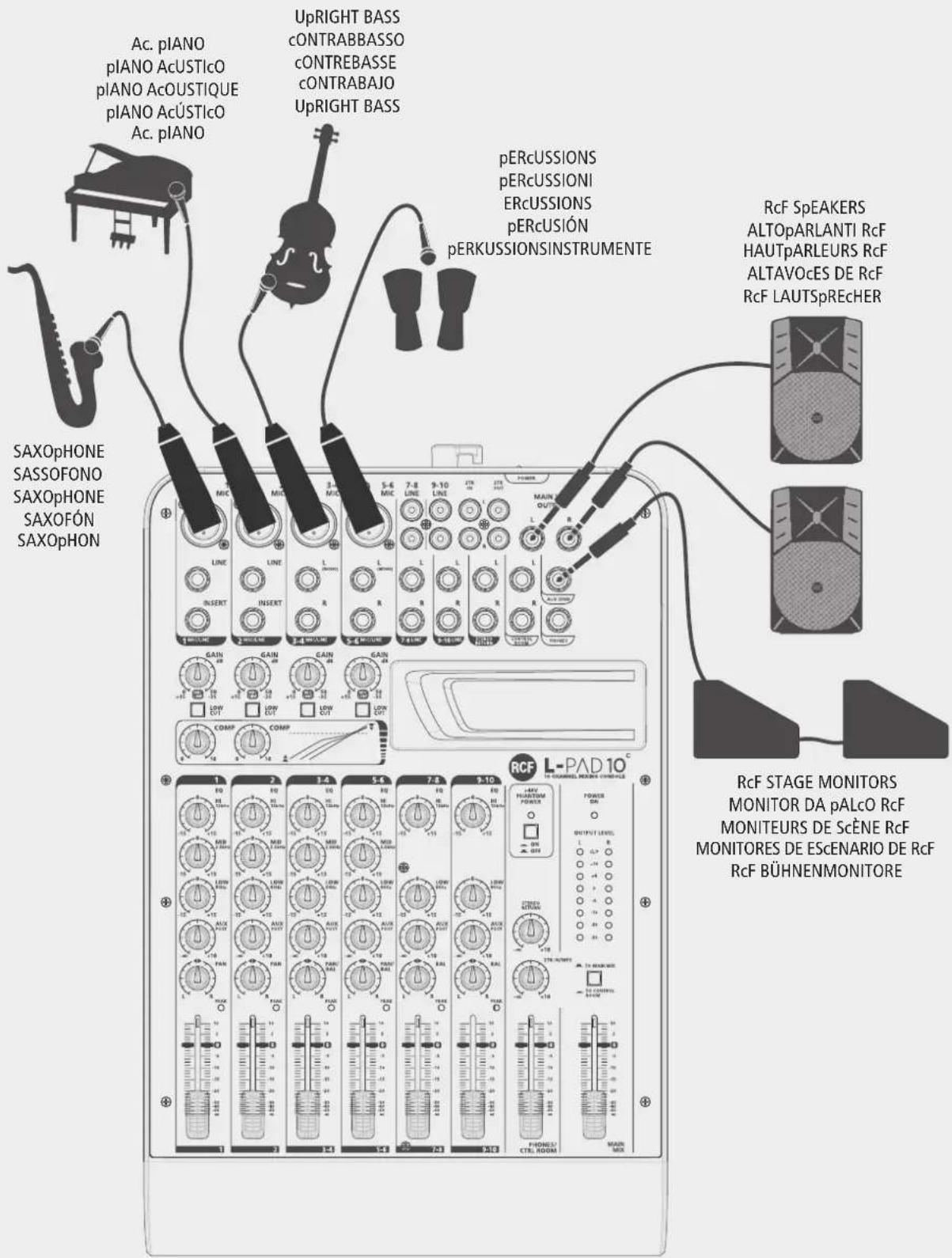
SuggeSTeD COnFlguRaTlOnS / COnFlguRaZlOnl SuggeRlTe / SuggeSTlOnS De COnFlguRaTlOnS / COnFlguRaClón ReCOMenDaDa / eMPFOHlene KOnFlguRaTlOnen
"eleCTRIC" COnFlguRaTlOn COnFlguRaZlOne "eleTTRICa" COnFlguRaTlOn « ÉleCTRIQue » COnFlguRaClón "elÉCTRICa" "eleCTRIC"-KOnFlguRaTlOn
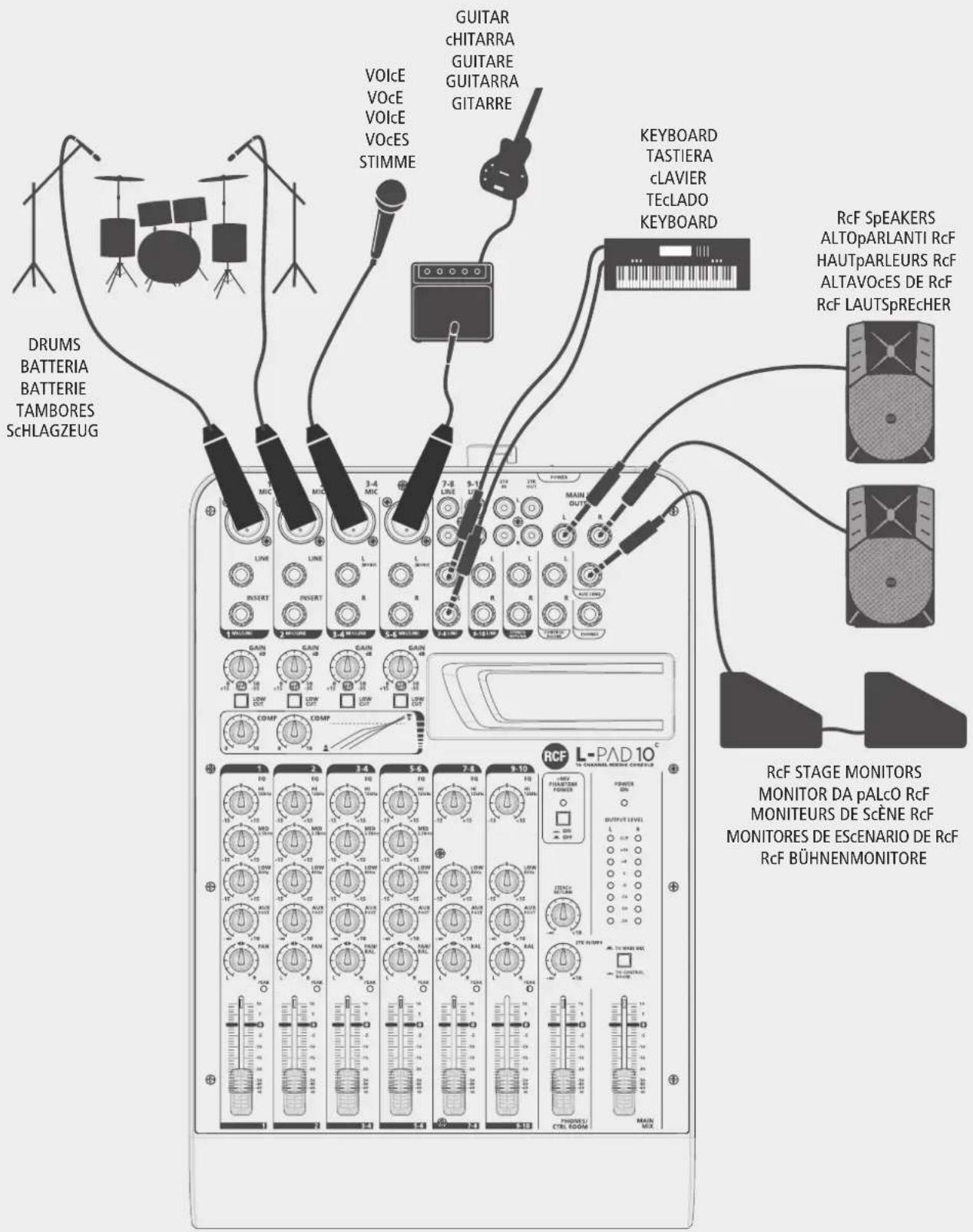
nOTeS
n0TeS
www.rcf.it
HEADQUARTERS:
RCF S.p.A. Italy
tel. +39 0522 274 411
e-mail: info@rcf.it
RCF UK
tel. 0844 745 1234
Int. +44 870 626 3142
e-mail: info@rcfaudio.co.uk
RCF France
tel. +33 1 49 01 02 31
e-mail: france@rcf.it
RCF Germany
tel. +49 2203 925370
e-mail: germany@rcf.it
RCF Benelux
tel. +49 (0) 2203 9253724
e-mail: belgium@rcf.it
RCF USA Inc.
tel. +1 732-9026100
e-mail: info@rcf-usa.com
RCF Spain
tel. +34 91 817 42 66
e-mail: info@rcfaudio.es




- POWER SUPPLY FROM MAINS
- Make sure that no objects or liquids get into the device, as this may cause a short circuit.
- Never attempt to carry out any operations, modifications or repairs that are not expressly described in this manual.
- Unplug the device if it will not be used for a long time.
- Switch the device off immediately and unplug it if emission of strange odours or smoke is noticed.
- Do not connect the device to any equipment or accessories other than those provided for the purpose.
- RCF S.p.A. strongly recommends this product is only installed by professional qualified installers (or specialised firms) who can ensure correct installation and certify it according to the regulations in force.
- Supports and trolleys
- Numerous mechanical and electrical factors must be considered when installing a professional audio system (in addition to strictly acoustic factors, such as sound pressure, coverage angles, frequency response etc.).
- Hearing loss
- IMPORTANT NOTES
- OPERATING PRECAUTIONS
- INFORMATION ON THE DEVICE
- CLEAR SOUND
- RELIABILITY
- DESIGN
- FEATURES
- Inputs
- Outputs
- Other features
- Physical specifications
- FunCTIONS
- STEREO LINE INPUT (Ch. 3/4 - RCA LINE INPUT
- HOW TO GET SOUND FROM A RCF mixing consoles MIXER
- HOW TO IMPROVE THE SOUND
- AVAILABLE ACCESSORIES
- MOUNT ACCESSORIES
- OPTIONAL CARDS
- RCF mixing consoles OPTIONAL CARDS Installation and use
- AVVERTENZE PER LA SICUREZZA
- Supports et chariots
- FOnCTIONs
- COMMENT AMÉLIORER LE SON
- ACCESSOIRES DISPONIBLES
- CÓMO HACER QUE LA MESA DE MEZCLAS RCF mixing consoles FUNCIONE
- SO KÖNNEN SIE DEN SOUND VERBESSERN
- ERHÄLTLICHES ZUBEHÖR
- SPECIFICATIONS / SPECIFICHE / SPÉCIFICATIONS / ESPECIFICACIONES / TECHNISCHE DATEN
- SPECIFICATIONS
- Mono channels
- L-PAD 10C
- Stereo input channels
- Channel EQ
- Mono channel Stereo channel
- 2-TRACK IN
- STEREO RETURNS
- Impedances
- Main mix section
- Power supply
- SuggeSTeD COnFlguRaTlOnS / COnFlguRaZlOnl SuggeRlTe / SuggeSTlOnS De COnFlguRaTlOnS / COnFlguRaClón ReCOMenDaDa / eMPFOHlene KOnFlguRaTlOnen
- nOTeS
- n0TeS
- www.rcf.it
- HEADQUARTERS:
Brand : RCF
Model : L-PAD 10C
Category : Mixer