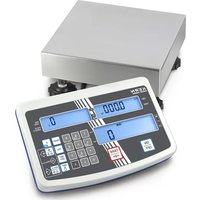
VHB 2T1 - Camera Kern - Free user manual and instructions
Find the device manual for free VHB 2T1 Kern in PDF.


| Product Type | Weighing Pallet Truck |
| Brand | Kern |
| Model | VHB 2T1 |
| Weighing Range (max) | 2000 kg |
| Readability (d) | 1 kg |
| Reproducibility | 1 kg |
| Linearity | ±2 kg |
| Stabilization Time | 3 seconds |
| Allowable Ambient Temperature | -10°C to +40°C |
| Humidity Level | 95% max. (non-condensing) |
| Weighing Units | kg, lb |
| Power Supply | 4 AA batteries 1.5 V |
| Operating Time | 80 h or 1700 weighings |
| Auto Off | 3 minutes |
| Net Weight | 125 kg |
| Dimensions | 1150 x 725 x 555 mm (L x W x H approx) |
| Main Functions | Gross weighing, net weighing with tare, button tare, manual tare entry, weighing totalization |
| Certification | CE/EU Declaration of Conformity available online |
| Maintenance | Clean with a damp cloth and mild soap; do not use solvents |
| Safety Instructions | Do not overload, avoid shocks, do not use in explosive atmospheres |
| Repairability | Opening only by personnel trained and authorized by Kern |
Frequently Asked Questions - VHB 2T1 Kern
User questions about VHB 2T1 Kern
0 question about this device. Answer the ones you know or ask your own.
Ask a new question about this device
Download the instructions for your Camera in PDF format for free! Find your manual VHB 2T1 - Kern and take your electronic device back in hand. On this page are published all the documents necessary for the use of your device. VHB 2T1 by Kern.
USER MANUAL VHB 2T1 Kern
natural_image
Yellow and black manual pallet jack with control panel (no visible text or symbols)
Further language versions you will find online under www.kern-sohn.com/manuals

natural_image
Diagram of a forklift lifting stacked boxes (no text or symbols)natural_image
Line drawing of a forklift carrying stacked boxes (no text or symbols)Operating instruction
Pallet truck scale
Table of Contents
1 Technical data .... 4
2 Declaration of conformity 5
3 Basic instructions for scales....6
3.1 Proper use....6
3.2 Improper Use 6
3.3 Warranty 6
3.4 Monitoring of Test Resources....7
4 Basic safety instructions for scales 7
4.1 Pay attention to the instructions in the Operation Manual 7
4.2 Personnel training....7
5 Transport and storage 7
5.1 Testing upon acceptance 7
5.2 Packaging....7
6 Unpacking, Setup and Commissioning 8
6.1 Site of installation, place of operation for scales 8
6.2 Scope of delivery....9
6.3 Battery operation....9
6.4 Commissioning....9
6.5 Overview of display....10
6.6 Keyboard overview....11
7 Functions of display unit.... 12
7.1 Prior to weighing: ZERO-POINT CHECK.... 12
7.2 Gross weighing....12
7.3 Net weighing: TARING BY PRESSING A BUTTON.... 12
7.4 Net weighing: MANUAL TARE INPUT....12
7.5 Addition of individual weighings.... 14
8 Service, maintenance, disposal 15
8.1 Cleaning 15
8.2 Service, maintenance.... 15
8.3 Disposal.... 15
9 Error messages 15
10 Instant help.... 16
1 Technical data
| KERN VHB 2T1 | |
| Readability (d) 1 kg | |
| Weighing range (max) 2000 kg | |
| Reproducibility 1 kg | |
| Linearity ± 2 kg | |
| Stabilization time 3 sec. | |
| Allowable ambient temperature | -10°C .... + 40°C |
| Humidity of air | max. 95% (not condensing) |
| Weighing Units | kg, lb |
| Electric Supply | 4 x 1.5V AA batteries |
| Operating time | 80 h/approx.1700 weightings |
| Auto Off | 3 min |
| Net weight | 125 kg |
Dimensions:
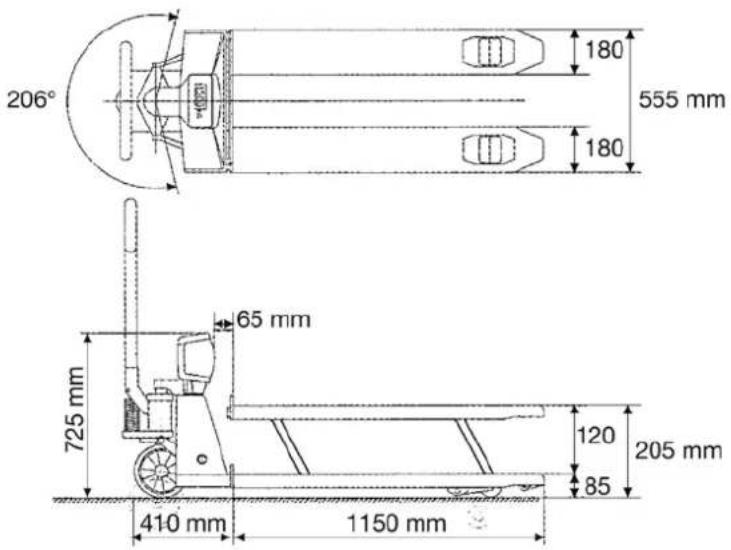
text_image
206° 180 555 mm 180 65 mm 725 mm 410 mm 1150 mm 120 85 205 mm2 Declaration of conformity
To view the current EC/EU Declaration of Conformity go to:
www.kern-sohn.com/ce
3 Basic instructions for scales
3.1 Proper use
The balance you purchased is intended to determine the weighing value of material to be weighed. It is intended to be used as a “non-automatic” balance, i.e. the material to be weighed is manually and carefully placed in the centre of the weighing plate. As soon as a stable weighing value is reached the weighing value can be read.
3.2 Improper Use
Do not use balance for dynamic weighings. In the event that small quantities are removed or added to the material to be weighed, incorrect weighing results can be displayed due to the “stability compensation” in the balance. (Example: Slowly draining fluids from a container on the balance.)
Do not leave permanent load on the weighing plate. This may damage the measuring system.
Impacts and overloading exceeding the stated maximum load (max) of the balance, minus a possibly existing tare load, must be strictly avoided. Balance may be damage by this.
Never operate balance in explosive environment. The serial version is not explosion protected.
The structure of the balance may not be modified. This may lead to incorrect weighing results, safety-related faults and destruction of the balance.
The balance may only be used according to the described conditions. Other areas of use must be released by KERN in writing.
3.3 Warranty
Warranty claims shall be voided in case
• Our conditions in the operation manual are ignored
- The appliance is used outside the described uses
• The appliance is modified or opened
• Mechanical damage and damage caused by media, liquids
• Natural wear and tear
- The appliance is improperly set up or incorrectly electrically connected
• The measuring system is overloaded
3.4 Monitoring of Test Resources
In the framework of quality assurance the measuring-related properties of the balance and, if applicable, the testing weight, must be checked regularly. The responsible user must define a suitable interval as well as type and scope of this test. Information is available on KERN's home page (www.kern-sohn.com) with regard to the monitoring of balance test substances and the test weights required for this. In KERN's accredited DKD calibration laboratory test weights and balances may be calibrated (return to the national standard) fast and at moderate cost.
4 Basic safety instructions for scales
4.1 Pay attention to the instructions in the Operation Manual
Carefully read this operation manual before setup and commissioning, even if you are already familiar with KERN balances.
4.2 Personnel training
The appliance may only be operated and maintained by trained personnel.
5 Transport and storage
5.1 Testing upon acceptance
When receiving the appliance, please check packaging immediately, and the appliance itself when unpacking for possible visible damage.
5.2 Packaging
Keep all parts of the original packaging in case you need to return the appliance.
Only use original packaging for returning.
Before sending, disconnect all connected cables and loose/movable parts.
6 Unpacking, Setup and Commissioning
6.1 Site of installation, place of operation for scales
The balances are designed in a way that reliable weighing results are achieved in common conditions of use.
You will work accurately and fast, if you select the right location for your balance.
Therefore, observe the following for the installation site:
- The load must be lifted clear of the display unit's case and other pallets.
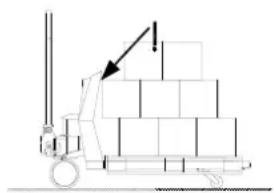
natural_image
Diagram of a forklift lifting stacked boxes (no text or symbols)Incorrect lifting of a load
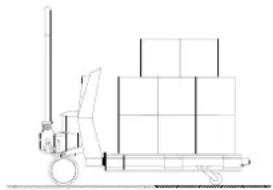
natural_image
Line drawing of a pallet jack with stacked boxes on top (no text or symbols)Correct lifting of a load
- The accuracy of the weighing system is falling by approximately 0.1 % per degree if there is a slant of more than 2°. Holes and unevenness, too, have this effect. A smooth floor is ideal.
- Optimum accuracy in weighing results is achieved if the load centre is between the forks. The forks are easily bent and twisted when the load is off-centre. This may result in diminished accuracy. In verifiable models off-centre loads, or slants affecting accuracy, activate the inclination switch which in turn disconnects the display.
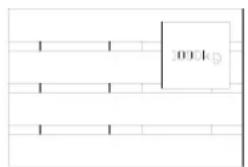
text_image
0004Non-optimal positioning of load
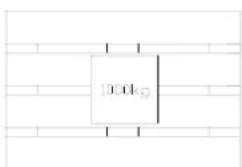
text_image
100.0kSOptimal positioning of load
- Temperature range: The maximum deviation for 0.1% of the weighed load is between -10 and +40°C. Outside this temperature range deviations of up to 0.3% may occur.
- Avoid jarring during weighing
- Protect the balance against high humidity, vapours and dust
- Do not expose the device to extreme dampness for longer periods of time. Non-permitted condensation (condensation of air humidity on the appliance) may occur if a cold appliance is taken to a considerably warmer environment. In this case, acclimatize the disconnected appliance for ca. 2 hours at room temperature.
- Major display deviations (incorrect weighing results) may be experienced should electromagnetic fields (e.g. due to mobile phones or radio equipment), static electricity accumulations or instable power supply occur. Change location or remove source of interference.
6.2 Scope of delivery
Standard accessory:
- Pallet truck scale
- 4 x 1.5V AA batteries
- Operating Manual
6.3 Battery operation
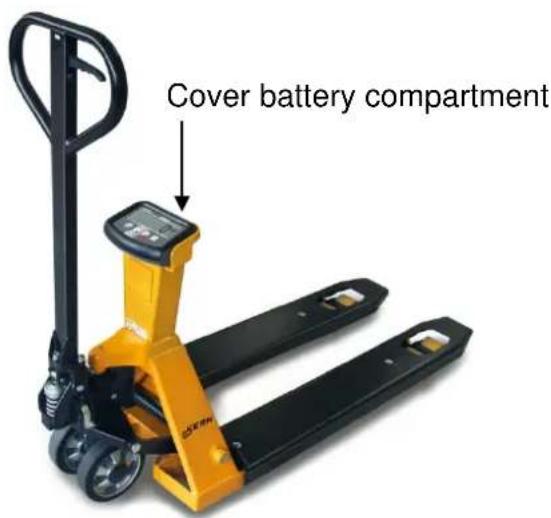
text_image
Cover battery compartmentTo change the batteries, unscrew and take off the cover of the battery compartment at the back of the display unit. Replace the used batteries with new ones (4 x 1.5V AA batteries) (Pay attention to correct polarity) and reinsert the battery cover.
In order to save the battery, the balance switches automatically off after 3 minutes without weighing.
Used batteries are indicated by "LO-BA", on the display. Change the batteries immediately.
If the balance is not used for a longer time, take out the batteries and store them separately. Leaking battery liquid could damage the balance.
6.4 Commissioning
To activate the weighing system, press the key.
The operating temperature for the electronic system and the weighing cells will have been reached after three to five minutes. . Prior to this, deviations of c. 0.3% are possible.
Loads should not be lifted before this zero adjust is complete.
6.5 Overview of display
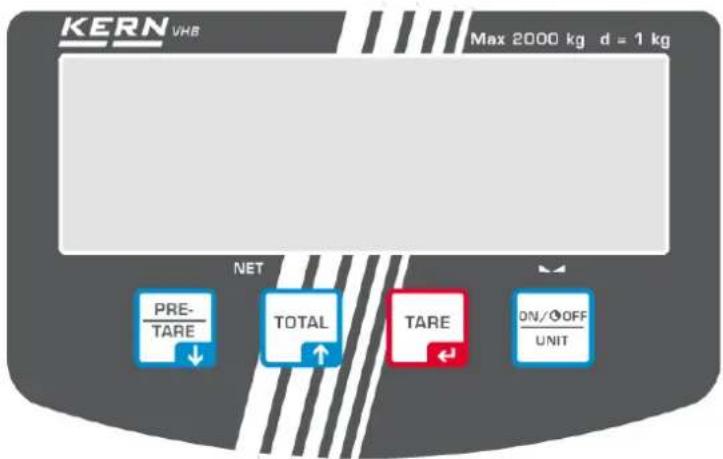
text_image
KERN VHB Max 2000 kg d = 1 kg NET PRE- TARE TOTAL TARE ON/OFF UNITTHE DISPLAY
The three displays provide the following information:

The weighing system (incl. load) is stable
— The indicated weight has a negative value
NET
The indicated value is a net weight
DISPLAY-MESSAGES
The following messages may appear on the display:
HELP 1 Weighing system overloaded
HELP 2 Taring impossible due to negative gross weight
HELP 3 Negative signal of load cells to A-D converter / slant
HELP 4 Entered tare weight is too high. Press the 📄 key again in order to cancel the HELP display and enter a new, reduced tare weight.
HELP 7 The signal of the load cells on the A-D converter is too high.
LO-BA The storage battery status is too low; charge storage battery.
6.6 Keyboard overview
Each key provides an operating as well as an input function.
Operating function
 | Zero setting and automatic tare | Confirm and enter numeric values. Shifts the flashing digits to the left |
 | Input of tare | Entering numeric values: Decreases the numeric value of flashing digit by 1. |
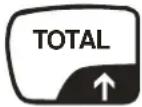 | Adding | Entering numeric values: Increases the numeric value of flashing digit by 1. |
 | On / Off | Delete |
IMPORTANT
The actuation of a key will only be accepted if the load is stable and the message "load stable" is lit up. The display unit only carries out functions as long as the load is stable.
WARNING
If the weighed weight exceeds the set maximum, the display will show: "ERRO2". To prevent damage to the display unit or the weighing cells, please lighten the load of the weighing system instantly.
SLANT
The verifiable model of the weighing system will display stripes only if a slant exceeds 2^ . If this is the case, place the weighing system on an even base.
7 Functions of display unit
7.1 Prior to weighing: ZERO-POINT CHECK
Prior to each weighing process ensure that the system is unloaded and clear of obstructions. The display unit provides automatic zero adjustment. This means, that small deviations from the zero-point are corrected automatically. If the display unit does not correct the zero-point automatically you will have to carry out a manual correction with the help of the key.
7.2 Gross weighing
After the load was lifted, the display shows the gross value of the weighed weight.
7.3 Net weighing: TARING BY PRESSING A BUTTON
The display unit offers an option that allows tare weights to be reset to zero by pressing a button. In this way net weight changes can be traced. After taring, the display unit will once again start at the smallest display step.
Lift the load.
Press TARE button
☐ The display unit shows zero.
☐ The lit up display "NET", indicates that a tare weight is active.
- Loading and unloading the net load.
☐ The net value for the weighed weight is shown on the display.
☐ For unloading this will be a negative value.
The system reverts to standard weighing mode when a zero adjustment is carried out in an unloaded state.
7.4 Net weighing: MANUAL TARE INPUT
You may enter the tare weight at any time, that is, regardless whether the scales are in a loaded or unloaded state. To achieve higher accuracy, a tare weight with a higher resolution may be entered, regardless of the size of the weight and the display steps of the indicator.
Press button
☐ The most recently used tare value appears.
☐ The segment on the right is flashing.
➢ Press the ☐key for three seconds if the indicated tare value is to be used again
or
Press button
➢ Press the numeric or down the desired value.
PRE-TARE until the flashing number has reached
To move to the next segment, press the key

➢ Repeat this action until the display shows the desired tare value.
To activate the tare weight (but not for storing): Press the seconds, to confirm the value.

☐ The tare weight is now activated.
□ “NET” appears.
☐ If the system is loaded at this moment, the net value of the weighed weight appears on the display.
☐ If the system is unloaded, the system indicates the entered tare value negative.
☐ The entered value remains active until the weighing system is turned off, a new tare weight entered, a new load tared (See 7.3.) or if a reset to zero is carried out:
The weighing system is loaded: Press the

for two seconds. The tare
value will be reset to zero and the system reverts to standard weighing mode.
or
The weighing system is unloaded: Press

ton A reset to zero is
carried out and the system reverts to standard weighing mode.
To activate and store the tare weight: Confirm all segments by pressing the key.

☐ The tare weight is now activated and stored.
□ “NET” appears.
☐ If the system is loaded at this moment, the net value of the weighed weight appears on the display.
☐ If the system is unloaded, the entered tare value is shown negative.
☐ The entered value remains active even after the system was turned off, until a new tare weight is entered, a new load tared (See 7.3.) or a reset to zero is carried out.
The weighing system is loaded: Press the

for two seconds. The tare
value will be reset to zero and the system reverts to standard weighing mode.
or
The weighing system is unloaded: Press button. A reset to zero is carried out and the system reverts to standard weighing mode.
7.5 Addition of individual weighings
The display unit offers an option that allows the addition of weighings and the display of the total weight. When the tare weight is active, the net weight is automatically added up.
- Loading the system with the load to be added
To add the weighed weight to the memory, press the ^TOTAL key.
☐ The displayed value is stored and simultaneously added to the summation memory.
☐ The display alternately shows consecutive numbers (number of weighings) and the total value (summation memory).
☐ If the weighing system has been equipped with a printer, the value shown is printed at the same time (KERN VHS).
☐ After a few seconds the system automatically reverts to standard weighing mode.
or
To read the total weight calculated so far, press the ^TOTAL key for three seconds.
☐ The display alternately shows the consecutive numbers (number of weighings) and the total.
☐ After a few seconds the system automatically reverts to standard weighing mode.
Whilst the total value is displayed, you may delete the memory by pressing the key.
☐ If the system is equipped with a printer, an overview print is made (KERN VHS)
☐ The display shows the sequence number 00 and the initial value 0.0 kg.
☐ The system automatically reverts to standard weighing mode.
Important:
➢ Please note that the balance must be unloaded between the individual weighing procedures.
Additional summation is also possible after the scales were turned on or off. The stored values are kept after the scales were turned off.
8 Service, maintenance, disposal
8.1 Cleaning
Please do not use aggressive cleaning agents (solvents or similar agents), but a cloth dampened with mild soap suds. Ensure that no liquid penetrates into the device and wipe with a dry soft cloth.
8.2 Service, maintenance
The appliance may only be opened by trained service technicians who are authorized by KERN.
The same maintenance guidelines apply to the chassis of the mobile weighing system as those for simple manual pallet trucks. Experience has taught us that the integrated weighing system continues to function even if the chassis was damaged by overloading.
General rules:
- As the steering wheels are mounted at the front, it is better to pull rather than push the manual pallet truck.
- If the lifting device is not used, the manual lever should be left in centre position. This prolongs the life span of the seals.
- To prevent damages to the electronic system and weighing cells it is necessary that welding work on the entire weighing system is carried out exclusively by technical specialists.
- The bearings of the wheels (with the exception of polyurethane) as well as the joints in the load roller section should be regularly cleaned and greased.
8.3 Disposal
Disposal of packaging and appliance must be carried out by operator according to valid national or regional law of the location where the appliance is used.
9 Error messages
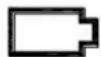
The battery symbol flashes: The battery is almost empty and must be replaced.
Low bat
Critical error message:
The battery is almost empty.
Replace it immediately.
Otherwise the weighing system will turn off. All data will be deleted and you will have to readjust the system.
10 Instant help
In case of an error in the program process, briefly turn off the balance and disconnect from power supply. The weighing process must then be restarted from the beginning.
Help:
Fault Possible cause
The displayed weight does not glow.
- The balance is not switched on.
- The batteries are empty
The displayed weight is permanently changing
- Draught/air movement
- Sites with vibration.
- The weighing plate is in contact with foreign matter.
- Electromagnetic fields / static charging (choose different location/switch off interfering device if possible)
The weighing value is obviously wrong
• The display of the balance is not at zero
- Adjustment is no longer correct.
• Great fluctuations in temperature.
- Electromagnetic fields / static charging (choose different location/switch off interfering device if possible)
Should other error messages occur, switch balance off and then on again. If the error message remains inform manufacturer.

KERN VHB
Version 1.4 2018-03
natural_image
Diagram of a forklift lifting stacked boxes (no text or symbols)natural_image
Line drawing of a forklift carrying stacked boxes (no text or symbols)Levage correct de la charge