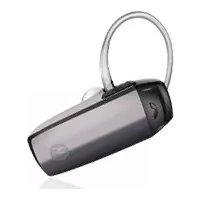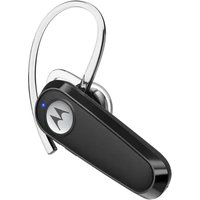
HK126 - Earphones MOTOROLA - Free user manual and instructions
Find the device manual for free HK126 MOTOROLA in PDF.


| Product type | Bluetooth headset |
| Brand | Motorola |
| Model | HK126 |
| Connectivity | Bluetooth |
| Charging port | USB-C |
| Power supply | Integrated rechargeable battery |
| Multifunction button (MFB) | Yes |
| Volume control | Dedicated buttons (+ and -) |
| Built-in microphone | Yes |
| LED status indicator | Yes (blue, red, purple) |
| Ear hook | Yes |
| Ear tip | Yes (interchangeable) |
| Voice assistant | Activate via MFB (long press 2 s) |
| 3-way conference | Yes |
| Factory reset | MFB + volume down (6 s) |
| Basic functions | Answer/hang up, reject call, mute/unmute, play/pause, previous/next track |
| Battery type | Lithium-ion (recommendation: full charge every 3 months) |
| Operating temperature | Not specified |
Frequently Asked Questions - HK126 MOTOROLA
User questions about HK126 MOTOROLA
0 question about this device. Answer the ones you know or ask your own.
Ask a new question about this device
Download the instructions for your Earphones in PDF format for free! Find your manual HK126 - MOTOROLA and take your electronic device back in hand. On this page are published all the documents necessary for the use of your device. HK126 by MOTOROLA.
USER MANUAL HK126 MOTOROLA
IN-EAR WIRELESS MONO HEADSET
Model: HK126
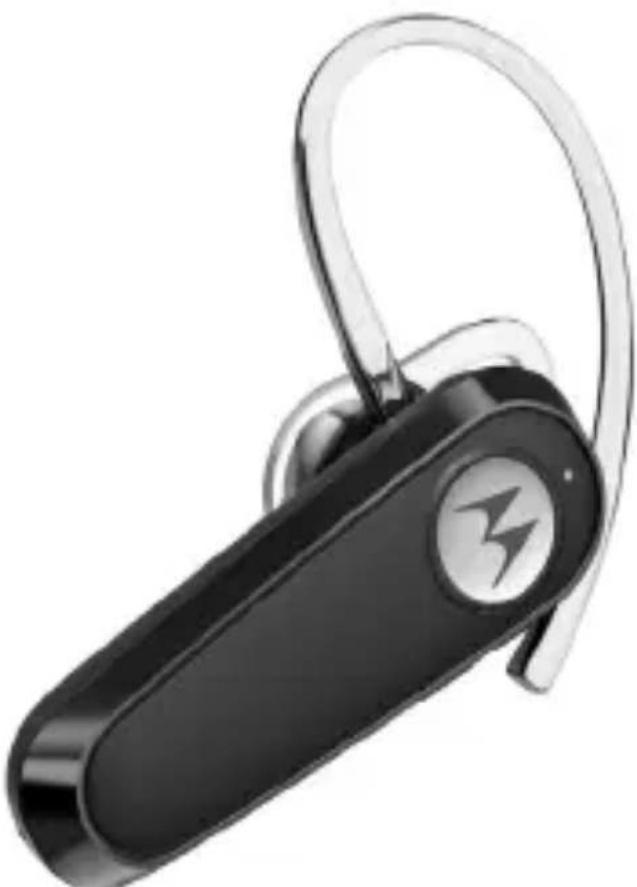
Quick Start Guide / Guía de inicio=rápido / Guía de inicio=rápido / Guide de démarriage rapide / Guida rapida / Schnellstartanleitung / Snelstartgids / Snabbstartsguide / Hurtigstart-guide / Skrócona instrukcja obsfugi / Rychly námod / Oðnyóç Γρήγορης EKKÍVŋθης
English 3
Espanol 6
Portugues. 9
François. 12
Italiano 15
Deutsch 18
Nederlands 21
Svenska 24
Dansk 27
Polski 30
Česky 33
Eλληνικα 36
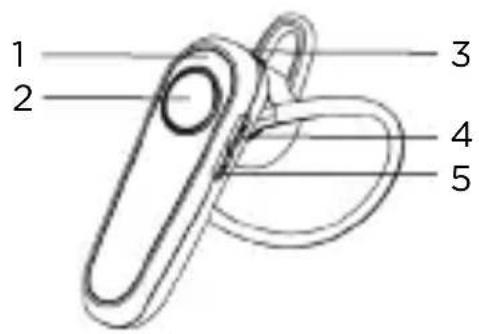
1. At a glance

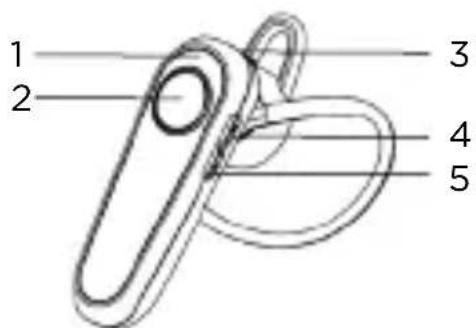
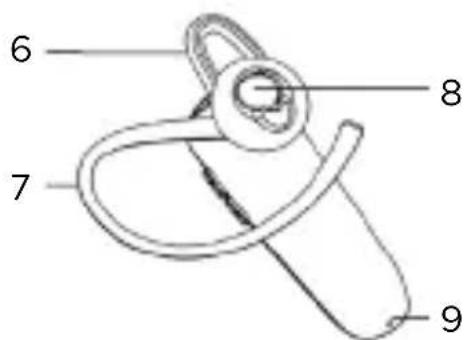
-
LED status indicator
-
Eartip
-
Multi-function button (MFB)
-
Ear hook
-
USB-C charging port
-
Earpiece
-
Volume up
-
Microphone
-
Volume down
Turn on/off headset
- Turn on, press and hold MFB for 2s
- Turn off, press and hold MFB for 6s
2. Charge
Plug the Type C cable into the headset's USB-C charging port and connect to the Type C power source.
Note
Fully charge before use. To protect battery life, it is recommended to fully charge it at least every 3 months. Do not expose HK126 to liquids or water while charging.
3. Connect and go
- Turn on Bluetooth on your device.
- Turn on your headset.
- Follow the voice prompt's instruction.
- Select HK126 from the Bluetooth menu of your device.
4. Connect to the second device
Connect your headset with two devices at the same time:
-
Before pairing the second device, turn off Bluetooth on the previously paired device. Then pair the second device following the 'Connect and go' section.
-
Once paired to the second device, your headset is ready to connect with either or both devices when it is turned on.
5. Basic operation
| To: Buttons | |
| Answer/end a call MFB | |
| Reject a call MFB x 2s | |
| Mute/unmute | Mute: Volume down x 2s Unmute: Volume up x 2s |
| Change volume Volume | up/down |
| Last track | Volume down x 2s (when music playing on headset) |
| Next track Volume up x 2s | |
| Play/pause MFB | |
| Activate voice assistant | MFB x 2s |
| Reset MFB and volume down x 6s | |
| 3-way call Buttons | |
| Pick up calls/put calls on hold/switch calls | MFB |
| Reject calls/continue current call | MFB x 2s |
| End current call/resume on hold calls | MFB x 2 |
Note
Some features are phone and network dependent.
6. LED status indicators
| Power on Flashes blue x 1s |
| Power off Flashes red x 2s |
| Pairing Flashes red and blue alternately |
| Standby Flashes blue every 5s |
| Charging Steady red |
| Fully charged Steady blue |
| Low battery level Flashes red every 5s |
7. Factory reset
Turn on your headset, press and hold the MFB and the volume down buttons for 6s, the LED flashes purple for 1s.
For a full explanation of all features, please download the user guide from motorolasound.com.
1. Resumenrado
3. Conectary marchar
Frequency band: 2.402 to 2.480GHz
Maximum RF power: < 9dBm
- USB type C charging: DC5V, 3A maximum
CE Declaration
This product is in compliance with the essential requirements and other relevant provisions of the RED Directive 2014/53/EU.
UK Declaration of Conformity
Hereby, MZGW declares that this product is in compliance with the requirements for UKCA marking.
The CE and UK Declaration of Conformity can be obtained at motorolasound.com.
Imported and Distributed by:
Meizhou Guo Wei Electronics (UK) Co., Ltd., 207 Regent Street, Suite 8, Third Floor, London, W1B 3HH. UK
Meizhou Guo Wei Electronics (EU) Co., Ltd., 51 Bracken Road, Carlisle Offices, Dublin 18, D18 CV48. Ireland
Contact email address: support@motorolasound.com
Manufactured, distributed or sold by Meizhou Guo Wei Electronics Co. LTD., official licensee for this product. MOTOROLA and the Stylized M Logo are trademarks or registered trademarks of Motorola Trademark Holdings, LLC. and are used under license. All other trademarks are the property of their respective owners. © 2024 Motorola Mobility LLC. All rights reserved.
Version 2.2 (EU)