AM-ST23BF - TV Stand LG - Free user manual and instructions
Find the device manual for free AM-ST23BF LG in PDF.



User questions about AM-ST23BF LG
0 question about this device. Answer the ones you know or ask your own.
Ask a new question about this device
Download the instructions for your TV Stand in PDF format for free! Find your manual AM-ST23BF - LG and take your electronic device back in hand. On this page are published all the documents necessary for the use of your device. AM-ST23BF by LG.
USER MANUAL AM-ST23BF LG
Please read this manual carefully before operating your set and retain it for future reference.
AM-ST23BF
* Image shown may differ from your product.
Safety instructions

This symbol is intended to alert the user to the presence of important operating and maintenance (servicing) instructions in the literature accompanying the appliance.
Please read these safety precautions carefully before using the product.

- When lifting or moving the product, at least two people are required due to the heavy weight of the product.
- The product may fall down, causing a malfunction or injury.
• Do not let children hang on or climb onto the product.
- The product may fall down, causing an injury or even death.
- Do not install the product in a place which is unstable or vibrating or a place where the product is not completely supported such as a shaky shelf or a tilted place.
- The product may fall down or overturn, causing an injury or malfunction.
• Put the product on a flat and firm floor.
- The product may fall and cause an injury.
- When moving or handling a product assembled with the Stand, be cautious about damaging the exterior of the product.
- When there is a stain or fingerprint left on the surface, wipe it off gently.
- When removing a stain, do not use excessive force. Wiping with excessive force may cause scratches or discoloration on the product.
Assembling and Preparing
Accessories
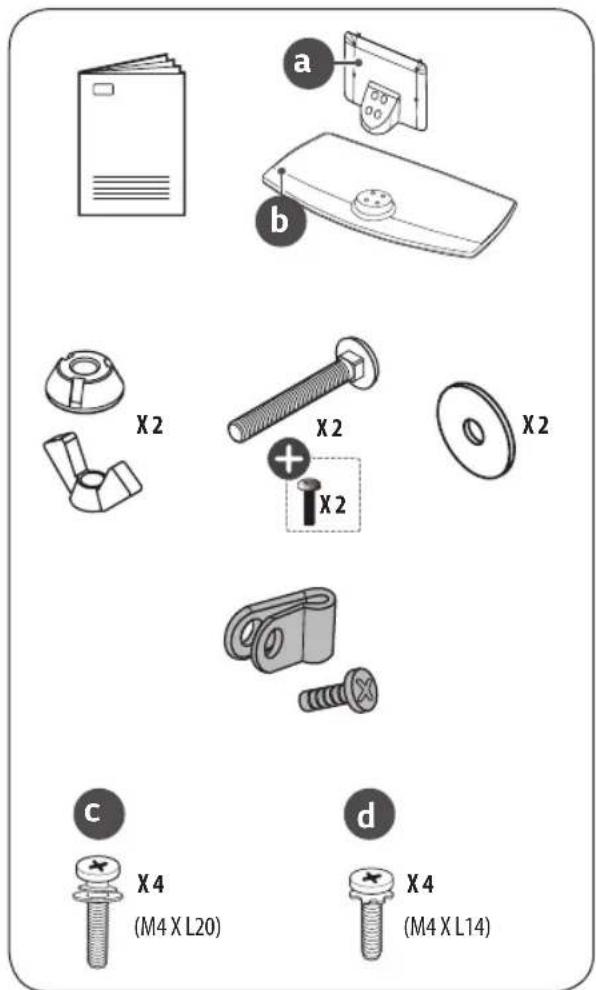
text_image
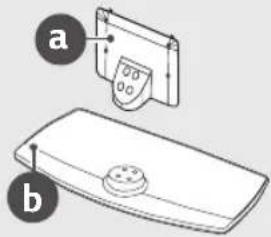
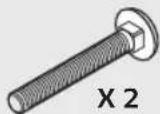
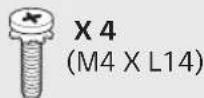
a b X2 X2 X2 X2 c X4 (M4 X L20) d X4 (M4 X L14)
Depending on country
How to Assemble the Stand

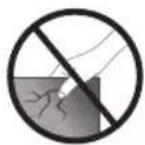
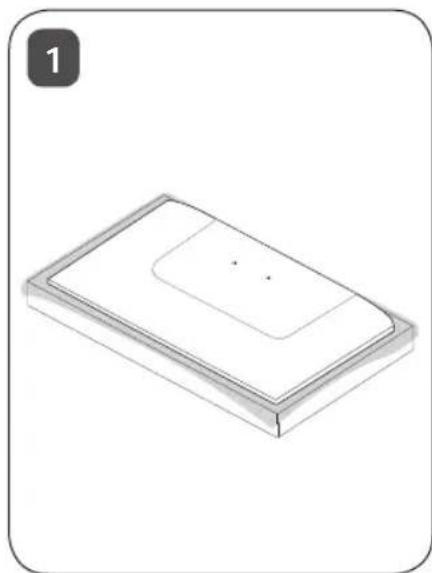
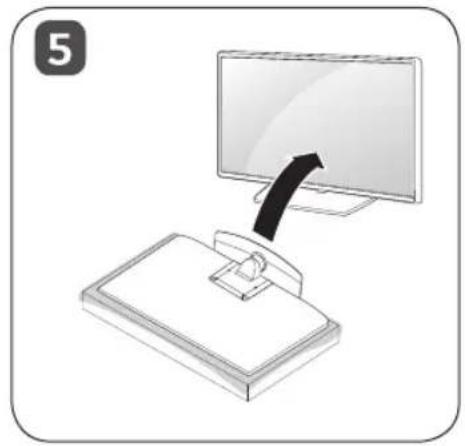
- When assembling the stand, put the product on a table or a flat floor with its screen facing downward. Here, first put a soft and fluffy cloth on the place, and then put the product on top of it to prevent the screen from being damaged.
- When assembling the stand, check if the screws are completely fastened. (If they are not completely fastened, the product may lean forward after being installed.) Avoid fastening the screws with excessive force because otherwise the joint part of the screws may be worn out, and the screws might come off.
- When assembling the product, do not use foreign substances (oil, lubricant, etc.) on the screws.
- It may cause damage to the product.
- Before installing a wall mount support, disassemble the Stand by conducting the method to assemble the stand in a reverse order.
natural_image
Isometric view of a rectangular electronic component with a recessed top and internal layer (no text or symbols)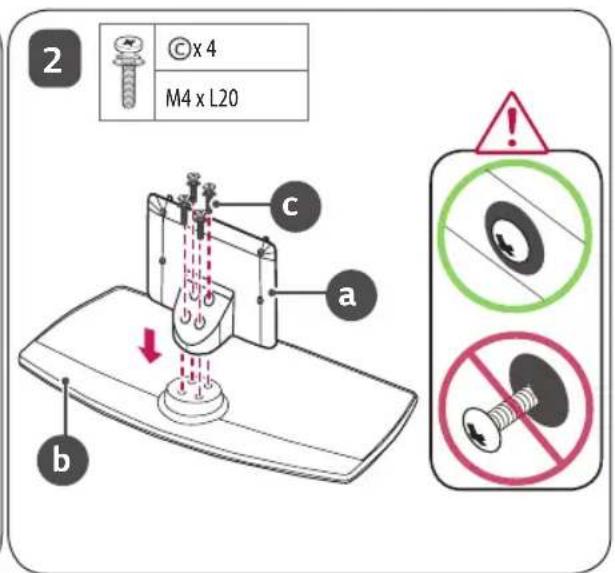
text_image
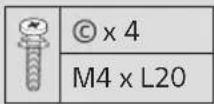
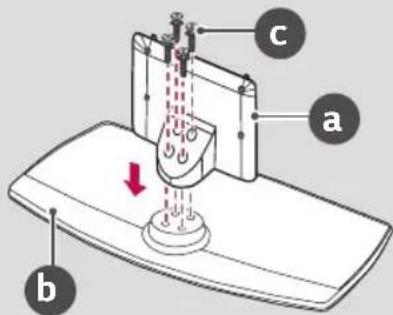
2 © x 4 M4 x L20 a b c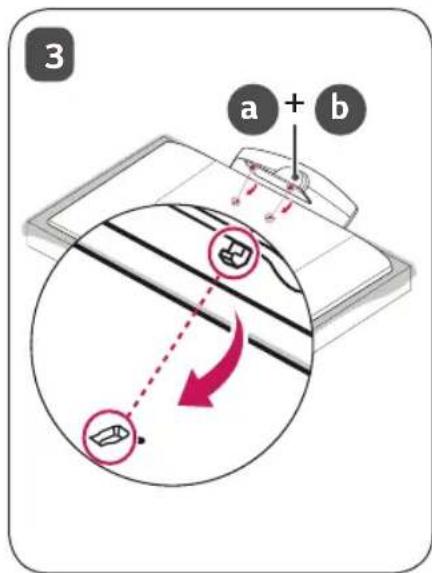
text_image
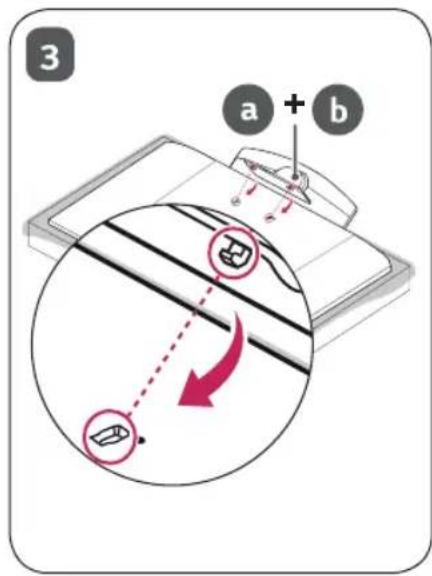
3 a + b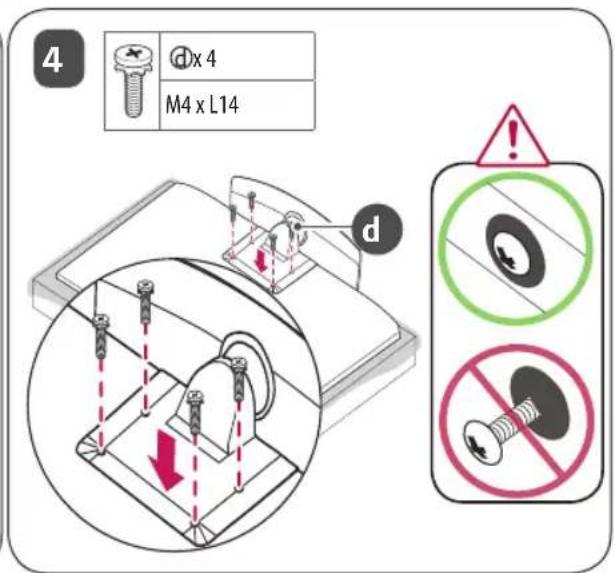
text_image
4 d x 4 M4 x L14 d
natural_image
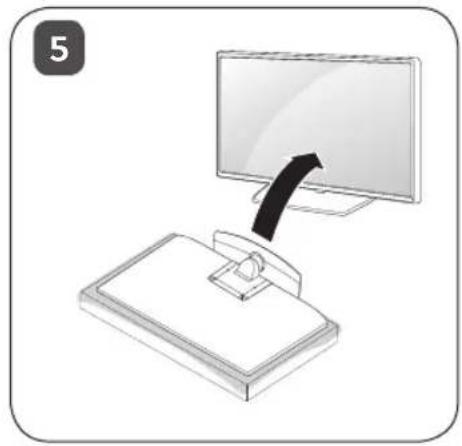
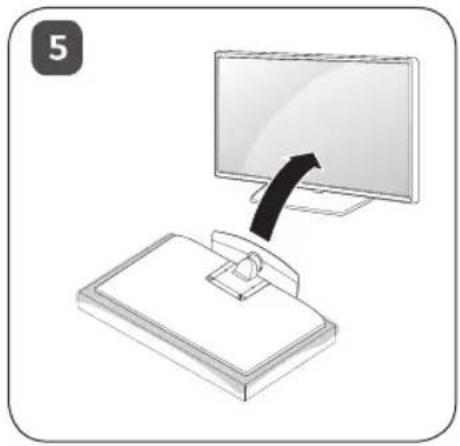
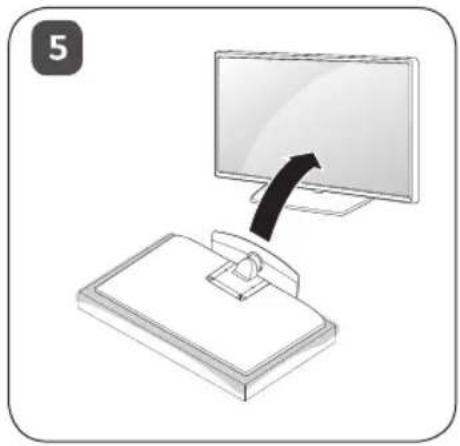
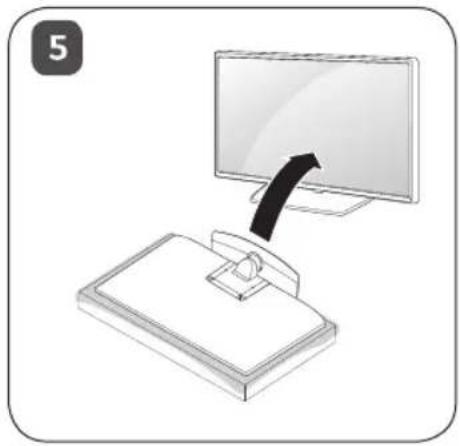
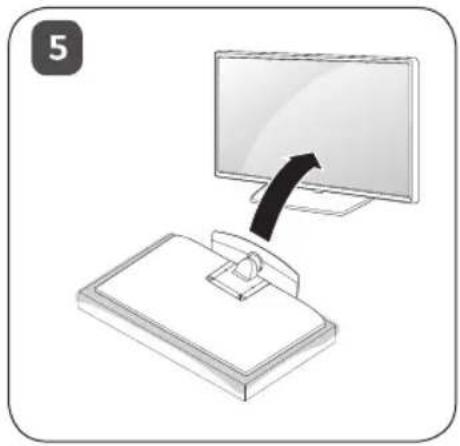
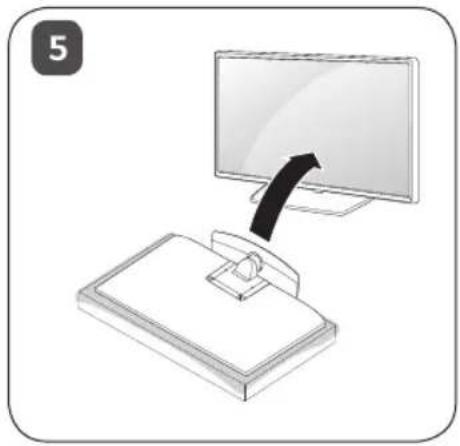
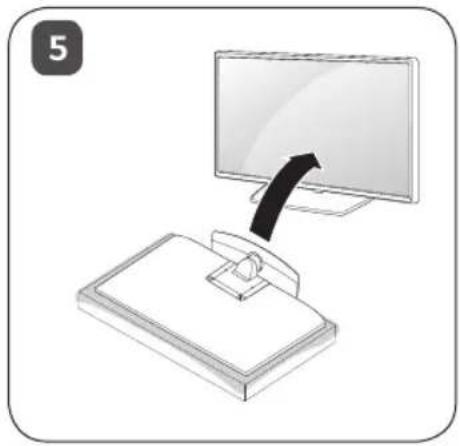
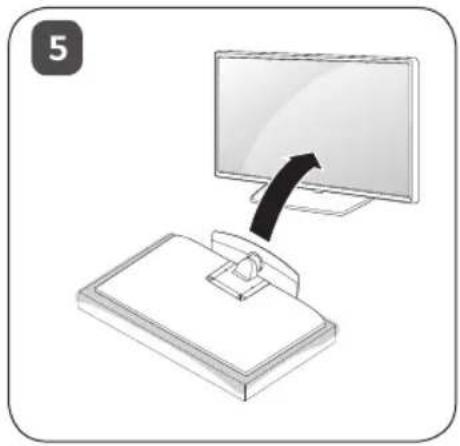
Illustration of a computer monitor with an arrow pointing to it, mounted on a stand (no text or symbols)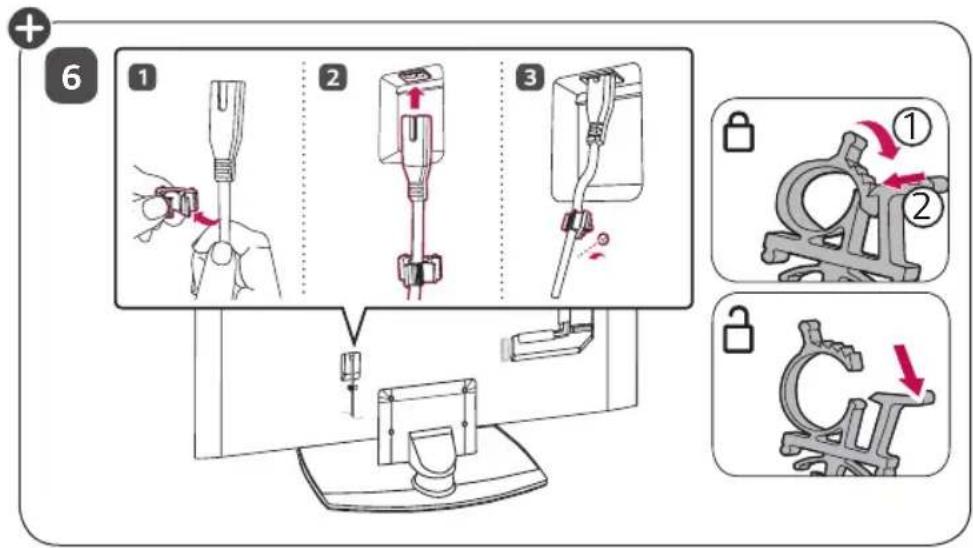
text_image
Diagram illustrating a medical procedure for inserting a device into a device, with numbered steps and corresponding mechanical diagrams.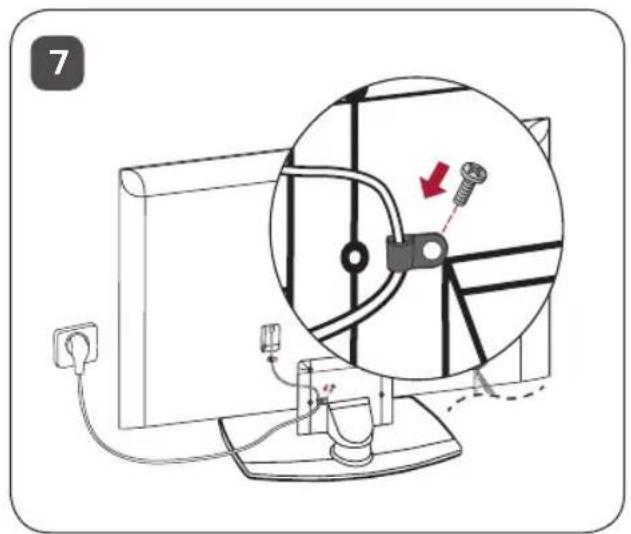
text_image
7
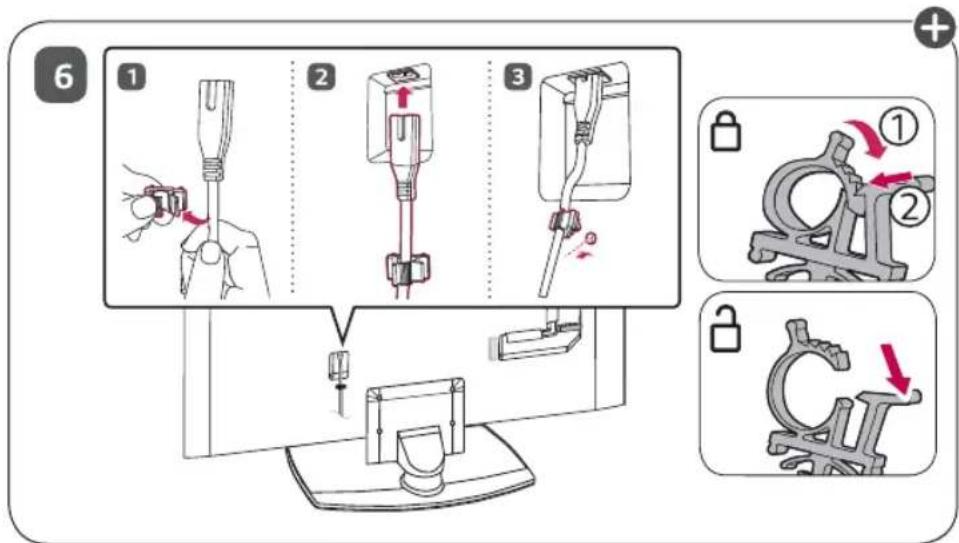
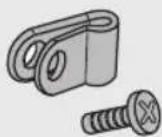
The cover and cable holder are provided as TV accessories. (Depending on Model.)
Mounting on a Table
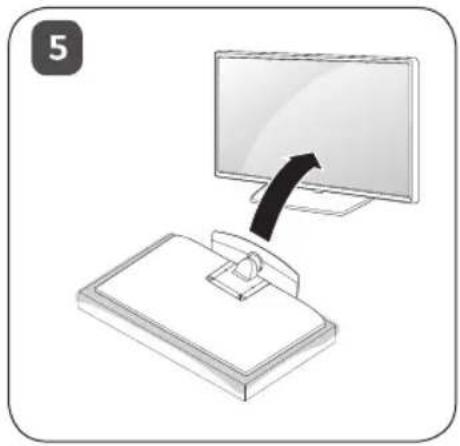
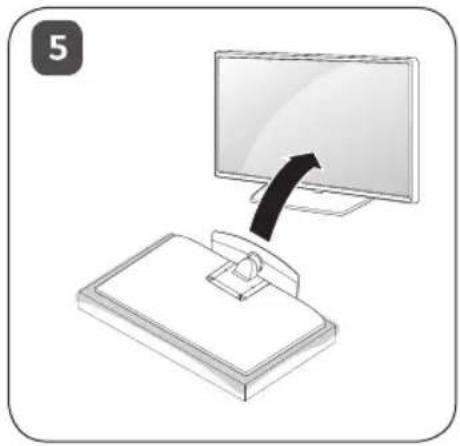
1 Lift and tilt the TV into its upright position on a table.
- Leave a 10 cm (4 inches) (minimum) space from the wall for proper ventilation.
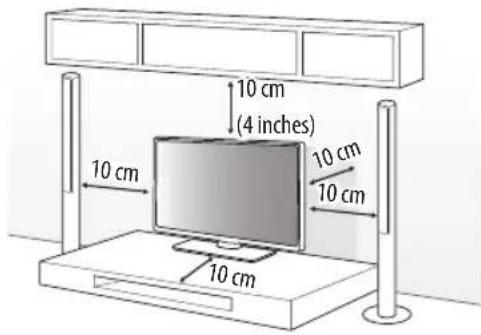
text_image
10 cm (4 inches) 10 cm 10 cm 10 cm 10 cm2 Connect the power cord to a wall outlet.

- Do not apply foreign substances (oils, lubricants, etc.) to the screw parts when assembling the product. (Doing so may damage the product.)
- If you install the TV on a stand, you need to take actions to prevent the product from overturning. Otherwise, the product may fall over, which may cause injury.
- Do not use any unapproved items to ensure the safety and product life span.
- Any damage or injuries caused by using unapproved items are not covered by the manufacturer's warranty.
- When assembling the stand, ensure that all of the provided screws are attached. If the screws are not fully tightened, the product may tilt or tip over, resulting in damage. Tightening the screws with excessive force may cause them to come off due to abrasion of the screw joint.
- Only use the authorized stand and wall mounting bracket made specifically for LG products.
- Pursuant to Consumer Protection Law, LG Electronics will not be held responsible for any product malfunction, material damage or injury caused by using products not authorized by LG Electronics.
Attaching the TV to a Desk
(Depending on model)
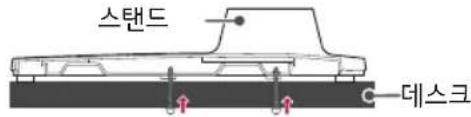
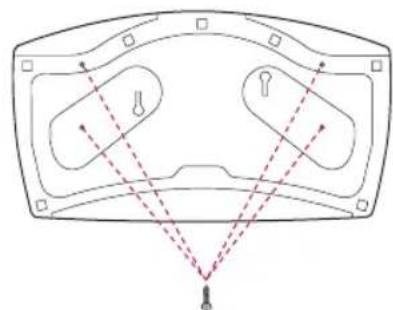
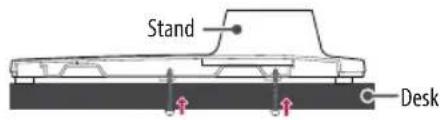
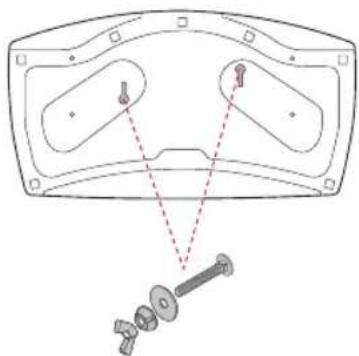
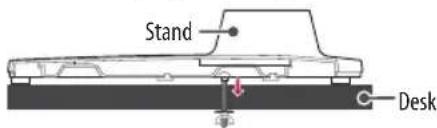
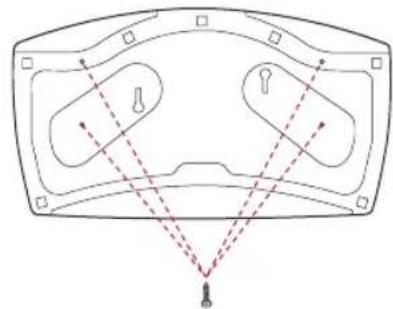
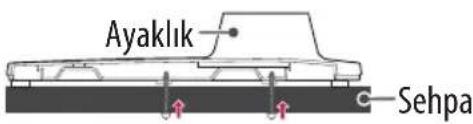
The TV should be attached to a desk so it cannot be pulled in a forward/backward direction, potentially causing injury or damaging the product.
A type
natural_image
Diagram of a device with two lenses and dashed lines indicating light paths (no text or symbols)4-Screws
(Not supplied with TV)
text_image
Stand Desk- Screw: M5 x L (*L: Table depth + 8\~10 mm (0.31\~0.39 inches)) ex) Table depth: 15 mm (0.5 inches), Screw: M5 x L25
B type
natural_image
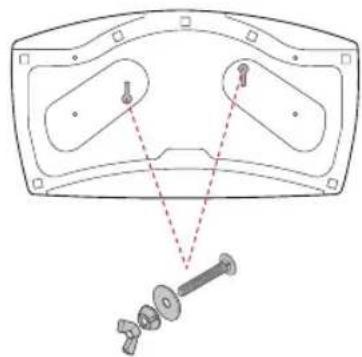
Technical diagram of a mechanical assembly with no visible text or symbols2-Screws for Stand Fixing,
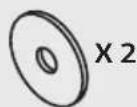
2-Washers for Stand Fixing,
2-Nuts for Stand Fixing
(Supplied with TV)
text_image
Stand DeskSecuring the TV to a Wall
text_image
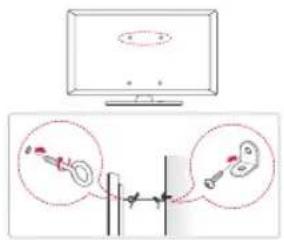
Diagram showing a monitor with an elliptical shape and two close-up insets of a mechanical component, likely illustrating a mechanical or electrical setup.1 Insert and tighten the eye-bolts, or TV brackets and bolts on the back of the TV.
- If there are bolts inserted at the eye-bolts position, remove the bolts first.
2 Mount the wall brackets with the bolts to the wall.
Match the location of the wall bracket and the eye-bolts on the rear of the TV.
3 Connect the eye-bolts and wall brackets tightly with a sturdy rope.
Make sure to keep the rope horizontal with the flat surface.
- Use a platform or cabinet that is strong and large enough to support the TV securely.
- Brackets, bolts and ropes are not provided. You can obtain additional accessories from your local dealer.
Adjusting the Angle of the TV to suit view
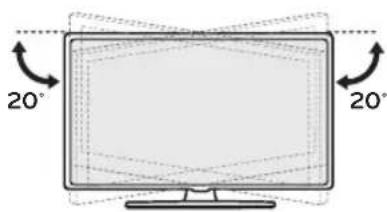
Swivel 20 degrees to the left or right and adjust the angle of the TV to suit your view.
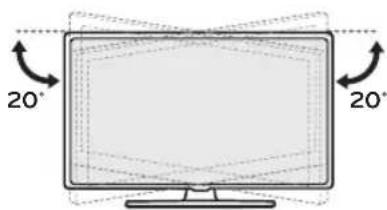
text_image
20° 20°
- When adjusting the angle of the product, watch out for your fingers.
- Personal injury may occur if hands or fingers are pinched. If the product is tilted too much, it may fall, causing damage or injury.
Specifications
| AM-ST23BF | ||
| Model | 43UM767H50UM767H55UM767H | |
| Width x Depth x Height | (mm) 570 | x 303 x 240 |
| (inches) 22.4 | x 11.9 x 9.4 | |
| Weight | (kg) 3.26 | |
| (lbs) 7.18 | ||

text_image
LG Life's GoodThe model and serial number of the product are located on the back and on one side of the product. Record them below in case you ever need service.
Model
Serial no.
MANUEL D'UTILISATION
Support
Comment assembler le support

natural_image
Isometric illustration of a rectangular electronic component with a recessed top and internal layer (no text or symbols)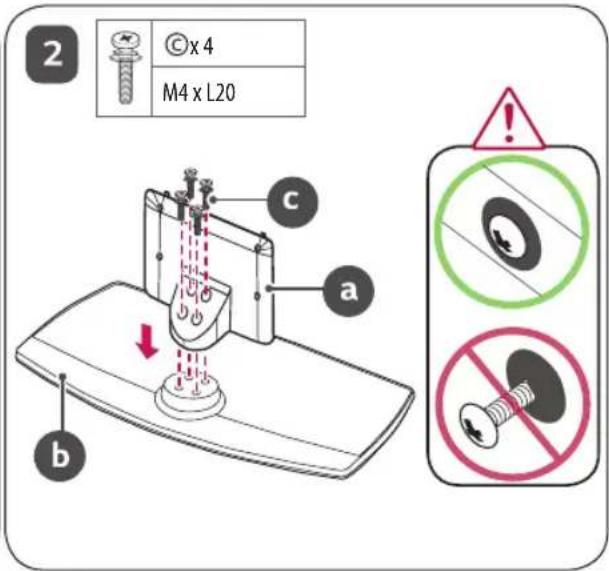
text_image
2 © x 4 M4 x L20 a b c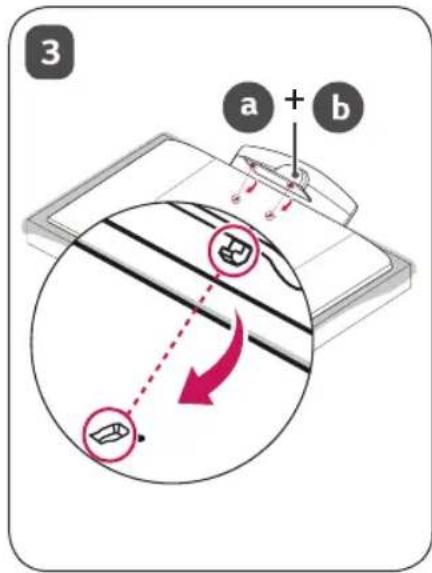
text_image
3 a + b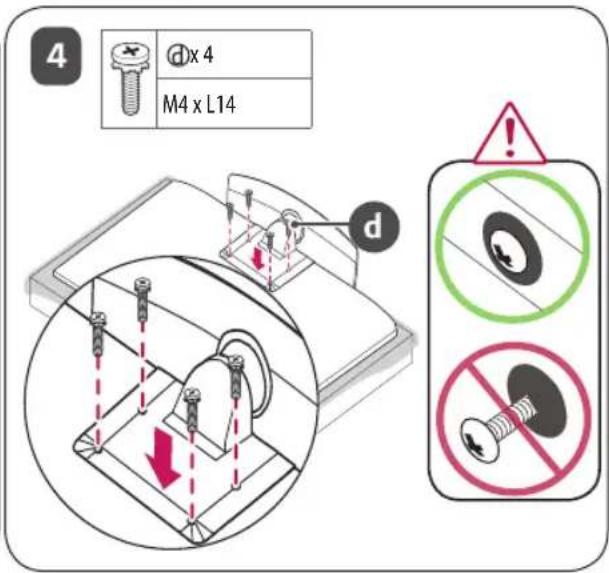
text_image
4 d x 4 M4 x L14 d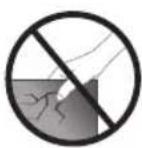
natural_image
Illustration of a computer monitor with an arrow pointing to it, placed on a stand (no text or symbols present)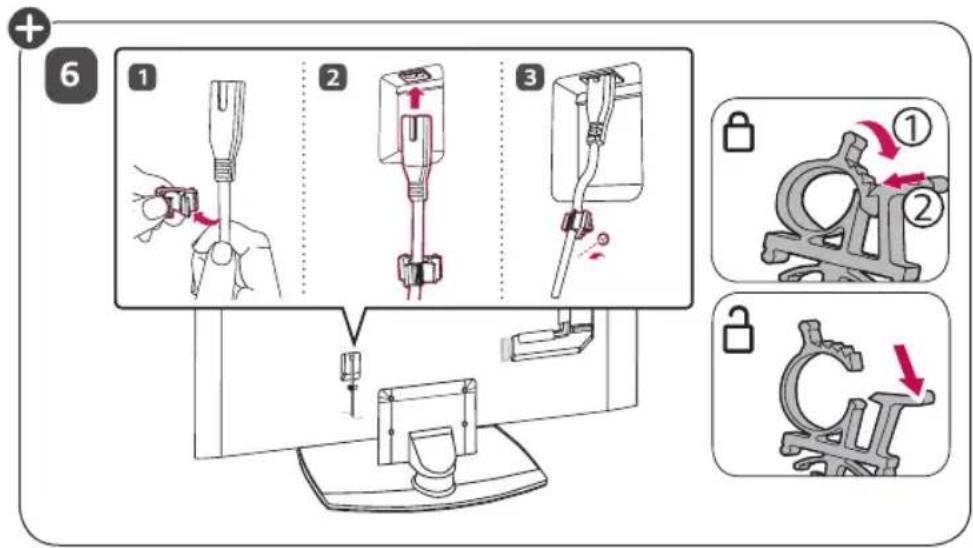
text_image
Diagram illustrating a mechanical assembly process with numbered steps and corresponding close-ups of the component being locked.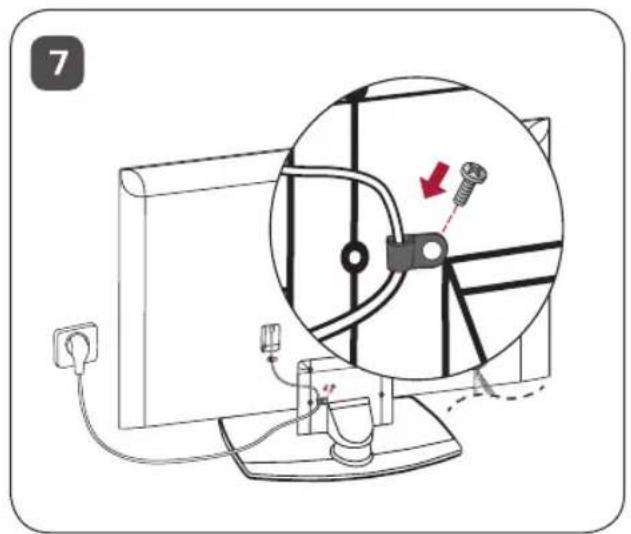
text_image
7
natural_image
Technical line drawing of a mechanical component with dashed alignment lines and mounting holes (no text or symbols)4 vis
text_image
Support Bureautext_image
Technical diagram showing a mechanical assembly with labeled parts and a disassembled shaft component.text_image
Support Bureautext_image
Diagram showing a monitor with an elliptical shape and two close-up insets of mechanical components, likely illustrating a mechanical or electrical setup.text_image
LG Life's Goodnatural_image
Isometric illustration of a rectangular electronic component with a recessed top and two small dots on the side (no text or symbols)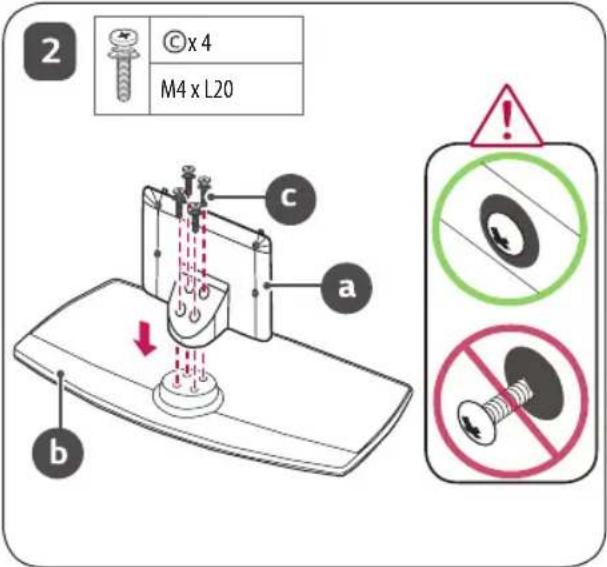
text_image
2 © x 4 M4 x L20 a b c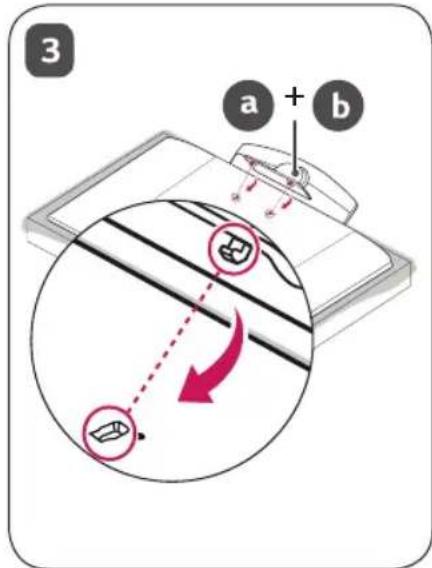
text_image
3 a + b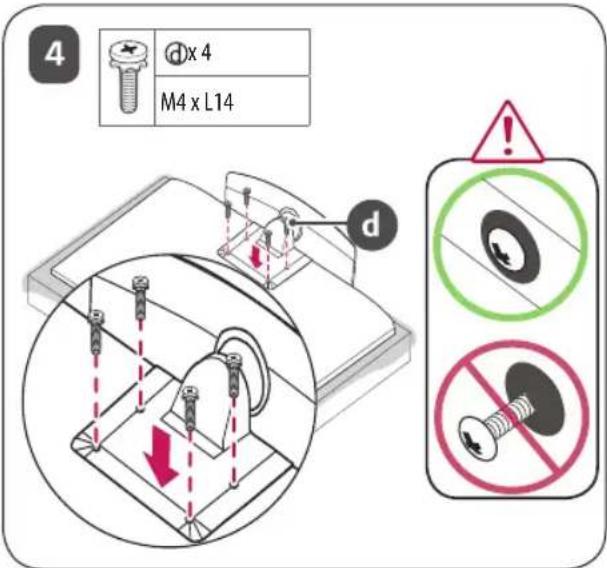
text_image
4 d x 4 M4 x L14 d
natural_image
Illustration of a computer monitor with an arrow pointing to it, placed on a stand (no text or symbols present)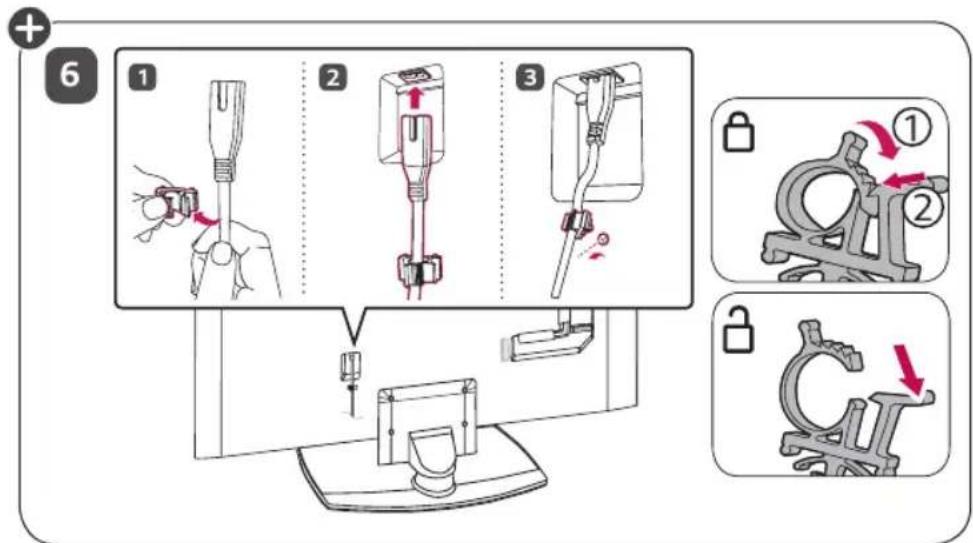
text_image
Diagram illustrating a medical procedure for inserting a device into a device, with numbered steps and corresponding mechanical diagrams.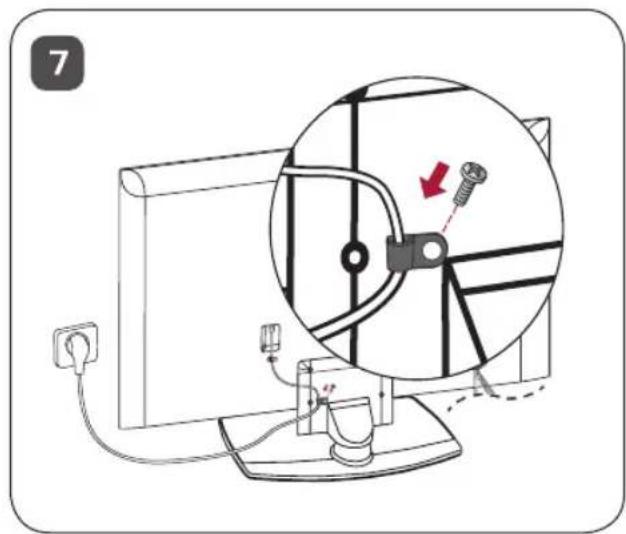
text_image
7
natural_image
Diagram of a vehicle's cross-section with dashed lines indicating measurement or alignment points (no text or labels)4 Schrauben
text_image
Technical diagram showing a mechanical assembly with labeled components and a dimension annotation '300'text_image
Diagram showing a monitor connected to a vertical line with two circular insets highlighting the components of the device.text_image
LG Life's Goodnatural_image
Isometric illustration of a rectangular electronic component with a recessed top and internal layer (no text or symbols)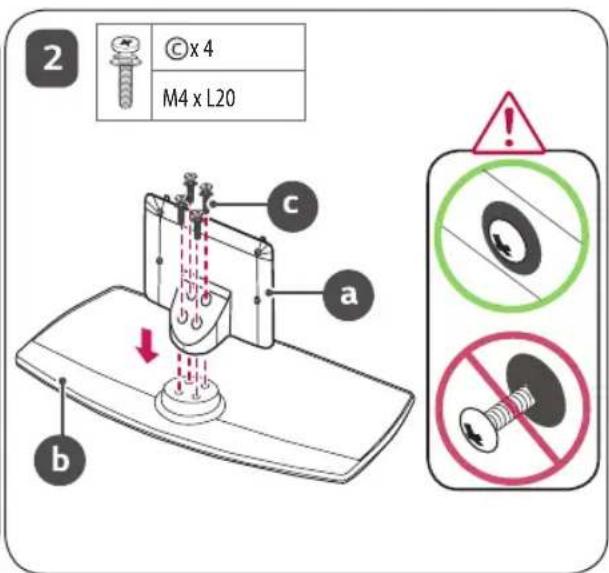
text_image
2 © x 4 M4 x L20 a b c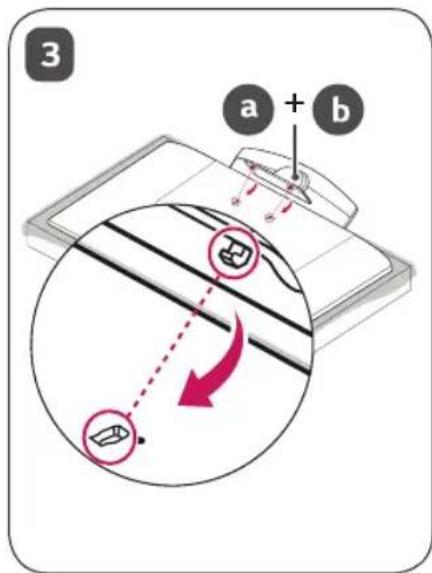
text_image
3 a + b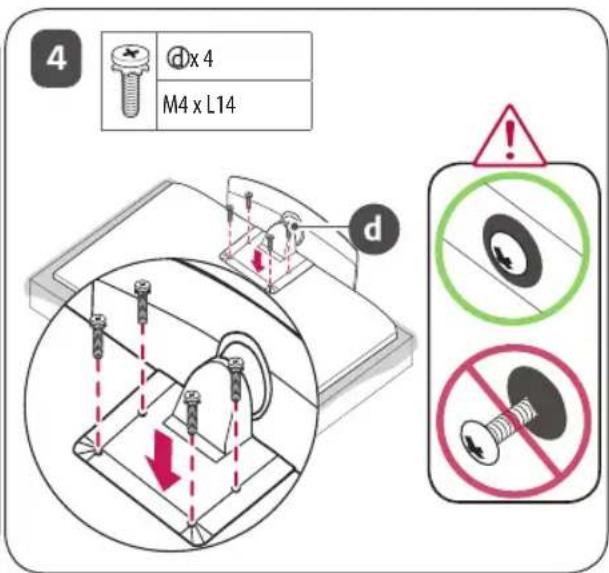
text_image
4 Dx 4 M4 x L14 d
natural_image
Illustration of a computer monitor with an arrow pointing to it, placed on a stand (no text or symbols present)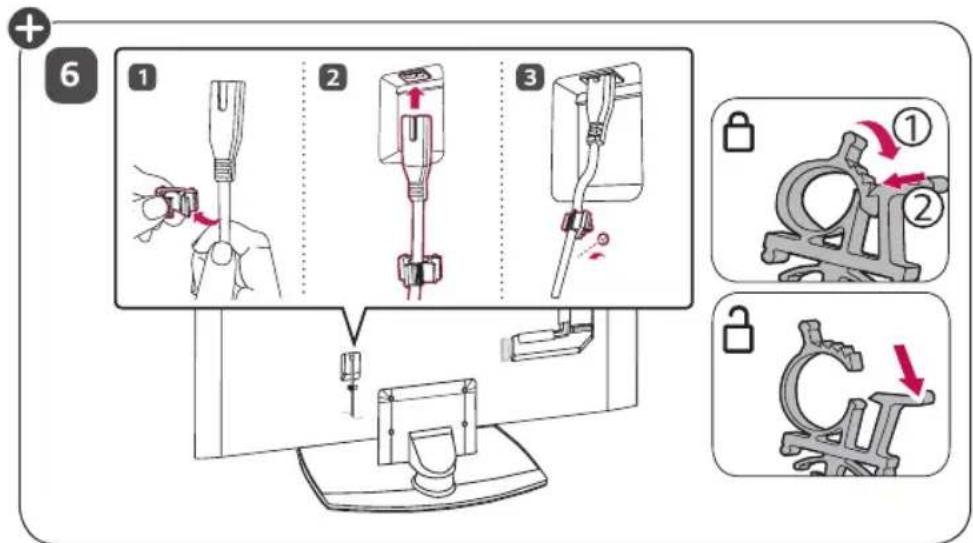
text_image
Diagram illustrating a medical procedure for inserting a device into a device, with numbered steps and corresponding mechanical diagrams.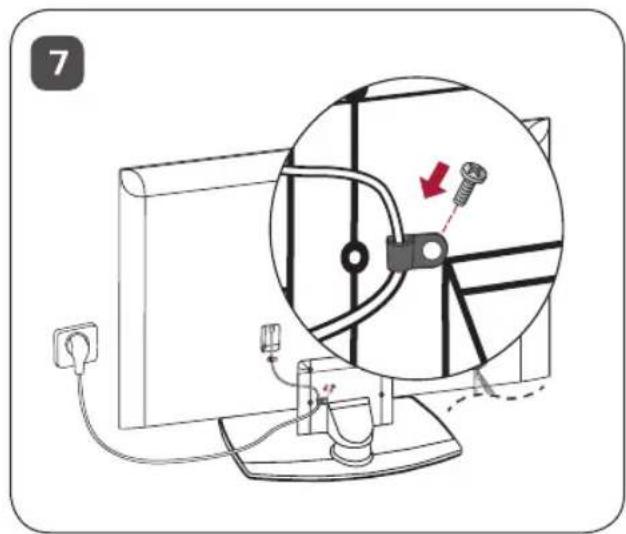
text_image
7
natural_image
Technical diagram of a mechanical assembly with two oval components and a separate bolted component (no text or labels)text_image
Diagram showing a monitor with an elliptical shape above and two close-up insets illustrating mechanical or electrical components.text_image
LG Life's Goodnatural_image
Isometric illustration of a rectangular electronic component with a recessed top and internal layer (no text or symbols)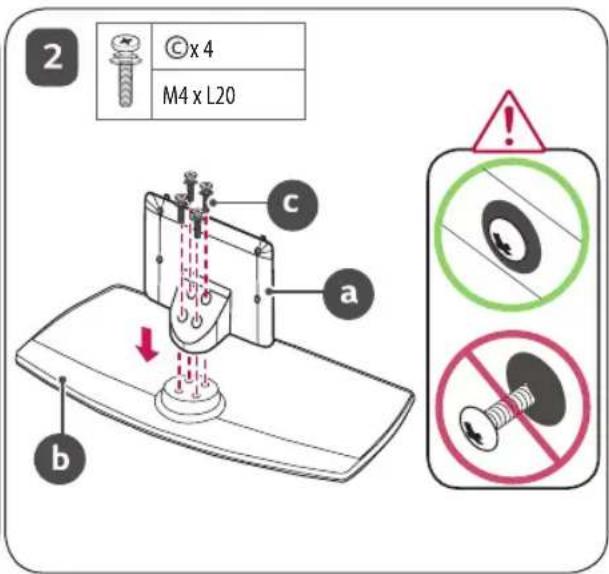
text_image
2 © x 4 M4 x L20 a b c(EUROPE)
ESPANOL
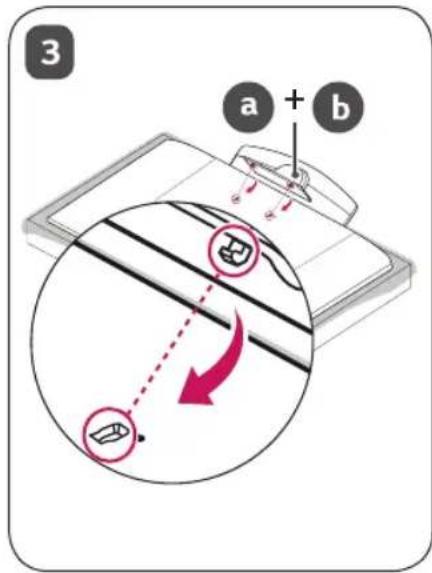
text_image
3 a + b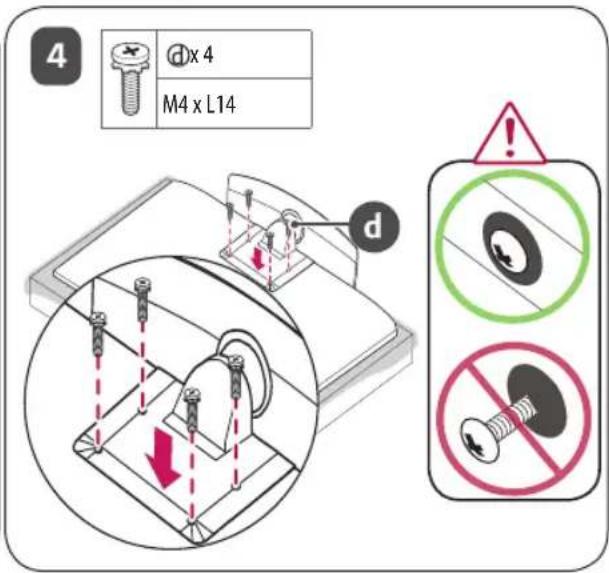
text_image
4 d x 4 M4 x L14 d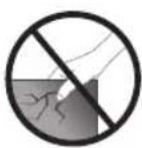
natural_image
Illustration of a computer monitor with an arrow pointing to it, placed on a stand (no text or symbols present)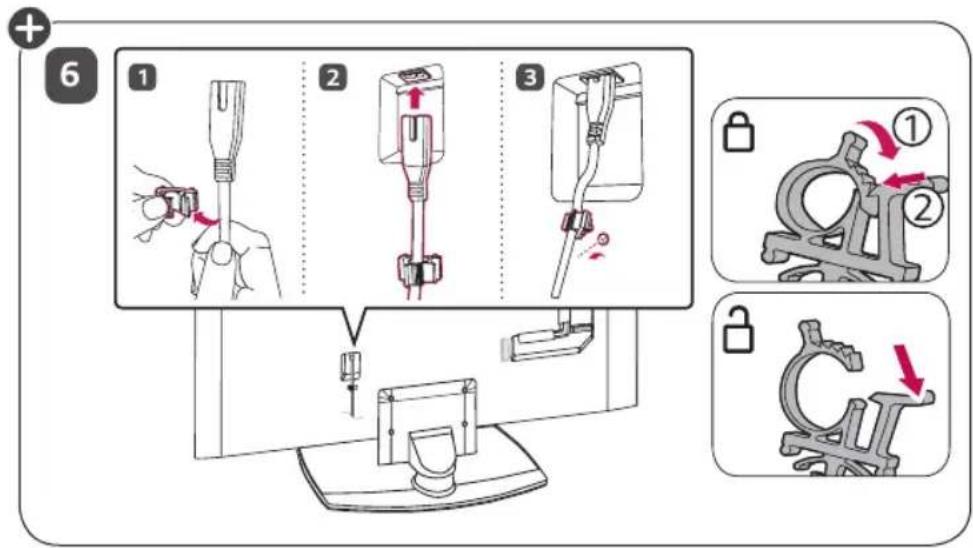
text_image
Diagram illustrating three-step assembly steps of a mechanical device, showing tool positioning and mounting details.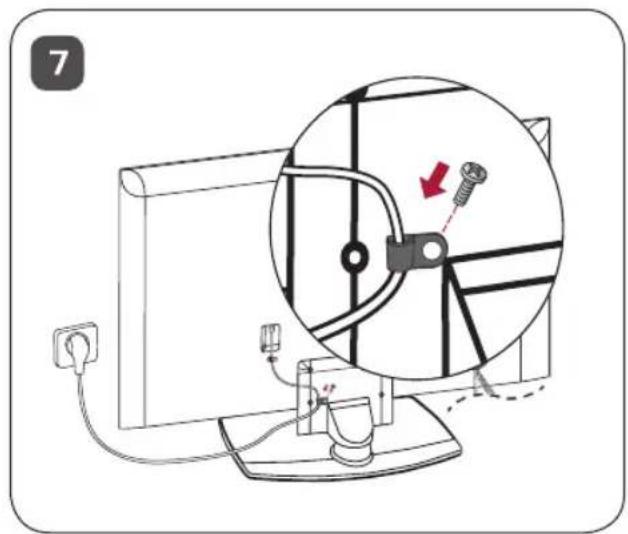
text_image
7
text_image
Technical diagram showing a mechanical assembly with labeled components and alignment indicatorstext_image
Diagram showing a computer monitor connected to a vertical line with two magnified insets highlighting mechanical components.natural_image
Isometric illustration of a rectangular electronic component with a recessed top and internal layer (no text or symbols)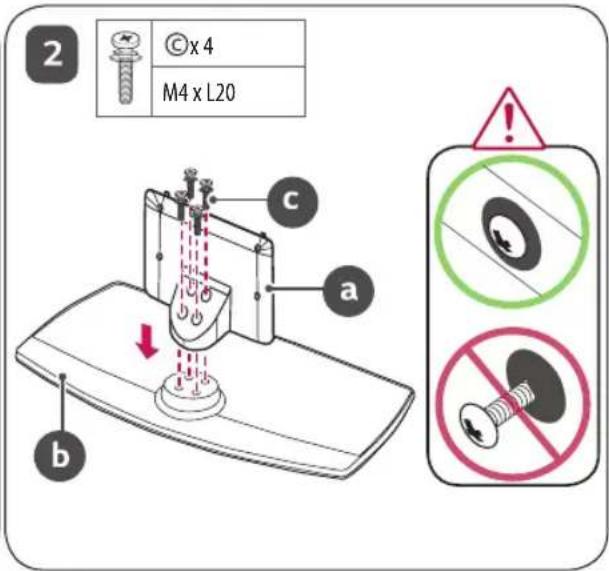
text_image
2 © x 4 M4 x L20 a b c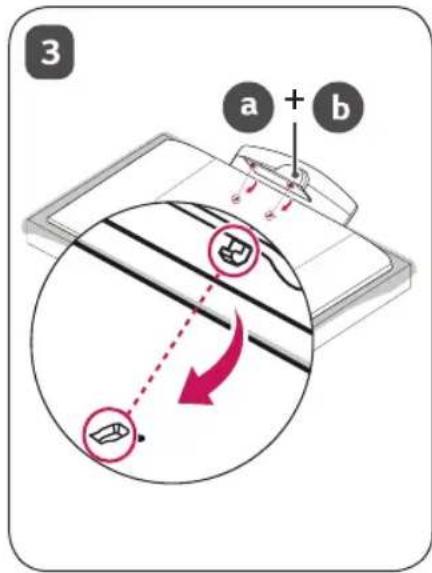
text_image
3 a + b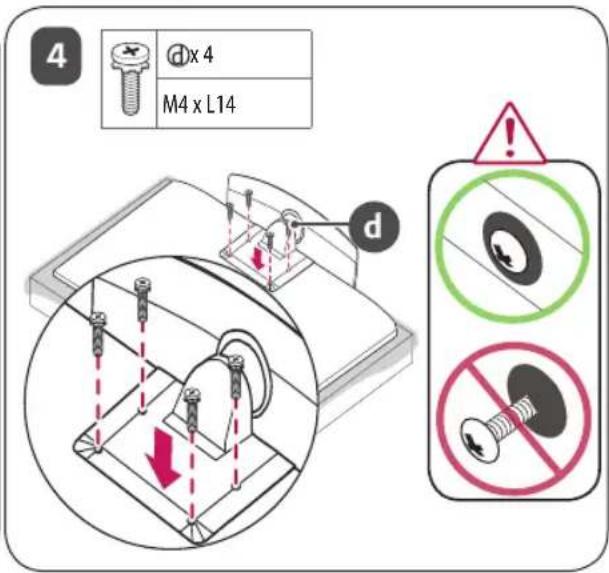
text_image
4 d x 4 M4 x L14 d
natural_image
Illustration of a computer monitor with an arrow pointing to it, placed on a stand (no text or symbols present)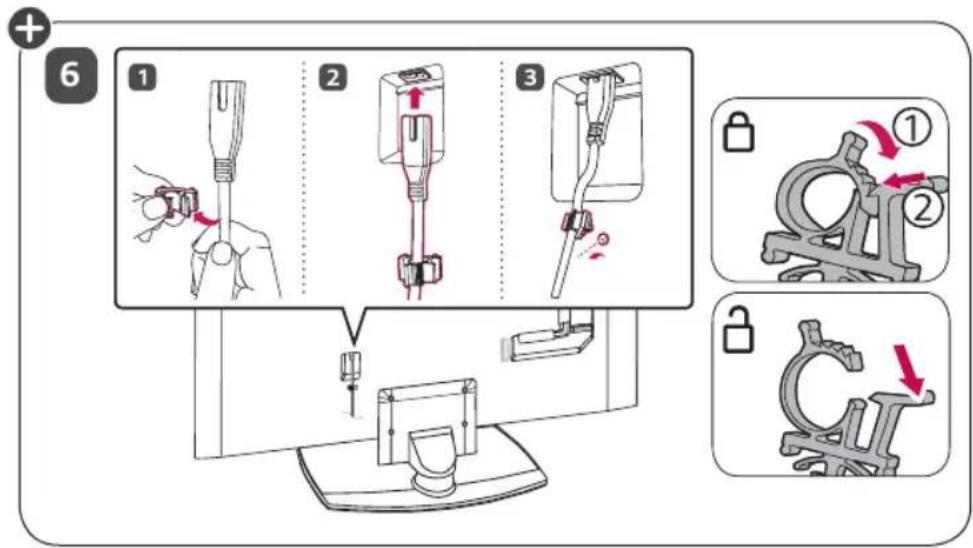
text_image
Diagram illustrating three-step assembly steps of a mechanical device, showing tool positioning and mounting details.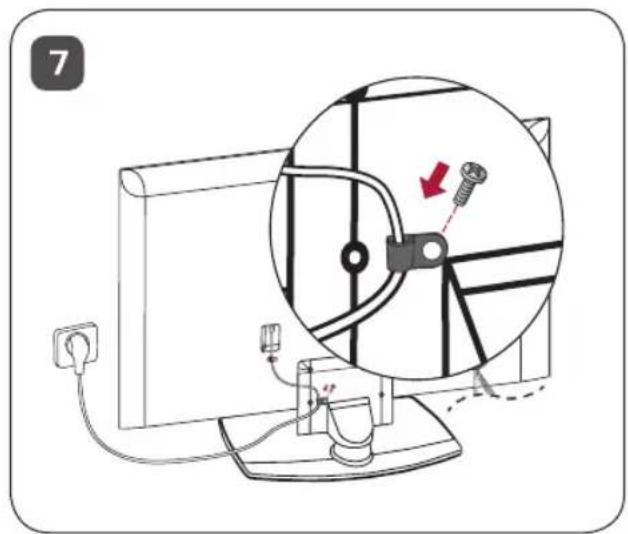
text_image
7
natural_image
Technical line drawing of a mechanical component with dashed red lines indicating alignment or projection (no text or symbols)4 vis
text_image
Technical diagram showing mechanical assembly with labeled components and alignment indicatorstext_image
Diagram showing a monitor with an elliptical shape and two close-up insets illustrating mechanical or electrical components.text_image
LG Life's Goodnatural_image
Isometric illustration of a rectangular electronic component with a recessed top layer (no text or symbols)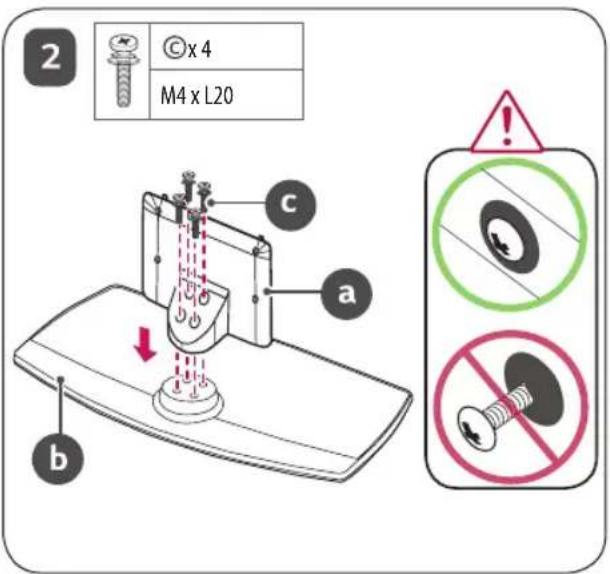
text_image
2 © x 4 M4 x L20 a b c
text_image
3 a + b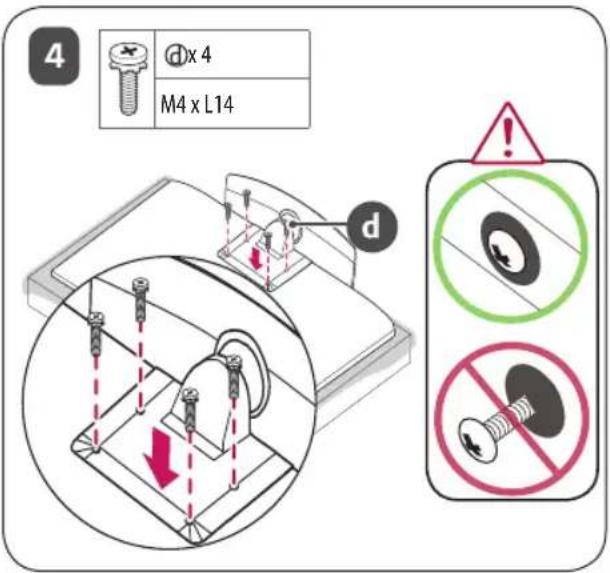
text_image
4 d x 4 M4 x L14 d
natural_image
Illustration of a computer monitor with an arrow pointing to it, placed on a stand (no text or symbols present)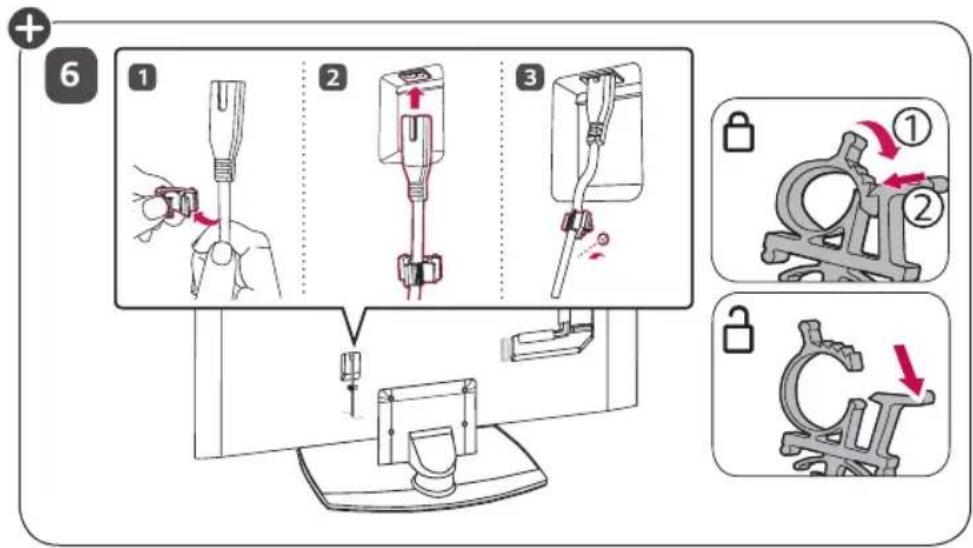
text_image
Diagram illustrating three-step assembly steps of a mechanical device, showing tool positioning and mounting details.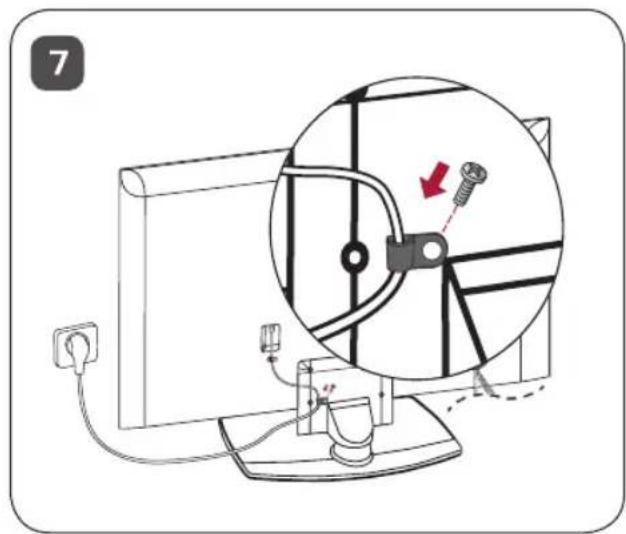
text_image
7
natural_image
Technical line drawing of a mechanical component with dashed alignment lines and mounting holes (no text or symbols)4-Tornillos
natural_image
Technical line drawing of a mechanical assembly with no visible text or symbolstext_image
Diagram showing a monitor with an elliptical shape and two close-up insets of a mechanical or electrical component, likely illustrating a physical or engineering concept.text_image
LG Life's Goodnatural_image
Isometric view of a rectangular electronic component with a recessed top and internal layer (no text or symbols)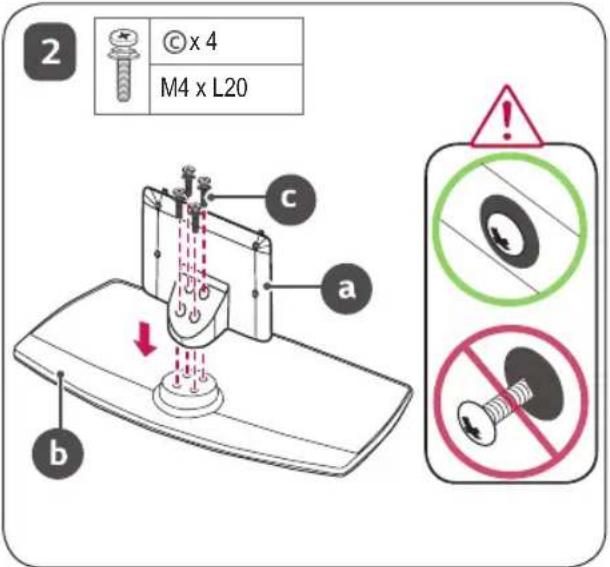
text_image
2 © x 4 M4 x L20 a b c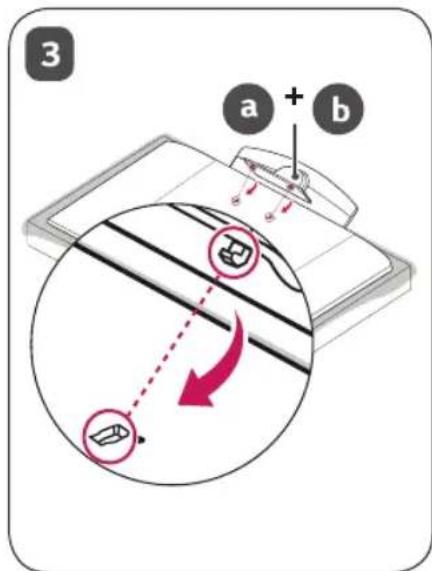
text_image
3 a + b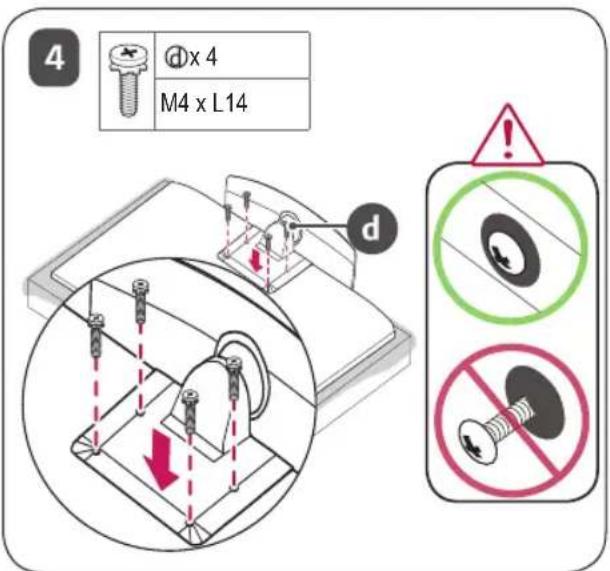
text_image
4 d x 4 M4 x L14 d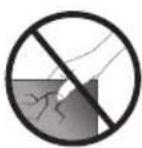
natural_image
Illustration of a computer monitor with an attached clip, showing no text or symbols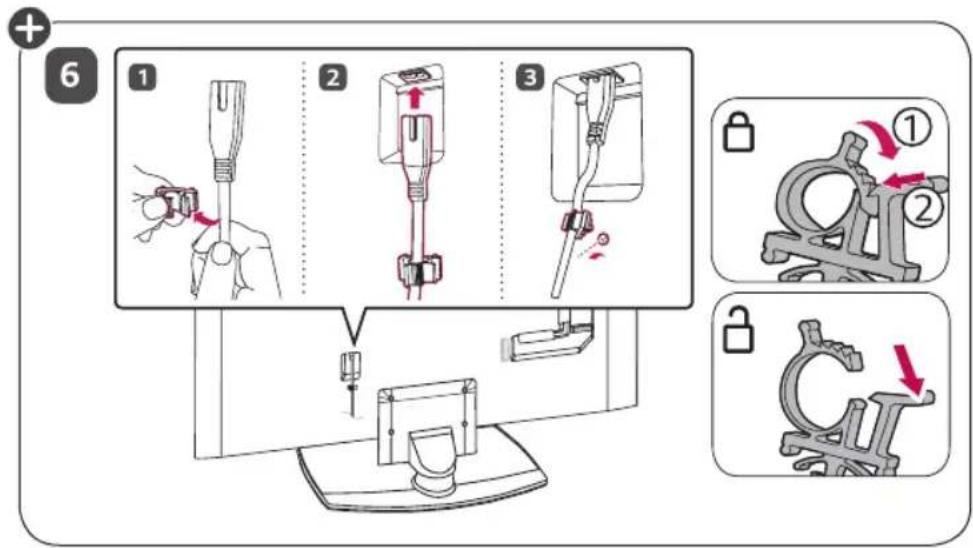
text_image
Diagram illustrating three-step assembly steps of a mechanical device, showing tool positioning and lock mechanism with numbered instructions.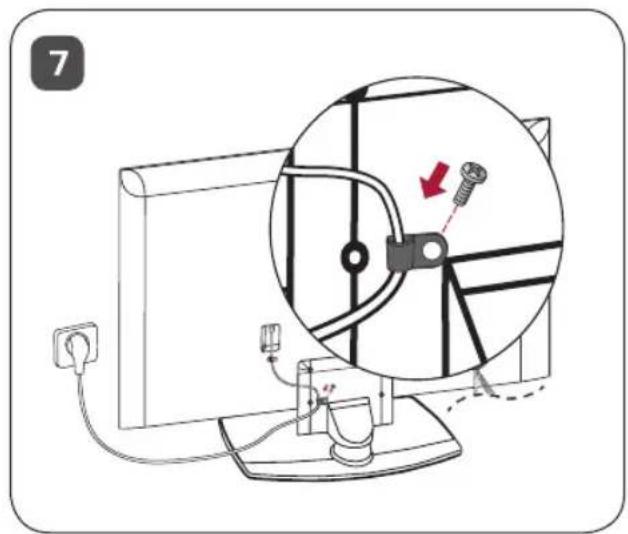
text_image
7
natural_image
Technical line drawing of a mechanical component with dashed lines indicating alignment or projection (no text or symbols)4 винта
natural_image
Technical diagram of a mechanical assembly with two components and a separate bolt (no text or labels)text_image
Diagram showing a monitor connected to a vertical line with two circular insets highlighting specific points of interest.text_image
LG Life's Goodnatural_image
Isometric view of a rectangular electronic component with a recessed top and base, labeled with number 1 (no text or symbols on the object itself)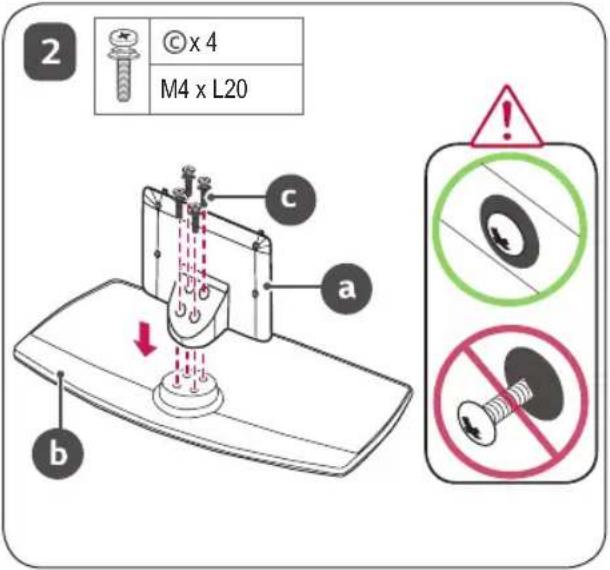
text_image
2 © x 4 M4 x L20 a b c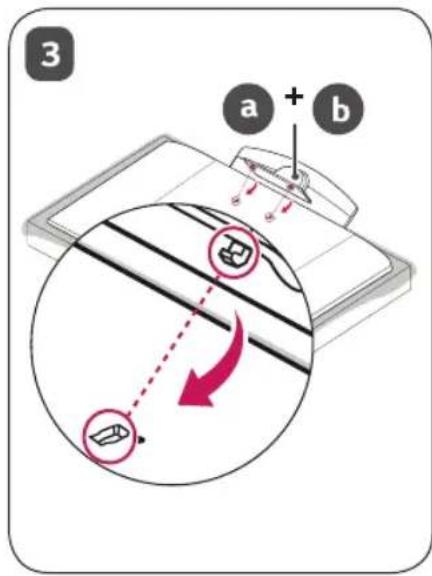
text_image
3 a + b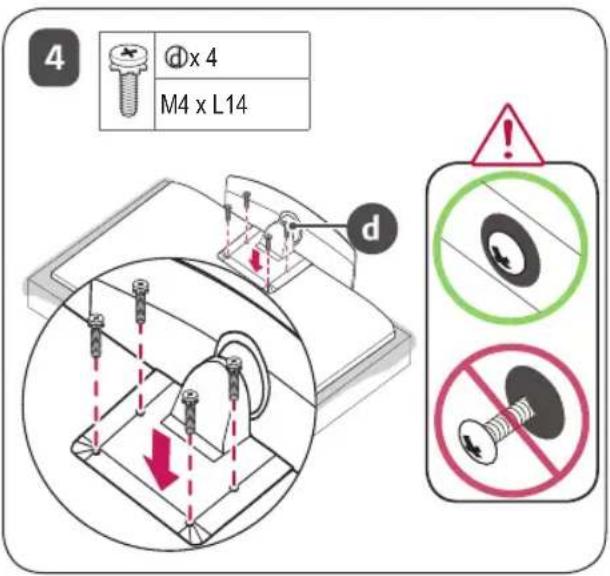
text_image
4 d x 4 M4 x L14 d
natural_image
Illustration of a computer monitor with an attached clip, showing no text or symbols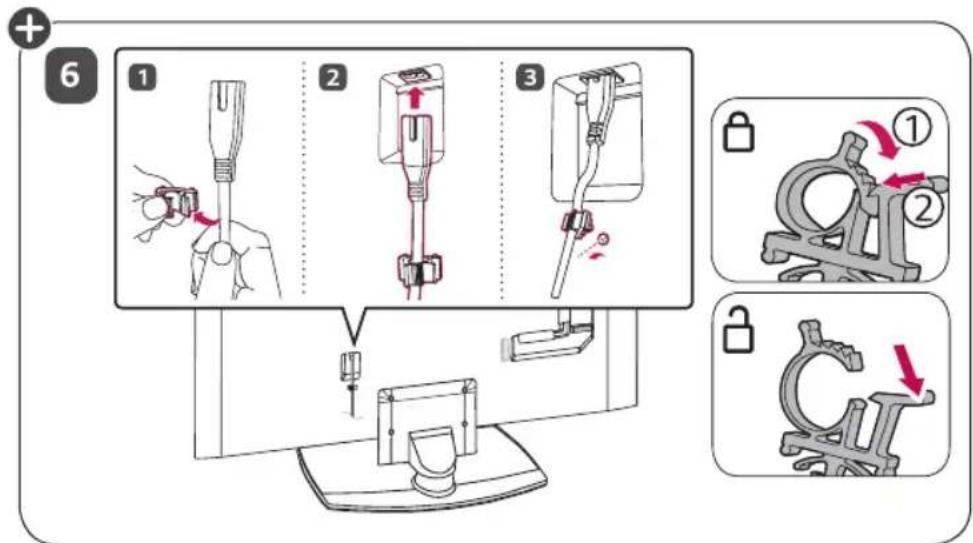
text_image
Diagram illustrating a medical procedure for inserting a device into a device, with numbered steps and corresponding mechanical diagrams.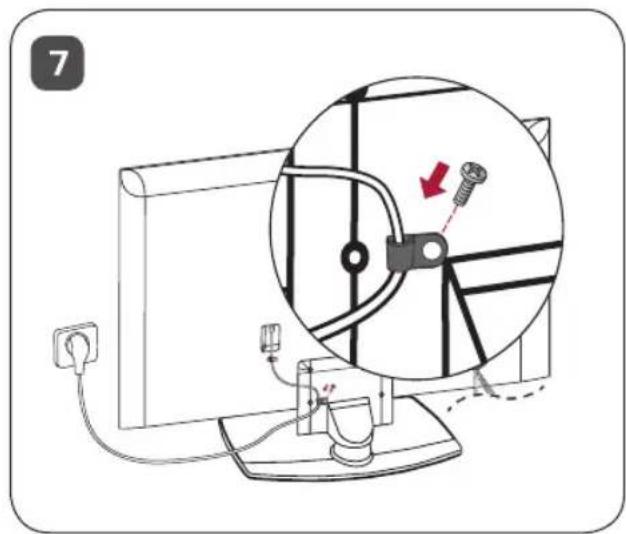
text_image
7
Qopqoq va kabel ushlagichi televizor aksessuari sifatida yetkazib beriladi. (Rusumga qarab.)
Stol ustiga o'rnatish
1 Televizorni ko'taring va uni vertikal holatga keltirgan holda stol ustiga qo'ying.
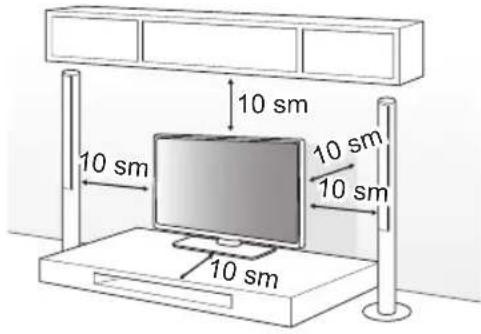
- Yetarlicha havo aylanib turishi uchun devor bilan televizor orasida (eng kamida) 10 sm masofa qoldiring.
text_image
10 sm 10 sm 10 sm 10 sm2 Quvvat manbai shnurini rozetkaga ulang.

- Mahsulotni yig'ish paytida burama mix qismlariga begona moddalarni (moylar, moylash materiallari, va hokazolar) qo'llamang. (Bunday qilish mahsulotga shikast yetkazishi mumkin.)
- Agar siz televizorni tayanchga o'rnatmoqchi bo'lsangiz, mahsulotning ag'darilib ketishining oldini olish bo'yicha choralar ko'rishingiz kerak bo'ladi. Aks holda, televizor tushib ketishi, bu esa shaxsiy zarar xavfiga olib kelishi mumkin.
- Xavfsizlik va mahsulotning xizmat ko'rsatish davomiyligini kafolatlash uchun ruxsatnomaga ega bo'lmagan buyumlardan foydalanmang.
- Ruxsat berilmagan buyumlardan foydalanish orqali yetkazilgan har qanday zarar yoki shikastlanishlar ishlab chiqaruvchi kafolati orqali qoplanmaydi.
- Taglikni yig'ayotganda berilgan vintlarning barchasi biriktirilishi kerak. Agar vintlar to'liq qotirilmasa, mahsulot egilishi yoki qulab tushishi, natijada unga shikast yetishi mumkin. Vintlarni ortiqcha kuch bilan qotirib yuborish rezbali birikmaning yeyilishi tufayli uning ishdan chiqishiga olib kelishi mumkin.
- Faqat maxsus LG mahsulotlari uchun ishlab chiqarilgan ruxsat berilgan taglik va devorga mahkamlanadigan tayanchdan foydalaning. -Iste'molchilar huquqlarini himoya qilish to'g'risidagi qonunga binoan LG Electronics kompaniyasi LG Electronics tomonidan ruxsat berilmagan mahsulotlardan foydalanish natijasida kelib chiqadigan har qanday nosozlik, moddiy zarar yoki shikastlanish uchun javobgar bo'lmaydi.
Televizorni stolga mahkamlash
(Rusumga qarab)
TV oldinga/orqaga surilmasligi va buning natijasida mahsulotga zarar yetmasligi uchun u stol ustiga mahkamlanishi zarur.
A tur
natural_image
Diagram of a medical device with internal components and dashed red lines indicating alignment or measurement (no text or labels)4 ta vint
natural_image
Technical diagram of a mechanical assembly with two oval components and a separate bolted component (no text or labels)Taglikni qotirish uchun 2 ta vint,
Taglikni qotirish uchun 2 ta bolt,
text_image
Diagram showing a monitor connected to a vertical line with two circular insets highlighting the angles of the screen.1 Teshikli boltlar yoki devorga mahkamlanadigan tayanch va boltlarni televizorning orqa paneliga kiriting va tortib mahkamlang.
- Agar teshikli boltlar o'rnida boltlar o'rmatilgan bo'lsa, ularni olib tashlang.
2 Tayanchlarni boltlar yordamida devorga o'rnating. Tayanch va televizor orqa panelidagi teshikli boltlarning joylashuv o'rinlarini moslashtiring.
3 Teshikli boltlar va tayanchlarni mustahkam bog'lagich bilan ulang. Bog'lagich tekis sirtda horizontal holatda bo'lishiga ishonch hosil qiling.
- Televizor mahkam turishi uchun yetarli darajada mustahkam va katta platforma yoki shkafdan foydalaning.
- Tayanch moslamalar, boltlar va bog'lagichlar mahsulot bilan birga yetkazib berilmaydi. Qo'shimcha qurilmalar uchun mahalliy dileringizga murojaat qiling.
Yaxshi ko‘rinishi uchun TV burchagini sozlash
Ekran yaxshi ko'rinishi uchun TV burchagini 20 daraja chap yoki o'ngga aylantirish orqali sozlang.
text_image
20° 20°
- Mahsulot burchagini sozlayotganda barmoqlaringizga ehtiyot bo'ling.
-Qo'l yoki barmog'ingizni qisib olsangiz, bu sizga shikast yetkazishi mumkin. Agar mahsulot ortiqcha darajada og'dirilgan bo'lsa, u tushib ketishi va natijada buzilishi yoki unga zarar yetishi mumkin.
Texnik xususiyatlar
| AM-ST23BF | ||
| Rusum | 43UM767H50UM767H55UM767H | |
| Kenglik x Chuqurlik x Balandlik | (mm) 570 x 303 x 240 | |
| Vazni (kg) 3,26 | ||

text_image
LG Life's GoodMahsulotning rusumi va seriya raqami mahsulotning orqa paneli va yon tomonida ko'rsatilgan. Xizmat ko'rsatish zarur bo'Igan holatlar uchun ularni quyida yozib qo'ying.
Rusum
Seriya raqami
natural_image
Isometric illustration of a rectangular electronic component with a recessed top and internal layer (no text or symbols)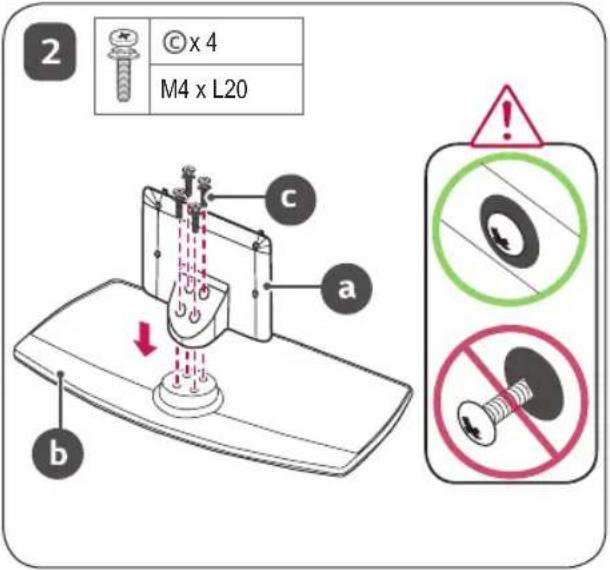
text_image
2 © x 4 M4 x L20 a b c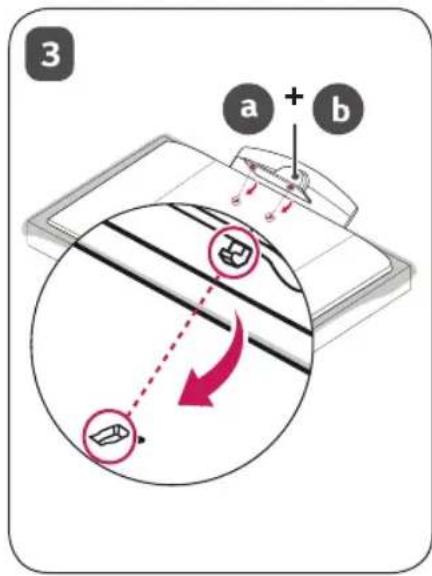
text_image
3 a + b
text_image
4 d x 4 M4 x L14 d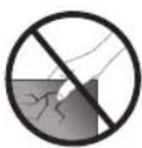
natural_image
Illustration of a computer monitor with an attached stand and a black arrow indicating the screen's direction (no text or symbols)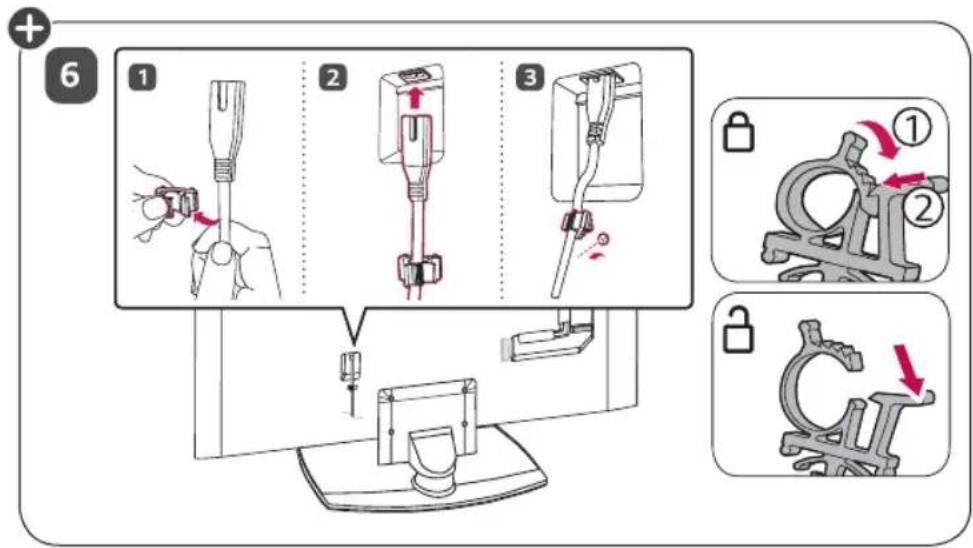
text_image
Diagram illustrating a mechanical assembly process with numbered steps and corresponding close-ups of the component being locked.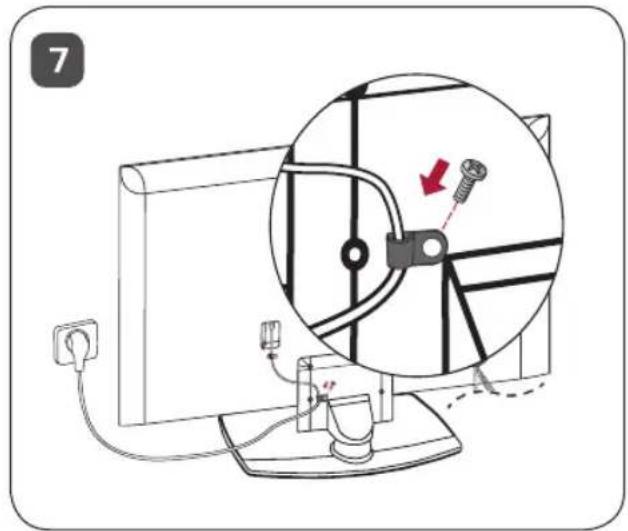
natural_image
Diagram of a computer monitor setup with a magnified view showing a mechanical component and a red arrow indicating motion (no text or symbols present)
natural_image
Diagram of a vehicle's front view with dashed lines indicating sensor or measurement points (no text or labels)4 ГВИНТИ
natural_image
Technical diagram of a mechanical assembly with two components and a separate bolted component (no text or labels)text_image
Diagram showing a monitor connected to a vertical line with two circular insets highlighting specific points of interest.text_image
LG Life's Goodnatural_image
Isometric view of a rectangular electronic component with a recessed top (no text or symbols)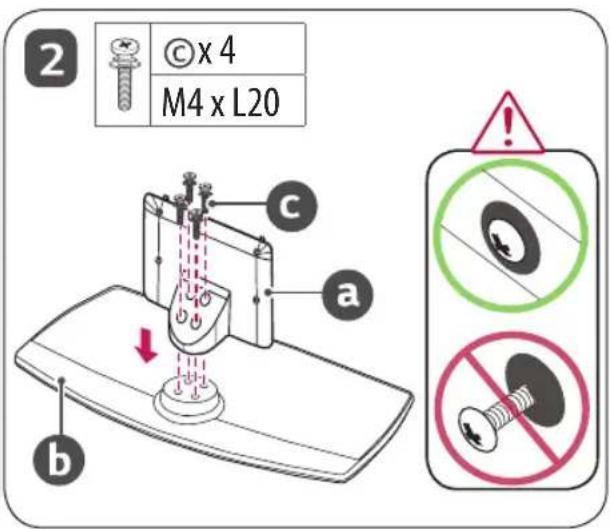
text_image
2 © x 4 M4 x L20 a b c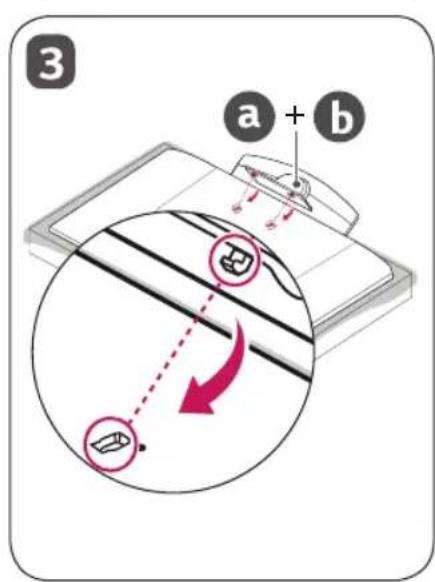
text_image
3 a + b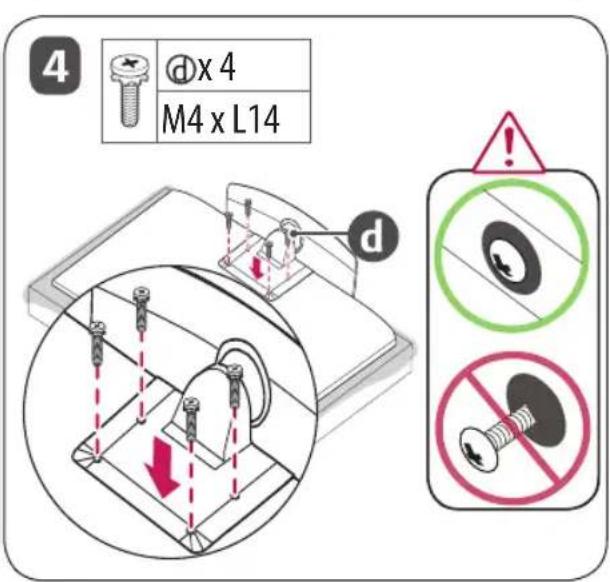
text_image
4 d x 4 M4 x L14 d
natural_image
Illustration of a computer monitor with an arrow pointing to it, placed on a stand (no text or symbols present)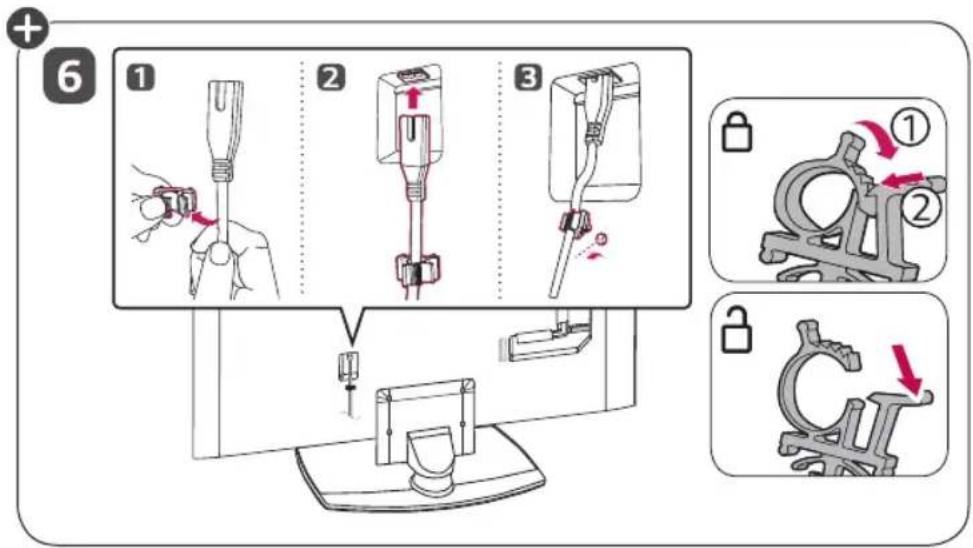
text_image
Diagram illustrating a mechanical assembly process with numbered steps and component illustrations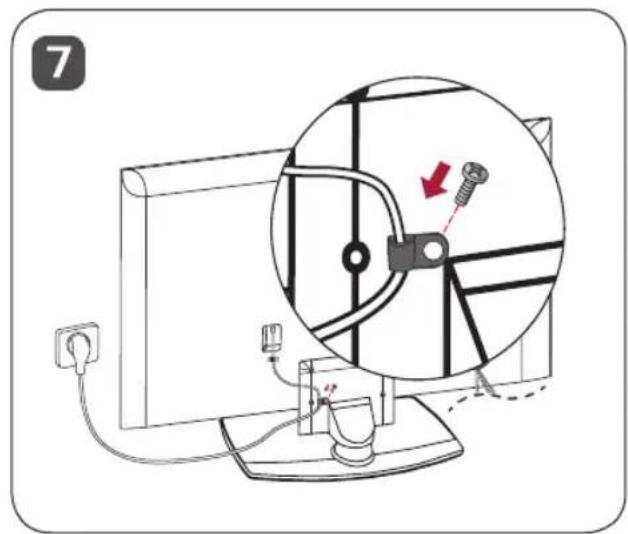
text_image
7natural_image
Diagram of a vehicle's front view with dashed lines indicating sensor or measurement points (no text or labels)4 Vida
(TV ile sağlanmaz)
text_image
Ayaklık Sehpa- Vida: M5 x L (*L: Masa derinliği + 8\~10 mm)
örn.) Masa derinliği: 15 mm, Vida: M5 x L25
B tipi
natural_image
Technical line drawing of a mechanical component with mounting holes and a bolted joint (no text or symbols)text_image
Ayaklik Sehpatext_image
Diagram showing a computer monitor connected to a vertical line with two circular insets highlighting different positions of a device or component.text_image
LG Life's GoodThe image contains no legible text or symbols.
المواصفات
natural_image
Illustration of a computer monitor with an attached clip, no text or symbols present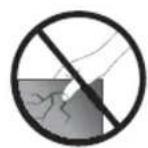
text_image
Diagram illustrating a medical procedure for inserting a device into a patient's arm, with steps numbered 1 to 6 and corresponding instructions shown.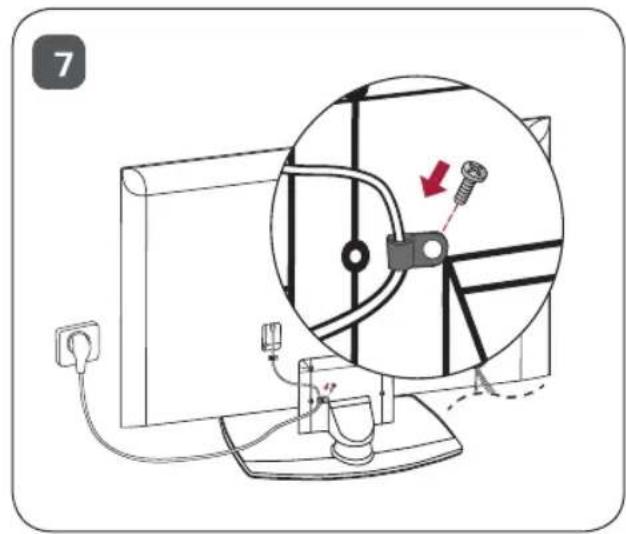
natural_image
Diagram of a computer monitor setup with a magnified view showing a cable or cable assembly and a screw, no text or symbols present.كيفية تجmeg الحامل
natural_image
Isometric view of a rectangular electronic component with a recessed top layer (no text or symbols)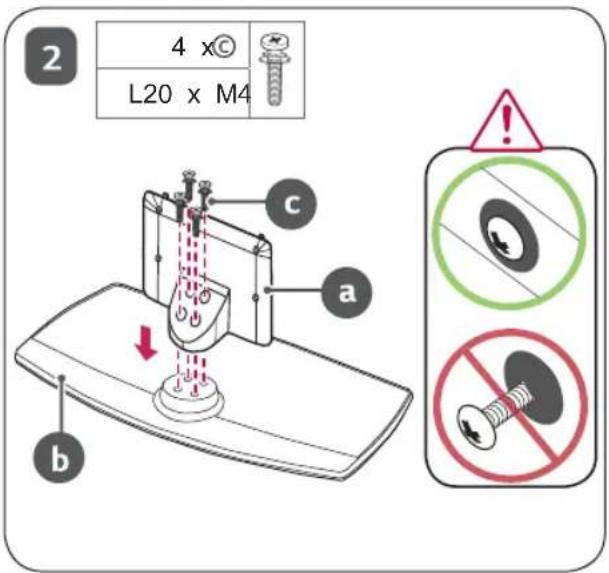
text_image
2 4 x© L20 x M4 a b c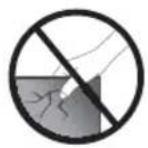
text_image
3 a + b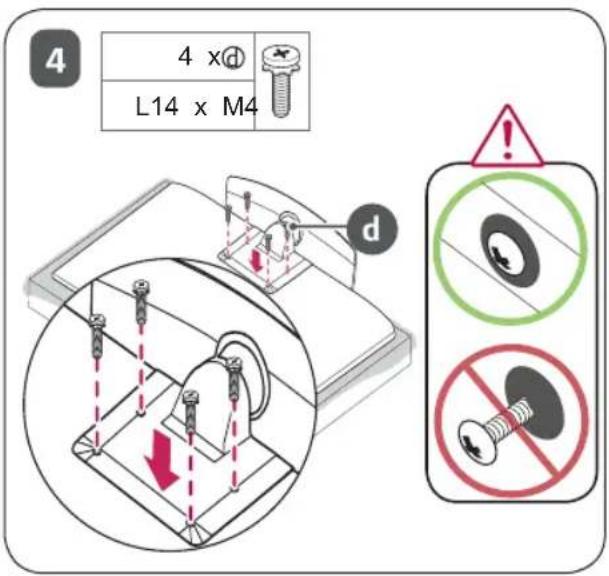
text_image
4 x Ø L14 x M4 dالتجmic والتحضير
text_image
a b X 2 X 2 X 2 X 2 d 4 X (L14 x M4) 4 X (L20 x M4) cnatural_image
Technical line drawing of a door handle and its mounting bracket (no text or symbols)스텐드 사용설명서
부속품
text_image
a b

X4 (M4 X L20)

+:지역에 적용이 상이합니다.
제품규격
natural_image
Illustration of two hands holding a computer monitor with a smiley face icon (no text or symbols)natural_image
Cartoon illustration of a child climbing a TV screen with a small Earth icon (no text or symbols)natural_image
Illustration of a flat-screen computer monitor with a circular screen showing two stars (no text or symbols)natural_image
Isometric view of a rectangular electronic component with a flat top and internal cavity (no text or symbols)2
text_image
Diagram of a sewing machine with labeled parts (a, b, c) and a downward arrow indicating force or direction.
text_image
Warning sign with circular and cross symbols indicating correct and incorrect safety conditions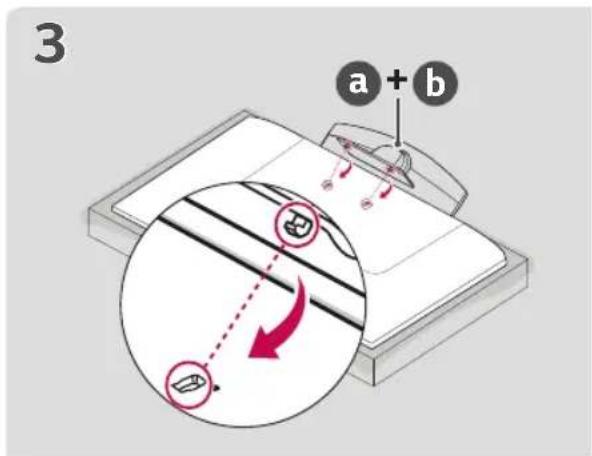
text_image
3 a + b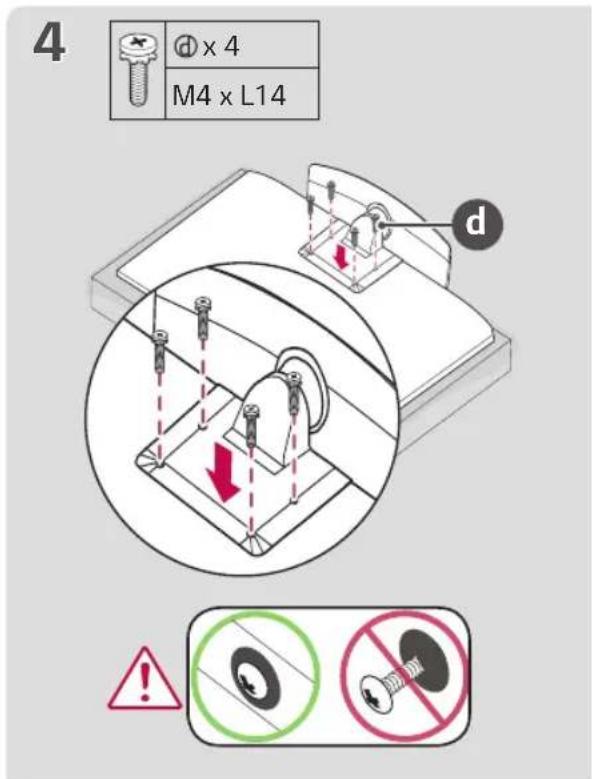
text_image
4 d x 4 M4 x L14 d ! No Change No Change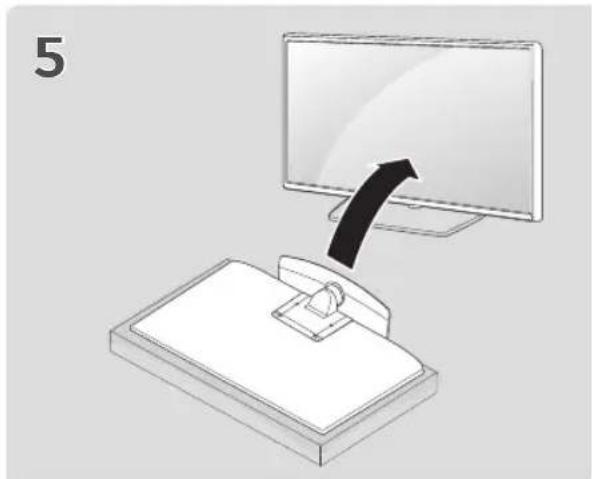
natural_image
Illustration of a computer monitor with an arrow pointing to it, placed on a bed (no text or symbols)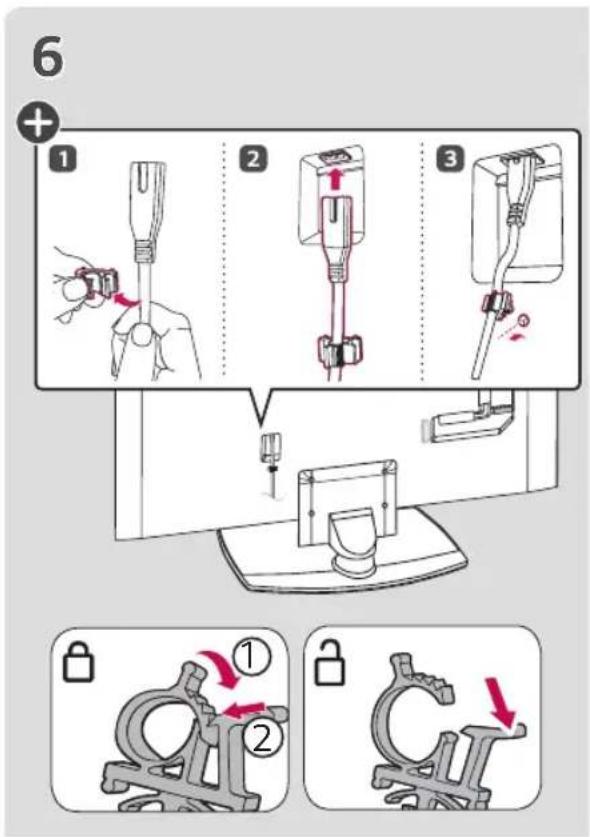
text_image
6 + 1 2 3 ① ② ③ ④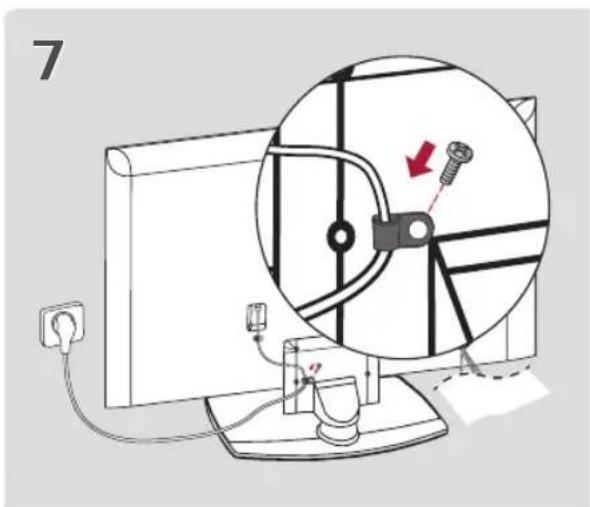
text_image
7natural_image
Diagram of a vehicle's rear window with dashed lines indicating sensor or measurement points (no text or labels)4개의 나사
(TV와 함께 제공되지 않음)