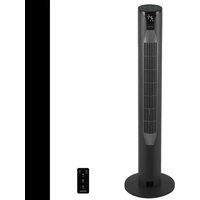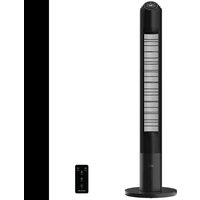
EnergySilence 9150 Skyline Smart Design - Fan CECOTEC - Free user manual and instructions
Find the device manual for free EnergySilence 9150 Skyline Smart Design CECOTEC in PDF.


| Brand | Cecotec |
| Model | EnergySilence 9150 Skyline Smart Design |
| Product Type | Column Fan |
| Reference | 08363 |
| Power | 45 W |
| Voltage | 220-240 V~, 50-60 Hz |
| Maximum Airflow | 34.63 m³/min |
| Power Used | 35.8 W |
| Standby Consumption | 0.20 W |
| Noise Level | 56.2 dB(A) |
| Maximum Air Speed | 3.10 m/s |
| Operating Modes | Normal, Natural, Night, Auto |
| Timer | 1 to 12 hours |
| Oscillation | Yes, can be activated/deactivated |
| Remote Control | Yes, with included CR2032 battery |
| LED Display | Yes, with automatic shutdown |
| Cleaning | Soft damp cloth, no solvents |
| Power Supply | Mains, grounded outlet |
| Remote Control Battery | CR2032, insert respecting polarity |
| Safety | Do not immerse, keep away from children, do not use near water |
Frequently Asked Questions - EnergySilence 9150 Skyline Smart Design CECOTEC
User questions about EnergySilence 9150 Skyline Smart Design CECOTEC
0 question about this device. Answer the ones you know or ask your own.
Ask a new question about this device
Download the instructions for your Fan in PDF format for free! Find your manual EnergySilence 9150 Skyline Smart Design - CECOTEC and take your electronic device back in hand. On this page are published all the documents necessary for the use of your device. EnergySilence 9150 Skyline Smart Design by CECOTEC.
USER MANUAL EnergySilence 9150 Skyline Smart Design CECOTEC
natural_image
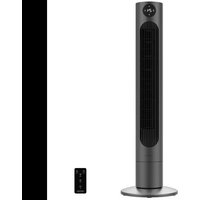
Black vertical electric vacuum tower with grid pattern and circular head indicator (no text or symbols visible)-
Parts and components 39
-
Before use 30
-
Product assembly 39
-
Operation 39
-
Cleaning and maintenance 41
-
Technical specifications 41
-
Disposal of old electrical
and electronic appliances 42
B. Technical support and warranty 43
- Copyright 43
INDICE
Read these instructions thoroughly before using the device. Keep this instruction manual for future reference or new users.
- All safety instructions must be closely followed when using the appliance.
- This appliance can be used by children aged 8 years and above and people with reduced physical, sensory, or mental capabilities or lack of experience and knowledge if they have been given supervision or instruction concerning use of the appliance in a safe way and understand the hazards involved. Children must not play with the appliance. Cleaning and user maintenance should not be carried out by unsupervised children.
- This device is designed for domestic use only and is not intended for bars, restaurants, farmhouses, hotels, motels, and offices.
- Make sure that the mains voltage matches the voltage stated on the appliance marking and that the wall outlet is earthed.
- Check the power cable regularly for visible damage. If the cable is damaged, it must be repaired by the official Cecotec Technical Support Service in order to avoid any type of danger.
- Do not immerse the cable, plug, or any other non-removable part of the device in water or any other liquid or expose electrical connections to water. Make sure your hands are dry before handling the plug or switching on the device.
- If the appliance falls accidentally into water, unplug it immediately. Do not touch the water!
-
Do not operate the device if any fault or unusual sign is detected.
-
Do not operate the product next to combustible or explosive gas.
- The appliance must not be placed immediately below a socket.
- Keep hair, loose clothing, fingers, and other parts of the body away from the openings and moving parts of the device.
- Make sure the appliance is placed on a flat and stable surface and do not move it during operation.
- Do not use the appliance near a window or places where it could get wet (at least 2 metres away), as water could cause an electric shock.
- Do not operate the product under or next to curtains.
- Do not cover the air inlet and outlet and do not place the product's cord under carpets or other objects during operation. Keep the front, back, and sides of appliance at a minimum safety distance from walls and other objects.
- Do not leave the appliance unattended while in use.
- It is not recommended to use the product with an extension lead.
- Always switch off and unplug the appliance when not in use and before assembling, disassembling, or moving it. Pull from the plug, not the cable, to disconnect it from the outlet.
- Cleaning and maintenance tasks should be carried out according to this manual to ensure the correct operation of the device.
- Supervise children to prevent them from playing with the appliance. Close supervision is necessary when the appliance is being used by or near children.
Instructions on batteries
- Do not burn or expose the batteries to high temperatures, as they may explode.
- Leaks from the batteries can occur under extreme conditions.
- Do not touch any liquid that leaks from the batteries. If the liquid gets into contact with skin, wash immediately with soap and water. If the liquid gets into the eyes, wash them immediately with clean water for a minimum of 10 minutes and seek medical attention. Wear gloves to handle the battery and dispose of it immediately in accordance with local regulations.
- Avoid contact between the batteries and small metal objects such as paper clips, coins, keys, nails, or screws.
- Do not tamper with the batteries in any way.
- The batteries must be removed for safe disposal of the machine.
- Keep the batteries out of the reach of children when there is a risk of ingestion.
- Battery ingestion can cause burns, soft-tissue perforation, and death. It can cause severe burns within two hours of the ingestion.
- In case of battery ingestion, please seek medical help immediately.
- The batteries' power supply terminals must not be short-circuited.
- If the machine is to be stored for a long period of time, it is advisable to remove the batteries.
- The batteries must be inserted in the correct position. When replacing batteries, check the polarity.
INSTRUCTIONS DE SÉCURITÉ
- Control panel
- LED display
- Base
- Storage space for remote control
- Cord winder
Control panel
Fig. 2
- Modes icon
- Timer icon
- Power Icon
- Speed icon
- Oscillation icon
- Auto mode Indicator light
- Sleep mode indicator light
- Natural mode indicator light
- Speed indicator light
- Oscillation indicator light
NOTE:
The graphics in this manual are schematic representations and may not exactly match the device.
2. BEFORE USE
- This appliance is packaged in a way as to protect it during transport. Take the device out of its box and remove all packaging materials. You can keep the original box and other packaging elements in a safe place. This will help you prevent damage to the device when transporting it in the future. In case the original packaging is disposed of, make sure all packaging materials are recycled accordingly.
- Make sure all parts and components are included and in good conditions. If there is any piece missing or in bad conditions, contact the official Cecotec Technical Support Service immediately.
Box content
- Tower fan
- Remote control
CR2032 battery - Instruction manual
3. PRODUCT ASSEMBLY
- Remove the two halves of the base from the packaging. Then, fit the halves together as shown in figure 3.
- Pass the power cable through the central hole and place the base on the fan. Secure it tightly with the four screws provided, as shown in figure 4.
- Cord winder: remove the cord winder from the packaging and place it on the back of the fan. You can hang the cable from this part when you are not using the appliance as shown in figure 5.
4. OPERATION
NOTE:
You can control the fan by using the control panel on the top of the fan or by using the remote control.
- Place the appliance on a flat, stable surface. Next, plug the cable into the mains socket.
- To switch the fan on, press the (1) icon. Press this icon again to switch it off.
- The ||| icon is used to set the fan speed (low, medium, or high). The selected speed will appear on the display.
- Press the ≡ icon to set the mode. This fan has three modes: Normal, Natural, or Sleep.
Normal mode
The fan will operate at the previously selected speed.
Natural mode
The operating sequence in this mode is as follows: low speed (5 seconds) → medium speed (5 seconds) → high speed (5 seconds) → medium speed (5 seconds). Then, the sequence will start again.
Sleep mode
- If the selected speed is high, the fan will operate at this speed for 30 minutes. Next, it will operate at medium speed for another 30 minutes. After this time, the fan will operate at
ENGLISHENGLISH
low speed until it switches off.
- If the selected speed is medium, the fan will operate at this speed for 30 minutes. After this time, it will operate at low speed until it switches off.
- If the selected speed is low, the fan will operate at this speed until it switches off.
NOTE: If no operation is performed for 30 seconds, the fan display will turn off. Press any of the icons to turn it on again.
- The fan can be operated in AUTO, which means that it will operate automatically
Set the timer so that the fan switches off after 3 hours and activates the oscillation function. The fan will operate at high speed for 15 minutes. After this time, it will operate at medium speed for 15 more minutes. Then, it will operate at low speed until it switches off. You can deactivate the oscillation function manually if you wish.
NOTE: if no operation is performed for 30 seconds, the fan display will turn off. Press any of the icons to turn it on again.
- The fan has a timer which allows you to set the operation time from 1 to 12 hours. If no operation is performed for 30 seconds, the fan display will turn off. Press any of the icons to turn it on again.
- Press the ⬤ icon to activate and deactivate the oscillation function. If you activate it, the corresponding indicator light will appear on the display.
- The display can be temporarily switched off by pressing the ⏻ button on the remote control or by pressing and holding the || icon on the control panel for 3 seconds. The display will turn on again when you press any icon.
Remote control
Fig. 6.
The remote control requires 1 x CR2032 battery (included). You can store the remote control at the back of the fan. It has a compartment for it in the upper part.
- The functions of the remote control are the same as those of the control panel.
| 1 | Power button | |
| 2 Speed button: 3 speeds are available. | ||
| 3 Oscillation button | |
| 4 LED display light button | |
| 5 Timer button: the timer can be set in a range of 1-12 hours. | |
| 6 Modes button: Normal, Natural and Sleep. Press this button to select one of the three modes. |
5. CLEANING AND MAINTENANCE
NOTE: repairs should only be carried out by qualified personnel. Contact the official Cecotec Technical Support Service.
- Always disconnect electrical and electronic appliances before cleaning them.
- Use a soft, clamp cloth to clean the surface of the device.
- To remove stubborn dirt, you can wipe it off with a cloth dampened with warm, soapy water. Do not use solvents, as they may damage the plastic housing
- Do not use abrasive or corrosive products.
- Do not immerse any part of the fan in water or other liquids.
- After cleaning, carefully dry the appliance and make sure that all the electrical parts are completely dry.
- Make sure the air inlet and outlet are kept clean and protected from dust and dirt.
If the product is not going to be used for a long period, unplug it, and store it in a dry and safe place.
6. TECHNICAL SPECIFICATIONS
Product reference: 06363
Product: EnergySilence 9150 Skyline Smart Design tower fan
Power: 45 W
Voltage: 220 - 240 V-
Frequency: 50-60 Hz
ENGLISHENGLISH
| Description Symbol Value Unit | |||
| Fan maximum flow F 34.63 m | ^2 /min | ||
| Fan power consumption P 35.8 W | |||
| Service value | SV | 0.97 | (m3/min)/W |
| Power consumption on standby mode | P_su | 0.20 | W |
| Fan sound power level | L_ss | 56.2 | dB (A) |
| Maximum air speed | C 3:10 | m/seg | |
| Service value measurement standard | IEC 60789:2019 | ||
| Contact details to obtain more information | Cecotec Innovaciones SL.Av. Reyes Católicos n°60, 46910, Alfajar(Valencia, Spain) | ||
The power consumption in standby mode is 0.20 W using the guidelines of EN 50564:2011 and the European regulations 1275/2008/EC and 801/2013/EC. For this purpose, the device is connected to the mains without performing any function, waiting for the standby mode to be activated.
Technical specifications may change without prior notification to improve product quality. Made in China | Designed in Spain
7. DISPOSAL OF OLD ELECTRICAL AND ELECTRONIC APPLIANCES

This symbol indicates that, according to the applicable regulations, the product and/or batteries must be disposed of separately from household waste. When this product reaches the end of its shelf life, you should dispose of the cells/batteries/accumulators and take them to a collection point designated by the local authorities.
Consumers must contact their local authorities or retailer for information
concerning the correct disposal of old appliances and/or their batteries.
Compliance with the above guidelines will help protecting the environment.
B. TECHNICAL SUPPORT AND WARRANTY
Cecotec shall be liable to the end user or consumer for any lack of conformity that exists at the time of delivery of the product under the terms, conditions, and deadlines established by the applicable regulations.
It is recommended that repairs be carried out by qualified personnel.
If at any moment you detect any problem with your product or have any doubt, do not hesitate to contact the official Cecotec Technical Support Service at +34 963 210 728.
9. COPYRIGHT
The intellectual property rights over the texts in this manual belong to CECOTEC INNOVACIONES, S.L. All rights reserved. The contents of this publication may not, in whole or in part, be reproduced, stored in a retrieval system, transmitted, or distributed by any means (electronic, mechanical, photocopying, recording or similar) without the prior authorization of CECOTEC INNOVACIONES, S.L.