CA-406W - Fan Clean Air Optima - Free user manual and instructions
Find the device manual for free CA-406W Clean Air Optima in PDF.


| Product type | Tower fan |
| Brand | Clean Air Optima |
| Model | CA-406W |
| Dimensions (L x H) | 280 x 968 mm |
| Weight | 4.8 kg |
| Power supply | 220-240 V / 50 Hz |
| Rated power | 45 W |
| Noise level (Low) | <25 dB(A) |
| Color | White |
| Fan speeds | 3 (Low, Medium, High) |
| Fan modes | Normal, Nature, Sleep, ECO |
| Maximum airflow | 520 m³/h |
| Airflow speed | 7 m/s |
| Horizontal oscillation | Automatic 90°, manual 360° (top outlet) |
| Timer | 1, 2, 4, 8 hours |
| Display | Digital LED (temperature and icons) |
| Remote control | Yes (CR2032 battery included) |
| Maintenance and cleaning | Monthly cleaning of grilles; removable rear grille to vacuum rotor |
| Safety | Overheat protection; automatic shut-off in case of tipping (not specified but safety measures) |
| Warranty | 1 year |
Frequently Asked Questions - CA-406W Clean Air Optima
User questions about CA-406W Clean Air Optima
0 question about this device. Answer the ones you know or ask your own.
Ask a new question about this device
Download the instructions for your Fan in PDF format for free! Find your manual CA-406W - Clean Air Optima and take your electronic device back in hand. On this page are published all the documents necessary for the use of your device. CA-406W by Clean Air Optima.
USER MANUAL CA-406W Clean Air Optima
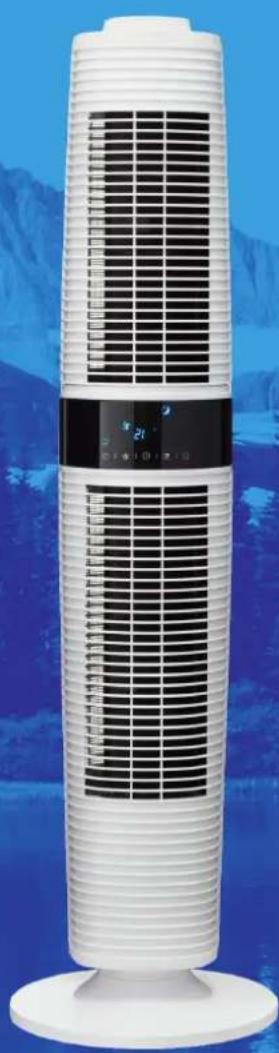
Clean Air Optima Design Tower Fan CA-406W
User manual
Gebrauchsanweisung
Gebruiksaanwijzing
Mode d'emploi
natural_image
White vertical air conditioner tower with black ventilation grilles against a blue mountain backdrop (no visible text or symbols)Read these instructions carefully before you start using the Tower Fan and keep the manual for later usage.
Clean Air Optima®
CA-406W main unit
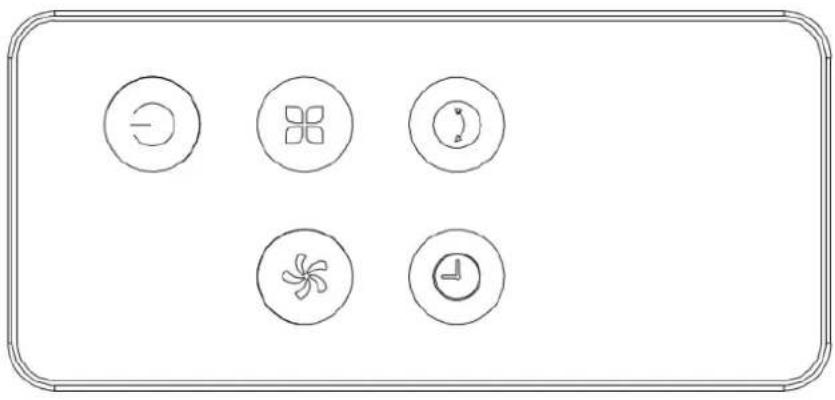
14. Remote control
natural_image
Simple line drawing of six circular icons with different symbols (circle, square, crescent, fan, clock) arranged in a row on a white background, enclosed in a rounded rectangle (no text or labels)15. Control panel
natural_image
Five simple icons (hair, butterfly, clock, butterfly, smiley face) arranged horizontally on a plain background (no text or symbols)16. Display panel
natural_image
Pure diagram of icons and symbols without any text, numbers, or labelsClean Air Optima®
English
Thank you for purchasing the innovative Clean Air Optima CA-406W Design Tower Fan.
We wish you many years of healthy indoor air with this efficient and effective product.
Ensure that all safety precautions are followed when using this electrical appliance for the proper operation of the device. These instructions describe the safety precautions to be observed during operation. They are designed to prevent injuries or damage to this device.
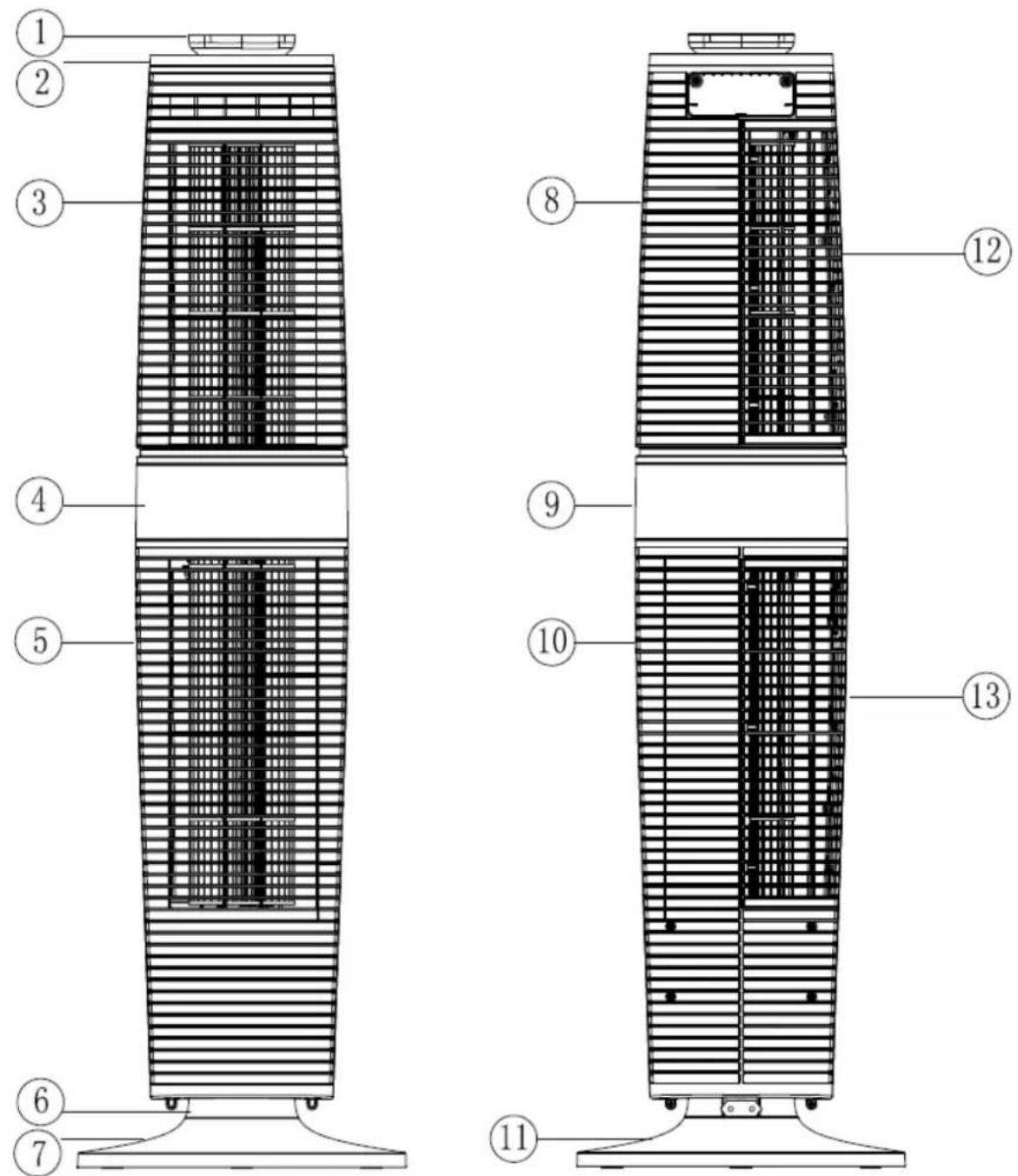
Description of the appliance
The appliance consists of the following main components:
- Handle
- Top Cover
- Upper front housing
- Former decorative panel
- Down front housing
- Oscillation base
- Front base
- Upper back housing
- Back decorative panel
- Down back housing
- Rear base
- Upper filter cover
- Down filter cover
- Remote control
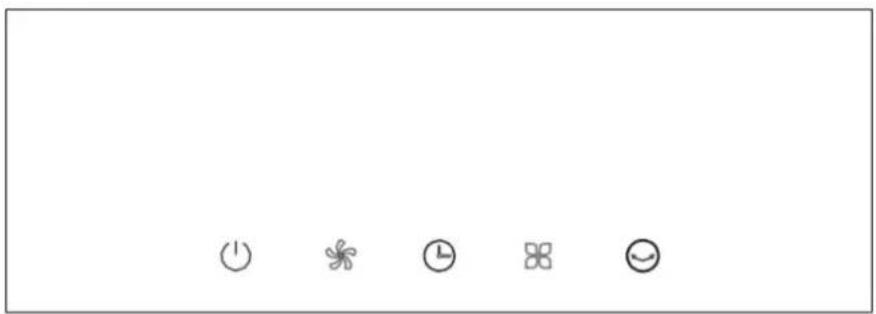
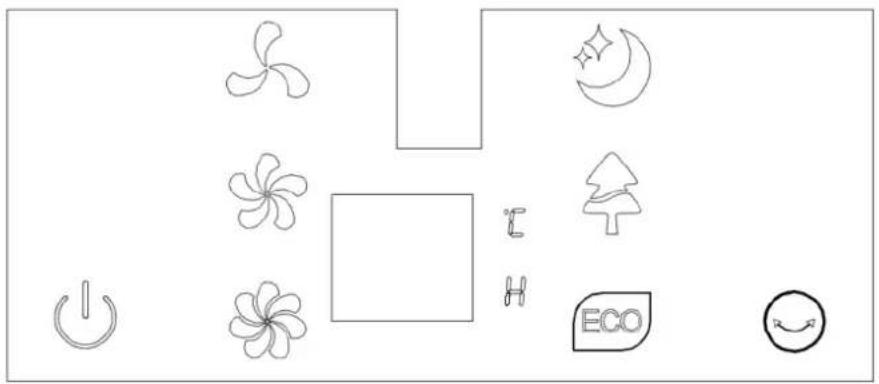
- Control panel
- Display panel
Safety warnings
Take the following steps to minimize the risk of personal injury caused by for example electric shocks or fire.
- Only for indoor use.
- Pull the plug when you do not use the device or when you clean internal or external parts of it.
- Use, maintain and clean the device as described in this manual.
- Do not use the device when there is visible damage on the electrical cord or on the device itself. Do not repair the device yourself in case of damage.
- Make sure that the air outlets are always free, clean up dust, hair and other obstruction for the airflow and at the air outlets.
- Keep your hair, clothes, jewels or fingers away from the air outlets.
- Pay special attention when the fan is used near children, and avoid children playing with the fan.
- Do not stick sharp objects through the grid as it can result in failures or electric shocks.
- Do not use the device in rooms where inflammable liquids or gases are stored, close to heat sources or in particularly humid rooms like the bathroom.
- Touch the device only with dry hands.
- Make sure that the fan does not touch any obstruction when oscillating.
-
Pay attention to damages on the electrical cord. Never pull the device by its cord.
-
Bring discarded devices to the appropriate collecting points. Prevent children from opening the device. The device is not a toy. Children may only use the device under the surveillance of an adult.
- This appliance can be used by children aged from 8 years and above and persons with reduced physical, sensory or mental capabilities or lack of experience and knowledge if they have been given supervision or instructions concerning use of the appliance in a safe way and understand the hazards involved. Children shall not play with the appliance. Cleaning- and user maintenance shall NOT be done by children without supervision.
- If the power cord is damaged, it must be replaced by the manufacturer, its aftersales service or a similar qualified person in order to avoid danger.
Features
- Touch control buttons
- Wind modes: normal, nature, sleeping, ECO
- 3 Wind speed: high, med, low
- Powerful airstream of 7 m/s
- Fan air flow rate up to 520m3/h
- Automatically 90°horizontal oscillation for whole unit, manually 360°horizontal oscillation for the up wind outlet
- Timer: 1.2.4.8H and digital temperature display
- LED display: ON/OFF, wind speed, wind modes, oscillation
- Remote control
Installation & operating instruction
- Get the Tower Fan out of the package for assembly and make sure all accessories are included.
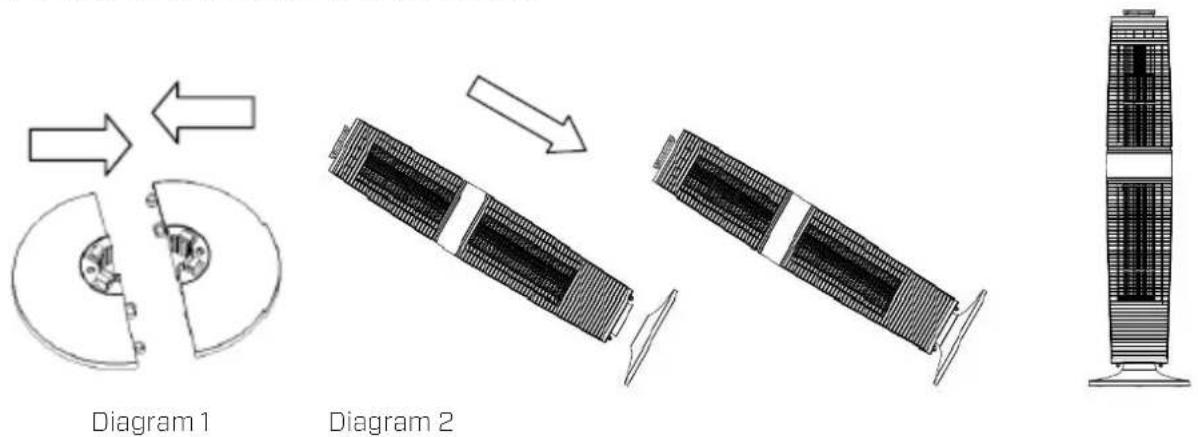
- Assemble the fan following the below instructions:
-Lock the rear base and front base together following Diagram 1.
-
Put the main body into the assembled base along the locating pole, following Diagram 2.
-After assembled, put the fan in a suitable place, plug it in and operate according to the instruction manual. -
The device needs to be positioned at least 30 cm from the walls and furniture to obtain good air flow.
- Make sure that the front air outlet of the device is positioned away from the closest wall or piece of furniture. Make sure that the air in-and outlets are not blocked.
- Never pull up the device by its loose parts.
Note: When you plug in the fan for the fist time, a "BiBi" sound alert means that the fan is correctly connected.
Clean Air Optima®
1) ON/OFF
Only the "ON/OFF" button is available when the unit is in standby mode. Press ON/OFF and the fan will initially operate in "LOW" speed, normal mode, with no timer & swing functions. The LED lights show accordingly.
The fan will work in the same mode that it was in before it was last turned off without shut off, except without Timer and Mode functions.
Press ON/OFF when under working, turn off the fan and the fan shift to STAND BY mode with long BI---sound alters.
2) SPEED
Press the SPEED button to set the wind speed, and circulate from the following options: LOW-MED-HI-LOW.... The LED lights show accordingly.
3) TIMER
There is no timer status when turning on the fan, the timer LED has no display.
Press the TIMER button to set and circulate from the following options 1H-2H-4H-8H-no timer-1H.... The LED lights show accordingly.
There is no timer and its related display under the initial conditions. The fan will be in countdown mode till it turns off.
4) MODE
The initial wind mode is "Normal", press the MODE button to set the wind mode from the following options: "Normal" - "Sleeping" - "Natural" - "ECO" - Normal... The LED lights show accordingly. (No display for NORMAL mode.)
Working rule of wind modes:
- Normal:
HI speed
MED speed
LOW speed
- Sleeping:
HI: 30 minutes "HI" natural wind—30 minutes "MED" natural wind—Remain
"LOW" natural wind speed
MED: 30 minutes "MED" natural wind—Remain "LOW" natural wind speed
LOW: Remain "LOW" natural wind speed
- Natural:
There are 3 natural wind options (HI, MED, LOW)
- ECO:
Under this mode, the fan works in Low speed when ambience temperature < 25°C in Hi speed when > 29°C; in Med speed when 25°C-29°C.
Memory function without power off., remembers the working status before turn off (not for power off), expect timer & mode function.
5) AUTO DIMMING FUCTION:
The LED lights will dim 30% automatically without operation after more than 1 minute.
6) DISPLAY INSTRUCTION:
- Double 8 digital display 15*14mm, 0.36inch Common Cathode.
- Ten LED lights as below, except the digital display.
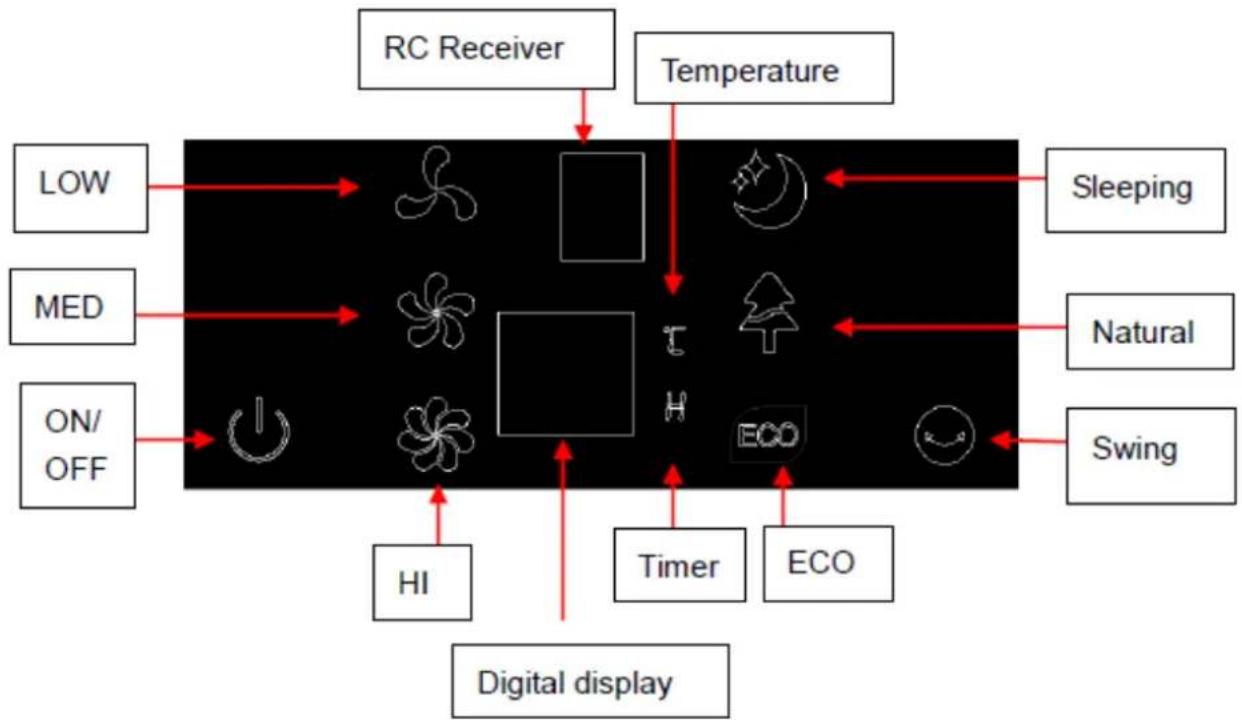
flowchart
graph TD
    A["RC Receiver"] --> B["Temperature"]
    C["Digital display"] --> D["HI"]
    D --> E["ON/OFF"]
    E --> F["MED"]
    F --> G["LOW"]
    G --> H["Sleeping"]
    I["Timer"] --> J["ECO"]
    K["ECO"] --> L["Natural"]
    M["Swing"] --> N["Swing"]
    O["Timer"] --> P["ECO"]
    Q["ECO"] --> R["Natural"]
    S["ICU"] --> T["H"]
    U["ICU"] --> V["ICU"]
    W["ICU"] --> X["ICU"]
    Y["ICU"] --> Z["ICU"]
    AA["ICU"] --> AB["ICU"]
    AC["ICU"] --> AD["ICU"]
    AE["ICU"] --> AF["ICU"]
Remote control
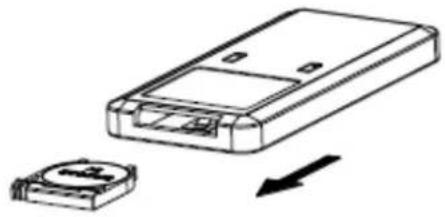
- Open the battery box on the back of the remote control, install a battery of 3V CR2032.
- Align with the receiver to operate.
- To place the battery, pull out the battery box as shown. Insert the battery with the correct polarity. The remote control will restart after pushing back the battery box.
natural_image
Diagram showing a device with a housing and a small circular component, both without any text or symbols.Clean Air Optima®
Cleaning and maintenance
Accumulation of dust and dirt at the back of the device will negatively influence the performance of the fan. Cleaning the backside of the fan at least once a month is required for an optimal performance. This fan is very safe and easy to clean:
- Switch the device off and pull the plug
- If used continuously (24 hours/day) under normal circumstances, we advise that the accumulated dust is cleaned once a week from the air inlet at the back of the device and at least once a month at the air outlet. Clean once a month the outer surface with a cloth.
- If necessary clean the rotor gently with the vacuum cleaner on a low level. You first have to loosen one screw with the screwdriver and take away the grid at the back.
Attention: put the grid back in place before using the device again. - If necessary you can use a soft cloth with a neutral cleaning product dissolved in warm water (below 50°) to clean the outer side of the fan. Dry carefully.
- If the fan is not used for a longer period of time, we advise to clean the device carefully and let it dry. The device has to be stored in a cool and dry place.
Specifications
Model CA-406W
Rated voltage 220-240V/50Hz
Rated power 45W
Sound level <25 dB(A) (Low)
Dimensions 280x968 (DxH)
Weight 4,8 kg
Colour White
Complies with EU
regulations CE/WEEE/RoHS

Ask your retailer or your municipality for updated information regarding the disposal of ing and of the device.
Service
WARRANTY CERTIFICATE FOR THE Clean Air Optima CA-406W Design Tower Fan
Date of purchase: ....
Customers name:
Address:
Telephone:
Email:
Seller's name: ....
Address:
- Please fill in completely this Warranty Certificate. Send it with the invoice and the unit, postage pre-paid and using the original packing box, to your distributor. Make sure to include the appropriate return postage for the package.
- Please enclose a short description of the damage, fault or malfunction, and the circumstances under which these problems arose.
The Clean Air Optima CA-406W is subjected to strict testing procedures before leaving the factory. If within one year from the date of purchase the product does not perform according to the specifications, because of factory defects, the purchaser is entitled to free repairs or replacement of parts upon presentation of this warranty (provided that the malfunction or damage to the device and/or parts occurred under normal operating conditions). What is covered: All parts defective in material and workmanship. For how long: one year from purchase date. What we will do: Repair or replace any defective parts.
Other Conditions
The provisions of this warranty are in lieu of any other written warranty whether express or implied, written or oral, including any warranty of merchantability or fitness for a particular purpose. The manufacturer's maximum liability shall not exceed the actual purchase price paid by you for the product. In no event shall the manufacturer be liable for special, incidental, consequential, or indirect damages. This warranty does not cover a defect that has resulted from improper or unreasonable use or maintenance, faulty assembly, accident, natural catastrophes, improper packing, or unauthorized tampering, alteration, or modification as determined solely by us. This warranty is void if the label bearing the serial number has been removed or defaced.
Clean Air Optima International B.V. David Ricardostraat 9-7 / 9-9 7559 SH Hengelo (ov) The Netherlands Tel: +31 (0) 74 - 2670145 E-mail: info@cleanairoptima.com Internet: www.cleanairoptima.com
Deutsch
natural_image
Diagram showing a device with a labeled component and an arrow indicating direction (no text or symbols present)Schema 1
Schema 2
Clean Air Optima®
6) WEERGAVE-INSTRUCTIE:
natural_image
Diagram showing a device with a labeled component and an arrow indicating direction (no text or symbols present)Clean Air Optima®
Schéma 1
Schéma 2