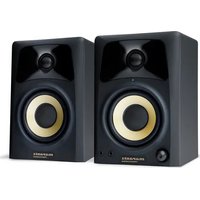
Studio Scope 3 - Oscilloscope MARANTZ - Free user manual and instructions
Find the device manual for free Studio Scope 3 MARANTZ in PDF.


| Product type | Powered monitoring loudspeaker |
| Brand | Marantz |
| Model | Studio Scope 3 |
| Woofer | 3 inches (76 mm) with polypropylene cone and high-temperature voice coil |
| Tweeter | 1 inch (25 mm) polycarbonate with integrated damping |
| Speaker type | Bass reflex with rear port |
| Cabinet material | Medium-density fiberboard (MDF) panels with internal bracing |
| Audio inputs | RCA inputs (pair), 3.5 mm stereo auxiliary input |
| Audio output | 3.5 mm stereo headphone output |
| Control | Volume with power on/off switch |
| Power supply | Mains via included power cable |
| Included accessories | Acoustic/anti-slip pads, power cable, 3.5 mm stereo cable, 3.5 mm to RCA cable, speaker cable, user guide |
| Connection between speakers | Spring terminals (red/black) with supplied speaker cable |
| Recommended use | Meeting rooms, classrooms, presentations, speech and music reproduction |
| Maintenance | Clean with a dry, soft cloth. Avoid moisture and solvents. |
| Safety | Unplug before cleaning. Use on a stable surface. Do not expose to water. |
Frequently Asked Questions - Studio Scope 3 MARANTZ
User questions about Studio Scope 3 MARANTZ
0 question about this device. Answer the ones you know or ask your own.
Ask a new question about this device
Download the instructions for your Oscilloscope in PDF format for free! Find your manual Studio Scope 3 - MARANTZ and take your electronic device back in hand. On this page are published all the documents necessary for the use of your device. Studio Scope 3 by MARANTZ.
USER MANUAL Studio Scope 3 MARANTZ
User Guide (English)
Introduction
The Studio Scope 3 is designed to meet your needs in multiple environments such as boardrooms, classrooms, presentation facilities, and other installed applications. It is focused on delivering pure sound reproduction, excellent for both speech and music.
The Studio Scope 3 delivers a wide-range frequency response by employing two extraordinary drivers and unique crossover technology. It boasts a balanced low-mid frequency response along with a defined mid and high frequency response.
Box Contents
(2) Studio Scope 3 Speakers
Acoustic/Traction Pads
Power Cable
Stereo 1/8" Cable
1/8" to Stereo RCA Cable
Speaker Wire
User Guide
Safety & Warranty Manual
Support
For the latest information about this product (system requirements, compatibility information, etc.) and product registration, visit marantzpro.com.
Features
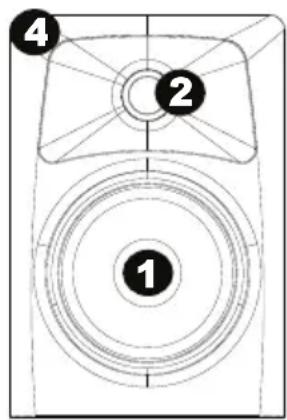
- Woofer: The woofer unit is 3" (76 mm) in diameter. It includes a high-temperature voice coil and 3" (76 mm) polypropylene treated paper cone. The woofer delivers balanced mid and low-frequency response.
- Tweeter: By employing a specially developed 1" (25 mm) silk cone, the tweeter can deliver an extremely natural response. It minimizes resonance by adapting a unique internal damping technology.
- Bass Reflex Port: The hole in the rear panel is a bass reflex port. It is designed to discharge very low frequency signals and enhance the overall bass response.
- Enclosure: Along with the other components, the Studio Scope 3's enclosure plays an important role. In order to provide more stable performance, we used a special medium-density fiberboard (MDF) and unique interior reinforcement designed to absorb vibration and minimize distortion. Additionally, our innovative loudspeaker cabinet includes carefully placed acoustic material that makes the Studio Scope 3 sound much bigger than it is—resulting in a smooth, natural bass response.
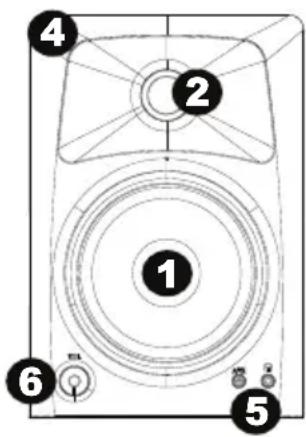
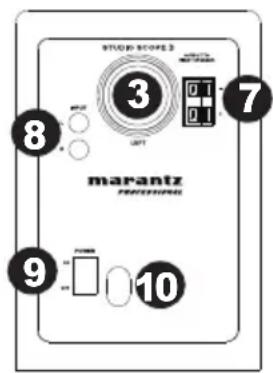
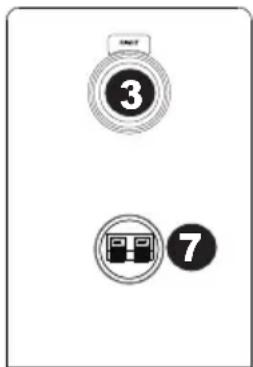
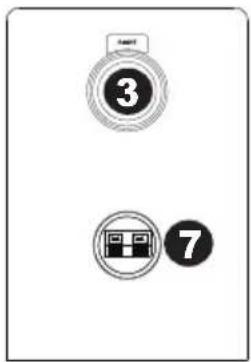
- Stereo Auxiliary Input and Headphone Output: For maximum flexibility, we have included a stereo "Aux" input which allows you to plug in a secondary audio source (such as your portable music player) in addition to the main RCA inputs. The volume control works on all inputs simultaneously. Additionally, there is a stereo headphone output next to the "Aux" jack that mutes the sound coming out of the loudspeakers and redirects it to your headphones.
- Volume Control: Use the volume control to set the output sound pressure from the Studio Scope 3 to proper levels as required.
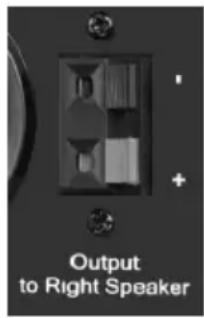
- Loudspeaker Wire Input/Output: Connect your speaker wire from the loudspeaker wire output to the loudspeaker wire input.
- RCA Inputs: Use RCA cables (sold separately) to connect an external sound source to these inputs.
- Power Switch: Use this switch to power the loudspeaker on or off.
- Power Cable Input: Insert the included power cable here.
Precautions
- Connections: Your Studio Scope 3 loudspeakers have a variety of inputs for use with a multitude of devices. Soundcards or other devices with RCA line outputs can be connected to the RCA inputs on your left loudspeaker's back panel. If your soundcard or portable music player has an 1/8" output, you can connect it to the front panel aux input, using the provided 1/8" to 1/8" cable.
- Correct Power Operation: Since the Studio Scope 3 contains amplifiers, it must be connected to a power outlet. Before connecting power, please make sure that the On/Off switch on the back of the Studio Scope 3 is set to the off position.
- Acoustic/Traction Pads: In order to minimize vibrations and maximize physical stability, we recommend you use the provided acoustic/traction pads on the bottoms of the Studio Scope 3 loudspeakers.
- Speaker Wire Connections: Use the red and black cable included in the Studio Scope 3 package to connect the Left and Right loudspeakers via the red/black spring-clip terminals on the back of each loudspeaker.
- Connecting to a Computer Sound Card or Other Audio Output Device: Before connecting the Studio Scope 3 loudspeakers, make sure the power from the computer or other output device has been turned off and the Studio Scope 3 system is also turned off. Connect the RCA input jacks to the corresponding output connectors of a computer sound card, portable music player, etc. You can also use the 1/8" stereo mini cable to connect a secondary audio device to the "Aux" input on the front of the Studio Scope 3.
Appendix (English)
Technical Specifications
| Type: Two-way desktop reference loudspeaker | |
| Low-frequency driver: | 3" (76 mm) diameter, polypropylene-coated, with high-temperature voice coil |
| High-frequency driver: | 1" (25 mm) diameter, silk cone tweeter |
| Cabinet: | Vinyl-laminated MDF |
| Power Requirements: 100-120V, 50/60 Hz; 220-240V, 50/60 Hz | |
| Dimensions:(height x width x depth) | 7.5" x 5.1" x 6.1"19 cm x 13 cm x 15.6 cm |
| Weight:(for loudspeaker pair) | 5.6 lbs.2.55 kg |
Specifications are subject to change without notice.
Trademarks and Licenses
Marantz is a trademark of D&M Holdings Inc., registered in the U.S. and other countries.
All other product or company names are trademarks or registered trademarks of their respective owners.
California Proposition 65 Warning
WARNING: This product contains chemicals known to the State of California to cause cancer and birth defects or other reproductive harm. (California law requires this warning to be given to customers in the State of California.)
marantzpro.com
Brand : MARANTZ
Model : Studio Scope 3
Category : Oscilloscope