
307154 - Lighting Bearware - Free user manual and instructions
Find the device manual for free 307154 Bearware in PDF.


| Brand | Bearware |
| Model | 307154 |
| Category | Outdoor lighting |
| Product type | Solar LED house number plaque |
| Dimensions (H x W x D) | 50 x 180 x 205 mm |
| Power supply | Solar panel 4V 0.6W + rechargeable battery 3.2V 500mAh type 14500 |
| Brightness | 10 lumens |
| Color temperature | 7000 K (cool white) |
| Main functions | Automatic day/night lighting; house number display; solar operation |
| Package contents | Light plate, self-adhesive numbers/letters, instruction manual |
| Mounting | Wall mounting with screws (hole spacing 100 mm, drilling diameter 5 mm); drilling template included |
| Replaceable battery | Yes, type 14500 – 3.2V, 500mAh (replacement recommended every 2 to 3 years) |
| Standby consumption | < 100 μA |
| Twilight detection | Yes, automatic switch-on at dusk |
| Maintenance and cleaning | Clean with a slightly damp cloth |
| Safety | Do not disassemble the battery; avoid short circuit; do not expose above 50°C; keep out of reach of children |
| Recycling | Device and battery must be recycled separately (according to WEEE regulations) |
| Usage | Protected outdoor use (not submerged) |
Frequently Asked Questions - 307154 Bearware
User questions about 307154 Bearware
0 question about this device. Answer the ones you know or ask your own.
Ask a new question about this device
Download the instructions for your Lighting in PDF format for free! Find your manual 307154 - Bearware and take your electronic device back in hand. On this page are published all the documents necessary for the use of your device. 307154 by Bearware.
USER MANUAL 307154 Bearware
ENG: Current drivers, user manuals and other relevant documents for this product can be found on our homepage.
Thank you for purchasing a BEARWARE product. Please read the following quick guide carefully so that you can enjoy your new appliance for a long time to come.
1. Scope of delivery
• LED house number light
- Numbers and letters sticker
- Operating instructions
2. Technical data
| Solar panel 4V; 0.6W | |
| rechargeable battery 3.2V, 500mAh; type 14500 | |
| Dimensions (HxWxD) | 50mm x 180mm x 205mm |
| Lumen | 10lm |
| Colour temperature 7000K | |
| Standby consumption <100μA | |
| Feature Day-night detection | |

3. Important notes on this device
- On cloudy days or in winter, the charging time may be longer and the operating time shorter.
- If the sun is not shining efficiently, it may not be possible to fully charge the battery.
- Only use a slightly damp cloth to clean the device and wipe it carefully.
Important safety regulations for rechargeable batteries
- Before using the rechargeable battery, observe all safety instructions and warnings in this manual as well as the warnings regarding rechargeable batteries.
- Do not disassemble the battery!
- If the operating time of the rechargeable battery has become significantly shorter than usual, stop using the appliance immediately. There is a risk of overheating or explosion.
- If battery fluid gets into the eyes, it must be washed out immediately! Seek medical treatment immediately! There is a risk of losing your eyesight.
- Do not short-circuit the battery. Contacts must not be touched with conductive materials. Do not store the device with conductive materials.
- Do not allow any liquid to come into contact with the battery. A short circuit causes a very strong current flow and can lead to overheating or burns.
- Do not store the power tool or the battery in places where the temperature exceeds 50°C!
- Never attempt to burn the battery, even if it is damaged. The battery may explode in a fire!
- Ensure that the battery is never dropped or subjected to any kind of impact. Do not use a battery that has been dropped or shaken.
4. Function
With this LED wall light, you can have your house number illuminated. Thanks to the energy-saving solar operation, the lamp only lights up in the dark. As soon as it gets light, the LED light switches off again automatically.
5. Product details
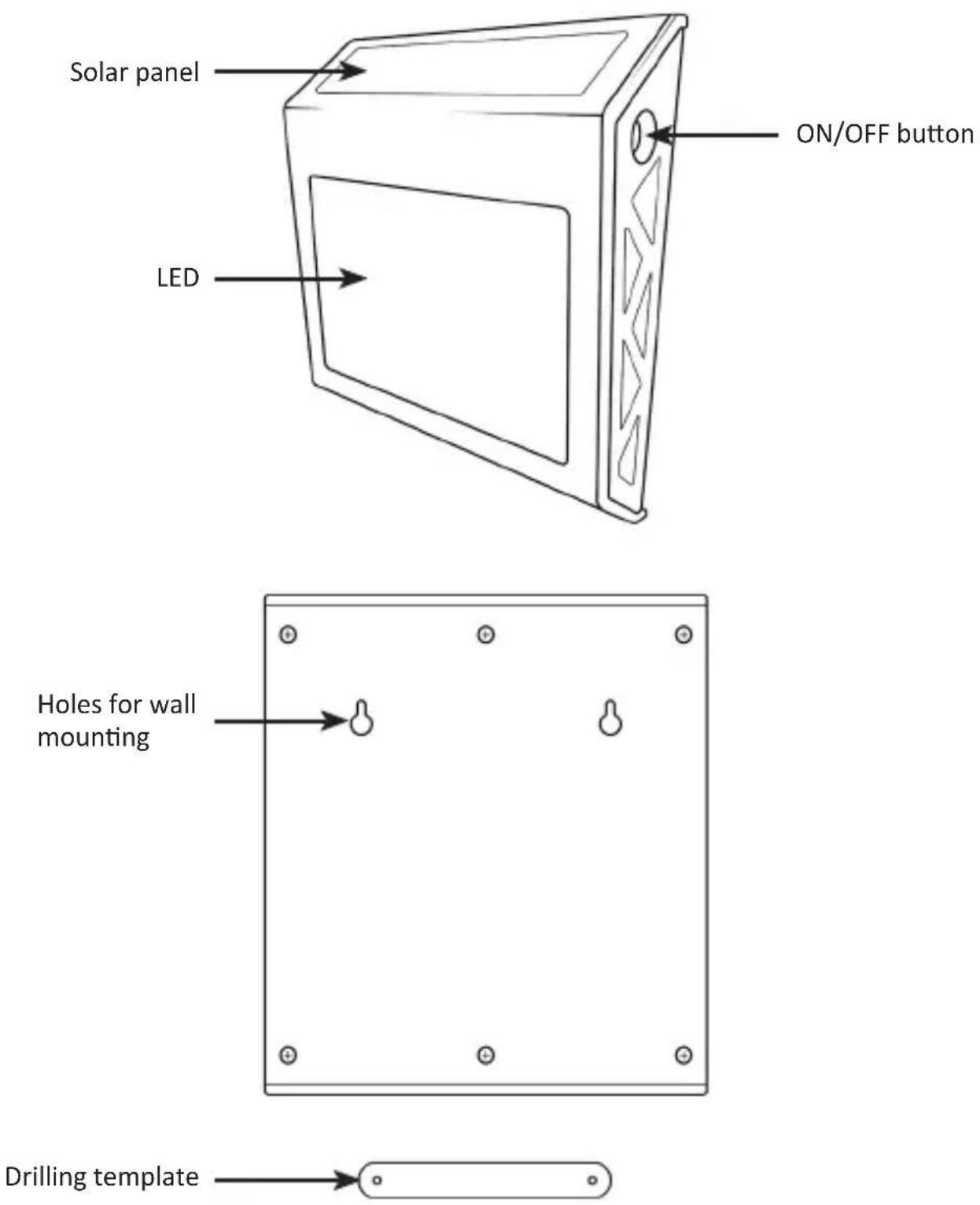
12 English
6. Montage
Note: Find a suitable position for the light and preferably choose a sufficiently bright spot.
- Now take the corresponding house number and, if necessary, the corresponding letter from the number/letter set supplied and stick them onto the LED of the house number light without leaving any bubbles.
- Press the „ON/OFF“ button to switch on the device.
- Then drill two holes with a diameter of 5 mm in the desired wall. These holes must be about 100 mm apart. You can use the drilling template as an aid. Then screw the screws into the holes so that they protrude slightly.
- Now hang the light in the prepared position.
Attention! If you do not have the necessary technical knowledge or do not have the confidence to carry out the installation yourself, please have the installation carried out by a trained specialist! Furthermore, we ask you to proceed carefully when changing the battery and to carefully remove the casing of the device!
7. Replace battery
To ensure the optimum performance of your lamp, we recommend replacing the battery approximately every 2-3 years. Carefully open the housing and replace the battery with an identical 3.2V, 500mAh, type 14500 battery.
- The battery is located under the solar panel. To access it, unscrew the rear cover of the light using a screwdriver.
- Carefully open the housing and unscrew the battery compartment cover.
1
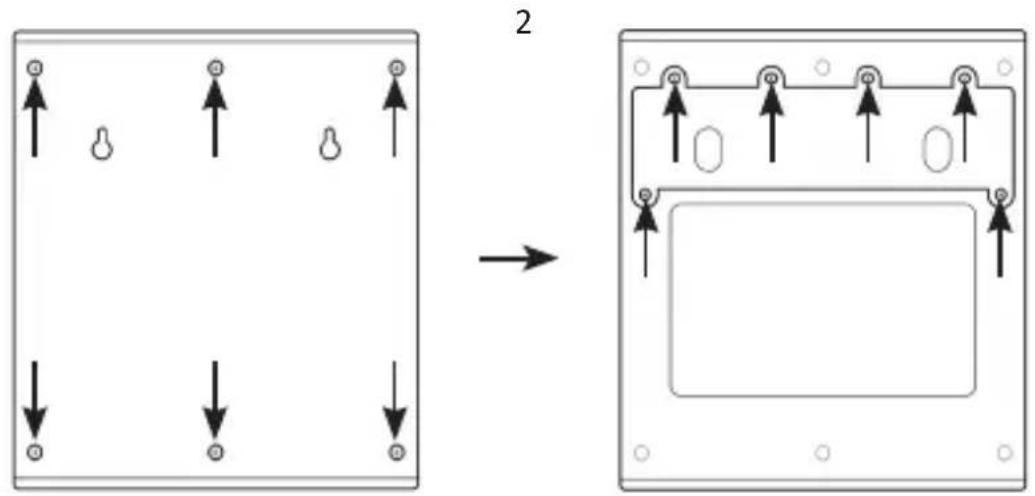
- Remove the battery and replace it with a new one.
- Reinsert the battery compartment and carry out the above steps in reverse order.
8. Safety instructions and disclaimer
Never attempt to open the appliance to carry out repairs or modifications. Avoid contact with the mains voltage. Do not short-circuit the product. The device is only approved for operation in protected outdoor areas. Keep the device away from high temperatures.
Do not expose the device to sudden temperature changes or strong vibrations, as this could damage the electronic parts. check the device for damage before use. The appliance should not be used if it has been knocked or damaged in any other way.
Please observe the national regulations and restrictions. Do not use the appliance for purposes other than those described in the instructions. This product is not a toy. Keep it out of the reach of children or mentally impaired persons. Any repair or modification to the appliance that is not carried out by the original supplier will invalidate the warranty or guarantee. The appliance may only be used by persons who have read and understood these instructions. The device specifications may change without prior notice.
9. Disposal instructions
According to the European WEEE Directive, electrical and electronic devices may not be disposed of with household waste. Their components must be recycled or disposed of separately, as toxic and hazardous components can cause lasting damage to the environment if disposed of incorrectly. As a consumer, you are obliged under the Electrical and Electronic Equipment Act (ElektroG) to return electrical and electronic equipment free of charge at the end of its life to the manufacturer, the point of sale or to public collection centres set up for this purpose. Details are regulated by the respective state law. The symbol on the product, the operating instructions and/or the packaging refers to these regulations. By separating, recycling and disposing of old appliances in this way, you are making an important contribution to protecting our environment.
10. Notes on battery disposal
In connection with the sale of batteries or the delivery of devices containing batteries, the supplier is obliged to inform the customer of the following: The customer is legally obliged to return used batteries as the end user. The customer can return used batteries that the supplier carries or has carried as new batteries free of charge to the supplier's dispatch warehouse (dispatch address). The symbols shown on the batteries have the following meaning: Pb = battery contains more than 0.004 per cent lead by mass, Cd = battery contains more than 0.002 per cent cadmium by mass, Hg = battery contains more than 0.0005 per cent mercury by mass.

The crossed-out dustbin symbol means that the battery must not be disposed of with household waste.


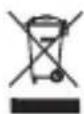
WEEE Directive 2012/19/EU WEEE Register No.: DE 67896761
Hereby, WD Plus GmbH declares that the device 307154 is in compliance with the essential requirements and other relevant regulations. A complete declaration of conformity can be obtained from: WD Plus GmbH, Wohlenbergstraße 16, 30179 Hanover, Germany
MO-FR 9:30am - 18pm CET

downloads.ganzeinfach.de
WD Plus GmbH

Brand : Bearware
Model : 307154
Category : Lighting