
AC3210 - Air purifier PHILIPS - Free user manual and instructions
Find the device manual for free AC3210 PHILIPS in PDF.

 FR
FR
 BG
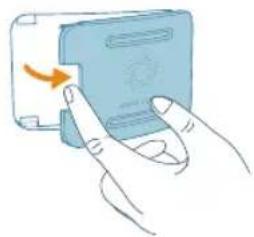
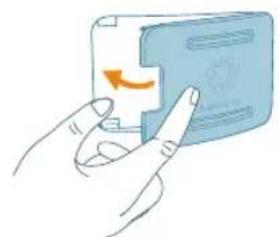
BG
 CS
CS
 DA
DA
 DE
DE
 EL
EL
 EN
EN
 ES
ES
 ET
ET
 FI
FI
 HU
HU
 ID
ID
 IT
IT
 LT
LT
 LV
LV
 MK
MK
 NL
NL
 NO
NO
 PL
PL
 PT
PT
 RO
RO
 SK
SK
 SL
SL
 SQ
SQ
 SV
SV
 TR
TR
 UK
UK
 VI
VI
| Brand | Philips |
| Model | AC3210 |
| Product type | Air purifier |
| Power supply | Power adapter (KA4801A-2402000EU) |
| Operating modes | Auto, Medium, Turbo, Sleep, Anti-allergy sleep (via app), App |
| Connectivity | Wi-Fi 2.4 GHz (802.11b/g/n/ax), Bluetooth 5.2 LE |
| Sensor | AeraSense particle sensor (PM2.5) |
| Filter type | Combined filter FY3200 (non-washable, non-recyclable) |
| Air quality indicator | Light ring: Blue (good), Blue-purple (average), Purple-red (poor), Red (very poor) |
| Display | Real-time PM2.5, mode icons, lock, Wi-Fi, filter alerts |
| Special functions | Child lock, brightness detector, lamp mode, Wi-Fi reset |
| Maintenance | Clean sensor every 2 months, vacuum filter surface, replace FY3200 filter |
| Safety | Auto shut-off if front cover not properly installed, lock after filter replacement date |
| Warranty | 2 years |
| Spare parts | Filter FY3200, adapter KA4801A-2402000EU |
Frequently Asked Questions - AC3210 PHILIPS
User questions about AC3210 PHILIPS
0 question about this device. Answer the ones you know or ask your own.
Ask a new question about this device
Download the instructions for your Air purifier in PDF format for free! Find your manual AC3210 - PHILIPS and take your electronic device back in hand. On this page are published all the documents necessary for the use of your device. AC3210 by PHILIPS.
USER MANUAL AC3210 PHILIPS
natural_image
Three Philips brand speakers on cylindrical stands, no visible text or symbols on the devices themselves.-1
1_
-1
1
-1
-1
1_
1
-1
1_
-1
1
English 6
Bahasa Indonesia 28
Čeština 50
Dansk 72
Deutsch 94
Eesti 118
Español 139
Français 162
Hrvatski 185
Italiano 207
Latviešu 230
Lietuviškai 252
Magyar 274
Nederlands 297
Norsk 320
Polski 342
Português 365
Română 387
Shqip 410
Slovenščina 433
Slovensky 454
Srpski 476
Suomi 498
Svenska 520
Tiếng Việt 542
Türkçe 563
Ελληνικά 585
Български 608
Македонски 631
Українська 654
677 العربية
6 English
Important
Read this user manual carefully before you use the appliance, and save it for future reference.
To ensure the best performance, kindly suggest the firmware of your purifier is upgraded to the latest version. You can do this upgrade via the Air+ app.
Danger
- Do not clean the appliance with water, any other liquid, or a (flammable) detergent, nor let them enter the appliance, to avoid electric shock and/or a fire hazard.
- Do not spray any flammable materials such as insecticides or fragrance around the appliance.
Warning
- Check if the voltage indicated on the appliance corresponds to the local power voltage before you connect the appliance.
- If the power cord is damaged, you must have it replaced by Philips, a service center authorized by Philips, or similarly qualified persons in order to avoid a hazard.
- Do not use the appliance if the adaptor, the power cord, or the appliance itself is damaged.
- Only to be used together with the adaptor provided with the appliance.
- This appliance can be used by children aged from 8 years and above and persons with reduced physical, sensory or mental capabilities or lack of experience and knowledge if they have been given supervision or instruction concerning use of the appliance in a safe way and understand the hazards involved.
- Children shall not play with the appliance.
- Cleaning and maintenance shall not be made by children without supervision.
- Do not block the air inlet and outlet, e.g. by placing items on the air outlet or in front of the air inlet.
- Make sure that foreign objects do not fall into the appliance through the air outlet.
- Standard WiFi interface based on 802.11b/g/n/ax at 2.4GHz with a maximum output power of 64mW EIRP.
- Bluetooth version 5.2 (LE) at frequency 2.4GHz with RF output less than 10mW EIRP.
- We recommend people who are allergic to dust, pollen, pets or mold, not to replace filters by themselves or to take protective measures, such as mask and gloves.
Caution
- We recommend people who are allergic to dust, pollen, pets or mold, not to replace filters by themselves or to take protective measures, such as mask and gloves. This appliance is not a substitute for proper ventilation, regular vacuum cleaning, or use of an extractor hood or fan while cooking.
- Always place and use the appliance on a dry, stable, level, and horizontal surface.
- Leave at least 20cm free space around the appliance and leave at least 30cm free space above the appliance.
- Do not sit or stand on the appliance. Do not place anything on top of the appliance.
- Do not place the appliance directly below an air conditioner to prevent condensation from dripping onto the appliance.
- Only use the original Philips filters specially intended for this appliance. Do not use any other filters.
- Combustion of the filter may cause irreversible human hazard and/or jeopardize other lives. Do not use the filter as fuel or for similar purpose.
- Avoid knocking against the appliance (the air inlet and outlet in particular) with hard objects.
- Do not insert your fingers or objects into the air outlet or the air inlet to prevent physical injury or malfunctioning of the appliance.
- Do not use this appliance when you have used indoor smoke-type insect repellents or in places with oily residues, burning incense, or chemical fumes.
- Do not use the appliance near gas appliances, heating devices or fireplaces.
- Always unplug the appliance when you want to move, clean appliance, replace the filter or carry out other maintenance.
- The appliance is only intended for household use under normal operating conditions.
- Do not use the appliance in wet surroundings or in surroundings with high ambient temperatures, such as the bathroom, or in a room with major temperature changes.
- The appliance does not remove carbon monoxide (CO) or radon (Rn). It cannot be used as a safety device in case of accidents with combustion processes and hazardous chemicals.
Electromagnetic fields (EMF)
This appliance complies with the applicable standards and regulations regarding exposure to electromagnetic fields.
Recycling

This symbol means that this product shall not be disposed of with normal household waste (2012/19/EU).
8 English
Follow your country's rules for the separate collection of electrical and electronic products. Correct disposal helps prevent negative consequences for the environment and human health.
The filter units are non-washable and non-recyclable, dispose of used filter units in accordance with local regulations.
Simplified EU declaration of conformity
Hereby, DAP B.V. declares that the radio equipment type AC3210/AC3220/AC3221 is in compliance with Directive 2014/53/EU. The full text of the EU declaration of conformity is available at the following internet address: www.philips.com.
Your air purifier
Congratulations on your purchase, and welcome to Philips! To fully benefit from the support that Philips offers, register your product at www.philips.com/support.
Product overview
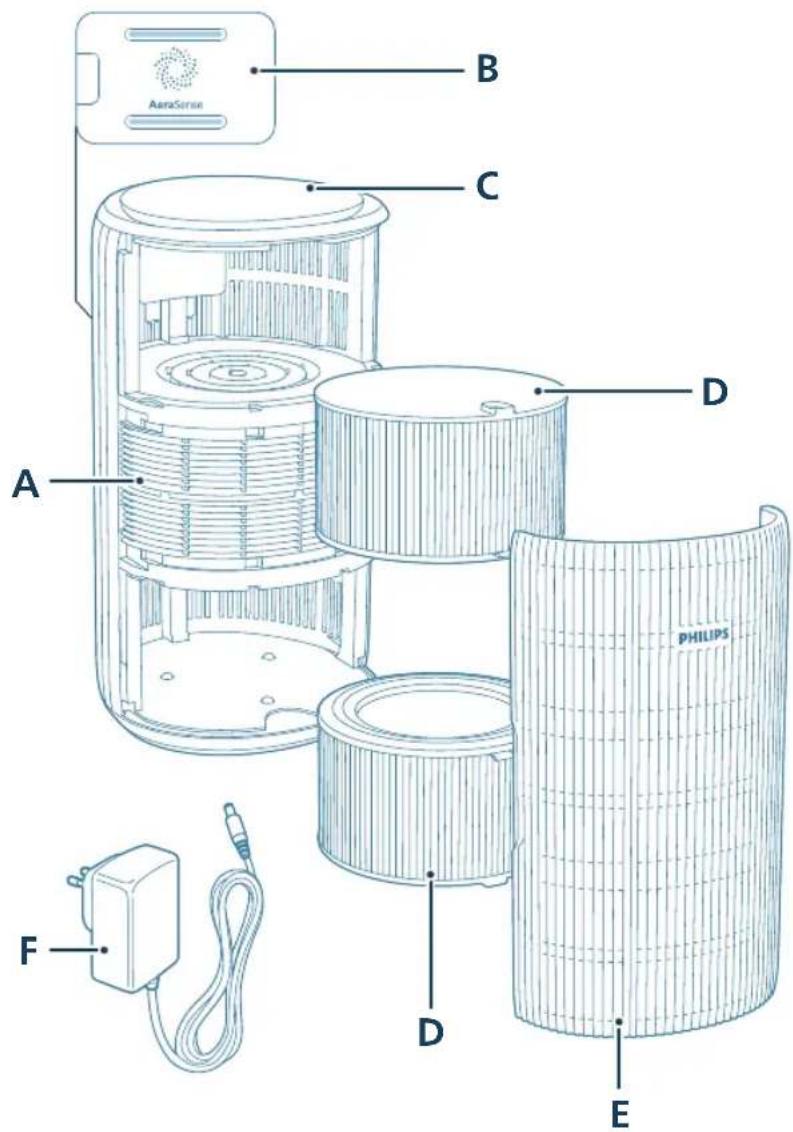
A Air outlet D Filter (FY3200)
B Particle sensor E Front cover
C Control panel F Adapter (KA4801A-2402000EU)
Controls overview
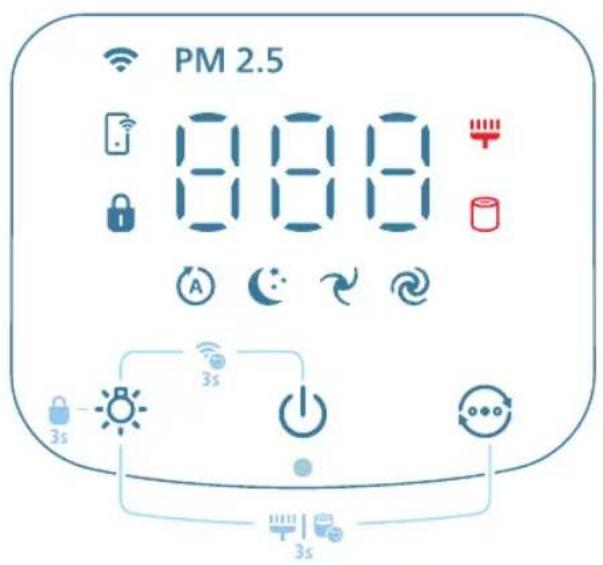
Control buttons:
| Power on/off button Light function button | |
| Mode switch button | |
| Long press the button(s) for 3 seconds: | |
| Child lock Wi-Fi reset | + |
| Filter reset | |
| Display panel: | |
| Auto mode Medium mode | |
| Sleep mode Turbo mode | |
| Wi-Fi indicator PM2.5 display | PM2.5 |
| App-operated mode Child lock indicator | |
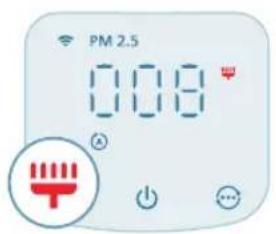
| Filter cleaning alert Filter replacement alert | |
Note:
The light sensor is located beneath the power button. Please ensure that it is not obstructed by any other objects.
Getting started
Installing the filters
Remove all packaging of the filters before use.
Note: Make sure the air purifier is unplugged from the electrical outlet before installing the filters.
natural_image
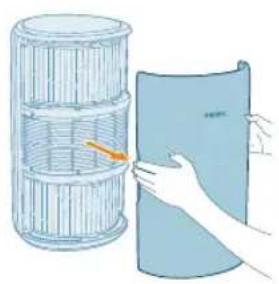
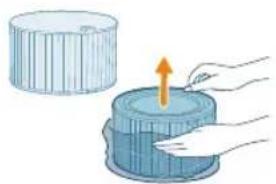
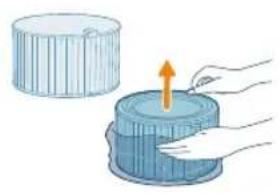
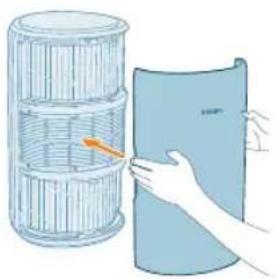
Illustration of a hand holding a folded paper or sheet, next to a cylindrical container with a handle (no text or symbols)1 Pull the front cover and remove it from the appliance.
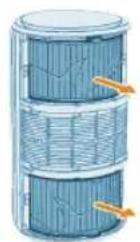
2 Pull the filters out from the appliance.
3 Remove all packaging materials of the air purification filters.
natural_image
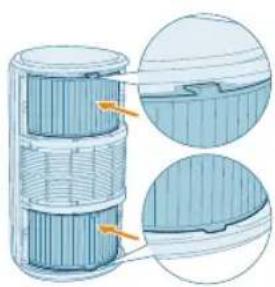
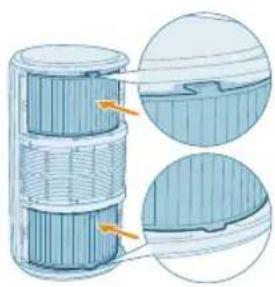
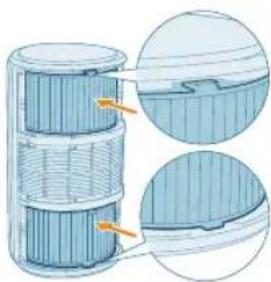
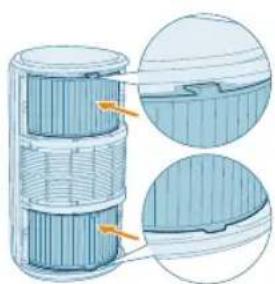
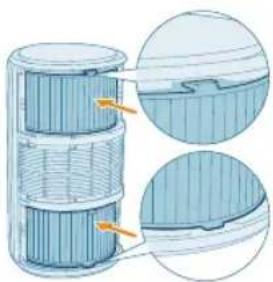
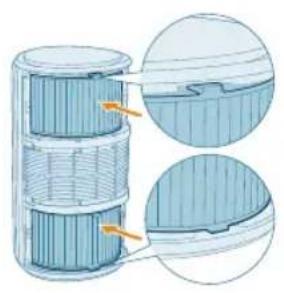
Illustration of a hand placing a blue cylindrical object into a container with an upward arrow (no text or symbols)4 Put the filters back into the appliance.
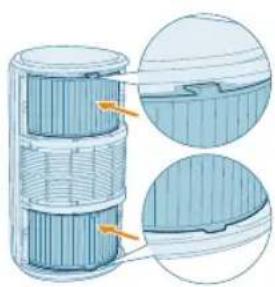
natural_image
Cross-sectional diagram of a cylindrical device with internal layered structure and highlighted components (no text or symbols)12 English
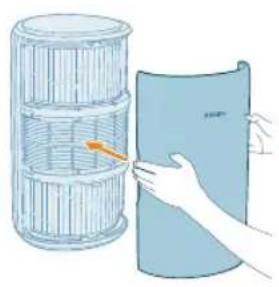
natural_image
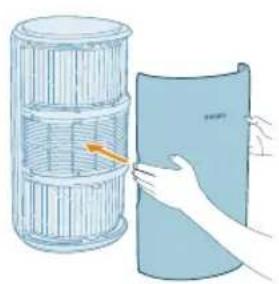
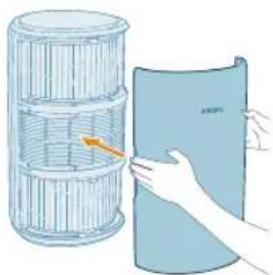
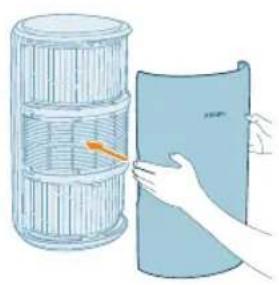
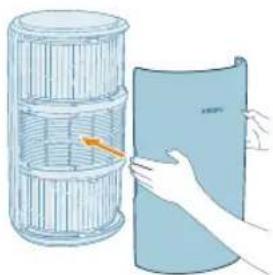
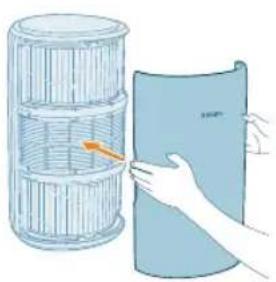
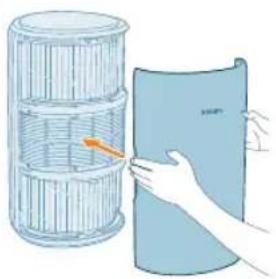
Illustration of a hand placing a blue sheet with an orange arrow into a cylindrical container (no text or symbols)5 Reattach the front cover.
Connecting power
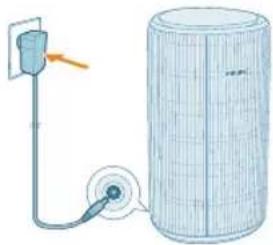
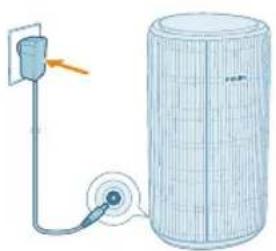
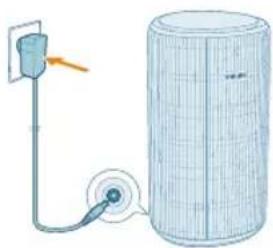
CAUTION: Risk of electric shock! When you unplug the power adapter, always pull the plug from the socket. Never pull the cord.
natural_image
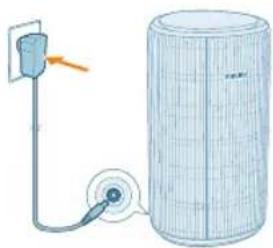
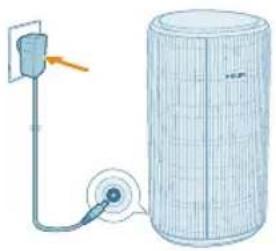
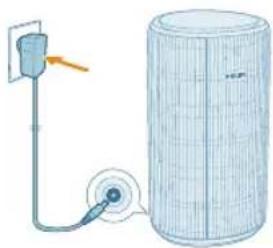
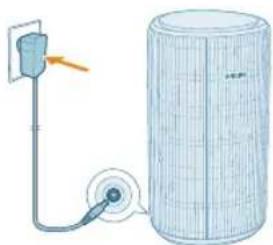
Diagram of a water pump connected to a cylindrical tank with a cable (no text or symbols)Connect the power adapter to:
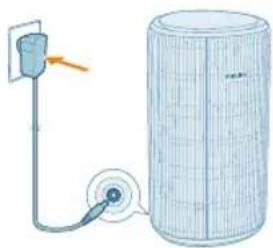
- First, the power socket on the appliance.
- Then, the wall outlet.
Understanding Wi-Fi indicator
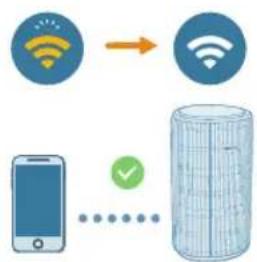
Wi-Fi icon status Wi-Fi connection status
| Blink in orange Connecting to the smart phone |
| Stable in orange Connected to the smart phone |
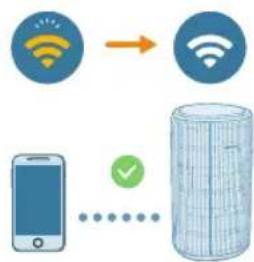
| Blink in white Connecting to the server |
| Stable in white Connected to the server |
| Off Wi-Fi function disabled or device lights are off |
Wi-Fi connection

Setting up the Wi-Fi connection for the first time
1 Download and install the Philips "Air+" app from the App Store or Google Play.
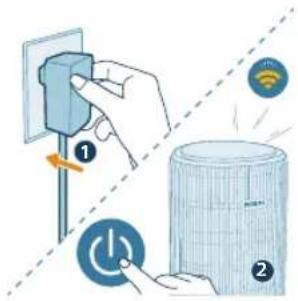
2 Put the plug of the air purifier in the power socket and press the power button to turn on the air purifier.
- The Wi-Fi indicator 📋links orange for the first time.
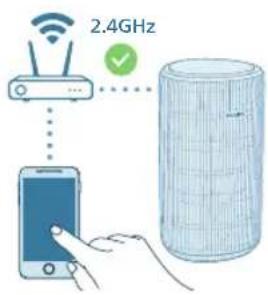
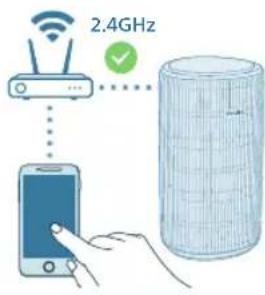
3 Make sure that your smart phone or tablet is successfully connected to your Wi-Fi network.
Note:
Enable Bluetooth feature on your smart phone to ensure the smooth pairing.
Please ensure your smart phone is connected to a 2.4GHz (home) Wi-Fi network instead of a 5GHz Wi-Fi network or public Wi-Fi. For a successful pairing, we suggest turning off your mobile data before initiating the pairing process.

flowchart
graph TD
    A["WiFi"] --> B["WiFi"]
    C["Smartphone"] --> D["Data Storage Container"]
    style A fill:#f9f,stroke:#333
    style B fill:#bbf,stroke:#333
    style C fill:#dfd,stroke:#333
    style D fill:#dfd,stroke:#333
4 Launch the Philips "Air+" app and click on "Add a device" or press the "+" button on the screen. Follow the on-screen instructions to connect the air purifier to your network.
- After a successful connection, the Wi-Fi indicator remains steady in white.
Note:
This instruction is only valid when the air purifier is being set up for the first time. If the network has changed or the setup needs to be performed again.
If you want to connect more than one air purifier to your smart phone or tablet, you can add the purifier in the app on additional smart phones without doing the Wi-Fi connection reset on the device.
Make sure that the distance between your smart phone or tablet and the air purifier is less than 10 meters without any obstructions.
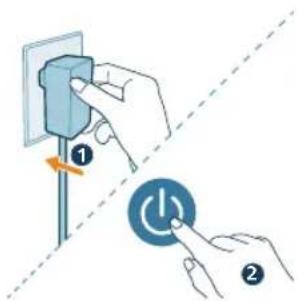
Reset the Wi-Fi connection
1 Put the plug of the air purifier in the power socket and press turn on the air purifier.
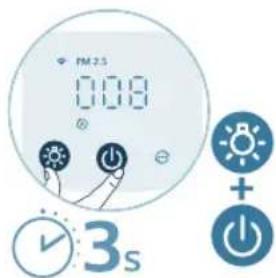
2 Long press and button for 3 seconds at the same time until you hear a beep.
- The air purifier goes to pairing mode.
- The Wi-Fi indicator 📋blinks orange.
3 Follow the steps 3-4 in "Setting up the Wi-Fi connection for the first time" section.
Using the air purifier
Understanding the air quality light
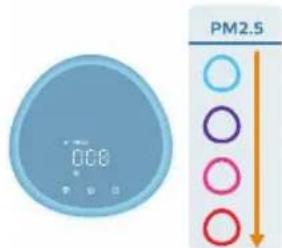
Once turned on, the air purifier will start scanning the air quality. After approximately 30 seconds, the particle sensor selects the color that corresponds to the surrounding air quality of airborne particles.
The color of the air quality light is determined by the PM2.5 reading.
PM2.5
AeraSense sensing technology accurately detects and quickly responds to even the slightest particle change in the air. It provides you with reassurance with real-time PM2.5 feedback.
Most of the indoor air pollutants fall under PM2.5 – which refers to airborne particle pollutants smaller than 2.5 micrometers. Common indoor sources of fine particles are tobacco smoke, cooking, burning candles. Some airborne bacteria and the smallest mold spores, pet allergen and dust mite allergen particles also fall under PM2.5.
PM2.5 level Air quality color Air quality level
| ≤12 Blue Good |
| 13-35 Blue-purple Fair |
| 36-55 Purple-red Poor |
| >55 Red Very poor |
Turning on and off
Note:
For optimum purification performance, close doors and windows.
Keep curtains away from the air inlet or air outlet.
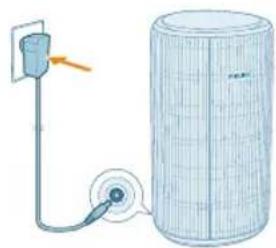
natural_image
Diagram of a water pump connected to a cylindrical tank with a cable, showing no text or symbols.1 Put the plug of the air purifier in the power socket.
2 Press the power button to switch on the air purifier.
- The air purifier beeps.
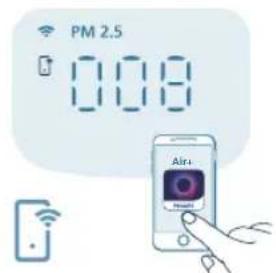
- The displays on the screen during warming up. Then the air purifier shows the PM2.5 level after measuring the air quality.
- The air purifier operates in the Auto mode with PM2.5 displayed on the screen.
3 Press the power button again to switch off the air purifier.
Note: If the air purifier stays connected to the electrical outlet after turning OFF, the air purifier will operate under the previous settings when turned ON again.
Changing the mode setting
You can choose between the Auto mode, the Medium mode, the Turbo mode, or the Sleep mode by pressing the mode switch button. Additional operating modes can be selected in the Air+ app.
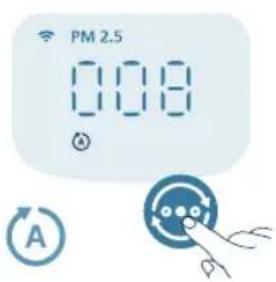
Auto mode (The air purifier automatically adjusts the fan speed in accordance with the ambient air quality.
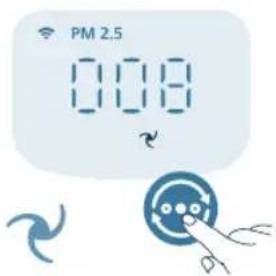
Medium mode ( ?). In the Medium mode, the air purifier operates on a medium speed.
English
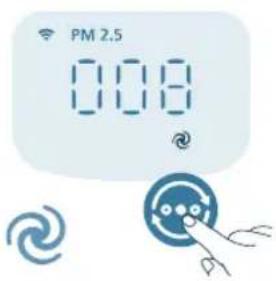
Turbo mode ( ☑: The air purifier operates on the highest speed.
natural_image
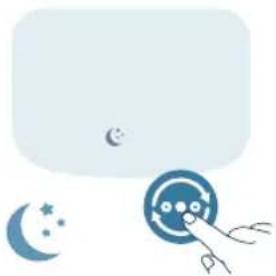
Illustration of a crescent moon, star, and circular button with a hand pointing at it (no text or symbols)Sleep mode ( ): The air purifier operates quietly at a low speed. After 3 seconds, the display lights turn off.
- Allergy Seep mode: This mode can be enabled in the Air+ app. Allergy Sleep mode turns your Sleep mode into a more powerful one when you need it. By enabling it, your Sleep mode automatically adapts the fan speed in a similar way with the Auto mode, while keeping the sound level low. This mode is ideal for people who want a higher performance at night vs. regular Sleep mode.
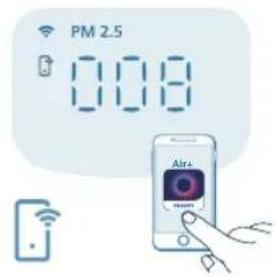
App-operated mode (☐): The appliance is operating a mode that is only available through the app, such as additional manual fan speeds or other modes that were customized in the app.
Note: The app-operated mode is available ONLY through the app after the Wi-Fi connection is successful.
Using the light function
natural_image
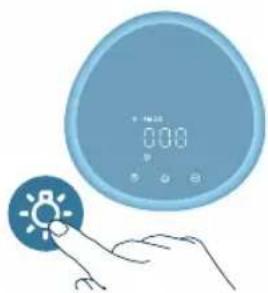
Illustration of a blue circular digital timer with a hand pointing at it, next to a light bulb icon (no text or symbols)With the light sensor, the control panel can automatically turn on, turn off or dim according to the ambient light.
The control panel will be off or dim when the ambient light is dark. You can press any button to wake up all lights. Then, if no further operation, all lights will be off or dim again to match with the ambient light.

natural_image
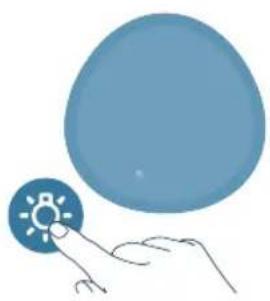
Illustration of a digital clock with a light bulb icon and a finger pointing at it (no text or symbols present)You can press the light function button to switch to lamp mode: a cozy light ring around the control panel. Tailor the brightness of the cozy light in the Air+ app.
natural_image
Illustration of a hand interacting with a blue circular button featuring a sun icon (no text or symbols)You can press the ⚙ button to turn off all lights and the control panel. Press the button again to wake up all lights.
Setting the child lock
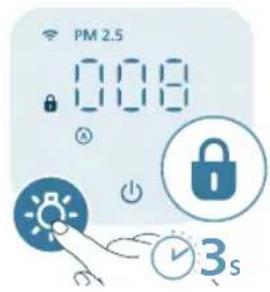
1 Press the button for 3 seconds to activate the child lock. - The displays on the screen.
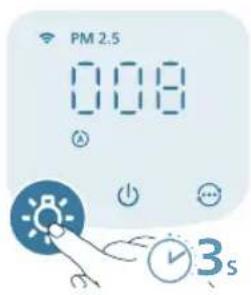
2 Press the button for 3 seconds again to deactivate the child lock. - The disappears from the screen.
Cleaning and maintenance
Note:
Always unplug the appliance before you clean it.
Never immerse the appliance in water or any other liquid.
Never use abrasive, aggressive, or flammable cleaning agents such as bleach or alcohol to clean any part of the appliance.
Never use any liquids (including water) to clean the filter.
Do not attempt to clean the particle sensor with a vacuum cleaner.
Cleaning schedule
Frequency Cleaning method
When necessary Wipe the plastic part of the appliance with a soft, dry cloth
Clean the air outlet cover
Every two months Clean the particle sensor with a dry cotton swab

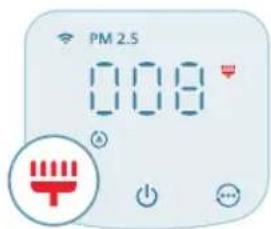
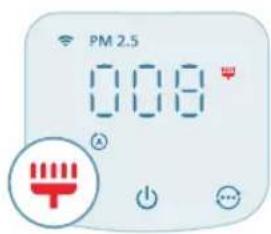
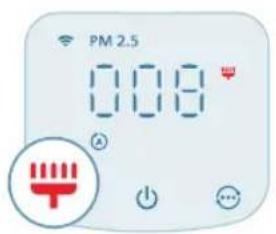
displays on the screen Clean the surface of the filter
Cleaning the body of the air purifier
Regularly clean the inside and outside of the air purifier to prevent dust from collecting.
1 Use a soft, dry cloth to clean both the interior and exterior of the air purifier.
2 The air outlet can also be cleaned with a dry, soft cloth.
Cleaning the particle sensor
Clean the particle sensor every 2 months for optimal functioning of the appliance.
If the air purifier is used in a dusty environment, it may need to be cleaned more often.
If the humidity level in the room is very high, condensation may develop on the particle sensor and the air quality light may indicate a more poor air quality even though the air quality is actually good. If this occurs, clean the particle sensor.
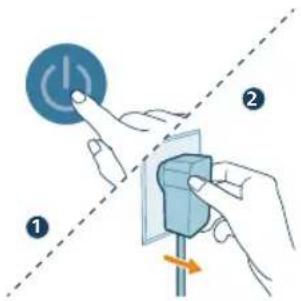
1 Switch off the air purifier and unplug from the power socket.
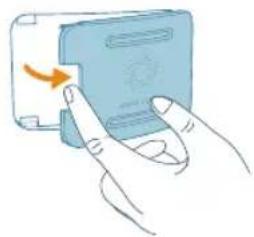
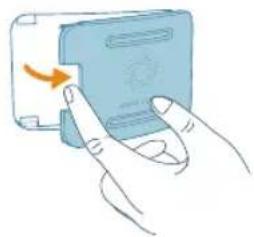
2 Open the air quality sensor cover.
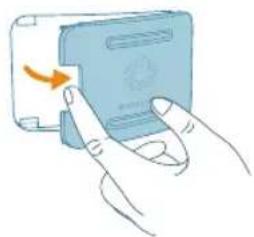
natural_image
Illustration of a hand pressing a button on a device (no text or symbols visible)3 Clean the particle sensor with a damp cotton swab.
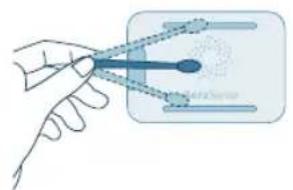
natural_image
Illustration of a hand holding a tool interacting with a device (no text or symbols visible)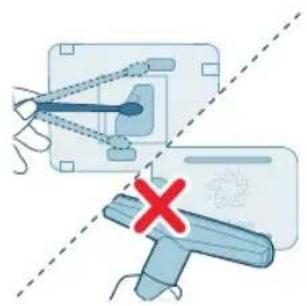
natural_image
Diagram showing a mechanical device with a blue handle and a red X mark, no text or symbols present4 Dry all parts thoroughly with a dry cotton swab.
5 Close the air quality sensor.

natural_image
Illustration of a hand pressing a button on a blue card with an orange scroll (no text or symbols)Cleaning the surface of the filters

When the filter cleaning alert displays on the screen, clean the surface of the filters with a vacuum cleaner.
Note: We recommend people who are allergic to dust, pollen, pets or mold, not to replace filters by themselves or to take protective measures, such as wearing a mask and gloves.
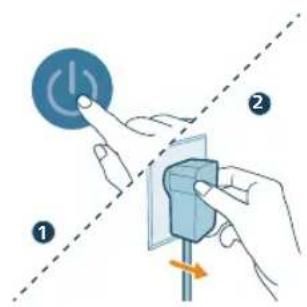
1 Switch off the air purifier and unplug from the power socket.
20
English
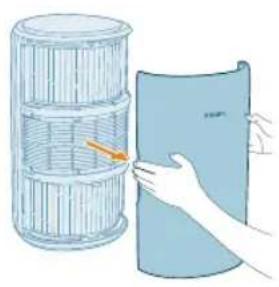
natural_image
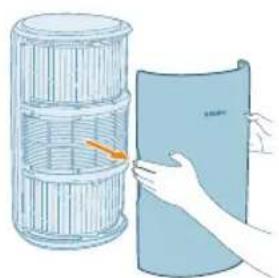
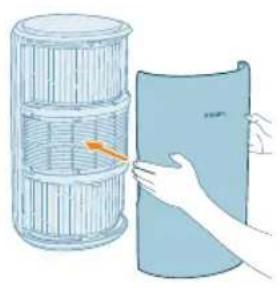
Illustration of a hand holding a folded paper or plastic sheet next to a cylindrical container (no text or symbols visible)2 Pull the front cover and remove it from the appliance.
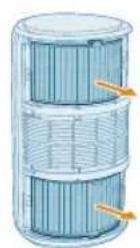
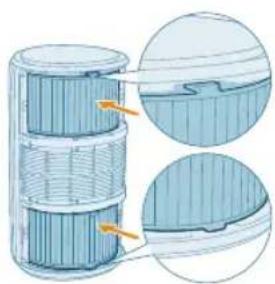
3 Pull the filters out from the appliance.

natural_image
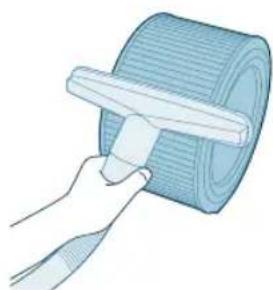
Illustration of a hand using a tool to spread a blue corrugated sheet (no text or symbols)4 Clean the surface of the filters with a vacuum cleaner.
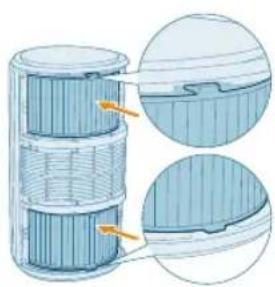
natural_image
Cross-sectional diagram of a layered cylindrical device with internal components, showing internal structure and highlighted sections (no text or symbols)5 Put the filters back into the appliance.
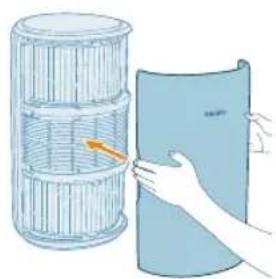
natural_image
Illustration of a hand holding a folded paper or sheet, next to a cylindrical container with a handle (no text or symbols)6 Reattach the front cover.
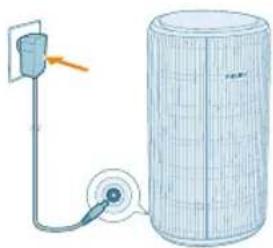
natural_image
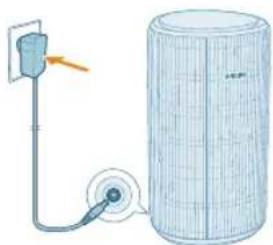
Diagram of a mechanical device with a pulley and cylindrical housing (no text or symbols)7 Put the adapter of the air purifier in the power socket.
8 Press the button to switch on the appliance.
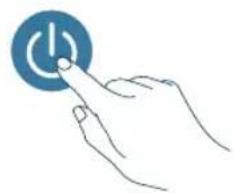
natural_image
Hand pressing a button with a blue circular icon (no text or symbols)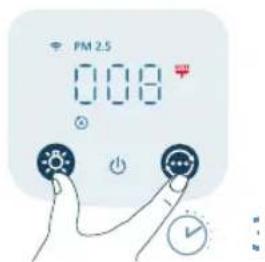
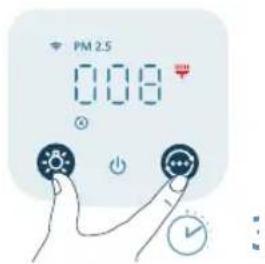
9 Press and hold the and button for 3 seconds to reset the filter cleaning time.
- You can also reset the filter cleaning time via the Air+ app.
- After the reset is successful, the filter cleaning alert disappears from the screen.
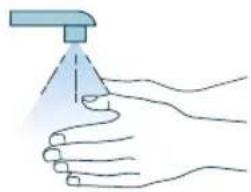
natural_image
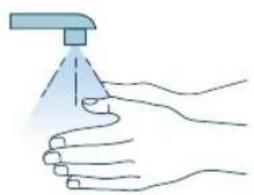
Illustration of a hand spraying a spray bottle onto a surface (no text or symbols)10 Wash your hands thoroughly after cleaning the filters.
Replacing the filters
Understanding the healthy air protect lock
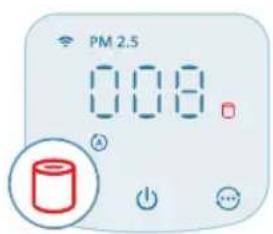
This air purifier is equipped with a filter replacement indicator to make sure that the air purification filter is in optimal condition when the air purifier is operating. When the filters need to be replaced, the filter replacement alert lights up red.
If the filters are not replaced in time, the air purifier will stop operating and automatically lock to protect the air quality in the room. Replace the filters as soon as possible.
22 English
Replacing the filters
Note:
The filters are not washable or reusable.
Always turn off the air purifier and unplug from the electrical outlet before replacing the filters.
When the filter replacement alert displays on the screen, replace the filter (FY3200).
Note: We recommend people who are allergic to dust, pollen, pets or mold, not to replace filters by themselves or to take protective measures, such as wearing a mask and gloves.
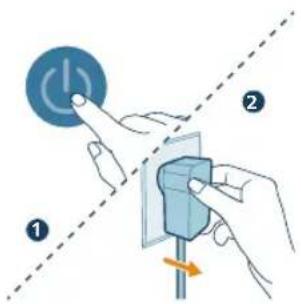
1 Switch off the air purifier and unplug from the power socket.
natural_image
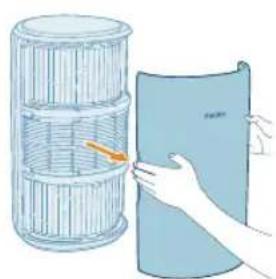
Illustration of a hand holding a folded paper or sheet, next to a cylindrical container filled with ribbed material (no text or symbols visible)2 Pull the front cover and remove it from the appliance.
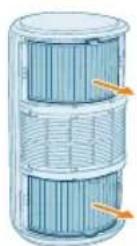
3 Pull the filters out from the appliance. Discard the used filters.
4 Remove all packaging materials of the new filters.
natural_image
Illustration of a hand placing a blue cylindrical object into a container with an upward arrow (no text or symbols)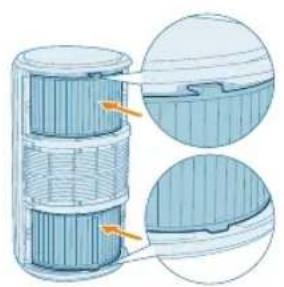
natural_image
Cross-sectional diagram of a battery cell with internal structure and two views of the casing (no text or symbols)5 Put the new filters back into the appliance.
natural_image
Illustration of a hand holding a blue cylindrical object next to a wire cage (no text or symbols)6 Reattach the front cover.
natural_image
Diagram of a water heater connected to a power outlet and pump (no text or symbols)7 Put the adapter of the air purifier in the power socket.
8 Press the button to switch on the appliance.
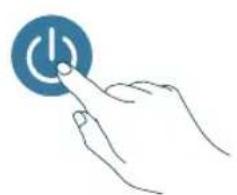
natural_image
Hand holding a blue circular button with a white 'Power' symbol (no text or numbers present)24 English
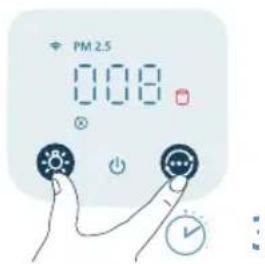
natural_image
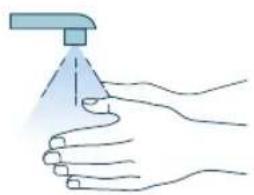
Illustration of a hand spraying a spray bottle from a water dispenser (no text or symbols)9 Press and hold the and button for 3 seconds to reset the filter lifetime counter.
- You can also reset the filter lifetime via the Air+ app.
- After the reset is successful, the filter replacement alert disappears from the screen.
10 Wash your hands thoroughly after replacing the filters.
Note: Do not smell the filters as it has collected pollutants from the air.
Filter reset
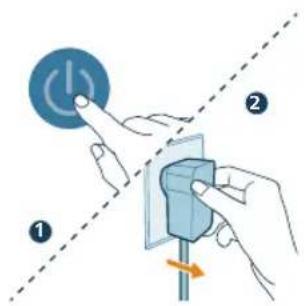
You can replace the filters even before filter replacement alert (☐) displays on the screen. After replacing filters, you need to reset the filter lifetime counter manually.
1 Press the button to turn off the appliance. Unplug the appliance.
natural_image
Diagram of a cylindrical water pump connected to a wire, with a pulley and outlet pipe (no text or symbols)2 Make sure the appliance is completely unplugged, and then put the power adapter in the power socket.
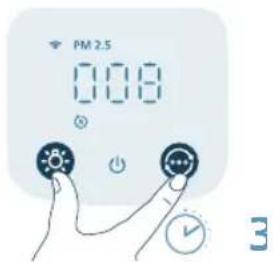
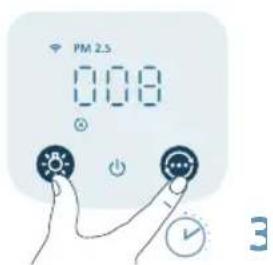
3 Within 15 seconds after power on, press and hold the and button for 3 seconds to reset the filter lifetime counter.
Storage
1 Turn off the air purifier and unplug from the power socket.
2 Clean the air purifier and the surface of the filters (see Chapter "Cleaning and Maintenance").
3 Let all parts air dry thoroughly before storing.
4 Wrap the filters in air tight plastic bags.
5 Store the air purifier, filters in a cool, dry location.
6 Always thoroughly wash hands after handling filters.
Troubleshooting
This chapter summarizes the most common problems you could encounter with the appliance. If you are unable to solve the problem with the information below, contact the Consumer Care Center in your country.
Problem Possible solution
| The appliance does not work properly. Check if the front cover is properly installed. If not, for safety reason, the appliance will stop operating. | |
| The filter replacement alert is on but you have not replaced the corresponding filter. As a result, the appliance is now locked. In this case, replace the filter and reset the filter lifetime counter. | |
| The airflow that comes out of the air outlet is significantly weaker than before. | The surface of the filter is dirty. Clean the surface of the filter (see Chapter 'Cleaning and maintenance'). |
| The air quality does not improve, even though the appliance has been operating for a long time. | Check if the packing material is removed from the filters. |
| Make sure that the two filters (FY3200) are properly installed. | |
| Room size is large or the outdoor air quality is poor. | |
| For optimum purification performance, please close the doors and windows when operating the air purifier. | |
| There are indoor pollution resources. For instances, smoking, cooking, incense. | |
Filters reach the end of life. Replace the filter with a new one.
| The appliance produces a strange smell. The first few times you use the appliance, it may produce a plastic smell. This is normal. However, if the appliance produces a burnt smell even if removing the filter, contact your Philips dealer or an authorized Philips service center. The filter may produce smell after being used for a while because of the absorption of indoor gases. It's recommended that you reactivate the filter by putting it in direct sunlight for repeated use. If odor still exists, replace the filters. | |
| The appliance is extra loud. It's normal if the appliance runs at the Turbo mode. | |
| The appliance will run in high speed when the air quality is poor, which will cause higher noise. When using the appliance in a bedroom at night, choose the Sleep speed. | |
| If there is abnormal sound, contact the Consumer Care Center in your country. | |
| The appliance still indicates that I need to replace filters, but I already did. | Perhaps you did not reset the filter lifetime counter. Switch on the appliance. Then touch and hold the and simultaneously for 3 seconds. |
| Error code "E1" displays on the screen. The motor has malfunctions. Contact the Consumer Care Center in your country. | |
| The Wi-Fi setup is not successful. Please ensure your smart phone is connected to a 2.4GHz (home) Wi-Fi network instead of a 5GHz Wi-Fi network or public Wi-Fi. For a successful pairing, we suggest turning off your mobile data before initiating the pairing process. | |
| Ensure to enable the following permissions: "Location", "Storage", "Bluetooth", and "Local Network" on your smart phone. After a successful Wi-Fi setup, you can change permission settings as desired. | |
| Please verify that you have entered the correct Wi-Fi password. The password is case-sensitive, has a limit of 63 characters. Special symbols are not accepted. | |
| Ensure the network name of your home Wi-Fi is correct. The network name is case-sensitive. | |
| If you are using a VPN on your smart phone, please turn it off before starting the pairing process. | |
| If your router has a whitelist set up to block pairing, please disable the whitelist to ensure successful connection. | |
| Please ensure that both your device and smart phone are within 10 meters of the router. | |
| Ensure the app has been updated to the latest version. | |
To ensure a strong Wi-Fi connection, avoid placing your device near other electronic devices, bright light sources, or signal stations that may cause interference. If you experience connectivity issues, move the device away from these sources and attempt to reconnect it to the Wi-Fi network.
Consult the help section in the app for extensive and up-to-date troubleshooting tips.
Warranty and support
Versuni offers a two-year warranty after purchase on this product. This warranty is not valid if a defect is due to incorrect use or poor maintenance. Our warranty does not affect your rights under law as a consumer. For more information or for invoking the warranty, please visit our website www.philips.com/support.
Order parts or accessories
If you have to replace a part or want to purchase an additional part, go to your Philips dealer or visit www.philips.com/support.
If you have problems obtaining the parts, please contact the Philips Consumer Care Center in your country.
Penting
natural_image
Illustration of a hand holding a folded paper or sheet, next to a cylindrical container with a handle (no text or symbols)natural_image
Illustration of a hand placing a blue cylindrical object into a container with an upward arrow (no text or symbols)natural_image
Cross-sectional diagram of a cylindrical device with internal layered structure and highlighted components (no text or symbols)34 Bahasa Indonesia
natural_image
Illustration of a hand holding a folded paper or plastic sheet, next to a cylindrical container filled with ribbed material (no text or symbols visible)natural_image
Diagram of a water pump connected to a cylindrical tank with a cable (no text or symbols)Hubungkan adaptor daya ke:
Mengatur ulang koneksi Wi-Fi
natural_image
Diagram of a cylindrical device connected to a power outlet with a pulley, showing no text or symbols.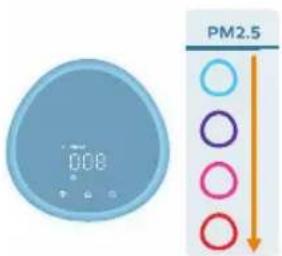
natural_image
Illustration of a crescent moon, star, and eye icon with a hand pointing at it (no text or symbols)natural_image
Illustration of a hand interacting with a digital display showing 0.08 (no text or symbols on the device itself)natural_image
Illustration of a digital timer and a hand interacting with a light bulb (no text or symbols)natural_image
Illustration of a hand interacting with a light bulb icon (no text or symbols)natural_image
Illustration of a hand inserting a card into a device (no text or symbols visible)natural_image
Illustration of a hand holding a blue object with a dot and connecting lines, next to a rectangular frame (no text or symbols)natural_image
Diagram showing two mechanical components with a red X mark, one connected to a device and the other attached (no text or symbols present)natural_image
Illustration of hands inserting a card into a device (no text or symbols visible)42 Bahasa Indonesia
Membersihkan permukaan filter
natural_image
Illustration of a hand holding a folded paper or plastic sheet next to a cylindrical container (no text or symbols visible)natural_image
Illustration of a hand using a tool to spread a blue textured surface (no text or symbols)natural_image
Cross-sectional diagram of a cylindrical mechanical component with internal layered structure (no text or symbols)natural_image
Illustration of a hand holding a folded paper or sheet, next to a cylindrical container filled with wire mesh (no text or symbols)natural_image
Diagram of a water pump connected to a cylindrical tank with a pulley (no text or symbols)7 Colokkan adaptor pemurni udara ke soket daya.
natural_image
Hand icon showing a hand pressing a button with a blue circular icon (no text or symbols)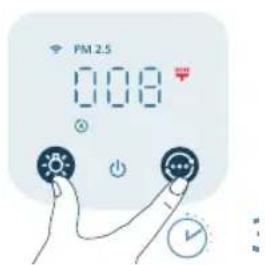
natural_image
Illustration of a hand washing a faucet with a clear blue liquid level (no text or symbols)natural_image
Illustration of a hand holding a folded paper or plastic sheet next to a cylindrical container (no text or symbols visible)natural_image
Illustration of a hand placing a blue cylindrical object into a container with an upward arrow (no text or symbols)natural_image
Cross-sectional diagram of a battery pack with internal structure and highlighted components (no text or symbols)natural_image
Illustration of a hand holding a folded paper or sheet, next to a cylindrical container filled with ribbed material (no text or symbols visible)Bahasa Indonesia
natural_image
Diagram of a pump connected to a cylindrical tank with a pulley (no text or symbols)7 Colokkan adaptor pemurni udara ke soket daya.
natural_image
Hand icon showing a hand pressing a button with a blue circular icon (no text or symbols)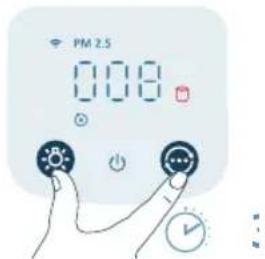
natural_image
Illustration of a hand spraying a spray bottle onto a surface (no text or symbols)natural_image
Diagram of a pump connected to a cylindrical tank with a wire mesh structure (no text or symbols)natural_image
Illustration of a hand holding a folded paper or sheet, next to a cylindrical container with a handle (no text or symbols)natural_image
Illustration of a hand placing a blue cylindrical object into a container with an upward arrow (no text or symbols)natural_image
Cross-sectional diagram of a cylindrical device with internal layered structure and highlighted components (no text or symbols)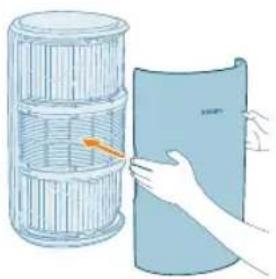
natural_image
Illustration of a hand holding a cylindrical object next to a plastic sheet (no text or symbols visible)natural_image
Diagram of a pulley system next to a cylindrical grid cylinder, with no visible text or symbols.natural_image
Diagram of a cylindrical water heater connected to a power outlet with a pulley (no text or symbols)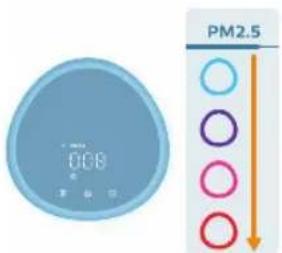
natural_image
Illustration of a crescent moon, star, and circular icon with a pointing finger (no text or symbols)natural_image
Illustration of a digital climate controller with a hand interacting with a light bulb (no text or symbols)natural_image
Illustration of a digital clock with a light bulb and a finger pointing at it (no text or symbols)natural_image
Illustration of a hand interacting with a light bulb icon (no text or symbols)natural_image
Illustration of a hand inserting a device into a device with an arrow indicating rotation (no text or symbols)natural_image
Illustration of a hand holding a tool interacting with a device (no text or symbols visible)natural_image
Diagram showing a hand holding a device with a blue handle and a red X mark, intersected by a dashed diagonal line (no text or symbols)natural_image
Illustration of a hand pressing a button on a device (no text or symbols visible)natural_image
Illustration of a hand holding a folded paper or sheet, next to a cylindrical container filled with ribbed material (no text or symbols visible)natural_image
Illustration of a hand using a tool to spread a blue textured mat (no text or symbols)natural_image
Cross-sectional diagram of a cylindrical device with internal components and highlighted sections (no text or symbols)natural_image
Illustration of a hand holding a folded paper or sheet, next to a cylindrical container filled with ribbons (no text or symbols)natural_image
Diagram of a pump connected to a cylindrical tank with a pulley (no text or symbols)natural_image
Hand icon showing a finger pressing a blue circular button with an 'Power' symbol (no text or numbers present)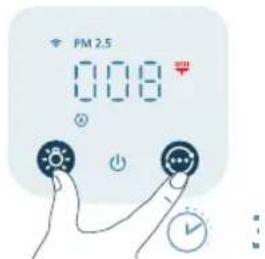
natural_image
Illustration of a hand spraying a spray bottle onto a surface (no text or symbols)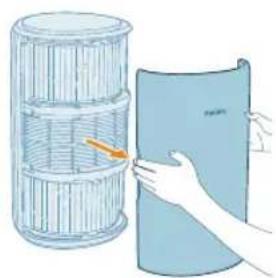
natural_image
Illustration of a hand holding a folded paper or sheet, next to a cylindrical container filled with wire mesh (no text or symbols)natural_image
Illustration of a hand placing a blue cylindrical object into a container with an upward arrow (no text or symbols)natural_image
Cross-sectional diagram of a battery cell with internal structure and highlighted components (no text or symbols)natural_image
Illustration of a hand holding a folded paper or sheet, next to a cylindrical container with an arrow indicating rotation (no text or symbols present)natural_image
Diagram of a power supply connected to a cylindrical device with a pulley and cable (no text or symbols)natural_image
Hand holding a blue circular button with a power symbol (no text or numbers present)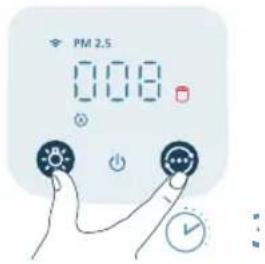
natural_image
Illustration of a hand spraying a spray gun with a funnel (no text or symbols)natural_image
Diagram of a water pump connected to a cylindrical tank with a pulley (no text or symbols)natural_image
Illustration of a hand holding a folded paper or sheet, next to a cylindrical container with a handle (no text or symbols)natural_image
Illustration of a hand placing a component into a blue cylindrical container with an upward arrow (no text or symbols)natural_image
Cross-sectional diagram of a cylindrical device with internal layered structure and highlighted components (no text or symbols)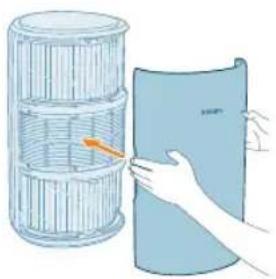
natural_image
Illustration of a hand holding a folded paper or plastic sheet, next to a cylindrical container filled with ribbed material (no text or symbols visible)natural_image
Diagram of a water pump connected to a cylindrical tank with a cable (no text or symbols)flowchart
graph TD
    A["Mobile Device"] --> B["Wireless Network"]
    B --> C["Server with Wireless icon"]
    style A fill:#f9f,stroke:#333
    style B fill:#ccf,stroke:#333
    style C fill:#cfc,stroke:#333
Nulstil Wi-Fi-forbindelsen
natural_image
Diagram of a cylindrical water heater connected to a pump and a wall-mounted device (no text or symbols)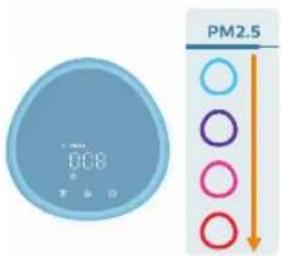
natural_image
Illustration of a crescent moon, moon with stars, and a hand pointing at a circular icon (no text or symbols)natural_image
Illustration of a hand holding a circular digital timer with a sun icon, no text or symbols present.natural_image
Illustration of a digital clock with a light bulb and a finger pointing at it (no text or symbols)natural_image
Illustration of a hand holding a light bulb icon next to a large blue sphere (no text or symbols)2 Åbn luftkvalitetssensorens dæksel.
natural_image
Illustration of a hand inserting a device into a card (no text or symbols visible)natural_image
Illustration of a hand holding a tool interacting with a device (no text or symbols visible)natural_image
Diagram showing two mechanical components with a red X mark, one with connecting rods and the other with a tool (no text or symbols present)5 Luk luftkvalitetssensoren.
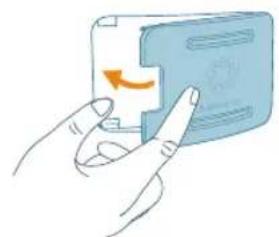
natural_image
Illustration of a hand pressing a button on a blue card (no text or symbols visible)1 Sluk for luftrenseren, og tag stikket ud af stikkontakten.
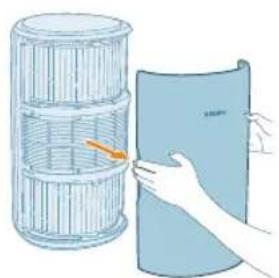
natural_image
Illustration of a hand holding a folded paper or sheet, next to a cylindrical container filled with lined paper (no text or symbols visible)natural_image
Illustration of a hand using a tool to spread a blue textured mat (no text or symbols)natural_image
Cross-sectional diagram of a layered cylindrical structure with highlighted components (no text or symbols)natural_image
Illustration of a hand holding a folded paper or sheet, next to a cylindrical container filled with ribbons (no text or symbols visible)natural_image
Diagram of a water pump connected to a cylindrical tank with a pulley (no text or symbols)7 Sæt adapteren til luftrenseren i stikkontakten.
natural_image
Hand icon showing a finger pressing a blue circular button with an 'Power' symbol (no text or numbers present)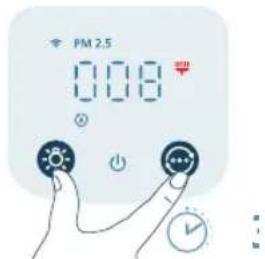
9 Tryk på knappen og 13 sekunder for at nulstille filterets rengøringstid.
natural_image
Illustration of a hand spraying a spray gun with a triangular spray nozzle (no text or symbols)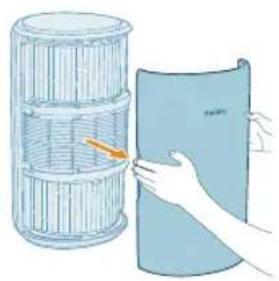
natural_image
Illustration of a hand holding a rolled-up document next to a cylindrical container filled with liquid, no text or symbols present.1 Sluk for luftrenseren, og tag stikket ud af stikkontakten.
natural_image
Illustration of a hand placing a blue cylindrical object into a container with an upward arrow (no text or symbols)natural_image
Cross-sectional diagram of a battery cell with internal structure and highlighted components (no text or symbols)natural_image
Illustration of a hand holding a folded paper or sheet, next to a cylindrical container with an arrow indicating rotation (no text or symbols present)natural_image
Diagram of a power supply connected to a cylindrical device with a pulley and cable (no text or symbols)7 Sæt adapteren til luftrenseren i stikkontakten.
natural_image
Hand icon showing a hand pressing a blue circular button with a power symbol (no text or numbers)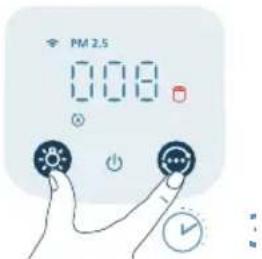
natural_image
Illustration of a hand spraying a spray gun with a funnel (no text or symbols)natural_image
Diagram of a water pump connected to a cylindrical tank with a pulley (no text or symbols)natural_image
Illustration of a hand holding a folded paper or sheet, next to a cylindrical container with a handle (no text or symbols visible)natural_image
Illustration of a hand pressing down on a blue cylindrical object with an upward arrow (no text or symbols)natural_image
Cross-sectional diagram of a layered cylindrical device with internal components and highlighted sections (no text or symbols)natural_image
Illustration of a hand holding a cylindrical object next to a plastic sheet (no text or symbols visible)natural_image
Diagram of a pulley system connected to a cylindrical grid structure (no text or symbols)natural_image
Diagram of a cylindrical device connected to a power source and cable, with an arrow pointing to the cable (no text or symbols present)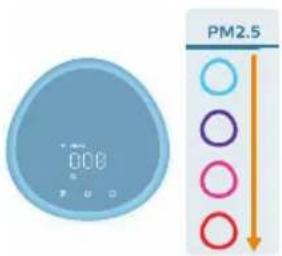
natural_image
Illustration of a crescent moon, star, and circular button with dots, next to a blank rounded rectangle (no text or symbols)natural_image
Illustration of a blue circular digital timer with a hand pointing at it, next to a stylized sun icon (no text or symbols)natural_image
Illustration of a hand holding a blue circular icon with a sun symbol, next to a large blue sphere (no text or symbols)natural_image
Illustration of a hand inserting a device into a blue card with an arrow indicating rotation (no text or symbols)natural_image
Illustration of a hand holding a tool with a blue tool tip, no text or symbols presentnatural_image
Diagram showing a mechanical device with a blue handle and a red X mark, no text or symbols presentnatural_image
Illustration of a hand pressing a button on a blue card (no text or symbols visible)natural_image
Illustration of a hand holding a blue cylindrical object next to a wire rack (no text or symbols)natural_image
Illustration of a hand using a tool to spread a blue rolled-up material (no text or symbols visible)natural_image
Cross-sectional diagram of a cylindrical device with internal components and highlighted parts (no text or symbols)natural_image
Illustration of a hand holding a blue cylindrical object next to a wire rack (no text or symbols)natural_image
Diagram of a mechanical device with a pulley and a cylindrical component (no text or symbols)natural_image
Hand pressing a button with a blue circular icon (no text or symbols)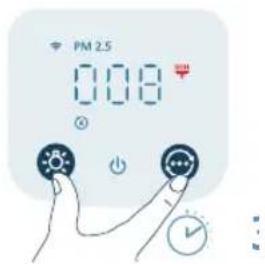
natural_image
Illustration of a hand holding a spray gun, no text or symbols presentnatural_image
Illustration of a hand holding a blue cylindrical object next to a stack of woven bamboo materials (no text or symbols)natural_image
Illustration of a hand pressing down on a blue cylindrical object with an upward arrow (no text or symbols)natural_image
Cross-sectional diagram of a cylindrical device with internal layered structure and highlighted components (no text or symbols)natural_image
Illustration of a hand holding a folded paper or sheet, next to a cylindrical container filled with wire mesh (no text or symbols)natural_image
Diagram of a water pump connected to a cylindrical tank with a pulley (no text or symbols)natural_image
Hand holding a blue circular button with a power symbol (no text or numbers visible)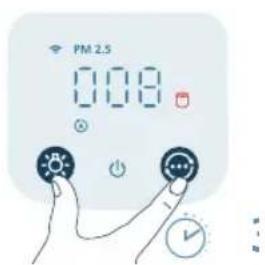
natural_image
Illustration of a hand washing a showerhead with a blue spray funnel (no text or symbols)natural_image
Diagram of a cylindrical device connected to a power outlet with a pulley, showing no text or symbols.Juhtnupud:
natural_image
Illustration of a hand holding a folded paper or sheet, next to a cylindrical container with a handle (no text or symbols)natural_image
Illustration of a hand placing a component into a blue cylindrical container with an upward arrow (no text or symbols)4 Pange filtrid tagasi seadmesse.
natural_image
Cross-sectional diagram of a cylindrical device with internal layered structure and highlighted components (no text or symbols)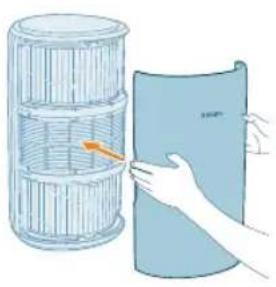
natural_image
Illustration of a hand holding a folded paper or plastic sheet next to a cylindrical container (no text or symbols visible)5 Paigaldage esikaas uuesti.
Toite ühendamine
natural_image
Diagram of a mechanical device with a pulley and grid-patterned cylinder, no text or symbols present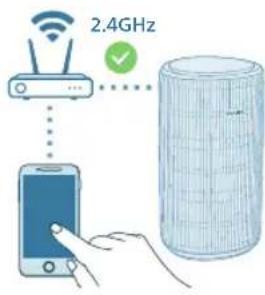
flowchart
graph TD
    A["Mobile Device"] --> B["Server"]
    C["Wi-Fi Signal"] --> D["Data Storage"]
    style A fill:#f9f,stroke:#333
    style B fill:#ccf,stroke:#333
    style C fill:#cfc,stroke:#333
    style D fill:#fcc,stroke:#333
Wi-Fi-ühenduse esmakordne seadistamine
natural_image
Diagram of a water pump connected to a cylindrical tank with a pulley (no text or symbols)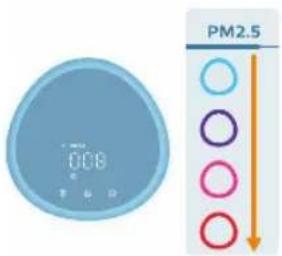
natural_image
Illustration of a crescent moon, star, and eye icon with a hand pointing at it (no text or symbols)natural_image
Illustration of a digital timer and a hand interacting with a light bulb icon (no text or symbols)natural_image
Illustration of a digital clock with a light bulb and a finger pointing at it (no text or symbols)natural_image
Hand holding a blue circular icon with a sun-like symbol, next to a large blue rounded circle (no text or symbols)130 Eesti
natural_image
Illustration of a hand inserting a device into a device with an arrow indicating rotation (no text or symbols)natural_image
Illustration of a hand holding a tool interacting with a device (no text or symbols visible)natural_image
Diagram showing a hand holding a device with a blue handle and a red X mark, intersected by dashed lines (no text or symbols)natural_image
Illustration of a hand pressing a button on a device (no text or symbols visible)Filtrite pinna puhastamine
natural_image
Illustration of a hand holding a folded paper or sheet next to a cylindrical container (no text or symbols visible)natural_image
Illustration of a hand using a tool to spread a rolled-up mat (no text or symbols)4 Puhastage filtrite pinda tolmuimejaga.
natural_image
Cross-sectional diagram of a cylindrical device with internal layered structure and highlighted components (no text or symbols)5 Pange filtrid tagasi seadmesse.
132
Eesti

natural_image
Illustration of a hand holding a folded paper or plastic sheet next to a cylindrical container (no text or symbols visible)6 Paigaldage esikaas uuesti.
natural_image
Diagram of a pump connected to a cylindrical grid device with a cable (no text or symbols)natural_image
Hand icon showing a blue circular button with an 'Power' symbol, no text or labels present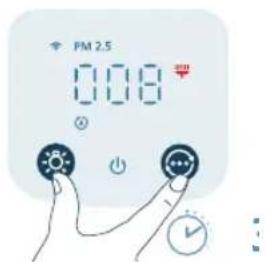
natural_image
Illustration of a hand spraying a spray bottle from a water dispenser (no text or symbols)natural_image
Illustration of a hand holding a folded paper or plastic sheet next to a multi-tiered cylindrical container (no text or symbols visible)natural_image
Illustration of a hand placing a blue cylindrical object into a container with an upward arrow (no text or symbols)5 Pange uued filtrid tagasi seadmesse.
natural_image
Cross-sectional diagram of a battery cell with internal structure and highlighted components (no text or symbols)6 Paigaldage esikaas uuesti.
natural_image
Illustration of a hand holding a folded paper or sheet, next to a cylindrical container filled with plastic wrap (no text or symbols)natural_image
Diagram of a power supply connected to a cylindrical device with a pulley and cable (no text or symbols)8 Vajutage nuppu, et seade sisse lülitada.
natural_image
Hand holding a blue circular button with a power symbol (no text or numbers present)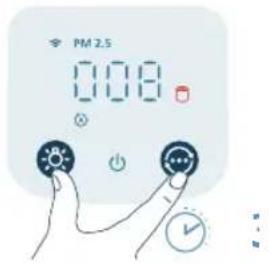
natural_image
Illustration of a hand holding a spray gun with a blue spray can (no text or symbols)natural_image
Diagram of a pump connected to a cylindrical tank with a pulley (no text or symbols)natural_image
Illustration of a hand holding a folded paper or sheet, next to a cylindrical container with a handle (no text or symbols)natural_image
Illustration of a hand placing a component into a blue cylindrical container with an upward arrow (no text or symbols)natural_image
Cross-sectional diagram of a cylindrical device with internal layered structure and highlighted components (no text or symbols)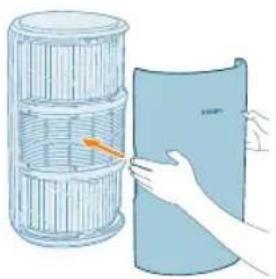
natural_image
Illustration of a hand holding a folded paper or plastic sheet, next to a cylindrical container filled with ribbed material (no text or symbols visible)natural_image
Diagram of a water pump connected to a cylindrical tank with a cable (no text or symbols)natural_image
Diagram of a pump connected to a cylindrical tank with a cable, showing no text or symbols.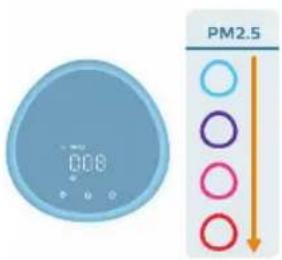
natural_image
Illustration of a crescent moon, star, and circular button with a hand pointing at it (no text or symbols)natural_image
Illustration of a digital timer with a sun icon and a finger pointing at it (no text or symbols)natural_image
Illustration of a hand holding a blue circular icon with a sun symbol, next to a large blue sphere (no text or symbols present)natural_image
Illustration of a hand inserting a device into a card with an arrow indicating rotation (no text or symbols)natural_image
Illustration of a hand holding a tool with a blue tool tip, no text or symbols presentnatural_image
Diagram showing a mechanical device with a blue handle and a red X mark, no text or symbols presentnatural_image
Illustration of a hand inserting a card into a blue card with an orange scroll (no text or symbols)natural_image
Illustration of a hand holding a closed book next to a cylindrical container (no text or symbols visible)natural_image
Illustration of a hand using a tool to spread a blue rolled-up material (no text or symbols visible)natural_image
Cross-sectional diagram of a cylindrical device with internal components and highlighted parts (no text or symbols)natural_image
Illustration of a hand holding a blue cylindrical object next to a wire rack (no text or symbols)natural_image
Diagram of a mechanical device with a pulley and a cylindrical component, no text or symbols presentnatural_image
Hand icon showing a finger pressing a blue circular button with an 'Power' symbol (no text or numbers present)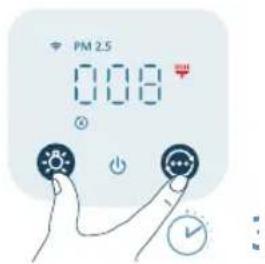
natural_image
Illustration of a hand holding a spray gun, no text or symbols presentnatural_image
Illustration of a hand holding a folded paper or sheet, next to a cylindrical container filled with ribbed material (no text or symbols visible)natural_image
Illustration of a hand placing a blue cylindrical object into a container with an upward arrow (no text or symbols)natural_image
Cross-sectional diagram of a layered cylindrical structure with highlighted components (no text or symbols)natural_image
Illustration of a hand holding a blue cylindrical object next to a wire rack (no text or symbols)natural_image
Diagram of a pump connected to a cylindrical tank with a cable, showing no text or symbols.natural_image
Hand icon showing a blue circular button with an 'Power' symbol, no text or labels present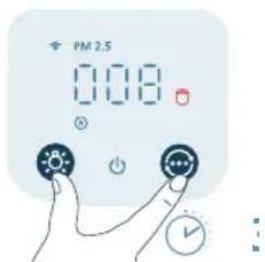
natural_image
Illustration of a hand spraying a spray gun with a funnel (no text or symbols)natural_image
Diagram of a water filtration system with a pump and cylindrical filter (no text or symbols)natural_image
Illustration of a hand holding a folded paper or sheet, next to a cylindrical container with a handle (no text or symbols)natural_image
Illustration of a hand placing a component into a blue cylindrical container with an upward arrow (no text or symbols)natural_image
Cross-sectional diagram of a cylindrical device with internal layered structure and highlighted components (no text or symbols)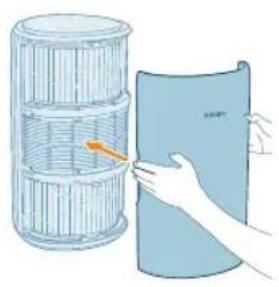
natural_image
Illustration of a hand holding a blue sheet with an orange arrow pointing to a cylindrical container (no text or symbols)natural_image
Diagram of a gas pump connected to a cylindrical tank with a cable, showing internal components (no text or symbols)natural_image
Diagram of a water pump connected to a cylindrical tank with a pulley (no text or symbols)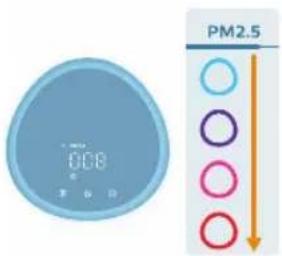
natural_image
Illustration of a crescent moon, star, and eye icon with a hand interacting with the eye (no text or symbols)natural_image
Illustration of a blue circular digital timer with a hand pointing to it, next to a light bulb icon (no text or symbols)natural_image
Illustration of a digital timer and a hand interacting with a light bulb (no text or symbols)natural_image
Illustration of a hand interacting with a blue circular icon featuring a sun-like symbol (no text or symbols present)natural_image
Illustration of a hand inserting a card into a device (no text or symbols visible)natural_image
Illustration of a hand holding a blue object with a dot and connecting lines, next to a rectangular frame (no text or symbols)natural_image
Diagram showing two mechanical components with a red X mark, one connected to a device and the other grounded (no text or symbols present)natural_image
Illustration of hands inserting a card into a device (no text or symbols visible)natural_image
Illustration of a hand holding a folded paper or sheet, next to a cylindrical container with a handle (no text or symbols visible)natural_image
Illustration of a hand using a tool to spread a blue corrugated material (no text or symbols visible)natural_image
Cross-sectional diagram of a cylindrical mechanical component with internal layered structure (no text or symbols)natural_image
Illustration of a hand holding a folded paper or sheet next to a cylindrical container (no text or symbols visible)natural_image
Diagram of a water pump connected to a cylindrical tank with a pulley (no text or symbols)natural_image
Hand holding a blue circular button with a power symbol (no text or numbers visible)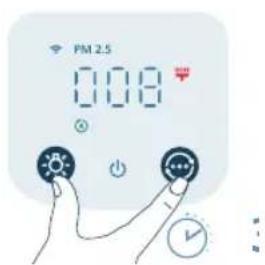
natural_image
Illustration of a hand spraying a spray bottle with a blue tip (no text or symbols)natural_image
Illustration of a hand holding a folded paper or plastic sheet next to a cylindrical container (no text or symbols visible)natural_image
Illustration of a hand placing a blue cylindrical object into a container with an upward arrow (no text or symbols)natural_image
Cross-sectional diagram of a cylindrical device with internal components and highlighted parts (no text or symbols)natural_image
Illustration of a hand holding a folded paper or sheet, next to a cylindrical container filled with ribbed material (no text or symbols visible)natural_image
Diagram of a pump connected to a cylindrical tank with a pulley (no text or symbols)natural_image
Hand icon showing a blue circular button with a white 'Power' symbol, no text or labels present.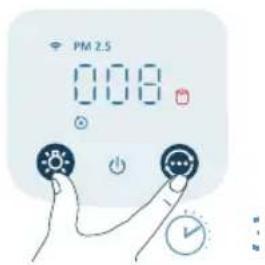
natural_image
Illustration of a hand spraying a spray can with a funnel (no text or symbols)natural_image
Diagram of a water pump connected to a cylindrical tank with a pulley (no text or symbols)natural_image
Illustration of a hand holding a blue sheet with an orange arrow, next to a cylindrical container (no text or symbols)1 Povucite prednji poklopac i odvojite ga od aparata.
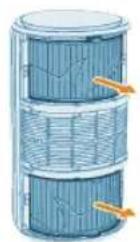
2 Izvadite filtre iz aparata.
3 Uklonite svu ambalažu filtara za pročišćavanje zraka.
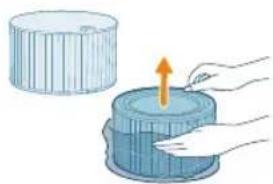
natural_image
Illustration of a hand pressing down on a blue cylindrical object with an upward arrow (no text or symbols)4 Vratite filtre u aparat.
natural_image
Cross-sectional diagram of a layered cylindrical device with internal components and highlighted sections (no text or symbols)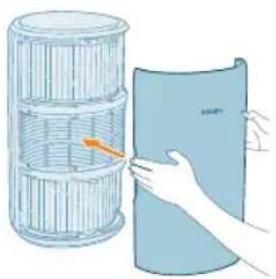
natural_image
Illustration of a hand holding a folded paper or plastic sheet, next to a cylindrical container filled with ribbed material (no text or symbols visible)5 Vratite prednji poklopac.
natural_image
Diagram of a water pump connected to a cylindrical tank with a cable (no text or symbols)Adapter za napajanje ukopčava se na sljedeći način:
flowchart
graph TD
    A["Mobile Device"] --> B["Server"]
    C["Wi-Fi Signal"] --> D["Data Storage"]
    style A fill:#f9f,stroke:#333
    style B fill:#ccf,stroke:#333
    style C fill:#cfc,stroke:#333
    style D fill:#fcc,stroke:#333
2 Istovremeno pritisnite gumbe i te 14adržite 3 sekunde dok se ne oglasi zvučni signal.
- Pročišćivač zraka prelazi u način rada za uparivanje.
- Indikator za Wi-Fi õljeska narančasto.
3 Pratite korake 3 – 4 u odjeljku „Prvo postavljanje veze Wi-Fi“.
Upotreba pročišćivača zraka
natural_image
Diagram of a cylindrical water heater connected to a power outlet with a pulley (no text or symbols)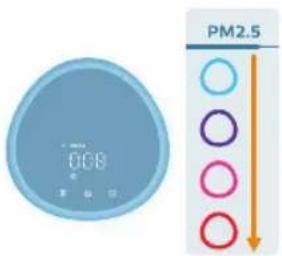
natural_image
Illustration of a crescent moon, star, and eye icon with a hand pointing at it (no text or symbols)Način rada za spavanje (C): Pročišćivač zraka radi tiho pri maloj brzini. Indikatori zaslona isključuju se nakon 3 sekunde.
- Način rada za spavanje za alergičare: Ovaj način rada može se omogućiti u aplikaciji Air+. Način rada za spavanje za alergičare pretvara Način rada za spavanje u snažniji način rada kad to trebate. Kad ga omogućite, Način rada za spavanje automatski prilagodava brzinu ventilatora na sličan način kao Automatski način rada, održavajući razinu zvuka niskom. Ovaj je način rada idealan za osobe koje žele veću učinkovitost noću u odnosu na standardni Način rada za spavanje.
Način rada kojim se upravlja aplikacijom (☐): Aparat radi u načinu rada koji je dostupan samo putem aplikacije, kao što su dodatne ručne brzine ventilatora ili drugi načini rada koji su prilagođeni u aplikaciji.
Napomena: Način rada kojim se upravlja aplikacijom dostupan je SAMO putem aplikacije nakon uspješnog uspostavljanja veze Wi-Fi.
natural_image
Illustration of a blue circular digital timer with a hand holding a light bulb icon (no text or symbols)natural_image
Illustration of a digital clock with a hand interacting with a light bulb (no text or symbols)natural_image
Illustration of a hand interacting with a light bulb icon (no text or symbols)Hrvatski
natural_image
Illustration of a hand inserting a device into a device with an arrow indicating rotation (no text or symbols)2 Otvorite poklopac senzora kvalitete zraka.
natural_image
Illustration of a hand holding a tool interacting with a device (no text or symbols visible)natural_image
Diagram showing two mechanical components with a red X mark, one with connecting rods and the other with a handle (no text or symbols)5 Zatvorite senzor kvalitete zraka.
natural_image
Illustration of a hand pressing a button on a blue card (no text or symbols visible)Čišćenje površine filtara
Kad se na zaslonu prikaže upozorenje za čišćenje filtra 🚪očistite površinu filtara usisavačem.
1 Isključite pročišćivač zraka i iskopčajte ga iz strujne utičnice.
natural_image
Illustration of a hand holding a folded paper or sheet with an orange arrow pointing to it, next to a cylindrical container (no text or symbols)2 Povucite prednji poklopac i odvojite ga od aparata.
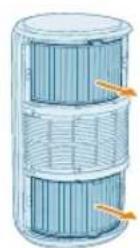
3 Izvadite filtre iz aparata.
natural_image
Illustration of a hand using a tool to lift a blue textured roller (no text or symbols)4 Površinu filtara očistite usisivačem.
natural_image
Cross-sectional diagram of a layered cylindrical structure with highlighted components (no text or symbols)5 Vratite filtre u aparat.
200 Hrvatski
natural_image
Illustration of a hand holding a folded paper or plastic sheet next to a cylindrical container (no text or symbols visible)6 Vratite prednji poklopac.
natural_image
Diagram of a water pump connected to a cylindrical tank with a pulley (no text or symbols)7 Adapter pročišćivača zraka ukopčajte u strujnu utičnicu.
8 Pritisnite gumb za uključivanje aparata.
natural_image
Hand icon showing a finger pressing a blue circular button with an 'Power' symbol (no text or numbers present)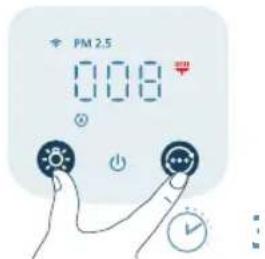
natural_image
Illustration of a hand spraying a spray gun with a funnel (no text or symbols)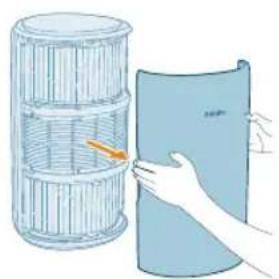
natural_image
Illustration of a hand holding a folded paper or sheet next to a cylindrical container (no text or symbols visible)1 Isključite pročišćivač zraka i iskopčajte ga iz strujne utičnice.
2 Povucite prednji poklopac i odvojite ga od aparata.
202 Hrvatski
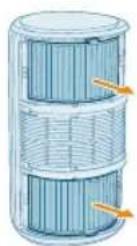
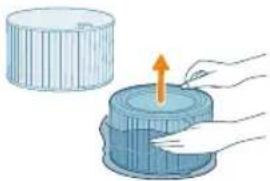
3 Izvadite filtre iz aparata. Iskorištene filtre odložite u otpad.
4 Uklonite svu ambalažu s novih filtara.
natural_image
Illustration of a hand placing a blue cylindrical object into a container with an upward arrow (no text or symbols)5 Umetnite nove filtre u aparat.
natural_image
Cross-sectional diagram of a battery cell with internal structure and highlighted components (no text or symbols)6 Vratite prednji poklopac.
natural_image
Illustration of a hand holding a folded paper or sheet, next to a cylindrical container filled with plastic wrap (no text or symbols)7 Adapter pročišćivača zraka ukopčajte u strujnu utičnicu.
natural_image
Diagram of a mechanical device with a power outlet and a cylindrical component connected to a pulley (no text or symbols)8 Pritisnite gumb za uključivanje aparata.
natural_image
Hand holding a blue circular button with an 'Power' symbol (no text or numbers present)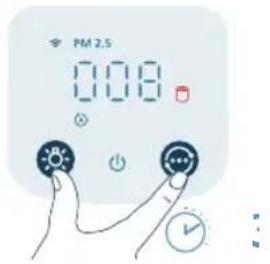
9 Pritisnite i 3 sekunde zadržite gumbe 🚙️ kako biste ponovo postavili brojač trajanja filtra.
natural_image
Illustration of a hand holding a spray gun with a blue spray can (no text or symbols)204 Hrvatski
natural_image
Diagram of a cylindrical device connected to a power outlet with a pulley (no text or symbols)2 Provjerite je li aparat potpuno iskopčan, a zatim ukopčajte adapter za napajanje u strujnu utičnicu.
natural_image
Illustration of a hand holding a folded paper or sheet, next to a cylindrical container with a handle (no text or symbols)natural_image
Illustration of a hand placing a component into a blue cylindrical container with an upward arrow (no text or symbols)natural_image
Cross-sectional diagram of a cylindrical device with internal layered structure and highlighted components (no text or symbols)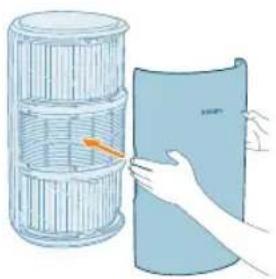
natural_image
Illustration of a hand holding a folded paper or plastic sheet, next to a cylindrical container filled with ribbed material (no text or symbols visible)natural_image
Diagram of a water pump connected to a cylindrical tank with a cable (no text or symbols)natural_image
Diagram of a cylindrical water heater connected to a pump and a wall-mounted device (no text or symbols)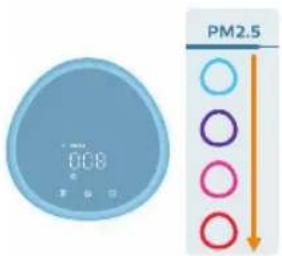
natural_image
Illustration of a crescent moon, star, and eye icon with a hand pointing at it (no text or symbols)natural_image
Illustration of a blue circular digital timer with a hand pointing at it, next to a stylized sun icon (no text or symbols)natural_image
Illustration of a digital timer and a hand interacting with a light bulb (no text or symbols)natural_image
Illustration of a hand interacting with a light bulb icon (no text or symbols)natural_image
Illustration of a hand inserting a card into a device (no text or symbols visible)natural_image
Illustration of a hand holding a tool interacting with a blue object, no text or symbols presentnatural_image
Diagram showing two mechanical components with a red X mark, one connected to a wire and the other to a tool (no text or symbols present)natural_image
Illustration of hands inserting a card into a device (no text or symbols visible)natural_image
Illustration of a hand holding a folded paper or sheet, next to a stacked cylindrical container (no text or symbols)natural_image
Illustration of a hand using a tool to lift a blue textured roller (no text or symbols)4 Pulire la superficie dei filtri con un aspirapolvere.
222 Italiano
natural_image
Cross-sectional diagram of a cylindrical device with internal layered structure and highlighted components (no text or symbols)natural_image
Illustration of a hand holding a folded paper or sheet, next to a cylindrical container with a handle (no text or symbols)natural_image
Diagram of a water pump connected to a cylindrical tank with a pulley (no text or symbols)natural_image
Hand icon showing a hand pressing a blue circular button with a power symbol (no text or labels)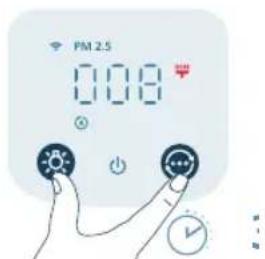
natural_image
Illustration of a hand washing a faucet with a blue spray (no text or symbols)natural_image
Illustration of a hand holding a folded paper or plastic sheet next to a cylindrical container (no text or symbols)natural_image
Illustration of a hand placing a blue cylindrical object into a container with an upward arrow (no text or symbols)natural_image
Cross-sectional diagram of a cylindrical device with internal components and highlighted parts (no text or symbols)natural_image
Illustration of a hand holding a folded paper or sheet, next to a cylindrical container with internal structure (no text or symbols)natural_image
Diagram of a water pump connected to a cylindrical tank with a pulley (no text or symbols)natural_image
Hand pressing a button with a blue circular icon (no text or symbols)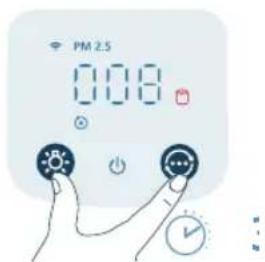
natural_image
Illustration of a hand holding a spray can with a funnel (no text or symbols)natural_image
Diagram of a mechanical device with a pulley and a cylindrical component (no text or symbols)natural_image
Illustration of a hand holding a folded paper or sheet, next to a cylindrical container with a handle (no text or symbols)natural_image
Illustration of a hand placing a component into a blue cylindrical container with an upward arrow (no text or symbols)natural_image
Cross-sectional diagram of a cylindrical device with internal layered structure and highlighted components (no text or symbols)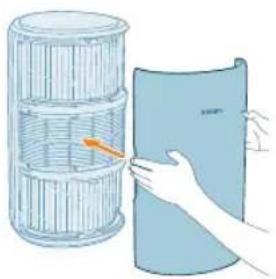
natural_image
Illustration of a hand holding a folded paper or plastic sheet, next to a cylindrical container filled with ribbed material (no text or symbols visible)5 Uzlieciet atpakal priekšejo pârsegu.
natural_image
Diagram of a water pump connected to a cylindrical tank with a cable (no text or symbols)natural_image
Diagram of a water pump connected to a cylindrical tank with a pulley (no text or symbols)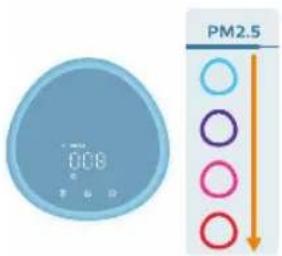
natural_image
Illustration of a crescent moon, star, and circular button with a hand interacting (no text or symbols)natural_image
Illustration of a digital climate controller with a light bulb icon and a finger pointing to it (no text or symbols present)natural_image
Illustration of a digital clock with a light bulb and a finger pointing at it (no text or symbols)natural_image
Illustration of a hand interacting with a blue circular icon featuring a sun-like symbol (no text or symbols present)Lai izslēgtu visus indikatorus un vadības paneli, varat nospiest pogu Vēlreiz nospiediet šo pogu, lai aktivizētu visus indikatorus.
natural_image
Illustration of a hand inserting a card into a device (no text or symbols visible)natural_image
Illustration of a hand holding a tool interacting with a device (no text or symbols visible)natural_image
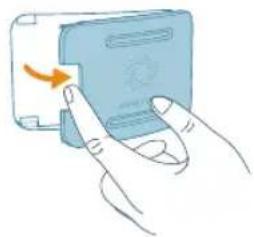
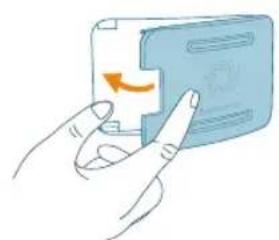
Diagram showing two mechanical components with a red X mark, one with dashed lines and the other with solid lines (no text or symbols)5 Aizveriet gaisa kvalitātes sensoru.
natural_image
Illustration of a hand pressing a button on a device (no text or symbols visible)Filtru tīrīšana
natural_image
Illustration of a hand holding a folded paper or sheet, next to a cylindrical container filled with ribbed material (no text or symbols visible)natural_image
Illustration of a hand using a tool to spread a blue textured mat (no text or symbols)natural_image
Cross-sectional diagram of a layered cylindrical structure with highlighted components (no text or symbols)5 levietojiet filtrus atpakal ierice.
natural_image
Illustration of a hand placing a blue sheet with orange arrow into a cylindrical container (no text or symbols)natural_image
Diagram of a water pump connected to a cylindrical tank with a cable, showing no text or symbols.natural_image
Hand icon showing a finger pressing a blue circular button with an 'Power' symbol (no text or numbers present)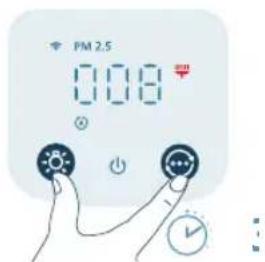
natural_image
Illustration of a hand spraying a spray bottle onto a surface (no text or symbols)Filtru nomaina
natural_image
Illustration of a hand holding a rolled-up document next to a woven basket (no text or symbols visible)natural_image
Illustration of a hand placing a blue cylindrical object into a container with an upward arrow (no text or symbols)natural_image
Cross-sectional diagram of a battery cell with internal structure and highlighted components (no text or symbols)natural_image
Illustration of a hand holding a folded paper or sheet, next to a cylindrical container with an arrow indicating rotation (no text or symbols present)6 Uzlieciet atpakal priekšejo pârsegu.
natural_image
Diagram of a mechanical device with a power outlet and a cylindrical component connected to a pulley (no text or symbols)natural_image
Hand icon showing a blue circular button with a white 'Power' symbol, no text or numbers present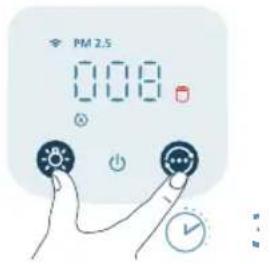
natural_image
Illustration of a hand spraying a spray gun with a triangular spray nozzle (no text or symbols)natural_image
Diagram of a cylindrical device connected to a power outlet with a pulley (no text or symbols)natural_image
Illustration of a hand holding a blue sheet with an orange arrow, next to a cylindrical container (no text or symbols)natural_image
Illustration of a hand pressing down on a blue cylindrical object with an upward arrow (no text or symbols)natural_image
Cross-sectional diagram of a layered cylindrical device with internal components and highlighted sections (no text or symbols)258 Lietuviškai
natural_image
Illustration of a hand holding a cylindrical object next to a blue sheet, with no visible text or symbols.natural_image
Diagram of a pulley system connected to a cylindrical grid structure (no text or symbols)Galios adapterio prijungimas:
natural_image
Diagram of a cylindrical water heater connected to a power outlet with a pulley (no text or symbols)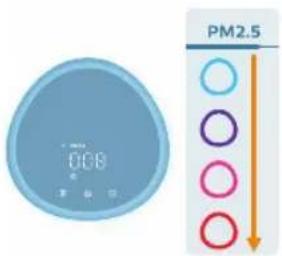
natural_image
Illustration of a moon, crescent moon, and a stylized face with eyes and finger pointing at it (no text or symbols)natural_image
Illustration of a blue circular digital timer with a hand holding a glowing button (no text or symbols)natural_image
Illustration of a digital clock with a light bulb and a finger pointing at it (no text or symbols)natural_image
Illustration of a hand interacting with a light bulb icon (no text or symbols)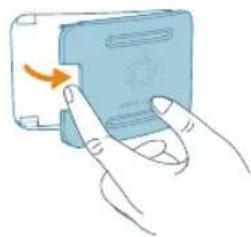
natural_image
Illustration of a hand pressing a button on a device (no text or symbols visible)natural_image
Illustration of a hand holding a tool interacting with a blue object, no text or symbols presentnatural_image
Diagram showing two mechanical components with a red X mark, one with connecting rods and the other with a handle (no text or symbols)natural_image
Illustration of a hand pressing a button on a device (no text or symbols visible)natural_image
Illustration of a hand holding a folded paper or sheet, next to a cylindrical container filled with ribbed material (no text or symbols visible)natural_image
Illustration of a hand using a tool to lift a rolled-up blue mat (no text or symbols)natural_image
Cross-sectional diagram of a layered cylindrical structure with highlighted components (no text or symbols)natural_image
Illustration of a hand holding a folded paper or plastic sheet next to a multi-tiered cylindrical container (no text or symbols visible)natural_image
Diagram of a water pump connected to a cylindrical tank with a pulley (no text or symbols)7 Ijunkite oro valytuvo adapteri i sieninj elektros lizda.
natural_image
Hand icon showing a finger pressing a blue circular button with an 'Power' symbol (no text or numbers present)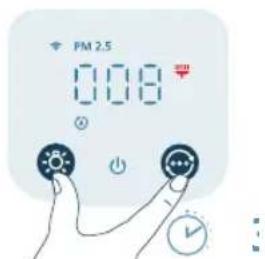
natural_image
Illustration of a hand spraying a spray gun with a triangular spray tip (no text or symbols)268 Lietuviškai
Filtrų keitimas
natural_image
Illustration of a hand holding a folded paper or sheet next to a cylindrical container (no text or symbols visible)natural_image
Illustration of a hand placing a blue cylindrical object into a container with an upward arrow (no text or symbols)natural_image
Cross-sectional diagram of a battery cell with internal structure and highlighted components (no text or symbols)natural_image
Illustration of a hand holding a folded paper sheet next to a cylindrical container (no text or symbols)natural_image
Diagram of a mechanical device with a power outlet and a cylindrical component connected to a cable (no text or symbols)7 Ijunkite oro valytuvo adapteri i sieninj elektros lizdą.
270 Lietuviškai
natural_image
Hand holding a blue circular button with a power symbol (no text or numbers present)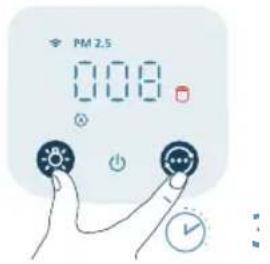
natural_image
Illustration of a hand holding a spray gun with a blue spray can (no text or symbols)natural_image
Diagram of a cylindrical device connected to a power outlet with a pulley (no text or symbols)natural_image
Illustration of a hand holding a blue sheet with an orange arrow, next to a cylindrical container (no text or symbols)natural_image
Illustration of a hand pressing down on a blue cylindrical object with an upward arrow (no text or symbols)natural_image
Cross-sectional diagram of a layered cylindrical device with internal components and highlighted sections (no text or symbols)280 Magyar
natural_image
Illustration of a hand holding a blue cylindrical object next to a wire rack (no text or symbols)natural_image
Diagram of a water pump connected to a cylindrical tank with a cable (no text or symbols)natural_image
Diagram of a water pump connected to a cylindrical tank with a pulley (no text or symbols)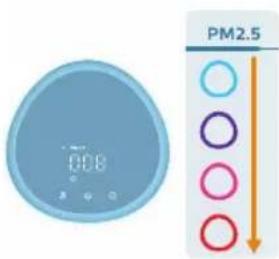
natural_image
Illustration of a crescent moon, star, and circular button with a hand pointing at it (no text or symbols)natural_image
Illustration of a blue circular digital timer with a hand pointing at it, next to a stylized sun icon (no text or symbols)natural_image
Illustration of a hand interacting with a blue circular icon featuring a sun symbol (no text or labels)natural_image
Illustration of a hand pressing a button on a device (no text or symbols visible)natural_image
Illustration of a hand holding a tool with a blue pointer and a magnified view of a rectangular object (no text or symbols)natural_image
Diagram showing two mechanical components with a red X mark, one connected to a bracket and the other holding a tool (no text or symbols present)natural_image
Illustration of a hand inserting a card into a blue card with an orange scroll (no text or symbols)natural_image
Illustration of a cylindrical container with internal structure being handled by a hand (no text or symbols)natural_image
Illustration of a hand using a tool to lift a rolled-up blue material (no text or symbols)natural_image
Cross-sectional diagram of a cylindrical device with internal layered structure and highlighted components (no text or symbols)natural_image
Illustration of a hand holding a folded paper or plastic sheet next to a cylindrical container (no text or symbols visible)natural_image
Diagram of a water heater connected to a wall-mounted power outlet (no text or symbols)natural_image
Hand icon showing a finger pressing a blue circular button with an 'Power' symbol (no text or numbers present)290 Magyar
natural_image
Illustration of a hand spraying water with a spray can (no text or symbols)natural_image
Illustration of a hand holding a folded paper or sheet, next to a cylindrical container filled with wire (no text or symbols visible)natural_image
Illustration of a hand placing a cylindrical object into a blue container with an upward arrow (no text or symbols)natural_image
Cross-sectional diagram of a cylindrical device with internal components and highlighted parts (no text or symbols)natural_image
Illustration of a hand holding a blue sheet with a yellow arrow pointing to a woven basket (no text or symbols)natural_image
Diagram of a water pump connected to a cylindrical tank with a pulley (no text or symbols)natural_image
Hand icon showing a blue circular button with a power symbol, pointing at it (no text or labels)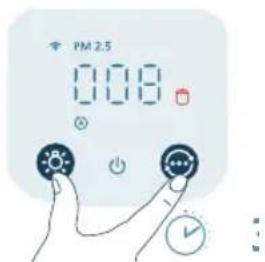
natural_image
Illustration of a hand spraying a spray gun with a triangular spray nozzle (no text or symbols)natural_image
Diagram of a mechanical device with a pulley and a cylindrical component (no text or symbols)natural_image
Illustration of a hand holding a folded paper or sheet, next to a cylindrical container with a handle (no text or symbols)natural_image
Illustration of a hand placing a component into a blue cylindrical container with an upward arrow (no text or symbols)natural_image
Cross-sectional diagram of a cylindrical device with internal layered structure and highlighted components (no text or symbols)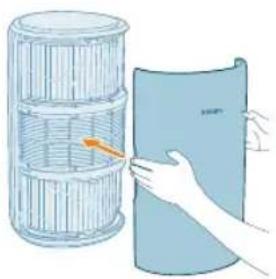
natural_image
Illustration of a hand holding a cylindrical object next to a plastic sheet (no text or symbols visible)natural_image
Diagram of a pulley system connected to a cylindrical grid structure (no text or symbols)natural_image
Diagram of a water pump connected to a cylindrical tank with a cable (no text or symbols)natural_image
Illustration of a crescent moon, star, and eye icon with a hand pointing at it (no text or symbols)natural_image
Illustration of a digital climate controller with a hand pointing at it, no text or symbols present.natural_image
Illustration of a digital timer and a hand interacting with a light bulb (no text or symbols)natural_image
Illustration of a hand holding a light bulb icon next to a large blue sphere (no text or symbols)natural_image
Illustration of a hand inserting a card into a device (no text or symbols visible)natural_image
Illustration of a hand holding a tool interacting with a device (no text or symbols visible)natural_image
Diagram showing two mechanical or electrical components with a red X mark, no text or symbols present.natural_image
Illustration of hands inserting a card into a blue card with an orange scroll (no text or symbols)natural_image
Illustration of a hand holding a blue sheet with a grid-like structure beside it, next to a cylindrical container (no text or symbols)natural_image
Illustration of a hand using a tool to lift a rolled-up blue mat (no text or symbols)natural_image
Cross-sectional diagram of a cylindrical device with internal layered structure and highlighted components (no text or symbols)natural_image
Illustration of a hand holding a folded paper or sheet, next to a cylindrical container filled with wire mesh (no text or symbols)natural_image
Diagram of a water pump connected to a cylindrical tank with a cable, showing no text or symbols.natural_image
Hand icon showing a finger pressing a blue circular button with an 'Power' symbol (no text or numbers present)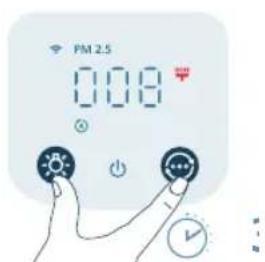
natural_image
Illustration of a hand holding a spray gun with a triangular tip (no text or symbols)natural_image
Illustration of a hand holding a folded paper or plastic sheet next to a cylindrical container (no text or symbols visible)natural_image
Illustration of a hand placing a component into a blue cylindrical container with an upward arrow (no text or symbols)natural_image
Cross-sectional diagram of a cylindrical device with internal components and highlighted parts (no text or symbols)natural_image
Illustration of a hand holding a folded paper or sheet, next to a cylindrical container with a handle (no text or symbols)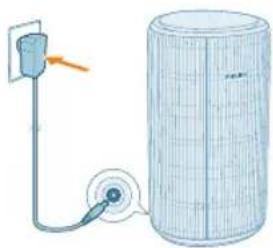
natural_image
Diagram of a pump connected to a cylindrical tank with a pulley (no text or symbols)natural_image
Hand icon showing a hand pressing a button with a blue circular icon (no text or symbols)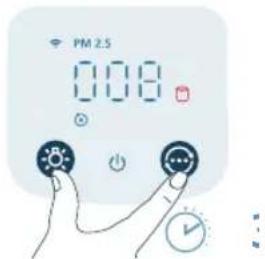
natural_image
Illustration of a hand spraying a spray can on fingers (no text or symbols)natural_image
Diagram of a cylindrical device connected to a pulley and a vertical pipe, with no visible text or symbols.natural_image
Illustration of a hand holding a folded paper or sheet, next to a cylindrical container with a handle (no text or symbols)natural_image
Illustration of a hand placing a blue cylindrical object into a container with an upward arrow (no text or symbols)4 Sett filtrene tilbake i apparatet.
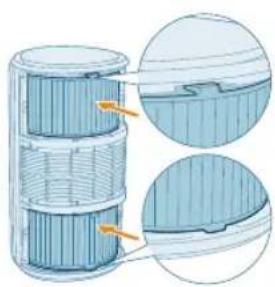
natural_image
Cross-sectional diagram of a cylindrical device with internal layered structure and highlighted components (no text or symbols)326 Norsk

natural_image
Illustration of a hand holding a folded paper or sheet, next to a cylindrical container filled with ribbed material (no text or symbols visible)natural_image
Diagram of a water pump connected to a cylindrical tank with a cable (no text or symbols)Tilbakestille Wi-Fi-tilkoblingen
natural_image
Diagram of a water pump connected to a cylindrical tank with a pulley (no text or symbols)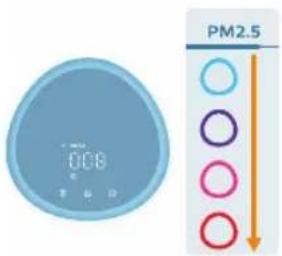
natural_image
Illustration of a crescent moon, star, and circular button with a hand pointing at it (no text or symbols)Hvilemodus ( ).Luftrenseren jobber stillegående på en lav hastighet. Displaylampen slås av etter tre sekunder.
natural_image
Illustration of a blue digital timer and a hand interacting with a light bulb icon (no text or symbols)natural_image
Illustration of a digital clock with a light bulb and a finger pointing at it (no text or symbols)natural_image
Illustration of a hand interacting with a blue circular icon featuring a sunburst symbol (no text or symbols present)natural_image
Illustration of a hand inserting a device into a card (no text or symbols visible)natural_image
Illustration of a hand holding a tool interacting with a device (no text or symbols visible)natural_image
Diagram showing two mechanical components with a red X mark, one with connecting rods and the other with a handle (no text or symbols)5 Lukk luftkvalitetssensoren.
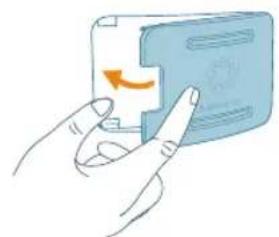
natural_image
Illustration of a hand pressing a button on a blue card (no text or symbols visible)natural_image
Illustration of a hand holding a folded paper or plastic sheet next to a cylindrical container (no text or symbols visible)natural_image
Illustration of a hand using a tool to lift a rolled-up blue mat (no text or symbols)natural_image
Cross-sectional diagram of a cylindrical device with internal layered structure and highlighted components (no text or symbols)5 Sett filtrene tilbake i apparatet.
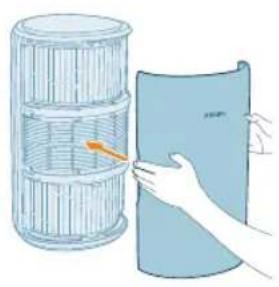
natural_image
Illustration of a hand holding a folded paper or sheet, next to a cylindrical container filled with ribbons (no text or symbols visible)natural_image
Diagram of a pump connected to a cylindrical tank with a pulley (no text or symbols)7 Sett adapteren på luftrenseren inn i stikkontakten.
natural_image
Hand icon showing a blue circular button with a power symbol, pointing to the right (no text or symbols present)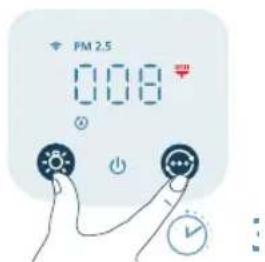
natural_image
Illustration of a hand spraying a spray bottle onto a surface (no text or symbols)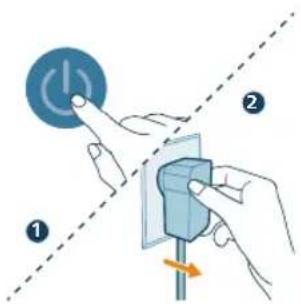
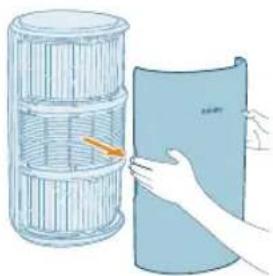
natural_image
Illustration of a hand holding a folded paper or sheet, next to a cylindrical container with a handle (no text or symbols visible)natural_image
Illustration of a hand placing a blue cylindrical object into a container with an upward arrow (no text or symbols)natural_image
Cross-sectional diagram of a battery cell with internal structure and highlighted components (no text or symbols)5 Sett de nye filtrene tilbake i apparatet.
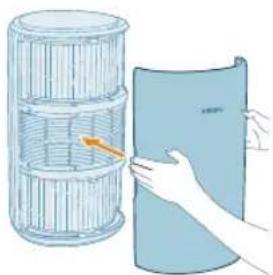
natural_image
Illustration of a hand holding a folded paper or sheet, next to a cylindrical container filled with plastic wrap (no text or symbols)natural_image
Diagram of a mechanical device with a power outlet and a cylindrical component connected to a cable (no text or symbols)7 Sett adapteren på luftrenseren inn i stikkontakten.
338 Norsk
natural_image
Hand icon showing a blue circular button with a white 'Power' symbol, no text or numbers present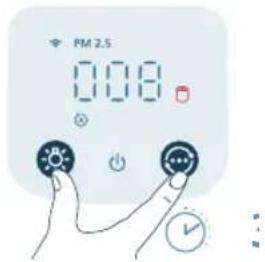
natural_image
Illustration of a hand spraying a spray gun with a funnel (no text or symbols)Du kan bytte ut filtrene før varselet om filterbytte (vises på skjermen. Når du har byttet ut filtrene, må du tilbakestille filterlevetidtelleren manuelt.
natural_image
Diagram of a water pump connected to a cylindrical tank with a pulley (no text or symbols)natural_image
Illustration of a hand holding a folded paper or sheet, next to a cylindrical container with a handle (no text or symbols)natural_image
Illustration of a hand placing a blue cylindrical object into a container with an upward arrow (no text or symbols)natural_image
Cross-sectional diagram of a cylindrical device with internal layered structure and highlighted components (no text or symbols)348 Polski
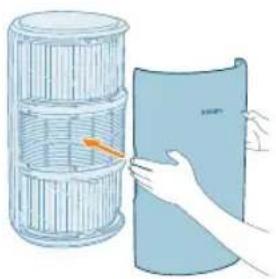
natural_image
Illustration of a hand holding a folded paper or plastic sheet, next to a cylindrical container filled with ribbed material (no text or symbols visible)natural_image
Diagram of a water pump connected to a cylindrical tank with a cable (no text or symbols)natural_image
Diagram of a water pump connected to a cylindrical tank with a cable and pipe (no text or symbols)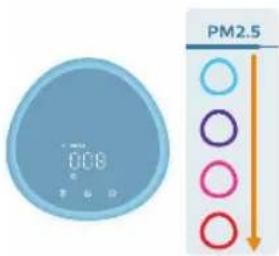
natural_image
Illustration of a crescent moon, star, and eye icon with a pointing finger (no text or symbols)natural_image
Illustration of a hand holding a light bulb next to a digital display (no text or symbols)natural_image
Illustration of a digital timer with a hand interacting with it (no text or symbols)natural_image
Illustration of a hand interacting with a light bulb icon (no text or symbols present)natural_image
Illustration of a hand inserting a card into a device (no text or symbols visible)natural_image
Illustration of a hand holding a tool interacting with a device (no text or symbols visible)natural_image
Diagram showing two mechanical components with a red X mark, one connected to a wire and the other to a handle (no text or symbols present)natural_image
Illustration of hands inserting a card into a blue card with an orange scroll (no text or symbols)natural_image
Illustration of a hand holding a folded paper or sheet next to a cylindrical container (no text or symbols visible)natural_image
Illustration of a hand using a tool to lift a rolled-up blue surface (no text or symbols)natural_image
Cross-sectional diagram of a cylindrical device with internal layered structure and highlighted components (no text or symbols)natural_image
Illustration of a hand holding a folded paper or sheet, next to a cylindrical container with a handle (no text or symbols)natural_image
Diagram of a water pump connected to a cylindrical tank with a pulley (no text or symbols)natural_image
Hand icon showing a hand pressing a blue circular button with an 'Power' symbol (no text or numbers present)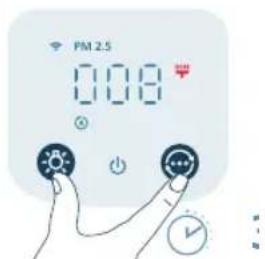
natural_image
Illustration of a hand washing a faucet with a blue spray (no text or symbols)natural_image
Illustration of a hand holding a folded paper or plastic sheet next to a cylindrical container (no text or symbols visible)natural_image
Illustration of a hand placing a component into a blue cylindrical container with an upward arrow (no text or symbols)natural_image
Cross-sectional diagram of a cylindrical device with internal components and highlighted parts (no text or symbols)natural_image
Illustration of a hand holding a folded paper or sheet next to a cylindrical container (no text or symbols visible)360 Polski
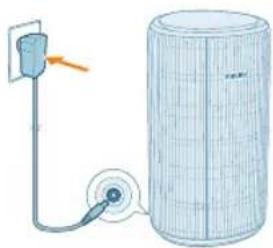
natural_image
Diagram of a water pump connected to a cylindrical tank, showing internal components and flow direction (no text or labels)natural_image
Hand icon showing a hand pressing a button with a blue circular icon (no text or symbols)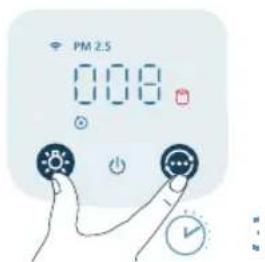
natural_image
Illustration of a hand spraying a spray can with a funnel (no text or symbols)natural_image
Diagram of a water pump connected to a cylindrical tank with a pulley (no text or symbols)Botões de controlo:
natural_image
Illustration of a hand holding a folded paper or sheet, next to a cylindrical container with a handle (no text or symbols)natural_image
Illustration of a hand placing a blue cylindrical object into a container with an upward arrow (no text or symbols)natural_image
Cross-sectional diagram of a cylindrical device with internal layered structure and highlighted components (no text or symbols)
natural_image
Illustration of a hand holding a folded paper or plastic sheet, next to a cylindrical container filled with ribbed material (no text or symbols visible)5 Volte a colocar a tampa frontal.
Ligar a alimentação
natural_image
Diagram of a water pump connected to a cylindrical tank with a cable (no text or symbols)Ligue o adaptador de corrente:

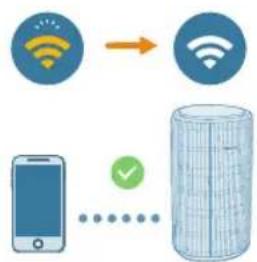
flowchart
graph TD
    A["Mobile Device"] --> B["Server"]
    C["Wireless Signal"] --> D["Wireless Signal"]
    E["User"] --> F["Download Icon"]
    style A fill:#f9f,stroke:#333
    style B fill:#bbf,stroke:#333
    style C fill:#bfb,stroke:#333
    style D fill:#ffb,stroke:#333
    style E fill:#ffb,stroke:#333
    style F fill:#cfc,stroke:#333
natural_image
Diagram of a water pump connected to a cylindrical tank with a pulley (no text or symbols)1 Ligue a ficha do purificador de ar à tomada elétrica.
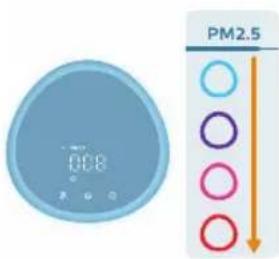
natural_image
Illustration of a crescent moon, star, and circular icon with a pointing finger (no text or symbols)natural_image
Illustration of a digital climate controller with a hand interacting with it (no text or symbols present)natural_image
Illustration of a digital timer and a hand interacting with a light bulb (no text or symbols)natural_image
Illustration of a hand interacting with a blue circular icon featuring a sunburst symbol (no text or symbols present)Português
natural_image
Illustration of a hand inserting a device into a card (no text or symbols visible)natural_image
Illustration of a hand holding a tool interacting with a device (no text or symbols visible)natural_image
Diagram showing two mechanical components with a red X mark, one with connecting rods and the other with a handle (no text or symbols)natural_image
Illustration of a hand pressing a button on a device (no text or symbols visible)natural_image
Illustration of a hand holding a folded paper or sheet, next to a cylindrical container filled with wire (no text or symbols visible)natural_image
Illustration of a hand using a tool to spread a rolled-up blue mat (no text or symbols)natural_image
Cross-sectional diagram of a cylindrical device with internal layered structure and highlighted components (no text or symbols)natural_image
Illustration of a hand holding a folded paper or sheet, next to a cylindrical container filled with ribbons (no text or symbols)6 Volte a colocar a tampa frontal.
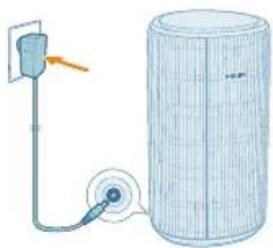
natural_image
Diagram of a water pump connected to a cylindrical tank with a pulley (no text or symbols)7 Ligue o adaptador do purificador de ar à tomada elétrica.
natural_image
Hand icon showing a finger pressing a blue circular button with an 'Power' symbol (no text or numbers present)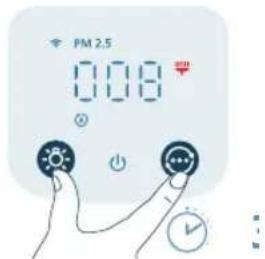
natural_image
Illustration of a hand spraying a spray bottle with a triangular tip (no text or symbols)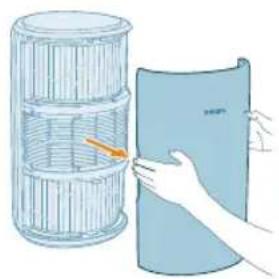
natural_image
Illustration of a hand holding a folded paper or plastic sheet next to a cylindrical container (no text or symbols visible)natural_image
Illustration of a hand placing a cylindrical object into a blue container with an upward arrow (no text or symbols)natural_image
Cross-sectional diagram of a battery cell with internal structure and highlighted components (no text or symbols)6 Volte a colocar a tampa frontal.
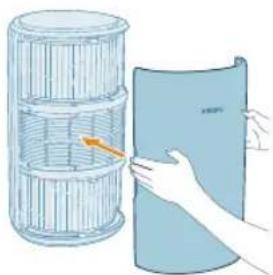
natural_image
Illustration of a hand holding a folded paper or sheet, next to a cylindrical container filled with plastic wrap (no text or symbols)7 Ligue o adaptador do purificador de ar à tomada elétrica.
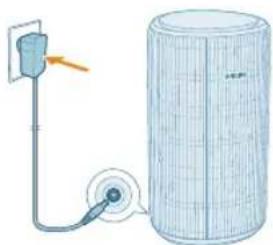
natural_image
Diagram of a power supply connected to a cylindrical device with a pulley and cable (no text or symbols)natural_image
Hand holding a blue circular button with a power symbol (no text or numbers present)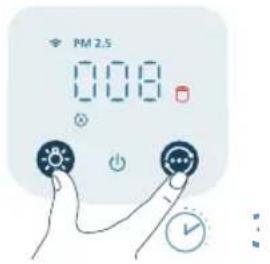
natural_image
Illustration of a hand holding a spray gun with a triangular tip (no text or symbols)natural_image
Diagram of a water pump connected to a cylindrical tank with a pulley (no text or symbols)natural_image
Illustration of a hand holding a folded paper or sheet, next to a cylindrical container with a handle (no text or symbols visible)natural_image
Illustration of a hand pressing down on a blue cylindrical object with an upward arrow (no text or symbols)natural_image
Cross-sectional diagram of a battery pack showing internal structure and two views of the casing (no text or labels)natural_image
Illustration of a hand placing a paper roll into a plastic sheet (no text or symbols)natural_image
Diagram of a pulley system connected to a cylindrical grid structure (no text or symbols)natural_image
Diagram of a water pump connected to a cylindrical tank with a pulley (no text or symbols)natural_image
Illustration of a crescent moon, star, and eye icon with a hand pointing at it (no text or symbols)natural_image
Illustration of a blue circular digital timer with a hand pointing at it, next to a light bulb icon (no text or symbols)natural_image
Illustration of a digital timer and a hand interacting with a light bulb (no text or symbols)natural_image
Illustration of a hand holding a light bulb icon next to a large blue sphere (no text or symbols)natural_image
Illustration of a hand inserting a card into a device (no text or symbols visible)natural_image
Illustration of a hand holding a tool interacting with a blue object, no text or symbols presentnatural_image
Diagram showing two mechanical components with a red X mark, one connected to a wire and the other to a tool (no text or symbols present)natural_image
Illustration of hands inserting a card into a blue card with an orange scroll (no text or symbols)natural_image
Illustration of a hand holding a blue sheet with a yellow arrow pointing to it, next to a stack of wire baskets (no text or symbols)natural_image
Illustration of a hand using a tool to spread a blue textured surface (no text or symbols)natural_image
Cross-sectional diagram of a cylindrical device with internal layered structure and highlighted components (no text or symbols)natural_image
Illustration of a hand holding a folded paper or sheet, next to a cylindrical container filled with wire mesh (no text or symbols)natural_image
Diagram of a water pump connected to a cylindrical tank with a cable, showing no text or symbols.natural_image
Hand holding a blue circular button with a power symbol (no text or numbers visible)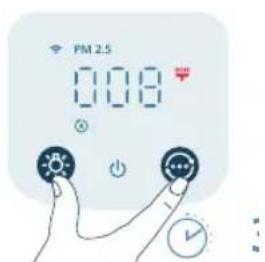
natural_image
Illustration of a hand washing a faucet with a clear blue spray (no text or symbols)natural_image
Illustration of a hand holding a folded paper or plastic sheet next to a cylindrical container (no text or symbols visible)natural_image
Illustration of a hand placing a blue cylindrical object into a container with an upward arrow (no text or symbols)natural_image
Cross-sectional diagram of a cylindrical device with internal components and highlighted parts (no text or symbols)natural_image
Illustration of a hand holding a folded paper or sheet, next to a cylindrical container filled with ribbed material (no text or symbols visible)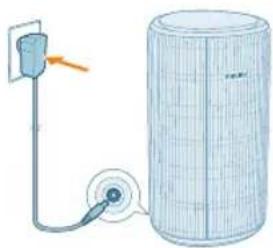
natural_image
Diagram of a water pump connected to a cylindrical tank with a pulley (no text or symbols)natural_image
Hand icon showing a finger pressing a blue circular button with an 'Power' symbol (no text or numbers present)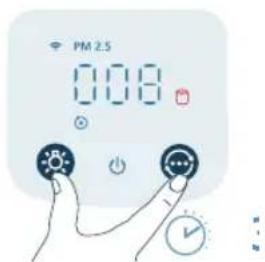
natural_image
Illustration of a hand spraying a spray bottle onto a surface (no text or symbols)natural_image
Diagram of a water pump connected to a cylindrical tank with a pulley (no text or symbols)natural_image
Illustration of a hand holding a folded paper or sheet, next to a cylindrical container with a handle (no text or symbols)natural_image
Illustration of a hand placing a blue cylindrical object into a container with an upward arrow (no text or symbols)natural_image
Cross-sectional diagram of a cylindrical device with internal layered structure and highlighted components (no text or symbols)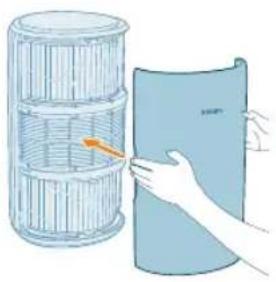
natural_image
Illustration of a hand placing a blue sheet with orange arrow into a cylindrical container (no text or symbols)natural_image
Diagram of a pulley system connected to a cylindrical grid structure (no text or symbols)Rivendosja e lidhjes Wi-Fi
natural_image
Diagram of a water pump connected to a cylindrical tank with a pulley (no text or symbols)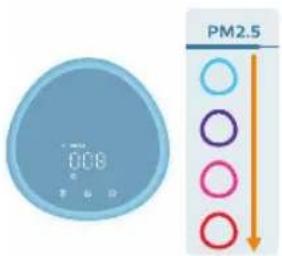
natural_image
Illustration of a crescent moon, star, and circular icon with a hand pointing at it (no text or symbols)natural_image
Illustration of a hand interacting with a digital clock displaying 0.08 (no text or symbols on the clock face)natural_image
Illustration of a digital alarm clock with a hand interacting with a light bulb (no text or symbols)natural_image
Illustration of a hand interacting with a light bulb icon (no text or symbols)natural_image
Illustration of a hand inserting a card into a mobile device (no text or symbols visible)natural_image
Illustration of a hand holding a pen or stylus with a magnified view of the pen tip (no text or symbols)natural_image
Diagram showing two mechanical components with a red X mark, no text or symbols presentnatural_image
Illustration of hands inserting a card into a blue card with an orange scroll (no text or symbols)424 Shqip
natural_image
Illustration of a hand holding a folded paper or sheet, next to a cylindrical container with a handle (no text or symbols visible)natural_image
Illustration of a hand using a tool to spread a blue corrugated material (no text or symbols)natural_image
Cross-sectional diagram of a cylindrical mechanical component with internal layered structure (no text or symbols)natural_image
Illustration of a hand holding a folded paper or sheet, next to a cylindrical container filled with wire mesh (no text or symbols)natural_image
Diagram of a water pump connected to a cylindrical tank with a pulley (no text or symbols)natural_image
Hand icon showing a finger pressing a blue circular button with an 'Power' symbol (no text or numbers present)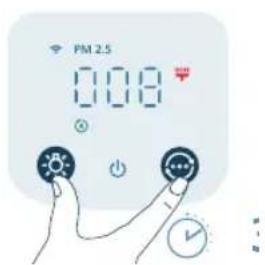
natural_image
Illustration of a hand washing a showerhead with a spray can (no text or symbols)natural_image
Illustration of a hand holding a folded paper or plastic sheet next to a cylindrical container (no text or symbols visible)natural_image
Illustration of a hand placing a blue cylindrical object into a container with an upward arrow (no text or symbols)natural_image
Cross-sectional diagram of a cylindrical device with internal components and highlighted parts (no text or symbols)natural_image
Illustration of a hand holding a folded paper or sheet, next to a cylindrical container with a grid pattern (no text or symbols)natural_image
Diagram of a pump connected to a cylindrical tank with a pulley (no text or symbols)natural_image
Hand icon showing a finger pressing a blue circular button with an 'Power' symbol (no text or numbers present)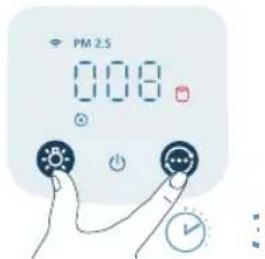
natural_image
Illustration of a hand spraying a spray gun with a blue funnel (no text or symbols)natural_image
Diagram of a pump connected to a cylindrical tank with a wire mesh structure (no text or symbols)Upravljalni gumbi:
natural_image
Illustration of a hand holding a folded paper or plastic sheet next to a cylindrical container (no text or symbols visible)1 Sprednji pokrov povlecite in ga odstranite z aparata.
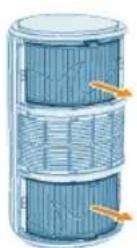
2 Filtra povlecite iz aparata.
natural_image
Illustration of a hand placing a blue cylindrical object into a container with an upward arrow (no text or symbols)438 Slovenščina
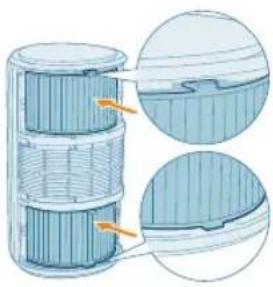
natural_image
Cross-sectional diagram of a battery cell with internal structure and highlighted components (no text or symbols)4 Filtra namestite nazaj v aparat.
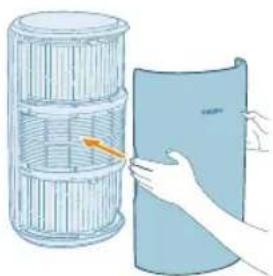
natural_image
Illustration of a hand holding a blue sheet with an arrow pointing to it, next to a cylindrical container (no text or symbols)natural_image
Diagram of a pulley system connected to a cylindrical tank, with an arrow indicating direction (no text or symbols present)natural_image
Diagram of a cylindrical water heater connected to a power outlet with a pulley (no text or symbols)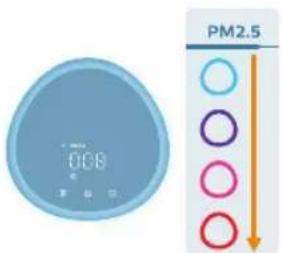
2 Za vklop čistilnika zraka pritisnite gumb za vklop.
natural_image
Illustration of a crescent moon, star, and eye icon with a hand interacting with the eye (no text or symbols)natural_image
Illustration of a hand interacting with a digital climate controller displaying a timer and sun icon (no text or symbols)natural_image
Illustration of a digital timer and a hand interacting with a light bulb (no text or symbols)natural_image
Illustration of a hand interacting with a light bulb icon (no text or symbols)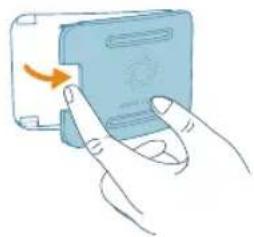
natural_image
Illustration of a hand inserting a device into a card with an arrow indicating rotation (no text or symbols)2 Odprite pokrov senzorja kakovosti zraka.
natural_image
Illustration of a hand holding a tool interacting with a device (no text or symbols visible)4 Vse dele temeljito osušite s suho vatirano paličico.
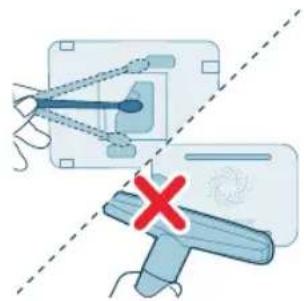
natural_image
Diagram showing two mechanical components with a red X mark, one with connecting rods and the other with a tool handle (no text or symbols present)natural_image
Illustration of a hand pressing a button on a blue card with an orange arrow (no text or symbols)natural_image
Illustration of a hand holding a folded paper or sheet, next to a cylindrical container filled with ribbed material (no text or symbols visible)2 Sprednji pokrov povlecite in ga odstranite z aparata.
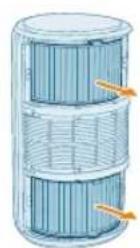
3 Filtra povlecite iz aparata.
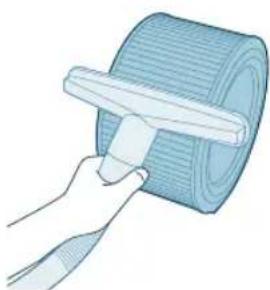
natural_image
Illustration of a hand using a tool to spread a blue textured mat (no text or symbols)4 Površino filtrov očistite s sesalnikom.
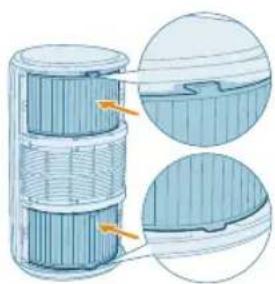
natural_image
Cross-sectional diagram of a layered cylindrical structure with highlighted components (no text or symbols)5 Filtra namestite nazaj v aparat.
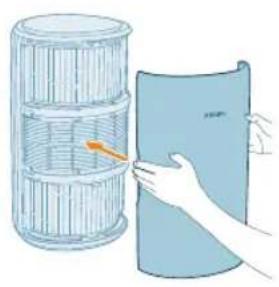
natural_image
Illustration of a hand holding a folded paper or sheet, next to a cylindrical container filled with ribbons (no text or symbols)natural_image
Diagram of a water pump connected to a cylindrical tank with a pulley (no text or symbols)7 Adapter čistilnika zraka priključite v električno vtičnico.
8 Pritisnite gumb za vklop aparata.
natural_image
Hand icon showing a blue circular button with an 'Power' symbol, no text or labels present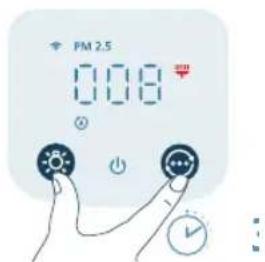
natural_image
Illustration of a hand spraying a spray bottle with a funnel (no text or symbols)Menjava filtrov
natural_image
Illustration of a hand holding a folded paper or sheet next to a cylindrical container (no text or symbols visible)2 Sprednji pokrov povlecite in ga odstranite z aparata.
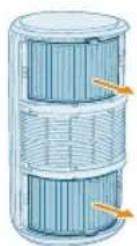
3 Filtra povlecite iz aparata. Rabljena filtra zavrzite.
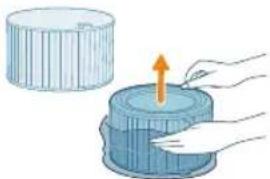
natural_image
Illustration of a hand placing a blue cylindrical object into a container with an upward arrow (no text or symbols)4 Z novih filtrov odstranite ves embalažni material.
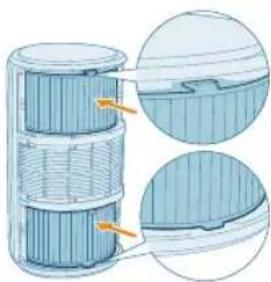
natural_image
Cross-sectional diagram of a battery cell with internal structure and highlighted components (no text or symbols)5 V aparat vstavite nova filtra.
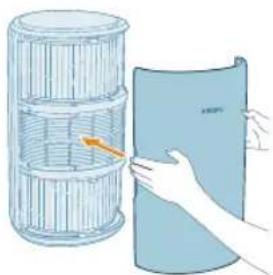
natural_image
Illustration of a hand holding a folded paper or sheet, next to a cylindrical container with an arrow indicating rotation (no text or symbols present)natural_image
Diagram of a power supply connected to a cylindrical device with a pulley and cable (no text or symbols)7 Adapter čistilnika zraka priključite v električno vtičnico.
450 Slovenščina
8 Pritisnite gumb∅za vklop aparata.
natural_image
Hand holding a blue circular button with a power symbol (no text or numbers present)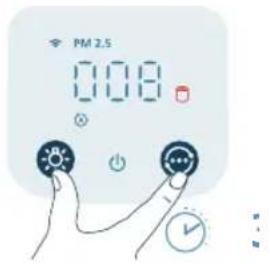
natural_image
Illustration of a hand holding a spray gun with a blue spray nozzle (no text or symbols)10 Ko zamenjate filtre, si temeljito umijte roke.
natural_image
Diagram of a water pump connected to a cylindrical tank with a pulley (no text or symbols)natural_image
Illustration of a hand holding a folded paper or sheet, next to a cylindrical container with a handle (no text or symbols)natural_image
Illustration of a hand placing a component into a blue cylindrical container with an upward arrow (no text or symbols)4 Filtre zasuňte spät do zariadenia.
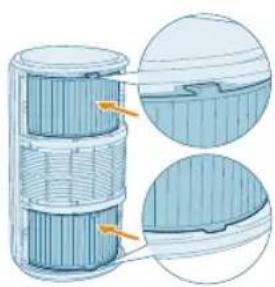
natural_image
Cross-sectional diagram of a cylindrical device with internal layered structure and highlighted components (no text or symbols)460 Slovensky
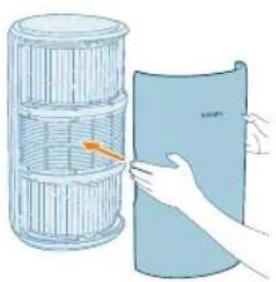
natural_image
Illustration of a hand holding a cylindrical object next to a blue sheet, with no visible text or symbols.natural_image
Diagram of a mechanical device with a pulley and cylindrical component (no text or symbols)Zresetujte pripojenie Wi-Fi
natural_image
Diagram of a cylindrical water heater connected to a power outlet with a pulley (no text or symbols)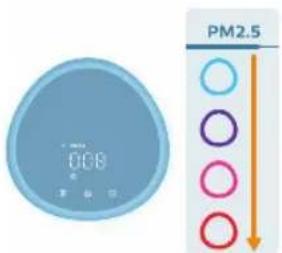
natural_image
Illustration of a crescent moon, star, and eye icon with a hand pointing at it (no text or symbols)natural_image
Illustration of a blue circular digital timer with a hand holding a light bulb icon (no text or symbols)natural_image
Illustration of a digital clock with a light bulb and a finger pointing at it (no text or symbols)natural_image
Illustration of a hand interacting with a light bulb icon (no text or symbols)natural_image
Illustration of a hand inserting a device into a device with an arrow indicating rotation (no text or symbols present)natural_image
Illustration of a hand holding a tool interacting with a device (no text or symbols visible)natural_image
Diagram showing two mechanical components with a red X mark, one with connecting rods and the other with a handle (no text or symbols)natural_image
Illustration of a hand pressing a button on a blue card with an arrow indicating rotation (no text or symbols)Čistenie povrchu filtrov
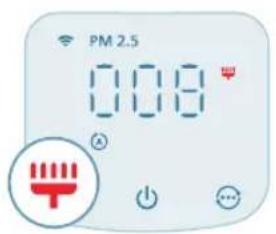
1 Vypnite čistič vzduchu a odpojte ho od elektrickej zásuvky.
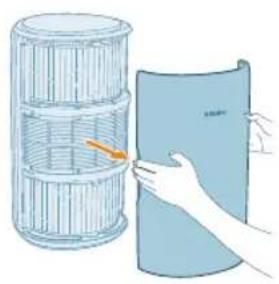
natural_image
Illustration of a hand holding a folded paper or sheet next to a cylindrical container (no text or symbols visible)natural_image
Illustration of a hand using a tool to spread a rolled-up blue mat (no text or symbols)natural_image
Cross-sectional diagram of a cylindrical device with internal layered structure and highlighted components (no text or symbols)5 Filtre zasuňte spät do zariadenia.
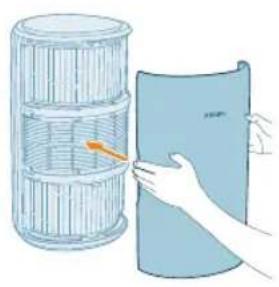
natural_image
Illustration of a hand holding a folded paper or plastic sheet next to a cylindrical container (no text or symbols visible)natural_image
Diagram of a pump connected to a cylindrical grid device with a cable (no text or symbols)natural_image
Hand icon showing a blue circular button with an 'Power' symbol, no text or labels present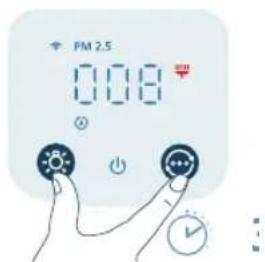
natural_image
Illustration of a hand spraying a spray bottle from a water dispenser (no text or symbols)470 Slovensky
Výmena filtrov
1 Vypnite čistič vzduchu a odpojte ho od elektrickej zásuvky.
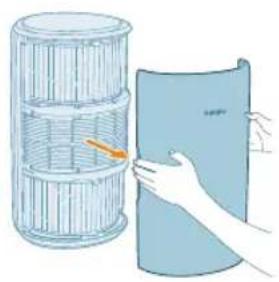
natural_image
Illustration of a hand holding a blue sheet with a paper roll, next to a wire cage (no text or symbols)natural_image
Illustration of a hand placing a blue cylindrical object into a container with an upward arrow (no text or symbols)natural_image
Cross-sectional diagram of a battery cell with internal structure and highlighted components (no text or symbols)5 Nové filtre vložte spät do zariadenia.
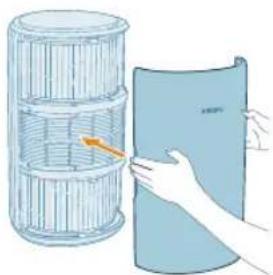
natural_image
Illustration of a hand holding a folded paper or sheet, next to a cylindrical container with an arrow indicating rotation (no text or symbols present)natural_image
Diagram of a mechanical device with a power outlet and a cylindrical component connected to a cable (no text or symbols)natural_image
Hand icon showing a blue circular button with a power symbol, no text or labels present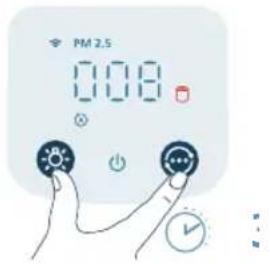
natural_image
Illustration of a hand holding a spray gun with a triangular tip (no text or symbols)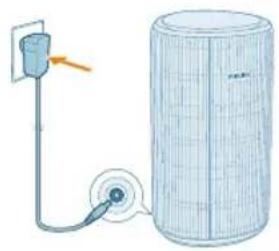
natural_image
Diagram of a water pump connected to a cylindrical tank with a pulley (no text or symbols)natural_image
Illustration of a hand holding a folded paper or sheet, next to a cylindrical container with a handle (no text or symbols)1 Povucite prednji poklopac i skinite ga sa aparata.
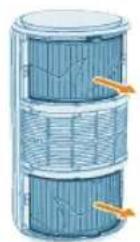
2 Izvucite filtere iz aparata.
3 Uklonite svu ambalažu filtera za prečišćavanje vazduha.
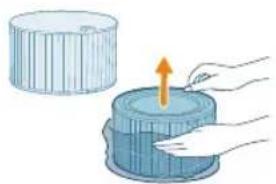
natural_image
Illustration of a hand placing a blue cylindrical object into a container with an upward arrow (no text or symbols)4 Vratite filtere u aparat.
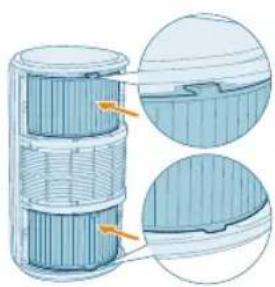
natural_image
Cross-sectional diagram of a cylindrical device with internal layered structure and highlighted components (no text or symbols)482 Srpski
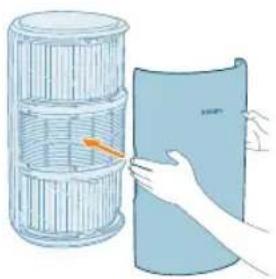
natural_image
Illustration of a hand holding a blue cylindrical object next to a wire rack (no text or symbols)5 Vratite prednji poklopac na mesto.
natural_image
Diagram of a water heater connected to a cylindrical tank with a cable and pipe (no text or symbols)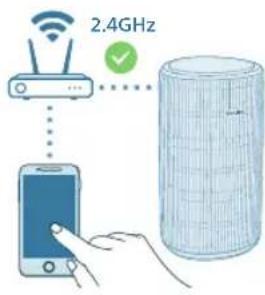

flowchart
graph TD
    A["WiFi Signal"] --> B["WiFi"]
    C["Smartphone"] --> D["Data Storage"]
    style A fill:#f9f,stroke:#333
    style B fill:#bbf,stroke:#333
    style C fill:#dfd,stroke:#333
    style D fill:#dfd,stroke:#333
Resetovanje Wi-Fi veze
natural_image
Diagram of a water pump connected to a cylindrical tank with a pulley (no text or symbols)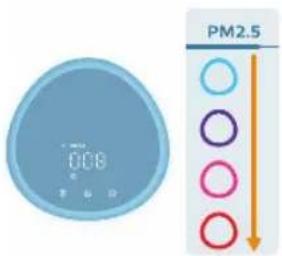
2 Pritisnite dugme za napajanje da biste uključili prečišćivač vazduha.
- Prečišćivač vazduha se oglašava zvučnim signalom.
- se prikazuje na ekranu tokom zagrevanja. Zatim prečišćivač vazduha prikazuje nivo PM2.5 nakon merenja kvaliteta vazduha.
- Prečišćivač vazduha radi u automatskom režimu dok se na ekranu prikazuje PM2.5.
3 Ponovo pritisnite dugme za napajanje da biste isključili prečišćivač vazduha.
natural_image
Illustration of a crescent moon, star, and eye icon with a hand pointing at it (no text or symbols)Režim za spavanje (9) Prečišćivač vazduha radi tiho na maloj brzini. Ekran se isključuje nakon 3 sekunde.
- Režim za spavanje za osobe sa alergijama: Ovaj režim možete da omogućite u aplikaciji Air+. Režim za spavanje za osobe sa alergijama pretvara režim za spavanje u snažniji režim kada vam je to potrebno. Kada ga omogućite, režim za spavanje automatski prilagodava brzinu ventilatora na sličan način kao u automatskom režimu, održavajući nivo zvuka na niskom nivou. Ovaj režim je idealan za osobe koje žele veći učinak noću u odnosu na standardni režim za spavanje.
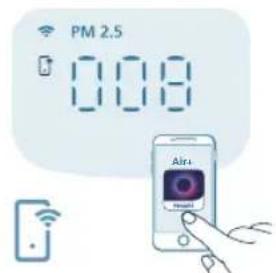
Režim upravljanja pomoću aplikacije (☐): Aparat radi u režimu koji je dostupan isključivo preko aplikacije, kao što su dodatne ručne brzine ventilatora ili drugi režimi koji su prilagođeni u aplikaciji.
Napomena: Režim upravljanja pomoću aplikacije dostupan je SAMO preko aplikacije nakon uspešnog uspostavljanja Wi-Fi veze.
Korišćenje funkcije svetla
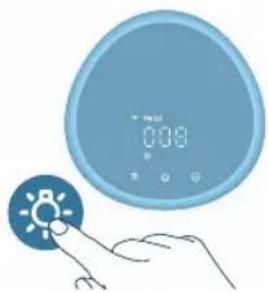
natural_image
Illustration of a blue circular digital timer with a hand pointing to a light bulb icon (no text or symbols)Zahvaljujući senzoru svetla, kontrolna tabla može automatski da se uključi, isključi ili priguši u skladu sa ambijentalnim osvetljenjem.
Kontrolna tabla će biti isključena ili prigušena kada je ambijentalno svetlo slabo. Možete da pritisnete bilo koje dugme da biste aktivirali sva svetla. Zatim, ako nema dodatnih radnji, sva svetla će se ponovo isključiti ili prigušiti u skladu sa ambijentalnim osvetljenjem.
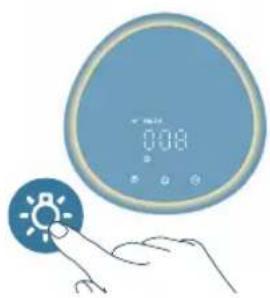
natural_image
Illustration of a digital alarm clock with a hand interacting with a light bulb (no text or symbols)Možete da pritisnete dugme za funkciju svetla da biste prešli na režim lampe: ugodan prsten koji svetli oko kontrolne table. Prilagodite osvetljenost ugodnog svetla u aplikaciji Air+.
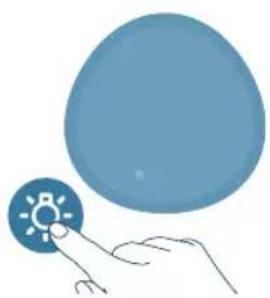
natural_image
Illustration of a hand interacting with a light bulb icon (no text or symbols)Možete da pritisnete dugme da biste isključili sve indikatore i kontrolnu tablu. Pritisnite opet dugme da biste aktivirali sve indikatore.
2 Otvorite poklopac senzora za kvalitet vazduha.
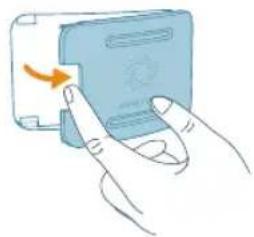
natural_image
Illustration of a hand inserting a card into a device (no text or symbols visible)natural_image
Illustration of a hand holding a tool interacting with a device (no text or symbols visible)natural_image
Diagram showing two mechanical components with a red X mark, one with connecting rods and the other with a handle (no text or symbols)5 Zatvorite senzor za kvalitet vazduha.
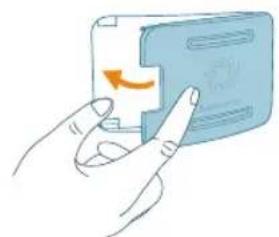
natural_image
Illustration of a hand pressing a button on a blue card (no text or symbols visible)Čišćenje površine filtera
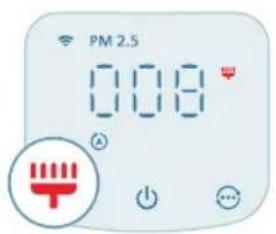
Kada se upozorenje za čišćenje površine filtera 🚪rikaže na ekranu, očistite površinu filtera usisivačem.
Napomena: Preporučujemo da osobe koje su alergične na prašinu, polen, kućne ljubimce ili bud ne menjaju filtere samostalno ili da primene mere zaštite, poput nošenja maske i rukavica.
490 Srpski
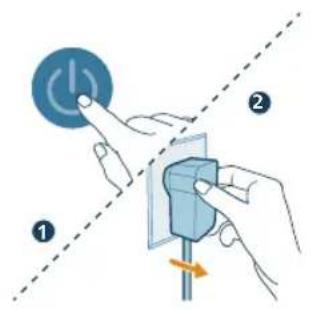
natural_image
Illustration of a hand holding a folded paper or sheet next to a cylindrical container (no text or symbols visible)2 Povucite prednji poklopac i skinite ga sa aparata.
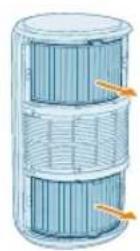
3 Izvucite filtere iz aparata.

natural_image
Illustration of a hand using a tool to spread a rolled-up blue mat (no text or symbols)4 Očistite površinu filtera usisivačem.
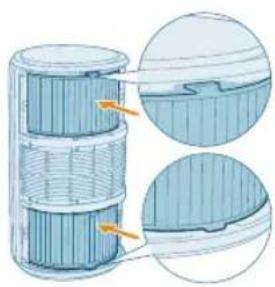
natural_image
Cross-sectional diagram of a cylindrical device with internal layered structure and highlighted components (no text or symbols)5 Vratite filtere u aparat.
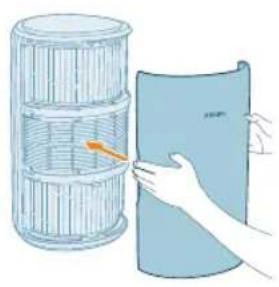
natural_image
Illustration of a hand holding a folded paper or sheet, next to a cylindrical container filled with ribbons (no text or symbols)6 Vratite prednji poklopac na mesto.
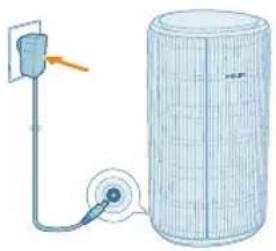
natural_image
Diagram of a pump connected to a cylindrical tank with a cable, showing no text or symbols.natural_image
Hand icon showing a blue circular button with a power symbol, no text or labels present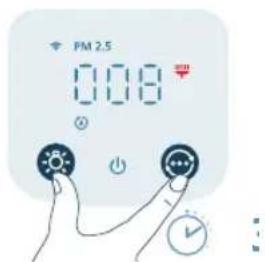
9 Pritisnite dugmad ☑ koržite 3 sekunde da biste resetovali vreme za čišćenje filtera.
- Vreme za čišćenje filtera možete da resetujete i putem aplikacije Air+.
- Nakon uspešnog resetovanja, upozorenje za čišćenje filtera nestaje sa ekrana.
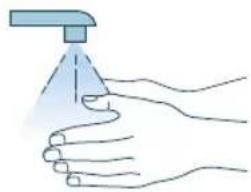
natural_image
Illustration of a hand spraying a spray bottle onto a surface (no text or symbols)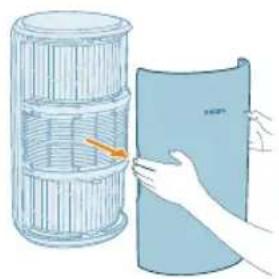
natural_image
Illustration of a hand holding a folded paper or sheet, next to a cylindrical container filled with ribbons (no text or symbols visible)natural_image
Illustration of a hand placing a blue cylindrical object into a container with an upward arrow (no text or symbols)4 Uklonite svu ambalažu novih filtera.
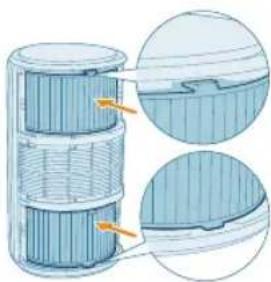
natural_image
Cross-sectional diagram of a battery cell with internal structure and highlighted components (no text or symbols)5 Stavite nove filtere u aparat.
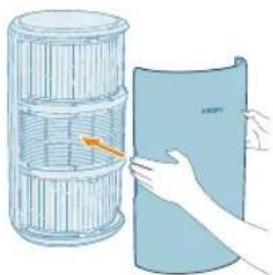
natural_image
Illustration of a hand holding a folded paper or sheet, next to a cylindrical container with an arrow indicating rotation (no text or symbols present)6 Vratite prednji poklopac na mesto.
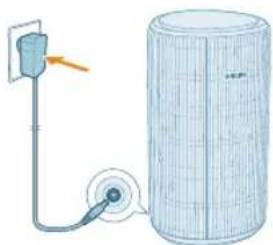
natural_image
Diagram of a mechanical device with a power outlet and a cylindrical component connected to a cable (no text or symbols)natural_image
Hand holding a blue circular button with a power symbol (no text or numbers visible)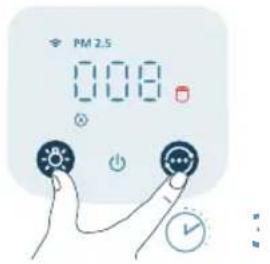
9 Dodirnite dugmadći kuržite 3 sekunde da biste resetovali brojač za radni vek filtera.
- Brojač za radni vek filtera možete da resetujete i putem aplikacije Air+. - Nakon uspešnog resetovanja, upozorenje za zamenu filtera nestaje sa ekrana.
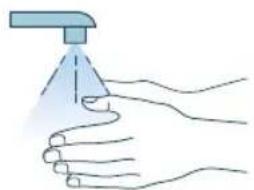
natural_image
Illustration of a hand holding a spray gun with a blue spray can (no text or symbols)10 Temeljno operite ruke nakon zamene filtera.
Filtere možete da zamenite čak i pre nego što se upozorenje za zamenu filtera (Uprikaže na ekranu. Nakon zamene filtera potrebno je da ručno resetujete brojač za radni vek filtera.
1 Pritisnite dugme da biste isključili aparat. Isključite aparat iz zidne utičnice.

natural_image
Diagram of a cylindrical device connected to a power outlet with a pulley (no text or symbols)natural_image
Illustration of a hand holding a folded paper or sheet, next to a cylindrical container filled with plastic wrap (no text or symbols)natural_image
Illustration of a hand placing a blue cylindrical object into a container with an upward arrow (no text or symbols)natural_image
Cross-sectional diagram of a battery cell with internal structure and highlighted components (no text or symbols)504 Suomi
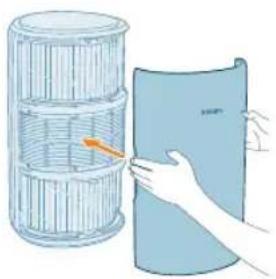
natural_image
Illustration of a hand holding a blue cylindrical object next to a wire rack (no text or symbols)natural_image
Diagram of a water heater connected to a cylindrical tank with a cable and pipe (no text or symbols)Liitä verkkolaite
Nollaa Wi-Fi-yhteys
natural_image
Diagram of a water pump connected to a cylindrical tank with a pulley (no text or symbols)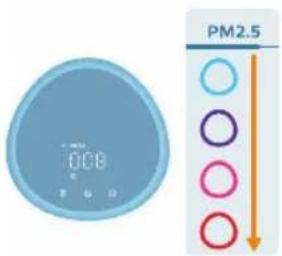
natural_image
Illustration of a crescent moon, star, and eye icon with a hand pointing at it (no text or symbols)natural_image
Illustration of a digital climate controller with a hand pointing to it, no text or symbols present.natural_image
Illustration of a digital timer and a hand interacting with a light bulb (no text or symbols)natural_image
Illustration of a hand interacting with a blue circular icon featuring a sunburst symbol (no text or symbols present)natural_image
Illustration of a hand inserting a device into a device with an arrow indicating rotation (no text or symbols present)natural_image
Illustration of a hand holding a tool interacting with a blue object, no text or symbols presentnatural_image
Diagram showing two mechanical components with a red X mark, one with connecting rods and the other with a handle (no text or symbols)natural_image
Illustration of a hand pressing a button on a device (no text or symbols visible)natural_image
Illustration of a hand holding a folded paper or sheet next to a cylindrical container (no text or symbols visible)natural_image
Illustration of a hand using a tool to spread a rolled-up mat (no text or symbols visible)natural_image
Cross-sectional diagram of a cylindrical device with internal layered structure and highlighted components (no text or symbols)natural_image
Illustration of a hand holding a folded paper or sheet, next to a cylindrical container filled with ribbons (no text or symbols visible)natural_image
Diagram of a water pump connected to a cylindrical tank with a pulley (no text or symbols)natural_image
Hand icon showing a finger pressing a blue circular button with an 'Power' symbol (no text or numbers present)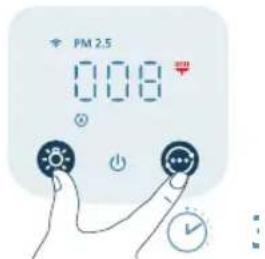
natural_image
Illustration of a hand spraying a spray gun with a triangular spray nozzle (no text or symbols)natural_image
Illustration of a hand holding a folded paper or sheet, next to a cylindrical container filled with ribbed material (no text or symbols visible)natural_image
Illustration of a hand placing a blue cylindrical object into a container with an upward arrow (no text or symbols)natural_image
Cross-sectional diagram of a battery cell with internal structure and highlighted components (no text or symbols)natural_image
Illustration of a hand holding a folded paper or sheet, next to a cylindrical container filled with plastic wrap (no text or symbols)natural_image
Diagram of a mechanical device with a power outlet and a cylindrical component connected to a pulley (no text or symbols)natural_image
Hand icon showing a blue circular button with a white 'Power' symbol, no text or numbers present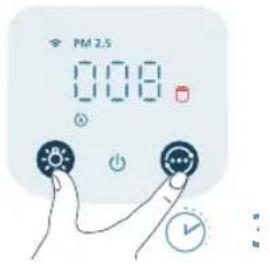
natural_image
Illustration of a hand holding a spray gun with a triangular spray tip (no text or symbols)natural_image
Diagram of a cylindrical device connected to a power outlet with a pulley (no text or symbols)natural_image
Illustration of a hand holding a folded paper or sheet, next to a cylindrical container with a handle (no text or symbols)natural_image
Illustration of a hand placing a component into a blue cylindrical container with an upward arrow (no text or symbols)natural_image
Cross-sectional diagram of a cylindrical device with internal layered structure and highlighted components (no text or symbols)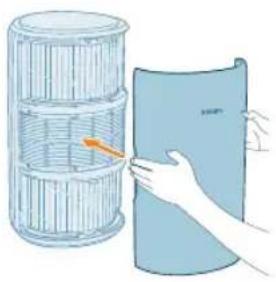
natural_image
Illustration of a hand holding a folded paper or sheet, next to a cylindrical container filled with ribbons (no text or symbols visible)natural_image
Diagram of a water heater system with a pump and wire, no text or symbols presentnatural_image
Diagram of a water pump connected to a cylindrical tank with a pulley (no text or symbols)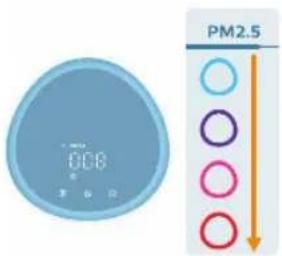
natural_image
Illustration of a crescent moon, star, and eye icon with a hand pointing at it (no text or symbols)natural_image
Illustration of a digital climate controller with a hand pointing to it, showing no text or symbols on the device itself.natural_image
Illustration of a digital timer and a hand interacting with a light bulb (no text or symbols)natural_image
Illustration of a hand interacting with a blue circular icon featuring a sunburst symbol (no text or symbols present)natural_image
Illustration of a hand inserting a card into a device (no text or symbols visible)natural_image
Illustration of a hand holding a tool interacting with a device (no text or symbols visible)natural_image
Diagram showing two mechanical components with a red X mark, one with connecting rods and the other with a handle (no text or symbols)natural_image
Illustration of a hand pressing a button on a blue card (no text or symbols visible)natural_image
Illustration of a hand holding a folded paper or sheet, next to a cylindrical container filled with ribbed material (no text or symbols visible)natural_image
Illustration of a hand using a tool to lift a rolled-up blue mat (no text or symbols)natural_image
Cross-sectional diagram of a cylindrical device with internal components and highlighted sections (no text or symbols)natural_image
Illustration of a hand holding a folded paper or sheet, next to a cylindrical container filled with ribbons (no text or symbols visible)natural_image
Diagram of a water pump connected to a cylindrical tank with a pulley (no text or symbols)natural_image
Hand icon showing a blue circular button with a power symbol, pointing to the right (no text or symbols present)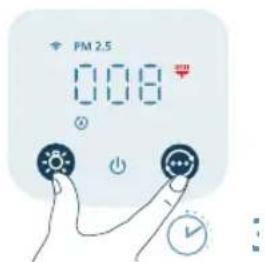
natural_image
Illustration of a hand spraying a spray gun with a triangular spray nozzle (no text or symbols)Byta ut filtren
natural_image
Illustration of a hand holding a folded paper or sheet next to a cylindrical container (no text or symbols visible)natural_image
Illustration of a hand placing a blue cylindrical object into a container with an upward arrow (no text or symbols)natural_image
Cross-sectional diagram of a battery cell with internal structure and highlighted components (no text or symbols)5 Placera de nya filtren i apparaten.
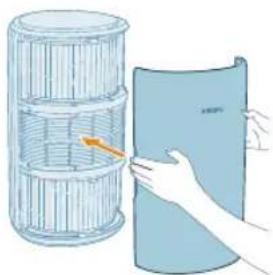
natural_image
Illustration of a hand holding a folded paper or sheet, next to a cylindrical container filled with plastic wrap (no text or symbols)natural_image
Diagram of a mechanical device with a power outlet and a cylindrical component connected to a pulley (no text or symbols)natural_image
Hand pressing a button with a blue circular icon (no text or symbols)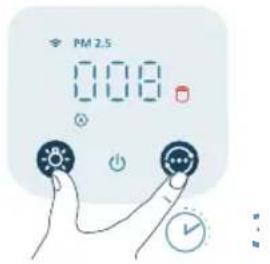
natural_image
Illustration of a hand holding a spray gun with a triangular tip (no text or symbols)natural_image
Diagram of a water pump connected to a cylindrical tank with a pulley (no text or symbols)Các nút điều khiển:
natural_image
Illustration of a hand holding a folded paper or plastic sheet next to a cylindrical container (no text or symbols visible)natural_image
Illustration of a hand pressing down on a blue cylindrical object with an upward arrow (no text or symbols)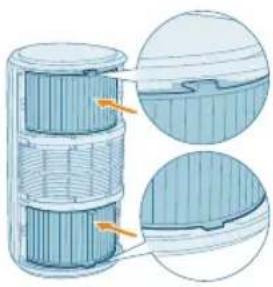
natural_image
Cross-sectional diagram of a battery cell with internal structure and highlighted components (no text or symbols)natural_image
Illustration of a hand holding a blue sheet with an arrow pointing to it, next to a cylindrical container (no text or symbols)natural_image
Diagram of a pulley system connected to a cylindrical tank, with an arrow indicating direction (no text or symbols present)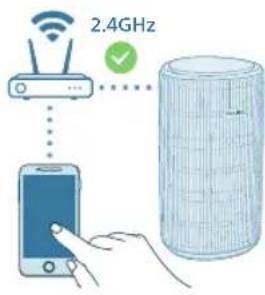
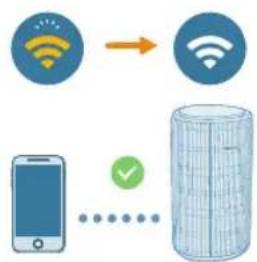
flowchart
graph TD
    A["WiFi Signal"] --> B["WiFi Signal"]
    C["Mobile Phone"] --> D["Data Storage"]
    style C stroke:#000,stroke-width:2px
    style D stroke:#000,stroke-width:2px
natural_image
Diagram of a cylindrical water heater connected to a pump and a wall-mounted device (no text or symbols)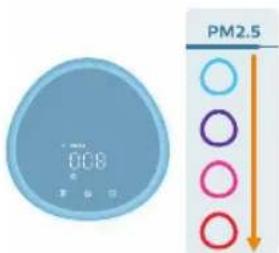
Luu y:
natural_image
Illustration of a crescent moon, star, and circular icon with a hand interacting with it (no text or symbols)natural_image
Illustration of a blue digital timer and a hand holding a light bulb icon (no text or symbols)natural_image
Illustration of a digital timer and a hand interacting with a light bulb (no text or symbols)natural_image
Illustration of a hand interacting with a blue circular icon featuring a sun-like symbol (no text or symbols present)554 Tiếng Việt
natural_image
Illustration of a hand inserting a device into a device with an arrow indicating rotation (no text or symbols)natural_image
Illustration of a hand holding a tool interacting with a blue object, no text or symbols presentnatural_image
Diagram showing a hand holding a device with a blue handle and a red X mark, intersected by dashed lines (no text or symbols)natural_image
Illustration of a hand pressing a button on a device (no text or symbols visible)natural_image
Illustration of a hand holding a folded paper or sheet, next to a cylindrical container filled with wire (no text or symbols visible)natural_image
Illustration of a hand using a tool to spread a rolled-up blue mat (no text or symbols)natural_image
Cross-sectional diagram of a cylindrical device with internal layered structure and highlighted components (no text or symbols)natural_image
Illustration of a hand holding a blue cylindrical object next to a stack of plastic containers (no text or symbols)natural_image
Diagram of a mechanical device with a pulley and cylindrical housing (no text or symbols)natural_image
Hand icon showing a blue circular button with a power symbol, pointing to the right (no text or labels)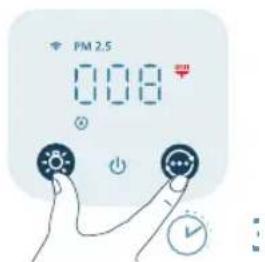
natural_image
Illustration of a hand spraying a spray gun with a funnel (no text or symbols)Thay thế bộ lọc
natural_image
Illustration of a hand holding a folded paper or sheet, next to a cylindrical container filled with wire and an orange arrow (no text or symbols)natural_image
Illustration of a hand placing a cylindrical object into a blue container with an upward arrow (no text or symbols)natural_image
Cross-sectional diagram of a battery cell with internal structure and highlighted components (no text or symbols)natural_image
Illustration of a hand holding a folded paper or sheet, next to a cylindrical container filled with plastic wrap (no text or symbols)natural_image
Diagram of a mechanical device with a power outlet and a cylindrical component connected to a pulley (no text or symbols)natural_image
Hand holding a blue circular button with a power symbol (no text or numbers present)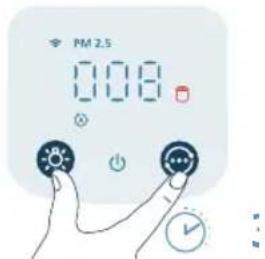
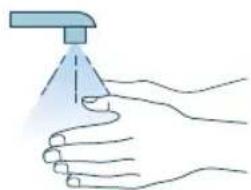
natural_image
Illustration of a hand spraying a spray gun with a funnel (no text or symbols)natural_image
Diagram of a water pump connected to a cylindrical tank with a pulley (no text or symbols)natural_image
Illustration of a hand holding a folded paper or sheet, next to a cylindrical container with a handle (no text or symbols visible)natural_image
Illustration of a hand pressing down on a blue cylindrical object with an upward arrow (no text or symbols)natural_image
Cross-sectional diagram of a layered cylindrical device with internal components and highlighted sections (no text or symbols)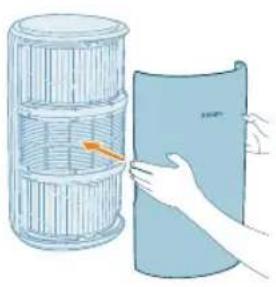
natural_image
Illustration of a hand holding a blue sheet with a grid-like structure, next to a cylindrical container (no text or symbols)natural_image
Diagram of a water filtration system with a pump, coiled tube, and cylindrical filter (no text or labels)natural_image
Diagram of a mechanical device with a pulley and cylindrical housing (no text or symbols)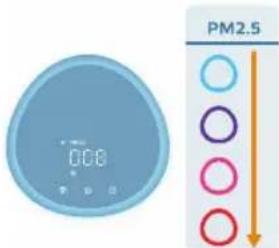
natural_image
Illustration of a crescent moon, star, and circular button with a hand pointing at it (no text or symbols)natural_image
Illustration of a hand interacting with a digital timer and a light bulb icon (no text or symbols)natural_image
Illustration of a digital climate controller with a hand pointing to it, showing no text or symbols on the device itself.natural_image
Illustration of a hand interacting with a blue circular icon featuring a sun symbol (no text or labels)natural_image
Illustration of a hand inserting a device into a card with an arrow indicating rotation (no text or symbols)natural_image
Illustration of a hand holding a tool interacting with a device (no text or symbols visible)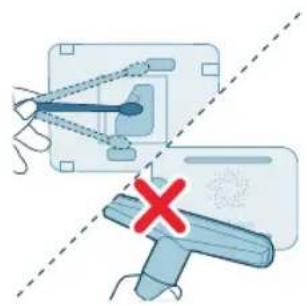
natural_image
Diagram showing a mechanical device with a blue handle and a red X mark, no text or symbols presentnatural_image
Illustration of a hand pressing a button on a blue card (no text or symbols visible)natural_image
Illustration of a hand holding a folded paper or plastic sheet next to a cylindrical container (no text or symbols visible)natural_image
Illustration of a hand using a tool to spread a blue corrugated material (no text or symbols)natural_image
Cross-sectional diagram of a cylindrical device with internal layered structure and highlighted components (no text or symbols)natural_image
Illustration of a hand holding a folded paper or sheet, next to a cylindrical container with a grid pattern (no text or symbols)natural_image
Diagram of a pump connected to a cylindrical tank with a pulley (no text or symbols)natural_image
Hand icon showing a blue circular button with a white 'Power' symbol, pointing to it (no text or symbols present)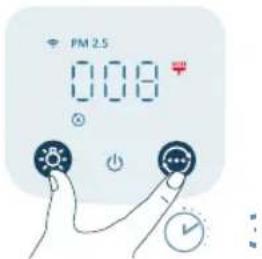
natural_image
Illustration of a hand spraying a spray bottle onto a surface (no text or symbols)natural_image
Illustration of a hand holding a folded paper or sheet next to a cylindrical container (no text or symbols visible)natural_image
Illustration of a hand placing a blue cylindrical object into a container with an upward arrow (no text or symbols)natural_image
Cross-sectional diagram of a mechanical component with layered structure and highlighted sections (no text or symbols)natural_image
Illustration of a hand holding a folded paper or plastic sheet next to a cylindrical container (no text or symbols visible)natural_image
Diagram of a pump connected to a cylindrical tank with a cable, showing no text or symbols.natural_image
Hand icon showing a finger pressing a blue circular button with an 'Power' symbol (no text or numbers present)
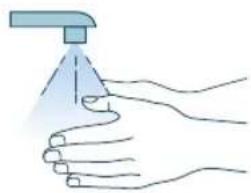
natural_image
Illustration of a hand spraying a spray bottle onto a surface (no text or symbols)natural_image
Diagram of a mechanical device with a pulley and attached cable, no text or symbols presentnatural_image
Illustration of a hand holding a folded paper or sheet, next to a cylindrical container with a handle (no text or symbols)natural_image
Illustration of a hand placing a component into a blue cylindrical container with an upward arrow (no text or symbols)natural_image
Cross-sectional diagram of a cylindrical device with internal layered structure and highlighted components (no text or symbols)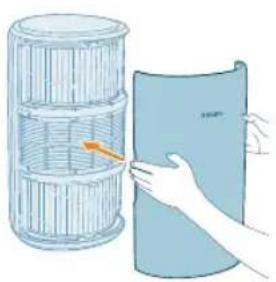
natural_image
Illustration of a hand holding a cylindrical object next to a blue sheet, with no visible text or symbols.natural_image
Diagram of a mechanical device with a pulley and coil, no text or symbols present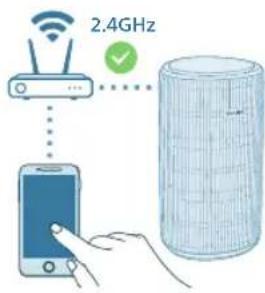
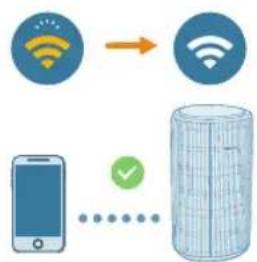
flowchart
graph TD
    A["WiFi"] --> B["WiFi"]
    C["Smartphone"] --> D["Data Storage Block"]
    style A fill:#4CAF50,stroke:#388E3C
    style B fill:#4CAF50,stroke:#388E3C
    style C fill:#FFA500,stroke:#388E3C
    style D fill:#F1C712,stroke:#388E3C
natural_image
Diagram of a water pump connected to a cylindrical tank with a cable (no text or symbols)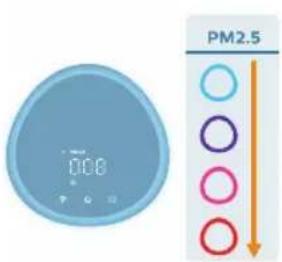
natural_image
Illustration of a crescent moon, star, and circular icon with a hand interacting with it (no text or symbols)natural_image
Illustration of a digital timer with a sun icon and a finger pointing at it (no text or symbols)natural_image
Illustration of a hand interacting with a blue circular icon featuring a sun symbol (no text or labels)natural_image
Illustration of a hand inserting a card into a device (no text or symbols visible)natural_image
Illustration of a hand holding a tool interacting with a blue object (no text or symbols visible)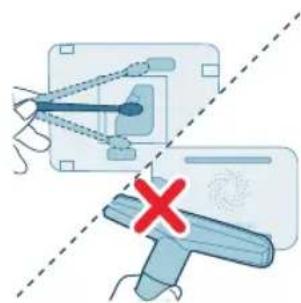
natural_image
Diagram showing a mechanical device with a handle and a red X mark, no text or symbols presentnatural_image
Illustration of hands interacting with a blue card or device (no text or symbols visible)natural_image
Illustration of a hand holding a folded paper or sheet, next to a cylindrical container filled with plastic wrap (no text or symbols visible)natural_image
Illustration of a hand using a tool to lift a rolled-up blue material (no text or symbols visible)natural_image
Cross-sectional diagram of a battery cell with internal structure and two views of the casing (no text or labels)natural_image
Illustration of a hand holding a folded paper or sheet, next to a cylindrical container filled with plastic wrap (no text or symbols)natural_image
Diagram of a water pump connected to a cylindrical tank with a cable, showing no text or symbols.natural_image
Hand icon showing a hand pressing a button with a power symbol (no text or labels)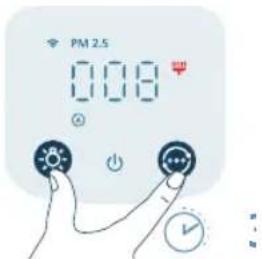
natural_image
Illustration of a hand spraying a spray gun with a funnel (no text or symbols)natural_image
Illustration of a hand holding a folded paper or plastic sheet next to a cylindrical container (no text or symbols visible)natural_image
Illustration of a hand placing a blue cylindrical object into a container with an upward arrow (no text or symbols)natural_image
Cross-sectional diagram of a battery cell with internal structure and highlighted components (no text or symbols)natural_image
Illustration of a hand holding a folded paper or sheet, next to a cylindrical container filled with ribbons (no text or symbols visible)natural_image
Diagram of a water pump connected to a cylindrical tank with a cable, showing no text or symbols.natural_image
Hand icon showing a finger pressing a blue circular button with an 'Power' symbol (no text or numbers present)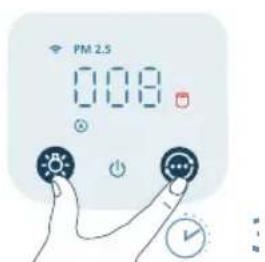
natural_image
Illustration of a hand holding a spray gun with a blue tip (no text or symbols)natural_image
Diagram of a water pump connected to a cylindrical tank with a cable (no text or symbols)natural_image
Illustration of a hand holding a folded paper or sheet, next to a cylindrical container with a handle (no text or symbols)natural_image
Illustration of a hand placing a component into a blue cylindrical container with an upward arrow (no text or symbols)natural_image
Cross-sectional diagram of a cylindrical device with internal layered structure and highlighted components (no text or symbols)4 Поставете филтрите обратно в уреда.
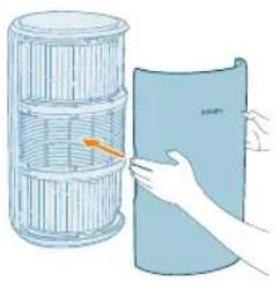
natural_image
Illustration of a hand placing a blue sheet with orange arrow into a cylindrical container (no text or symbols)natural_image
Diagram of a pulley system connected to a cylindrical grid structure (no text or symbols)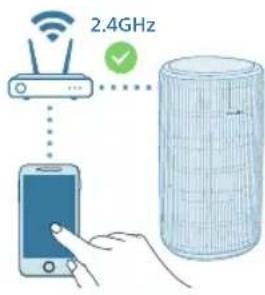
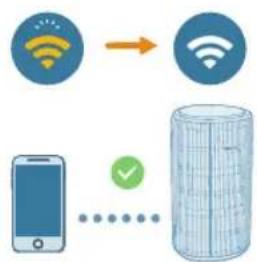
flowchart
graph TD
    A["Mobile Device"] --> B["Server"]
    C["Wi-Fi Signal"] --> D["Switch"]
    E["Wireless Signal"] --> F["Wireless Signal"]
natural_image
Diagram of a water pump connected to a cylindrical tank with a pulley (no text or symbols)natural_image
Illustration of a moon, crescent moon, and a stylized face with eyes and finger pointing at it (no text or symbols)natural_image
Illustration of a digital timer with a sun icon and a finger pointing at it (no text or symbols)natural_image
Illustration of a hand interacting with a blue circular icon featuring a sun symbol (no text or labels)natural_image
Illustration of a hand inserting a card into a device (no text or symbols visible)natural_image
Illustration of a hand holding a tool with a blue pointer and dotted line, no text or symbols present622 Български
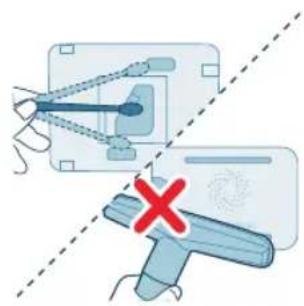
natural_image
Diagram showing a mechanical device with a handle and a red X mark, no text or symbols presentnatural_image
Illustration of hands interacting with a blue card or folder, showing a scroll icon and a finger (no text or symbols)natural_image
Illustration of a hand holding a folded paper or sheet, next to a cylindrical container with a handle (no text or symbols visible)natural_image
Illustration of a hand using a tool to lift a rolled-up blue mat (no text or symbols)natural_image
Cross-sectional diagram of a battery cell with internal structure and highlighted components (no text or symbols)5 Поставете филтрите обратно в уреда.
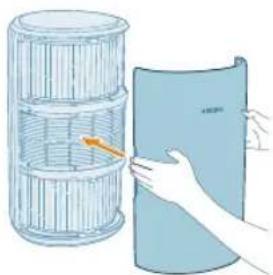
natural_image
Illustration of a hand holding a folded paper or sheet, next to a cylindrical container filled with plastic wrap (no text or symbols)natural_image
Diagram of a water pump connected to a cylindrical tank with a cable, showing no text or symbols.natural_image
Hand holding a blue circular button with a white 'Power' symbol (no text or numbers present)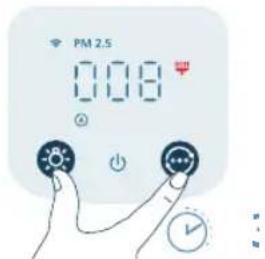
natural_image
Illustration of a hand spraying a spray gun with a funnel (no text or symbols)natural_image
Illustration of a cylindrical container with internal structure being handled by hands, no text or symbols presentnatural_image
Illustration of a hand placing a cylindrical object into a blue container with an upward arrow (no text or symbols)natural_image
Cross-sectional diagram of a battery pack showing internal structure and casing (no text or labels)natural_image
Illustration of a hand holding a folded paper or sheet, next to a cylindrical container filled with wire mesh (no text or symbols)natural_image
Diagram of a water pump connected to a cylindrical tank with a cable, showing no text or symbols.natural_image
Hand icon showing a hand pressing a blue circular button with a power symbol (no text or labels)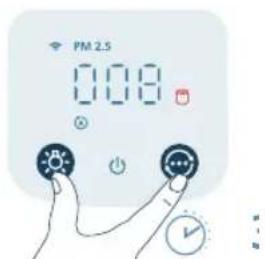
natural_image
Illustration of a hand using a spray gun to clean water (no text or symbols)natural_image
Diagram of a cylindrical water tank connected to a pump and a wall-mounted pipe (no text or symbols)natural_image
Illustration of a hand holding a folded paper or sheet, next to a cylindrical container with a handle (no text or symbols)natural_image
Illustration of a hand placing a component into a blue cylindrical container with an upward arrow (no text or symbols)natural_image
Cross-sectional diagram of a cylindrical device with internal layered structure and highlighted components (no text or symbols)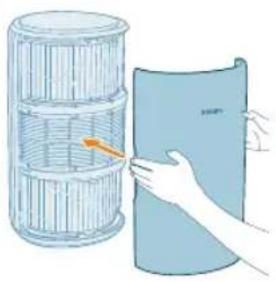
natural_image
Illustration of a hand placing a blue sheet with orange arrow into a cylindrical container (no text or symbols)natural_image
Diagram of a pulley system connected to a cylindrical grid structure (no text or symbols)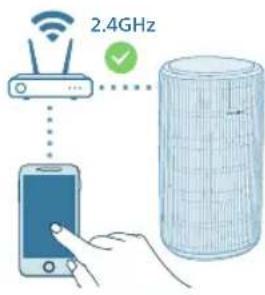
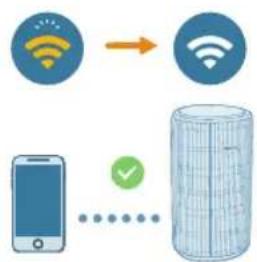
flowchart
graph TD
    A["Mobile Device"] --> B["Server"]
    C["WiFi Signal"] --> D["Cloud Storage"]
    style A fill:#f9f,stroke:#333
    style B fill:#ccf,stroke:#333
    style C fill:#cfc,stroke:#333
    style D fill:#fcc,stroke:#333
natural_image
Diagram of a water pump connected to a cylindrical tank with a pulley (no text or symbols)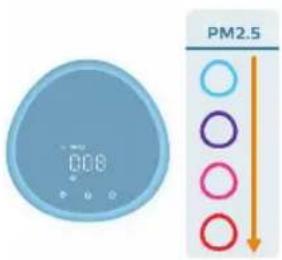
natural_image
Illustration of a moon, crescent moon, and a stylized face with a circular button (no text or symbols)natural_image
Illustration of a digital timer with a sun icon and a finger pointing at it (no text or symbols)natural_image
Illustration of a hand holding a blue circular icon with a sun symbol, next to a large blue sphere (no text or symbols)natural_image
Illustration of a hand inserting a device into a blue card with an arrow indicating rotation (no text or symbols)natural_image
Illustration of a hand holding a tool with a blue tool tip, no text or symbols presentnatural_image
Diagram showing a mechanical device with a blue handle and a red X mark, no text or symbols presentnatural_image
Illustration of a hand pressing a button on a blue card (no text or symbols visible)natural_image
Illustration of a cylindrical container with a handle holding a blue sheet, next to a separate paper roll (no text or symbols)natural_image
Illustration of a hand using a tool to spread a blue rolled-up material (no text or symbols visible)natural_image
Cross-sectional diagram of a cylindrical device with internal components and highlighted parts (no text or symbols)natural_image
Illustration of a hand holding a blue cylindrical object next to a wire rack (no text or symbols)natural_image
Diagram of a mechanical system with a pulley and cylindrical component (no text or symbols)natural_image
Hand pressing a button with a blue circular icon (no text or symbols)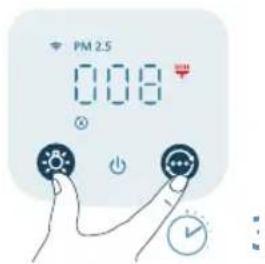
natural_image
Illustration of a hand holding a spray gun with a blue spray tip (no text or symbols)natural_image
Illustration of a hand holding a folded paper or sheet, next to a cylindrical container filled with ribbed material (no text or symbols visible)natural_image
Illustration of a hand placing a blue cylindrical object into a container with an upward arrow (no text or symbols)natural_image
Cross-sectional diagram of a layered structure with highlighted components (no text or symbols)natural_image
Illustration of a hand holding a folded paper or sheet next to a cylindrical container (no text or symbols visible)natural_image
Diagram of a water pump connected to a cylindrical tank with a pulley (no text or symbols)natural_image
Hand icon showing a blue circular button with a white 'Power' symbol, pointing at it (no text or symbols present)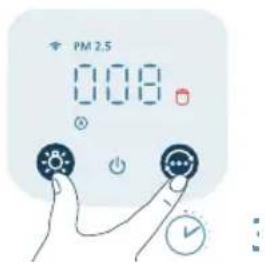
natural_image
Illustration of a hand spraying a spray gun with a funnel (no text or symbols)natural_image
Diagram of a mechanical device with a pulley and a cylindrical component (no text or symbols)natural_image
Illustration of a hand holding a folded paper or sheet, next to a cylindrical container with a handle (no text or symbols)natural_image
Illustration of a hand placing a blue cylindrical object into a container with an upward arrow (no text or symbols)natural_image
Cross-sectional diagram of a cylindrical device with internal components and highlighted sections (no text or symbols)660 Українська
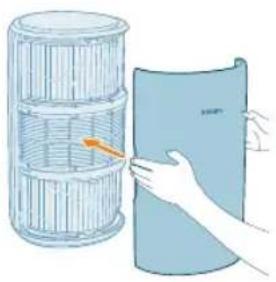
natural_image
Illustration of a hand placing a blue sheet with an orange arrow into a cylindrical container (no text or symbols)natural_image
Diagram of a pulley system connected to a cylindrical grid cylinder, with an arrow pointing to the top-left corner (no text or symbols present)natural_image
Diagram of a water pump connected to a cylindrical tank with a cable (no text or symbols)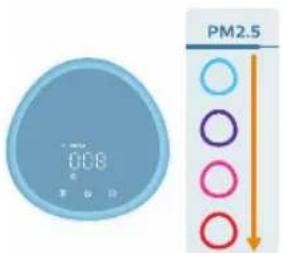
natural_image
Illustration of a moon, crescent moon, and a stylized face with stars (no text or symbols)natural_image
Illustration of a blue circular digital timer with a hand pointing at it, next to a stylized sun icon (no text or symbols)natural_image
Illustration of a hand holding a blue circular icon with a sun symbol, next to a large blue sphere (no text or symbols)natural_image
Illustration of a hand pressing a button on a device (no text or symbols visible)natural_image
Illustration of a hand holding a tool with a blue tool tip, no text or symbols presentnatural_image
Diagram showing two mechanical components with a red X mark, one with a connecting rod and the other with a handle (no text or symbols present)668 Українська
natural_image
Illustration of a hand inserting a card into a blue card (no text or symbols visible)natural_image
Illustration of a cylindrical container with a handle holding a curved panel, next to a smaller blue object (no text or symbols)natural_image
Illustration of a hand using a tool to lift a rolled-up blue material (no text or symbols)natural_image
Cross-sectional diagram of a cylindrical device with internal layered structure and highlighted components (no text or symbols)natural_image
Illustration of a hand holding a folded paper or plastic sheet next to a cylindrical container (no text or symbols visible)natural_image
Diagram of a water heater connected to a wall-mounted power outlet (no text or symbols)natural_image
Hand icon showing a finger pressing a blue circular button with an 'Power' symbol (no text or numbers present)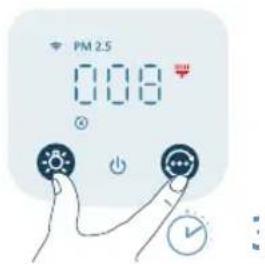
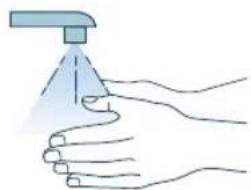
natural_image
Illustration of a hand holding a spray gun, no text or symbols presentnatural_image
Illustration of a hand holding a folded paper or sheet, next to a cylindrical container filled with ribbed material (no text or symbols visible)natural_image
Illustration of a hand placing a blue cylindrical object into a container with an upward arrow (no text or symbols)natural_image
Cross-sectional diagram of a cylindrical device with internal components and highlighted sections (no text or symbols)natural_image
Illustration of a hand holding a blue sheet with a yellow arrow pointing to a woven basket (no text or symbols)natural_image
Diagram of a water pump connected to a cylindrical tank with a cable, showing no text or symbols.natural_image
Hand icon showing a blue circular button with an 'Power' symbol, no text or labels present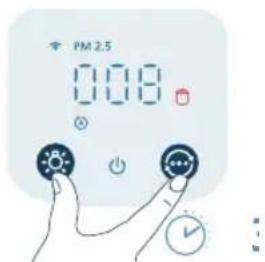
natural_image
Illustration of a hand spraying a spray gun with a funnel (no text or symbols)natural_image
Diagram of a cylindrical device connected to a power outlet with a cable, showing internal components (no text or symbols)أزرار التحكم:
natural_image
Illustration of a hand holding a blue sheet with an arrow pointing to a cylindrical container (no text or symbols)نرجه من الجهاز.
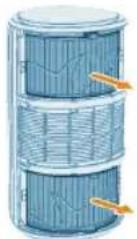
فلادتر من الجهاز.
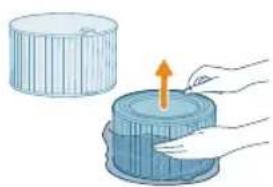
natural_image
Illustration of a hand pressing down on a cylindrical object with an upward arrow (no text or symbols)دتر تنقبة الهواء.3.
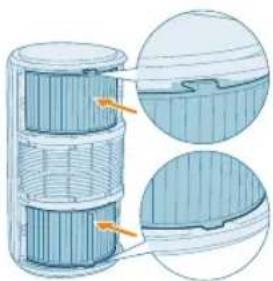
natural_image
Cross-sectional diagram of a cylindrical device with internal components and highlighted parts (no text or symbols)فلاتر إلى الجهاز.
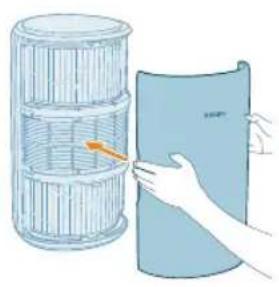
natural_image
Illustration of a hand holding a blue sheet with an orange arrow pointing to a cylindrical container (no text or symbols)الجهةolinaية.5
توصيل الطاقة
natural_image
Diagram of a water filtration or gas collection system with a cylindrical container and connected pipe (no text or symbols)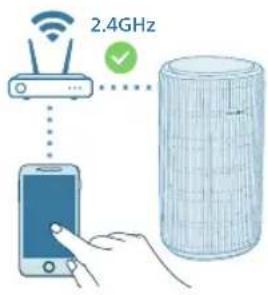
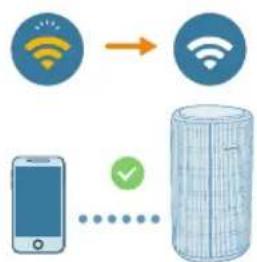
flowchart
graph TD
    A["Mobile Device"] -->|Signal| B["Server"]
    C["Wireless Signal"] -->|Signal| B
    D["Wireless Device"] -->|Signal| B
    E["Wireless Device"] -->|Signal| B
    F["Wireless Device"] -->|Signal| B
    G["Wireless Device"] -->|Signal| B
    H["Wireless Device"] -->|Signal| B
    I["Wireless Device"] -->|Signal| B
    J["Wireless Device"] -->|Signal| B
    K["Wireless Device"] -->|Signal| B
    L["Wireless Device"] -->|Signal| B
    M["Wireless Device"] -->|Signal| B
    N["Wireless Device"] -->|Signal| B
    O["Wireless Device"] -->|Signal| B
    P["Wireless Device"] -->|Signal| B
    Q["Wireless Device"] -->|Signal| B
    R["Wireless Device"] -->|Signal| B
    S["Wireless Device"] -->|Signal| B
    T["Wireless Device"] -->|Signal| B
    U["Wireless Device"] -->|Signal| B
    V["Wireless Device"] -->|Signal| B
    W["Wireless Device"] -->|Signal| B
    X["Wireless Device"] -->|Signal| B
    Y["Wireless Device"] -->|Signal| B
    Z["Wireless Device"] -->|Signal| B
    AA["Wireless Device"] -->|Signal| B
    AB["Wireless Device"] -->|Signal| B
    AC["Wireless Device"] -->|Signal| B
    AD["Wireless Device"] -->|Signal| B
    AE["Wireless Device"] -->|Signal| B
    AF["Wireless Device"] -->|Signal| B
    AG["Wireless Device"] -->|Signal| B
    AH["Wireless Device"] -->|Signal| B
    AI["Wireless Device"] -->|Signal| B
    AJ["Wireless Device"] -->|Signal| B
    AK["Wireless Device"] -->|Signal| B
    AL["Wireless Device"] -->|Signal| B
    AM["Wireless Device"] -->|Signal| B
    AN["Wireless Device"] -->|Signal| B
    AO["Wireless Device"] -->|Signal| B
    AP["Wireless Device"] -->|Signal| B
    AQ["Wireless Device"] -->|Signal| B
    AR["Wireless Device"] -->|Signal| B
    AS["Wireless Device"] -->|Signal| B
    AT["Wireless Device"] -->|Signal| B
    AU["Wireless Device"] -->|Signal| B
    AV["Wireless Device"] -->|Signal| B
    AW["Wireless Device"] -->|Signal| B
    AX["Wireless Device"] -->|Signal| B
    AY["Wireless Device"] --> AZ["Data Storage"]
    AZ --> BA["Data Storage"]
    BA --> BB["Data Storage"]
    BB --> BC["Data Storage"]
    BC --> BD["Data Storage"]
    BD --> BE["Data Storage"]
    BE --> BF["Data Storage"]
    BF --> BG["Data Storage"]
    BG --> BH["Data Storage"]
    BH --> BI["Data Storage"]
    BI --> BJ["Data Storage"]
    BJ --> BK["Data Storage"]
    BK --> BL["Data Storage"]
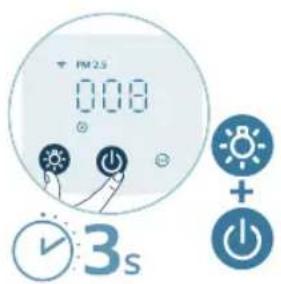
natural_image
Diagram of a cylindrical device connected to a power outlet with a cable, showing internal components (no text or symbols)
هاز تنقية الهواء.2.
natural_image
Illustration of a moon, crescent moon, and eye icon with a finger pointing at it (no text or symbols)natural_image
Illustration of a digital alarm clock with a hand pointing at it, no text or symbols present.استخدام وظيفة الضوع
natural_image
Illustration of a digital timer and a hand interacting with a circular device (no text or symbols)natural_image
Illustration of a hand interacting with a light bulb icon (no text or symbols)689 العربية
عرجودة الهواء.
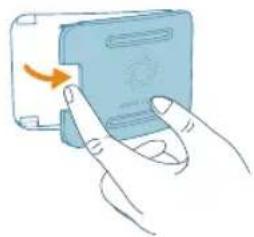
natural_image
Illustration of a hand pressing a button on a device (no text or symbols visible)منquentرطب.
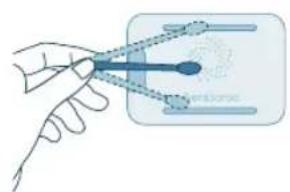
natural_image
Illustration of a hand holding a tool interacting with a blue object, no text or symbols presentمنquent جاف.
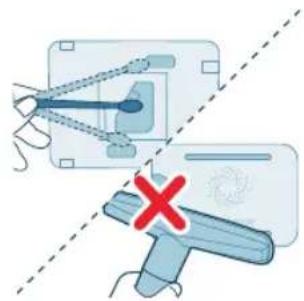
natural_image
Diagram showing two mechanical components with a red X mark, one with connecting rods and the other with a handle (no text or symbols)عرجودة الهواء.5.
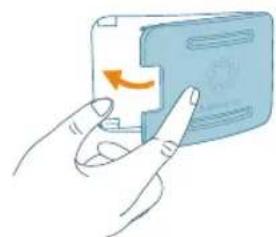
natural_image
Illustration of a hand pressing a button on a device (no text or symbols visible)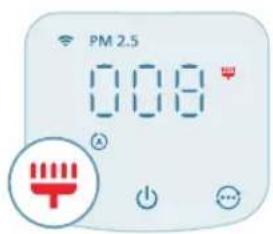
تنظيف سطح الفلادتر
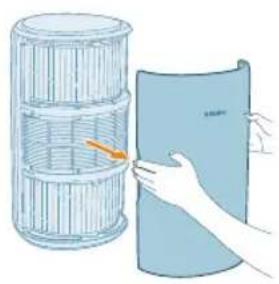
natural_image
Illustration of a hand holding a folded paper or sheet next to a cylindrical container (no text or symbols visible)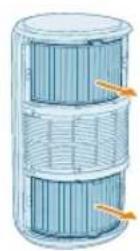
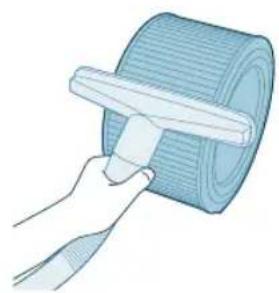
natural_image
Illustration of a hand using a tool to spread a rolled-up mat (no text or symbols visible)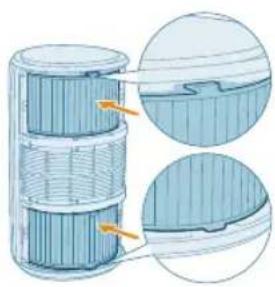
natural_image
Cross-sectional diagram of a cylindrical device with internal layered structure and highlighted components (no text or symbols)من مأخذ الطاقة.
دربه من الجهاز.
فلادتر من الجهاز.3
کنسبة کهربائية. 4.
natural_image
Illustration of a hand holding a folded paper or sheet, next to a cylindrical container filled with ribbons (no text or symbols visible)الجهةolinaJune.
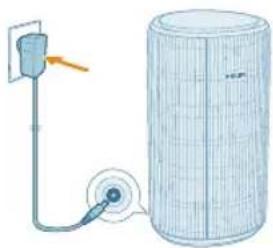
natural_image
Diagram of a water pump connected to a cylindrical tank with a pulley (no text or symbols)في مأخذ الطاقة. 7.
(
letشفيل الجهاز.
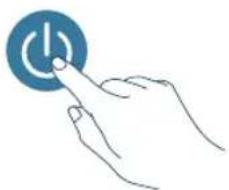
natural_image
Hand icon showing a finger pressing a blue circular button with an 'Power' symbol (no text or numbers present)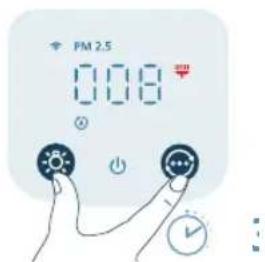
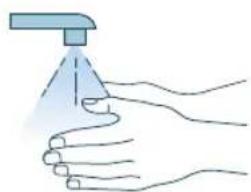
natural_image
Illustration of a hand spraying a spray bottle (no text or symbols)[Non-Text]
ت تنظيف الفادتر.9
![PHILIPS AC3210 - [Non-Text] - 1](/content/2026/04/707483/images/324559f649e7e5654b8d8237423b6de2d39e51821497697aaaf8acbf1efe0e69.jpg)
natural_image
Illustration of a hand holding a folded paper or sheet, next to a cylindrical container filled with wire (no text or symbols visible)من مأخذ الطاقة.
- رجه من الجهاز
693 العربية
الاتر المستعملة.
![PHILIPS AC3210 - [Non-Text] - 2](/content/2026/04/707483/images/219bd7cb4e526da618bf699c0d26b5b01e6ed589c92ce9ba56c52a0e36c0e957.jpg)
![PHILIPS AC3210 - [Non-Text] - 3](/content/2026/04/707483/images/91cfbef14b594c3a626a545312dae46de456ef710f4b53e4dccd25667f6f6441.jpg)
natural_image
Illustration of a hand placing a blue cylindrical object into a container with an upward arrow (no text or symbols)![PHILIPS AC3210 - [Non-Text] - 4](/content/2026/04/707483/images/480e7b45999fd5aa0820b12d68f800e6fe4351bc688411779a5483b03269e8cc.jpg)
natural_image
Cross-sectional diagram of a cylindrical device with internal components and highlighted parts (no text or symbols)![PHILIPS AC3210 - [Non-Text] - 5](/content/2026/04/707483/images/0c15468167635a0ea778fcb04635a8f8232d058fb7ff88b0727f20e220355655.jpg)
natural_image
Illustration of a hand holding a folded paper sheet next to a cylindrical container (no text or symbols)![PHILIPS AC3210 - [Non-Text] - 6](/content/2026/04/707483/images/1d9d12e0e94b503aa92ac045d0f9f6e177baa46d37e6aab9d7fd2cace2249b26.jpg)
natural_image
Diagram of a power supply connected to a cylindrical device with a pulley and cable (no text or symbols)الفلاتر الجديدة 4.
ديدة إلى الجهاز.5.
الجهة大宗商品.
في مأخذ الطاقة. 7.
![PHILIPS AC3210 - [Non-Text] - 7](/content/2026/04/707483/images/6a3175d1f2a86ecab7777b332b252fa599ee61ef4580043b0f4daf9ad3012e3e.jpg)
natural_image
Hand holding a blue circular button with a white 'Power' symbol (no text or numbers present)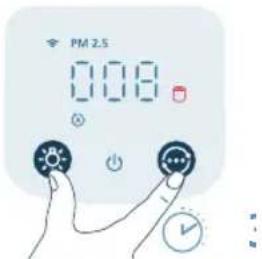
![PHILIPS AC3210 - [Non-Text] - 9](/content/2026/04/707483/images/7398e54a011b756bde4c74df147cdb606321f5d9d9df474cbfbc8994fec1d227.jpg)
natural_image
Illustration of a hand spraying a spray gun with a funnel (no text or symbols)(
letشفيل الجهاز.
![PHILIPS AC3210 - [Non-Text] - 10](/content/2026/04/707483/images/d84e85e1e48118d3d01fd3768251cce8182fe091e5c88751994652d26ba55981.jpg)
![PHILIPS AC3210 - [Non-Text] - 11](/content/2026/04/707483/images/7c413f8e584e1ad050c1961aba5e9739562cec67ebb589fcac6926e709956bac.jpg)
استهلاك الفلادتر.9
695 العربية
في مأخذ الطاقة.
![PHILIPS AC3210 - [Non-Text] - 12](/content/2026/04/707483/images/6d308852ef68c251ee57d9c9c4dd2ecf3a56e8a7d3fee50f0cca0281f485199d.jpg)
natural_image
Diagram of a cylindrical device connected to a power outlet with a pulley (no text or symbols)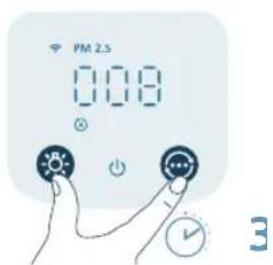
![PHILIPS AC3210 - [Non-Text] - 14](/content/2026/04/707483/images/8a78bc267d728c8ae456cbae7a51077801d3c5f0982da0404970e60263c8d336.jpg)
PHILIPS and the Philips Shield Emblem are registered trademarks of Koninklijke Philips N.V. and are used under license.
This product has been manufactured by and is sold under the responsibility of Versuni Holding B.V., and Versuni Holding B.V. is the warrantor in relation to this product.
2025 © Versuni Holding B.V.
- English
- Important
- Danger
- Warning
- Caution
- Electromagnetic fields (EMF)
- Recycling
- English
- Simplified EU declaration of conformity
- Your air purifier
- Product overview
- Controls overview
- Getting started
- Installing the filters
- English
- Connecting power
- Understanding Wi-Fi indicator
- Wi-Fi connection
- Setting up the Wi-Fi connection for the first time
- Reset the Wi-Fi connection
- Using the air purifier
- Understanding the air quality light
- PM2.5
- Turning on and off
- Changing the mode setting
- English
- Using the light function
- Setting the child lock
- Cleaning and maintenance
- Cleaning schedule
- Frequency Cleaning method
- Cleaning the body of the air purifier
- Cleaning the particle sensor
- Cleaning the surface of the filters
- Replacing the filters
- Understanding the healthy air protect lock
- English
- English
- Filter reset
- Storage
- Troubleshooting
- Warranty and support
- Order parts or accessories
- Penting
- Bahasa Indonesia
- Mengatur ulang koneksi Wi-Fi
- Bahasa Indonesia
- Membersihkan permukaan filter
- Bahasa Indonesia
- Nulstil Wi-Fi-forbindelsen
- Toite ühendamine
- Wi-Fi-ühenduse esmakordne seadistamine
- Eesti
- Filtrite pinna puhastamine
- Eesti
- Upotreba pročišćivača zraka
- Hrvatski
- Čišćenje površine filtara
- Hrvatski
- Hrvatski
- Hrvatski
- Italiano
- Filtru tīrīšana
- Filtru nomaina
- Lietuviškai
- Lietuviškai
- Filtrų keitimas
- Lietuviškai
- Magyar
- Magyar
- Norsk
- Tilbakestille Wi-Fi-tilkoblingen
- Norsk
- Polski
- Polski
- Ligar a alimentação
- Português
- Rivendosja e lidhjes Wi-Fi
- Shqip
- Slovenščina
- Menjava filtrov
- Slovenščina
- Slovensky
- Zresetujte pripojenie Wi-Fi
- Čistenie povrchu filtrov
- Slovensky
- Výmena filtrov
- Srpski
- Resetovanje Wi-Fi veze
- Korišćenje funkcije svetla
- Čišćenje površine filtera
- Srpski
- Suomi
- Nollaa Wi-Fi-yhteys
- Byta ut filtren
- Tiếng Việt
- Thay thế bộ lọc
- Български
- Українська
- Українська
- توصيل الطاقة
- استخدام وظيفة الضوع
- تنظيف سطح الفلادتر
- [Non-Text]
Brand : PHILIPS
Model : AC3210
Category : Air purifier