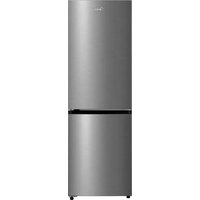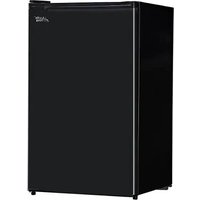
ARM44S5ABB - Fridge MIDEA - Free user manual and instructions
Find the device manual for free ARM44S5ABB MIDEA in PDF.


User questions about ARM44S5ABB MIDEA
0 question about this device. Answer the ones you know or ask your own.
Ask a new question about this device
Download the instructions for your Fridge in PDF format for free! Find your manual ARM44S5ABB - MIDEA and take your electronic device back in hand. On this page are published all the documents necessary for the use of your device. ARM44S5ABB by MIDEA.
USER MANUAL ARM44S5ABB MIDEA
text_image
Arctic™ KingInstruction Manual
REFRIGERATOR
Model: ARM044S1ARSV ARM44S5ABB
natural_image
Pure technical line drawing of a rectangular frame with no text, numbers, or symbolsContents
- SAFETY WARNINGS.... 1
- INSTALLATION 2
2.1 Location.... 2
2.2 Reversing the Door Swing 2
2.3 Door Space Requirements.... 3
2.4 Levelling the Unit 3
2.5 Cleaning Before Use 4
2.6 Before Using Your Unit....4
2.7 Interior Accessories....4
- PRODUCT OVERVIEW 5
- OPERATION....5
4.1 Switching On Your Unit 5
4.2 Noise Inside the Unit 5
4.3 Tips for Keeping Food in the Unit....5
- CLEANING 6
5.1 Cleaning the Interior and the Exterior of the Unit....6
5.2 Cleaning Tips 6
- MAINTENANCE 6
6.1 Care When Handling / Moving Your Unit.... 6
6.2 Servicing 6
6.3 Switching Off for Long Periods of Time.... 6
- TROUBLESHOOTING 7
7.1 Additional tips 7
- WARRANTY 8
1. SAFETY WARNINGS
1) WARNING—Do not use mechanical devices or other means to accelerate the defrosting process, other than those recommended by the manufacturer.
2) WARNING—Do not damage the refrigerant circuit.
3) WARNING—Do not use electrical appliances inside the food storage compartments of the appliance, unless they are of the type recommended by the manufacturer.
4) WARNING—DANGER: Risk of child entrapment. Before you throw away your old refrigerator or freezer:
• Take off the doors.
- Leave the shelves in place so that children may not easily climb inside.
5) The appliance has to be unplugged after use and before carrying out user maintenance on the appliance.
6) This appliance can be used by children aged from 8 years and above and persons with reduced physical, sensory or mental capabilities or lack of experience and knowledge if they have been given supervision or instruction concerning use of the appliance in a safe way and understand the hazards involved. Children shall not play with the appliance. Cleaning and user maintenance shall not be made by children without supervision.
7) If the supply cord is damaged, it must be replaced by the manufacturer, its service agent or similarly qualified persons in order to avoid a hazard.
8) Please dispose of the refrigerator according to local regulations.
9) Before you scrap the appliance, please take off the doors to prevent children from being trapped.
10) This appliance is intended to be used in household and similar applications such as:
– Staff kitchen areas in shops, offices and other working environments.
– Farm houses and by clients in hotels, motels and other residential type environments.
- Bed and breakfast type environments.
– Catering and similar non-retail applications.
11) Do not use an extension cord with this appliance. If the power cord is too short, have a qualified electrician or service technician install an outlet near the appliance. Use of an extension cord can negatively affect the performance of the unit.

IT IS HAZARDOUS FOR ANYONE OTHER THAN AUTHORISED SERVICE PERSONNEL TO CARRY OUT SERVICING OR REPAIRS WHICH INVOLVE THE REMOVAL OF COVERS.

TO AVOID THE RISK OF ELECTRIC SHOCK DO NOT ATTEMPT REPAIRS YOURSELF.
2. INSTALLATION
2.1 Location
When selecting a position for your unit you should make sure the floor is flat and firm, and the room is well ventilated. Avoid locating your unit near a heat source, e.g., cooker, boiler or radiator.
Also avoid direct sunlight as it may increase the electrical consumption. Extreme cold ambient temperatures may also cause the unit not to perform properly. This unit is not designed for use in a garage or outdoor installation. Do not drape the unit with any covering.
When installing the unit, ensure that 8" (20 cm) of free space is left at both sides, 6" (15 cm) at the rear and 8" (20 cm) at the top of the unit. This will allow cold air to circulate around the refrigerator and improve the efficiency of the cooling process. The door can be opened to the right or the left, depending on which better suits the location. Please ensure there is adequate space for the door to fully open.
2.2 Reversing the Door Swing
Tools Required: Cross-head screwdriver / Flat-head screwdriver / Hexagonal wrench

◆ If you want to have the door swing reversed, we recommend that you contact a qualified technician. You should only try to reverse the door yourself if you believe that you are qualified to do so.
◆ Ensure the unit is unplugged and empty.
◆ Adjust the two levelling feet to their highest position.
◆ To take the door off it is necessary to tilt the unit backwards. You should rest the unit on something solid so that it will not slip during the door reversing process.
◆ All parts removed must be saved to do the reinstallation of the door.
◆ Do not lay the unit flat as this may damage the coolant system.
◆ We recommend that 2 people handle the unit during assembly.
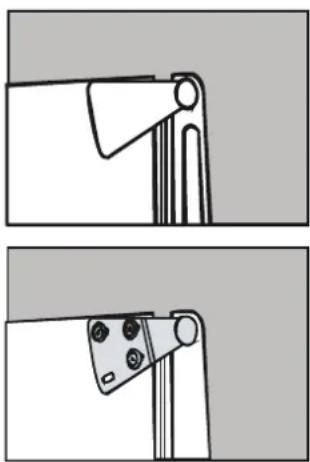
1) Remove the plastic covering from the top door hinge.
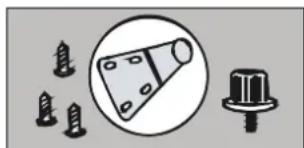
2) Unscrew the three screws from the bottom bracket. Remove the foot from opposite side.
3) Place to one side.
natural_image
Pure electrical circuit lines without any symbols4) Slide the appliance door down about 6" (15 cm) and off the top hinge pin and lift away from the appliance.
5) Remove the two screws from top bracket and replace on the other side. You will need to first remove the plastic caps from the other side.
6) Slide the appliance door back on to the top hinge, making sure it's the right way up.
Screw the bottom hinge into place on the new side. Replace the other foot on the other side. Replace the plastic covering by clicking back into position on the door hinge.
7) Check that the door is aligned horizontally and vertically and that the seals are closed on all sides before finally tightening the bottom hinge. Re-adjust the levelling feet.
2.3 Door Space Requirements
The unit's door must be able to open fully as shown. W must be a minimum of 33" (84 cm). D must be a minimum of 39 3/16" (99.5 cm).
2.4 Levellirtge Unit
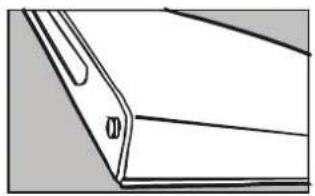
To do this adjust the two levelling feet at the front of the unit. If the unit is not level, the door and magnetic seal alignments will not be covered properly.
natural_image
Pure geometric diagram of a folded paper edge with no text or symbols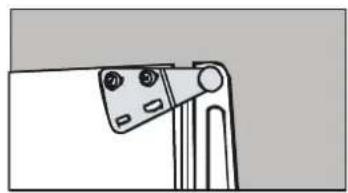
natural_image
Simple line drawing of a mechanical clamp or bracket with no text or symbols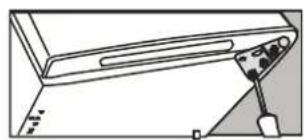
natural_image
Simple line drawing of a device with a handle and cable, no text or symbols present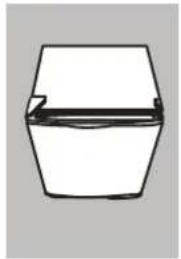
natural_image
Simple line drawing of a hexagonal container with a handle and internal lines (no text or symbols)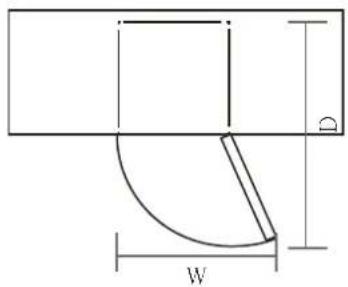
text_image
D W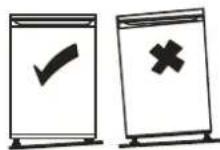
2.5 Cleaning Before Use
Wipe the inside of the unit with a weak solution of baking soda and water. Then rinse with warm water and a damp sponge or cloth. Wash the shelves and salad bin in warm soapy water and dry completely before replacing in the unit. Clean the exterior of the unit with a damp cloth. If you require more information refer to the Cleaning section.
2.6 Before Using Your Unit
Before placing any food in your unit, turn it on and wait for 24 hours, to make sure it is working properly and to allow it time to fall to the correct temperature. Your unit should not be over Iled.

Before Plugging in
You must check that you have a socket which is compatible with the plug supplied with the unit.
Before Turning On
Do not turn on for two hours after moving the unit. The coolant uid needs time to settle.
2.7 Interior Accessories
Various glass or plastic storage shelves are included with your appliance–different models have different combinations.
You should always slide one of the full size glass storage shelves into the lowest set of guides, above the fruit and vegetable containers, and keep it in this position. To do this, pull the storage shelf forward until it can be swivelled upwards or downwards and removed.
Please do the same in reverse to insert the shelf at a different height.

In order to make the most of the volume of the fresh food storage compartment and frozen-food storage compartment, the user can remove one or more shelves, drawers, out of the appliance, according to your daily use.
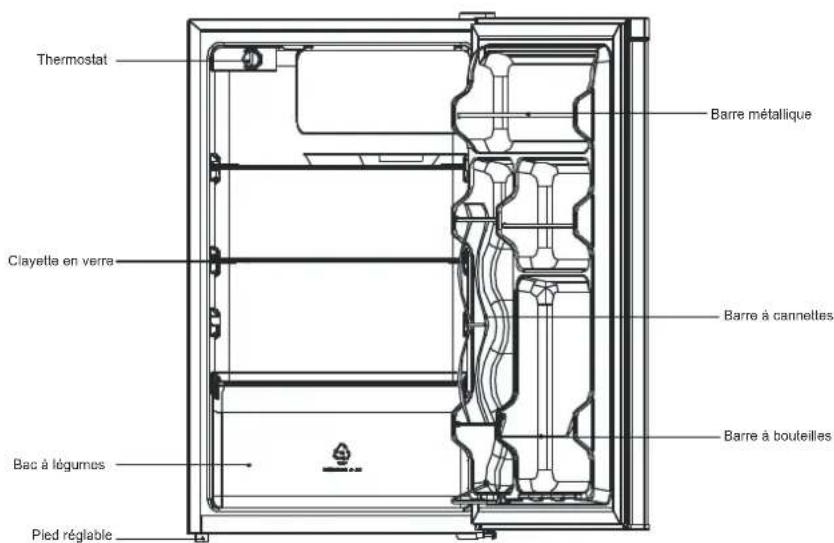
3. PRODUCT OVERVIEW
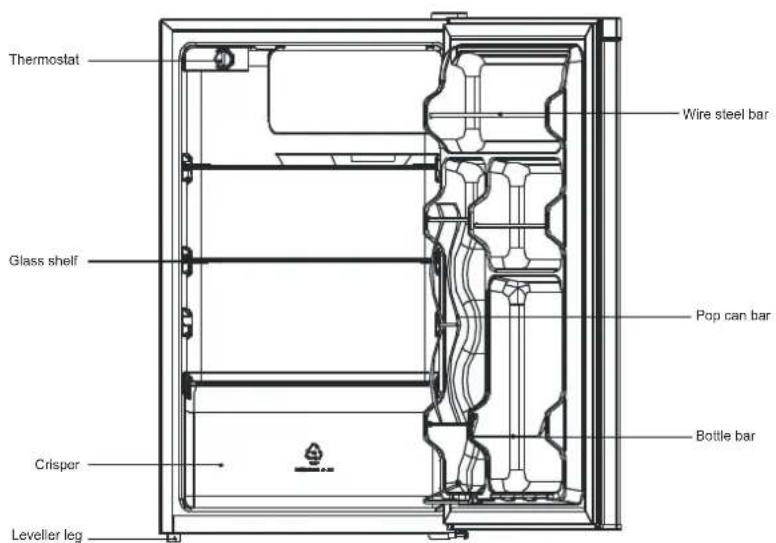
text_image
Thermostat Glass shelf Crisper Levelier leg Wire steel bar Pop can bar Bottle bar*All images in this instruction manual are for indication only; please refer to your individual unit for details.
4. OPERATION
4.1 Switching On Your Unit
The thermostat knob is used to adjust the compartment's temperature. 0 is off. Lower numbers indicate less cooling and a higher internal temperature. Higher numbers indicate more cooling and a lower internal temperature.
If the refrigerator interior ices up, adjust the thermostat knob to a lower number.
If the interior is too warm, adjust the thermostat to a higher number.
4.2 Noise Inside the Unit
You may notice that your unit makes some unusual noises. Most of these are perfectly normal, but you should be aware of them.
These noises are caused by the circulation of the refrigerant liquid in the cooling system. It has become more pronounced since the introduction of CFC free gases. This is not a fault and will not act the performance of your unit. This is the compressor motor working to pump the refrigerant around the system.
4.3 Tips for Keeping Food in the Unit
◆ Cooked meats/ shes should always be stored on a shelf above raw meats/ shes to avoid bacterial transfer. Keep raw meats/ shes in a container which is large enough to collect juices and cover it properly. Place the container on the lowest shelf.
Leave space around your food to allow air to circulate inside the unit. Ensure all parts of the unit are kept cool.
◆ To prevent transfer of flavours and drying out, pack or cover the food separately. Fruit and vegetables do not need to be wrapped.
◆ Always let pre-cooked food cool down before you put in the unit. This will help to maintain the internal temperature of the unit.
◆ To prevent cold air escaping from the unit, try to limit the number of times you open the door. We recommend that you only open the door when you need to put food in or take food out.
5. CLEANING
5.1 Cleaning the Interior and the Exterior of the Unit
◆ Remove all the shelves and the salad bin. To remove the salad bin, first remove the lower door shelf.
◆ Wipe the inside of the unit with a weak solution of baking soda and water and then rinse with warm water using a damp sponge or cloth. Wipe completely dry before replacing the shelves and salad bin.
Use a damp cloth to clean the exterior, and then wipe with a standard furniture polish. Make sure that the door is closed to avoid the polish getting on the magnetic door seal or inside the unit.
◆ The grille of the condenser at the back of the unit and the adjacent components can be vacuumed using a soft brush attachment.
5.2 Cleaning Tips
Condensation may appear on the outside of the unit. This may be due to a change in room temperature. Wipe off any moisture residue. If the problem continues, please contact a qualified technician for assistance.
6. MAINTENANCE
6.1 Care When Handling / Moving Your Unit
Hold the unit around its sides or base when moving it. Under no circumstances should it be lifted by holding the edges of the top surface. Avoid damaging the refrigerant tubing when handling, moving and using the refrigerator.
6.2 Servicing
The unit should be serviced by an authorized engineer and only genuine spare parts should be used. Under no circumstances should you attempt to repair the unit yourself. Repairs carried out by inexperienced persons may cause injury or serious malfunction. Contact a qualitatively technician.
6.3 Switching Off for Long Periods of Time
When the unit is not in use for a long period of time, disconnect it from the mains supply, empty all food and clean the appliance, leaving the door ajar to prevent unpleasant smells.
GNITOOHSELBUORT.7
The following simple issues can be handled by the user. Please call the after-sale service department if the issues are not settled.
| Fridge not working. | Ensure the fridge is plugged in and the circuit is live.Check for possible low voltage situation.Check for power failure or tripped circuit. |
| Odour. | Tightly wrap odourous foods.Check for rotten food.Check to see if the interior of the refrigerator needs to be cleaned. |
| Long-term operation of compressor. | It is normal that refrigerator operates for longer times in summer when the ambient temperature is higher.Do not put too much food in the freezer at one time.Do not refrigerate foods until they are cooled.Reduce frequent opening of refrigerator door. |
| Illuminating light does not shine. | Check to see if the refrigerator is connected to power.Check to see if the light is damaged. |
| The refrigerator door can not be properly closed. | The freezer door is stuck by food packages.Too much food.Check to see if the refrigerator is tilted. |
| Loud noises. | Check to see whether the refrigerator is balanced.Check whether the refrigerator parts are properly placed. |
7.1 Additional tips
◆ Heat: The refrigerator enclosure may emit heat during operation, especially in summer. This is caused by heat radiation from the condenser and it is a normal phenomenon.
◆Condensation: Condensation may be found on the exterior surface and door seals of the freezer when the ambient humidity is high. This is a normal phenomenon and the condensation can be wiped away with a dry towel.
◆Buzz: Buzz will be generated by the running compressor especially when starting up or shutting down.
For more information, please contact the local authority or your retailer where you purchased the product.
Your product is protected by this warranty:
Warranty service must be obtained from Arctic King Consumer Services or an authorized Arctic King servicer.
Warranty
• One year full warranty from original delivery date.
Arctic King, through its authorized servicers will:
- Pay all costs for repairing or replacing parts of this appliance which prove to be defective in materials or workmanship.
Consumer will be responsible for:
• Diagnostics, removal, transportation and reinstallation cost required because of service.
- Costs of service calls that are a result of items listed under NORMAL RESPONSIBILITIES OF THE CONSUMER**
Arctic King replacement parts shall be used and will be warranted only for the period remaining on the original warranty.
NORMAL RESPONSIBILITIES OF THE CONSUMER\*\*
This warranty applies only to products in ordinary household use, and the consumer is responsible for the items listed below:
- Proper use of the appliance in accordance with instructions provided with the product.
- Routine maintenance and cleaning necessary to keep in good working condition.
- Proper installation by an authorized service professional in accordance with instructions provided with the appliance and in accordance with all local plumbing, electrical and / or gas codes.
- Proper connection to a grounded power supply of sufficient voltage, replacement of blown fuses, repair of loosened connections or defects in house wiring.
- Expenses for making the appliance accessible for servicing.
- Damages to finish after installation.
EXCLUSIONS
This warranty does not cover the following:
- Failure caused by damage to the unit while in your possession (other than damage caused by defect or malfunction), by its improper installation, or by unreasonable use of the product, including without limitation, failure to provide reasonable and necessary maintenance or to follow the written Installation and Operating Instructions.
- Products purchased "as-is" or refurbished are not covered by this warranty.
- Food loss caused by refrigerator or freezer failure.
- Service calls to repair or replace consumables such as water filters, light bulbs, air filters, etc., or handles, knobs and other cosmetic parts.
- Product that has been transferred from its original owner.
- Interior or exterior rust on the unit.
- Damages caused by services performed by persons other than authorized Arctic King servicers; use of parts other than Arctic King replacement parts obtained from persons other than Arctic King customer service, or external causes such as abuse, misuse, inadequate power supply or acts of God.
- Service calls resulting from improper installation of your product.
- Service calls to instruct you on the use of your product.
- Surcharges including, but not limited to, any after hour, weekend, or holiday service calls, tolls, ferry trip charges, or mileage expense for service calls to remote areas, including the state of Alaska.
- If the unit is put to commercial, business, rental, or other use or application other than for consumer use, we make no warranties, express or implied, including but not limited to, any implied warranty of merchantability or fitness for particular use or purpose.
- Product that has been removed outside the USA or Canada.
- Products without original serial numbers or products that have serial numbers which have been altered or cannot be readily determined.
Note: Some states do not allow the exclusion or limitation of incidental or consequential damages. So this limitation or exclusion may not apply to you.
IF YOU NEED SERVICE
USA: CANADA:
https://www.midea.com/us/support
Or contact us at:
Telephone: 1-866-646-4332
Email: customerserviceusa@midea.com
https://www.midea.com/ca/support
Or contact us at:
Telephone: 1-888-365-2230
Email: canadasupport@midea.com
You must have your bill of sale, delivery slip, or appropriate proof of purchase to submit a warranty claim. The date of delivery establishes the warranty period, should service be required.

text_image
Arctic™ Kingnatural_image
Pure architectural line drawing of a rectangular frame with no text, numbers, or symbolsContenu
- AVERTISSEMENTS DE SÉCURITÉ .... 1
- INSTALLATION 2
natural_image
Simple line drawing of a mechanical component or bracket (no text or symbols)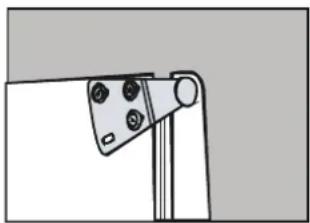
natural_image
Simple line drawing of a mechanical clamp or bracket with four circular holes (no text or symbols)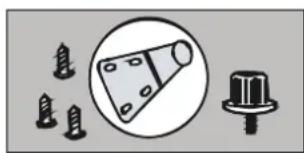
natural_image
Pure electrical circuit lines without any symbolsnatural_image
Pure technical line drawing of a mechanical component or bracket (no text or symbols)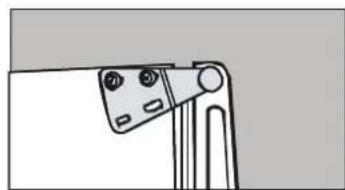
natural_image
Simple line drawing of a mechanical component with no text or symbols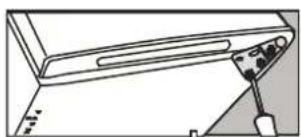
natural_image
Line drawing of a mechanical device with a tool inserted, showing no text or symbols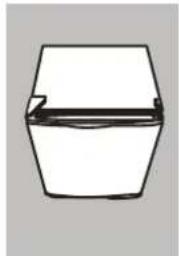
natural_image
Simple line drawing of a hexagonal container with a horizontal line inside (no text or symbols)3. APERÇU DU PRODUIT
https://www.midea.com/us/support https://www.midea.com/ca/support