B300K - Power bank BLUETTI - Free user manual and instructions
Find the device manual for free B300K BLUETTI in PDF.


User questions about B300K BLUETTI
0 question about this device. Answer the ones you know or ask your own.
Ask a new question about this device
Download the instructions for your Power bank in PDF format for free! Find your manual B300K - BLUETTI and take your electronic device back in hand. On this page are published all the documents necessary for the use of your device. B300K by BLUETTI.
USER MANUAL B300K BLUETTI
Portable Power Station
User Manual v1.0
Inspect the packaging for damage before use.
Perform a charge cycle before first use.
Scan the QR code for the BLUETTI app.
Register for warranty at https://www.bluettipower.com/

text_image
QR code image with a central logo, likely linking to a digital resource or website.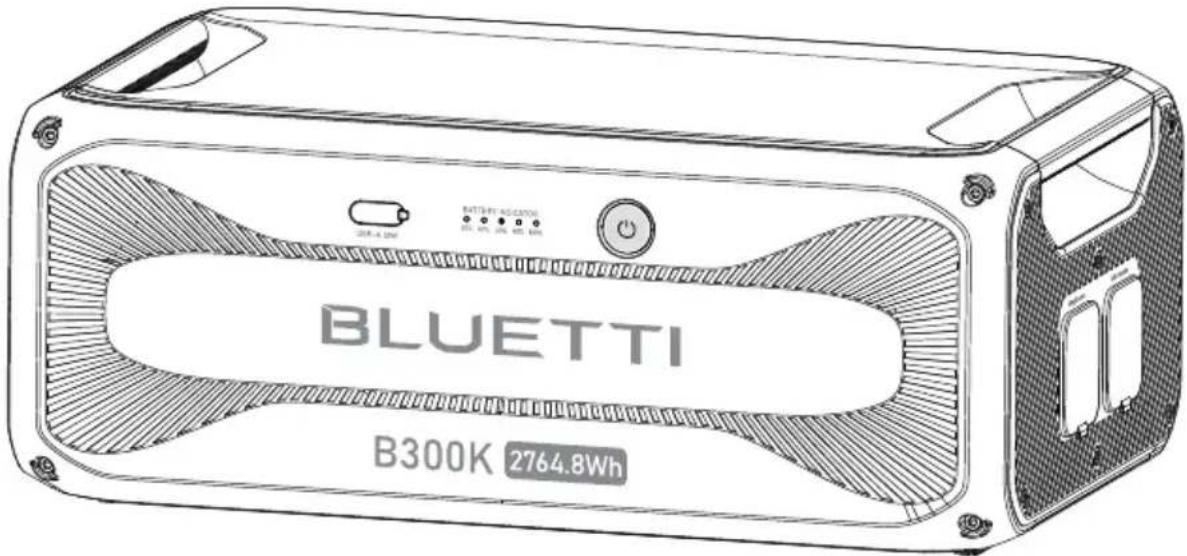
text_image
BLUETTI B300K 2764.8WhThank You
Thank you for making BLUETTI a part of your family.
From the very beginning, BLUETTI has tried to stay true to a sustainable future through green energy storage solutions while delivering an exceptional eco-friendly experience for our homes and our world.
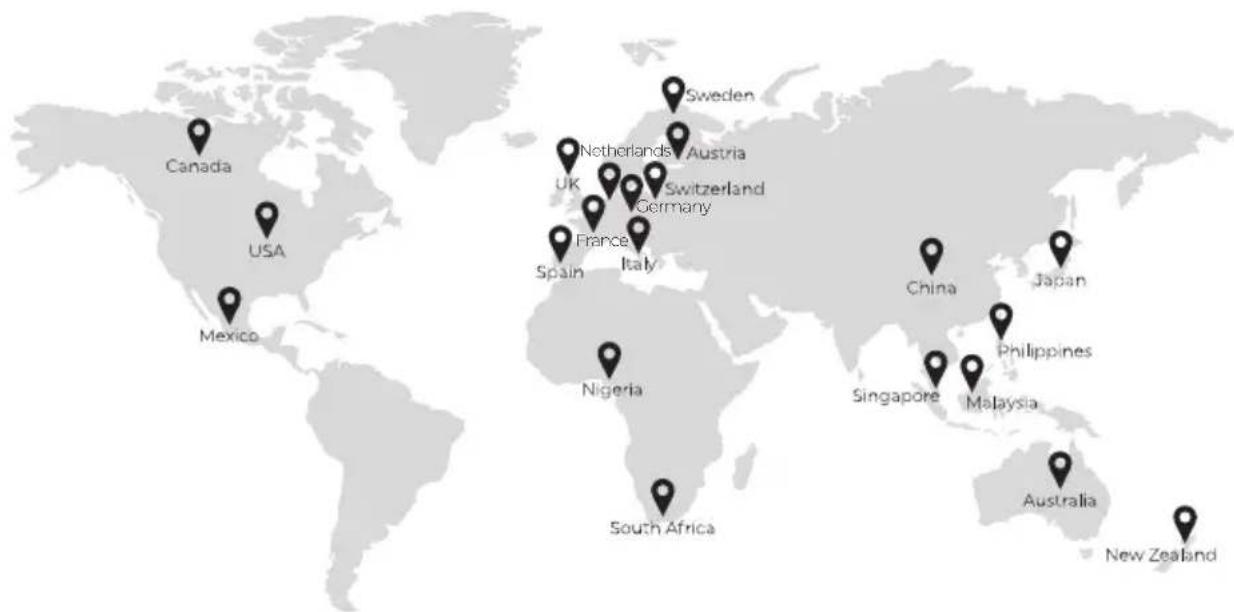
That's why BLUETTI makes its presence in 100+ countries and is trusted by millions of customers across the globe.
text_image
Canada USA Mexico Netherlands UK France Italy Germany Sweden Austria China Japan Nigeria Singapore Malaysia Philippines Australia New ZealandCopyright © Shenzhen PowerOak Newener Co., Ltd. All Rights Reserved.
No reproduction or transmission of any part of this document is permitted without the prior written consent of Shenzhen PowerOak Newener Co., Ltd.
Disclaimer
BLUETTI's products and services are subject to the terms and conditions agreed upon during purchase. Some aspects described in this manual may not be available under your purchase contract. Unless otherwise specified in the contract, BLUETTI makes no express or implied representations or warranties regarding the contents of this manual.
BLUETTI should assume no liability for the failures, damages, or injuries resulting from force majeure, repair attempts by unqualified personnel, or improper installation and operation.
The contents of this manual are subject to change without notice. Please obtain the latest version from BLUETTI official website.
If you have any questions or concerns about this manual, please contact BLUETTI support for further assistance.
Shenzhen PowerOak Newener Co., Ltd.
F19, BLD No.1, Kaidaer, Tongsha RD No.168, Xili street, Nanshan, Shenzhen, China Web: https://www.bluettipower.com
About the Manual
Introduction
This manual provides information on the functionality, basic operation and safety instructions of the B300K portable power station. Please read and understand all instructions in this manual before use.
Target Audience
• Technical support engineer
- End-user
Contents
1 Safety Information 06
2 Packing List 08
3 Get to Know Your B300K 09
4 Use Your B300K 10
Power On/Off 10
Connect to B300K and Power Station 10
Charge Up 13
Control and Monitor 13
5 Indicators Status 14
6 Maintenance and Care 14
7 Specifications 15
8 Troubleshooting 16
Appx. 1 FAQ (Frequently Asked Questions) 17
Appx. 2 Compliance 18
FCC Statement 18
IC Caution 19
CAN ICES-3 (B)/NMB-3(B) (Canada) 19
WARNING - When using the product, basic precautions should always be followed to prevent the risk of fire, electric shock, or injury to persons:
- Read all the instructions before using the product.
- Use and store the product in a cool, dry place with good ventilation.
- Keep it away from flammable liquids, gases, explosives and corrosive substances.
- Do not expose it to high temperatures or heat sources like sunlight, fire, transformers, and heaters.
- Do not insert fingers or foreign objects into the product's ports.
- Do not use damaged or modified product to prevent electric shock, injury, etc.
- Operate the product only with undamaged plugs and cables.
- Do not move the product during use to avoid internal hardware damage from vibration and collision.
- Handle the product with care to prevent drops, violent impacts, or tilting.
- Place the product on a stable platform.
- Keep the product out of reach of children and pets.
- Avoid submerging or cleaning the product with liquids.
- Power off the product before any servicing to reduce the risk of electric shock.
- Only professionals should handle leaks or defects - seek their assistance as needed.
Battery Safety
- Use the battery within the specified temperature range.
- Do not disassemble, modify, or damage the battery to prevent leakage, overheating, or fire.
- Keep the positive and negative battery terminals from touching each other or metal objects.
- Avoid welding or grinding near batteries to prevent fire from sparks or arcs.
- Do not drop metal tools onto the battery to prevent sparks or short circuits.
• Lithium-ion batteries pose fire risks, so be aware of these hazards:
a. Thermal runaway can release flammable and harmful gases such as CO and HF.
Vapors from burning batteries may irritate the eyes, skin, and throat.
b. The concentration of these gases could lead to deflagration and explosion.
c. The battery electrolyte is flammable, toxic, and volatile.
- If a battery leaks chemicals or emits odors, don't approach it - contact professionals for safe disposal. They'll need proper protective gear.
- Do not touch a battery that's been submerged in water, to avoid electric shocks. Discard soaked batteries through proper recycling channels.
- Electrolyte is corrosive and can cause irritation and chemical burns. If you come into direct contact with battery electrolyte:
a. Inhalation of Vapors: Evacuate the contaminated area, get fresh air immediately, and seek medical attention.
b. Eye Contact: Immediately flush eyes with water for at least 15 minutes, do not rub eyes, and seek medical attention immediately.
c. Skin Contact: Immediately wash the infected area with soap and water and seek medical attention immediately.
d. Ingestion: Seek medical attention immediately.
- Follow local guidelines for proper battery disposal; never burn, crush, or discard them improperly.
Personal Precautions
- When working near batteries, wear eye and clothing protection.
- Avoid smoking, sparks, or flames near the battery or engine.
- In abusive conditions, liquid may eject. If contact occurs, flush with water; seek medical help if liquid contacts eyes.
SAVE THESE INSTRUCTIONS
2. Packing List
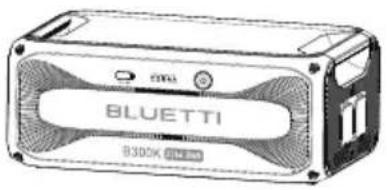
text_image
BLUETTI 8300KB300K Portable Power Station
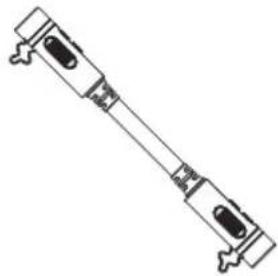
natural_image
Pure mechanical component diagram without any text, numbers, or symbolsP090A Battery Expansion Cable (31.49in / 800mm)
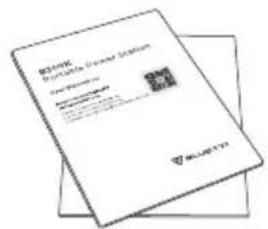
text_image
Microsoft Publisher's License Statement www.mcpms.com Microsoft Office Microsoft Publisher Microsoft Publisher Microsoft Publisher Microsoft Publisher Microsoft Publisher Microsoft Publisher Microsoft Publisher Microsoft Publisher Microsoft Publisher Microsoft Publisher Microsoft Publisher Microsoft Publisher Microsoft Publisher Microsoft Publisher Microsoft Publisher Microsoft Publisher Microsoft Publisher Microsoft Publisher Microsoft Publisher Microsoft Publisher Microsoft Publisher Microsoft Publisher Microsoft Publisher Microsoft Publisher Microsoft Publisher Microsoft Publisher Microsoft Publisher Microsoft Publisher Microsoft Publisher Microsoft Publisher Microsoft Publisher Microsoft Publisher Microsoft Publisher Microsoft PublisherDocumentation
The following accessories may not be included. Please purchase optional accessories at https://www.bluettipower.com
Optional Accessories
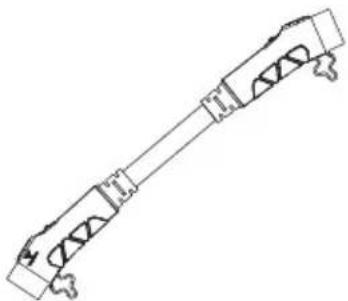
natural_image
Pure mechanical assembly diagram without any text, numbers, or symbolsP090D to P150D Battery Expansion Cable (31.49in / 800mm)
Note:
Battery Expansion Cables:
Connect the B300K to AC300, AC200MAX, AC200L, or other B300K units with the P090A battery expansion cable. Use the P090D to P150D cable to connect to AC500.
3. Get to Know Your B300K
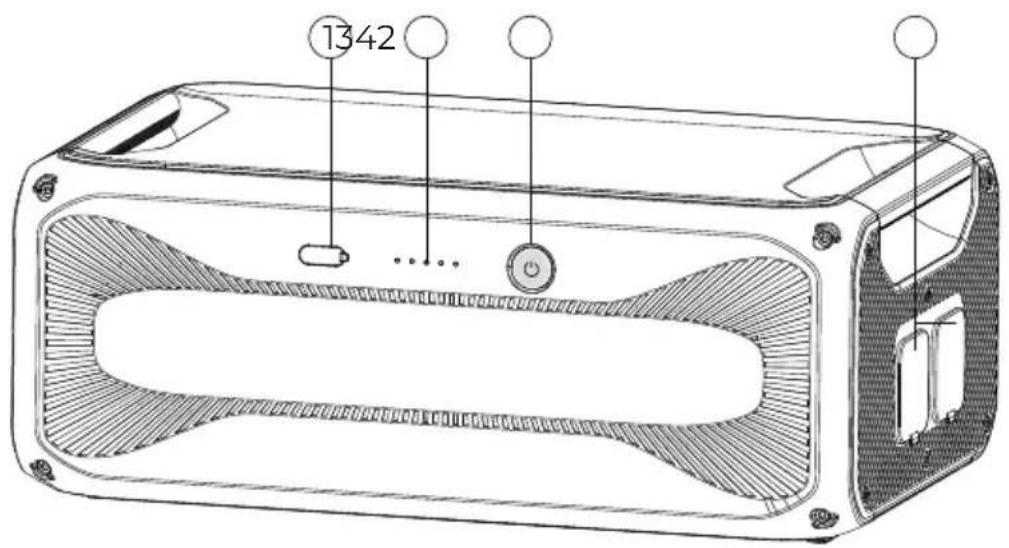
The B300K can be used with AC300, AC500, AC200MAX, and AC200L as a 2764.8Wh expansion pack.
text_image
1342① USB-A Port
③ Power Button**
② LED Indicators*
④ Battery Expansion Ports
* Indicate battery level and operation status.
** Button light indicates operation status with LED indicators.
Refer to Chapter 5 (Indicators Status) and Chapter 8 (Troubleshooting) for details.
4. Use Your B300K
Power On/Off
natural_image
Line drawing of a hand pressing down on a device panel with no text or symbolsPower On
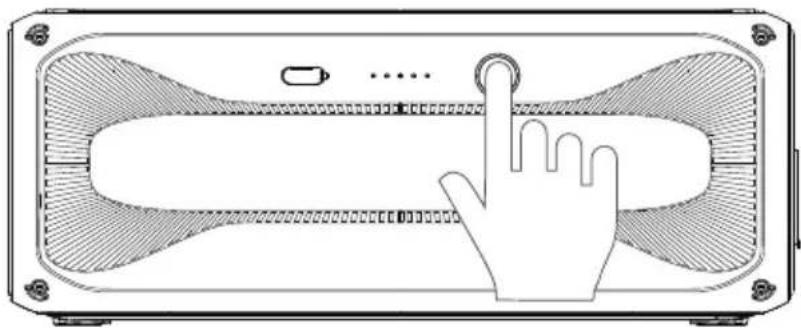
- Long press the power button.
- When the button lights up, the B300K is on standby.
- The LED indicators show the battery level.
Power Off
- Long press the power button.
- The button light and indicators turn off.
Note: Connected to a power station, the B300K automatically turns on when the combo charges with AC power or solar panels.
Connect to B300K and Power Station
Connecting to B300K Battery
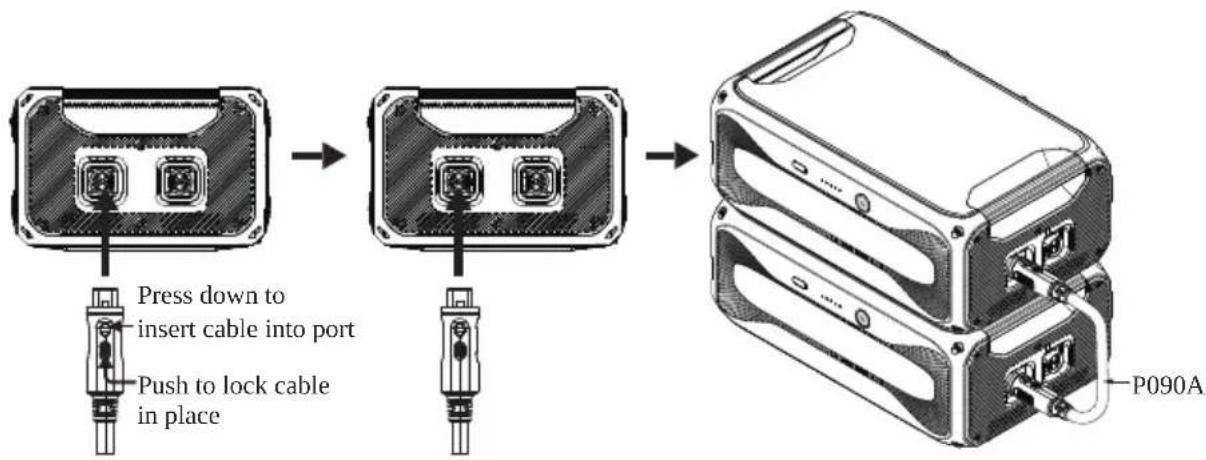
Use the P090A battery expansion cable to interconnect the B300K units.
flowchart
graph LR
    A["Device with two ports"] --> B["Press down to insert cable into port"]
    B --> C["Push to lock cable in place"]
    C --> D["Device with two ports"]
    D --> E["P090A"]
*Be sure to LOCK the connection.
Connecting to AC300
Connect up to 4 B300K units for a maximum capacity of 11,059.2Wh.
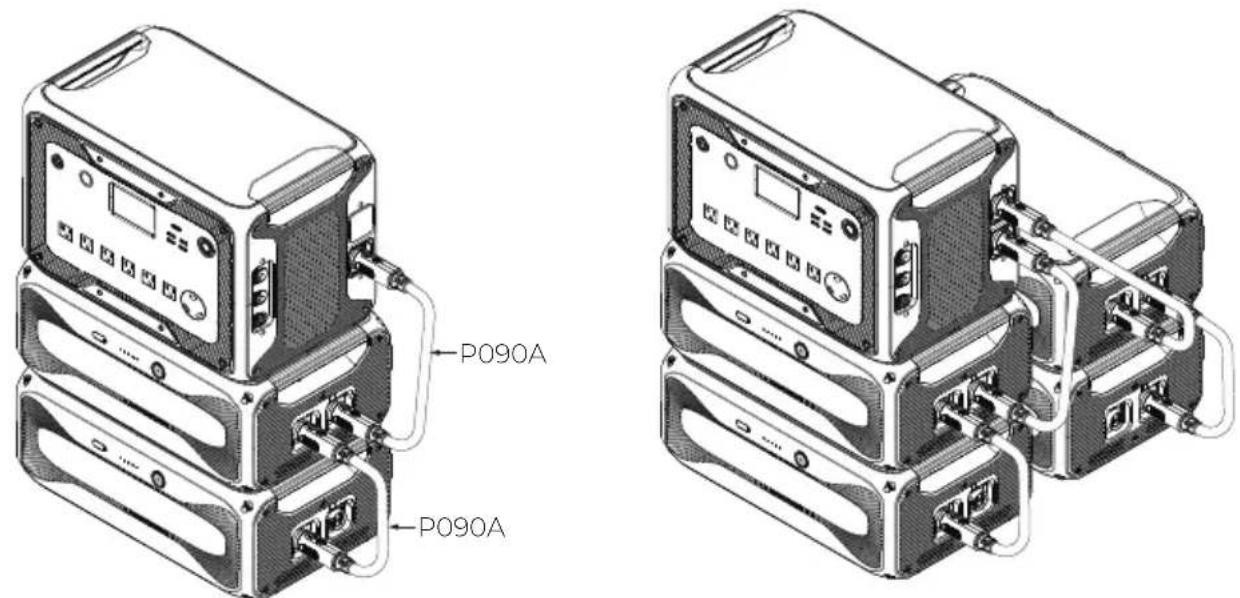
Note: The AC300 can work with B300K and B300 expansion batteries simultaneously using P090A battery expansion cables.
Connecting to AC200MAX
Connect up to 2 B300K units for a maximum capacity of 5,529.6Wh.
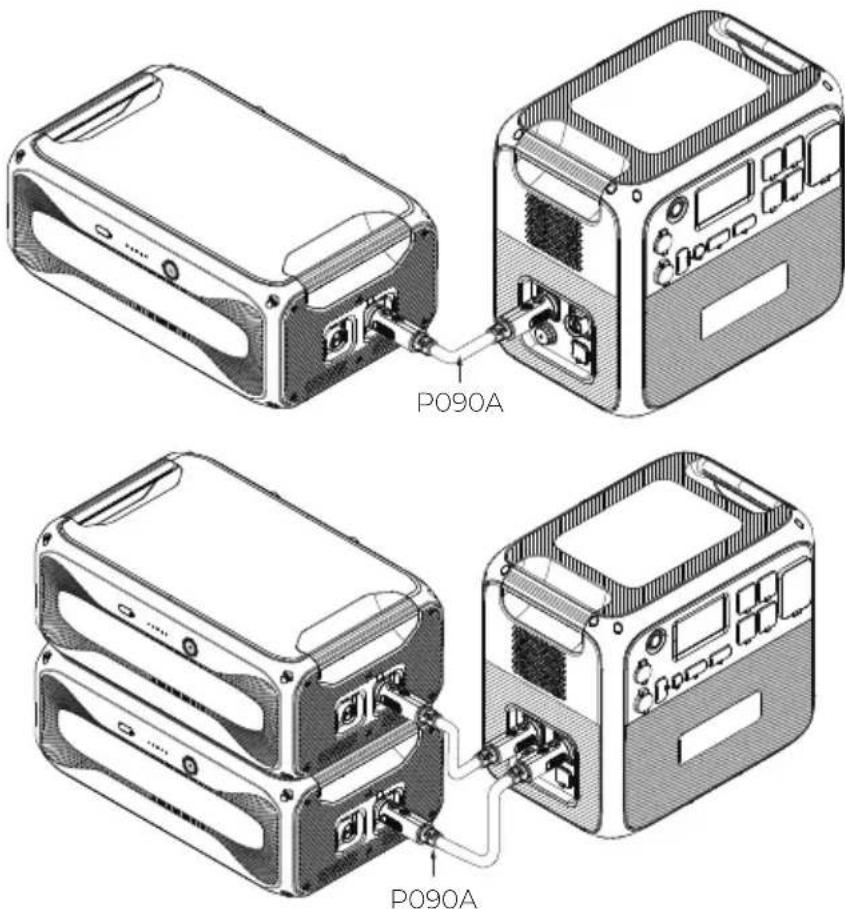
text_image
P090A P090AConnecting to AC200L
Connect up to 2 B300K units for a maximum capacity of 5,529.6Wh.
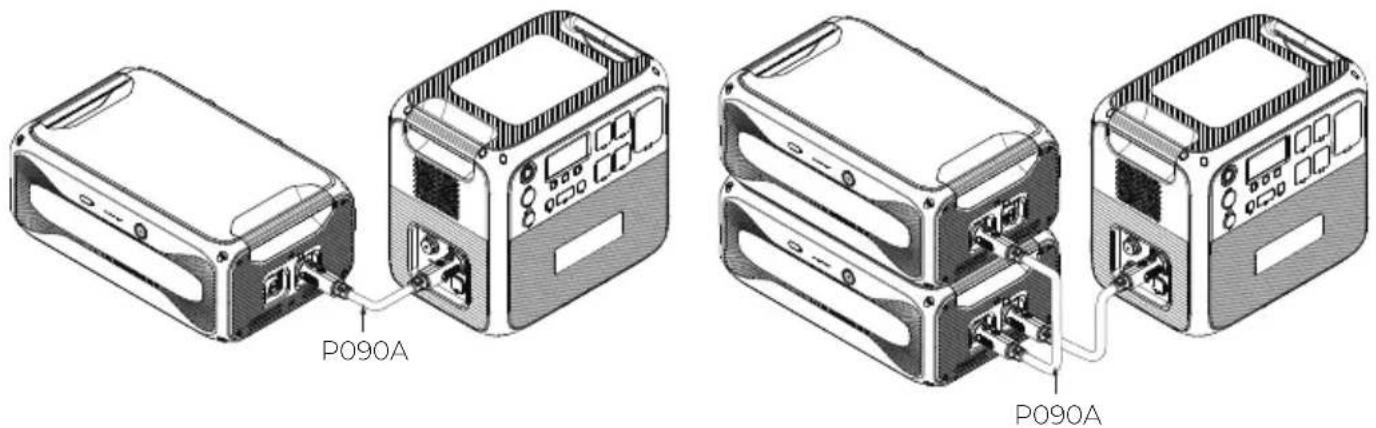
text_image
P090A P090AConnecting to AC500
Connect up to 6 B300K units for a maximum capacity of 16,588.8Wh.
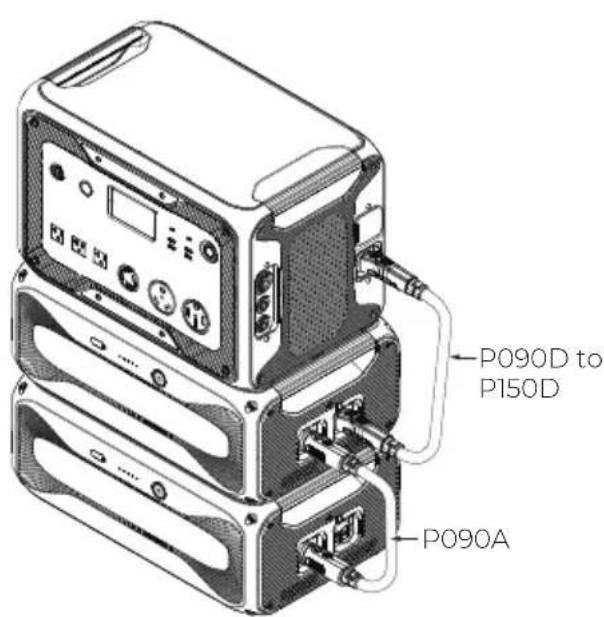
text_image
P090D to P150D P090A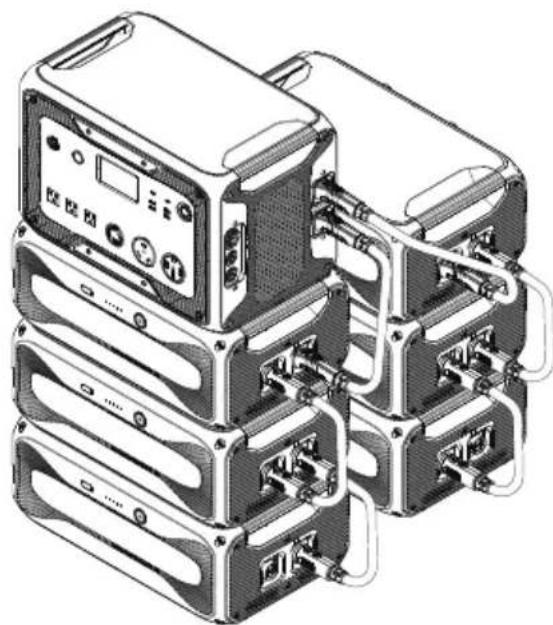
natural_image
Illustration of a multi-tiered server rack with connected ports and cables (no visible text or labels)Note: The AC500 can work with B300K, B300S and B300 expansion batteries simultaneously. To connect them:
| Cable RequiredConnection | |
| AC500 to B300S | P150D battery expansion cable |
| AC500 to B300K/B300 | P090D to P150D battery expansion cable |
| B300K/B300 to B300S | P090D to P150D battery expansion cable |
| B300K to B300 | P090A battery expansion cable |
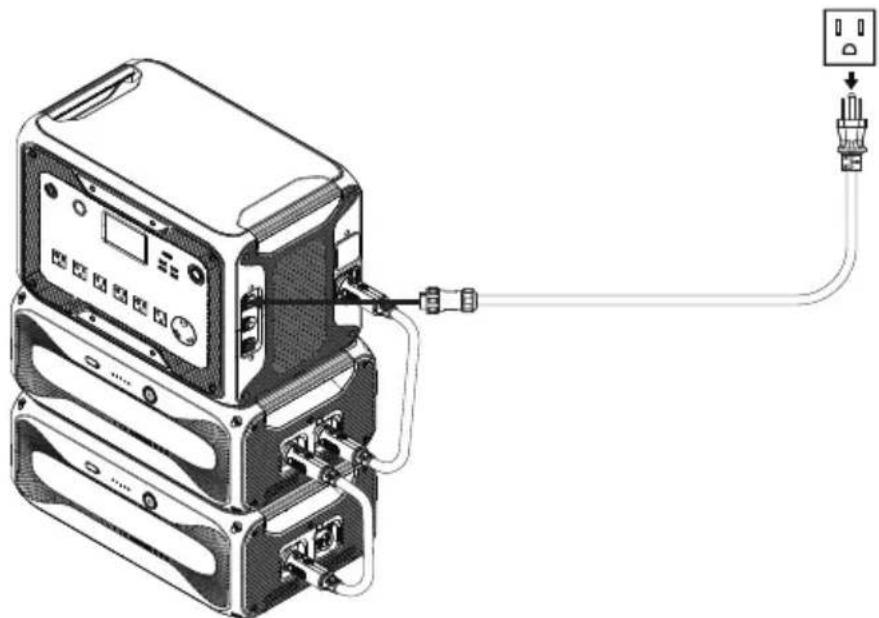
Charge Up
Connect the B300K to a power station for charging. It charges from 5% to 80% in about 45 minutes when connected to AC300 or AC500.
natural_image
Diagram of a device with connected cables and connectors, showing internal components and connections (no text or symbols)Note: Recommended charging temperature: 15°C to 30°C (59°F to 86°F)
Control and Monitor
Connect the B300K to a power station, and check the battery level and upgrade it using the BLUETTI app. For more details, please refer to your power station's app user guide.
5. Indicators Status
| Indicator Status Description | ||
| Power Button | Steady green | Normal operation |
| Flashes 4 times per second | Malfunction | |
| Flashes once every 1.5 seconds | Upgrading | |
| Off | Shutdown | |
| Flashes twice, pause for 4 seconds, and repeat | The battery expansion cable is not locked. | |
| LEDs | Each lit indicator represents 20% SoC.All indicators remain steady when fully charged and go off when fully discharged.Flashing indicators show the charging progress. | |
6. Maintenance and Care
- When the SoC drops to 1% without any power input, power off the unit promptly to prevent overdischarge.
- Before storing, charge it to 60% - 80% SoC and fully cycle every 6 months to maintain battery health.
- For long-term storage over 6 months, charge it to 40% - 60% SoC and fully cycle every 3 months.
- Safe storage temperature: -20^ to 40^ (-4°F to 104°F). For storage over a month, aim for a range of -20^ to 25^ (-4°F to 77°F). Perform a cycle charge before reuse.
- Avoid extended storage periods as it can impact the battery's performance and lifespan.
-
Use a dry and soft towel to clean the battery's exterior.
-
Specifications
| General | |
| Model | B300K |
| Battery Capacity | 2,764.8Wh (51.2V, 54Ah) |
| Battery Type | LFP |
| Net Weight | Approx. 29.5kg (65.04lbs) |
| Dimensions (L × W × H) | 525 × 327 × 209mm (20.67 × 12.87 × 8.23in) |
| Charging Temperature | 0°C to 40°C (32°F to 104°F) |
| Discharging Temperature | -20°C to 40°C (-4°F to 104°F) |
| Storage Temperature | Up to 1 month: -20°C to 40°C (-4°F to 104°F)Up to 6 months: -20°C to 25°C (-4°F to 77°F) |
| Working Humidity | 5% to 95%RH |
| Charging Current | 60A Max.(Current may decrease outside specified temperatures) |
| Discharging Current | 70A Max. |
| 2 × Expansion Port | 58.4VDC Max., 90A Max. |
| DC Output | |
| USB-A 12W Max., 5V / 2.4A | |
8. Troubleshooting
When the B300K malfunctions, the LEDs may flash or turn off in various combinations. For soft errors, restart the unit. For hardware issues, contact BLUETTI support for repair or replacement. See the table below for details.
| DescriptionIndicators Status | |
| Soft Errors | |
| ☀️ ● ⚙ ● | Low voltage |
| ● ⚙️ ● ● ● | High/low temperature |
| ☀️ ⚙️ ● ● ● | Pre-charge failure |
| ● ● ⚙️ ● ● | Short circuit |
| ☀️ ● ⚙️ ● ● | Address allocation mix-up |
| ● ⚙️ ⚙️ ● ● | Charging/discharging overcurrent |
| ☀️ ⚙️ ⚙️ ● ● | Overdischarging protection |
| Hardware Failures | |
| ● ● ● ⚙️ ● | NTC fault |
| ☀️ ● ● ⚙️ ● | Cell fault |
| ● ⚙️ ● ⚙️ ● | Voltage reference fault (3.3V) |
| ☀️ ⚙️ ● ⚙️ ● | AFE fault |
| ● ● ⚙️ ⚙️ ● | Current zero point error |
| ☀️ ● ⚙️ ⚙️ ● | Battery cell disconnect |
| ● ⚙️ ⚙️ ⚙️ ● | Charging MOS fault |
| ☀️ ⚙️ ⚙️ ⚙️ ● | Discharging MOS fault |
| ● ● ● ● ⚙️ | Cell voltage difference fault |
| ☀️ ● ● ● ⚙️ | Current detection error |
Appx. 1 FAQ (Frequently Asked Questions)
Q1: How to claim warranty?
A: Please refer to the warranty card.
Q2: How to upgrade the B300K?
A: Connect the B300K to the power station and upgrade it via the BLUETTI app in Settings > Firmware Upgrade. Follow in-app instructions.
Q3: Can it charge and discharge at the same time?
A: Yes, the B300K supports pass-through charging.
Q4: Why doesn't the B300K drain all its power?
A: The B300K reserves some energy to avoid overdischarging and protect the battery's lifespan.
Q5: Can I leave the battery uncharged after fully discharging?
A: No, charge promptly after use to prevent damage. Keep the battery in the environment of at least 10^ C ( 50^ F) for at least 12 hours beforehand.
Appx. 2 Compliance
FCC Statement
This device complies with part 15 of the FCC Rules. Operation is subject to the following two conditions:
(1) This device may not cause harmful interference.
(2) This device must accept any interference received, including interference that may cause undesired operation.
This equipment has been tested and found to comply with the limits for a Class B digital device, pursuant to part 15 of the FCC Rules. These limits are designed to provide reasonable protection against harmful interference in a residential installation. This equipment generates, uses and can radiate radio frequency energy and, if not installed and used in accordance with the instructions, may cause harmful interference to radio communications. However, there is no guarantee that interference will not occur in a particular installation. If this equipment does cause harmful interference to radio or television reception, which can be determined by turning the equipment off and on, the user is encouraged to try to correct the interference by one or more of the following measures:
- Reorient or relocate the receiving antenna.
- Increase the separation between the equipment and receiver.
- Connect the equipment into an outlet on a circuit different from that to which the receiver is connected.
- Consult the dealer or an experienced radio/TV technician for help.
FCC Caution: Any changes or modifications not expressly approved by the party responsible for compliance could void the user's authority to operate this equipment.
IMPORTANT NOTE: FCC Radiation Exposure Statement
This equipment complies with FCC radiation exposure limits set forth for an uncontrolled environment. This equipment should be installed and operated with a minimum distance of 20cm between the radiator & your body.
IC Warning statement
This device contains licence-exempt transmitter(s)/receiver(s) that comply with Innovation, Science and Economic Development Canada's licence-exempt RSS(s). Operation is subject to the following two conditions:
- This device may not cause interference.
- This device must accept any interference, including interference that may cause undesired operation of the device.
RF exposure statement (BT): The equipment complies with IC Radiation exposure limits set forth for uncontrolled environments. This equipment should be installed and operated with a minimum distance of 20cm between the radiator and your body.
This Class B digital apparatus complies with Canadian ICES-003.
SAVE THESE INSTRUCTIONS
Need Help? We're here for you!
C» +1 800-200-2980 (Mon-Sun 9:00-17:00)
service@bluettipower.com

@ BLUETTI Official

@ bluetti_inc

@bluetti.inc

@bluetti.inc
Visit Us
SHENZHEN POWEROAK NEWENER CO., LTD.
19F, Block A, Kaidaer Bldg., No. 168 Tong Sha Rd, Shenzhen, China
BLUETTI Power Inc.
6185 S Valley View Blvd, Ste D, Las Vegas, NV 89118, US

natural_image
Abstract geometric logo with black and white triangular shapes (no text or symbols)BLUETTI
[Non-Text]
L
Certificate
Inspector:
QC: