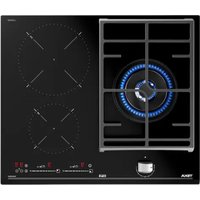
USER MANUAL JZC 63312 AB TEKA
natural_image
Modern kitchen interior with glossy black walls, ovenetry, and stainless steel appliances (no visible text or symbols)
ES Manual de Usuario
EN User Manual
FR Manuel d'Utilisation
GR εγχειρίδιο χρήστη
PT Manual do Utilisador
JZC SERIES
Modelos - Models - Modèles Μοντέλα - Modelos
JZC 63312 A
JZC 64322 A
JZC 95314 A
JZC 94313 A
JZC 96324 A
JZC 96342 A
JZC 96342 B
TIPO/TYPE/TYNOΣ: PCZTI
natural_image
Black plastic electrical panel with a fan and mounting bracket (no text or symbols visible)
Resumen - Summary - Résumé - Περίληψη - Resumo

Pag. 4 - 9 Description, installation, assembly, cleaning, maintenance and the various assembly phases. Technical data.
Pag. 40 Instructions for the installation and advice for the maintenance. Instructions Manual.
natural_image
Line drawings of two cooking pots with diagonal lines indicating heating, no text or symbols present
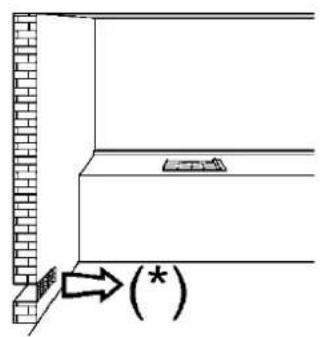
(*) entrada de aire: ver el capítulo de instalación (apartados 5 y 6)
(*) air inlet: see installation chapter (paragraphs 5 and 6)
(*) entree d'air: voir chapitre installation (paragraphes 5 et 6)
(*) εισοδος αερα: βλεπε κεφαλαιο τοποθετησης (παραγραφοι 5 και 6)
(*) entrada de ar de 100 cm2 de secção mínima (parágrafos 5 e 6)
EIK. - FIG. 2
EIK. - FIG. 3

LIMPIEZA - CLEANING - NETTOYAGE ΚΑΘΑΡΙΣΜΑ - LIMPEZA

EIK. - FIG. 5
G.7
natural_image
Line drawing of a hand using a tool to clean or inspect a circular component (no text or symbols)

INSTALACIÓN - INSTALLATION - INSTALLATION ΕΓΚΑΤΑΣΤΑΣΗ - INSTALAÇÃO
EIK. - FIG. 8
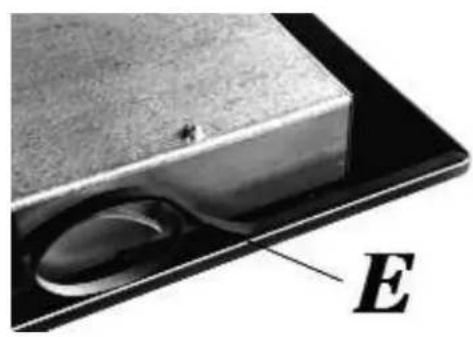
EIK. - FIG. 9
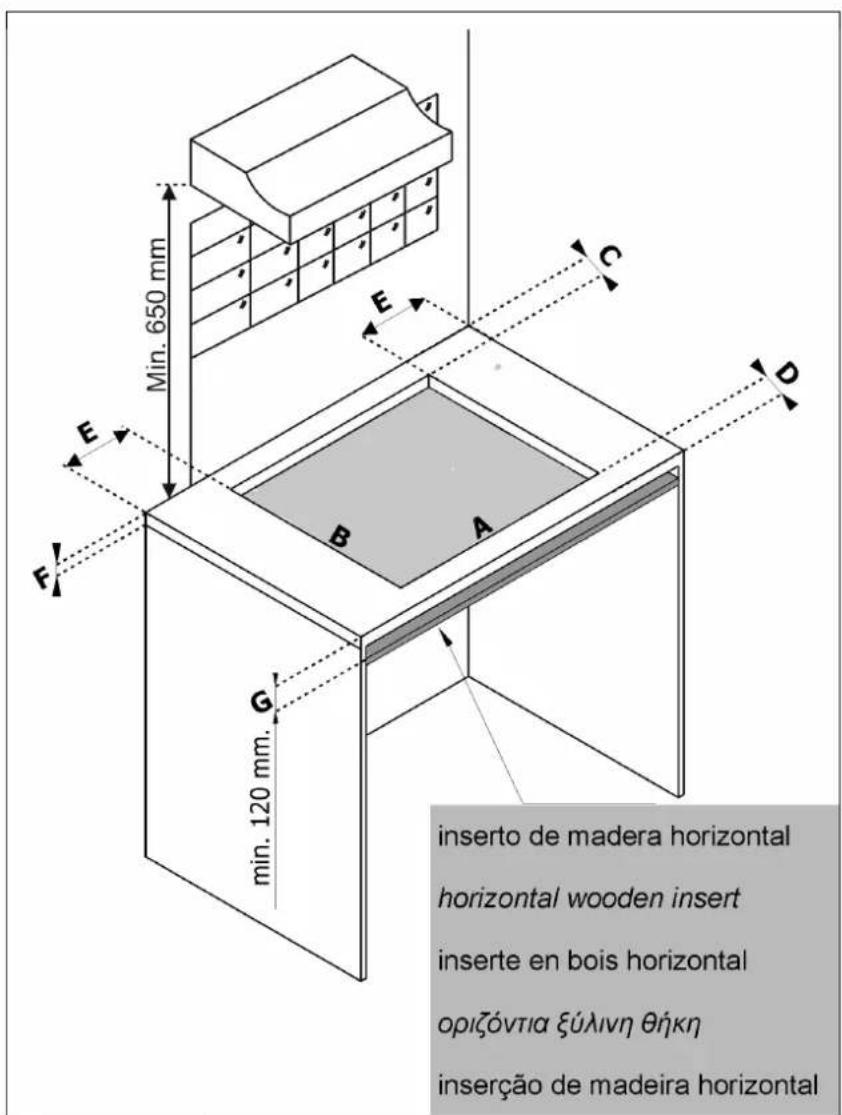
COMPLY WITH THE DIMENSIONS (in mm)
DIMENSIONS A RESPECTER (en mm)
natural_image
Simple line drawing of a circular frame with horizontal lines and a small rectangular object inside (no text or symbols)
natural_image
Technical line drawing of a gas stove with cooling fans and mounting base (no text or symbols)
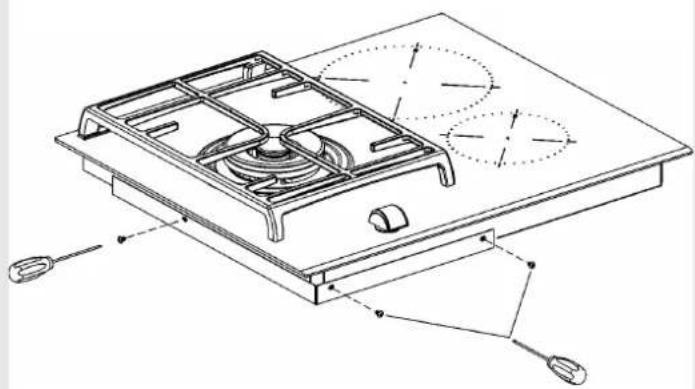
WARNING! In the need to disassemble the hob, first remove the screw on the bottom, as shown in the figure to side!
natural_image
Close-up of a mechanical component with labeled section A, showing internal parts and mounting holes (no readable text or symbols)
EIK. - FIG. 16
DADOS TÉCNICOS RELATIVOS À REGULAÇÃO DE GÁS DO APARELHO
TECHNICAL DATA FOR THE APPLIANCE GAS REGULATION
DONNEES TECHNIQUES DE LA RÉGULATION GAZ DE L'APPAREIL
In case of adaptation of the hob to another type of gas, operate as described in the directions for the and installation use and replace the label on the bottom with the one provided in the spare bag.
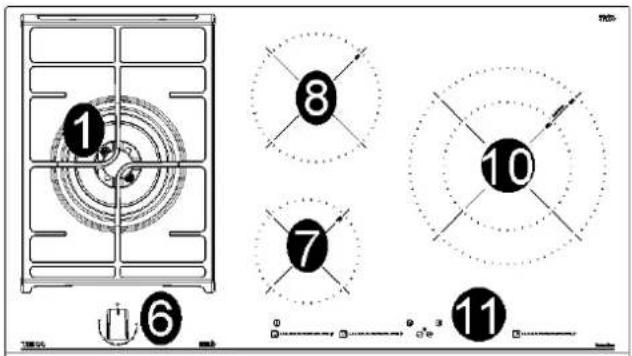
JZC 94313 A JZC 95314 A
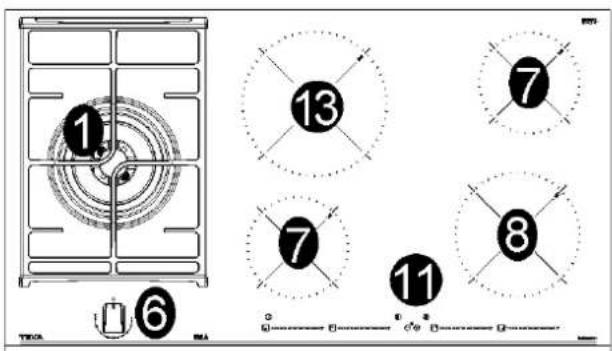
JZC 96324 A JZC 96342 A
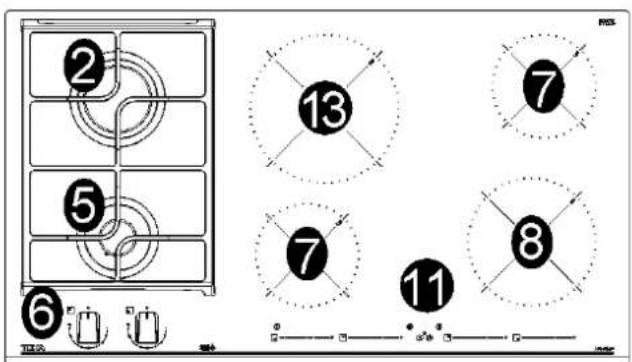
JZC 96342 B
natural_image
Two crossed black metal tools on a plain background (no text or symbols)
81216133
ADVERTENCIAS:
natural_image
Technical line drawing of a device casing with internal compartments and mounting brackets (no text or symbols)
natural_image
Architectural floor plan showing room layout with furniture and fixtures (no text or labels)
abrazadera gas
natural_image
Technical line drawing of a device casing with internal compartments and mounting features (no text or symbols)
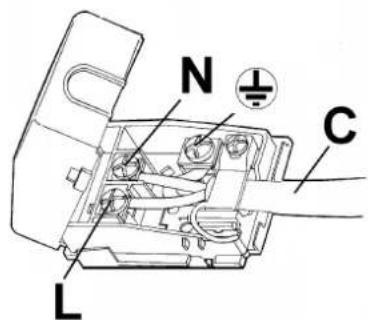
FIG. 18
natural_image
Technical line drawing of a mechanical assembly with labeled components (no readable text or symbols)
natural_image
Technical line drawing of a mechanical assembly with labeled components (N1, N2, L1, L2) and circular boundary, no readable text or symbols beyond labels.
INSTALACIÓN
This cook top was designed to be used exclusively as a cooking appliance: any other use (such as heating rooms) is to be considered improper and dangerous.
WARNING: The appliance and its accessible parts become hot during use.
Care should be taken to avoid touching heating elements.
Children less than 8 years of age shall be kept away unless continuously supervised.
This appliance can be used by children aged from 8 years and above and persons with reduced physical, sensory or mental capabilities or lack of experience and knowledge if they have been given supervision or instruction concerning use of the appliance in a safe way and understand the hazards involved.
Children shall not play with the appliance.
Cleaning and user maintenance shall not be made by children without supervision.
WARNING: Unattended cooking on a hob with fat or oil can be dangerous and may result in fire. NEVER try to extinguish a fire with water, but switch off the appliance and then cover flame e.g. with a lid or a fire blanket.
WARNING: Danger of fire: do not store items on the cooking surfaces.
WARNING: If the surface is cracked, switch of the appliance to avoid the possibility of electric shock.
WARNING: do not use a steam cleaning unit of: stoves, hobs and ovens.
WARNING: the hob is not designed to work with an external timer, or with a remote control system.
WARNING: Use only hob guards designed by the manufacturer of the cooking appliance or indicated by the manufacturer of the appliance in the instructions for use as suitable or hob guards incorporated in the appliance. The use of inappropriate guards can cause accidents.
WARNING: The cooking process has to be supervised. A short term cooking process has to be supervised continuously.
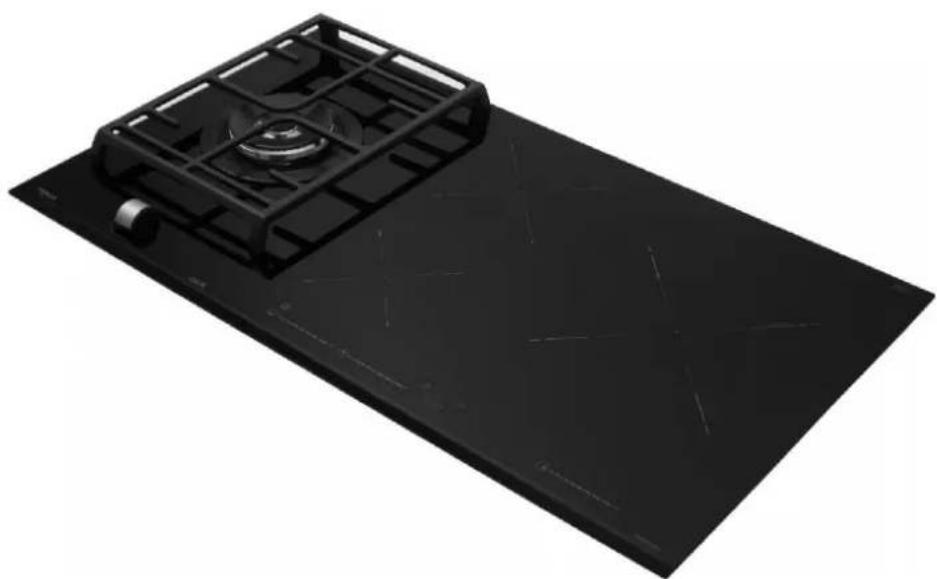
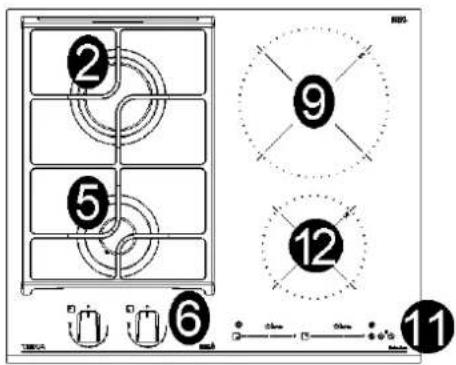
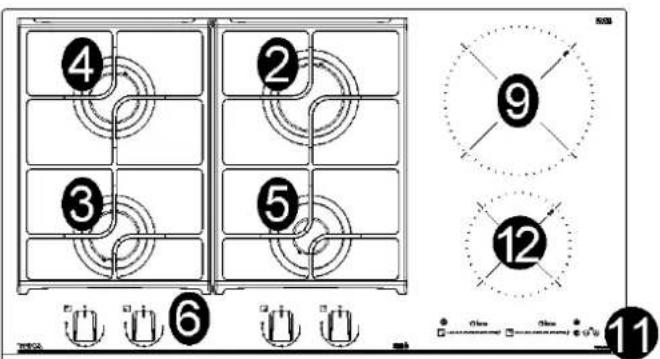
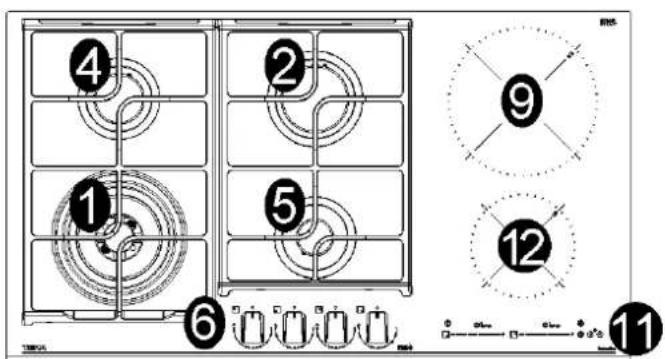
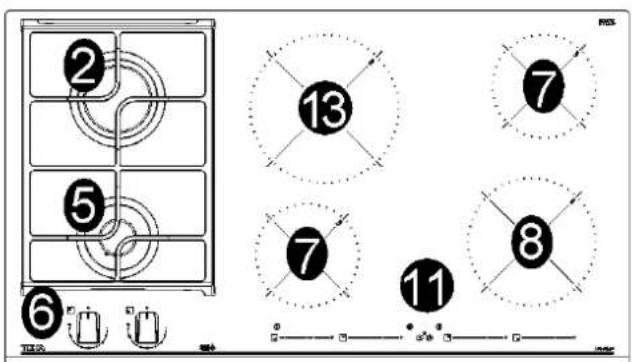
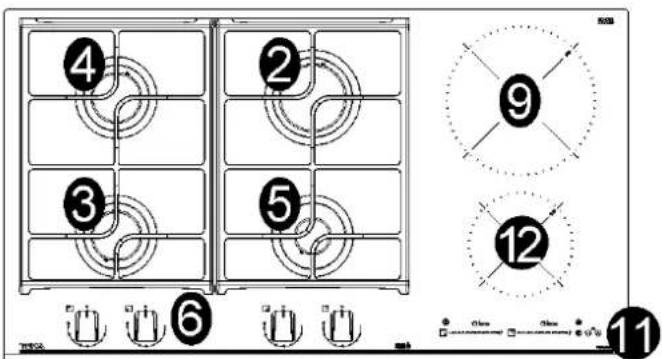
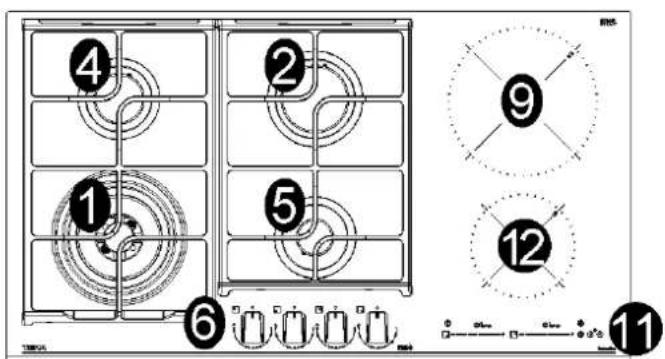
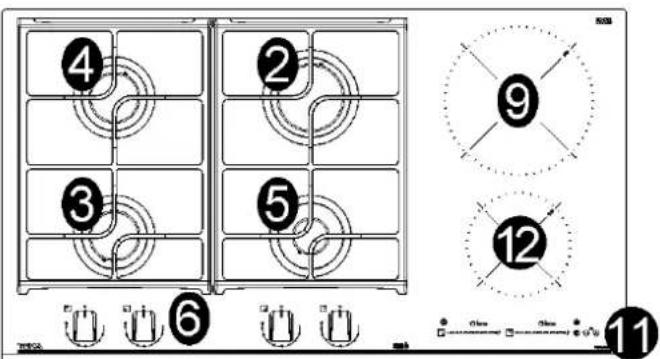
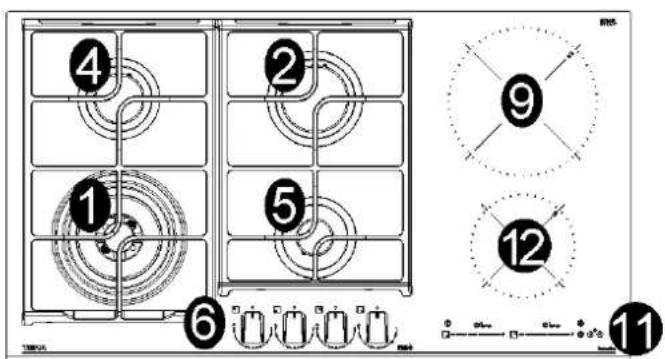
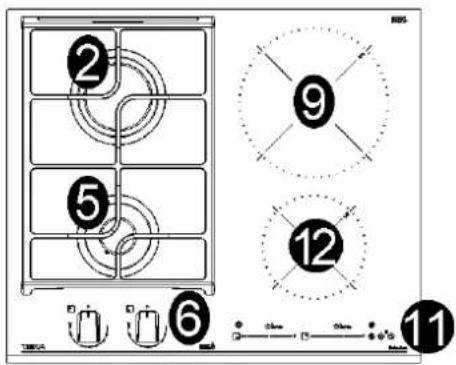
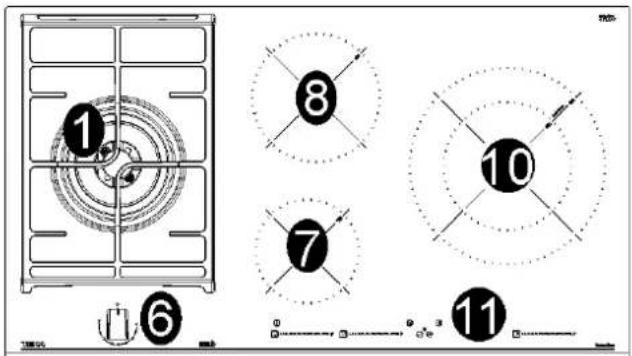
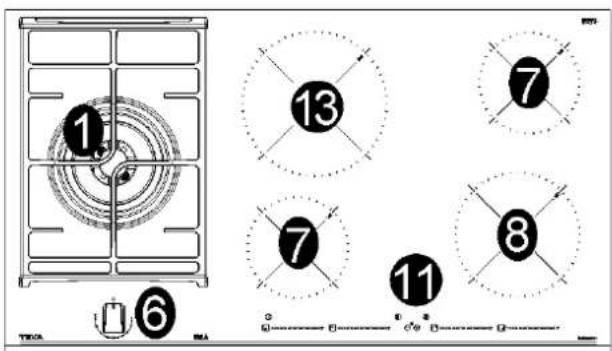
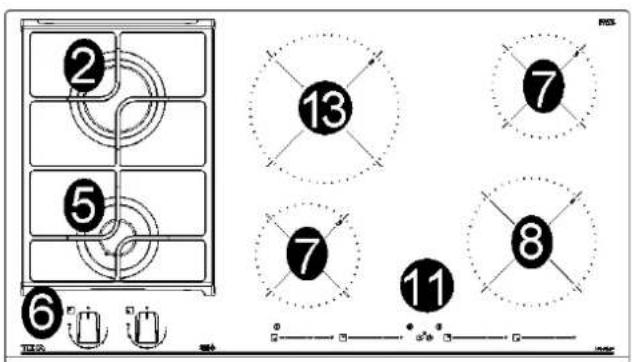
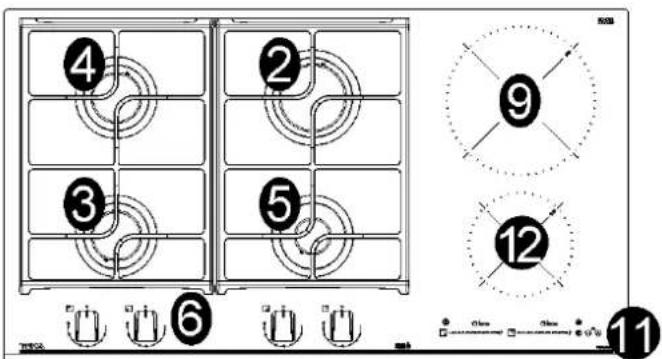
DESCRIPTION OF HOBS
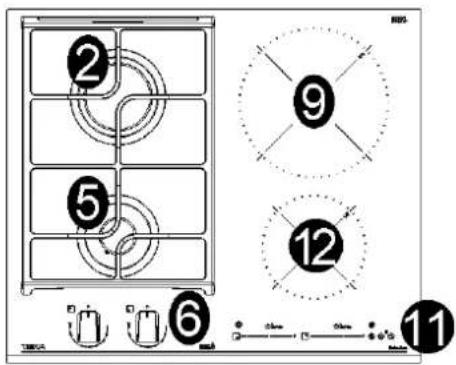
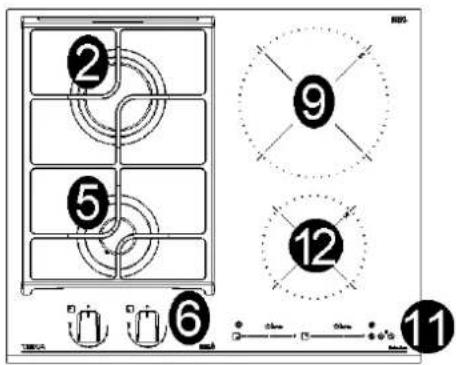
JZC 63312 A JZC 64322 A
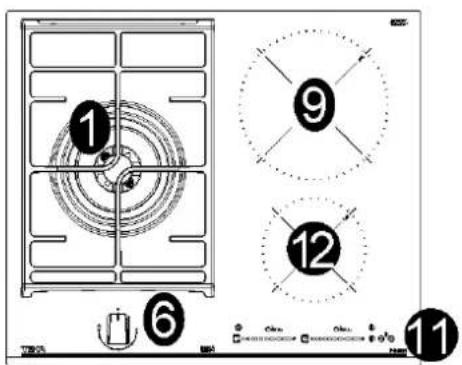
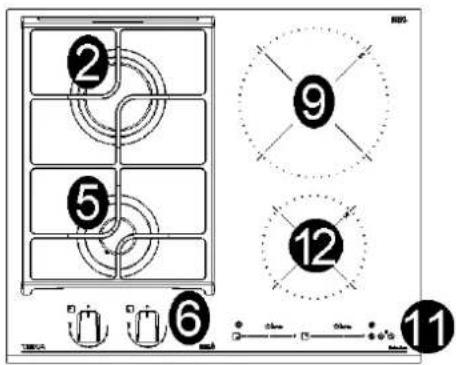
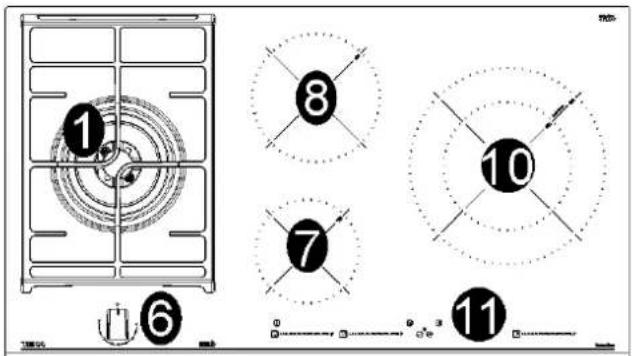
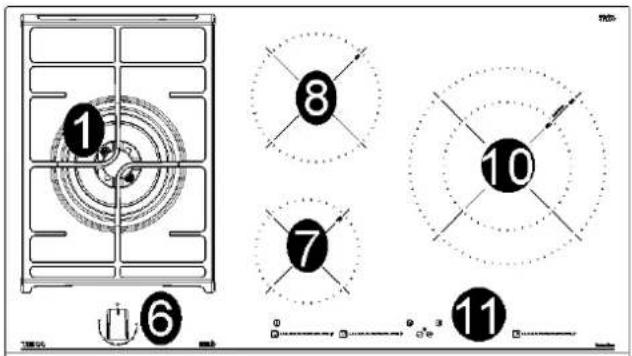
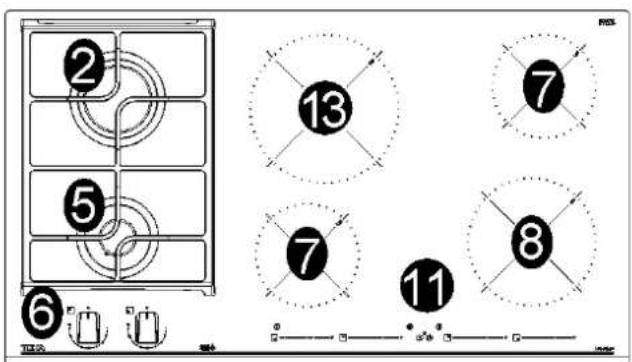
JZC 94313 A JZC 95314 A
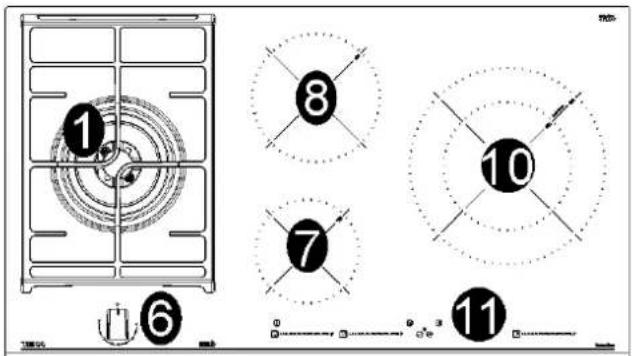
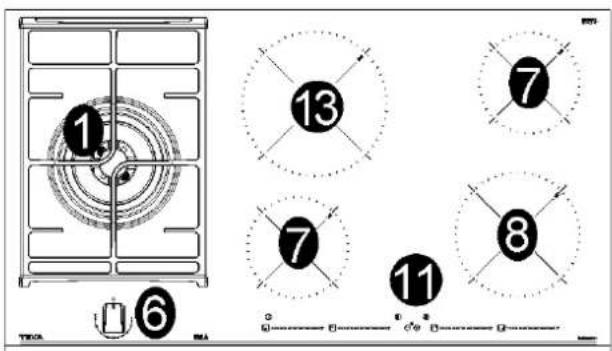
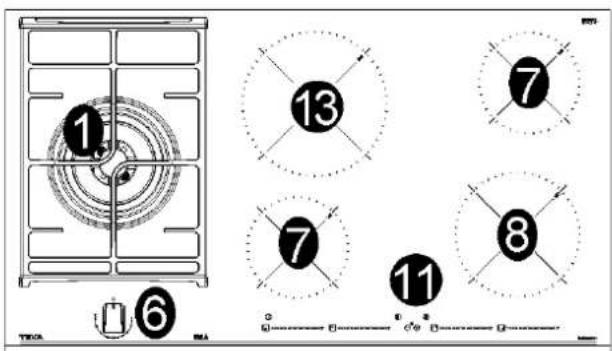
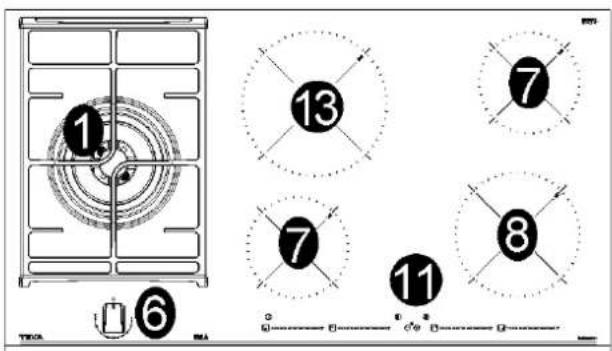
JZC 96324 A JZC 96342 A
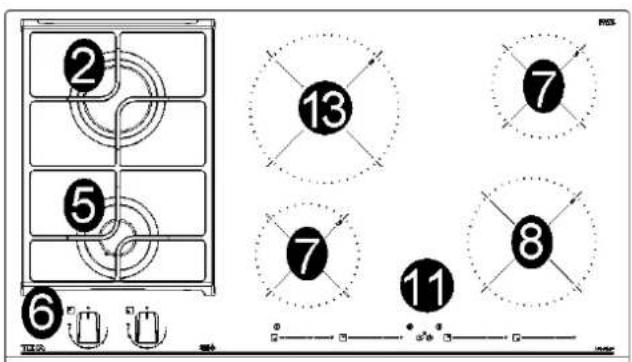
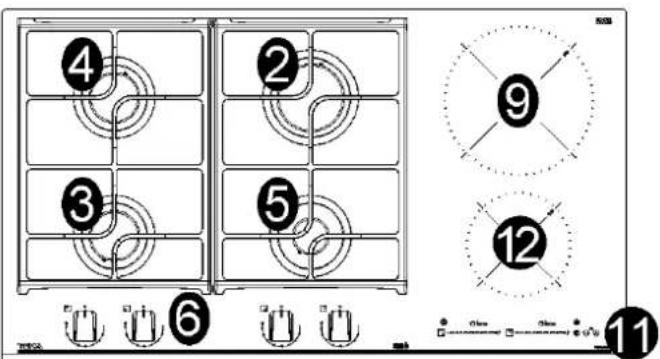
JZC 96342 B
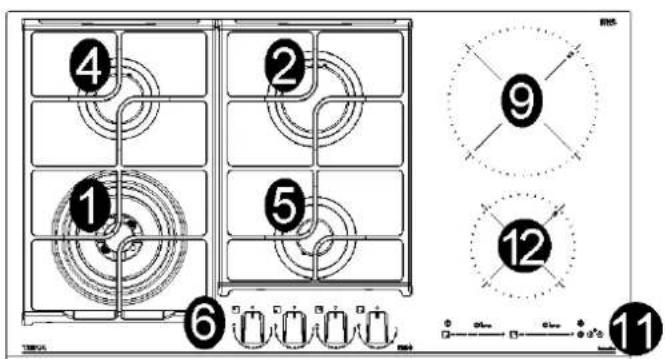
DESCRIPTION OF HOBS
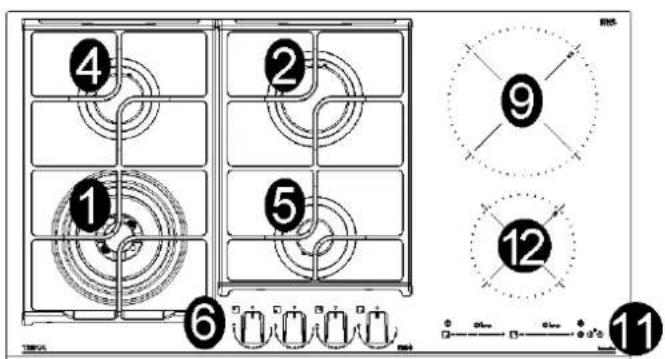
1 Ultra rapid gas burner (*DCC AFB) of 4000 W
2 Rapid gas burner of 2800 W
3 Semirapid gas burner reduced of 1400 W
4 Semirapid gas burner of 1750 W
5 Auxiliary gas burner of 1000 W
6 Burner control knob
7 Electric heating element induction ∅ 14,5 cm of 1500 W
8 Electric heating element induction ∅ 18,0 cm of 2100 W
9 Electric heating element induction ∅ 21,0 cm of 3000 W
10 Electric heating element induction DUAL zone ∅ 16,0/28,0 cm of 3600 W
11 Touch control
12 Electric heating element induction ∅ 14,5 cm of 1800 W
13 Electric heating element induction ∅ 21,0 cm of 2300 W
*DCC AFB: Air From The Bottom (fig. 16)
Attention: this appliance has been manufactured for domestic use only and it employment by private person.
IMPORTANT SAFETY WARNINGS
IMPORTANT WARNINGS FOR THE USER
During operation the work surfaces of the cooking area become very hot: keep children away!
CAUTION:
In case of hotplate glass breakage:
- shut immediately off all burners and any electrical heating element and isolate the appliance from the power supply;
- do not touch the appliance surface;
- do not use the appliance.
- IMPORTANT!
A perfect installation, adjustment or transformation of the cook top to use other gases requires a QUALIFIED INSTALLER: a failure to follow this rule will void the warranty.
- IMPORTANT: the appliance must be installed following the manufacturer's instructions. The manufacturer will not be liable for injury to persons or animals or property damage caused by an incorrect installation.
- If the installation requires modifications to the home's electrical system or if the socket is incompatible with the appliance's plug, have changes or replacements performed by professionally-qualified person. In particular, this person must also make sure that the section of the wires of the socket is suitable for the power absorbed by the appliance.
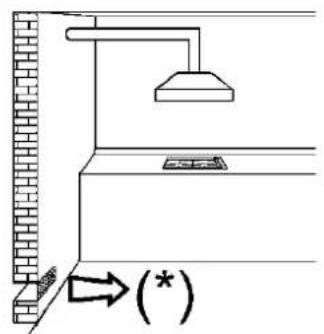
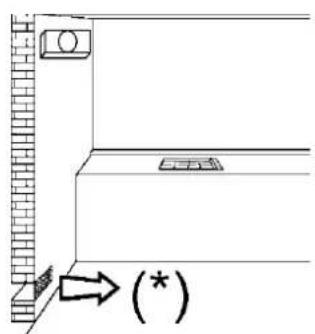
- Use of a gas cooking appliance produces heat and moisture in the room in which it is installed. The room must therefore be well ventiladed by keeping the natural air vents clear (see fig. 2) and by activating the mechanical aeration device (suction hood or electric fan fig. 3 and fig. 4).
- Intensive and lengthy use of the appliance may require additional ventilation. This can be achieved by opening a window or by increasing the power of the mechanical exhausting system if installed.
- Do not attempt to change the technical characteristics of the product because it can be dangerous.
- If you should not to use this appliance any more (or replace an old model), before disposing of it, make it inoperative in conformity with current law on the protection of health and the prevention of environmental pollution by making its dangerous parts harmless, especially for children who might play on an abandoned appliance.
•CAUTION:
Do not touch the appliance with wet or damp hands or feet. Do not use the appliance barefoot
- The manufacturer will not be liable for any damage resulting from improper, incorrect or unreasonable use.
- During, and immediately after operation, some parts of the cook top are very hot: avoid touching them.
- After using the cook top, make sure that the knob is in the closed position and close the main tap of the gas supply or gas cylinder.
- If the gas taps are not operating correctly, call the Service Department.
- Keep the Warranty Certificate or the sheet of technical data with the Instructions Handbook during the appliance life. It contains important technical data.
IMPORTANT:
All our products are conform with the European Norms and relative amendments.
The product is therefore conform with the requirements of the European Directivesin force relating to:
- compatibility electromagnetic (EMC);
- electrical security (LVD);
- restriction of use of certain hazardous substances (RoHS);
- EcoDesign (ERP).
The appliance complies with the provisions of the sub-regulations for European Directives:
- Regulation (EU) 2016/426.
USE
1) BURNERS
A diagram is screen-printed above each knob on the front panel. This diagram indicates to which burner the knob in question corresponds. After having opened the gas mains or gas bottle tap, light the burners as described below:
- automatic electrical ignition
Push and turn the knob corresponding to the required burner in an anticlockwise direction until it reaches the full on position of full (position 9 fig. 17), then depress the knob, the tap is equipped with a scale of 9 positions, with each click the flame is reduced until you reach the position of 1, ie the minimum supply of gas.
- Lighting burners equipped with flame failure device
The knobs of burners equipped with flame failure device must be turned in an anticlockwise direction until they reach the full on position (Position 9, fig. 17) and come to a stop. Now depress the knob in question and repeat the previously indicated operations.
Keep the knob depressed for about 10 seconds once the burner has ignited.
Then follow the instructions for using the tap as explained above.
With regards to all the models, in case of accidental extinguishment of the flame, disengage the ignition by rotating the knob to the off position. Wait at least 1 minute before re-igniting the flame.
HOW TO USE THE BURNERS
Bear in mind the following indications in order to achieve maximum efficiency with the least possible gas consumption:
- use adequate pans for each burner (consult the following table and fig. 1).
- When the pan comes to the boil, set the knob to the reduced rate position (Position 1, fig. 17).
- Always place a lid on the pans.
- Use only pan with a flat bottom.
| Burners Pan ∅ in cm (min) Pan ∅ in cm (max) |
| Ultrarapid | 24 26 |
| Rapid | 20 22 |
| Semirapid reduced | 16 18 |
| Semirapid | 16 18 |
| Auxiliary | 10 14 |
APPROPRIATE PAN AND CONTEINERS
These indications help to save energy and prevent damage to food pans.
Use only containers of suitable diameters. The pan must not exceed the edges of the hob. Do not use small pans on large burners. The flame should not touch the sides of the container.
Only use pans with a concave base on the multi-crown burners.
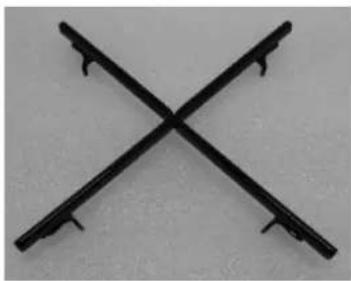
If the pan dimension is larger than 26cm always use the extra pan support shown in the figure below (cod. 81216133).
The accessories can be bought through the After Sales Service net.
natural_image
Two crossed metal tools on a plain background (no text or symbols)
81216133
WARNINGS:
- Burners with flame failure device may only be ignited when the relative knob has been set to the Full on position (Position 9, fig. 17).
- Matches can be used to ignite the burners in a blackout.
- Never leave the appliance unattended when the burners are being used. Make sure there are no children in the near vicinity. Particularly make sure that the pan handles are correctly positioned and keep a check on foods requiring oil and grease to cook since these products can easily catch fire.
- Never use aerosols near the appliance when it is operating.
- Containers wider than the unit are not recommended.
9) Full position
Closed position
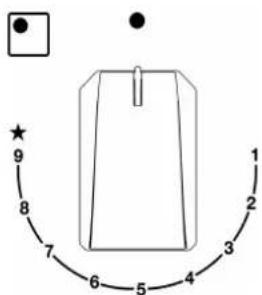
FIG. 17
1) Reduced rate position
WARNINGS
SAFETY WARNINGS:

The induction generator complies with current EU legislation. We however recommend that anyone fitted with a device such as a pacemaker should refer to their physician, or if in doubt abstain from using the induction areas.

Metal object such as knives, forks, spoons and lids may not placed on the surface of the hob they may overheat.

After use always disconnect the hot plate, do not simply remove the pot or pan. Otherwise a malfunction may occur if inadvertently another pot or pan is placed on it within the detection period. Prevent possible accidents!

If the supply cord is damaged, it must be replaced by the manufacturer, its service agent or similarly qualified persons in order to avoid hazard.

It is necessary to allow the appliance disconnection after llation.
Disconnection devices must be incorporated to the fixed electrical installation, according to the installation regulations.
INSTALLATION
INSTALLATION
Installation with cutlery drawer
If you wiesh to install furniture or a cutlery drawer under the hob, a separation board must be fitted between the two. Accidental contact with the hot surface of the device's housing is thus prevented.
The board must be fitted 20 mm beneath the under part of the stovetop.
Electrical connection
Before you connect the stovetop to the mains, check that the voltage and frequency match those specified on the stovetop nameplate, which is under-neath it, and on the Guarantee Sheet, or if applicable on the technical data sheet, which you must keep together with this manual throughout the product's service life.
Ensure that the inlet cable does not come into contact with the induction top housing or the oven housing, if it is installed in the same unit.
WARNING! The manufacturer will not be liable for any damage caused by the alteration or modification of the product or its components during the installation. The installer will be liable for any damages or faults occurred for the incorrect assembly or installation. For any damages resulting from the installation of the product, please contact the authorized installer.
Warning:
The electrical connection must be properly grounded, following current legislation, otherwise the induction hob may malfunction.
⚠️ Unusually high power surges can damage the control system (like with any electrical appliance).
It is advised to refrain from using the induction hob during the pyrolytic cleaning function in the case of pyrolytic ovens, due to the high temperature that this type of device attains.
Only the official technical service can handle or repair the appliance, including replacement of the power cable.
Before disconnecting the hob form the mains, we recommend switching off the cut-off switch and waiting for approximately 25 seconds before disconnecting from the mains. This time is required to allow for the complete discharge of the electronic circuitry and thus preclude the possibility of electric shock from the cable terminals.
Keep the Guarantee Certificate or the technical data sheet together with the instructions manual throughout the product's service life. These contain important technical information.
USE
induction 2 elements
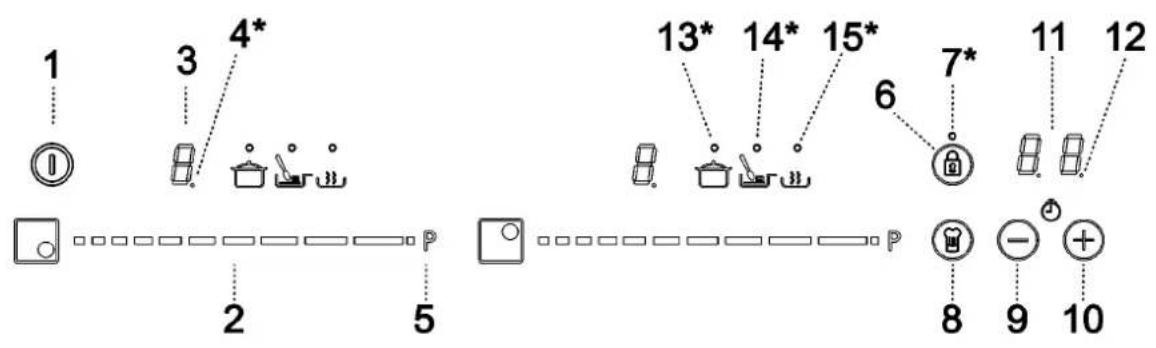
User instructions of the touch control
Handling elements
1 General on/off sensor.
2 Cursor slider for controlling power.
3 Power and/or residual heat indicator.*
4 Decimal dot of power and/of residual heat indicator.
5 Direct access to "Power" function.
6 Activation sensor for "Block" function.
7 Pilot indicator light "Block" function activated.*
8 Activation sensor for "Chef" functions.
9 "Minus" sensor for timer.
10 "Plus" sensor for timer.
11 Timer indicator.
12 Decimal dot of the timer.*
13 Pilot indicator light "Simmering" function activated.*
14 Pilot indicator light "Melting" function activated.*
15 Pilot indicator light "Keep Warm" function activated.*
*Only visible while running.
USE
The manoeuvres are done by means of the touch keys. You do not need to exert force on the desired touch key, you only need to touch it with your fingertip to activate the required function.
Each action is verified by a beep.
Use the cursor slider (2) to adjust power levels (0 - 9) by sliding your finger over it. Sliding towards the right increases the value, whereas sliding towards the left decreases it.
It's also possible to directly select a power level by placing your finger directly on a desired point of the cursor slider (2).

In order to select a plate on these models, directly touch the cursor slider (2).
SWITCHING ON THE DEVICE
1 Touch the On touch key (①) for at least one second. The touch control will become active, a beep will be heard and the indicators (3) will light up displaying a “-”. If any cooking area is hot, the related indicator will flash an H and “-”.
If you do not take any action in the next 10 seconds the touch control will switch off automatically.
When the touch control is activated, you can disconnect it at any time by touching the touch button (1), even if it has been locked (lock function activated). The touch button (1) always has priority to disconnect the touch control.
ACTIVATING PLATES
Once the touch control is activated with sensor ① (1), any plate can be turned on by following these steps:
1 Slide the finger or touch in any position of one of the cursors "slider" (2). The zone has been selected and simultaneously the power level will be set between 0 and 9. That power value will be shown on the corresponding power indicator and its decimal dot (4) will keep light up during 10 seconds.
2 Use the cursor slider (2) to choose a new cooking level between 0 and 9.
As long as the plate is selected, in other words, with the decimal (4) dot light up, its power level can be modified.
TURNING OFF A PLATE
Using the touch slider key (2) lower the power to level 0. The hotplate will switch off.
When a hot plate is switched off an H will appear in its power indicator (3), if the glass surface of the related cooking area is hot and there is a risk of burns. When the temperature drops, the indicator (3) switches off (if the hob is disconnected), or otherwise a “-” will light up if the hob is still connected.
TURNING ALL PLATES OFF
All plates can be simultaneously disconnected by using the general on/off sensor (1). All plate indicators (3) will turn off. If the heating zone turned off is hot, its indicator shows an H.
Pan detector
Induction cooking zones have a built-in pan detector. This way, the plate will stop working if there is no pan present or if the pan is not suitable.
The power indicator (3) will show a symbol to designate "there is no pan" if while the zone is on, no pan is detected or the pan is not suitable.
If a pan is taken off the zone while it is running, the plate will automatically stop supplying energy and it will show the symbol for "there is no pan". When a pan is once again placed on the cooking zone, energy supply will resume at the same power level previously selected.
USE
The time for pan detection is 3 minutes. If a pan is not placed within this time period, or the pan is unsuitable, the cooking zone shuts off.
When finished, turn off the cooking zone by using the touch controls. Otherwise an undesired operation could occur if a pan is accidentally placed on the cooking zone during the next three minutes. Avoid possible accidents!
Block function
With the Block Function, you can block the other sensors, except for the on/off sensor (1) in order to avoid undesired operations. This function is useful as a childproof safety.
To activate this function, touch sensor(46) for at least one second. Once you have done so, the pilot (7) turns on indicating that the control panel is blocked. To deactivate the function, simply touch sensor(8) again.
If the on/off sensor (1) is used to turn off the appliance while the block function is activated, it won't be possible to turn the cooktop on again until it unblocks.
Silencer of the beep
When the hob is on, if one presses the touch key (10) and the locking touch key (6) simultaneously for three seconds, the beep that accompanies each action will be deactivated.
The time indicator (11) will display "OF".
This deactivation will not be applied to all the functions, as for example the beep for on/off, the ending of the timer or the locking/unlocking of the touch keys always remain activated.
To once again activate all the beeps that accompany each action, again simultaneously press the touch key and the locking touch key ④ (10) and the locking touch key (6) for three seconds. The timer indicator (11) will display "On".
Power Function
This function supplies “extra” power to the plate, above the nominal value. Said power depends on the size of the plate, with the possibility of reaching the maximum value permitted by the generator.
1 Slide the finger above the corresponding cursor slider (2) until the power indicator (3) shows "9" and keep the finger pressed for one second, or touch directly on and keep pressed the finger for one second.
2 The power level indicator (3) will show the symbol P, and the plate will start to supply extra power.
The Power Function has a maximum duration specified in Table 1. After this time the power level will automatically adjust to 9. A beep sounds.
On activating the Power function in one hotplate, it is possible that the performance of some of the others may be affected, reducing its power to a lower level, in which case this will be displayed on its indicator (3).
Deactivation of Power Function, before its working time passes, can be done either by means of touching cursor "slider" modifying its power level or repeating step 3.
Timer Function (countdown clock)
This function facilitates cooking given that you don't have to be present: you can set a timer for a plate, and it will turn off once the desired time is up.
For these models, you can simultaneously program each plate for durations ranging from 1 to 99 minutes.
USE
Setting a timer on a plate.
Once the power level is set on the desired zone, and while the decimal dot of the zone keeps on, the zone will be able to be timed.
To that end:
1 Touch sensor (9) or (10). Timer indicator (11) will show "00" and corresponding zone indicator (3) will show the symbol t blinking alternately with its current power level.
2 Immediately afterwards set a cooking time between 1 and 99 minutes, using the sensors ☑ (9) o (10). With the first one the value will start at 60, whereas with the second it will start at 01. By keeping sensors (9) or (10) + pressed, the value will be restored to 00. When there is less than one minute left, the clock will begin to count down in seconds.
3 When the time indicator (11) stops flashing, it will start to count down the time automatically. The indicator (3) relating to the timed hotplate will alternately display the selected power level and the symbol
Once the selected cooking time has elapsed, the heating zone being timed is turned off and the clock emits a series of beeps for several seconds.
To turn off the audible signal, touch any sensor. The timer indicator (11) will display a flashing 00 beside of the decimal dot (4) of the selected zone. If the heating zone turned off is hot, its power indicator (3) will display alternately the H symbol and a “-”.
If you wish to time another hotplate at the same time, repeat steps 1 to 3.
If one or more zones are already timed, the timer indicator (11) will show by default the shortest remaining time to finish, showing a "t" on the related zone. Rest of timed zones will show on their corresponding indicator zones the decimal dot blinking. When cursor "slider" of another timed zone is pressed, the timer will show the remaining time of that zone for a few seconds and its indicator will show its power level and the "t" alternately.
Changing the programmed time.
For modifying programmed time, cursor "slider" (2) of timed zone has to be pressed. Then it will be possible to read and modify the time.
Through sensors ⑨ and (10), you can modify the programmed time.
Disconnecting the clock
If you wish to stop the clock before the programmed time is up, this can be done at any time by simply adjusting its value to “--”.
1 Select the desired plate.
2 Adjust the value of the clock to "00" by using the sensor ⏻ (9). The clock is cancelled. This can also be done more quickly by pushing the sensors (9) and (10) at the same time.
Power Management function
The models are equipped with a power limiting function (Power Management). This function allows the total power generated by the hob to be set to different values selected by the user. To do this, for the first minute after having connected the hob to the power supply, it is possible to access the power limiting menu.
1 Press the ⊕ (10) touch key for three seconds. The letter PL will appear on the timer indicator (11).
2 Press the looking touch key Ⓞ (6). The different power values to which the hob can be limited will appear and these can be changed using the + (10) and Ⓓ sensors.
3 Once the value has been selected, once again press the looking touch key Ⓗ (6). The hob will be limited to the chosen power value.
If you want to change the value again, you must unplug the hob and plug it in again after a few seconds. Thus you will again be able to enter the power limiting menu.
USE
Every time the power level of a hotplate is changed, the power limiter will calculate the total power the hob is generating. If you have reached the total power limit, the touch control will not allow you to increase the power level of that hotplate. The hob will beep and the power indicator (3) will blink at the level that cannot be exceeded. If you wish to exceed that value, you must lower the power of the other hotplates. Sometimes it will not be enough to lower another by a single level as this depends on the power of each hotplate and the level it is set at. It is possible that to raise the level of a large hotplate that of several smaller ones must be turned down.
If you use the quick switch-on at maximum power function and the said value is above the value set by the limit, the hotplate will be set to the maximum possible level. The hob will beep and the said power value will blink twice on the indicator (3).
Special functions: CHEF (depending on the model)
The Touch Control has special features that help the user to cook through the CHEF sensor ^① (8). These functions are available depending on the model.
To activate a special feature on a zone:
1 First it should be selected; and then, the decimal point (4) will be active on the power indicator (3).
2 Now click on the CHEF sensor (8). The sequentially successive presses will go over all the CHEF functions available in each zone one by one. These functions will show the activation with the corresponding leds (13), (14), (15).
If you want to cancel a special active function at any time, you should touch the "slider" cursor sensor (2) in the position "0".
KEEP WARM FUNCTION
This function automatically sets an appropriate power level to keep the cooked food hot.
To activate it, select the plate, and press on the CHEF sensor (8) until the led (15) located on the icon lights up. Once the function is activated, the symbol will appear on the power indicator (3).
You can override the function at any time by turning off the plate, by changing the power level or by choosing a different special function.
MELTING FUNCTION
This function maintains a low temperature in the cooking zone. Ideal for defrosting food or for slowly melting other food types as chocolate, butter, etc.
To activate it, select the plate, and press on the CHEF sensor (8) until the led (14) located on the icon lights up. Once the function is activated, the symbol will appear on the power indicator (3).
You can override the function at any time by turning off the plate, by changing the power level or by choosing a different special function.
SIMMERING FUNCTION
This function allows you to keep simmered.
After the food is boiled, enable the plate by selecting it, and press the CHEF sensor ^⑧ (8) until the led (13) located on the icon lights up. Once the function is activated, the symbol will appear on the power indicator (3).
You can override the function at any time by turning off the plate, by changing the power level or by choosing a different special function.
Safety switch off function
If due to an error one or several heating zones do not switch off, the appliance will be automatically disconnected after a set amount of time (see table 1).
When the “safety switch off” function has been triggered, a 0 is displayed if the glass surface temperature is not dangerous for the user or an H if there is a burn risk.

Keep the control panel of the heating areas clean and dry at all times.

In the event of operating problems or incidents not mentioned in this manual, connect the appliance and contact the cal service.
Suggestions and recommendations
- Use pots or pans with thick, completely flat bottoms.
- Do not slide pots and pans over the glass because they could scratch it.
- Although the glass can take knocks from large pots and pans without sharp edges, try not to knock it.
- To avoid damaging the ceramic glass surface, do not drag pots and pans over the glass and keep the undersides of them clean and in good condition.
- Recommended diameters of the bottom of the pan (see the relative table).

Try not to spill sugar or products containing sugar on the glass as while
the surface is hot these could damage it.
| Table 1 |
| Select power level | MAXIMUM OPERATION TIME (in hours) |
| 0 | 0 |
| 1 | 8 |
| 2 | 5 |
| 3 | 4 |
| 4 | 4 |
| 5 | 3 |
| 6 | 3 |
| 7 | 2 |
| 8 | 2 |
| 9 | 1 |
| P 10 minutes, readjust to level 9 |
POWER RATINGS OF THE ELECTRICAL COMPONENTS
induction 2 elements
| DENOMINATIONS ∅ (cm) | | ∅ pot recommended(minimum in cm.) | POWER(W) | *ECelectric cooking:Wh/kg |
| Element heating induction 14,5 | 10 1800 182,1 | | | |
| Element heating induction | 21,0 13 3000 178,7 | | | |
induction 3 - 4 elements
| DENOMINATIONS ∅ (cm) | | ∅ pot recommended (minimum in cm.) | POWER (W) | *ECelectric cooking: Wh/kg |
| Element heating induction | 14,5 | 10 | 1500 | 193,3 |
| Element heating induction | 18,0 | 11 | 2100 | 177,5 |
| Element heating induction | 21,0 | 11 | 2300 | 181,7 |
| Element heating induction DUAL zone | 16,0/28,0 | 10/21 | 3600 | 163,6 |
* ECelectric cooking: Energetic consumption calculated per kg in accordance with Regulation (EU) 66/2014.
Cleaning and maintenance
To keep the appliance in good condition, clean it using suitable products and implements once it has cooled down. This will make the job easier and avoid the build-up of dirt. Never use harsh cleaning products or tools that could scratch the surface, or steam-operated equipment.
Light dirt not stuck to the surface can be cleaned using a damp cloth and a gentle detergent or warm soapy water. However, for deeper stains or grease use a special cleaner for ceramic hot plates and follow the instructions on the bottle. Dirt that is firmly stuck due to being burned repeatedly can be removed using a scraper with a blade.
Slight tinges of colour are caused by pots and pans with dry grease residue underneath or due to grease between the glass and the pot during cooking. These can be removed using a nickel scourer with water or a special cleaner for ceramic hot plates. Plastic objects, sugar or food containing a lot of sugar that have melted onto the surface must be removed immediately using a scraper.
Metallic sheens are caused by dragging metal pots and pans over the glass. These can be removed by cleaning thoroughly using a special cleaner for ceramic glass hot plates, although you may need to repeat the cleaning process several times.
Environmental considerations
The symbol on the product or its packaging means that this product cannot be treated like ordinary household waste. This product must be taken to a recycling collection point for electrical and electronic appliances. By ensuring that this product is disposed of correctly, you will avoid harming the environment and public health, which could happen if this product is not handled properly. For more detailed information about recycling this product, please contact your local authority, household waste service or the store where you purchased the product.
The packaging materials used are environmentally friendly and can be recycled completely. Plastic components are marked >PE<, >LD<, >EPS<, etc. Dispose of packaging materials, like household waste, in your local container.
Warning:

A pot or pan may become stuck to the glass due to a product having melted between them. Do not try to lift the pot while the heating zone is cold! This could break the glass.

Do not step on the glass or lean on it as it could break and cause injury. Do not use the glass as a surface for placing objects.
The Manufacturer reserves the right to make changes to its manuals that it deems necessary or useful, without affecting the product's essential features.
USE
Fulfillment with Energy Efficiency of the appliance:
- Appliance has been tested according to standard EN 60350-2 and the obtained value, in Wh/Kg (see the relative table).
Following advices will help you to save energy anytime you cook:
- Use the correct lid for each pot whenever is possible. Cooking without lid uses more energy.
- Use pans with flat bases and appropriate base diameters in order to match size of the cooking zone. Pan manufacturers usually provide top diameter of the pot that is always larger than bases diameter.
- When water is used for cooking, use little quantities in order to preserve vitamins and minerals of vegetables and set the minimum power level that allows maintaining the cooking. High power level is unnecessary and a waste of energy.
- Use small pots with small quantities of food.
IF SOMETHING DOES NOT WORK
Before calling the technical service, perform the verifications described below.
The appliance does not work:
ensure that the power cable is plugged in.
The induction zones do not produce heat:
the container is not appropriate (it does not have a ferromagnetic bottom or is too small).
Check that the bottom of the container attracts a magnet, or use a larger container.
A humming is heard when starting to cook in the induction zones:
with containers which are not very thick or not of one piece, the humming results from the transmission of energy directly to the bottom of the container.
the humming is not a defect, but if you wish to avoid it anyway, reduce the power level slightly or use a container with a thicker bottom, and/or of one piece.
The touch control does not light up or, despite lighting, does not respond:
no heating zone has been selected.
Be sure to select a heating zone before operating it. There is humidity on the sensors, and/or your fingers are wet. Keep the touch control surface and/or your fingers clean and dry. The locking function is activated. Unlock the controls.
The sound of a fan is heard while cooking, which continues even after cooking has ended:
the induction zones have a fan to keep the electronics cool. This only operates when the electronic circuits get hot. It stops again when the circuits cool whether the hob is turned on or not.
The symbol will appear on-the power indicator of a hotplate:
the induction system does not find a pot or pan on a hotplate or it is of an unsuited type.
The hotplate will switch off and the messages C81 or C82 appears on the indicators:
excessive temperature in the electronics or on the glass. Wait for a while for the electronics to cool down or remove the pot or pan so that the glass can cool.
The appliances switches off and the message C90 appears on the power indicators (3):
the touch control detects on/off (1) sensor is covered and doesn't allow switching on the cooktop. Remove the possible objects or liquids keeping the touch control surface, clean and dry until the message disappears.
USE
induction 3 elements
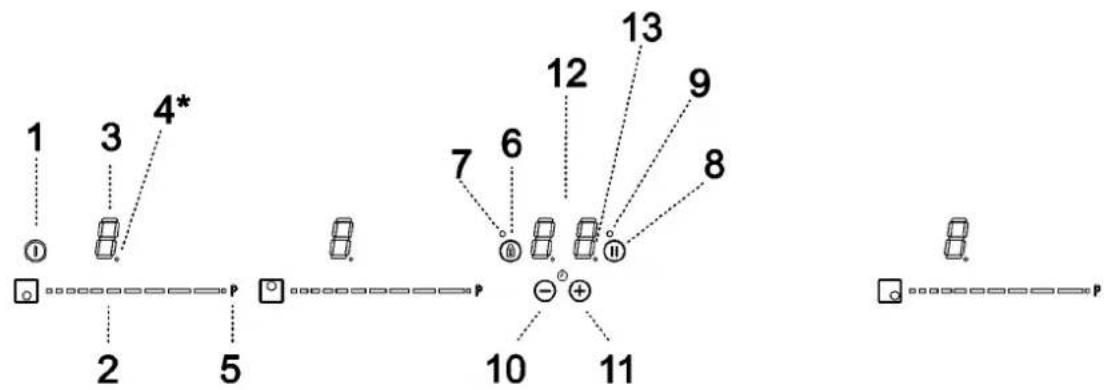
flowchart
graph TD
    1["①"] --> 2["□"]
    3["③"] --> 5["●"]
    4*[4*] --> 5
    5 --> 2
    6["⑥"] --> 7["○"]
    7 --> 8["⑧"]
    8 --> 9["⑨"]
    8 --> 10["⊕"]
    10 --> 11["11"]
    11 --> 10
    12["⑫"] --> 13["13"]
    13 --> 9
    13 --> 8
    13 --> 7
    13 --> 6
    13 --> 5
    13 --> 4*
induction 4 elements
flowchart
graph TD
    A["①"] --> B["2"]
    C["②"] --> D["5"]
    E["③"] --> F["4*"]
    G["④"] --> H["7"]
    I["⑤"] --> J["6"]
    K["⑥"] --> L["8"]
    M["⑦"] --> N["10"]
    O["⑧"] --> P["11"]
    Q["⑨"] --> R["12"]
    S["⑩"] --> T["13"]
    U["⑪"] --> V["8"]
    W["⑫"] --> X["9"]
    Y["⑬"] --> Z["8"]
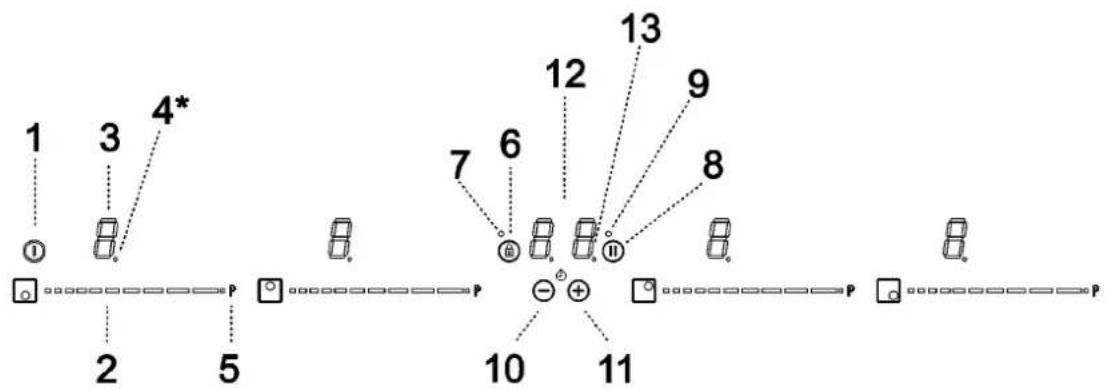
User instructions of the touch control
Handling elements
1 General on/off sensor.
2 Cursor slider for controlling power.
3 Power and/or residual heat indicator.*
4 Decimal dot of power and/of residual heat indicator.
5 Direct access to "Power" function.
6 Activation sensor for "Block" or "Stop&Go" functions.
7 Pilot indicator light "Block" function activated.*
8 Activation sensor for "Stop&Go" function.
9 Pilot indicator light "Stop&Go" function activated.*
10 "Minus" sensor for timer.
11 "Plus" sensor for timer.
12 Timer indicator.
13 Decimal dot of the timer.*
*Only visible while running.
USE
The manoeuvres are done by means of the touch keys. You do not need to exert force on the desired touch key, you only need to touch it with your fingertip to activate the required function.
Each action is verified by a beep.
Use the cursor slider (2) to adjust power levels (0 - 9) by sliding your finger over it. Sliding towards the right increases the value, whereas sliding towards the left decreases it.
It's also possible to directly select a power level by placing your finger directly on a desired point of the cursor slider (2).

In order to select a plate on these models, directly touch the cursor slider (2).
SWITCHING ON THE DEVICE
1 Touch the On touch key (①) for at least one second. The touch control will become active, a beep will be heard and the indicators (3) will light up displaying a “-”. If any cooking area is hot, the related indicator will flash an H and “-”.
If you do not take any action in the next 10 seconds the touch control will switch off automatically.
When the touch control is activated, you can disconnect it at any time by touching the touch button (①), even if it has been locked (lock function activated). The touch button (①) always has priority to disconnect the touch control.
ACTIVATING PLATES
Once the touch control is activated with sensor ① (1), any plate can be turned on by following these steps:
1 Slide the finger or touch in any position of one of the cursors "slider" (2). The zone has been selected and simultaneously the power level will be set between 0 and 9. That power value will be shown on the corresponding power indicator and its decimal dot (4) will keep light up during 10 seconds.
2 Use the cursor slider (2) to choose a new cooking level between 0 and 9.
As long as the plate is selected, in other words, with the decimal (4) dot light up, its power level can be modified.
TURNING OFF A PLATE
Using the touch slider key (2) lower the power to level 0. The hotplate will switch off.
When a hot plate is switched off an H will appear in its power indicator (3), if the glass surface of the related cooking area is hot and there is a risk of burns. When the temperature drops, the indicator (3) switches off (if the hob is disconnected), or otherwise a “-” will light up if the hob is still connected.
TURNING ALL PLATES OFF
All plates can be simultaneously disconnected by using the general on/off sensor (1). All plate indicators (3) will turn off. If the heating zone turned off is hot, its indicator shows an H.
Pan detector
Induction cooking zones have a built-in pan detector. This way, the plate will stop working if there is no pan present or if the pan is not suitable.
The power indicator (3) will show a symbol to designate "there is no pan" if, while the zone is on, no pan is detected or the pan is not suitable.
If a pan is taken off the zone while it is running, the plate will automatically stop supplying energy and it will show the symbol for "there is no pan". When a pan is once again placed on the cooking zone, energy supply will resume at the same power level previously selected.
The time for pan detection is 3 minutes. If a pan is not placed within this time period, or the pan is unsuitable, the cooking zone shuts off.
When finished, turn off the cooking zone by using the touch controls. Otherwise an undesired operation could occur if a pan is accidentally placed on the cooking zone during the next three minutes. Avoid possible accidents!
Block function
With the Block Function, you can block the other sensors, except for the on/off sensor (1) in order to avoid undesired operations. This function is useful as a childproof safety.
To activate this function, touch sensor ^46 for at least one second. Once you have done so, the pilot (7) turns on indicating that the control panel is blocked. To deactivate the function, simply touch sensor ^48 again.
If the on/off sensor (1) is used to turn off the appliance while the block function is activated, it won't be possible to turn the cooktop on again until it unblocks.
Silencer of the beep
When the hob is on, if one presses the touch key (11) and the locking touch key (6) simultaneously for three seconds, the beep that accompanies each action will be deactivated.
The time indicator (12) will display "OF".
This deactivation will not be applied to all the functions, as for example the beep for on/off, the ending of the timer or the locking/unlocking of the touch keys always remain activated.
To once again activate all the beeps that accompany each action, again simultaneously press the touch key and the locking touch key ④ (11) and the locking touch key (6) for three seconds. The timer indicator (12) will display "On".
Stop&Go Function
This function puts the cooking process on pause. The timer will also be paused if it is activated.
Activating the Stop function.
Touch the Stop sensor (12) for one second. The pilot (9) lights up and the power indicators will show the symbol // to indicate cooking has been paused.
Deactivating the Stop function.
Touch Stop&Go sensor Ⓐ (8) again. The pilot (9) turns off and cooking resumes under the same power and timer settings that were established before the pause.
Power Function
This function supplies “extra” power to the plate, above the nominal value. Said power depends on the size of the plate with the possibility of reaching the maximum value permitted by the generator.
1 Slide the finger above the corresponding cursor slider (2) until the power indicator (3) shows "9" and keep the finger pressed for one second, or touch directly on P and keep pressed the finger for one second.
2 The power level indicator (3) will show the symbol P, and the plate will start to supply extra power.
The Power Function has a maximum duration specified in Table 1. After this time the power level will automatically adjust to 9. A beep sounds.
On activating the Power function in one hotplate, it is possible that the performance of some of the others may be affected, reducing its power to a lower level, in which case this will be displayed on its indicator (3).
Deactivation of Power Function, before its working time passes, can be done either by means of touching cursor "slider" modifying its power level or repeating step 3.
USE
Timer Function (countdown clock)
This function facilitates cooking given that you don't have to be present: you can set a timer for a plate, and it will turn off once the derived time is up.
For these models, you can simultaneously program each plate for durations ranging from 1 to 99 minutes.
Setting a timer on a plate.
Once the power level is set on the desired zone, and while the decimal dot of the zone keeps on, the zone will be able to be timed.
To that end:
1 Touch sensor (10) or (11). Timer indicator (12) will show "00" and corresponding zone indicator (3) will show the symbol t blinking alternately with its current power level.
2 Immediately afterwards set a cooking time between 1 and 99 minutes, using the sensors ⊖ (10) o (11). With the first one the value will start at 60, whereas with the second it will start at 01. By keeping sensors (10) or ⊕ (11) pressed, the value will be restored to 00. When there is less than one minute left, the clock will begin to count down in seconds.
3 When the time indicator (12) stops flashing, it will start to count down the time automatically. The indicator (3) relating to the timed hotplate will alternately display the selected power level and the symbol
Once the selected cooking time has elapsed, the heating zone being timed is turned off and the clock emits a series of beeps for several seconds.
To turn off the audible signal, touch any sensor. The timer indicator (12) will display a flashing 00 beside of the decimal dot (4) of the selected zone. If the heating zone turned off is hot, its power indicator (3) will display alternately the H symbol and a “-”.
If you wish to time another hotplate at the same time, repeat steps 1 to 3.
If one or more zones are already timed, the timer indicator (12) will show by default the shortest remaining time to finish, showing a "t" on the related zone. Rest of timed zones will show on their corresponding indicator zones the decimal dot blinking. When cursor "slider" of another timed zone is pressed, the timer will show the remaining time of that zone for a few seconds and its indicator will show its power level and the "t" alternately.
Changing the programmed time.
For modifying programmed time, cursor "slider" (2) of timed zone has to be pressed. Then it will be possible to read and modify the time.
Through sensors (10) and (11), you can modify the programmed time.
Disconnecting the clock
If you wish to stop the clock before the programmed time is up, this can be done at any time by simply adjusting its value to “--”.
1 Select the desired plate.
2 Adjust the value of the clock to "00" by using the sensor ⊖ (10). The clock is cancelled. This can also be done more quickly by pushing the sensors ⊖ (10) and ⊕ (11) at the same time.
USE
Power Management function (depending on model)
Some models are equipped with a power limiting function (Power Management). This function allows the total power generated by the hob to be set to different values selected by the user. To do this, for the first minute after having connected the hob to the power supply, it is possible to access the power limiting menu.
1 Press the ①1) touch key for three seconds. The letter PL will appear on the timer indicator (12).
2 Press the looking touch key ⑥). The different power values to which the hob can be limited will appear and these can be changed using the ⑦ (11) and ⑩ sensors.
3 Once the value has been selected, once again press the looking touch key (6). The hob will be limited to the chosen power value.
If you want to change the value again, you must unplug the hob and plug it in again after a few seconds. Thus you will again be able to enter the power limiting menu.
Every time the power level of a hotplate is changed, the power limiter will calculate the total power the hob is generating. If you have reached the total power limit, the touch control will not allow you to increase the power level of that hotplate. The hob will beep and the power indicator (3) will blink at the level that cannot be exceeded. If you wish to exceed that value, you must lower the power of the other hotplates. Sometimes it will not be enough to lower another by a single level as this depends on the power of each hotplate and the level it is set at. It is possible that to raise the level of a large hotplate that of several smaller ones must be turned down.
If you use the quick switch-on at maximum power function and the said value is above the value set by the limit, the hotplate will be set to the maximum possible level. The hob will beep and the said power value will blink twice on the indicator (3).
Safety switch off function
If due to an error one or several heating zones do not switch off, the appliance will be automatically disconnected after a set amount of time (see table 1).
When the “safety switch off” function has been triggered, a 0 is displayed if the glass surface temperature is not dangerous for the user or an H if there is a burn risk.

Keep the control panel of the heating areas clean and dry at all times.
In the event of operating problems or incidents not mentioned in this manual, disconnect the appliance and contact the technical service
Table 1
| Select power level | MAXIMUM OPERATION TIME (in hours) |
| 0 | 0 |
| 1 | 8 |
| 2 | 8 |
| 3 | 5 |
| 4 | 4 |
| 5 | 4 |
| 6 | 3 |
| 7 | 2 |
| 8 | 2 |
| 9 | 1 |
| P | 10 or 5 minutes, readjust to level 9 (depending on model) |
IF SOMETHING DOES NOT WORK
Before calling the technical service, perform the verifications described below.
The appliance does not work:
ensure that the power cable is plugged in.
The induction zones do not produce heat:
the container is not appropriate (it does not have a ferromagnetic bottom or is too small).
Check that the bottom of the container attracts a magnet, or use a larger container.
A humming is heard when starting to cook in the induction zones:
with containers which are not very thick or not of one piece, the humming results from the transmission of energy directly to the bottom of the container.
the humming is not a defect, but if you wish to avoid it anyway, reduce the power level slightly or use a container with a thicker bottom, and/or of one piece.
The touch control does not light up or, despite lighting, does not respond:
no heating zone has been selected.
Be sure to select a heating zone before operating it. There is humidity on the sensors, and/or your fingers are wet. Keep the touch control surface and/or your fingers clean and dry. The locking function is activated. Unlock the controls.
The sound of a fan is heard while cooking, which continues even after cooking has ended:
the induction zones have a fan to keep the electronics cool. This only operates when the electronic circuits get hot. It stops again when the circuits cool whether the hob is turned on or not.
The symbol will appear on the power indicator of a hotplate:
The induction system does not find a pot or pan on a hotplate or it is of an unsuited type.
The hob powers off during cooking and the messages C81 or C82 appears:
excessive temperature in the electronics or on the glass. Wait for a while for the electronics to cool down or remove the pot or pan so that the glass can cool.
C85 appears on the indicator of one of the hotplates:
The pot or pan used is of an unsuited type. Switch off the hob, switch it on again and try with another pot or pan.
The appliances switches off and the message C90 appears on the power indicators (3).
The touch control detects on/off (1) sensor is covered and doesn't allow switching on the cooktop. Remove the possible objects or liquids keeping the touch control surface, clean and dry until the message disappears.
The appliances switches off and the message C91 appears on the power indicators (3).
The touch control detects Stop&Go sensor (6) is covered and doesn't allow to handle the cooktop. Remove the possible objects or liquids keeping the touch control surface, clean and dry, then press twice Stop&Go (6) sensor for removing the message and return to normal operation.
IMPORTANT:
Always disconnect the appliance from the gas and electricity mains before carrying out any cleaning operation.
2) HOT PLATE
It is very important to clean the surface soon after every use, when the glass is still tepid.
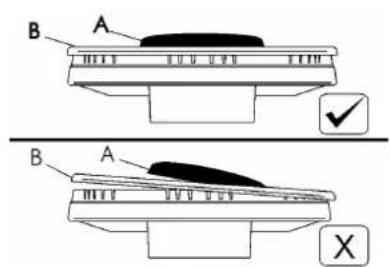
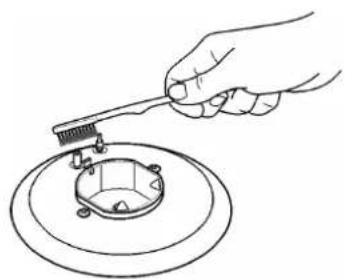
Periodically wash the hot plate, the enamelled stell pan support, the enamelled burner caps "A", "B" and "C" and the burner heads "T" (see fig. 5 - 6) with lukewarm soapy water. They should also be cleaned plugs "AC" and flame detection "TC" (see fig. 5). Clean them gently with a small nylon brush as shown (see fig. 7) and allow to dry fully.
Do not wash in the dishwasher.
Do not allow vinegar, coffee, milk, salted water, lemon or tomato juice from remaining in contact with the enamelled surfaces for long periods of time.
Do not use metallic sponges, powder abrasives or corrosive sprays.
WARNINGS:
Comply with the following instructions, before remounting the parts:
- check that burner heads slots (see fig. 5 - 6) have not become clogged by foreign bodies.
- Check that enamelled burner cap "A - B - C" (fig. 5 - 6) have correctly positioned on the burner head. It must be steady.
- The pan support must be placed in the appropriate centering pins.
Verifying the perfect stability.
- Do not force the taps if they are difficult open or close. Contact the technical assistance service for repairs.
- Don't use steam jets for the equipment cleaning.
Note: continuous use could cause the burners to change colour due to the high temperature.
Installation, adjustments of controls and maintenance must only be carried out by a qualified engineer.
The appliance must be correctly installed in conformity with current law and the manufacturer's instructions.
Incorrect installation may cause damage to persons, animals or property for which the Manufacturer shall not be considered responsible.
During the life of the system, the automatic safety or regulating devices on the appliance may only be modified by the manufacturer or by his duly authorized dealer.
3) INSTALLING THE HOT PLATE
Check that the appliance is in a good condition after having removed the outer packaging and internal wrappings from around the various loose parts. In case of doubt, do not use the appliance and contact qualified personnel.
Never leave the packaging materials (cardboard, bags, polystyrene foam, nails, etc.) within children's reach since they could become potential sources of danger.
The measurements of the opening made in the top of the modular cabinet and into which the hot plate will be installed are indicated in either fig. 8. Always comply with the measurements given for the hole into which the appliance will be recessed (see fig. 8)
The appliance belongs to class 3 and is therefore subject to all the provisions established by the provisions governing such appliances.
4) FIXING THE HOT PLATE
The hot plate has a special seal which prevents liquid from infiltrating into the cabinet. Strictly comply with the following instructions in order to correctly apply this seal:
- take off all the movable parts of the hob.
- Cut the seal in 4 parts of the necessary lenght to positioning it on the 4 edges of the crystal.
- Overturn the hot plate and correctly position seal "E" (fig. 9 under the edge of the hot plate itself, so that the outer side of the seal perfectly matches the outer perimetral edge of the crystal. The ends of the strips must fit together without overlapping.
INSTALLATION
- Evenly and securely fix the seal to the crystal, pressing it in place with the fingers.
- Position the hob in the hole in the unit and fasten it in place using the appropriate screws "F" of the fastening hooks "G" (see fig. 11 and 12).
- In order to avoid accidental touch with the overheating bottom of the hob, during the working, is necessary to put a wooden insert, fixed by screws, at a minimum distance of 120 mm from the top (see fig. 8).
IMPORTANT INSTALLATION INSTRUCTIONS
The installer should note that the appliance that side walls should be no higher than the hot plate itself. Furthermore, the rear wall, the surfaces surrounding and adjacent to the appliance must be able to withstand an temperature of 90 °C.
The adhesive used to stick the plastic laminate to the cabinet must be able to withstand a temperature of not less than 150 °C otherwise the laminate could come unstuck.
The appliance must be installed in compliance with BS 6172 1990, BS 5440 part. 2 1989 and BS 6891 1988.
This appliance is not connected to a device able to dispose of the combustion fumes. It must therefore be connected in compliance
with the above mentioned installation standards. Particular care should be paid to the following provisions governing ventilation and aeration.
5) ROOM VENTILATION
To ensure correct operation of the appliance, it is important to ensure that the room where the hot plate is installed has sufficient ventilation, as set out in BS 5440 part 2. 1989. See table below.
| Type of appliance | Volume of room cubic metres | Min. size of vent sq. cm. | Openable window or alternative method of venting to the outside |
| Domestic ovens hotplates or any combinations | 5 | 100 | yes |
| | |
| 5 to 10 | 50 | yes |
| | |
| 11 to 20 | nil | yes |
| 20 and above | nil | yes |
Natural air flow must enter directly through permanent openings in the walls of the room in question. These must open towards the outside and possess a minimum section of 100 cm^2 see fig. 2). It must be impossible to obstruct these openings.
Indirect ventilation with air drawn from adjacent rooms is permitted in strict compliance with the provisions in force.
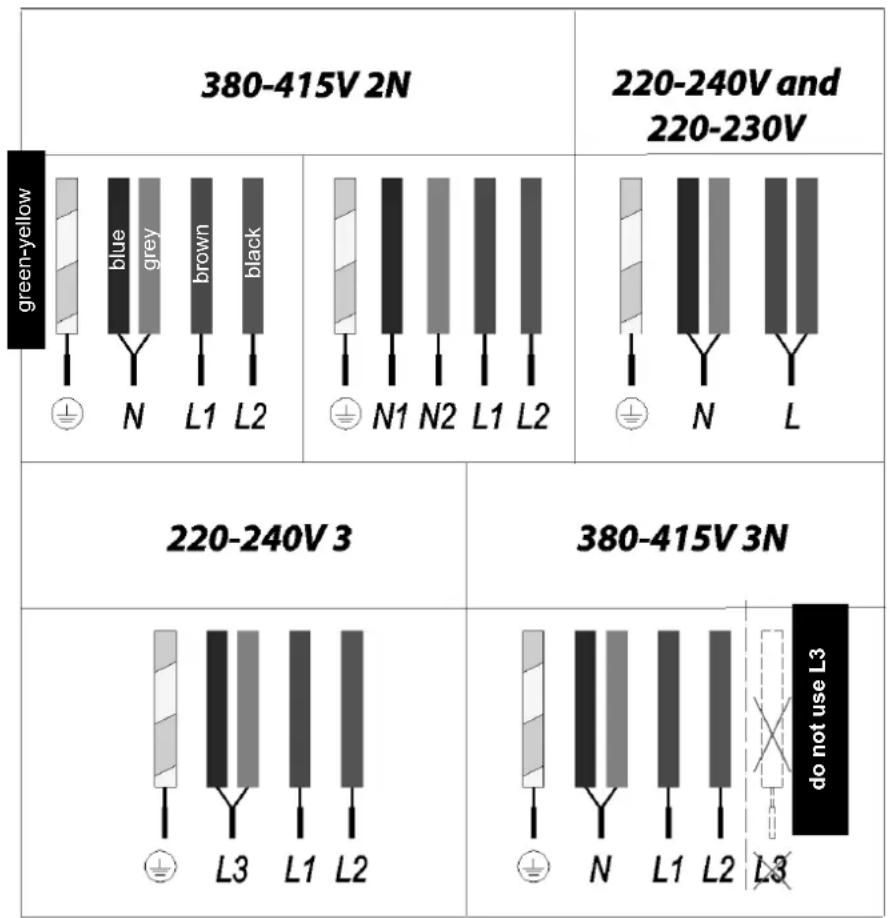
Wiring diagram for 3/4 element models heating
INSTALLATION - REGULATION
6) LOCATION AND AERATION
Gas cooking appliances must always dispose of their combustion fumes through hoods. These must be connected to flues, chimneys or straight outside (see fig. 3). If it is not possible to install a hood, an electric fan can be installed on a window or on a wall facing outside (see fig. 4). This must be activated at the same time as the appliance, so long as the specifications in the provisions in force are strictly complied with.
7) GAS CONNECTION
Before connecting the appliance, check that the values on the data label affixed to the underside of the hot plate correspond to those of the gas mains in the home.
A label on the appliance indicates the regulating conditions: type of gas and working pressure.
WARNING:
a gas hot plate can only be connected by a CORGI Registered engineer.
Installations should be carried out in accordance with BS 6891 1988 and must comply with the Gas Safety Regulations.
All hot plate installations must include an isolation tap.
GAS PRESSURE TEST
Some hot plates models have a test point fitted under the control panel, to conduct a gas pressure test proceed as follows:
- turn off the gas supply.
- Remove screw in the pressure test point, place test gauge connecting tube on test point.
- Fit a burner ring and cap onto burner assembly, replace control knob onto corresponding control tap for the burner.
- Turn on gas and ascertain working pressure.
After test, turn off control tap, turn off gas supply, disconnect test gauge connecting tube.
Replace the test point screw, turn gas back on and test for soundness. Reassemble the hotplate.
The electrical connections of the appliance must be carried out in compliance with the provisions and standards in force.
Before connecting the appliance, check that:
- the voltage matches the value shown on the specification plate and the section of the wires of the electrical system can support the load, which is also indicated on the specification plate.
- The electrical capacity of the mains supply and current sockets suit the maximum power rating of the appliance (consult the data label applied to the underside of the hot plate).
- The socket or system has an efficient earth connection in compliance with the provisions and standards in force. The manufacturer declines all responsibility for failing to comply with these provisions.
When the appliance is connected to the electricity main by a socket:
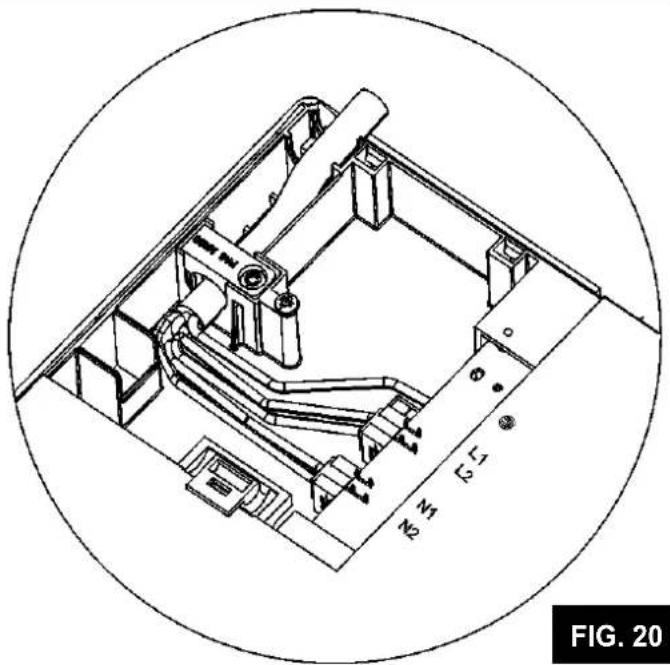
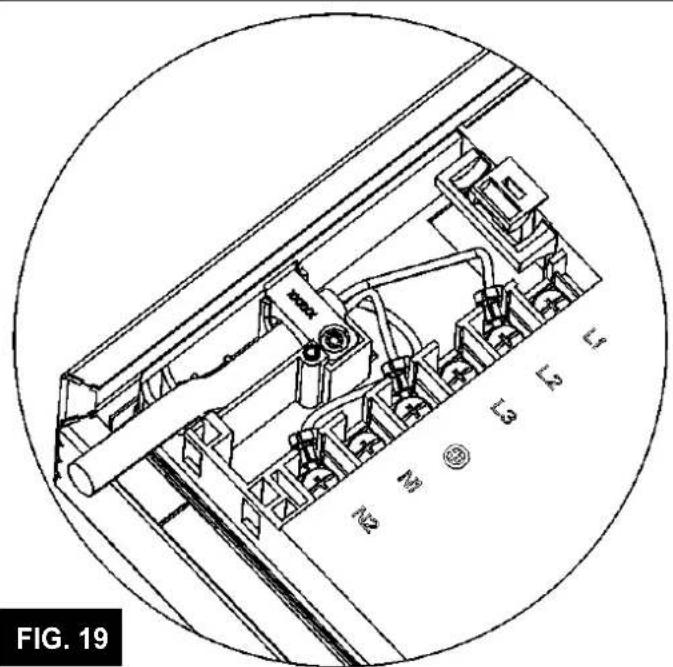
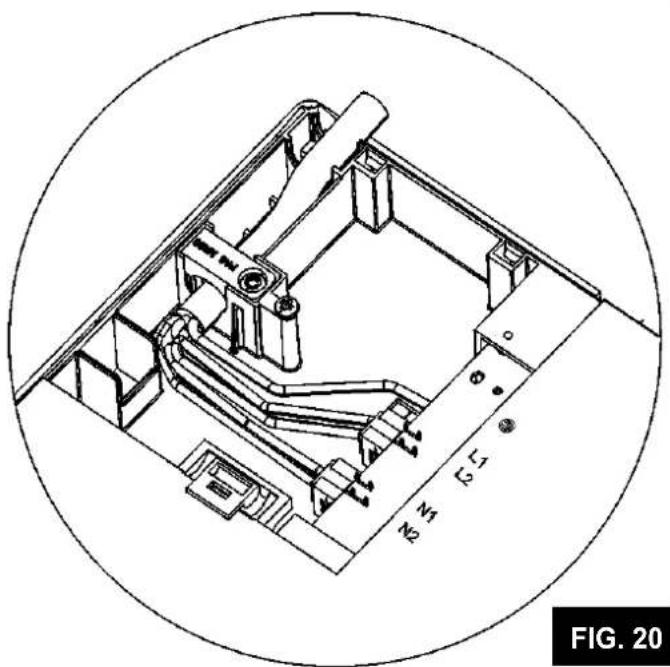
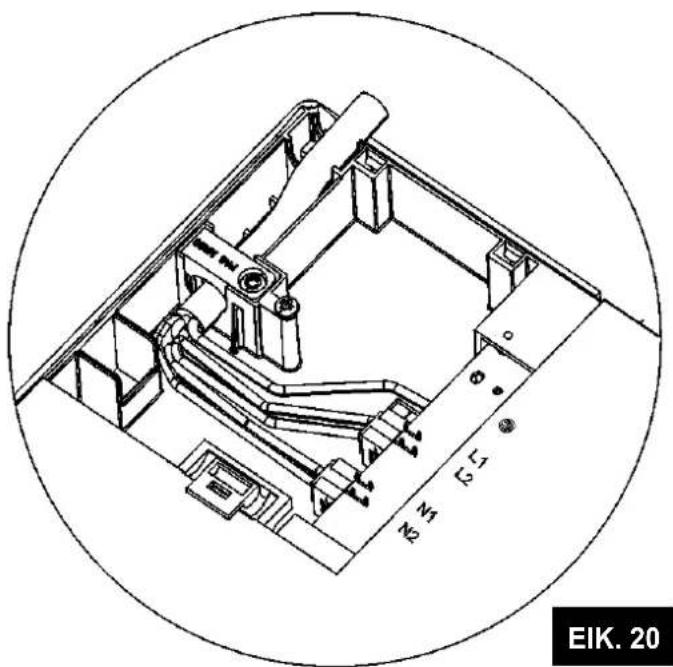
- fit a standard plug "C" suited to the load indicated on the data label to the cable. Fit the wires following figure 18 - 19 - 20, taking care of respecting the following correspondences:
Letter L (live) = brown wire;
Letter N (neutral) = blue wire;
earth symbol ≡ green - yellow wire.
- The power supply cable must be positioned so that no part of it is able to reach an temperature of 90 °C.
- Never use reductions, adapters of shunts for connection since these could create false contacts and lead to dangerous overheating.
- The outlet must be accessible after the built-in.
When the appliance is connected straight to the electricity main:
- install an omnipolar circuit-breaker between the appliance and the electricity main. This circuit-breaker should be sized, in compliance with current installation regulations.
- Remember that the earth wire must not be interrupted by the circuit-breaker.
- For optimum safety, the electrical connection may also be protected by a high sensitivity differential circuit-breaker.
You are strongly advised to fix the relative yellow-green earth wire to an efficient earthing system. Before performing any service on the electrical part of the appliance, it must absolutely be disconnected from the electrical network.
Always disconnect the appliance from the electricity main before making any adjustments. All seals must be replaced by the technician at the end of any adjustments or regulations.
Our burners do not require primary air adjustment.
9) TAPS
"Reduced rate" adjustment
- witch on the burner and turn the relative knob to the "Reduced rate" position (small flame fig. 17).
- Remove knob "M" (fig. 13 and 14) of the tap, which is simply pressed on to its rod. The bypass for minimal rate regulation can be: beside the tap (fig. 13) or inside the shaft. In any case, to access to regulation, it can be done trought the insertion of a small screwdriver "D" beside the tap (fig. 13) or in the hole "C" inside the shaft of the tap (fig 14). Turn the throttle screw to the right or left until the burner flame has been adequately regulated to the "Reduced rate"
CONVERSIONS
position.
The flame should not be too low: the lowest small flame should be continuous and steady. Re-assemble the several components.
It is understood that only burners operating with G20 gas should be subjected to the above mentioned adjustments. The screw must be fully locked when the burners operate with G30 or G31 (turn clockwise).
TAPS LUBRIFICATION Should a tap being blocked, do not force and ask for Technical Assistance.
In case of failure or cut in the cable, please move away from the cable and do not touch it. Moreover the device must be unplugged and not switched on. Call the nearest authorized service center to fix the problem.
10) REPLACING THE INJECTORS
The burners can be adapted to different types of gas by mounting injectors suited to the type of gas in question. To do this, first remove the burner tops using a an appropriate tool. Now unscrew injector (see fig. 15 - 16) and fit a injector corresponding to the utilized type of gas in its place.
It is advisable to strongly tighten the injector in place.
To access the injector, in ultra-fast burners with DCC AFB, remove the injector cover "A" (fig. 16).
After the injectors have been replaced, the burners must be regulated as explained in paragraphs 9. The technician must reset any seals on the regulating or pre-regulating devices.
The envelope with the injectors and the labels can be included in the kit, or at disposal to the authorized customer Service Centre.
For the sake of convenience, the nominal rate table also lists the heat inputs of the burners, the diameter of the injectors and the working pressures of the various types of gas.
TABLE
| BURNERS | GAS | NORMAL PRESSURE mbar | NORMAL RATE | INJECTOR DIAMETER Max100mm | NOMINAL HEAT INPUT (W) | |
| N° | DESCRIPTION | gr/h | l/h Min. | | | Gas Burner* |
| 1 | ULTRA RAPID (**DCC AFB) | G30 - BUTAN | 28 - 30 | 291 | | 100 H1 | 1800 | 4000 | 55,9 % |
| G31 - PROPAN | 37 | 286 | | 100 H1 | 1800 | 4000 |
| G20 - NATURAL | 20 | | 381 | 150 Z1 | 1800 | 4000 |
| 2 | RAPID | G30 - BUTAN | 28 - 30 | 204 | | 83 | 900 | 2800 | 58,0 % |
| G31 - PROPAN | 37 | 200 | | 83 | 900 | 2800 |
| G20 - NATURAL | 20 | | 267 | 117 S | 900 | 2800 |
| 3 | SEMIRAPID REDUCED | G30 - BUTAN | 28 - 30 | 102 | | 60 | 550 | 1400 | 60,0 % |
| G31 - PROPAN | 37 | 100 | | 60 | 550 | 1400 |
| G20 - NATURAL | 20 | | 133 | 88 Z | 550 | 1400 |
| 4 | SEMIRAPID | G30 - BUTAN | 28 - 30 | 127 | | 65 | 550 | 1750 | 63,0 % |
| G31 - PROPAN | 37 | 125 | | 65 | 550 | 1750 |
| G20 - NATURAL | 20 | | 167 | 97 Z | 550 | 1750 |
| 5 | AUXILIARY | G30 - BUTAN | 28 - 30 | 73 | | 50 | 450 | 1000 | N.A. |
| G31 - PROPAN | 37 | 71 | | 50 | 450 | 1000 |
| G20 - NATURAL | 20 | | 95 | 72 X | 450 | 1000 |
*In accordance with Regulation No. 66/2014 EU measures for the implementation of Directive 2009/125/EC, the performance (EEgas burner) was calculated according to EN 30-2-1 last review with the G20.
**DCC AFB: Air from the bottom (fig. 16).
INSTALLATION
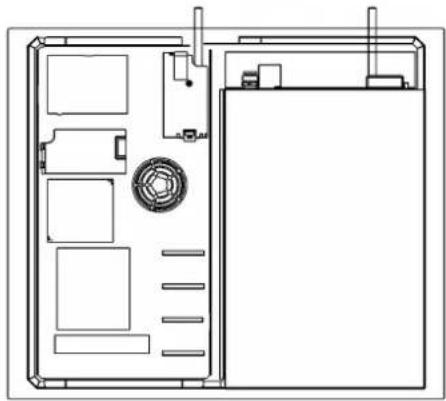
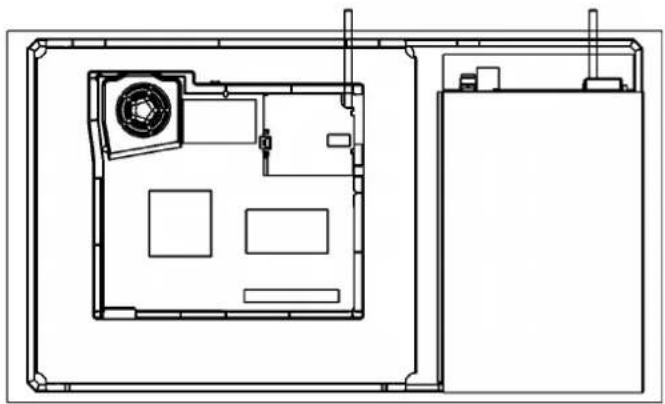
CABLE POSITION
60 cm. - 1 or 2 gas burners 90 cm.
2 gas burners
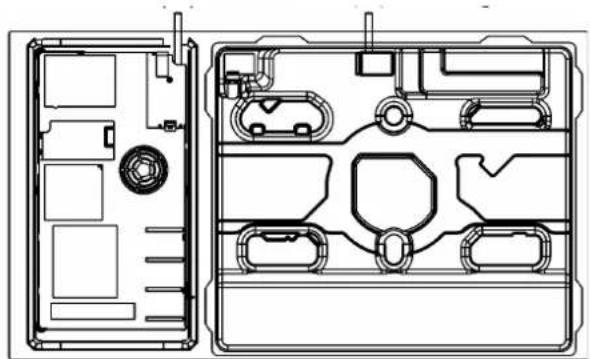
induction cable (A) induction cable (A) gas cable (B)(B) gas cable
natural_image
Technical line drawing of a device interior with compartments and a door (no text or symbols)
90 cm. - 4 gas burners
natural_image
Architectural floor plan showing room layout with furniture and fixtures (no text or labels)
clamp gas
induction cable (A) (B) gas cable
natural_image
Technical line drawing of a mechanical housing assembly (no text or symbols)
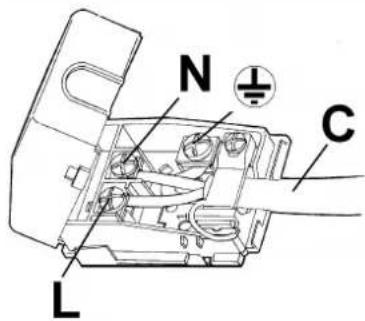
FIG. 18
induction clamp 2 elements induction clamp 3 - 4 elements
natural_image
Technical line drawing of a mechanical assembly with no visible text or symbols
natural_image
Technical line drawing of a mechanical assembly with labeled components (no readable text or symbols)
INSTALLATION
induction 2 elements
TYPE AND SECTION OF THE POWER CABLES (see figure above)
| | Type of cable | Monophase power supply220 V ~ 230 V ~ 220 - 240 V ~ 230 - 240 V ~ | Monophase power supply220 - 230 V ~ 220 - 240 V ~ | Three-phase power supply220 - 240 V 3 ~ |
| Hob gas B | | H05 RR-FH05 RN-FH07 RN-F | 3 × 0.75 mm^2 | | |
| Hob induction | A H | 05 RR-F 3 x 2.5 | mm | ^2 | 4 × 2.5 mm^2 |
ATTENTION!!!
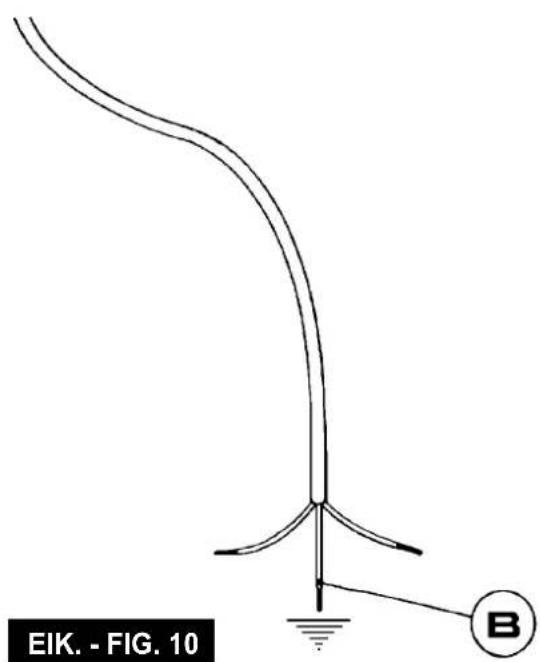
If the power supply cable is replaced, the installer should leave the ground wire (B) longer than the phase conductors (fig. 10) and comply with the recommendations given in paragraph 8.
induction 3 - 4 elements
TYPE AND SECTION OF THE POWER CABLES (see figure above)
| | Type of cable | Monophase power supply220 V ~ 230 V ~ 220 - 240 V ~ 230 - 240 V ~ | Monophase power supply220 - 230 V ~ 220 - 240 V ~ | Three-phase power supply380 - 415 V 3N ~ 220 - 240 V 3 ~ | Two-phase power supply380 - 415 V 2N ~ |
| Hob gas B | | H05 RR-FH05 RN-FH07 RN-F | 3 × 0.75 mm^2 | | | |
| Hob induction | A | H05 V2V2-F 5 | x 1.5 mm | ^2 (*) 5 | x 1.5 mm ^2 (*) 5 | x 1.5 mm ^2 (*) |
(\*) Taking into account the contemporaneity factor
ATTENTION!!!
If the power supply cable is replaced, the installer should leave the ground wire (B) longer than the phase conductors (fig. 10) and comply with the recommendations given in paragraph 8.
TROUBLESHOOTING TABLE
FOR USERS
| Problems Causes Solutions |
| The gas ring burns unevenly | Burner crown maybe occluded by dirtyWrong gas regulation | Clean the burner crown with metal cleaning agentCall the assistance |
| Burner flame suddenly changes Incorrect burner components assembly | Assemble the burner components correctly |
| Ignition of burners takes excessively long | Incorrect burner components assembly | Assemble the burner components correctly |
| The flame goes off after ignition | Early release of knob. Knob is not pushed in firmlyUncorrect pan dimensionThermocouple problems | Keep the knob pressed longer. Before releasing the knob, give it one final solid pushIf the flame goes out with a pan larger than those indicated in the booklet, the user must use the appropriate "paellero" gridMove the thermocoupleCall the assistance |
| The colour of the pan support has changed | Normal situation, caused by the high temperature | Clean the pan support with metal cleaning agents |
| The burner fails to ignite after pressing the knob (the spark-plug emit the spark) | Lack of gas or dirty on spark-plug Clean the spark-plug like described in the cleaning chapter on instruction manual |
| The burner fails to ignite after pressing the knob (the spark-plug do not emit the spark) | Spark-plug or ignition generator problems | Call the assistance |
| The ignition generator does not work | Lack of electricityIncorrect ignition generator assembly or break | Check that the plug is inserted. Verify that the counter is turned on.Call the assistance |
| The spark-plug emit continuously emits the spark | HumidityIncorrect micro-switch assembly or break | Remove the power for 24 hours and allow the top to dry; verify that all the bushings are mounted correctlyCall the assistance |
TECHNICAL ASSISTANCE AND SPARE PARTS
Before leaving the factory, this appliance will have been tested and regulated by expert and specialized personnel in order to guarantee the best performances.
Any repairs or adjustments which may be subsequently required may only be carried out by qualified personnel with the utmost care and attention.
For this reason, always contact your Dealer or our nearest After Sales Service Center whenever repairs or adjustments are required, specifying the type of fault and the model of the appliance in your possession.
Please also note that genuine spare parts are only available from our After Sales Service Centers and authorized retail outlets.
The above data are printed on the data label put on the inferior part of the appliance and on the packing label.
The above informations give to the technical assistant the possibility to get fit spare parts and a heaven-sent intervention. We suggest to fill the table below.
MARK:
MODEL:
SERIES:
WARNING: MAINTENANCE MUST ONLY BE PERFORMED BY AUTHORISED PERSONS.
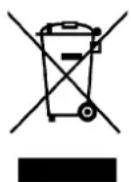
This appliance is marked according to the European directive 2012/19/EC on Waste Electrical and Electronic Equipment (WEEE).
This guideline is the frame of a European-wide validity of return and recycling on Waste Electrical and Electronic Equipment.
MATIERES:
pag. 72 description de table de cuisson
pag. 74 avertissements de sécurité importants
pag. 75 utilisation bruleurs
pag. 76 avertissements de sécurité induction
pag. 77 installation induction
pag. 78 utilisation induction
pag. 92 nettoyage - installation
pag. 93 fixation de la table de cuisson
pag. 94 ventilation, aération - raccordment au gaz
pag. 95 branchement eletrique, reglage robinets
pag. 98 transformation
pag. 99 service apres-vente
JZC 94313 A JZC 95314 A
JZC 96324 A JZC 96342 A
JZC 96342 B
DESCRIPTION DES TABLES DE CUISSON
natural_image
Two crossed black metal tools on a plain background (no text or symbols)
81216133
ROBINETS LUBRIFICATION
10) REMPLACEMENT DES BUSES
natural_image
Technical line drawing of a device rear panel with internal compartments and a central circular component (no text or symbols)
natural_image
Architectural floor plan showing room layout with furniture and fixtures (no text or labels)
gaz pince
natural_image
Technical line drawing of a device casing with internal compartments and housing (no text or symbols)
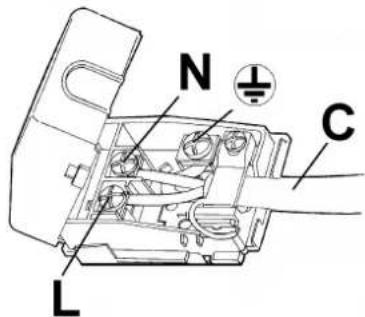
FIG. 18
natural_image
Technical line drawing of a mechanical assembly with no visible text or symbols

natural_image
Technical line drawing of a mechanical assembly with labeled components (L1, L2, N1, N2), no readable text or symbols beyond labels
INSTALLATION
induction 2 éléments
JZC 94313 A JZC 95314 A
JZC 96324 A JZC 96342 A
JZC 96342 B
natural_image
Two crossed black metal tools on a plain background (no text or symbols)
81216133
ΠΡΟΕΙΔΟΠΟΙΗΣΕΙΣ:
natural_image
Technical line drawing of a mechanical assembly with no visible text or symbols
natural_image
Technical line drawing of a mechanical assembly with labeled components (N1, N2, L1, L2) and no readable text or symbols beyond labels.
ΕΓΚΑΤΑΣΤΑΣΗ
JZC 94313 A JZC 95314 A
JZC 96324 A JZC 96342 A
JZC 96342 B
natural_image
Two crossed black metal tools on a plain background (no text or symbols)
81216133
ADVERTÊNCIAS:
natural_image
Technical line drawing of a device interior with labeled compartments and a central circular component (no text or symbols)
natural_image
Architectural floor plan showing room layout with furniture and fixtures (no text or labels)
braçadeira de gás
natural_image
Technical line drawing of a mechanical housing assembly (no text or symbols)
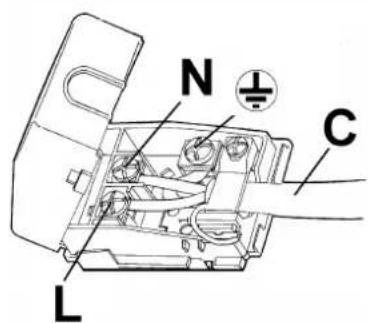
FIG. 18
natural_image
Technical line drawing of a mechanical assembly with labeled components (N1, N2, L1, L2) and no readable text or symbols beyond labels.
INSTALAÇÃO
indução 2 elementos
natural_image
World map silhouette showing continents and countries with no text or labels
www.teka.com
Teka Industrial, S.A.
C/Cajo,17
39011 Santander
+34 942 355 050