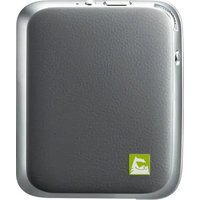
Cam Plus CBG-720 - Mobile phone accessory LG - Free user manual and instructions
Find the device manual for free Cam Plus CBG-720 LG in PDF.


| Product Type | Handle and extra battery module for LG G5 camera |
| Brand | LG |
| Model | Cam Plus CBG-720 |
| Dimensions | 73.9 mm x 61.4 mm x 15.9 mm |
| Weight | 55.4 g |
| Battery Type | Lithium-ion 1200 mAh |
| Supply Voltage | 5 V ±10% / 9 V ±10% |
| Charging Time | Less than 200 minutes |
| Consumption (not charging) | 25 mA |
| Consumption while charging | 500 mA |
| Output Current | 500 mA |
| Connection Type | USB 2.0 Type C |
| Main Functions | Shutter, zoom in/out, video recording, half-press focus, extra battery, LED charging indicator |
| Compatibility | LG G5 |
| Required Operating System | Android 6.0 (M OS) or later (for firmware update) |
| Operating Temperature | -20 °C to 40 °C |
| Maintenance | Wipe with a soft cloth |
| Warranty | Limited 1 year, repair or replacement by LG |
| Light Indicators | Red LED when charging, green when charged; red blinking if battery ≤5% |
| Package Contents | LG CAM Plus module, user guide |
Frequently Asked Questions - Cam Plus CBG-720 LG
User questions about Cam Plus CBG-720 LG
0 question about this device. Answer the ones you know or ask your own.
Ask a new question about this device
Download the instructions for your Mobile phone accessory in PDF format for free! Find your manual Cam Plus CBG-720 - LG and take your electronic device back in hand. On this page are published all the documents necessary for the use of your device. Cam Plus CBG-720 by LG.
USER MANUAL Cam Plus CBG-720 LG
Compatible with G5 in Canada and with AT&T-powered G5 only

REV 2.0 CA
LG
Life's Good
User Guide
LG
CAM Plus
CBG-720
▲ WARNING: This product contains chemicals known to the State of California to cause cancer and birth defects or reproductive harm.
Wash hands after handling.
Contents
Product Overview....3
Important Safety Information ....4
Product Components....7
Product Description....8
Connections 9
Instructions....12
Specifications and Features....14
Limited Warranty Statement (USA)....15
Limited Warranty Statement (Canada)....17
© 2016 LG Electronics Inc. ALL RIGHTS RESERVED. LG, LG Life's Good, and the LG logo are registered trademarks of LG Corp. All other trademarks and trade names are property of their respective owners. Design, features, functionality, and other product specifications are subject to change without notice.
Product Overview
The LG CAM Plus is a camera grip and extra battery that can be attached to the bottom of your LG G5.
- With the LG CAM Plus, you can use your LG G5 like a digital camera. Use it to take pictures by pressing the shutter button and zooming in and out. Half-press the shutter button to use the half-shutter function.
- The LG CAM Plus is equipped with a 1,200 mAh battery.
Note: Please read all information carefully prior to using the LG CAM Plus in order to enjoy the best performance and prevent damage to the product.
Important Safety Information
• Always use genuine products. Do not use this product for any unintended purpose.
- If you insert a module that is not compatible with your service provider, for example, a module bought from another service provider or in an area that is not covered by your service provider, your device does not operate normally.
- Applying heavy pressure to the product may damage it.
- Do not use or store the product in extreme temperatures. Do not leave the product in direct sunlight for long periods of time. Doing so may cause damage or an explosion.
- Use a soft cloth to wipe the product.
- Do not place the product near metal objects, such as necklaces, keys, coins, nails, or clocks. In the case of a short-circuit, there is also the risk of an explosion.
- Keep the product out of the reach of small children and pets. Do not put the product in your mouth or subject it to severe shock. There is a risk of electric shock, an explosion, or suffocation.
- Do not connect or insert conductive materials (metal pieces, pencil leads, etc.) into the connectors.
- Do not cover or wrap the product with a blanket while using the product.
- The product may become hot after long periods of use. Avoid touching the product when it becomes hot as it may cause a low-temperature burn.
- Do not dispose of the product as household waste. Doing so may cause a fire or damage the environment.
- Do not disassemble or open, crush, bend, or deform, puncture, or shred.
- Do not modify or remanufacture, attempt to insert foreign objects into the battery, immerse or expose to water or other liquids, explosion, or other hazard.
- Only use the battery for the system for which it is specified.
- Only use the battery with a charging system that has been qualified with the system per CTIA Certification Requirements for Battery System Compliance to IEEE1725. Use of an unqualified battery or charger may present a risk of fire, explosion, leakage, or other hazard.
- Do not short-circuit a battery or allow metallic conductive objects to contact battery terminals.
- Replace the battery only with another battery that has been qualified with the system per this standard, IEEE-Std-1725. Use of an unqualified battery may present a risk of fire, explosion, eakage, or other hazard. Only authorized service providers shall replace battery (If the battery is non-user replaceable.)
- Battery usage by children should be supervised.
- Avoid dropping the device or battery. If the device or battery is dropped, especially on a hard surface, and the user suspects damage, take it to a service center for inspection.
- Improper battery use may result in a fire, explosion, or other hazard.
Part15.19 statement
This device complies with part 15 of the FCC Rules. Operation is subject to the following two conditions:
(1) This device may not cause harmful interference, and
(2) this device must accept any interference received, including interference that may cause undesired operation.
Part15.21 statement
Changes or modifications not expressly approved by the manufacturer (or party responsible) for compliance could void the user's authority to operate the equipment.
Part15.105 statement
This equipment has been tested and found to comply with the limits for a Class B digital device, pursuant to part 15 of the FCC Rules. These limits are designed to provide reasonable protection against harmful interference in a residential installation. This equipment generates, uses and can radiate radio frequency energy and, if not installed and used in accordance with the instructions, may cause harmful interference to radio communications. However, there is no guarantee that interference will not occur in a particular installation. If this equipment does cause harmful interference to radio or television reception, which can be determined by turning the equipment off and on, the user is encouraged to try to correct the interference by one or more of the following measures:
- Reorient or relocate the receiving antenna.
- Increase the separation between the equipment and receiver.
- Consult the dealer or an experienced radio/TV technician for help.
- Connect the equipment into an outlet on a circuit different from that to which the receiver is connected.
Product Components
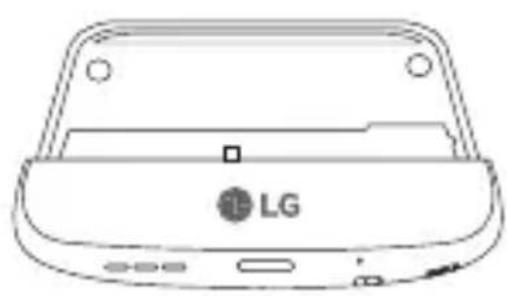
natural_image
Line drawing of a LG device casing with ports and buttons (no text or symbols beyond branding)LG CAM Plus User Guide
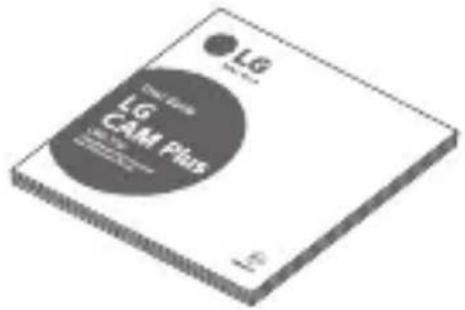
- If there are any missing components, contact the retailer where you purchased the product.
- Some items are subject to change without prior notice depending on the circumstances.
- The appearance and specifications of the product are subject to change without prior notice to improve performance.
Product Description
Front
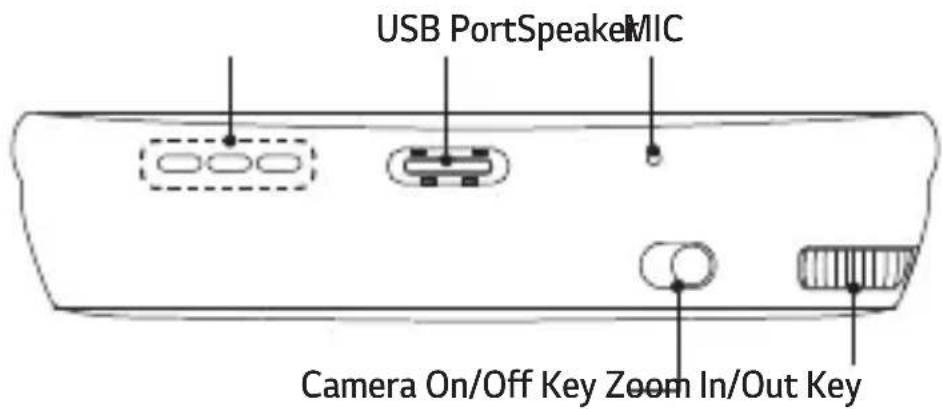
Side
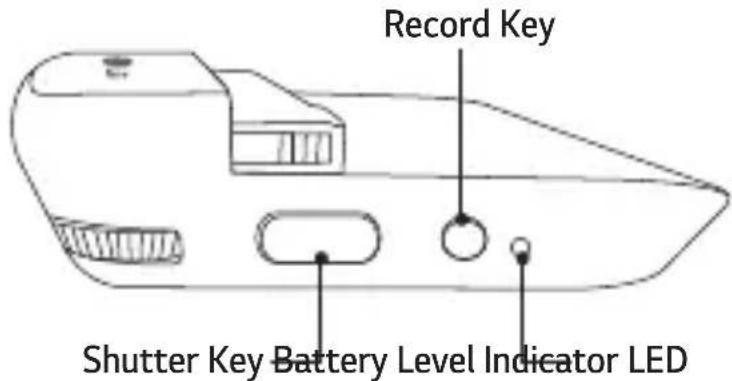
Some functions may not be available depending on the product specifications.
Connections
Inserting the Battery
1 Align the arrows on both the battery and the module and firmly connect the battery terminals to the module.
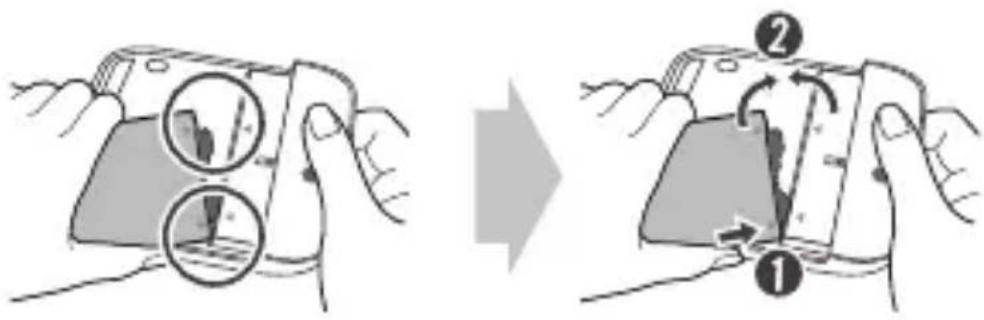
2 Align the battery with the lower edge and carefully slide the module back into the device.
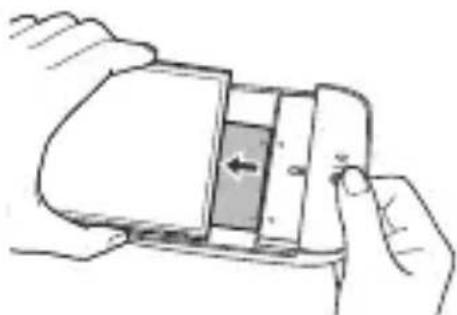
natural_image
Illustration of hands holding a smartphone with an open panel showing internal components (no text or symbols)- Never press the Module Eject Key when inserting the module into the device. - When inserting the battery into the device, make sure the battery is attached to the module.
Removing the Battery
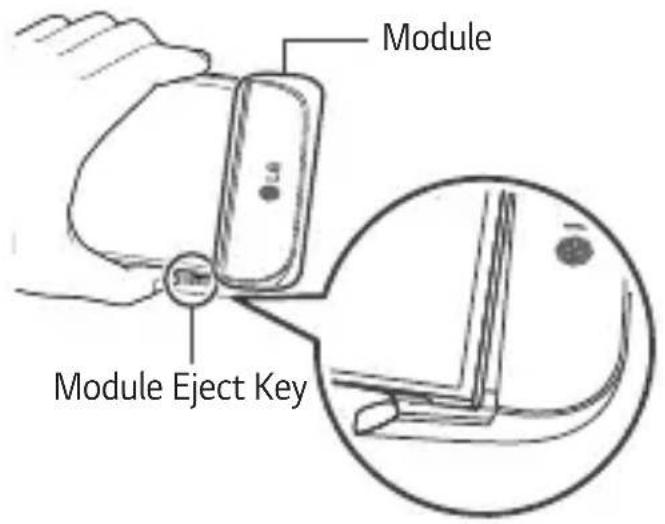
1 Press the Module Eject Key to partly eject the module from the device.
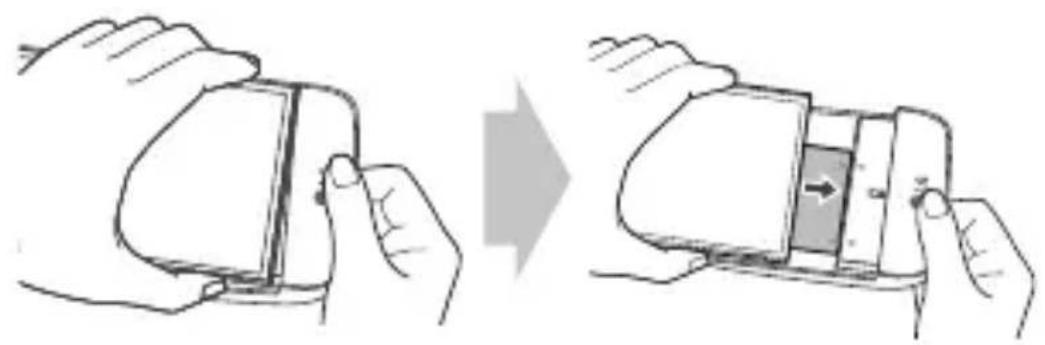
2 Grab the middle of the ejected module and pull it out.
natural_image
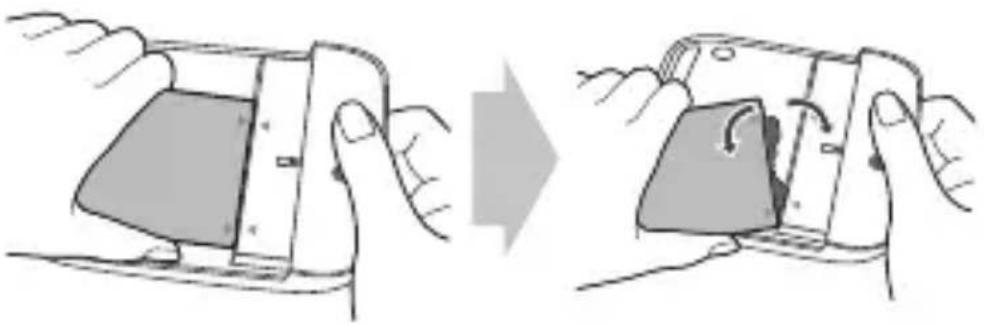
Illustration of a smartphone being held, showing the blade and handle (no text or symbols)3 Hold the battery and module with both hands and separate them from one another in an outward arc (as indicated below) to disconnect the battery terminals.
natural_image
Illustration of a smartphone being held, showing the blade and handle (no text or symbols)- Do not detach the module while it is in use.
- Immediately attach the module to the main unit if it becomes loose or is detached during use.
- Be careful to not hurt your hands or fingers when attaching or detaching the module.
- Be careful to not be injured by the edges of the product or the module.
- Make sure the battery and the module are properly inserted. Otherwise, the product may be damaged or fail to turn on.
- Failing to follow the instructions in this user guide may damage the product.
Instructions
- This product will not operate normally if your G5 and LG CAM Plus are supported by different countries or operators.
- The LG CAM Plus cannot be operated while the USB is connected (data communication and charging are still available).
- If you press the Camera On/Off, Shutter, or Recording buttons, the low-capacity battery in the LG CAM Plus will charge your LG G5 for some time. The charging feature is not available when the LG G5's battery is completely empty (power off).
- OTG devices that are connected to the LG CAM Plus will not be recognized.
- The product may be not compatible with camera apps available on online marketplaces.
LED Notifications
- The LED light will turn red while charging, and it will turn green when fully charged.
- After the LG CAM Plus is connected to the phone, the Battery Level Indicator LED will turn red if the battery level is at 10% or less, and the LED will blink if the battery level is at 5% or less. (The LED will be off if it is at 11% or more.)
About Firmware Upgrades
- Firmware upgrades are available through CAM Plus Manager, which can be downloaded and installed from Google Play™ Store (Supported OS: Android™ 6.0 [Marshmallow OS] or above).
- Firmware upgrade is also available using the LG Friends Manager app.
Information about Burst Shot feature support
The following Burst Shot feature using the LG CAM Plus will be made available through a future G5 software upgrade.
- Burst Shot
You can take continuous shots to create moving photos.
Tap and hold ☐ on the auto mode screen, or tap and hold the Shutter key on the LG CAM Plus.
Continuous shots are taken at a fast speed while for the Shutter key is held down.
Specifications and Features
| USB Type USB 2.0 (Type-C) | |
| Battery Li-ion 1200 mAh | |
| Charging Time | Less than 200 minutes |
| Voltage | 5V ±10%, 9V ±10% |
| Current Consumption | 25 mA (no Charging), 1 mA (Power Off) |
| Charging Consumption | 500 mA |
| Output Consumption | 500 mA |
| Audio Speaker and Digital MIC | |
| Sound Pressure | 1 m Sound Pressure 60 dB ↑ (100%) *Based on full charge |
| Antenna GSM/CDMA, WCDMA, LTE ^TM | |
| LED Battery Indicator | |
| Operating Temperature | -20 °C ~ 40 °C |
| Dimensions/Weight | 2.9" x 2.4" x .6" / 2 oz73.9 mm X 61.4 mm X 15.9 mm / 55.4 g |
Limited Warranty Statement (USA)
1. WHAT THIS WARRANTY COVERS:
LG offers you a limited warranty that the enclosed unit and its enclosed accessories will be free from defects in material and workmanship, according to the following terms and conditions:
(1) The limited warranty for the product extends for TWELVE (12) MONTHS beginning on the date of purchase of the product with valid proof of purchase, or absent valid proof of purchase, FIFTEEN (15) MONTHS from date of manufacture as determined by the unit's manufacture date code.
(2) The limited warranty extends only to the original purchaser of the product and is not assignable or transferable to any subsequent purchaser/end user.
(3) This warranty is good only to the original purchaser of the product during the warranty period as long as it is in the U.S, including Alaska, Hawaii, U.S. Territories, and Canada.
(4) The external housing and cosmetic parts shall be free of defects at the time of shipment and; therefore, shall not be covered under these limited warranty terms.
(5) Upon request from LG, the consumer must provide information to reasonably prove the date of purchase.
(6) The customer shall bear the cost of shipping the product to the Customer Service Department of LG. LG shall bear the cost of shipping the product back to the consumer after the completion of service under this limited warranty.
2. WHAT THIS WARRANTY DOES NOT COVERS:
(1) Defects or damages resulting from use of the product in other than its normal and customary manner.
(2) Defects or damages from abnormal use, abnormal conditions, improper storage, exposure to moisture or dampness, unauthorized modifications, unauthorized connections, unauthorized repair, misuse, neglect, abuse, accident, alteration, improper installation, or other acts which are not the fault of LG, including damage caused by shipping, blown fuses, spills of food, or liquid.
(3) Breakage or damage to antennas unless caused directly by defects in material or workmanship.
(4) Alleged product defects or malfunction of which the Customer Service Department at LG was not not notified by consumer during the applicable limited warranty period.
(5) Products which have had the serial number removed or made illegible.
(6) This limited warranty is in lieu of all other warranties, express or implied either in fact or by operations of law, statutory or otherwise, including, but not limited to any implied warranty of marketability or fitness for a particular use.
(7) Damage resulting from use of non-LG approved accessories.
(8) All plastic surfaces and all other externally exposed parts that are scratched or damaged due to normal customer use.
(9) Products operated outside published maximum ratings.
(10) Products used or obtained in a rental program.
(11) Consumables (such as fuses).
3. STATE LAW RIGHTS:
No other express warranty is applicable to this product. THE DURATION OF ANY IMPLIED WARRANTIES, INCLUDING THE IMPLIED WARRANTY OF MARKETABILITY OR MERCHANTABILITY OR FITNESS FOR A PARTICULAR PURPOSE, IS LIMITED TO THE DURATION OF THE EXPRESS WARRANTY HEREIN. LG SHALL NOT BE LIABLE FOR THE LOSS OF THE USE OF THE PRODUCT, INCONVENIENCE, LOSS OR ANY OTHER DAMAGES, DIRECT OR CONSEQUENTIAL, ARISING OUT OF THE USE OF, OR INABILITY TO USE, THIS PRODUCT OR FOR ANY BREACH OF ANY EXPRESS OR IMPLIED WARRANTY, INCLUDING THE IMPLIED WARRANTY OF MARKETABILITY OR MERCHANTABILITY OR FITNESS FOR A PARTICULAR PURPOSE APPLICABLE TO THIS PRODUCT.
Some states do not allow the exclusive limitation of incidental or consequential damages or limitations on how long an implied warranty lasts; so these limitations or exclusions may not apply to you. This warranty gives you specific legal rights and you may also have other rights which vary from state to state.
4. HOW TO GET WARRANTY SERVICE:
To obtain warranty service, please call or fax to the following telephone numbers from anywhere in the continental United States:
Tel. 1-800-793-8896 or Fax. 1-800-448-4026
Or visit http://www.lg.com/us/support. Correspondence may also be mailed to:
LG Electronics Service–Mobile Handsets
P.O. Box 240007, Huntsville, AL 35824
DO NOT RETURN YOUR PRODUCT TO THE ABOVE ADDRESS.
Please call or write for the location of the LG authorized service center nearest you and for the procedures for obtaining warranty claims.
Limited Warranty Statement (Canada)
1. WHAT THIS WARRANTY COVERS:
LG offers you a limited warranty that the enclosed subscriber unit and its enclosed accessories will be free from defects in material and workmanship, according to the following terms and conditions:
(1) The limited warranty for the product extends for ONE (1) year beginning on the date of purchase of the product by the original end user.
(2) The limited warranty extends only to the original end user of the product and is not assignable or transferable to any subsequent purchaser/end user.
(3) This warranty is good only to the original end user of the product during the warranty period as long as it is in Canada.
(4) Upon request from LG, the consumer must provide information to reasonably prove the date of purchase.
(5) During the applicable warranty period, LG will repair or replace at LG's sole option, without charge to the original end user, any defective component part of the phone or accessory.
(6) LG may use rebuilt, reconditioned or new parts or components when repairing any product or replace a product with a rebuilt, reconditioned or new product.
2. WHAT THIS WARRANTY DOES NOT COVER:
(1) Defects or damages resulting from use of the product in other than its normal and customary manner.
(2) Defects or damages from abnormal use, abnormal conditions, improper storage, exposure to moisture or dampness, unauthorized modifications, unauthorized connections, unauthorized repair, misuse, neglect, abuse, accident, alteration, improper installation or other acts which are not the fault of LG, including damage caused by spills of food or liquids.
(3) Breakage or damage to antennas unless caused directly by defects in material or workmanship.
(4) The fact that the Customer Service Department at LG was not notified by the original end user of the alleged defect or malfunction of the product, during the warranty period.
(5) Products which have had their serial numbers removed or made illegible.
(6) Damage resulting from use of non-LG approved accessories.
(7) All plastic surfaces and all other externally exposed parts that are scratched or damaged due to normal customer use.
(8) Products serviced by non-authorized persons or companies.
Notes:
(1) This limited warranty supersedes all other warranties, expressed or implied either in fact or by operations of law, statutory or otherwise, including, but not limited to any implied warranty of merchantability or fitness for a particular purpose.
(2) Shipping damage is the sole responsibility of the shipping company.
3. EXCLUSION OF LIABILITY:
No other express warranty is applicable to this product.
THE DURATION OF ANY IMPLIED WARRANTIES, INCLUDING THE IMPLIED WARRANTY OF MARKETABILITY, IS LIMITED TO THE DURATION OF THE EXPRESS WARRANTY HEREIN.
LG ELECTRONICS CANADA, INC. SHALL NOT BE LIABLE FOR THE LOSS OF THE USE OF THE PRODUCT, INCONVENIENCE, LOSS OR ANY OTHER DAMAGES, DIRECT OR CONSEQUENTIAL, ARISING OUT OF THE USE OF, OR INABILITY TO USE, THIS PRODUCT OR FOR ANY BREACH OF ANY EXPRESS OR IMPLIED WARRANTY, INCLUDING THE IMPLIED WARRANTY OF MARKETABILITY APPLICABLE TO THIS PRODUCT.
4. HOW TO GET WARRANTY SERVICE:
To obtain warranty service, please call the following telephone number from anywhere in Canada: LG Electronics Canada, Inc.
Tel. 1-888-LG-Canada (1-888-542-2623)
http://www.lg.com/ca_en (see links to "Support > Mobile phone support")


Life's Good
Electronics Canada Inc. North York, Ontario
LG
Life's Good
Guía del usuario
LG
CAM Plus
CBG-720
natural_image
Line drawing of a LG device casing with ports and buttons (no text or symbols beyond branding)natural_image
Illustration of hands holding a smartphone with an open screen showing internal components (no text or symbols)natural_image
Illustration of a smartphone being held, showing the blade and handle (no text or symbols)natural_image
Illustration of a smartphone being held, showing the blade and handle (no text or symbols)LG Electronics Service-Mobile Handsets, P.O. Box 240007, Huntsville, AL 35824
natural_image
Line drawing of a LG device casing with ports and buttons (no text or symbols beyond branding)
natural_image
Illustration of a hand holding a smartphone with an open screen showing internal components (no text or symbols)natural_image
Illustration of a smartphone being held, showing the blade and handle (no text or symbols)natural_image
Illustration of a smartphone being held, showing the blade and handle (no text or symbols)LG Electronics Canada, Inc.
Tél. 1-888-LG-Canada (1-888-542-2623)
Electronics Canada Inc. North York, Ontario

www.lg.com
Any modifications or changes to this manual due to typographical errors or inaccuracies of stated information shall only be made by LG Electronics Inc.
Printed in Korea
- Contents
- Product Overview
- Important Safety Information
- Part15.19 statement
- Part15.21 statement
- Part15.105 statement
- Product Components
- Product Description
- Connections
- Inserting the Battery
- Removing the Battery
- Instructions
- LED Notifications
- About Firmware Upgrades
- Information about Burst Shot feature support
- - Burst Shot
- Limited Warranty Statement (USA)
- WHAT THIS WARRANTY COVERS:
- WHAT THIS WARRANTY DOES NOT COVERS:
- STATE LAW RIGHTS:
- HOW TO GET WARRANTY SERVICE:
- DO NOT RETURN YOUR PRODUCT TO THE ABOVE ADDRESS.
- Limited Warranty Statement (Canada)
- WHAT THIS WARRANTY DOES NOT COVER:
- Notes:
- EXCLUSION OF LIABILITY:
Brand : LG
Model : Cam Plus CBG-720
Category : Mobile phone accessory