Specialist FC9114 - Vacuum Cleaner PHILIPS - Free user manual and instructions
Find the device manual for free Specialist FC9114 PHILIPS in PDF.


User questions about Specialist FC9114 PHILIPS
0 question about this device. Answer the ones you know or ask your own.
Ask a new question about this device
Download the instructions for your Vacuum Cleaner in PDF format for free! Find your manual Specialist FC9114 - PHILIPS and take your electronic device back in hand. On this page are published all the documents necessary for the use of your device. Specialist FC9114 by PHILIPS.
USER MANUAL Specialist FC9114 PHILIPS
natural_image
Close-up of a mechanical component with a central shaft and four circular features (no visible text or symbols)Reach & Clean ^TM
Specialist
natural_image
Black-and-white photo of a vacuum cleaner on a textured floor next to a white appliance (no visible text or symbols)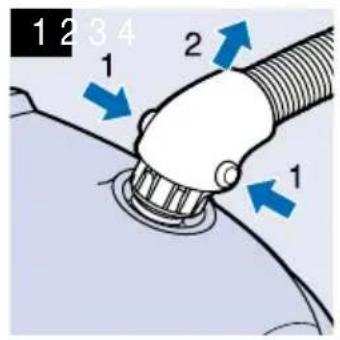
text_image
1 2 3 4 1 2 1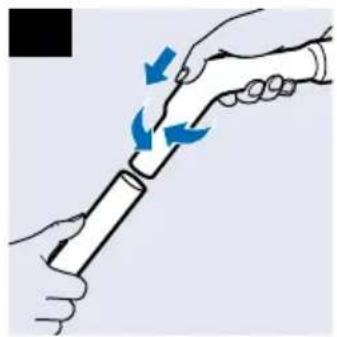
natural_image
Illustration of two hands holding a cylindrical object with blue arrows indicating motion or force (no text or symbols)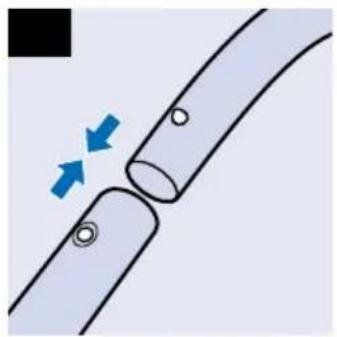
natural_image
Diagram of two curved pipes with blue arrows indicating flow direction (no text or symbols)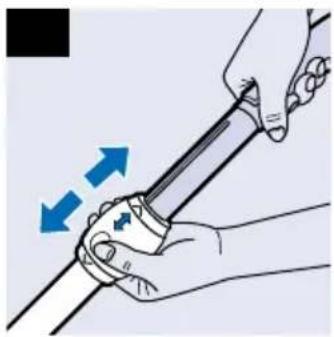
natural_image
Illustration of hands holding a tool with blue arrows indicating motion or force direction (no text or symbols)
text_image
5 6 7 8 360°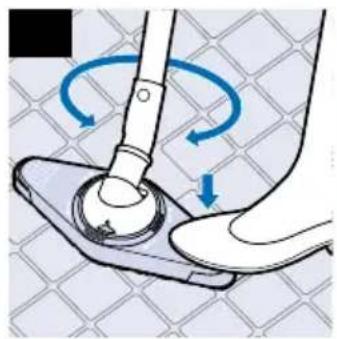
natural_image
Illustration of a hand using a tool to lift a circular component on a base, with blue arrows indicating rotational motion (no text or symbols)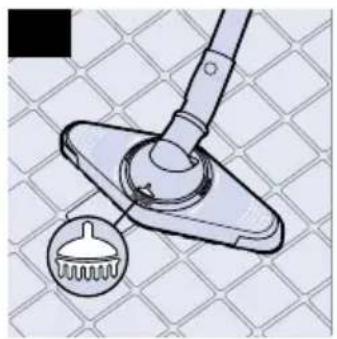
natural_image
Diagram of a mechanical clamp or lever mechanism on a grid-patterned surface, with a magnified inset showing a circular component (no text or symbols present)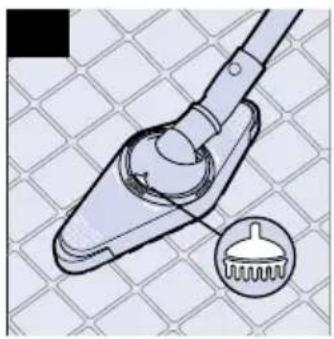
natural_image
Diagram of a mechanical tool with a magnified inset showing a circular detail (no text or symbols)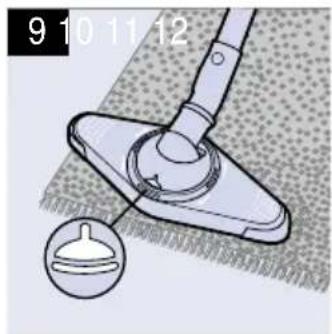
natural_image
Diagram of a cleaning or repair device with a handle and circular component, showing no text or symbols.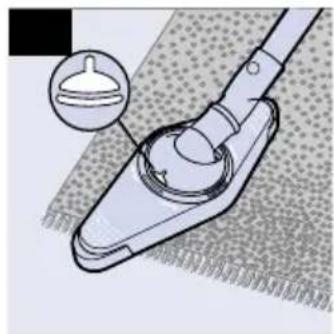
natural_image
Diagram of a mechanical tool with a circular component and an inset showing a small circular feature (no text or symbols)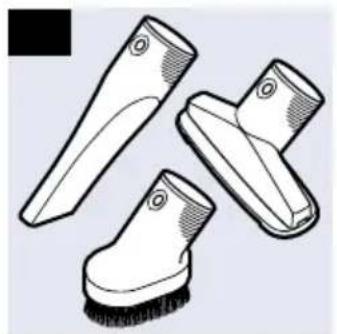
natural_image
Illustration of three different cleaning brush tips (no text or symbols)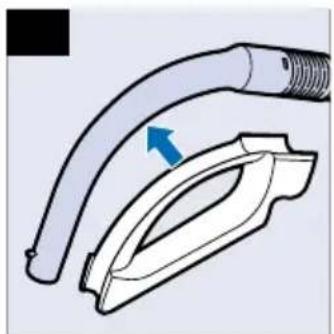
natural_image
Diagram of a hairless tool with a curved tube and handle, showing a blue arrow indicating direction (no text or symbols present)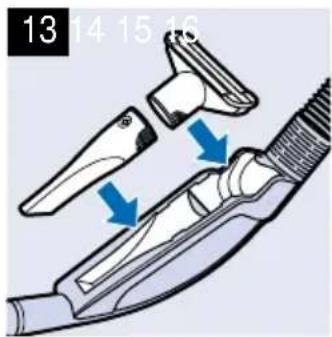
text_image
13 14 15 16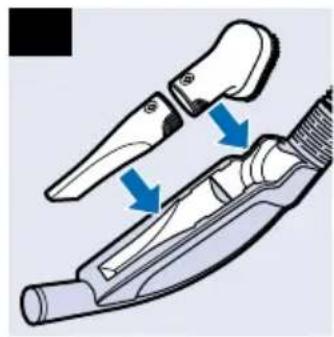
natural_image
Diagram of a hairpin tool with blue arrows indicating movement or force (no text or symbols present)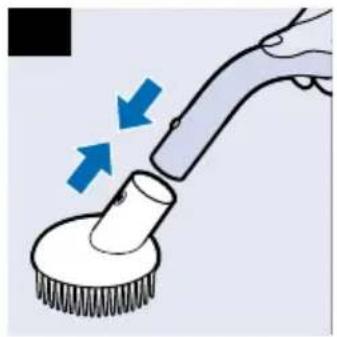
natural_image
Illustration of a cleaning brush applying paint to a circular brush (no text or symbols)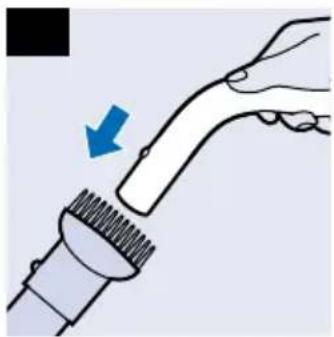
natural_image
Illustration of a hand holding a brush applying material to a brush tip, with a blue arrow indicating direction (no text or symbols)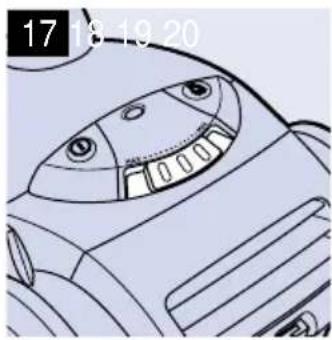
natural_image
Illustration of a cartoon character's face with large eyes and mouth, no text or symbols present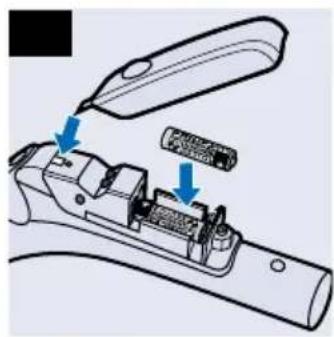
natural_image
Technical illustration of a mechanical device with blue arrows indicating component placement (no text or symbols)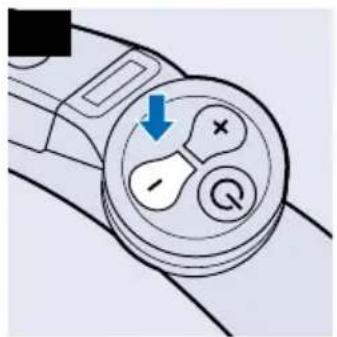
text_image
Diagram of a device control knob with labeled buttons and a blue arrow indicating action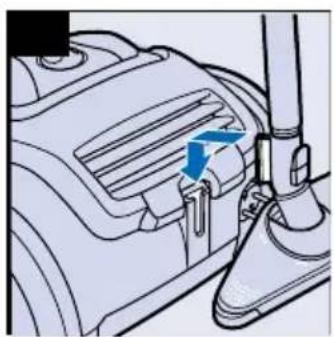
natural_image
Mechanical component diagram showing a valve or actuator with blue arrows indicating direction (no text or symbols present)ENGLISH 6
DEUTSCH 10
FRANÇAIS 14
NEDERLANDS 18
ESPAÑOL 22
ITALIANO 26
PORTUGUÊS 30
NORSK 34
SVENSKA 38
SUOMI 42
DANSK 46
ΕΛΛΗΝΙΚΑ 50
TÜRKÇE 55
ENGLISH
Important
- Only use Philips s-bag™ double-layer paper dustbags (type FC8021), or the cotton dustbag provided (some versions only).
- Never use the vacuum cleaner to suck up water or any other liquid. Never suck up ashes until they are cold.
- When the vacuum cleaner is used to suck up fine dust, the pores of the dustbag may become clogged, causing the passage of air through the dustbag to become obstructed. As a result, the dustbag-full indicator will indicate that the dustbag needs to be replaced, even though the dustbag is not full at all.
- Never use the appliance without the Motor Protection Filter. This could damage the motor and shorten the life of the appliance.
Connecting accessories
Hose
1 To connect the hose, push it firmly into the appliance (you will hear a click).
2 To disconnect the hose, push the buttons on the swivel and pull the hose out of the appliance.(fig.1)
Tube
There are two types of coupling systems. Depending on the type, this appliance is equipped with one of them. See the systems displayed in the following pictures.
Conical coupling (specific types only)
- Connect the tubes to the handgrip by inserting the narrow section into the wider section while turning it a little.(fig.2)
To disconnect the tubes from the handgrip, pull while turning a little.
Button coupling (specific types only)
- Connect the tube to the handgrip by pressing the spring-loaded lock button on the handgrip and inserting the handgrip into the tube. Fit the spring-loaded lock button into the opening in the tube ('click'). (fig.3)
- To disconnect the tube from the handgrip, press the spring-loaded lock button and pull the handgrip out of the tube.
- Use the same method to connect and disconnect the other accessories.
Telescopic tube (specific types only)
1 Adjust the tube to the length you find most comfortable during vacuum cleaning.(fig.4)
Reach & Clean nozzle
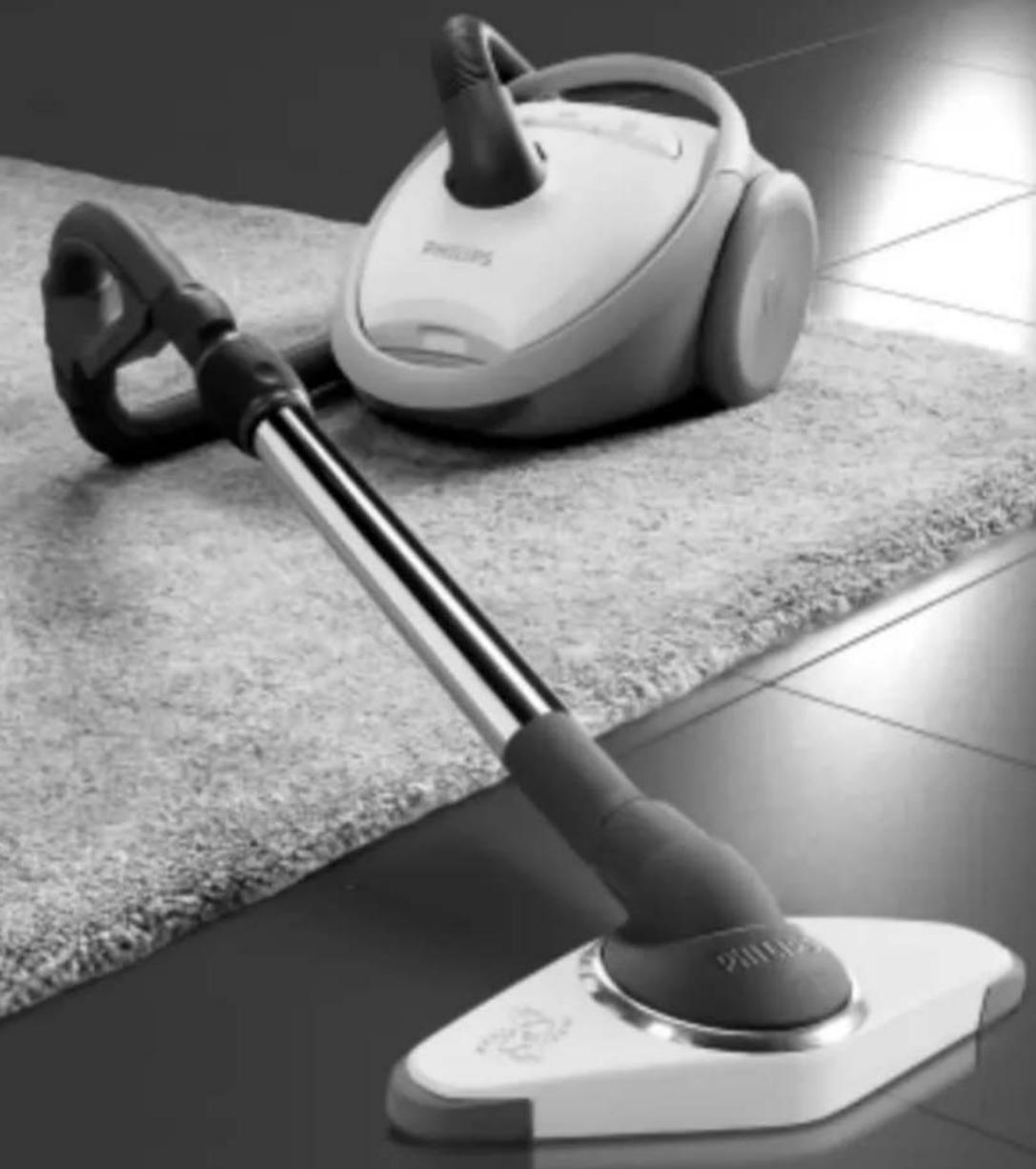
- The Reach & Clean nozzle can be used on either carpets or hard floors. The nozzle can be turned 360 degrees to 4 different positions, allowing you to also vacuum clean hard-to-reach places in an easy way. When the nozzle is positioned lengthwise, the suction power is concentrated at the front side of the nozzle.(fig.5)
- To adjust the nozzle to the type of floor and the area to be cleaned, put your foot on the indicated spot and then turn the tube until the nozzle is in the required position.(fig.6)
1 With the nozzle positioned breadthwise and the brush strip folded out, you can clean large hard floor areas. Turn the nozzle until the brush strip pops out of the nozzle housing and the nozzle is positioned breadthwise. (fig.7)
2 With the nozzle positioned lengthwise and the brush strip folded out, you can vacuum clean small hard floor areas. Turn the tube 90 degrees anti-clockwise until it is positioned lengthwise with the brush strip still folded out of the nozzle housing. (fig.8)
3 With the nozzle positioned breadthwise and the brush strip folded in, you can vacuum clean large soft floor areas. Turn the tube 90 degrees anti-clockwise again to position the nozzle breadthwise and to make the brush strip disappear into the nozzle housing. (fig.9)
4 With the nozzle positioned lengthwise and the brush strip folded in, you can vacuum clean small soft floor areas. Turn the tube 90 degrees anti-clockwise again until it is positioned lengthwise with the brush strip still folded in. (fig.10)
Crevice tool, small nozzle and small brush
1 Connect the crevice tool (1), the small nozzle
(2) or the small brush (3) directly to the handgrip or to the tube.(fig.11)
Accessory holder
1 The accessory holder can simply be snapped onto the handgrip. (fig.12)
- There are two ways to store accessories in the accessory holder.
- The crevice tool and small nozzle can be stored in the accessory holder by pushing them into the holder. To detach them, pull them out of the holder. (fig.13)
Please note the way in which the small nozzle must be placed in the accessory holder.
- Instead of the small nozzle, the small brush can be stored in the accessory holder by pushing it into the holder.(fig.14)
Animal brush (specific types only)
While combing your dog or cat with the Animal Brush, dirt, loose hairs and knots will be removed. Regular combing will keep the fur healthy.
1 Connect the animal brush to the handgrip ('click').(fig.15)
2 Place the vacuum cleaner as far away from the dog or cat as possible. Set the suction power to the lowest setting.
3 For optimal results, move the brush through the fur of the cat or dog in one direction.
4 You can remove hairs from the Animal Brush by detaching it from the appliance and vacuum cleaning it.(fig.16)
Vacuum cleaning
Adjusting suction power
- You can adjust the suction power while vacuum cleaning.
1 Use the slide control on top of the appliance.(fig.17)
2 Use maximum suction power for vacuum cleaning very dirty carpets and hard floors.
3 Use minimum power for vacuum cleaning curtains, table carpets, etc.
Infrared remote control (specific types only)
1 Place the batteries in the battery compartment.(fig.18)
Make sure the - and + poles are pointing in the right direction.
- With the infrared remote control you can set the suction power to one of 5 different suction power settings. When you switch the appliance on, it will always start running at the highest suction power setting.
2 By pushing the - button, you will reduce the suction power by one setting.(fig.19)
3 By pushing the + button, you will increase the suction power by one setting.
4 Push the standby button to temporarily switch the vacuum cleaner off, for instance when you have to move some furniture.
5 To continue vacuum cleaning, simply press the - button or the + button. The appliance will start operating at the previously selected suction power setting again.
Parking the tube
1 By inserting the ridge on the nozzle in the parking slot, you can park the tube in a convenient position.(fig.20)
Storing the vacuum cleaner
1 You can put the appliance in upright position and attach the nozzle to the appliance by inserting the ridge on the nozzle in the slot.(fig.21)
Replacing the dustbag
1 Replace the dustbag as soon as the dustbag-full indicator changes colour. (fig.22)
The dustbag is full when the colour of the indicator has changed even when the nozzle is not placed on the floor.
2 Switch the appliance off.
3 Open the cover by pulling it upwards.(fig.23) Place your fingers at the inlet of the cover and press with your thumb on the ridge on top of the cover.
4 Lift the dustbag holder out of the appliance.(fig.24)
Make sure you hold the dustbag upright when lifting it out of the appliance.
5 Remove the full dustbag from the holder by pulling the cardboard tag.(fig.25) When you do this, the dustbag will be automatically sealed.
6 Slide the cardboard tag of the new dustbag into the two grooves of the dustbag holder as far as possible. Re-insert the dustbag holder into the vacuum cleaner.(fig.26)
You cannot close the cover if no dustbag has been inserted.
- If provided, you can use the cotton dustbag instead of paper dustbags. The cotton dustbag can be used and emptied repeatedly.
Ordering dustbags
Philips s-bag™ paper dustbags are available under type number FC8021 (482248010113).
Philips s-bag™ clinic high filtration dustbags are available under type number FC8022 (883802201010).
Philips cotton dustbags are available under type number FC8020 (432200493291).
Cleaning and replacing filters
Motor Protection Filter
Every time you empty or replace the dustbag, clean the Permanent Motor Protection Filter.
1 Remove the dustbag holder with the dustbag.
2 Take the Motor Protection Filter holder out of the appliance and clean the filter by shaking it over a dustbin.(fig.27)
3 Press the filter holder with the clean filter firmly into place to ensure that it fits properly at the bottom.(fig.28)
4 Place the dustbag holder with the dustbag back into the appliance.
Activated Carbon Filter
Instead of with the Motor Protection Filter, some appliances are equipped with an Activated Carbon Filter. This filter neutralises smells produced by the dirt in the dustbag.
- Replace the Activated Carbon Filter every 6 months or when you notice that smell absorption becomes less effective.
1 To replace the Activated Carbon Filter, see the Motor Protection Filter section above. Instead of cleaning the filter, you have to insert a new filter.
Motor Outlet Filter
The AFS Micro Filter located in the back of this appliance will filter a large part of the smallest particles from the exhaust air by means of its electrostatically charged fibres.
1 Replace the AFS Micro Filter every six months
2 Open the filter grille.(fig.29)
3 Remove the old filter.(fig.30)
4 Insert the new filter into the appliance.
5 Close the filter grille and push the left and right bottom corners until they snap home.(fig.31)
HEPA filter
Instead of with the AFS Micro Filter, this appliance can also be equipped with the special HEPA Filter. The HEPA Filter is able to remove at least 99.99% of all particles down to 0.0003 mm in size from the outlet air. This not only includes normal house dust, but also harmful microscopic vermin such as house dust mites and their excrements, which are well-known causes of respiratory allergies.
1 Replace the HEPA Filter as soon as the pilot light of the filter-full indicator goes on (specific types only). The HEPA filter can be replaced in the same way as the AFS Micro Filter. (fig.32)
Ordering filters
AFS Micro Filters are available under type number FC8030 (432200492910).
HEPA Filters are available under type number FC8031 (432200492920).
Activated Carbon Filters are available under type number FC8033 (482248020145).
Activated Carbon upgrade kits are available under type number FC8034.
Ordering accessories
If you have any difficulties obtaining dustbags, filters or other accessories for this appliance, please contact the Philips Customer Care Centre in your country or consult the worldwide guarantee leaflet.
Environment
To make recycling possible, the plastics used for this appliance have been coded.
The cardboard packaging has been made of recycled material and is fully recyclable.
Types with an infrared remote control only: remove the batteries when you discard the appliance. Do not throw the batteries away with the normal household waste, but hand them in at an official collection point.
Replacing the mains cord
If the mains cord of this appliance is damaged, it must always be replaced by Philips or a service centre authorised by Philips, as special tools and/or parts are required.
Solving problems
- The suction power is insufficient:
1 Check if the suction power control is in the required position (see the section on vacuum cleaning - adjusting suction power).
2 Check if the dustbag is full. If necessary, replace the dustbag.
3 Check if the filters need to be replaced.
4 Check if the nozzle, tube or hose is blocked up.
5 To remove the obstruction, disconnect the blocked-up item and connect it (as far as possible) in reverse position. Switch the vacuum cleaner on to make the airflow suck the obstructing material out of the blocked-up item. (fig.33)
The infrared remote control does not function (specific types only):
- It is possible that the batteries are not making proper contact.
Remove the lid of the battery compartment and push the batteries back into place.
- It is possible that the batteries have not been placed properly.
6 Remove the lid of the battery compartment to make sure that the - and + poles are pointing in the right direction.(fig.34) - The batteries are empty.
Replace the batteries.
Information & service
If you need information or if you have a problem, please visit the Philips Web site at www.philips.com or contact the Philips Customer Care Centre in your country (you will find its phone number in the worldwide guarantee leaflet).
If there is no Customer Care Centre in your country, turn to your local Philips dealer or contact the Service Department of Philips Domestic Appliances and Personal Care BV.
DEUTSCH
Wichtig
text_image
Diagram of a device interior with labeled buttons and a downward arrow indicating a drop or change.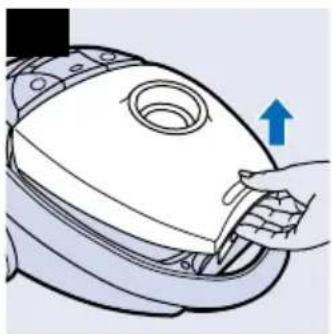
natural_image
Illustration of a hand inserting a component into a device (no text or symbols)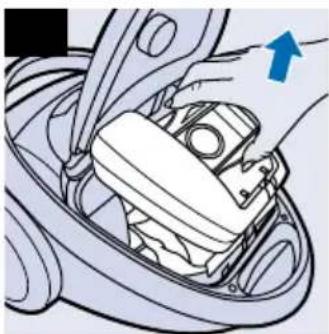
natural_image
Mechanical assembly diagram showing a hand pressing a component on a car intake manifold (no text or symbols visible)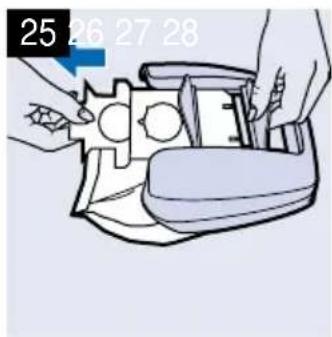
natural_image
Illustration of hands assembling a mechanical device with numbered callouts (25, 26, 27, 28) and no visible text or symbols on the device itself.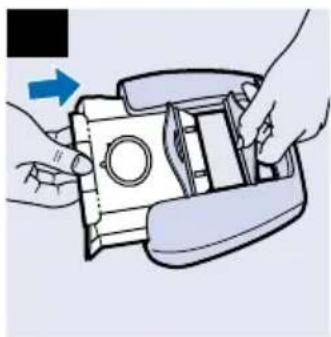
natural_image
Illustration of hands assembling a device with a blue arrow indicating rotation (no text or symbols)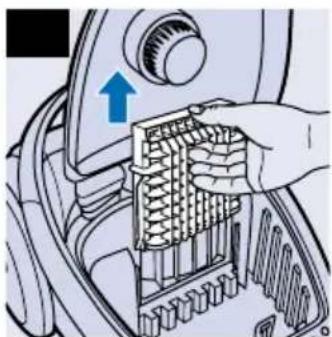
natural_image
Illustration of a hand inserting a spring into a mechanical component (no text or symbols visible)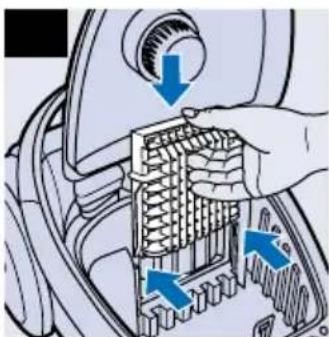
natural_image
Mechanical component diagram showing a hand inserting into a grid-like structure with blue arrows indicating direction (no text or symbols present)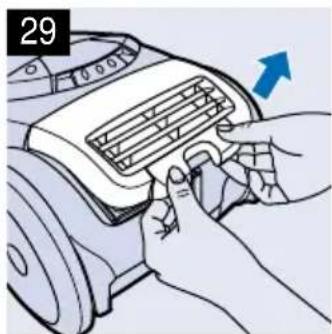
natural_image
Illustration of hands installing or adjusting a car air vent (no text or symbols visible)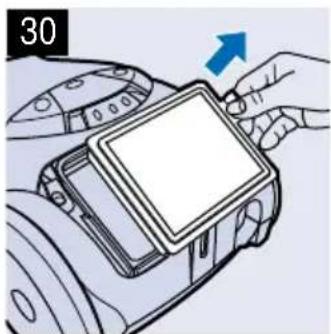
natural_image
Illustration of a hand holding a camera module with an arrow indicating direction (no text or symbols)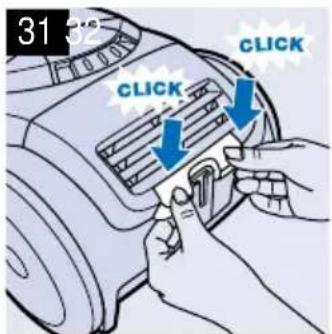
text_image
31 52 CLICK CLICK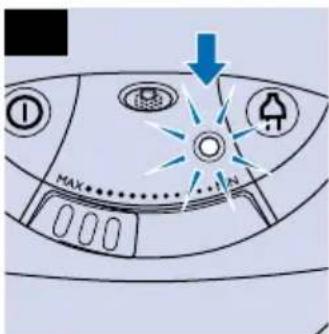
text_image
MAX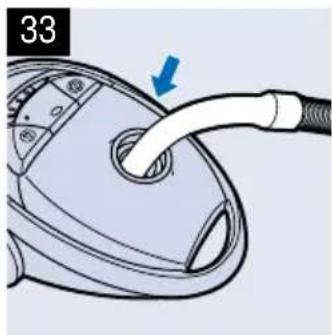
natural_image
Close-up of a hairdryer with a blue arrow pointing to the handle (no text or symbols visible)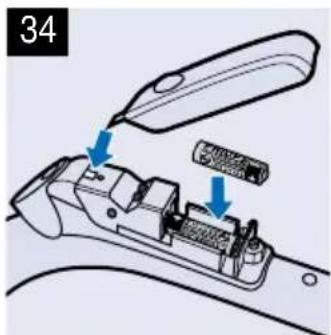
text_image
34