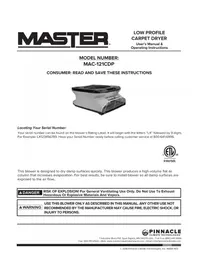
MAC-121CDP - Fan Master - Free user manual and instructions
Find the device manual for free MAC-121CDP Master in PDF.


| Product Type | Drying and Ventilation Fan |
| Brand | Master |
| Model | MAC-121CDP |
| Supply Voltage | 110 V ~ 60 Hz |
| Rated Current | 2.18 A |
| Airflow (Low Speed) | 25 m³/min |
| Airflow (High Speed) | 31 m³/min |
| Motor Power | 1/4 HP |
| Main Use | Drying Wet Surfaces |
| Additional Functions | Ventilation and Cooling |
| Front Clearance Distance | 1.5 m |
| Side Clearance Distance | 1 m |
| Plug Type | 3-prong grounded |
| Recommended Extension Cord | 14 AWG or larger |
| Housing Maintenance | Clean with mild detergent and water |
| Cord Inspection | Inspect regularly to avoid damage |
| Warranty | 1 year limited (parts and labor) |
| Serial Number | Starts with "LX" followed by 9 digits |
| Customer Service | 800-641-6996 |
| Safety | Ground fault circuit interrupter recommended |
Frequently Asked Questions - MAC-121CDP Master
User questions about MAC-121CDP Master
0 question about this device. Answer the ones you know or ask your own.
Ask a new question about this device
Download the instructions for your Fan in PDF format for free! Find your manual MAC-121CDP - Master and take your electronic device back in hand. On this page are published all the documents necessary for the use of your device. MAC-121CDP by Master.
USER MANUAL MAC-121CDP Master
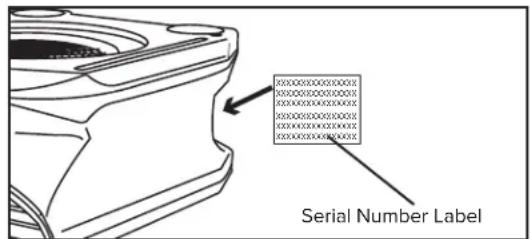
Locating Your Serial Number:
Your serial number can be found on the blower's Rating Label. It will begin with the letters "LX" followed by 9 digits. For Example: LX123456789. Have your Serial Number ready before calling customer service at 800-641-6996.

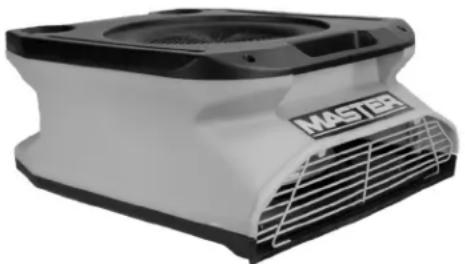
This blower is designed to dry damp surfaces quickly. This blower produces a high-volume flat air column that increases evaporation. For best results, be sure to install blower so all damp surfaces are exposed to the air flow.
DANGER
RISK OF EXPLOSION! For General Ventilating Use Only. Do Not Use To Exhaust Hazardous Or Explosive Materials And Vapors.
WARNING
USE THIS BLOWER ONLY AS DESCRIBED IN THIS MANUAL. ANY OTHER USE NOT RECOMMENDED BY THE MANUFACTURER MAY CAUSE FIRE, ELECTRIC SHOCK, OR INJURY TO PERSONS.

Pinnacle
LIMATE TECHNOLOGIES
1 Industrial Blvd #101, Sauk Rapids, MN 56379 USA · Toll Free (800) 641-6996
Fax: 320-251-2922 • Web: www.masterindustrialproducts.com • Email: info@pinnacleclimate.com
TABLE OF CONTENTS
Safety Information. 1-2
Specifications. 3
Features. 3
Operation. 4
Maintenance. 4
Troubleshooting Guide. 5
Warranty. 6
SAFETY INFORMATION
WARNING To Reduce The Risk Of Electric Shock, Do Not Expose To Water Or Rain.
WARNING THIS IS NOT A TOY! Keep out of reach of children. This blower is intended for use by only qualified persons.
WARNING RISK OF INJURY! Keep hair, loose clothing, fingers and all body parts away from air inlet and outlet.
WARNING RISK OF INJURY! DO NOT MOVE BLOWER WHILE IT IS OPERATING.
WARNING RISK OF ELECTRIC SHOCK! TAKE PRECAUTIONS TO PREVENT INJURY.
WARNING RISK OF ELECTRIC SHOCK OR INJURY. Do not route cord under carpeting, Do not cover cord with throw rugs, runners, or similar coverings. Do not route cord under furniture or appliances. Arrange cord away from the traffic area where it will not cause a tripping hazard. Do not operate any blower with a damaged cord or plug, or after blower malfunctions, or has been dropped or damaged in any manner. Discard blower, or return to authorized service facility for examination and / or repair.
WARNING RISK OF ELECTRICAL SHOCK. Connect to properly grounded outlets only. Do not insert or allow foreign objects to enter any ventilation or exhaust opening as this may cause an electric shock or fire, or damage the blower. Unplug blower before performing any maintenance or when not in use.
WARNING Keep Out of Dangerous Areas Do not operate the unit near dangerous areas such as fire, gas, fumes, or hazardous materials. Doing so might result in injuries to the operator or those around the unit.
This product contains chemicals, including lead, which are known to the State of California to cause cancer and birth defects or other reproductive harm. For more information go to www.P65Warnings.ca.gov.
CAUTION In order to avoid a hazard due to inadvertent resetting of the thermal cut-out, this appliance must not be supplied through an external switching device, such as a timer, or connected to a circuit that is regularly switched on and off by the utility.
CAUTION Automatically Operated Device - To Reduce The Risk Of Injury, Disconnect From Power Source Before Servicing.

Look for this icon throughout the manual for helpful tips on how to assemble, use and clean your Carpet Dryer.
SAFETY INFORMATION (CONT.)
DANGER DO NOT USE TO VENTILATE HARMFUL GASSES OR VAPORS.
This blower is designed to dry damp surfaces quickly. This blower produces a high-volume, flat air column that increases evaporation. For best results, be sure to install blower so all damp surfaces are exposed to the air flow.
Before operating this blower, be sure that you know how to switch the blower off in an emergency.
ALWAYS use only the electrical power (voltage and frequency) specified on the model plate of the blower.
ALWAYS use only three-prong, grounded outlet.
ALWAYS use only 14 AWG or higher gauge extension cord.
ALWAYS unplug the blower when not in use.
ALWAYS install the blower so that it is not directly exposed to water spray, rain, dripping water, or wind.
ALWAYS disconnect blower from power source when not in use.
WARNING To Reduce The Risk Of Electric Shock And Injury To Persons, Do Not Use In A Window.
Use this blower only in the matter intended by the manufacturer. If you have any questions, contact Customer Service at 800-641-6996.
WARNING To reduce the risk of electric shock, connect only to an outlet provided with a ground fault interrupting device.
WARNING RISK OF ELECTRIC SHOCK!
Do not operate any blower with a damaged cord or plug. Discard blower or return to an authorized service facility for examination and/or repair.
If the blower is damaged, do not use it. The blower must be serviced by a qualified person or service agent.
When servicing or replacing a component requires the removal or disconnection of a safety device, the safety device is to be reinstalled or remounted as previously installed before operating this blower.
NEVER pull or carry the blower by the power cord.
NEVER block the air inlet (rear) or air outlet (front) while in operation.
NEVER insert any objects through the blower guards.
NEVER use to ventilate harmful, explosive, flammable, or volatile gases, fumes, or substances.
This blower produces a strong, constant stream of air. Before operating blower be sure there are no unsecured materials that can be blown about the stream of air.
| Minimum Distance From Blower | |
| MAC-121CDP | |
| Front 5 | ft. (1.5 m) |
| Sides 3.2 ft (1 m) | |
CAUTION - RISK OF ELECTRIC SHOCK DO NOT OPEN BLOWER SHELL NO USER-SERVICEABLE PARTS INSIDE
SPECIFICATIONS
| Model # MAC-121CDP | |
| Voltage ~ Hz 110V~60Hz | |
| Amps | 2.18 |
| Air Flow (CFM) 900 / 1100 | |
| Motor (HP) 1/4 | |
Specifications subject to change without notice.
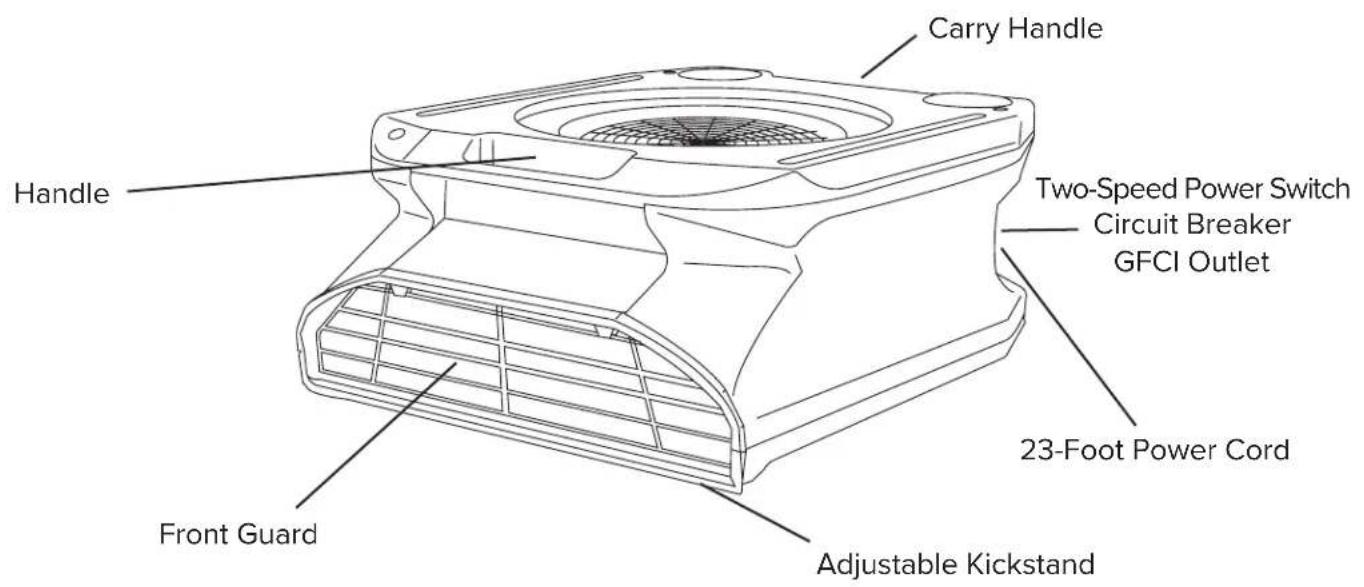
FEATURES
OPERATION
Using The Blower:
- Remove the blower from packaging. Be certain no packaging materials are blocking the air inlet (rear) or air outlet (front).
- Place the blower on level ground.
- Connect the blower to a grounded power outlet with an approved power rating using a 14 AWG or higher gauge power cord.
- Push the power switch on the back of the blower to turn on the blower and to select the desired speed.
NOTE: The direction of moving air is indicated by an arrow on the blower housing.
Moisture Control:
This blower can be used to remove moisture from an area.
NOTE: This blower will not prevent mold or mildew formation.
Ventilation:
This blower can move large quantities of air rapidly to provide ventilation and cooling.
WARNING
WARNING Risk Of Injury! Always disconnect the blower from the power source before maintenance.
DO NOT TAMPER WITH THE UNIT. HAVE A COMPETENT SERVICEMAN MAKE ANY NECESSARY ADJUSTMENT OR REPAIRS.
Use only original equipment parts. The use of alternate or third party components can cause unsafe operating conditions and will void your warranty.

TIP: To order parts call (800) 641-6996
Electrical System:
Check the power cable regularly for damage. If the power cable is damaged, it must be replaced by a qualified person or a service agent.
Air Outlets:
Dust and other dirt that can collect in the air outlet must be cleaned and removed regularly.
Housing:
Clean the housing with a mild detergent and water.
External Parts:
Check all external parts to ensure they have been installed properly. Be alert for unusual noises.
Keep Motor And Wiring Dry:
DO NOT use a water hose or any pressurized washing device to clean your blower. If any electrical elements do get wet, they must be dried immediately and completely before use.
TROUBLESHOOTING GUIDE
| Problem Possible | Cause Solution | |
| Motor does not run. | 1. No power supply to the device. 2. Switch / knob not turned on. 3. Fan wheel blocked. 4. Air inlet or outlet is blocked. 5. Switch is broken. 6. Loose wiring. | 1. Connect device, check fuse. 2. Turn knob on / press power switch to ON. 3. Inspect fan wheel and remove blockage. 4. Remove blockage and clean air inlet and air outlet. 5. Call Customer Service. 6. Call Customer Service. |
| Motor runs, but wheel spins irregularly or hits sides. | 1. A heavy impact has bent the motor suspension so that the wheel is stuck. 2. A heavy impact has let the motor slide out of the suspension so that the wheel is stuck. | 1. Call Customer Service. 2. Call Customer Service. |
| Device vibrates excessively. | 1. Fan wheel is stuck. 2. Fan wheel is unbalanced. 3. Fan wheel is bent. 4. Motor shaft is bent. | 1. Clean fan wheel. 2. Call Customer Service. 3. Call Customer Service. 4. Call Customer Service. |
LIMITED WARRANTY
Pinnacle Climate Technologies, Inc. warrants this blower to the original retail purchaser only, to be free from defects in material and workmanship for a period of one (1) year from the date of initial purchase. This product must be properly installed, maintained and operated in accordance with the instructions provided.
Pinnacle Climate Technologies, Inc. requires reasonable proof of your date of purchase from an authorized retailer or distributor. Therefore, you should keep your sales slip, invoice or cancelled check from the original purchase. This Limited Warranty shall be limited to the repair or replacement of parts, which prove defective under normal use and service within the warranty period, and which Pinnacle Climate Technologies, Inc. shall determine at its reasonable discretion.
This warranty does not apply to products purchased for rental use.
This Limited Warranty does not cover any failures or operating difficulties due to normal wear and tear, accident, abuse, misuse, alteration, misapplication, improper installation, or improper maintenance and service by you or any third party. Failure to perform normal and routine maintenance on the blower, shipping damage, damage related to insects, birds or animals of any kind, and damage due to weather conditions are also not covered. In addition, the Limited Warranty does not cover damage to the finish, such as scratches, dents, discoloration, rust, or other weather damage, after purchase.
All transportation costs for the return of damaged product or parts will be the responsibility of the purchaser. Upon receipt of damaged item, Pinnacle Climate Technologies, Inc. will examine the item and determine if defective. Pinnacle Climate Technologies, Inc. will repair or replace and return the item, freight pre-paid.
If Pinnacle Climate Technologies, Inc. finds the item to be in normal operating condition, or not defective the item will be returned freight collect. This Limited Warranty is in lieu of all other express warranties. Pinnacle Climate Technologies, Inc. disclaims all warranties for products that are purchased from sellers other than authorized dealers or distributors.
AFTER THE PERIOD OF THE ONE (1) YEAR EXPRESS WARRANTY EXISTS, Pinnacle Climate Technologies, Inc. DISCLAIMS ANY AND ALL IMPLIED WARRANTY, INCLUDING WITHOUT LIMITATION THE IMPLIED WARRANTY OF MERCHANTABILITY AND FITNESS FOR A PARTICULAR APPLICATION. FURTHER, Pinnacle Climate Technologies, Inc. SHALL HAVE NO LIABILITY WHATSOEVER TO PURCHASER OR ANY THIRD PARTY FOR ANY SPECIAL, INDIRECT, PUNITIVE INCIDENTAL, OR CONSEQUENTIAL DAMAGES. Pinnacle Climate Technologies, Inc. assumes no responsibility for any defects caused by third parties. This Limited Warranty gives the purchaser specific legal rights; a purchaser may have other rights depending upon where he or she lives. Some states do not allow the exclusion or limitation of special, incidental, or consequential damages, or limitations on how long a warranty lasts, so the above exclusion and limitations may not apply to you.
Pinnacle Climate Technologies, Inc. does not authorize any person or company to assume for it any other obligation or liability in connection with the sale, installation, use, removal, return, or replacement of its equipment, and no such representations are binding on Pinnacle Climate Technologies, Inc.
Always be sure to specify the model number and serial number when making any claim with Pinnacle Climate Technologies, Inc. For your convenience, use the space provided below to list this information.
Locating Your Serial Number:
Your serial number can be found on the blower's Rating Label. It will begin with the letters "LX" followed by 9 digits. For Example: LX123456789. Have your Serial Number ready before
calling customer service at 800-641-6996.
Model #:
Serial #:
Date of Purchase:
NUMERO DE MODELE:
MAC-121CDP
NOTE AU CLIENT : LIRE ET CONSERVER CE MANUEL POUR CONSULTATION ULTÉRIEURE
CONSEIL : Pour commander des pieces, composer le (800) 641-6996
- Locating Your Serial Number:
- DANGER
- WARNING
- TABLE OF CONTENTS
- SAFETY INFORMATION
- SAFETY INFORMATION (CONT.)
- DANGER DO NOT USE TO VENTILATE HARMFUL GASSES OR VAPORS.
- WARNING To Reduce The Risk Of Electric Shock And Injury To Persons, Do Not Use In A Window.
- WARNING To reduce the risk of electric shock, connect only to an outlet provided with a ground fault interrupting device.
- WARNING RISK OF ELECTRIC SHOCK!
- CAUTION - RISK OF ELECTRIC SHOCK DO NOT OPEN BLOWER SHELL NO USER-SERVICEABLE PARTS INSIDE
- OPERATION
- Using The Blower:
- Moisture Control:
- Ventilation:
- Electrical System:
- Air Outlets:
- Housing:
- External Parts:
- Keep Motor And Wiring Dry:
- TROUBLESHOOTING GUIDE
- LIMITED WARRANTY
- NUMERO DE MODELE:
- MAC-121CDP
Brand : Master
Model : MAC-121CDP
Category : Fan