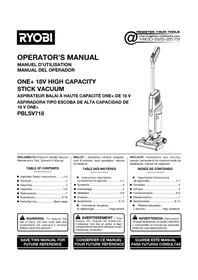
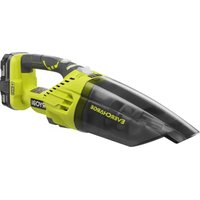
One+ PBLSV718 - Vacuum Cleaner RYOBI - Free user manual and instructions
Find the device manual for free One+ PBLSV718 RYOBI in PDF.


| Product type | Cordless stick vacuum |
| Brand | RYOBI |
| Model | One+ PBLSV718 |
| Power source | 18V Lithium-ion battery (One+ compatible) |
| Height (approx.) | 115 cm |
| Width (approx.) | 25 cm |
| Depth (approx.) | 20 cm |
| Weight (approx.) | 4.5 kg |
| Dust container capacity | 0.5 L |
| Filter type | Washable foam filter |
| Power levels | 3 modes: Low, Medium, High |
| Main functions | Hard floor and carpet cleaning, brush mode on/off, LED indicator lights |
| Maintenance and cleaning | Emptying dust container, washing foam filter, cleaning hose and brush bars |
| Safety | Do not use on wet surfaces, do not vacuum flammable liquids, remove battery before maintenance, use only recommended accessories |
| Spare parts and repairability | Replacement foam filter (ref. A32SV718), maintenance tool included. No user-serviceable parts. Contact an authorized service center. |
| Warranty | 3-year limited warranty (upon presentation of proof of purchase) |
| Usage | Household use, dry surfaces only |
| Included accessories | Handle, vacuum maintenance tool, user manual |
Frequently Asked Questions - One+ PBLSV718 RYOBI
User questions about One+ PBLSV718 RYOBI
0 question about this device. Answer the ones you know or ask your own.
Ask a new question about this device
Download the instructions for your Vacuum Cleaner in PDF format for free! Find your manual One+ PBLSV718 - RYOBI and take your electronic device back in hand. On this page are published all the documents necessary for the use of your device. One+ PBLSV718 by RYOBI.
USER MANUAL One+ PBLSV718 RYOBI
INCLUDES: Stick Vacuum, Handle, Vacuum Maintenance Tool, Operator's Manual
TABLE OF CONTENTS
***************************
■ Important Safety Instructions...... 2-3
■ Symbols 4
■ Assembly 5
■ Operation 5-6
■ Maintenance ....7
■ Illustrations.... 8-10
■ Parts/Service......Back page

WARNING: To reduce the risk of injury, the user must read and understand the operator's manual before using this product.
SAVE THIS MANUAL FOR
FUTURE REFERENCE
IMPORTANT SAFETY INSTRUCTIONS
SAVE THESE INSTRUCTIONS
When using an electrical appliance, basic precautions should always be followed, including the following:

WARNING!
Read and understand all instructions. Failure to follow all instructions listed below, may result in electric shock, fire and/or serious personal injury.
READ ALL INSTRUCTIONS BEFORE USING THIS APPLIANCE

WARNING:
To reduce the risk of electric shock - Do not use on wet surfaces. Do not expose to rain. Store indoors.
■ Dress properly. Do not wear loose clothing or jewelry. Contain long hair. Keep your hair, loose clothing, fingers, and all parts of the body and clothing, away from openings and moving parts. Loose clothes, jewelry, or long hair can be caught in internal moving parts.
■ Do not overreach. Keep proper footing and balance at all times. Proper footing and balance enables better control of the product in unexpected situations. Do not use on a ladder or unstable support.
■ Use safety equipment. Dust mask must be used for appropriate conditions.
■ Do not allow children to operate product or play with product as a toy. Close attention is necessary when used by or near children.
■ Use this product ONLY for its intended use as described in this manual. Use only the attachments recommended in this manual.
If product is not working properly, has been dropped, damaged, left outdoors, or dropped into water, return to your nearest service center.
■ Do not use charger with damaged cord or plug.
■ Do not handle charger plug or product with wet hands.
■ Do not put any objects in ventilation openings. Do not use with any opening blocked. Keep openings free of dust, lint, hair, and anything that may reduce air flow.
■ NEVER vacuum materials that are burning or smoking, such as hot coals, cigarette butts, matches, burning or smoking ashes, etc.
■ DO NOT use to pick up flammable or combustible liquids, such as gasoline, or use in areas where they may be present.
- Do not pull or carry by cord, use cord as a handle, close a door on cord, or pull cord around sharp edges or corners. Do not run appliance over cord. Keep cord away from heated surfaces.
■ Turn off all controls before removing battery pack.
■ Use extra care when using on stairs.
■ Do not use without dust bowl or filter in place.
■ Do not use to pick up hard objects such as nails, screws, coins, etc. Damage or injury could result.
■ Do not incinerate this appliance even if it is severely damaged. The batteries can explode in a fire.
■ Product does not have to be plugged into an electrical outlet, therefore it is always in operating condition. Be aware of possible hazards when using the product or when changing accessories.
■ Use battery only with charger listed. For use with 18V lithium-ion battery packs. see tool/appliance/battery pack/charger correlation supplement 987000-432. Do not use charger outdoors.
■ When battery pack is not in use, keep it away from other metal objects like: paper clips, coins, keys, nails, screws, or other small metal objects that can make a connection from one terminal to another. Shorting the battery terminals together may cause sparks, burns, or a fire.
■ Always remove battery pack from your tool when you are assembling parts, making adjustments, cleaning, or when not in use. Removing battery pack will prevent accidental starting that could cause serious personal injury.
■ Do not use a battery pack that is damaged or modified. Damaged or modified batteries may exhibit unpredictable behavior resulting in fire, explosion or risk of injury.
■ Do not modify or attempt to repair a battery pack that has been damaged.
■ Batteries can explode in the presence of a source of ignition, such as excessive heat or a pilot light. To reduce the risk of serious personal injury, never use any cordless product in the presence of an open flame or temperature above 265°F. An exploded battery can propel debris and chemicals. If exposed, flush with water immediately.
■ Prevent unintentional starting. Ensure the switch is in the off-position before connecting to power source and/or battery pack, picking up or carrying the product. Carrying battery products with your finger on the
IMPORTANT SAFETY INSTRUCTIONS
switch or energizing battery products that have the switch on invites accidents.
■ Under abusive conditions, liquid may be ejected from the battery; avoid contact. If contact accidentally occurs, flush with water. If liquid contacts eyes, additionally seek medical help. Liquid ejected from the battery may cause irritation or burns.
■ Protect your lungs. Wear a face or dust mask if the operation is dusty. Following this rule will reduce the risk of serious personal injury.
- Check for misalignment or binding of moving parts, breakage of parts, and any other condition that may affect the product's operation. If damaged, have the product serviced before using. Many accidents are caused by poorly maintained products.
■ Use only accessories that are recommended by the manufacturer for your model. Accessories that may be suitable for one product may create a risk of injury when used on another product.
■ Always turn off this appliance before connecting or disconnecting motorized nozzle.
■ Do not put hands or objects inside of roller bar attachment as this could cause a malfunction of the tool or risk of injury may occur.
■ Follow all charging instructions and do not charge the battery pack or appliance outside of the temperature range specified in the instructions. Charging improperly or at temperatures outside of the specified range may damage the battery and increase the risk of fire.
■ Do not let gasoline, oils, petroleum-based products, etc., come in contact with plastic parts. They contain chemicals that can damage, weaken, or destroy plastic.
■ Have servicing performed by a qualified repair person using only identical replacement parts. This will ensure that the safety of the product is maintained.
■ This product contains no serviceable parts.
- Do not charge battery in a damp or wet location. Do not use, store, or charge battery packs or products in locations where the temperature is less than 50°F or more than 100°F. Do not store outside or in vehicles.
■ Recharge only with the charger specified by the manufacturer. A charger that is suitable for one type of battery pack may create a risk of fire when used with another battery pack.
Use appliances only with specifically designated battery packs. Use of any other battery packs may create a risk of injury and fire.
■ Do not expose a battery pack or appliance to fire or excessive temperature. Exposure to fire or temperature above 265° F may cause explosion.
■ Save these instructions. Refer to them frequently and use them to instruct others who may use this product. If you loan someone this product, loan them these instructions also.

WARNING:
To reduce the risk of injury from moving parts, remove battery before servicing.

WARNING:
Risk of Injury. Brush may start unexpectedly. Remove battery before cleaning or servicing.

WARNING:
To reduce the risk of fire, electric shock, or injury, do not leave appliance when plugged in. Unplug from outlet when not in use and before servicing.
SYMBOLS
| The following signal words and meanings are intended to explain the levels of risk associated with this product. | ||
| SYMBOL | SIGNAL | MEANING |
 | DANGER: | Indicates a hazardous situation, which, if not avoided, will result in death or serious injury. |
 | WARNING: | Indicates a hazardous situation, which, if not avoided, could result in death or serious injury. |
 | CAUTION: | Indicates a hazardous situation, that, if not avoided, may result in minor or moderate injury. |
| NOTICE: | (Without Safety Alert Symbol) Indicates information considered important, but not related to a potential injury (e.g. messages relating to property damage). | |
| Some of the following symbols may be used on this product. Please study them and learn their meaning. Proper interpretation of these symbols will allow you to operate the product better and safer. SYMBOL NAME DESIGNATION/EXPLANATION | ||
 | Safety Alert Indicates a potential personal injury hazard. | |
 | Read Operator's Manual | To reduce the risk of injury, user must read and understand operator's manual before using this product. |
 | Wet Conditions Alert | Do not expose to rain or use in damp locations. |
 | Long Hair Risk of long hair being drawn into air inlet. | |
 | Dust Bowl Do not run unit while dust bowl is unsecured. | |
 | Recycle Symbol | This product uses lithium-ion (Li-ion) batteries. Local, state or federal laws may prohibit disposal of batteries in ordinary trash. Consult your local waste authority for information regarding available recycling and/or disposal options. |
| V Volts Voltage | ||
| min Minutes Time | ||
| --- | Direct Current Type or a characteristic of current | |
| no | No Load Speed Rotational speed, at no load | |
| .../min Per Minute | Revolutions, strokes, surface speed, orbits etc., per minute | |
This is a “household type” product which means it is intended for household use.
ASSEMBLY
UNPACKING
This product requires assembly.
■ Carefully remove the tool and any accessories from the box. All items listed in the Includes section must be included at the time of purchase.

WARNING:
Items in this Assembly section are not assembled to the product by the manufacturer and require customer installation. Use of a product that may have been improperly assembled could result in serious personal injury.
■ If any parts are damaged or missing, please call 1-800-525-2579 for assistance.

WARNING:
If any parts are damaged or missing do not operate this product until the parts are replaced. Use of this product with damaged or missing parts could result in serious personal injury.

WARNING:
Do not attempt to modify this product or create accessories or attachments not recommended for use with this product. Any such alteration or modification is misuse and could result in a hazardous condition leading to possible serious personal injury.
ASSEMBLING THE VACUUM
See Figure 1, page 8.
■ Switch off unit and remove the battery pack.
■ Place the vacuum on a flat surface in the upright position.
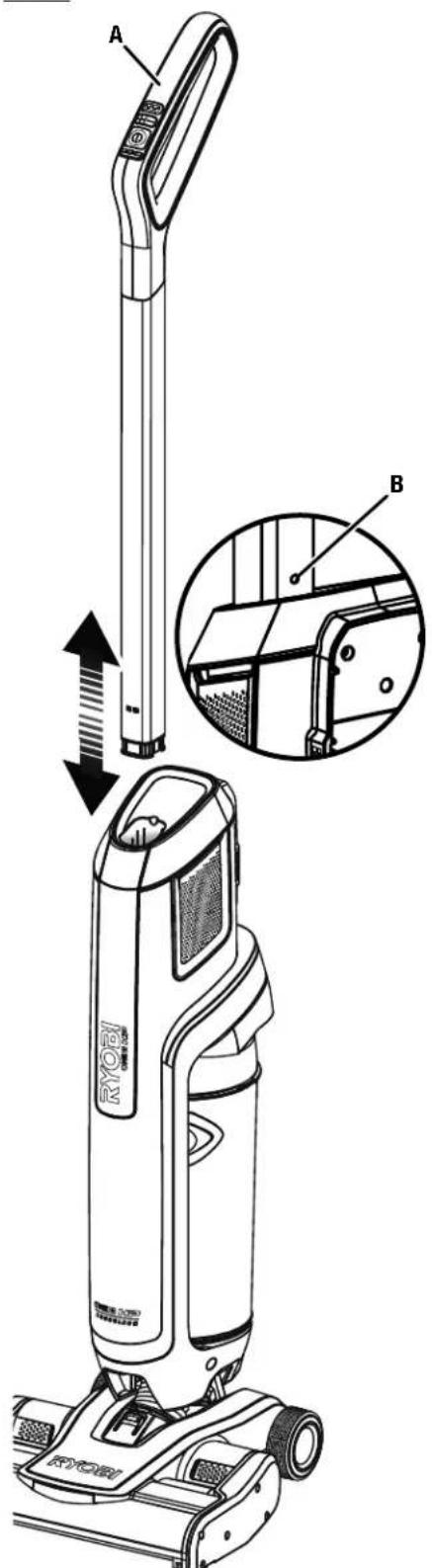
■ Slide the handle into the opening at the top of the vacuum until it clicks.
To remove the handle:
■ Insert a small object into the hole on the back of the handle and press firmly.
■ Pull the handle up and away from the vacuum
OPERATION

WARNING:
Do not allow familiarity with this product to make you careless. Remember that a careless fraction of a second is sufficient to inflict serious injury.

WARNING:
Always remove battery pack from the tool when you are assembling parts, making adjustments, cleaning, or when not in use. Removing battery pack will prevent accidental starting that could cause serious personal injury.

WARNING:
Do not use any attachments or accessories not recommended by the manufacturer of this product. The use of attachments or accessories not recommended can result in serious personal injury.
APPLICATIONS
You may use this product for the following purpose:
■ Light-duty vacuuming of dry surfaces
■ Household type
INSTALLING/REMOVING BATTERY PACK
See Figure 2, page 9.
To install:
■ Insert the battery pack into the battery port.
■ Make sure the latches on each side of the battery pack snap into place and that the battery pack is secured in the tool before beginning operation.
To remove:
- Locate the latches on the side of the battery pack and depress both sides to release the battery pack from the tool.
For complete charging instructions, see the operator's manuals for your battery pack and charger.
STARTING/STOPPING THE VACUUM
See Figure 3, page 9.
To start the vacuum:
■ Press the ON/OFF button
To stop the vacuum:
■ Press the ON/OFF button again
OPERATION
MODE SETTINGS
See Figure 3, page 9.
The vacuum has three modes and roller bar ON/OFF to accommodate your cleaning needs.
NOTE: The vacuum starts on MEDIUM mode.
■ Press the PLUS button to cycle to HIGH mode, for carpet and more embedded messes.
■ Press the MINUS button to cycle to LOW mode, for hard floors and every day messes.
The floor head can be used with the roller bars turned off.
To turn off the roller bars:
■ Press the roller bar ON/OFF button to turn off the use of the roller bars.
To turn on the roller bars:
■ Press the roller bar ON/OFF button again to turn the roller bars back on.
LED INDICATOR FUNCTIONS
See Figure 3, page 9.
The LED indicator will indicate the status of the tool when the tool is powered on.
| TOOL STATUS HANDLE LED ROLLER BARLED | ||
| High All 3 Green White | ||
| Medium 1 & 2 Green White | ||
| Low 1 Green White | ||
| FAULT STATUS HANDLE LED ROLLER BARLED | ||
| Low Battery Flashing Red | White | |
| Battery Depleted | All 3 Red | White |
| Error* All 3 Red | OFF | |
| Roller Bar Jammed | All 3 Red | Red |
*Clean roller bar and air path. Allow motor to cool for 10 minutes, then restart.
USING THE VACUUM
See Figures 4 - 5, page 9.
■ Roll the vacuum to the item or surface you want to clean.
■ Insert the battery pack and start the vacuum.
■ Select the appropriate mode for the surface you are cleaning.
NOTE: If necessary, step on the back of the floor head and pull back on the handle to recline and begin cleaning.
■ When vacuuming is complete, stop the unit and remove the battery pack.
The dust bowl should be checked, emptied, and cleaned periodically for maximum dust collection.
To empty:
■ Remove the battery pack.
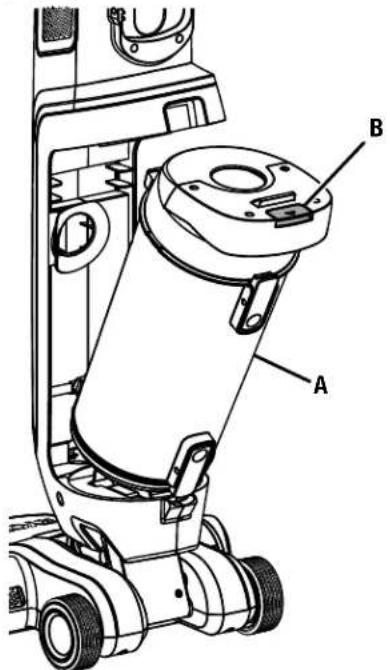
■ Press the dust bowl release latch and pull the dust bowl away from the vacuum.
■ Hold dust bowl over waste receptacle.
■ Press latch on bottom of bowl to release the door.
■ Shake lightly or tap sides to dislodge debris.
■ Close door, pressing firmly until lock tab engages.
To reattach:
■ Position the dust bowl and vacuum as shown.
■ Lower the bottom of the dust bowl onto the vacuum at an angle and then push the top of the dust bowl toward the vacuum until the release latch clicks into place.
MAINTENANCE
This product contains no serviceable parts.
GENERAL MAINTENANCE
Avoid using solvents when cleaning plastic parts. Most plastics are susceptible to damage from various types of commercial solvents and may be damaged by their use. Use clean cloths to remove dirt, dust, oil, grease, etc.

WARNING:
Do not at any time let brake fluids, gasoline, petroleum-based products, penetrating oils, etc., come in contact with plastic parts. Chemicals can damage, weaken or destroy plastic which could result in serious personal injury.
HOSE MAINTENANCE
See Figure 8, page 10.
Irregular suction may be the result of a clogged or obstructed hose.
To clean hose:
■ Remove the battery pack.
■ Tilt the body of the vacuum away from the floor head and rest it on the floor.
■ Depress the hose release button to eject the hose from the floor head.
■ Remove any foreign materials clogging or restricting the hose.
■ Reinstall the hose. Align the tab on the hose with the release button. Press down firmly on the tab until it clicks into place.
NOTE: Make sure the hose is securely in place before using.
REMOVING THE ROLLERS FOR CLEANING
See Figures 9 - 10, page 10.
The rollers are located inside the floor head.
To remove the front roller:
■ Remove the battery pack.
■ Rotate the tab on the end of the roller bar approximately 1/4 turn to unlock the roller bar.
■ Using the tab, rotate the front roller bar down and away from the floor head.
To remove the back roller:
■ Remove the battery pack.
■ Rotate the tab on the end of the roller bar approximately 1/4 turn to unlock the roller bar.
■ Slide the roller bar through the opening and pull the roller bar from the floor head assembly.
NOTE: Use scissors or the vacuum maintenance tool to remove any threads or hair wrapped around the roller bar.
To reattach:
■ Insert the roller bar into the floor head assembly.
■ Align the tabs on the cap to the notches on the assembly and firmly press the cap into place.
NOTE: Make sure the opposite end of the roller bar is aligned to the drive spindle when pressing the cap into the assembly housing.
■ Rotate the end cap 1/4 in. turn to lock into place.
CLEANING/REPLACING THE FILTER
See Figure 11 - 12, page 10.
■ Remove the battery pack and the dust bowl.
■ Push the latch to open the lid on top of the dust bowl.
■ Remove the filter from inside the lid.
■ Rinse filter with warm water. Set aside and allow to dry completely.
■ Empty the dust bowl; rinse the dust bowl and pre-filter with water if necessary. Before reattaching to the stick vacuum, make sure all pieces are completely dry.
NOTE: Allow 24 hours for parts to dry completely.
■ Reinsert the filter into the lid.
■ Close lid, pressing firmly until lock tab engages.
■ Reattach dust bowl.
When purchasing replacement parts, use the recommended model number for filter (A32SV718).
NOTE: ILLUSTRATIONS START ON PAGE 8 AFTER FRENCH AND SPANISH LANGUAGE SECTIONS.
INSTRUCTIONS IMPORTANTES CONCERNANT LA SÉCURITÉ
CONSERVER CES INSTRUCTIONS
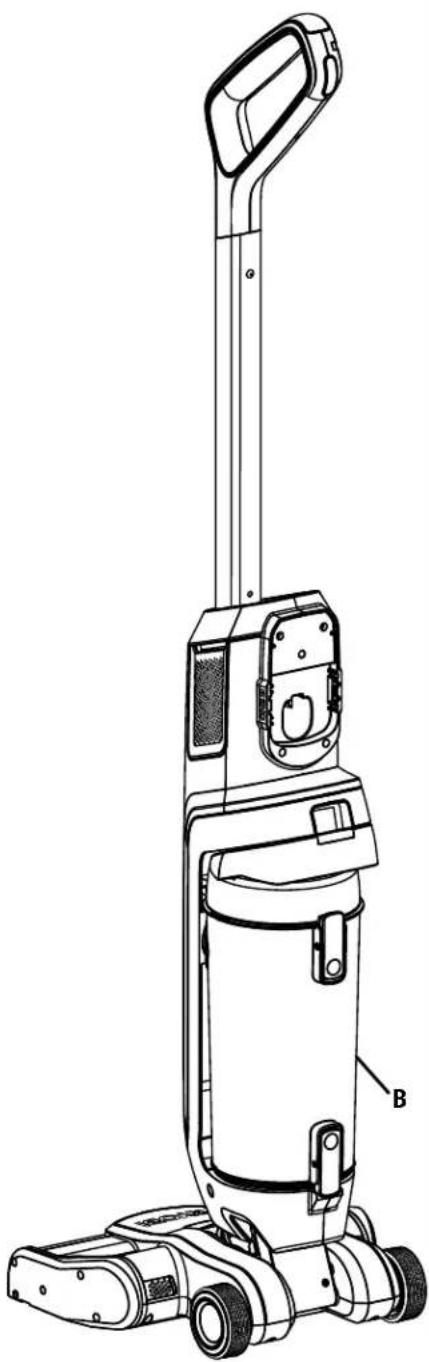
FIG. 1
A - Battery pack (bloc-piles, paquete de baterías)
B - Latch (loquet, pestillo)
FIG. 3
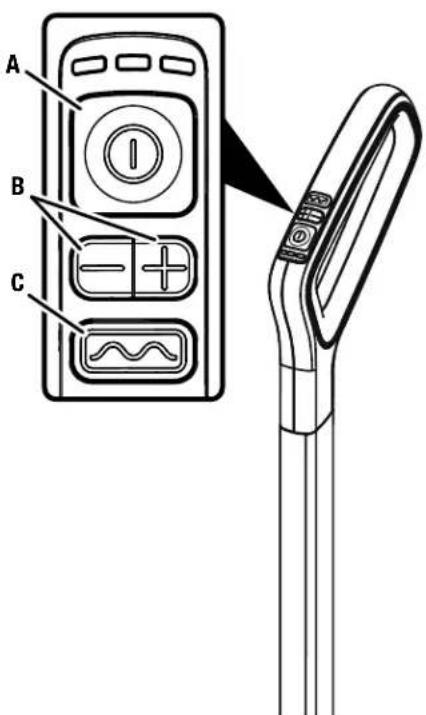
A - ON/OFF button (interrupteur de marche/arrêt, botón de encendido/apagado)
B - Mode buttons (boutons mode, botóns de modo)
C - Roller bar ON/OFF button (bouton de marche/arrêt des barres à tapis, botón de encendido/apagado de rodillo giratorio)
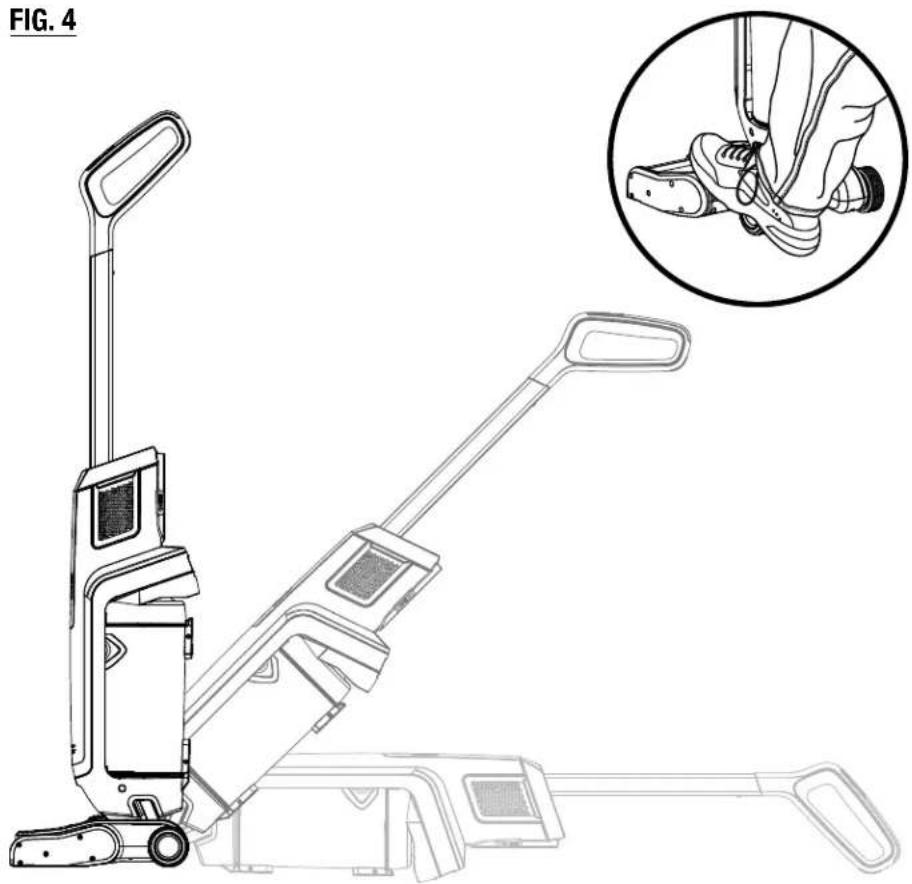
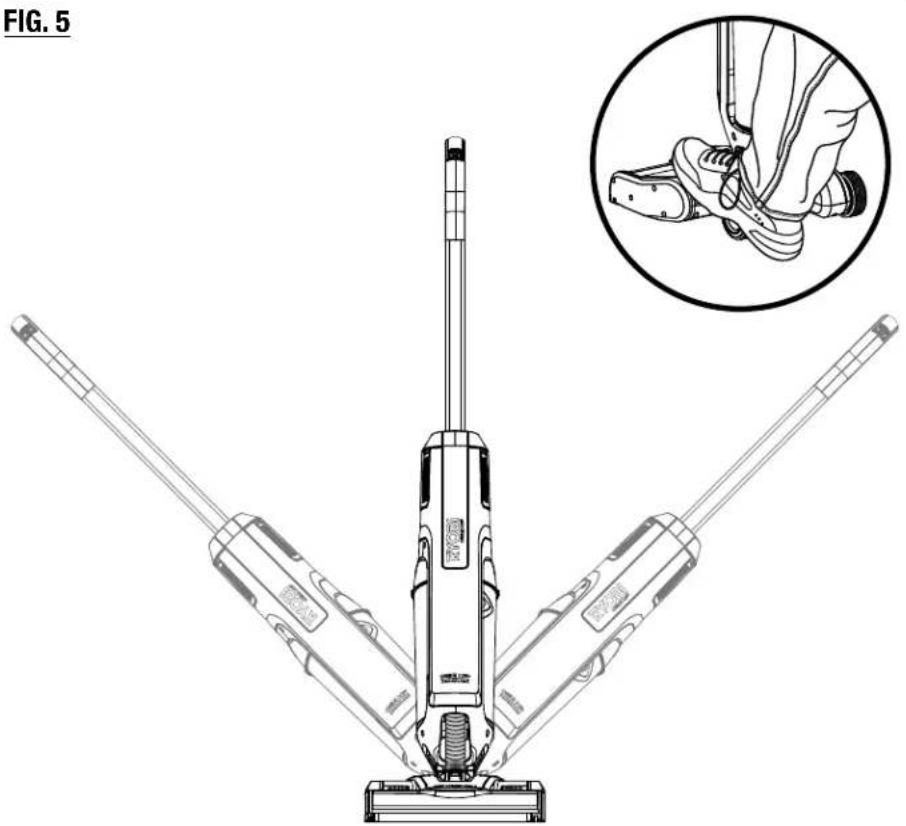
Fig. 6
A - Latch (loquet, pestillo)
Fig. 8
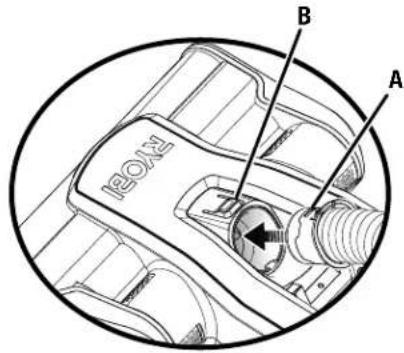
A - Hose (tuyau, manguera)
B - Hose release button (bouton de dégagement de la tuyau, perilla de liberación de manguera)
Fig. 9
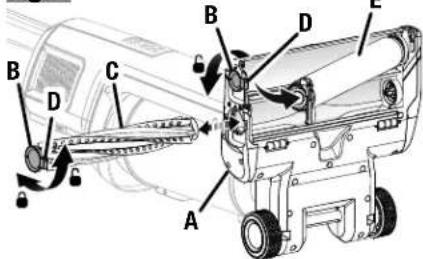
A - Floor head (tête pour sol, cabezal de piso)
B - End cap (capuchon d'extrémité, tapa del extremo)
C - Rear roller bar (barre à tapis arrière, rodillo giratorio trasero)
D - Tab (languette, lengüeta)
E - Front roller bar (barre à tapis avant, rodillo giratorio delantero)
Fig. 10
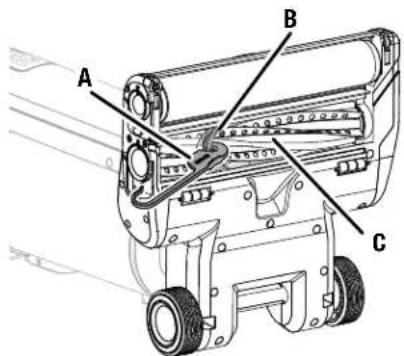
A - Latch (loquet, pestillo)
B - Pre-filter (préfiltre, prefiltro)
Fig. 12

To request service, purchase replacement parts,
locate an Authorized Service Center or obtain Customer or Technical Support:
Visit www.ryobitools.com or call 1-800-525-2579
If any parts or accessories are damaged or missing, do not return this product to the store.
Call 1-800-525-2579 for immediate service.
Please obtain your model and serial number from the product data plate.
This product is covered under a 3-year limited Warranty. Proof of purchase is required.
MODEL NUMBER* ____ SERIAL NUMBER ____
*Model number on product may have additional letters at the end. These letters designate manufacturing information and should be provided when calling for service.
RYOBI is a trademark of Ryobi Limited and is used pursuant to a license granted by Ryobi Limited.
- TABLE OF CONTENTS
- IMPORTANT SAFETY INSTRUCTIONS
- SAVE THESE INSTRUCTIONS
- WARNING
- READ ALL INSTRUCTIONS BEFORE USING THIS APPLIANCE
- SYMBOLS
- ASSEMBLY
- UNPACKING
- ASSEMBLING THE VACUUM
- OPERATION
- APPLICATIONS
- INSTALLING/REMOVING BATTERY PACK
- STARTING/STOPPING THE VACUUM
- MODE SETTINGS
- TO TURN OFF THE ROLLER BARS
- TO TURN ON THE ROLLER BARS
- LED INDICATOR FUNCTIONS
- USING THE VACUUM
- TO EMPTY
- TO REATTACH
- MAINTENANCE
- GENERAL MAINTENANCE
- HOSE MAINTENANCE
- TO CLEAN HOSE
- REMOVING THE ROLLERS FOR CLEANING
- TO REMOVE THE FRONT ROLLER
- TO REMOVE THE BACK ROLLER
- CLEANING/REPLACING THE FILTER
- NOTE: ILLUSTRATIONS START ON PAGE 8 AFTER FRENCH AND SPANISH LANGUAGE SECTIONS
- INSTRUCTIONS IMPORTANTES CONCERNANT LA SÉCURITÉ
- CONSERVER CES INSTRUCTIONS
Brand : RYOBI
Model : One+ PBLSV718
Category : Vacuum Cleaner