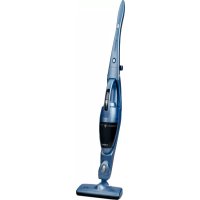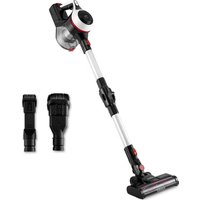
Inspire U3 Digital - Broom UFESA - Free user manual and instructions
Find the device manual for free Inspire U3 Digital UFESA in PDF.


| Product Type | Cordless stick vacuum |
| Brand | Ufesa |
| Model | Inspire U3 Digital |
| Power Supply | Rechargeable battery via mains adapter (supplied) |
| Power | Two levels: low and maximum |
| Filter Type | HEPA filter and sponge filter (washable) |
| Included Accessories | Extension tube, motorized floor head, 2-in-1 brush, long crevice nozzle, wall mount, charger |
| Functions | Automatic safety shut-off, LED charge and battery indicator, dry vacuuming |
| Maintenance | Regular cleaning of dust container and filters, cleaning of the roller brush |
| Safety | Do not vacuum liquids, sharp objects or glowing embers; use only with supplied adapter |
| Usage | Household use only, maximum altitude 2000 m |
| Warranty | According to applicable legislation, contact authorized technical service |
| Recycling | Compliant with WEEE, removable battery to be recycled separately |
| Motorized brush | Yes (motorized floor head) |
| Suction Type | Dry only |
Frequently Asked Questions - Inspire U3 Digital UFESA
User questions about Inspire U3 Digital UFESA
0 question about this device. Answer the ones you know or ask your own.
Ask a new question about this device
Download the instructions for your Broom in PDF format for free! Find your manual Inspire U3 Digital - UFESA and take your electronic device back in hand. On this page are published all the documents necessary for the use of your device. Inspire U3 Digital by UFESA.
USER MANUAL Inspire U3 Digital UFESA
natural_image
Two black vacuum cleaner units with adjustable arm and handle, shown against white background (no text or symbols visible)ESPAÑOL
WE WOULD LIKE TO THANK YOU FOR CHOOSING UFESA. WE WISH THE PRODUCT PERFORMS TO YOUR SATISFACTION AND PLEASURE.
WARNING
PLEASE READ THE INSTRUCTIONS FOR USE CAREFULLY PRIOR TO USING THE PRODUCT. STORE THESE IN A SAFE PLACE FOR FUTURE REFERENCE.
DESCRIPTION
- Battery indicator light
- Main unit
- Suction seat
- Extension tube release button
- Extension tube
- Floor head release button
- Motorized floor head
- Brush roller
- Dust empty release button
- Dust container
- Power switch
- Charge hole
- Stainless net
- Hepa filter
- Charger
- Wall mount
- Long crevice nozzle
- 2 in 1 mini corner and furniture brush
SAFETY INSTRUCTIONS
This appliance can be used by children aged from 8 years and above and persons with reduced physical, sensory or mental capabilities or lack of experience and knowledge if they have been given supervision or instruction concerning use of the appliance in a safe way and understand the hazards involved. Children shall not play with the appliance. Cleaning and user maintenance sha-
Il not be made by children without supervision. The adaptor cable cannot be replaced. If the cable is damaged, the adaptor will be discarded. Plug must be removed from socket-outlet before cleaning or maintaining the appliance.
WARNING: This device can only be used with the adapter model supplied with the device and powered at the safety voltage indicated on the appliance specifications plate. Follow the DEVICE CHARGE instructions in order to charge it. Follow the device BATTERY REMO-VAL instructions for removal of the batteries from the device.
This appliance is intended for use at a maximum altitude of 2000m above sea level.
This symbol means that the appliance is intended to be supplied from a detachable supply unit. Due to the plastic housing of the vacuum cleaner, keep the appliance away from all the heat sources (radiators, stoves, etc). Do not block the vacuum cleaner inlet and outlet openings! Turn off the vacuum cleaner before replacing equipment.
Warning: Risk of entrapment. Do not touch the rotating parts without stopping the appliance.
BATTERY REMOVAL
PLEASE REMOVE THE BATTERY BEFORE DISCARDING IT. The appliance must be disconnected from the supply mains when removing the battery.
Make sure the battery pack is fully discharged.
Press the battery removal button and remove the battery from the product.
PLEASE ENSURE THE BATTERY IS DISPOSED OF SAFELY.
IMPORTANT WARNINGS
Prior to plugging in the product, check that your mains voltage is the same as the one indicated on the product label. The mains connection cable must not be tangled or wrapped around the product during use. Do not pull on the connection cord in order to unplug it. Do not use, connect or disconnect the device to the mains with your hands or feet wet. Proceed according to the conservation and cleaning section of this manual for cleaning. Unplug the product immediately from the mains in the event of any breakdown or damage and contact an authorized Technical support service. In order to prevent any risk of danger, do not open the device. Only qualified technical personnel from the brand's Official Technical support service may carry out repairs or procedures on the device. Any incorrect use or improper handling of the product shall render the warranty null and void. Only an authorized technical support service center may carry out repairs on this product. This appliance is designed exclusively for domestic use, in no case should be a commercial or industrial use. In case of misuse or tampering with the product, it will be out of warranty. Do not use the appliance to vacuum liquids (water, etc), sharp objects (pins, pins, nails, glass, etc), incandescent objects (matches, cigarettes). Never use the turbobrush to: Polish floors, suck (Liquids, wet or damp dust, hot ash, burning objects, such as cigarettes, matches, sharp and hard items, such us: razors, pins, thumbtacks, pieces of glass, etc), flour, cement, plaster, printer or photocopier toner, etc.
B&B Trends, S.L. disclaims all liability for damages that may occur to people, animals or objects, for the non-observance of these warnings.
ACCESSORIES
Extension Tube: Use for extended reach when using as an upright unit or for those hard to reach places.
Motorized Floor Head: Use this for hard floors and carpets. Easily picking up dirt dust and small debris.
2 in 1 dusting brush: Use this for vacuuming fabric furnishings such as sofas arm-chairs and curtains.
Long crevice nozzle: Features a narrow nozzle that makes quick work of vacuuming tight spaces such as corners and hard to reach areas.
ASSEMBLY INSTRUCTIONS
NOTE: Before assembling the appliance fix the included mount to the wall. Ensure it is placed high enough for the vacuum to be securely wall mounted.
Assembling the extension tube, motorized floor brush and accessories
- Insert the connector of the motorized floor head into the base of the extension tube by clicking it into place. Attach the floor head and extension tube to the main body by slotting it into place via the air duct connector.
- Attach the long crevice nozzle or the 2 in 1 dusting brush to the base of the extension tube via the connector. It will "click" into place.
- If using the motorized floor head or accessories without the extension tube, simply attach it to the main body via the air duct connector. It will "click" when secure.
BEFORE FIRST USE
- Put the unit to the wall mount.
- Ensure that the air vent and suction pipe are free from blockages and dust. Should they suddenly clogged, switch off the appliance immediately and clear the blockage before attempting to use the vacuum again.
- Remove any sharp or large objects from the path before using this vacuum as these may damage the appliance irreparably.
Vacuum cleaner charging:
When the batteries unit power off, please recharge it. Please use the designated adaptor to charge the vacuum cleaner. Plug the adaptor to start charging, the three indicator lights will flash when charging and when fully charged, the three lights will be stable. The lights will turn off successively as the device is used.
Indicator light definition
| TYPE OF LIGHT DEFINITION | ||
| During charging | The indicator light is flashing The appliance is charging | |
| There's only one light shine fast | The battery unit is low voltage and the battery package must be changed | |
| There's two lights fast flashing | The charging circuit is damaged and the battery package must be changed | |
| There's two lights slow flashing Low ambient temperature | ||
| During use | The lights turn off successively The | appliance is discharging |
| There's only one light slow flashing | The battery is almost over and the appliance must be charged | |
| There's two lights fast flashing and unit cut off | The battery package temperature is over the limitation, the program cut off the circuit to protect the unit | |
| There's three lights fast flashing and unit cut off | Over load or short circuit | |
INSTRUCTIONS OF USE
CAUTION: The vacuum must be fully charged before using for the first time.
- Remove the vacuum cleaner from the wall mount. If using as a handheld unit, disassemble the tube and attach the desired accessory. 2. Use the power switch to turn on the appliance. Default power is low power.
- Push the switch twice to increase to max power, ideal when you are cleaning carpets with a high pile.
- Push the switch three times and the power is off.
MAINTAINING & CLEANING
All the maintenance must be held after the unit is shut off.
Clean the dust cup regularly to avoid any problems.
It is recommended to dry storage and not to put heavy things on the unit.
Cleaning the dust container and filters
- Press the dust release button to open the bottom cover and expel trash. Wipe to clean the dust container, do not immerse in water.
- Turn the tank counterclockwise and take out the high-efficient filter and sponge filter.
- Rinse the filters thoroughly under the running cold water. Do not use soap or other cleaning solvents. COMPLETELY air dry the filters before reassembling. Do not use hair dryer to dry the filter. This may cause the filter to warp.
Cleaning the roller brush:
After a long period of using, the bristle may be jammed by hair or something similar, it is required to clean it on time in order to make the appliance to work efficiently.
- Remove the motorized power brush from the main unit before cleaning the roller brush.
- Turn the lock to unlock mark. Open the roller cover, take out the roller from the brush.
- Carefully clean and remove the hairs and debris from the brush roller. Wipe to clean only, do not use any soap or harsh cleaning solvents.
- After cleaning, reassemble the roller into the brush and turn the lock to the lock mark
- If roller brush becomes damp, allow to dry naturally before replacing.
TROUBLESHOOTING
| PROBLEM POSSIBLE CAUSES SOLUTION | ||
| Appliance is not power on | This can occur if the appliance has been used or stored for an extended period of time | Connect the vacuum to the charger and allow for a full charging cycle to complete |
| Vacuum is stopped suddenly | This will occur if the safety cut-out device has been activated. This device is designed to prevent your appliance from overheating | Ensure the vacuum is turned off, disconnect all accessories and leave to cool down for at least half an hour before attempting to operate again. Try to identify the source of the overheat by checking for blockages in the extension tube motor-drive floor head and accessories. Empty the dust container and clean or replace the filter |
| Suction of the vacuum is reduced | This is probably caused by dust blockages | Turn the vacuum off. Disconnect the floor head, extension tube and any accessories. Check for and remove any blockages from the dustbin filter, air duct, extension tube floor head and accessories |
| Motorized power brush is not rotating | This tends to occur when there are too many fibers wrapped around the brush roll restricting movement | Check the maintenance section of this manual for instructions on how to appropriately clean the brush roll |
| Charging indicator light does not flash up | There may be no power reaching the vacuum from the charger | Ensure that power is being supplied to the mains socket and that the charger is turned on. Ensure the charging cable is securely connected to the vacuum. Ensure the mains socket is switched off before checking the charging cable itself. Do not attempt to use if the cable is split, frayed or otherwise damaged. Instead, seek a replacement charger |
| Application time of the vacuum is less than it used to be | An insufficient charging cycle will result in reduced application time. | Ensure the battery has completed a full charging cycle. There may be reduced energy discharge in the battery. This is normal and gradually occurs in all batteries over time |
PRODUCT DISPOSAL
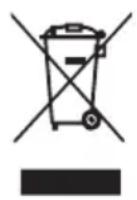
This product complies with European Directive 2012/19/EU on electrical and electronic devices, known as WEEE (Waste Electrical and Electronic Equipment), provides the legal framework applicable in the European Union for the disposal and reuse of waste electronic and electrical devices. Do not dispose of this product in the bin, instead going to the electrical and electronic waste collection centre closest to your home
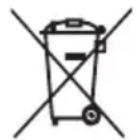
The product may contain batteries. Remove them before disposing of the product and dispose in special containers approved for this purpose.
FRANÇAIS
NOUS VOUS REMERCIONS D'AVOIR CHOISI UFESA. NOUS SOUHAITONS QUE CE PRODUIT VOUS APPORTE SATISFACTION ET QUE VOUS PRENIEZ PLAISIR À L'UTILISER.
AVERTISSEMENT
VEUILLEZ LIRE ATTENTIVEMENT LE MODE D'EMPLOI AVANT D'UTILISER LE PRODUIT. CONSERVEZ-LE DANS UN ENDROIT SÛR POUR POUVOIR LE CONSULTER ULTÉRIEUREMENT.
DESCRIPTION
B&B TRENDS, SL. guarantees compliance of this product, for the use for which it is, during the period established by the legislation in force in the country of sale. In the case of breakdown during the term of this warranty, users are entitled to repair or else the replacement of the product at no charge if the former is unavailable, unless one of these options proves impossible to fulfil or is disproportionate. In this case, you can then opt for a reduction in price or cancellation of the sale, which must be dealt with directly with the sales vendor. This also covers replacement of spare parts provided that the product has been used according to the recommendations specified in this manual for both cases, and has not been tampered with by any third party that is not authorised by B & B TRENDS, SL. The warranty will not cover any parts subject to wear and tear. This warranty does not affect your rights as a consumer in accordance with the provisions in Directive 1999/44/EC for member states of the European Union.
USE OF WARRANTY
Customers must contact a B&B TRENDS, SL., authorised Technical Service for repair of the product. Since any tampering of the same by anyone not authorised by B&B TRENDS, SL., or the careless or improper use of the same shall render this warranty null and void. You must keep the purchase invoice, receipt or delivery docket in order to exercise your warranty rights. For technical service and after-sales care outside the Spanish territory, please submit your query to the point of sale where you purchased the item.