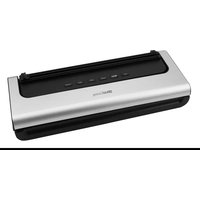
V200 - Vacuum packaging machines AddLiving - Free user manual and instructions
Find the device manual for free V200 AddLiving in PDF.


User questions about V200 AddLiving
0 question about this device. Answer the ones you know or ask your own.
Ask a new question about this device
Download the instructions for your Vacuum packaging machines in PDF format for free! Find your manual V200 - AddLiving and take your electronic device back in hand. On this page are published all the documents necessary for the use of your device. V200 by AddLiving.
USER MANUAL V200 AddLiving
natural_image
Line drawing of a rectangular electronic device with internal components and mounting holes (no text or symbols)Vakuumierer
Modell: V200
DE / AT / CH
Fragen und Service
Lieber Kunde,
natural_image
Line drawing of a battery pack with an inset showing its internal components (no text or symbols)natural_image
Diagram of a device with directional arrows indicating movement or force (no text or symbols present)natural_image
Line drawing of a hand pressing a button on a device panel (no text or symbols)natural_image
Line drawing of a hand pressing down on a cylindrical device with a black button, no text or symbols present
natural_image
Diagram of a printer or scanner with a hand pointing to a button, showing no text or symbols.natural_image
Diagram of a device with an attached cable and plug, showing internal components (no text or symbols)text_image
QR code image containing encoded data, no visible human-readable textHersteller
GO Europe GmbH
Zum Kraftwerk 1
45527 Hattingen
AddLiving
natural_image
Line drawing of a battery pack with no text or symbolsVacuum sealer
Model: V200
EN
Warranty
Dear customer, We are delighted that you have chosen this equipment. In the case of a defect, please return the device together with the receipt and original packing material to the point of sale.
Intended use
The vacuum sealer is used to vacuum pack food or seal plastic bags. Any other use is considered improper use. Unauthorised modifications or conversions that are not described in these operating instructions are not permitted and will result in damage to this product. Proper installation and observance of and compliance with the instructions in this operating manual are prerequisites for the intended use of the product.
Content
Warranty....12
Intended use....12
Important safety instructions....13
Notes on use 14
Scope of delivery 14
Product overview 15
Installation site 16
Functions 16
Commissioning....16
Vacuuming and sealing 16
Sealing without vacuuming....18
Cutting the vacuum bag 18
Vacuum external containers (with vacuum hose)....19
Cleaning....20
Troubleshooting 20
Notes on disposal....20
Technical data....21
Technical changes 21
Declaration of Conformity....21
Manufacturer 21
Important safety instructions


Warning! Choking hazard due to small parts, packaging and protective film! Keep children away from the product and its packaging!

Warning! There is a risk of electric shock!
Never open or repair the appliance yourself. Never touch bare contacts with with metal objects. Never operate the product with wet hands. Do not operate the product if it is damaged.


Warning! Do not touch the heating element or the sealing seam directly after use to avoid burns.

Warning! If the product exhibits unusual characteristics such as noise, odour or smoke, disconnect the power supply immediately.
Notes on use

Before connecting and using the product, please read these operating instructions and keep them for future reference.
Protect the product from direct sunlight, naked flames, heat sources and moisture.
Do not store the product at extreme temperatures or in a humid environment, as this may affect its service life.
Prevent the ingress of dust and moisture.
Do not cover the product during operation.
The product is not intended for commercial use and should only be used indoors in accordance with the instructions.
Only operate the product from a professionally installed socket. Observe the information under Technical data.
The device is not suitable for continuous operation. The overheating protection function switches on automatically after 20 consecutive processes. The device cannot be used for 5 minutes. Open the device to prevent overheating.
Do not leave the device unattended during operation.
Only use vacuum bags that are suitable for vacuum sealers.
When you are not using the device, disconnect it from the power supply to prevent accidental operation.
Scope of delivery
1 Vacuum sealer V200
1 Mains cable
1 Operating instructions
1 Vacuum hose
5 Vacuum bag (20x30 cm)
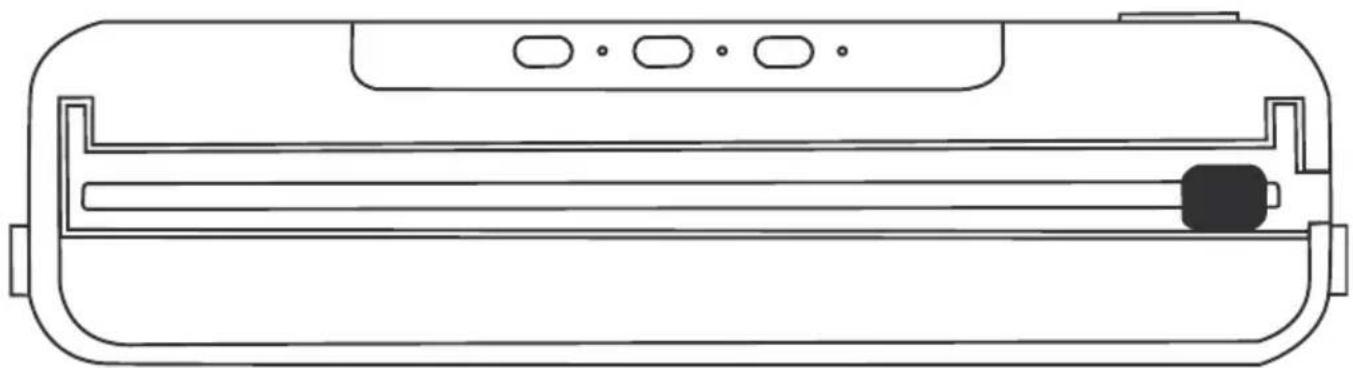
Product overview
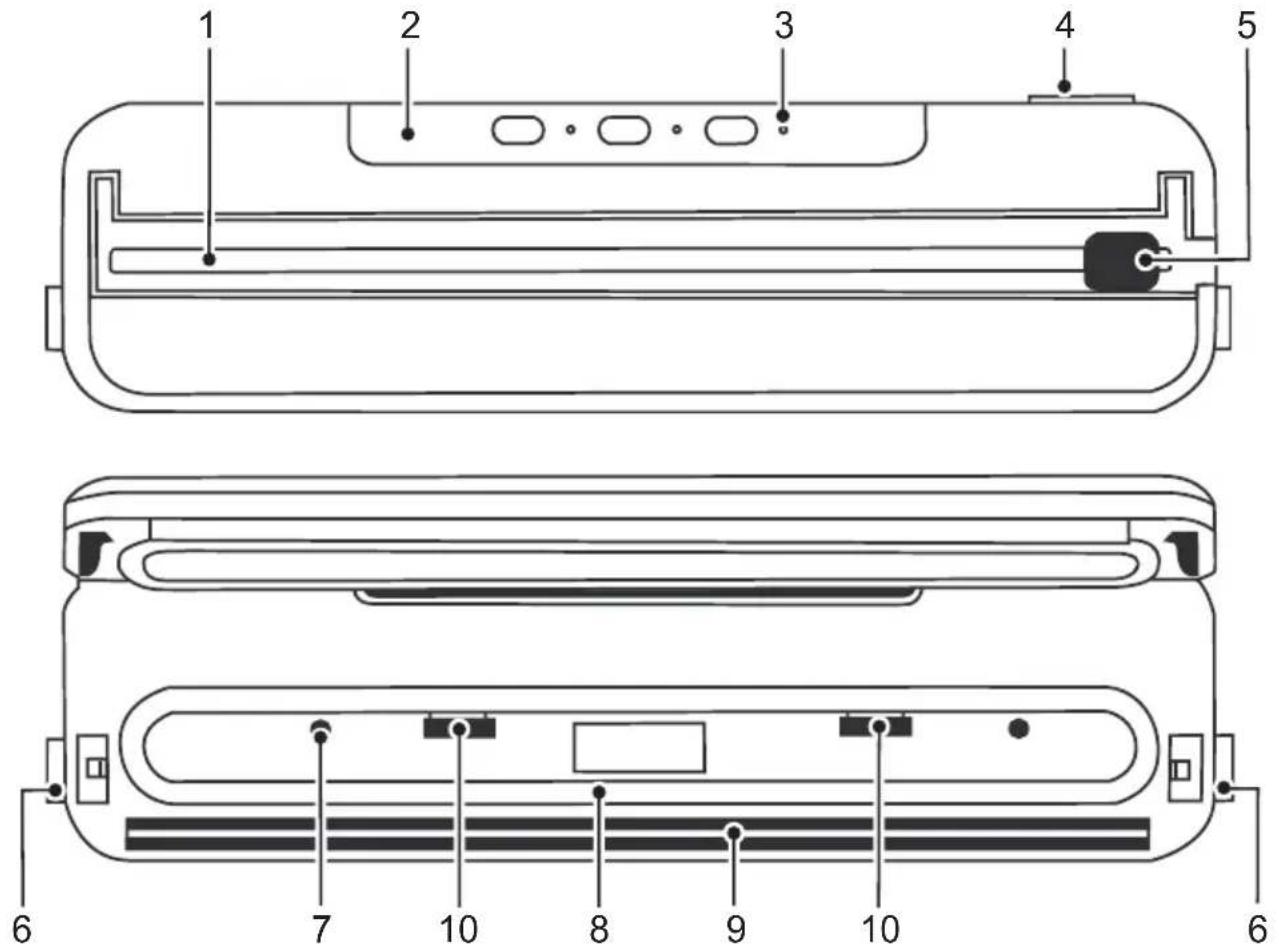
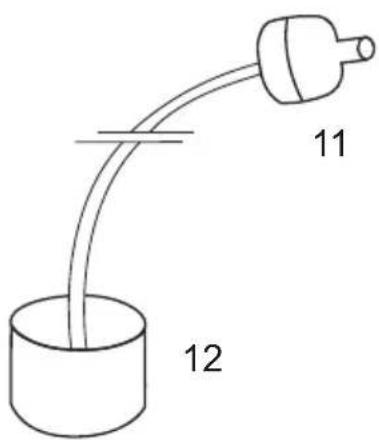
text_image
11 121 Cutting bar 7 Connection for vacuum hose
2 Control panel 8 Sealing foam
3 Control lamp 9 Heating element
4 Grid connection 230 V 10 Vacuum bag stop
5 Cutting knife 11 Device connection
6 Unlocking buttons 12 Container connection
Installation site
Place the device on a stable, level surface near a power socket.
Functions
Vacuuming and sealing (VAC SEAL)
Use this function for dry or hard foods, such as nuts, rice, fruit, etc. The vacuum level is -55 kPa.
Vacuuming and sealing gently (SOFT MODE)
Use this function for soft foods, such as bread etc.
The vacuum level is between -15 kPa and -25 kPa.
Sealing (SEAL)
Use this function for sealing.
Vacuum external containers (with vacuum hose)
Use this accessory to vacuum seal liquid foods, such as soups, sauces, etc. A suitable container (not included in the scope of delivery) must be used to utilise this function.
Commissioning
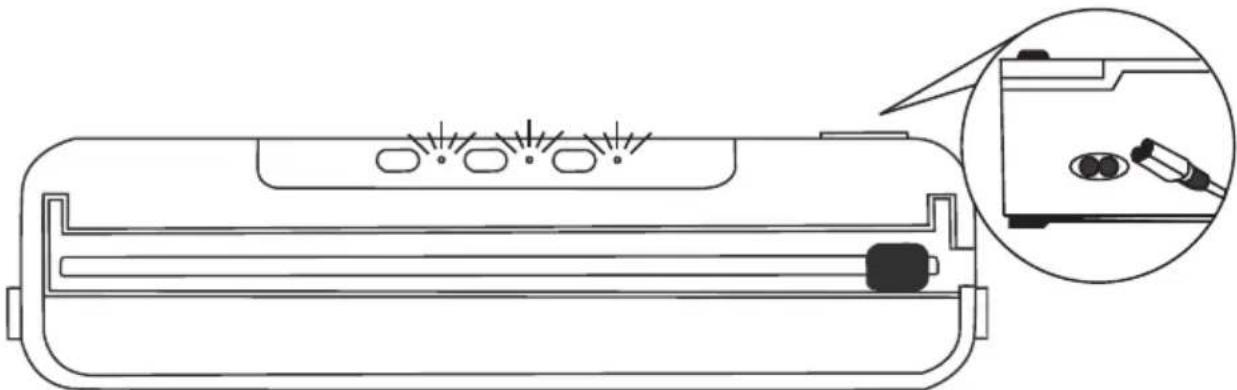
1 Insert the mains plug with the device connection into the grid connection (4).
2 Connect the mains plug to a properly installed socket.
natural_image
Line drawing of a battery pack with indicator lights and a magnified inset showing internal components (no text or symbols)The LED indicators light up once. The device is in standby mode.
Vacuuming and sealing
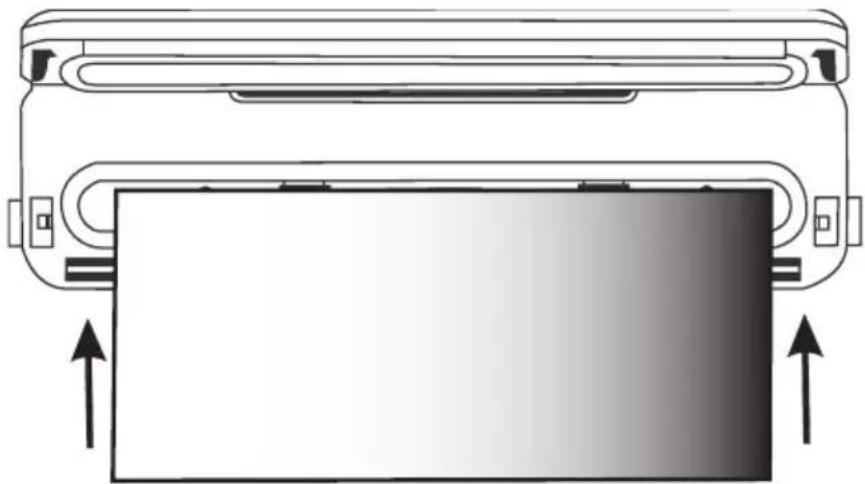
1 Press both unlocking buttons (6) to open the cover.
2 Place the bag opening up to the vacuum bag stop (10) in the vacuum chamber and press the bag flat.
A distance of at least 70 mm or more should be maintained between the food in the bag and the bag opening.

Note: Make sure that the vacuum bag is inserted straight, flat and crease-free.

Note: Sharp, fermented, rotten items are not suitable for vacuuming. This may cause leaks in the vacuum bag or it may inflate.
natural_image
Diagram of a device with directional arrows indicating movement or force, no text or symbols present3 Press the cover down firmly until you hear it click into place.
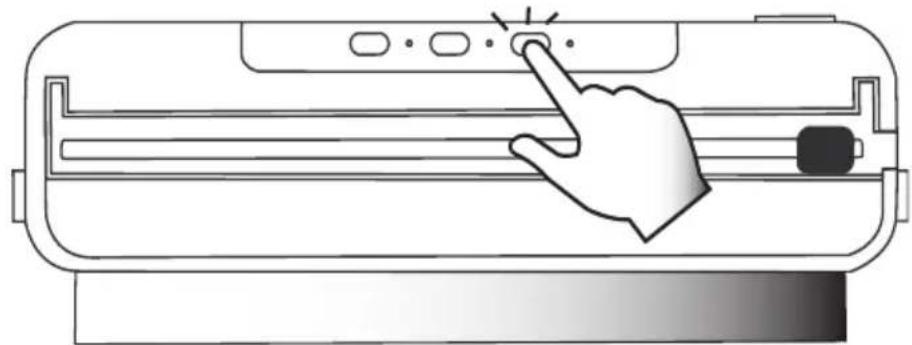
4 Depending on the nature of the food, press the button with the desired function VAC SEAL or SOFT MODE. The vacuuming process starts and the corresponding LED lights up.
natural_image
Illustration of a hand pressing a button on a cylindrical device (no text or symbols)5 Once the process is complete, the appliance stops automatically and the LED goes out.
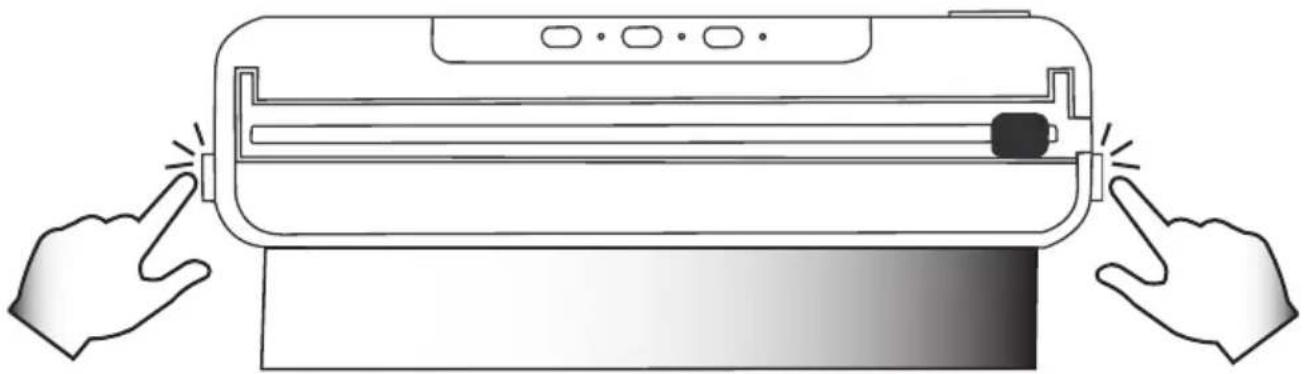
6 Press both unlocking buttons to open the cover and remove the bag.

Caution! Do not touch the heating element or the sealing seam to avoid burns!
natural_image
Line drawing of a hand pressing down on a cylindrical device with a black button, no text or symbols present
Note: Unlock the cover after each use. This prevents pressure being exerted on the sealing foam.
Sealing without vacuuming
1 Press both unlocking buttons (6) to open the cover.
2 Place the bag opening up to the vacuum bag stop (10) in the vacuum chamber and press the bag flat.
3 Press the cover down firmly until you hear it click into place.
4 Press SEAL. The sealing process starts and the corresponding LED lights up.
5 Once the process is complete, the device stops automatically and the LED goes out.
6 Press both unlocking buttons to open the cover and remove the bag.

Caution! Do not touch the heating element or the sealing seam to avoid burns!
Cutting the vacuum bag
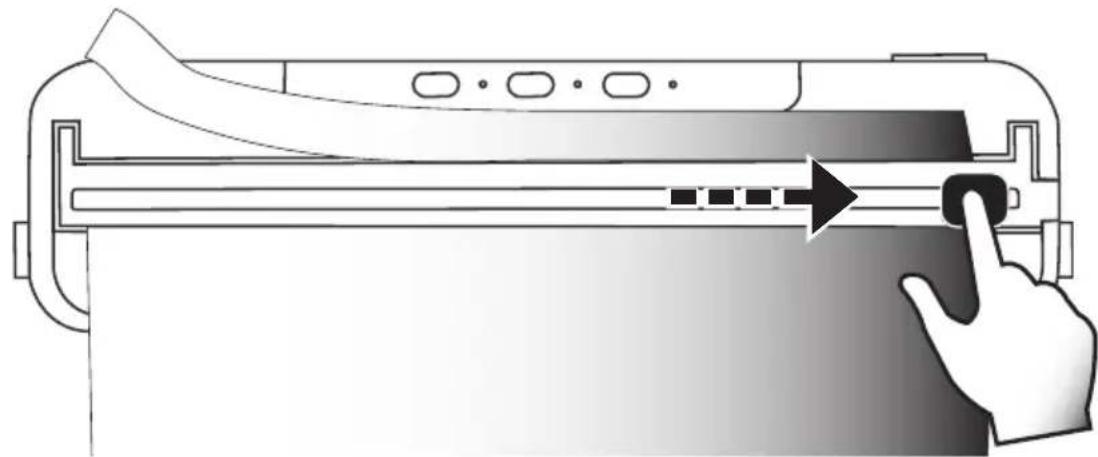
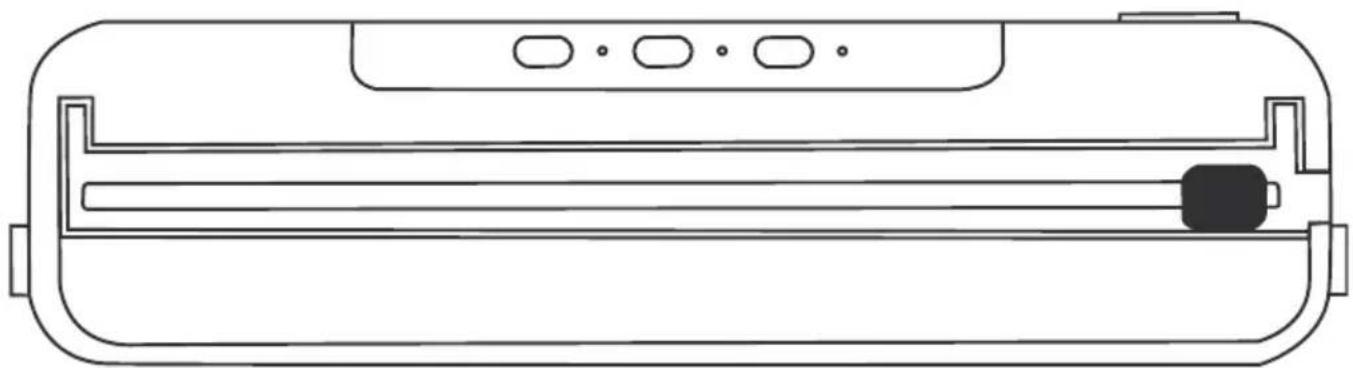
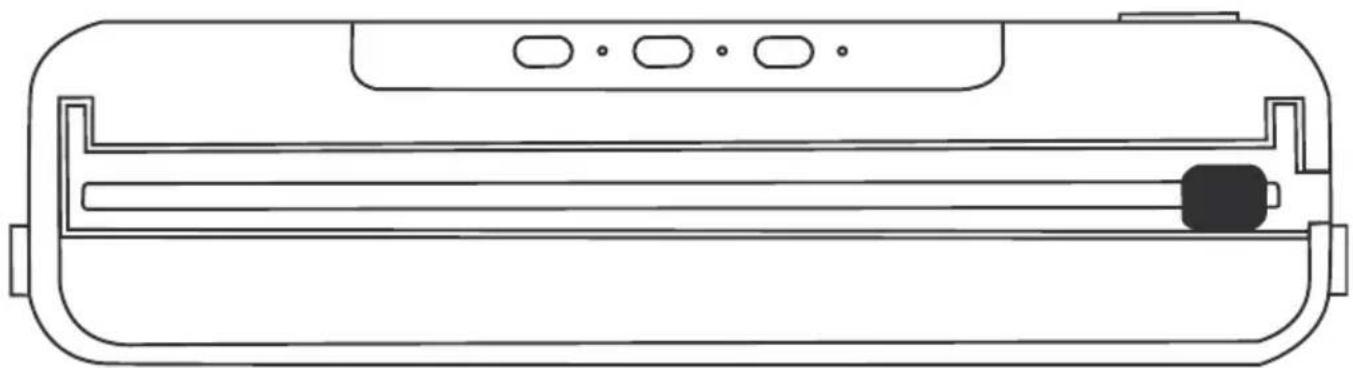
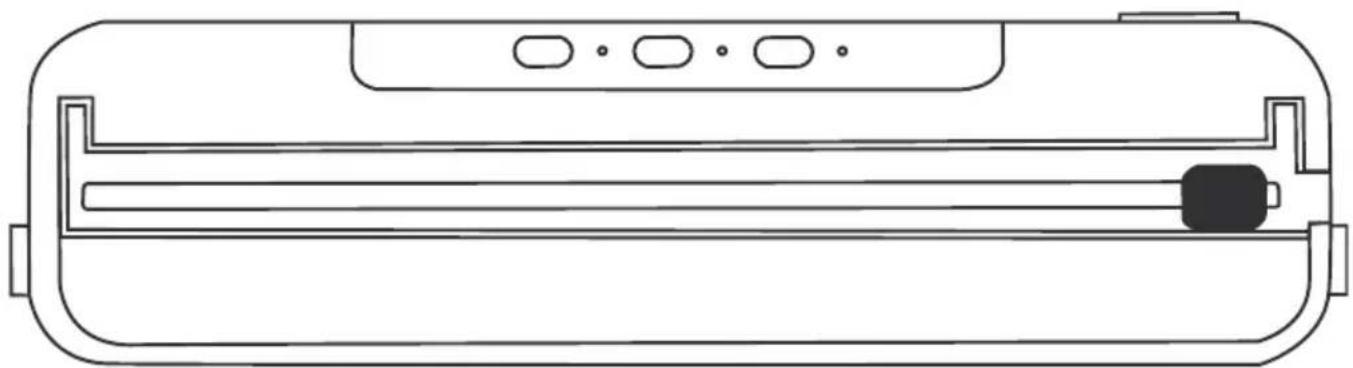
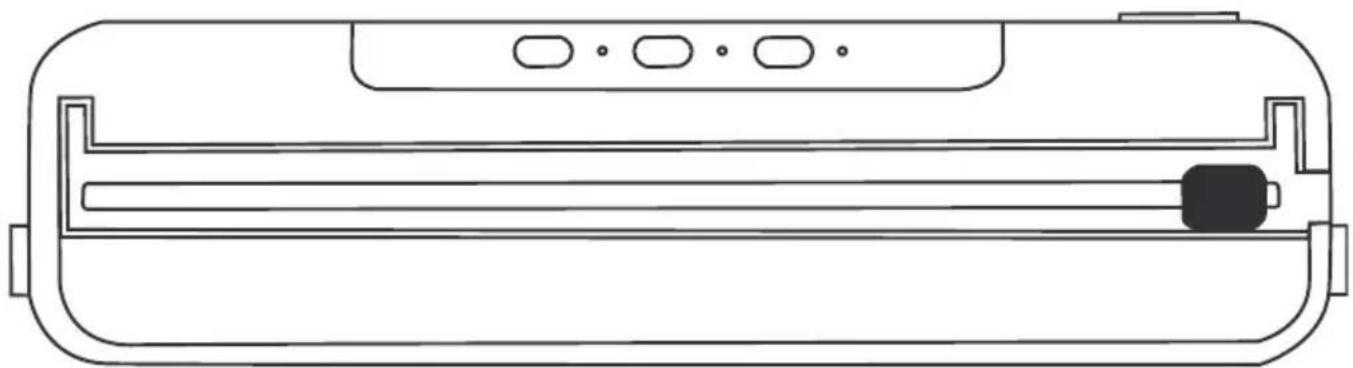
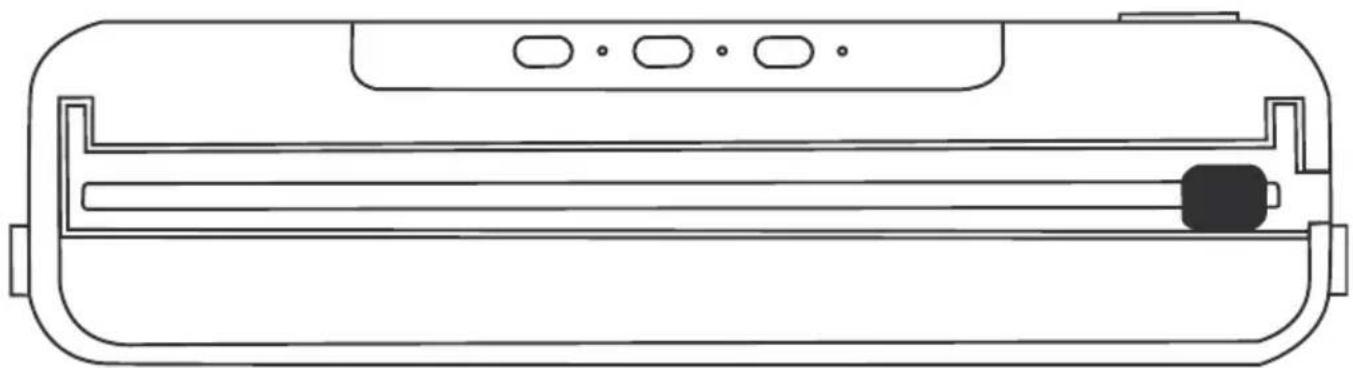
1 Move the cutting blade (5) to the left or right end of the cutting rail (1) and fold the cutting rail upwards.
2 Place the vacuum bag as far as desired under the cutting rail and fold it down.
3 Hold the cutting bar down and slide the cutter to the other end to cut the vacuum bag.
natural_image
Illustration of a printer with paper being placed on top, showing a hand interacting with the page (no text or symbols present)Vacuum external containers (with vacuum hose)

Note: Only vacuum external containers with the vacuum hose included in the scope of delivery.
1 Prepare a container suitable for vacuum sealers. Make sure that the container is completely closed and that no air can enter.
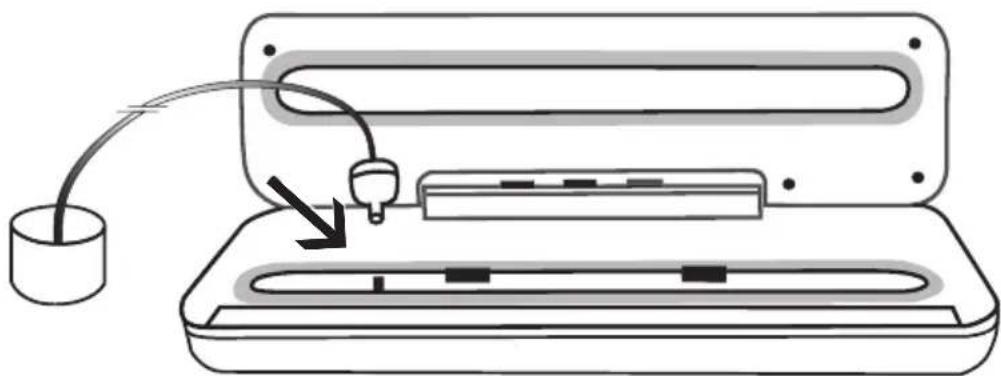
2 Plug the device connection of the vacuum hose (11) into the connection (7) on the device.
3 Place the container connection (12) on the suction opening of your container.

Note: The cover of the device remains open during this process.
natural_image
Diagram of a device with a plug inserted into a tray, showing internal components and an arrow indicating insertion (no text or symbols present)4 Press VAC SEAL. The vacuuming process starts and the corresponding LED lights up.
5 Once the process is complete, the device stops automatically and the LED goes out.
6 Remove the vacuum hose once the process is complete.

Note: The vacuum hose can only vacuum seal. There is no sealing. Remove the vacuum hose from the device after each use.
Cleaning
Clean the inside and outside of the device with a soft, slightly damp, lint-free cloth. Only use gentle cleaning agents.

Note: Do not clean the device under running water.
Troubleshooting
Malfunction Solution
The device does not start Check
The device does not vacuum or seal / does not seal properly
that the mains plugs are plugged in correctly.
Check whether the vacuum bag is too full. There should be a distance of at least 70 mm or more between the food in the bag and the bag opening.
Check whether the vacuum bag is leaking or not inserted correctly.
Check that the vacuum hose is connected correctly if you want to vacuum over it.
Check whether the vacuum bag is damaged or whether there is liquid on the sealing seam.
Notes on disposal

Find out about the possibilities of taking back used appliances free of charge from your dealer.

Packaging materials must be disposed of according to local regulations.

The packaging is made of environmentally friendly materials that you can dispose of at local recycling points. Advice on the options with which to dispose of your old device can be obtained from your municipal or local administration offices.

Observe the identification on the packaging materials during the waste sorting process; they are identified by abbreviations (b) and numbers (a) which have the following significance: 1–7: plastic/20–22: paper and cardboard/80–98: composite materials.

The adjacent symbol indicates laws dictate that electrical and electronic apparatus no longer required must be disposed of separate from domestic waste. Dispose of your device at a collection point provided by your local public waste authority. Packaging materials must be disposed of according to local regulations.
Technical data
Input voltage: 220-240 VAC 50-60 Hz
Power: 100W±10%
Working width: max. 300mm
Weight: 740 g
Dimensions (W x H x D): 375 x 55 x 97 mm

The EU-wide glass-fork symbol identifies materials that are suitable for food contact.
Technical changes
These operating instructions are for information purposes only. Its contents are not the subject of a contract. All data given are only nominal values. The equipment and options described may vary depending on the country-specific requirements.
Declaration of Conformity
We, GO Europe GmbH, Zum Kraftwerk 1, 45527 Hattingen, DEUTSCHLAND, declare in sole responsibility, that the product complies with the EU Directives: 2014/53/EU and 2011/65/EU. The full EU Declaration of Conformity is available online at the following website or by scanning the QR code:

The CE Mark on the device confirms conformity.
The Declaration of Conformity can be read online at http://productip.com/?f=2a155b

text_image
QR code image containing encoded data, no visible human-readable textManufacturer
GO Europe GmbH
Zum Kraftwerk 1
45527 Hattingen
Germany
AddLiving
natural_image
Line drawing of a battery pack with no text or symbolsVacuümsealer
Model: V200
NL
Garantie
Geachte klant,
natural_image
Line drawing of a battery pack with indicator lights and a magnified inset showing internal components (no text or symbols)natural_image
Diagram of a device with directional arrows indicating movement or force, no text or symbols presentnatural_image
Illustration of a hand pressing a button on a cylindrical device (no text or symbols)natural_image
Line drawing of a hand pressing down on a cylindrical device with a black button, no text or symbols present
natural_image
Diagram of a printer or scanner with a hand pointing to the right page, showing no text or symbols.Vacuüm externe containers (met vacüümslang)

natural_image
Diagram of a device with a plug inserted into a tray, showing internal components and an arrow indicating insertion (no text or symbols present)text_image
QR code image containing encoded data, no visible human-readable textFabrikant
GO Europe GmbH
Zum Kraftwerk 1
45527 Hattingen
Duitsland
AddLiving
natural_image
Line drawing of a battery pack with no text or symbolsSelladora al vacío
Modelo: V200
ES
Garantía
natural_image
Line drawing of a battery pack with indicator lights and a magnified inset showing internal components (no text or symbols)natural_image
Diagram of a device with directional arrows indicating movement or force, no text or symbols presentnatural_image
Illustration of a hand pressing down on a cylindrical device with indicator lights (no text or symbols)natural_image
Line drawing of a hand pressing down on a device with fingers pointing at it (no text or symbols)
natural_image
Illustration of a printer with paper being placed on top, showing a hand interacting with the page (no text or symbols present)natural_image
Diagram of a device with a plug inserted into a tray, showing internal components and an arrow indicating insertion (no text or symbols present)text_image
QR code image containing encoded data, no visible human-readable textFabricante
GO Europe GmbH
Zum Kraftwerk 1
45527 Hattingen
Alemania
AddLiving
natural_image
Line drawing of a battery pack with no text or symbolsMachine sous vide
Modèle : V200
FR
Garantie
Cher client,
Modifications techniques ....52
natural_image
Line drawing of a battery pack with internal components and an inset showing a close-up of its internal components (no text or symbols)natural_image
Diagram of a device with directional arrows indicating movement or force (no text or symbols present)natural_image
Line drawing of a hand pressing a button on a device panel (no text or symbols)natural_image
Line drawing of a hand pressing down on a cylindrical device with a black button, no text or symbols present
natural_image
Illustration of a printer with paper being placed on top, showing a hand interacting with the page (no text or symbols present)natural_image
Diagram of a device with a plug inserted into a tray, showing internal components and an arrow indicating insertion (no text or symbols present)Modifications techniques
text_image
QR code image containing encoded data, no visible human-readable textFabricant
GO Europe GmbH
Zum Kraftwerk 1
45527 Hattingen
Allemagne
AddLiving
natural_image
Line drawing of a battery pack with no text or symbolsnatural_image
Line drawing of a battery pack with an inset showing its internal components (no text or symbols)natural_image
Diagram of a device with directional arrows indicating movement or force (no text or symbols present)natural_image
Line drawing of a hand pressing a button on a cylindrical device (no text or symbols)natural_image
Line drawing of a hand pressing down on a cylindrical device with a black button, no text or symbols present
natural_image
Illustration of a printer with paper being placed on top, showing a hand interacting with the page (no text or symbols present)natural_image
Diagram of a device with a plug inserted into a tray, showing internal components and an arrow indicating insertion (no text or symbols present)text_image
QR code image containing encoded data, no visible human-readable textProduttore
GO Europe GmbH
Zum Kraftwerk 1
45527 Hattingen
Germania
AddLiving
natural_image
Line drawing of a battery pack with no text or symbolsΣφραγιστής κενού
Μοντέλο: V200
GR
Εγγύηση
natural_image
Line drawing of a battery pack with internal components and an inset showing a close-up of its internal components (no text or symbols)natural_image
Diagram of a device with directional arrows indicating movement or force (no text or symbols present)natural_image
Illustration of a hand pressing a button on a cylindrical device (no text or symbols)natural_image
Line drawing of a printer with two hands pointing at it, no text or symbols present
natural_image
Illustration of a printer with paper being placed on top, showing a hand pointing to the page (no text or symbols present)natural_image
Diagram of a device with an attached cable and plug, showing internal components (no text or symbols)text_image
QR code image containing encoded data, no visible human-readable textΚατασκευαστής
GO Europe GmbH
Zum Kraftwerk 1
45527 Hattingen
Γερμανία