Magic 6 Pro 5G - Mobile Phone HONOR - Free user manual and instructions
Find the device manual for free Magic 6 Pro 5G HONOR in PDF.


| Product type | Mobile phone |
| Brand | HONOR |
| Model | Magic 6 Pro 5G |
| Dimensions (estimated) | 162.5 x 75.8 x 8.9 mm |
| Weight (estimated) | 225 g |
| Power supply | Charging via USB Type-C, compatible wireless charging |
| Battery | Integrated lithium-ion, non-removable |
| Screen | Touchscreen with integrated fingerprint sensor |
| Durability | IP68: resistant to splashes, water and dust (tested under controlled conditions) |
| Connectivity | 5G, 4G LTE, Bluetooth, Wi-Fi 5 GHz, NFC |
| Main functions | Calls, SMS, Internet, Camera, GPS, NFC, Reverse wireless charging |
| Security | In-display fingerprint, software security functions |
| Care and cleaning | Avoid dusty, humid environments or near magnetic fields; do not charge in wet environments |
| Spare parts and repairability | Integrated battery, replacement only by an authorized service center |
| General information | Compliant with EU directives (RoHS, WEEE), SAR head: 0.82 W/kg, trunk: 1.25 W/kg, limbs: 2.83 W/kg |
| Included accessories | USB Type-C cable, power adapter, SIM tray eject tool (depending on version) |
| SIM card compatibility | Dual nano-SIM, unmodified SIM card recommended |
| Frequency bands | GSM 900/1800, WCDMA 900/2100, LTE multiple bands, 5G NR n1/n3/n7/n8/n20/n28/n38/n40/n41/n77/n78 |
| Operating system | Android (registered trademark of Google LLC) with HONOR interface |
| Operating temperature | 0°C to 35°C (use), -20°C to 45°C (storage) |
Frequently Asked Questions - Magic 6 Pro 5G HONOR
User questions about Magic 6 Pro 5G HONOR
0 question about this device. Answer the ones you know or ask your own.
Ask a new question about this device
Download the instructions for your Mobile Phone in PDF format for free! Find your manual Magic 6 Pro 5G - HONOR and take your electronic device back in hand. On this page are published all the documents necessary for the use of your device. Magic 6 Pro 5G by HONOR.
USER MANUAL Magic 6 Pro 5G HONOR
Before using the device, familiarise yourself with its basic operations.
• To power on your device, press and hold the power button until the screen turns on.
- To power off your device, press and hold the power button, and then touch ⏻
- To restart your device, press and hold the power button, and then touch
- Press and hold the Power and Volume down buttons for more than 10 seconds to force restart your device.
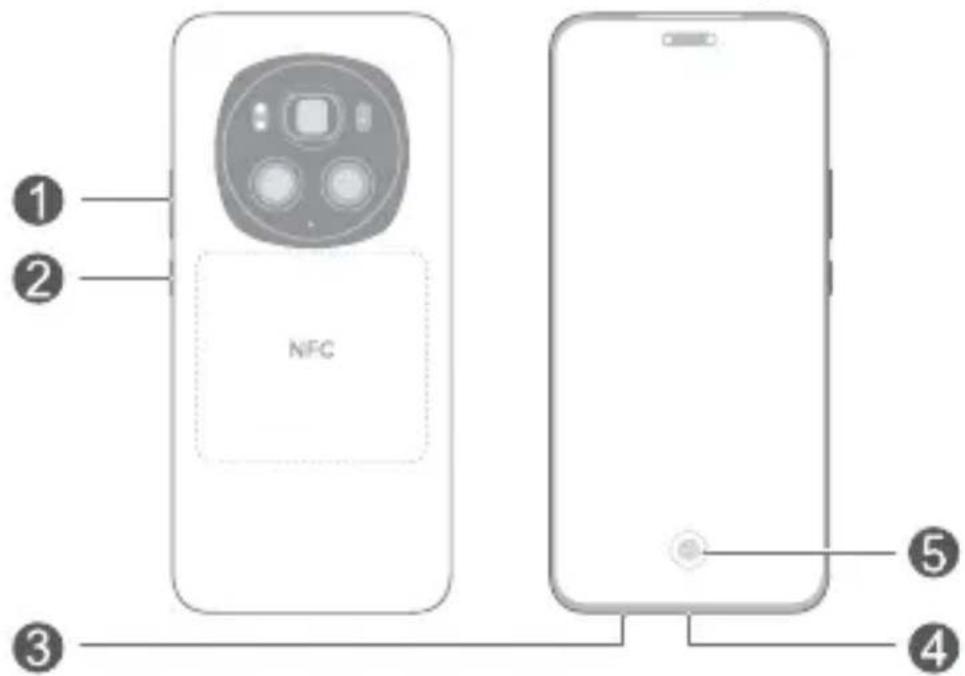
| 1 | Volume button Power button | |
| 3 | Card slot | 4 USB Type-C port/Headset jack |
| 5 | In-screen fingerprint |

- Please keep the NFC area close to other devices or objects while using the NFC function.
- Check out the pre-installed Tips app and master all the great features on your device.
Getting Started

- Be careful not to scratch your device or hurt yourself when using the eject pin.
- Store the eject pin out of the reach of children to prevent accidental swallowing or injury.
- Do not use cut or modified SIM cards with your device as these may not be recognised and could damage the card tray (slot).
- If your SIM card does not match your device, please contact your carrier.
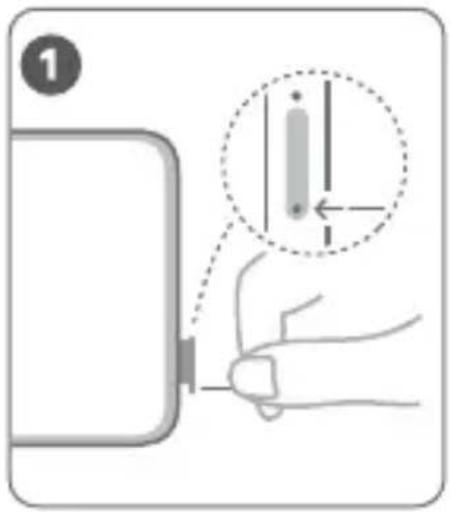
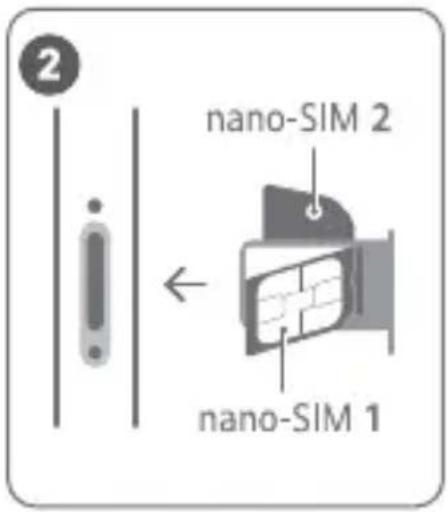
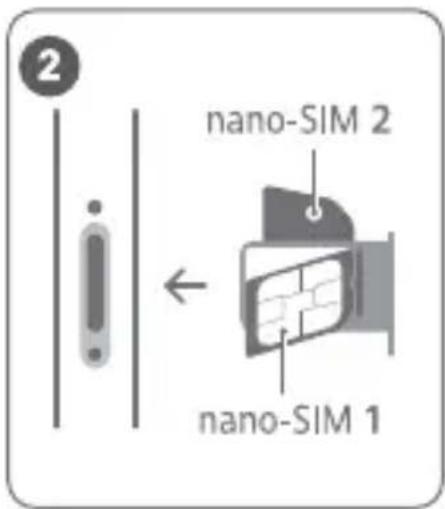
Follow the instructions in the following figures to set up your device. Please use the eject pin included.
Ensure that the card is correctly aligned and its notch is first inserted into the card tray.
SIM Card Management
Select the default mobile data card and calling card as needed. For details, check out the pre-installed Tips app.

- 5G and 4G service depends on the support of your network carrier and its deployment of relevant services. Please contact your carrier to activate 5G or 4G service.
- 5G and 4G service may be unavailable in certain areas due to network interference.
- If this guide is inconsistent with the description on the official website, the latter prevails.
For More Information
If you encounter any problems while using your device, you can obtain help from the following resources:
- Visit https://www.hihonor.com to view device information and other information.
- Visit https://www.hihonor.com/global/support/ for the most up-to-date contact information for your country or region.
- Go to Settings and enter the following keywords in the search box to view the corresponding information. E.g. Legal information, Safety information, Authentication info, Regulatory information.
Safety Information
Please read all of the safety information carefully before using your device to ensure its safe and proper operation and to learn how to dispose of your device properly.
Operation and Safety
- To prevent possible hearing damage, do not listen at high volume levels for long periods.
- Using an unapproved or incompatible power adapter, charger or battery may damage your device, shorten its lifespan or cause a fire, explosion or other hazards.
- Ideal operating temperatures are 0^ to 35^ . Ideal storage temperatures are -20^ to +45^ .
- Pacemaker manufacturers recommend maintaining a minimum distance of 15 cm between a pacemaker and a wireless device to prevent potential interference with the pacemaker. If using a pacemaker, hold the device on the side opposite the pacemaker and do not carry the device in your front pocket.
- Keep the device and the battery away from fire, excessive heat and direct sunlight. Do not place them on or in heating devices, such as microwave ovens, water heaters, stoves or radiators.
- Adhere to local laws and regulations while using the device. To reduce the risk of accidents, do not use
your wireless device while driving. If you must make or answer a call, stop your vehicle at a safe location first.
- While flying in an aircraft or immediately before boarding, ensure that you use your device according to the instructions provided. Using a wireless device in an aircraft may disrupt wireless networks, present a hazard to aircraft operations or be illegal under law.
- In order to avoid damaging the internal circuit of the device or charger, do not use the device in a dusty, damp, or dirty place, or near a magnetic field.
- When charging the device, make sure the power adapter is plugged into a socket near the devices and is easily accessible.
- Unplug the charger from the electric socket and from the device when not in use.
- Do not use, store or transport the device where flammables or explosives are stored (e.g. in a petrol station, oil depot or chemical plant). Using your device in these environments increases the risk of explosion or fire.
- Keep the battery away from fire, and do not disassemble, modify, throw, or squeeze it. Do not insert foreign objects into it, submerge it in water or other liquids, or expose it to external force or pressure, as this may cause the battery to leak, overheat, catch fire, or even explode.
- Dispose of this device, the battery and accessories according to local regulations. They should not be disposed of in normal household waste. Improper battery use may lead to fire, explosion or other hazards.
- Please consult your doctor and the device manufacturer to determine if operation of your device may interfere with the operation of your medical device.
- Adhere to any rules or regulations set forth by hospitals and health care facilities.
- This device contains a built-in battery. Do not attempt to replace the battery by yourself. Otherwise, the device may not run properly or it may damage the battery. For your personal safety and to ensure that your device runs properly, you are
strongly advised to contact an authorised service centre for a replacement.
- Your device has been tested in a controlled environment and certified to be splash, water, and dust resistant in specific situations (meets requirements of classification IP68 as described by the international standard IEC 60529). Splash, water, and dust resistance are not permanent conditions and resistance might decrease as a result of normal wear. Do not charge your device in wet conditions. Visit https://www.hihonor.com/global/support/ for detailed description of this function.
- Reverse wireless charging works at maximum power when the device battery level is kept above 90% and a power adapter that supports HONOR SCP charging protocol, e.g., a HONOR 100W SuperCharge adapter or HONOR 66W SuperCharge adapter, is used with the standard HONOR charging cable.
Potentially Explosive Atmosphere
Power off your device in any area with a potentially explosive atmosphere, and comply with all signs and instructions. Areas that may have potentially explosive atmospheres include the areas where you would normally be advised to turn off your vehicle engine. Triggering of sparks in such areas could cause an explosion or a fire, resulting in bodily injuries or even deaths. Do not power on your device at refueling points such as service stations. Comply with restrictions on the use of radio equipment in fuel depots, storage, and distribution areas, and chemical plants. In addition, adhere to restrictions in areas where blasting operations are in progress. Before using the device, watch out for areas that have potentially explosive atmospheres that are often, but not always, clearly marked. Such locations include areas below the deck on boats, chemical transfer or storage facilities, and areas where the air contains chemicals or particles such as grain, dust, or metal powders. Ask the manufacturers of vehicles using liquefied petroleum gas (such as propane or butane) whether this device can be safely used in their vicinity.
Disposal and Recycling Information

The symbol on the product, battery, literature, or packaging means that the products and batteries should be taken to separate waste collection points designated by local authorities at the end of the lifespan. This will ensure that EEE waste is recycled and treated in a manner that conserves valuable materials and protects human health and the environment. For more information, please contact your local authorities, retailer, or household waste disposal service or visit the website https://www.hihonor.com/.
Reduction of hazardous substances
This device and its electrical accessories comply with local applicable rules on the restriction of the use of certain hazardous substances in electrical and electronic equipment, such as EU REACH regulation, RoHS and Batteries (where included) directive. For declarations of conformity about REACH and RoHS, please visit the website
https://www.hihonor.com/global/legal/certification/.
RF Exposure Information
If your device supports the wireless reverse charging function, this equipment should be operated with a minimum distance of 20 cm between the device and your body.
The World Health Organisation has stated that exposure can be reduced by limiting your usage or simply using a hands-free kit to keep the device away from the head and body.
Ensure that the device accessories, such as a device case and device holster, are not composed of metal components. Keep the device away from your body to meet the distance requirement.
For the countries that adopted the SAR limit 2.0 W/kg over 10 grams of tissue.
The device complies with RF specifications when used near your ear or at a distance of 0.50 cm from your body. The highest reported SAR value: head SAR: 0.82 W/kg; body SAR: 1.25 W/kg.
EU Regulatory Compliance
Statement
Hereby, Honor Device Co., Ltd. declares that this device BVL-N49 is in compliance with the following Directive: RED 2014/53/EU, RoHS 2011/65/EU, ErP 2009/125/EC. The full text of the EU declaration of conformity, the detailed ErP information and most recent information about accessories & software are available at the following internet address:
https://www.hihonor.com/global/legal/certification/.
This device may be operated in all member states of the EU.
Observe national and local regulations where the device is used.
This device may be restricted for use, depending on the local network.
UK Regulatory Compliance
Hereby, Honor Device Co., Ltd. declares that this device BVL-N49 is in compliance with the following Regulations: Radio Equipment Regulations 2017, The Restriction of the Use of Certain Hazardous Substances in Electrical and Electronic Equipment Regulations 2012, The Ecodesign for Energy-Related Products Regulations 2010. The full text of the UK declaration of conformity, the detailed ErP information and most recent information about accessories & software are available at the following internet address: https://www.hihonor.com/global/legal/certification/.
Restrictions in Norway
Use of this radio equipment is not allowed in the geographical area within a radius of 20 km from the center of Ny-Ålesund, Svalbard.
Restrictions in the 5 GHz band:
The 5150 to 5350 MHz frequency range is restricted to indoor use in: AT, BE, BG, CH, CY, CZ, DE, DK, EE, EL, ES, FI, FR, HR, HU, IE, IS, IT, LI, LT, LU, LV, MT, NL, NO, PL, PT, RO, SE, SI, SK, TR, UK(NI).
In accordance with the relevant statutory requirements in the UK, the 5150 to 5350 MHz frequency range is restricted to indoor use in the United Kingdom.
Frequency Bands and Power
The frequency bands and transmitting power (radiated and/or conducted) nominal limits applicable to this radio equipment are as follows:
| BVL-N49 GSM900: 35.5dBm, GSM1800: 32.5dBm, WCDMA900/2100: 25.7dBm, LTE Band 1/3/7/8/20/28/34/38/40/42: 25dBm, 5G NR Band: n1/n3/n7/n8/n20/n28/n38/n40: 26dBm, 5G NR Band: n41/n77/n78: 29dBm, Bluetooth 2.4GHz: 20dBm, Wi-Fi 2.4GHz: 20dBm, Wi-Fi 5G: 5150-5250MHz: 23dBm, 5250-5350MHz: 23dBm, 5470-5725MHz: 23dBm, 5725-5850MHz: 14dBm, NFC 13.56MHz: 42 dBμA/m @ 10m, Wireless Power Charging: 100-119KHz: 42 dBμA/m @ 10m, 119-135KHz: 66 dBμA/m @ 10m descending 10 dB/dec above 119KHz, 135-140KHz: 42 dBμA/m @ 10m, 140-148.5KHz: 37.7 dBμA/m @ 10m |
Legal Notice
Trademarks and Permissions
Android is a trademark of Google LLC. LTE is a trademark of ETSI.
The Bluetooth ^® word mark and logos are registered trademarks owned by Bluetooth SIG, Inc. and any use of such marks by Honor Device Co., Ltd. is under licence. Wi-Fi ^® , the Wi-Fi CERTIFIED logo and the Wi-Fi logo are trademarks of Wi-Fi Alliance.
dts X For DTS patents, see http://patents.dts.com. Manufactured under license from DTS Licensing Limited. DTS, DTS:X, DTS:X Ultra, and the DTS:X logo are registered trademarks or trademarks of DTS, Inc. in the United States and other countries. © 2021 DTS, Inc. ALL RIGHTS RESERVED.
Copyright © Honor Device Co., Ltd. 2024. All rights reserved.
ALL PICTURES AND ILLUSTRATIONS IN THIS GUIDE, INCLUDING BUT NOT LIMITED TO THE DEVICE COLOUR, SIZE, AND DISPLAY CONTENT, ARE FOR YOUR REFERENCE ONLY. THE ACTUAL DEVICE MAY VARY. NOTHING IN THIS GUIDE CONSTITUTES A WARRANTY OF ANY KIND, EXPRESS OR IMPLIED.
Privacy Policy
To better understand how we protect your personal information, please see the privacy policy at https://www.hihonor.com/privacy-policy/worldwide/.
Français
https://www.hihonor.com/global/legal/certification/.
https://www.hihonor.com/global/legal/certification/.
https://www.hihonor.com/global/legal/certification/.
https://www.hihonor.com/privacy-policy/worldwide/.
Italiano
https://www.hihonor.com/.
https://www.hihonor.com/global/legal/certification/.
https://www.hihonor.com/global/legal/certification/.
https://www.hihonor.com/global/legal/certification/.
https://www.hihonor.com/.
https://www.hihonor.com/global/legal/certification/.
https://www.hihonor.com/privacy-policy/worldwide/.
Nederlands
Ken uw apparaat
https://www.hihonor.com/global/legal/certification/.
| 1 | Volymknapp Strömknapp | |
| 3 | Kortöppning | 4 USB Type C-port/Headset-uttag |
| 5 | På-skärmenfingeravtryck |

https://www.hihonor.com/global/legal/certification/.
Information om radiofrekvensexponering
https://www.hihonor.com/global/legal/certification/.
SIM-kortstyring
https://www.hihonor.com/privacy-policy/worldwide/.
Norsk
https://www.hihonor.com/global/legal/certification/.
https://www.hihonor.com/global/legal/certification/.
https://www.hihonor.com/global/legal/certification/.
https://www.hihonor.com/global/legal/certification/.
https://www.hihonor.com/privacy-policy/worldwide/.
Ελληνικά
https://www.hihonor.com/global/legal/certification/.
https://www.hihonor.com/.
https://www.hihonor.com/global/legal/certification/.
n1/n2/n3/n5/n7/n8/n12/n20/n25/n26/n28/n38/n40/n41/n
66/n71/n75/n77/n78/n79
LTE TDD: B34/B38/B39/B40/B41/B42
LTE FDD:
B1/B2/B3/B4/B5/B7/B8/B12/B13/B17/B18/B19/B20/B25/B
26/B28/B32/B66/B71
WCDMA: B1/B2/B4/B5/B6/B8/B19
GSM: B2/B3/B5/B8
Slovenčina
Spoznajte svoje zariadenie
| 1 | Tlačidlo ovládania hlasitosti | 2 | Tlačidlo napájania |
| 3 | Zásuvka pre karty | 4 | Port USB typu C/konektor slúchadiel |
| 5 | Odtlačok prsta na obrazovke |

https://www.hihonor.com/global/legal/certification/.
https://www.hihonor.com/global/legal/certification/.
Информации за изложеност на радиофреквенции
https://www.hihonor.com/global/legal/certification/.
https://www.hihonor.com/privacy-policy/worldwide/.
Shqip
Njihuni me pajisjen tuaj
https://www.hihonor.com/global/legal/certification/.
| 1 | Taster za podešavanje jačine zvuka | 2 | Taster za uključivanje i isključivanje |
| 3 | Umetak za kartice | 4 | USB Type-C priključak/Konektor za slušalice |
| 5 | Senzor otiska prsta na ekranu |

- Tokom korišćenja NFC funkcije, NFC oblast držite u blizini drugih uređaja ili predmeta.
• Proverite preinstaliranu aplikaciju Saveti i ovladajte svim sjajnim funkcijama na uređaju.
Prvi koraci

https://www.hihonor.com/global/legal/certification/.
Ovaj uređaj može da se koristi u svim zemljama članicama EU.
https://www.hihonor.com/tr/support/ https://www.hihonor.com/tr/privacy-policy/
Yetkili Servisler:
KVK Teknik Servis Bakırköy
Adres: Kartaltepe Mah. İncirli Cad. İhsan Kalmaz
SokakNo: 3/1-2 Bakırköy / İstanbul
Web: https://www.kvkteknikservis.com/
Suite 3401, Unit A, Building 6, Shum Yip Sky
Park, No. 8089, Hongli West Road, Xiangmihu Street, Futian District,
Shenzhen, Guangdong 518040, People's Republic of China
Tel : +86-755-61886688
Web: www.hihonor.com
Çin'de üretilmiştir
https://www.hihonor.com/global/legal/certification/

Web:https://www.hihonor.com/tr/
Enerji Tasarrufu
https://www.hihonor.com/global/legal/certification/.
Ovaj se uređaj može upotrebljavati u svim državama članicama EU-a.
Pridržavajte se nacionalnih i lokalnih zakonskih propisa gdje se uređaj upotrebljava.
https://www.hihonor.com/global/legal/certification/.
https://www.hihonor.com/privacy-policy/worldwide/.
Latviešu
https://www.hihonor.com/global/legal/certification/.
https://www.hihonor.com/global/legal/certification/.
https://www.hihonor.com/privacy-policy/worldwide/.