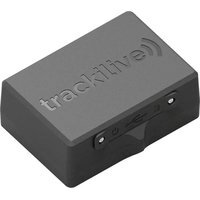
TL-60 - GPS device Trackilive - Free user manual and instructions
Find the device manual for free TL-60 Trackilive in PDF.


User questions about TL-60 Trackilive
0 question about this device. Answer the ones you know or ask your own.
Ask a new question about this device
Download the instructions for your GPS device in PDF format for free! Find your manual TL-60 - Trackilive and take your electronic device back in hand. On this page are published all the documents necessary for the use of your device. TL-60 by Trackilive.
USER MANUAL TL-60 Trackilive
natural_image
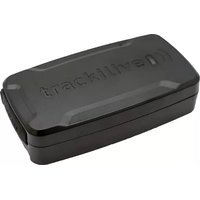
Black rectangular electronic component with engraved text 'tracklive' on its surface (no other visible text or symbols)• DE - Bedienungsanleitung 3
• EN - User Manual 7
• ES - Manual de uso 11
• IT - Instruzioni per l'uso 15
• FR - Mode d'emploi 19
• NL - Bedieningshandleiding 23
Inhaltsverzeichnis:
Verpackungsinhalt 4
natural_image
Icon of a person reading a book inside a circular frame (no text or symbols)Package contents / product parts 8
General information 8
Initial set-up 8
Charging Battery 8
Activating the tracker 9
Turning "ON" the tracker 9
Start tracking 9
LED indicator definition 9
Green indicator: GPS
Blue indicator: LTE
Red indicator: Power charge
Documentations 10
Declaration of Conformity 10
Package contents / product parts:
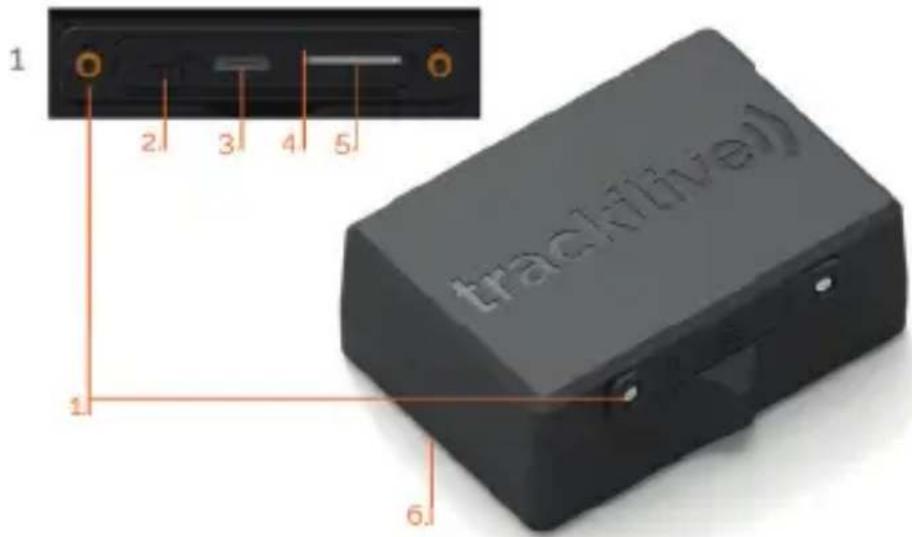
Device description:
- screwed cover
- Power switch
- MicroUSB charging port
4.3 status LEDs - SIM card slot
- Magnetic base with light sensor
Package Contents:
- tracklive TL-60 4G
- MicroUSB cable
- User manual
text_image
1 2 3 4 5 tracklive 1 6General information

natural_image
Icon of a person using a laptop (no text or symbols)These operating instructions are for Trackilive TL-60 4G Tracker, which will simply be referred to as 'tracker' in the following. They contain important information regarding set-up and operation. Before using the tracker, please read the operating instructions carefully. This particularly applies to the safety notes. Failure to adhere to these operating instructions may result in severe injury or damage to the tracker.
The operating instructions are based on the standards and rules in force in the European Union. When abroad, you must also observe country-specific guidelines and laws.
Keep the operating instructions for future use. If you pass the tracker on to third parties, please make sure, to include these operating instructions.
Initial set-up
Charging Battery
When you unpack the tracker for the first time, the battery is probably empty. Battery need to be charged a few times to reach full capacity!
Charge it as follows:
- Open the screwed cover located on the side of the device and connect the charging cable to the tracker's charging port.
- Connect the other end of the charging cable to the USB power adaptor and then to the power socket.
-
Charge the tracker for a few hours. The red LED lights up while charging and fl ashes when the tracker is fully charged.
-
Disconnect tracker from the charging cable.
Activating the tracker
- Open your internet browser and go to the following website: www.tracklive.com
- Select your language.
- Click on "Activate Tracker" and follow the instructions on the screen.
Turning "ON" the tracker
Take the tracker outside so that it has the sky view.
- Slide the power button towards "ON" indicator, the blue LED will light up. When the position ahs be determined, the green LED lights up.
- Put the tracker down and wait for 15 minutes. The tracker will carry out initial GPS positioning. This is required for the device to operate correctly. The tracker will then be ready for use and can be activated.
- Close the cover and fix it with the screws.
NOTE: this procedure is only required the very first time the tracker is turned "ON".
Start tracking:
You can directly start tracking from our online tracking platform by visiting www.track-live.com, or download our mobile application by searching "tracklive" in Apple's app store or Google's play store for free of charge.
LED Indicator Definition
Blue LED: "on": operating mode; "off": Device switched off or is in sleep mode
Green LED: "on": GPS location successful; "off": Device switched off and/or no GPS reception
Red LED: „on“: charging; „flashes“: device is fully charged
NOTE: When the device is in sleep mode, the LEDs turn off automatically.
Documentations
For the complete user manual, functionalities, application guide and all other necessary documentations, please visit the "Help" section of our website at: www.tracklive.com
Declaration of Conformity

VarioTek GmbH hereby declares that the TL-50 tracker radio equipment model conforms with EU Directive 2014/53/EU.
The full text for the EU Declaration of Conformity can be found on the following web-page: www.trackilive.com/hilfecenter/downloadportal/
Disposal
Disposing of the packaging

Make sure packaging materials are correctly separated.
Dispose of cardboard and carton as waste paper and dispose of foils via the recyclable material collection service.
Disposing of the tracker
(Applicable in the EU and other European countries with systems of separately collecting waste and recyclables).
Old devices cannot be disposed of as household waste!
If the tracker can no longer be used, all consumers are legally required to separate old devices from household waste, e.g. by disposing of them using a municipal/district collection point. This ensures that old devices are properly recycled and avoids negative environmental impact. Therefore, electronic devices are labelled with the symbol shown here.
Batteries cannot be disposed of as household waste!
As a consumer, you are legally obligated to dispose of all batteries at a municipal/district collection point or at a retailer, regardless of whether or not they contain harmful substances*, so that they can be disposed of in an environmentally friendly way.
*labelled as:
Cd = cadmium
Hg = mercury
Pb = lead
10 EN
Tabla de contenido:
Contenido 16
natural_image
Icon of a person using a laptop (no text or symbols)natural_image
Icon of a person reading a book inside a circular frame (no text or symbols)natural_image
Icon of a person reading a book inside a circular frame (no text or symbols)natural_image
Icon of a person using a laptop, no text or symbols presentsupport@trackilive.com
www.trackilive.com