
HOCE3T618EWKR-1 - Refrigerator HOOVER - Free user manual and instructions
Find the device manual for free HOCE3T618EWKR-1 HOOVER in PDF.
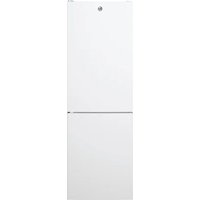


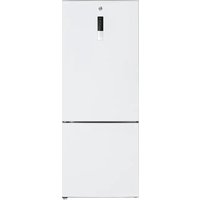
| Product type | Refrigerator with freezer compartment |
| Brand | Hoover |
| Model | HOCE3T618EWKR-1 |
| Minimum installation dimensions (W x D) | 920 mm x 1137 mm |
| Refrigerator temperature range | 2°C to 8°C |
| Freezer temperature range | -18°C, Super freeze at -25°C |
| Fine temperature adjustment | Yes, 3 sub-levels per level |
| Special functions | Super cooling, Super freeze, Eco mode, Holiday mode, Demo mode |
| Defrost | Automatic (refrigerator and freezer) |
| Door reversibility | Yes |
| App connectivity | Yes, hOn app |
| Control panel | On/Off button, SET button, LED |
| Interior lighting | Yes |
| Vegetable compartment | With humidity control (slider) |
| Shelves | Movable |
| Door bins | Yes |
| Leveling feet | Yes |
| Door alarm | Yes, after 3 minutes of opening |
| Power supply | 220-240 V / 50 Hz |
Frequently Asked Questions - HOCE3T618EWKR-1 HOOVER
User questions about HOCE3T618EWKR-1 HOOVER
0 question about this device. Answer the ones you know or ask your own.
Ask a new question about this device
Download the instructions for your Refrigerator in PDF format for free! Find your manual HOCE3T618EWKR-1 - HOOVER and take your electronic device back in hand. On this page are published all the documents necessary for the use of your device. HOCE3T618EWKR-1 by HOOVER.
USER MANUAL HOCE3T618EWKR-1 HOOVER
Discover extra contents and
create your inventory list


EN 1 BG 9 CS 18 DA 26 DE 34 EL 42 ES 51 FI 59 FR 67 HR 75 HU 83 IT 91 NL 99 NO 107 PL 115 PT 123 RO 131 RU 139 SK 148 SL 156 SR 164 SV 172 UK 180 E 188 LT 196 LV 204
Summary
PRODUCT DESCRIPTION 2 Space requirements 2 USE 3 Use 3 Customized temperature 3 4 Super Cool function 4 Super Freeze function 4 Eco mode 5 Holiday function 5 Defrosting 5 Demo mode 5 Error codes 5 APP CONNECTION (Content only) 6 IN APP PAIRING PROCEDURE 6 Step 1. 6 Step 2. 6 Step 3. 6 DOOR REVERSIBILITY 7 DOOR REVERSIBILITY 8 TROUBLESHOOTING
PRODUCT DESCRIPTION
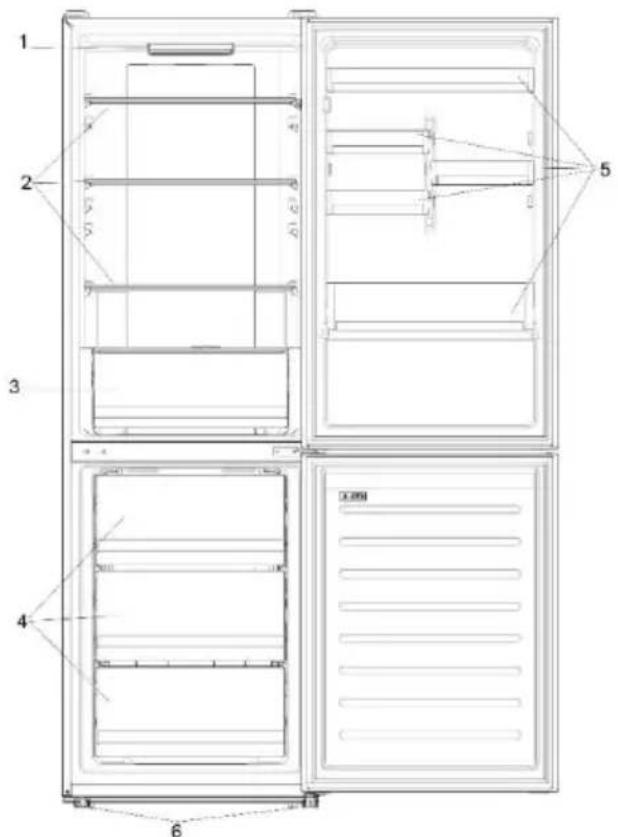
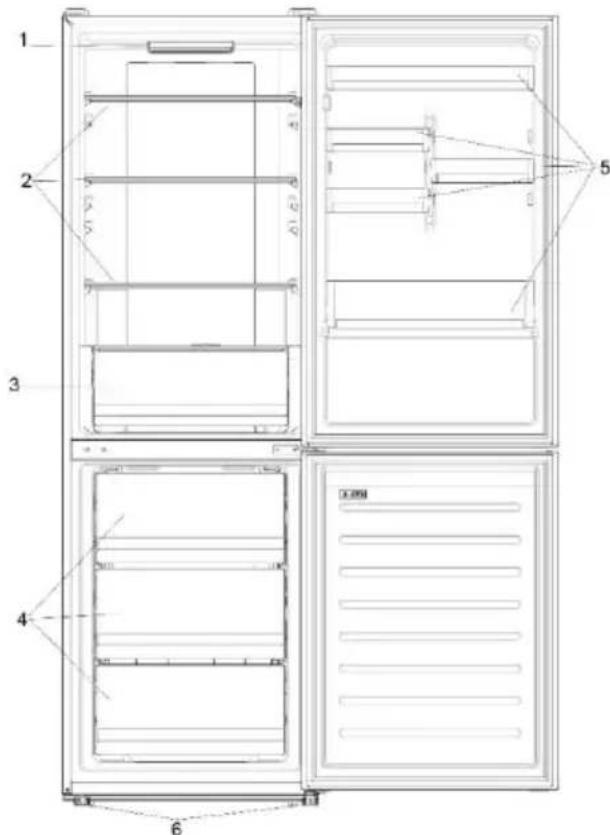
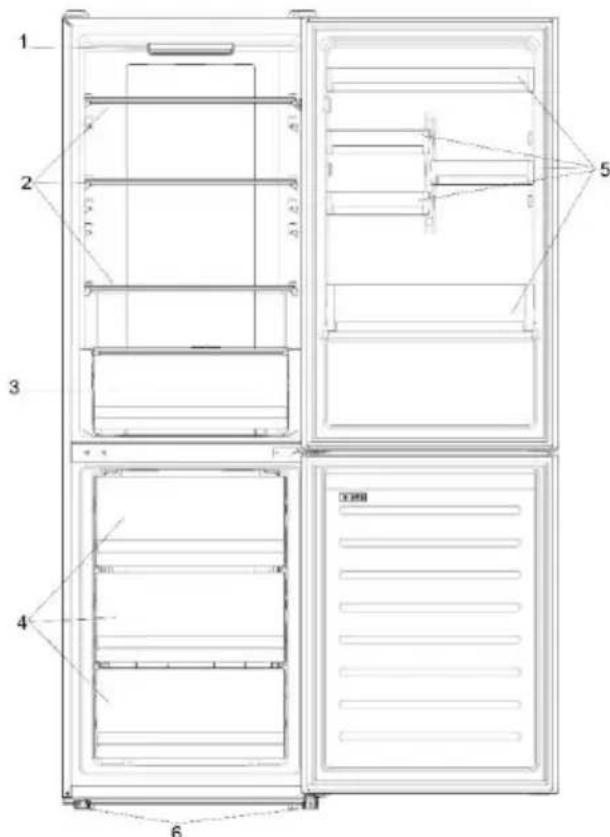
- Control panel and light
- Movable Shelves
- Crisper
- Freezer drawers
- Balconies
- Levelling feet
- The most energy-saving configuration requires drawers, food box and shelves to be positioned in the product, please refer to the above pictures. ** The pictures above are only for reference. The actual configuration will depend on the physical product or statement by the distributor.
Space requirements
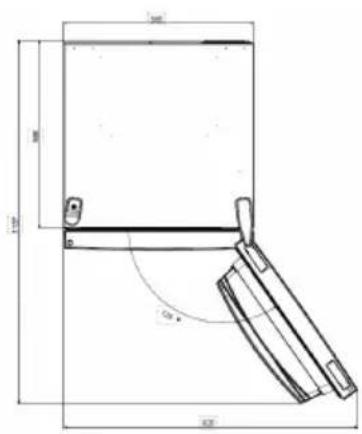
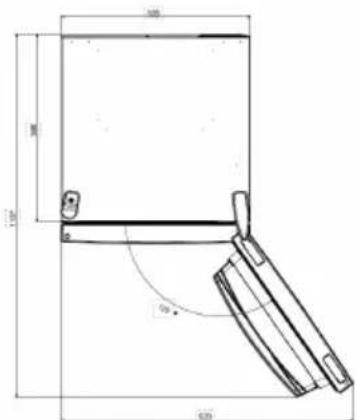
The unit's door must be able to fully open as shown. Spare enough space for convenient opening of the doors and drawers.
Keep a distance of at least 50 mm between the side walls of the product and adjacent parts.
Width: min. 920 mm
Depth: min. 1137 mm
USE
① ON/OFF key, used to switch on/off the appliance. ② SET key, used to select the fridge temperature or the special functions like. ③ Super Cool Icon, shows if the function is activated. ④ Temperature levels, show which is the selected temperature.
Use
Plug on the appliance. The appliance will turn on automatically. The temperature will automatically set at 4°C in the fridge and -18°C in the freezer. - To change the temperature, with the fridge door open, press the SET key. When the setting increases, the corresponding LED light will turn on. An acoustic signal is made every time the SET key is pressed and the temperature is changed. It is possible to select a temperature from 2°C to 8°C in the fridge. In case of power loss, the last cooling level set will be restored. - To restore the default setting, at the screen lit, keep pressed the TEMP button, and then press ON/OFF button 5 times in 5 seconds. - Under the normal operating condition (in spring and autumn), it is recommended to set the temperature at 4°C. In summer when the ambient temperature is high, it is recommended to set temperature at 6~8°C, so as to guarantee the fridge and freezer temperatures and reduce the refrigerator continuous running time; and in winter when the ambient temperature is low, it is recommended to set temperature at 2~4°C to avoid frequent start/stop of the refrigerator.
Fine Tuning
The fine tuning selection SET gives to possibility to set the temperatures by sublevels; each temperature level has three sublevels.
How to use the fine tuning function:
- Press the SET key for 8 seconds to enter fine tuning selection mode. When the appliance enters the mode, an acoustic signal is made and the LED of currently selected cooling level blinks.
- By short pressing the SET key within 5 seconds, the fine tuning setting increases and, at each pressing, an acoustic signal is made.
- During fine tuning, the LED of the selected cooling level is fixed, while the LED of the selected sublevel blinks.
- If no key is pressed for 5 seconds, the system automatically exits from fine tuning selection mode. The fine tuning setting is saved and the LED of the selected fridge temperature is fixed. If the fine tuning is activated again, the setting will start from the previously stored level.
Super Cool function
It is suggested to switch on the Super Cool function if a large quantity of food should be stored (for example after the purchase). The Super-Cool function accelerates the cooling of fresh food and protects the goods already stored from undesirable warming. When the function is activated, the temperature of the fridge is automatically set at 2°C .
How to use the Super Cool function:
- The function can be activated by pressing many times the SET key until the Super Cool LED is turned ON or by selecting it from the app. If the function is activated, the corresponding icon on the control panel will be turned on.
- To exit the Super Cool function, press the SET key again.
- The Super Cool function automatically ends after 30 hours running.
- When the Super Cool ends, the corresponding icon of the control panel turns off and the previously set cooling level is restored.
Super Freeze function
The super freezing function accelerates the freezing of fresh food and protects the goods already stored from undesirable warming. If a large amount of food has to be freeze, it is recommended to set the Super Freeze function on 24h before the usage. When the function is activated, the temperature is automatically set at -25°C .
How to use the Super Freeze function:
- The function can be launched only by selecting it from the app. If the function is activated, it will be shown by the app; there is no indication on the control panel.
- To exit the Super Freeze function, turn it off from the app.
- The Super Freeze function automatically ends when the function has lasted for more than 50 hours.
Eco mode
The Eco mode can be activated to optimize the performance of the appliance, while ensuring the best food storage. When the function is activated, the temperature is automatically set to 5°C in the fridge and -18°C in the freezer.
How to use the Eco mode:
- The function can be activated only by selecting it from the app. If the function is activated, it will be shown by the app; there is no indication on the control panel.
- To exit the Eco mode, turn it off from the app; the previously selected temperature will be restored.
- The Eco mode automatically ends when another function is chosen from the control panel.
Holiday function
The Holiday function can be used to reduce the energy consumption of the appliance when it is not used regularly. When the function is on, the LED lights will be off (even if the door is open) and the fridge will work on low power consumption mode, whereas the freezer will keep working normally. How to use the Holiday function:
The function can be activated only by selecting it from the app. If the function is activated, it will be shown by the app; there is no indication on the control panel. - To exit the Holiday function, turn it off from the app; the previously selected temperature will be restored. - The Holiday function automatically ends when another function is chosen from the control panel.
Defrosting
The defrosting of the refrigerator and freezer compartments is done automatically: no manual operation is needed.
Slider
Near the vegetable basket there is a slider that allows you to adjust the humidity inside it: moving it to the right decreases the humidity, moving it to the left increases the humidity.
Demo mode
Keep the refrigerated door open, press and hold the on/off key, and click the set key five times. The refrigerator will enter the Demo mode. To exit the mode, keep pressed the door switch and press again the mode key for 5s.
Error codes
If the -6 °C LED light is flashing, it means there has been a fan error. Please contact technical assistance to help solve the problem.
APP CONNECTION (Content only)
IN APP PAIRING PROCEDURE
Step 1
- Download the hOn app from the stores.


GET IT ON
Google Play

Download on the
App Store

EXPLORE IT ON
AppGallery
Step 2
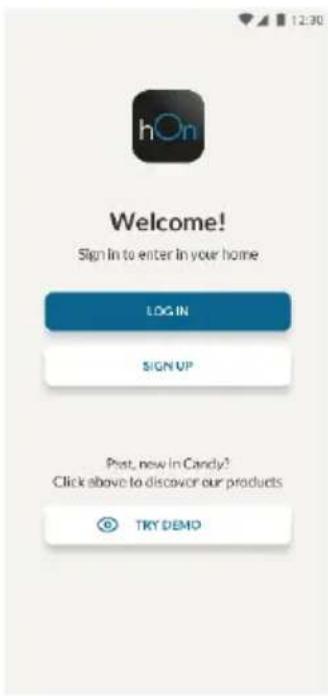
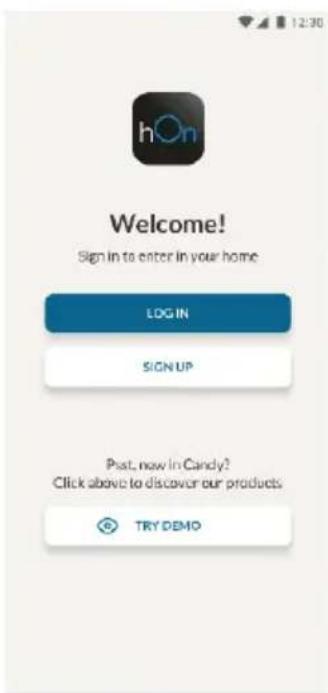
- Create your account on the hOn App or log in if you already have an account.
Step 3
- Follow the pairing instructions in the hOn App.
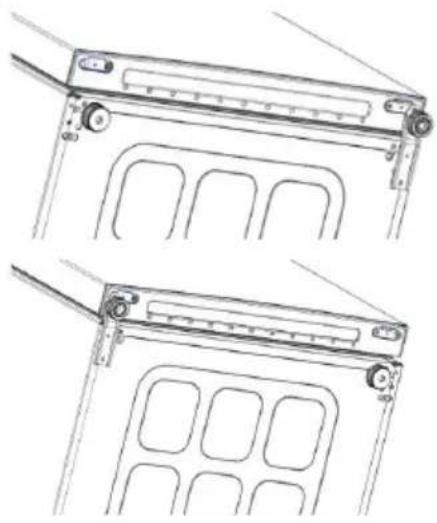
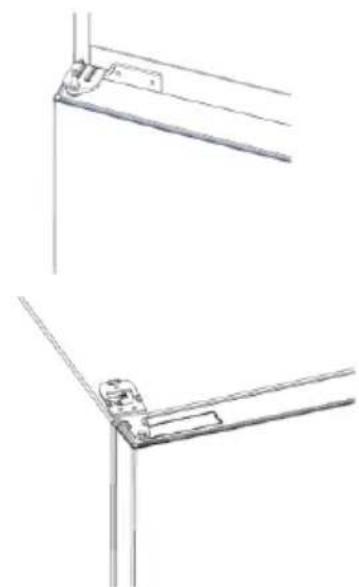
DOOR REVERSIBILITY
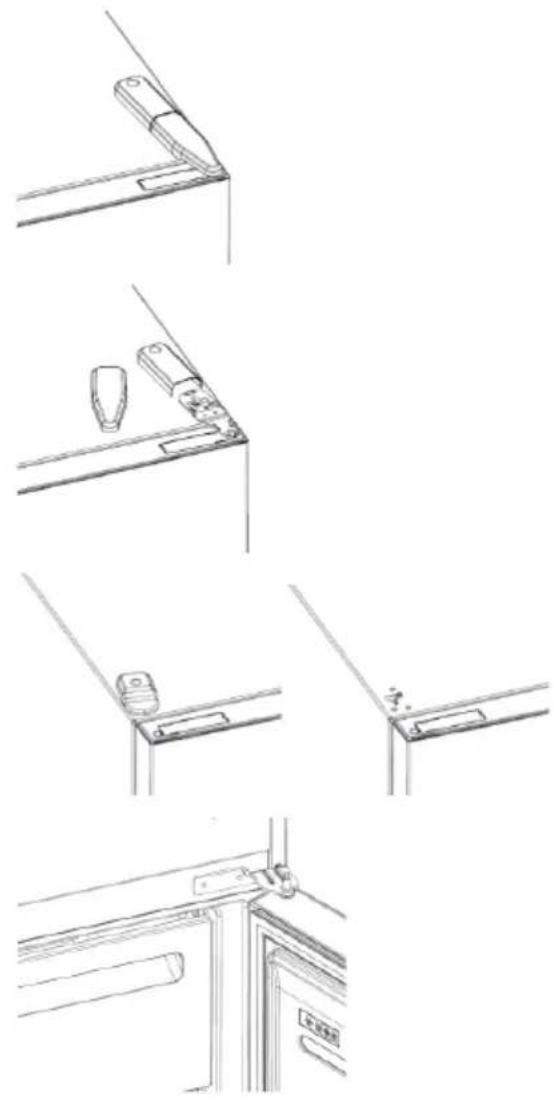
Tools needed: Electric screwdriver
- Remove the top hinge cover
- Unscrew the top hinge
- Remove the top hinge cover (left)
- Remove middle hinge
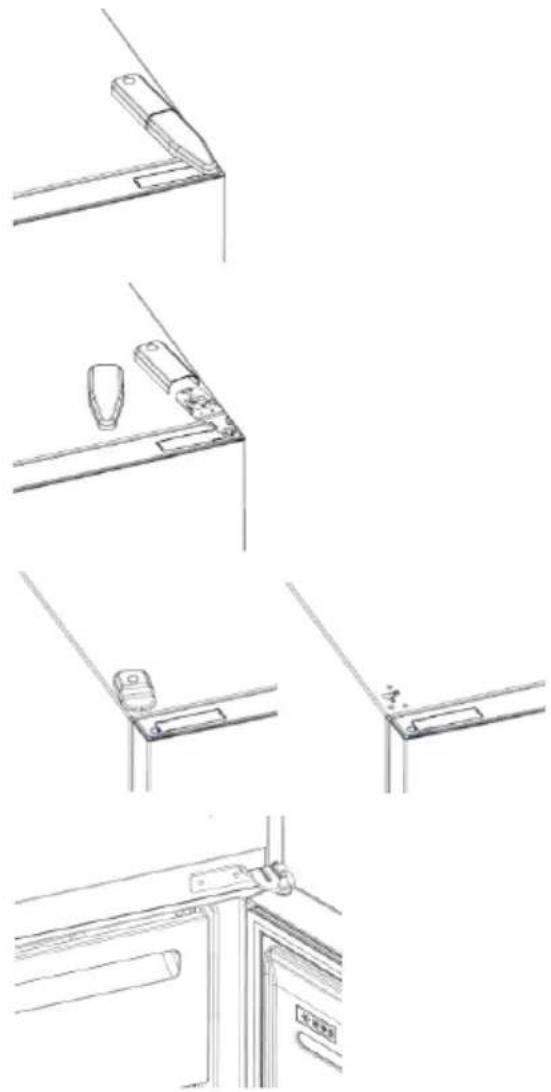
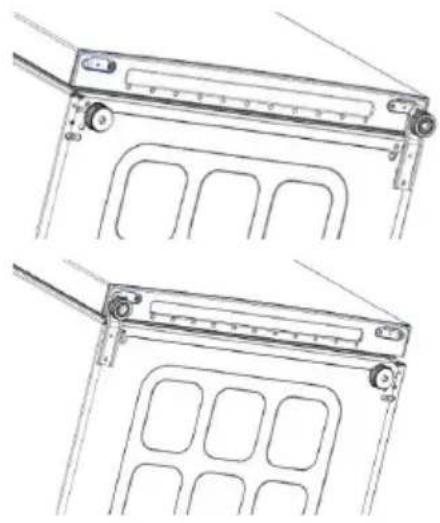
- Remove lower hinge
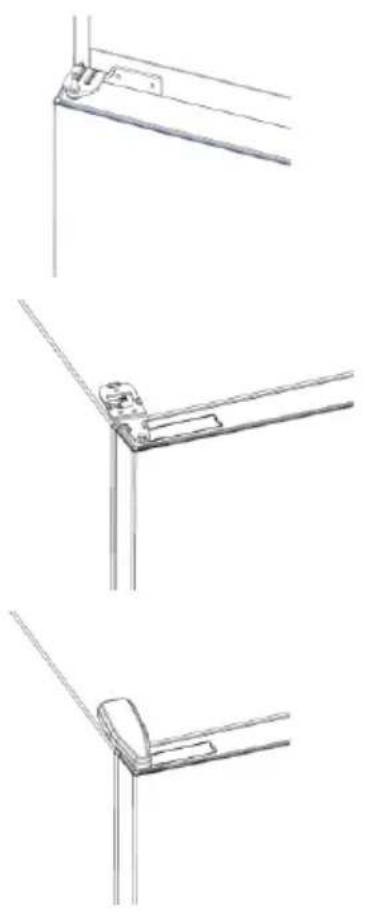
- Mount hinge foot
- Mount middle hinge
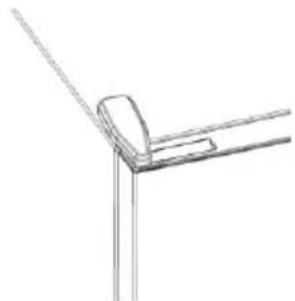
- Mount the upper hinge plate
- Mount the upper hinge cover
TROUBLESHOOTING
| The inside light bulb does not turn on. | ·No electricity. | ·The power cable is not properly plugged in. ·Check if the appliance is switched off (see Temperature Adjustment). ·Check the power socket is working correctly (e.g. with another electric device). |
| ·Holiday Mode is activated. | ·Deactivate Holiday mode. | |
| The internal temperature of the refrigerator and/or freezer is not cold enough. | ·The doors are not closed. | ·Check that the door and gaskets close properly. |
| ·The doors are frequently opened. | ·Avoid opening the doors unnecessarily for some time. | |
| ·Incorrect temperature setting. | ·Check the temperature setting and, if possible, set a lower temperature (see Temperature Adjustment). | |
| ·The refrigerator and/or freezer are too full. | ·Wait for the temperature of the refrigerator/ freezer to stabilise. ·Avoid filling the refrigerator and freezer excessively. | |
| ·The surrounding temperature is too low. | ·Move the unit to a warmer place or heat the current room. | |
| ·Warm items have been stored. | ·Always allow items to cool before storing them. | |
| The food in the refrigerator freezes. | ·Incorrect temperature setting. | ·Check the temperature setting and, if possible, increase the temperature. |
| ·Food in contact with the back wall. | ·Keep the food away from the refrigerator's back wall. | |
| The bottom of the refrigerator compartment is wet or water droplets are present. | ·The drain hose could be clogged. | ·Clean the drain hose with a stick or similar item to allow the water to drain. |
| Presence of drops of water or frost on the rear wall of the refrigerator. | ·Depending on the function, drops of water or frost form on the rear wall of the refrigerator during operation. | ·It is not a defect. |
| ·Warm items have been stored. | ·Always allow items to cool before storing them. | |
| ·There are open food containers or liquids. | ·Always cover food and liquids. | |
| ·The doors are not closed. | ·Check that the door and gaskets close properly. | |
| ·The doors are frequently opened. | ·Avoid opening the doors unnecessarily for some time. | |
| Presence of water in the vegetable drawer. | ·Lack of air circulation. | ·Verify that your appliance is not too full. |
| ·Vegetables and fruit with too much moisture. | ·Wrap the fruit and vegetables in plastic materials, e.g. cling film, bags or containers. | |
| The motor runs continuously. | ·The doors are not closed. | ·Make sure the doors are closed and check the seals close properly. |
| ·The doors are opened frequently. | ·Avoid opening the doors unnecessarily for some time. | |
| ·Ambient temperature is very high. | ·Verify that the ambient temperature is in the range set out in the specifications on the appliance tag. ·Set the display screen/thermostat to a warmer temperature. | |
| ·The appliance has been off (no power) for some time. | ·It normally takes the appliance 8-12h to cool completely. | |
| The frozen food is thawing. | ·Surrounding temperature is too low. | ·Move the unit to a warmer place or heat the current room. |
| ·The freezer door is not closed. | ·Make sure the door is closed and that the gasket is sealing properly. | |
| Fridge door alarm. | ·Fridge door alarm (acoustic beep) activates whenever the door is left open for more than 3 minutes. | ·Avoid leaving the door open when not needed. The beep ceases when the door is closed. |
| The appliance makes noises such as gurgling, buzzing, clicking, creaking. | ·No breakdowns. An engine is running, e.g. refrigeration unit, fan. The refrigerant flows into the pipes. Motor, switches and solenoid valves are switched on or off. | ·No action needed. |
| ·The appliance is not located on level ground. | ·Adjust the feel to level the appliance. | |
| ·The appliance touches an object around it. | ·Remove objects around the appliance. | |
| The appliance does not cool, the temperature and lighting indicators are on. | ·Demo mode is activated. | ·Deactivate DEMO mode. |
| Strong ice and frost in the freezer compartment. | ·The items were not adequately packaged. | ·Always pack the items well. |
| ·A door/drawer of the appliance is not tightly closed. | ·Close the door/drawer. | |
| ·The door/drawer has been opened too frequently or for too long. | ·Do not open the door/drawer too frequently. | |
| ·The door/drawer gasket is dirty, worn, cracked or mismatched. | ·Clean the door/drawer gasket or replace it with a new one. | |
| ·Something on the inside prevents the door/drawer from closing properly. | ·Reposition the shelves, door racks or internal containers to allow the door/drawer to close. | |
| The sides of the appliance are warm. | ·This is normal. |
CONTENTS
DESCRIPTION OF THE PRODUCT 10 Space requirements. 10 USE 11 Use 11 Personalized temperature. 11 Fine tuning. 12 Super Cool function 12 Super Freeze function 12 Eco mode 13 Holiday function 13 Defrosting 13 Demonstration mode 13 Ice cube trays 14 Connection to the water supply (see for refrigerator)..15 PROCEDURE FOR REVERSING THE DOOR......15 Joint 1 15 Joint 2 15 Joint 3 15 REVERSING THE DOOR. 16 REVERSING THE DOOR 17 TROUBLESHOOTING
Description of the product
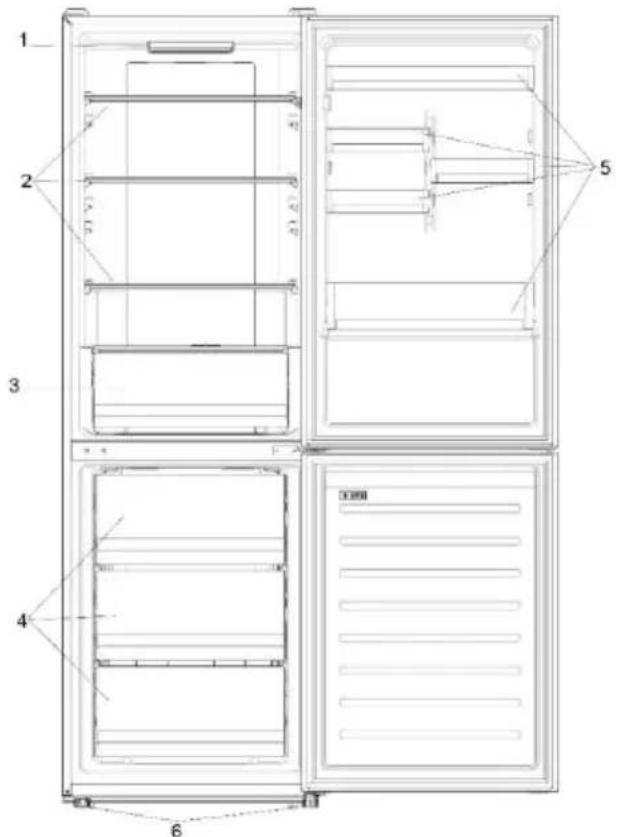
- Control panel and light 2. Adjust the shelves
- Cleaning the refrigerator
- Cleaning the freezer
- Shelves
- Leveling the legs
- The most energy-efficient configuration of the appliance is when the drawers, shelves and doors are positioned as shown in the figure above. ** The images above are for reference only. The actual configuration depends on the physical product or the distributor's declaration.
The appliance doors must be able to open fully, as shown. Leave sufficient space for easy opening of the doors and the appliance. Maintain a distance of at least 50 mm between the side walls of the product and adjacent parts.
Width: min. 920 mm
Depth: min. 1137 mm
OPERATION

① The "ON/OFF" button is used to turn the appliance on/off. ② The "SET" button is used to select the temperature of the refrigerator or the special functions. ③ The "Super Cool" icon indicates that the function is active. ④ The temperature level shows the selected temperature.
Operation
Plug the appliance into the outlet. The appliance will turn on automatically. The refrigerator temperature is automatically set to 4 °C, and the freezer to -18 °C. To change the temperature, while the door is open, press the "SET" button. When the setting increases, the corresponding LED light turns on. With each press of the "SET" button, a sound signal is emitted and the temperature changes. - It is possible to select a temperature from 2 °C to 8 °C in the refrigerator. In case of power loss, the set temperature of the cooling level will be restored. To restore the factory settings, press and hold the "TEMP" button and then press the "ON/OFF" button within 5 seconds. - For normal operating conditions (spring and autumn), it is recommended to set the temperature to 4 °C. In summer, when the ambient temperature is high, it is recommended to set the temperature to 6~8 °C to guarantee the temperature of the refrigerator and freezer and to extend the operating time of the refrigerator. In winter, when the ambient temperature is low, it is recommended to set the temperature to 2~4 °C to avoid frequent on/off cycling of the refrigerator.
The fine adjustment function allows you to set the temperatures through the menu; each temperature level has three menus. How to use the fine adjustment function:
Press and hold the "SET" button for 8 seconds to enter the fine adjustment mode. When the level enters the mode, a sound signal will be emitted and the LED light of the currently selected cooling level will flash. With a short press of the "SET" button within the 5-second adjustment, the setting increases, and with each press a sound signal is emitted. - During the fine adjustment, the LED light of the selected cooling level is flashing, and the LED light of the selected menu is on. If none of the buttons are pressed for a continuation of 3 seconds, the system automatically exits the fine adjustment mode. The fine adjustment is saved and the LED light of the selected temperature of the refrigerator is flashing. - If the fine adjustment is activated again, the adjustment starts from the previously saved level.
Function "Super Cool"
It is recommended to enable the "Super Cool" function if you need to store a large quantity of food (for example after shopping). The "Super Cool" function accelerates the cooling of fresh food and prevents already stored products from unwanted warming. When the function is activated, the temperature of the refrigerator is set automatically to 2 °C. How to use the "Super Cool" function:
- The function can be activated by pressing the "SET" button multiple times until the LED light of "Super Cool" turns on, when selecting it from the application. If the function is activated, the corresponding icon on the control panel will be enabled. To exit the "Super Cool" function, press the "SET" button again.
- The "Super Cool" function automatically ends after 30 hours of operation. When "Super Cool" ends, the corresponding icon on the control panel turns off and the previously set cooling level is restored.
PAIRING MODE IN THE APP 31
Step 1 31
Step 2 31
Step 3 31
CHANGING THE DOOR HINGE SIDE 32
CHANGING THE DOOR HINGE SIDE 33
TROUBLESHOOTING
PRODUCT DESCRIPTION
Download on the App Store

EXPLORE IT ON AppGallery
Step 2
Download on the App Store

EXPLORE IT ON AppGallery
Step 2
PRODUCT DESCRIPTION 100
The fine adjustment selection function allows you to set the temperature by sub-levels; each temperature level has three sub-levels.
How to use the fine adjustment function:
Press and hold the SET button for 8 seconds to enter the fine adjustment selection mode. When the device enters this mode, a sound signal is emitted and the LED indicator of the currently selected cooling level flashes. - With a short press of the SET button within 5 seconds, the fine adjustment value increases, and with each press a sound signal is emitted. During fine adjustment, the LED indicator of the selected cooling level stays on continuously, while the LED indicator of the selected sub-level flashes. If no buttons are pressed within 5 seconds, the system automatically exits the fine adjustment selection mode. The fine adjustment value is saved, and the LED indicator of the selected refrigerator temperature stays on continuously. - If the fine adjustment function is activated again, the setting will start from the previously saved level.
Super Cool function
It is recommended to activate the Super Cool function if you need to store a large quantity of products (for example, after shopping). The Super Cool function accelerates the cooling of fresh products and protects already stored goods from undesirable warming. When this function is activated, a temperature of 2°C is automatically set for the refrigerator compartment.
How to use the Super Cool function:
This function can be activated by pressing the SET button multiple times until the Super Cool LED indicator turns on; or select this function in the app. If the function is activated, the corresponding icon on the control panel turns on. - The Super Cool function automatically turns off after 30 hours of operation. When the Super Cool function turns off, the corresponding icon on the control panel turns off, and the previously set cooling level is restored.
Super Freeze function
The Super-Freeze function accelerates the freezing of fresh products and protects already stored products in the freezer from unwanted warming. If you need to freeze a large quantity of products, it is recommended to activate the Super-Freeze function 24 hours before use. When the function is activated, the temperature is automatically set to -25 °C.
How to use the Super-Freeze function:
- The function can only be activated by selecting it in the app. If the function is activated, this will be shown in the app; there will be no indication on the control panel. - To switch off the Super-Freeze function, switch it off in the app. - The Super-Freeze function automatically switches off after more than 50 hours after its activation.
Eco Mode
Eco Mode can be activated to optimize the appliance's performance while ensuring good storage conditions for food. When this function is enabled, the temperature is automatically set to 5 °C in the refrigerator compartment and -18 °C in the freezer compartment.
How to use Eco Mode:
- The function can only be activated by selecting it in the app. If the function is activated, this will be shown in the app; there will be no indication on the control panel.
- To exit Eco Mode, switch it off in the app; the previous temperature setting will be restored.
- Eco Mode automatically switches off when another function is selected on the control panel.
Holiday Function
The Holiday function can be used to reduce the energy consumption of the appliance when it is not used regularly. When this function is activated, the light indicators will be switched off (even if the door is open), and the refrigerator compartment switches to low energy consumption mode, while the freezer compartment will operate in the usual way.
How to use the Holiday function:
- The function can only be activated by selecting it in the app. If the function is activated, this will be shown in the app; there will be no indication on the control panel.
Defrosting
Defrosting of the refrigerator and freezer compartment is carried out automatically: manual control is not required.
Slider
The refrigerator with a vegetable drawer has a slider that allows you to adjust the humidity inside it: moving it to the right reduces humidity, moving it to the left increases humidity.
Demonstration mode
With the refrigerator door open, press and hold the On/Off button, then press the Settings button three times. The refrigerator will enter demonstration mode. To exit this mode,
hold the door switch pressed and press the mode button again for 5 seconds.
Error codes
If the light indicator 6 °C flashes, it means a fan error has occurred. Contact technical support for assistance in resolving the problem.
To use the Holiday function:
- The function can be activated by selecting it in the app. Once the function is activated, it is displayed in the app; there is no corresponding indicator on the control panel. - To deactivate the Holiday function, turn it off in the app; the previous temperature setting will be restored. - The Holiday function automatically turns off if another function is selected on the control panel.
Defrosting
Defrosting of the refrigerator and freezer compartments is carried out automatically: manual control is not required.
Demonstration mode
With the refrigerator doors closed, press and hold the On/Off button, then press the Settings button three times. The refrigerator will enter demonstration mode. To exit this mode, hold the door switch pressed and press the mode button again for 5 seconds.
Error codes
If the fan does not start at 6 °C, this means that a fan fault has occurred. Contact technical support to get help in resolving the problem.
CONNECTING TO THE ACCOUNT (IF APPLICABLE) ACCOUNT TOP-UP PROCEDURE
Step 1
- Download the app


Step 2
Create a new account or log in to the system if you already have an account
Step 3
Follow the instructions for topping up the account
REPLACING THE HINGE
Required tool: Phillips screwdriver
- Remove the top hinge cover
- Remove the top hinge
- Remove the top hinge cover (left) 4. Remove the middle hinge
5. Remove the bottom hinge 6. Install the hinge support 7. Install the middle hinge 8. Install the top hinge plate 9. Install the top hinge cover
TROUBLESHOOTING
| BvHTPIUHЯ пamnochka не вимикаевая. | Hemae eneKtpKoJbHnHЯ. | ●Кobstb.JxHbHnHHeTcIaIbOHeHnHApKmH.YHOM. |
| Pexim Holiday akTmbOboHo. | ●Поровские инисторы (бгБ. Рергдуновская). | |
| BvHTPIUHЯ Tempepatурахоношпскота Мамошпскота/Ta/aboМорозшпскотаКамери HeDIOCTaTHb O HNbKa. | Дерцета не зашиени. | ●Поровский Tempeztа улійноковян зашиени налійжий ChYOM. |
| Дерцета часTo BIDINHЯOTь. | ●Дерай сиспеспеспеспеспеспеспеспеспеспеспеспеспеспеспеспеспеспеспеспеспеспеспеспеспеспеспеспеспеспеспеспеспеспеспеспеспеспеспеспеспеспеспеспеспеспеспеспеспеспеспCES. | |
| HenpabINbHe HanaSTyBaHHa Tempepatур. | ●Поровский Нал��Увану Tempeptур.Ta, RAJIko MOKJIbNO, BCTS NIKHу Tempeptур(DAIB. PeryKOBaHHa Tempeptuyr). | |
| XoNoDInbHK Ta/aboMopo3InbHaКamepri HeDIOCTaTHb O HNbKa. | ●ДочькaytemсStaBIIaIaIaIIaIIaIIaIIaIIaIIaIIaIIaIIaIIaIIaIIaIIaIIaIIaIIaIIaIIaIIaIIaIIaIIaIIaIIaIIaIIaIIaIIaIIaIIaIIaIIaIIaIIaIIaIIaIIaIIaIIaIIaIIaIIaIIaIIaIIaIIaIIaIIaIIaIIaIbKAMeRy.YuIMaJIte HauIMDPHO HauOBENHry XoIOZIMbHNa TBA MOp3InbHa KAMeRy. | |
| TempepatураhabNKoIshMbOro cpeodobuHa ZaHApNt HNbKa. | ●Поровский р�шаду.Tуліпійші місіеAzIoBirpivne notoCHyPrIMiuzhenry. | |
| Ha 36eRigraHЯ noKladeHу.TeniPy prOduKtMy XapUbAHny. | ●Порун.HK.Klactny prOduKtMy duOprilady oboB'8xKoBOO daMaiye IM oxOLOHTy. | |
| Пюdukутв в xoNoDinbHnKуЗамерзаOTb | HepabINbHe HanaSTyBaHHa Tempepatуr. | ●Поровский HanaSTyBaHHa Tempepatуr.Ta, RAJIIO MOKJIbNO, BIAIOITb KAMeRy. |
| IpoDyKTb KOHTAkyTOb I3 zadHbOIO CTiKIOO. | ●Тумайтейду pOduKtMy naidу Аддду OdoB'8xKOO daMaiye IM oxOLOHTy. | |
| Днохошпь ВODи abo hamopoc Na 3aDni StChU OxONoDInbHa. | ЗлівNHи ShlaHr Maye 6byu 3a6HtN. | ●Очісіті Блінініshna loanr naHypKoO abo podibHm predemetom, zuoboda stCkana. |
| НавинICTb kramelь ВODи abo hamopoc Na 3aDni StChU OxONoDInbHa. | Залжно bIDФунКuIIyI nd vacPoToH na 3aDni STxONoDInbHaKу TByROIpOToBcKpaIpiВODи abOHamOpOzB. | ●Lle He depeKt. |
| Ha 36eRigraHЯ noKladeHу.TeniPy prOduKtMy xapUbAHny. | ●Порун.HK.Klactny prOduKtMy duOprilady oboB'8xKoBOO daMaiye IM oxOLOHTy. | |
| E bIDKrti KONTeHepri din yxapOboHx prOduKtB a pIDINH. | ●Завдз дохрьaite Ixy Ta pIDINH. | |
| Дерцета He zaHinHeli. | ●Поровский Tempeztа, улійноковян зашиeleni HauKoINHry. | |
| Дерцета часTo BIDINHЯOTь. | ●Дерай сиспеспеспеспеспеспеспеспеспеспеспеспеспеспеспеспеспеспеспеспеспеспеспеспеспеспеспеспеспеспеспеспеспеспеспеспYES. | |
| НавинICTb ВODи вяшikу对于我们obч. | ВidCyTHcTb CizpKuJIyI IOBITry. | ●Поровский Tempeztа, улійноковян зашиeleni HauKoINHry. |
| Овсіні ФруКуЗ 3ЗадТо BELINOIO KIIKCTO BOYON. | ●Загон'tь PhFruKу IozOу YpIaNtKoBу MATEpIaIpy, hapKuKND, yxapOceY pIIaIby, abO nomCtB tIX y npakTe rHy konTeHepRpy. | |
| ДвИгун працIoС b6З�еррьно. | Дерцета He zaHinHoiYOBCTB. | ●Поровский Tempeztа, улійноковян зашиeleni HauKoINHry. |
| Темратура habKoIshMbOro cpeodobuHa duKue BIVSOKA. | ●Поровский Tempeztа, улійноковян зашиeleni HauKoINHry. | |
| Пюрад 6byb VIMKHNHу (6e3 JxWbJIeHry) prOtroTOn DeKoRTO ChUy. | 338888888888888888888888888888888888888888888888888888888888888888888888888888888888888888888888888888 | |
| Замороженiy pròdukуtm розморожуковс. | Темратура habKoIshMbOro cpeodobuHa 3aHaIbHa. | ●Роровский Tempeztу prOVIy d YTeNIIe MlcIe abO obGriPitte NotOToHne PrOdiHbO. |
| Дерцета морOZINbIOI KAMeRpy He zaHinHoi. | ●Поровский Tempeztу, улійноковян зашиeleni HauKoINHry. | |
| Сигнанлзцяв Дiverseн 德рurtхonodyньп KaIouDInbHa. | Сигнанлзцяв Дiverseн 德рurtхуonoDIOIshNikha (38YOBKoBn CINHAN) cspaIpbOBye KOKHOrO pazy, konydeBércuTa 3aIaIbOHTb BIDINH. | ●He zaliiashayderpeBRAUTa bIDINHIMMH 6e3NtpebE. 38YOBKoBn C OBMKKaIbTa, konydeBércuTa 3aIaIbOHTb BIDINH. |
| Пюрад 6byb VIMKHNHу (6e3 JxWbJIeHry) prOtroTOn DeKoRTO ChUy. | ●Дi ne toPbIb. | |
| Пюрад видах тaki zbyk, я сььkanндддддддддддддддддддддддддддддддддддддддддддддддддддддддддддддддддддддддддддддддддддддддддддддддддддд徳 | Пюрад 6byb PozOBoHn Ha pIBHn nobErpHi. | ●Вiderperny Te JokKу, zuo BiPbHrTn prPnilad. |
| Пюрад ТОТКAZТСЯ KIaIaHn, okpInn. | ●Вiderperny TempeTун GOKKу. | |
| Пюрад He oxOLOdKyeTbC, ИдДКATOqTум Tempepatури и ocBtItenHry CBtIbck. | ДемонстацIHINу рекIM AkTbBOVAnO. | ●Вiderperny DEMOHCTPAUIHINу рекIM. |
| Занчна КлбКICь льODY i hamopocьtsу морozшьи KaIouDInbHiKamepri. | ПюрдуКуТу He 6byTo HanekhIMЧИOM uKpObAHO. | ●Заджди добse pankyTe prOduKtY. |
| Дерцета/YaIrukПруlandу He zachinHEDO doctaTHbO LILbHO. | ●Заджди bDepePURA/IaIzum. | |
| Дерцета/YaIrukИдчYNHANLISCE ZaHADTO chAOTo Afo B. | ●He bIDmHReTe DpePURA/YaIzum 3aHADTO chAOTo. | |
| YuzilnoBovd YdEprpTAYIaIzua 3a6pDyHEnHn, 3IOUeHnI, trichytu nAO He bIDINOIAE BVMorAm. | ●Очісь YuIaIbHouDApePURA/YaIzum 6a6ZamHIty IyoI ToHOM. | |
| Iozb 3epeDInu He pOteKoDlxAe HaneXHomU 3aIaIbHIO DcEPTA/IAIaIa. | ●Зимпьnomodny poHnIb, duEprpHn poHnIb, abO anHtPbHxKoHxHInH. | |
| БИЧИ StIkn priPIMADу tellni. | IzeHoprMaIbHo. |
Table of Contents
PRODUCT OVERVIEW 189
USAGE 190
Space requirements 189 Usage 190 Fine adjustment 191 Quick cooling function Super Cool 191 Quick freezing function Super Freeze 191 Eco mode 192 Energy saving function Holiday 192 Defrosting 192 Demo mode 192 Error codes 192 CONNECTING WITH THE APP 193 PAIRING THE DEVICE IN THE APP 193 Step 1 193 Step 2 193 Step 3 193 CHANGING THE DOOR HINGE SIDE 194 CHANGING THE DOOR HINGE SIDE 195 TROUBLESHOOTING
PRODUCT OVERVIEW
- SUMMARY
- PRODUCT DESCRIPTION
- SPACE REQUIREMENTS
- USE
- FINE TUNING
- SUPER COOL FUNCTION
- SUPER FREEZE FUNCTION
- ECO MODE
- HOLIDAY FUNCTION
- DEFROSTING
- SLIDER
- DEMO MODE
- ERROR CODES
- APP CONNECTION (CONTENT ONLY)
- IN APP PAIRING PROCEDURE
- STEP
- DOOR REVERSIBILITY
- CONTENTS
- DESCRIPTION OF THE PRODUCT
- OPERATION
- FUNCTION "SUPER COOL
- DEMONSTRATION MODE
- CONNECTING TO THE ACCOUNT (IF APPLICABLE) ACCOUNT TOP-UP PROCEDURE
- REPLACING THE HINGE
- TABLE OF CONTENTS
- PRODUCT OVERVIEW
- USAGE
Brand : HOOVER
Model : HOCE3T618EWKR-1
Category : Refrigerator