
ES-PV6B - Razor PANASONIC - Free user manual and instructions
Find the device manual for free ES-PV6B PANASONIC in PDF.
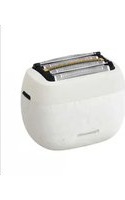


| Product Type | Waterproof Electric Shaver |
| Brand | Panasonic |
| Model | ES-PV6B |
| Power Supply | USB mains adapter (model ES-RU1-02), USB Type-C cable |
| Motor Voltage | 3.6 V --- |
| Charging Time | Approximately 2 hours |
| Noise Level | 63 dB (A) |
| Usage | Dry or wet skin, in the shower |
| Battery | Built-in rechargeable Lithium-Ion |
| Replacement Parts | Outer foil (WES9181), inner blades (WES9170), oil (WES003P) |
| Maintenance | Clean with soapy water, lubricate after use |
| Safety | Power button lock |
| Included Accessories | Travel case, oil, cleaning brush, instruction manual |
| Waterproof | Yes, usable in the shower and bath |
| Warranty | See enclosed warranty card |
| Manufacturer | Panasonic Corporation, Osaka, Japan |
Frequently Asked Questions - ES-PV6B PANASONIC
User questions about ES-PV6B PANASONIC
0 question about this device. Answer the ones you know or ask your own.
Ask a new question about this device
Download the instructions for your Razor in PDF format for free! Find your manual ES-PV6B - PANASONIC and take your electronic device back in hand. On this page are published all the documents necessary for the use of your device. ES-PV6B by PANASONIC.
USER MANUAL ES-PV6B PANASONIC
Model No. ES-PV6B ES-PV3B
Learn more

Operating Instructions
Operating Instructions
Operating Instructions
Operating Instructions
![graph TD A["Press"] --> B["Release"] B --> C["Hold"]](/content/2026/04/699346/images/21d8855b2f3502495587523ac2bca49817ede4cd5d2935a9cefe3f26076035bd.jpg)
WARNING
- This appliance can be used by children aged from 8 years and above and persons with reduced physical, sensory or mental capabilities or lack of experience and knowledge if they have been given supervision or instruction concerning use of the appliance in a safe way and understand the hazards involved. Children shall not play with the appliance. Cleaning and user maintenance shall not be made by children without supervision.
- This WET/DRY shaver can be used for wet shaving using shaving lather or for dry shaving. You can use this watertight shaver in the shower and clean with water. The following symbol means suitable for use in a bath or shower.

- Do not use anything other than the supplied USB power adaptor or USB cable for any purpose. Also, do not use any other product with the USB power adaptor or USB cable. (See page 7.)
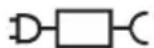
- The following symbol indicates that a specific detachable power supply unit is required for connecting the electrical appliance to the supply mains. The type reference of power supply unit is marked near the symbol.
- Thank you for purchasing this Panasonic product.
- Before operating this unit, please read these instructions completely and save them for future use.
Safety precautions
Make sure to follow these instructions.
To prevent accidents, injuries, or damage to property, please follow the instructions below.
The following chart indicates the degree of damage caused by improper operation.

DANGER
Indicates a potential hazard that will result in serious injury or death.

WARNING
Indicates a potential hazard that could result in serious injury or death.

WARNING
This product
This product has a built-in rechargeable battery. Do not throw it into fire, apply heat, or charge, use, leave, or store it in a high-temperature environment.
Doing so may cause overheating, ignition, or explosion.

WARNING
Preventing accidents

Do not place within reach of children or infants. Do not let them use it.
Putting parts or accessories in the mouth may cause an accident or injury.
In case of an abnormality or malfunction, immediately stop using and remove the USB power adaptor.
- Failure to do so may cause fire, electric shock, or injury.
- The main unit, USB power adaptor, or USB cable is deformed or abnormally hot.
- The main unit, USB power adaptor, or USB cable smells of burning.
- There is an abnormal sound during use or charging of the main unit.
- Immediately request inspection or repair at an authorized service center.

Handling of the removed battery when disposing

DANGER
- The rechargeable battery is exclusively for use with this appliance. Do not use the battery with other products.
- Do not charge the battery after it has been removed from the product.
- Do not throw into fire or apply heat.
- Do not hit, disassemble, modify, or puncture with a nail.
- Do not let the positive and negative terminals of the battery get in contact with each other through metallic objects.
- Do not carry or store the battery together with metallic jewelry such as necklaces and hairpins.
- Do not use or leave the battery where it will be exposed to high temperatures, such as under direct sunlight or near other sources of heat.
- Never peel off the tube.
- Doing so may cause overheating, ignition, or explosion.
Important information
- Charge the appliance correctly according to these Operating Instructions. (See page 7 "Charging the shaver".)
- This appliance contains a battery that is only replaceable by skilled persons. Please contact an authorized service centre for the details of repair.
Parts identification (Fig. 1)
A Main body
① Protective cap ② System outer foil ③ Foil frame release buttons ④ Foil frame ⑤ Outer foil section ⑥ System outer foil release buttons ⑦ Inner blades ⑧ Charge status lamp ⑨ Switch lock lamp (🔒) ⑩ Power switch ⑪ Appliance socket (Type-C) ⑫ Socket cover
B USB power adaptor (ES-RU1-02)
⑬ Power plug
⑭ USB port (Type-A)
© USB cable
⑮ Cord
⑯ USB plug (Type-C)
⑰ USB plug (Type-A)
Accessories
D Travel case
E Oil
F Cleaning brush
G Operating
Instructions
H Guarantee Card
Charging the shaver
Insert the USB plug [C16] into the main body and USB power adaptor [B] (Fig. 2-1), and then insert the USB power adaptor firmly into a household outlet (Fig. 2-2).
- Panasonic's specified adaptor with splash-resistant design and a USB cable with an overheating protection feature should be used to ensure safety. The adaptor is not completely waterproof, so prevent it from getting wet.
- Wipe off any water droplets on the appliance socket.
- Check that the charge status lamp is glowing.
- Charging is completed after approx. 2 hours.
- Recommended ambient temperature for charging is 10 °C – 35 °C. It may take longer to charge or the battery may fail to charge properly in extremely high or low temperatures.
How to use
Note
You cannot operate the shaver while charging.
- Check that the socket cover is closed.
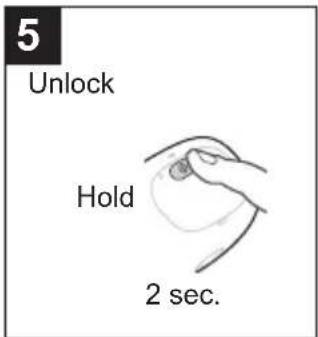
- See Fig. 3 to shaving foam mode. (The lamps blink alternately.) • See Fig. 4 and Fig. 5 to lock or unlock the power switch.
- The appliance beeps and the charge status lamp blinks when the battery capacity is low.
Remove the cap [A①] and press the power switch [A⑩].
How to clean
- Turn the shaver off and disconnect the USB plug.
- Check that the socket cover is closed.
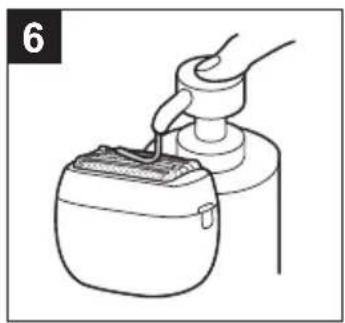
- Wet the system outer foil, put on the hand soap (Fig. 6), turn on the power, and turn off the power after 20 seconds.
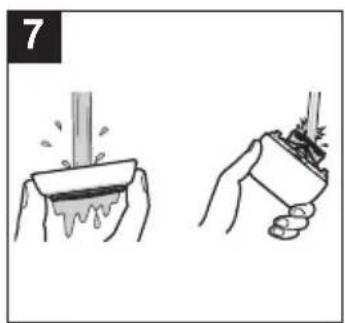
- Remove the outer foil section.
- Rinse them with running water. (Fig. 7)
- Shake up and down several times to remove the water.
- Wipe off the water with a dry cloth and dry it well.
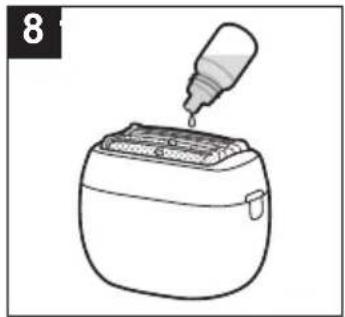
- Lubricate the shaver.
- Apply one drop of lubrication oil to each of the system outer foils. (Fig. 8)
- Turn on the power and allow it to run for approximately 5 seconds.
- Turn off the power and wipe off any excess lubrication oil from the system outer foil with a soft cloth.
Replacing the system outer foil and the inner blades
Outer foil section
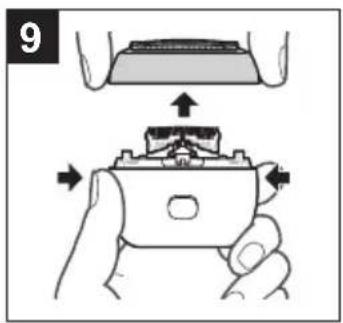
Remove the outer foil section [A⑤] by pushing the frame release buttons [A③]. (Fig. 9)
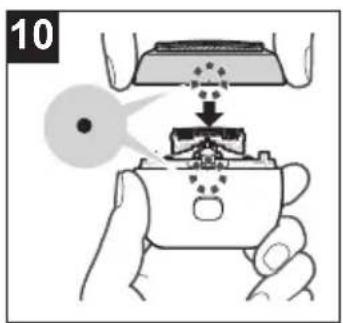
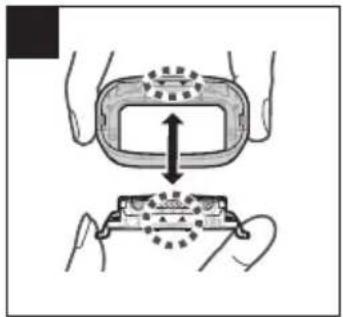
Align as illustrated, securely attach the outer foil section to the head until it clicks. (Fig. 10)
System outer foil (Fig. 11)
- Do not throw away the foil frame.
Press the system outer foil release buttons [A⑥] and pull down the system outer foil [A②].
Align as illustrated, securely attach the system outer foil to the foil frame [A④] until it clicks.
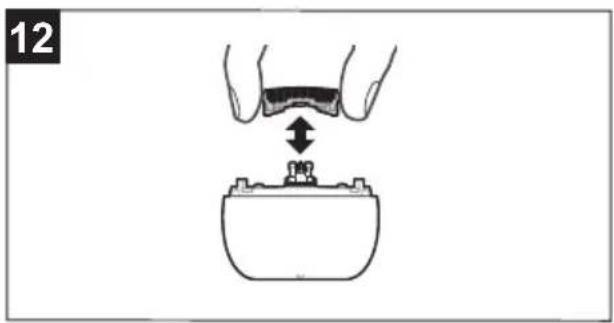
Inner blades (Fig. 12)
Remove the inner blades [A⑦] one at a time. Insert the inner blades one at a time.
Troubleshooting
| Problem Action | |
| The power switch does not turn ON. | Unlock the switch lock. |
| Operating time is short even after a full charge. | The battery is nearing the end of its life. |
| Shaver does not operate even after charging. | The shaver will not operate while it is connected to the household outlet. |
| Makes a loud sound. | Clean the blade and apply lubrication oil. |
| Confirm that the blade is properly attached. | |
| The shaver makes a high-pitched sound due to the linear motor drive. This does not indicate a problem. |
If the problems still cannot be solved, contact the store where you purchased the unit or a service centre authorized by Panasonic for repair.
Service
Contact
Please visit Panasonic web site https://www.panasonic.com or contact an authorized service centre (you find its contact address in the pan european guarantee leaflet.) if you need information or if the shaver or the cord gets damaged.
Replacement parts
System outer foil: Approximately once every year* Inner blades: Approximately once every two years*
* The replacement timing is a recommendation and is subject to individual usage and preference. Replacement part is available at your dealer or Service Centre.
| System outer foil and inner blades | WES9040 |
| System outer foil | WES9181 |
| Inner blades | WES9170 |
| Lubrication oil | WES003P |
Battery life
The life of the battery is 3 years. The battery in this shaver is not intended to be replaced by consumers. Have the battery replaced by an authorized service centre.
For environmental protection and recycling of materials
This shaver contains a Lithium-ion battery. Please make sure that the battery is disposed of at an officially assigned location, if there is one in your country.
Disposal of Old Equipment and Batteries Only for European Union and countries with recycling systems

These symbols on the products, packaging, and/or accompanying documents mean that used electrical and electronic products and batteries must not be mixed with general household waste.
For proper treatment, recovery and recycling of old products and batteries, please take them to applicable collection points in accordance with your national legislation.
By disposing of them correctly, you will help to save valuable resources and prevent any potential negative effects on human health and the environment.
For more information about collection and recycling, please contact your local authority.
Penalties may be applicable for incorrect disposal of this waste, in accordance with national legislation.
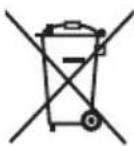
Note for the battery symbol (bottom symbol)
This symbol might be used in combination with a chemical symbol. In this case it complies with the requirement set by the Directive for the chemical involved.
Disposal of the appliance
Remove the built-in rechargeable battery before disposing of the appliance.
• The battery is to be disposed of safely. - This figure must only be used when disposing of the appliance and must not be used to repair it. If you dismantle the appliance yourself, it will no longer be waterproof, which may cause it to malfunction.
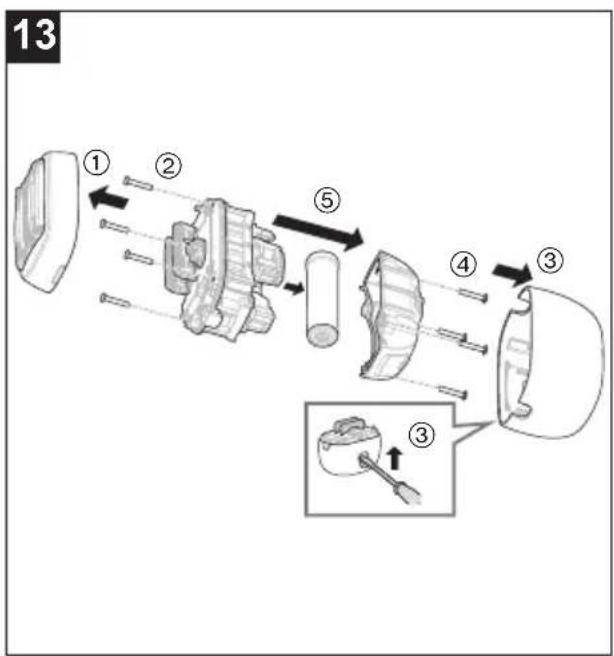
How to remove the battery (Fig. 13)
- Remove the appliance from the USB plug.
- Press the power switch to turn on the power and then keep the power on until the battery is completely discharged.
- Perform steps ① to ⑤ and lift the battery, and then remove it.
- Use a flat head screwdriver as shown. • Take care not to short circuit the positive and negative terminals of the removed battery, and insulate the terminals by applying tape to them.
Specifications
| Power supply | See the name plate on the USB power adaptor. (Automatic voltage conversion) |
| Motor voltage | 3.6 V--- |
| Charging time | Approx. 2 hours |
| Airborne Acoustical Noise | 63 (dB (A) re 1 pW) |
This product is intended for household use only.
For more information about the energy efficiency of the product, please visit our website, www.panasonic.com, and enter the model number in the search box.
Authorized Representative in EU:
Panasonic Marketing Europe GmbH
Panasonic Testing Centre
Winsbergring 15, 22525 Hamburg, Germany
Importer:
Panasonic Marketing Europe GmbH
Hagenauer Strasse 43, 65203 Wiesbaden, Germany
Manufactured by:
Panasonic Corporation
1006, Oaza Kadoma, Kadoma City, Osaka, Japan
WARNING
▶ Accident prevention

Panasonic Testing Centre
Panasonic Testing Centre
Winsbergring 15, 22525 Hamburg, Germany
Importer:
Panasonic Marketing Europe GmbH
Hagenauer Strasse 43, 65203 Wiesbaden, Germany
Manufactured by:
Panasonic Corporation
Panasonic Testing Centre
Panasonic Testing Centre
Panasonic Testing Centre
Panasonic Testing Centre
Winsbergring 15, 22525 Hamburg, Germany
Importer:
Panasonic Marketing Europe GmbH
Hagenauer Strasse 43, 65203 Wiesbaden, Germany
Manufactured by:
Panasonic Corporation
1006, Oaza Kadoma, Kadoma, Osaka, Japan
WARNING
Panasonic Testing Centre
Winsbergring 15, 22525 Hamburg, Germany
Importer:
Panasonic Marketing Europe GmbH
Hagenauer Strasse 43, 65203 Wiesbaden, Germany
Manufactured by:
Panasonic Corporation
1006, Oaza Kadoma, Kadoma, Osaka, Japan
WARNING
⑯ USB plug (Type C)
⑰ USB plug (Type A)
Accessories
Panasonic Testing Centre
Winsbergring 15, 22525 Hamburg, Germany
Importer:
Panasonic Marketing Europe GmbH
Hagenauer Strasse 43, 65203 Wiesbaden, Germany
Manufacturer:
Panasonic Corporation
1006, Oaza Kadoma, Kadoma, Osaka, Japan
WARNING
Panasonic Testing Centre
Winsbergring 15, 22525 Hamburg, Germany
Importer:
Panasonic Marketing Europe GmbH
Hagenauer Strasse 43, 65203 Wiesbaden, Germany
Manufacturer:
Panasonic Corporation
1006, Oaza Kadoma, Kadoma City, Osaka, Japan
WARNING
Panasonic Testing Centre
Panasonic Testing Centre
Panasonic Testing Centre
Winsbergring 15, 22525 Hamburg, Germany
Importer:
Panasonic Marketing Europe GmbH
Hagenauer Strasse 43, 65203 Wiesbaden, Germany
Manufacturer:
Panasonic Corporation
1006, Oaza Kadoma, Kadoma City, Osaka, Japan
WARNING
Panasonic Testing Centre
Panasonic Testing Centre
Winsbergring 15, 22525 Hamburg, Germany
Importer:
Panasonic Marketing Europe GmbH
Hagenauer Strasse 43, 65203 Wiesbaden, Germany
Manufactured by:
Panasonic Corporation
1006, Oaza Kadoma, Kadoma City, Osaka, Japan
WARNING
Panasonic Testing Centre
Winsbergring 15, 22525 Hamburg, Germany
© Panasonic Corporation 2024
⑤ EN, DE, FR, IT, SP, NL, PT, SV, DA, NB, FI, PL, CS, SK, HU, RO, TR
Printed in Japan
ES9700PV6B1E Y0624-0


- WARNING
- SAFETY PRECAUTIONS
- DANGER
- PREVENTING ACCIDENTS
- IN CASE OF AN ABNORMALITY OR MALFUNCTION, IMMEDIATELY STOP USING AND REMOVE THE USB POWER ADAPTOR
- HANDLING OF THE REMOVED BATTERY WHEN DISPOSING
- IMPORTANT INFORMATION
- PARTS IDENTIFICATION (FIG. 1)
- A MAIN BODY
- B USB POWER ADAPTOR (ES-RU1-02)
- © USB CABLE
- ACCESSORIES
- CHARGING THE SHAVER
- HOW TO USE
- NOTE
- REMOVE THE CAP [A①] AND PRESS THE POWER SWITCH [A⑩]
- HOW TO CLEAN
- REPLACING THE SYSTEM OUTER FOIL AND THE INNER BLADES
- REMOVE THE OUTER FOIL SECTION [A⑤] BY PUSHING THE FRAME RELEASE BUTTONS [A③]. (FIG. 9)
- ALIGN AS ILLUSTRATED, SECURELY ATTACH THE OUTER FOIL SECTION TO THE HEAD UNTIL IT CLICKS. (FIG. 10)
- PRESS THE SYSTEM OUTER FOIL RELEASE BUTTONS [A⑥] AND PULL DOWN THE SYSTEM OUTER FOIL [A②]
- ALIGN AS ILLUSTRATED, SECURELY ATTACH THE SYSTEM OUTER FOIL TO THE FOIL FRAME [A④] UNTIL IT CLICKS
- SERVICE
- CONTACT
- BATTERY LIFE
- FOR ENVIRONMENTAL PROTECTION AND RECYCLING OF MATERIALS
- DISPOSAL OF OLD EQUIPMENT AND BATTERIES ONLY FOR EUROPEAN UNION AND COUNTRIES WITH RECYCLING SYSTEMS
- NOTE FOR THE BATTERY SYMBOL (BOTTOM SYMBOL)
- DISPOSAL OF THE APPLIANCE
- REMOVE THE BUILT-IN RECHARGEABLE BATTERY BEFORE DISPOSING OF THE APPLIANCE
- HOW TO REMOVE THE BATTERY (FIG. 13)
- AUTHORIZED REPRESENTATIVE IN EU
- IMPORTER
- MANUFACTURED BY
- MANUFACTURER
Brand : PANASONIC
Model : ES-PV6B
Category : Razor