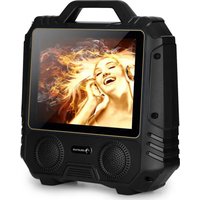
CenterStage 4 - Karaoke system Auna - Free user manual and instructions
Find the device manual for free CenterStage 4 Auna in PDF.


| Product Type | Karaoke System |
| Brand | Auna |
| Model | CenterStage 4 |
| Power Supply | 220-240 V~ 50/60 Hz (input); 9-12 V (output) |
| Internal Battery | Rechargeable, controlled by ON/OFF switch |
| Bluetooth Connectivity | Yes, name "DisGo Box", password 0000 |
| USB/SD Player | Yes, formats MP3, MP4, WMA, max capacity 32 GB |
| FM Radio | Yes, with automatic station search |
| Microphones | 1 wireless mic (AA batteries) + 1 wired mic input (jack) |
| Audio Settings | Main volume, mic volume, echo, bass/treble |
| Auxiliary Input | DC 12V socket for external battery |
| Safety | Unplug during storms; do not open; use approved spare parts |
| Maintenance | Clean with a dry cloth; avoid liquids and foreign objects |
| Recycling | Do not dispose of with household waste; take to collection point |
| Dimensions | Not specified in the manual |
| Weight | Not specified in the manual |
Frequently Asked Questions - CenterStage 4 Auna
User questions about CenterStage 4 Auna
0 question about this device. Answer the ones you know or ask your own.
Ask a new question about this device
Download the instructions for your Karaoke system in PDF format for free! Find your manual CenterStage 4 - Auna and take your electronic device back in hand. On this page are published all the documents necessary for the use of your device. CenterStage 4 by Auna.
USER MANUAL CenterStage 4 Auna
INHALTSVERZEICHNIS
Member of Berlin Brands Group
Handwerkerstr. 11
15366 Dahlwitz-Hoppegarten
Deutschland
natural_image
Symbol of a trash bin crossed with a diagonal line, representing no waste or discharge (no text or labels)Berlin Brands Group UK Ltd
PO Box 1145
Oxford, OX1 9UW
United Kingdom
Congratulations on purchasing this equipment. Please read this manual carefully and take care of the following hints to avoid damages. Any failure caused by ignoring the mentioned items and cautions mentioned in the instruction manual are not covered by our warranty and any liability. Scan the QR code to get access to the latest user manual and other information about the product.

CONTENT
Safety Instructions 15
Operation Panel and knobs 16
Operation 18
BLUETOOTH Playback 20
Using the Radio 21
Use of the External Battery Option 21
Disposal Considerations 22
Declaration of Conformity 22
TECHNICAL DATA
| Item number 10032833 | |
| Power supply adapter | Input: 220-240 V~ 50/60 HzOutput: 9-12 V |
SAFETY INSTRUCTIONS
General information
- Lightning - If you are not going to use the device for a long time or if there is a storm, disconnect the plug from the electrical outlet and disconnect the device from the antenna connector. This will avoid damage to the product that may be caused by lightning or overvoltage.
- Overload - Do not overload power outlets, extension cords, or built-in power outlets, as this may result in a fire or electric shock.
- Foreign objects and liquid - Never push objects of any kind through openings in the device as they may touch dangerous voltage points or short out parts, which could result in a fire or electric shock. Never spill liquids of any kind on the device.
- Repairs and maintenance - Do not attempt to service this product yourself, as opening or removing covers will expose you to dangerous voltages or other hazards. Leave all maintenance to qualified service personnel.
- Damage requiring service - Disconnect the power plug from the outlet and consult a qualified specialist if any of the following conditions occur:
a) If the power cord or plug is damaged.
b) If liquid has been spilled or objects have fallen onto the product.
c) If the product has been exposed to rain or water.
d) If the product has been dropped or damaged.
e) If the product has a markedly reduced performance.
- Replacement parts - When replacement parts are required, make sure that the service professional who replaces the parts only uses replacement parts that have been approved by the manufacturer or that have the same characteristics as the original part. Unauthorized replacement may result in fire, electric shock or other hazards.
- Heat - Do not place the unit near heat sources such as radiators, heaters, stoves or other products (including amplifiers).
| 1 Enter AV input mode |
| 2 Switch function for the microphone priority |
| 3 Directly play movies and other video files |
| 4 BT :Enter into bluetooth mode |
| 5 Up direction key, long press for previous song |
| 6 Enter into the setting interface of the products |
| 7 Confirm to enter into the corresponding function |
| 8 Left direction, long press for rewind |
| 9 Down direction key, long press for next song |
| 10 Paise or play function for the video and audio. |
| 11 Video menu:Enter into the menu for video.no function for audio. |
| 12 Digital keys for choose audio |
| 13 Enter into the recoding function |
| 14 Turn off the sound for audio and video |
| 15 Standby: standby function for video,No function for audio |
| 16 Turn off/on screen display |
| 17 Toggle among modes of BT, USB drive, TF card and FM radio |
| 18 Switch the sound track for audio vocal accompaniment. Switch between the original singer and vocal accompaniment (the same function as the soundtrack) |
| 19 Play music files directly |
| 20 Enter into the FM radio |
| 21 Launch the corresponding mode radio |
| 22 To the right direction,2S long press for fast words |
| 23 Return to the previous menu or the main interface |
| 24 Switch soundtrack for video and video |
| 25 Select the screen size (4:3/16:9) for Video (some model do not have this function) |
| 26 Delete the selected file from USB (some model do not have this function) |
| 27 Repeat single song or repeat all songs from audio |
| 28 Enter into ebook directly (some model don't have this function) |
| 29 Enter into photos playback directly |
| 30 Decrease the Main volume |
| 31 Increase the main volume |
OPERATION
Turning ON/OFF
The PA speaker can be powered when connected to main power or using the internal 12 V battery.
- Connect the power cable to the top of the unit.
- Connect the other end of power cable to main power.
- Turn on the switch for the main power.
- The unit will automatically power on when connected to main power.
Notes : If you wish to use the internal battery power of the unit, just simply turn on the Battery switch located on the top of unit to ON.
Charging
Before using the PA speaker for the first time, charge the unit at least 8 hours.
- Connect the power cable to the top of the panel.
- Turn off the battery switch on the top of the panel.
- Recharge indicator light will be on when unit is charging.
Notes : The internal battery will charge while the unit is being operated and the power switch is on. It is better to charge the unit while the power switch is off.
Using the Wireless Microphone
The PA speaker comes with wireless microphones to get you started straight out of the box.
- Tune on the unit.
- Unscrew the bottom of the microphone to access the battery enclosure. Insert 2XAA batteries into the microphone. Take note the battery polarity when inserting the batteries.
- Replace the bottom microphone cover.
- The wireless microphone will flash once and automatically pair with the PA speaker, it is ready to use. If it does not flash, check that you have inserted the batteries correctly or replace old batteries.
- Adjust the volume of the microphone by turning the MIC VOL knob located on top control panel
Notes: Please do not operate the microphone directly in front of the PA speaker, please set the MIC VOL/ECHO at a lower level before turning on the wireless microphone. Operating the microphone incorrectly will cause a loud squealing noise. Please turn off the power switch when the wireless microphone is not in use. This will save the battery.
Using the Wired Microphone
You can connect the wired microphone to this unit using the MIC INPUT located on the top of control panel.
- Turn off the unit.
- Connect your wired microphone to the MIC INPUT located on top of the control panel.
- Adjust the microphone volume by tuning the MIC VOL/ECHO knobs located on top control panel.
Notes: You can use the wired microphone and wireless microphone at the same time.
USB/SD Card Playback
You can play music from USB stick or SD Card using the USB/SD slot on the PA speaker.
- Turn on the unit.
- Insert your USB or SD card into the slot.
- Once inserted the USB or SD card unit will automatically play.
- You can use the 1/1 to control and play music.
Notes: The speaker system can play the following audio file formats: MP3,MP4,WMA.The USB/SD Card no more than 32GB. Operation may be slower when searching large memory files. It will need several seconds to respond when your USB/SD Card full of contents.
BLUETOOTH PLAYBACK
You can connect your BT phone or other device to the PA speaker.
- Turn on the unit.
- Press the INPUT button which is located on top control panel, next to the USB/SD slot.
- The BT is on when you hear two „tone“ indicator sound.
- Use your BT phone or other device to search for the PA speaker. It will displayed as [DisGo Box].
- Connect your device by selecting [DisGo Box], it will require you to enter a four digit code, the code is 0000.
- Enter the code and connect with unit.
- Play music on your phone or device, sound will come from the speaker through the BT wireless connection.
- You can use the VOLUME/BASS/TREBLE to adjust the sound level for BT, also you can adjust the BT music sound through your own phone or other device.
Notes: If there is no sound through the PA speaker during BT, Check the volume controller both on the unit and on your phone or other device.
USING THE RADIO
- Turn on the unit.
- Press INPUT once, to select FM Radio.
- Press PRE/NEXT to select your desired radio station. Ensure that you have the extended the antenna located on the rear of the speaker. It will ensure the best possible radio quality and signal strength.
- When you first use the radio, press NEXT button twice, it will auto search and store the radio stations with the strongest signal.
USE OF THE EXTERNAL BATTERY OPTION
To use the PA speaker longer than the internal battery life, you can connect the PA speaker to a external 12V Battery Source.
- Find the INPUT DC 12V on the side of the unit.
- Use the correct cable connect the INPUT DC 12V.
Notes: The PA speaker will consume the internal battery first, when it is low, the LOW BATTERY indicator light located on the control panel will turn on, you can use the external 12V battery to power on the unit. The external 12V battery will also charge the internal battery while in use.
DISPOSAL CONSIDERATIONS
natural_image
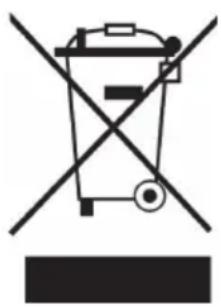
Symbol of a trash bin crossed with a diagonal line, representing no waste or discharge (no text or labels)If there is a legal regulation for the disposal of electrical and electronic devices in your country, this symbol on the product or on the packaging indicates that this product must not be disposed of with household waste. Instead, it must be taken to a collection point for the recycling of electrical and electronic equipment. By disposing of it in accordance with the rules, you are protecting the environment and the health of your fellow human beings from negative consequences. For information about the recycling and disposal of this product, please contact your local authority or your household waste disposal service.
DECLARATION OF CONFORMITY
CE UK CA
Manufacturer:
Chal-Tec GmbH, Wallstrasse 16, 10179 Berlin, Germany.
Importer for Great Britain:
Berlin Brands Group UK Ltd PO Box 1145 Oxford, OX1 9UW United Kingdom
Hereby, Chal-Tec GmbH declares that the radio equipment type CenterStage is in compliance with Directive 2014/53/EU. The full text of the EU declaration of conformity is available at the following internet address: use.berlin/10032833
For Great Britain: Hereby, Chal-Tec GmbH declares that the radio equipment type CenterStage is in compliance with the relevant statutory requirements. The full text of the declaration of conformity is available at the following internet address: use.berlin/10032833
Estimado cliente:
ÍNDICE DE CONTENIDOS
natural_image
Symbol of a trash bin crossed with a diagonal line, representing no waste or discharge (no text or labels)Berlin Brands Group UK Ltd
PO Box 1145
Oxford, OX1 9UW
United Kingdom
SOMMAIRE
natural_image
Symbol of a trash bin crossed out by a diagonal line, with no text or labels present.DÉCLARATION DE CONFORMITÉ

Fabricant :
Chal-Tec GmbH, Wallstraße 16, 10179 Berlin, Allemagne.
Berlin Brands Group UK Ltd
PO Box 1145
Oxford, OX1 9UW
United Kingdom
INDICE
natural_image
Symbol of a trash bin crossed with a diagonal line, representing no waste or discharge (no text or labels)Berlin Brands Group UK Ltd
PO Box 1145
Oxford, OX1 9UW
United Kingdom
natural_image
Abstract white logo design on dark background, resembling stylized letter 'S' or wave form (no text or symbols)
- INHALTSVERZEICHNIS
- Member of Berlin Brands Group
- Dahlwitz-Hoppegarten
- CONTENT
- SAFETY INSTRUCTIONS
- General information
- OPERATION
- Turning ON/OFF
- Charging
- Using the Wireless Microphone
- Using the Wired Microphone
- USB/SD Card Playback
- BLUETOOTH PLAYBACK
- USING THE RADIO
- USE OF THE EXTERNAL BATTERY OPTION
- DISPOSAL CONSIDERATIONS
- DECLARATION OF CONFORMITY
- CE UK CA
- Manufacturer:
- Importer for Great Britain:
- Estimado cliente:
- ÍNDICE DE CONTENIDOS
- SOMMAIRE
- DÉCLARATION DE CONFORMITÉ
- Fabricant :
- INDICE
Brand : Auna
Model : CenterStage 4
Category : Karaoke system