
FP10258 - Ice Maker COSTWAY - Free user manual and instructions
Find the device manual for free FP10258 COSTWAY in PDF.


| Product type | Ice maker |
| Brand | Costway |
| Model | FP10258 |
| Dimensions (L x W x H) | 265 x 410 x 428 mm |
| Carton dimensions (L x W x H) | 360 x 490 x 518 mm |
| Net weight | 8.7 kg |
| Gross weight | 16.7 kg |
| Power supply | 120 V / 60 Hz |
| Rated current | 3 A |
| Rated power | 170 W |
| Refrigerant/charge | R600a / 24 g |
| Insulation type | Cyclopentane (C5H10) |
| Applicable climate type | SN/N/ST |
| Electric shock protection class | I |
| Water supply | Manual (drawer filling) or automatic (tap connection) |
| Functions | Ice making, automatic cleaning, LED lighting |
| Indicators | Ice making, ice full, water addition |
| Recommended maintenance | Weekly cleaning, drain reservoir every 3 days |
| Cleaning method | Lemon water or vinegar/water solution |
| Safety instructions | Mandatory grounding, flat surface, do not use flammable liquids |
| Warranty period | Not specified in the manual |
| Included accessories | Water inlet hose, drainage bracket, drawer |
Frequently Asked Questions - FP10258 COSTWAY
User questions about FP10258 COSTWAY
0 question about this device. Answer the ones you know or ask your own.
Ask a new question about this device
Download the instructions for your Ice Maker in PDF format for free! Find your manual FP10258 - COSTWAY and take your electronic device back in hand. On this page are published all the documents necessary for the use of your device. FP10258 by COSTWAY.
USER MANUAL FP10258 COSTWAY
natural_image
Abstract geometric pattern with overlapping gray shapes and a white arrow (no text or symbols)Ice Maker
Machine à Glaçons
FP10258
EN

Before You Start
⚠️ Please read all instructions carefully.
⚠️ Retain instructions for future reference.
Separate and count all parts and hardware.
Read through each step carefully and follow the proper order.
We recommend that, where possible, all items are assembled near to the area in which they will be placed in use, to avoid moving the product unnecessarily once assembled.
△ Always place the product on a flat, steady and stable surface.
Keep all small parts and packaging materials for this product away from babies and children as they potentially pose a serious choking hazard.
FR

Avant de Commencer
natural_image
Line drawing of a desktop computer tower with ventilation slots and a mounted rack (no text or symbols)
Q&A
1. How often do I need to clean my ice maker?
It depends on your usage habits. If you use the ice maker often, it is recommended that you clean it at least once a week. Failure to clean the machine will cause scale accumulation, which will eventually block the pump and cause the product to stop working.
2.How should I clean the machine?
It is recommended to use lemon water or a solution of low-acid vinegar and water for cleaning. Drain the machine immediately after cleaning and then rinse it with pure water. It is recommended to drain the water tank at least once every three days. This keeps the hardness of the water low, ensures that impurities can be discharged, and prevents scale buildup in the water tank.
3.Why are my ice cubes cloudy?
It means that your water quality is turbid. It is recommended to use only drinking water and distilled water. If your water quality problem is serious, it is recommended that you install a water filtration system on your faucet.
4. Can I put milk and juice into the water tank to make ice cubes?
Using liquids other than water to make ice cubes is not recommended. Our research has found that the particles in milk and beverages can easily block the pump and reduce the life of the pump. Also the protein in milk is prone to calcification, which chemically reacts with the PU water pipe inside the machine and easily breaks it, making the product unable to continue working.
5.Why do my ice cubes melt easily?
Because the ice maker is not a refrigerator, it does not have a heat-control function. High ambient temperatures in summer will accelerate the melting of ice cubes. You can close the lid of the machine to maintain the internal temperature. Some users put electric fans by the machine to blow away hot air, which you can also try. However, if you are not going to use the ice cubes for a longtime, we recommend removing them from the ice basket and storing them in your freezer.
6.Why do my ice cubes stick together?
Either the room temperature or the water temperature is too low. You can add water to increase the temperature of the water in the tank. If this does not work, then the evaporator may have sagged and become deformed. It is recommended that you push up the cubes with your hand.
7. Why do the ice cubes I made smell of plastic?
The ice cubes themselves have no taste, If they smell of plastic, first try to clean the inside of the machine with lemon water. Then run a few ice-making cycles and discard the ice cubes made. Finally, rinse the machine with distilled water.
8. Why does my machine make noise when it is running?
The machine will make a faint sound when it is running. Closing the lid can reduce the noise. If the water pump makes noise during use, it is recommended to turn off the machine first. Then turn on the machine after cleaning the filter in the water tank to see whether the noise disappears.
9.Why is water leaking from my machine?
It may be that the tube inside the machine fell off during transport, You can remove the back cover of the machine and reconnect the tube yourself. If you do not know how to do this, please contact qualified technician for help.
10. Why is there water flowing but not making ice?
If the ambient temperature and refrigeration pipe are OK, then the refrigerant in the machine has leaked. Please contact qualified technician for help.
11. Why the ice making is not big?
When the ambient temperature or the initial water temperature is too high or the machine's evaporator column deformation will lead to the production of ice is not large enough. It is recommended to continue to wait for the machine to make a few more rounds of ice, or add the water temperature of the tank is not too high, and then the deformed evaporator column will be manually pulled down to restore its original state.
Contents Safety Precautions
Safety Precautions
Unit Construction
Operation & Maintenance
Technical Parameters
Safety Precautions
IMPORTANT SAFETY INSTRUCTIONS / For Household Use Only

Your safety and the safety of others are very important.
*We have provided many important safety messages in this manual and on your appliance.
*Always read and obey all safety messages.
*This is the safety alert symbol.

All safety messages will follow the safety alert symbol and the word "DANGER or "WARNING

WARNING:

DANGER:
These words mean:
Death or serious injury may occur if you don't follow the immediate instructions exactly. All safety messages will tell you what the potential hazard is, how to reduce the chance of injury, and what can happen if the instructions are not followed.

When using electrical appliances, basic safety precautions should be followed to reduce the risk of fire, electric shock, and injury to persons or property. Read all instructions before using any appliance.
*If the power cord is damaged, please do not operate the machine.
*The power socket must have reliable grounding. Ensure that the power plug is inserted all the way into the socket. Do not cover the power cord when in use. The power cord should never be immersed in water.
*It is not recommended to use extension cords, which may cause overheating or fire. If necessary, please use at least 59" of extension cord.
*Children must have adult supervision before they can use the machine.
*Please do not use flammable liquids to clean the ice maker as these may cause fire or explosion.
*Turn off the power and unplug the machine before cleaning or repairing it.

WARNING: This appliance must be grounded.
To prevent a hazard due to instability of the appliance, it must be placed on a flat, even surface.
Unit Construction
ICE MAKER STRUCTURE
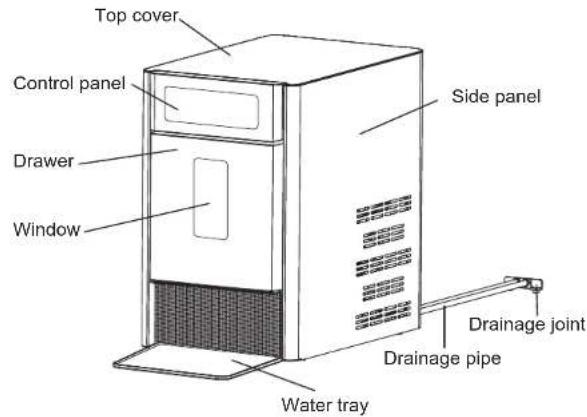
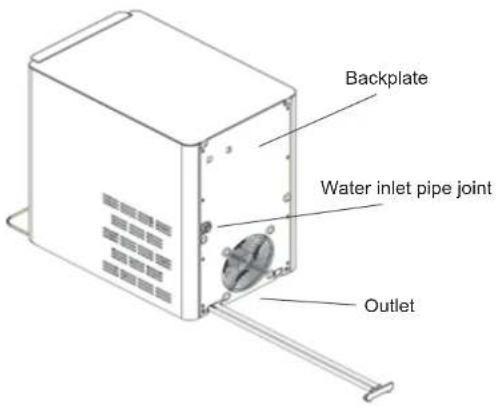

Note:
Attention
1 Air outlet: ensure the smoothness of the air outlet and the air outlet from the obstruction distance of more than 15 cm/6".
2. Water tray: catch the condensate drip when pulling out the drawer.
3. Drainage bracket: when cleaning the machine's water tank, remove the drainage bracket from the back of the machine, then pull out the drainage bracket, empty the water in the water pipe. Re-installed the drainage bracket after the drainage.
4. After the machine is cleaned, the sewage is discharged from the drainage pipe (there are two, one from the top tank and one from the bottom tank. Be sure to plug the drainage pipe with a drainage fitting and hang it on the back of the machine after the water is discharged).
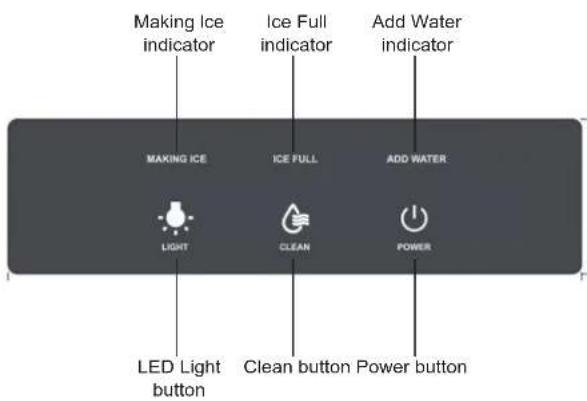
OPERATION AND DISPLAY AREAS
Operation & Maintenance
HOW TO START THE UNIT
①Put the water tray on the desktop and push it to the bottom of the machine (stuck it between the two rubber)
②The machine will be connected to the water source
- Manual refill water mode: pull out the drawer, then add the water to the liner. The water level shall not exceed the maximum water level line in the liner (MAX mark). Put back the drawer. Note: drawer should put back thoroughly.
- Auto refill water mode(recommended to use drinkable room temperature filtered water): connect the tap water inlet pipe to the water inlet connector on the back panel, then turn on the faucet (water supply water pressure must be controlled between 100kpa\~800kpa)
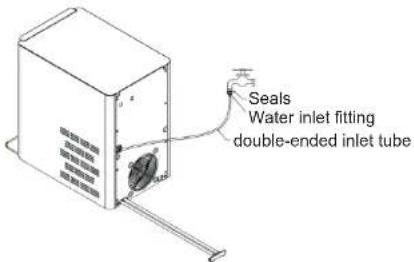
- Plug the power cord into the socket, then connect the rated power.
- After the power is on, the power light flashes. Then press the "POWER" button, the pump starts to pump water and start making ice.
- Pressing the "LIGHT" button, the internal light will turn on. Press the "LIGHT" button again, the light will go out and the internal light will turn off.
-
Long pressing "CLEAN" button for 3 seconds, it will enter the cleaning mode. Then the "CLEAN" button lights up, and the machine enters the automatic cleaning mode. The automatic cleaning will last 8 minutes to end.
-
To stop making ice, pressing the "POWER" button, the power indicator flashes state. And the machine enters the cleaning state. Motor, pump start to operate. After 5 minutes cleaning, motor, pump stop running, indicating the cleaning is done.
- The lack of water indicator lights up, indicating that there is no water in the liner. The ice production stop. Please pull out the drawer, then manually add water to the liner(only for manual water mode). If the water is automatically flowing into the drawer please check whether the faucet is turned down or the water pressure is too low.
Note: the amount of water added should not exceed the maximum water level line. Pull back the drawer if the drawer is not pull back in place, the ice indicator light flashes. After 5 minutes, the machine will turn to standby; After the drawer is pulled back, the ice light turn on, and the machine begins to make ice.
- Ice full indicator light is on, indicating that the ice in the ice basket is full. The ice production stops. Please pull out the drawer, then pour out the ice. After that, please pull back the drawer. The ice full indicator light will automatically go out, and at the same time automatically start making ice.
MAINTAINING YOUR ICE MAKER
- When using the machine for the first time or after a long period of disuse, it is recommended to clean the machine before making ice. It is recommended to discard any ice cubes made within the first hour. Ice made after one hour can be used.
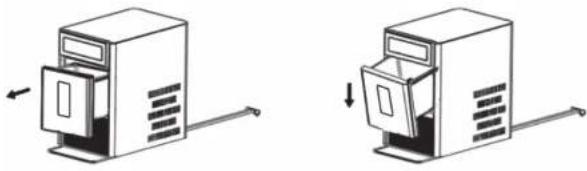
• To open the drawer:
Use your hand to gently pull out the drawer until it catches. Let go of the drawer, and it will hang at an angle from the frame of the machine. When you need to close the drawer again, first lift it up to a horizontal position. Then gently push it all the way in.
natural_image
Two technical illustrations of a desktop computer tower with open doors and directional arrows indicating movement (no text or symbols)• To take out the drawer:
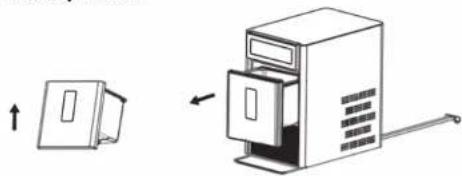
Use your hand to gently pull out the drawer until it catches. Then lift the drawer at an angle and pull it all the way out. When you need to reinsert the drawer, first tilt the drawer at the same angle it was when you removed it. First, place the raised edge to the frame at the back of the drawer, then slowly level the drawer, and gently push it in until it is fully closed.
natural_image
Diagram showing a device with an open lid and a closed door, connected by a lever (no text or symbols present)
Note:
Do not use organic solvents, boiled water, detergent, strong acids, strong alkali, or other harsh substances for cleaning. Please empty the water tank and dry it before storing the ice maker if it will not be used for a long time.
CORRECT DISPOSAL OF THIS PRODUCT

When the unit is taken out of service, disposal of this unit and its materials shall be in accordance with national regulations.
Technical Parameters
| Sku | FP10258 |
| Applicable climate type | SN/N/ST |
| Anti-electric shock level | I |
| Rated voltage/frequency | 120V/60Hz |
| Rated current | 3A |
| Input power | 170W |
| Refrigerator/charge amount | R600a/24g |
| Insulation type | Cyclopentane (C5H10) |
| Net weight | 16.7 kg/36.8 lbs |
| Gross weight | 8.7 kg/41 lbs |
| Overall size | 265 x 410 x428 mm/10" x 16" x 17"(L x W x H) |
| Carton size | 360 x 490 x 518 mm/14" x 19" x 20 (L x W x H) |
| Problem | Possible cause(s) Solution | |
| No power / equipment doesn't respond | Not powered on Power cord disconnected | Please check the local power supply. |
| No power from the power outlet | Please check the power cord connection. | |
| Power cord is not plugged in firmly | Please check whether the power cord is damaged. | |
| Power cord is damaged | Please contact qualified technician for help. | |
| Add Water indicator is lit | No water or low water | Please add water. |
| Water sensitivity is poor | Power off and restart after 2 minutes. | |
| The pump is stuck or damaged | Please contact qualified technician for help. | |
| Add Water sensor is bad | Please contact qualified technician for help. | |
| Ice Full indicator is lit | Ice is full | Remove ice cubes. |
| Water sensitivity is poor | Clean sensor probe. | |
| Ice full sensor is bad | Please contact qualified technician for help. | |
| Water leakage | The drainage pipe bracket is not installed in place | Plug the water drain bracket into the water drain. |
| The water pipe connector inside the machine is not installed | Please contact qualified technician for help. | |
| Ice forms too slowly or not at all | Air temperature is too high Water temperature in inner tank is too high | Air temperature should be below 90°F. |
| Refrigeration pipe blockage Refrigerant leak | Please contact qualified technician for help. | |
FR
Q&R
natural_image
Illustration of a desktop computer tower with an open door and scroll, no text or symbols present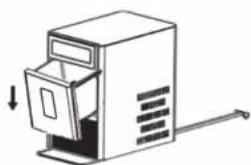
natural_image
Simple line drawing of a desktop computer with an open door and scroll (no text or symbols)natural_image
Diagram showing a cabinet with an open door and a separate view of the cabinet with a handle (no text or symbols present)
Remarque:
ÉLIMINATION CORRECTE DE CE PRODUIT

DO NOT discard the box / original packaging.
In case a return is required, the item must be returned in original box. Without this your return will not be accepted.
Take a photo of the box markings.
A photo of the markings (text) on the side of the box is required in case a part is needed for replacement. This helps our staff identify your product number to ensure you receive the correct parts.
Take a photo of the damaged part (if applicable).
A photo of the damage is always required to file a claim and get your replacement or refund processed quickly. Please make sure you have the box even if it is damaged.
Send us an email with the images requested.
Email us directly from marketplace where your item was purchased with the attached images and a description of your claim.
FR

Instructions De Retour / Réclamation De Dommages

- EN
- Before You Start
- FR
- Avant de Commencer
- Q&A
- How often do I need to clean my ice maker?
- 2.How should I clean the machine?
- 3.Why are my ice cubes cloudy?
- Can I put milk and juice into the water tank to make ice cubes?
- 5.Why do my ice cubes melt easily?
- 6.Why do my ice cubes stick together?
- Why do the ice cubes I made smell of plastic?
- Why does my machine make noise when it is running?
- 9.Why is water leaking from my machine?
- Why is there water flowing but not making ice?
- Why the ice making is not big?
- Contents Safety Precautions
- Safety Precautions
- Unit Construction
- Note:
- Attention
- Operation & Maintenance
- HOW TO START THE UNIT
- MAINTAINING YOUR ICE MAKER
- CORRECT DISPOSAL OF THIS PRODUCT
- Q&R
- Remarque:
- ÉLIMINATION CORRECTE DE CE PRODUIT
- Instructions De Retour / Réclamation De Dommages
Brand : COSTWAY
Model : FP10258
Category : Ice Maker