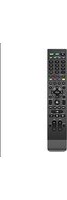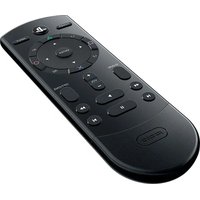
Cloud - Remote control PDP - Free user manual and instructions
Find the device manual for free Cloud PDP in PDF.


User questions about Cloud PDP
0 question about this device. Answer the ones you know or ask your own.
Ask a new question about this device
Download the instructions for your Remote control in PDF format for free! Find your manual Cloud - PDP and take your electronic device back in hand. On this page are published all the documents necessary for the use of your device. Cloud by PDP.
USER MANUAL Cloud PDP
text_image
POWER L1 R1 ENTER L2 R2 SHARE + VOL - OPTIONS I H pdpLIMITED WARRANTY
Coverage and Term
PDP warrants that this product will be free from manufacturing defects for two years from the original date of purchase. Manufacturing defects are those defects in materials and/or workmanship, subject to final determination by PDP's customer service department. This warranty applies only to original purchasers with a valid proof of purchase from an authorized PDP retailer that clearly shows the date of purchase.
Exclusive Remedy and Exclusions
The exclusive remedy for valid claims will be the repair, replacement or refund of the product. This warranty does not cover defects caused by accidents, improper or abusive use of the product, unauthorized or improper modifications, repairs or handling.
How to Get Service
Purchasers should contact the PDP customer service department at (800) 331-3844 (US and Canada only) or by visiting support.pdp.com. Inquiries are typically answered within twenty-four business hours.
Your Rights Under Applicable Law
This warranty does not affect the legal rights of customers under applicable state, provincial or national laws governing the sale of consumer goods.
WARNING
- Before using this product, carefully read this manual and keep it for future reference. Additionally, read the instructions for the PlayStation®4 system.
- Do not handle damaged or leaking batteries.
WHAT YOU CAN DO WITH THE CLOUD REMOTE FOR PS4
Simplify your set-up and effortlessly control your entertainment with the Cloud Remote for PlayStation®4. The Cloud Remote uses Bluetooth® wireless technology to manage media playback of PS4 streaming and live apps, and includes controls for power, input, and volume for TVs. Programming the remote is straightforward with the downloadable PDP Cloud Remote App, which uses advanced Cloud technology to auto-detect devices connected to the PS4 for hassle-free remote programming. With the remote's compact design that features the most essential buttons for successfully navigating your entertainment, you'll have all your controls under one thumb!
PREPARING FOR USE
Remove the battery cover on the rear by pushing down and insert 2 AAA batteries. Make sure the batteries are in the correct position.
IMPORTANT:
- The remote only needs to be paired once.
- Only one remote can be connected to the PS4 console at a time.
- To prevent Bluetooth pairing difficulties, it is advised to unpair any other existing PS4 remotes from the console, before the Cloud Remote is paired to the PS4 console.
NOTE: Simply just doing a “Disconnect” is not the same as unpairing, as the other remote can still be listed on the Bluetooth Devices listing on the PS4 console. Please follow the procedures below to properly unpair or “forget” the other remote before pairing the Cloud Remote for PS4.
UNPAIRING BLUETOOTH REMOTES:
1) Go to Settings> Devices> Bluetooth Devices.
2) Select your other remote from the list and choose "Disconnect" option.
3) Using your PS4 controller, select your other remote from the devices list again.
4) Press Options with your PS4 controller.
5) Select "Forget Device".
6) Confirm your selection "OK".
7) Restart your console.
8) Remove your new remote's batteries and put them back again.
Please continue with the following steps below to pair the Cloud Remote for PS4, after you have unpaired the other remote from your console.
To use the Cloud Remote, the PS4 ^™ system software must be version 3.0 or later. You can check the system software version by selecting Settings -> System -> System Information.
Pairing the Cloud Remote with a PS4 ^TM system
This operation is performed only once, when you are using the Cloud Remote for the first time.
- Turn on the PS4 ^™ system.
- Using a connected controller, select Settings -> Devices -> Bluetooth Devices from the PS4 ^™ system menu.
- Press the PS button once to activate the remote.
- Next, press and hold the SHARE button and the PS button simultaneously until the red LED begins to flash.
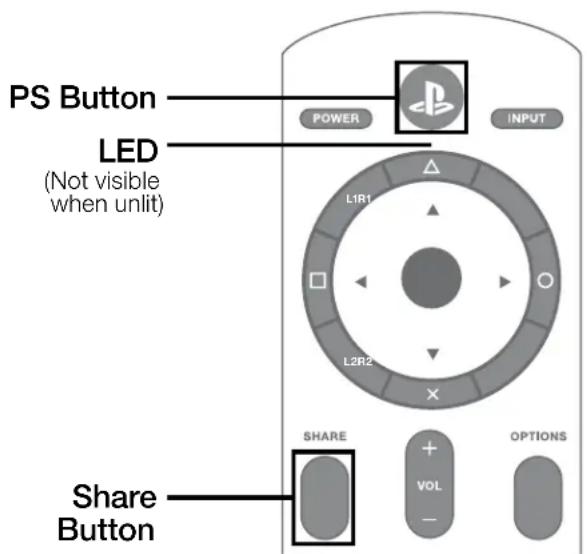
text_image
PS Button LED (Not visible when unlit) POWER INPUT L1R1 L2R2 SHARE + VOL - OPTIONS Share Button- Place the remote close to the PS4 ^™ system and wait for “PDP Cloud Remote” to appear in the device list.
- Using a DUALSHOCK® 4 Wireless Controller, select "PDP Cloud Remote" from the list, and press the "X" button. When prompted, select "Yes".
- The red LED on the remote will illuminate for 3 seconds and then turn off, indicating successful pairing.
- If pairing is unsuccessful, repeat steps 3 through 6.
NOTE
To conserve battery life, the PS4 ^™ system will disconnect the Cloud Remote after 30 minutes of activity.
- To reactivate, press any buttons to wake up the Cloud Remote.
- If the batteries are just replaced, press the PS button once to wake up the Cloud Remote.
TIPS
- For the latest PS4 ^TM usage instructions, refer to the user's guide for the PS4 ^TM system (manuals.playstation.net/document/).
- For the latest Cloud Remote instructions, refer to the online user's guide (support.pdp.com).
- Only one Cloud Remote can be registered with the PS4 ^TM system at a time.
- When you pair the Cloud Remote with another PS4 ^™ system, registration with the original PS4 ^™ system is cleared. To use the remote with the original PS4 ^™ system, you will have to follow the pairing procedure again.
PDP CLOUD REMOTE APP
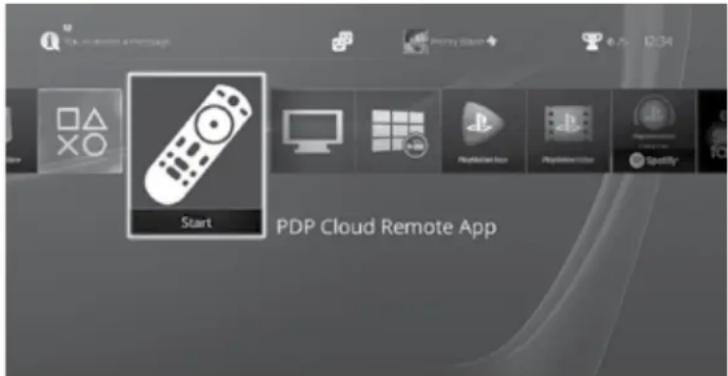
NOTE: To enable full TV remote functionality of your Cloud Remote, please download the free PDP Cloud Remote App in the PlayStation Store.
text_image
Start PDP Cloud Remote AppUsing Cloud technology, the PDP Cloud Remote App allows you to easily program the remote to work with any TV without having to pore through pages of IR codesets and minimize going through the hassle of manually programming the remote. If your TV is not recognized, the app's user friendly, interactive interface walks you via the app's step-by-step remote programming process. Please follow the instructions in the PDP Cloud Remote App to complete setting up your remote.
PRECAUTIONS
Battery Use
- Never throw batteries into a fire.
- If you come into contact with material from a leaking battery, take the following actions:
☐ If the material gets into the eyes, do not rub. Immediately flush the eyes with clean water and seek medical attention.
☐ If the material comes into contact with the skin or clothes, immediately rinse the affected area with clean water. Consult your physician if inflammation or soreness develops. - Keep the product out of reach of small children. Small children may swallow the batteries or small parts, which may inflict injury or cause an accident.
- Do not use batteries other than those specified, and always replace with the same type of battery.
- Do not mix old and new batteries.
- Insert batteries with the plus and minus ends in the correct direction.
- Remove batteries when they have reached the end of their life, or if the remote is to be stored for an extended period of time.
Use and handling
- Do not expose the remote to high temperatures, high humidity or direct sunlight.
- Do not allow liquid or small particles to get into the product.
- Do not put heavy objects on the product.
- Never disassemble or modify the product.
- Do not throw or drop the product, or otherwise expose it to strong physical impact.
- Do not place any rubber or vinyl materials on the product exterior for an extended period of time.
- When cleaning the product, use a soft, dry cloth. Do not use solvents or other chemicals.
PlayStation®
Pdp ^TM
text_image
Start PDP Cloud Remote AppPRÉCAUTIONS
Changes or modifications not expressly approved by the party responsible for compliance could void your authority to operate the equipment.
The equipment complies with FCC RF exposure limites set forth for an uncontrolled environment. The equipment must not be co-located or operating in conjunction with any other antenna or transmitter
This equipment has been tested and found to comply with the limits for a Class B digital device, pursuant to part 15 of the FCC Rules. These limits are designed to provide reasonable protection against harmful interference in a residential installation. This equipment generates, uses and can radiate radio frequency energy and, if not installed and used in accordance with the instructions, may cause harmful interference to radio communications. However, there is no guarantee that interference will not occur in a particular installation. If this equipment does cause harmful interference to radio or television reception, which can be determined by turning the equipment off and on, the user is encouraged to try to correct the interference by one or more of the following measures:
- Reorient or relocate the receiving antenna.
- Increase the separation between the equipment and receiver.
- Connect the equipment into an outlet on a circuit different from that to which the receiver is connected.
- Consult the dealer or an experienced radio/TV technician for help.
FCC ID: X5B-051081
This device complies with FCC radiation exposure limits set forth for an uncontrolled environment and it also complies with Part 15 of the FCC Rules.
Operation is subject to the following two conditions:
(1) this device may not cause harmful interference, and
(2) this device must accept any interference received, including interference that may cause undesired operation.
AVIS FCC ET IC MISE EN GARDE
This device complies with Industry Canada licence-exempt RSS standard(s). Operation is subject to the following two conditions:
(1) this device may not cause interference, and
(2) this device must accept any interference, including interference that may cause undesired operation of the device.
© 2017 Performance Designed Products LLC. All rights reserved. Performance Designed Products, PDP, and their respective logos are trademarks and/or registered trademarks of Performance Designed Products LLC. All other trademarks are the property of their respective owners. Manufactured and distributed under license from Sony Interactive Entertainment LLC. PlayStation and the PS family logo are trademarks of Sony Interactive Entertainment Inc.
“”, “PlayStation”, “ O × ”, “DUALSHOCK®4”, and are registered trademarks of Sony Interactive Entertainment Inc. All rights reserved.
For use exclusively with PlayStation®4. This product is compatible with PlayStation®4 system software version 3.0 and later.
4225 W Buckeye Rd #2,
Phoenix, AZ 85009 USA
Ph: 800-331-3844
(USA and Canada only)
www.pdp.com
Please keep this information for future reference.
Designed in the USA by PDP
This product is manufactured and imported by
Performance Designed Products LLC.
Made in China
Performance Designed Products LLC.
Fabriqué en Chine.
US Patents/Brevets aux É.-U.: www.pdp.com/patents