303316 - External hard drive enclosure Aplic - Free user manual and instructions
Find the device manual for free 303316 Aplic in PDF.


| Product type | External hard drive enclosure |
| Brand | Aplic |
| Model | 303316 |
| External interface | USB 3.2 Gen1 (backward compatible with USB 2.0/1.1) |
| Internal interface | Serial ATA III (6 Gbit/s) |
| Compatible disk format | 3.5 inches (8.89 cm) |
| Main features | Convert an internal SATA hard drive into an external storage device; UASP support; driverless installation |
| Dimensions (estimated) | 190 x 115 x 35 mm |
| Weight (estimated) | 300 g |
| Power supply | Via USB 3.2 Gen1 port (bus power) |
| Operating temperature | 0 to 40 °C |
| Package contents | Enclosure, USB 3.2 Gen1 cable, mounting accessories, user manual |
| Maintenance and cleaning | Clean with a dry, lint-free cloth; avoid contact with water or moisture |
| Safety | Do not open or modify the device; avoid moisture, high temperatures, and shocks; keep out of reach of children |
| Spare parts and repairability | Not user-repairable; no spare parts provided; any unauthorized repair voids the warranty |
| General information | Brand: Aplic, Model: 303316, Category: External hard drive enclosure |
| Disposal | Do not dispose with household waste; drop off at a store or recycling center; WEEE eco-contribution included |
Frequently Asked Questions - 303316 Aplic
User questions about 303316 Aplic
0 question about this device. Answer the ones you know or ask your own.
Ask a new question about this device
Download the instructions for your External hard drive enclosure in PDF format for free! Find your manual 303316 - Aplic and take your electronic device back in hand. On this page are published all the documents necessary for the use of your device. 303316 by Aplic.
USER MANUAL 303316 Aplic
natural_image
Abstract geometric logo design with a stylized letter 'O' inside a partial white circle on dark background (no text or symbols)BEDIENUNGSANLEITUNG
USER MANUAL
USB 3.2. GEN1 HARD DISK ENCLOSURE FOR 3.5"
Mod.-Nr.: 303316
Table of contents
- Deutsch .... 3
- English 7
- Français 11
- Español....15
- Italiano .... 19

ENG: Current drivers, user manuals and other relevant documents for this product can be found on our homepage.
natural_image
Technical line drawing of a mechanical device with mounting holes and internal components (no text or symbols)natural_image
Isometric line drawing of a rectangular electronic device with labeled ports (no text or symbols beyond labels)Thank you for choosing a product from aplic. To ensure that you will enjoy your purchased device for a long time, please read the following manual carefully. Before using the delivered product, check that it is complete, faultless and undamaged.
1. Scope of delivery
- Hard Disk Enclosure
- USB 3.2 Gen1. Connection Cable
- Mounting Accessories
- User Manual
2. Technical data
| External connector USB 3.2 Gen1. (downward compatible) | |
| Internal connector Serial ATA III (6 Gbit/s) | |
| Form factor 3.5” / 8.89 cm | |
| Operating temperature 0-40°C | |
| Features UASP | |
3. Features
The hard-disk case can be used as an external hard-drive. To do so, just insert your SATA hard disk into the casing and connect it via the included USB 3.2 Gen1. lead to a computer. A manual installation of a driver is not necessary.
4. Start-up
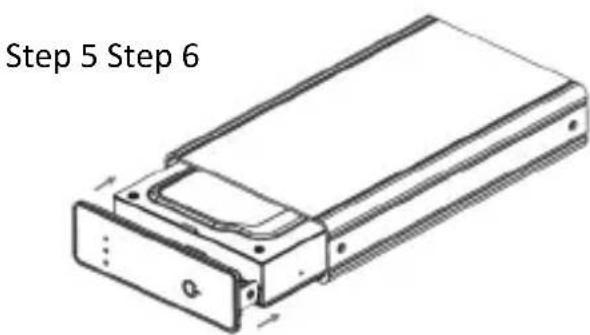
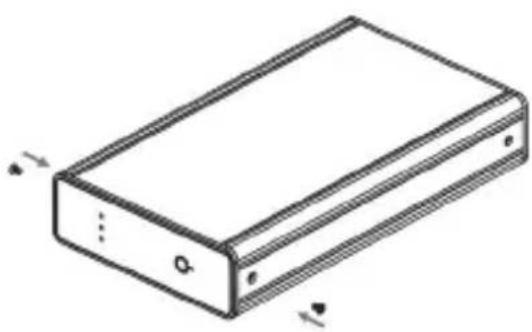
Please take the hard-disk case out of its packaging and put the packaging aside. The following drawings describe the assembly of the casing.
Please unscrew the two screws on the front side of the hard-disk case. Then you have to take off the front panel.
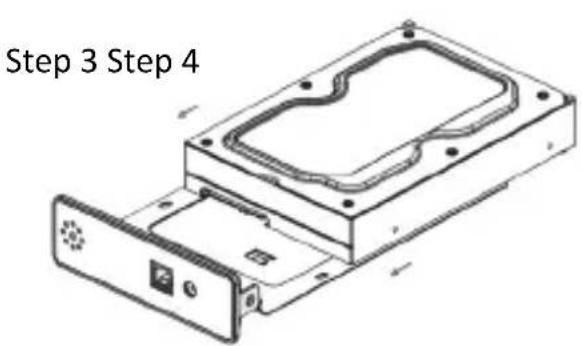
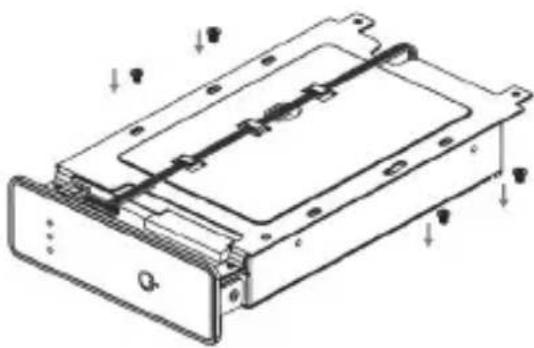
Now please connect your hard disk with the SATA connectors of the case. After that, fix the hard disk by 4 screws to the bottom side of the case.
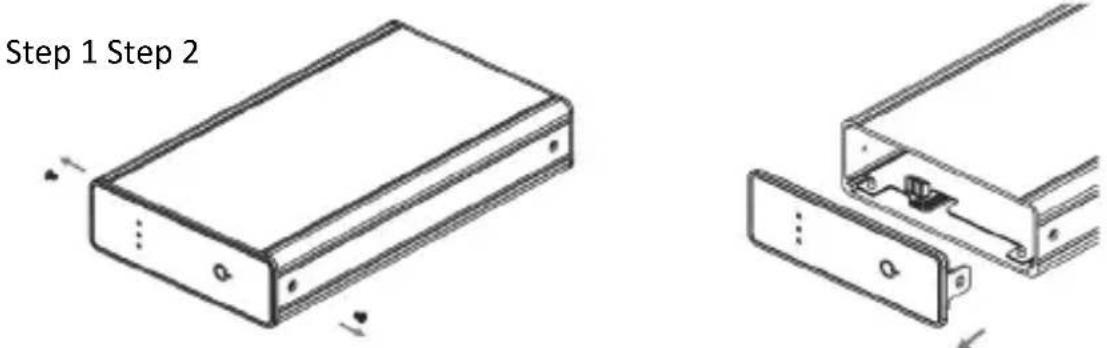
Please slide the hard disk into the case. Now you only have to close the case and fix the front side by the two screws on it.
natural_image
Technical line drawing of a mechanical device with mounting holes and internal components (no text or symbols)When the device is ready for mounting, connect the USB 3.2 Gen1. cable to the hard disk and to a free USB 3.2 Gen1. port on your PC. To start the hard disk, press the ON/OFF button on the front of the device.
natural_image
Isometric line drawing of a rectangular electronic component with labeled terminals (no text or symbols beyond basic labels)5. Safety instructions and liability disclaimer
Never try to open the device to carry out repairs or conversions. Avoid contact with mains voltages. Do not short-circuit the product. The device is not certified for use in the open air; only use it in dry conditions. Protect it from high humidity, water and snow. Keep it away from high temperatures. Do not subject the device to sudden changes in temperature or heavy vibration as this might damage electronic components. Examine the device for damage before using it. The unit should not be used if it has received an impact or has been damaged in any other way. Please observe national regulations and restrictions. Do not use the device for purposes other than those described in the instructions. This product is not a toy. Keep it out of the reach of children or mentally impaired persons. Any repair or alteration to the device not carried out by the original supplier, will invalidate the warranty or guarantee. The product may only be used by persons who have read and understood these instructions. The device specifications may change without any separate prior notice to this effect.
6. Disposal instructions
Electrical and electronic devices may only be disposed of in accordance with the European WEEE Directive and not with household rubbish. Components must be disposed of or recycled separately as dangerous, toxic elements can inflict sustained damage on the environment if they are disposed of incorrectly. As a consumer, you are bound by the Electrical and Electronic Devices Act (ElektroG) to return electrical and electronic goods free of charge at the end of their useful life to the manufacturer, the place of purchase or to specially set up, public collection points. The details in each case are governed by national law. The symbol on the product, the operating instructions and/or the packaging refers to these regulations. By separating materials in this way, recycling and disposing of old devices, you are making an important contribution towards protecting our environment. For information on authorised collection points in your area, please contact your local city or municipal administration.
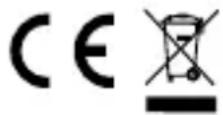
WEEE guideline: 2012/19/EU WEEE register number: DE 67896761
WD Plus GmbH, herewith declares that this product 303316 conforms to the principle requirements and other relevant stipulations. The complete Declaration of Conformity can be obtained from: WD Plus GmbH, Wohlenbergstraße 16, 30179 Hanover
natural_image
Technical line drawing of a mechanical assembly with no visible text or symbolsnatural_image
Technical line drawing of a mechanical device with mounting holes and internal components (no text or symbols)natural_image
Isometric line drawing of a rectangular electronic device with labeled ports (no text or symbols)natural_image
Technical line drawing of a mechanical assembly with no visible text or symbolsnatural_image
Technical line drawing of a mechanical device with mounting holes and internal components (no text or symbols)natural_image
Isometric line drawing of a rectangular electronic device with labeled ports (no text or symbols)MO-FR 9:30am - 18pm CET

Brand : Aplic
Model : 303316
Category : External hard drive enclosure