Temperature and Humidity Sensor - Smart Home Aqara - Free user manual and instructions
Find the device manual for free Temperature and Humidity Sensor Aqara in PDF.


User questions about Temperature and Humidity Sensor Aqara
0 question about this device. Answer the ones you know or ask your own.
Ask a new question about this device
Download the instructions for your Smart Home in PDF format for free! Find your manual Temperature and Humidity Sensor - Aqara and take your electronic device back in hand. On this page are published all the documents necessary for the use of your device. Temperature and Humidity Sensor by Aqara.
USER MANUAL Temperature and Humidity Sensor Aqara
natural_image
Simple line drawing of a temperature sensor device (no text or symbols)Temperature and Humidity Sensor
Temperature and Humidity Sensor Quick Start Guide
Product Introduction
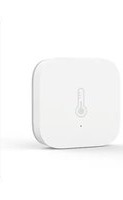
Aqara Temperature and Humidity Sensor monitors and records indoor temperature, humidity and atmospheric pressure in real time. The current and historical data is displayed in the app. It can also trigger other smart accessories to automate your home.
* A hub is required.
* Aqara Hub is required to enable Aqara Temperature and Humidity Sensor to work with HomeKit technology. See www.aqara.com for more details.
* This product is for indoor use only.
natural_image
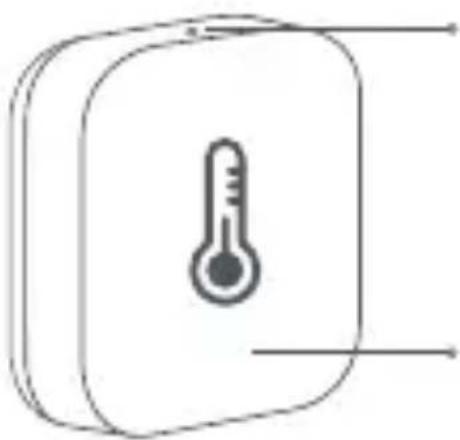
Simple line drawing of a thermometer inside a rounded rectangular box (no text or symbols)Reset Button
Long Press for 5s: Reset/Connect to
Network
Single Press: Effective Range Test
Indicator Light
Quick Setup
- Before activating the accessory, please make sure you have the Aqara Home app downloaded and Aqara hub installed.
- Please open the app, tap "Home" and then tap "+" in the top right corner to enter "Add Device (Accessory)" page. Select "Temperature and Humidity Sensor", and add it according to instructions.
* If the connection fails, please move the accessory closer to the Hub and try again.
Installation
Effective Range Test: Single press the reset button on the accessory at your desired position. If the Hub makes voice prompts, it indicates that the accessory can communicate effectively with the Hub.
* Avoid metal surface to maximize signal strength.
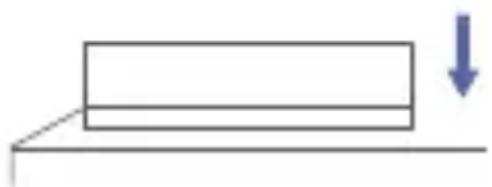
Option 1: Place it directly in the desired position.
natural_image
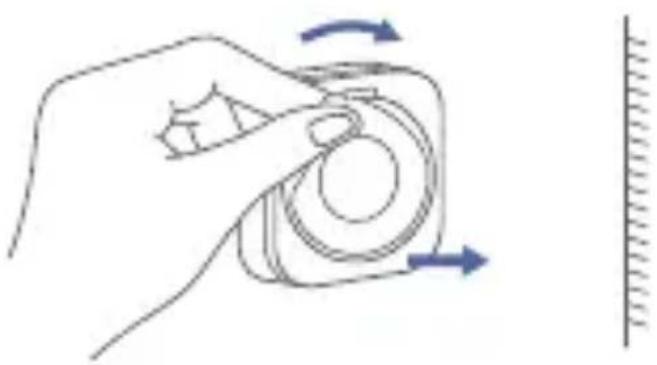
Simple line drawing of a rectangular block on a horizontal surface with a downward arrow indicating force or direction (no text or symbols)Option 2: Remove the protective film, and stick it to the desired position.
natural_image
Hand holding a camera with blue directional arrows indicating rotation (no text or symbols)* Keep the surface clean and dry.
Specifications
Model: WSDCGQ11LM
Dimensions: 36 × 36 × 9 mm ( 1.42 × 1.42 × 0.35 in.)
Wireless Protocol: Zigbee
Battery: CR2032
Temperature Range and Precision: -20^ - +50^, ± 0.3^ (-4° - 122^, ± 0.54^ )
Humidity Range and Precision: 0 – 100% RH, ±3%
Atmospheric Pressure Range and Precision:
30 kPa - 110 kPa, ±0.12 kPa
Maximum Transmit Power (Zigbee): 9.99 dBm
Working Frequency: 2400 MHz – 2483.5 MHz
Online Customer Service: www.aqara.com/support
Email: support@aqara.com
Manufacturer: Lumi United Technology Co., Ltd.
Address: 8th Floor, JinQi Wisdom Valley, No.1 Tangling Road, Liuxian Ave, Taoyuan Residential District, Nanshan District, Shenzhen, China.
Warnings
- This product is NOT a toy. Please keep children away from this product.
- This product is designed for indoor use only. Do NOT use in humid environments or outdoors.
- Beware of moisture, do NOT spill water or other liquids onto the product.
- Do NOT place this product near a heat source. Do NOT place it in an enclosure unless there is normal ventilation. Do NOT attempt to repair this product by yourself. All
- repairs should be performed by an authorized professional. This product is only suitable for improving the entertainment, convenience of your home life and
- reminding you about the device status. If a user violates the product use instructions, the manufacturer will NOT be liable for any risks and property losses.
FCC ID: 2AKIT-WSDCGQ11LM
Federal Communications Commission (FCC) compliance statement:
- This device complies with part 15 of the FCC Rules.
Operation is subject to the following two conditions:
(1) This device may not cause harmful interference, and
(2) this device must accept any interference received, including interference that may cause undesired operation.
- Changes or modifications not expressly approved by the party responsible for compliance could void the user's authority to operate the equipment.
Note: This equipment has been tested and found to comply with the limits for a Class B digital device, pursuant to part 15 of the FCC Rules. These limits are designed to provide reasonable protection against harmful interference in a residential installation.
This equipment generates, uses and can radiate radio frequency energy and, if not installed and used in accordance with the
instructions, may cause harmful interference to radio communications. However, there is no guarantee that interference will not occur in a particular installation. If this equipment does cause harmful interference to radio or television reception, which can be determined by turning the equipment off and on, the user is encouraged to try to correct the interference by one or more of the following measures:
-Reorient or relocate the receiving antenna.
-Increase the separation between the equipment and receiver.
-Connect the equipment into an outlet on a circuit different from that to which the receiver is connected.
-Consult the dealer or an experienced radio/TV technician for help.
RF Exposure statement:
This equipment complies with FCC radiation exposure limits set forth for an uncontrolled environment. This equipment should be installed and operated with minimum distance of 20 cm between the radiator and your body. This transmitter must not be co-located or operating in conjunction with any other antenna or transmitter.
IC: 22635-WSDCGQ11LM
IC NOTICE TO CANADIAN USERS
This device contains licence-exempt transmitter(s)/receiver(s) that comply with Innovation, Science and Economic Development Canada's licence-exempt RSS(s). Operation is subject to the following two conditions:
(1) This device may not cause interference.
(2) This device must accept any interference, including interference that may cause undesired operation of the device.
This Class B digital apparatus complies with Canadian ICES - 003. This device complies with RSS - 247 of Industry Canada. Operation is subject to the condition that this device does not cause harmful interference.
This equipment complies with IC radiation exposure limits set forth for an uncontrolled environment. This equipment should be installed and operated with minimum distance of 20 cm between the radiator and your body. This transmitter must not be co-located or operating in conjunction with any other antenna or transmitter.
Risk of explosion if the battery is replaced by an incorrect type.
Dispose of used batteries according to the instructions.
Do not ingest battery, Chemical Burn Hazard.
This product contains a coin / button cell battery. If the coin / button cell battery is swallowed, it can cause severe internal burns in just 2 hours and can lead to death.
Keep new and used batteries away from children.
If the battery compartment does not close securely, stop using the product and keep it away from children.
If you think batteries might have been swallowed or placed inside any part of the body, seek immediate medical attention.
- The equipment is only suitable for mounting at heights ≤ 2 m
- Disposal of a battery into fire or a hot oven, or mechanically crushing or cutting of a battery, that can result in an explosion. Leaving a battery in an extremely high temperature surrounding
environment that can result in an explosion or the leakage of flammable liquid or gas
A battery subjected to extremely low air pressure that may result in an explosion or the leakage of flammable liquid or gas

Hereby, [Lumi United Technology Co., Ltd.] declares that the radio equipment type [Temperature and Humidity Sensor, WSDCGQ11LM] is in compliance with Directive 2014/53/EU. The full text of the EU declaration of conformity is available at the following internet address: http://www.aqara.com/DoC/
All products bearing this symbol are waste electrical and electronic equipment (WEEE as in directive 2012/19/EU) which should not be mixed with unsorted household waste. Instead, you should protect human health and the environment by handing over your waste equipment to a designated collection point for the recycling of waste electrical and electronic equipment, appointed by the government or local authorities. Correct disposal and recycling will help prevent potential negative consequences to the environment and human health. Please contact the installer or local authorities for more information about the location as well as terms and conditions of such collection points.
natural_image
Symbol of a trash bin crossed with a diagonal line, representing waste sorting or disposal (no text or numbers present)Symbol on the product or on its packaging indicates that this product may not be treated as household waste.
Instead it shall be handed over to the applicable collection point for the recycling of electrical and electronic equipment.
溫濕度感測器快速入門指南
產品介紹
natural_image
Simple line drawing of a thermometer inside a rounded rectangular device (no text or symbols)重設鍵
長按5s:重設/入網
按一下:通訊有效距離驗證
指示燈
快速設定
natural_image
Simple line drawing of a rectangular block resting on a horizontal surface with a downward arrow indicating force or direction (no text or symbols)natural_image
Line drawing of a hand holding a camera with blue directional arrows indicating rotation (no text or symbols)
*確保粘貼位置表面清潔乾燥。
基本參數
產品型號:WSDCGQ11LM
natural_image
Simple line drawing of a thermometer inside a rounded rectangular device (no text or symbols)Rücksetztaste
natural_image
Simple line drawing of a rectangular block on a horizontal surface with a downward arrow indicating force or direction (no text or symbols)natural_image
Hand holding a camera with blue directional arrows indicating rotation (no text or symbols)Adresse: 8th Floor, JinQi Wisdom Valley, No.1 Tangling Road,
Liuxian Ave, Taoyuan Residential District, Nanshan District,
Shenzhen, China.
Warnhinweise
natural_image
Symbol of a trash bin crossed with no text or numbers, representing waste sorting or disposal (no text present)natural_image
Simple line drawing of a thermometer inside a rounded rectangular device (no text or symbols)natural_image
Simple line drawing of a rectangular block on a horizontal surface with a downward arrow indicating force or direction (no text or symbols)natural_image
Line drawing of a hand holding a camera lens with blue directional arrows indicating rotation (no text or symbols)Adresse : 8th Floor, JinQi Wisdom Valley, No.1 Tangling Road,
Liuxian Ave, Taoyuan Residential District, Nanshan District,
Shenzhen, China.
Avertissements
natural_image
Simple line drawing of a trash bin with two crossed lines indicating no waste or prohibition (no text or symbols)natural_image
Simple line drawing of a thermometer inside a rounded rectangular box (no text or symbols)natural_image
Simple line drawing of a rectangular block on a horizontal surface with a downward arrow indicating force or direction (no text or symbols)natural_image
Line drawing of a hand holding a camera with blue arrows indicating rotation (no text or symbols)www.aqara.com/support
Correo electrónico: support@aqara.com
Fabricante: Lumi United Technology Co., Ltd.
Dirección: 8th Floor, JinQi Wisdom Valley, No.1 Tangling Road, Liuxian Ave, Taoyuan Residential District, Nanshan District, Shenzhen, China.
Advertencias
natural_image
Simple line drawing of a trash bin with two crossed lines indicating no waste or prohibition (no text or symbols)natural_image
Simple line drawing of a thermometer inside a rounded rectangular device (no text or symbols)Tasto Reset
natural_image
Simple line drawing of a rectangular block on a horizontal surface with a downward arrow indicating force or direction (no text or symbols)natural_image
Hand holding a camera with blue directional arrows indicating rotation (no text or symbols)Protocollo wireless: Zigbee
Batteria: CR2032
Gamma e precisione della temperatura: -20^ - +50^ , ±0.3^
$$ (- 4 ^ {\circ} - + 1 2 2 ^ {\circ} \mathrm{F}, \pm 0. 5 4 ^ {\circ} \mathrm{F}) $$
natural_image
Simple line drawing of a trash bin with two crossed lines indicating no waste or prohibition (no text or symbols)natural_image
Simple line drawing of a thermometer inside a rounded rectangular device (no text or symbols)Кнопка сброса
natural_image
Simple line drawing of a rectangular block on a horizontal surface with a downward arrow indicating force or direction (no text or symbols)natural_image
Hand holding a camera lens with blue directional arrows indicating rotation (no text or symbols)Адрес: 8th Floor, JinQi Wisdom Valley, No.1 Tangling Road, Liuxian Ave, Taoyuan Residential District, Nanshan District, Shenzhen, China.
Сделано в Китае
Внимание!
natural_image
Simple line drawing of a thermometer inside a rounded rectangular device (no text or symbols)リセットボタン
5秒間押し続ける:リセット/ネットワ
ークへ接続
1回押す:検出範囲のテスト
インジケータライト