Elite IC7 - Indoor bike trainer Horizon Fitness - Free user manual and instructions
Find the device manual for free Elite IC7 Horizon Fitness in PDF.


| Product Type | Indoor Bike Trainer |
| Brand | Horizon Fitness |
| Model | Elite IC7 |
| Power Supply | CR2032 3V battery (1 piece) |
| Console | Digital display with Time, Distance, Calories, Heart rate, RPM, Speed modes |
| Resistance | Friction brake with micro-adjustment and emergency stop lever |
| Flywheel | High inertia for smooth pedaling |
| Drive | Silent belt drive |
| Seat | Padded, adjustable height and fore/aft |
| Handlebar | Height adjustable |
| Pedals | With toe cages and adjustable straps |
| Transport | Integrated front transport wheels |
| Stability | Adjustable leveling feet |
| Heart Rate | Built-in wireless receiver, compatible with Polar belt (included) |
| Safety | Red lever emergency brake, fixed flywheel |
| Maintenance | Clean after each use, weekly and monthly inspection |
| Wear Parts | Brake pad, seat, pedals, belt (rare replacement) |
Frequently Asked Questions - Elite IC7 Horizon Fitness
User questions about Elite IC7 Horizon Fitness
0 question about this device. Answer the ones you know or ask your own.
Ask a new question about this device
Download the instructions for your Indoor bike trainer in PDF format for free! Find your manual Elite IC7 - Horizon Fitness and take your electronic device back in hand. On this page are published all the documents necessary for the use of your device. Elite IC7 by Horizon Fitness.
USER MANUAL Elite IC7 Horizon Fitness
ELITE IC7

OPERATION GUIDE
GUIDE D'UTILISATION
4
H2'4_03_Eliu_JCr_Rev1_1incd 4569214 2.09 FM
MODEL INFORMATION
A) ADJUSTABLE LEVERS: allow adjustment to the height of both saddle post & handlebar
NOTE: To reposition the lever, pull lever outward and turn.
B) HEAVY FLYWHEEL: high-inertia flywheel creates a smooth feel
C) TRANSPORTATION WHEEL: allows for easy movement of the machine
D) BELT DRIVE: simulates the feel of road riding
E) CRANK: initiates movement to the flywheel
F) SADDLE POST: allows vertical adjustment to customize height for any user
G) SADDLE SLIDER: allows fore/aft adjustment to customize for any user
H) SADDLE: extra padding to provide a comfortable ride
I) TENSION CONTROL & EMERGENCY BRAKE LEVER: friction brake with micro-adjustable knob and push-down emergency stop
NOTE: In case of emergency, press the emergency brake lever down to bring the flywheel to an abrupt stop.

5

HOW TO MOVE THE INDOOR CYCLE
Due to the weight of the Indoor Cycle, it is recommended that two persons move it. While one person lifts the back of the indoor cycle, the second person firmly holds the handlebar and tips the indoor cycle forward until it rolls on the wheels. Carefully move the Indoor Cycle to the desired location and then lower it.
If the Indoor Cycle rocks on the floor after being set down, turn the leveling feet underneath the front or rear stabilizer until the rocking motion is eliminated.

LOCATION OF THE INDOOR CYCLE
Place the Indoor Cycle on a level surface. There should be 6 feet (183 cm) of clearance behind the Indoor Cycle, 3 feet (91 cm) on each side and 1 foot (30 cm) in front of the Indoor Cycle. Do not place the cycle in any area that will block any vent or air openings. The Indoor Cycle should not be located in a garage, covered patio, near water or outdoors.
WARNING
To reduce the risk of injury, use extreme caution while moving the indoor cycle. Do not attempt to move it over uneven surfaces and make sure there's a safety space of 20 inch (minimum) to the nearest equipment is recommended.

HOW TO ADJUST THE INDOOR CYCLE
The Indoor Cycle can be adjusted for maximum comfort and exercise effectiveness. The instructions below describe one approach to adjusting the Indoor Cycle to ensure optimal user comfort and ideal body positioning; you may choose to adjust the Indoor Cycle differently.
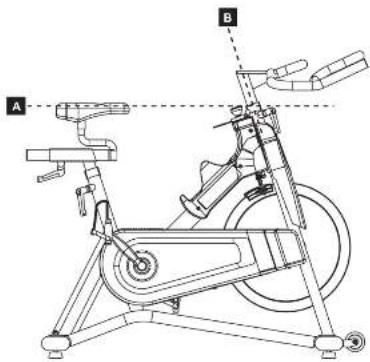
SADDLE ADJUSTMENT
Proper saddle height helps ensure maximum
exercise efficiency and comfort, while reducing the risk of injury. Adjust the needle
height to make sure it's in proper position, one
that keeps a slightly bend in your knee while
HANDLEBAR ADJUSTMENT
Proper position for the handlebar is based
primarily on comfort. Typically, the handlebar should be positioned slightly higher than
the saddle for beginning cyclists. Advanced
cyclists could try different heights to get the
arrangement most suitable for you.


TO ADJUST THE SADDLE HEIGHT:
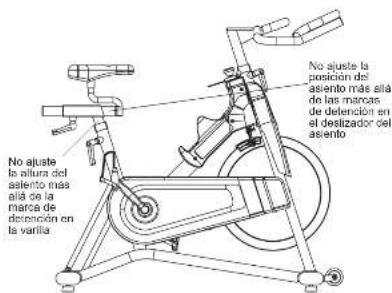
Rotate the adjustment lever counterclockwise and adjust the saddle to a comfortable pedaling position. Rotate the lever clockwise to lock saddle position.
TO ADJUST THE SADDLE HORIZONTAL POSITION:
Rotate the adjustment lever counterclockwise to slide the saddle forward or backward as desired. Rotate the lever clockwise to lock saddle position. Test the saddle slide for proper operation.

TO ADJUST THE HANDLEBAR HEIGHT:
Rotate the adjustment lever counterclockwise to adjust the handlebar height. Raise or lower the handlebar to the desired height. Rotate the lever clockwise to lock handlebar position.
TO ADJUST THE PEDAL STRAPS:
Place each foot ankle on the pedal and in the toe clip that the foot ankle is centered over the pedal spindle (center of the pedal). Rotates one foot to arms reach and pull up on the toe clip strap. Repeat for the other foot. Keep your knees over your feet as you pedal. To remove your foot from the toe clip, loosen the strap and pull out.
8
H2'4_00_Ele_JCr_Re1_1incd 5-950214 2.00 FM

9

TENSION CONTROL AND EMERGENCY BRAKE
The preferred level of difficulty in pedaling (resistance) can be regulated in fine increments by use of the tension control knob. To increase the resistance, turn the tension control knob clockwise. To decrease the resistance, turn the knob counter clockwise.
IMPORTANT:
• To stop the flywheel while pedaling, push down on the red emergency brake lever.
- The flywheel should quickly come to a complete stop.
- Apply full resistance load when the bike is not in use to prevent injuries due to moving drive gear components.
WARNING
The Indoor Cycle does not have a free moving flywheel: the pedals will continue to move together with the flywheel until the flywheel stops. Reducing speed in a controlled manner is required. To stop the flywheel immediately, push down the rod emergency brake lever. Always pedal in a controlled manner and adjust your desired cadence according to your own abilities. Push the rod lever down = emergency step.

WARNING
The Indoor Cycle uses a fixed flywheel that builds momentum and will keep the pedals turning even after the user stops pedaling or if the user's feet slip off. DO NOT ATTEMPT TO REMOVE YOUR FEET FROM THE PEDALS OR DISMOUNT THE MACHINE UNTIL. BOTH THE PEDALS AND THE FLYWHEEL HAVE COMPLETELY STOPPED. Failure to follow these instructions may lead to loss of control and the potential for serious injury.
CONSOLE OPERATION
| BUTTONS |
| MODERRESET To confirm all settings. Prass this button and hold for 2 seconds to reset all function figures. |
| SET To set up the value of TIME, DISTANCE, CAL ORIRES, PULSE. You can hold the button to increase the value fast. (The computer has to be in soap condition.) |
| FUNCTIONS |
| SCAN Displays all function TIME—DISTANCE—CAL ORIRES—PULSE—RPM/SPEED in sequence. |
| RPM Displays the positioning Rotation Per Minute. The RPM and SPEED will switch to another display in every 6 seconds after exercise starts. |
| SPEED Displays the user's exercise speed. |
| TIME 1. You can press "SET" button to set target time between 0:00 to 50:00 for count down function. 2. It can be set up by the user or accumulated automatically for count up function. |
| DISTANCE 1. You can press "SET" button to set target distance between 0:00 to 95:00 for count down function. 2. It can be set up by the user or accumulated automatically for count up function. |
| CALORIES 1. You can press "SET" button to set target calories between 0 to 9999 for count move function. 2. It can be set up by the user or accumulated automatically for count up function. |
| PULSE Displays the user's pulse. User may set the largest pulse. When pulse value reaches to the target, the computer will alarm with "Beep" sound. |
WIRELESS HEART RATE
This bike includes a Polar® wireless heart rate strap and has a built-in wireless heart rate receiver. When used in conjunction with a wireless chest transmitter, your heart rate can be transmitted wirelessly to the console.
Prior to wearing the wireless chest transmitter on your chest, moisten the two rubber electrodes with water. Center the chest strap just below the breast or pectoral muscles, directly over your sternum, with the logo facing out. NOTE: The chest strap must be light and properly placed to receive an accurate and consistent readout. If the chest strap is too loose, or positioned improperly, you may receive an erratic or inconsistent heart rate readout.


CONSOLE OPERATION
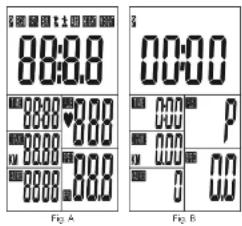
1) After installing the battery (CR2032 3V), the display will turn on (Fig. A) and the console will make a beep sound before entering TIME and DATE setup. Press "MODE" button to confirm. When complete, the console will display the main screen (Fig. B).
2) Press "SET" to enter set-up mode. Press "SET" button to adjust the TIME value and press "MODE" to confirm setting. Repeat the process to set up DISTANCE, CALORIES and PULSE.
3) During your workout, TIME, DISTANCE, and CALORIES will count up from 0. If you have set a TIME, DISTANCE or CALORIES TARGET, the console will count down from the target you have set to 0. When you are within 30 seconds of completing your target, the console beeps. If you keep exercising after reaching your target, the console will count up from 0. When a pulse signal is detected, the console will beep consistently.
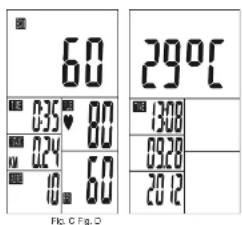
4) Press "SCAN" during your workout and the display will change the feedback every 6 seconds (Fig. C).
5) Press "MODE" during your workout and the display will only show RPM and SPEED. The console will cycle between RPM and SPEED every 6 seconds.
NOTE:
• After 4 minutes of inactivity, the console will display TEMPERATURE and TIME and DATE (Fig. D). Press any button to return to the main screen (Fig. B).
- Removing battery will restore default settings.
- If the computer displays abnormally, re-install the battery.
- Battery Spec: 3V CR2032 (1PC).
- To replace the battery, remove the screw and the battery cover on the back of the console.
TROUBLESHOOTING & MAINTENANCE


COMMON PRODUCT QUESTIONS
ARE THE SOUNDS MY INDOOR CYCLE MAKES NORMAL?
Our Indoor Cycles are some of the quietest available because they use belt drives and cantilever brake resistance. We use the highest grade bearings and chains/belts to minimize noise. However, because the resistance system itself is so quiet, you will occasionally hear other slight mechanical noises. Unlike older, louder technologies, there are no fans, friction belts, or alternator noises to mask these sounds on our Indoor Cycles. These mechanical noises, which may or may not be intermittent, are normal and are caused by the transfer of significant amounts of energy to a rapidly spinning flywheel. All bearings, chains/belts and other rotating parts will generate some noise which will transmit through the casing and frame. It is also normal for these sounds to change slightly during a workout and over time because of thermal expansion of the parts.
WHY IS THE INDOOR CYCLE I HAD DELIVERED LOUDER THAN THE ONE AT THE STORE?
All fitness products seem quieter in a large store showroom because there is generally more background noise than in your home. Also, there will be less reverberation on a carpeted concrete floor than on a wood overlay floor. Sometimes a heavy rubber mat will help reduce reverberation through the floor. If a fitness product is placed close to a wall, there will be more reflected noise.
HOW LONG WILL THE BELT LAST?
The computer modeling we have done indicated virtually thousands of maintenance free hours. You should not have to replace the belt as long as you have the Indoor Cycle.
CAN I MOVE THE INDOOR CYCLE EASILY ONCE IT IS ASSEMBLED?
Your Indoor Cycle has a pair of transport wheels built into the front stabilizer tube. Please follow the MOVING THE INDOOR CYCLE section to transport your Indoor Cycle. It is important that you place your Indoor Cycle in a comfortable and inviting room. Your Indoor Cycle is designed to use minimal floor space. Many people will place their Indoor Cycles facing the TV or a picture window. If at all possible, avoid putting your Indoor Cycle in an unfinished basement. To make exercise a desirable daily activity for you, the Indoor Cycle should be in a comfortable setting.
H2:4_03_Eltz_JCr_Pcr1_1ind 14-15 8/20'14 2.00 PN
TROUBLESHOOTING
PROBLEM: The Indoor Cycle makes a squesking or chirping noise.
SOLUTION: Verify the following:
• The Indoor Cycle is on a level surface.
+ Loosen all bolts attached during the assembly process, grease the threads, and tighten again.
If this does not remedy the problem, you may
CONTACT CUSTOMER TECH SUPPORT AT THE NUMBER ON THE INFORMATION CARD.
The following information may be asked of you when you call. Please have these items readily available:
- Model Name
- Serial Number
• Proof of Purchase (receipt or credit card statement)
You may find more troubleshooting suggestions on the customer support section of our website. Contact customer support using the contact information on the INFORMATION CARD.
In order for Customer Tech Support to service your Indoor Cycle they may need to ask detailed questions about
the symptoms that are occurring. Some troubleshooting questions that may be asked are:
• How long has this problem been occurring?
- Does this problem occur with every use? With every user?
- If you are hearing a noise, does it come from the front or the back? What kind of noise is it (thumping,
grinding, squeaking, chirping etc.)? - Has the machine been lubricated and maintained per the MAINTENANCE schedule?
Answering these and other questions will give the technicians the ability to send proper replacement parts and the service necessary to get you and your Indoor Cycle running again!


MAINTENANCE
The safety level given by the design of the Indoor Cycle can only be maintained when the equipment is regularly examined for damage and wear. Inoperable components should be replaced or the equipment should be put out of use until it is repaired.
DAILY
- Wipe down the Indoor Cycle after each use to remove sweat and moisture. Use soap and water, or a diluted non-abrasive domestic cleaner solution. Rinse to remove detergent residue and then dry off.
- Before each session, inspect for loose components such as pedals or cranks prior to commencing the next use. Tighten up any loose parts.
WEEKLY
- Check for proper flywheel alignment. Torque flywheel nuts as necessary.
- Remove chain guard and check for loose chain. Adjust and lubricate the chain as necessary.
- Check to make sure the crank arms are light to the bottom bracket.
• Inspect all parts, nuts, bolts, or screws for adjustments, replacements or maintenance.
MONTHLY
- Inspect the frame and main assembly components for rust or corrosion. Tilt the cycle or place in an upside down position to locate areas where rust and corrosion may develop. Use a small, wire brush to remove rust build-up in small crevasses, such as leveling feet, quick release levers and other bolt assemblies.
- Inspect all wear items for adjustments or possible part replacement. Give particular attention to the following:
A) Inspect brake pad for wear. Excessive wear or dryness indicates replacement is required.
B) Inspect seat pad for wear. Rips, tears or excessive movement indicates replacement is required.
C) Inspect pedals for play. Excessive movement of pedals indicates replacement is required. - Inspect the chain for tensioning by rotating the crank to drive the flywheel forward. Do this motion in 1/4 turns to assess if there is free play between the crank and the flywheel.
- Dryness or prolonged use may cause the height and reach adjustments for the seat and handlebar to become tight. If this is the case, the sliding assembly should be removed from the frame and have a smear of light duty grease applied along the sliding surface before assembly. Similarly, apply some light grease to the clamping assembly to ensure it does not seize up. Clean off excessive grease before reassembly.
- Please lubricate the seat post, brake pad and handlebar adjustment regularly with lubricant in your parts package.
H2*4_03_Eliu_JCY_Rev1_1indl 18-17 620*4 2.02 PN
UTILISATION DU VÉLO D'INTÉRIEUR


H2'4_03_Ele_JCr_Revt_1ined 16-19 820*4 2.02 PM
INFORMATION SUR LE MODÈLE
RÉGLAGE DE LA SELLE
H2*4_03_Ele_JCr_Rev_1.html 32:38/2014 2:02 PM
CÓMO MOVER LA BICICLETA
DE INTERIORES
Fatas de nivelación
CÓMO AJUSTAR LA BICICLETA DE INTERIORES
AJUSTE DEL ASIENTO
H2'4_00_Ele_JCr_Rev1_1ined 34:56/00'4 2.00 PM

If a question or problem arises please see INFORMATION CARD for contact information.
- MODEL INFORMATION
- HOW TO MOVE THE INDOOR CYCLE
- LOCATION OF THE INDOOR CYCLE
- WARNING
- HOW TO ADJUST THE INDOOR CYCLE
- SADDLE ADJUSTMENT
- HANDLEBAR ADJUSTMENT
- TO ADJUST THE SADDLE HEIGHT
- TO ADJUST THE SADDLE HORIZONTAL POSITION
- TO ADJUST THE HANDLEBAR HEIGHT
- TO ADJUST THE PEDAL STRAPS
- TENSION CONTROL AND EMERGENCY BRAKE
- IMPORTANT
- WIRELESS HEART RATE
- CONSOLE OPERATION
- TROUBLESHOOTING & MAINTENANCE
- COMMON PRODUCT QUESTIONS
- ARE THE SOUNDS MY INDOOR CYCLE MAKES NORMAL
- WHY IS THE INDOOR CYCLE I HAD DELIVERED LOUDER THAN THE ONE AT THE STORE
- HOW LONG WILL THE BELT LAST
- CAN I MOVE THE INDOOR CYCLE EASILY ONCE IT IS ASSEMBLED
- TROUBLESHOOTING
- MAINTENANCE
- DAILY
- WEEKLY
- MONTHLY
- UTILISATION DU VÉLO D'INTÉRIEUR
- INFORMATION SUR LE MODÈLE
- RÉGLAGE DE LA SELLE
- CÓMO MOVER LA BICICLETA
- DE INTERIORES
- CÓMO AJUSTAR LA BICICLETA DE INTERIORES
- AJUSTE DEL ASIENTO
Brand : Horizon Fitness
Model : Elite IC7
Category : Indoor bike trainer