Elite E7 - Fitness Equipment Horizon Fitness - Free user manual and instructions
Find the device manual for free Elite E7 Horizon Fitness in PDF.


| Product Type | Elliptical fitness machine |
| Brand | Horizon Fitness |
| Model | Elite E7 |
| Power supply | 120 V, 60 Hz |
| Power consumption | Standby: energy saving after 15 minutes of inactivity |
| Display | LCD (liquid crystal display): time, distance, speed, calories, incline, RPM, watts, level, heart rate |
| Workout programs | Manual, Distance, Calories, Intervals, Performance, Step, Custom (E7: via keys) |
| Resistance | Adjustable by +/- keys, range not specified (estimate: 1-20 levels) |
| Incline | Adjustable by +/- keys, range 0-20% (estimate) |
| Heart rate | Handgrip heart rate detection (manual contact); zones: warm-up, fat burn, fitness, performance, max |
| Connectivity | Built-in Wi-Fi (ViaFit) and Passport connection (Bluetooth receiver) |
| User storage | Up to 4 users with xID account |
| Fan | Built-in personal fan (low, medium, high) |
| Audio | Audio input jack (3.5 mm) for media player, built-in speakers, headphone jack |
| USB port | For software updates and device charging (< 1 A) |
| Media support | Reading rack (magazine/book) and compartment for phone/media player |
| Dimensions (estimate) | Length: approximately 180 cm, Width: approximately 70 cm, Height: approximately 160 cm |
| Maximum user weight | Approximately 136 kg (300 lbs) |
| Maintenance | Clean with a soft, dry cloth; regularly check bolt tightness |
| Repairability | Spare parts available from the manufacturer; contact Horizon Fitness customer service |
Frequently Asked Questions - Elite E7 Horizon Fitness
User questions about Elite E7 Horizon Fitness
0 question about this device. Answer the ones you know or ask your own.
Ask a new question about this device
Download the instructions for your Fitness Equipment in PDF format for free! Find your manual Elite E7 - Horizon Fitness and take your electronic device back in hand. On this page are published all the documents necessary for the use of your device. Elite E7 by Horizon Fitness.
USER MANUAL Elite E7 Horizon Fitness
natural_image
Two identical black silhouette figures of a stationary exercise machine, no text or symbols present.ELITE E7
E9

OPERATION GUIDE
GUIDE D'UTILISATION
H2'4_03_Eliv_Er_E9_Rer_Audl 23.715'14 250PM
This section explains how to use your elliptical's console and programming.
The BASIC OPERATION section in the ELLIPTICAL GUIDE has instructions for the following.
• LOCATION OF THE ELLIPTICAL
• POWER/GROUNDING INSTRUCTIONS
- FOOT POSITIONING
• MOVING THE ELLIPTICAL
• LEVELING THE ELLIPTICAL
• POWER/MANUAL INCLINE OPERATION
• USING THE HEART RATE FUNCTION


H2'4_03_EliE7_E9_RoF_4_kml =5
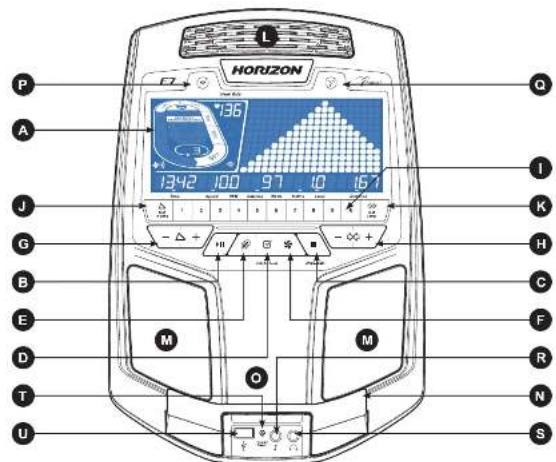
Note: There is a thin protective sheet of clear plastic on the overlay of the console that should be removed before use.
A) LCD DISPLAY WINDOW: time, distance, speed, calories, incline. RPM, Watts, level, laps, and heart rate.
B) START/PAUSE KEY): press to start workout and pause workout.
C) ■TOP KEY): press to stop workout. Hold to reset console.
D) ENTER KEY): press to confirm selection during programming setup. Hold to reset console.
E) CHANGE DISPLAY): press to change display feedback during workout.
E) AN KEY: press to turn tan on and off
G) INCLINE √-△-KEYS: press to adjust incline level
H) RESISTANCE -∞ + KEYS: press to adjust resistance level
II QUICK ADJUST KEYPAD: quickly access any incline or resistance level by typing the number and pressing SET
INCLINE (J) or SET LEVEL (K) keys. Examples:
• To change the incline to 40%, press 4-0-SET INCLINE.
• To change the resistance level to 12, press T-2-SET LEVEL.
J) SET INCLINE KEY: press to change incline to level entered into keypad.
K) SET LEVEL KEY: press to change resistance to level entered into keypad.
L) FAN: personal workout fan.
M) SPEAKERS: plays music through speakers when connected to your media player.
N) READING RACK: holds reading material.
O) PHONE/MEDIA PLAYER POCKET: holds phone or media player.
P) WIFI CONNECT & SYNC: press to reset and connect your wireless internet connection. See Page 8 for more info
Q) PASSPORT CONNECT & SYNC: press to reset and connect your Passport box for Virtual Active programming
R) AUDIO IN JACK: plug your media player into the console using the included audio adaptor cable.
S) AUDIO OUT/HEADPHONE JACK: plug your headphones into the console to use them instead of the console speakers.
T) ENERGY SAVER LIGHT: indicates if machine is in Energy Saver mode.
U) USB PORT: used for software updates or to charge devices less than 1 amp

2014 250 PM

bar
Heart Rate | Category | Time (min) | Speed (P) | RPM (A) | Calories (A) | Watts (W) | incline (mW) | Level (A) | Distance (m) | | :--- | :--- | :--- | :--- | :--- | :--- | :--- | :--- | :--- | | A | 1342 | 100 | 136 | 97 | 10 | 167 | 167 | 167 | | B | - | - | - | - | - | - | - | - | | C | - | - | - | - | - | - | - | - | | D | - | - | - | - | - | - | - | - | | E | - | - | 50° | - | - | - | - | - | | F | - | - | - | - | - | - | - | - | | G | - | - | - | - | - | - | - | - | The chart displays a single data point: 'Heart Rate' with values: 136, 100, 97, 10, 167. The bottom row is a visual representation of the height of the pyramid. The top row contains a color-coded scale from 97 to 167, and the bottom row contains a color-coded scale from 97 to 167. The label 'Time' appears at the bottom left.H2'4_00_Ele_Er_E9_Rer'4.mll 8:7:15'14 250 FM
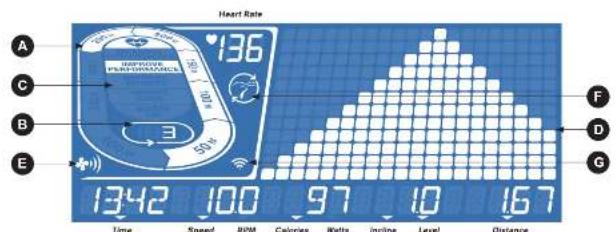
E7 DISPLAY WINDOW
• TIME: Shown as minutes : seconds. View the time remaining or the time elapsed in your workout.
- SPEED: Shown as MPH. Indicates how fast the foot pads is moving.
• CALORIES: Total calories burned or remaining for your workout.
• DISTANCE: Shown as miles. Indicates distance traveled or distance remaining during your workout.
• RPM: Rotations Per Minute
• WATTS: Displays current user power output.
• INCLINE: Shown as percent.
• LEVEL: Shows the current level of resistance.
- HEART RATE: Shown as BPM (beats per minute). Used to monitor your heart rate (displayed when contact is made with both pulse grips)
A) TRACK: Follows progress around a simulated track. Segments light up with every 50 meters completed.
B) LAPS: Shows how many laps have been completed. One lap is 400 meters (1/4 mile).
C) HEART RATE ZONE: Displays what activity zone you are in during your workout (displayed when contact is made with both
pulse grips or when using a wireless heart rate strap)
• WARM UP: 0-50% of maximum heart rate
- WEIGHT LOSS: 60-70% of maximum heart rate - IMPROVE FITNESS: 70-80% of maximum heart
• IMPROVE PERFORMANCE: 80.00% of maximum bo
• MAXIMUM PERFORMANCE: 90-100% of maximum heart rate
D) PROGRAM PROFILE: Represents the profile of the program being used (resistance during resistance based programs and
incline during incline based programs).
E) FAN: Indicates fan setting (low, medium, high)
F) PASSPORT. Indicates Passport box connection is present.
G) WI-FI: Indicates wireless connection is present and the strength (low, medium, high).


SET UP XID ACCOUNT FOR VIA FIT" CONNECTIVITY
Creating an xID account will allow you to save and share workout data using the Via Fit WI-FI. Up to four users can be saved on a machine. This process is the first step in connecting your equipment. It must be done from a computer, tablet, or mobile device.
1) Visit the web site: www.ViaFitness.com
2) Once at the web site, select the CONNECT YOUR EQUIPMENT option on the top menu bar.
3) The first step in connecting your equipment will be creating your xID account. This will be your login to Via Fit.
4) Enter your phone number or another easy-to-remember 10-14 digit number. This will be your account number.
5) Fill in your profile information to finish the xID account set up process. You will be asked to provide an email address not associated with any other xID account. Check your email after the set-up process for a link to validate your account.
CONNECT WI-FI
Once you have created your xID account, you will be able to move on to activating the Wi-Fi on your equipment. Reminder, this requires you to use your computer, tablet, or mobile device that is connected to the internet.
1) Press and hold 3-5 seconds until you see the message ACTIVATED on your screen.
2) On your computer or other device, go to your Wi-Fi settings. You should select the network with your model name. Doing this enables you to connect your equipment to your wireless network.
3) A new window will pop up with the list of wireless networks your equipment can see. Select your home Wi-Fi network and connect.
4) The remaining step is to reconnect your computer or other device back to your Wi-Fi network. Go to your settings again and connect as you normally would.
Congratulations! You are now connected and ready to get started.
8
H2'4_00_Ele_Er_E9_Rer'_4_nbl 8971514 250PM
E7 GETTING STARTED
1) Check to make sure no objects are nearby that will hinder the movement of the elliptical.
2) Plug in the power cord.
3) Select your xID account, User, Guest, or Edit a User using √∞+ and press √
4) When you log in for the first time as User 1-4, you will be prompted to enter your xID information.
a) Enter your xID account number using -∞ and press ☑ to select the numbers. Press ☑ after each input to move to the next digit. After the final input, press ☑
b) Enter your passcode using -∞+ to select the numbers. Press☑ after each input to move to the next digit. After the final input, press ☑
c) If you key the incorrect number at any point while entering your xID or psscode, press and hold ☑ for 3-5 seconds to clear the selection and begin again.
A) QUICK START
Simply press▶ begins working out. Time will count up from 0:00.
The resistance level will default to level 1. Incline will default to 0%
B) SELECT A PROGRAM
1) Select a PROGRAM using -∅+ and press √
2) Set workout program information using -90+ and press □ after each selection.
3) Press ▶b begin workout
NOTE: You can adjust the resistance and incline levels during your workout.
When your workout is complete, the console will display "workout complete" and beep. Your workout information will stay displayed on the console for 30 seconds and then reset.
TO CLEAR CURRENT SELECTION
To clear the current program selection or screen, press and hold■for 3 seconds.

9

H2'4_03_EliE7_E9_Rer'4_kibl 10-11
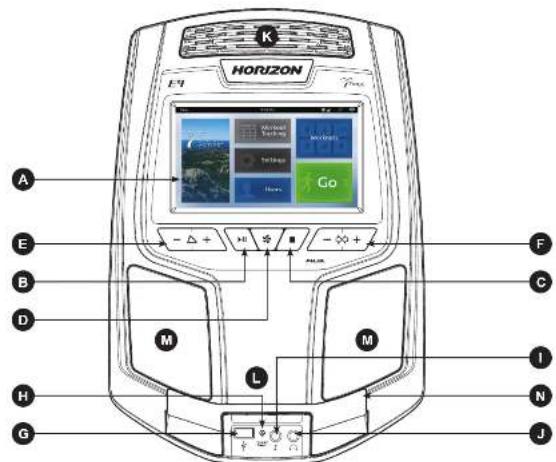
Note: There is a thin protective sheet of clear plastic on the overlay of the console that should be removed before use.
A) TOUCHSCREEN: please see page 12 for more information about the touchscreen.
B) (START/PAUSE KEY): press to start workout, pause workout, and restart after pause.
C) STOP KEY): press to stop workout. Hold to reset console.
D) (MAN KEY): press to turn fan on and off.
E) INCLINE ▼-△-□ KEYS: press to adjust incline level.
F) RESISTANCE -+ KEYS: press to adjust resistance level
G) USB PORT used for software updates or to charge devices less than 1 amp.
H) ENERGY SAVER LIGHT: indicates if machine is in Energy Saver mode.
I) AUDIO IN JACK: plug your media player into the console using the included audio adaptor cable.
J) AUDIO OUT/HEADPHONE JACK: plug your headphones into the console to use them instead of the console speakers.
K) FAN: personal workout fan.
L) PHONE/MEDIA PLAYER POCKET: holds phone or media player.
M) SPEAKERS: plays music through speakers when connected to your media player.
N) READING RACK: holds reading material.

1110
271814 250 PM

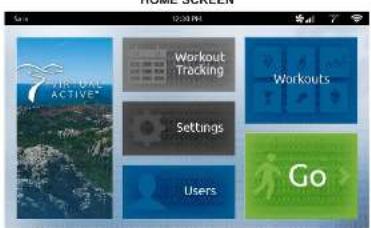
E9 DISPLAY WINDOW
A) VIRTUAL ACTIVE: A series of interactive HD videos filmed in scenic locations around the world. For more info, see page 17.
B) WORKOUT TRACKING: Press to view your workout calendar. The calendar is available to act as a workout tracking function. Press a day on the calendar to see your workout history for that day.
C) SETTINGS: Press to edit your machine's default settings, including screen brightness, volume level, demo mode on/off, clock time, date, language.
D) USERS: Press to logout or edit one of 3 preset users or as Guest.
E) WORKOUTS: Press to take you to the workout selection screen.
F) GO: Press for quick start.
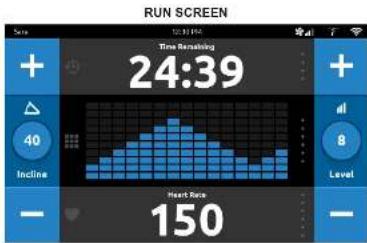
A) USER: the xID account currently logged in.
B) TIME: the current time.
C) FAN: Indicates tan setting (low, medium, high).
D) PASSPORT: Indicates Passport connection is present.
E) WI-Fl: Indicates wireless connection is present and the strength (low, medium, high).
F) INCLINE * / - KEYS: used to adjust incline level.
G) INCLINE VIEW AND KEYBOARD: shows the current incline level. Tap the circle button to make a keyboard appear for custom setting your incline level.
H) LEVEL + / - KEYS: used to adjust resistance level.
1) RESISTANCE LEVEL VIEW AND KEYBOARD: shows the current resistance level. Tap the circle button to make a keyboard appear for custom setting your resistance level.
J) TIME METRICS: customize your time view during your workout. Tap the top third of the screen to choose between time elapsed, time remaining (shown), total time, and clock time. PERFORMANCE WORKOUTS may also show you personalized information
K) DISTANCE METRICS: customize your distance view during your workout. Tap the middle third of the screen to choose between distance, brickyard (shown), current pace, average pace, track, and heart rate graph.
L) PERFORMANCE METRICS: customize your performance metrics view during your workout. Tap the bottom third of the screen to choose between calories, calories/hr, heart rate (shown), watts, METs, and RPM view. PERFORMANCE WORKOUTS will also show you your last and best segment performance times.


GETTING STARTED
CONNECT WI-FI
The Wi-Fi connection for your Horizon Elite E9 is set up directly on the elliptical. The first time you turn on your machine, you will automatically be prompted to set up the internet access.
1) Choose from the available wireless networks detected and shown on screen. If you do not see your network, press REFRESH. If it is still not showing up, you can add if manually via the OTHER option. If you do not want to set up Wi-Fi at this time, press SKIP. NOTE - You can set up or change your Wi-Fi connectivity at any time under the SETTINGS option on the home screen.
2) Use the keyboard to enter your Wi-Fi network password. Press √o confirm.
3) The network will have a buy it to confirm you are connected to the network.
4) Use the Date and Time setup screen to select your lime zone and set the current date and lime.
SET UP XID ACCOUNT FOR VIA FIT™ CONNECTIVITY
Creating an xID account will allow you to save and share workout data using the Vis Fit Wi-Fi. Up to four users can be saved on a machine. Your Horizon Elite E9 elliptical allows you to set up an xID account directly from the console.
1) On the user setup screen, press the CREATE AN xID button.
2) Enter your phone number or another easy-to-remember 10-14 digit number. This will be your account number. Also on this page, you will select your units of measurement. Press √to confirm.
3) Enter your email address. This must be an email address not associated with any other xID account. Press √ to confirm
4) Follow the software to input account information. Press √to confirm.
5) The final step is to confirm your information and review the terms and conditions. Press √o confirm.
6) Select the xID account or unassigned user profile to log in.
7) If you have previously logged in on this machine, you will be asked to enter your 4-digit passcode. Press √ In confirm.
8) If you are logging on to a user profile for the first time, you will be asked to enter your account name and it will now be saved in that spot. Press √o confirm.
9) Next, you will be asked to enter your 4-digit passcode. Press √to confirm.
H2'4_00_Elc_E7_E9_Rcv_4_nbl 1413 67814 2.50 PM
GETTING STARTED
You have the following options to start your workout:
A) QUICK START
Simply press GO to begin working out. Time will count up from 0:00.
The resistance level will default to level 1. Incline will default to 0%.
B) SELECT A PROGRAM
1) Press the VIRTUAL ACTIVE or WORKOUTS tiles to select an initial program.
2) Scroll through the options by dragging your finger across the touch screen.
3) Select your Virtual Active course or workout type by scrolling through the options. Press √o confirm.
4) Set workout program information by touching and dragging the number until you reach your desired setting. Press √ to confirm.
5) Press GO to begin workout.
NOTE: You can adjust the resistance and incline levels during your workout.
When your workout is complete, the console will save your workout data. You will be asked to rate your workout by selecting the corresponding star. Your workout information will stay displayed on the console for 30 seconds and then reset. The information will be saved in your workout calendar.
TO CLEAR CURRENT SELECTION
To clear the current program selection or screen, press and hold ■ for 3 seconds.


PROGRAM INFORMATION
MANUAL: Adjust your resistance and incline manually during your workout. User sets time, resistance level and
DISTANCE: Push yourself and go further during your workout with 13 distance workouts. Choose from 1 mile, 2 miles, 5k, 5 miles, 10k, 8 miles, 15k, 10 miles, 20k, half marathon, 15 miles, 20 miles, and marathon goals. User sets starting resistance level and incline.
CALORIES: Set goals for burning calories with nine workouts. Choose from 100, 200, 300, 400, 500, 600, 700, 800, and 900 calorie burn workouts. User inputs weight and sets starting resistance level and incline. Calories burned are calculated using weight input with the resistance level and incline of the workout.
INTERVALS: An effective fat-burning workout that helps you get improve your fitness level. Choose from Speed Intervals, Peak Intervals, and Endurance Intervals workouts. User sets time and starting level.
PERFORMANCE: Challenge yourself with targeted performance workouts intent on helping you improve specific training elements. Choose from Run/Walk, Hill Training, and Sprint workout programs.
STEPS: Promotes healthy activity with 10 step-based workouts calculated using average slide length. Choose from 1000, 2000, 3000, 4000, 5000, 6000, 7000, 8000, 9000, and 10,000 step workouts. User sets starting resistance level and incline.
CUSTOM (E9): Let's you create and reuse a perfect workout for you with specific resistance, incline and time combination. The ultimate in personal programming. Time-based goal.
1) Select CUSTOM and then select CUSTOM 1 or CUSTOM 2.
2) Press → add a segment to your custom workout. Press to delete a segment.
3) Touch a segment to select it. A selected segment will be highlighted in white. When a segment is highlighted, you may edit the segment time, resistance and incline.
4) Press GO at any time to begin using your custom workout. Your custom workout will be saved automatically.
H2'4_00_Elc_Er_E9_Rcv_4_nbl 18-17 71814 2.50 PM

CUSTOM (E7)
1) Select CUSTOM 1 or CUSTOM 2 using and press.
2) Set the workout time using and press
3) Use to set the RESISTANCE level for each segment. Press to confirm.
4) Use to set the INCLINE for each segment. Press to confirm
5) Press▶ begin workout.

VIRTUAL ACTIVE (E9 ONLY): A series of interactive HD videos filmed in scenic locations around the world.
1) Select VIRTUAL ACTIVE and then select one of the destinations.
2) Set level by touching and dragging the number until you reach your desired setting. Press √ to confirm.
3) Set resistance by touching and dragging the number until you reach your desired setting. Press √o confirm.
4) Press GO to begin workout.
- During the workout, the incline will adjust to reflect the terrain of the destination.
• The intensity is based on the level you selected
The console includes two destinations.
Additional destinations can be purchased online at www.passportplayer.com
Once you've purchased destinations from the website, you must download the destination media files to your computer, uncompress them and copy them to a USB flash drive (sold separately). With the destination media properly saved on your USB flash drive, you can use your new destinations with the machine. Simply insert the USB flash drive into the USB port on the console and the new destinations will be available to use in the Virtual Active program.
NOTES: Destination files do not transfer to the console. They must remain on your USB flash drive while inserted into the console in order to use with the Virtual Active program. Because they are HD-quality video, these files can be over 2 GB in size. Broadband Internet connection is required to purchase and download new files. See website for more information.
Touch the center of the screen to expand the video to full screen and touch again to minimize.
Video will not start playing until user begins pedalling.


PROGRAM CHARTS
| Warm-Up | 1~2 | 3~4 | 5~6 | 8~9 | 10~11 | 12 | Cov. Down | ||||||||||
| Type | 1 | 2 | 3 | 10 | 11 | 12 | 10 | 11 | 10 | 11 | 10 | 11 | 10 | 11 | 10 | 11 | |
| Lough 1 | 1 | 2 | 2 | 3 | 5 | 7 | 1 | 1 | 5 | 5 | 1 | 5 | 1 | 5 | 5 | 1 | 3 |
| Lough 2 | 1 | 2 | 2 | 3 | 6 | 8 | 7 | 8 | 6 | 7 | 6 | 8 | 7 | 8 | 7 | 1 | 5 |
| Lough 3 | 1 | 2 | 2 | 4 | 7 | 9 | 3 | 7 | 7 | 7 | 7 | 3 | 7 | 7 | 7 | 3 | 5 |
| Lough 4 | 1 | 2 | 2 | 5 | 8 | 4 | 4 | 8 | 5 | 4 | 8 | 4 | 8 | 3 | 4 | 5 | 2 |
| Lough 5 | 1 | 2 | 2 | 6 | 9 | 5 | 5 | 6 | 5 | 4 | 9 | 5 | 6 | 5 | 5 | 5 | 1 |
| Lough 6 | 2 | 2 | 2 | 7 | 10 | 6 | 8 | 10 | 10 | 8 | 10 | 8 | 10 | 10 | 8 | 7 | 5 |
| Lough 7 | 2 | 2 | 2 | 8 | 11 | 7 | 11 | 11 | 11 | 7 | 11 | 7 | 11 | 11 | 7 | 5 | 5 |
| Lough 8 | 2 | 2 | 2 | 8 | 12 | 8 | 8 | 12 | 12 | 5 | 12 | 5 | 12 | 12 | 5 | 9 | 5 |
| Lough 9 | 3 | 4 | 5 | 10 | 13 | 2 | 9 | 13 | 13 | 9 | 13 | 9 | 13 | 13 | 9 | 10 | 5 |
| Lough 10 | 3 | 4 | 5 | 10 | 14 | 3 | 10 | 14 | 14 | 10 | 14 | 10 | 14 | 10 | 10 | 10 | 5 |
| Lough 11 | 3 | 8 | 10 | 12 | 15 | 11 | 11 | 15 | 15 | 11 | 15 | 11 | 15 | 15 | 11 | 12 | 10 |
| Lough 12 | 3 | 10 | 15 | 15 | 16 | 12 | 12 | 15 | 16 | 12 | 15 | 12 | 15 | 16 | 12 | 15 | 10 |
| Lough 13 | 3 | 10 | 15 | 15 | 16 | 12 | 15 | 17 | 17 | 12 | 15 | 12 | 15 | 16 | 12 | 15 | 10 |
| Lough 14 | 3 | 13 | 15 | 16 | 16 | 14 | 14 | 16 | 16 | 14 | 15 | 14 | 14 | 15 | 14 | 15 | 10 |
| Lough 15 | 3 | 13 | 15 | 16 | 16 | 14 | 14 | 16 | 16 | 14 | 15 | 14 | 14 | 15 | 14 | 15 | 10 |
| Lough 16 | 3 | 13 | 15 | 16 | 16 | 14 | 14 | 16 | 16 | 14 | 15 | 14 | 14 | 15 | 14 | 15 | 10 |
| PEAK INTERVALS - INLINE AND RESISTANCE CHANGE TO LEVELS OF RESISTANCE | |||||||
| Second | 2-00 | 2-00 | 3-00 | 3-00 | 2-00 | 2-00 | |
| Level | Appendix 4 | 70 | 100 | 1 | 2 | 100 | 100 |
| 1 | Level | 1 | 2 | 1 | 4 | 2 | 1 |
| labeled | 16 | 15 | 5 | 15 | 15 | 0 | |
| 2 | Level | 1 | 2 | 2 | 8 | 2 | 1 |
| labeled | 16 | 20 | 30 | 65 | 20 | 15 | |
| 3 | Level | 1 | 2 | 3 | 5 | 2 | 1 |
| labeled | 20 | 80 | 40 | 15 | 80 | 20 | |
| 4 | Level | 1 | 2 | 1 | 6 | 2 | 1 |
| labeled | 20 | 90 | 40 | 85 | 30 | 20 | |
| 5 | Level | 1 | 2 | 3 | 6 | 3 | 1 |
| labeled | 20 | 90 | 45 | 90 | 20 | 25 | |
| 6 | Level | 1 | 2 | 8 | 7 | 2 | 1 |
| labeled | 20 | 90 | 45 | 105 | 35 | 25 | |
| 7 | Level | 2 | 3 | 4 | 7 | 3 | 2 |
| labeled | 20 | 90 | 50 | 100 | 40 | 30 | |
| 8 | Level | 2 | 3 | 4 | 8 | 3 | 2 |
| labeled | 30 | 40 | 55 | 100 | 40 | 30 | |
| 9 | Level | 2 | 3 | 4 | 8 | 3 | 2 |
| labeled | 30 | 40 | 60 | 100 | 50 | 20 | |
| 10 | Level | 2 | 3 | 4 | 9 | 3 | 2 |
| labeled | 30 | 60 | 60 | 100 | 80 | 20 | |
| ENCURANCE INTERVALS RESISTANCE | |||||||||||
| Yield U: 12.845.673 | Cost/Down | ||||||||||
| 10 mn | 30 mn | 50 mn | 10 mn | 30 mn | 50 mn | 10 mn | 30 mn | 50 mn | 10 mn | 50 mn | |
| Level 1 | 23.482 | 27.879 | 43 | ||||||||
| Level 2 | 37.087 | 27.879 | 63 | ||||||||
| Level 3 | 35.887 | 27.879 | 59 | 59.794 | |||||||
| Level 4 | 4 | 3 | 7 | 5 | 9 | 10 | 11 | 12 | 5 | 0 | 7 |
| Level 5 | 8 | 5 | 8 | 9 | 10 | 11 | 12 | 11 | 9 | 8 | 5 |
| Level 6 | 8 | 5 | 10 | 10 | 11 | 12 | 13 | 11 | 10 | 9 | 6 |
| Level 7 | 5 | 5 | 10 | 11 | 12 | 13 | 14 | 13 | 12 | 11 | 8 |
| Level 8 | 5 | 5 | 12 | 12 | 13 | 14 | 15 | 13 | 12 | 10 | 7 |
| Level 9 | 5 | 5 | 13 | 13 | 14 | 15 | 16 | 13 | 14 | 11 | 7 |
| Level 10 | 7 | 10 | 13 | 14 | 15 | 16 | 17 | 16 | 15 | 14 | 9 |
| Level 11 | 10 | 10 | 15 | 16 | 17 | 18 | 19 | 17 | 16 | 15 | 17 |
| Level 12 | 7 | 10 | 15 | 16 | 17 | 18 | 19 | 17 | 16 | 15 | 19 |
| SPRITS (RESTANCE) | ||||||||||||||||||||||||||||||||||||||||||||||||||||||||||||||||||||||||||||||||||||||||||||||||||||
| 100k Sprrn 1st instuary 200k Sprrn 300k Sprrn 400k Sprrn 500k Sprrn 600k Sprrn 700k Sprrn 800k Sprrn 900k Sprrn 1000k Sprrn 1100k Sprrn 1200k Sprrn 1300k Sprrn 1400k Sprrn 1500k Sprrn 1600k Sprrn 1700k Sprrn 1800k Sprrn 1900k Sprrn 2000k Sprrn 2100k Sprrn 2200k Sprrn 2300k Sprrn 2400k Sprrn 2500k Sprrn 2600k Sprrn 2700k Sprrn 2800k Sprrn 2900k Sprrn 3000k Sprrn 3100k Sprrn 3200k Sprrn 3300k Sprrn 3400k Sprrn 3500k Sprrn 3600k Sprrn 3700k Sprrn 3800k Sprrn 3900k Sprrn 4000k Sprrn 4100k Sprrn 4200k Sprrn 4300k Sprrn 4400k Sprrn 4500k Sprrn 4600k Sprrn 4700k Sprrn 4800k Sprrn 4900k Sprrn 5000k Sprrn 5100k Sprrn 5200k Sprrn 5300k Sprrn 5400k Sprrn 5500k Sprrn 5600k Sprrn 5700k Sprrn 5800k Sprrn 5900k Sprrn 6000k Sprrn 6100k Sprrn 6200k Sprrn 6300k Sprrn 6400k Sprrn 6500k Sprrn 6600k Sprrn 6700k Sprrn 6800k Sprrn 6900k Sprrn 7000k Sprrn 7100k Sprrn 7200k Sprrn 7300k Sprrn 7400k Sprrn 7500k Sprrn 7600k Sprrn 7700k Sprrn 7800k Sprrn 7900k Sprrn 8000k Sprrn 8100k Sprrn 8200k Sprrn 8300k Sprrn 8400k Sprrn 8500k Sprrn 8600k Sprrn 8700k Sprrn 8800k Sprrn 8900k Sprrn 9000k Sprrn 9100k Sprrn 9200k Sprrn 9300k Sprrn 9400k Sprrn 9500k Sprrn 9600k Sprrn 9700k Sprrn 9800k Sprrn 9900k Sprrn 10000k Sprrn 10100k Sprrn 10200k Sprrn 10300k Sprrn 10400k Sprrn 10500k Sprrn 10600k Sprrn 10700k Sprrn 10800k Sprrn 10900k Sprrn 11000k Sprrn 11100k Sprrn 11200k Sprrn 11300k Sprrn 11400k Sprrn 11500k Sprrn 11600k Sprrn 11700k Sprrn 11800k Sprrn 11900k Sprrn 12000k Sprrn 12100k Sprrn 12200k Sprrn 12300k Sprrn 12400k Sprrn 12500k Sprrn 12600k Sprrn 12700k Sprrn 12800k Sprrn 12900k Sprrn 13000k Sprrn 13100k Sprrn 13200k Sprrn 13300k Sprrn 13400k Sprrn 13500k Sprrn 13600k Sprrn 13700k Sprrn 13800k Sprrn 13900k Sprrn 14000k Sprrn 14100k Sprrn 14200k Sprrn 14300k Sprrn 14400k Sprrn 14500k Sprrn 14600k Sprrn 14700k Sprrn 14800k Sprrn 14900k Sprrn 15000k Sprrn 15100k Sprrn 15200k Sprrn 15300k Sprrn 15400k Sprrn 15500k Sprrn 15600k Sprrn 15700k Sprrn 15800k Sprrn 15900k Sprrn 16000k Sprrn 16100k Sprrn 16200k Sprrn 16300k Sprrn 16400k Sprrn 16500k Sprrn 16600k Sprrn 16700k Sprrn 16800k Sprrn 16900k Sprrn 17000k Sprrn 17100k Sprrn 17200k Sprrn 17300k Sprrn 17400k Sprrn 17500k Sprrn 17600k Sprrn 17700k Sprrn 17800k Sprrn 17900k Sprrn 18000k Sprrn 18100k Sprrn 18200k Sprrn 18300k Sprrn 18400k Sprrn 18500k Sprrn 18600k Sprrn 18700k Sprrn 18800k Sprrn 18900k Sprrn 19000k Sprrn 19100k Sprrn 19200k Sprrn 19300k Sprrn 19400k Sprrn 19500k Sprrn 19600k Sprrn 19700k Sprrn 19800k Sprrn 19900k Sprrn 20000k Sprrn 20100k Sprrn 20200k Sprrn 20300k Sprrn 20400k Sprrn 20500k Sprrn 20600k Sprrn 20700k Sprrn 20800k Sprrn 20900k Sprrn 21000k Sprrn 21100k Sprrn 21200k Sprrn 21300k Sprrn 21400k Sprrn 21500k Sprrn 21600k Sprrn 21700k Sprrn 21800k Sprrn 21900k Sprrn 22000k Sprrn 22100k Sprrn 22200k Sprrn 22300k Sprrn 22400k Sprrn 22500k Sprrn 22600k Sprrn 22700k Sprrn 22800k Sprrn 22900k Sprrn 23000k Sprrn 23100k Sprrn 23200k Sprrn 23300k Sprrn 23400k Sprrn 23500k Sprrn 23600k Sprrn 23700k Sprrn 23800k Sprrn 23900k Sprrn 24000k Sprrn 24100k Sprrn 24200k Sprrn 24300k Sprrn 24400k Sprrn 24500k Sprrn 24600k Sprrn 24700k Sprrn 24800k Sprrn 24900k Sprrn 25000k Sprrn 25100k Sprrn 25200k Sprrn 25300k Sprrn 25400k Sprrn 25500k Sprrn 25600k Sprrn 25700k Sprrn 25800k Sprrn 25900k Sprrn 26000k Sprrn 26100k Sprrn 26200k Sprrn 26300k Sprrn 26400k Sprrn 26500k Sprrn 26600k Sprrn 26700k Sprrn 26800k Sprrn 26900k Sprrn 27000k Sprrn 27100k Sprrn 27200k Sprrn 27300k Sprrn 27400k Sprrn 27500k Sprrn 27600k Sprrn 27700k Sprrn 27800k Sprrn 27900k Sprrn 28000k Sprrn 28100k Sprrn 28200k Sprrn 28300k Sprrn 28400k Sprrn 28500k Sprrn 28600k Sprrn 28700k Sprrn 28800k Sprrn 28900k Sprrn 29000k Sprrn 29100k Sprrn 29200k Sprrn 29300k Sprrn 29400k Sprrn 29500k Sprrn 29600k Sprrn 29700k Sprrn 29800k Sprrn 29900k Sprrn 30000k Sprrn 30100k Sprrn 30200k Sprrn 30300k Sprrn 30400k Sprrn 30500k Sprrn 30600k Sprrn 30700k Sprrn 30800k Sprrn 30900k Sprrn 31000k Sprrn 31100k Sprrn 31200k Sprrn 31300k Sprrn 31400k Sprrn 31500k Sprrn 31600k Sprrn 31700k Sprrn 31800k Sprrn 31900k Sprrn 32000k Sprrn 32100k Sprrn 32200k Sprrn 32300k Sprrn 32400k Sprrn 32500k Sprrn 32600k Sprrn 32700k Sprrn 32800k Sprrn 32900k Sprrn 33000k Sprrn 33100k Sprrn 33200k Sprrn 33300k Sprrn 33400k Sprrn 33500k Sprrn 33600k Sprrn 33700k Sprrn 33800k Sprrn 33900k Sprrn 34000k Sprrn 34100k Sprrn 34200k Sprrn 34300k Sprrn 34400k Sprrn 34500k Sprrn 34600k Sprrn 34700k Sprrn 34800k Sprrn 34900k Sprrn 35000k Sprrn 35100k Sprrn 35200k Sprrn 35300k Sprrn 35400k Sprrn 35500k Sprrn 35600k Sprrn 35700k Sprrn 35800k Sprrn 35900k Sprrn 36000k Sprrn 36100k Sprrn 36200k Sprrn 36300k Sprrn 36400k Sprrn 36500k Sprrn 36600k Sprrn 36700k Sprrn 36800k Sprrn 36900k Sprrn 37000k Sprrn 37100k Sprrn 37200k Sprrn 37300k Sprrn 37400k Sprrn 37500k Sprrn 37600k Sprrn 37700k Sprrn 37800k Sprrn 37900k Sprrn 38000k Sprrn 38100k Sprrn 38200k Sprrn 38300k Sprrn 38400k Sprrn 38500k Sprrn 38600k Sprrn 38700k Sprrn 38800k Sprrn 38900k Sprrn 39000k Sprrn 39100k Sprrn 39200k Sprrn 39300k Sprrn 39400k Sprrn 39500k Sprrn 39600k Sprrn 39700k Sprrn 39800k Sprrn 39900k Sprrn 40000k Sprrn 40100k Sprrn 40200k Sprrn 40300k Sprrn 40400k Sprrn 40500k Sprrn 40600k Sprrn 40700k Sprrn 40800k Sprrn 40900k Sprrn 41000k Sprrn 41100k Sprrn 41200k Sprrn 41300k Sprrn 41400k Sprrn 41500k Sprrn 41600k Sprrn 41700k Sprrn 41800k Sprrn 41900k Sprrn 42000k Sprrn 42100k Sprrn 42200k Sprrn 42300k Sprrn 42400k Sprrn 42500k Sprrn 42600k Sprrn 42700k Sprrn 42800k Sprrn 42900k Sprrn 43000k Sprrn 43100k Sprrn 43200k Sprrn 43300k Sprrn 43400k Sprrn 43500k Sprrn 43600k Sprrn 43700k Sprrn 43800k Sprrn 43900k Sprrn 44000k Sprrn 44100k Sprrn 44200k Sprrn 44300k Sprrn 44400k Sprrn 44500k Sprrn 44600k Sprrn 44700k Sprrn 44800k Sprrn 44900k Sprrn 45000k Sprrn 45100k Sprrn 45200k Sprrn 45300k Sprrn 45400k Sprrn 45500k Sprrn 45600k Sprrn 45700k Sprrn 45800k Sprrn 45900k Sprrn 46000k Sprrn 46100k Sprrn 46200k Sprrn 46300k Sprrn 46400k Sprrn 46500k Sprrn 46600k Sprrn 46700k Sprrn 46800k Sprrn 46900k Sprrn 47000k Sprrn 47100k Sprrn 47200k Sprrn 47300k Sprrn 47400k Sprrn 47500k Sprrn 47600k Sprrn 47700k Sprrn 47800k Sprrn 47900k Sprrn 48000k Sprrn 48100k Sprrn 48200k Sprrn 48300k Sprrn 48400k Sprrn 48500k Sprrn 48600k Sprrn 48700k Sprrn 48800k Sprrn 48900k Sprrn 49000k Sprrn 49100k Sprrn 49200k Sprrn 49300k Sprrn 49400k Sprrn 49500k Sprrn 49600k Sprrn 49700k Sprrn 49800k Sprrn 49900k Sprrn 50000k Sprrn 50100k Sprrn 50200k Sprrn 50300k Sprrn 50400k Sprrn 50500k Sprrn 50600k Sprrn 50700k Sprrn 50800k Sprrn 50900k Sprrn 51000k Sprrn 51100k Sprrn 51200k Sprrn 51300k Sprrn 51400k Sprrn 51500k Sprrn 51600k Sprrn 51700k Sprrn 51800k Sprrn 51900k Sprrn 52000k Sprrn 52100k Sprrn 52200k Sprrn 52300k Sprrn 52400k Sprrn 52500k Sprrn 52600k Sprrn 52700k Sprrn 52800k Sprrn 52900k Sprrn 53000k Sprrn 53100k Sprrn 53200k Sprrn 53300k Sprrn 53400k Sprrn 53500k Sprrn 53600k Sprrn 53700k Sprrn 53800k Sprrn 53900k Sprrn 54000k Sprrn 54100k Sprrn 54200k Sprrn 54300k Sprrn 54400k Sprrn 54500k Sprrn 54600k Sprrn 54700k Sprrn 54800k Sprrn 54900k Sprrn 55000k Sprrn 55100k Sprrn 55200k Sprrn 55300k Sprrn 55400k Sprrn 55500k Sprrn 55600k Sprrn 55700k Sprrn 55800k Sprrn 55900k Sprrn 56000k Sprrn 56100k Sprrn 56200k Sprrn 56300k Sprrn 56400k Sprrn 56500k Sprrn 56600k Sprrn 56700k Sprrn 56800k Sprrn 56900k Sprrn 57000k Sprrn 57100k Sprrn 57200k Sprrn 57300k Sprrn 57400k Sprrn 57500k Sprrn 57600k Sprrn 57700k Sprrn 57800k Sprrn 57900k Sprrn 58000k Sprrn 58100k Sprrn 58200k Sprrn 58300k Sprrn 58400k Sprrn 58500k Sprrn 58600k Sprrn 58700k Sprrn 58800k Sprrn 58900k Sprrn 59000k Sprrn 59100k Sprrn 59200k Sprrn 59300k Sprrn 59400k Sprrn 59500k Sprrn 59600k Sprrn 59700k Sprrn 59800k Sprrn 59900k Sprrn 60000k Sprrn 60100k Sprrn 60200k Sprrn 60300k Sprrn 60400k Sprrn 60500k Sprrn 60600k Sprrn 60700k Sprrn 60800k Sprrn 60900k Sprrn 61000k Sprrn 61100k Sprrn 61200k Sprrn 61300k Sprrn 61400k Sprrn 61500k Sprrn 61600k Sprrn 61700k Sprrn 61800k Sprrn 61900k Sprrn 62000k Sprrn 62100k Sprrn 62200k Sprrn 62300k Sprrn 62400k Sprrn 62500k Sprrn 62600k Sprrn 62700k Sprrn 62800k Sprrn 62900k Sprrn 63000k Sprrn 63100k Sprrn 63200k Sprrn 63300k Sprrn 63400k Sprrn 63500k Sprrn 63600k Sprrn 63700k Sprrn 63800k Sprrn 63900k Sprrn 64000k Sprrn 64100k Sprrn 64200k Sprrn 64300k Sprrn 64400k Sprrn 64500k Sprrn 64600k Sprrn 64700k Sprrn 64800k Sprrn 64900k Sprrn 65000k Sprrn 65100k Sprrn 65200k Sprrn 65300k Sprrn 65400k Sprrn 65500k Sprrn 65600k Sprrn 65700k Sprrn 65800k Sprrn 65900k Sprrn 66000k Sprrn 66100k Sprrn 66200k Sprrn 66300k Sprrn 66400k Sprrn 66500k Sprrn 66600k Sprrn 66700k Sprrn 66800k Sprrn 66900k Sprrn 67000k Sprrn 67100k Sprrn 67200k Sprrn 67300k Sprrn 67400k Sprrn 67500k Sprrn 67600k Sprrn 67700k Sprrn 67800k Sprrn 67900k Sprrn 68000k Sprrn 68100k Sprrn 68200k Sprrn 68300k Sprrn 68400k Sprrn 68500k Sprrn 68600k Sprrn 68700k Sprrn 68800k Sprrn 68900k Sprrn 69000k Sprrn 69100k Sprrn 69200k Sprrn 69300k Sprrn 69400k Sprrn 69500k Sprrn 69600k Sprrn 69700k Sprrn 69800k Sprrn 69900k Sprrn 70000k Sprrn 70100k Sprrn 70200k Sprrn 70300k Sprrn 70400k Sprrn 70500k Sprrn 70600k Sprrn 70700k Sprrn 70800k Sprrn 70900k Sprrn 71000k Sprrn 71100k Sprrn 71200k Sprrn 71300k Sprrn 71400k Sprrn 71500k Sprrn 71600k Sprrn 71700k Sprrn 71800k Sprrn 71900k Sprrn 72000k Sprrn 72100k Sprrn 72200k Sprrn 72300k Sprrn 72400k Sprrn 72500k Sprrn 72600k Sprrn 72700k Sprrn 72800k Sprrn 72900k Sprrn 73000k Sprrn 73100k Sprrn 73200k Sprrn 73300k Sprrn 73400k Sprrn 73500k Sprrn 73600k Sprrn 73700k Sprrn 73800k Sprrn 73900k Sprrn 74000k Sprrn 74100k Sprrn 74200k Sprrn 74300k Sprrn 74400k Sprrn 74500k Sprrn 74600k Sprrn 74700k Sprrn 74800k Sprrn 74900k Sprrn 75000k Sprrn 75100k Sprrn 75200k Sprrn 75300k Sprrn 75400k Sprrn 75500k Sprrn 75600k Sprrn 75700k Sprrn 75800k Sprrn 75900k Sprrn 76000k Sprrn 76100k Sprrn 76200k Sprrn 76300k Sprrn 76400k Sprrn 76500k Sprrn 76600k Sprrn 76700k Sprrn 76800k Sprrn 76900k Sprrn 77000k Sprrn 77100k Sprrn 77200k Sprrn 77300k Sprrn 77400k Sprrn 77500k Sprrn 77600k Sprrn 77700k Sprrn 77800k Sprrn 77900k Sprrn 78000k Sprrn 78100k Sprrn 78200k Sprrn 78300k Sprrn 78400k Sprrn 78500k Sprrn 78600k Sprrn 78700k Sprrn 78800k Sprrn 78900k Sprrn 79000k Sprrn 79100k Sprrn 79200k Sprrn 79300k Sprrn 79400k Sprrn 79500k Sprrn 79600k Sprrn 79700k Sprrn 79800k Sprrn 79900k Sprrn 8000 | ||||||||||||||||||||||||||||||||||||||||||||||||||||||||||||||||||||||||||||||||||||||||||||||||||||
| RUN T WALK (RESISTANCE) | |||||
| Level | WARM UP | RUN | WALK COOL DOWN | ||
| Boglar | TWO | 2 km | 2 km | 2 km | 2 km |
| LWAL | 7 | 6 | 3 | 2 | |
| Intermediate | TWO | 2 km | 5 km | 1 km | 2 km |
| LWAL | 2 | 10 | 4 | 2 | |
| Advanced | TWO | 2 km | 5 km | 1 km | 2 km |
| LWAL | 7 | 14 | 5 | 2 | |
| HILL TRADING | |||||||||||||
| WARM UP | WORKOUT | COOL. DOWN | |||||||||||
| Beginner | Time | 2 yrs | 2 yrs | 2 yrs | 2 yrs | 2 yrs | 2 yrs | ||||||
| In-line | 1 euro | 0% | 1 euro | 5% | 1 euro | 15% | 1 euro | 15% | 4 euro | 25% | .... | 1 euro 60% | |
| Immediate | Time | 2 yrs | 2 yrs | 2 yrs | 2 yrs | 2 yrs | 2 yrs | ||||||
| In-line | 1 euro | 0% | 1 euro | 5% | 1 euro | 15% | 1 euro | 15% | 4 euro | 25% | .... | 1 euro 30% | |
| Advanced | Time | 2 yrs | 2 yrs | 2 yrs | 2 yrs | 2 yrs | 2 yrs | ||||||
| In-line | 1 euro | 0% | 8 euro | 5% | 8 euro | 15% | 1 euro | 15% | 4 euro | 25% | .... | 8 euro 10% | |


USING YOUR MEDIA PLAYER
1) Connect the Included AUDIO ADAPTOR CABLE to the AUDIO IN JACK on the left of the console and the headphone jack on your media player.
2) Use your media player buttons to adjust song settings.
3) Remove the AUDIO ADAPTOR CABLE when not in use.
ADJUSTING THE VOLUME
E7 models: To enter the engineering menu, press and hold the RESISTANCE + key and RESISTANCE - key for 3-5 seconds. Use the - + keys to navigate to ENG8 and press Use the - + keys to set Volume. Press and hold the for 3-5 seconds to exit ENG8 and hold again for 3-5 seconds to exit engineering mode.
E9 models: From the home screen, touch settings. Adjust the volume using the volume control bar.
ENERGY SAVER (STANDBY MODE)
This machine has a special feature called Energy Saver™ mode. This mode is NOT automatically activated. When Energy Saver mode is activated, the display will automatically enter standby mode (Energy Saver mode) after 15 minutes of inactivity. This feature saves energy by disabling most power to the machine until a key is pressed on the console. This feature can be turned on or off in the engineering menu.
E7 models: To enter the engineering menu, press and hold the RESISTANCE + key and RESISTANCE - key for 3-5 seconds. Use + to navigate to SWITCH FUNCTION and press - Press - Select Energy Saver mode. use to select ENERGY SAVE ON or OFF. Press and hold ■ (STOP) for 3-5 seconds to exit SWITCH FUNCTION. Press and hold ■ (STOP) again for 3-5 seconds to exit the engineering menu.
E9 models: From the home screen, touch SETTINGS. To turn Energy Saver OFF, touch DEMO ON. To turn Energy Saver ON, touch DEMO OFF
H2'4_03_Ele_Er_E9_Rev_4.html 202'71814 2:50 PM
PASSPORT™ MEDIA PLAYER
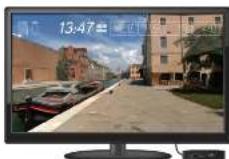
The Passport player, featuring Virtual Active* technology, is a high-definition experience that uses real destination footage and matching ambient sounds from stunning destinations around the world. The ultimate in workout entertainment, Passport lets you escape the confines of a regular workout routine while enjoying a dynamic experience.
A Passport player is available for purchase separately from your Horizon Fitness retailer. Additional courses are available from your Horizon Fitness retailer.
For more information, go to: www.passportplayer.com www.horizonfitness.com
SYNCING CONSOLE WITH PASSPORT
1) Use the arrow keys on the Passport remote to scroll to the setup icon and press select.
2) Follow the on-screen prompts to press (on the equipment console.
3) The message displayed on screen will notify you if the sync was a success or failure.
NOTE: See PASSPORT OWNER'S MANUAL for more information.

FRANÇAIS
FONCTIONNEMENT DE L'EXERCISEUR ELLIPTIQUE
H2'4_03_Elu_Er_E9_Rer_Audl 28:27:1874 2:50 PM
FENÊTRE D'AFFICHAGE DU E7
SE CONNECTER AU RÉSEAU WI-FI
H2'4_03_Ele_Er_E9_Rer_4_kbl 30:31
FONCTIONNEMENT DE LA CONSOLE DU E9
H2'4_00_Ele_Er_E9_Rev_AuBl 323371814 250 PM

POUR COMMENCER
SE CONNECTER AU RÊSEAU WI-FI
H2'4_00_Elc_Er_E9_Rer'_4_nbl 38:37:1814 2.50 PM

CUSTOM (E7) (PROGRAMME PERSONNALISÉ)
| RUN T/WALK (COURSE MARCHE) | |||||
| Name | ECHAUTFEMENT | COURSE | MARCHE | RECAUTION | |
| Decured Intermediates | Candle | 2 gm | 2 gm | 1 gm | 2 gm |
| Newsp | 2 | 5 | 3 | 2 | |
| Candle | 2 gm | 5 gm | 1 gm | 2 gm | |
| Newsp | 2 | 10 | 3 | 2 | |
| Avance | Candle | 2 gm | 8 gm | 1 gm | 2 gm |
| Newsp | 2 | 14 | 5 | 2 | |
| HILL TRADING (ENTRAJERENET EN MONTAINE) | |||||||||||
| S.NO. | LPG.MG.128.NI | ENTRAL.PG.1 | S.D. PRT.1009 | ||||||||
| Dezervat | Durco | 25m | 25m | 25m | 25m | 25m | 25m | 25m | 25m | 25m | 25m |
| Petracore | Mang 2 | 35% | Mang 4 | 35% | Mang 5 | 35% | Mang 6 | 35% | Mang 7 | 35% | |
| Intermed. Sale | Durco | 25m | 25m | 25m | 25m | 25m | 25m | 25m | 25m | 25m | 25m |
| Petracore | Mang 2 | 35% | Mang 3 | 35% | Mang 4 | 35% | Mang 5 | 35% | Mang 6 | 35% | |
| Assisi | Durco | 25m | 25m | 25m | 25m | 25m | 25m | 25m | 25m | 25m | 25m |
| Petracore | Mang 2 | 35% | Mang 4 | 35% | Mang 5 | 35% | Mang 6 | 35% | Mang 7 | 35% | |

3938
H2'4_03_Ele_Er_E9_Rer_Knll 38-31
271814 250 PM

UTILISATION DU LECTEUR MULTIMÉDIA
H2'4_03_EliE7_E9_Rav_4_kbl 50.5
H2'4_00_Ele_Er_E9_Rev_AuBl S2S371814 2.50 PM

5352
INICIO
CONECTAR A WI-FI
| CORREICAMINAR | |||||
| Steel | CALENTAMENTO | CORRER | CANVAR | ENFRUMENTO | |
| Pentecular to Intrinsic | Tempo | 2 mm | 4 mm | 2 mm | 2 mm |
| Velocated | Nov 2 | Nov 6 | Nov 5 | Nov 2 | |
| Tempo | 2 mm | 5 mm | 1 mm | 2 mm | |
| Velocated | Nov 2 | Nov 10 | Nov 4 | Nov 2 | |
| Asparcoco | Tempo | 2 mm | 5 mm | 2 mm | 2 mm |
| Velocated | Nov 2 | Nov 14 | Nov 5 | Nov 2 | |
| Expte. | ENTRENAMIENTO EN MONTARA | ||||||||||||
| CALIDADAMENTO | SERVO DE E-ERCICIO | ENRAYAMIENTO | |||||||||||
| Participantes | Tiempo | 2 cm | 0% | 2 cm | 2 cm | 2 cm | 2 cm | 2 cm | 2 cm | 2 cm | 2 cm | 2 cm | 2 cm |
| Petracaje | Nivel 2 | 0% | Nivel 1 | 0% | Nivel 1 | 0% | Nivel 1 | 70% | Nivel 1 | 25% | Nivel 1 | 0% | |
| Interrado | Tiempo | 2 cm | 2 cm | 2 cm | 2 cm | 2 cm | 2 cm | ||||||
| Petracaje | Nivel 2 | 0% | Nivel 3 | 0% | Nivel 3 | 0% | Nivel 3 | 20% | Nivel 3 | 25% | Nivel 3 | 0% | |
| Avonado | Tiempo | Nivel 2 | 0% | Nivel 4 | 0% | Nivel 4 | 0% | Nivel 4 | 20% | Nivel 4 | 25% | Nivel 4 | 0% |
| Petracaje | Nivel 2 | 0% | Nivel 5 | 0% | Nivel 5 | 0% | Nivel 5 | 20% | Nivel 5 | 35% | Nivel 5 | 0% | |
5958
H2'4_03_EliE7_E9_Rav_4_kbl 58-51
271014 250 PM

CÓMO USAR EL REPRODUCTOR
If a question or problem arises please see INFORMATION CARD for contact information.
REMARQUE:
- E7 DISPLAY WINDOW
- SET UP XID ACCOUNT FOR VIA FIT" CONNECTIVITY
- CONNECT WI-FI
- E7 GETTING STARTED
- A) QUICK START
- B) SELECT A PROGRAM
- TO CLEAR CURRENT SELECTION
- E9 DISPLAY WINDOW
- GETTING STARTED
- SET UP XID ACCOUNT FOR VIA FIT™ CONNECTIVITY
- PROGRAM INFORMATION
- CUSTOM (E7)
- USING YOUR MEDIA PLAYER
- ADJUSTING THE VOLUME
- ENERGY SAVER (STANDBY MODE)
- PASSPORT™ MEDIA PLAYER
- SYNCING CONSOLE WITH PASSPORT
- FRANÇAIS
- FONCTIONNEMENT DE L'EXERCISEUR ELLIPTIQUE
- FENÊTRE D'AFFICHAGE DU E7
- SE CONNECTER AU RÉSEAU WI-FI
- FONCTIONNEMENT DE LA CONSOLE DU E9
- POUR COMMENCER
- SE CONNECTER AU RÊSEAU WI-FI
- UTILISATION DU LECTEUR MULTIMÉDIA
- INICIO
- CONECTAR A WI-FI
- CÓMO USAR EL REPRODUCTOR
- REMARQUE:
Brand : Horizon Fitness
Model : Elite E7
Category : Fitness Equipment