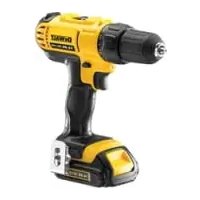
DCD733 - Drill DEWALT - Free user manual and instructions
Find the device manual for free DCD733 DEWALT in PDF.


| Brand | DEWALT |
| Model | DCD733 |
| Type | Cordless drill/driver |
| Nominal voltage | 14.4 V |
| No-load speed (1st gear) | 0–400 rpm |
| No-load speed (2nd gear) | 0–1300 rpm |
| Maximum torque | 30 Nm |
| Chuck capacity | 10 mm |
| Drilling capacity steel | 10 mm |
| Drilling capacity wood | 30 mm |
| Weight (without battery) | 1.2 kg |
| Sound pressure (L_pA) | 73 dB(A) (uncertainty 3 dB) |
| Sound power (L_wA) | 84 dB(A) (uncertainty 3.3 dB) |
| Battery type | Li-Ion 14.4 V (DCB140/DCB141/DCB142) |
| Compatible charger | DCB105 (230 V) |
| Charging time (1.5 Ah battery) | 30 min |
| Charging time (3.0 Ah battery) | 60 min |
| Charging time (4.0 Ah battery) | 70 min |
| Functions | Drilling, screwing, hammer drilling |
| Chuck type | Keyless (single sleeve) |
| Number of torque positions | 15 |
| Dual speed range | Yes (mechanical) |
| Motor brake | Yes |
| Belt hook | Included (repositionable) |
| Warranty | 1 year full + 30 days satisfaction + 1 year free service |
| Standards | CE, EN 60745-1, EN 60745-2-1, EN 60745-2-2 |
Frequently Asked Questions - DCD733 DEWALT
User questions about DCD733 DEWALT
0 question about this device. Answer the ones you know or ask your own.
Ask a new question about this device
Download the instructions for your Drill in PDF format for free! Find your manual DCD733 - DEWALT and take your electronic device back in hand. On this page are published all the documents necessary for the use of your device. DCD733 by DEWALT.
USER MANUAL DCD733 DEWALT
English (original instructions)
Figure 3
natural_image
Technical line drawing of a device with an open lid and internal components (no text or symbols)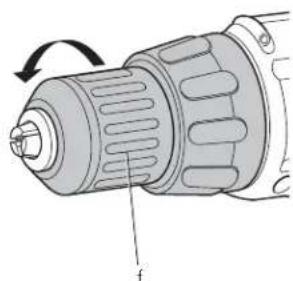
natural_image
Diagram of a drill bit with labeled component 'f' and rotation arrow (no text or symbols beyond label)Figure 5 Figure 4
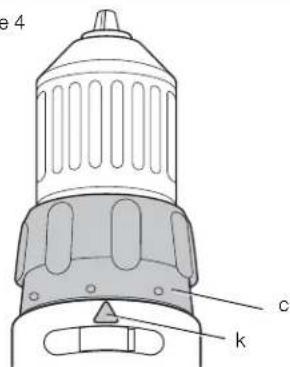
Figure 6
natural_image
Illustration of a hand holding a medical or electronic device with a tool, no text or symbols visibleFigure 7
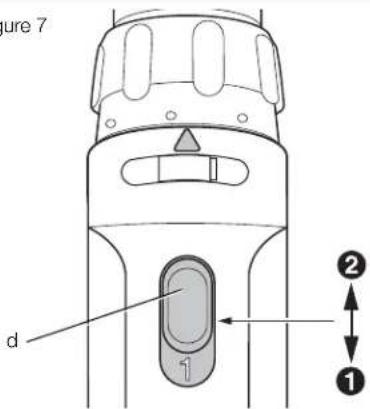
Figure 8
natural_image
Line drawing of a hand holding a DeWALT electric drill (no text or symbols on the drill body)TRÅDL∅S BOREMASKINE/SKRUEMASKINE DCD733
Tillykke!
Ladevorgang [Abb. (fi gure) 3]
You have chosen a DEWALT tool. Years of experience, thorough product development and innovation make DEWALT one of the most reliable partners for professional power tool users.
Technical Data
| DCD733 | ||
| Voltage V 14.4 | ||
| Type | 1 | |
| No-load speed | ||
| 1st gear min | -1 | 0-400 |
| 2nd gear | min ^-1 | 0-1300 |
| Max, torque | Nm 30 | |
| Chuck capacity | mm | 10 |
| Maximum drilling capacityin steel/wood | mm | 10/30 |
| Weight (withoutbattery pack) | kg | 1.2 |
| L_ap (sound pressure) | dB(A) | 73 |
| K_ap (sound pressureuncertainty) | dB(A) | 3 |
| L_wth (sound power) | dB(A) | 84 |
| K_wth (sound poweruncertainty) | dB(A) | 3.3 |
Vibration total values (triax vector sum) determined according to EN 60745:
Drilling into metal
| a_h,D = | m/s2 | 1.7 |
| Uncertainty K = | m/s2 | 1.5 |
Screwdriving without impact
| a_h = | m/s2 | 1.3 |
| Uncertainty K = | m/s2 | 1.5 |
The vibration emission level given in this information sheet has been measured in accordance with a standardised test given in EN 60745 and may be used to compare one tool with another. It may be used for a preliminary assessment of exposure.
![DEWALT DCD733 - Ladevorgang [Abb. (fi gure) 3] - 1](/content/2026/04/697151/images/8f558e3cb202fb40823a397f5a7684ceb4bf56acb2eaaf8ff06a28b612e47973.jpg)
WARNING: The declared vibration emission level represents the main applications of the tool. However if the tool is used for different applications, with different accessories or poorly
maintained, the vibration emission may differ. This may significantly increase the exposure level over the total working period.
An estimation of the level of exposure to vibration should also take into account the times when the tool is switched off or when it is running but not actually doing the job. This may significantly reduce the exposure level over the total working period.
Identify additional safety measures to protect the operator from the effects of vibration such as: maintain the tool and the accessories, keep the hands warm, organisation of work patterns.
| Battery pack | DCB140 | DCB141 | DCB142 | |
| Battery type | Li-Ion | Li-Ion | Li-Ion | |
| Voltage | V_uc | 14.4 | 14.4 | 14.4 |
| Capacity | A_h | 3.0 | 1.5 | 4.0 |
| Weight | kg | 0.53 | 0.30 | 0.54 |
| Charger | DCB105 | ||||
| Mains voltage | V_AC | 230 V | |||
| Battery type | LI-Ion | ||||
| Approx. charging time | (1.5 Ah) | min | 30 | 60 | 70 |
| (3.0 Ah battery packs) | (4.0 Ah battery packs) | battery packs) | |||
| Weight | kg | 0.49 | |||
Fuses
| Europe | 230 V tools | 10 Amperes, mains |
| U.K. & Ireland | 230 V tools | 3 Amperes, in plugs |
Definitions: Safety Guidelines
The definitions below describe the level of severity for each signal word. Please read the manual and pay attention to these symbols.

DANGER: Indicates an imminently hazardous situation which, if not avoided, will result in death or serious injury. WARNING: Indicates a potentially hazardous situation which, if not avoided, could result in death or serious injury.
CAUTION: Indicates a potentially
hazardous situation which, if not avoided, may result in minor or moderate injury.
NOTICE: Indicates a practice not related to personal injury which, if not avoided, may result in property damage.

Denotes risk of electric shock.

Denotes risk of fire.
EC-Declaration of Conformity MACHINERY DIRECTIVE

DCD733
DEWALT declares that these products described under Technical Data are in compliance with: 2006/42/EC, EN 60745-1, EN 60745-2-1, EN 60745-2-2.
These products also comply with Directive 2004/108/EC and 2011/65/EU. For more information, please contact DEWALT at the following address or refer to the back of the manual.
The undersigned is responsible for compilation of the technical file and makes this declaration on behalf of DEWALT.
Horst Grossmann
Vice President Engineering and Product
Development
D-65510, Idstein, Germany
28.02.2012

WARNING: To reduce the risk of injury, read the instruction manual.
General Power Tool Safety Warnings

WARNING! Read all safety warnings and all instructions. Failure to follow the warnings and instructions may result in electric shock, fire and/or serious injury.
SAVE ALL WARNINGS AND INSTRUCTIONS FOR FUTURE REFERENCE
The term "power tool" in the warnings refers to your mains-operated (corded) power tool or battery-operated (cordless) power tool.
1) WORK AREA SAFETY
a) Keep work area clean and well lit.
Cluttered or dark areas invite accidents.
b) Do not operate power tools in explosive atmospheres, such as in the presence of flammable liquids, gases or dust. Power tools create sparks which may ignite the dust or fumes.
c) Keep children and bystanders away while operating a power tool. Distractions can cause you to lose control.
2) ELECTRICAL SAFETY
a) Power tool plugs must match the outlet. Never modify the plug in any way. Do not use any adapter plugs with earthed (grounded) power tools. Unmodified plugs and matching outlets will reduce risk of electric shock.
b) Avoid body contact with earthed or grounded surfaces such as pipes, radiators, ranges and refrigerators. There is an increased risk of electric shock if your body is earthed or grounded.
c) Do not expose power tools to rain or wet conditions. Water entering a power tool will increase the risk of electric shock.
d) Do not abuse the cord. Never use the cord for carrying, pulling or unplugging the power tool. Keep cord away from heat, oil, sharp edges or moving parts. Damaged or entangled cords increase the risk of electric shock.
e) When operating a power tool outdoors, use an extension cord suitable for outdoor use. Use of a cord suitable for outdoor use reduces the risk of electric shock.
f) If operating a power tool in a damp location is unavoidable, use a residual current device (RCD) protected supply. Use of an RCD reduces the risk of electric shock.
3) PERSONAL SAFETY
a) Stay alert, watch what you are doing and use common sense when operating a power tool. Do not use a power tool while you are tired or under the influence of drugs, alcohol or medication. A moment of inattention while operating power tools may result in serious personal injury.
ENGLISH
b) Use personal protective equipment. Always wear eye protection. Protective equipment such as dust mask, non-skid safety shoes, hard hat, or hearing protection used for appropriate conditions will reduce personal injuries.
c) Prevent unintentional starting. Ensure the switch is in the off position before connecting to power source and/or battery pack, picking up or carrying the tool. Carrying power tools with your finger on the switch or energising power tools that have the switch on invites accidents.
d) Remove any adjusting key or wrench before turning the power tool on. A wrench or a key left attached to a rotating part of the power tool may result in personal injury.
e) Do not overreach. Keep proper footing and balance at all times. This enables better control of the power tool in unexpected situations.
f) Dress properly. Do not wear loose clothing or jewellery. Keep your hair, clothing and gloves away from moving parts. Loose clothes, jewellery or long hair can be caught in moving parts.
g) If devices are provided for the connection of dust extraction and collection facilities, ensure these are connected and properly used. Use of dust collection can reduce dust-related hazards.
4) POWER TOOL USE AND CARE
a) Do not force the power tool. Use the correct power tool for your application. The correct power tool will do the job better and safer at the rate for which it was designed.
b) Do not use the power tool if the switch does not turn it on and off. Any power tool that cannot be controlled with the switch is dangerous and must be repaired.
c) Disconnect the plug from the power source and/or the battery pack from the power tool before making any adjustments, changing accessories, or storing power tools. Such preventive safety measures reduce the risk of starting the power tool accidentally.
d) Store idle power tools out of the reach of children and do not allow persons unfamiliar with the power tool or these instructions to operate the power tool. Power tools are dangerous in the hands of untrained users.
e) Maintain power tools. Check for misalignment or binding of moving parts, breakage of parts and any other condition that may affect the power tool's operation. If damaged, have the power tool repaired before use. Many accidents are caused by poorly maintained power tools.
f) Keep cutting tools sharp and clean.
Properly maintained cutting tools with sharp cutting edges are less likely to bind and are easier to control.
g) Use the power tool, accessories and tool bits etc., in accordance with these instructions taking into account the working conditions and the work to be performed. Use of the power tool for operations different from those intended could result in a hazardous situation.
5) BATTERY TOOL USE AND CARE
a) Recharge only with the charger specified by the manufacturer. A charger that is suitable for one type of battery pack may create a risk of fire when used with another battery pack.
b) Use power tools only with specifically designated battery packs. Use of any other battery packs may create a risk of injury and fire.
c) When battery pack is not in use, keep it away from other metal objects like paper clips, coins, keys, nails, screws or other small metal objects that can make a connection from one terminal to another. Shorting the battery terminals together may cause burns or a fire.
d) Under abusive conditions, liquid may be ejected from the battery, avoid contact. If contact accidentally occurs, flush with water. If liquid contacts eyes, additionally seek medical help. Liquid ejected from the battery may cause irritation or burns.
6) SERVICE
a) Have your power tool serviced by a qualified repair person using only identical replacement parts. This will ensure that the safety of the power tool is maintained.
Additional Specific Safety Rules for Drill/Driver/Hammerdrill
- Wear ear protectors when impact drilling. Exposure to noise can cause hearing loss.
-
Use auxiliary handle(s), if supplied with the tool. Loss of control can cause personal injury.
-
Hold power tool by insulated gripping surfaces, when performing an operation where the cutting accessory may contact hidden wiring. Cutting accessory contacting a "live" wire may make exposed metal parts of the power tool "live" and could give the operator an electric shock.
- Use clamps or other practical way to secure and support the workpiece to a stable platform. Holding the work by hand or against your body is unstable and may lead to loss of control.
- Wear safety goggles or other eye protection. Hammering and drilling operations cause chips to fly. Flying particles can cause permanent eye damage.
- Accessories and tool may get hot during operation. Wear gloves when handling them if performing heat producing applications such as hammerdrilling and drilling metals.
- Do not operate this tool for long periods of time. Vibration caused by hammer action may be harmful to your hands and arms. Use gloves to provide extra cushion and limit exposure by taking frequent rest periods.
• Air vents often cover moving parts and should be avoided. Loose clothes, jewelry or long hair can be caught in moving parts.
Residual Risks
The following risks are inherent to the use of drills:
- Injuries caused by touching the rotating parts or hot parts of the tool.
In spite of the application of the relevant safety regulations and the implementation of safety devices, certain residual risks cannot be avoided.
These are:
- Impairment of hearing.
– Risk of squeezing fingers when changing accessories.
– Health hazards caused by breathing dust developed when working in wood.
– Risk of personal injury due to flying particles.
– Risk of personal injury due to prolonged use.
Markings on Tool
The following pictograms are shown on the tool:

Read instruction manual before use.
DATE CODE POSITION
The Date Code, which also includes the year of manufacture, is printed into the housing surface that forms the mounting joint between tool and battery.
Example:
2012 XX XX
Year of Manufacture
Important Safety Instructions for All Battery Chargers
SAVE THESE INSTRUCTIONS: This manual contains important safety and operating instructions for the DCB105 battery charger.
- Before using the charger, read all instructions and cautionary markings on charger, battery pack and product using the battery pack.

WARNING: Shock hazard. Do not allow any liquid to get inside charger. Electric shock may result.

N: Burn hazard. To reduce the risk of injury, charge only DEWALT rechargeable battery packs. Other types of batteries may overheat and burst resulting in personal injury and property damage.

N: Children should be supervised to ensure that they do not play with the appliance.
NOTICE: Under certain conditions, with the charger plugged in to the power supply, the exposed charging contacts inside the charger can be shorted by foreign material. Foreign materials of a conductive nature such as, but not limited to, steel wool, aluminum foil or any buildup of metallic particles should be kept away from charger cavities. Always unplug the charger from the power supply when there is no battery pack in the cavity. Unplug charger before attempting to clean.
- DO NOT attempt to charge the battery pack with any chargers other than the ones in this manual. The charger and battery pack are specifically designed to work together.
- These chargers are not intended for any uses other than charging DEWALT rechargeable batteries. Any other uses may result in risk of fire, electric shock or electrocution.
- Do not expose charger to rain or snow.
ENGLISH
- Pull by plug rather than cord when disconnecting charger. This will reduce risk of damage to electric plug and cord.
- Make sure that cord is located so that it will not be stepped on, tripped over or otherwise subjected to damage or stress.
- Do not use an extension cord unless it is absolutely necessary. Use of improper extension cord could result in risk of fire, electric shock or electrocution.
- When operating a charger outdoors, always provide a dry location and use an extension cord suitable for outdoor use. Use of a cord suitable for outdoor use reduces the risk of electric shock.
- Do not block the ventilation slots on the charger. The ventilation slots are located on the top and sides of the charger. Place the charger in a position away from any heat source.
- Do not operate charger with damaged cord or plug — have them replaced immediately.
- Do not operate charger if it has received a sharp blow, been dropped or otherwise damaged in any way. Take it to an authorised service centre.
- Do not disassemble the charger; take it to an authorised service centre when service or repair is required. Incorrect reassembly may result in a risk of electric shock, electrocution or fire.
- In case of damaged power supply cord the supply cord must be replaced immediately by the manufacturer, its service agent or similar qualified person to prevent any hazard.
- Disconnect the charger from the outlet before attempting any cleaning. This will reduce the risk of electric shock. Removing the battery pack will not reduce this risk.
• NEVER attempt to connect 2 chargers together. - The charger is designed to operate on standard 230 V household electrical power. Do not attempt to use it on any other voltage. This does not apply to the vehicular charger.
SAVE THESE INSTRUCTIONS
Chargers
The DCB105 charger accepts 10.8 V, 14.4 V and 18 V Li-Ion (DCB121, DCB123, DCB140, DCB141, DCB142, DCB180, DCB181 and DCB182) battery packs.
This charger requires no adjustment and is designed to be as easy as possible to operate.
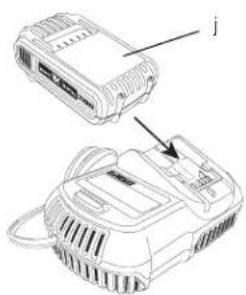
Charging Procedure (fi g. 3)
- Plug the charger into an appropriate 230 V outlet before inserting the battery pack.
- Insert the battery pack (j) into the charger, making sure the pack is fully seated in the charger. The red (charging) light will blink continuously indicating that the charging process has started.
- The completion of charge will be indicated by the red light remaining ON continuously. The pack is fully charged and may be used at this time or left in the charger.
NOTE: To ensure maximum performance and life of Li-Ion batteries, charge the battery pack fully before first use.
Charging Process
Refer to the table below for the state of charge of the battery pack.
| State of charge | |
This charger will not charge a faulty battery pack. The charger will indicate faulty battery by refusing to light or by displaying problem pack or charger blink pattern.
NOTE: This could also mean a problem with a charger.
If the charger indicates a problem, take the charger and battery pack to be tested at an authorised service centre.
Hot/Cold Pack Delay
When the charger detects a battery that is too hot or too cold, it automatically starts a hot/cold pack delay, suspending charging until the battery has reached an appropriate temperature. The charger then automatically switches to the pack charging mode. This feature ensures maximum battery life.
XR Li-Ion tools are designed with an Electronic Protection System that will protect the battery against overloading, overheating or deep discharge.
The tool will automatically turn off if the Electronic Protection System engages. If this occurs, place the Li-Ion battery on the charger until it is fully charged.
A cold battery pack will charge at about half the rate of a warm battery pack. The battery pack will charge at that slower rate throughout the entire charging cycle and will not return to maximum charge rate even if the battery warms.
Important Safety Instructions for All Battery Packs
When ordering replacement battery packs, be sure to include the catalog number and voltage.
The battery pack is not fully charged out of the carton. Before using the battery pack and charger, read the safety instructions below and then follow the charging procedures outlined.
READ ALL INSTRUCTIONS
- Do not charge or use the battery pack in explosive atmospheres, such as in the presence of flammable liquids, gases or dust. Inserting or removing the battery pack from the charger may ignite the dust or fumes.
- Never force the battery pack into charger. Do not modify the battery pack in any way to fit into a non-compatible charger as battery pack may rupture causing serious personal injury.
- Charge the battery packs only in designated DEWALT chargers.
• DO NOT splash or immerse in water or other liquids. - Do not store or use the tool and battery pack in locations where the temperature may reach or exceed 40 °C (105 °F) (such as outside sheds or metal buildings in summer).
- For best results, make sure the battery pack is fully charged before use.
WARNING: Never attempt to open the battery pack for any reason. If the battery pack case is cracked or damaged, do not insert it into the charger. Do not crush, drop or damage battery pack. Do not use a battery pack or charger that has received a sharp blow, been dropped, run over or damaged in any way (e.g., pierced with a nail, hit with a hammer, stepped on). Electric shock or electrocution may result. Damaged battery packs should be returned to the service centre for recycling.

CAUTION: When not in use, place tool on its side on a stable surface where it will not cause a tripping or falling hazard. Some tools with large battery packs will stand upright on the battery pack but may be easily knocked over.
SPECIFIC SAFETY INSTRUCTIONS FOR LITHIUM ION (Li-Ion)
- Do not incinerate the battery pack even if it is severely damaged or is completely worn out. The battery pack can explode in a fire. Toxic fumes and materials are created when lithium ion battery packs are burned.
- If battery contents come into contact with the skin, immediately wash the area with mild soap and water. If the battery liquid gets into the eye, rinse water over the open eye for 15 minutes or until irritation ceases. If medical attention is needed, the battery electrolyte is composed of a mixture of liquid organic carbonates and lithium salts.
- Contents of opened battery cells may cause respiratory irritation. Provide fresh air. If symptoms persist, seek medical attention.

WARNING: Burn hazard. Battery liquid may be flammable if exposed to spark or flame.
Battery Pack
BATTERY TYPE
The DCD733 operates on 14.4 volt battery packs. The DCB140, DCB141 or DCB142 battery packs may be used. Refer to Technical Data for more information.
Storage Recommendations
- The best storage place is one that is cool and dry away from direct sunlight and excess heat or cold. For optimum battery performance and life, store battery packs at room temperature when not in use.
- For long storage, it is recommended to store a fully charged battery pack in a cool, dry place out of the charger for optimal results.
NOTE: Battery packs should not be stored completely depleted of charge. The battery pack will need to be recharged before use.
ENGLISH
Labels on Charger and Battery Pack
In addition to the pictographs used in this manual, the labels on the charger and the battery pack show the following pictographs:


LI-HON


Lilon

Read instruction manual before use.
Charging.
Fully charged.
hot/cold pack delay.
Problem pack or charger.
Problem powerline.
Do not probe with conductive objects.
Do not charge damaged battery packs.
Use only with DEWALT battery packs.
Others may burst, causing personal injury and damage.
Do not expose to water.
Have defective cords replaced immediately.
Charge only between 4 °C and 40 °C.
Discard the battery pack with due care for the environment.
Do not incinerate the battery pack.
Charges Li-Ion battery packs.
See technical data for charging time.
Only for indoor use.
Package Contents
The package contains:
1 Cordless drill/driver
1 Belt hook
1 Charger
1 Li-Ion battery Battery pack (C1 models)
2 Li-Ion battery Battery packs (C2 models)
3 Li-lon battery packs (C3 models)
1 Kitbox
1 Instruction manual
1 Exploded drawing
NOTE: Battery packs, chargers and kitboxes are not included with N-models.
- Check for damage to the tool, parts or accessories which may have occurred during transport.
• Take the time to thoroughly read and understand this manual prior to operation.
Description (fi g. 1)

VG: Never modify the power tool or any part of it. Damage or personal injury could result.
a. Trigger switch
b. Forward/reverse control button
c. Torque adjustment collar
d. Gear shifter
e. Main handle
f. Keyless chuck
g. Belt hook
h. Mounting screw
i. Battery release button
j. Battery pack
INTENDED USE
These drills/drivers/hammerdrills are designed for professional drilling, percussion drilling and screwdriving applications.
DO NOT use under wet conditions or in presence of flammable liquids or gases.
These drills/drivers/hammerdrills are professional power tools.
DO NOT let children come into contact with the tool. Supervision is required when inexperienced operators use this tool.
- This product is not intended for use by persons (including children) suffering from diminished physical, sensory or mental abilities; lack of experience, knowledge or skills unless they are supervised by a person responsible for their safety. Children should never be left alone with this product.
Electrical Safety
The electric motor has been designed for one voltage only. Always check that the battery pack voltage corresponds to the voltage on the rating plate. Also make sure that the voltage of your charger corresponds to that of your mains.

Your DEWALT charger is double insulated in accordance with EN 60335; therefore no earth wire is required.
If the supply cord is damaged, it must be replaced by a specially prepared cord available through the DEWALT service organisation.
Mains Plug Replacement (U.K. & Ireland Only)
If a new mains plug needs to be fitted:
• Safely dispose of the old plug.
- Connect the brown lead to the live terminal in the plug.
- Connect the blue lead to the neutral terminal.
WARNING: No connection is to be made to the earth terminal.
Follow the fitting instructions supplied with good quality plugs. Recommended fuse: 3 A.
Using an Extension Cable
An extension cord should not be used unless absolutely necessary. Use an approved extension cable suitable for the power input of your charger (see Technical Data). The minimum conductor size is 1 mm^2 ; the maximum length is 30 m.
When using a cable reel, always unwind the cable completely.
ASSEMBLY AND ADJUSTMENTS

WARNING: Prior to assembly and adjustment, always remove the battery pack. Always switch off the tool before inserting or removing the battery pack.

WARNING: Use only DEWALT battery packs and chargers.
Inserting and Removing the Battery Pack from the Tool (fi g. 2)
NOTE: For best results, make sure your battery pack is fully charged.
TO INSTALL THE BATTERY PACK INTO THE TOOL HANDLE
- Align the battery pack (j) with the rails inside the tool's handle (fig. 2).
- Slide it into the handle until the battery pack is firmly seated in the tool and ensure that it does not disengage.
TO REMOVE THE BATTERY PACK FROM THE TOOL
- Press the battery release button (i) and firmly pull the battery pack out of the tool handle.
- Insert battery pack into the charger as described in the charger section of this manual.
Variable Speed Trigger Switch (fi g. 1)
To turn the tool on, squeeze the trigger switch (a). To turn the tool off, release the trigger switch. Your tool is equipped with a brake. The chuck will stop as soon as the trigger switch is fully released.
NOTE: Continuous use in variable speed range is not recommended. It may damage the switch and should be avoided.
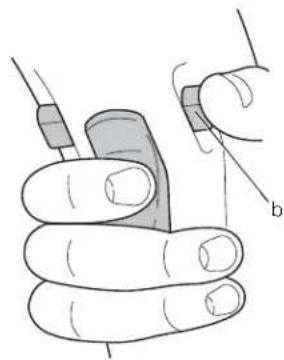
Forward/Reverse Control Button (fi g. 1, 6)
A forward/reverse control button (b) determines the direction of the tool and also serves as a lock-off button.
To select forward rotation, release the trigger switch and depress the forward/reverse control button on the right side of the tool.
To select reverse, depress the forward/reverse control button on the left side of the tool.
The center position of the control button locks the tool in the off position. When changing the position of the control button, be sure the trigger is released.
NOTE: The first time the tool is run after changing the direction of rotation, you may hear a click on start up. This is normal and does not indicate a problem.
ENGLISH
Torque Adjustment Collar (fi g. 1, 5)
The collar of this tool has 15 positions for the adjustment of the torque to suit the size of the screw and the workpiece material. For torque adjustment, refer to Screwdriver Operation.
Select the drilling mode or torque by aligning the symbol or number on the collar (c) with the indicator (k) on the housing.
Dual Range Gearing (fi g. 1, 7)
The dual range feature of your drill/driver allows you to shift gears for greater versatility.
- To select speed 1 (high torque setting), turn the tool off and permit it to stop. Slide the gear shifter (d) forward (towards the chuck).
- To select speed 2 (low torque setting), turn the tool off and permit it to stop. Slide the gear shifter back (away from the chuck).
NOTE: Do not change gears when the tool is running. Always allow the drill to come to a complete stop before changing gears. If you are having trouble changing gears, make sure that the dual range gear shifter is either completely pushed forward or completely pushed back.
Keyless Single Sleeve Chuck (fi g. 4)
WARNING: Do not attempt to tighten drill bits (or any other accessory) by gripping the front part of the chuck and turning the tool on. Damage to the chuck and personal injury may result. Always lock off trigger switch and disconnect tool from power source when changing acces sories.
WARNING: Always ensure the bit is secure before starting the tool. A loose bit may eject from tool causing possible personal injury.
Your tool features a keyless chuck (f) with one rotating sleeve for one-handed operation of the chuck. To insert a drill bit or other accessory, follow these steps.
- Turn tool off and disconnect tool from power source.
- Grasp the black sleeve of the chuck with one hand and use the other hand to secure the tool. Rotate the sleeve counterclockwise far enough to accept the desired accessory.
- Insert the accessory about 19 mm (3/4") into the chuck and tighten securely by rotating the chuck sleeve clockwise with one hand
while holding the tool with the other. Your tool is equipped with an automatic spindle lock mechanism. This allows you to open and close the chuck with one hand.
Be sure to tighten chuck with one hand on the chuck sleeve and one hand holding the tool for maximum tightness.
To release the accessory, repeat steps 1 and 2 above.
Belt Hook (fi g. 1)
WARNING: To reduce the risk of serious personal injury, DO NOT suspend tool overhead or suspend objects from the belt hook. ONLY hang tool's belt hook from a work belt.
WARNING: To reduce the risk of serious personal injury, ensure the screw (h) holding the belt hook is secure.
The belt hook (g) can be attached to either side of the tool to accommodate left- or right-handed users. If the hook is not desired at all, it can be removed from the tool.
To move belt hook, remove the screw (h) that holds the belt hook in place then reassemble on the opposite side.
OPERATION
Instructions for Use
WARNING: Always observe the safety instructions and applicable regulations.
WARNING: To reduce the risk of serious personal injury, turn tool off and disconnect tool from power source before making any adjustments or removing/installing attachments or accessories.
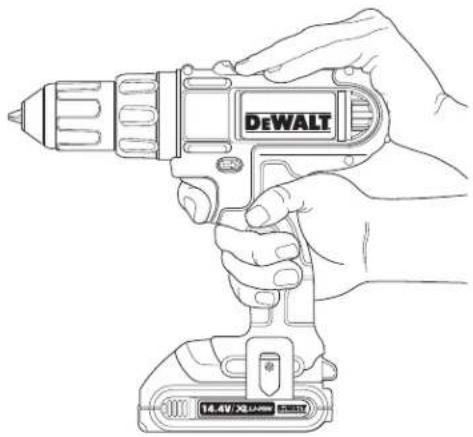
Proper Hand Position (fi g. 1, 8)
WARNING: To reduce the risk of serious personal injury, ALWAYS use proper hand position as shown.
WARNING: To reduce the risk of serious personal injury, ALWAYS hold securely in anticipation of a sudden reaction.
Proper hand position requires one hand on the top of the drill as shown, with the other hand on the main handle (e).
Drill Operation (fi g. 5, 7)

WARNING: To reduce the risk of serious personal injury, turn tool off and disconnect tool from power source before making any adjustments or removing/installing attachments or accessories.

WARNING: To reduce the risk of personal injury, ALWAYS ensure workpiece is anchored or clamped firmly. If drilling thin material, use a wood "back-up" block to prevent damage to the material.
- Select the desired speed/torque range using the gear shifter (d) to match the speed and torque to the planned operation.
- For WOOD, use twist bits, spade bits, power auger bits or hole saws. For METAL, use high-speed steel twist drill bits or hole saws. Use a cutting lubricant when drilling metals. The exceptions are cast iron and brass which should be drilled dry.
- Always apply pressure in a straight line with the bit. Use enough pressure to keep drill biting, but do not push hard enough to stall the motor or deflect the bit.
- Hold tool firmly with both hands to control the twisting action of the drill.

CAUTION: Drill may stall if overloaded causing a sudden twist. Always expect the stall. Grip the drill firmly to control the twisting action and avoid injury.
- IF DRILL STALLS, it is usually because it is being overloaded or improperly used. RELEASE TRIGGER IMMEDIATELY, remove drill bit from work, and determine cause of stalling. DO NOT CLICK TRIGGER ON AND OFF IN AN ATTEMPT TO START A STALLED DRILL — THIS CAN DAMAGE THE DRILL.
- To minimize stalling or breaking through the material, reduce pressure on drill and ease the bit through the last fractional part of the hole.
- Keep the motor running when pulling the bit back out of a drilled hole. This will help prevent jamming.
- With variable speed drills there is no need to center punch the point to be drilled. Use a slow speed to start the hole and accelerate by squeezing the trigger harder when the hole is deep enough to drill without the bit skipping out.
Screwdriver Operation (fi g. 5, 7)
- Select the desired speed/torque range using the dual range gear selector to match the speed and torque of the planned operation.
- Turn the torque adjustment collar (c) to the desired position. Lower numbers indicate lower torque settings; higher numbers indicate higher torque settings.
- Insert the desired fastener accessory into the chuck as you would any drill bit.
- Make some practice runs in scrap or on unseen areas to determine the proper position of the clutch collar.
- Always start with lower torque settings, then advance to higher torque settings to avoid damage to the workpiece or fastener.
MAINTENANCE
Your DEWALT power tool has been designed to operate over a long period of time with a minimum of maintenance. Continuous satisfactory operation depends upon proper tool care and regular cleaning.

IG: To reduce the risk of serious personal injury, turn tool off and disconnect battery pack before making any adjustments or removing/installing attachments or accessories. An accidental start-up can cause injury.
The charger and battery pack are not serviceable. There are no serviceable parts inside.

Lubrication
Your power tool requires no additional lubrication.

Cleaning
WARNING: Blow dirt and dust out of the main housing with dry air as often as dirt is seen collecting in and around the air vents. Wear approved eye protection and approved dust mask when performing this procedure.
ENGLISH
WARNING: Never use solvents or other harsh chemicals for cleaning the non-metallic parts of the tool. These chemicals may weaken the materials used in these parts. Use a cloth dampened only with water and mild soap. Never let any liquid get inside the tool; never immerse any part of the tool into a liquid.
CHARGER CLEANING INSTRUCTIONS
WARNING: Shock hazard. Disconnect the charger from the AC outlet before cleaning. Dirt and grease may be removed from the exterior of the charger using a cloth or soft non-metallic brush. Do not use water or any cleaning solutions.
Optional Accessories
WARNING: Since accessories, other than those offered by DEWALT, have not been tested with this product, use of such accessories with this tool could be hazardous. To reduce the risk of injury, only DEWALT, recommended accessories should be used with this product.
Consult your dealer for further information on the appropriate accessories.
Protecting the Environment
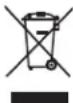
Separate collection. This product must not be disposed of with normal household waste.
Should you find one day that your DEWALT product needs replacement, or if it is of no further use to you, do not dispose of it with household waste. Make this product available for separate collection.

Separate collection of used products and packaging allows materials to be recycled and used again. Re-use of recycled materials helps prevent environmental pollution and reduces the demand for raw materials.
Local regulations may provide for separate collection of electrical products from the household, at municipal waste sites or by the retailer when you purchase a new product.
DEWALT provides a facility for the collection and recycling of DEWALT products once they have reached the end of their working life. To take advantage of this service please return your product to any authorised repair agent who will collect them on our behalf.
You can check the location of your nearest authorised repair agent by contacting your local DEWALT office at the address indicated in this manual. Alternatively, a list of authorised DEWALT repair agents and full details of our after-sales service and contacts are available on the Internet at: www.2helpU.com.

Rechargeable Battery Pack
This long life battery pack must be recharged when it fails to produce sufficient power on jobs which were easily done before. At the end of its technical life, discard it with due care for our environment:
- Run the battery pack down completely, then remove it from the tool.
- Li-lon cells are recyclable. Take them to your dealer or a local recycling station. The collected battery packs will be recycled or disposed of properly.
GUARANTEE
DEWALT is confident of the quality of its products and offers an outstanding guarantee for professional users of the product. This guarantee statement is in addition to and in no way prejudices your contractual rights as a professional user or your statutory rights as a private non-professional user. The guarantee is valid within the territories of the Member States of the European Union and the European Free Trade Area.
• 30 DAY NO RISK SATISFACTION GUARANTEE •
If you are not completely satisfied with the performance of your DEWALT tool, simply return it within 30 days, complete with all original components, as purchased, to the point of purchase, for a full refund or exchange. The product must have been subject to fair wear and tear and proof of purchase must be produced.
• ONE YEAR FREE SERVICE CONTRACT •
If you need maintenance or service for your DEWALT tool, in the 12 months following purchase, you are entitled to one service free of charge. It will be undertaken free of charge at an authorised DEWALT repair agent. Proof of purchase must be produced. Includes labour. Excludes accessories and spare parts unless failed under warranty.
• ONE YEAR FULL WARRANTY •
If your DEWALT product becomes defective due to faulty materials or workmanship within 12 months from the date of purchase, DEWALT guarantees to replace all defective parts free of charge or – at our discretion – replace the unit free of charge provided that:
• The product has not been misused;
- The product has been subject to fair wear and tear;
• Repairs have not been attempted by unauthorised persons;
• Proof of purchase is produced.
- The product is returned complete with all original components
If you wish to make a claim, contact your seller or check the location of your nearest authorised DEWALT repair agent in the DEWALT catalogue or contact your DEWALT office at the address indicated in this manual. A list of authorised DEWALT repair agents and full details of our after-sales service is available on the Internet at: www.2helpU.com
TALADRO PERCUTOR INALÁMBRICO DCD733
¡Enhorabuena!
Suspension de charge.

Batterie rechargeable
Vice President Engineering and Product Development
BEWAAR ALLE WAARSCHUWINGEN EN INSTRUCTIES ALS TOEKOMSTIG REFERENTIEMATERIAAL
1) SIKKERHET PÅ ARBEIDSOMRÅDET
Vice President Engineering and Product Development
natural_image
Pure horizontal line with endpoints and tick marks, no text or symbols present| Belgique et Luxembourg | Black & Decker - DEWALTNieuwlandlaan 7, IZ Aarschot B156België en B-3200 Aarschot www.dewalt.be | Dutch Tel: 32 70 220 063French Tel:32 70 220 062 | Fax: 32 70 225 585Fax: 32 70 222 441 |
| Danmark | DEWALTSluseholmen 2-42450 Kobenhavn SV | www.dewalt.dk | Tlf: 70201511Fax: 70224910 |
| Deutschland | DEWALTRichard Klinger Str. 1165510 Idstein | Fax: 06126-21-2770 | Tel: 06126-21-1www.dewalt.de |
| Ελλάς | Black & Decker (Ελλάς) A.E.Στράβωνος 7 & Bouλιαγμένης 159Γλυφάδα 16674, Αθήνα | Τηλ: 30 210 8981-616Service: 30 210 8981-616Φαξ: 30 210 8983-570 | www.dewalt.gr |
| España | DEWALTParque de Negocios "Mas Blau"Edificio Muntadas, c/Bergadá, 1, Of. A608820 El Prat de Llobregat (Barcelona) | Fax: 934 797 419www.dewalt.es | Tel: 934 797 400 |
| France | DEWALT5, allée des hêtresBP 30084, 69579 Limonest Codex | Tel: 04 72 20 39 20Fax: 04 72 20 39 00www.dewalt.fr | |
| SchweizSuisseSvizzera | DEWALTIn der Luberzon 408902 Urdorf | Tel: 01 - 730 67 47Fax: 01 - 730 70 67www.dewalt.ch | |
| Ireland | DEWALTCalpe House Rock HillBlack Rock, Co. Dublin | Fax: 00353-2781811www.dewalt.ie | Tel: 00353-2781800 |
| Italia | DEWALTc/o Energypark Building 03 sud, Via Monza 7/A,20871 Virmercate (MB), IT | www.dewalt.it | Tel: 800-014353Fax: 39 039 9590 317 |
| Nederlands | Black & Decker - DEWALTJoulohof 124600 AB Bergen Op Zoom | Fax: 31 164 283 200www.dewalt.nl | Tel: 31 164 283 063 |
| Norge | DEWALTPostboks 4613, Nydalen0405 Oslo | Fax: 45 25 08 00 | Tel: 45 25 13 00www.dewalt.no |
| Österreich | DEWALTWerkzeug Vertriebsges m.b.HOberlaaerstrasse 248A-1230 Wien | Fax: 01 - 66116 - 14www.dewalt.at | Tel: 01 - 66116 - 0 |
| Portugal | DEWALTCentro de Escritórios de Sintra Avenida AlmiranteGago Coutinho, 132/134, Edificio 142710-418 Sintra2710-418 Lisboa | Tel: 214 66 75 00 | Fax: 214 66 75 75www.dewalt.pt |
| Suomi | DEWALTTeknikantie 1202150 Espoo, Finland | Puh: 010 400 430Faksi: 0800 411 340www.dewalt.fi | |
| Sverige | DEWALTBox 94431 22 Mölndal | Fax: 031 68 60 08www.dewalt.se | Tel: 031 68 61 00 |
| Türkiye | KALE Hirdavat ve Makina A.Ş.Defterdar Mah. Savaklar Cad. No:15Edirnekapı / Eyüp / İSTANBUL 34050 TÜRKİYE | Tel: 0212 533 52 55Faks: 0212 533 10 05www.dewalt.com.tr | |
| UnitedKingdom | DEWALT210 Bath Road; Slough, Berks SL1 3YD | Tel: 01753-56 70 55Fax: 01753-57 21 12 | www.dewalt.co.uk |
| Middle EastAfrica | DEWALTP.O. Box - 17164,Jebel Ali (South Zone), Dubai, UAE | Tel: 971 4 8863030www.dewalt.ae | Fax: 971 4 8863333 |
N164842
04/12