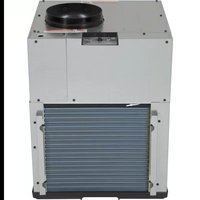
AZ9VH12DBM - Air Conditioning GE - Free user manual and instructions
Find the device manual for free AZ9VH12DBM GE in PDF.


| Product Type | Heat pump air conditioner (AZ9VH) |
| Brand | GE |
| Model | AZ9VH12DBM |
| Power Supply | 220-240 VAC single phase (208/230/265 V depending on configuration) |
| Refrigerant | R410A |
| Casing Height | 30 in (762 mm) |
| Casing Width | 23 3/4 in (603 mm) |
| Casing Depth | 28 3/4 in (730 mm) |
| Air Filter Dimensions (mounted on unit) | 18 x 20 x 1 in |
| Controls | Wall thermostat Class 2 (2C/2H) or internal controls |
| Heating Modes | Heat pump + electric heat (options: Heat Boost, All-Electric Heat) |
| Special Functions | Quick heat recovery, smart fan, fan overdrive mode |
| Auxiliary Settings | 12 modes: temperature limits, sentinels, dehumidification, etc. |
| Filter Maintenance | Replacement at least every 30 days |
| Coil Cleaning | Professional cleaning recommended; avoid acidic cleaners |
| Drainage System | 3/4 in. fittings (primary and secondary) |
| Installation Accessories | Telescoping wall plenum (RAVWPT15B), louvered vent (RAVAL4), drain platform (RAVDPLAT), return air grilles (RAVRG4*, RAVRG2*) |
| Warranty | 1 year parts and labor, 5 years sealed refrigerant system |
| Certification | Installation up to 13,000 ft (3,962 m) |
Frequently Asked Questions - AZ9VH12DBM GE
User questions about AZ9VH12DBM GE
0 question about this device. Answer the ones you know or ask your own.
Ask a new question about this device
Download the instructions for your Air Conditioning in PDF format for free! Find your manual AZ9VH12DBM - GE and take your electronic device back in hand. On this page are published all the documents necessary for the use of your device. AZ9VH12DBM by GE.
USER MANUAL AZ9VH12DBM GE
SAFETY INFORMATION .... 3
FEATURES OF THE ZONELINE
Temperature Control....4
About your Heat Pump....4
Quick Heat Recovery....4
CARE AND CLEANING
Air Filters....5
Drain....5
Indoor/Outdoor Coils 5
Base Pan 5
INSTALLATION INSTRUCTIONS
Installation Overview....6
Installation Preparation.....12
Installing the Zoneline....15
Servicing 21
Setting the Auxiliary Controls ..... 22
TROUBLESHOOTING TIPS
Normal Operating Sounds 27
Troubleshooting Tips....28
CONSUMER SUPPORT
Product Registration 31
Limited Warranty....32
Consumer Support....33
Write the model and serial numbers here:
Model #
Serial # ____
You can find them on a label on the top panel.
OWNER'S MANUAL AND INSTALLATION INSTRUCTIONS
Heat Pump
AZ9VH
THANK YOU FOR CHOOSING GE APPLIANCES.
Whether you grew up with GE Appliances, or this is your first, we're happy to have you in the family.
We take pride in the craftsmanship, innovation and design that goes into every GE Appliances product, and we think you will too. Among other things, registration of your appliance ensures that we can deliver important product information and warranty details when you need them.
Register your GE appliance now online. Helpful websites and phone numbers are available in the Consumer Support section of this Owner's Manual. You may also mail in the pre-printed registration card included in the back of this manual.

GE APPLIANCES
IMPORTANT SAFETY INFORMATION READ ALL INSTRUCTIONS BEFORE USING THE APPLIANCE
WARNING
For your safety, the information in this manual must be followed to minimize the risk of fire, explosion, electric shock, age, personal injury, or loss of life.
SAFETY PRECAUTIONS
This Zoneline must be properly installed in accordance with the Installation Instructions before it is used. Zoneline Vertical units shall not be accessible to the room guest. See the Installation Instructions in the back of this manual.
NOTE: GEA strongly recommends that any servicing be performed by a qualified person.
■ All air conditioners contain refrigerants, which under federal law must be removed prior to product disposal. If you are getting rid of an old product with refrigerants, check with the company handling disposal about what to do.
■ These R410A air conditioning systems require contractors and technicians to use tools, equipment and safety standards approved for use with this refrigerant. DO NOT use equipment certified for R22 refrigerant only.
■ This unit is certified for installations up to 13,000 (3962m) feet above sea level.
■ This unit is not to be installed in a laundry room.
■ Children should be supervised to ensure that they do not play with the appliance.
This appliance is not intended for use by persons (including children) with reduced physical, sensory or mental capabilities, or lack of experience and knowledge, unless they have been given supervision or instruction concerning use of the appliance by a person responsible for their safety.
WARNING
This unit must be controlled by a Class 2 remote control wall mounted heating and cooling thermostat, minimum 2C/2H. Standard thermostats used on prior models are not designed for AZ9V models. Refer to the operating instructions of the thermostat being used on how to control the unit.
About Your Heat Pump
Heat pumps can save money by removing heat from the outside air—even when the outside temperature is below freezing—and releasing that heat indoors.
To get the best energy performance from your heat pump, don't change the room thermostat by more than one degree at one time. Raising the heat setting 2–3 degrees may cause the Zoneline to use its electric heating elements in order to reach the new temperature setting quickly.
The electric heating elements use more electricity than heat pumps and cost more to operate.
There is a 3-minute minimum compressor run time at any setting to prevent short cycling.
The fans start before the compressor and stop after the compressor cycles off.
When the outdoor temperature is determined to be too cold, heat is provided by the electric heater instead of by the heat pump.
Do Not Operate the Air Conditioner (cool mode) in Freezing Outdoor Conditions
Air conditioners are not designed for use when freezing outdoor conditions exist. They must not be used in freezing outdoor conditions.
Quick Heat Recovery
Activates each time the thermostat is switched from OFF or COOL mode to HEAT mode. Electric heaters are energized until the thermostat set point is reached. The heat pump operation will resume at the next call for heat.
Turn off the Zoneline and disconnect the power supply before cleaning.
Air Filters
NOTICE: Do not operate the Zoneline without the filter in place. If a filter becomes torn or damaged, it should be replaced immediately.
Operating without the filter in place or with a damaged filter will allow dirt and dust to reach the indoor coil and reduce the cooling/heating, performance, airflow, and efficiency of the unit.
The most important thing you can do to maintain the Zoneline is to change the filter at least every 30 days. Dirty filters reduce cooling, heating performance and air flow.
Changing the filter will: Decrease cost of operation, save energy, prevent clogged heat exchanger coils, and reduce the risk of premature component failure.
Replacement filters should be purchased from your local retailer where air conditioner and furnace accessories are sold. If MERV13 filtration is desired, use RAVRG4*
with 2" filter.
Filter size for front of unit is 18" x 20" x 1".
Filter sizes for RAVRG4* is 24" x 20" x (1" or 2").
Filter sizes for RAVRG2* is 20" x 20".
NOTE: Use only one filter in the installation.
To replace the filter (unit mounted return air filter):
-
Slide the filter up to clear the filter holders.
-
Remove the filter.
-
Install new disposable filter.
To maintain optimum performance, change the filter at least every 30 days. For other filter installation options, see page 7.
Drain
Clean the drain system regularly to prevent clogging.
The condensate drain must be routed to a suitable drainage area. Check the unit condensate drain periodically. Keep it free of anything that may block or impeded the flow of
condensate water. If there is any accumulation of foreign matter in the drainpipe, it should be removed and cleaned. The entire drain line must be protected from freezing.
Indoor/Outdoor Coils
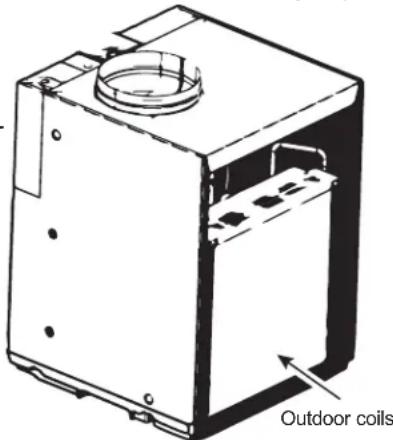
The Indoor/Outdoor coils on the Zoneline should be cleaned and checked regularly.
NOTE: When cleaning the coils do not use acid-based coil cleaners, or cleaning agents with formic or acetic acids. Care must be taken to avoid bending the aluminum fins on the coils. Do not use any high pressure spray mechanisms.
Indoor-Air Coil
Minor amounts of lint and dirt may pass through the filter and collect on the indoor-air coil. These minor accumulations can be carefully vacuumed away with a brush attachment on a vacuum cleaner or professionally cleaned.
Outdoor-Air Coil
The unit's outdoor-air intake and outdoor-air exhaust paths must remain clear. Check the outdoor-air exhaust frequently. Keep it free of all debris, snow, or ice. The
outdoor-air intake should also be kept free of obstructions. Blocking the outdoor-air exhaust or outdoor-air intake opening will reduce the efficiency of your unit and could cause premature compressor failure.
Inspection and cleaning of the outdoor-air coils may require the unit to be removed
from the closet. See servicing section of this manual for instructions on how to remove the unit. Professional cleaning is recommended for the inside surface of the outdoor coil. Use care to cover and protect electrical controls and components during the cleaning process.
Have the coils cleaned regularly.
Base Pan
In some installations, dirt or other debris may be blown in some areas of the United States, a “gel-like” substance into the unit from the outside and settle in the base pan may be present in the base pan. (the bottom of the unit). Check it periodically and clean, if necessary.
ZONELINE COMPONENTS
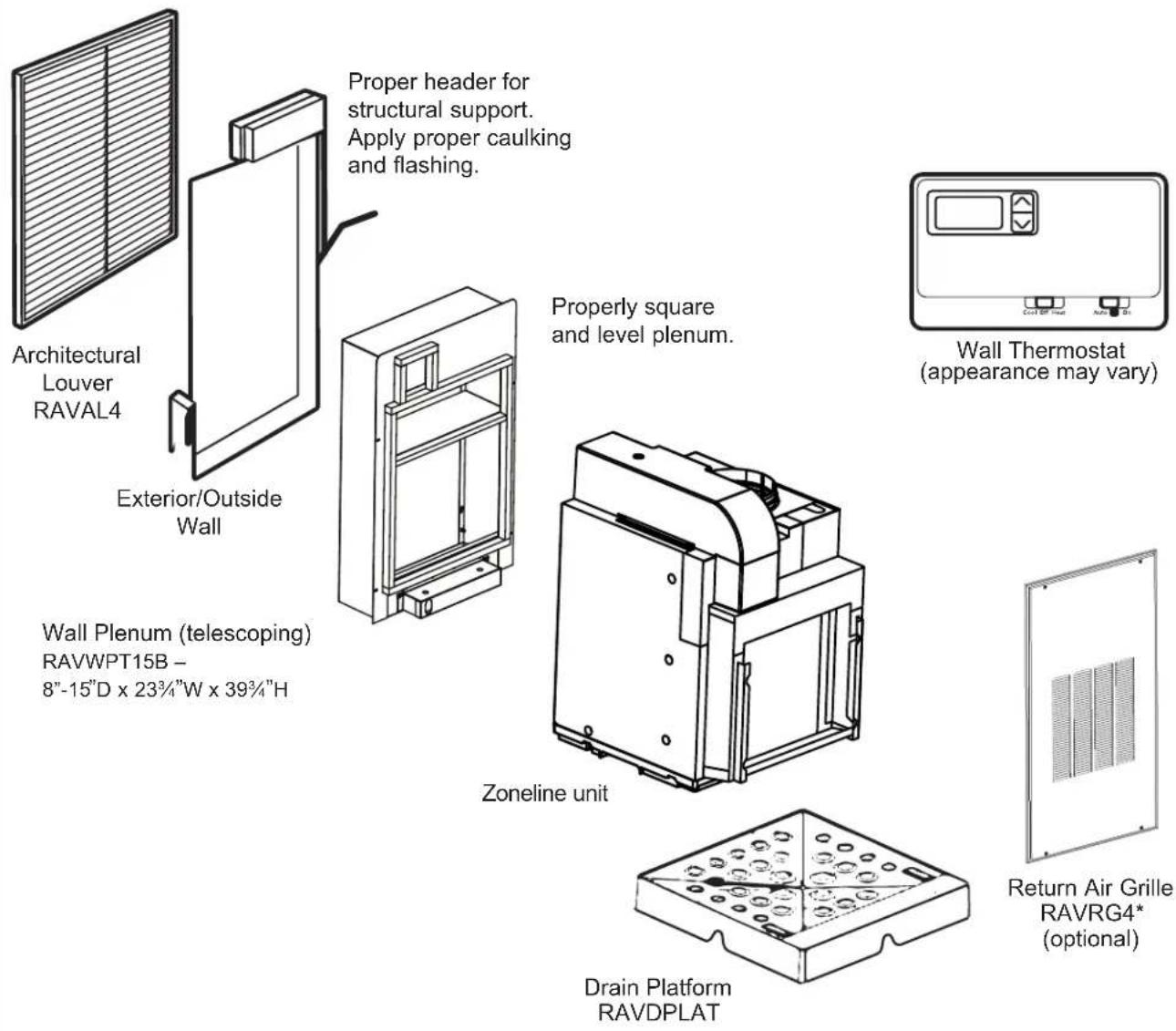
Proper header for structural support. Apply proper caulking and flashing.
Properly square and level plenum.
Wall Thermostat (appearance may vary)
Wall Plenum (telescoping)
RAVWPT15B –
8"-15"D x 23 ^3/4 "W x 39 ^3/4 "H
• Install the wall plenum through the exterior wall in accordance with the Installation Instructions provided with the plenum.
IMPORTANT: The wall plenum is not designed to carry structural loads. Proper wall header construction is required. The plenum requires proper flashing, shim, and caulk for a weather resistant installation.
RETURN AIR GRILLE INSTALLATION OPTIONS
The room return air grille may be installed toward the front or either side of the unit. Improper return air arrangements will cause performance problems.
There are three indoor return air grille installation options. Choose the option that best suits your installation requirements. Follow the Installation Instructions provided with the return air grille accessory for installation details.
NOTE: For the main unit, use only one inlet filter in the installation. The filter may be installed on the unit or in the access panel/door.
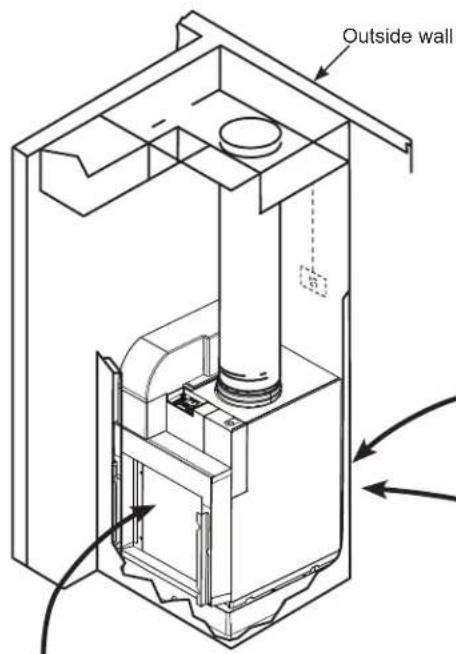
RAVRG4* – Access panel with return air grille
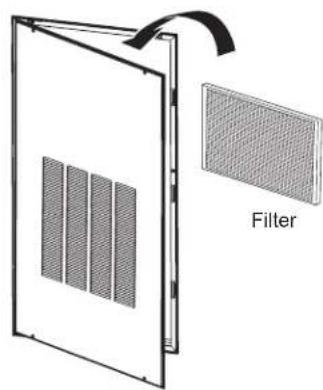
Option 1
Unit-mounted filter with a field-supplied return air grille and access door/panel
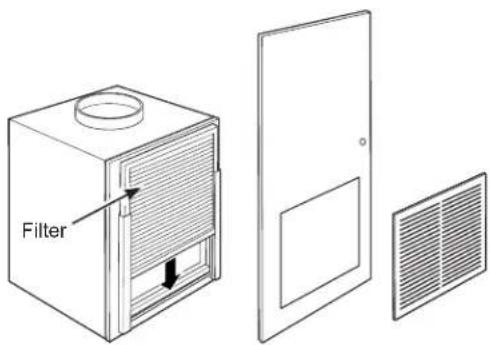
Option 3
RAVRG2* – Return air grille
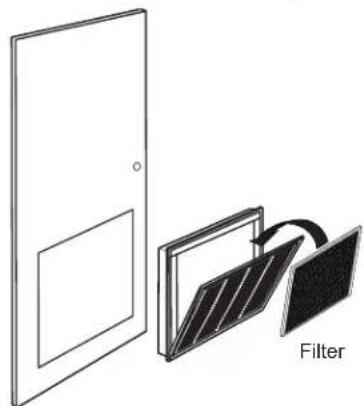
Option 2
| ACCESSORIES for NEW Installation | ||
| Accessory and model number Appearance Cutout Dimensions | ||
| Plenum (telescoping)RAVWPT15B8"-15"D x 233⁄4"W x 393⁄4"H*excluding flange | 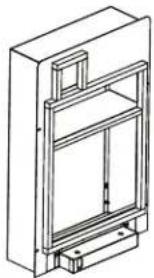 | CutoutDimensions:24"W x 40"H |
Architectural LouverRAVAL4 Architectural Louver designed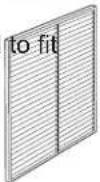 | the following Plenums:RAVWPT15B8"-15"D x 233⁄4"W x 393⁄4"H | |
| Access Panel with Return AirGrille (optional)RAVRG4* | 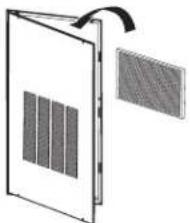 | CutoutDimensions:281⁄8"W x 551⁄8"H |
| Return Air Grille (optional)RAVRG2* | 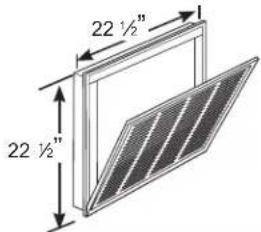 | CutoutDimensions:203⁄8"W x 203⁄8"H |
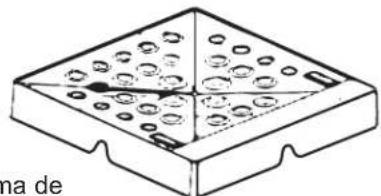
| Drain PlatformRAVDPLAT | 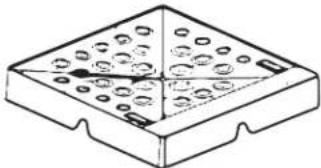 | Not Applicable |
| MUA filter (optional)RAA13V | 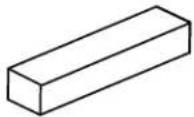 | Not applicable |
Wall Thermostat (appearance may vary)
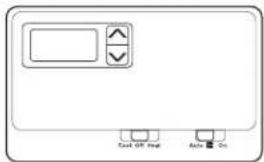
| Model Type Wiring Thermostat | Type Fan Speed(s) | Kit Number | |
| 2C/2H 8-wire 8-wire 2 RAK1 | 50VF2 |
UTILITY CLOSET CONNECTION LOCATIONS
IMPORTANT: Plan and locate plenum, drains and thermostat cable carefully to avoid interference. Hard-to-reach locations will make installation and service difficult!
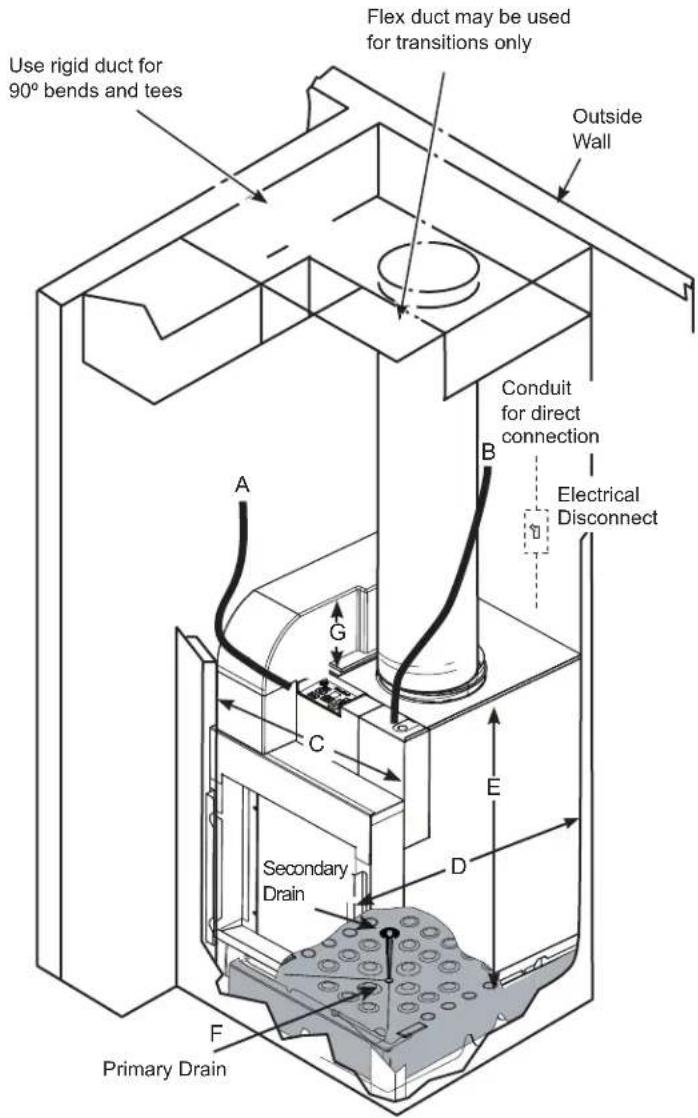
Reference Dimensions
A. Thermostat cable
B. Electrical connections - Direct connections using flex cable or appropriate wiring
C. Case width: 23 %
D. Case depth: 28 38
E. Case height: 30"
F. Condensate drains: 34 " connector
- Primary Drain – The centerline is approximately 11 34 " from left case wall and 11 34 " from back case wall.
- Secondary Drain – The centerline is 6 18 " from centerline of drain platform and 6 316 " from back case wall.
G. Makeup air duct height: 7"
TYPICAL UTILITY CLOSET AND DIMENSIONS
(For Reference Only)
FRONT INSTALL
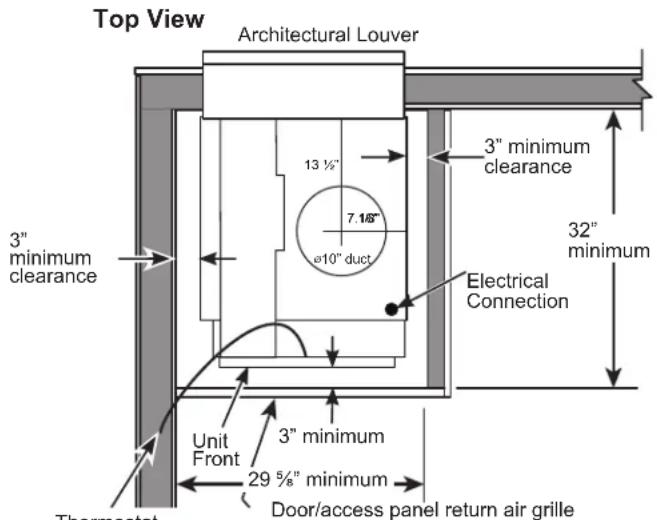
Note: It is recommended to leave additional space around the unit to ease installation and access for service.
SIDE INSTALL Option 1 (RAVRG2* in Door or closet wall)
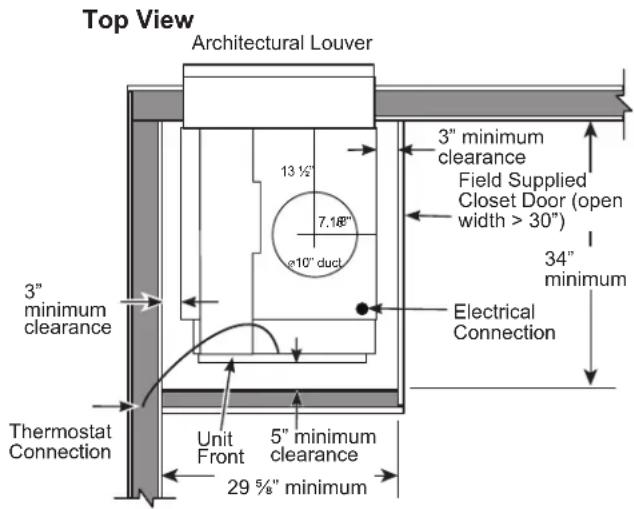
NOTE: Clearance and minimum dimensions are from interior walls of closet
SIDE INSTALL Option 2 (RAVRG4*)
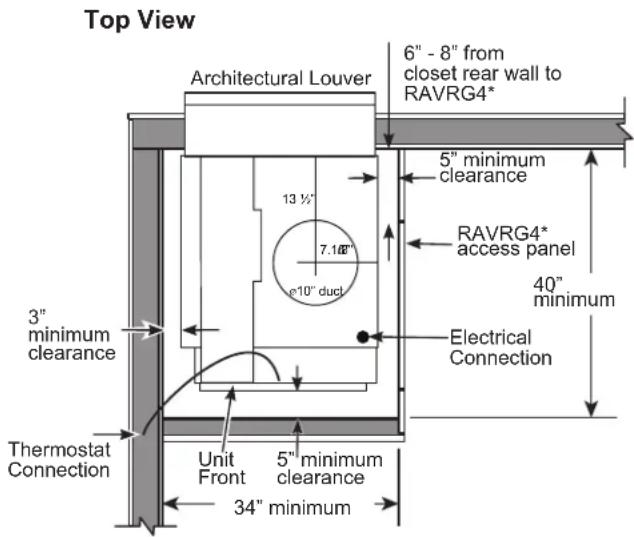
For RAVRG4*: After installing RAVDPLAT per instructions, slide rear of unit through RAVRG4* and rest it on platform in the closet. Rotate unit 90° so that rear of unit is facing the wall plenum. Follow remaining instructions for installing unit to wall plenum.
TYPICAL UTILITY CLOSET AND DIMENSIONS
(For Reference Only)
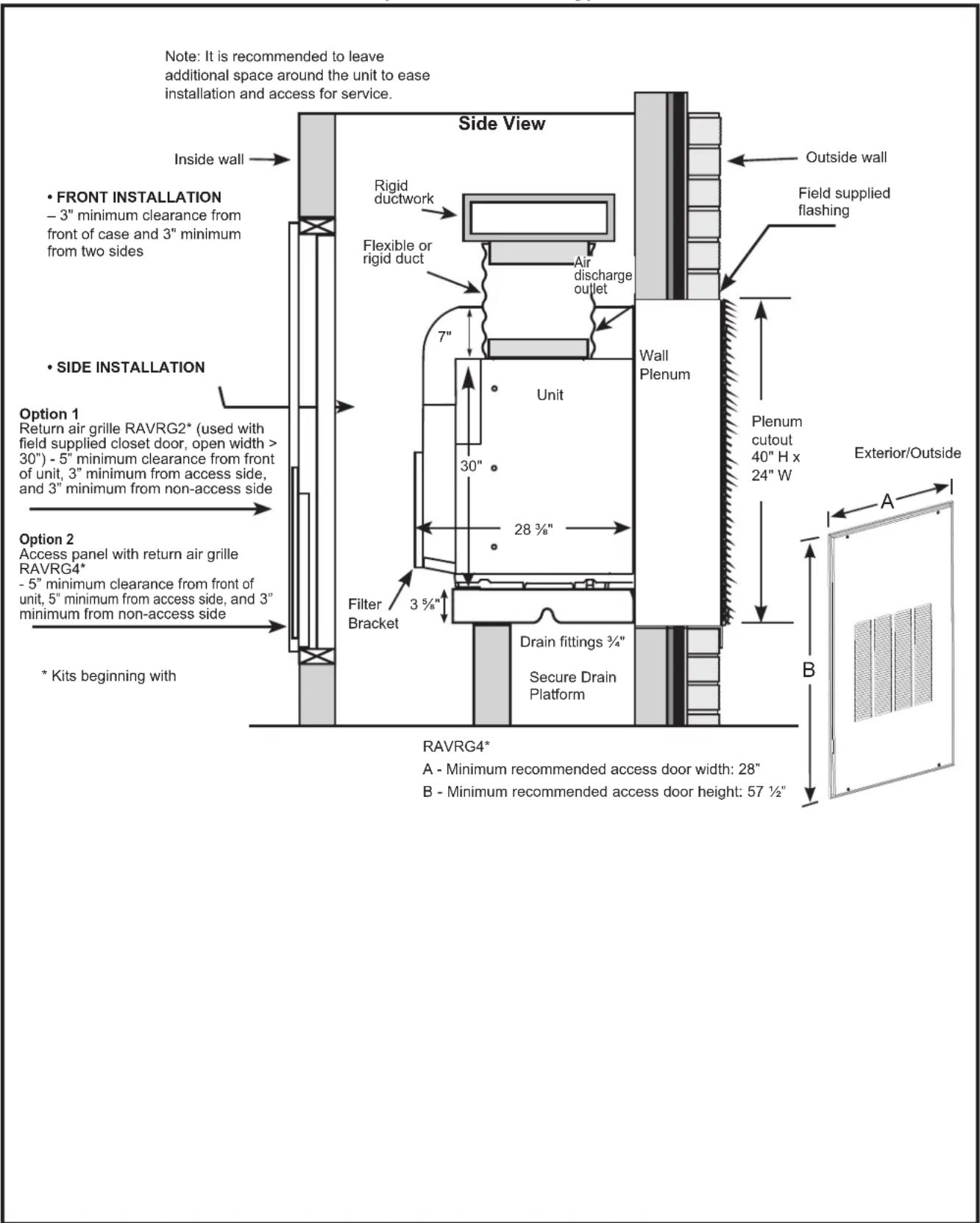
TYPE OF ELECTRIC CONNECTIONS
A power supply kit must be used to supply power to the Zoneline unit.
Models must be installed using the appropriate GE Appliances power supply kit for the branch circuit amperage and the electrical resistance heater wattage desired. See the POWER CONNECTION CHART to select the appropriate kit.
It is the responsibility of the installer to ensure the connection of components is done in accordance with electrical codes.
External Disconnect
There shall be disconnecting means from the electrical supply located within line of sight of the closet door opening or access panel opening. The disconnecting means shall be readily accessible while the air conditioner is installed in the closet. The disconnect shall not obscure the rating plate or be located on the access panel or closet door. A properly rated field supplied switch is a common means for electrical disconnection.
Power Supply Kit Direct Connect
208/230/265 Volt Applications
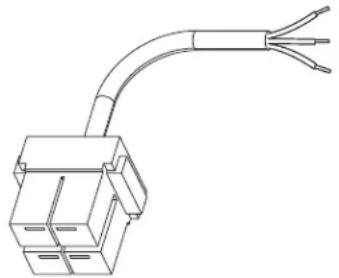
natural_image
Line drawing of a 3-pin electrical connector with three leads (no text or symbols)Power Supply Kit - Direct Connect
IMPORTANT: Connection to a branch circuit MUST be done by direct connection in accordance with the National Electrical Code. Plugging this unit into a building mounted exposed receptacle is not permitted by code.
POWER CONNECTION CHART
Direct Connections
| Power Supply Kits230 / 208 VoltRange: 187v - 254v | ConfigurationDirect Connection | Heater Wattage@ 230 / 208 Volt | Circuit Protective Device |
| RAK315D Hard | Wired 2.45 / 2.00 KW 15-Amp Time Delay-Fuse or Breaker | ||
| RAK320D Hard | Wired 3.45 / 2.82 KW 20-Amp Time Delay-Fuse or Breaker | ||
| RAK330D Hard | Wired 5.00 / 4.09 KW 30-Amp Time Delay-Fuse or Breaker | ||
| Power Supply Kits265 Volt*Range: 249v - 293v | ConfigurationDirect Connection | Heater Wattage@ 265 Volt | Circuit Protective Device |
| RAK515D Hard | Wired 2.45 KW 15-Amp | Time Delay-Fuse or Breaker | |
| RAK520D Hard | Wired 3.45 KW 20-Amp | Time Delay-Fuse or Breaker | |
| RAK530D Hard | Wired 5.00 KW 30-Amp | Time Delay-Fuse or Breaker | |
*See NEC for 265 Volt applications
Indoor Air Flow Data
Indoor air flow may be determined by measuring the external static pressure (ESP) of the duct system and then using the chart below to determine the actual airflow. Under no circumstances should the Zoneline unit be operated to an ESP in excess of .3" W.C.. Operation of the Zoneline under this condition will result in inadequate air flow thus leading to poor performance and/or premature component failure.
| Airflow – CFM @ 230 Volt and @ 265 Volt | |||||
| ESP (in. water) | Indoor Fan CFM | ||||
| Fan Boost Mode | |||||
| ON ☐OFF ☐ | |||||
| High CFM | Medium CFM | Medium CFM | Low CFM | ||
| AZ9VH12 | 0.10 500 433 433 363 | ||||
| 0.15 485 416 416 333 | |||||
| 0.20 470 385 385 295 | |||||
| 0.25 440 350 350 230 | |||||
| 0.30 410 313 313 * | |||||
| * Do not operate unit in these conditions. | |||||
Your airflow should be balanced based on many factors, such as available ESP, room CFM, and ductwork. Consult an HVAC engineer for proper applications. External static pressure (ESP) can be measured with a manometer or pitot tube. Once this ESP is established, you can calculate the CFM using the above chart.
Indoor Air Flow Data (cont)
| CFM Recommendations | ||
| AZ9VH12 | ||
| 500 | 433 | 363 |
| • | ||
| • = Recommended Mid Range | ||
Higher CFMs tend to increase Sensible capacity, enhance room circulation and increase duct noise, while lower CFMs tend to increase latent capacity and reduce noise.
Ductwork
Prepare the closet ductwork for later connection to the case.
The duct system should be designed for a maximum friction rate of .30" water column taking into consideration all fittings, registers and/or diffusers.
DO NOT operate unit without a supply duct attached.
For installations that require a ducted return, the rectangular duct must be no smaller than 20"W x 20"H and no longer than 12". In addition, it must be straight with no bends, turns, contractions, or expansions.
The total flow rate (CFM) and external static pressure (ESP) available can be estimated from the charts on this page. Use these charts to select your fan speed setting.
The collar on top of the unit accepts standard 10" duct. Pull all duct tight. Extra duct slack can greatly increase static pressure.
NOTICE: Flex duct can collapse and cause airflow restrictions. Do not use flex duct for 90° bends or unsupported runs of 5 ft. or more.
Installation Preparation
Questions? Call 844-GE4-PTAC (or 844-434-7822) or Visit our Website at: GEAppliances.com
BEFORE YOU BEGIN
Read these instructions completely and carefully.
• IMPORTANT — Save these
instructions for local inspector's use.
- IMPORTANT – Observe all governing codes and ordinances.
- Note to Installer – Be sure to leave these instructions with the owner.
- Note to Owner – Keep these instructions for future reference.
- Proper installation is the responsibility of the installer. Completed installation of the Zoneline shall not be accessible to the general public.
- Product failure due to improper installation is not covered under the Warranty.
- Team lift is recommended when moving unit.
- You MUST use all supplied parts and use proper installation procedures as described in these instructions when installing this air conditioner.
IMPORTANT ELECTRICAL SAFETY—READ CAREFULLY
RISK OF ELECTRIC SHOCK.
- All electrical connections and wiring MUST be installed by a qualified electrician.
- Follow the National Electrical Code (NEC) and/or local codes and ordinances.
- For personal safety, this Zoneline unit and case must be properly grounded.
- Protective devices (fuses or circuit breakers) acceptable for Zoneline installations are specified on the nameplate of each unit.
- Do not use an extension cord with this unit.
- Aluminum building wiring may present special problems—consult a qualified electrician.
- When the unit is not running there is still voltage to the electrical controls.
- Disconnect the power to the unit before servicing by:
- Removing the branch circuit fuses or turning the circuit breakers off at the panel.
- Disconnecting the power cord from the unit.
ELECTRICAL REQUIREMENTS
Wire Size Use ONLY wire size recommended for single outlet branch circuit
Fuse/Circuit Breaker Use ONLY type and size fuse or HVACR circuit breaker indicted on units rating plate. Proper over current protection to the units is the responsibility of the owner.
Grounding Unit MUST be grounded from branch circuit to unit, or through separate ground wire provided on permanently connected units. Be sure that branch circuit is grounded.
Wire Sizing Use recommended wire size given in tables and install a single branch circuit. All wiring must comply with local and national codes.
NOTE: Use copper conductors only.
NOTE: All field wiring must comply with NEC and local codes. It is the responsibility of the installer to ensure that the electrical codes are met.
- Use ONLY the wiring size recommended for single outlet branch circuit.
- Proper current protection is the responsibility of the owner.
Recommended Branch Circuit Wire Sizes*
| NameplateMaximum CircuitBreaker Size | AWG Wire Size** |
| 15A | 14 |
| 20A | 12 |
| 30A | 10 |
AWG - American Wire Gauge
* Single circuit breaker from main box
** Based on copper wire, single insulated conductor at 60°C
NOTE: Use copper conductors only.
RISK OF ELECTRIC SHOCK.
Can cause injury or death. This appliance must be properly grounded.
INSTALLATION SUMMARY
- Plan for proper electrical supply, drains and ductwork locations.
- Install the louver and wall plenum.
- Install and level the drain platform.
- Complete condensate drain connections.
- Install unit to wall plenum.
-
Connect the top ductwork.
-
Connect the remote thermostat.
- Connect auxiliary features, if required.
- Make electrical connections to unit.
- Install filter.
- Review the final installation checklist.
- Turn power on.
- Adjust auxiliary control settings, if required.
INSTALLATION INSTRUCTIONS
1. Plan for proper electrical supply, drains and ductwork locations.
- Complete rough in plumbing for primary and secondary condensation drains.
2. Install the Louver and Wall Plenum
- Install the louver to the wall plenum.
Refer to instructions included in the louver kit RAVAL4 for proper installation procedures. - Adjust depth of wall plenum and install into exterior wall.
Refer to instructions included in the wall plenum kit RAVWPT15B for proper installation procedures.
3. Install and Level the Drain Platform
- Refer to instructions included with Drain Platform kit RAVDPLAT for proper procedure for support and installation of platform to wall plenum. Platform must be level in all directions.
Condensate Disposal System
The Condensate Disposal System increases energy efficiency utilizing a factory installed fan that slings the condensate onto the hot outdoor coil.
When high outdoor humidity prevents the slinger from disposing of all condensate, the excess condensate overflows into the condensate drain pan and out the 3/4" internal drain connections.
NOTE: If the primary drain system fails to remove all of the condensate from the unit, any excess condensate will overflow from the drain pan into the secondary drain (if connected), and drain outside the building. This is your indication that the chassis or drain requires servicing.
Installing the Zoneline
4. Complete Connections
Condensate
An external or an internal drain must be attached to the primary drain connector. A secondary drain is supplied if required by state and local codes. Refer to the local codes for proper installation of the drains. If the secondary drain is not used, seal its drain port with a 3/4" FNPT plug.
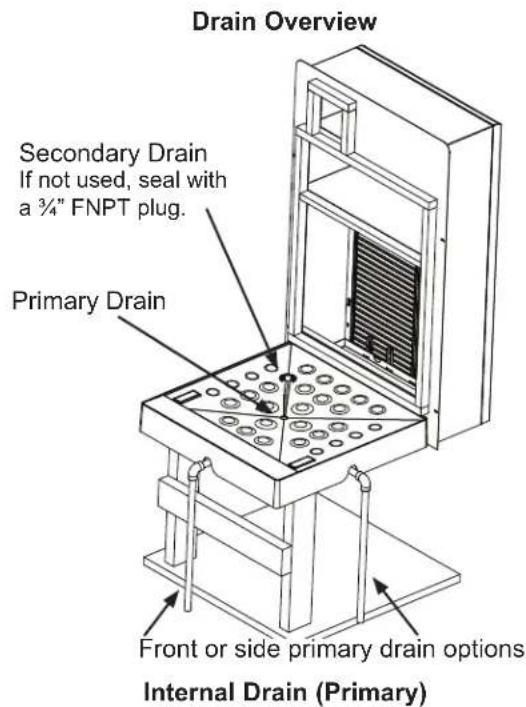
Run condensate line to building interior drain line with proper venting according to local building codes.
Option for drain line connection to front of platform
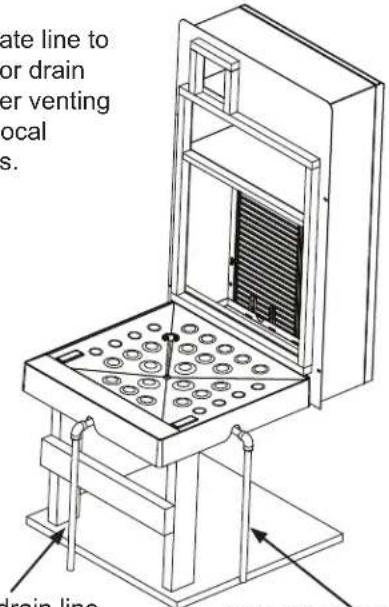
Option for drain line connection to right of platform
raia. Complete Condensate Drain Connections (cont)
External Drain (Secondary)
If necessary, extend secondary drain line though the plenum and grille. Use a pipe connector and additional piping to ensure drain pipe extends past the outdoor grille.
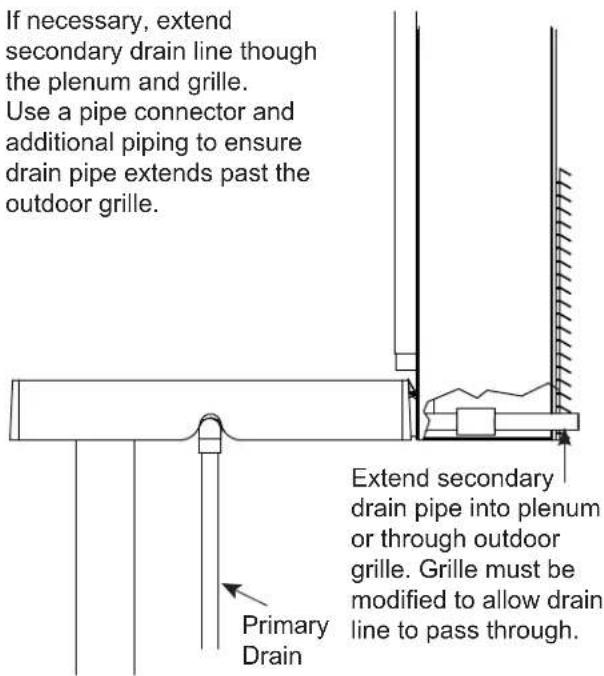
Refer to drain platform instruction manual for drain installation
5. Install Unit to Wall Plenum
Align the unit with plenum opening and slide unit toward plenum to ensure it is seated properly with the drain platform. Ensure that unit is secure and level in all directions.
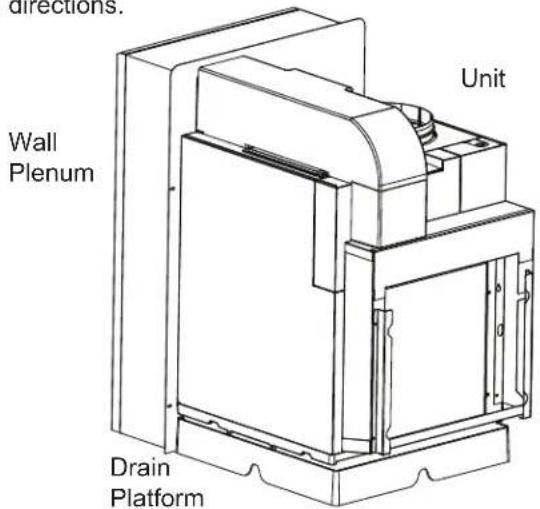
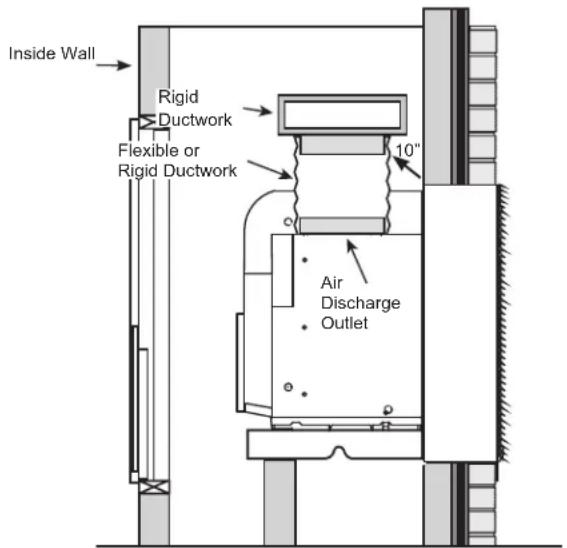
6. Connect the Top Ductwork
- Use a field supplied clamp to clamp the flexible 10" duct to the rigid ductwork above the unit.
- Install the other end of the duct onto the air discharge outlet. Use a field supplied clamp to secure the duct to the air discharge outlet.
7. Connect the Remote Thermostat
The unit will be controlled by a remote thermostat.
IMPORTANT: The Zoneline thermostat connections provide 24V AC only. If using a digital/electronic wall thermostat, you must set it to the 24V AC setting. See the Installation Instructions for the wall thermostat. NOTICE: Damage to a wall thermostat or to the Zoneline electronics can result from improper connections. Exercise extra attention when connecting blue and black wires. No line voltage connections should be made to any circuit in the thermostat. Isolate all wires in building from line voltage.
- Thermostat electrical connector is included with the unit. Follow the instructions included with the thermostat to connect the thermostat to the unit. Maximum Wiring
- Plug the thermostat connector into the control board.
| Maximum WiringLength for ThermostatConnection to the Unit |
| 66 ft. for AWG 1860 ft. for AWG 2040 ft. for AWG 24AWG – American Wire GaugeUse only Class 2 wiring |
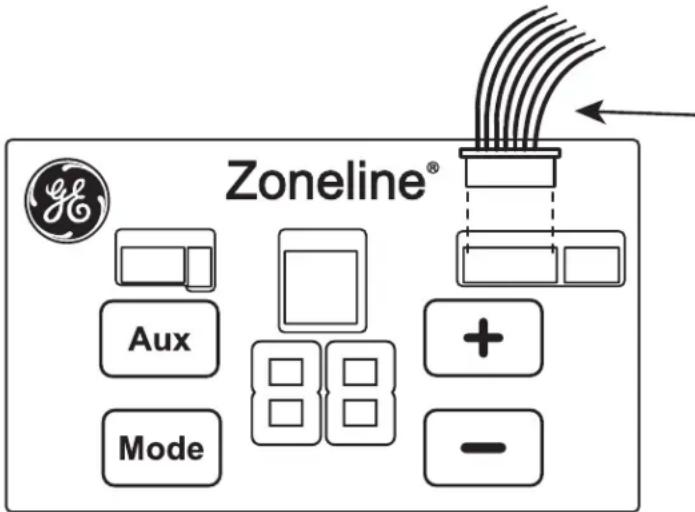
External Thermostat Connector
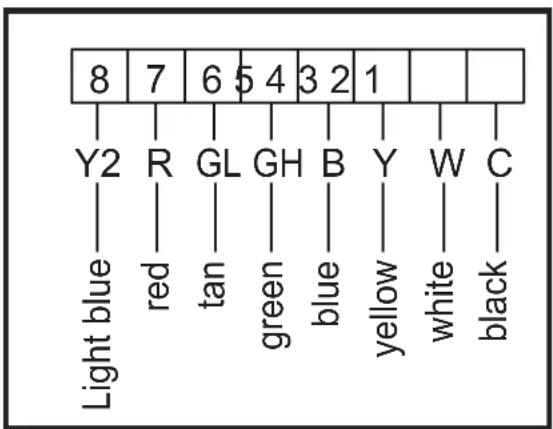
flowchart
graph TD
    A["8"] --> B["Y2"]
    A --> C["R"]
    A --> D["GL"]
    A --> E["GH"]
    A --> F["B"]
    A --> G["Y"]
    A --> H["W"]
    A --> I["C"]
    B --> J["Light blue"]
    C --> K["red"]
    D --> L["tan"]
    E --> M["green"]
    F --> N["blue"]
    G --> O["yellow"]
    H --> P["white"]
    I --> Q["black"]
8. Connect Auxiliary Features, if required
Auxiliary Controls - Terminal Connections
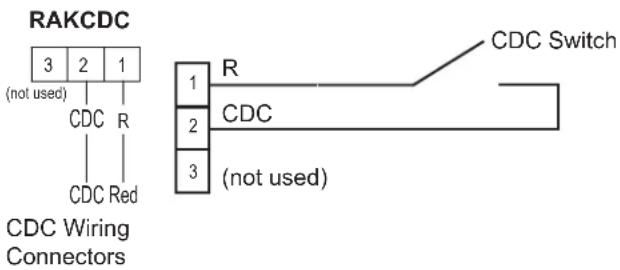
NOTE: Connector Kit RAKCDC is required to make CDC electrical connections.
(See wiring diagrams for RAKCDC below.)
The auxiliary control terminal connects are located on the front of the unit.
- To connect auxiliary devices to the unit, connect the wires from the RAKCDC Kit to the wires from the auxiliary devices. Then insert the RAKCDC connector into the mating control board connector next to the thermostat connector.
- After all desired connections have been made, replace the front case panel.
The owner is responsible for making all connections and setting the appropriate AUX SET mode.
NOTICE: Improper wiring may damage the Zoneline electronics. No common busing is permitted. Damage or erratic operation may result. A separate wire pair must be run from each separate controlling switch to each individual Zoneline.
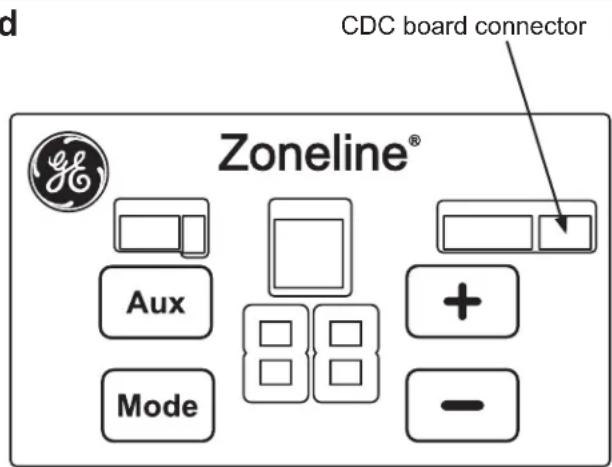
Central Desk Control (Field Supplied)
The Central Desk Control is a feature that allows the unit to be made operable/inoperable from a remote location. Operation of the feature requires that an ON-OFF switch at the remote location be wired to the two CDC terminals on the control panel of the Zoneline. When the remote switch is CLOSED, the unit cannot be operated in the Fan,
Cool, or Heat modes by the control. The Freeze Sentinel and the Heat Sentinel features remain operable. When the remote switch is Open, the unit is fully operable by control.
The RAKCDC accessory must be used with a central desk control system. No "Common Busing" is permitted.
NOTICE: Improper CDC wiring may damage the Zoneline electronics or cause erratic Zoneline operation. No common busing is permitted. A separate wire pair must be run from each separate controlling switch to each individual Zoneline.
Use only Class 2 wiring.
9. Make electrical connections to unit
ELECTRICAL CONNECTIONS - DIRECT CONNECT APPLICATIONS
WARNING
Electric Shock Hazard
Before servicing, disconnect power to the Zoneline at the fuse box or circuit breaker and pull out electrical disconnect on front of the chassis.
Failure to do so can result in personal injury and/or death.
208/230/265 Volt Electrical Supply
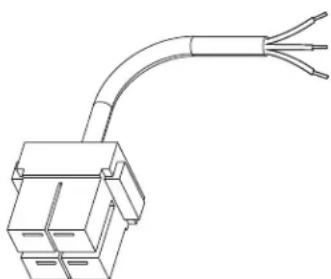
A power supply kit must be used to supply power to the Zoneline unit. The appropriate kit is determined by the voltage, the means of electrical connection and the amperage of the branch circuit. See the POWER CONNECTION CHART to select the appropriate kit.
natural_image
Line drawing of a mechanical connector with three leads (no text or symbols)Power Supply Kit - Direct Connect
FOR DIRECT CONNECT APPLICATIONS
IMPORTANT: Connection to a branch circuit MUST be done by direct connection in accordance with the National Electrical Code. Plugging this unit into a building mounted exposed receptacle is not permitted by code.
These models must be installed using the appropriate GE Appliances power supply kit for the branch circuit amperage and the electrical resistance heater wattage desired. See the POWER CONNECTION CHART to select the appropriate kit.
It is the responsibility of the installer to ensure the connection of components is done in accordance with electrical codes.
Direct connection to branch circuit wiring inside the provided junction box must be made by connecting as follows in steps 1–3.
EXTERNAL DISCONNECT
There shall be disconnecting means from the electrical supply located within line of sight of the closet door opening or access panel opening. The disconnecting means shall be readily accessible while the air conditioner is installed in the closet. The disconnect shall not obscure the rating plate or be located on the access panel or closet door. A properly rated switch is a common means for electrical disconnection.
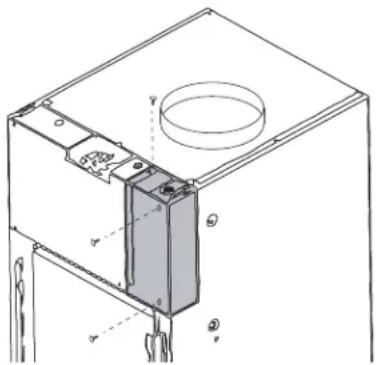
1. Remove Junction Box Cover
Remove unit-mounted filter. Remove the junction box cover by taking out the three screws.
2. Attach Conduit
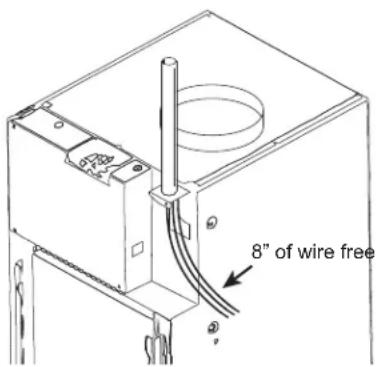
Use the round knockout hole at the top of the junction box to install conduit coming from the branch circuit. Install and clamp the conduit through the conduit clamp and bring wire leads into the junction box. Leave 8" of wire free from the end of the conduit.
9. Make electrical connections to unit (cont)
ELECTRICAL CONNECTIONS - DIRECT CONNECT APPLICATIONS
3. Make Wire Lead Connections Inside the Junction Box
- Make all wire connections by using appropriate UL-listed electrical connectors and techniques.
- Select the applicable wiring situation and follow the instructions accordingly:
When connecting the Zoneline to a single-phase circuit for 230V applications:
Connect the white and black leads of the Zoneline power supply kit to the branch circuit L1 and L2 leads. (The white lead of the power supply kit should be identified by the installer using electrical tape with some color other than green or white.) Connect the green lead of the power supply kit to the power supply and branch circuit ground.
• 3-Phase 208 VAC
When connecting the Zoneline to a three-phase 208V application:
Connect the white and black leads of the Zoneline power supply kit to the branch circuit L1 and L2 leads. (The white lead of the power supply kit should be identified by the installer using electrical tape with some color other than green or white.) Connect the green lead of the power supply kit to the power supply and branch circuit ground.
• 3-Phase 265 VAC
When connecting the Zoneline to a single leg of a three-phase 265V application:
Connect the white and black leads of the Zoneline power supply kit to the branch circuit Neutral and L1 leads. (The white lead of the power supply kit should be connected to neutral.) Connect the green lead of the power supply kit to the power supply and branch circuit ground.
-
Be sure that all wire leads are inside the junction box and not pinched between the box and the unit. The green insulated ground wire from the Zoneline MUST be connected to the branch circuit ground wire.
-
For 20A and 30A power supply kits, plug in personality jumper for heater selection.
-
Plug the 4-pin connector into the 4-pin receptacle in the junction box.
-
Replace the junction box cover by replacing the three screws removed earlier.
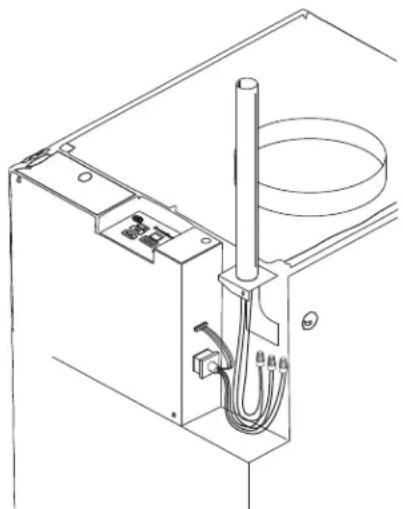
natural_image
Technical line drawing of a mechanical or electrical enclosure with wiring and a cylindrical component (no text or symbols)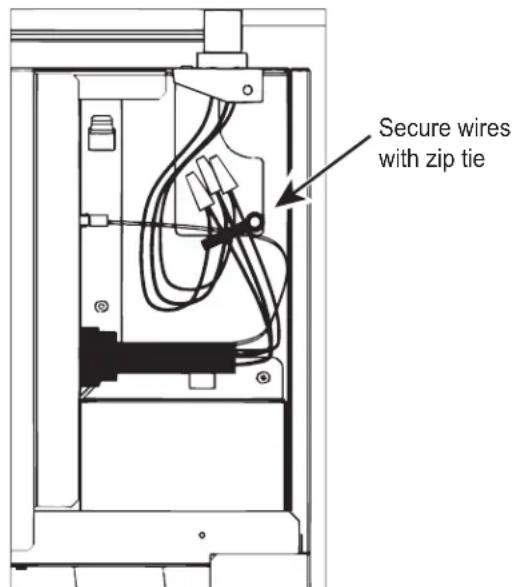
NOTICE: Wire junction box to match figure on the right. Building supply wires must both be secured with zip tie and oriented vertically.
10. Install Filter
Note: Use only one filter in the installation
- For installs that will use a unit-mounted filter, slide it down between the provided filter brackets on the front of the unit, ensuring that any airflow direction arrows on the filter are pointing toward the unit.
- For installs that will employ a filter within the return air grille RAVRG4* or RAVRG2*, do not install a unit mounted filter. Refer to instructions included in the RAVRG4* or RAVRG2* return air grille kit for proper filter installation.
11. FINAL INSTALLATION CHECKLIST
☐ Ensure that all installation instructions concerning clearances around the unit have been adhered to
☐ Inspect and ensure that all components and accessories have been installed properly and that they have not been damaged during the installation process.
□ Wall plenum flashing is installed, plenum level and caulked.
□ Unit is level. No tilt allowed.
☐ Check to ensure that the unit air filter, indoor coil, and outdoor coil are free from any obstructions.
☐ Check to make sure only one air filter is installed in the system.
☐ Check the condensate water drain(s) to ensure that they are connected and adequate for the removal of condensate water and that they meet approval of the end user.
☐ Ductwork is connected and secured to air discharge outlet.
- Secure all access panels (e.g. mainboard cover and junction box cover).
□ Wall thermostat is wired correctly.
□ Unit is wired correctly.
☐ Ensure that the circuit breaker(s) / fuse(s) and supply circuit wire size have been sized correctly.
☐ Ensure the unit has correct line voltage to it, is on a single circuit and is properly grounded.
☐ Ensure that the entire installation is in compliance with all applicable national and local codes and ordinances having jurisdiction.
12. Turn Power On
- If all of the items on the final checklist have been checked and are correct, turn the power ON to the unit at the main service panel.
- Turn the thermostat ON and check the unit to make sure it is functioning as intended.
13. Adjust Auxiliary Control Settings, if required
See the Auxiliary Control Setting section for instructions on how to program the controls.
Prior to programming the controls, review the final installation checklist before applying power to the unit.
SERVICING
WARNING
Risk of Electric Shock, can
cause injury or death. Before servicing, switch power OFF at the service panel and lock the area to prevent power from being switched on accidentally. When the area cannot be locked, securely fasten a prominent warning device, such as a tag, to the service panel.
NOTE: We strongly recommend that any servicing be performed by a qualified individual.
To remove the unit from the closet.
- Switch the thermostat to OFF.
- Turn OFF unit at electrical disconnect.
- Unplug 4 pin connector from unit.
- Remove cable connector bracket attached to direct connect kit from unit.
- Disconnect the wall thermostat wiring from the unit.
Auxiliary Controls – Aux Set Button
The electronic control for the unit comes preset from the factory to control the unit how “most” customers would prefer the unit to operate. The presets (called modes or functions) can be modified to accommodate for differences in installation parameters or personal preferences on how the unit should operate and perform.
If the owner modifies the auxiliary controls, it is then the owner that is responsible for ensuring the auxiliary controls are set to the desired function. There are 12 different modes (functions) that can be set using the auxiliary set button.
Modes of the Auxiliary Control
Mode 1 – Smart Fan Cool / Smart Fan Heat
Mode 7 – Fan Boost Mode
Mode 2 – Temperature Units
Mode 8 – Electric Heat Only
Mode 3 – Freeze Sentinel/Heat Sentinel
Mode 9 – Heat Boost
Mode 4 – Constant ON Fan
Mode 0 – Makeup Air Mode
Mode 5 – Temperature Limit Cool / Heat
Mode E – Makeup Air Occupancy
Mode 6 – Thermostat
Mode d – Dehumidification
To change operating or set up parameters the control must be in AUX Mode. With power applied to the unit, press the AUX SET button until the "RU" appears on the display.
The display will look like this when entering the AUX Mode :
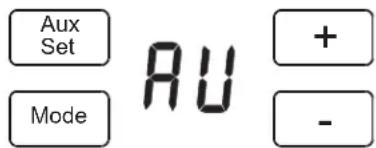
Auxiliary Set Mode
While in AUX Mode, press the MODE button to scroll through the different modes. Continue the press the MODE button until the number corresponding to the mode to be modified is showing in the first digit of the display. Once the correct number is displayed, use the +/- buttons to change the second digit of the display for that mode to either "π" for On OR "U" for Off depending on the desired function.
When the selection for a given mode is complete, press the MODE button to continue setting other auxiliary control functions OR press the AUX SET button to confirm the selection and exit AUX SET mode.
Mode 1 Smart Fan—Cooling/Heating
Press MODE until a 1 first appears in the first digit of the display for Smart Fan cool mode. To change to Smart Fan heat mode, press MODE again.
Press the - pad to set the indoor fan to cycle on/off in the heating or cooling mode selected “☐”
Press the + pad to set the indoor fan to run continuously in the heating or cooling mode selected "☐"
Press AUX to confirm your selection and exit AUX mode, or press MODE to continue setting other functions.
The default setting for Mode 1 is as follows:
Cooling: Continuous (ON)
Heating: Cycle (OFF)
*Note: In cyclic cooling mode, the indoor fan will activate occasionally to verify air temperature in the room. In cyclic heating mode, the fan will continue to operate for several seconds after the heating function has stopped in order to increase unit efficiency.


This feature allows the individual to switch the temperature units between Fahrenheit and Celsius on the display.
Press MODE until a 2 appears in the first digit of the display for Fahrenheit/Celsius mode.
Press the - pad to select Celsius or the + pad to select Fahrenheit. The individual will see an F for Fahrenheit or a C for Celsius in the second digit of the display based on the selection.
The default setting for Mode 2 is Fahrenheit.

° F

^ C
Mode 3 Freeze Sentinel / Heat Sentinel
With power to the unit and Freeze Sentinel activated, the unit automatically provides heat without user interface. This prevents potential plumbing damage by turning the heater and indoor fan ON at 41°F and then OFF once the closet temperature reaches 46°F.
When Heat Sentinel is activated, the unit automatically provides cooling without user interface. This prevents an excessively hot room by turning the air conditioner ON at 85°F and then OFF once the room temperature reaches 80°F.
Press MODE until a 3 first appears in the first digit of the display for Freeze Sentinel mode. Press the - pad for OFF "LI" or the + pad for ON "Π". This is shown in the second digit of the display. Press MODE again to access the Heat Sentinel settings. Press the - pad for OFF "LI" or the + pad for ON "Π". Press AUX to lock in your selection and exit AUX mode, or press MODE to continue setting other functions.
In the default setting for Mode 3, Heat Sentinel is off, Freeze Sentinel is on.
NOTE: These functions are active whenever the unit is plugged in, even if the unit is not receiving thermostat signals.

Freeze Sentinel OFF

Freeze Sentinel ON

Heat Sentinel OFF

Heat Sentinel ON
Mode 4 Constant ON Fan
Press MODE until a 4 appears in the first digit of the display to set the fan to run continuously - even if the unit is not receiving thermostat signals.
Press the - pad for OFF "U" or the + pad for ON "Π" This is shown in the second digit of the display.
Press AUX to lock in your selection and exit AUX mode or press MODE to continue setting other functions.
The default setting for Mode 4 is OFF.
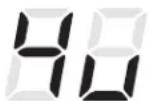
Constant
Fan OFF
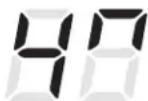
Constant
Fan ON
Setting the auxiliary control
Mode 5 Temperature Limiting
Temperature limiting is a feature that reduces energy costs by limiting the lowest temperature that can be obtained in cooling and the highest temperature that can be obtained in heating. This is only applicable when using a 2-way thermostat (see Mode 6 for setup).
Press MODE until a 5 first appears in the first digit of the display for Temperature Limiting cool mode. To change to heat mode, press MODE again.
To set the temperature limits, press the + or - pad. The second digit of the display will be between 0 and 7 depending on the limit you want to set. The chart shows the limits available. Press AUX to lock in your selection and exit AUX mode, or press MODE to continue setting other functions.
| Temperature Limits – Cool Temperature Limits – Heat |
| 0 = 60°F to 85°F 0 = 60°F to 65°F |
| 1 = 64°F to 85°F 1 = 60°F to 70°F |
| 2 = 66°F to 85°F 2 = 60°F to 72°F |
| 3 = 68°F to 85°F 3 = 60°F to 74°F |
| 4 = 70°F to 85°F 4 = 60°F to 76°F |
| 5 = 72°F to 85°F 5 = 60°F to 78°F |
| 6 = 74°F to 85°F 6 = 60°F to 80°F |
| 7 = 76°F to 85°F 7 = 60°F to 85°F |

Temperature Limiting Cool - Limit 2

Temperature Limiting Heat - Limit 5
The default setting for Mode 5 is as follows:
Cool: 2 (66°F to 85°F)
Heat: 5 (60°F to 78°F)
Mode 6 Wall Thermostat
Setting this mode to ON will allow the unit to operate with a Class 2 Remote Control Wall Thermostat. Press MODE until a 6 appears in the first digit of the display for Class 2 mode.
The default setting for Mode 6 is ON.
Press the + pad to turn the option ON “ ☐ for “standard cool/heat” thermostats. Press the – pad for two-way thermostat “ ☐! Press AUX to lock in your selection and exit AUX mode, or press MODE to continue setting other functions.

Two-way Thermostat

Standard Remote Control Wall Thermostat
Setting the auxiliary control
Mode 7 Fan Boost Mode
This setting is used when the unit is installed with more restrictive ductwork where additional airflow is needed. See airflow table on page 16. This increases the fan speed to ensure proper circulation.
Press MODE until a 7 appears in the first digit of the display. Press the - pad for OFF "U" or the + pad for ON "Π" This is shown in the second digit of the display. Press AUX to lock in your selection and exit AUX mode.
The default setting for Mode 7 is OFF.
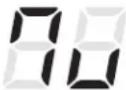
Fan Boost Mode OFF
Uses LOW and MED fan speeds
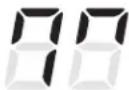
Fan Boost Mode ON
Uses MED and HIGH fan speeds
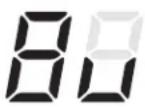
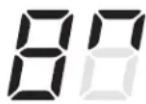
Mode 8 All-Electric Heat
When this option is ON " ," heat pump operation is locked out, causing the unit to provide only electric resistance heat.
To set All-Electric Heat option, press MODE until an 8 appears in the first digit of the display. Press the - pad for OFF "U" or the + pad for ON "Π" This is shown in the second digit of the display.
The default setting for Mode 8 is OFF.
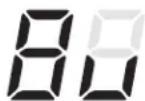
All- Electric Heat OFF
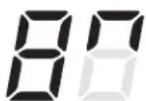
All- Electric Heat ON
Mode 9 Heat Boost
When Heat Boost is ON, supplementary electric heat is added to the heat pump operation to help maintain a consistent, comfortable room temperature.
To set Heat Boost, press MODE until a 9 appears in the first digit of the display. Press the - pad for OFF "U" or the + pad for ON "Π" This is shown in the second digit of the display. Press AUX to lock in your selection and exit AUX mode.
The default setting for Mode 9 is OFF.
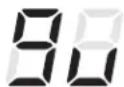
Heat Boost OFF
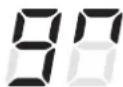
Heat Boost ON
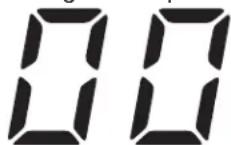
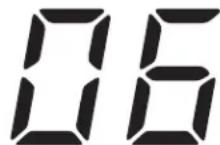
Mode 0 Digital Makeup Air Module Fan Speed
Press MODE until a 0 appears in the first digit of the display for the Digital Makeup Air mode. To change the fan speeds, press the + or - pad.
The default setting for Mode 0 is 02.
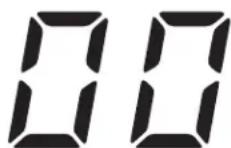
Makeup Air Off Makeup Air Duct Closes
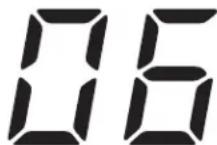
Makeup Air Speed 6
| Makeup Air Setting No | Filter (CFM) | RAA13V (CFM) |
| 00 0 0 | ||
| 01 30 25 | ||
| 02 40 30 | ||
| 03 50 40 | ||
| 04 60 50 | ||
| 05 70 60 | ||
| 06 * 70 | ||
| *Not Recommended | ||
Setting the auxiliary control
Mode E Digital Makeup Air Module Occupancy
To control the delivery of makeup air based on room occupancy status, press MODE until an E appears in the first digit of the display. Press the + or - pad to set occupancy detection to OFF "☐" or ON "☐".
The default setting for Mode E is OFF "☐".
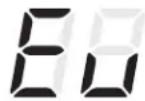
Occupancy detection OFF
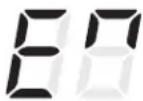
Occupancy detection ON
Mode d Dehumidification
This setting allows for various approaches for dehumidifying a room during a cooling condition once the temperature is controlled.
Note: you may see increased power consumption with the "standard" or "max" settings.
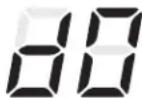
No additional dehumidification

Max dehumidification
| Setting Additional Dehumidification after Temperature Control | |
| 0 None | |
| 1 Low (target 50% RH) | |
| 2 Standard (target 50% RH, more aggressive above 70% RH) | |
| 3 Max (target 50% RH, more aggressive above 60% RH) | |
Defaults
Makeup Air off: d0 Makeup Air on: min. of d2
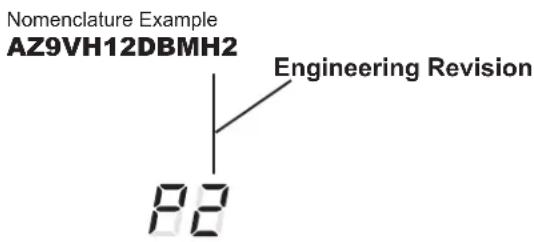
Mode P Engineering Revision Setup
This setting is used to configure the unit when the circuit board is replaced.
The first time the unit is powered after a service board is installed, the unit will automatically enter this mode. The UI will read P1. Press the + pad until the number matches the engineering revision as shown. The engineering revision is the last number in the model number. Press Aux to save and exit.
The engineering revision may be adjusted after the first power cycle using AUX. Press MODE until P appears in the first digit, and follow the steps described above.
UNIT/COMPRESSOR SETUP FOR IEER TESTING
| Abbreviated Table | |||
| Compressor RPM | Thermostat Signals | ||
| A 1 | 100% 38 | 00 W+B+GL+GH | |
| B 7 | 5% 260 | 0 Y+GL+GH | |
| C 5 | 50% 160 | 0 GH | |
| D 2 | 5% 160 | 0 GH | |
| External Thermostat Connector | |||||||
| 8 | 7 | 6 | 5 | 4 | 3 | 2 | 1 |
| Y2 | R | GL | GH | B | Y | W | C |
| Light blue | Red | Tan | Green | Blue | Yellow | White | Black |
Full equation for defining compressor speed rpm:
Comp RPM = (W * 1600) + (Y * 800) + (B * 400) + (GL * 200) + (GH * 100) + 1500
Example (W + B + GH):
Comp RPM = (1600 + 400 + 100 + 1500) = 3600
IEER Operation Instructions
- Power unit off.
- Wait for at least 3 minutes.
- Power unit on.
- Press MODE and + together.
- Press MODE until E3 appears on the display.
- Apply thermostat signals as indicated in the table by connecting the appropriate wires to the red (24VAC) wire via a wire nut.
- Press + to enter the compressor test mode (this will automatically exit after 20 hours).
Things that are normal
Normal Operating Sounds
PING!

POP!

You may hear a pinging noise caused by water being picked up and thrown against the condenser on rainy days or when the humidity is high. This design feature helps remove moisture and improve efficiency.
"CLICK"
You may hear relays click when the controls cycle on and off or are adjusted to change the room temperature.

Water will collect in the base pan during high humidity or on rainy days. The water may overflow and drip from the outdoor side of the unit.
The indoor fan runs continuously when the unit is operating in the cooling mode, unless the Smart Fan Auxiliary Control is set to cycle. This will cause the fan to cycle on and off with the compressor. You may also hear a fan noise stop and start.
There are times when the fan on the unit will run even when the unit is not heating or cooling. If the system is set up to be in continuous fan the indoor fan will run regardless if the unit may be cooling or heating. Other times the fan will run longer than the heating/cooling cycle or kick on occasionally. This is normal and is done to improve room comfort and balance.
If the unit is equipped with a make-up air ventilation system, fans will run continuously.
Digital makeup air unit will perform a system check upon power up, power cycle, and once every 7 days if the unit is in occupancy mode. The system check lasts approximately 45 seconds. During this time the fans will speed up, slow down and then go to the set point.
3-Minute Delay
You may notice a few minutes delay in starting if you try to restart the Zoneline too soon after turning it off or if you adjust the thermostat right after the compressor has shut off. This is due to a built-in restart protector for the compressor that causes a 3-minute delay.
SILENCE
During the defrost cycle, both indoor and outdoor fans stop and the compressor will operate in the cooling mode to remove frost from the outdoor coil. After defrost, the unit will restart in electric heat to quickly warm the room to the desired comfort level.
COMPRESSOR PROTECTION
To protect the compressor and prevent short cycling, the unit is designed to run for a minimum of 3 minutes after the compressor starts at any thermostat setting.
Troubleshooting Tips... Before you call for service
Save time and money! Review the charts on the following pages first and you may not need to call for service.
| Problem Possible Cause | What To Do | |
| Zoneline does not start. The | direct connect kit is not firmly attached. | Remove the junction box cover and make sure that the black connector on the end of the power cord is firmly engaged. |
| The fuse is blown/circuit breaker is tripped. | Check the house fuse/circuit breaker box and replace the fuse or reset the breaker. | |
| The unit is waiting for the compressor overload protector to reset. | This is normal. The Zoneline will start again after it resets. | |
| Power Failure. There is a protective time delay (up to 3 minutes) to prevent tripping of the compressor overload. For this reason, the unit may not start normal heating or cooling for 3 minutes after it is turned back on. | ||
| Zoneline does not cool or heat as it should. | Indoor airflow is restricted. Make sure there are no curtains, blinds or furniture blocking the air discharge grille or the return air grille. | |
| Outdoor airflow is restricted or recirculated. | Make sure the rear grille is not restricted. This can cause the unit to cycle off due to the compressor overload protector. Outdoor louvers must have a minimum of 65% free area. Non-GE Appliances louvers may be too restrictive for proper performance. Consult your salesperson for assistance. | |
| The thermostat control may not be set properly. | Turn the thermostat to the lower or higher setting. NOTE: The temperature limiter may be limiting the temperature range. | |
| The air filter is dirty. Change the filter at least every 30 days. See the Care and Cleaning section | ||
| The room may have been hot or cold. | When the Zoneline is first turned on you need to allow time for the room to cool down or warm up. | |
| Burning odor at the start of heating operation. | Dust on the surface of the heating elements. | This can cause a “burning” odor at the beginning of the heating operation. This should quickly fade. |
| The air is not always cool or hot during operation. | The heat pump is not producing hot air. | This is normal. The heat pump will produce warm air but not as hot as air produced when the higher-cost electric heat is used. |
| The Zoneline unit's fan is continuously running, even during the OFF cycle. | This causes the fan to blow room temperature air even when the compressor or heater cycles off. The continuous air movement provides better overall temperature control in the cool mode. If airflow is desired only when the Zoneline is actively heating or cooling the room, set the external wall thermostat's fan setting to “auto”. -OR-Aux Mode 4 is set to “on”, which always keeps the indoor fan on. To turn this feature off, set Aux Mode 4 to off | |
| The air does not feel warm enough during heating operation | The heat pump alone produces air that feels cooler than desired. | Use the Boost Heat option (Aux Mode 9) or All Electric Heat option (Aux Mode 8). Both options will provide electric heat but only the All Electric Heat option (Aux Mode 8) will turn off heat pump operation. NOTE: Use of this option will result in increased energy consumption. |
| The unit is not blowing out air | The external wall thermostat's “fan” setting may be set to “auto” | If airflow is desired even when the Zoneline is not actively heating or cooling the room, set the external wall thermostat's fan setting to “on”. |
| The electric heating and fan features do not work | The personality jumper is not firmly attached. | Remove the junction box cover and make sure that the black connector on the end of the power cord is firmly engaged. |
Troubleshooting Tips... Before you call for service
Save time and money! Review the charts on the following pages first and you may not need to call for service.
| Problem Possible Cause | What To Do | |
| The unit does not function after installing Remote Wall Thermostat | Unit thermostat connections are incorrect. | Verify wiring from Remote Wall Thermostat is correct to unit thermostat connector. |
| Transformer resets or opens with short. Wait 5 minutes to see if power resets. | ||
| Heat pump operates with electric heat only during heating. | Outdoor ambient temperature is too cold. Heat pump operation will not function if the outdoor ambient temperature is too cold. Heat pump will resume once the outdoor temperature has sufficiently warmed up | |
| Aux Mode 8 not set properly. See “Setting the auxiliary control” section of this manual.Check Aux Mode 8 to be sure the mode is set to OFF “U” for heat pump operation. | ||
Troubleshooting Tips... Before you call for service
FAULT CODES - Press and hold MODE, then press AUX
This shows all current fault codes, and cycles through them. If there are no current faults, the display shows "--". Pressing AUX clears the faults. Any other key exits and preserves the faults.
| Fault Code Numbers | Fault Meaning Effective on system operation while | fault is active |
| 1 Inside fan fault. Fan motor not moving at commanded speed after 90 seconds of drive. Fault clears after 10 minutes. | No resistance heating, fan, heating pump or cooling available. | |
| 2 Outside fan fault. Fan motor not moving at command speed after 90 seconds of drive. Fault clears after 10 minutes. | No heat pump or cooling available.Resistance heating and fan only. | |
| 3 External thermostat wiring. Applied signal is not valid and has been constant for 30 seconds. | No external control of fans, heat and cooling internal control operation only. | |
| 4 Inside thermistor fault. One of the inside thermistors is not reading valid temperatures. | No cooling or heat pump operation available.Resistance heating and fan only. | |
| 5 Outside thermistor fault.One of the outside thermistors is not reading valid temperatures. | No cooling or heat pump operation available.Resistance heating and fan only. | |
| 6 Compressor fault. No temperature change has been detected after 1 minute of running. | No effect. | |
| 7 Reverse valve fault. Temperature change not happening as expected after 1 minute of running. | No cooling or heat pump operation available.Resistance heating and fan only. | |
| 8 Software fault. No effect. | ||
| 9 Indoor coil freeze fault. The temperature of the inside coil has fallen below the freeze threshold (34°F). | The compressor is shut down until the coil temperature recovers. | |
| 10 Heat pump overload fault. The inside coil temperature is over the overload threshold (131°F). | The compressor is shut down while the coil temperature recovers. | |
| 11 | Overheat fault. The incoming air is too hot to run the heater. | Heat pump and resistance heating are shut down and restarted when the indoor ambient temperature cools sufficiently. |
| 12 UI board disconnected/failed. No effect. | ||
| 13 Heater airflow fault. Indoor airflow is unexpectedly low. Fault clears after 10 minutes. | No resistance heating available. | |
| 16 N/A N/A | ||
| 17 Outlet thermistor failure. Fault clears when thermistor reads value other than short circuit or open circuit. | No resistance heating available. | |
| 18 Outlet temperature overheat. The outgoing air is too hot. Fault clears when air temperature drops below threshold. | No resistance heating available. | |
| 19 Repeated outlet temperature overheat. The outgoing air is too hot. Check indoor fan operation and check unit/ductwork for blockage. | No resistance heating available. | |
| 23 Make-up Air Module Fault. Fan is not operating as expected No effect | ||
| 24 Make-up Air Module Vent Door Fault. Vent door validation failed No effect | ||
| 25 | Abnormal Defrost Fault (heat pump models only). Will self clear after 4.5 days. | Locks out heat pump, locks out defrost. |
| 26 Air Conditioning Lockout Fault. Sets when outdoor ambient temperature drops below 35°F. Will self clear after Outdoor Ambient temperature rises above 40°F. | Locks out compressor cooling operation. | |
| 27 Inside Coil Vapor Temperature Sensor Fault (AZ9V only). Readings invalid. Fault clears when readings are valid. | Locks out Electronic Expansion Valve (EEV) PI control when in cooling operation | |
| 28 Outside Coil Vapor/Liquid Temperature Sensor Fault (AZ9V only). Readings invalid. Fault clears when readings are valid. | Locks out EEV PI control when in heat pump operation. Modifies defrost termination target | |
| 29 Humidity Sensor Fault (AZ9V only). Readings invalid. Fault clears when readings are valid. | Prevents unit from running dehumidification cycles. | |
| 30 EEV Superheat fault (AZ9V only). EEV unable to return superheat to valid range. | Locks out compressor for 3 minutes, homes EEVs, then allows compressor to restart | |
| 99 Inverter Fault (AZ9V only). Inverter board is in a faulted state that prevents it from running normally. | Locks out compressor for 3 minutes, then allows compressor to restart | |
Follow these three steps to protect your new appliance investment: For Canada, see page 30.
1
Complete and mail your Consumer Production Registration today have the peace of mind of knowing we can contact you in the unlikely event of a safety modification.
After mailing the registration below, store this document in a safe place. It contains information you will need should you require service. Our service number is 844-GE4-PTAC (or 844-434-7822).
Read your Owner's Manual carefully. It will help you operate your new appliance properly.

cut here
CONSUMER PRODUCT OWNERSHIP REGISTRATION
Product:
Model:
Serial:
Three ways to register your appliance:


SCAN
this code with your smart-phone app

GO ONLINE
geappliances.com/register

COMPLETE & MAIL
this registration card
Mr. □ Mrs. □ Ms. □
First
Street
Address
Address
We'll use your email address to send you information about your product, as well as discounts and other offers from GE Appliances
City
Month

State
ZIP
Code
Date appliance was installed or placed in use
GE Appliances takes your privacy seriously. All information you provide shall be held in strict accordance with the GE Appliances Privacy Policy. Read the full policy at www.geappliances.com/privacy/privacy_policy.htm.
geappliances.com/register
Revised 6/15
245D1499P001
Please place in envelope and mail to:
PRODUCT REGISTRATION DEPARTMENT
PO BOX 34980
LOUISVILLE KY 40232-4980
GE Appliances Vertical Zoneline Limited Warranty
All warranty service provided by our Factory Service Centers or an authorized Customer Care® technician. To schedule service, on-line, visit us at GEAppliances.com, or call 844-GE4-PTAC (or 844-434-7822). For service in Canada, contact your distributor. Please have serial number and model number available when calling for service.
| For The Period Of: | GE Appliances Will Replace: |
| One YearFrom the date of the original purchase | Any part of the air conditioner which fails due to a defect in materials or workmanship. During this limited one-year warranty, GE Appliances will provide, free of charge, all labor and related service cost to replace the defective part. |
| Five YearFrom the date of the original purchase | Sealed Refrigerating System, if any part of the sealed refrigerating system (the compressor, condenser, evaporator and all connecting tubing including the make up air system) should fail due to a defect in materials or workmanship. During this limited five-year warranty, GE Appliances will provide, free of charge, all labor and related service cost to replace the defective part. |
| Second through Fifth YearFrom the date of the original purchase | For the second through the fifth year from the date of original purchase, GE Appliances will replace certain parts that fail due to a defect in materials or workmanship. Parts covered are fan motors, switches, thermostats, electric resistance heater, electric resistance heater protectors, compressor overload, solenoids, circuit boards, auxiliary controls, thermistors, frost controls, ICR pump, capacitors, varistors and indoor blower bearing. During this four-year limited additional warranty, you will be responsible for any labor or on-site service costs. |
What GE Appliances Will Not Cover:
■ Service trips to your site to teach you how to use the product.
■ Improper installation, delivery or maintenance.
If you have an installation problem, or if the air conditioner is of improper cooling capacity for the intended use, contact your dealer or installer. You are responsible for providing adequate electrical connecting facilities.
■ In commercial locations, labor necessary to move the unit to a location where it is accessible for service by an individual technician.
■ Failure or damage resulting from corrosion due to installation in an environment containing corrosive chemicals.
■ Replacement of fuses or resetting of circuit breakers.
■ Failure of the product resulting from modifications
to the product or due to unreasonable use, including failure to provide reasonable and necessary maintenance.
■ Failure or damage resulting from corrosion due to installation in a coastal environment, except for models treated with special factory-applied anti-corrosion protection as designated in the model number.
■ Damage to product caused by improper power supply voltage, accident, fire, floods or acts of God.
■ Incidental or consequential damage to personal property caused by possible defects with this air conditioner.
■ Damage caused after delivery.
■ Product not accessible to provide required service.
EXCLUSION OF IMPLIED WARRANTIES—Your sole and exclusive remedy is product repair as provided in this Limited Warranty. Any implied warranties, including the implied warranties of merchantability or fitness for a particular purpose, are limited to one year or the shortest period allowed by law.
This limited warranty is extended to the original purchaser and any succeeding owner for products purchased for use within the USA and Canada. If the product is located in an area where service by a GE Appliances Authorized Servicer is not available, you may be responsible for a trip charge or you may be required to bring the product to an Authorized GE Appliances Service location for service. In Alaska, the limited warranty excludes the cost of shipping or service calls to your site.
Some states or provinces do not allow the exclusion or limitation of incidental or consequential damages. This limited warranty gives you specific legal rights, and you may also have other rights which vary from state to state or province to province. To know what your legal rights are, consult your local, state or provincial consumer affairs office or your state's Attorney General.
Warrantor: GE Appliances, a Haier company
Louisville, KY 40225
Consumer Support
GE Appliances Website
Have a question or need assistance with your appliance? Try the GE Appliances Website 24 hours a day, any day of the year! You can also shop for more great GE Appliances products and take advantage of all our on-line support services designed for your convenience. In the US: GEAppliances.com
Register Your Appliance
Register your new appliance on-line at your convenience! Timely product registration will allow for enhanced communication and prompt service under the terms of your warranty, should the need arise. You may also mail in the pre-printed registration card included in the packing material. In the US: GEAppliances.com/register
Schedule Service
Expert GE Appliances repair service is only one step away from your door. Get on-line and schedule your service at your convenience any day of the year. In the US: GEAppliances.com/service or call 844.434.7822 during normal business hours. For service in Canada, contact your distributor.
Parts and Accessories
Individuals qualified to service their own appliances can have parts or accessories sent directly to their homes (VISA, MasterCard and Discover cards are accepted). Order on-line today 24 hours every day. In the US: GEApplianceparts.com or by phone at 877.959.8688 during normal business hours.
Instructions contained in this manual cover procedures to be performed by any user. Other servicing generally should be referred to qualified service personnel. Caution must be exercised, since improper servicing may cause unsafe operation.
Contact Us
If you are not satisfied with the service you receive from GE Appliances, contact us on our Website with all the details including your phone number, or write to:
In the US: General Manager, Customer Relations | GE Appliances, Appliance Park | Louisville, KY 40225 GEAppliances.com/contact
INFORMATION DE SÉCURITÉ...3
UTILISATION DU ZONELINE
Product Registration 62
Garantie 63
natural_image
Technical line drawing of a mechanical device housing (no text or symbols)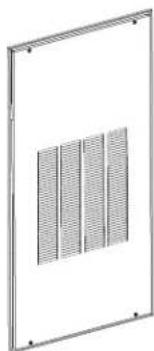
natural_image
Metal-framed panel with four vertical grout pattern (no text or symbols)natural_image
Line drawing of a 3D electrical connector with three leads (no text or symbols)natural_image
Technical line drawing of a mechanical connector with two leads (no text or symbols)natural_image
Technical line drawing of an electrical enclosure with wiring and a cylindrical component (no text or symbols)
natural_image
Technical line drawing of a mechanical device with internal wiring and mounting bracket (no text or symbols)| Limites de température - Froid | Limites de température - Chauffage |
| 0 = 60°F to 85°F 0 = 60°F to 65°F | |
| 1 = 64°F to 85°F 1 = 60°F to 70°F | |
| 2 = 66°F to 85°F 2 = 60°F to 72°F | |
| 3 = 68°F to 85°F 3 = 60°F to 74°F | |
| 4 = 70°F to 85°F 4 = 60°F to 76°F | |
| 5 = 72°F to 85°F 5 = 60°F to 78°F | |
| 6 = 74°F to 85°F 6 = 60°F to 80°F | |
| 7 = 76°F to 85°F 7 = 60°F to 85°F | |
CONFIGURATION DE L'UNITÉ / DU COMPRESSEUR POUR LES TESTS IEER
| Comp RPM Thermostat | |||
| A | 100% 380 | 0 W+B+GL+GH | |
| B | 75% 260 | 0 Y+GL+GH | |
| C | 50% 160 | 0 GH | |
| D | 25% 160 | 0 GH | |
Garant: GE Appliances, a Haier company
Louisville, KY 40225
Au Canada : Prodsupport.mabe.ca/crm/Products/ProductRegistration.aspx
Au Canada : Director, Consumer Relations, Mabe Canada Inc. | Suite 310, 1 Factory Lane | Moncton, N.B. E1C 9M3 GEAppliances.ca/en/contact-us
For your safety, the information in this manual must be followed to minimize the risk of fire, explosion, electric shock, age, personal injury, or loss of life.
SAFETY PRECAUTIONS
This Zoneline must be properly installed in accordance with the Installation Instructions before it is used. Zoneline Vertical units shall not be accessible to the room guest. See the Installation Instructions in the back of this manual.
NOTE: GEA strongly recommends that any servicing be performed by a qualified person.
■ All air conditioners contain refrigerants, which under federal law must be removed prior to product disposal. If you are getting rid of an old product with refrigerants, check with the company handling disposal about what to do.
■ These R410A air conditioning systems require contractors and technicians to use tools, equipment and safety standards approved for use with this refrigerant. DO NOT use equipment certified for R22 refrigerant only.
■ This unit is certified for installations up to 13,000 (3962m) feet above sea level.
■ This unit is not to be installed in a laundry room.
■ Children should be supervised to ensure that they do not play with the appliance.
This appliance is not intended for use by persons (including children) with reduced physical, sensory or mental capabilities, or lack of experience and knowledge, unless they have been given supervision or instruction concerning use of the appliance by a person responsible for their safety.
WARNING
natural_image
Technical line drawing of a mechanical device housing (no text or symbols)Unidad del Zoneline
natural_image
Diagram of a 3D rectangular block with internal holes and a central arrow, no text or symbols present.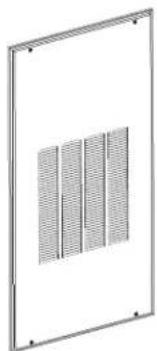
natural_image
Pure technical diagram of a rectangular frame with four vertical grout patterns, no text or symbols present.natural_image
Line drawing of a 3-pin electrical connector with curved leads (no text or symbols)natural_image
Pure technical line drawing of a mechanical assembly without any text, numbers, or symbolsnatural_image
Line drawing of a 3-pin electrical connector with three leads (no text or symbols)Mode 1 Smart Fan—Cooling/Heating
Press MODE until a 1 first appears in the first digit of the display for Smart Fan cool mode. To change to Smart Fan heat mode, press MODE again.
Press the - pad to set the indoor fan to cycle on/off in the heating or cooling mode selected "☐"
Press the + pad to set the indoor fan to run continuously in the heating or cooling mode selected "☐"
Press AUX to confirm your selection and exit AUX mode, or press MODE to continue setting other functions.
The default setting for Mode 1 is as follows:
Cooling: Continuous (ON)
Heating: Cycle (OFF)
*Note: In cyclic cooling mode, the indoor fan will activate occasionally to verify air temperature in the room. In cyclic heating mode, the fan will continue to operate for several seconds after the heating function has stopped in order to increase unit efficiency.


| Límites de Temperatura - Frío | Límites de Temperatura - Calor |
| 0 = 60°F to 85°F 0 = 60°F to 65°F | |
| 1 = 64°F to 85°F 1 = 60°F to 70°F | |
| 2 = 66°F to 85°F 2 = 60°F to 72°F | |
| 3 = 68°F to 85°F 3 = 60°F to 74°F | |
| 4 = 70°F to 85°F 4 = 60°F to 76°F | |
| 5 = 72°F to 85°F 5 = 60°F to 78°F | |
| 6 = 74°F to 85°F 6 = 60°F to 80°F | |
| 7 = 76°F to 85°F 7 = 60°F to 85°F |
All-
Electric
Heat OFF
All-
Electric
Heat ON
Makeup Air Off
Makeup Air Duct Closes
Makeup Air Speed 6
Three ways to register your appliance:


SCAN
this code with your smart-phone app

GO ONLINE
geappliances.com/register

COMPLETE & MAIL
this registration card
Mr. □ Mrs. □ Ms. □
First Name
Street Address
Email Address
We'll use your email address to send you information about your product, as well as discounts and other offers from GE Appliances
City
Month

Date appliance was installed or placed in use
GE Appliances takes your privacy seriously. All information you provide shall be held in strict accordance with the GE Appliances Privacy Policy. Read the full policy at www.geappliances.com/privacy/privacy_policy.htm.
geappliances.com/register
Revised 6/15
245D1499P001
Please place in envelope and mail to:
PRODUCT REGISTRATION DEPARTMENT
PO BOX 34980
LOUISVILLE KY 40232-4980
GE Appliances, a Haier company
Louisville, KY 40225
Soporte al Cliente
- SAFETY INFORMATION .... 3
- FEATURES OF THE ZONELINE
- CARE AND CLEANING
- INSTALLATION INSTRUCTIONS
- TROUBLESHOOTING TIPS
- CONSUMER SUPPORT
- OWNER'S MANUAL AND INSTALLATION INSTRUCTIONS
- THANK YOU FOR CHOOSING GE APPLIANCES.
- IMPORTANT SAFETY INFORMATION READ ALL INSTRUCTIONS BEFORE USING THE APPLIANCE
- WARNING
- SAFETY PRECAUTIONS
- About Your Heat Pump
- Do Not Operate the Air Conditioner (cool mode) in Freezing Outdoor Conditions
- Quick Heat Recovery
- Turn off the Zoneline and disconnect the power supply before cleaning.
- Air Filters
- Drain
- Indoor/Outdoor Coils
- Indoor-Air Coil
- Outdoor-Air Coil
- Base Pan
- RETURN AIR GRILLE INSTALLATION OPTIONS
- UTILITY CLOSET CONNECTION LOCATIONS
- IMPORTANT: Plan and locate plenum, drains and thermostat cable carefully to avoid interference. Hard-to-reach locations will make installation and service difficult!
- Reference Dimensions
- TYPICAL UTILITY CLOSET AND DIMENSIONS
- (For Reference Only)
- TYPE OF ELECTRIC CONNECTIONS
- External Disconnect
- Indoor Air Flow Data
- Ductwork
- DO NOT operate unit without a supply duct attached.
- Installation Preparation
- BEFORE YOU BEGIN
- IMPORTANT ELECTRICAL SAFETY—READ CAREFULLY
- RISK OF ELECTRIC SHOCK.
- ELECTRICAL REQUIREMENTS
- INSTALLATION SUMMARY
- Plan for proper electrical supply, drains and ductwork locations.
- Install the Louver and Wall Plenum
- Install and Level the Drain Platform
- Condensate Disposal System
- Installing the Zoneline
- Complete Connections
- Condensate
- raia. Complete Condensate Drain Connections (cont)
- Install Unit to Wall Plenum
- Connect the Top Ductwork
- Connect the Remote Thermostat
- Connect Auxiliary Features, if required
- Auxiliary Controls - Terminal Connections
- Central Desk Control (Field Supplied)
- Make electrical connections to unit
- ELECTRICAL CONNECTIONS - DIRECT CONNECT APPLICATIONS
- Electric Shock Hazard
- 208/230/265 Volt Electrical Supply
- FOR DIRECT CONNECT APPLICATIONS
- Remove Junction Box Cover
- Attach Conduit
- Make electrical connections to unit (cont)
- Make Wire Lead Connections Inside the Junction Box
- • 3-Phase 208 VAC
- • 3-Phase 265 VAC
- Install Filter
- Note: Use only one filter in the installation
- FINAL INSTALLATION CHECKLIST
- Turn Power On
- Adjust Auxiliary Control Settings, if required
- SERVICING
- To remove the unit from the closet.
- Auxiliary Controls – Aux Set Button
- Modes of the Auxiliary Control
- Mode 1 Smart Fan—Cooling/Heating
- Mode 3 Freeze Sentinel / Heat Sentinel
- Mode 4 Constant ON Fan
- Setting the auxiliary control
- Mode 5 Temperature Limiting
- Mode 6 Wall Thermostat
- Mode 7 Fan Boost Mode
- Mode 8 All-Electric Heat
- Mode 9 Heat Boost
- Mode 0 Digital Makeup Air Module Fan Speed
- Mode E Digital Makeup Air Module Occupancy
- Mode d Dehumidification
- Defaults
- Mode P Engineering Revision Setup
- UNIT/COMPRESSOR SETUP FOR IEER TESTING
- Full equation for defining compressor speed rpm:
- Example (W + B + GH):
- IEER Operation Instructions
- Things that are normal
- Normal Operating Sounds
- PING!
- POP!
- "CLICK"
- 3-Minute Delay
- SILENCE
- COMPRESSOR PROTECTION
- Troubleshooting Tips... Before you call for service
- FAULT CODES - Press and hold MODE, then press AUX
- CONSUMER PRODUCT OWNERSHIP REGISTRATION
- GE Appliances Vertical Zoneline Limited Warranty
- What GE Appliances Will Not Cover:
- GE Appliances Website
- Register Your Appliance
- Schedule Service
- Parts and Accessories
- Contact Us
- INFORMATION DE SÉCURITÉ...3
- UTILISATION DU ZONELINE
- CONFIGURATION DE L'UNITÉ / DU COMPRESSEUR POUR LES TESTS IEER
- Soporte al Cliente
Brand : GE
Model : AZ9VH12DBM
Category : Air Conditioning