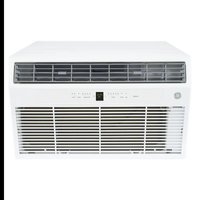
AKEQ12DCJ - Air Conditioning GE - Free user manual and instructions
Find the device manual for free AKEQ12DCJ GE in PDF.


| Product Type | Wall air conditioner (sleeve type) |
| Brand | GE |
| Model | AKEQ12DCJ |
| Cooling capacity | 12 000 BTU/h |
| Heating capacity | 12 000 BTU/h (AKEQ models only) |
| Power supply | 115 V, 60 Hz, 12 A |
| Dimensions (W x H x D) | 24 in x 14 in x 18 in (61 x 35.6 x 45.7 cm) |
| Weight | Approximately 30 kg |
| Operating modes | Cool, Heat (model dependent), Dry, Auto, Fan only |
| Fan speeds | Auto, Low, Med, High, Boost |
| Remote control | Yes (battery CR2025 included) |
| Timer | Programmable (0.5 to 24 h) |
| Air filter | Washable (clean every 250 h) |
| Temperature display | °C / °F (switchable) |
| Refrigerant | Flammable (type R32) |
| Safety | Grounded plug, cord-integrated differential circuit breaker |
| Warranty | 2 years parts and labor |
| Maintenance and cleaning | Washable filter with warm water, body cleanable with damp cloth |
| Spare parts | Available at GEApplianceparts.com |
| Repairability | Repair by qualified technician, do not repair components containing refrigerant |
Frequently Asked Questions - AKEQ12DCJ GE
User questions about AKEQ12DCJ GE
0 question about this device. Answer the ones you know or ask your own.
Ask a new question about this device
Download the instructions for your Air Conditioning in PDF format for free! Find your manual AKEQ12DCJ - GE and take your electronic device back in hand. On this page are published all the documents necessary for the use of your device. AKEQ12DCJ by GE.
USER MANUAL AKEQ12DCJ GE
SAFETY INFORMATION .... 3
USING THE AIR CONDITIONER....4
CARE AND CLEANING....7
INSTALLATION INSTRUCTIONS....8
TROUBLESHOOTING TIPS ..... 18
CONSUMER SUPPORT
Warranty 19 Consumer Support 20
OWNER'S MANUAL & INSTALLATION INSTRUCTIONS
Cool Only Models
AKCQ08ACJ
AKCQ10ACJ
AKCQ10DCJ
AKCQ12ACJ
AKCQ12DCJ
AKCQ14DCJ
Heat/Cool Models
AKEQ10DCJ
AKEQ12DCJ
AKEQ14DCJ
Write the model and serial numbers here:
Model # ____
Serial # ____
You can find the this information on a label attached to the right side of the chassis.
ESPAÑOL
For a Spanish version of this manual, visit our Website at www.GEAppliances.com.
For a French version of this manual, visit our Website at www.GEAppliances.ca.
THANK YOU FOR MAKING GE APPLIANCES A PART OF YOUR HOME.
Whether you grew up with GE Appliances, or this is your first, we're happy to have you in the family.
We take pride in the craftsmanship, innovation and design that goes into every GE Appliances product, and we think you will too. Among other things, registration of your appliance ensures that we can deliver important product information and warranty details when you need them.
Register your GE appliance now online. Helpful websites and phone numbers are available in the Consumer Support section of this Owner's Manual. You may also mail in the pre-printed registration card included in the packing material.

GE APPLIANCES
IMPORTANT SAFETY INFORMATION READ ALL INSTRUCTIONS BEFORE USING THE APPLIANCE
For your safety, the information in this manual must be followed to minimize the risk of fire, electric shock or personal injury.
■ Use this appliance only for its intended purpose as described in this Owner's Manual.
■ This air conditioner must be properly installed in accordance with the Installation Instructions before it is used.
■ Never unplug your air conditioner by pulling on the power cord. Always grip plug firmly and pull straight out from the receptacle.
■ Replace immediately all electric service cords that have become frayed or otherwise damaged. A damaged power supply cord must be replaced with a new power supply cord obtained from the manufacturer and not repaired. Do not use a cord that shows cracks or abrasion damage along its length or at either the plug or connector end.
■ Turn the unit OFF and unplug your air conditioner before cleaning.
■ For your safety...do not store or use combustible materials, gasoline or other flammable vapors or liquids in the vicinity of this or any other appliance.
■ If the receptacle does not match the plug, the receptacle must be changed out by a qualified electrician.
■ GEAppliances does not support any servicing of sealed system components (i.e. refrigerant containing parts) in the air conditioner.
■ Service of all other components may ONLY be completed by a qualified technician.
■ This appliance is not intended for use by persons (including children) with reduced physical, sensory or mental capabilities or lack of experience and knowledge, unless they have been given supervision or instruction concerning use of the appliance by a person responsible for their safety.
■ Children should be supervised to ensure that they do not play with the appliance.
■ Do not operate your air conditioner in a wet room such as a bathroom or laundry room.
■ The appliance shall be stored so as to prevent mechanical damage from occurring.
USE OF EXTENSION CORDS
RISK OF FIRE. Could cause serious injury or death.
■ DO NOT use an extension cord with this air conditioner.
■ DO NOT use surge protectors or multi-outlet adaptors with this air conditioner.
HOW TO CONNECT ELECTRICITY
Do not, under any circumstances, cut or remove the third (ground) prong from the power cord. For personal safety, this appliance must be properly grounded.
DO NOT use an adapter plug with this appliance.
The power cord of this appliance is equipped with a 3-prong (grounding) plug which mates with a standard 3-prong (grounding) wall outlet to minimize the possibility of electric shock hazard from this appliance.
Power cord includes a current interrupter device. A test and reset button is provided on the plug case. The device should be tested on a periodic basis by first pressing the TEST button and then the RESET button while plugged into the outlet. If the TEST button does not trip or if the RESET button will not stay engaged, discontinue use of the air conditioner and contact a qualified service technician. Have the wall outlet and circuit checked by a qualified electrician to make sure the outlet is properly grounded.
Where a 2-prong wall outlet is encountered, it is your personal responsibility and obligation to have it replaced with a properly grounded 3-prong wall outlet.
The air conditioner should always be plugged into its own individual electrical outlet which has a voltage rating that matches the rating plate.
This provides the best performance and also prevents overloading house wiring circuits which could cause a fire hazard from overheated wires.
See the Installation Instructions, Electrical Requirements section for specific electrical connection requirements.
READ AND SAVE THESE INSTRUCTIONS
IMPORTANT SAFETY INFORMATION READ ALL INSTRUCTIONS BEFORE USING THE APPLIANCE
WARNING
Chemical Burn Hazard. Keep batteries away from children.
■ This product contains a lithium button/coin cell battery. If a new or used lithium button/coin cell battery is swallowed or enters the body, it can cause severe internal burns and can lead to death in as little as 2 hours. Always completely secure the battery compartment. If the battery compartment does not close securely, stop using the product, remove the batteries, and keep it away from children.
■ If you think batteries might have been swallowed or placed inside any part of the body, seek immediate medical attention.
■ The cells shall be disposed of properly, including keeping them away from children.
■ Even used cells may cause injury.
WARNING
Risk of Fire or Explosion. This unit contains flammable refrigerant. Additional safety precautions must be followed.
■ Do not use means to accelerate the defrosting process or to clean, other than those recommended by the manufacturer.
■ The appliance shall be stored in a room without continuously operating ignition sources (for example: open flames, an operating gas appliance or an operating electric heater.
■ Do not pierce or burn refrigerant tubing. Be aware that refrigerants may not contain an odor.
- Keep ventilation openings clear of obstruction.
■ When handling, installing, and operating the appliance, care should be taken to avoid damage to the refrigerant tubing.
■ Do not drill holes in the unit.
■ Maintenance, cleaning, and service should only be performed by technicians properly trained and qualified in the use of flammable refrigerants.
■ GEAppliances does not support any servicing of sealed system components (i.e. refrigerant containing parts) in the air conditioner.
■ Dispose of air conditioner in accordance with Federal and Local Regulations. Flammable refrigerants require special disposal procedures. Contact your local authorities for the environmentally safe disposal of your air conditioner.
For appliance recycling information please visit GEAppliances.com/recycling.
FCC Compliance Statement:
The device complies with Part 15 of the FCC Rules. Operation is subject to the following two conditions:
1. This device may not cause harmful interference.
2. This device must accept any interference received, including interference that may cause undesired operation.
READ AND SAVE THESE INSTRUCTIONS
Using the Air Conditioner - Controls
Appearance may vary.
Temp/Timer
Air Conditioner Controls
Lights above the touch pads on the air conditioner control panel indicate the selected settings.
1. POWER
Turns air conditioner on and off.
2. Display
Displays the temperature setting. Displays hours when setting the timer.
3. Mode
Use to set COOL, HEAT (on some models), DRY, AUTO, or FAN modes. Indicator lights on the controls will show the mode selected.
4. Temp Increase + / Decrease - Pads
Use to set temperature when in AUTO, COOL, DRY or HEAT (on some models) mode.
5. Fan Speed
Use to set the fan speed at LOW, MEDIUM, or HIGH. Indicator lights will show the speed selected.
6. Timer
ON - Use to set the air conditioner to automatically turn ON from 0.5 to 24 hours later.
OFF - Use to automatically turn the air conditioner OFF from 0.5 to 24 hours later.
7. Filter
Monitors accumulated fan run time as a reminder to clean the filter.
8. Eco
ON: Use to cycle the fan off when the compressor cycles off.
OFF: Use to run the fan continuously when in cooling or heating (on some models) mode.
9. Sleep
Allows room temperature to increase (Cool mode) or decrease (Heat mode) during sleeping hours.
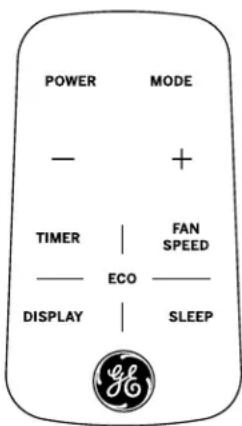
Remote Control
■ To ensure proper operation, aim the remote control at the signal receiver on the air conditioner.
■ The remote control signal has a range up to 21 feet.
■ Make sure nothing is between the air conditioner and the remote control that could block the signal.
■ Make sure the battery is fresh and installed correctly—see the Care and Cleaning section.
Using the Air Conditioner - Features
To Adjust Fan Speeds
Press the Fan Speed button to select the FAN Speed in four steps - Auto, Low, Med, or High. Each time the button is pressed, the fan speed mode is shifted.
For some models, the fan speed can not be adjusted under HEAT mode. In DRY mode, the fan speed is controlled at low automatically.
Sleep
Press the Sleep button to initiate the sleep mode. In this mode, the selected temperature will increase (cooling) or decrease (heating) by 2^ F / 1^ C 30 minutes after the mode is selected. The temperature will then increase (cooling) or decrease (heating) by another 2^ F / 1^ C after an additional 30 minutes.
This new temperature will be maintained for 7 hours before it returns to the originally selected temperature. This ends the Sleep mode and the unit will continue to operate as originally programmed. The Sleep mode program can be cancelled at any time during operation by pressing the Sleep button again.
Check Filter
Press the Filter button to initiate this feature. This feature is a reminder to clean the air filter for more efficient operation.
The LED (light) will illuminate after 250 hours of operation. To reset after cleaning the filter, press the Filter button and the light will go off.
Eco - Energy Saver
Press the Eco button to initiate this feature. This feature is available on COOL, DRY, AUTO, (only AUTO-COOLING and AUTO-FAN) modes. The fan will continue to run for 3 minutes after the compressor shuts off.
The fan then cycles on for 2 minutes at 10 minute intervals until the room temperature is above the set temperature, at which time the compressor turns back on and Cooling starts.
To Select the Operating Mode
To choose operating mode, press the Mode button. Each time you press the button, a mode is selected in a sequence that goes from AUTO, COOL, DRY, HEAT (on some models) and FAN only. The indicator light above will be illuminated and remain on once the mode is selected.
The unit will initiate the Energy Saver function under COOL, DRY, AUTO (only AUTO-COOLING and AUTO-FAN) modes.
To Operate on Auto Feature:
■ When you set the air conditioner in AUTO mode, it will automatically select cooling, heating (on some models) or fan only operation depending on what temperature you have selected and the room temperature.
■ The air conditioner will control room temperature automatically to the temperature set point.
■ In this mode, the fan speed cannot be adjusted, it starts automatically at a speed according to the room temperature.
To Operate on Fan Only:
■ Use this function only when cooling is not desired. You can choose any fan speed you prefer.
■ During this function, the display will show the actual room temperature, not the set temperature in the cooling mode.
■ In Fan only mode, the temperature is not adjustable.
To Operate on Dry Mode:
In this mode, the air conditioner will generally operate in the form of a dehumidifier. Since the conditioned space is a closed or sealed area, some degree of cooling will continue.
Timer: Auto Start / Stop
■ When the unit is on or off, first press the Timer button, the TIMER ON indicator light illuminates. It indicates the Auto Start program is initiated.
■ When the time of TIMER ON is displayed, press the Timer button again, the TIMER OFF indicator light illuminates. It indicates the Auto Stop program is initiated.
- Press or hold the + or - button to change the Auto time by 0.5 hour increments, up to 10 hours, then at 1 hour increments up to 24 hours. The control will count down the time remaining until start.
■ The selected time will register in 5 seconds, and the system will automatically revert back to display the previous temperature setting or room temperature when the unit is on. (When the unit is off, there is no display.)
■ Turning the unit ON or OFF at any time or adjusting the timer setting to 0.0 will cancel the Auto Start/Stop timed program.
To change the temperature display from Fahrenheit to Celsius, press - and + together and hold for 5 seconds.
Using the Air Conditioner - Features
Additional Features
The “Cool” circuit has an automatic 3 minute delayed start if the unit is turned off and on quickly. This prevents overheating of the compressor and possible circuit breaker tripping. The fan will continue to run during this time.
There is a 2 second delay for the compressor to stop when selecting FAN ONLY/HEAT. This is to cover the possibility of having to roll through to select another mode.
Air Direction
Air directional louvers control air flow direction.
The louvers will allow you to direct the air flow up or down and left or right throughout the room as needed until the desired left/right direction is obtained. Pivot horizontal louvers until the desired up/down direction is obtained.
The control will maintain the set temperature within 1^ F between 62^ F and 86^ F in cool or heat mode (on some models).
After a power outage, the unit will remember last setting and return the unit to that setting when power is restore.
Care and Cleaning
Air filter
To access the filter, grasp the front grille on both sides at the recess and tilt forward. Remove the filter by lifting up and out. Note the filter direction when re-installing.
Wash the filter using liquid dishwashing detergent and warm water. Rinse the filter thoroughly. Gently shake excess water from the filter.
Be sure the filter is thoroughly dry before replacing. Or, instead of washing, you may vacuum the filter until clean.
NOTE: Never use hot water over 104^ F ( 40^ C) to clean the air filter. Never attempt to operate the unit without the air filter.
Energy Saving Note
In order to reach maximum energy saving and comfort, it is recommended to use a cover to insulate the unit when the unit is not in use. The recommended cover size for the unit is 24.4" x 14.8" x 2.2" (W x H x D).
NOTE: Unplug the unit before installing a cover.
Cabinet
- Be sure to unplug the air conditioner to prevent shock or fire hazard. The cabinet and front may be dusted with an oil-free cloth or washed with a cloth dampened in a solution of warm water and mild liquid dishwashing detergent. Rinse thoroughly with a damp cloth and wipe dry.
- Never use harsh cleaners, wax, or polish on the cabinet front.
- Be sure to wring excess water from the cloth before wiping around the controls. Excess water in or around the controls may cause damage to the air conditioner.
- Plug in the air conditioner.
Outdoor Coils
- The coils on the outdoor side of the air conditioner should be checked regularly.
- If they are clogged with dirt or soot, they may need to be professionally cleaned, a service available through GE Appliances service or other service companies.
How to Insert the Batteries in the Remote Control
- Remove the battery cover by sliding the locking tab to the left and pulling the battery cover out of the remote.
- Insert a new battery, making sure that the (+) and (-) of the battery are installed correctly, (+) side up.
- Reattach the cover by sliding it back into the remote.
NOTES:
- Use 1 CR2025 (3 VDC) battery. Do not use rechargeable batteries.
- Remove the battery from the remote control if the system is not going to be used for an extended period of time.
Front Grille Removal
The front grille can be removed for a more thorough cleaning.
To remove:
- Grasp the sides of the front grille by the recessed areas on each side and tilt forward.
- Remove the filter by pulling forward and out.
- Remove the two Phillips head screws located on the upper corners of the grille.
-
Push inward on each side of the metal chassis cover about 5" from the bottom. This will release the tabs on the grille from the metal chassis cover. Pull the bottom of the grille slightly forward while lifting the grille upward.
-
Once the grille is released, gently raise it upward to release the tabs from the top of the metal chassis cover.
- To release the multi-pin electrical connector from the user interface, press both sides and gently pull apart.
Reverse the order to re-install the grille.
For more help, visit GEAppliances.com
BEFORE YOU BEGIN
Read these instructions completely and carefully.
- IMPORTANT — Save these instructions for local inspector's use.
- IMPORTANT — Observe all governing codes and ordinances.
- Note to Installer – Be sure to leave these instructions with the consumer.
- Note to Consumer – Keep these instructions for future reference.
- Skill level – Installation of this appliance requires basic mechanical skills.
- Completion time – Approximately 1 hour
- We recommend that two people install this product.
- Proper installation is the responsibility of the installer.
- Product failure due to improper installation is not covered under the Warranty.
- You MUST use proper installation procedures as described in these instructions when installing this air conditioner.
ELECTRICAL REQUIREMENTS
CAUTION
- Do not, under any circumstances, cut or remove the third (ground) prong from the power cord.
- Do not change the plug on the power cord of this air conditioner.
- Aluminum house wiring may present special problems—consult a qualified electrician.
Power cord includes a current interrupter device. A TEST and RESET button are provided on the plug case. The device should be tested on a periodic basis by first pressing the TEST button and then the RESET button while plugged into the outlet. If the TEST button does not trip or if the RESET button will not stay engaged, discontinue use of the air conditioner and contact a qualified service technician.
IMPORTANT NOTE
For optimal energy efficiency and performance, we recommend using the RAB24 Wall Sleeve and the supplied stamped aluminum outdoor grille or the RAB26A with the RAG13 stamped aluminum outdoor grille.
For Existing Wall Sleeves
Note that the air conditioner dimensions are: 24" wide, 14" high, and 18" deep (without front). Install air conditioner according to these Installation Instructions to achieve the best performance. Save these Installation Instructions for future reference.
NOTE: Do not use any screws other than those specified here.
Parts Included
You may not need all parts in the kit. Discard unused parts.
| Name Spec. Qty | ||
| Tapered spacer Blocks 17" | long 2 | |
| Centering/Support Blocks | 4-1/2" x 3-1/2" x 1-1/2" | 4 |
| Plastic Divider 1/8" x 4-1/2" | x 14-1/2" 2 | |
| Stuffer Seal | 1" x 1-1/2" x 84" | 1 |
| Seal | 1" x 1-1/2" x 14" | 3 |
| Seal | 1" x 3/8" x 25" | 2 |
| Seal | 1" x 3/8" x 14" | 3 |
| Seal | 1" x 3/4" x 14" | 2 |
| Seal | 2 | |
| Trim Frame (side legs) | 2 | |
| Trim Frame (top & bottom legs) | 2 | |
| Ground Wire (green) | 1 | |
| Toothed Washer for grounding screw | 2 | |
| Grounding Screw | 1 | |
| Grille (Plastic) | 1 | |
| Grille (Aluminum) | 1 | |
| Nuts (Plastic) | 4 | |
| Screw Washer | 4 | |
| Screw | 4 | |
| Security Brackets for a 24" Wall Sleeve | (in separate packetS with 4 mounting screws) | 2 |
| Security Brackets for a 26" Wall Sleeve | 2 |
How to Install In Pre-Existing Wall Sleeve
- Identify the wall-sleeve brand for your installation, from the chart below.
| Wall Sleeve Dimensions (inches) | |||
| Width Height Depth | |||
| White-Westinghouse | 25-1/2 | 15-1/4 16, 17 | -1/2 or 22 |
| Frigidaire | |||
| Carrier (52F Series) | |||
| GE/Hotpoint | 26 15-5/8 | 15-7/8 | |
| Whirlpool | 25-7/8 | 16-1/2 17-1/8 or 23 | |
| Fedders/Emerson | 27 16-3/4 | 16-3/4 or 19-3/4 | |
| Sears/Kenmore | 25-3/4 | 16-7/8 18-5/8 | |
| Carrier (51S Series) | |||
| Emerson/Fedders | 26-3/4 | 15-3/4 15 | |
| Friedrich | 27 16-3/4 | 16-3/4 | |
NOTE: All wall sleeves used to mount the new air conditioner must be in sound structural condition and have a rear grille that securely attaches to sleeve, or rear flange that serves as a stop for the air conditioner.
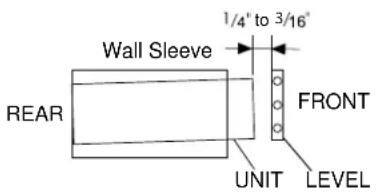
IMPORTANT: When installation is complete, replacement unit MUST have a rearward slope as shown.
- Remove old air conditioner from wall sleeve and prepare wall sleeve as follows:
■ Clean interior (do not disturb seals).
■ Wall sleeve must be securely fastened in wall before installing air conditioner. Drive more nails or screws through sleeve, into wall, if needed.
■ Repair paint if needed.
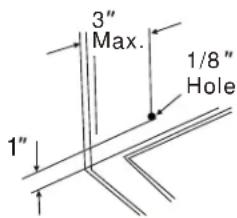
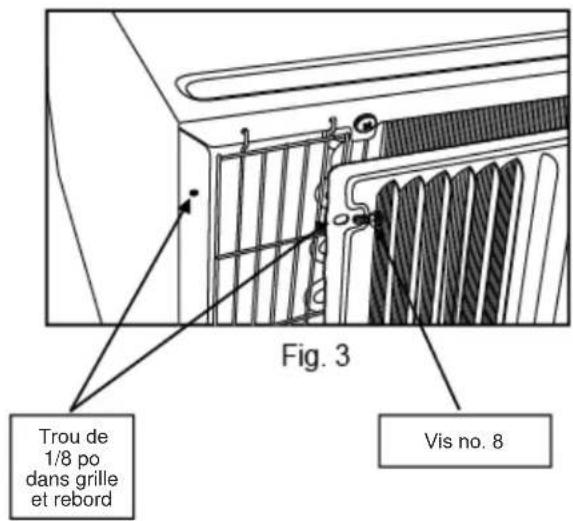
- If not pre-existing, drill a 1/8" hole to attach the supplied grounding wire to the left side of the wall sleeve (see approximate hole location dimensions in the illustration below). Use the toothed washer and pointed screw to attach one end of the supplied green striped ground wire to the inside of the wall sleeve. The toothed washer must be between the eyelet of the wire and the wall sleeve. BE CAREFUL TO NOT OVERTIGHTEN THE SCREW. Pull loose end of ground wire out front of sleeve, and temporarily bend it down and around lower edge of sleeve. This ground wire will later be attached to frame of air conditioner once it
- Prepare the wall sleeve for installation of the new unit per the following brand instructions.
| 1 Emerson | 15" Deep |
| 2 Fedders | 19-3/4" Deep |
| 3 Fedders or Friedrich | 16-3/4" Deep |
| 4 GE/Hotpoint | 16-7/8" Deep |
| 5 Sears or Carrier (51S Series) | 18-5/8" Deep |
| 6 Whirlpool | 17-1/8" Deep |
| 7 Whirlpool | 28" Deep |
| 8 White-Westinghouse/ Frigidaire/Carrier (52F Series) | 16" + 17-1/2" Deep |
| 9 White-Westinghouse/Frigidaire | 22" Deep |
- Identify your wall sleeve type and follow the instructions for that type in the following pages.
IMPORTANT - BEFORE YOU BEGIN
- This unit's performance characteristics result from having two rear air intakes.
■ It is very important that these instructions are followed so the unit can operate at maximum efficiency.
If this is an existing sleeve and there is an existing rear grille, it may need to be replaced by one that has been shipped with the unit in the accessory kit. If the new rear grille is too small for the rear sleeve opening, use the black plastic grille. Insure it is secured in place using the included screws, washers and grommets.
FOR INCREASED EFFICIENCY, UTILIZE THE PROVIDED LOUVERED REAR PANEL
Installation of new grille provided with unit.
- Remove the existing grille. (Exception: GE 26".)
- Place the grille, included with the new air conditioner, towards the rear of the sleeve.
- Mark through the hole positions.
- Drill through the sleeves flanges with a 1/8" drill bit.
- Attach the new grille with self-threading screws and washers.
- It is VERY IMPORTANT that the grille is placed exactly as shown below.
- Most decorative exterior grilles may be left in place as long as the proper interior air direction grille is installed.
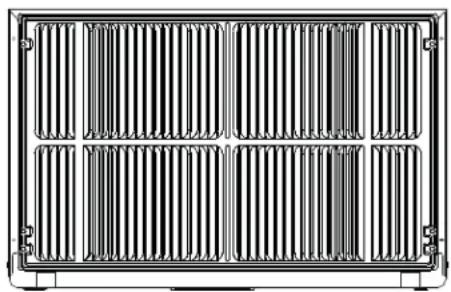
natural_image
Front view of a rectangular industrial or thermal grid structure with vertical slats and mounting brackets (no text or symbols)Emerson (15" Deep)
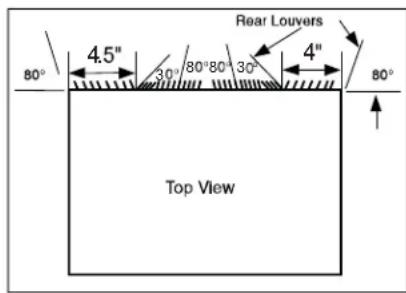
- Remove existing rear grille as shown on page 9 of this manual and replace with provided louvered rear panel.
NOTE: You may need to drill holes in flange of existing sleeve to match new rear grille.
- Attach (1) 1" x 3/8" x 25" long seal in the center at the top of the sleeve. Remove the backing paper and press into position.
- Attach the (2) 1" x 3/8" x 14" long seals to the left and right sides of the sleeve.
- Cut (2) 1" x 3/8" x 25" seals to 14" long and attach them to the vertical sections of the rear grille.
- Attach (2) 4-1/2" x 3-1/2" x 1-1/2" centering/support blocks, one on each side wall. Place in center of side wall with the tapered end facing the opening.
- Gently slide unit into sleeve.
- Before sliding all-the-way back, remove the second screw from front on the left side of unit.
- Remove the plastic washer from the screw.
- Screw and attach the other end of the ground wire to the unit. Make sure that the toothed washer is against the cabinet.
- Slide the unit completely to the rear to ensure a good seal, making sure the ground wire does not become tangled.
- If you have difficulty with mounting the grill to the sleeve, follow the instructions for direct mounting on page 15.
- Seal and frame the unit as described on page 16.
Fedders (19-3/4" Deep)
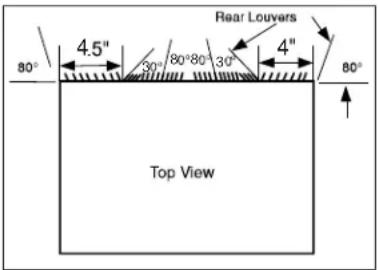
- Remove existing rear grille as shown on page 9 of this manual and replace with provided louvered rear panel.
NOTE: You may need to drill holes in flange of existing sleeve to match new rear grille.
- Attach (2) 4-1/2" x 3-1/2" x 1-1/2" centering/support blocks, one on each side wall. Place in center of side wall with the tapered end facing the opening.
- Cut (2) 17" tapered spacer blocks as shown below into two pieces.
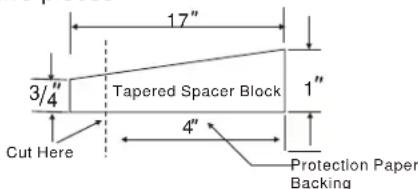
- The 4" section is placed in front of the rib on base with the tapered end facing the back of the sleeve. The remaining portion will be placed behind the rib again sloping toward the rear of the sleeve. This helps induce a rearward slope on the unit.
- Attach (1) 1" x 3/8" x 25" long seal in the center at the top of the sleeve. Remove the backing paper and press into position.
- Attach (2) 1" x 3/8" x 14" seals to the left and right sides of the sleeve.
- Cut (2) 1" x 3/8" x 25" seals to 14" long and attach them to the vertical sections of the rear grille.
- Gently slide unit into sleeve.
- Before sliding all-the-way back, remove the second screw from front on left side of unit.
- Remove the plastic washer from the screw.
- Screw and attach the other end of the ground wire to the unit. Make sure that the toothed washer is against the cabinet.
- Slide the unit completely to the rear to ensure a good seal, making sure the ground wire does not become tangled.
- If you have difficulty with mounting the grill to the sleeve, follow the instructions for direct mounting on page 15.
- Seal and frame the unit as described on page 16.
Fedders or Friedrich (16-3/4" Deep)
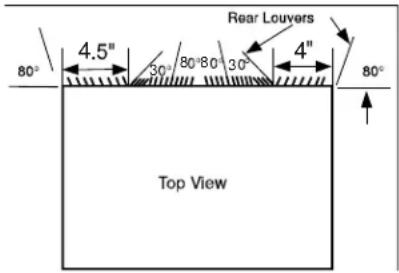
- Remove existing rear grille as shown on page 9 of this manual and replace with provided louvered rear panel.
NOTE: You may need to drill holes in flange of existing sleeve to match new rear grille. - Attach (2) 4-1/2" x 3-1/2" x 1-1/2" centering/support blocks, one on each side wall. Place in center of side wall with the tapered end facing the opening.
- Cut (2) 17" tapered spacer blocks as shown below into three pieces.
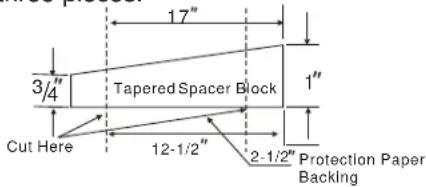
- The 2-1/2" section is placed in front of the rib on base with the tapered end facing the back of the sleeve. Cut the remaining portion to 12-1/2" and placed behind the rib again sloping toward the rear of the sleeve. This helps induce a rearward slope on the unit.
- Attach (1) 1" x 3/8" x 25" long seal in the center at the top of the sleeve. Remove the backing paper and press into position.
- Attach (2) 1" x 3/8" x 14" seals to the left and right sides of the sleeve.
- Cut (2) 1" x 3/8" x 25" seals to 14" long and attach them to the vertical sections of the rear grille.
- Gently slide unit into sleeve.
- Before sliding all-the-way back, remove the second screw from front on left side of unit.
-
Remove the plastic washer from the screw.
-
Screw and attach the other end of the ground wire to the unit. Make sure that the toothed washer is against the cabinet.
- Slide the unit completely to the rear to ensure a good seal, making sure the ground wire does not become tangled.
- If you have difficulty with mounting the grill to the sleeve, follow the instructions for direct mounting on page 15.
- Seal and frame the unit as described on page 16.
GE/Hotpoint (16-7/8" Deep)
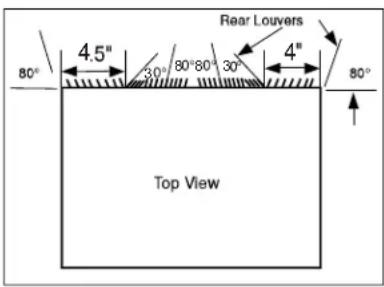
- Retain existing rear grille.
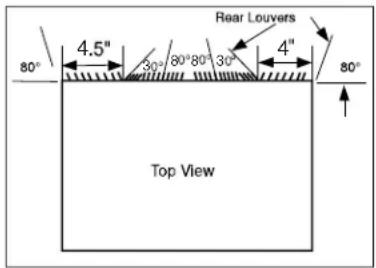
- Using needle nose pliers, change the outdoor grille directional louvers per the illustration above.
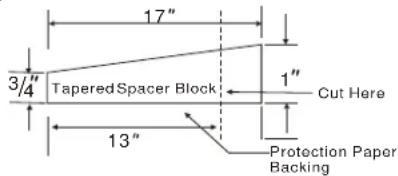
- Cut (2) 17" tapered spacer blocks as shown below into two pieces.
-
Install 13" section with the tapered end 1/2" from the back of the sleeve. This helps induce a rearward slope on the unit.
-
Attach (1) 1" x 3/8" x 25" long seal in the center at the top of the sleeve. Remove the backing paper and press into position.
-
Attach (2) 1" x 3/8" x 14" seals to the left and right sides of the sleeve.
-
Cut (2) 1" x 3/8" x 25" seals to 14" long and attach them to the vertical sections of the rear grille.
-
Center unit and gently slide unit into sleeve.
-
Before sliding all-the-way back, remove the second screw from front on left side of unit.
-
Remove the plastic washer from the screw.
-
Screw and attach the other end of the ground wire to the unit. Make sure that the toothed washer is against the cabinet.
-
Slide the unit completely to the rear to ensure a good seal, making sure the ground wire does not become tangled.
-
If you have difficulty with mounting the grill to the sleeve, follow the instructions for direct mounting on page 15.
-
Seal and frame the unit as described on page 16.
Sears or Carrier 51S Series (18-5/8" Deep)
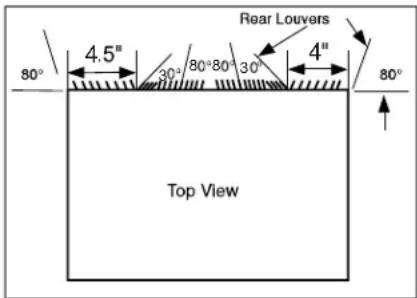
- Remove existing rear grille as shown on page 9 of this manual and replace with provided louvered rear panel.
NOTE: You may need to drill holes in flange of existing sleeve to match new rear grille.
-
Install (2) tapered spacer blocks to the floor of the sleeve. This helps induce a rearward slope on the unit.
-
Install with the tapered end 1/2" from the back of the sleeve. This helps induce a rearward slope on the unit.
-
Attach (1) 1" x 3/8" x 25" long seal in the center at the top of the sleeve. Remove the backing paper and press into position.
-
Attach (2) 1" x 3/8" x 14" seals to the left and right sides of the sleeve.
-
Cut (2) 1" x 3/8" x 25" seals to 14" long and attach them to the vertical sections of the rear grille.
-
Center unit and gently slide unit into sleeve.
-
Before sliding all-the-way back, remove the second screw from front on left side of unit.
-
Remove the plastic washer from the screw.
-
Screw and attach the other end of the ground wire to the unit. Make sure that the toothed washer is against the cabinet.
-
Slide the unit completely to the rear to ensure a good seal, making sure the ground wire does not become tangled.
-
If you have difficulty with mounting the grill to the sleeve, follow the instructions for direct mounting on page 15.
-
Seal and frame the unit as described on page 16.
Whirlpool (17-1/8" Deep)
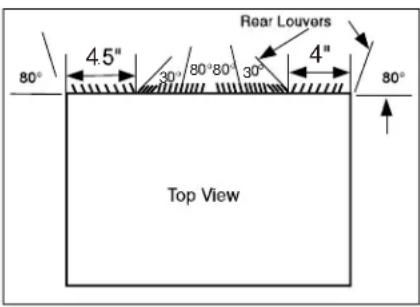
- Remove existing rear grille as shown on page 9 of this manual and replace with provided louvered rear panel.
NOTE: You may need to drill holes in flange of existing sleeve to match new rear grille.
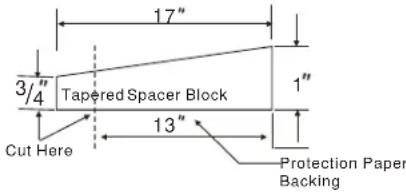
- Cut (2) 17" tapered spacer blocks as shown below into two pieces.
-
Install 13" section to the floor of the sleeve. This helps induce a rearward slope on the unit.
-
Attach (1) 1" x 3/8" x 25" long seal in the center at the top of the sleeve. Remove the backing paper and press into position.
-
Attach (2) 1" x 3/8" x 14" seals to the left and right sides of the sleeve.
-
Cut (2) 1" x 3/8" x 25" seals to 14" long and attach them to the vertical sections of the rear grille.
-
Center unit and gently slide unit into sleeve.
-
Before sliding all-the-way back, remove the second screw from front on left side of unit.
-
Remove the plastic washer from the screw.
-
Screw and attach the other end of the ground wire to the unit. Make sure that the toothed washer is against the cabinet.
-
Slide the unit completely to the rear to ensure a good seal, making sure the ground wire does not become tangled.
-
If you have difficulty with mounting the grill to the sleeve, follow the instructions for direct mounting on page 15.
-
Seal and frame the unit as described on page 16.
Whirlpool (23" Deep)
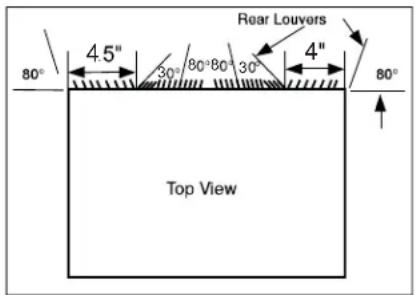
- Remove existing rear grille as shown on page 9 of this manual and replace with provided louvered rear panel.
NOTE: You may need to drill holes in flange of existing sleeve to match new rear grille.
Because of the increased unit depth, first try dry fitting using the method described below:
- Place (2) 1" x 1-1/2" x 14" seals against each side.
- Gently slide unit in and check if amount extending from the sleeve is sufficient once the trim frame is attached.
- If position is correct, remove unit and proceed to the next step. If not, go to step 9.
- Attach (1) 1" x 1-1/2" x 25" long seal in the center at the top of the sleeve. Remove the backing paper and press into position.
- Attach (2) 1" x 1-1/2" x 14" seals to the left and right sides of the sleeve.
- Cut (2) 1" x 3/8" x 25" seals to 14" long and attach them to the vertical sections of the grille.
- Attach the tapered spacer blocks to the floor of the sleeve. Now go to step 15.
Use these next steps if the unit requires extra extension into the room:
- Attach 1" x 3/4" x 14" long seal over the solid vertical portion of the rear grille.
- Attach (4) 4-1/2" x 3-1/2" x 1-1/2" foam blocks with the slot overlapping the seal above.
- Install the divider into the slots of the foam blocks. You may need to trim the length to size.
- Repeat steps 9-11 for the other vertical portion of the grille.
- Attach (2) 1" x 1-1/2" x 14" seals along the sides of the sleeve again making sure all seals are flush.
- Cut the 1" x 1-1/2" x 25" seal to fit the top of the sleeve. The pieces must be fitted flush to the edge of the divider.
Whirlpool (23" Deep) (cont)
- Center unit and gently slide unit into sleeve.
- Before sliding all-the-way back, remove the first screw from front on left side of unit.
- Remove the plastic washer from the screw.
- Screw and attach the other end of the ground wire to the unit. Make sure that the toothed washer is against the cabinet.
- Slide the unit completely to the rear to ensure a good seal, making sure the ground wire does not become tangled.
- If you have difficulty with mounting the grill to the sleeve, follow the instructions for direct mounting on page 15.
- Seal and frame the unit as described on page 16.
White-Westinghouse/Frigidaire/Carrier 52F Series (16" + 17-1/2" Deep)
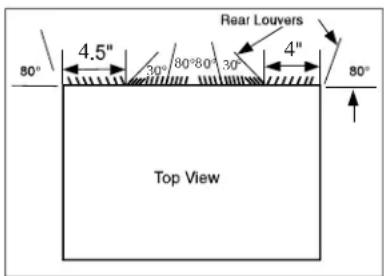
- Remove existing rear grille as shown on page 9 of this manual and replace with provided louvered rear panel.
NOTE: You may need to drill holes in flange of existing sleeve to match new rear grille. - Attach (1) 1" x 3/8" x 25" long seal in the center at the top of the sleeve. Remove the backing paper and press into position.
- Attach (2) 1" x 3/8" x 14" seals to the left and right sides of the sleeve.
- Attach (2) 1" x 3/4" x 14" long seals vertically 4.5" from the left side of the sleeve and 4" from the right side of the sleeve.
- Center unit and gently slide unit into sleeve.
- Before sliding all-the-way back, remove the second screw from front on left side of unit.
- Remove the plastic washer from the screw.
- Screw and attach the other end of the ground wire to the unit. Make sure that the toothed washer is against the cabinet.
- Slide the unit completely to the rear to ensure a good seal, making sure the ground wire does not become tangled.
- If you have difficulty with mounting the grill to the sleeve, follow the instructions for direct mounting on page 15.
- Seal and frame the unit as described on page 16.
White-Westinghouse or Frigidaire (22" Deep)
- Remove existing rear grille as shown on page 9 of this manual and replace with provided louvered rear panel.
NOTE: You may need to drill holes in flange of existing sleeve to match new rear grille.
Because of the increased unit depth, first try dry fitting using the method described below:
- 3ODFH ' [ ' [ ' VHDOV
- Gently slide unit in and check if amount extending from the sleeve is sufficient once the trim frame is attached.
- If position is correct, remove unit and proceed to the next step. If not, go to step 8.
- \$WWDFK ' [ ' [ ' ORQJ and right side of the sleeve.
- &XW [ ] VHDO WR them vertically to the rear grill 4.5" from the left side of the sleeve and 4" from the right side of the sleeve.
- \$WWDFK ' [ ' [ ' ORQ] the top of the sleeve. Remove the backing paper and press into position. Proceed to step 14.
Use these next steps if the unit requires extra extension into the room.
White-Westinghouse or Frigidaire (22" Deep) (cont)
- \$WWDFK ' [ ' [ ' ORQJ VHDO RYHU WI portion of the rear grille.
- \$WWDFK ' [ ' [ ' IRD the slot overlapping the seal above.
- Install the divider into the slots of the foam blocks. You may need to trim the length to size.
- Repeat steps 8-10 for the other vertical shown portion of the grille.
- \$WWDFK ' [ ' [ ' VHDOV DOR the sleeve again making sure all seals are flush.
- &XW WKH ' [ ' [ ' VHDO WR ILW sleeve. The pieces must be fitted flush to the edge of the divider.
- Center unit and gently slide unit into sleeve.
- Before sliding all-the-way back, remove the first screw from the front on left side of the unit.
- Remove the plastic washer from the screw.
- Screw and attach the other end of the ground wire to the unit. Make sure that the toothed washer is against the cabinet.
- Slide the unit completely to the rear to ensure a good seal, making sure the ground wire does not become tangled. VLGH
- If you have difficulty with mounting the grill to the sleeve follow the instructions for direct mounting on page 15.
- Seal and frame the unit as described on page 16. DO LQ WKH FHQWHU DW
Direct Unit Mounting:
The previous directions are the preferable way to mount the new rear grille. The units performance is slightly better and the possibility of drafts is reduced. As a last resort, direct mounting of the grille to the unit can be considered.
NOTE: The grille must be installed prior to inserting the unit into the sleeve.
- Attach the 2 seal pieces (1" x 3/8" x 14") as shown in the illustration.
- Position the grille over the rear of the unit making sure that:
a. The double set of screw holes are at the bottom.
b. The fins of the grille are pointed away from the unit.
- Align the top of the grille with the top of the unit. The overhang on each side should be equal.
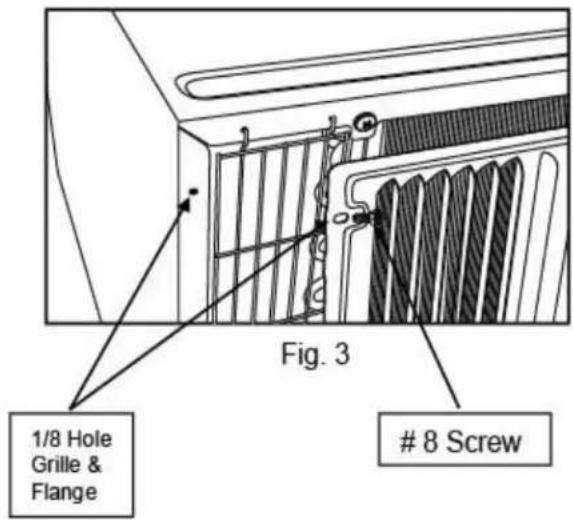
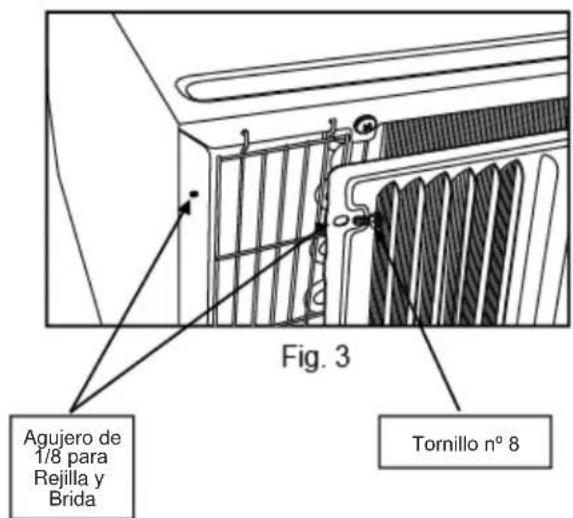
- If the unit has not been pre-drilled (some models), carefully drill (4) 1/8" holes through the grille and into the side flange of the unit approximately 1-1/2" to 2" from the top and bottom as shown.
- Install 4 #8 self-tapping screws to affix the grille to the unit.
- Insert the unit into the sleeve.
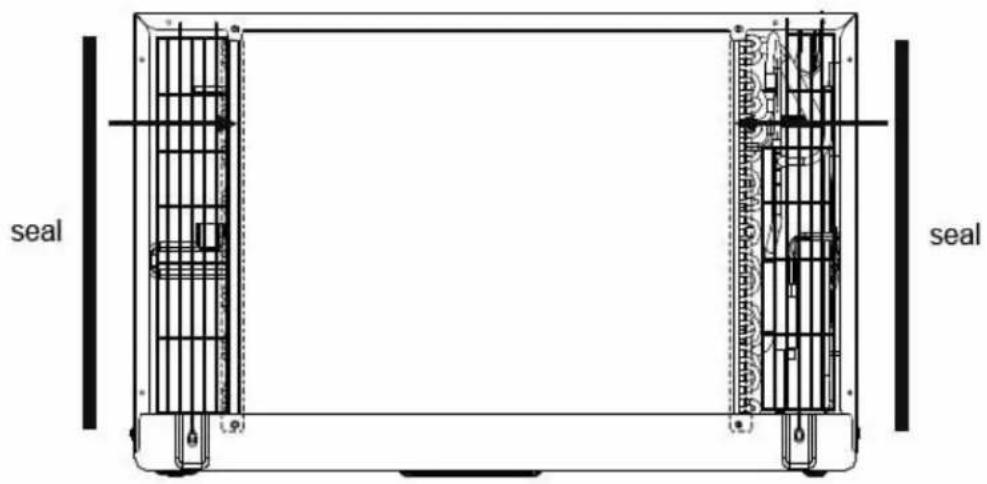
Fig. 1
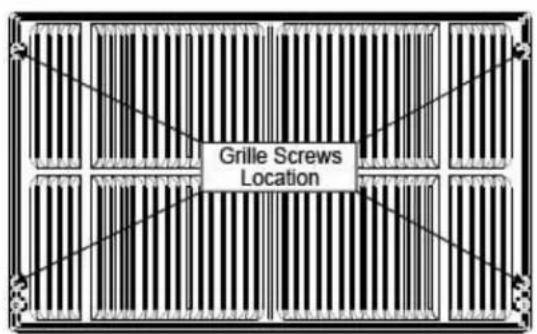
Fig. 2
Installation Instructions
Trim Kit Installation Instructions
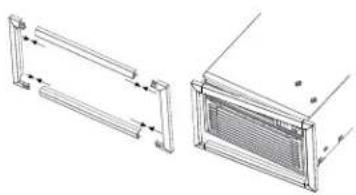
■ Install the 1" x 1-1/2" x 84" long stuffer seal between the wall sleeve and the unit. A flat-bladed screwdriver or putty knife is recommended.
■ Assemble the trim frame by inserting the top and bottom pieces into side pieces and snapping into place.
■ Pull the cord through the trim frame and slide the trim over the unit until flush with the wall or wall sleeve.
natural_image
Technical line drawing of two mechanical components with dimension lines (no text or symbols)Security Brackets Installation
(It is important to install these brackets to prevent the chassis from being pushed into the room from the outside.)
■ Measure the width of the installed wall sleeve and choose the appropriate security bracket (24" or 26") designed for that sleeve.
■ The brackets must be installed so the flanges are hooked behind the inside flanges of the wall sleeve. Using the screws provided, attach the brackets on the sides of the chassis.
For 24" sleeves, pull the unit out slightly, hook the short flange of the 24" bracket behind the sleeve inside edge and secure to the unit with the two screws provided. Repeat on the opposite side. Push the unit all the way back into the case.
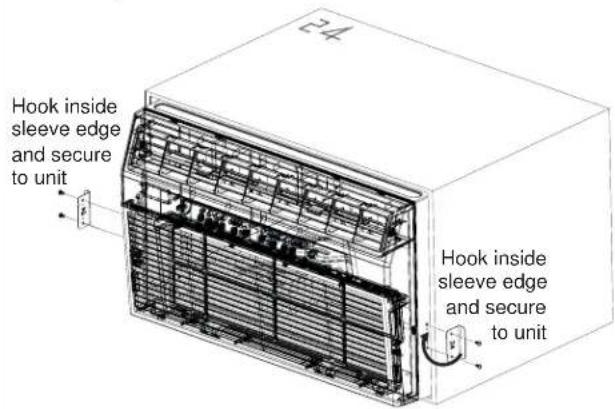
For 26" sleeves, hook the short flange of the 26" bracket behind the sleeve inside edge and secure to the unit with the two screws provided. Repeat on the opposite side.

Troubleshooting Tips... Before you call for service
| Problem Solution | |
| Air conditioner does not start | Wall plug disconnected. Push plug firmly into wall outlet. |
| House fuse blown or circuit breaker tripped. Replace fuse with time delay type or reset circuit breaker. | |
| Plug current device tripped. Press the RESET button. | |
| Power is OFF. Turn power ON. | |
| Air from the unit does not feel cold enough | Room temperature below 62°F (17°C). Cooling may not occur until room temperature rises above 62°F (17°C). |
| Temperature sensor behind air filter may be touching cold coil. Keep it from the cold coil. | |
| Set to a lower temperature. | |
| Compressor stopped when changing modes. Wait for 3 minutes after set to the COOL mode. | |
| Air conditioner cooling, but room is too warm. Ice is forming on cooling coil behind decorative front. | Outdoor temperature below 64°F (18°C). To defrost the coil, set FAN ONLY mode. |
| Air filter may be dirty. Clean the filter. Refer to Care and Cleaning section. To defrost, set to FAN ONLY mode. | |
| Thermostat set to cold for night-time cooling. To defrost the coil, set to FAN ONLY mode. Then, set temperature to a higher setting. | |
| Dirty air filter, or the air is restricted. Clean the air filter. Refer to Care and Cleaning section. | |
| Temperature is set too high. Set the temperature to a lower setting. | |
| Air directional louvers positioned improperly. Position louvers for better air distribution. | |
| Front of unit is blocked by drapes, blinds, furniture, etc, which restricts air distribution. Clear blockage in front of unit. | |
| Doors, windows, registers, etc, may be open. Close doors, windows, registers. | |
| Unit recently turned on in hot room. Allow additional time to remove “stored heat” from walls, ceiling, floor, and furniture. | |
| Air conditioner turns on and off rapidly | Dirty air filter, the air is restricted. Clean air filter. |
| Outside temperature extremely hot. Set FAN speed to a higher setting to cool outdoor cooling coil. | |
| Noise when unit is cooling | Air movement sound. This is normal. If too loud, set to a slower FAN setting. |
| Improper installation. Refer to installation instructions or check with installer. | |
| Water dripping INSIDE when unit is cooling | Improper installation. Tilt air conditioner slightly to the outside to allow water drainage. Refer to installation instructions, and check with installer. |
| Water dripping OUTSIDE when unit is cooling | Unit removing large quantity of moisture from humid room. This is normal during excessively humid days. |
| Room too cold Set temperature | |
| Error code “AS” in the display | Room temperature sensor error. Unplug the unit and plug it back in. If error repeats, call for service. NOTE: In Fan only mode, it will display “LO” or “HI”. |
| Error code “HS” in the display | Electric heating sensor error. Unplug the unit and plug it back in. If error repeats, call for service. |
| Error code “.” in the display | Evaporator temperature sensor error. Unplug the unit and plug it back in. If error repeats, call for service. |
GE Appliances Air Conditioner Limited Warranty
All warranty service must be provided by our Factory Service Centers, or an authorized Customer Care® technician. To schedule service, visit us on-line at GEAppliances.com/service, or call 800.GE.CARES (800.432.2737). Have serial number and model number available when calling for service.
| For The Period Of: | GE Appliances Will Replace: |
| Two YearsFrom the date of the original purchase | Any part of the air conditioner which fails due to a defect in materials or workmanship.During this limited two-year warranty, GE Appliances will also provide, free of charge, all labor and related service to replace the defective part. |
What GE Appliances Will Not Cover:
■ Service trips to your home to teach you how to use the product.
- Improper installation, delivery or maintenance. If you have an installation problem, or if the air conditioner is of improper cooling capacity for the intended use, contact your dealer or installer. You are responsible for providing adequate electrical connecting facilities.
■ Failure of the product resulting from modifications to the product or due to unreasonable use including failure to provide reasonable and necessary maintenance.
■ In commercial locations, labor necessary to move the unit to a location where it is accessible for service by an individual technician.
■ Replacement of house fuses or resetting of circuit breakers.
■ Failure due to corrosion on models not corrosion-protected.
■ Damage to the product caused by improper power supply voltage, accident, fire, floods or acts of God.
■ Incidental or consequential damage caused by possible defects with this air conditioner.
■ Damage caused after delivery.
EXCLUSION OF IMPLIED WARRANTIES—Your sole and exclusive remedy is product repair as provided in this Limited Warranty. Any implied warranties, including the implied warranties of merchantability or fitness for a particular purpose, are limited to two years or the shortest period allowed by law.
This limited warranty is extended to the original purchaser and any succeeding owner for products purchased for home use within the USA. If the product is located in an area where service by a GE Appliances Authorized Servicer is not available, you may be responsible for a trip charge or you may be required to bring the product to an Authorized GE Service location for service. In Alaska, the limited warranty excludes the cost of shipping or service calls to your home.
Some states do not allow the exclusion or limitation of incidental or consequential damages. This limited warranty gives you specific legal rights, and you may also have other rights which vary from state to state. To know what your legal rights are, consult your local or state consumer affairs office or your state's Attorney General.
Warrantor: GE Appliances, a Haier company Louisville, KY 40225
Consumer Support
GE Appliances Website
Have a question or need assistance with your appliance? Try the GE Appliances Website 24 hours a day, any day of the year! You can also shop for more great GE Appliances products and take advantage of all our on-line support services designed for your convenience. In the US: GEAppliances.com
Register Your Appliance
Register your new appliance on-line at your convenience! Timely product registration will allow for enhanced communication and prompt service under the terms of your warranty, should the need arise. You may also mail in the pre-printed registration card included in the packing material. In the US: GEAppliances.com/register
Schedule Service
Expert GE Appliances repair service is only one step away from your door. Get on-line and schedule your service at your convenience any day of the year. In the US: GEAppliances.com/service or call 800.432.2737 during normal business hours.
Extended Warranties
Purchase a GE Appliances extended warranty and learn about special discounts that are available while your warranty is still in effect. You can purchase it on-line anytime. GE Appliances Services will still be there after your warranty expires. In the US: GEAppliances.com/extended-warranty or call 800.626.2224 during normal business hours.
Parts and Accessories
Individuals qualified to service their own appliances can have parts or accessories sent directly to their homes (VISA, MasterCard and Discover cards are accepted). Order on-line today 24 hours every day. In the US: GEApplianceparts.com or by phone at 877.959.8688 during normal business hours.
Instructions contained in this manual cover procedures to be performed by any user. Other servicing generally should be referred to qualified service personnel. Caution must be exercised, since improper servicing may cause unsafe operation.
Contact Us
If you are not satisfied with the service you receive from GE Appliances, contact us on our Website with all the details including your phone number, or write to:
In the US: General Manager, Customer Relations | GE Appliances, Appliance Park | Louisville, KY 40225 GEAppliances.com/contact
INFORMATION DE SÉCURITÉ...3
UTILISANT LE CLIMATISEUR .. 4
ENTRETIEN ET NETTOYAGE....7
INSTRUCTIONS
D'INSTALLATION....8
CONSEILS DE DÉPANNAGE....18
SOUTIEN AU CONSOMMATEUR
natural_image
Diagram of airflow or heat transfer through a ventilation duct system (no text or labels)natural_image
Front view of a rectangular industrial or thermal unit with vertical slats and internal compartments (no text or symbols visible)Emerson (15 po prof.)
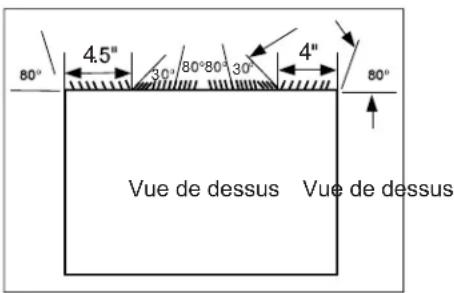
Fig. 2
natural_image
Technical line drawing of two mechanical components with dimension arrows (no text or symbols)Garant : GE Appliances, a Haier company Louisville, KY 40225
Au Canada : Prodsupport.mabe.ca/crm/Products/ProductRegistration.aspx
Au Canada : GEAppliances.ca/en/support/service-request ou composez le 800.561.3344
Prolongation de garantie
Au Canada : GEAppliances.ca/en/support/purchase-extended-warranty ou composez le 800.290.9029
GEAppliances.com/ge/service-and-support/contact.htm
Au Canada : Director, Consumer Relations, Mabe Canada Inc. | Suite 310, 1 Factory Lane | Moncton, N.B. E1C 9M3 GEAppliances.ca/en/contact-us
Allows room temperature to increase (Cool mode) or decrease (Heat mode) during sleeping hours.
Control Remoto
natural_image
Diagram of airflow or heat transfer between a ventilation duct and adjacent wall-mounted air vent (no text or symbols)Cuidado y Limpieza
Filtro de Aire
natural_image
Front view of a rectangular industrial fan or radiator unit with vertical slats and mounting brackets (no text or symbols visible)Fig. 2
natural_image
Technical line drawing of two mechanical components with dimension annotations (no text or symbols)Garante: GE Appliances, a Haier company Louisville, KY 40225
- CONSUMER SUPPORT
- OWNER'S MANUAL & INSTALLATION INSTRUCTIONS
- ESPAÑOL
- THANK YOU FOR MAKING GE APPLIANCES A PART OF YOUR HOME.
- IMPORTANT SAFETY INFORMATION READ ALL INSTRUCTIONS BEFORE USING THE APPLIANCE
- USE OF EXTENSION CORDS
- HOW TO CONNECT ELECTRICITY
- READ AND SAVE THESE INSTRUCTIONS
- WARNING
- Chemical Burn Hazard. Keep batteries away from children.
- Risk of Fire or Explosion. This unit contains flammable refrigerant. Additional safety precautions must be followed.
- FCC Compliance Statement:
- Using the Air Conditioner - Controls
- Air Conditioner Controls
- POWER
- Display
- Mode
- Temp Increase + / Decrease - Pads
- Fan Speed
- Timer
- Filter
- Eco
- Sleep
- Remote Control
- Using the Air Conditioner - Features
- To Adjust Fan Speeds
- Sleep
- Check Filter
- Eco - Energy Saver
- To Select the Operating Mode
- To Operate on Auto Feature:
- To Operate on Fan Only:
- To Operate on Dry Mode:
- Timer: Auto Start / Stop
- Additional Features
- Air Direction
- Care and Cleaning
- Air filter
- Energy Saving Note
- Cabinet
- Outdoor Coils
- How to Insert the Batteries in the Remote Control
- NOTES:
- Front Grille Removal
- To remove:
- BEFORE YOU BEGIN
- ELECTRICAL REQUIREMENTS
- CAUTION
- IMPORTANT NOTE
- For Existing Wall Sleeves
- Parts Included
- How to Install In Pre-Existing Wall Sleeve
- IMPORTANT - BEFORE YOU BEGIN
- FOR INCREASED EFFICIENCY, UTILIZE THE PROVIDED LOUVERED REAR PANEL
- Emerson (15" Deep)
- Fedders (19-3/4" Deep)
- Fedders or Friedrich (16-3/4" Deep)
- GE/Hotpoint (16-7/8" Deep)
- Sears or Carrier 51S Series (18-5/8" Deep)
- Whirlpool (17-1/8" Deep)
- Whirlpool (23" Deep)
- Because of the increased unit depth, first try dry fitting using the method described below:
- Use these next steps if the unit requires extra extension into the room:
- Whirlpool (23" Deep) (cont)
- White-Westinghouse or Frigidaire (22" Deep)
- White-Westinghouse or Frigidaire (22" Deep) (cont)
- Direct Unit Mounting:
- Screw
- Installation Instructions
- Trim Kit Installation Instructions
- Security Brackets Installation
- GE Appliances Air Conditioner Limited Warranty
- What GE Appliances Will Not Cover:
- GE Appliances Website
- Register Your Appliance
- Schedule Service
- Extended Warranties
- Parts and Accessories
- Contact Us
- Emerson (15 po prof.)
- Prolongation de garantie
- Control Remoto
- Cuidado y Limpieza
- Filtro de Aire
Brand : GE
Model : AKEQ12DCJ
Category : Air Conditioning