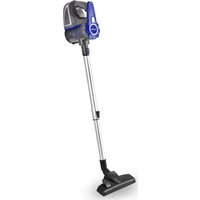
VC 46599 - Vacuum Cleaner KALORIK - Free user manual and instructions
Find the device manual for free VC 46599 KALORIK in PDF.


| Brand | KALORIK |
| Model | VC 46599 |
| Product Type | Dust Canister Vacuum |
| Power Supply | Mains (polarized plug) |
| Filter Type | Washable filter with cyclonic separation system |
| Included Accessories | Floor brush, crevice tool, dust brush, pet hair brush, telescopic tube |
| Features | Adjustable telescopic tube, hard floor/carpet selector on the brush |
| Intended Use | Household, dry surfaces |
| Maintenance | Empty the canister after use, clean the filter with warm water |
| Safety | Polarized plug, stop/unplug before maintenance, do not immerse |
| Warranty | 1 year (USA and Canada) |
| Control Type | On/off switch |
| Dirt Disposal System | Bottom release button |
| Canister Material | Plastic |
| Cord Length | Approx. 6 m (estimate) |
Frequently Asked Questions - VC 46599 KALORIK
User questions about VC 46599 KALORIK
0 question about this device. Answer the ones you know or ask your own.
Ask a new question about this device
Download the instructions for your Vacuum Cleaner in PDF format for free! Find your manual VC 46599 - KALORIK and take your electronic device back in hand. On this page are published all the documents necessary for the use of your device. VC 46599 by KALORIK.
USER MANUAL VC 46599 KALORIK
natural_image
Blue HALCREV vacuum cleaner with silver handle and black base (no visible text or symbols)EN......4
FR......13
PARTS DESCRIPTION / DESCRIPTION DES ÉLÉMENTS
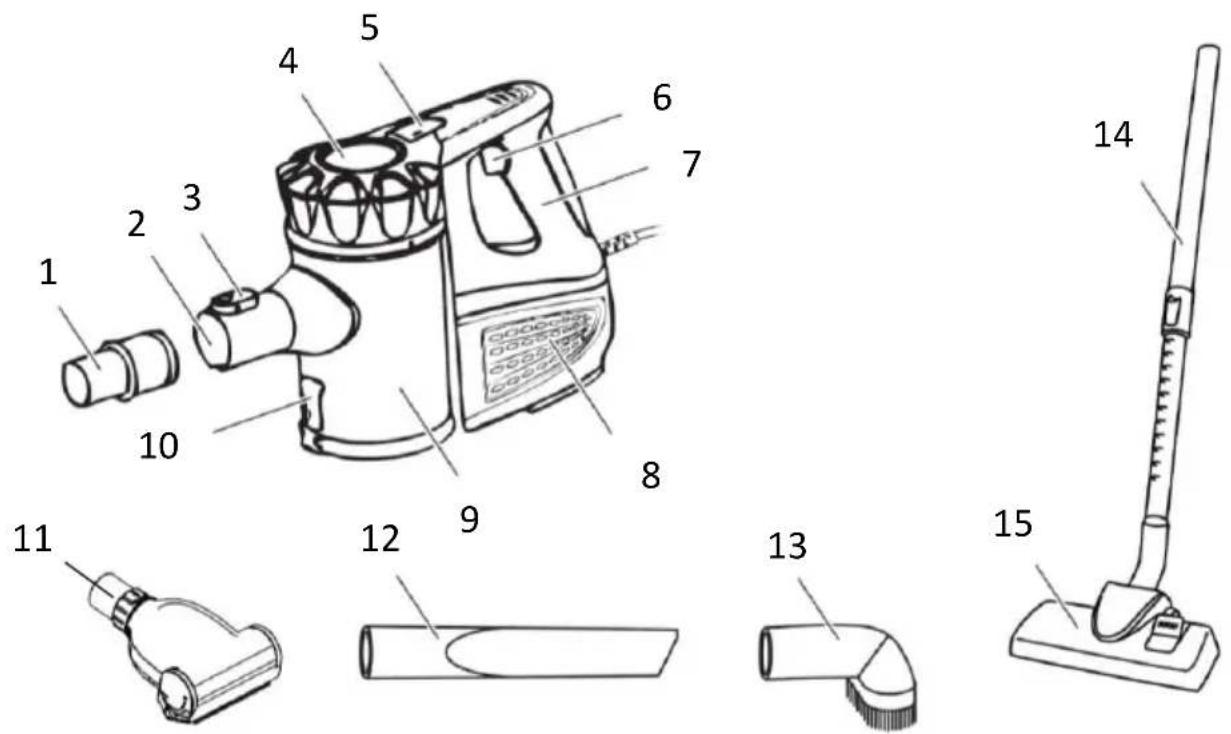
ENGLISH:
- Coupler
- Tube connection
- Coupler release button
- Dust container lid
- Dust container release button
- On/off switch
- Handle
-
Exhaust opening
-
Dust container
- Dust container lower release button
- Pet brush
- Crevice tool
- Brush tool
- Telescopic tube
- Floor brush
FRANÇAIS:
WARNING: To reduce the risk of fire, electric shock or injury, when using your appliance, basic safety precautions should always be followed, including the following:
- Read all instructions before use.
- Use only for intended use.
- If the supply cord is damaged, it must be replaced by the manufacturer or its service agent or a similarly qualified person in order to avoid a hazard.
- This appliance is not intended for use by persons (including children) with reduced physical, sensory or mental capabilities, or lack of experience and knowledge, unless they have been given supervision or instruction concerning use of the appliance by a person responsible for their safety.
- To protect against a risk of electric shock, do not immerse any part of the system in water or other liquids.
- Never yank cord to disconnect from outlet; instead, grasp plug and pull to disconnect.
- Do not allow cord to touch hot surfaces.
- Do not run appliance over cord.
- Do not operate the system with a damaged cord or plug, or if the appliance or any other part of the system has been dropped or damaged. To avoid the risk of electric shock, do not disassemble or attempt to repair. Return the unit for examination and repair. Incorrect re-assembly or repair can cause a risk of electrical shock or injury to persons when used.
- Close supervision is necessary for any appliance being used by or near children. Do not leave the system unattended while
connected. Keep hair, loose clothing, fingers and all parts of body away from opening and moving parts.
-
Do not use to pick up flammable or combustible liquids such as gasoline or use in areas where they may be present.
-
Do not pick up anything any of the following, as they could cause serious damage to the appliance and the filter system, making it unsafe to use:
-
Hot or burning objects
- Glass splinters or other sharp objects
- Residues of plaster, cement, stone, soot, etc.
-
Liquids or moist debris
-
Use extra care when cleaning on stairs.
- Do not use the vacuum without the dust cup filter in place.
- This appliance is intended only for household use. Follow all user instructions in this manual.
- Do not leave plugged in when unattended. Unplug the electrical cord when not in use and before servicing.
- Do not allow to be used as a toy. Close attention is necessary when used by or near children, pets or plants.
- Use only as described in this manual. Use only manufacturer's recommended accessories.
- Do not pull cord, use cord as a handle, close a door on cord, or pull cord around sharp edges or corners.
- Do not run vacuum cleaner over cord. Keep cord away from heated surfaces.
- Turn off all controls as applicable before unplugging from electrical outlet.
- Do not unplug by pulling on cord. To unplug, grasp the plug, not the cord.
- Do not handle plug or vacuum with wet hands or operate without shoes.
- Do not put any objects into openings. Do not use with any opening blocked. Keep free of dust, lint, hair and anything else that may reduce air flow.
- Store your appliance indoors in a cool, dry area.
- Keep your work area well lit.
- Do not immerse the vacuum into water or other liquids.
-
Keep end of hose, wands and other openings away from your face and body.
-
Use only on dry surfaces.
- Using improper voltage may result in damage to the motor and possible injury to the user. Correct voltage is listed on rating label.
- Switch off the appliance and remove the plug from the wall socket in the event of a malfunction during use. Switch off the appliance before emptying, cleaning, fitting or removing an accessory, or storing after use.
- Do not pick up the appliance if it falls into water. Remove the plug from the wall socket immediately. Do not use the appliance any more.
SAVE THESE INSTRUCTIONS HOUSEHOLD USE ONLY
POLARIZED PLUG INSTRUCTIONS
This appliance has a polarized plug (one blade is wider than the other). To reduce the risk of electric shock, this plug will fit into the polarized outlet only one way. If the plug does not properly fit into the outlet at first, reverse it. If it still does not fit, contact a competent qualified electrician. Do not attempt to modify the plug in any way.
ASSEMBLY AND USE
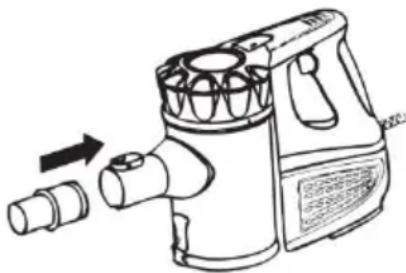
- Insert the coupler (1) into the tube connection (2) on the motor unit, as shown below. Note: To remove the coupler, push the button (3) at the top of the tube connection and pull it out.
natural_image
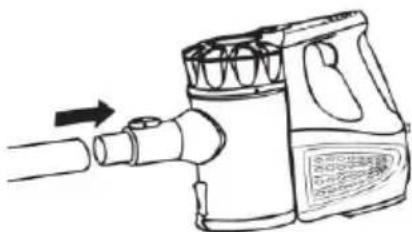
Line drawing of a handwashing brush with a valve and pipe fitting (no text or symbols)- Slide the telescopic interlocking tube (14), the floor brush (15) or one of the other included accessories onto the coupler, as shown
below. When using the telescoping interlocking tube, slide the floor brush or one of the other accessories onto the end of the tube.
natural_image
Line drawing of a hand tool emitting a cylindrical device (no text or symbols)-
Put the plug in the wall socket and press the on/off switch (6).
-
Start vacuum cleaning. Press the on/off switch again to turn off the appliance.
Telescopic Tube and Floor Brush
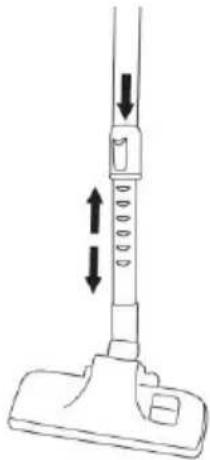
- Press the button on the telescopic tube and keep it pressed in; you can then extend or retract the tube to the required length. See the following for reference.
natural_image
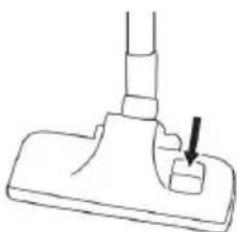
Line drawing of a vacuum cleaner with vertical arrows indicating motion (no text or symbols)- Press the foot button on the floor brush to switch between use for hard and soft floors, as shown below. On harder surfaces, press the foot button on the floor brush to extend the brushes. Lift the button for use on softer surfaces.
natural_image
Simple line drawing of a mechanical component with a downward arrow indicating a feature (no text or symbols)Caution: Never attach or detach tools while the vacuum cleaner is running. Turn off and unplug the vacuum before attaching accessories.
Using the crevice tool:
- Use the crevice nozzle to clean narrow, hard-to-reach places, such as heater gaps, wall ends and corners, etc.
- The accessory can be used with the extension tube or the handheld unit.

natural_image
Two types of electric shakers shown side by side, one straight and one tilted, with no visible text or symbols.Using the dust brush:
- Use the dust brush to clean lamps, blinds, shelves, upholstery and baseboards.
- The accessory can be used with the extension tube or the handheld unit.

natural_image
Two types of electric shaver devices shown side by side, no text or symbols presentUsing the pet brush:
- Powerful suction for picking up pet hair and carpet debris. Easy to use on stairs and upholstery.
- The accessory can be used with the extension tube or the handheld unit.

natural_image
Two identical mechanical devices with a lever, shown in side and top views (no text or symbols visible)Emptying the dust container
- Remove the plug from the wall socket.
- Remove the telescopic interlocking tube from the vacuum cleaner.
- Hold the vacuum cleaner above a waste-bin.
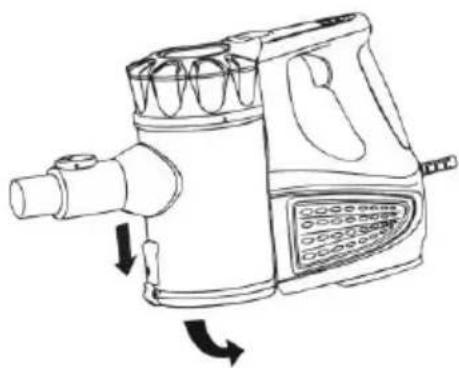
- Press the button (11) to open the bottom flap (10), as shown below. If required, use your hand to remove any waste sticking to the container.
natural_image
Line drawing of a portable air purifier with directional arrows indicating flow or movement (no text or symbols)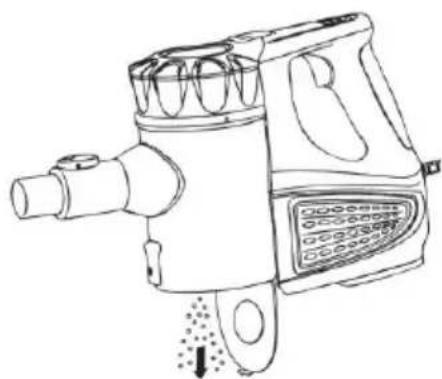
natural_image
Line drawing of a DQO brush tool with no visible text or symbols on the device itself- Close the bottom flap until it clicks into place.
Cleaning the housing
- Remove the plug from the wall socket.
- Clean the outer surface of all parts with a damp cloth and a cleaner suitable for plastics.
CAUTION:
- Never immerse the appliance, plug or power cord in water.
- Never use corrosive or scouring cleaning agents or sharp objects (such as knives or hard brushes) to clean the appliance.
Cleaning the filter
- Remove the plug from the wall socket.
- Remove the telescopic interlocking tube from the vacuum cleaner.
-
Remove the waste from the dust container.
-
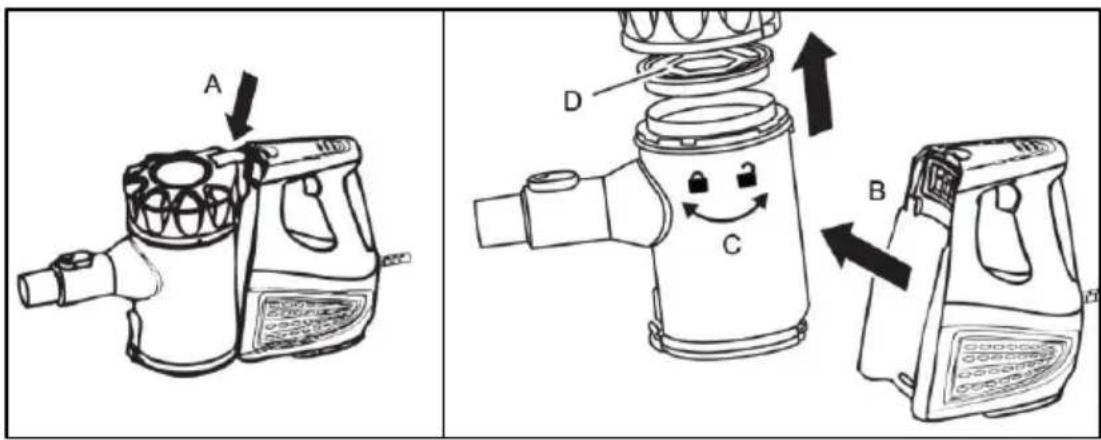
Remove the dust container from the vacuum cleaner by pressing the release button (A) and taking out the dust container (B). See the figure below for reference.
-
Turn the upper lid and remove it from the dust container (C). Take the dust separation system and filter from the dust separation system (D). See the following figure for reference.
- Rinse the filter and the dust separation system thoroughly in lukewarm water.
- Allow the filter to dry thoroughly.
- Mount the holders and filters in the reverse sequence.
TROUBLESHOOTING
| ISSUE | POSSIBLE REASON | POSSIBLE SOLUTION |
| The vacuum cleaner will not start. | Power cord is not firmly plugged into the outlet. | Check that the plug is inserted firmly into the electrical outlet. |
| Low suction | 1. Dust container is full.2. Dust filter needs cleaning or replacement.3. Power is low. | 1. Empty dust container.2. Remove dust cup filter and check for object(s) in air duct and remove. Clean or replace dust filter.3. Charge unit. |
| Dust escaping from vacuum | 1. Dust container is full.2. Dust filter is not installed correctly.3. Puncture/hole in dust filter. | 1. Empty dust container.2. Review dust filter installation instructions.3. Remove and replace dust filter. |
We suggest that you complete and return the enclosed Product Registration Card promptly to facilitate verification of the date of original purchase. However, return of the Product Registration Card is not a condition of these warranties. You can also fill out this warranty card online, at the following address: www.KALORIK.com
This KALORIK product is warranted in the U.S.A. and in Canada for 1 year from the date of purchase against defects in material and workmanship. This warranty is not transferable. Keep the original sales receipt. Proof of purchase is required to obtain warranty performance.
During this period, if the KALORIK product, upon inspection by KALORIK, is proven defective, it will be repaired or replaced, at Kalorik's option, without charge to the customer. If a replacement product is sent, it will carry the remaining warranty of the original product.
This warranty does not apply to any defect arising from a buyer's or user's misuse of the product, negligence, failure to follow KALORIK instructions noted in the user's manual, use on current or voltage other than that stamped on the product, wear and tear, alteration or repair not authorized by KALORIK, or use for commercial purposes. There is no warranty for glass parts, glass containers, filter basket, blades and agitators, and accessories in general. There is also no warranty for parts lost by the user.
ANY WARRANTY OF MERCHANTABILITY OR FITNESS WITH RESPECT TO THIS PRODUCT IS ALSO LIMITED TO THE ONE YEAR LIMITED WARRANTY PERIOD.
Some states do not allow limitation on how long an implied warranty lasts or do not allow the exclusion of incidental or consequential damages, so the above limitations may not apply to you. This warranty gives you specific legal rights, and you may also have other rights which vary from state to state.
If the appliance should become defective within the warranty period and more than 30 days after date of purchase, do not return the appliance to the store: often, our Customer Service Representatives can help solve the problem without having the product serviced. If
servicing is needed, a Representative can confirm whether the product is under warranty and direct you to the nearest service location.
If this is the case, bring the product, or send it, postage prepaid by the user (all Kalorik customers are responsible for the initial shipment back to the warranty center), along with proof of purchase and a return authorization number indicated on the outer package, given by our Customer Service Representatives. Send to the authorized KALORIK Service Center (please visit our website at www.KALORIK.com or call our Customer Service Department for the address of our authorized KALORIK Service Center).
When sending the product, please include a letter explaining the nature of the claimed defect.
If you have additional questions, please call our Customer Service Department (please see below for complete contact information), Monday through Thursday from 9:00am - 5:00pm (EST) and Friday from 9:00am - 4:00pm (EST). Please note hours are subject to change.
If you would like to write, please send your letter to:
KALORIK Customer Service Department
Team International Group of America Inc.
16175 NW 49th Avenue
Miami Gardens, FL 33014 USA
Or call:
Toll Free: +1 888-521-TEAM / +1 888-KALORIK
Only letters can be accepted at this address above. Shipments and packages that do not have a return authorization number will be refused.
natural_image
Line drawing of a handwashing brush with a directional arrow indicating motion (no text or symbols)natural_image
Line drawing of a hand tool emitting a cylindrical device (no text or symbols)natural_image
Line drawing of a vacuum cleaner with directional arrows indicating motion (no text or symbols)natural_image
Simple line drawing of a mechanical component with a downward arrow indicating a feature (no text or symbols)natural_image
Two identical mechanical devices with a lever, shown in side and top states (no text or symbols visible)natural_image
Two identical mechanical devices with a lever, shown side by side with bidirectional arrow (no text or symbols)natural_image
Two identical illustrations of a hand tool, one with a cable and the other with a handle, showing no text or symbols.NETTOYAGE ET ENTRETIEN
natural_image
Line drawings of two types of hair blower machines with directional arrows indicating motion (no text or symbols)Team International Group of America Inc.
16175 NW 49th Avenue
Miami Gardens, FL 33014 USA
For questions please contact:
Team International Group of America Inc.
16175 NW 49th Avenue
Miami Gardens, FL 33014 USA
User manual content and recipes courtesy of Team International Group – Do not reproduce without consent of the authors - All rights reserved.


- PARTS DESCRIPTION / DESCRIPTION DES ÉLÉMENTS
- ENGLISH:
- FRANÇAIS:
- SAVE THESE INSTRUCTIONS HOUSEHOLD USE ONLY
- POLARIZED PLUG INSTRUCTIONS
- ASSEMBLY AND USE
- Telescopic Tube and Floor Brush
- Using the crevice tool:
- Using the dust brush:
- Using the pet brush:
- Emptying the dust container
- Cleaning the housing
- CAUTION:
- Cleaning the filter
- TROUBLESHOOTING
- KALORIK Customer Service Department
- NETTOYAGE ET ENTRETIEN
Brand : KALORIK
Model : VC 46599
Category : Vacuum Cleaner