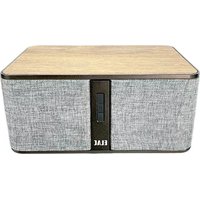
Discovery Z3 DS-Z31W - Speaker ELAC - Free user manual and instructions
Find the device manual for free Discovery Z3 DS-Z31W ELAC in PDF.


| Product Type | Active wireless speaker (powered speaker) |
| Brand | ELAC |
| Model | Discovery Z3 DS-Z31W |
| Power Supply | Mains power via included power cable |
| Wireless Connectivity | Bluetooth, Wi-Fi (home network) |
| Wired Connectivity | Ethernet, 3.5 mm audio input jack |
| Streaming Services | Spotify Connect, Roon Essentials, Discovery music server |
| Mobile App | Discovery Z3 (iOS and Android) |
| Control | Physical buttons (volume +/-, play/pause) and mobile app |
| Indicator Light | Multi-function LED (device status, brightness adjustable via app) |
| Bass Enhancement | Yes, customizable via app for 3.5 mm, AirPlay and Bluetooth inputs |
| Firmware Update | Via the Discovery Z3 app |
| Reset | Via app or by holding the play/pause button while connecting power |
| Bluetooth Pairing | Pairing from the front panel or the app |
| Safety Instructions | Do not open the enclosure, avoid heat sources and humidity, high volume can damage hearing |
| Cleaning | Soft cloth only, no abrasive or chemical products |
| Warranty (North America) | 3 years on cabinet and speakers, 1 year on amplifier |
| Intended Use | Domestic use, on a stable and level surface |
| Included Accessories | Mains power cable |
| Maintenance | Avoid strong magnetic fields, do not block ventilation openings |
Frequently Asked Questions - Discovery Z3 DS-Z31W ELAC
User questions about Discovery Z3 DS-Z31W ELAC
0 question about this device. Answer the ones you know or ask your own.
Ask a new question about this device
Download the instructions for your Speaker in PDF format for free! Find your manual Discovery Z3 DS-Z31W - ELAC and take your electronic device back in hand. On this page are published all the documents necessary for the use of your device. Discovery Z3 DS-Z31W by ELAC.
USER MANUAL Discovery Z3 DS-Z31W ELAC
natural_image
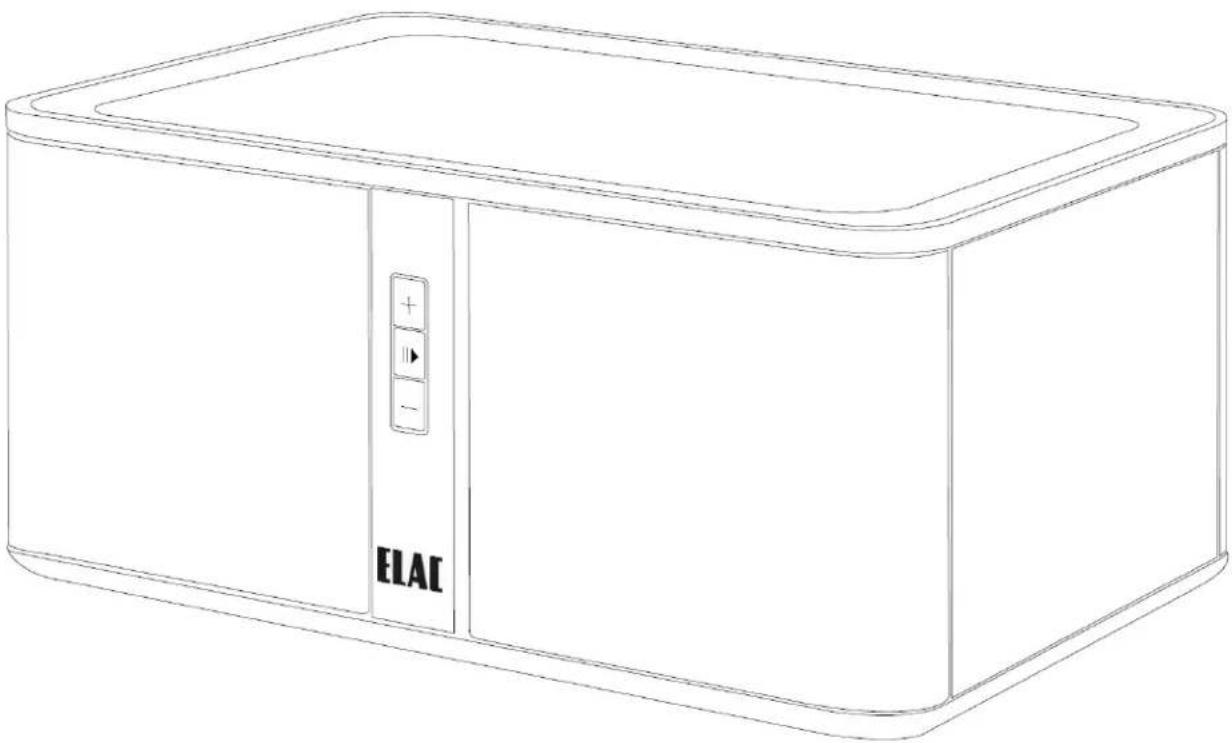
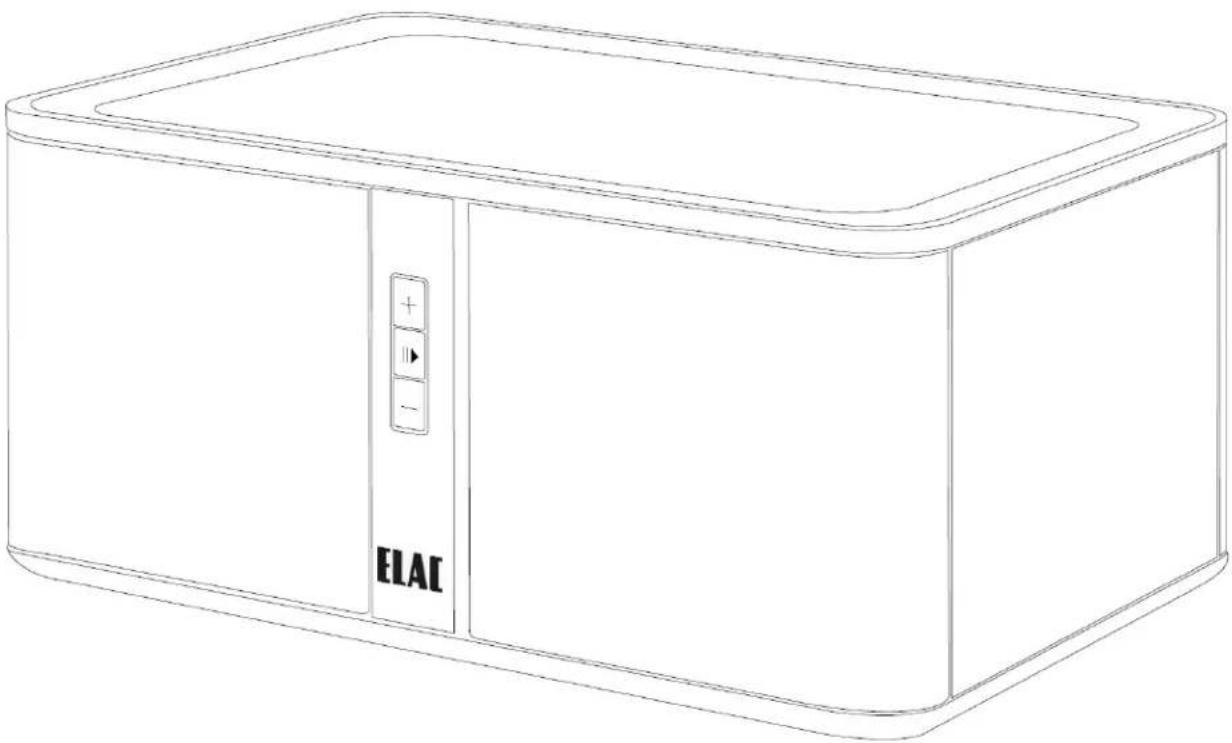
Line drawing of a rectangular electronic device with a control panel and 'ELAC' label (no text or symbols on the device itself)Discovery Z3 Wireless Speaker
OPERATING INSTRUCTIONS
Safety Instructions
1. General information
- Please read and follow these safety instructions.
- Keep them safe for future reference.
- Observe all warnings on the speaker and in the manual. Please check the speaker for damage before use. The speaker must be in perfect working condition. Damaged parts may lead to personal injury.
2. Use only as directed
- Connect the speaker(s) according to the instructions in the manual.
- Many ELAC speakers are equipped with spikes and/or anti-slip feet. They are explicitly provided for levelling the speaker. For levelling on an uneven floor, unscrew the spikes or anti-slip feet by 2-3 turns of thread. The speaker should always be in perfect vertical alignment: the stability of the speaker must not be compromised by using spikes or anti-slip feet as the speaker may tip-over.
3. Location
• Install the speakers on a level surface only
- When choosing the location of these speakers do not place them in locations that are:
• In direct sunlight
- Very humid
- Prone to vibrations
• Exceptionally hot or cold
- Near CRT Televisions (the speakers are not magnetically shielded and may cause color issues with a CRT based TV)
- Close to magnetic cards (Since the speakers are not magnetically shielded placing magnetic cards such as credit cards or commuter cards may cause them to fail).
WARNING! Please ensure the product is perfectly stable to avoid injury from tip-over. Please note, that stability can be increased by using spikes on carpeted surfaces. However, the mounting of spikes must be carried out carefully due to their very sharp ends which may cause injuries. The stability on slippery floors can be increased by using Velcro fastening tape or double-sided adhesive tape. Do not install the speaker near any heat sources such as radiators, heating valves, stoves, or other apparatus (including amplifiers) that produce heat, or in areas where there is a risk of explosion.
- Do not block any ventilation openings. Install in accordance with the manufacturer's instructions.
- Do not install the speaker in a closed rack or in a closed cupboard.
- Do not put burning candles on or near the speaker.
- Do not install the speaker near transformers because electromagnetic stray fields can cause hum noise on woofers.
- In combination with certain materials / lacquers / material surfaces, anti-slip feet or spike washers may cause colored imprints on the surfaces.
4. Overload
Extreme overload of the device due to very high volume may cause individual components to blow. Because of the possible danger, you should never leave loudspeakers under extreme overload conditions unattended.
5. Service
DANGER! Do not open the cabinet because the components and conductors may carry dangerous levels electricity! Servicing to be carried out by qualified service personnel only.
Servicing is required when the loudspeaker has been damaged in any way, such as damage to the power supply cord or the plug, or when liquid has been spilled or objects have fallen into the loudspeaker, the speaker has been exposed to rain or moisture, does not operate normally, or has been dropped. To reduce the risk of electric shock, do not open the loudspeaker. Servicing to be carried out by qualified service personnel only.

6. Cleaning
NOTE: Clean only with soft, smooth cloth or with dust brush. Do not use scouring agents, alcohol, benzene, furniture polish or other agents for cleaning! Modern furniture is often coated with multiple varnishes and plastics which can be treated with chemical agents. Some of these agents contain substances which degrade or soften the rubber feet. Therefore we advise you to place an anti-slip mat underneath the loudspeaker.
7. Volume
CAUTION! Continuous high volume may cause severe damage to your hearing. Please listen responsibly.
8. Disposal
The packaging is made from recyclable materials. Dispose of this in an environmentally friendly manner. At end of life do not dispose the speaker with the standard household waste. The speaker must be recycled in accordance with local legislation. Ask your local government for further information on recycling as the device contains valuable raw materials. Disable the speaker before disposal.
9. Power
This subwoofer is only intended to be connected to voltages that are listed on the rear panel of the cabinet. Connection to any other voltage may cause irreversible damage to the subwoofer and will void the warranty. Use of plug adapters is not recommended because they may allow connection to voltages other than those printed on the back of this subwoofer.
Philosophy
Thank you for purchasing this ELAC product.
Since the time we started (1926), ELAC has always striven to achieve the very best.
Your new ELAC speakers are built to the highest standards using high-quality components that are carefully constructed to deliver the best-in-class sound quality. They are developed by a passionate group of individuals whose sole purpose is to bring a new dimension of sound quality into your home. Enjoy!
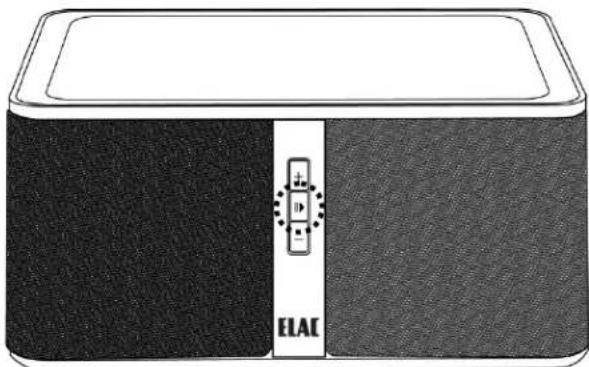
Front Controls and Indicators
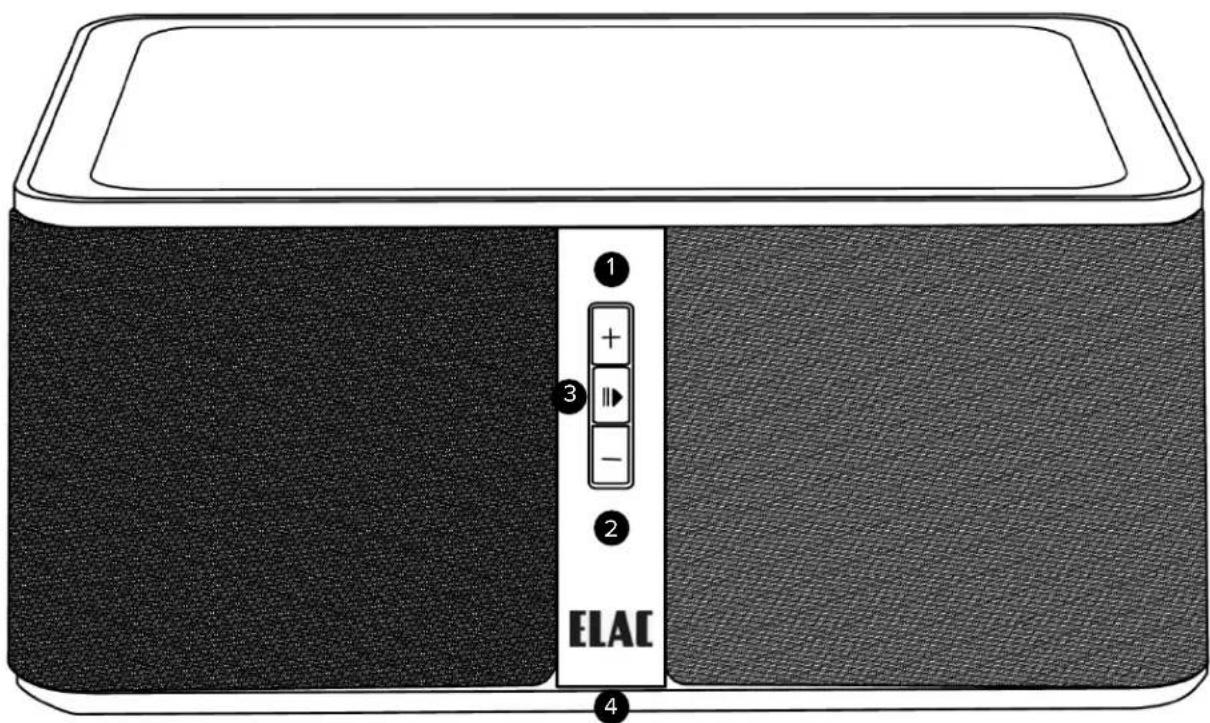
- Volume Up (+) - Press this button to increase the volume of the speaker
- Volume Down (-) - Press this button to decrease the volume of the speaker
- Play/Pause/Bluetooth Pair—Press this button to pause the current playback of content. (Please note this does not work with the 3.5mm input)
- Multi-Function LED—This LED is used to show the current status of the Discovery Z3.
• The brightness of this LED can be changed using the free iOS/Android App or web interface.
- Please refer to separate sections of this manual for further explanations of the LED status
Note: Volume control is linked between your phone and the Discovery Z3 when playing back content from the Discovery Music Server, Roon, and Spotify Connect. When using Bluetooth and the 3.5mm Input you will need to adjust the volume control on the Discovery as well as your phone/tablet.
Rear Panel and Connections
-
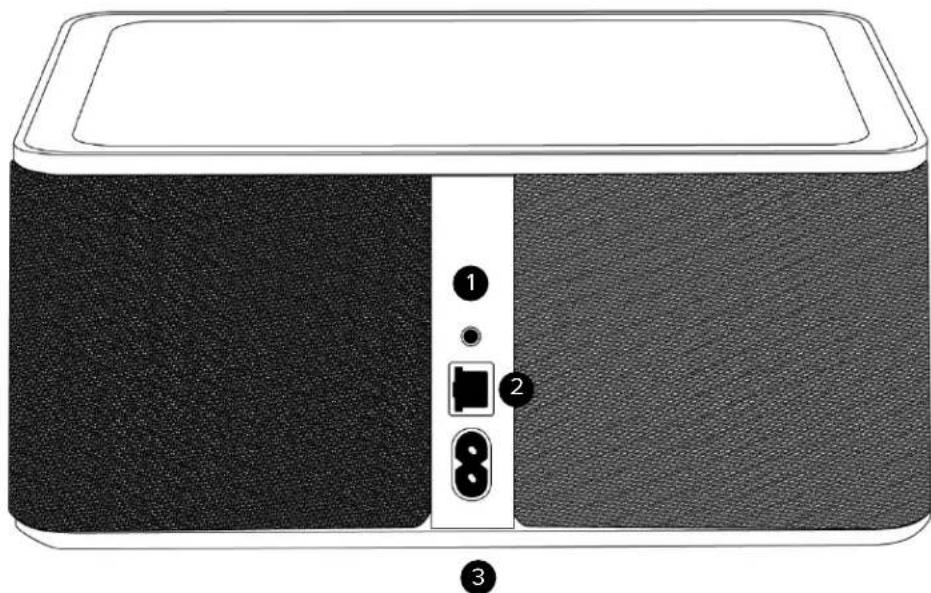
3.5mm Audio Input—Connect an external audio device to this input.
-
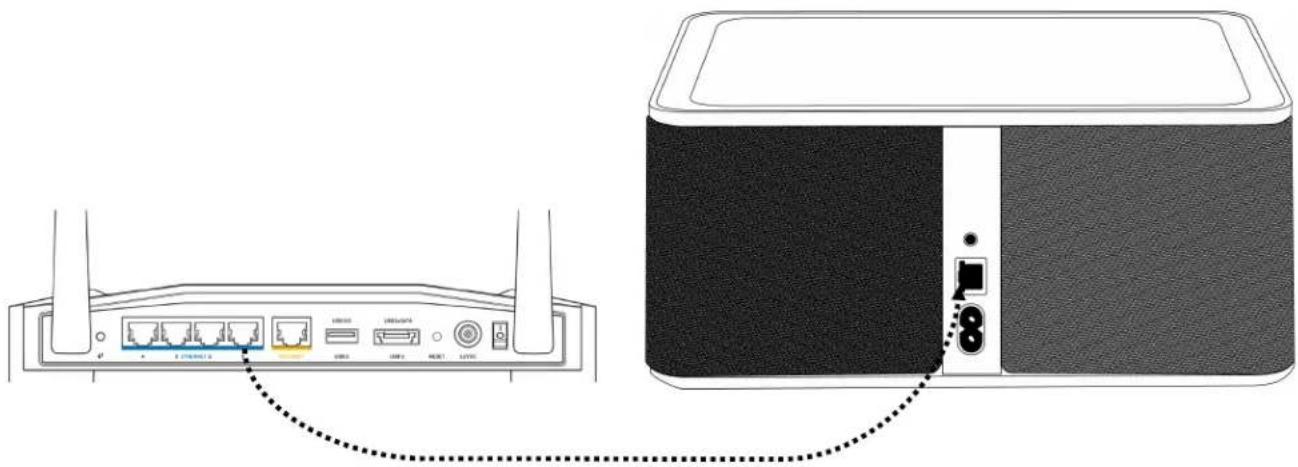
Ethernet Input—Use this when connecting the Z3 to your wired home network. See page 6 for how to connect to a wireless network.
-
Power Inlet—Connect the supplied power cable to this connector and the other side to an available AC jack.
Connecting to your Home Network
Wired Connection
- Connect an Ethernet cable (Not provided) to an available LAN port on your router or switch to the Ethernet input on the back of the Discovery Z3 Speaker.
- Apply power to the Discovery Z3 by connecting the power cord to an available outlet and to the power input on the Z3.
- The status LED will begin flashing during the power on phase and will go solid once it has connected to the network and is ready to play music.
Wi-Fi Connection
- Download the Discovery Z3 App from the Google Play store or Apple App Store.
- Ensure Bluetooth is enabled on your phone/tablet and launch the Discovery Z3 Application.
- The app should find the Discovery Z3 as shown in the Fig. 1
- Select the Discovery Z3 and you will be taken to the main menu. Select WiFi Setup from the top.
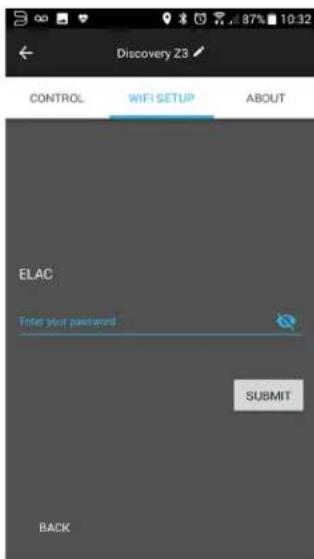
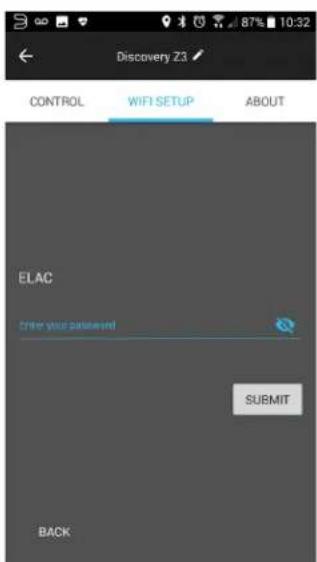
- You will be shown a list of all available wireless networks as shown in Fig 2. Find yours and select it. If your network is password protected please enter the password as shown in Fig. 3 and choose submit. The unit will reboot and you will connected to your home network.

Fig 1
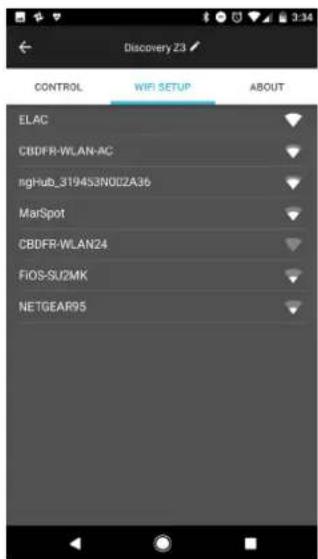
Fig 2 Fig 3
Using with the Discovery Music Server
Enabling the Discovery Z3 Speaker in Roon Essentials
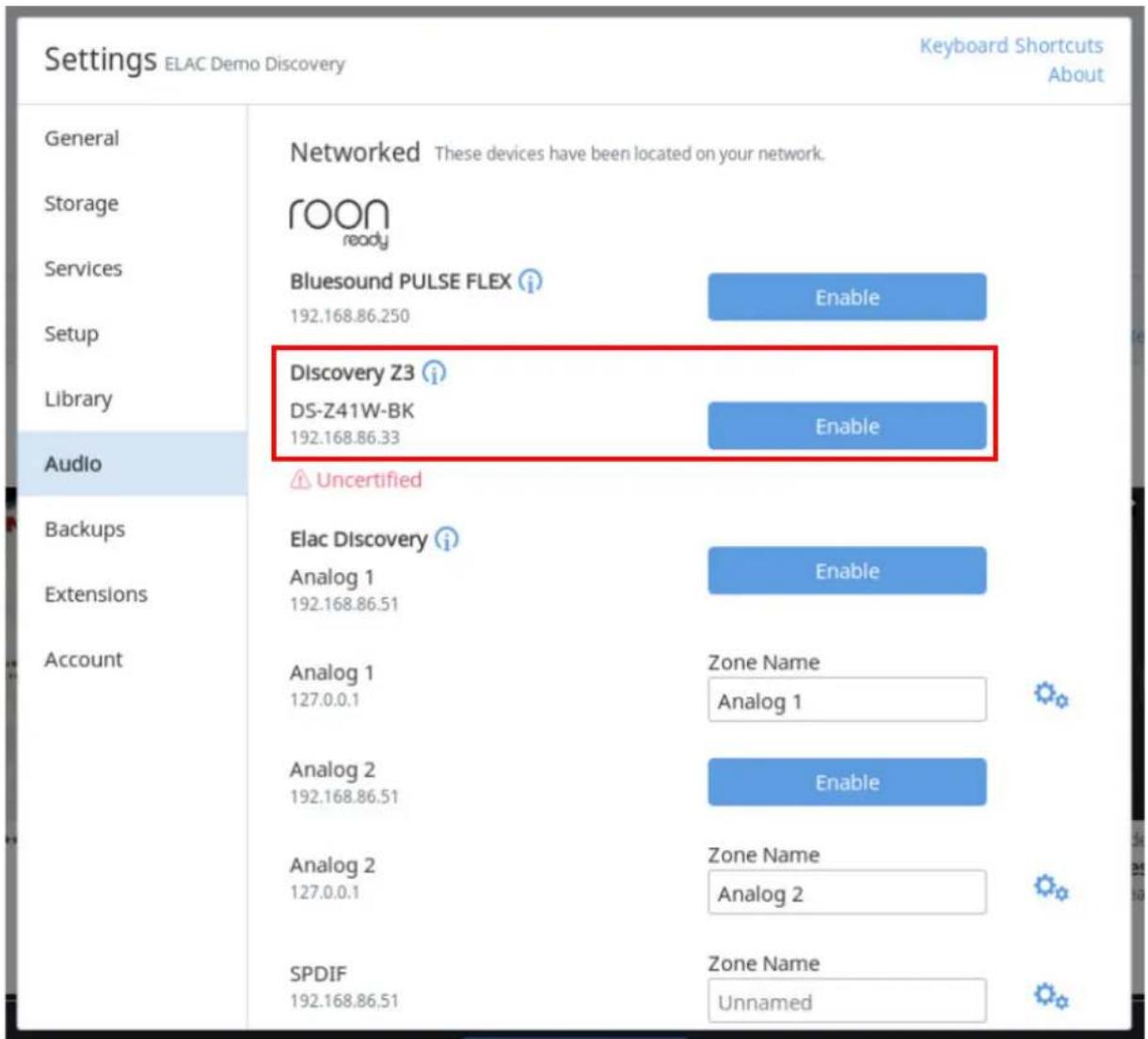
After connecting the Discovery Z3 to your home network, launch Roon Essentials on your PC or tablet. Go to Settings and then Audio. A list of all available audio devices will be listed. Locate the Discovery Z3 and click enable. You can also change the default name for the Z3. Now, the Discovery Z3 will be available in the audio output section of the Roon Essentials Application.
Listening to Bluetooth Audio
Pairing your Bluetooth Smartphone/Tablet for Audio
Note: Please note that this process is only for playing back audio from your Bluetooth device. It is not necessary to pair your device when using the App.
You can begin the paring process by using the smartphone application or the front panel.
Front Panel Pairing Process
- Press and hold the Play/Pause button (Fig 1) for 5 seconds or until the LED status light begins flashing red.
- Go to the Bluetooth settings section on your smartphone and scan for new devices (Fig 2). Select the Discovery Z3 from the list of available devices. If prompted for a pass code, accept the one that is displayed on your device and choose pair/connect. All Audio from your connected device will now come from the
Discovery Z3. Please note that when using Bluetooth you will have two volume controls (Phone and Z3)
natural_image
Illustration of a black and gray electronic device with a white panel labeled 'ELAC' on the side (no additional text or symbols)Fig 1
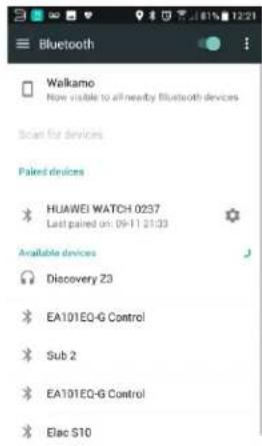
Fig 2
App Pairing Process
-
Download and install the Discovery Z3 App from the Google Play Store or Apple App Store
-
Launch the App and select the Discovery Z3 from the list of devices (If this is your first time using the app). On the Control page activate the Bluetooth Discoverable On/Off selection (Fig 3).
-
Go to the Bluetooth settings section on your smartphone and scan for new devices (Fig 2). Select the Discovery Z3 from the list of available devices. It prompted for a pass code, accept the one that is displayed on your device and choose pair/connect.
Bass Enhancement
The bass enhancement feature allows you to tailor the amount of bass enhancement when using the 3.5mm Input, AirPlay, and Bluetooth. This process is automatic when using Spotify Connect and Roon Essentials/Roon.
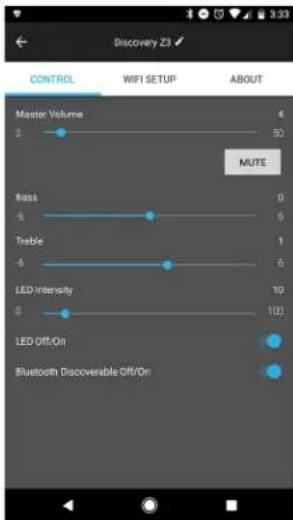
Fig 3
Using Spotify Connect
Using Spotify Connect
- If you have already connected the Discovery Z3 to your home network, proceed to step 2. If you have not connected it to your home network please go to page 6 and complete the steps. Then return to step 2 on this page.
- Download, install and login to the Spotify App on your phone/tablet/PC. Spotify Connect requires a Premium subscription to use this feature.
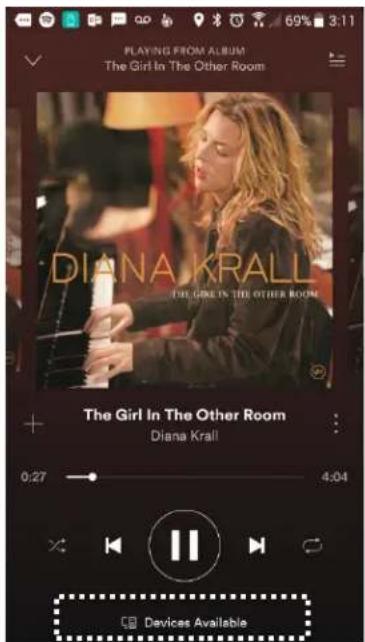
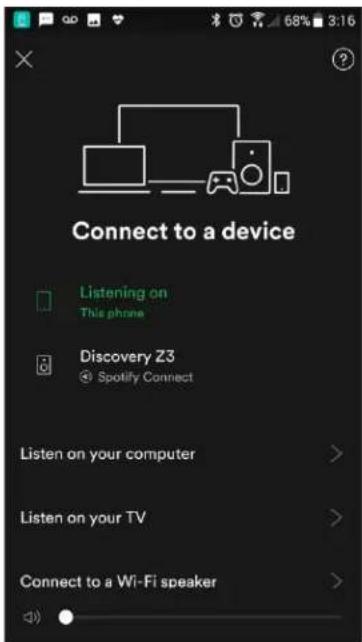
- Start the Spotify App and you will see "Device Available" text at the bottom of the app. Click on this and you will be presented with all of the Spotify Connect devices available. Select the Discovery Z3 and now music will start playing on the Discovery Z3.
Note: The volume control on your phone and in the Spotify app will now be linked with the volume control on the Discovery Z3.

Using the 3.5mm Input
- Connect a 3.5mm Stereo audio cable (Not supplied) from your source to the 3.5mm input on the back of the Discovery Z3 speaker.
- Adjust the volume on the Discovery Z3 and the volume of the source device.
- Play your content.

Firmware Update and Factory Reset
Updating the Firmware
Updating the firmware on the Discovery Z3 is a very simple process. Simply download and launch the free smartphone/tablet application. Connect to the Z3 by selecting it from the available devices screen, if a firmware update is available a message will appear in the application as shown in figure 1.
Next, select the about page from the application and click on firmware update (Fig 2), if a firmware update is found you will be presented with an option to install (Fig 3). Press install and the unit will perform the update process. The update process should take about 2—3 minutes total. The Z3 will reboot when complete. You can check the current firmware version from the about screen in the smartphone application.
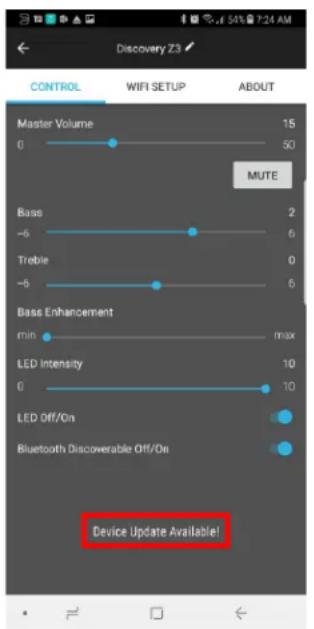
Fig 1 Fig 2
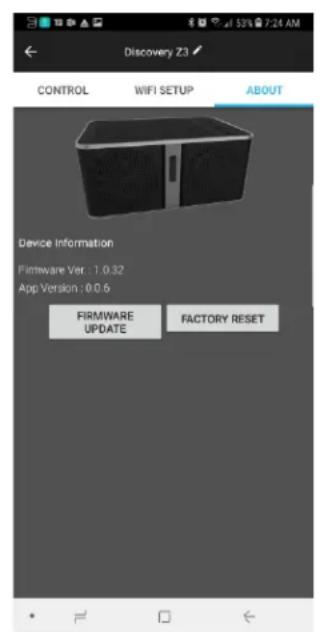
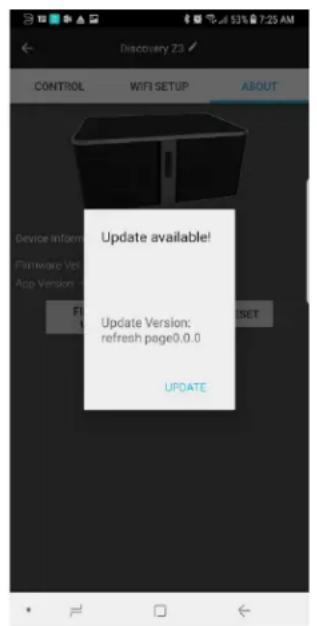
Fig 3
Factory Reset
In the remote case that the Discovery Z3 becomes unresponsive a factory reset can be accomplished using one of the two below methods.
Option 1: Using the smartphone application go the about page and press the factory reset button (Fig. 2). This will restore the unit back to its original settings.
Option 2: Unplug the power cord from the back of the unit. Press and hold the center/pause button on the front of the unit while reconnecting the power cord. Continue to hold the center/pause button until the front LED begins flashing. The unit will be restored back to its original settings.
SPECIFICATIONS
| POWERFUL AMPLIFICATION 50 watts for each bass driver20 watts for each tweeter140 watts total power | |
| CUSTOM DESIGNED ELAC DRIVERS Dual 4-inch aramid-fiber woofers with vented pole pieceDual 1-inch soft-dome tweetersDual 4-inch passive bass radiators | |
| WIRELESS CONNECTIVITY Wi-Fi; Bluetooth; 3.5 mm Input | |
| STREAMING TECHNOLOGIES Discovery, Spotify Connect, Bluetooth, AirPlay, Roon | |
| TOTAL CONTROL, SIMPLY iOS and Android app controlDiscovery app lets you customize your friendly nameAutomatic firmware updatesSimply connect to your home Wi-Fi network | |
| DIMENSIONS W X H X D 11.0 x 5.0 x 7.5 in / 279.4 x 127.0 x 190.5 mm | |
| VOLTAGE 100-240 V / 50-60 Hz |
ELAC Americas Inc.
North America Limited Liability Warranty
Passive Speakers (No built-in amplifier)
ELAC Americas INC. warrants to the original purchaser that this product be free from defects and or workmanship for a period of 3 (Three) years from the original date of purchase. During this time period, repair or replacement of parts will be free of charge to the original owner (See below limitations). Shipping to and return from the repair center will be the responsibility of the original purchaser.
Powered Subwoofers
ELAC Americas INC. warrants to the original purchaser that this product be free from defects and or workmanship for a period of 3 (Three) years on the cabinet and speaker driver and 1 (One) year on the amplifier from the original date of purchase. During this time period, repair or replacement of parts will be free of charge to the original owner (See below limitations). Shipping to and return from the repair center will be the responsibility of the original purchaser.
Electronics (Non Speaker Products)
ELAC Americas INC. warrants to the original purchaser that this product be free from defects and or workmanship for a period of 1 (One) years from the original date of purchase. During this time period, repair or replacement of parts will be free of charge to the original owner (See below limitations). Shipping to and return from the repair center will be the responsibility of the original purchaser.
B-Stock (Reconditioned/Open Box) Product Warranty
ELAC Americas INC. warrants to the original purchaser that this product be free from defects and or workmanship, unless otherwise stated in product description, for a period of 90 days from the original date of purchase. During this time period, repair or replacement of parts will be free of charge to the original owner (See below limitations). Shipping to and return from the repair center will be the responsibility of the original purchaser.
Limitations
- Warranty begins on the date of original purchase from an authorized ELAC Americas LLC dealer.
- Product is warranted only if used in home applications within the max power rating specified in this manual. Commercial use of this product is not warranted.
- Product that has been modified or altered in anyway will not be warranted.
- Product that has been abused or subjected to faulty equipment will not be warranted.
- Products with defaced or removed serial numbers will not be warranted.
If service is required
In the event that service is required, please contact ELAC America at 714-252-8843 or at customerservice@elac.us to arrange for service or replacement. You will be responsible to provide proof of purchase (Copy or original sales receipt). Shipping to and from our repair center will be the responsibility of the original purchaser.
Warranty Outside of North America
This warranty applies to products purchased in the United States and Canada. For warranty claims outside of North America please contact the local dealer/distributor in the country of purchase.

natural_image
Line drawing of a rectangular electronic device with a control panel and 'ELAC' label (no text or symbols on the device itself)ELAC The life of sound.
Sicherheitshinweise
1. Allgemeines
natural_image
Illustration of a portable electronic device with labeled ports (no text or symbols beyond labels)WLAN-Anbindung
Anbindung an den Discovery Music Server
Bluetooth Audio
natural_image
Illustration of a black and gray electronic device labeled 'ELAE' with a white vertical stripe (no additional text or symbols)Abb 1
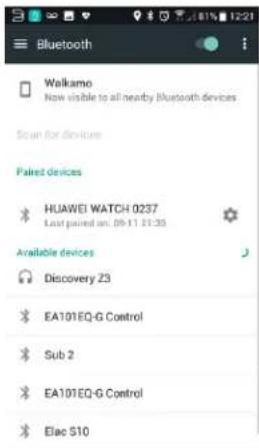
Abb 2
Abb 3
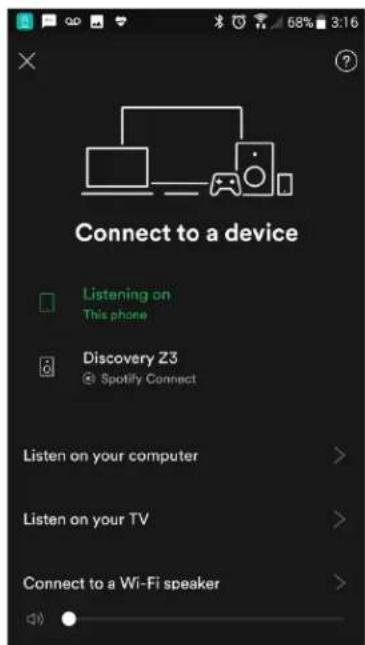

Abb 1
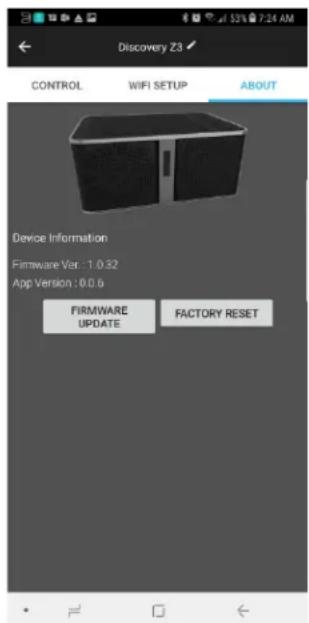
Abb 2
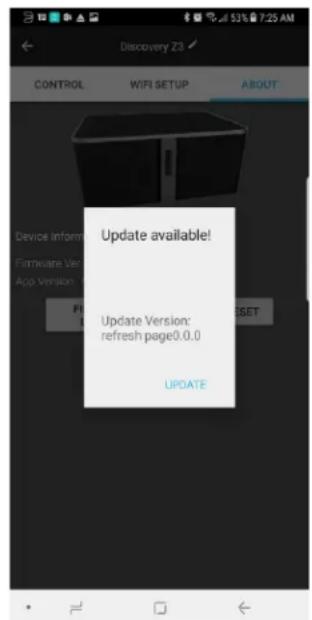
Abb 3
| POWERFUL AMPLIFICATION 50 watts for each bass driver20 watts for each tweeter140 watts total power | |
| CUSTOM DESIGNED ELAC DRIVERS Dual 4-inch aramid-fiber woofers with vented pole pieceDual 1-inch soft-dome tweetersDual 4-inch passive bass radiators | |
| WIRELESS CONNECTIVITY Wi-Fi; Bluetooth; 3.5 mm Input | |
| STREAMING TECHNOLOGIES Discovery, Spotify Connect, Bluetooth, AirPlay, Roon | |
| TOTAL CONTROL, SIMPLY iOS and Android app controlDiscovery app lets you customize your friendly nameAutomatic firmware updatesSimply connect to your home Wi-Fi network | |
| DIMENSIONS W X H X D 11.0 x 5.0 x 7.5 in / 279.4 x 127.0 x 190.5 mm | |
| VOLTAGE 100-240 V / 50-60 Hz |
natural_image
Line drawing of a rectangular electronic device with a control panel and 'ELAI' label (no additional text or symbols)ELAC The life of sound.
Connexion Wi-Fi
Figure 1
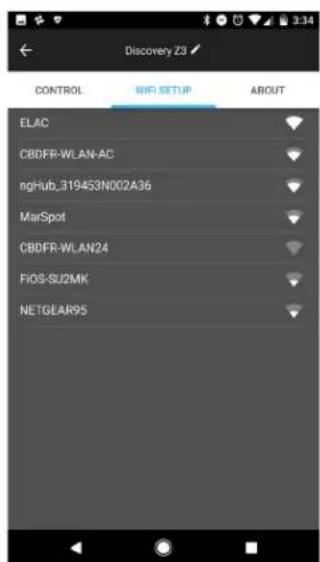
Figure 2 Figure 3
natural_image
Illustration of a black and gray electronic device with a vertical 'ELAE' label on its side (no additional text or symbols)Figure 1
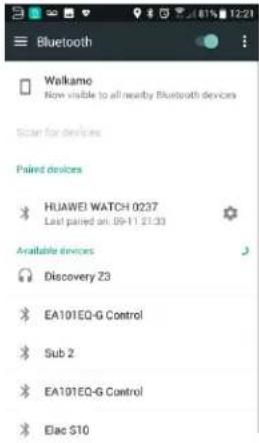
Figure 2
Accentuation des graves
Figure 3
Utiliser Spotify Connect
Utiliser Spotify Connect
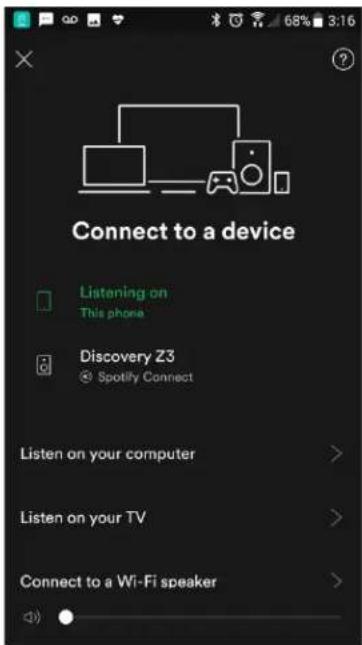

Fig 1 Fig 2
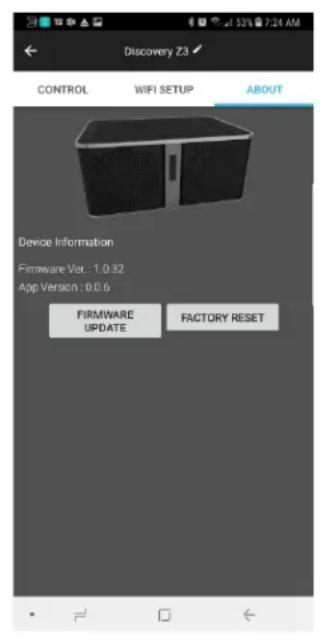
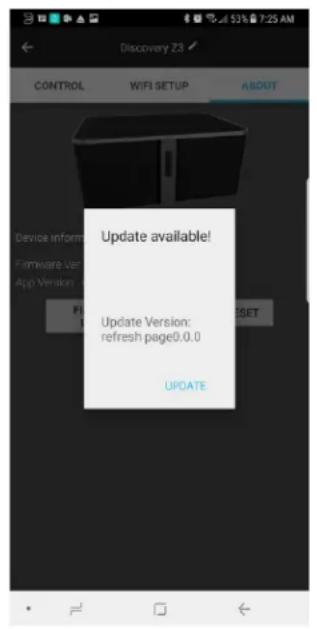
Fig 3
Réinitialisation
| POWERFUL AMPLIFICATION 50 watts for each bass driver20 watts for each tweeter140 watts total power | |
| CUSTOM DESIGNED ELAC DRIVERS Dual 4-inch aramid-fiber woofers with vented pole pieceDual 1-inch soft-dome tweetersDual 4-inch passive bass radiators | |
| WIRELESS CONNECTIVITY Wi-Fi; Bluetooth; 3.5 mm Input | |
| STREAMING TECHNOLOGIES Discovery, Spotify Connect, Bluetooth, AirPlay, Roon | |
| TOTAL CONTROL, SIMPLY iOS and Android app controlDiscovery app lets you customize your friendly nameAutomatic firmware updatesSimply connect to your home Wi-Fi network | |
| DIMENSIONS W X H X D 11.0 x 5.0 x 7.5 in / 279.4 x 127.0 x 190.5 mm | |
| VOLTAGE 100-240 V / 50-60 Hz |