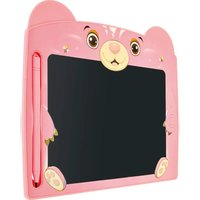
LST 8BB - Graphic tablet Schwaiger - Free user manual and instructions
Find the device manual for free LST 8BB Schwaiger in PDF.


| Product Type | Graphics Tablet |
| Brand | Schwaiger |
| Model | LST 8BB |
| Color | Blue |
| Screen Size | 21.59 cm (8.5 inches) |
| Dimensions | 190 x 230 x 6 mm |
| Weight | 145 g |
| Power Supply | CR2025 button cell, 3 V DC |
| Battery Life | Up to 12 months |
| Screen Lifespan | Approximately 50,000 erasures |
| Screen Technology | LCD |
| Frame Material | HIPS |
| Input Pressure | 100 - 200 g |
| Reflectance | 25 - 30% |
| Main Functions | Stylus writing, button erasing, screen lock |
| Writing Color | Multicolor (changes with pressure and position) |
| Package Contents | Graphics tablet, stylus, pre-installed CR2025 battery |
| Intended Use | Writing and displaying notes (private use) |
| Operating Temperature | 0°C to +40°C |
| Storage Temperature | 5°C to 20°C |
| Maintenance | Clean with a soft, dry cloth |
| Safety | Do not immerse, do not open, keep out of reach of children |
| Technical Service | Schwaiger GmbH, phone support in German Monday to Friday from 8 am to 5 pm |
Frequently Asked Questions - LST 8BB Schwaiger
User questions about LST 8BB Schwaiger
0 question about this device. Answer the ones you know or ask your own.
Ask a new question about this device
Download the instructions for your Graphic tablet in PDF format for free! Find your manual LST 8BB - Schwaiger and take your electronic device back in hand. On this page are published all the documents necessary for the use of your device. LST 8BB by Schwaiger.
USER MANUAL LST 8BB Schwaiger
GB USER GUIDE AND SAFETY INSTRUCTIONS
8.5" LCD WRITING TABLET
MODE D'EMPLOI ET CONSIGNES DE SÉCURITÉ
TABLETTE D'ÉCRITURE LCD 8,5"
ISTRUZIONI PER L'USO E AVVERTENZE DI SICUREZZA
TAVOLETTA DA SCRITTURA LCD 8,5"
natural_image
Illustration of a cartoon bear character with a blank screen, no text or symbols presentALLGEMEINES
Read the user guide and keep it in a safe place.
Congratulations and thank you for purchasing this Schwaiger Product. This user manual is an integral part of this product. It contains important information on commissioning and handling.
This user manual is intended to assist you in using the product. Read through the instructions for use carefully. Store this guide safely throughout the product's entire service life and pass it on to any subsequent users or owners. Check that the supplied package is complete and ensure that none of the parts are defective or damaged.
INTENDED USE
The product is designed exclusively for writing and displaying notes or similar. The product is intended for private use only and is not suitable for commercial use. Only use the product as described in this user manual. Any other use is considered improper and may result in property damage.
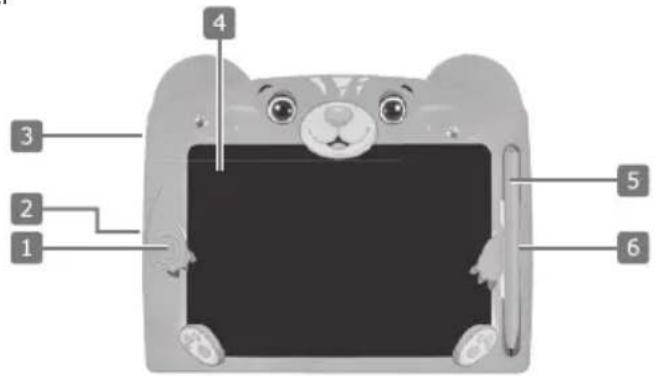
PRODUCT DETAILS
| 1 Erase button |
| 2 Lock switch |
| 3 Battery compartment |
| 4 Writing surface |
| 5 Pen |
| 6 Pen holder |
GENERAL SAFETY AND WARNING INSTRUCTIONS

WARNING!
Risk of electric shock!
Faulty electrical installation or excessive mains voltage can lead to electric shock.
- Do not operate the product if it shows visible damage.
- Do not open the housing but entrust the repair to specialists. Contact a specialist workshop for this purpose. Liability and warranty claims are excluded in the event of repairs carried out independently, improper connection or incorrect operation.
- Do not disassemble the product into its individual parts. Improper handling can lead to electric shock and malfunction.
- Never immerse the product in water.
- Never touch the product with wet hands.
- Keep the product away from open flames and hot surfaces.
- Only use the product in indoor areas.
- Do not expose the product to rain or extreme weather conditions e.g., sub-zero temperatures, hail, extreme heat.
- Never place the product in such a way that it can fall into water.
• Make sure that no liquid gets into the product and, if necessary, dry the product thoroughly before using it again. - Ensure that children do not insert any objects into the product.

WARNING!
Hazards for children and persons with reduced physical, sensory or mental abilities (for example, partially disabled persons, elderly persons with reduced physical and mental abilities) or lack of experience and knowledge (for example, older children).
- This product can be used by children aged from eight years and above and persons with reduced physical, sensory, or mental capabilities or lack of experience and knowledge if they have been given supervision or instruction concerning use of the product in a safe way and understand the hazards involved. Children must not play with the product. Cleaning and user maintenance must not be carried out by children without supervision.
- Do not leave the product unattended during operation.
- Do not allow children to play with the packaging film. Children can get caught in it while playing and suffocate.

WARNING!
Fire hazard!
Improper handling of the product and battery may cause an explosion or fire.
- Keep the product away from water, other liquids, open flames, and hot surfaces.
- Do not cover the product with objects or clothing.
- Do not place open fire sources, such as lighted candles, on or near the product.
- Keep a distance of at least 5 cm from easily flammable materials.

WARNING!
Hazard due to batteries!
If you use batteries improperly, there is a risk of explosion or burns from leaking battery fluid.
- Do not dispose of batteries in fire. Disposing of a battery in fire, in a hot oven, or mechanically crushing or cutting a battery can cause an explosion.
- Exposing a battery to extremely high ambient temperatures may cause an explosion or leakage of flammable liquid or gas.
- Exposure of a battery to extremely low atmospheric pressure may cause explosion or leakage of flammable liquid or gas.
- Do not expose batteries to unrestricted sunlight and heat. Increased risk of leakage!
- Do not charge, disassemble, or short-circuit batteries. Risk of explosion!
- Remove the battery from the battery compartment as soon as it is empty or if you do not use the product for a longer period of time.
- Pay attention to the correct polarity when inserting the battery
- Use only batteries of the same type.
- If necessary, clean the battery and device contacts before inserting the battery.
- If you suspect that a battery has been swallowed or otherwise entered your body, seek medical attention immediately.
- Do not touch leaking batteries. If you do come into contact with battery fluid, wash the affected area thoroughly with plenty of clean water. If leaking battery fluid causes a skin reaction or gets into the eyes, seek additional medical attention.
- If the battery compartment in which the battery is housed can no longer be closed securely, stop using the product. Remove the battery and keep it out of the reach of children.
Do not swallow batteries!
Danger of chemical burns. The product contains a button cell battery. If the button cell battery is swallowed, it can cause severe internal burns and death in as little as 2 hours. Keep new and used batteries away from children.

IMPORTANT!
Risk of damage!
Improper handling of the product may result in damage to the product.
- Do not drop the product or expose it to strong vibrations.
- Never place the product on or near hot surfaces (e.g., stove tops).
- Do not bring the product into contact with hot parts.
- Never expose the product to high temperature (heating, etc.) or weather (rain, etc.).
- Never pour liquid into the product.
- Never immerse the product in water for cleaning and do not use a steam cleaner for cleaning. The product may otherwise be damaged.
- Do not use the product if the plastic components of the product are cracked or deformed. Replace damaged components only with suitable original spare parts.
OPERATION IN DETAIL
Checking product and supplied package
Risk of damage!
If you open the packaging carelessly with a sharp knife or other pointed objects, the product can be damaged quickly.
- Be very careful when opening it.
-
Remove the product from the packaging.
-
Check if the delivery is complete.
-
Check whether the product or the individual parts show any damage. If this is the case, do not use the product. Contact the hotline or e-mail address specified in this instruction manual.
Commissioning
A button cell battery (CR2025) is included in the delivery and is already inserted in the battery compartment (3). Before using the product for the first time, you must pull the protective strip out of the battery compartment (3). You can then use the product.
- Remove the pen (5) from the pen holder (6).
- Write with the pointed side of the pen (5) on the writing surface (4) of the product. The harder you press with the pen (5) on the writing surface (4), the thicker the indicated line thickness will be. The colour of the writing changes automatically depending on where you write on the writing surface (4).
- Press the erase button (1) once to completely delete what you have written on the writing surface (4).
- If you want to prevent what is written on the writing surface (4) from being erased, activate the lock function of the product. To do this, slide the lock switch (2) on the back of the product to position B. To cancel the lock function, move the lock switch (2) back to position n.

Only use the pen (5) included in the scope of delivery for writing so that the writing surface (4) doesn't get damaged.
Changing the battery
When inserting a new battery, make sure that you insert the battery into the battery compartment (3) at the same time as the battery slide. In this way, the battery cannot slip in the battery compartment (3).
To insert a new button cell battery (CR2025), you must first open the battery compartment (3). Proceed as follows:
- Loosen the screw on the back of the product.
- Press the tension latch and remove the battery slide from the battery compartment (3). Remove the used battery.
- Now insert the new button cell battery into the battery slide. Make sure that the polarity of the battery is correct (positive pole towards the back of the product).
- Then put the battery slide with battery back into the battery compartment (3) and tighten the screw.
The product is now ready again and can be used.
TECHNICAL DATA
| Item number LST8BB / L | LST8BP Font colour colourful | ||
| Power supply via battery: 3 V DC Lifetime approx. 50,0 | 00 writing times (+/- 5%) | ||
| Type of battery 1x CR20 | 25 Ambient temperature 0°C - | +40°C | |
| Battery run time up to 12 months Product material LCD | display, HIPS frame | ||
| Display size 21,59 cm (8,5") | Dimensions | 190 x 230 x | 6 mm |
| Input pressure | 100 - 200 g | Weight | 145 g |
| Reflectance | 25 - 30 % | Colour | blue (LST8BB) / pink (LST8BP) |
MAINTENANCE & CLEANING
Short circuit hazard!
Water or other liquids entering the housing can cause a short circuit.
- Never immerse the product in water or other liquids.
- Make sure that no water or other liquids get into the housing.
i IMPORTANT!
Risk of damage!
Improper handling of the product may result in damage to the product.
- Do not use aggressive cleaning agents, brushes with metal or nylon bristles, or sharp or metallic cleaning objects such as knives, hard spatulas, and the like. These can damage the surfaces.
- Clean the product with a soft, dry cloth.
- If the product is stubbornly dirty, use a slightly damp cloth and a little mild detergent if necessary.
- Allow all parts to dry completely afterwards.
Storage
All parts must be completely dry before storage.
• Always store the product in a dry place.
- Store the product out of reach of children, securely closed and at a storage temperature between 5 °C and 20 °C (room temperature).
Disposal

Do not dispose of batteries or electric and electronic devices in the normal household waste. The consumer is legally obliged to return electrical and electronic devices and batteries that are at the end of their useful life to the point of sale or public collection points that have been set up for this purpose. Legislation in the country of use governs individual details regarding disposal. The symbol on the product, the user guide or the packaging indicates this legal requirement.

GÉNÉRALITÉS
LE PRODUIT EN DÉTAIL
HET PRODUCT IN DETAIL
ALGEMENE VEILIGHEIDSINSTRUCTIES EN WAARSCHUWINGEN

WAARSCHUWING!
Stroomslaggevaar!
Schwaiger GmbH does not accept any liability or warranty for damages that are sustained due to improper installation or mounting, improper use of the product or non-compliance with the safety instructions.
Manufacturer's information
Dear Customer, please contact our Technical Support if you need technical advice and your retailer is unable to help you.
Office Hours (Technical Support in German)
Monday to Friday: 8:00 a.m. - 5:00 p.m.
natural_image
Illustration of a cartoon-style digital drawing tablet with cat, sun, and flowers on its screen (no text or symbols)
- GB USER GUIDE AND SAFETY INSTRUCTIONS
- MODE D'EMPLOI ET CONSIGNES DE SÉCURITÉ
- ISTRUZIONI PER L'USO E AVVERTENZE DI SICUREZZA
- ALLGEMEINES
- Read the user guide and keep it in a safe place.
- INTENDED USE
- PRODUCT DETAILS
- GENERAL SAFETY AND WARNING INSTRUCTIONS
- WARNING!
- Risk of electric shock!
- Fire hazard!
- Hazard due to batteries!
- Do not swallow batteries!
- IMPORTANT!
- Risk of damage!
- OPERATION IN DETAIL
- Checking product and supplied package
- Commissioning
- Changing the battery
- MAINTENANCE & CLEANING
- Short circuit hazard!
- i IMPORTANT!
- Storage
- Disposal
- GÉNÉRALITÉS
- LE PRODUIT EN DÉTAIL
- HET PRODUCT IN DETAIL
- ALGEMENE VEILIGHEIDSINSTRUCTIES EN WAARSCHUWINGEN
- WAARSCHUWING!
- Stroomslaggevaar!
- Manufacturer's information
- Office Hours (Technical Support in German)
Brand : Schwaiger
Model : LST 8BB
Category : Graphic tablet