Breezy 86690 - Fan UNOLD - Free user manual and instructions
Find the device manual for free Breezy 86690 UNOLD in PDF.


User questions about Breezy 86690 UNOLD
0 question about this device. Answer the ones you know or ask your own.
Ask a new question about this device
Download the instructions for your Fan in PDF format for free! Find your manual Breezy 86690 - UNOLD and take your electronic device back in hand. On this page are published all the documents necessary for the use of your device. Breezy 86690 by UNOLD.
USER MANUAL Breezy 86690 UNOLD
natural_image
Five colorful headband earpieces arranged in a row, no visible text or symbols on the devices themselves.NACKENVENTILATOR BREEZY
Bedienungsanleitung
Instructions for use | Notice d'utilisation Gebruiksaanwijzing | Istruzioni per l'uso Instrucciones de uso | Instrukcja obsługi
Modell 86690/94/96/98/99
Impressum:
natural_image
Modern kitchen appliance with digital display and bucket containing food (no visible text or symbols)
natural_image
Illustration of a modern wheat bread machine with a bucket containing grain, accompanied by small kitchen utensils and a glass of milk (no text or symbols visible)UNOLD®
Care + Style
natural_image
Product photo of a red and black electric toothbrush with a small brush attachment (no text or symbols visible)
natural_image
Close-up of a metallic electronic device with a cable and indicator lights (no visible text or symbols)UNOLD®
Fan + Heat
natural_image
Close-up of a metallic desktop fan with visible blades and base (no text or symbols)
natural_image
Red electric fan with cooling fan and control panel (no visible text or symbols)INHALTSVERZEICHNIS
Technical Specifications....14
Explanation of the symbols.... 14
For your safety.... 14
Placing in service and charging.... 17
Operation.... 18
Cleaning and care....19
Guarantee Conditions....20
Waste Disposal/Environmental Protection ... 20
Service 13
natural_image
Close-up of two metallic mesh fans with spiral blades, no text or symbols visiblenatural_image
Man in office attire relaxing on a desk with a laptop and office chair in the background (no visible text or symbols)
natural_image
Woman pushing a baby stroller on a paved path surrounded by trees (no text or symbols visible)Dimensions: approx. 21.4 x 2.7 x 29 cm (W/D/H)
Weight: approx. 0.19 kg
Cable length: USB cable, approx. 50 cm
Rechargeable battery: 2,000 mA, 3.76 watt
Charge input: DC 5 V, 1 A
Housing: Plastic
Colour: 86690 white, 86694 pink, 86696 green, 86698 blue,
86699 purple
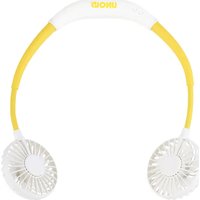
Features: ON/OFF button, ventilation angle flexibly adjustable for both sides, 3 speed levels, indicator light, runtime 2 to 8 hours depending on speed level, approx. 3 hours charging time, rotors with light function (changing colours or continuous colour)
Accessories: Operating instructions, USB charging cable without plug-in power supply, hair protection net
Equipment features, technology, colours and design are subject to change without notice. Errors and omissions excepted.
EXPLANATION OF THE SYMBOLS

This symbol indicates potential hazards that may result in injury or damage to the appliance.
FOR YOUR SAFETY
Please read the following instructions and keep them on hand for later reference.
Instructions for persons in the household
-
This appliance can be used by children 8 years and older, as well as by persons with reduced physical, sensory or mental abilities or with lack of experience and/or knowledge, if they are supervised or if they have been instructed with regard to safe use of the appliance and have understood the dangers that can result from use of the appliance.
-
Children must not play with the appliance.
-
Children are not allowed to perform cleaning and user maintenance, unless they are 8 years of age or older and are supervised.
- Keep the appliance and the power cord out of the reach of children under 8 years of age.
- Keep the appliance out of the reach of children.
Note: The appliance is delivered without plug-in power supply/USB charger. However, to charge the appliance it must be connected to the mains supply via a USB charger. In this regard the following instructions for dealing with electricity apply:
- Strictly comply with the safety instructions and operating instructions for the respective USB charger.
- When connecting the USB charger, ensure that the mains voltage meets the specified requirements of the charger.
- The USB charger must not be operated with an external timer or a remote control system.
-
Only charge the appliance with the USB charger indoors.
-
Protect the USB charger from wetness, heat and direct sunlight.
-
Always ensure that the charging cable is laid out its entire length to prevent damage due to overheating.
- Unplug the charging cable from the electrical outlet only by grasping and unplugging the plug-in power supply. Do not, under any circumstances, pull directly on the charging cable.
- Unplug the USB charger from the mains supply, when it is not required.
- When you put the appliance away for storage purposes, do not, under any circumstances wrap the charging cable around the appliance. Wrapping the power cord around the appliance can damage the power cord. Disconnect the charging cable from the appliance when the appliance is completely charged.
- As long as the plug-in power supply of the USB charger is in the electrical outlet, even if the appliance is switched off, the appliance poses a hazard in the vicinity of water.
- Do not, under any circumstance, touch the plug-in power supplies with wet hands.
-
Do not insert any objects into the appliance. There is danger of electric shock due to appliance damage.
-
Ensure that you do not damage the rechargeable battery in the appliance, e.g. through falling, impact or vibration. Do not continue to use a damaged rechargeable battery. If in doubt, contact our customer service organisation.
- Recharge the battery on a regular basis to avoid deep discharge, and thus a possible appliance defect.
- Attention: The provided charging cable is not suitable for data transmission!
- If liquid should escape from the rechargeable battery, put on protective gloves immediately before handling the appliance. Do not continue to use the appliance. Avoid contact with skin and eyes. Should skin or eye contact nevertheless occur, seek medical attention immediately. The appliance is intended for personal use only; it is not designed for commercial requirements.
Safety instructions for safe operation of the appliance
- Do not use the appliance in rooms that are extremely dusty or in the vicinity of flammable substances.
- Do not, under any circumstances, operate or charge the appliance if it has been brought from a cold environment into a warmer environment. In such a situation condensation can occur that can damage the appliance. Wait until the appliance has reached room temperature before using it.
- Do not, under any circumstances, open the housing of the appliance. This could damage the rechargeable battery.
- The appliance is intended for household use only, or for similar areas of use, such as,
■ in kitchenettes in businesses, offices or other workplaces,
■ for use by guests in hotels, motels or other lodgings,
■ in private guest houses or holiday homes.
-
Be careful not to pinch the charging cable or pull it over corners. Otherwise the power cord could be damaged.
-
Do not, under any circumstances, stick your fingers or objects, such as needles, pins, etc. through the basket grille into the interior of the appliance – danger of injury!
- Ensure that long hair cannot be caught by the impeller.
- Check the appliance, the plug and the charging cable regularly for wear or damage. If the charging cable or other parts are
damaged, please send the appliance for inspection and repair to our customer service organisation. Unauthorised repairs can result in serious hazards for the user and void the warranty.
- To avoid damage, do not use the appliance with accessories of other manufacturers or brands.
- Unplug the mains plug of the charger after use and before cleaning. Do not, under any circumstances, leave the appliance unattended when the mains plug is plugged in.

Do not, under any circumstances, stick your fingers or objects, such as needles, pins, etc. through the openings into the interior of the appliance – danger of injury!
The manufacturer will not be liable in the event of incorrect assembly, improper or incorrect use or if repairs are carried out by unauthorized third parties.
PLACING IN SERVICE AND CHARGING
- Remove all packaging materials and transport safeguards. Keep the packaging material, such as plastic bags or Styrofoam away from small children – danger of suffocation!
- Ensure that the applanc e is switched off.
- Connect the changing cable on the charging connection of the appliance. This is located at the top left.
- Connect the other end of the charging cable to a USB charger.
- Plug the plug of the USB charging cable into an electrical outlet (220-240 V \~ 50 Hz).
- Ensure that all cables are correctly connected, otherwise the appliance cannot be correctly charged.
- The indicator light on the appliance illuminates red and indicates that the appliance is being charged. As soon as the charging process is completed, the indicator light illuminates blue (duration approx. 3 hours).
-
To prevent damage of the rechargeable battery, the appliance should not be charged longer than 12 hours.
-
You can use the appliance on level 1 for approx. 8 ~h , level 2 for approx. 3.5 ~h and level 3 for approx. 2 ~h , before it must be recharged. The maximum capacity of the rechargeable battery is only achieved after multiple charging processes.
-
Only recharge the appliance when the rechargeable battery is completely discharged. Thus the full capacity of the rechargeable battery remains intact for a longer period of time.
-
Tips: The appliance can also be charged with a different USB charging cable, as long as the USB charging cable meets the technical specifications. If in doubt, contact our technical customer service organisation.
-
It is also possible to connect the supplied charging cable to a USB port of a computer or power bank and charge the appliance in this manner. However, for technical reasons this charging process can take a very long time; consequently we recommend charging with a USB charger. When using a power bank for charging: Comply with all manufacture instructions and technical specifications of the power bank manufacturer.
OPERATION
- Ensure that the app liace is charged.
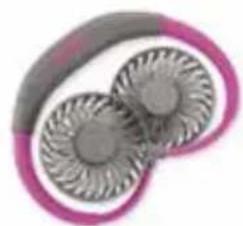
- Press the ON/OFF switch on the upper left side of the appliance. You have 3 speed levels to choose from. The appliance starts at a low speed. Briefly press the ON/OFF button once for level 2 (medium speed) or twice for level 3 (high speed).
- Note: If the indicator light is flashing red, this means that the battery must be recharged. Recharge the battery as soon as possible.
- If you want to switch on the rotor lighting, press the ⚙ button once for colour change mode or twice for continuous illumination. Press the ⚙ button again to switch off the rotor lighting. The rotor function can also be used without fan operation.
- Tip: To protect longer hair from the rotor blades, you can pull the provided hair protection nets over each fan head.
- Place the appliance around the neck as desired and align the fans.
- Switch-off the appliance by pressing the ON/OFF button when you no longer need it.
CLEANING AND CARE

Switch off the appliance.
Wait until the appliance has come to a complete standstill.
Do not, under any circumstances, immerse the appliance in water. The motor or electrical components of the appliance must not get wet.
- Never use any abrasive scouring agents, steel wool, metal objects, hot cleaning agents or disinfectants.
- Wipe off the housing and grille of the fan with a slightly amp cloth.
natural_image
Close-up of a pair of stylized earbuds with metallic blades, no text or symbols visible- Store the fan in a dry, safe place so that it is protected from dust, impact, heat and moisture. We recommend that you keep the original packaging on hand and store the appliance in the original packaging when the appliance is not needed.

natural_image
Man in office attire relaxing on a desk with a laptop and office chair in the background (no visible text or symbols)
natural_image
Woman pushing a baby stroller on a paved path surrounded by trees (no text or symbols visible)GUARANTEE CONDITIONS
We grant a 24 months guarantee, and in case of commercial use a 12 months guarantee, starting from the date of purchase for any damage demonstrably due to manufacturing defects and when the appliance has been used according to its intended use. Within the warranty period we will remedy defective materials or workmanship through repair or replacement, at our option. Our warranty terms apply only to appliances sold in Germany and Austria. For other countries, please contact the responsible importer. In the event of a claim for remedy of defects, please send the appliance to our after sales service, properly packaged, together with a copy of the automatically generated sales receipt, which must show the date of purchase, and a description of the defect. You can print out a return receipt on our website www.unold.de/ruecksendung. (only for entries from Germany and Austria). The warranty does not cover damage from normal wear, improper handling and failure to comply with the maintenance and care instructions. The warranty is void if repairs or modifications are made to the appliance by third parties. Any claims of the end consumer vis-à-vis the retailer are not limited by this warranty.
WASTE DISPOSAL / ENVIRONMENTAL PROTECTION
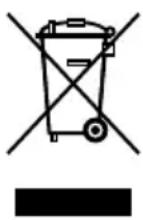
Our appliances are produced on a high quality level for a long lifetime. Regular maintenance and expert repairs by our after-sales service can extend the useful life of the appliance. If an appliance is defective and repair is not possible we ask you to follow the following instructions for disposal. Do not dispose this appliance together with your standard household waste. Please bring this product to an approved collection point for recycling of electric and electronic products. By separate collection and disposal of waste products you help to protect natural resources and ensure, that the product is disposed in an adequate way to protect health and environment.
Do not dispose of used batteries as household waste. Dispose of this product via your appliance dealer or take it to the municipal collection point.
NOTICE D'UTILISATION MODÈLE 86690/94/96/98/99
SPÉCIFICATION TECHNIQUE
natural_image
Abstract illustration of two interlocking circular patterns with gradient shading (no text or symbols)natural_image
Man in office attire relaxing on a desk with a laptop and office chair, no visible text or symbols
natural_image
Woman pushing a baby stroller on a paved path surrounded by green trees (no text or symbols visible)CONDITIONS DE GARANTIE
natural_image
Close-up of a pair of metallic fans with spiral blades, no text or symbols visiblenatural_image
Man in office attire relaxing on a desk with a laptop and computer, surrounded by abstract geometric shapes (no text or symbols visible)
natural_image
Woman pushing a baby stroller on a paved path surrounded by green trees (no text or symbols visible)GARANTIEVOORWAARDEN
natural_image
Abstract illustration of two interlocking circular patterns with radial lines, no text or symbols present.natural_image
Man in business attire relaxing on a computer keyboard, with office equipment in the background (no visible text or symbols)
natural_image
Woman pushing a baby stroller on a paved path surrounded by trees (no text or symbols visible)NORME DIE GARANZIA
natural_image
Close-up of two metallic circular components with radial grooves, possibly turbine blades or fans, against a pink and gray background (no text or symbols visible)natural_image
Man in business attire relaxing on a desk with a laptop and office chair, no visible text or symbols
natural_image
Woman pushing a baby stroller on a paved path surrounded by green trees (no text or symbols visible)CONDICIONES DE GARANTIA
natural_image
Close-up of two metallic fans with spiral blades, no text or symbols visiblenatural_image
Man in office attire relaxing on a computer keyboard, with office equipment in the background (no visible text or symbols)