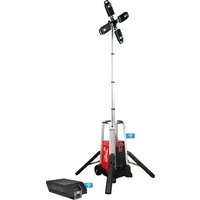
MXF041 - Lamp MILWAUKEE - Free user manual and instructions
Find the device manual for free MXF041 MILWAUKEE in PDF.


| Product Type | Jobsite Light Tower |
| Brand | Milwaukee |
| Model | MXF041 |
| Protection Rating | IP56 |
| Weight | 47.73 kg (105 lbs) |
| Battery Type | Lithium-ion MX FUEL™ 72 V DC |
| Charger Type | MX FUEL™ |
| AC Input Voltage (Charge) | 120 V |
| AC Output Voltage (Charge) | 6 V |
| DC Output Voltage | 72 V |
| DC Output Amperage | 4.5 A |
| Operating Ambient Temperature | 5°C to 40°C (40°F to 105°F) |
| Key Features | Telescopic motorized mast, 4 adjustable LED heads, deployable feet, ONE-KEY™ connectivity, battery or AC mains operation, dimmer |
| Maintenance and Cleaning | Clean with a damp cloth and mild soap. Do not immerse. Keep vents clean. |
| Safety | Do not look directly at the light. Lens hot during use. Ensure stability before raising mast. Do not use in strong wind. Keep batteries out of reach of children. |
| Spare Parts and Repairability | Repairs must be carried out by a Milwaukee authorized service center. Use only original parts. |
| Warranty | 2 years (subject to the conditions stated in the manual) |
Frequently Asked Questions - MXF041 MILWAUKEE
User questions about MXF041 MILWAUKEE
0 question about this device. Answer the ones you know or ask your own.
Ask a new question about this device
Download the instructions for your Lamp in PDF format for free! Find your manual MXF041 - MILWAUKEE and take your electronic device back in hand. On this page are published all the documents necessary for the use of your device. MXF041 by MILWAUKEE.
USER MANUAL MXF041 MILWAUKEE
natural_image
Line drawing of a multi-tiered industrial radar or wind turbine with four blades and a central hub (no text or symbols)Cat. No. / No de cat.
MXF041
MX FUEL™ ROCKET TOWER LIGHT/CHARGER TOUR D'ÉCLAIRAGE/CHARGEUR MX FUEL™ ROCKET LÁMPARA TIPO TORRE/CARGADOR MX FUEL™ ROCKET
IMPORTANT SAFETY INSTRUCTIONS
WARNING
Read all safety warnings and all instructions. Failure to follow the warnings and instructions may result in electric shock, fire and/or serious injury. Save all warnings and instructions for future reference.
WORK AREA SAFETY
- To reduce the risk of injury, close supervision is necessary when an appliance is used near children.
- Store idle light out of reach of children. Warm lights can become hazardous in the hands of children.
ELECTRICAL SAFETY
- Power cord plugs must match the outlet. Never modify the plug in any way. Do not use any adapter plugs with earthed (grounded) power tools. Unmodified plugs and matching outlets will reduce risk of electric shock.
- Avoid body contact with earthed or grounded surfaces, such as pipes, radiators, ranges and refrigerators. There is an increased risk of electric shock if your body is earthed or grounded.
• To reduce the risk of electric shock, do not put light in water or other liquid. Do not place or store appliance where it can fall or be pulled into a tub or sink.
- Do not abuse the cord. Never use the cord for carrying, pulling or unplugging the power tool. Keep cord away from heat, oil, sharp edges or moving parts.
- Arrange cords carefully to avoid hazardous environments. Tripping or snagging on cords can cause injury and product damage. Do not allow cords to run through puddles or across wet ground.
- Do not unplug by pulling on the cord. To unplug, grasp the plug, not the cord.
- Unplug the cord from outlet when not in use and before servicing or cleaning.
- Always use a suitable extension cord to reduce the risk of electric shock.
- If operating a light in a damp location is unavoidable, use a ground fault circuit interrupter (GFCI) protected supply. Use of an GFCI reduces the risk of electric shock.
PERSONAL SAFETY
- Do not overreach. Keep proper footing and balance at all times. This enables better control of the light in unexpected situations.
- Do not use on a ladder or unstable support. Stable footing on a solid surface enables better control of the light in unexpected situations.
BATTERY TOOL USE AND CARE
- Recharge only with the charger specified by the manufacturer. A charger that is suitable for one type of battery pack may create a risk of fire when used with another battery pack.
- Use light only with specifically designated battery packs. Use of any other battery packs may create a risk of injury and fire.
- Do not short circuit. A short-circuited battery pack may cause fire, personal injury, and product damage. A battery pack will short circuit if a metal object makes a connection between the positive and negative contacts on the battery pack. Do not place a battery pack near anything that may cause a short circuit, such as coins, keys or nails in your pocket.
- Do not allow fluids to flow into battery pack. Corrosive or conductive fluids, such as seawater,
certain industrial chemicals, and bleach or bleach containing products, etc., can cause a short circuit.
- Under abusive conditions, liquid may be ejected from the battery; avoid contact. If contact accidentally occurs, flush with water. If liquid contacts eyes, additionally seek medical help. Liquid ejected from the battery may cause irritation or burns.
- Do not use a battery pack or tool that is damaged or modified. Damaged or modified batteries may exhibit unpredictable behavior resulting in fire, explosion or risk of injury.
- Do not expose a battery pack or tool to fire or excessive temperature. Exposure to fire or temperature above 265^ (130°C) may cause explosion.
- Follow all charging instructions and do not charge the battery pack or tool outside the temperature range specified in the instructions. Charging improperly or at temperatures outside the specified range may damage the battery and increase the risk of fire.
CHARGER USE AND CARE
- Caution - To reduce the risk of injury, charge MILWAUKEE Lithium-Ion packs only in their MILWAUKEE Lithium-Ion charger. Other types of batteries may burst causing personal injury and damage. Do not wire a battery pack to a power supply plug or car cigarette lighter. Batteries will be permanently disabled or damaged.
- Charge only MILWAUKEE MX™ Lithium-Ion packs. Other types of batteries may burst causing personal injury or damage.
- Avoid dangerous environments. Do not charge battery pack in rain, snow, damp or wet locations. Do not use battery pack or charger in the presence of explosive atmospheres (gaseous fumes, dust or flammable materials) because sparks may be generated when inserting or removing battery pack, possibly causing fire.
- Charge in a well ventilated area. Do not block charger vents. Keep them clear to allow proper ventilation. Do not allow smoking or open flames near a charging battery pack. Vented gases may explode.
- Maintain charger cord. When unplugging charger, pull plug rather than cord to reduce the risk of damage to the electrical plug and cord. Never carry charger by its cord. Keep cord from heat, oil and sharp edges. Make sure cord will not be stepped on, tripped over or subjected to damage or stress. Do not use charger with damaged cord or plug. Have a damaged charger replaced immediately.
- Use only recommended attachments. Use of an attachment not recommended or sold by the battery charger or battery pack manufacturer may result in a risk of fire, electric shock or personal injury.
- Unplugcharger when not in use. Remove battery packs from unplugged chargers.
- To reduce the risk of electric shock, always unplug charger before cleaning or maintenance. Do not allow water to flow into AC/DC plug. Use a Ground Fault Circuit Interrupter (GFCI) to reduce shock hazards.
- Store your battery and charger in a cool, dry place. Do not store battery pack where temperatures may exceed 120°F (50°C) such as in direct sunlight, a vehicle or metal building during the summer.
SERVICE
- Have your light serviced by a qualified repair person using only identical replacement parts. This will ensure that the safety of the light is maintained.
- Never service damaged battery packs. Service of battery packs should only be performed by the manufacturer or authorized service providers.
SPECIFIC SAFETY RULES
WARNING When using flashlights or lanterns, additional precautions should always be followed, including the following:
a) To reduce the risk of injury, close supervision is necessary when a product is used near children. b) Do not contact hot parts.
c) Only use attachments recommended or sold by the manufacturer.
- WARNING The lens may get hot during use. To reduce the risk of burns, do not touch hot lens.
WARNING To reduce the risk of injury, keep hands clear of the moving parts when deploying legs and/or raising/lowering the mast.
•WARNING To reduce the risk of injury, do not look directly into the light when the light is on.
•WARNING To reduce the risk of injury, ensure the light is stable before raising the mast. Light may tip and cause injury.
WARNING Do not set up the unit if high winds are expected. High winds can cause the light to tip or fall causing severe injury.
•Light extends upward. Verify the area above light is open and clear of overhead wires and obstructions before raising.
•Chemical Burn Hazard. Keep batteries away from children.
- This tool contains a lithium button/coin cell battery. A new or used battery can cause severe internal burns and lead to death in as little as 2 hours if swallowed or enters the body. Always secure the battery cover with all screws. If it does not close securely, stop using the tool, remove the batteries, and keep it away from children. If you think batteries may have been swallowed or entered the body, seek immediate medical attention.
• Always use common sense and be cautious when using tools. It is not possible to anticipate every situation that could result in a dangerous outcome. Do not use this tool if you do not understand these operating instructions or you feel the work is beyond your capability; contact Milwaukee Tool or a trained professional for additional information or training.
- Maintain labels and nameplates. These carry important information. If unreadable or missing, contact a MILWAUKEE service facility for a free replacement.
EXTENSION CORDS
Grounded tools require a three wire extension cord. Double insulated tools can use either a two or three wire extension cord. As the distance from the supply outlet increases, you must use a heavier gauge extension cord. Using extension cords with inadequately sized wire causes a serious drop in voltage, resulting in loss of power and possible tool damage. Refer to the table shown to determine the required minimum wire size.
The smaller the gauge number of the wire, the greater the capacity of the cord. For example, a 14 gauge cord can carry a higher current than a 16 gauge cord. When using more than one extension cord to make up the total length, be sure each cord contains at least the minimum wire size required. If you are using one extension cord for more than one tool, add the nameplate amperes and use the sum to determine the required minimum wire size.
Guidelines for Using Extension Cords
- If you are using an extension cord outdoors, be sure it is marked with the suffix "W" to indicate that it is acceptable for outdoor use.
- Be sure your extension cord is properly wired and in good electrical condition. Always replace a damaged extension cord or have it repaired by a qualified person before using it.
- Protect your extension cords from sharp objects, excessive heat and damp or wet areas.
- When stringing lights together, consider the total Amperes draw when selecting the extension cords.
| Recommended Minimum Wire Gauge For Extension Cords* | |||||
| Nameplate Amps | Extension Cord Length | ||||
| 25' 50' | 75' 100' | 150' | |||
| 0 - 2.0 | 18 | 18 | 18 | 18 | 16 |
| 2.1 - 3.4 | 18 | 18 | 18 | 16 | 14 |
| 3.5 - 5.0 | 18 | 18 | 16 | 14 | 12 |
| 5.1 - 7.0 | 18 | 16 | 14 | 12 | 12 |
| 7.1 - 12.0 | 16 | 14 | 12 | 10 | -- |
| 12.1 - 16.0 | 14 | 12 | 10 | -- | -- |
| 16.1 - 20.0 | 12 | 10 | -- | -- | -- |
* Based on limiting the line voltage drop to five volts at 150% of the rated amperes.
READ AND SAVE ALL INSTRUCTIONS FOR FUTURE USE.
GROUNDING
ADANGER Improperly connecting the grounding wire can result in the risk of electric shock. Check with a qualified electrician if you are in doubt as to whether the outlet is properly grounded. Do not modify the plug provided with the tool. Never remove the grounding prong from the plug. Do not use the tool if the cord or plug is damaged. If damaged, have it repaired by a MILWAUKEE service facility before use. If the plug will not fit the outlet, have a proper outlet installed by a qualified electrician.
Grounded Tools (Three-Prong Plugs)
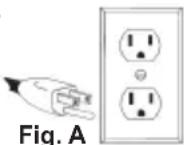
Tools marked “Grounding Required” have a three wire cord and three prong grounding plug. The plug must be connected to a properly grounded outlet (See Figure A). If the tool should electrically malfunction or break down, grounding provides a low resistance path to carry electricity away from the user, reducing the risk of electric shock.
The grounding prong in the plug is connected through the green wire inside the cord to the grounding system in the tool. The green wire in the cord must be the only wire connected to the tool's grounding system and must never be attached to an electrically "live" terminal.
Your tool must be plugged into an appropriate outlet, properly installed and grounded in accordance with all codes and ordinances. The plug and outlet should look like those in Figure A.
SPECIFICATIONS
Cat. No....MXF041
Ingress Protection IP56
Battery Type ...... MX FUEL™
Charger Type.... MX FUEL™
Module/FCC ID ......BLE113/QOQBLE113
AC Input Volts 120
AC Input Amps....6
DC Output Volts (Charging) 72
DC Output Amps (Charging)......4.5
Recommended Ambient Charging Temperature ....40°F to 105°F (5°C to 40°C)
Weight 105 lbs.
MX FUEL™ Li-Ion Battery Packs ...... 72 V DC
SYMBOLOGY
Volts

Direct Current

Alternating Current

Amps

Hertz
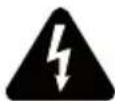
WARNING
Risk of Electric Shock
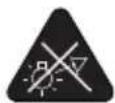
WARNING
Do not stare at the operating light source

Read operator's manual

Safety Alert Symbol
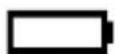
DC Power
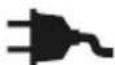
AC Power

Two-person lift

UL Listing for Canada and U.S.
FUNCTIONAL DESCRIPTION
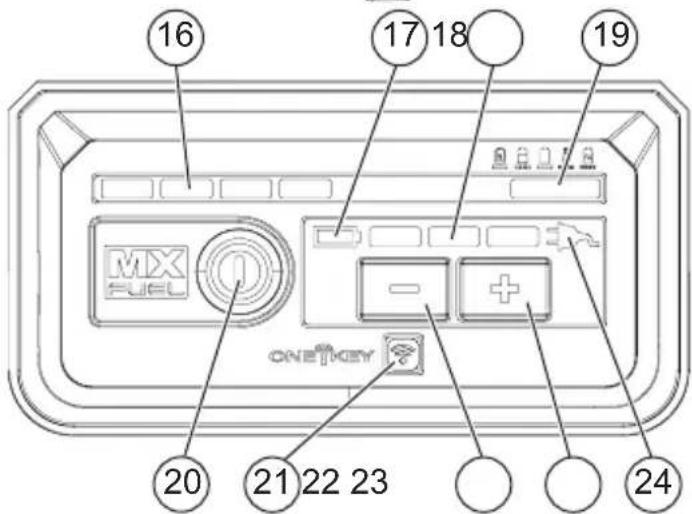
- Positioning handle
- LED
- Positioning knob
- Mast
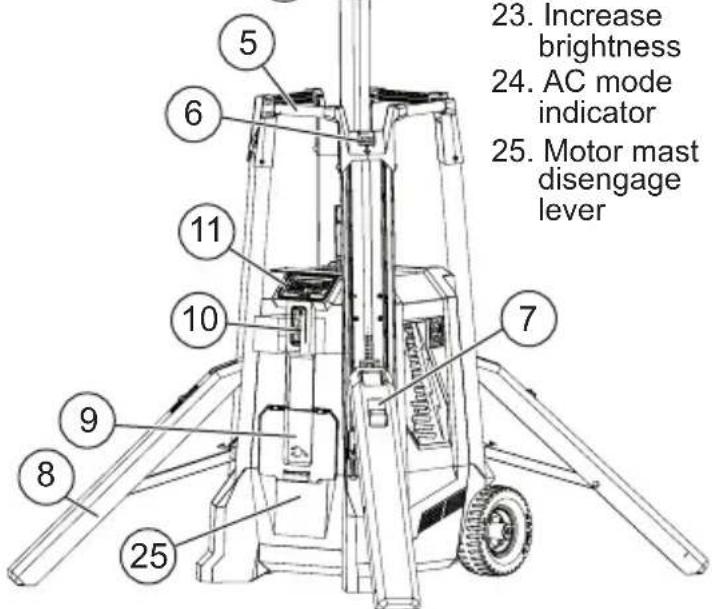
- Transport handles
- Leg deploy latch
- Leg retract latch
- Leg
- AC Inlet Door
- Mast raise/lower buttons
- Control panel
- Wheel
- Tilt bar
- Battery door
- Battery door lock ring
- Fuel gauge
- DC mode indicator
- Brightness gauge
- Battery status
- Arm button
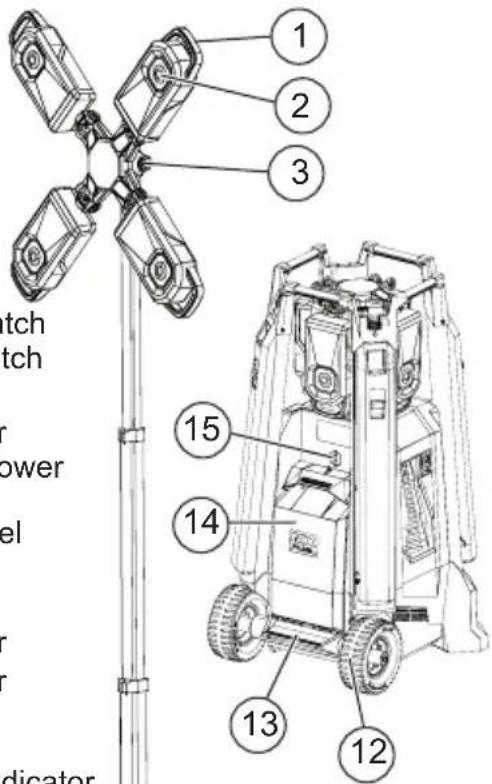
- ONE-KEY ^TM indicator
- Decrease brightness
- Increase brightness
- AC mode indicator
- Motor mast disengage lever
ASSEMBLY
WARNING
Recharge only with the charger specified for the battery. For spe-instructions, read the operator'sied with your charger and battery.
Removing/Inserting the Battery
To remove the battery, push the battery latch lock to the side and squeeze the battery latch lever. Pull the battery pack away from the light.
WARNING
Always remove battery pack before changing or removing accessories.
To insert the battery, slide the pack into the body of the light. Make sure it latches securely into place.
WARNING
Only use accessories specifically recommended for this light. Others dous.
WARNING
Transportation Use two people whenever it is necessary to lift or carry

the light. Light is heavy. Lift with legs, not back.
Always unarm the light before transporting.
Disconnect extension cords before transporting.
Always clear the area of obstructions before transporting.
To move light from place to place, grasp the transport handle and tilt the light back onto the wheels. Push, don't pull, the light.
Always use a two person lift when necessary. To lift, grasp the handle and tilt the light back onto the wheels. Have a second person grasp the lower hand pockets. Always maintain a firm footing.
Use the transport handles as anchor points when hoisting the light. Ensure the hoisting straps are rated for the weight of the light, and the straps will not slip or contact other parts during transport.
NOTE: Do not store the light in a hoisted position.
Inserting/Removing Extension Cords to operate on AC Power
To operate the light on AC Power, open the door and plug in a suitable extension cord into the light.
NOTE: When an extension cord is plugged into the light, the light will automatically run on AC power. Position cord in routing notch and close AC battery door during use.
To disconnect the extension cord, press the Power button to turn off the light, then remove the cord from the outlet.
NOTE: When not using the AC option, make sure the AC battery door is closed completely.
Deploying/Retracting the Legs
natural_image
Technical line drawing of a mechanical device with no visible text or symbols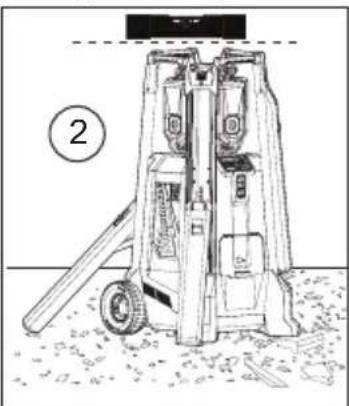
natural_image
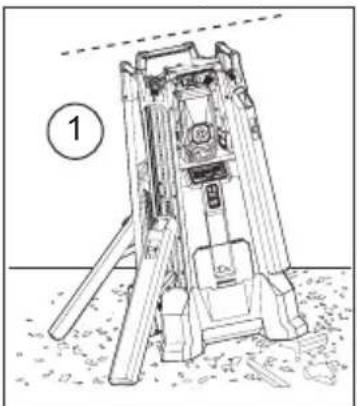
Technical line drawing of a mechanical device with a tool and base, no visible text or symbolsThe four legs can be deployed individually. When using the light on an uneven surface, ensure the light is level and stable before use. Lower mast before making adjustments to the legs or attempting to transport the light.
-
Push the leg deploy latch to deploy a leg. Keep clear of the legs as they deploy.
-
To retract a leg, lift the leg retract latch and secure the leg back into place.
Raising/Lowering the Mast (Motor)
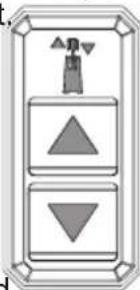
Press and hold the raise/lower mast button respectively to set the light at the desired height.
NOTE: Before raising the mast; ensure light is stable and be aware of any potential overhead obstacles.
natural_image
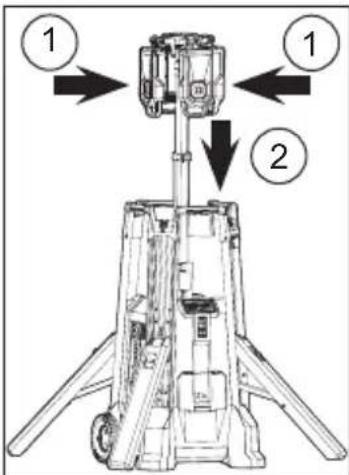
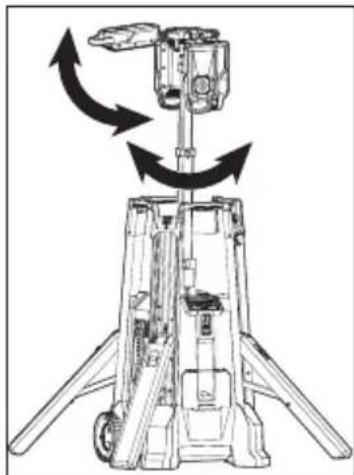
Pure electrical circuit lines without any symbolsNOTE: When lowering the mast back into the unit, turn light off, lower mast to shoulder level and return heads to their outward-facing upright angle. Lowering heads while fanned-out can cause damage to unit. Lowering heads facing inward can cause damage to unit by residual he
NOTE: Keep hands away from moving parts while lowering mast.
natural_image
Technical line drawing of a mechanical device with directional arrows indicating motion or rotation (no text or symbols)Lowering the Mast (Power Loss)
natural_image
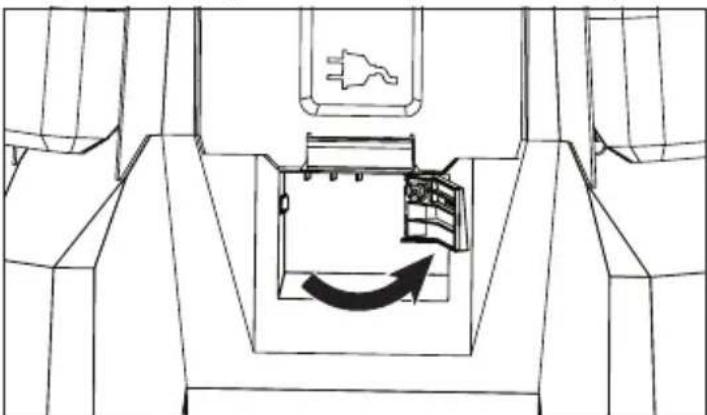
Technical line drawing of a mechanical component with an arrow indicating rotational motion (no text or symbols)To manually lower the mast after power loss, disengage the mast motor disengage lever using the latch found below the AC Outlet access door. Reset latch once power is restored.
Adjusting LED Heads
-
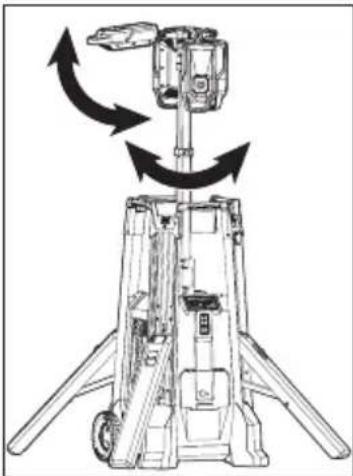
Ensure light is in upright stable position
-
Press the Arm button.
-
Raise mast to shoulder level.
-
Rotate the heads to the desired angle. The four heads can be adjusted individually.
-
If desired, loosen the positioning knob to tilt the lights to the desired angle. Tighten knob.
-
Continue to raise the mast to the desired height.
ONE-KEY™
To learn more about the ONE-KEY ^™ functionality for this tool, please refer to the quick reference included with this product or go to milwaukeeetool.com/One-Key. To download the ONE-KEY ^™ app, visit the App Store or Google Play from your smart device.
| ONE-KEYTM Indicator | |
| Solid Blue Wi | eless mode is active and ready to be configured via the ONE-KEYTM app. |
| Blinking Blue | Tool is actively communicating with the ONE-KEYTM app. |
| Blinking Red | Tool is in security lockout and can be unlocked by the owner via the ONE-KEYTM app. |
LIGHT OPERATION
⚠ WARNING To reduce the risk of injury, do not look directly into the light when the light is on.
Using the Light
- Insert battery pack(s) or plug into AC power.
- Press the Arm Ⓞ button.
NOTE: When the light is running on battery, the Battery Power Indicator will light. When the light is running on AC power, the AC Power Indicator will light. - Press the - and + buttons to cycle through High, Medium, and Low.
- Press the Arm① button to turn the light off. Always turn off power before unplugging the light.
BATTERY OPERATION
Fuel Gauge
Fuel Gauge Button
Approximate Run Time Remaining
10-32%
32-55%
55-77%
77-100%
Less than 10% if first light flashes 4 times
Use the Fuel Gauge to determine the battery pack's remaining run time. Press the Fuel Gauge button to display the lights. The Fuel Gauge will light up for 2-3 seconds. When less than 10% of charge is left, 1 light on the fuel gauge will flash 4 times. When the battery reaches 0% charge, 1 light on the fuel gauge will flash 8 times. Charge the battery pack. An alternating blinking pattern indicates that an error or overtemperature state was encountered. Allow the battery pack to cool and reinsert. If the pattern continues, contact a MILWAUKEE service facility. If the Fuel Gauge doesn't appear to be working place the battery pack on the charger and charge as needed.
Immediately after using the battery pack, the Fuel Gauge may display a lower charge than it will if checked a few minutes later. The battery cells "recover" some of their charge after resting.
Under extreme circumstances, the internal temperature of the battery could become too high. If this happens, the fuel gauge lights will flash in an alternating pattern and the product will not run. Allow the battery to cool down.
| Fuel Gauge Lights Diagnosis Solution | ||
| Lights 1 - 4 Solid Remaining run time Continue working | ||
| 1 Light, flashing slowly | Less than 10% run time left | Prepare to charge pack |
| 1 Light, flashing quickly | End of discharge Charge pack | |
| Lights 1-4, flashing quickly | Current draw too high | Release trigger. Once fuel gauge has stopped flashing, restart and reduce pressure |
| Lights 1&3 / 2&4, flashing alternatingly | Battery temperature too high | Release trigger and allow battery to cool |
| Lights 1&4 / 2&3, flashing alternatingly | Communication error | Remove the battery. Press the Fuel Gauge button to clear. Reinsert the battery. ^ |
† If the problem persists, take the product, charger, and battery pack to a MILWAUKEE service facility.
CHARGER OPERATION
WARNING Charge only MILWAUKEE MX FUEL™ Li-Ion batteries in this MILWAUKEE Li-Ion charger. Other types of batteries may cause personal injury and damage.
When to Charge the Battery Pack with this MILWAUKEE Charger
Remove the battery pack from the product for charging when convenient for you and your job. MILWAUKEE batteries do not develop a "memory" when charged after only a partial discharge. It is not necessary to run down the battery pack before placing it on the charger.
- Use the Fuel Gauge to determine when to charge your MILWAUKEE Li-Ion battery pack.
- You can "Top-Off" your battery pack's charge before starting a big job or long day of use.
•The only time it is necessary to charge the MILWAUKEE Li-Ion battery pack is when the battery pack has reached the end of its charge. To signal the end of charge, power to the product will drop quickly, allowing you just enough power to finish the operation. Charge the battery pack as needed.
How to Charge the Battery Pack
Align the battery pack with the bay and slide the battery pack into the charger as far as possible. The red light will come on, either flashing quickly (battery pack or charger is too hot or cold), flashing slowly (communication between pack and charger) or continuous (pack is charging).
- A fully discharged battery pack with an internal temperature in the normal range will charge in about 45 to 90 minutes, depending on the battery pack and internal temperature of the charger.
- Heavily cycled batteries may take longer to charge completely.
•The fuel gauge lights are displayed as the pack is being charged, indicating how fully charged the pack is. The fuel gauge will turn off when charging is complete.
•After charging is complete, the continuous green light will come on.
•The charger will keep the battery pack fully charged if it is left on the charger. The light indicator will be same as normal charging. - If the light indicator flashes red and green, check that the battery pack is fully seated into the bay. Remove the battery pack and reinsert. If the light continues to flash red and green, remove pack(s) and unplug charger for at least 2 minutes. After 2 minutes, plug charger back in and insert pack. If the problem persists, contact a MILWAUKEE service facility.
- If the light indicator does not come on, check that the battery pack is fully seated into the bay. Remove the battery pack and reinsert. If the light indicator still does not come on, remove pack(s) and unplug charger for at least 2 minutes. After 2 minutes, plug charger back in and insert pack. If after these attempts the light indicator still does not come on, contact a MILWAUKEE service facility.
Charging a Hot or Cold Battery Pack
The fast Red Flashing Indicator light on the charger indicates that the battery pack or charger temperature is outside the charging range. Once the battery pack or charger is within the acceptable range, normal charging will take place and the red light will be continuous. Hot or cold batteries may take longer to charge.
| Li-Ion Charging Status | ||
| Battery Pack or Charger Temperature | Red Charger Indicator Light | Charging Status |
| Too Hot Normal Range Too Cold | Fast Flashing Continuous Fast Flashing | Not charging Normal charging Not charging |
MAINTENANCE
⚠ WARNING To reduce the risk of injury, always unplug the tool and charger and remove the battery pack from the charger or tool before performing any maintenance. Never disassemble the tool, battery pack or charger. Contact a MILWAUKEE service facility for ALL repairs.
To reduce the risk of fire, personal injury, and product damage due to a short circuit, never immerse your tool, battery pack or charger in fluid or allow a fluid to flow inside them. Corrosive or conductive fluids, such as seawater, certain industrial chemicals, and bleach or bleach containing products, etc., can cause a short circuit.
Maintain Light
Keep your light, battery pack and charger in good repair by adopting a regular maintenance program. If the light does not work properly, return the light to a MILWAUKEE service facility for repairs.
ONE-KEY™
WARNING Chemical Burn Hazard. This device contains a lithium button/coin cell battery. A new or used battery can cause severe internal burns and lead to death in as little as 2 hours if swallowed or enters the body. Always secure the battery cover. If it does not close securely, stop using the device, remove the batteries, and keep it away from children. If you think batteries may have been swallowed or entered the body, seek immediate medical attention.
Internal Battery
An internal battery is used to facilitate full ONE-KEY™ functionality. If the Mode Indicator LED turns off and the machine cannot adjust speed, or if the Bluetooth communication stops working, remove and reinsert the coin cell battery to reset. Replace the battery if the problem continues.
To replace the battery:
- Remove the battery pack.
-
Remove the screw(s) and open the battery door.
-
Remove the old battery, keep it away from children, and dispose of it properly.
- Insert the new battery (3V CR2032), with the positive side facing up.
- Close the battery door and tighten the screw(s) securely.
WARNING To reduce the risk of personal injury, electric shock and damage, never immerse your machine in liquid or allow a liquid to flow inside it.
Cleaning
Clean dust and debris from vents. Keep handles clean, dry and free of oil or grease. Use only mild soap and a damp cloth to clean, since certain cleaning agents and solvents are harmful to plastics and other insulated parts. Some of these include gasoline, turpentine, lacquer thinner, paint thinner, chlorinated cleaning solvents, ammonia and household detergents containing ammonia. Never use flammable or combustible solvents around machines.
Cleaning the Battery and Battery Bay
Keep battery connections and surfaces between the machine and battery free of debris and materials. Failure to keep surfaces clean may result in misalignment and/or damage to the battery connection.
Repairs
For repairs, return the machine to the nearest authorized service center.
ACCESSORIES
⚠ WARNING Use only recommended accessories. Others may be hazardous.
For a complete listing of accessories, go online to www.milwaukeeetool.com or contact a distributor.
WIRELESS COMMUNICATION
For products provided with wireless communication features, including ONE-KEY™: Pursuant to part 15.21 of the FCC Rules, do not modify this product. Modification could void your authority to operate the product. This device complies with part 15 of the FCC Rules and ISED-Canada's license exempt RSS standards. Operation is subject to the following two conditions: 1) This device may not cause harmful interference, and 2) This device must accept any interference received, including interference that may cause undesired operation.
SERVICE - UNITED STATES
1-800-SAWDUST (1.800.729.3878)
Monday-Friday, 7:00 AM - 6:30 PM CST or visit www.milwaukeetool.com
Contact Corporate After Sales Service Technical Support with technical, service/repair, or warranty questions.
Email: metproductsupport@milwaukeeetool.com
Become a Heavy Duty Club Member at www.milwaukeeetool.com to receive important notifications regarding your tool purchases.
SERVICE - CANADA
Milwaukee Tool (Canada) Ltd 1.800.268.4015
Monday-Friday, 7:00 AM - 4:30 PM CST
or visit www.milwaukeetool.ca
LIMITEDWARRANTYUSA & CANADA
Every MILWAUKEE MX FUEL™ Product, battery pack, and charger is warranted to the original purchaser only to be free from defects in material and workmanship. Subject to certain exceptions, MILWAUKEE will repair or replace a MX FUEL™ product, battery pack, or charger which, after examination, is determined by MILWAUKEE to be defective in material or workmanship for a period of two (2) years after the date of purchase. Return of the MX FUEL™ product, battery pack, or charger to a MILWAUKEE factory Service Center location or MILWAUKEE Authorized Service Station, freight prepaid and insured, is required. For the proper shipping procedure of battery packs, contact 1.800.SAWDUST (1.800.729.3878), or go to www.milwaukeeetool.com. A copy of the proof of purchase should be included with the return product. This warranty does not apply to damage that MILWAUKEE determines to be from repairs made or attempted by anyone other than MILWAUKEE authorized personnel, misuse, alterations, abuse, normal wear and tear, lack of maintenance, or accidents.
Normal Wear: Many MX FUEL™ products need periodic parts replacement and service to achieve best performance. This warranty does not cover repair when normal use has exhausted the life of a part including but not limited to, assist & drive belts, pulleys, blade flanges, vacuum gaskets, tool free handles, set pins, skis, drive couplers, rubber boots, auto feed, stabilize blocks, wheels, carrier wheels, cords, o-rings, seals, bumpers, driver blades, pistons, strikers, lifters, tool holder, and bumper cover washers.
Warranty Registration is not necessary to obtain the applicable warranty on a MX FUEL™ product, battery pack, or charger. ACCEPTANCE OF THE EXCLUSIVE REPAIR AND REPLACEMENT REMEDIES DESCRIBED HEREIN IS A CONDITION OF THE CONTRACT FOR THE PURCHASE OF EVERY MILWAUKEE PRODUCT. IF YOU DO NOT AGREE TO THIS CONDITION, YOU SHOULD NOT PURCHASE THE PRODUCT. IN NO EVENT SHALL MILWAUKEE BE LIABLE FOR ANY INCIDENTAL, SPECIAL, CONSEQUENTIAL OR PUNITIVE DAMAGES, OR FOR ANY COSTS, ATTORNEY FEES, EXPENSES, LOSSES OR DELAYS ALLEGED TO BE AS A CONSEQUENCE OF ANY DAMAGE TO, FAILURE OF, OR DEFECT IN ANY PRODUCT INCLUDING, BUT NOT LIMITED TO, ANY CLAIMS FOR LOSS OF PROFITS. SOME STATES DO NOT ALLOW THE EXCLUSION OR LIMITATION OF INCIDENTAL OR CONSEQUENTIAL DAMAGES, SO THE ABOVE LIMITATION OR EXCLUSION MAY NOT APPLY TO YOU. THIS WARRANTY IS EXCLUSIVE AND IN LIEU OF ALL OTHER EXPRESS WARRANTIES, WRITTEN OR ORAL. TO THE EXTENT PERMITTED BY LAW, MILWAUKEE DISCLAIMS ANY IMPLIED WARRANTIES, INCLUDING WITHOUT LIMITATION ANY IMPLIED WARRANTY OF MERCHANTABILITY OR FITNESS FOR A PARTICULAR USE OR PURPOSE; TO THE EXTENT SUCH DISCLAIMER IS NOT PERMITTED BY LAW, SUCH IMPLIED WARRANTIES ARE LIMITED TO THE DURATION OF THE APPLICABLE EXPRESS WARRANTY AS DESCRIBED ABOVE. SOME STATES DO NOT ALLOW LIMITATIONS ON HOW LONG AN IMPLIED WARRANTY LASTS, SO THE ABOVE LIMITATION MAY NOT APPLY TO YOU, THIS WARRANTY GIVES YOU SPECIFIC LEGAL RIGHTS, AND YOU MAY ALSO HAVE OTHER RIGHTS WHICH VARY FROM STATE TO STATE.
This warranty applies to product sold in the U.S.A. and Canada only. Please consult the 'Service Center Search' in the Parts & Service section of MILWAUKEE's website www.milwaukeeetool.com or call 1.800. SAWDUST (1.800.729.3878) to locate your nearest service facility for warranty and non-warranty service on a MX FUEL™ product, battery pack or charger.
CONŞIGNES, DE SECURITÉ IMPORTANTES
natural_image
Technical line drawing of a mechanical device with no visible text or symbols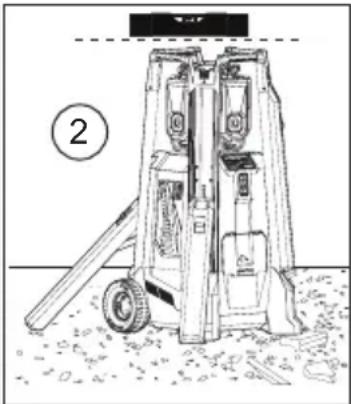
natural_image
Technical line drawing of a mechanical device with labeled part (2), no readable text or symbols presentnatural_image
Simple diagram of a vertical control panel with three buttons (up, down, down) and a triangular indicator symbol above the top (no text or labels)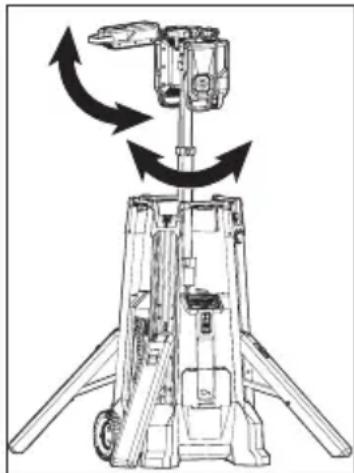
natural_image
Technical line drawing of a mechanical device with directional arrows indicating motion (no text or symbols)natural_image
Technical line drawing of a mechanical component with an arrow indicating rotation or movement (no text or symbols)Milwaukee Tool (Canada) Ltd
1.800.268.4015
Monday-Friday, 7:00 AM - 4:30 PM CST
www.milwaukeetool.ca
GARANTIE LIMITÉE -
AUX ÉTATS-UNIS ET AU CANADA
natural_image
Technical line drawing of a mechanical lifting device with no visible text or symbols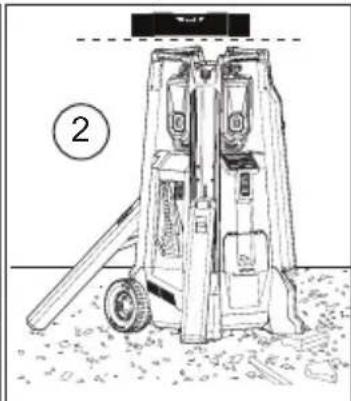
natural_image
Technical line drawing of a mechanical lifting device with no visible text or symbolsnatural_image
Simple diagram of a vertical control panel with three downward and upward arrows (no text or symbols)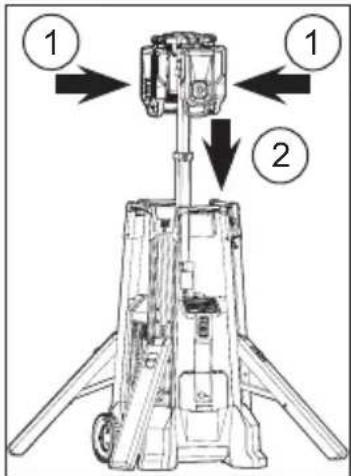
natural_image
Technical line drawing of a mechanical device with directional arrows indicating motion or force (no text or symbols)natural_image
Technical line drawing of a mechanical component with an arrow indicating rotational motion (no text or symbols)other
| Period | Percentage Range | |--------|------------------| | 10-32% | 10-32% | | 32-55% | 32-55% | | 55-77% | 55-77% | | 77-100%| 77-100% |Lunes a Viernes (9am a 6pm)
13135 West Lisbon Road
Brookfield, WI 53005 USA
- IMPORTANT SAFETY INSTRUCTIONS
- WARNING
- WORK AREA SAFETY
- ELECTRICAL SAFETY
- PERSONAL SAFETY
- BATTERY TOOL USE AND CARE
- CHARGER USE AND CARE
- SERVICE
- SPECIFIC SAFETY RULES
- EXTENSION CORDS
- Guidelines for Using Extension Cords
- READ AND SAVE ALL INSTRUCTIONS FOR FUTURE USE.
- GROUNDING
- Grounded Tools (Three-Prong Plugs)
- SPECIFICATIONS
- SYMBOLOGY
- FUNCTIONAL DESCRIPTION
- ASSEMBLY
- Removing/Inserting the Battery
- Inserting/Removing Extension Cords to operate on AC Power
- Deploying/Retracting the Legs
- Raising/Lowering the Mast (Motor)
- Lowering the Mast (Power Loss)
- Adjusting LED Heads
- ONE-KEY™
- LIGHT OPERATION
- ⚠ WARNING To reduce the risk of injury, do not look directly into the light when the light is on.
- Using the Light
- BATTERY OPERATION
- Fuel Gauge
- Approximate Run Time Remaining
- CHARGER OPERATION
- WARNING Charge only MILWAUKEE MX FUEL™ Li-Ion batteries in this MILWAUKEE Li-Ion charger. Other types of batteries may cause personal injury and damage.
- When to Charge the Battery Pack with this MILWAUKEE Charger
- How to Charge the Battery Pack
- Charging a Hot or Cold Battery Pack
- MAINTENANCE
- Maintain Light
- Internal Battery
- Cleaning
- Cleaning the Battery and Battery Bay
- Repairs
- ACCESSORIES
- WIRELESS COMMUNICATION
- SERVICE - UNITED STATES
- SERVICE - CANADA
- LIMITEDWARRANTYUSA & CANADA
- CONŞIGNES, DE SECURITÉ IMPORTANTES
- Milwaukee Tool (Canada) Ltd
- 1.800.268.4015
- GARANTIE LIMITÉE -
- AUX ÉTATS-UNIS ET AU CANADA
Brand : MILWAUKEE
Model : MXF041
Category : Lamp