300942 - Headphones CSL - Free user manual and instructions
Find the device manual for free 300942 CSL in PDF.


| Brand | CSL |
| Model | 300942 (CSL-450) |
| Product Type | Bluetooth Wireless Headset with Microphone |
| Dimensions | 200 x 180 x 65 mm |
| Weight | Approximately 200 g |
| Color | Black |
| Connectivity | Bluetooth 4.0, 3.5mm jack socket |
| Bluetooth Range | Up to 10 m |
| Power Supply | Rechargeable lithium-ion battery via micro USB |
| Battery Life | Up to 14 hours (music playback/call) |
| Charging Time | Approximately 2 hours |
| Audio Codec | apt-X |
| Main Functions | Foldable headphones, programmable buttons (volume, playback, call), simultaneous connection of two devices, built-in microphone for hands-free |
| Supplied Components | Headset, carrying bag, micro USB cable, 3.5mm jack cable, user manual |
| Care and Cleaning | Clean with a soft, dry cloth. Do not use chemical products. |
| Safety | Do not open, modify or short-circuit. Protect from moisture and high temperatures. Keep out of reach of children. |
| Spare Parts and Repairability | Spare parts available: micro USB cable, 3.5mm jack cable. Repair by manufacturer only. |
| General Information | Compliant with WEEE directive 2012/19/EU. Registration number DE: 94495668. Declaration of conformity available from the manufacturer. |
| Warranty | 2 years |
Frequently Asked Questions - 300942 CSL
User questions about 300942 CSL
0 question about this device. Answer the ones you know or ask your own.
Ask a new question about this device
Download the instructions for your Headphones in PDF format for free! Find your manual 300942 - CSL and take your electronic device back in hand. On this page are published all the documents necessary for the use of your device. 300942 by CSL.
USER MANUAL 300942 CSL
Thank you for having chosen this CSL product and for placing your trust in our company. Please read this manual carefully before installation to ensure your long-term enjoyment of this product. For future reference, please keep this manual.
1 Scope of delivery
- CSL 450 Bluetooth Headset
- Carry case
- Micro USB Charging cable
- 3.5mm stereo audio jack cable
- User manual
2 Technical specifications
| Connection • Bluetooth 4.0 | • 3.5mm stereo audio jack |
| Range up to 10m | |
| Power supply microUSB interface | |
| Battery duration up to 14 hours (music playback, making calls) | |
| Features • pair two devices simultaneously • foldable ear pieces • Function buttons (for playback, volume control and headset function) • apt-X | |
| Dimensions about 200 x 180 x 65mm |
3 Functions
Using Bluetooth technology, the CSL 450 headset plays the music from your Bluetooth devices such as Smartphone or Tablet PC without cables. An integrated 3.5mm audio jack gives you also the option to use the CSL 450 as a headset with a conventional MP3 player or connect it to the headphone port of your HiFi system. The foldable ear pieces save space and make it easy to carry. Due to the integrated microphone, the CSL 450 Headset can also be used as a Bluetooth hands-free unit.
Note: The function buttons work only in the Bluetooth playback mode. Please use the volume control on your playback device in case you have connected the headset using a 3.5 mm jack cable.
4 Product details and button assignment
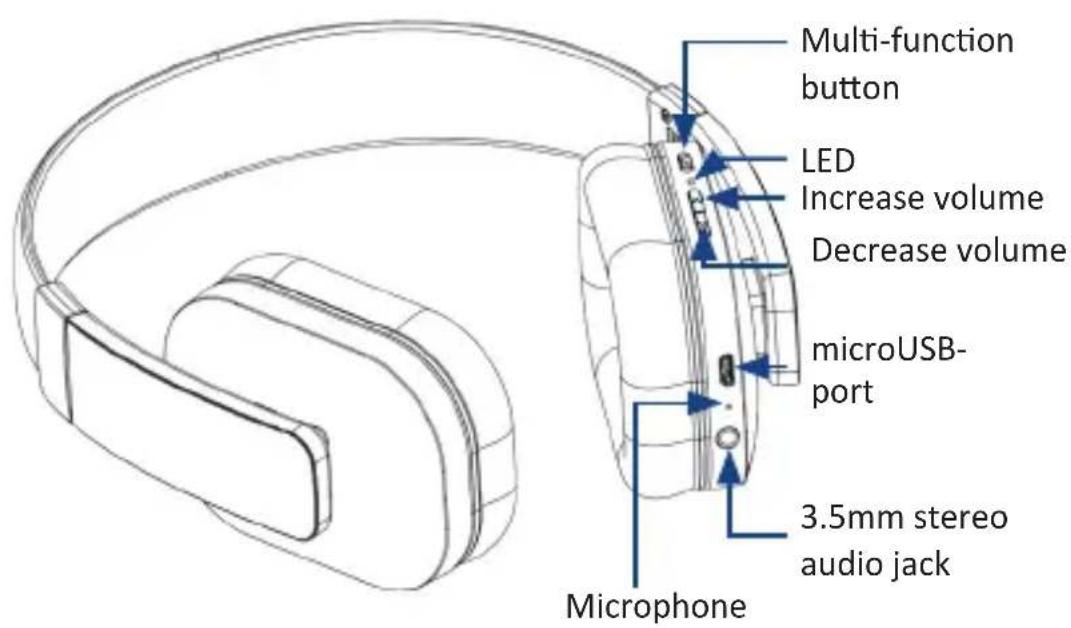
| Switching on Press the multi-function button for 2 seconds, the blue LED glows 2 times | |
| Switching off | Press the multi-function button for 3 seconds, the red LED glows 2 times |
| Increasing and decreasing the volume | The volume can be changed by pressing the "Increase volume" or "Decrease volume" button each time. A audible signal is emitted if the volume reaches the maximum or minimum value |
| Play/Pause Press the | multi-function button briefly and the music stops. The music resumes if the button is pressed again. |
| Next track Press the | "Increase volume" button for 2 seconds |
| Previous track Press the | the "Decrease volume" button for 2 seconds |
| Answering calls Press the | the multi-function button briefly |
| Hanging up Press the | multi-function button briefly |
| Rejecting calls Press the | the "Increase volume" button for 2 seconds |
| Redirecting calls You | can press the "Increase volume" button for 2 seconds during a call. The call will be redirected to your mobile phone. Press the "Increase volume" button again and the call is redirected back to your headset |
| Redialling | Press the multi-function button in standby mode two times in succession |
| Muting calls Press the | "Decrease volume" button for 2 seconds to mute the call. Press the button again for 2 seconds to resume the call |
5 LED function
| Switching on Blue LED | flashes 2 times |
| Switching off Red LED | flashes 2 times |
| Pairing Red and blue LEDs flash alternately | |
| Standby Blue LED flashes | 3 times in 5 seconds |
| Incoming call Blue LED | glows continuously |
| Low battery status Red | LED flashes 2 times every 2 seconds |
| Charging Red LED glows continuously If the device is fully charged, then the blue LED flashed once. | |
6 Getting started
Remove the headset from the packing and charge it fully before using it for the first time. To do this, connect the provided charging cable to the headset. The charging socket is located below the right bracket. For example, a computer or a USB charging adapter can be used for charging. The battery is fully charged once the LED indicator changes from red to blue. Always disconnect the headset from the power source after charging it to prevent constant recharging. It is advisable to use the headset regularly to maintain the full performance of the integrated batteries. The 3.5mm jack can be used when the headset is switched-on as well
as when switched-off. The hands-free function cannot be used when it is turned off.
7 Connecting via Bluetooth
Ensure the headset is switched off first. Press and hold the on/off button for about 6 seconds till the LED indicator starts to flash in red and blue alternately. Enable the Bluetooth on the device that you want to connect with the headset. Carry out a search now and connect to the device "CSL-450". Enter "0000" if you are prompted for a security code.
Note: The Bluetooth pairing mode is disabled for security reasons if connection is not established even after several minutes. Please carry out the steps mentioned above once again if pairing failed.
Please proceed as follows to connect two devices at the same time to your CSL-450 headset: Connect your first device to the CSL-450 headset as usual. Then press the "Increase volume" and "Decrease volume" buttons simultaneously to use the function for connecting the headset to two devices. Then, search for the model "CSL-450" on your Bluetooth enabled device. Here, the device that was paired first always has priority. If it is disabled, then you can also make phone calls or play music with the second device.
8 Safety instructions and liability disclaimer
Never try to open the device to carry out repairs or conversions. Avoid contact with mains voltages. Do not short-circuit the product. The device is not certified for use in the open air; only use it in dry conditions. Protect it from high humidity, water and snow. Keep it away from high temperatures. Do not subject the device to sudden changes in temperature or heavy vibration as this might damage electronic components.
Examine the device for damage before using it. The unit should not be used if it has received an impact or has been damaged in any other way. Please observe national regulations and restrictions. Do not use the device for purposes other than those described in the instructions. This product is not a toy. Keep it out of the reach of children or mentally impaired persons. Any repair or alteration to the device not carried out by the original supplier, will invalidate the warranty or guarantee. The product may only be used by persons who have read and understood these instructions. The device specifications may change without any separate prior notice to this effect.
9 Disposal Instructions
The European Directive (WEEE) requires that old electrical and electronic appliances shall be disposed of separately from normal household garbage for optimal recycling. The component parts must be separated, collected and sent for recycling or disposal in an environment-friendly
manner. Otherwise, toxic and dangerous substances could cause enduring damage to the environment if disposed of incorrectly.
As a consumer you are legally obligated (Electrical and Electronic Equipment Act-ElektroG) to return electronic equipment at the end of its lifetime to their manufacturer, point of sale, public collection points or importer free of charge. The relevant local laws apply here. The symbol on the product, in the instructions or on its packing indicates these regulations. The reuse or recycling of materials and old units makes an important contribution towards protecting the environment.
10 Instructions on the disposal of batteries
With regard to the sale of batteries or the supply of devices containing batteries, the supplier is obliged to draw the customer's attention to the following:
As the end user, the customer has a statutory obligation to return used batteries. He can return old batteries stocked or previously stocked by the supplier in the form of new batteries to the supplier's despatch warehouse (despatch address) free of charge. The symbols shown on the batteries have the following meanings: Pb = battery contains more than 0.004 percent by mass of lead, Cd = battery contains more than 0.002 percent by mass of cadmium, Hg = battery contains more than 0.0005 percent by mass of quicksilver.
The symbol of the rubbish bin with a cross through it indicates that the battery may not be put in household waste.
WEEE guideline: 2012/19/EU
WEEE register number: DE 94495668
CSL Computer GmbH & Co. KG, herewith declares that this product 40979/20160412DG013 conforms to the principle requirements and other relevant stipulations of Directive 1999/5/EG. The complete Declaration of Conformity can be obtained from: CSL Computer GmbH & Co. KG, Sokelantstraße 35, 30165 Hanover
Con性和 design of the device, including the use of a 3D virtual reality system, allows users to experience the experience of being in a real world. The device is designed to be used by people who are interested in the technology and have an interest in it.
Brand : CSL
Model : 300942
Category : Headphones