301770 - Lighting Brandson - Free user manual and instructions
Find the device manual for free 301770 Brandson in PDF.


| Product Type | Multifunction LED lamp with clock, alarm and calendar |
| Brand | Brandson |
| Model | 301770 |
| Dimensions (L x W x H) | 330 mm x 145 mm x 145 mm |
| Power supply | 12 V DC / 1 A via coaxial power adapter (3.5 mm) |
| Backup battery | 1 button cell battery (type not specified) for clock and alarm |
| Lighting colors | 3 modes: natural, white, yellow light |
| Main functions | Display time, date, alarm, snooze, touch brightness adjustment |
| Controls | Touch keys on top, SET, UP, DOWN keys on the back |
| Display | Digital screen (hours:minutes, date, temperature in °C/°F) |
| Temperature | Ambient temperature display (switchable °C/°F) |
| Material | Plastic (probably) |
| Usage | Indoor only, stable horizontal surface |
| Package contents | LED lamp, DC power adapter, user manual |
| Warranty | Legal warranty, unauthorized repairs void the warranty |
| Certifications | Compliant with WEEE (2012/19/EU), registration DE 94495668 |
Frequently Asked Questions - 301770 Brandson
User questions about 301770 Brandson
0 question about this device. Answer the ones you know or ask your own.
Ask a new question about this device
Download the instructions for your Lighting in PDF format for free! Find your manual 301770 - Brandson and take your electronic device back in hand. On this page are published all the documents necessary for the use of your device. 301770 by Brandson.
USER MANUAL 301770 Brandson
natural_image
Line drawing of a desk lamp with adjustable arm and base (no text or symbols)Thank you for choosing a Brandon product. Please read the following user manual carefully to have an enjoyable experience with your purchased product.
1 Scope of supply
- LED lamp
• DC coaxial power connector (3.5mm) - User manual
2 Technical data
| Operating voltage 12V DC / | 1A |
| Dimensions (H x W x D) 330 | mm x 145mm x 145mm |
| Features • 3 colours | • Temperature and calendar function• Alarm function• touch-controlled• dimmable |
3 Product details
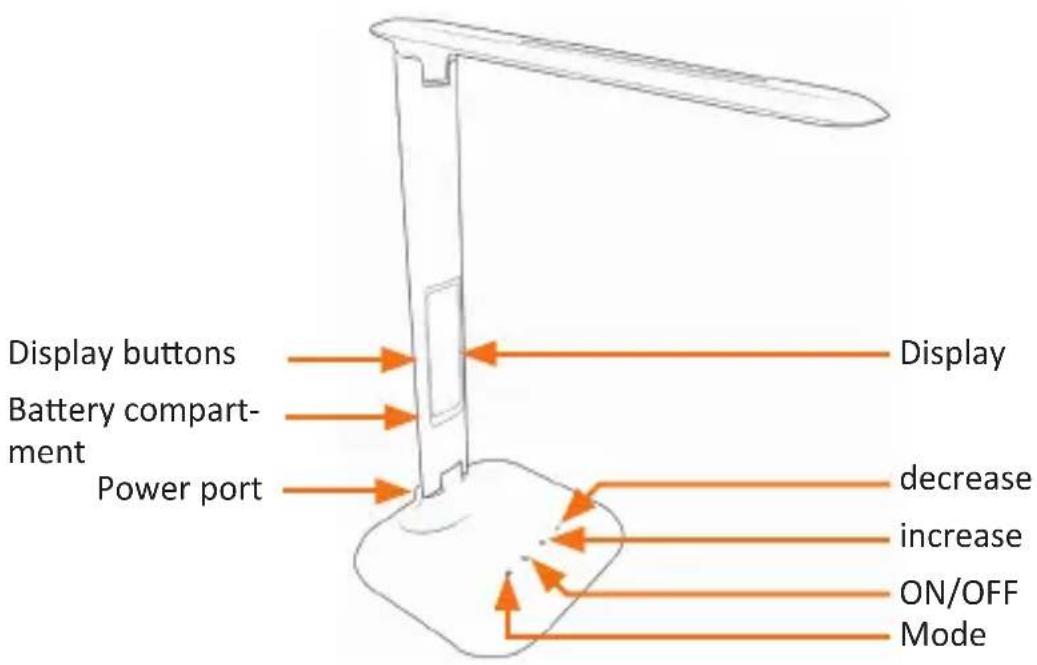
4 Initial use
Take the device out of the package and remove all the packaging material. Place the lamp on a flat and even surface, so that it does not fall over. Remove the battery safeguard on the rear of the lamp by turning the battery compartment anticlockwise and removing the plastic washer between the battery and the contact. Then close the battery compartment properly again.
Then insert the supplied DC coaxial power connector into a properly installed power socket and connect it to the lamp in order to start using it.
You can switch the lamp on or off by touching "ON / OFF".
Touch the "Mode" button to select one of the three light modes (natural, white and yellow light). To adjust the brightness of the lamp, touch the "increase" or "decrease" button (with the lamp switched on) until you get the desired brightness.
5 Display functions
First, set the current time and the current date. To do this, press the "SET" button on the back of the lamp. The time starts flashing. Set the desired time using the "UP" and "DOWN" buttons. Confirm your entry using the "SET" button. The setting sequence is as follows: Hour -> Minutes -> Year -> Month -> Day.
Press the "UP" button to change between the 12-hour and 24-hour display.
Press the "DOWN" button to change between °C and °F.
Alarm function:
Press the "MODE" button to display the currently set alarm. Press the "SET" button once the display shows the alarm time. Now you can enter the desired alarm time. Confirm the settings by pressing the "SET" button. The setting sequence here is as follows: Hours -> Minutes -> Snooze time -> Alarm.
Press any button on the rear of the device to stop the alarm and to turn off the alarm completely.
Press the "MODE" button to turn on the alarm, so that you are in the alarm mode. You can turn the alarm on or off using the "UP" and "DOWN" button. The
alarm is turned on when the symbol "Z" appears in the display. The setting sequence of the alarm is as follows: Alarm On -> Alarm and Snooze function On -> Alarm Off.
The alarm rings for one minute. If you do not press any button during this time and the alarm is thus turned off, the previously set snooze mode is enabled. The alarm goes off once again after the set snooze time, till a button is pressed on the rear of the device and the alarm is completely turned off.
6 Safety instructions and liability disclaimer
Never try to open the device to carry out repairs or conversions. Avoid contact with mains voltages. Do not short-circuit the product. The device is not certified for use in the open air; only use it in dry conditions. Protect it from high humidity, water and snow. Keep it away from high temperatures. Do not subject the device to sudden changes in temperature or heavy vibration as this might damage electronic components. Examine the device for damage before using it. The unit should not be used if it has received an impact or has been damaged in any other way. Please observe national regulations and restrictions. Do not use the device for purposes other than those described in the instructions. This product is not a toy. Keep it out of the reach of children or mentally impaired persons. Any repair or alteration to the device not carried out by the original supplier, will invalidate the warranty or guarantee. The product may only be used by persons who have read and understood these instructions. The device specifications may change without any separate prior notice to this effect.
7 Disposal instructions
Electrical and electronic devices may only be disposed of in accordance with the European WEEE Directive and not with household rubbish. Components must be disposed of or recycled separately as dangerous, toxic elements can inflict sustained damage on the environment if they are disposed of incorrectly. As a consumer, you are bound by the Electrical and Electronic Devices Act (ElektroG) to return electrical and electronic goods free of charge at the end of their useful life to the manufacturer, the place of purchase or to specially set up, public collection
points. The details in each case are governed by national law. The symbol on the product, the operating instructions and/or the packaging refers to these regulations. By separating materials in this way, recycling and disposing of old devices, you are making an important contribution towards protecting our environment.
8 Instructions on the disposal of batteries
With regard to the sale of batteries or the supply of devices containing batteries, the supplier is obliged to draw the customer's attention to the following:
As the end user, the customer has a statutory obligation to return used batteries. He can return old batteries stocked or previously stocked by the supplier in the form of new batteries to the supplier's despatch warehouse (despatch address) free of charge. The symbols shown on the batteries have the following meanings: Pb = battery contains more than 0.004 percent by mass of lead, Cd = battery contains more than 0.002 percent by mass of cadmium, Hg = battery contains more than 0.0005 percent by mass of quicksilver.

The symbol of the rubbish bin with a cross through it indicates that the battery may not be put in household waste.

WEEE guideline: 2012/19/EU WEEE register number: DE 94495668
WD Plus GmbH, herewith declares that this product 301770/20161125SZ126 conforms to the principle requirements and other relevant stipulations. The complete Declaration of Conformity can be obtained from: WD Plus GmbH, Wohlenbergstraße 16, 30719 Hanover


Brand : Brandson
Model : 301770
Category : Lighting