306523 - Mybeo - Free user manual and instructions
Find the device manual for free 306523 Mybeo in PDF.


User questions about 306523 Mybeo
0 question about this device. Answer the ones you know or ask your own.
Ask a new question about this device
Download the instructions for your in PDF format for free! Find your manual 306523 - Mybeo and take your electronic device back in hand. On this page are published all the documents necessary for the use of your device. 306523 by Mybeo.
USER MANUAL 306523 Mybeo
ENG: Current drivers, user manuals and other relevant documents for this product can be found on our homepage.
- Do not use the appliance on children under 3 years of age or heat-sensitive persons, such as persons with skin lesions due to illness or scarred skin areas in the application area.
- If the appliance does not work properly or you feel discomfort or pain, stop using it immediately.
- Make sure that children do not use the device as a toy.
- Keep children away from the packaging material. There is a risk of suffocation.
- Store the appliance out of the reach of children and pets.
-
Never use the device after taking pain-relieving medication, alcohol or drugs.
-
Do not use the device in case of sensitivity disorders with reduced pain sensation (such as metabolic disorders).
Do not use the device in case of persistent skin irritation due to prolonged exposure to heat on the same skin area.
-
Do not use the device on acute or chronic skin conditions such as inflammation, redness, rashes (e.g. allergies), burns, frostbite, bruises, swelling, and open or healing wounds (e.g. surgical scars).
-
Do not use the device if you suffer from diabetes. The sensation of pain may be reduced and diabetics may burn themselves.
-
Do not use the appliance on sensitive skin areas.
- Do not use the appliance if you have a fever.
- Do not use the appliance with ointments, creams and gels applied to the skin at the same time.
-
Seek medical advice immediately if symptoms worsen under or after using the insect bite remedy or if the first signs of increased skin itching, redness, swelling, dizziness, nausea, shortness of breath, wheals, changes in blood pressure appear and stop using the device.
-
For self-administration, the person must be older than 12 years. Use on children under 12 years of age should only be done under adult supervision or assistance.
- Consult your doctor before using the device.
- Seek medical advice immediately if it is a tick bite. The bite can lead to the transmission of pathogens such as TBE or Lyme disease.
-
Do not use the device near the eyes, on the eyelids, in the mouth or on mucous membranes.
-
Observe the general hygiene measures when using the insect bite healer. Use of the device does not replace medical consultation and treatment. Therefore, consult your doctor in case of any kind of pain or illness.
Thank you for choosing a mybeo product. To ensure that you enjoy your purchased device for a long time, please read the following brief instructions carefully. Before using the delivered product, check that it is complete, free of defects and undamaged.
1. Scope of delivery
- Insect bite healer
- USB-A to microUSB charging cable
- 5V 1A power supply
- Instruction manual
2. Technical data
| Power supply | • Power supply: 100-240V AC 50/60Hz • Device: 5V 1A DC |
| Temperature levels | 3 (40°C; Blue / 45°C; Pink / 50°C; Red) |
| Akku 330mAh 3,7V Li-Ion |
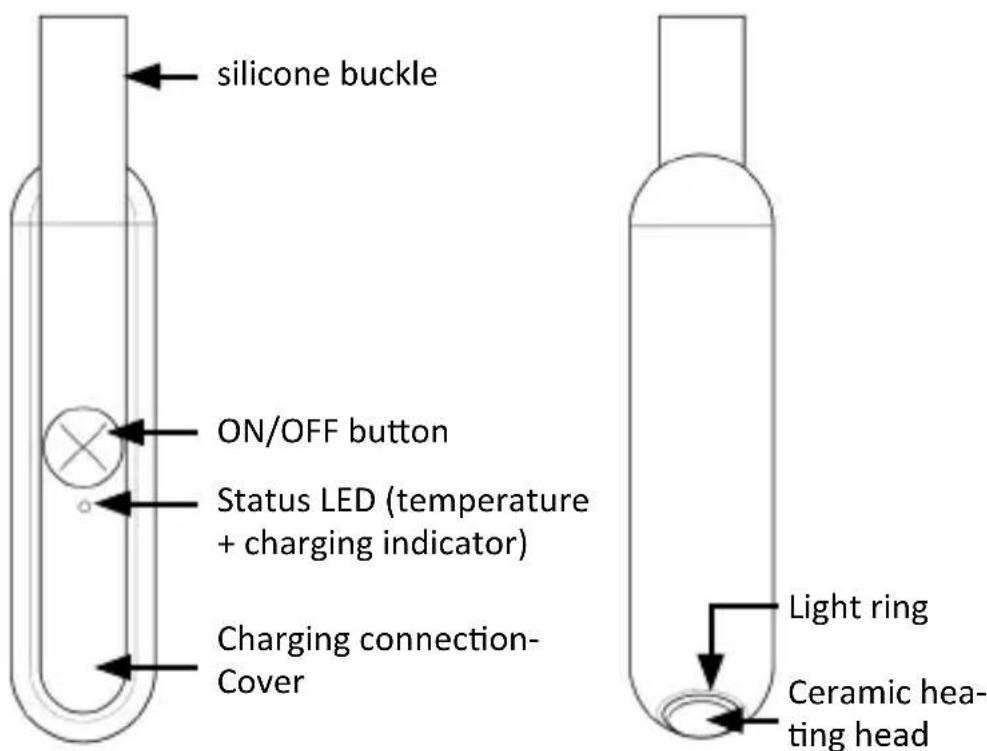
3. Product details
4. Initial operation
Remove the unit from the packaging and remove any packaging material. Before you can use the device, you must fully charge the battery. To do this, open the rubber charging port cover and connect the microUSB cable to the device and the power supply unit. During the charging process, the pink status LED of the charging indicator flashes.
5. Operation
Press the ON/OFF button to change the mode in the following cycle: Switch on (illuminated ring lights up) -> 40^ mode (blue status LED) -> 45^ mode (pink status LED) -> 50^ mode (red status LED) -> Switch off.
- Switch on (illuminated ring lights up): The status LED is switched off, the vibration is switched off, the illuminated ring is switched on. If no further action is taken within 1 minute, the unit switches off automatically.
- 40^ mode: The vibration is switched on, the illuminated ring is switched on, the blue status LED is activated. The status LED flashes until the 40^ is reached. The blue status LED lights up continuously as long as the 40^ is reached. After 10 seconds of reaching 40^ , the unit automatically switches off the vibration and the illuminated ring and then switches off. (If the 40^ is not reached within 1 minute, the unit switches off automatically.)
- 45^ mode: The vibration is switched on, the light ring is switched on, the pink status LED is activated. The status LED flashes until 45^ is reached. The pink status LED light up continuously as long as the 45^ is reached. After 10 seconds of reaching 45^ , the unit automatically switches off the vibration and the illuminated ring and then switches off. (If the 45^ is not reached within 1 minute, the unit switches off automatically.)
-
50^ mode: The vibration is switched on, the illuminated ring is switched on, the red status LED is activated. The status LED flashes until the 50^ is reached. The red status LED lights up continuously as long as the 50^ is reached. After 10 seconds of reaching the 50^ , the unit automatically switches off the vibration and the illuminated ring and then switches off. (If the 50^ is not reached within 1 minute, the unit switches off automatically.)
-
If the temperature sensor measures an abnormal temperature value for about 5 seconds in the various modes, the blue status LED flashes for 30 seconds and the vibration, light ring and heating plate switch off and the unit goes into shutdown mode.
- When a low battery condition is detected with the illuminated ring on in 40^ , 45^ and 50^ modes, after the red status LED flashes rapidly for 30 seconds, turn off the illuminated ring, vibration and heating and the unit will go into shutdown mode.
5.1 Charging
Use the microUSB cable to connect the power supply unit to the insect bite healer. Connect the power supply unit to a properly connected socket. Pay attention to the information on the rating plate.
- Charging: The pink status LED flashes.
- Charging completed: The pink status LED is permanently on.
6. Cleaning and care
It is recommended to clean the appliance before first use and before each subsequent use. Make sure that the appliance is switched off and has cooled down before cleaning. Use a dry soft cloth for cleaning. Never use substances that could be toxic to the skin or mucous membranes. Do not use harsh or chemical cleaning agents. Never immerse the appliance in water.
7. Safety instructions and disclaimer
Never attempt to open the unit to carry out repairs or modifications. Avoid contact with the mains voltages. Do not short-circuit the product. The unit is not waterproof. Please use it only in dry conditions. Protect it from high humidity, water and snow. Keep the unit away from high temperatures. Do not expose the unit to sudden temperature changes or strong vibrations as this may damage the electronic parts. Check the unit for damage before use. The unit should not be used if it has been knocked or damaged in any way. Please observe the national regulations and restrictions. Do not use the appliance for purposes other than those described in the instructions. This product is not a toy. Keep it out of the reach of children or mentally im
paired persons. Any repair or modification to the unit not carried out by the original supplier will invalidate the warranty or guarantee. The appliance may only be used by persons who have read and understood these instructions. The specifications of the appliance are subject to change without prior notice.

8. Disposal instructions
According to the European WEEE Directive, electrical and electronic equipment must not be disposed of with household waste. Their components must be recycled or disposed of separately because toxic and hazardous components can cause lasting damage to the environment if disposed of improperly. As a consumer, you are obliged under the Electrical and Electronic Equipment Act (ElektroG) to return electrical and electronic equipment free of charge at the end of its service life to the manufacturer, the point of sale or to public collection points set up for this purpose. Details are regulated by the respective national law. The symbol on the product, the operating instructions and/or the packaging indicates these regulations. By separating, recycling and disposing of old appliances in this way, you are making an important contribution to protecting our environment. For information on authorised collection points in your area, please contact your local city or municipal administration.
9. Notes on battery disposal
In connection with the sale of batteries or the delivery of devices containing batteries, the supplier is obliged to inform the customer of the following: The customer is legally obliged to return used batteries as an end user. He can return used batteries, which the supplier stocks or has stocked as new batteries, free of charge to the supplier's dispatch warehouse (dispatch address). The symbols shown on the batteries have the following meaning: Pb = battery contains more than 0.004 mass percent lead, Cd = battery contains more than 0.002 mass percent cadmium, Hg = battery contains more than 0.0005 mass percent mercury.

The symbol of the crossed-out dustbin means that the battery must not be disposed of in household waste.
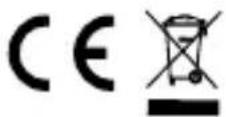
WEEE Directive: 2012/19/EU
WEEE Register No: DE 67896761
WD Plus GmbH hereby declares that the device 306523 is in compliance with the essential requirements and the other relevant provisions. A complete declaration of conformity can be obtained from: WD Plus GmbH, Wohlenbergstraße 16, 30179 Hannover, Germany, http://https://model.ganzeinfach.de/306523

ATTENTION!
Never attempt to open the unit to carry out repairs or modifications. Avoid contact with the mains voltages. Do not short-circuit the product. The unit is not waterproof. Please use it only in dry conditions. Protect it from high humidity, water and snow. Keep the unit away from high temperatures. Do not expose the unit to sudden temperature changes or strong vibrations as this may damage the electronic parts. Check the unit for damage before use. The unit should not be used if it has been knocked or damaged in any way. Please observe the national regulations and restrictions. Do not use the appliance for purposes other than those described in the instructions. This product is not a toy. Keep it out of the reach of children or mentally impaired persons. Any repair or modification to the unit not carried out by the original supplier will invalidate the warranty or guarantee. The appliance may only be used by persons who have read and understood these instructions. The specifications of the appliance are subject to change without prior notice.

MO-FR 9:30am - 18pm CET