Eco 700 - Heating Sonnenkönig - Free user manual and instructions
Find the device manual for free Eco 700 Sonnenkönig in PDF.


User questions about Eco 700 Sonnenkönig
0 question about this device. Answer the ones you know or ask your own.
Ask a new question about this device
Download the instructions for your Heating in PDF format for free! Find your manual Eco 700 - Sonnenkönig and take your electronic device back in hand. On this page are published all the documents necessary for the use of your device. Eco 700 by Sonnenkönig.
USER MANUAL Eco 700 Sonnenkönig
natural_image
Two white rectangular panels with blank surfaces, no text or symbols visibleArtikel-Nr.:
ECO 200: 21222802
ECO 500: 21221002
ECO 700: 21221102
ECO 1000: 21221202
ELEGANCE 500: 21222002
ELEGANCE 700: 21222102
This product is only suitable for well insulated spaces or occasional use.
INDEX
natural_image
Technical line drawing of a mechanical component with a labeled 'WALL' (no other text or symbols)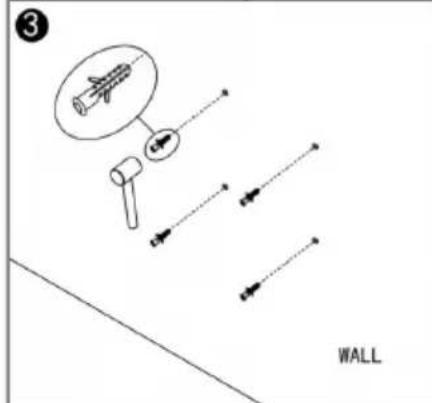
text_image
3 WALL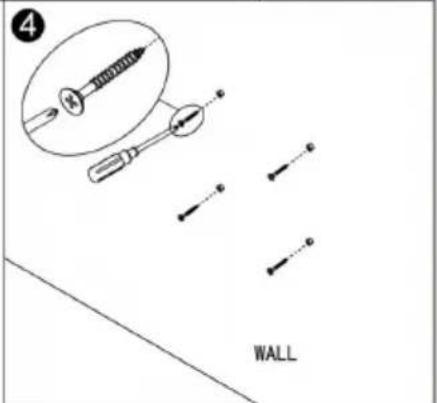
text_image
4 WALL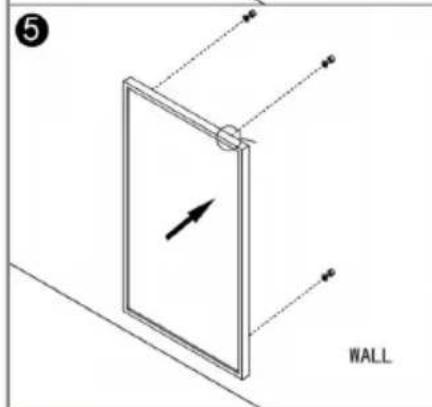
text_image
5 WALL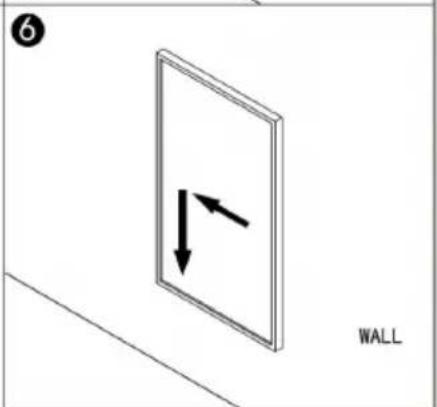
natural_image
Diagram of a wall-mounted device with two opposing arrows indicating direction (no text or symbols)text_image
1 2 3 4 8 5 → 88:88 6 → 88:1 7 → M P 8text_image
QR code image containing encoded data, no visible human-readable texttext_image
My Home ... No devices Add Device Home Smart Me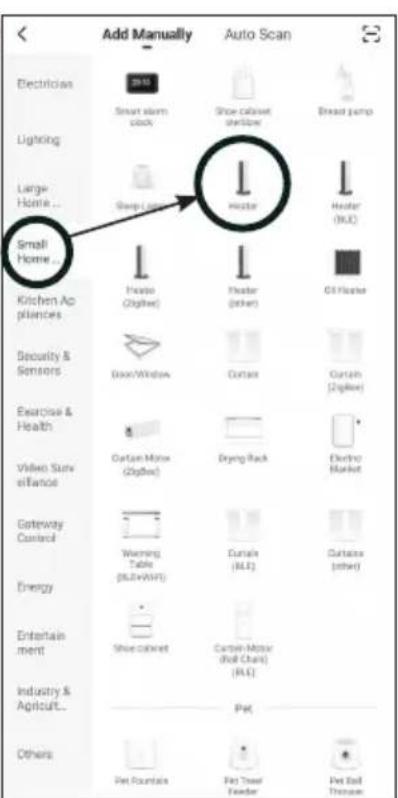
text_image
Add Manually Auto Scan Electrician Smart alarm clock Shoe-cabinet shellbox Bread pump Lighting Large Home ... Sharp-lamp Hotel Hotel (MLC) Small Home ... Kitchen Appliances House (cigarette) Hotel (other) Oil Home Security & Sensors Door Window Curtain Curtain (cigarette) Exercise & Health Cartan-Mouse (cigarette) Drying Rack Video Surveillance Electricity Market Gateway Control Warning Table (BLU+WAT) Curtain (MLC) Cartane (other) Energy Entertainment Shoe cabinet Cartan-Mouse (Roll Chart) (RLC) Industry & Agriculture... Pet Others Pet Fountains Pet Tree Coverer Pet Ball Throattext_image
Cancel Select 2.4 GHz Wi-Fi Network and enter password. If your Wi-Fi is 5GHz, please set it to be 2.4GHz. Common router setting method 2.4GHz 5GHz WiFi Name Password Next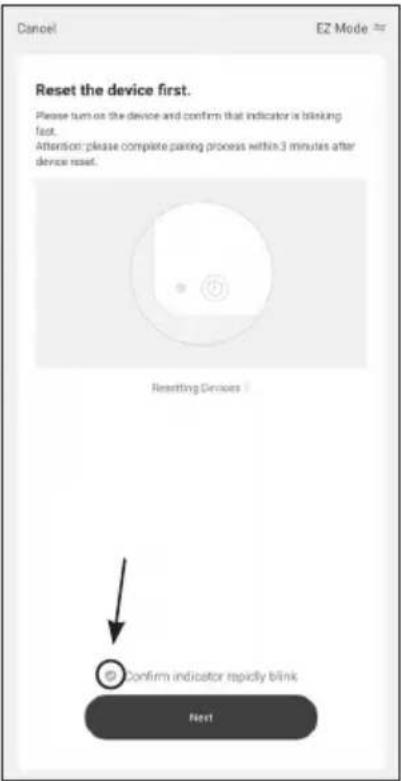
text_image
Cancel EZ Mode * Reset the device first. Please turn on the device and confirm that indicator is blinking fast. Attention: please complete passing process within 3 minutes after device reset. Resetting Devices Confirm indicator rapidly blink Next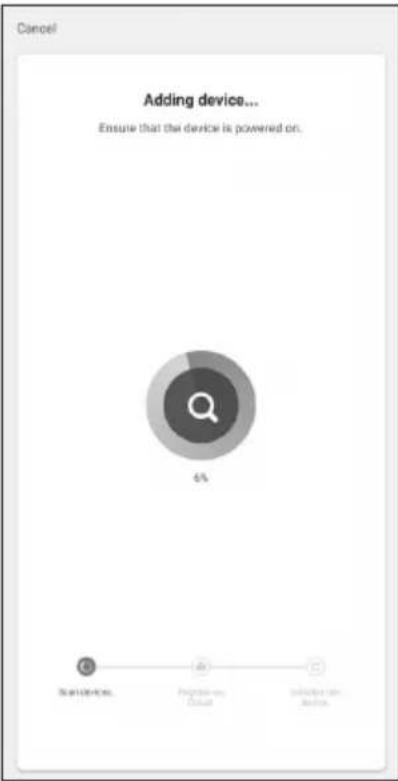
text_image
Cancel Adding device... Ensure that the device is powered on. 6% Start User-Action Progression Actual Sub<<-> User- ActionDE
natural_image
Two white rectangular panels with blank sides, no text or symbols visibleArticle-Nr.:
ECO 200: 21222802
ECO 500: 21221002
ECO 700: 21221102
ECO 1000: 21221202
ELEGANCE 500: 21222002
ELEGANCE 700: 21222102
FR
INDEX
natural_image
Technical line drawing of a mechanical component with a labeled 'WALL' (no other text or symbols)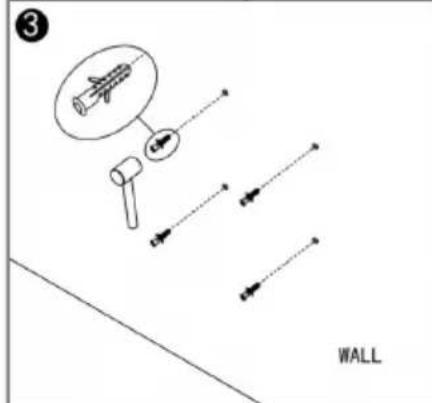
text_image
3 WALL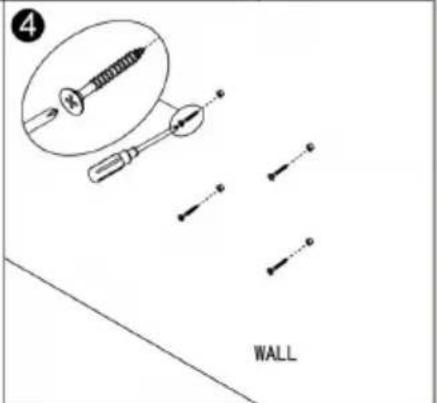
text_image
4 WALL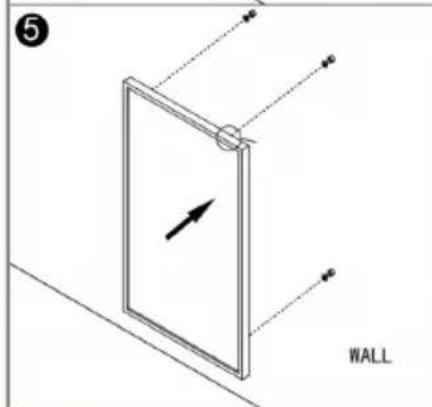
text_image
5 WALL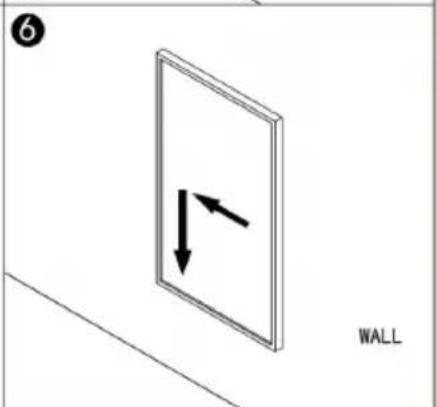
natural_image
Diagram of a wall-mounted device with two opposing arrows indicating direction (no text or symbols)text_image
QR code image containing encoded data, no visible human-readable textnatural_image
Black-and-white landscape photo of snow-capped mountains and a lake, with blooming flowers in the foreground (no text or symbols visible on the landscape itself)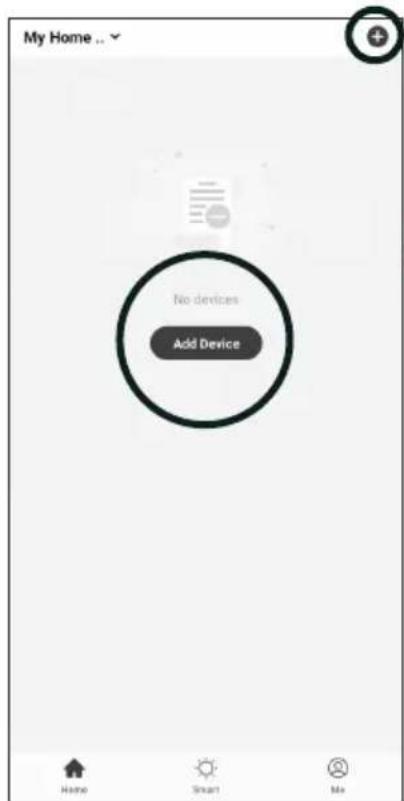
text_image
My Home ... No devices Add Device Home Smart Me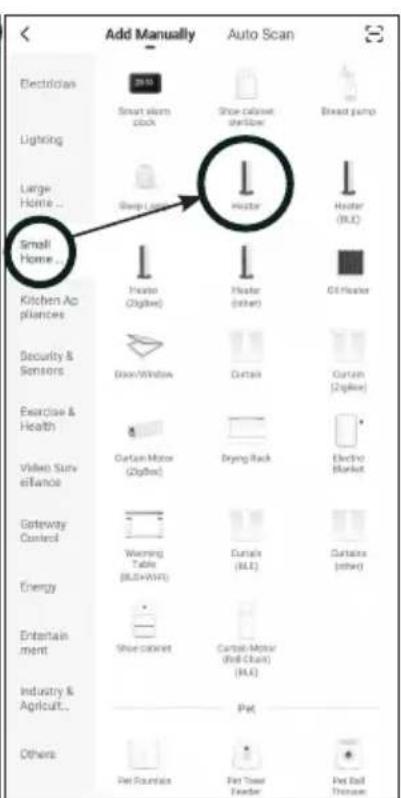
text_image
Add Manually Auto Scan Electrician Lighting Large Home ... Small Home ... Kitchen Appliances Security & Sensors Exercise & Health Video Survey Gateway Control Energy Entertainment Industry & Agriculture... Others Smart alarm clock Shoe cabinet, refrigerator Bread pump Sweep lock Hotel Hotel (R.L.C.) Hotel (other) Oil Heater Door Window Curtail Curtail (Zipbox) Cartoon Motor (Zipbox) Drying Rack Electric Blacket Warning Table (BLU+WLT) Curtain (R.L.C.) Cartoon Motor (Roll-Clout) (R.L.C.) Pet Pet Fountain Pet Tower Header Pet Ball Throattext_image
Cancel Select 2.4 GHz Wi-Fi Network and enter password. If your Wi-Fi is 5GHz, please set it to be 2.4GHz. Common router setting method 2.4GHz 5GHz WiFi Name Password Help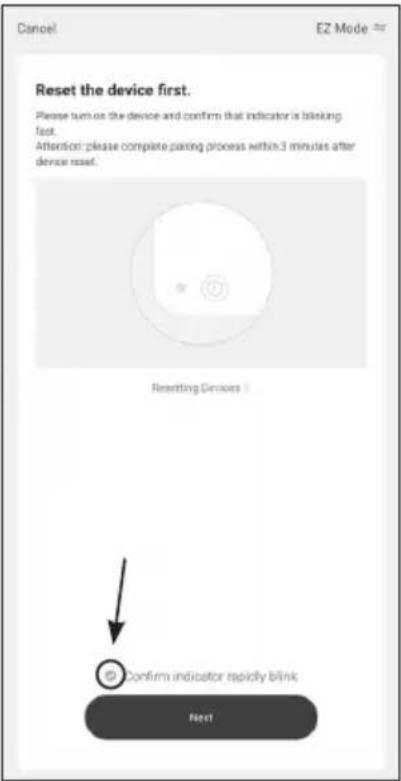
text_image
Cancel EZ Mode # Reset the device first. Please turn on the device and confirm that indicator is blinking fast. Attention: please complete passing process within 3 minutes after device reset. Resetting Devices Confirm indicator rapidly blink Next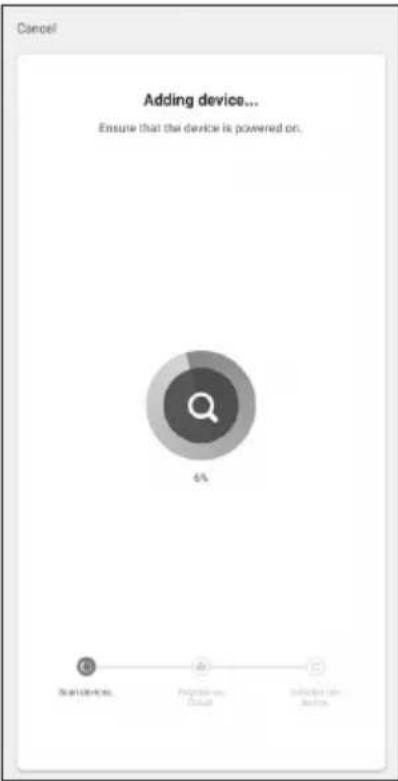
pie
Adding device... Ensure that the device is powered on. | Category | Percentage (%) | |---|---| | Start Devices | 5 | | Programs, Casual | 0 | | Sub-Application Services | 1 |
Modifications techniques
natural_image
Two white rectangular panels with blank sides, no text or symbols visibleN. Articolo:
ECO 200: 21222802
ECO 500: 21221002
ECO 700: 21221102
ECO 1000: 21221202
ELEGANCE 500: 21222002
ELEGANCE 700: 21222102
IT
INDEX
text_image
QR code image containing encoded data, no visible human-readable texttext_image
My Home ... No devices Add Device Home Smart Me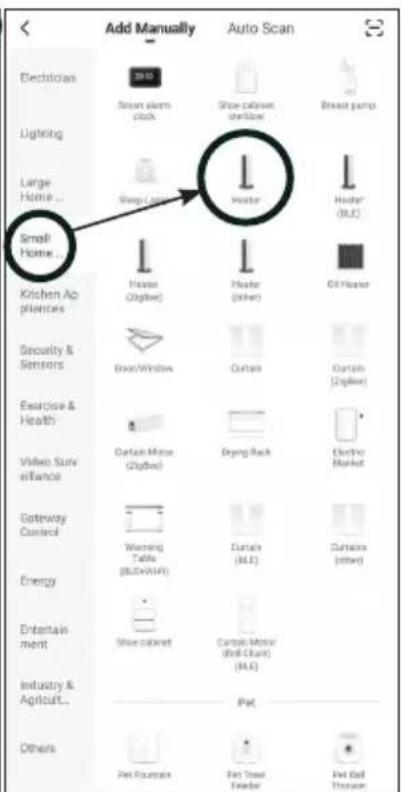
text_image
Add Manually Auto Scan Electrician Smart alarm clock Shoe cabinet window Breed pump Lighting Large Home... Sleep lamp Hotel Hotel (RGB) Small Home... Kitchen Appliances Photo (Omega) Hotel (other) Off Home Security & Sensors Door/Window Curtain Curtain (Omega) Exercise & Health Certain Mirror (Omega) Drying Rack Video Survey Gateway Control Warning Table (Bluetooth) Curtain (RGB) Curtains (other) Energy Entertainment Shoe cabinet Curtain Mirror (Red Clust) (RGB) Industry & Agriculture... Pet Others Pet Fountain Pet Stand Heater Pet Ball Throattext_image
Cancel Select 2.4 GHz Wi-Fi Network and enter password. If your Wi-Fi is 5GHz, please set it to be 2.4GHz. Common router setting method 2.4GHz 5GHz WiFi Name Password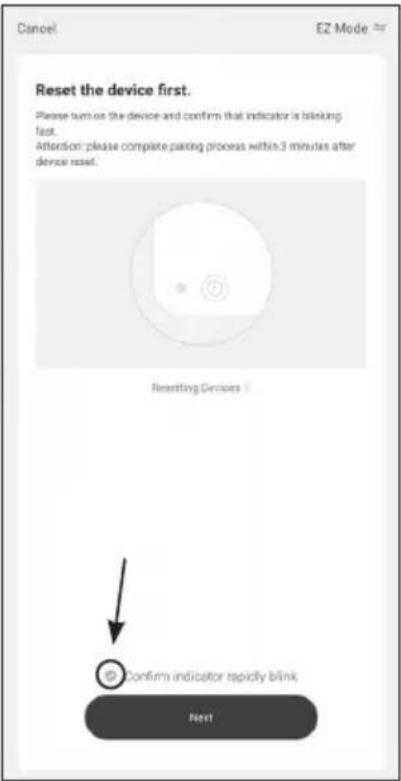
text_image
Cancel EZ Mode * Reset the device first. Please turn on the device and confirm that indicator is blinking fast. Attention: please complete passing process within 3 minutes after device reset. Resetting Devices Confirm indicator rapidly blink Next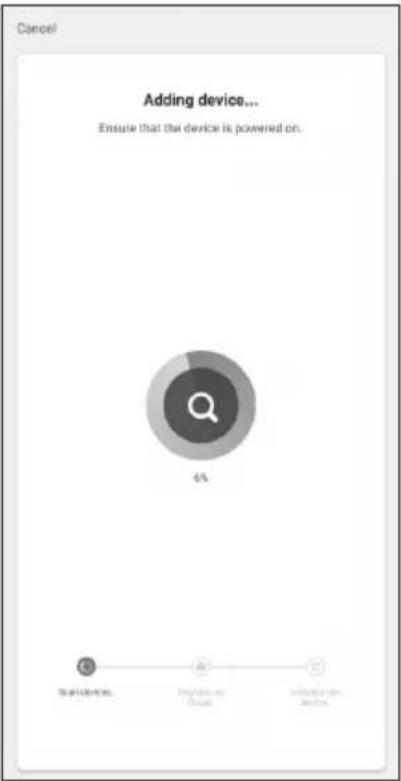
text_image
Cancel Adding device... Ensure that the device is powered on. 6% Start Devices Probability of Default Selection from Services
natural_image
Two white rectangular panels with blank sides, no text or symbols visibleArticle-No.:
ECO 200: 21222802
ECO 500: 21221002
ECO 700: 21221102
ECO 1000: 21221202
ELEGANCE 500: 21222002
ELEGANCE 700: 21222102
EN
INDEX
1 Safety instructions ....39
2 Cleaning and Maintenance ....40
3 Installation.... 41
4 Controlpanel and Display....42
5 Operation 42
6 Technical data....46
7 Warranty / Disposal / Technical change....46
1 Safety instructions
Please read before first commissioning the safety instructions carefully and observe the safety instructions to prevent damage due to misuse, improper operation, and improper environmental conditions to be avoided. Keep these for later reference.
Check the device after removing the packaging for damage. Do not put the unit in case of suspected corruption in operation and consult a specialist. The recyclable packaging material must not be stored or disposed accessible for young children, but must be disposed of properly.
This appliance is only for the purpose for which it was explicitly developed, ie be used for heating rooms. Any other use is regarded as improper and therefore dangerous. The supplier is not liable for damage to persons and / or property damage due to an improper or incorrect use.
Repairs to electrical appliances must only be carried out by trained personnel only. Improperly performed repairs and alterations to the equipment can have dangerous consequences for the user according to what the warranty will be rejected.
The use of all electrical equipment must be observed some fundamentally important rules:
- Do not touch the appliance with wet hands or feet.
- Do not expose the device to the weather.
- The appliance must not be used by children or infirm persons without supervision.
• Pull the plug from the outlet when you no longer need it . not by pulling the power cable or the device to unplug it. - Disconnect before carrying out any cleaning or maintenance operation, unplug the device. The air intake must be cleaned at least once a week.
- Do not use near a bathtub, shower, sink, or swimming pools
- Do not use any accessories or attachments that are not approved by the manufacturer.
- Do not insert objects into the interior of the device.
- Do not cover the appliance with objects.
- Mount the unit with the control at the bottom on a vertical wall.
The device must not be used under the following conditions:
• In areas with potentially explosive atmospheres.
• In rooms with aggressive atmospheres.
- In rooms with high solvent concentration.
• In areas with extremely high levels of dust.
- Disreputable operating conditions, it is recommended that the technical department of SONNENKÖNIG or dealer to contact. The use of an electric heater under the wrong conditions will invalidate the warranty!
This appliance can be used by children aged from 8 years and above and persons with reduced physical, sensory or mental capabilities or lack of experience and knowledge if they have been given supervision or instruction concerning use of the appliance in a safe way and understand the hazards involved. Children shall not play with the appliance. Cleaning and user maintenance shall not be made by children without supervision.
Children aged from 3 years and less than 8 years shall only switch on/off the appliance provided that it has been placed or installed in its intended normal operating position and they have been given supervision or instruction concerning use of the appliance in a safe way and understand the hazards involved. Children aged from 3 years and less than 8 years shall not plug in, regulate and clean the appliance or perform user maintenance.
2 Cleaning and Maintenance
EN 2.1 Cleaning
Always unplug your heater and let it cool down completely before cleaning. Never dip into water and never splash water on it. Clean the heater with a soft damp cloth. For glass models use a soft cloth and glass cleaner. Never use a wet cloth and make sure to dry the heater when clean with a dry cloth. Do not use any abrasive materials, solvents or harsh cleaning sponges as this could cause scratches or other irreparable damage. Before operating the heater again it must be completely dry.
2.2 Using/Working
Please note that the heater may discolour with use. This is due to airborne pollution and is not a fault. Do not cover your heater with a picture foil and do not paint or print the heater yourself. This might cause damage to the heating element and will void your warranty. If you notice any noise, smells, visible changes or exceptionally high temperatures please discontinue use and contact an authorized SON-NENKÖNIG dealer.
text_image
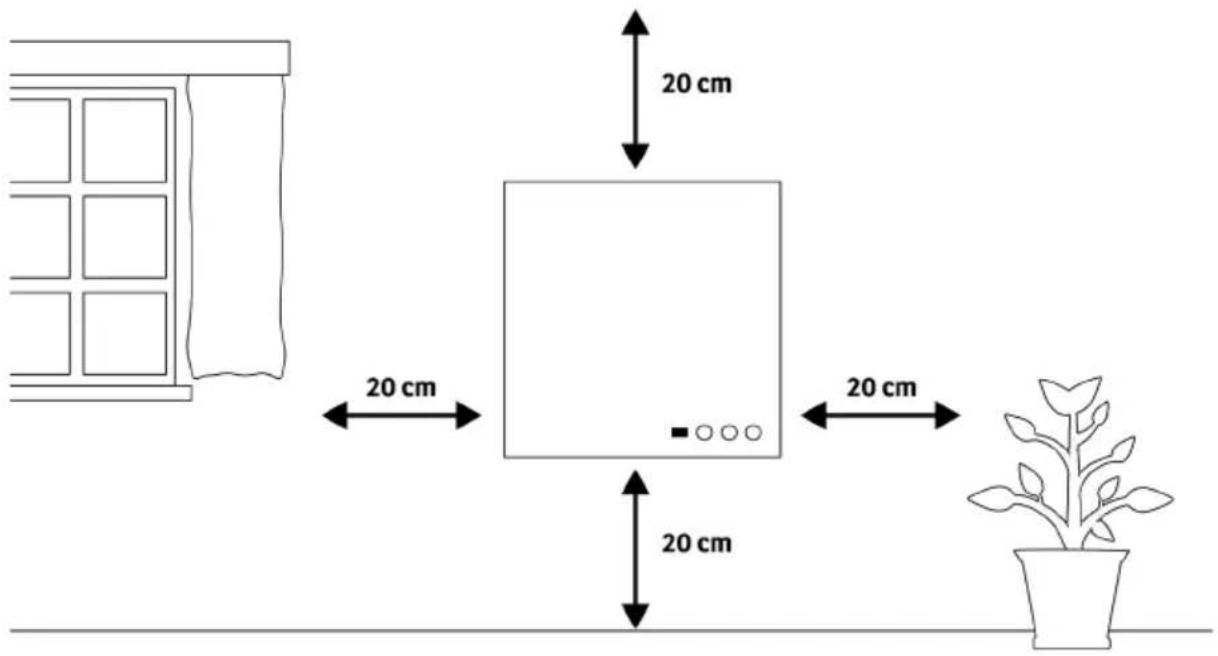
20 cm 20 cm 20 cm 20 cmThe heater must be at least 20 cm away from all objects, walls, the ceiling and the floor.
3 Installation
text_image
Wall Installation Template WALL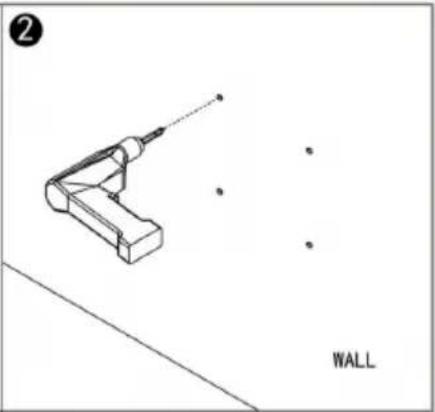
natural_image
Technical line drawing of a mechanical component with a labeled 'WALL' (no other text or symbols)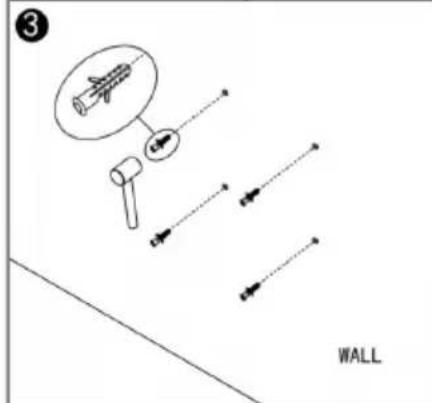
text_image
3 WALL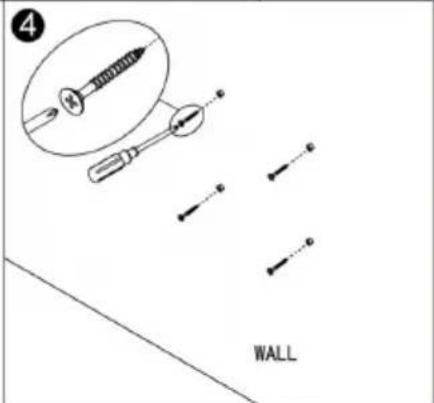
text_image
4 WALL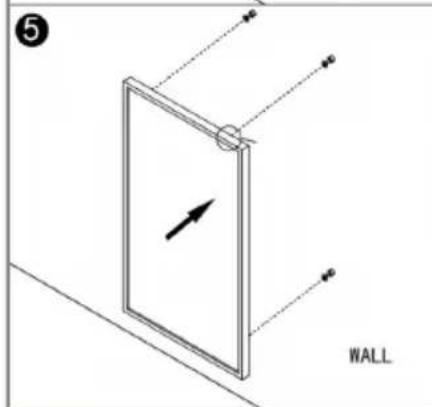
text_image
5 WALL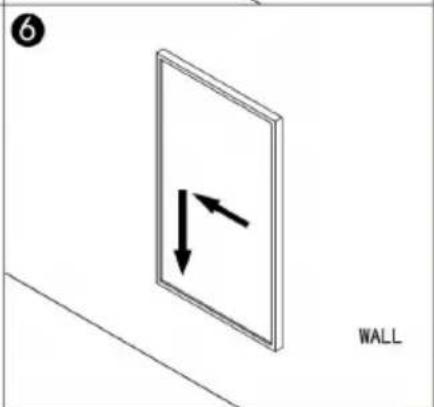
text_image
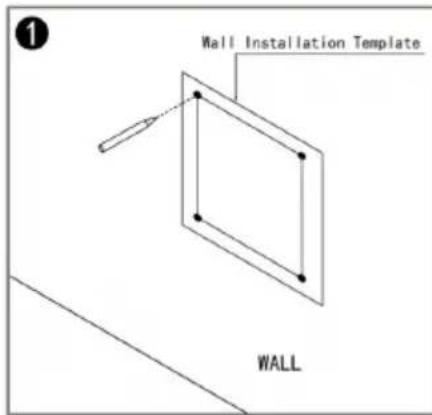
6 WALL- Use the supplied template to mark the position of the holes on the wall.
- Drill holes using a 8mm drill.
- Insert the dowels into the holes.
- Screw in the supplied screws to the wall.
- Mount the panel on the screws.
- Move the panel to the left and then down until it's secured.
Note: The kit supplied in the package is designed for mounting vertically on a solid wall. If mounted onto other types of walls, you will need appropriate fixings (not supplied). Please make sure the wall is safe to mount.
4 Controlpanel and Display
text_image
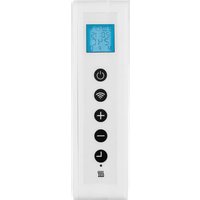
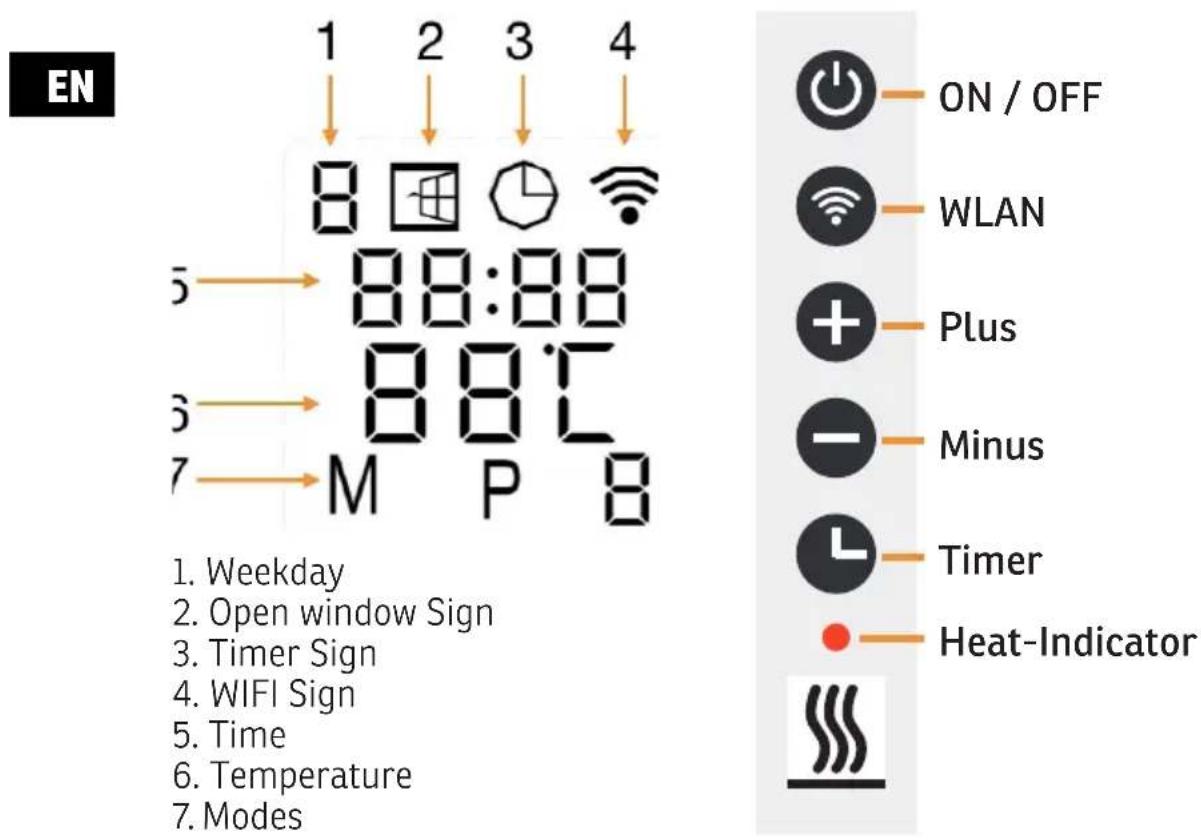
EN 1 2 3 4 8 8:88 8:8:8 M P 8 5 → 88:88 3 → 88:8 7 → M P 8 ON / OFF WLAN Plus Minus Timer Heat-Indicator 1. Weekday 2. Open window Sign 3. Timer Sign 4. WIFI Sign 5. Time 6. Temperature 7. Modes5 Operation
General introduction of the control system
The product range has an integrated WIFI control box, meaning there is no other additional thermostat needed to control the heater. Once the heater has been connected to the APP, the smartphone will take control and communicate with the control box. If your home internet is not working, it is still possible to operate the heater via the control box manually, once the heater is re-connected to the WIFI, the smart phone will take control again.
- Manual mode: simple temperature control and 24 hours timer function
• Smart mode: 7 days program, 4 time zones per day - Open window detection function
- Child lock
- Factory reset
- Mute operation
CAUTION: The control via app overwrites any presettings made on the manual setting.
Open window detection
If the room temperature drops drastically in a short time span, this function is activated and the heating stops for 30 minutes. Deactivate this function by pressing the ⬤tton for 5 seconds.
Temperature calibration
Press the button for 5 seconds to start the calibration. You can change the temperature from -5 to +5 °C.
EN
Deactivate Wireless
Press the button for 10 seconds to deactivate the Wireless function. The Symbol on the display should dissapear. Repeat to reactivate the Wireless function.
Manual Control
In manual mode, you can control the heating independently of a WLAN connection.
Temperature
Set the desired temperature by pressing the room key. Two seconds after setting, the display will return to the room temperature.
Timer
Press the button to enter the timer setting. The display will show either 00 H or the previous setting. Set the timer with the buttons.
Temperature calibration
Press and hold the button for 5 seconds to enter the temperature calibration. Adjust the number by pressing the button. The calibration ranges from -5 to +5 °C.
Child lock
Press and hold the 3 seconds to activate the child lock; "CL" is displayed on the screen.
Factory reset
Switch on the heater and press until "OFF" is displayed on the screen. Press and hold 10 seconds to reset the unit.
Mute operation
If you do not like the „beep“ sound when operating the heater, you can deactivate the sound in the settings after you have connected the heater to the APP.
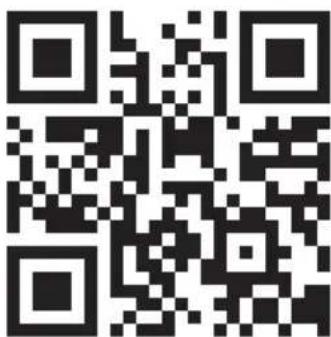
Scan the QR code below to download the "Smart Remote King" APP or search "Smart Remote King" APP on APP store or Google play store to start the procedure to download the APP, open the APP and register with your phone number or Email address.
text_image
QR code image containing encoded data, no visible human-readable text-
After you connect the device to the power supply and press the main switch, the WIFI symbol on the display will start flashing quickly. The WIFI module is now ready for normal connection mode.
-
- 3.

natural_image
Black-and-white landscape photo of snow-capped mountains and a lake, with blooming flowers in the foreground (no text or symbols visible on the main scene)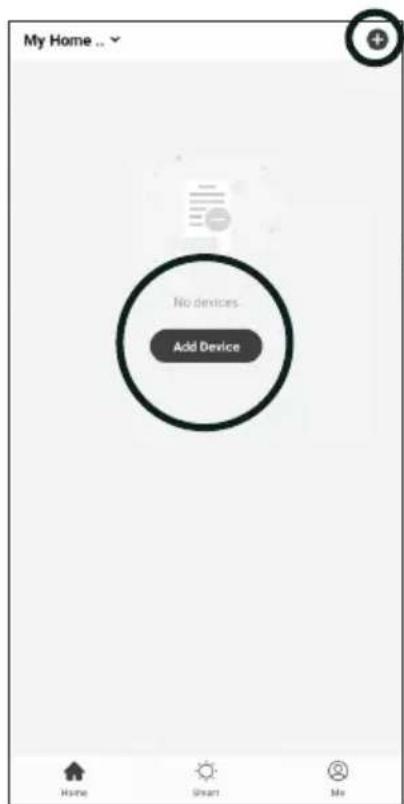
text_image
My Home ... No devices Add Device Home Smart Me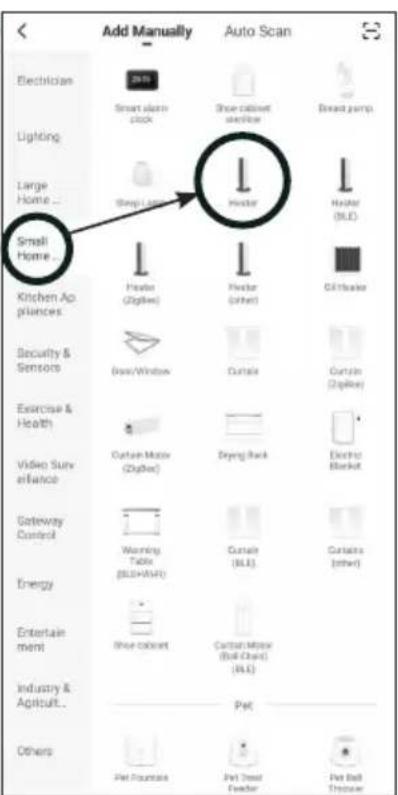
text_image
Add Manually Auto Scan Electrician Smart alarm clock Shoe cabinet shelf/low Bread jump Lighting Large Home ... Small Home ... Kitchen Appliances Heater (Zipbox) Heater (other) Oil heater Security & Sensors Box/Window Curtail Curtail (Zipbox) Exercise & Health Video Surveillance Cartan Motor (Zipbox) Drying Back Electric Basket Gateway Control Warning Panel (BLU+AVF) Curtail (BLU) Curtails (other) Energy Entertainment Shoe colorant Cartan Motor (Ball Chain) (BLU) Industry & Agriculture... Pet Others Pet Source Pet Stand Fender Pet Ball Troupe- press the + icon or the „Add Device“ button in your app
- Select „Small Home Appliances first and then „Heater“.
4.5.6.

text_image
Cancel Select 2.4 GHz Wi-Fi Network and enter password. If your Wi-Fi is 5GHz, please set it to be 2.4GHz. Common router setting method 2.40Hz 50Hz Wi-Fi Name Password Next Cancel EZ Mode 2# Reset the device first. Please turn on the device and confirm that indicator is blinking fast. Attention: please complete pairing process within 3 minutes after device reset. Resetting Devices > Confirm indicator rapidly blink Next Cancel Adding device... Ensure that the device is powered on. Scan devices. Regular mail / Clean. Master or Monitor
-
Make sure that your smartphone is connected to the WLAN and then enter the security phrase or password of your WIFI router
-
Check again that the WIFI symbol on the display of the infrared wall heater flashes quickly and check the box before pressing again.
-
Wait until the connection status shows 100%. Give the device a name so you can assign it later.
Troubleshooting
If no connection could be established after the time has elapsed, switch off the device, switch it on again after some time, check the points mentioned below and try again.
- Is your device and smartphone near the router?
- Does your WLAN signal have the necessary 2.4 GHz frequency?
- Is your router already overloaded with other WLAN devices?
Reset WIFI settings
To reset the WIFI settings on the device, press and hold the WIFI button until the WIFI symbol flashes slowly. Press the button again until the symbol flashes quickly again. The WIFI module is now back in the factory settings.
6 Dati tecnici
Model Power Size [mm] IP Protection
Class
| ECO 200 200 W 300 x 600 x 70 IP44 | |||
| ECO 500 500 W 600 x 800 x 70 IP44 | |||
| ECO 700 700 W | 600 x 1150 x 70 | IP44 | |
| ECO 1000 | 1000 W | 850 x 1200 x 70 | IP44 |
| ELEGANCE 500 | 500 W 600 x 850 x 70 IP44 | ||
| ELEGANCE 700 | 700 W 600 x 1200 x 70 | IP44 | |
| ELEGANCE SCHIEFER | 600 W | 550 x 1100 x 70 | IP44 |
7 Warranty / Disposal / Technical change
Warranty
The Products are controlled just before delivery. If despite a lack of your product, try trustfully your seller. Please bring your receipt, as this is to be submitted for each warranty. The guarantee period is 24 months from date of purchase.
Disposal
The device must be disposed of properly. The device can be distributed free of charge for disposal at each dealer.
Technical changes
Reserving technical changes in technology and design
Caution
Some parts of this product can become very hot and cause burns. Particular attention has to be given where children and vulnerable people are present.
CE Declaration of Conformity
This device complies with the following standards
EMC EN IEC 55014-1:2021
EN IEC 55014-2:2021
EN 61000-3-2:2019/A2:2024
EN 61000-3-3:2013/A2:2021 | EN 301 489-17 V3.3.1:2024
EN 62311:2008 | EN 50665:2017 | EN 300 328 V2.2.2:2019
LVD EN 60335-1:2012/A16:2023
EN 60335-2-30:2009/A13:2022
EN 62233:2008 | AfPS GS 2019:01 PAK | EK1 527-12 Rev. 2
EMC 2014/30/EU
LVD 2014/35/EU
RoHS 2015/863/EU
RED 2014/53/EU
ECHA 1907/2006
DISPOSAL INSTRUCTIONS FOR THE ELECTRICAL PART OF THE PRODUCT
In accordance with Article 26 of the Decree-Law of 14 March 2014 implementing Directive 2012/19/EC and the Law of 4 March 2014 implementing Directive 2011/65/EC on the reduction of the use of hazardous substances in electrical and electronic equipment and on waste management.
The crossed-out dustbin symbol on the machine or packaging indicates that the waste generated at the end of its useful life must be collected separately from other waste. The user must therefore take the device to the appropriate collection points at the end of its service life. Sort electronic and electrical waste or send the purchase of new, equivalent devices back to the dealer in a one-to-one process. L'adeguata separate collection for subsequent commissioning of the equipment to be recycled, treatment and environmentally sound disposal, helps to avoid possible adverse effects on the environment and health and promote the reuse and/or recycling of the materials to which they belong. composed the equipment. Misuse of this product by the user will result in the application of the administrative penalties provided for in the applicable legislation. Batteries contained in the device must be disposed of separately in the appropriate containers for the collection of used batteries.
DISPOSAL OF BATTERIES AND ACCUMULATORS
In accordance with Legislative Decree 188 of 20 November 2008 implementing Directive 2006/66/EC on batteries, accumulators and related waste, the symbol of the crossed-out waste bin on the battery indicates that it is prohibited to dispose of used batteries in household waste.
Batteries and batteries contain substances that are highly polluting for the environment. The user is obliged to dispose of used batteries at collection points in the municipality or in appropriate containers. The service is free. In this way, legal requirements will be respected and the environment will be protected. The symbols identifying hazardous materials that may be present in batteries and accumulators are as follows: Hg= Mercury, Cd= Cadmium, Pb= Lead.
Company
Armin Schmid
Olensbachstrasse 9-15
CH-9631 Ulisbach
Tel. Int. +41 58 611 60 00
Tel. Nat. 0848870850
www.sonnenkoenig.ch
Company
Armin Schmid
natural_image
Two white rectangular panels with blank sides, no text or symbols visibleArtikel-Nr:
ECO 200: 21222802
ECO 500: 21221002
ECO 700: 21221102
ECO 1000: 21221202
ELEGANCE 500: 21222002
ELEGANCE 700: 21222102
NL
INDEX
text_image
QR code image containing encoded data, no visible human-readable texttext_image
Mobile app interface screenshot showing home and auto scan options with icons for lighting, kitchen appliances, and home items.text_image
Select 2.4 GHz Wi-Fi Network and enter password. If your Wi-Fi is 5GHz, please set it to be 2.4GHz. Common router setting method 2.4GHz 5GHz Wi-Fi Name Password Reset the device first. Please turn on the device and confirm that indicator is thinking fast. Attention: please complete passing process within 3 minutes after device reset. Resetting Power Confirm indicator rapidly think Next Adding device... Ensure that the device is powered on. Prior device, requiring to start or endNL
Model Power Size [mm] IP Protection
Class
| ECO 200 200 W 300 x 600 x 70 IP44 | |||
| ECO 500 500 W 600 x 800 x 70 IP44 | |||
| ECO 700 700 W 600 x 1150 x 70 IP44 | |||
| ECO 1000 | 1000 W | 850 x 1200 x 70 | IP44 |
| ELEGANCE 500 | 500 W 600 x 850 x 70 IP44 | ||
| ELEGANCE 700 | 700 W | 600 x 1200 x 70 | IP44 |
| ELEGANCE SCHIEFER | 600 W 550 x 1100 x 70 IP44 | ||
| Table for information requirements for ECO 200, 500, 700, 1000 / ELEGANCE 500 / 700 | |||||
| Item | Symbol | Value | Unit | Item | P |
| Heat output Type of heat input, for electric storage local space heaters only (select one) | |||||
| Nominal heat output P | nomsee list kW | Manual heat charge control with integrated thermostat [no] | |||
| Minimum heat output (indicative) | Pminsee list kW | Manual heat charge control with room and/or outdoor temperature feedback | [no] | ||
| Maximum continuous heat output | Pmax,csee list kW | Eelectronic heat charge control with room and/or outdoor temperature feedback | [no] | ||
| Power consumption Fan assisted heat output [no] | |||||
| in off mode P | c0.00kW | Type of heat output/room temperature control (select one) | [no] | ||
| In standby mode | Psml0.33kW | single stage heat output and no romm temperature control | [no] | ||
| In idle mode | Pidle0.81kW | Two or more manual stages, no room temperature ocontrol | [no] | ||
| In network standby | Pnom0.81kW | with mechanic thermostat romm temperature control | [no] | ||
| Standby mode with display of information of status | [no] | with electronic room temperature control | [no] | ||
| Seasonal space heating energy efficiency in active mode | nson94.0% | Electronic room temperature control plus day timer | [no] | ||
| Electronic room temperature control plus week timer | [no] | ||||
| Other control options (multiple selections possible) | [yes] | ||||
| Room temperature control, with presence detection | [no] | ||||
| Room temperature control, with open window detection | [yes] | ||||
| distance control option | [yes] | ||||
| adaptive start control | [no] | ||||
| working time limitation | [yes] | ||||
| Black bulb sensor | [no] | ||||
| Self-learning functionality | [no] | ||||
| Control accuracy | [no] | ||||
| Remark: This product is only suitable for well insulated spaces or occasional use. will be showed on the cover page of the user manual, free-access websites of manufacturer, product packaging | |||||
This product is only suitable for well-insulated rooms or occasional use. For private use only!
This product is only suitable for well-insulated rooms or occasional use. For private use only!
This product is only suitable for well-insulated rooms or occasional use. For private use only!
This product is only suitable for well-insulated rooms or occasional use. For private use only!