Ironman Move x20 - Smartwatch TIMEX - Free user manual and instructions
Find the device manual for free Ironman Move x20 TIMEX in PDF.


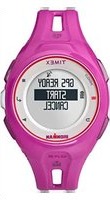
| Product type | Smartwatch / Activity tracker |
| Brand | Timex |
| Model | Ironman Move x20 |
| Power source | Rechargeable lithium-ion battery, up to 7 days battery life |
| Main functions | Step counting, distance traveled, calories burned, sleep tracking, exercise session recording, call and SMS notifications, phone finder, weather |
| Connectivity | Bluetooth 4.0 Low Energy |
| Compatibility | iOS and Android (Bluetooth 4.0 compatible smartphones) |
| Water resistance | Splash resistant (rain, hand washing) – do not submerge |
| Display | Digital screen (non-touch), button navigation |
| Sensors | Accelerometer |
| Wristband wearing | On the wrist, adjustable clasp |
| Data recording | Internal memory, synchronization via mobile app |
| Mobile app | Timex Ironman Move x20 (available on App Store and Google Play) |
| Charging | Via cable with magnetic contacts, USB plug |
| Care and cleaning | Clean with a soft, dry cloth; avoid chemicals and immersion |
| Warranty | 1-year international warranty (excluding glass, strap, battery) |
Frequently Asked Questions - Ironman Move x20 TIMEX
User questions about Ironman Move x20 TIMEX
0 question about this device. Answer the ones you know or ask your own.
Ask a new question about this device
Download the instructions for your Smartwatch in PDF format for free! Find your manual Ironman Move x20 - TIMEX and take your electronic device back in hand. On this page are published all the documents necessary for the use of your device. Ironman Move x20 by TIMEX.
USER MANUAL Ironman Move x20 TIMEX
- Overview
- Geng Started
- Charging your TIMEX IRONMAN Move x20
- Baery Life
- Water-resistance
- Wearing the TIMEX IRONMAN Move x20
- Tracking your Daily Activity
- Downloading the TIMEX IRONMAN Move x20 App
- First Time Pairing
- Text Message and Phone Call Nocaons
- Recording a Workflow
- Tracking your Sleep
- Syncing with your Smartphone
- Finding your Phone
- Reseng your TIMEX IRONMAN Move x20
a. Home Page
b. Activity Page
c. Sleep Page
d. Workout Page
e. Share Data
f. Menu
i. User
ii. Sengs
iii. Calibrate
iv. About
v. Device
vi. Sign out
- Warranty
- Declaraon of Conformity
WHAT'S INCLUDED
- TIMEX® IRONMAN® Move x20 acuity tracker
- Charging Cable
OVERVIEW
TIMEX IRONMAN Move x20 Buons
Home
Buon

Select/Scroll
Buon
GETTING STARTED
The TIMEX IRONMAN Move x20 acuity tracker should be setup and synced with an iOS or Android Smartphone that supports Bluetooth® 4.0 technology.
For a list of compatible devices, visit: hp://www.TIMEX.com/movex20
CHARGING YOUR TIMEX IRONMAN MOVE X20
Your TIMEX IRONMAN Move x20 must be charged before setup.
- Line up the silver contacts on the charger with the silver contacts on the back of the TIMEX IRONMAN Move x20.
- Clip the charging cable onto the back of the TIMEX IRONMAN Move x20 and secure the keeper strap over the TIMEX IRONMAN Move x20.
- Plug your charging cable into a USB port or universal A/C charging box.
The TIMEX IRONMAN Move x20 will display the baery charge level on the screen.
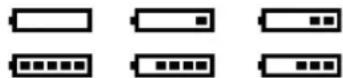
Inial charging can take up to three hours.
BATTERY LIFE
Your TIMEX IRONMAN Move x20 has a rechargeable lithium-ion baery. With normal use, your device will have a baery life of seven days. You can check the current baery level on the Time of Day screen on your device a19728the Home screen of the app.
The TIMEX IRONMAN Move x20 will give you a vibraon alert and will display an on-screen warning when the baery reaches 10% . Your TIMEX IRONMAN Move x20 will shut down when the baery reaches 5% .
WATER-RESISTANCE
Your TIMEX IRONMAN Move x20 is resistant to water splashes (you can wash your hands or get caught in the rain, but you don't want to submerge the device).
WEARING THE TIMEX IRONMAN MOVE X20
The TIMEX IRONMAN Move x20 is designed to be worn on your wrist.
- Put the TIMEX IRONMAN Move x20 on your wrist.
- Posion the ends of the wristband over each other with the clasp over the two holes that will provide the best t on your wrist.
- Squeeze the clasp and wristband between your thumb and forenger unl the clasp is fully engaged with the strap.
TRACKING YOUR DAILY ACTIVITY
Your TIMEX IRONMAN Move x20 uses a built-in accelerometer to record your daily movement: steps taken, distance travelled and calories burned.
To view your current day details, press the buon on your TIMEX IRONMAN Move x20. With each
press of the buon you will see: Time of Day
10:28 1
114550STEP5
10.22, Calories Burned Day-Date
and WeathsU 12-28
28°C
(If connected to a Smartphone).
The TIMEX IRONMAN automatically resets the daily acuity at 12:00 am; the data will be saved on the TIMEX IRONMAN Move x20 and can be synced to the app at any me. If the TIMEX IRONMAN Move x20 reaches memory capacity, the oldest data stored on the device will be overwien.
DOWNLOADING THE TIMEX IRONMAN MOVE X20 APP
- Download and install the TIMEX IRONMAN Move x20 app App Store, or, for Android from the Google Play app store

- Enable Bluetooth on your Smartphone.
for iPhone from the Apple
FIRST TIME PAIRING
Your TIMEX IRONMAN Move x20 is setup through the app. Remember, the device needs to be charged before aempng the setup process.
- Turn on the Bluetooth funcon on your Smartphone or other compatible mobile device.
- Open the TIMEX IRONMAN Move x20 app.
- Press and hold the buon on your TIMEX IRONMAN Move x20 for 2.5 seconds.
- The TIMEX IRONMAN Move x20 will display PAIR.
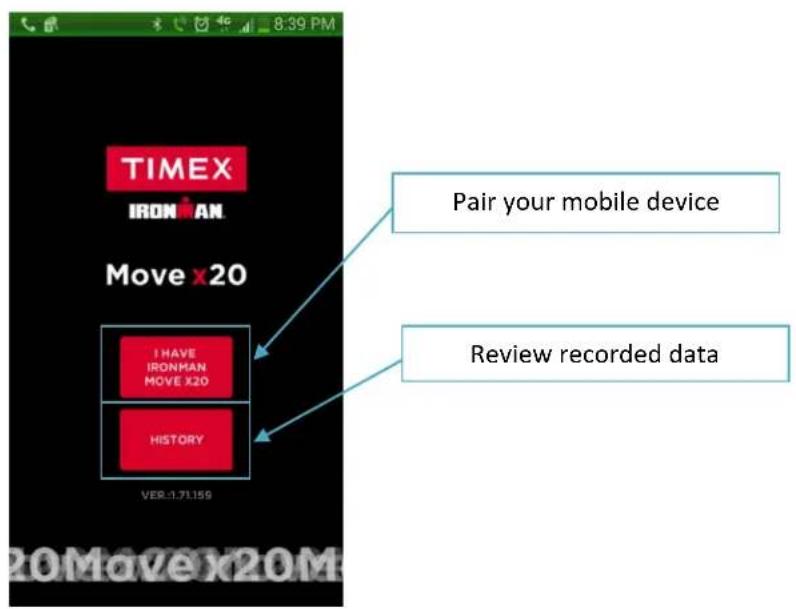
- In the app, tap the I HAVE TIMEX IRONMAN Move x20 buon and choose the device.
a. Aer the connecn is made, your TIMEX IRONMAN Move x20 will vibrate and display PAIR OK.
- Aer successful connecn, the app will display the setup screens:
a. Registraon screen:
i. Name, email address, zip code
ii. If you would like to receive informaon about your device or markeng informaon from Timex, check the box next to Email from Timex and then tap the Next buon.
b. Device customizaon screens (this informaon customizes your TIMEX IRONMAN Move x20 and provides more accurate calorie burn):
i. Unit
- Imperial or Metric
ii. User
-
Gender
-
Age
-
Weight
-
Height
-
BMI (this eld is not customizable, it is auto calculated based on your personal informaon)
iii. Sleep
- Manual (you must manually turn on the sleep functor and manually wake up the device in the morning)
- Auto (the TIMEX IRONMAN Move x20 will automatically acvate the sleep funcon and automatically wake up based on the mes you input)
a. To Bed (only available in Auto mode): The me you go to bed
b. Wake Up (only available in Auto mode): The me you wake up. This will also acvate a vibrang alert.
c. Window: Range oered from 0-20 minutes. This eld represents a grace period on your sleep me. For example, choose 15 minutes if you normally go to bed between 10 pm and 10:15 pm.
iv. Vibraon Alert: On or O
- When your TIMEX IRONMAN Move x20 is paired to a Smartphone, vibraon alerts are used to nofy you of new text messages, incoming phone calls, goals reached, and wake up alerts (when Auto sleep is selected).
v. Goals (device will alert you when you have met these goals CONGRATS! and a progress bar icon will be displayed on the device for each item):
- Steps
- Calories
- Distance
- Sleep Hours (this eld is not customizable, it is auto calculated based on your age)
- Workout Time
vi. Format:
- Date: MM-DD or DD-MM
- Time: 12 Hr (1 pm) or 24 Hr (13:00)
vii. Phone Alert
- Start (Time of day the app will start allowing alerts on the TIMEX IRONMAN Move x20
- End (Time of day the app will stop allowing alerts on the TIMEX IRONMAN Move x20)
viii. Phone Nocaon:
- Incoming Call: On or O
-
Incoming Message: On or O
-
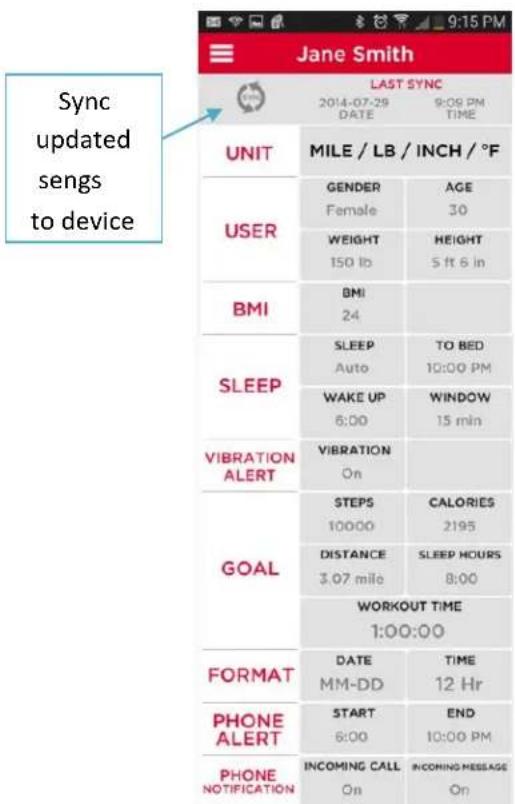
Aer all setup screens are complete, tap the SYN buon in the upper le-hand corner of the Sengs page. Your band will then be updated with all of your selected data.
TEXTMESSAGEANDPHONECALLNOTIFICATIONS
When paired with a compatible Apple or Android Smartphone, your TIMEX IRONMAN Move x20 will alert you of incoming texts and phone calls. Caller ID informaon is limited to 32 characters and text message content is limited to 32 characters; message/noconaon will be followed by "... when truncated.
NOTE: MMS messages will not trigger an alert in your TIMEX IRONMAN Move x20, only SMS messages are compatible. Also note, text messages and phone call nocaons are only available when your TIMEX IRONMAN Move x20 is paired to a compatible Smartphone. Also, the Smartphone must be within range of the TIMEX IRONMAN Move x20 (approximately 100m). If your Smartphone is not in range, your TIMEX IRONMAN Move x20 will display a ashing Bluetooth icon on the Time, Date, and Weather pages.
RECORDING A WORKOUT
Your TIMEX IRONMAN Move x20 will record your workout using a stopwatch funcon, while allowing you to see real-me feedback from the device (Elapsed Time, Distance Moved, Current Pace, Calories Burned and Steps).
To record your workout:
- Push the Home button unl you see WORKOUT on the display.
- Hold the buoyon for three seconds to start the workout.
- While your workout is running, press to scroll through the displays and get access to the following informaon:
a. Elapsed Time 0:30:00
b. Distance Moved 2.49m
c. Current Pace 1637" n-m
d. Calories Burned 50mm
e. Steps 4550
- Hold the buon for three seconds to stop your workout. Aer stopping the workout, you can review the workout summary by pressing the buon to scroll through your workout data.
- Press and hold the buon for three seconds to save the workout. Your workout can now be synced to the TIMEX IRONMAN Move x20 app.
TRACKING YOUR SLEEP
Your TIMEX IRONMAN Move x20 will track the following informaon about your sleep: Total Sleep Time, Deep Sleep Time, Light Sleep Time and Time Awake. Sleep can be tracked manually or automatically.
To manually track and record your sleep:
- Ensure Manual sleep is selected.
- Push the Home buon unl you see .
SLEEP
- Press the buon. Your band will wish you a good night and the sleep icon z^2 will be displayed to indicate your band is in sleep mode.
- When you wake up in the morning, press the Home buon unl you see SLEEP on the display.
- Press the buon to end the sleep session. Your TIMEX IRONMAN Move x20 will display your total sleep me; you must sync your device to your app to view Deep Sleep Time, Light Sleep Time, and Awake Time.
SYNCING WITH YOUR SMARTPHONE
Your TIMEX IRONMAN Move x20 will automatically sync with your supported iOS and Android device via Bluetooth® Low Energy 4.0 technology every me you open the TIMEX IRONMAN Move x20 app. If the app stays open and you want to sync your data, you can press the Syn buon on the home screen of the app. WhenSyncing, all sengs will be downloaded from the phone app to your band and all acvies and workouts will be uploaded from the band to the phone app for your review.
FINDING YOUR PHONE
The TIMEX IRONMAN Move x20 can locate your mobile device (when connected via Bluetooth 4.0).
To nd your device (your mobile device cannot be on silent and the TIMEX IRONMAN Move x20 app must be open in the background):
- Push the Home buon unl you see FIND
- Press thebuon to acvate the audible alert on your mobile device.
- To stop the audible alert, press the buon.
RESETTING THE TIMEX IRONMAN MOVE X20
- Press and hold the Home and Buons.
a. During device reset, the display will ash through multiple test paern screens.
- The reset will clear all data currently stored on the device. You will need to sync the TIMEX IRONMAN Move x20 to your mobile device to reset the me and goal sengs.
TIMEX IRONMAN MOVE X20 APP
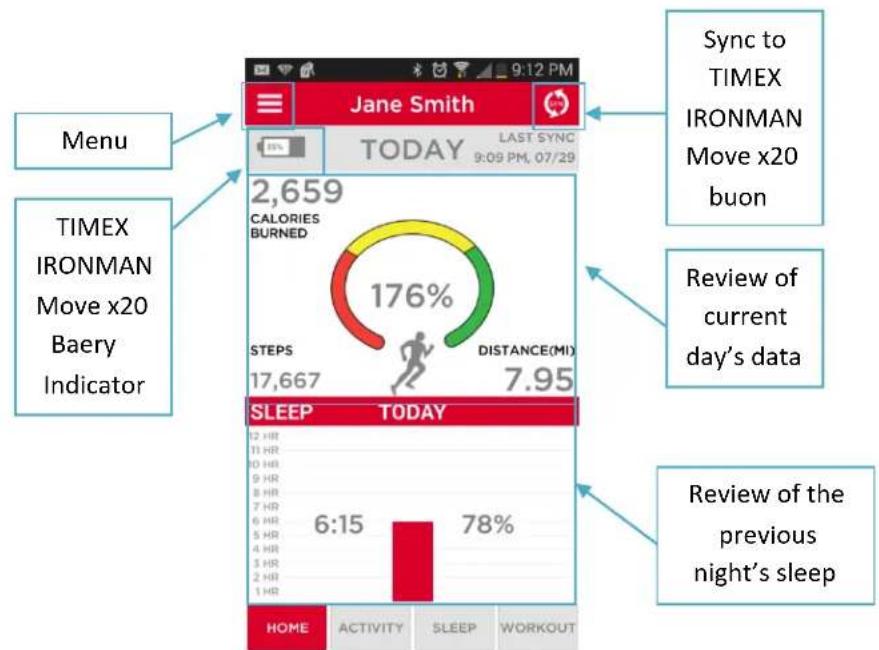
The TIMEX IRONMAN Move x20 app provides you with a way to customize the sengs and review the data recorded.
HOME PAGE
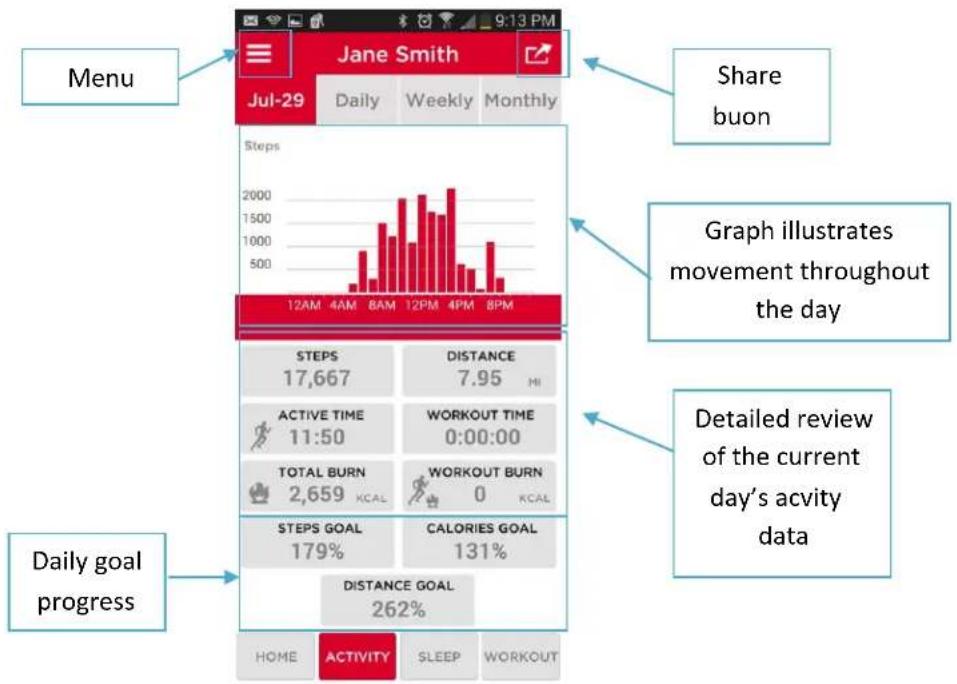
ACTIVITY PAGE
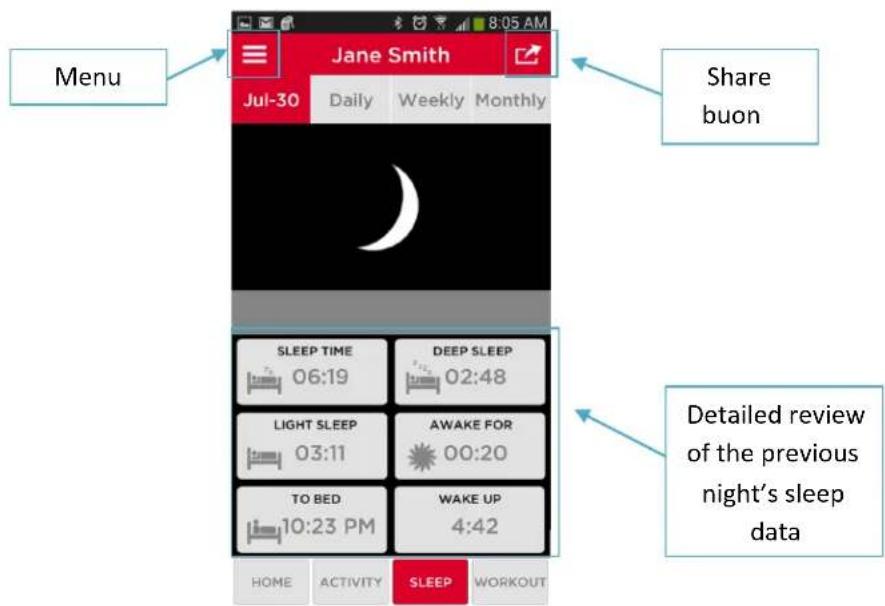
SLEEP PAGE
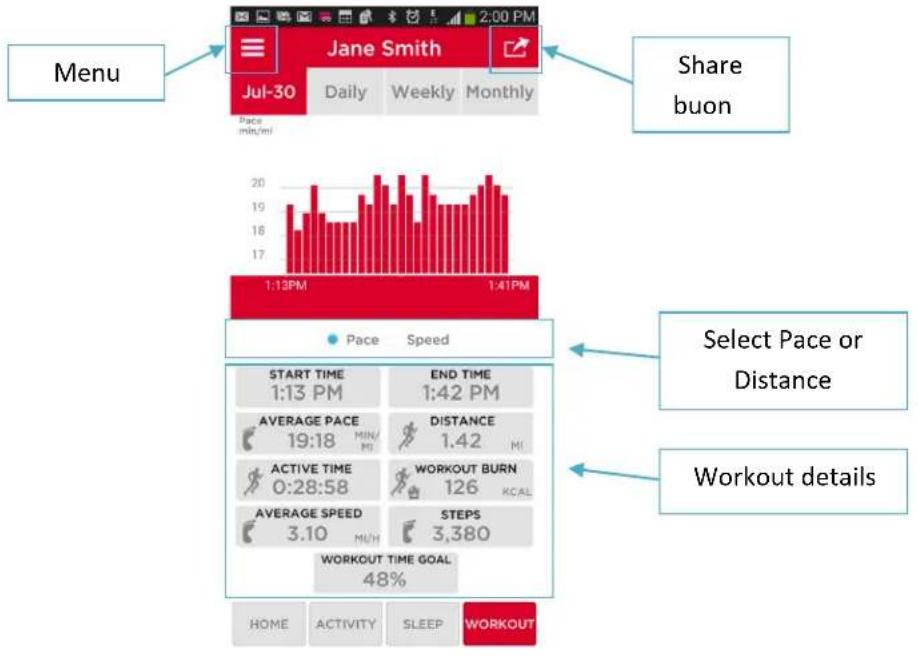
WORKOUT PAGE
SHARE DATA
The TIMEX IRONMAN Move x20 allows you to share acuity, sleep, and workout data. The Share buon can be found in the upper right-hand corner of the detailed pages. The opons available for sharing vary.
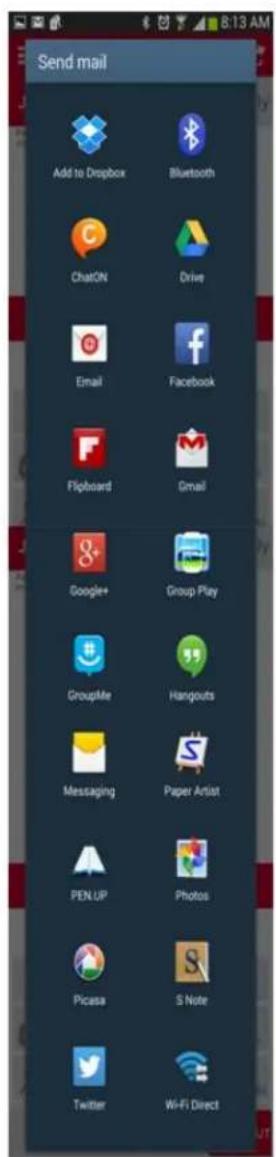
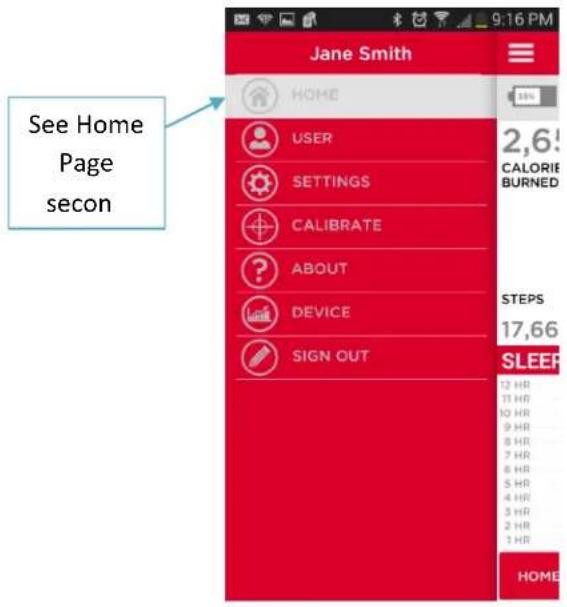
MENU
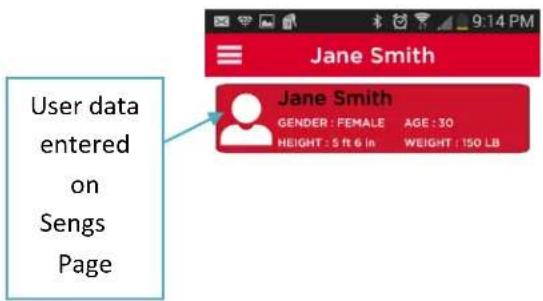
USER
SETTINGS
The sengs page provides the informaon needed to customize your TIMEX IRONMAN Move x20. Please see First Time Pairing secon for setup details.
CALIBRATE
The TIMEX IRONMAN Move x20 can be calibrated to provide more accurate distance informaon.
- Record a workout in which you are traveling a known distance.
- Access the Calibrate menu opon.
- Press the "Start Calibraon" buon.
- Select the appropriate workout.
- The app will prompt you to enter the known distance, enter that distance.
- The app will give you a customized walk/run stride (based on the acitivity you were doing).
- Press the Synchronize buon.

ABOUT
Provides app and device informaon.
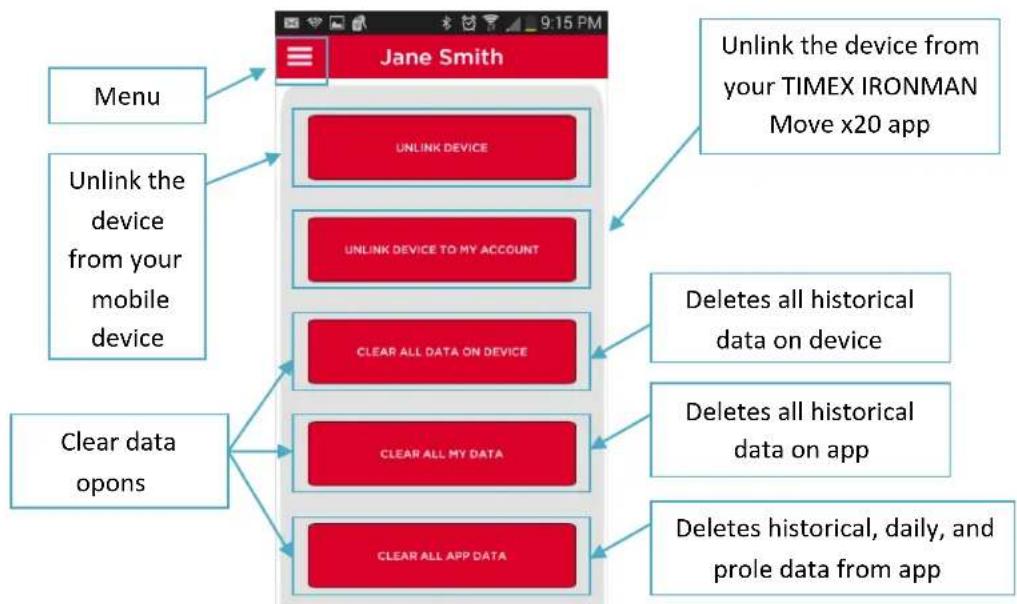
DEVICE
SIGN OUT
Signs the user out of the TIMEX IRONMAN Move x20 app.
WARRANTY
TIMEX INTERNATIONAL WARRANTY
(1U.5 - LIMTED WARRANTY - PLEAE SEE FRONT OF INSTRUCTION BOOKLET FOR TERMS OF EXTENDED WARRANTY OFFER) Your TIMEX® device is warranted against manufacturing defects by Timex Group USA, Inc. for a period of ONE YEAR from the original purchase date. Timex and its worldwide affiliates will honor this International Warranty. Please note that Timex may, at its option, repair your device by installing new or thoroughly reconditioned and inspected components or replace it with an identical or similar model.
IMPORTANT - PLEASE NOTE THAT THIS WARRANTY DOES NOT COVER DEFECTS OR DAMAGES TO YOUR WATCH:
1) After the warranty period expires;
2) If the device was not originally purchased from an authorized Timex retailer;
3) From repair services not performed by Timex;
4) From accidents, tampering or abuse; and
5) Lens or crystal, strap or band, watch case, attachments or battery.
Timex may charge you for replacing any of these parts.
THIS WARRANTY AND THE REMEDIES CONTAINED HEREIN ARE EXCLUSIVE AND IN LIEU OF ALL OTHER WARRANTYES, EXPRESS OR IMplied, INCLUDING ANY IMPLIED WARRANTY OF MERCHANTABILITY OR FITNESS FOR PARTICULAR PURPOSE. TIMEX IS NOT LIABLE FOR ANY SPECIAL, INCIDENTAL OR
CONSEQUENTIAL DAMAGES.
Some countries and states do not allow limitations on implied warranties and do not allow exclusions or limitations on damages, so these limitations may not apply to you. This warranty gives you specific legal rights and you may also have other rights which vary from country to country and state to state. To obtain warranty service, please return your device to Timex, one of its affiliates or the Timex retailer where the device was purchased, together with a completed original Watch Repair Coupon or, in the U.S. and Canada only, the completed original Watch Repair Coupon or a written statement identifying your name, address, telephone number and date and place of purchase. Please include the following with your device to cover postage and handling (this is not a repair charge): a US8.00 check or money order in the U.S.; a CAN10.00 cheque or money order in Canada; and a UK$3.50 cheque or money order in the U.K. In other countries, Timex will charge you for postage and handling. NEVER INCLUDE A SPECIAL WATCHBAND OR ANY OTHER ARTICLE OF PERSONAL VALUE IN YOUR SHIPMENT.
For the U.S., please call 1-800-328-2677 for additional warranty information. For Canada, call 1-800-263-0981.
For Brazil, call +55 (11) 5572 9733.
For Mexico, call 01-800-01-060-00.
For Central America, the Caribbean, Bermuda and the Bahamas, call (501) 370-5775 (U.S.)
For Asia, call 852-2815-0091
For the U.K., call 44 020 8687 9620.
For France, call 03 81 63 42 51 (10 a.m. - 12 Noon).
For Germany/Austria: +43 662 88921 30.
For the Middle East and Africa, call 971-4-310850.
For other areas, please contact your local Timex retailer or Timex distributor for warranty information.
©2014 Timex Group USA, Inc. TIMEX is a registered trademark of Timex Group USA, Inc. in the US and other countries. IRONMAN® and MDOT are registered trademarks of World Marathon Corporation. Used here by permission.
DECLARATION OF CONFORMITY
Manufacturers Name: Timex Group USA, Inc.
Manufacturers Address: 555 Christian Road
Middlebury, CT 06762
United States of America
declares that the product
Product Name: Activity Tracker Band
Model Numbers: M019
conforms to the following specifications:
R&TTE:2014/53/EU
Standards: EN 300 328 (Bluetooth)
EN 301 489-1 (EMC)
EN 301 489-17 (Bluetooth)
EN62479
LVD:2006/95/EC
Standards: EN 60950-1
Digital Device Emissions
Standards: FCC 47CFR 15B
FCC47CFR15C
RSS-210 Issue 8, Dec 2010
RS-Gen Issue 3, Dec 2010
ICES-003 Issue 5, Aug 2012
Agent:

Sam Everett
Quality Regulatory Engineer
Date: 10 June, 2014, Middlebury, Connecticut, U.S.A.
© 2014 Timex Group USA, Inc. TIMEX is a registered trademark of Timex Group USA, Inc. in the US and other countries.
IRONMAN® and MDOT are registered trademarks of World Triathlon Corporaon. Used here by permission. The Bluetooth word mark and logos are registered trademarks owned by Bluetooth SIG, Inc. and any use of such marks by Timex is under license.
TIMEX
IRONMAN
Move x20
使用手册
TIMEX® IRONMAN® Move x20 活动跟踪器使用手册
目录
United States of America
碳碳产品
产品名称
产品型号
活动思路分析
A
ASSOCIATION INITIALE
Middlebury, CT 06762
Quality Regulatory Engineer
Middlebury, CT 06762
USA
Middlebury, CT 06762
Estados Unidos da América
declar que o produits:
Nome do produits: Pulseira monitora de atividade
Numero do Modelo: M019
Middlebury, CT 06762
United States of America
RSS-210 Issue 8, Dec 2010
RS-Gen Issue 3, Dec 2010
ICES-003 Issue 5,Aug 2012
Agente:

Sam Everett
Middlebury, CT 06762
Quality Regulatory Engineer

- WHAT'S INCLUDED
- OVERVIEW
- GETTING STARTED
- CHARGING YOUR TIMEX IRONMAN MOVE X20
- BATTERY LIFE
- WATER-RESISTANCE
- WEARING THE TIMEX IRONMAN MOVE X20
- TRACKING YOUR DAILY ACTIVITY
- DOWNLOADING THE TIMEX IRONMAN MOVE X20 APP
- FIRST TIME PAIRING
- TEXTMESSAGEANDPHONECALLNOTIFICATIONS
- RECORDING A WORKOUT
- TRACKING YOUR SLEEP
- SLEEP
- SYNCING WITH YOUR SMARTPHONE
- FINDING YOUR PHONE
- RESETTING THE TIMEX IRONMAN MOVE X20
- TIMEX IRONMAN MOVE X20 APP
- HOME PAGE
- SHARE DATA
- SETTINGS
- CALIBRATE
- ABOUT
- DEVICE
- SIGN OUT
- WARRANTY
- TIMEX INTERNATIONAL WARRANTY
- DECLARATION OF CONFORMITY
- TIMEX
- Move x20
- 目录
- ASSOCIATION INITIALE
Brand : TIMEX
Model : Ironman Move x20
Category : Smartwatch