524148 - Switch Intellinet - Free user manual and instructions
Find the device manual for free 524148 Intellinet in PDF.


| Product Type | 24-Port PoE+ Gigabit Ethernet Switch with 2 SFP Ports |
| Number of Ports | 24 RJ-45 Gigabit Ethernet ports (10/100/1000 Mbps) + 2 SFP ports |
| PoE Power | Up to 30 W per port, maximum total power 370 W |
| Switching Fabric Capacity | 52 Gbps |
| Advanced Features | Plug and play, auto-negotiation, flow control, VLAN (port isolation 1-24), energy saving (Green Ethernet) |
| Power Supply | 100-240 V AC, 50/60 Hz (power adapter included) |
| LED Indicators | PWR (power), Link/Act/Speed (green/orange), PoE (green) |
| Mounting | Desktop or 19-inch rack (brackets included) |
| Operating Temperature | 0 °C to 40 °C |
| Operating Humidity | 10% to 90% (non-condensing) |
| Dimensions (W x D x H) | 440 x 200 x 44 mm (approximate) |
| Weight | 2.8 kg (estimated, including brackets) |
| Maintenance and Cleaning | Disconnect the device, clean with a dry, lint-free cloth; avoid liquids and abrasive products. |
| Safety | Grounding via chassis screw; do not expose to moisture or heat sources; use in a well-ventilated area. |
| Spare Parts and Repairability | No user-serviceable parts; contact technical support in case of failure. |
| General Information | Brand: Intellinet; Model: 524148; CE compliant (2014/30/EU, 2014/35/EU); recycling per WEEE |
Frequently Asked Questions - 524148 Intellinet
User questions about 524148 Intellinet
0 question about this device. Answer the ones you know or ask your own.
Ask a new question about this device
Download the instructions for your Switch in PDF format for free! Find your manual 524148 - Intellinet and take your electronic device back in hand. On this page are published all the documents necessary for the use of your device. 524148 by Intellinet.
USER MANUAL 524148 Intellinet
24-Port Gigabit Ethernet PoE+ Switch with 2 SFP Ports
Instructions
Model 561891(IPS-24G02-370W)
Important: Read before use. • Importante: Leer antes de usar.
natural_image
Exterior view of a Siemens iXP ports network switch (no signage or text overlays)
For additional benefits:
Scan to register your product warranty

or go to: register.intellinet-network.com/r/561891
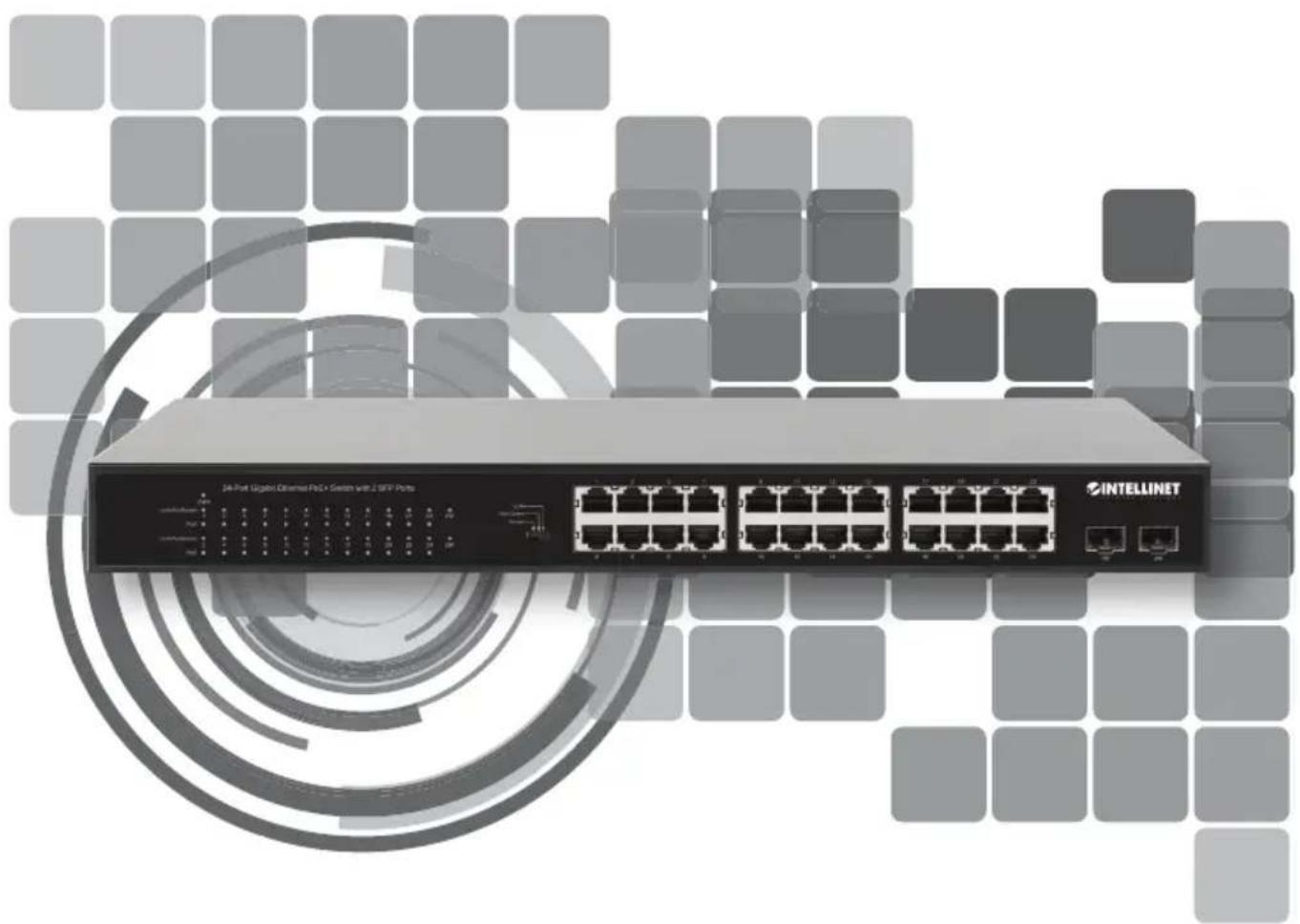
The Intellinet Network Solutions 24-Port Gigabit Ethernet PoE+ Switch with 2 SFP Ports offers an array of time-saving, cost-effective features while providing superior network throughput. No configuration is required and installation is plug and play. With a backplane speed of 52 Gbps, plenty of performance is available for your computers, servers and other networking devices. Each of the ports automatically senses the link speed of the connected network device and adjusts to 10, 100 or 1000 Mbps for compatibility and maximum performance. This PoE switch is designed to provide compatible devices with enough power when needed. It offers up to 30 watts of power per port until its power budget of 370 watts is reached.
Green Ethernet Technology
This Intellinet Network Solutions switch detects link status to all connected devices and reduces the power usage of ports not in use. In addition, the switch can adjust the level of power output based on the length of the network cable connected to a particular port. This feature allows for the enjoyment of maximum network performance, and when things slow down, it automatically scales back power usage to conserve energy and save money.
For specifications, visit intellinetnetwork.com. Register your product at register.intellinet-network.com/r/561891 or scan the QR code on the cover.

Front Panel

| LED COLOR STATUS STATUS DESCRIPTION | |||
| PWR | Off Power Off | ||
| Green On P | Power On | ||
| Link/Act/Speed(1-24,25F-26F[SFP]) | Off No device is connected to the port. | ||
| Orange On A | device is connected to the port at 10/100 Mbps speeds. | ||
| Green On A | device is connected to the port at 1000 Mbps speeds. | ||
| Orange / Green | Flashing Sending or receiving data | ||
| PoE (1-24) | Green | Off No powered device (PD) is connected to the port. | |
| On | The connected device is receiving power. | ||
| Flashing | Abnormal power supply | ||
Cat5e/6/6a/8.x UTP/STP cables provide optimal performance; if a status LED doesn't indicate a link or activity, check the corresponding device for proper setup and operation.
Slide Switch
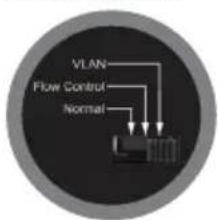
- Normal: default mode; allows normal communication between ports 1 – 26.
- Flow Control: disables the switch's flow-control function.
- VLAN: isolates ports 1 – 24 from each other while allowing them to connect to ports 25 and 26.

Rear Panel
Power
Use the included power cord to connect the device (on the rear panel) to an AC outlet. The device supports AC 100 – 240 V, 50/60 Hz.
Chassis Ground Column
Located on the side of the power supply connector, a grounding terminal connector is used to provide proper grounding for your Intellinet Network Solutions switch. If you use the chassis grounding screw, it should be wired to an object that provides earth ground. In rackmount installations, grounding is typically provided by the metal frame of the mounting rack.

Placement
Desktop Installation
Prior to use, it is recommended that the switch be placed/positioned on a level surface that can support the weight of the switch (and possibly other objects) with at least 25 mm (approx. 1") of clearance for ventilation; away from sources of electrical noise (radios, transmitters, broadband amplifiers); and within 100 m (approx. 328') of network devices it's to be connected to.
Rackmount Installation
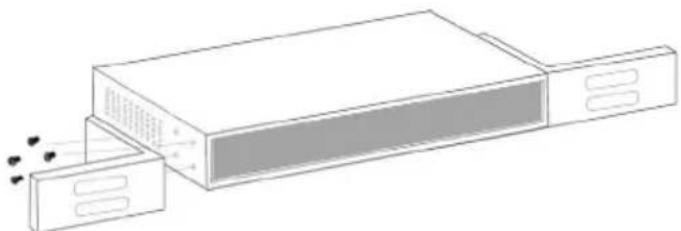
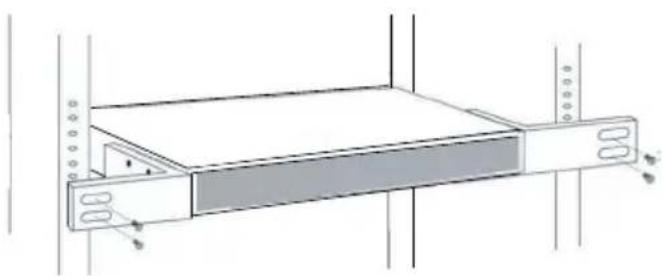
The switch can be mounted in an EIA standard-sized, 19-inch rack. Attach the mounting brackets on the switch's side panels (one on each side) and secure them with the screws provided.
natural_image
Diagram of a device with two rectangular units and a central panel, emitting sound waves (no text or symbols)Use the screws provided with the equipment rack to mount the Intellinet Network Solutions switch to the rack.
natural_image
Technical line drawing of a mechanical or electronic device with a rectangular panel and mounting brackets (no text or symbols)natural_image
Diagram of a device with two panels and a central box, showing internal components and motion indicators (no text or symbols)natural_image
Technical line drawing of a rack-mounted device with mounting flanges and a central panel (no text or symbols)natural_image
Line drawing of a device with two panels and a central screen, emitting exhaust smoke (no text or symbols)natural_image
Technical line drawing of a rack-mounted device with mounting flanges and a central tab (no text or symbols)natural_image
Diagram of a device with two rectangular units and a central panel, emitting sound waves (no text or symbols)natural_image
Technical line drawing of a rack-mounted device with mounting holes and a central slot (no text or symbols)natural_image
Diagram of a device with two compartments and a central chamber, showing sound waves (no text or symbols)natural_image
Technical line drawing of a rack-mounted device with mounting holes and a central slot (no text or symbols)Ethernet e Green Technology
natural_image
Diagram of a device with two rectangular panels and a central screen, showing internal components (no text or symbols)natural_image
Diagram of a server rack with indicator lights and a highlighted section (no text or symbols)WASTE ELECTRICAL & ELECTRONIC EQUIPMENT
DISPOSAL OF ELECTRIC AND ELECTRONIC EQUIPMENT
(Applicable In The European Union And Other European Countries With Separate Collection Systems)
ENGLISH: This symbol on the product or its

packaging means that this product must not be treated as unsorted household waste. In accordance with EU Directive 2012/19/EU on Waste Electrical and Electronic Equipment (WEEE), this electrical product must be disposed of in accordance with the user's local regulations for electrical or electronic waste. Please dispose of this product by returning it to your local point of sale or recycling pickup point in your municipality.
This equipment has been tested and found to comply with the limits for a Class A digital device, pursuant to Part 15 of the Federal Communications Commission (FCC) Rules. These limits are designed to provide reasonable protection against harmful interference when the equipment is operated in a commercial environment. This equipment generates, uses and can radiate radio frequency energy, and if not installed and used in accordance with the instruction manual may cause harmful interference to radio communications. Operation of this equipment in a residential area is likely to cause harmful interference, in which case the user will be required to correct the interference at his own expense. Any changes or modifications made to this equipment without the approval of the manufacturer could result in the product not meeting the Class A limits, in which case the FCC could void the user's authority to operate the equipment.
CE
ENGLISH : This device complies with the requirements of CE 2014/30/EU and / or 2014/35/EU. The Declaration of Conformity for is available at:
support.intellinet-network.com/barcode/561891



North America
IC Intracom America
550 Commerce Blvd.
Oldsmar, FL 34677 USA
Asia & Africa
IC Intracom Asia
4-F, No. 77, Sec. 1, Xintai 5th Rd.
Xizhi Dist., New Taipei City 221, Taiwan
Europe
IC Intracom Europe
Löhbacher Str. 7, D-58553
Halver, Germany
All trademarks and trade names are the property of their respective owners.
All trademarks and trade names are the property of their respective owners. © IC Intracom. All rights reserved. Intellinet Network Solutions is a trademark of IC Intracom, registered in the U.S. and other countries.


- 24-Port Gigabit Ethernet PoE+ Switch with 2 SFP Ports
- Instructions
- Green Ethernet Technology
- Front Panel
- Slide Switch
- Rear Panel
- Power
- Chassis Ground Column
- Placement
- Desktop Installation
- Rackmount Installation
- Ethernet e Green Technology
- WASTE ELECTRICAL & ELECTRONIC EQUIPMENT
- DISPOSAL OF ELECTRIC AND ELECTRONIC EQUIPMENT
- CE
- North America
- Asia & Africa
- Europe
Brand : Intellinet
Model : 524148
Category : Switch