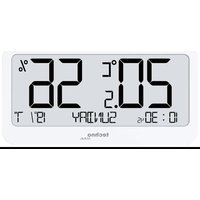
WS 9455 - Weather Station Techno Line - Free user manual and instructions
Find the device manual for free WS 9455 Techno Line in PDF.


| Product type | Indoor weather station |
| Brand | Techno Line |
| Model | WS 9455 |
| Power supply | 1 CR2032 battery (3V) |
| Display | LCD digital |
| Indoor temperature range | -9.9 °C to +50 °C |
| Indoor humidity range | 20% RH to 95% RH |
| Time format | 12h/24h adjustable |
| Calendar | Up to 2099 |
| Weekday display | Yes, in 7 languages (English, German, French, Spanish, Italian, Dutch, Danish) |
| Low battery indicator | Yes, flashing icon |
| Max/min value recording | Yes, automatic reset daily at 0:00 |
| Manual setting | Yes, SET, +, - buttons |
| Temperature unit | °C/°F switchable |
| Housing material | Plastic |
| Color | White/Black (estimated) |
| Recommended use | Indoor only |
| Maintenance | Clean with a soft dry cloth |
| Replaceable battery | Yes, by user |
| Repairability | Not user-repairable (do not open) |
| Safety | Do not expose to water, shocks, extreme temperatures |
| Compliance | EU declaration available |
Frequently Asked Questions - WS 9455 Techno Line
User questions about WS 9455 Techno Line
0 question about this device. Answer the ones you know or ask your own.
Ask a new question about this device
Download the instructions for your Weather Station in PDF format for free! Find your manual WS 9455 - Techno Line and take your electronic device back in hand. On this page are published all the documents necessary for the use of your device. WS 9455 by Techno Line.
USER MANUAL WS 9455 Techno Line
natural_image
Pure electrical circuit lines without any symbolsnatural_image
Pure electrical circuit lines without any symbolsPart A – Positive LCD
A1: Indoor temperature
A2: Indoor humidity
A3: Low battery indicator
A4: Month and date
A5: Weekday
A6: Time
Part B – Back button and power
B1: "SET" button
B2: “+” button
B3: “-” button
B4: Battery compartment cover
B5: Hanging hole
Initial operation
- Open the battery compartment cover.
- Insert or replace 1 x CR2032 by observing of correct polarity (+/- signs).
- Close the battery compartment cover again.
Note:
- When you insert the batteries all the symbols on the display will briefly light up for 2 seconds.
Manual time setting
- Press the “SET” button to switch between temperature and humidity display and time display.
- Press and hold the “SET” button to start the setting mode and 12/24 hour time display starts to flash. Press the “+” or the “-” button to set the time mode in 12 or 24 hour format.
- Press the “SET” button to confirm your setting, the hour display starts to flash. Press the “+” or the “-” button to set the correct hour.
- Press the “SET” button to confirm your setting, the minute displays starts to flash. Press the “+” or the “-” button to
set the correct minute.
- Press the “SET” button to confirm your setting, the date format displays starts to flash. Press the “+” or the “-” button to set the correct date format.
- Press the “SET” button to confirm your setting, the year display 2020 starts to flash. Press the “+” or the “-” button to set the correct year.
- Press the “SET” button to confirm your setting, the month display starts to flash. Press the “+” or the “-” button to set the correct month.
- Press the “SET” button to confirm your setting, the date display starts to flash. Press the “+” or the “-” button to set the correct date.
- Press the “SET” button to confirm your setting, the language display starts to flash. Press the “+” or the “-” button to set the correct language for the weekdays.
- Press the “SET” button to confirm and end your setting and return to the display mode.
Notes:
• After 20 seconds without pressing any button, the clock switches
automatically from the setting mode to normal time display.
- There are 7 weekday languages: English, German, French, Spanish, Italian, Dutch and Danish.
| Language / Weekday | English ENGLISH | German DEUTSCH |
| Monday | MONDAY | MONTAG |
| Tuesday | TUESDAY | DIENSTAG |
| Wednesday | WEDNESDAY | MITTWOCH |
| Thursday | THURSDAY | DONNERSTAG |
| Friday | FRIDAY | FREITAG |
| Saturday | SATURDAY | SAMSTAG |
| Sunday | SUNDAY | SONNTAG |
| Language / Weekday | French FRANCAIS | Italian ITALIANO |
| Monday | LUNDI | LUNEDI |
| Tuesday | MARDI | MARTEDI |
| Wednesday | MERCREDI | MERCOLEDI |
| Thursday | JEUDI | GIOVEDI |
| Friday | VENDREDI | VENERDI |
| Saturday | SAMEDI | SABATO |
| Sunday | DIMANCHE | DOMENICA |
| Language / Weekday | Spanish ESPANOL | Dutch NEDERLANDS |
| Monday | LUNES | MAANDAG |
| Tuesday | MARTES | DINSDAG |
| Wednesday | MIERCOLES | WOENSDAG |
| Thursday | JUEVES | DONDERDAG |
| Friday | VIERNES | VRIJDAG |
| Saturday | SABADO | ZATERDAG |
| Sunday | DOMINGO | ZONDAG |
| Language / Weekday | Danish DANSK |
| Monday | MONDAG |
| Tuesday | TIRSDAG |
| Wednesday | ONSDAG |
| Thursday | TORSDAG |
| Friday | FREDAG |
| Saturday | LORDAG |
| Sunday | SONDAG |
°C/°F temperature display
- The temperature is displayed either in °C or °F. Press the “-” button to switch between the measuring units.
Temperature & Humidity detection
- Indoor temperature measuring range:
LL.L °C(°F) will displayed if the value is lower than -9.9°C (+14°F),
HH.H °C(°F) will displayed if the value is higher than +50°C (+122°F).
$$ - 9. 9 ^ {\circ} \mathrm{C} (+ 1 4 ^ {\circ} \mathrm{F}) \sim + 5 0 ^ {\circ} \mathrm{C} (+ 1 2 2 ^ {\circ} \mathrm{F}), $$
- Indoor and outdoor humidity measuring range: 20%RH \~ 95%RH, 19%RH will displayed if the value is lower than 20%RH, 96%RH will displayed if the value is higher than 95%RH.
Maximum and minimum values of temperature and humidity
- Press the “+” button, the maximum temperature and humidity values will be displayed with “MAX”
- Press the “+” button again, the minimum temperature and humidity values will be displayed with “MIN”
- Press the “+” button again, to return to the normal display mode.
Notes:
- If you press and hold the "+" button for 2 seconds while viewing the max and min values, you can clear the max and
min values and start recording again.
- The maximum and minimum records will be automatically cleared and newly recorded at 0:00 each day.
Low battery indicator
- When the power supply of the product is below 2.2V (detected by internal low power measuring), the low battery indicator "☐" is displayed and flashes.
Declaration of conformity
The original EU declaration of conformity may be found at:
- This main unit is intended to be used only indoors.
- Do not subject the unit to excessive force or shock.
-
Do not expose the unit to extreme temperatures, direct sunlight, dust or humidity.
-
Do not immerse in water.
- Avoid contact with any corrosive materials.
- Do not dispose this unit in a fire as it may explode.
- Do not open the inner back case or tamper with any components of this unit.
Batteries safety warnings
- Use only lithium batteries, not rechargeable batteries.
- Install batteries correctly by matching the polarities (+/-).
- Always replace a complete set of batteries.
- Never mix used and new batteries.
- Remove exhausted batteries immediately.
- Remove batteries when not in use.
- Do not recharge and do not dispose of batteries in fire as the batteries may explode.
- Ensure batteries are stored away from metal objects as contact may cause a short circuit.
- Avoid exposing batteries to extreme temperature or humidity or direct sunlight.
- Keep all batteries out of reach from children. They are a choking hazard.
Use the product only for its intended purpose!
Consideration of duty according to the battery law
natural_image
Simple line drawing of a trash bin with diagonal lines crossing it, no text or symbols present.Old batteries do not belong to domestic waste because they could cause damages of health and environment. You can
return used batteries free of charge to your dealer and collection points. As end-user you are committed by law to bring back needed batteries to distributors and other collecting points!
Consideration of duty according to the law of electrical devices
natural_image
Simple line drawing of a trash bin with crossed lines indicating no waste or discharge (no text or symbols)This symbol means that you must dispose of electrical devices separated from the General household waste when it reaches the end of its useful
life. Take your unit to your local waste collection point or recycling centre. This applies to all countries of the European
Union, and to other European countries with a separate waste collection system.
natural_image
Simple line drawing of a trash bin with diagonal lines crossing it, no text or symbols present.natural_image
Pure electrical circuit lines without any symbolsnatural_image
Abstract black-and-white icon of a person walking with arrows, enclosed in a circle (no text or symbols)FR
natural_image
Simple line drawing of a trash bin with diagonal lines crossing through it, no text or symbols present.natural_image
Pure electrical circuit lines without any symbolsnatural_image
Simple line drawing of a trash bin with crossed lines indicating no waste or plastic (no text or symbols)natural_image
Pure electrical circuit lines without any symbolsnatural_image
Simple line drawing of a trash bin with diagonal lines crossing it, no text or symbols present.natural_image
Pure electrical circuit lines without any symbolsnatural_image
Pure electrical circuit lines without any symbolsnatural_image
Simple line drawing of a trash bin with diagonal lines crossing it, no text or symbols present.natural_image
Pure electrical circuit lines without any symbols- Part A – Positive LCD
- Part B – Back button and power
- Initial operation
- Note:
- Manual time setting
- Notes:
- °C/°F temperature display
- Temperature & Humidity detection
- Maximum and minimum values of temperature and humidity
- Low battery indicator
- Declaration of conformity
- Batteries safety warnings
- Union, and to other European countries with a separate waste collection system.
- FR
Brand : Techno Line
Model : WS 9455
Category : Weather Station