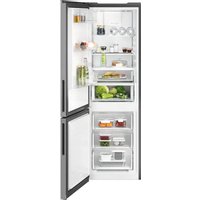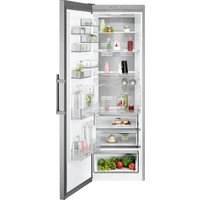
ATB4600C - Fridge AEG - Free user manual and instructions
Find the device manual for free ATB4600C AEG in PDF.


User questions about ATB4600C AEG
0 question about this device. Answer the ones you know or ask your own.
Ask a new question about this device
Download the instructions for your Fridge in PDF format for free! Find your manual ATB4600C - AEG and take your electronic device back in hand. On this page are published all the documents necessary for the use of your device. ATB4600C by AEG.
USER MANUAL ATB4600C AEG
natural_image
Two vertical rectangular blocks with black outlines, no text or symbols presentCONTENTS
- SAFETY INFORMATION....3
- SAFETY INSTRUCTIONS....4
- DESCRIPTION OF THE APPLIANCE....6
- TEMPERATURE CONTROL....9
- INSTALLING YOUR NEW REFRIGERATOR....13
- USING YOUR REFRIGERATOR....14
- CLEANING YOUR REFRIGERATOR....17
- FOOD STORAGE GUIDE....18
- TROUBLESHOOTING....19
- NOISES....22
FOR PERFECT RESULTS
Thank you for choosing this AEG product. We have created it to give you impeccable performance for many years, with innovative technologies that help make life simpler features you might not find on ordinary appliances. Please spend a few minutes reading to get the very best from it.
Visit our website to:

Get usage advice, brochures, trouble shooter, service information: www.aeg.com

Register your product for better service: www.registeraeg.com

Buy Accessories, Consumables and Original spare parts for your appliance: www.aeg.com/shop
CUSTOMER CARE AND SERVICE
Always use original spare parts.
When contacting our Authorised Service Centre, ensure that you have the following data available: Model, PNC, Serial Number.
The information can be found on the rating plate.
⚠ Warning / Caution-Safety information.
i General information and tips.
Environmental information.
Subject to change without notice.
1. ⚠️ SAFETY INFORMATION
Before the installation and use of the appliance, carefully read the supplied instructions. The manufacturer is not responsible if an incorrect installation and use causes injuries and damages. Always keep the instructions with the appliance for future reference.
1.1 Children and vulnerable people safety
- This appliance can be used by children aged from 8 years and above and persons with reduced physical, sensory or mental capabilities or lack of experience and knowledge if they have been given supervision or instruction concerning use of the appliance in a safe way and understand the hazards involved.
- Do not let children play with the appliance.
- Keep all packaging away from children.
- Cleaning and user maintenance shall not be made by children without supervision.
1.2 General Safety
- This appliance is intended to be used in household and similar applications such as:
- Farm houses; staff kitchen areas in shops, offices and other working environments
- By clients in hotels, motels, bed and breakfast and other residential type environments
- Keep ventilation openings, in the appliance enclosure or in the built-in structure, clear of obstruction.
- Do not use mechanical devices or other means to accelerate the defrosting process, other than those recommended by the manufacturer.
- Do not damage the refrigerant circuit.
- Do not use electrical appliances inside the food storage compartments of the appliance, unless they are of the type recommended by the manufacturer.
- Do not use water spray and steam to clean the appliance.
- Clean the appliance with a moist soft cloth. Only use neutral detergents. Do not use abrasive products, abrasive cleaning pads, solvents or metal objects.
- Do not store explosive substances such as aerosol cans with a flammable propellant in this appliance.
- If the supply cord is damaged, it must be replaced by the manufacturer, its service agent or similarly qualified persons in order to avoid a hazard.
- If the appliance is equipped with an Ice maker or a water dispenser, fill them with potable water only.
- If the appliance requires a water connection, connect it to potable water supply only.
- The inlet water pressure (minimum and maximum) must be between 1 bar (0,1 MPa) and 10 bar (1 MPa)
2. SAFETY INSTRUCTIONS
2.1 Installation
WARNING!
Only a qualified person must install this appliance.
- Remove all the packaging.
- Do not install or use a damaged appliance.
- Obey the installation instruction supplied with the appliance.
- Always be careful when you move the appliance because it is heavy. Always wear safety gloves.
- Make sure the air can circulate around the appliance.
- Wait at least 4 hours before connecting the appliance to the power supply. This is to allow the oil to flow back in the compressor.
- Do not install the appliance close to radiators or cookers, oven or hobs.
- The rear of the appliance must stand against the wall.
- Do not install the appliance where there is direct sunlight.
- Do not install this appliance in areas that are too humid or too colds, such as the construction appendices, garages or wine cellars.
- When you move the appliance, lift it by the front edge to avoid scratching the floor.
2.1 Electrical connection
WARNING!
Risk of fire and electrical shock
• The appliance must be earthed.
- All electrical connections should be made by a qualified electrician.
- Make sure that the electrical information on the rating plate agrees with the power supply. If not, contact an electrician.
- Always use a correctly installed shockproof socket.
- Do not use multi-plug adapters and extension cables.
- Make sure not to cause damage to the electrical components (e.g. mains plug, mains cable, compressor).
Contact the Service or an electrician to change the electrical components.
- The mains cable must stay below the level of the mains plug.
- Connect the mains plug to the mains socket only at the end of the installation. Make sure that there is access to the mains plug after the installation.
- Do not pull the mains cable to disconnect the appliance. Always pull the mains plug.
2.3 Use

WARNING!
Risk of injury, burns, electrical shock or fire.
- Do not change the specification of this appliance.
- Do not put electrical appliances (e.g. ice cream makers) in the appliance unless they are stated applicable by the manufacturer.
- Be careful not to cause damage to the refrigerant circuit. It contains isobutane (R600a), a natural gas with a high level of environmental compatibility. This gas is flammable.
- If damage occurs to the refrigerant circuit, make sure that there are no flames and sources of ignition in the room. Ventilate the room.
- Do not let hot items to touch the plastic parts of the appliance.
- Do not put soft drinks in the freezer compartment. This will create pressure on the drink container.
- Do not store flammable gas and liquid in the appliance.
- Do not put flammable products or items that are wet with flammable products in, near or on the appliance.
- Do not touch the compressor or the condenser. They are hot.
- Do not remove or touch items from the freezer compartment if your hands are wet or damp.
- Do not freeze again food that has been thawed.
- Obey the storage instructions on the packaging of frozen food.
2.5 Care and cleaning

WARNING!
Risk of injury or damage to the appliance.
- Before maintenance, deactivate the appliance and disconnect the mains plug from the mains socket.
- This appliance contains hydrocarbons in the cooling unit. Only a qualified person must do the maintenance and the recharging of the unit.
- Regularly examine the drain of the appliance and if necessary, clean it. If the drain is blocked, defrosted water collects in the bottom of the appliance.
2.6 Disposal

WARNING!
Risk of injury or suffocation.
- Disconnect the appliance from the mains supply.
- Cut off the mains cable and discard it.
- Remove the door to prevent children and pets to be closed inside of the appliance.
- The refrigerant circuit and the insulation materials of this appliance are ozone-friendly.
- The insulation foam contains flammable gas. Contact your municipal authority for information on how to discard the appliance correctly.
- Do not cause damage to the part of the cooling unit that is near the heat exchanger.
2.4 Internal light
- The type of lamp used for this appliance is not suitable for household room illumination.
3. DESCRIPTION OF THE APPLIANCE
TOP MOUNT REFRIGERATOR FEATURES
- ATB4600
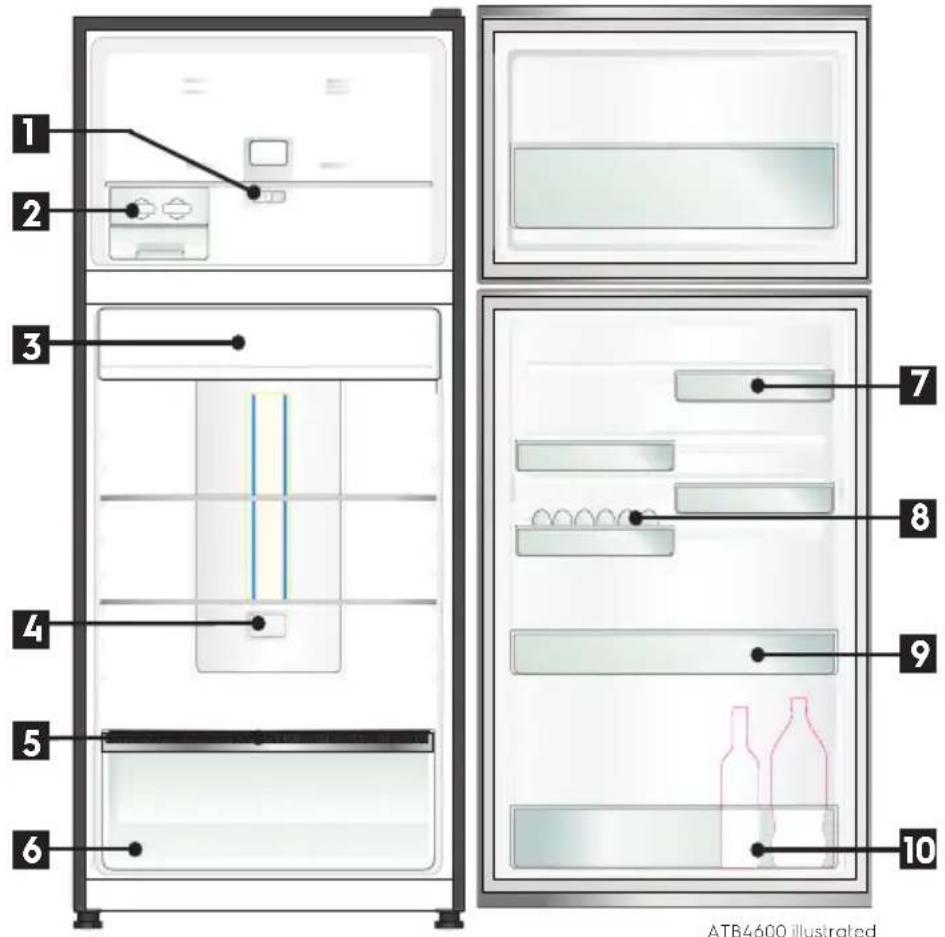
text_image
1 2 3 4 5 6 7 8 9 10 ATB4600 illustrated1 Freezer temperature control
Refer to the section "Temperature Control" for details on using this feature.
2 Twist & Serve Ice
Refer to the section "Using your Refrigerator" for details on removing, relocating and using this feature.
3 Chiller drawer
Use the chiller drawer to store foods like small goods, fresh or cookedmmeat and cheese, or as an additional crisper. The drawer will prevent strong food odours from impacting the rest of the refrigerator. To remove the chiller drawer, pull it forward, then lift it up and pull it further forward.
4 TasteGuard Deodoriser
5 Auto Humidity Control
6 Crisper
Use the crisper to store vegetables, fruit or small goods.
7 FlexStor® bins
Slide the bins to meet different storage needs. To remove, lift and tilt. To replace, tilt the top and push down until locked in place.
8 Egg tray
Removable egg tray provided for your convenience.
9 Door storage bin
The door bin can be removed by lifting it up over the support lugs. To replace, push down over the support lugs to lock in place.
10 Bottle storage bin
Use the bottle bin for tall bottle storage. The bottle bin can be removed by lifting it up over the support lugs. To replace, push down over the support lugs to lock in place.
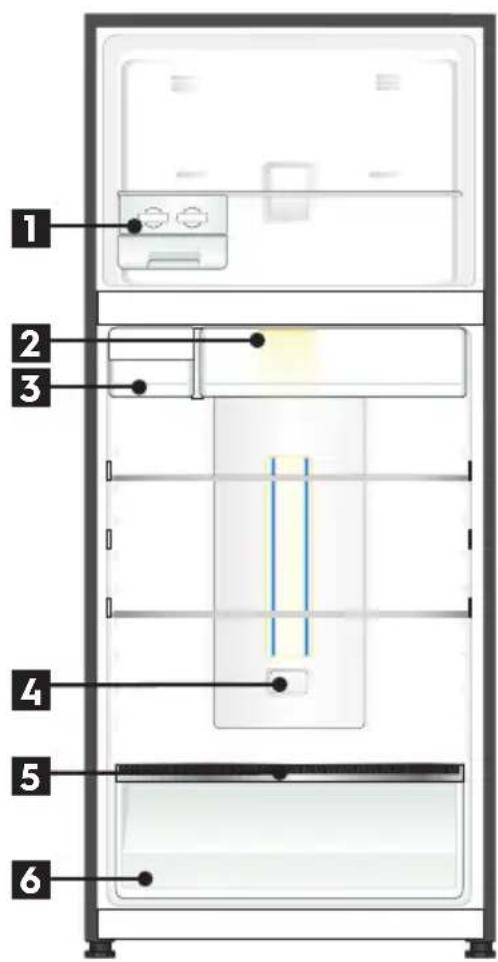
TOP MOUNT REFRIGERATOR FEATURES
- ATE5700
text_image
1 2 3 4 5 6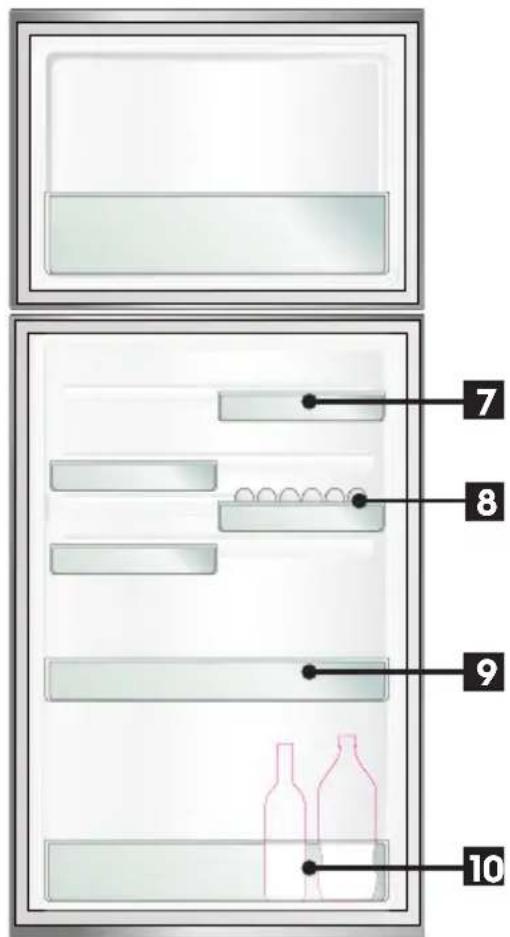
text_image
Diagram of a refrigerator interior with numbered compartments and decorative items, likely for cooking or storage instructions.ATE5700 illustrated
1 Twist & Serve Ice
Refer to the section "Using your Refrigerator" for details on removing, relocating and using this feature.
2 Chiller drawer
Use the chiller drawer to store foods like small goods, fresh or cooked meat and cheese, or as an additional crisper. The drawer will prevent strong food odours from impacting the rest of the refrigerator. To remove the chiller drawer, pull it forward, then lift it up and pull it further forward
3 Water Tank
4 TasteGuard Deodoriser
5 Auto Humidity Control
6 Crisper
Use the crisper to store vegetables, fruit or small goods.
7 FlexStor® bins
Slide the bins to meet different storage needs. To remove, lift and tilt. To replace, tilt the top and push down until locked in place.
8 Egg tray
Removable egg tray provided for your convenience.
9 Door storage bin
The door bin can be removed by lifting it up over the support lugs. To replace, push down over the support lugs to lock in place.
10 Bottle storage bin
Use the bottle bin for tall bottle storage. The bottle bin can be removed by lifting it up over the support lugs. To replace, push down over the support lugs to lock in place.
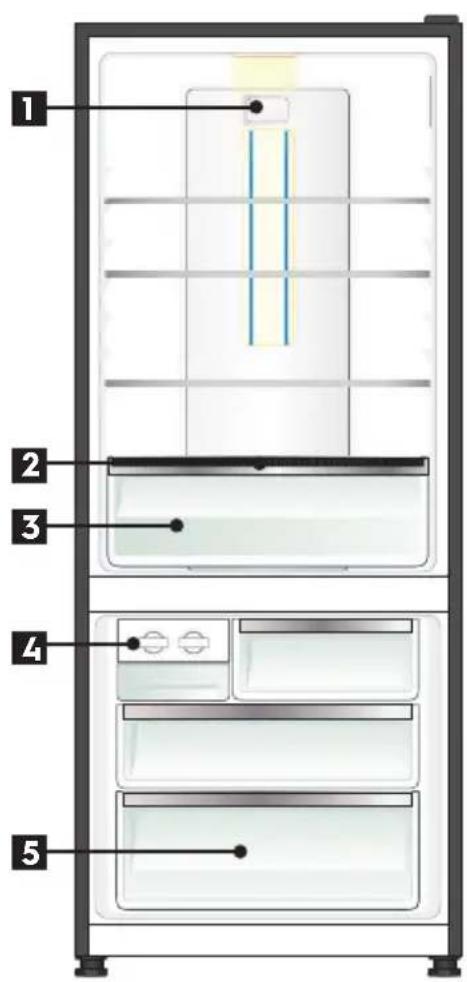
BOTTOM MOUNT REFRIGERATOR FEATURES
• ABE4502 & ABE5302
text_image
1 2 3 4 5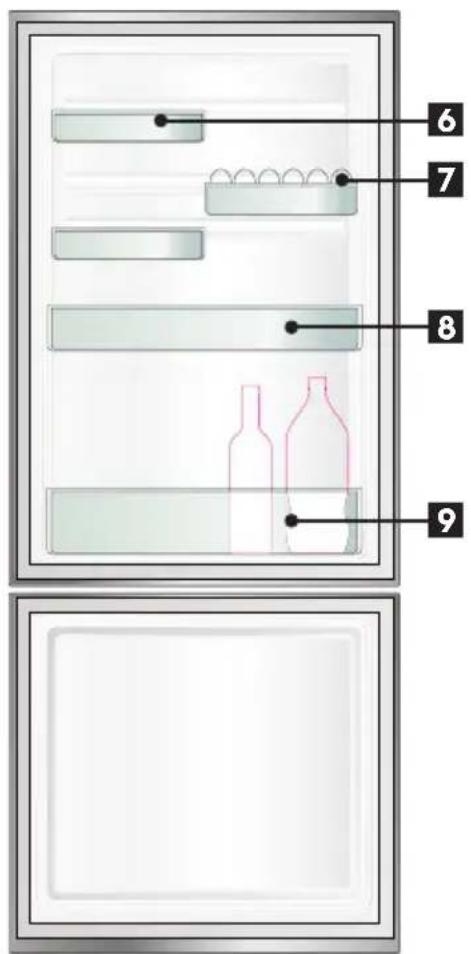
text_image
Diagram of a refrigerator interior with numbered compartments and bottles, likely for cooking or storage instructions.ABE5302 illustrated
1 TasteGuard Deodoriser
Refer to the section "Using your Refrigerator" for details on using this feature.
2 Auto Humidity Control
3 Crisper
4 Twist & Serve Ice
Refer to the section "Using your Refrigerator" for details on removing, relocating and using this feature.
5 Freezer storage bin
Refer to the section "Using your Refrigerator" for details on removing, and using this feature Anti-Oxidant Filter.
6 FlexStor® bins
Slide the bins to meet different storage needs. To remove, lift and tilt. To replace, tilt the top and push down until locked in place.
7 Egg tray
Removable egg tray provided for your convenience.
8 Door storage bin
The door bin can be removed by lifting it up over the support lugs. To replace, push down over the support lugs to lock in place.
9 Bottle storage bin
Use the bottle bin for tall bottle storage. The bottle bin can be removed by lifting it up over the support lugs. To replace, push down over the support lugs to lock in place.
4. TEMPERATURE CONTROL
If you want to change the temperature, follow the instructions in the section About the User Interface for your model. Ensure that you make only small adjustments and wait 24 hours to see if it's to your liking.
i IMPORTANT
NOTE: When you set a temperature, you set an average temperature for the whole refrigerator cabinet.
Checking the softness of ice cream is a good indication that your freezer is the right temperature, while checking the temperature of water kept in the refrigerator is a good way of checking the temperature of the food compartment.
Temperatures inside each compartment may vary, depending on how much food you store and where you place it.
High or low room temperature may also affect the actual temperature inside the refrigerator.
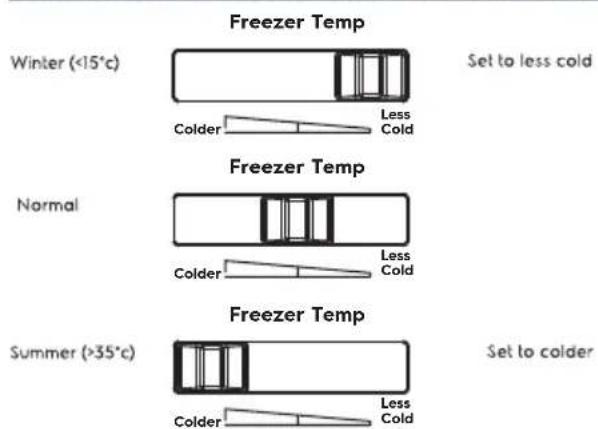
Top mount freezer temperature adjustment
- Select the freezer control.
- Slide the control to the right (as per image below).
- Slide the control to the left (as per image below).
FREEZER TEMPERATURE SETTING RECOMMEDATION
text_image
Freezer Temp Winter (<15°C) Colder Less Cold Set to less cold Normal Freezer Temp Colder Less Cold Set to colder Summer (>35°C) Colder Less ColdTop mount refrigerator temperature adjustment
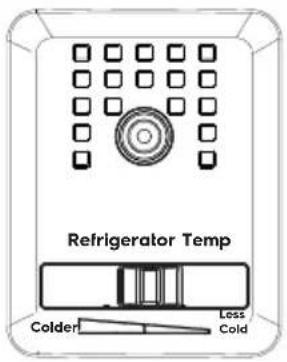
- Select the refrigerator control.
- Slide the control to the left to set to colder.
- Slide the control to the right to set less cold.
REFRIGERATOR TEMPERATURE SETTING RECOMMEDATION
text_image
Refrigerator Temp Colder Less ColdABOUT THE USER INTERFACE
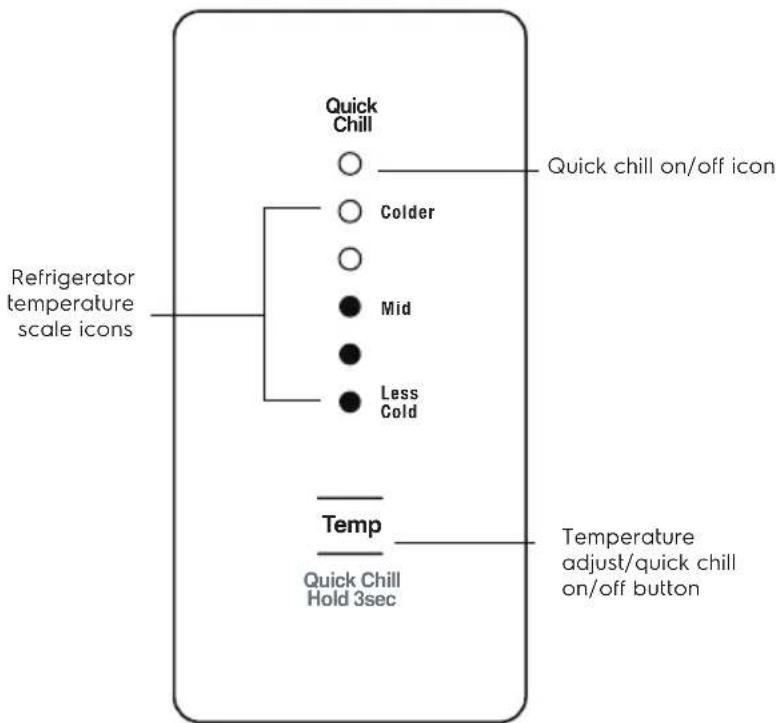
Control - ATB4600 Model
text_image
Quick Chill ○ Colder ○ Mid ● ● Less Cold Refrigerator temperature scale icons Temp Quick Chill Hold 3sec Quick chill on/off icon Temperature adjust/quick chill on/off button| DESCRIPTION | OPERATION / PRIMARY FUNCTION |
| Refrigerator temperature scale icons | Indicates the temperature setting of the refrigerator compartment. |
| Quick Chill On/ O~ icon | Indicates the status of the Quick Chill function |
| Temperature adjust/ quick chill on/ o~ button | Temperature ControlTouch the 'Temp' button to awaken control.Touch the 'Temp' button to decrease the refrigerator temperature.Once the coldest temperature is reached the display will return to the warmest setting with the next press. |
| Quick ChillUse the quick chill function when you add a large amount of food to the refrigerator compartment.Press and hold the 'Temp' button for 3 seconds. The Quick Chill icon will flash indicating that the Quick Chill is active.Your refrigerator will run at 2°C for 90 minutes, then automatically return to normal mode.The Quick Chill function can be cancelled anytime by pressing the 'Temp' button again. |

IMPORTANT
The factory default settings for the refrigerator is "Mid". If you want to change the temperature, remember to make only small adjustments and wait 24 hours to see if it's correct.
ABOUT THE USER INTERFACE
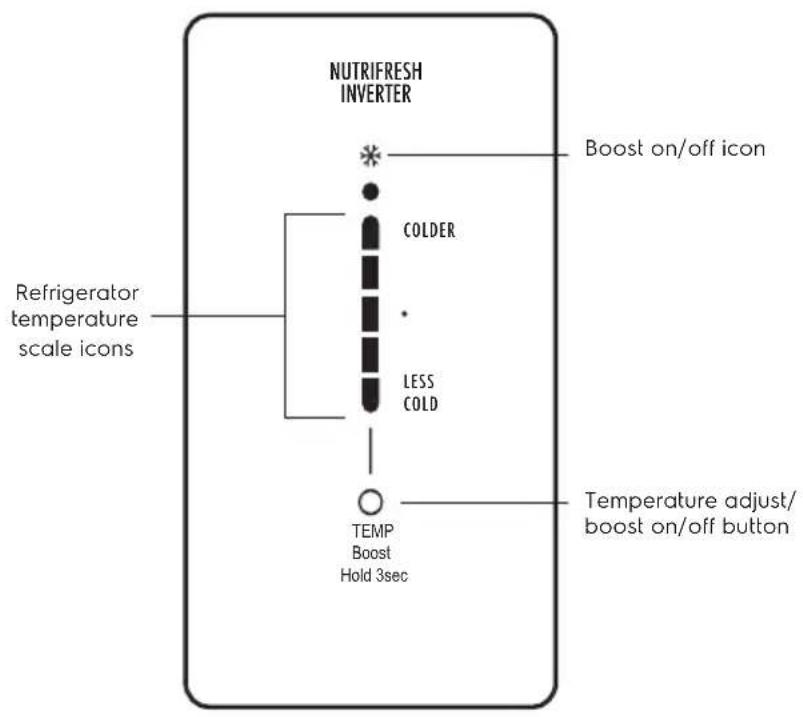
Control - ATE5700 Model
text_image
NUTRIFRESH INVERTER Boost on/off icon COLDER Refrigerator temperature scale icons LESS COLD TEMP Boost Hold 3sec Temperature adjust/ boost on/off buttonDESCRIPTION OPERATION / PRIMARY FUNCTION
Boost temperature scale icons
• Indicates the temperature setting of the refrigerator compartment
Boost On/ Off icon • Indicates the status of the Boost function
Temperature adjust/ boost on/ off button
Temperature Control
- Touch the 'Temp' button to awaken control.
- Touch the 'Temp' button to decrease the refrigerator temperature. Once the coldest temperature is reached the display will return to the warmest setting with the next press.
Boost
- Use the quick chill function when you add a large amount of food to the refrigerator compartment
- Press and hold the 'Temp' button for 3 seconds. The Boost icon will flash indicating that the Boost is active.
- Your refrigerator will run at 2°C for 90 minutes, then automatically return to normal mode.
- The Boost function can be canceled anytime by pressing the 'Temp' button again.
i IMPORTANT
The factory default settings for the refrigerator is "Mid". If you want to change the temperature, remember to make only small adjustments and wait 24 hours to see if it's correct.
ABOUT THE USER INTERFACE
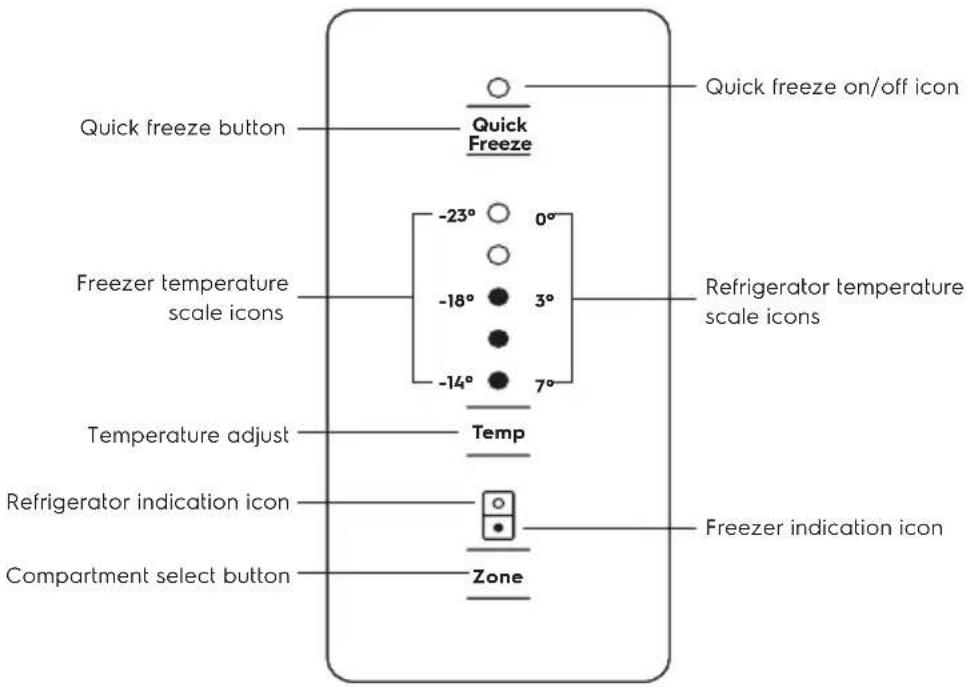
Control - ABE4502 & ABE5302 Model
text_image
Quick freeze button Quick Freeze Freezer temperature scale icons -23° 0° -18° 3° -14° 7° Temperature adjust Temp Refrigerator indication icon Zone Compartment select button Freezer indication icon Quick freeze on/off icon| DESCRIPTION | OPERATION / PRIMARY FUNCTION |
| Quick Freeze on/ o~ icon | ° Indicates the status of the Quick Freeze function. |
| Quick Freeze button | Use the Quick Freeze function when you add a large amount of food to the freezer compartment.° Press the 'Quick Freeze' button. The Quick Freeze iconwill flash indicating that the quick freeze is active and the compressor will run continuously for 90 minutes.° After 90 minutes the freezer will automatically return to normal mode.° The Quick Freeze function can be cancelled anytime by pressing the button again. |
| Refrigerator / Freezer temperature scale icons | ° Indicates the temperature setting of the refrigerator compartment.° Indicates the temperature setting of the freezer compartment. |
| Temperature adjust button | ° Touch any button to awaken control.° Touch the the 'Temp' button to decrease the selected compartment temperature. There are 8 temperature settings indicated by the illumination sequence on the display. Once the coldest temperature is reached the display will return to the warmest setting with the next press. |
| Refrigerator/Freezer | ° Indicates the selected zone. |
| indication icon Compartment select button | ° Press to select the desired compartment.° The refrigerator / freezer indication icon will show which zone is selected. |

IMPORTANT
The factory default settings for the refrigerator is "3°C" and "-18°C" for the freezer. If you want to change the temperature, remember to make only small adjustments and wait 24 hours to see if it's correct.
5. INSTALLING YOUR NEW REFRIGERATOR
Unpacking

ENVIRONMENT
Most of the packing materials are recyclable. Please dispose of those materials through your local recycling depot or by placing them in appropriate collection containers.
Important – check for any damages or marks. If you find the refrigerator is damaged or marked, you must report it within 7 days should you wish to claim for damage/ marks under the manufacturers warranty. This does not affect your statutory rights.
Clean your refrigerator thoroughly following the instructions in the "Cleaning" section and wipe off any dust that has accumulated during shipping.
Locating the refrigerator

CAUTION
Automatic aerosol systems (such as insect control) should not be located adjacent to the product as the spray may cause long term damage to the external plastics of the appliance.
Do not put the refrigerator in a location that is too cold or is unprotected, for example in a garage or on a veranda. The ambient temperature should be above 10^ C.
Put the refrigerator in a dry place avoiding areas of high moisture or humidity.
Ensure the refrigerator is located on an even surface.
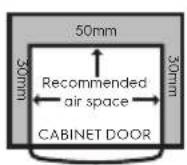
Adequate ventilation around your refrigerator
The diagram below shows the recommended airspace to allow for ventilation of your refrigerator.
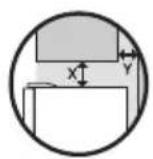
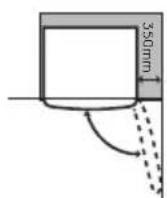
If you have a cupboard above the refrigerator with a rear gap of less than 100 mm (Y), recommended clearance at the top of the refrigerator increases from 50mm to 90mm (X) minimum.
When positioned in a corner area, spacing of at least 350mm (300mm for multi-door models) on the hinge side will allow the doors to open enough to enable the removal of bins and shelves.
NOTE: Doors are designed to sit proud of cabinetry (not flush). The clearances shown above are the recommended minimum clearances.
The clearance at the rear must not exceed 75mm.
Installing your refrigerator
-
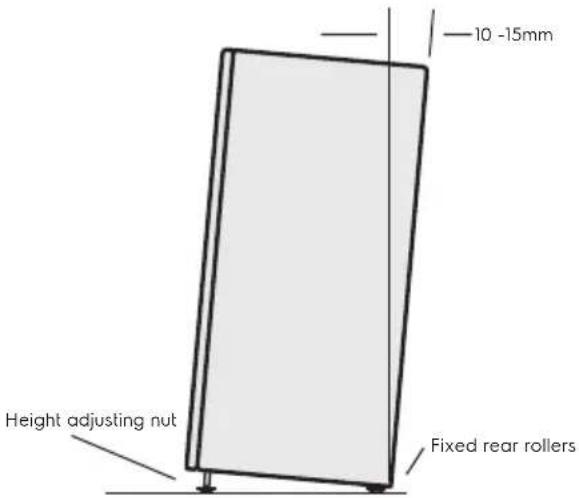
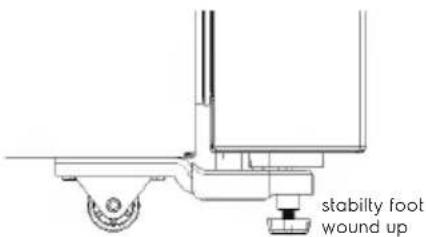
Roll the refrigerator into place. The rollers are designed for forward or backward movement only. They are not astors. Moving the refrigerator sideways may damage your floor and the rollers. Before moving your refrigerator ensure height adjusting nut and the stability foot are fully wound up off the floor.
-
Wind the large height adjusting nut under door hinge down until the refrigerator is tilted back by 10mm (see diagram).
text_image
10 -15mm Height adjusting nut Fixed rear rollers- Stability foot adjusting nut on the handle side down until the refrigerator is level and stable. If you have difficulty winding the nut or height adjusting foot down (recommend 20 mm wrench), have someone tilt the refrigerator back so you have better access.
text_image
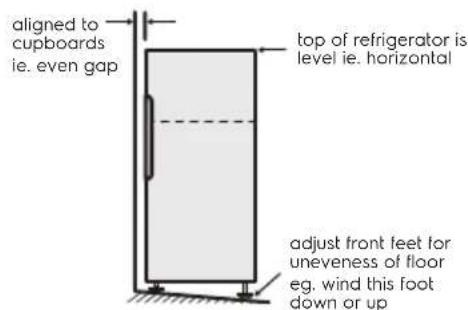
stabilly foot wound up- Check the alignment of the refrigerator to the surrounding cupboards to see if it is level. You can adjust the level as detailed in step 2 and 3.
text_image
aligned to cupboards ie. even gap top of refrigerator is level ie. horizontal adjust front feet for uneveness of floor eg. wind this foot down or up- If you find your refrigerator rocks from corner to corner, it means your floor is uneven. Find a piece of plastic or hardboard etc. and pack it firmly under the roller.
- You may now need to fine-tune the installation by repeating steps 3, 4 and 5.
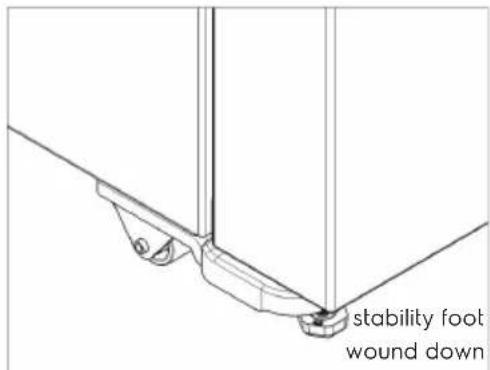
- When you have the appliance in its final position, it needs to be stabilised. Wind the stability foot under the door hinge down to the floor until it just makes contact with the floor. Lift the front of the appliance to take the weZight off the stability foot, then turn it half a turn further to ensure firm contact with the floor. Wind the large height adjusting nut back up to ensure all the weight is now on the front stability foot.
- Repeat step 7 for the stability foot on the handle side. Whenever you need to move the appliance, be sure to wind the feet back up so that the appliance can roll freely and be sure to reset it when reinstalling.
text_image
stability foot wound down- Plug your refrigerator straight into its own power point and never use a double adapter. If you need to roll the refrigerator to get to the plug, remember to raise the stability foot first.
- Before you put any food in your refrigerator, it's recommended you leave it on for 2 or 3 hours to check it is running properly.
Fitting the handles
The handles are supplied prepackaged inside your refrigerator and will require fitting.
Refer to the instructions provided in the pack.
Congratulations! You have successfully installed your new refrigerator.
6. USING YOUR REFRIGERATOR
Refrigerators work by transferring heat from the food inside to the outside air. This operation makes the back and sides of the refrigerator feel warm or even hot particularly at start-up and on warm days - this is normal.
Avoid placing food against the air vents in the refrigerator as it affects efficient circulation. If the door is opened frequently, a light frosting will occasionally occur on the freezer's interior. This is normal and will clear after a few days. If the freezer door is accidentally kept open, a heavy frost will coat the inside walls and should be removed.
Your new refrigerator uses a high-speed compressor, along with other energy-efficient components, which may make unusual sounds and be more noticeable at night and quieter times. These sounds simply indicate your refrigerator is working how it should. They include:
• Compressor running noises;
• Air movement noise from the small fan motor;
• A gurgling sound, similar to water boiling;
- A popping noise, heard during automatic defrosting; and
- A clicking noise, prior to compressor start-up. Further details can be found in the Troubleshooting Guide.
i IMPORTANT
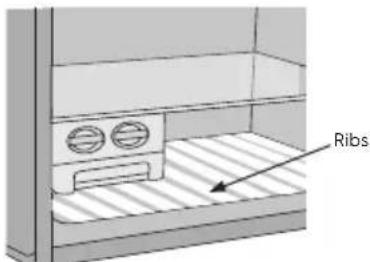
For top mount refrigerators (where the freezer is on top of the fresh food compartment).
- Don't place food forward of the ribs on the freezer floor, as it will keep the door open.
text_image
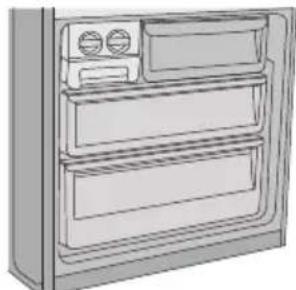
RibsFor bottom mount refrigerators (where freezer is below the fresh food compartment):
- Ensure all freezer drawers and shelves are pushed back completely to prevent them from keeping the door open.
natural_image
Line drawing of a refrigerator front panel with doors and drawers (no text or symbols)REMOVING FEATURES
Removal of Crisper Drawer:
- Empty food from the crisper. On some models it will be necessary to remove the bottle storage bins.
- Remove the crisper by pulling forward, then up and forward again.
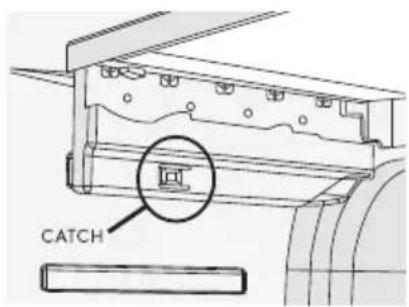
- For top mount models, remove the crisper shelf by lifting the catches on the left and right underside of the shelf and pulling the shelf forward.
text_image
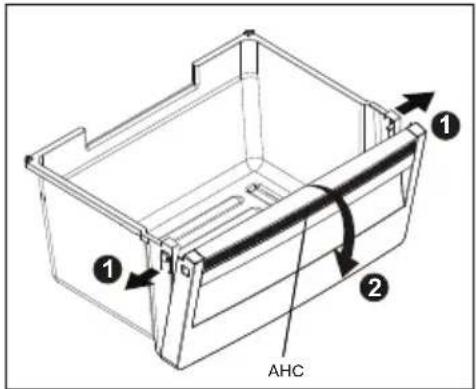
CATCHAuto humidity membrane automatically releases excess moisture and maintains optimal humidity for your fresh vegetables, maintaining the taste, texture and freshness.
text_image
① ② AHCTo remove the Auto humidity membrane part follow these step:
- Unclip the both side clips and,
- Lift off from crisper drawer.

It's not required to replace the Auto humidity membrane unless it becomes damaged or ruined. If the membrane became soiled or dirty, it can be washed with soap and water. Ensure membrane is dry before putting back in crisper drawer. Please contact our service provider when need to replace your AHC membrane.
Glass shelves
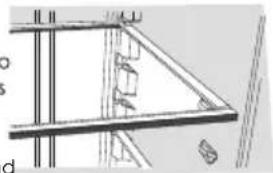
To remove the shelves, gently pull them forward until the shelf comes clear of the shelf guides. To return the shelf, make sure there is nothing behind that
may obstruct movement. Gently push the shelf, into the cabinet and back into position.
natural_image
Pure architectural line drawing of a modern building facade with structural elements (no text or symbols)Freezer shelf
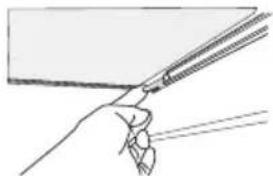
Remove the freezer shelf by lifting the catches on the right and left underside of the shelf to release the shelf then pull the shelf toward you.
natural_image
Simple line drawing of a hand holding a tool, no text or symbols presentDrawers fitted with telescopic slides
To remove the drawer for cleaning.
- Empty food from the drawer.
- Remove the drawer by pulling it forward and lifting the front to unhook it from the slides. Once you have removed the drawer, ensure the slides are pushed back so they are fully closed.

WARNING
Never close the door while the telescopic slides are extended. This may damage the slide and/or refrigerator or cause the slide to become disengaged from the refrigerator.
To replace the drawer:
- Ensure the telescopic slides are pushed in all the way.
- Slide the drawer into place over the slides and push the bin in until it stops.
- Drop drawer into position.

CAUTION
Never close the door while the telescopic slides are extended. It may damage the slide and/or the refrigerator or cause the slide to become disengaged from the refrigerator.
Twist and Serve Ice
Mounting the twist & serve dispenser to the other side of the freezer.
Note : This is only possible on top mount models.
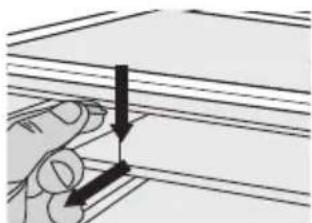
- Remove the ice bin and ice cube tray. If the ice tray assembly is frozen to the carriage, simply squeeze the tray and shelf together to break the ice.
natural_image
Illustration of a hand holding a thin sheet of paper with two arrows indicating direction (no text or symbols)-
Before you remove the ice carriage, remember to disengage it from the glass shelf as it may result in damage to the assembly.
-
Remove the centre runner by disengaging it at the front of the shelf, and removing it from the rear.
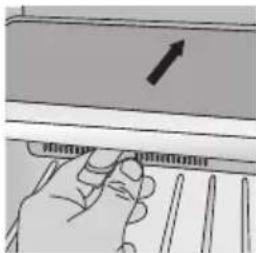
natural_image
Hand holding a ruler with a pointer and arrow, no visible text or symbolsInsert Into the slot at the rear of the shelf
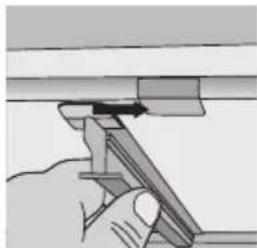
natural_image
Illustration of a hand using a tool to adjust or install a mechanical component (no text or symbols visible)Then engage Into the front of the shelf
-
Refit the runner into the rear of the shelf on the right hand side and then engage the front.
-
Fit the carriage by sliding it into the runners until the front if the carriage engages with the shelf.
-
Refit the ice tray and ice bin.

WARNING
Fill the ice tube tray with potable water only.

CAUTION
LED lighting
Your appliance is fitted with long life LED lighting. In the unlikely event the LED lights should fail, then the LED lights should be serviced by the manufacturer.
Refer to the warranty page for contact details.
7. CLEANING YOUR REFRIGERATOR

WARNING
BEFORE CLEANING: Turn the refrigerator off at the power point and unplug the cord to prevent any chance of electrocuting yourself.
Doors and exterior (white and silver):
You should only clean the doors with lukewarm soapy water and a soft cloth.
Stainless Steel:
Your stainless steel refrigerator is manufactured from mark-resistant stainless steel. This stainless steel has a special advanced protective coating that eases the removal of marks such as fingerprints and water spots. To keep its appearance, clean it regularly with lukewarm soapy water and a soft cloth.

CAUTION
Never use stainless steel cleaners, abrasive pads or other cleaners that will scratch the surface. Damage to the appliance after delivery is not covered by your warranty.
Interior
Clean the inside of your refrigerator regularly with a soft cloth, unscented mild soap and lukewarm water. Thoroughly dry all surfaces and removable parts and avoid getting water on the controls. Replace removable parts, plug power cord in and switch the power on before returning the food.
Door seals
Always keep door seals clean by washing them with a mild detergent and warm water, followed by a thorough drying.
Sticky food and drink can cause seals to stick to the cabinet and tear when you open the door.

CAUTION
Never use hot water, solvents, commercial kitchen cleaners, aerosol cleaners, metal polishes, caustic or abrasive cleaners, or scourers to clean your refrigerator. Many commercially available cleaning products and detergents contain solvents that will damage your refrigerator. Use only a soft cloth with an unscented mild soap and lukewarm water.
To clean a crisper or freezer bin with telescopic extension slides, simply wipe with a damp cloth and warm soapy water. Never immerse the cover in water, as this could affect the operation of the slide.
Switching off your refrigerator
If you switch off your refrigerator for an extended period, follow these steps to reduce the chances of mould:
- Remove all food.
- Remove the power plug from the power point.
- Thoroughly clean and dry the Interior.
- Ensure that all the doors are wedged open slightly for air circulation.
8. FOOD STORAGE GUIDE
| CATEGORY PRODUCT REFRIGERATOR FREEZER STORAGE TIPS | ||||
| MEAT | Sausages and Mince 1-2 Days 2-3 Months | Keep cold meat at the back of the refrigerator where it is coldest. | ||
| Chops and Steak 3-4 Days 4-6 Months | ||||
| Cold Meats 3-5 Days 4-6 Months | Plastic can cause meat to sweat if stored in refrigerator for more than a day. | |||
| Roasts 3-5 Days 12 Months | Roast can take up to 48 hours to defrost properly, transfer frozen roast to the refrigerator 2 days before use. | |||
| POULTRY | Chicken 1-2 Days 2 Months | If poultry takes on a smell or colour you are unsure about it is best to throw it out. | ||
| Roast Chicken 3-5 Days 12 Months | ||||
| Eggs | 6 Weeks | Not Suitable | Whole eggs are not suitable for freezing, slightly beaten eggs may be frozen for four months. | |
| SEAFOOD | Whole fish and fillets | 2-3 Days | 2 Months | Store in an air tight container or foil. |
| Lobster and crabs | 1-2 Days 2 Months | Never freeze prawns in salty water as this will dehydrate the flesh. | ||
| Prawns | 1-2 Days 2 Months | |||
| DAIRY | Milk | Until Expiry Date | Not Suitable | If dairy takes on a smell or colour and you are unsure about it, it is best to throw it out. |
| Yoghurt | 7-10 Days Not Suitable | |||
| Hard Cheeses | 2 Weeks - 2 Months 2 Months (Grated) | |||
| Soft Cheeses | 1-2 Weeks | Not Suitable | Depending on the variety hard cheese can last from 2 weeks to 2 months. | |
| Butter | 8 Weeks | 12 Months | ||
| FRUIT & VEGETABLES | Every fruit and vegetable has a different shelf life. Some stay fresh for a couple of days e.g beans, others can last for a couple of months e.g. onions. | 8-12 MonthsWhen freezing chop and blanch in small portions. | Keep vegetables in the crisper and away from the air vents to avoid freezing. | |
| Don't wash fruit and vegetables before storing them in the refrigerator as this can make them susceptible to rotting. | ||||
| LEFT OVERS | Homemade meals | 3-4 Days | 2-6 Months | Store in sealed container. |
| Freeze meals in small portion sizes to limit wastage. | ||||

IMPORTANT
Please note, use this information as a guide only, actual storage times will vary depending on how you use your refrigerator, climatic conditions and the freshness of the food.
9. TROUBLESHOOTING
Appliance does not operate at desired temperature
In a modern frost free refrigerator / freezer, cold air is circulated around the various compartments through air vents using a high efficiency fan.
| CONCERN | WHAT TO DO |
| Refrigerator is too warm | Ensure food is allowed to cool before placing inside the refrigerator. |
| Ensure the appliance is set up as per instructions on page 11. | |
| Ensure that contents are not obstructing the cooling vents. | |
| Ensure the door is not held open or is being opened too frequently. | |
| Freezer is too warm | Adjust temperature to a colder setting.Ensure food is allowed to cool before placing inside the freezer.Ensure the appliance is set up as per instructions on page 11.Ensure that contents are not obstructing the cooling vents.Ensure the door is not held open or is being opened too frequently. |
| Food is freezing in the refrigerator | Adjust temperature to a warmer setting.Ensure that fruit and vegetables are stored in the crisper. Items with a high water content should not be placed near the cooling vents. |
| Unable to change temperature settings | Refer to function guide in Controlling Your Refrigerator.Ensure that user interface is in “awake” mode before trying to adjust temperature settings. |
Appliance noise
Your new refrigerator may make sounds that your old one didn't make. Because the sounds are new to you, you might be concerned about them. Most of the new sounds are normal. Hard surfaces, like the floor, walls and cabinets, can make the sounds seem louder than they actually are. The following describes the kinds of sounds and what may be making them.
| CONCERN | WHAT TO DO |
| Motor noise (compressor) | Nothing. This is normal as your new refrigerator uses a high-speed compressor which switches on and off during operation. |
| Note that the compressor noise may seem louder at the start of the on cycle. | |
| A clicking noise heard just before the compressor starts. | Nothing. This is normal as your new refrigerator has an automatic switching action of the temperature control, turning the compressor on and off. |
| Occasional gurgling, similar to water boiling. | Nothing. As each cycle ends, you may hear a gurgling sound due to the refrigerant flowing in your refrigerator system. |
| Airflow noise. | Nothing, this is normal as your new refrigerator uses high efficiency fans to circulate air. |
| Rattling and other noises. | Ensure that the cabinet is level and stable, refer to Installation Instructions on page 6. |
| Check the surrounds of the appliance to ensure there is nothing touching or placed on top of the appliance. | |
| Ensure that contents of the appliance are not placed in such a way that they are vibrating (such as bottles). |
Crisper Operation
| CONCERN | WHAT TO DO |
| Excess moisture build up in crisperIt is normal for there to be some moisture and humidity in the crisper bin. | Ensure that the crisper is not over packed. |
| Crisper bin can not be removed If crisper bin interferes with the door bins, remove door bins before removing crisper.Position cabinet so that the door can be fully opened. | |
| Freezing items in the crisper | Adjust temperature to a warmer setting. |
Refrigerator operation
| CONCERN WHAT TO DO | |
| Appliance will not run | Ensure that the cord is plugged into a live power outlet and outlet is switched on. |
| It is normal for the freezer fan not to operate during the automatic defrost cycle, or for a short time after the appliance is switched on. | Ensure that the household circuit breaker has not tripped or that the fuse has not blown. |
| The appliance maybe in defrost mode, check again in half an hour. | |
| Compressor motor seems to run too long | Ensure that the doors are not held open |
| At normal room temperatures, expect your motor to run about 40% to 80% of the time. Under warmer conditions, expect it to run even more often. | Check that large amounts of warm food have not just been placed inside the appliance. Note that the appliance will run more than normal just after you install it or when adjusting to temperature setting changes. |
| The exterior of the appliance is warm or hot to touch | Ensure the appliance has the external clearances recommended in the section "Installing your new appliance". |
| This is normal because the appliance transfers heat from the inside out through the outer panels and the divider between the doors. | The exterior of the cabinet will be much warmer on warmer days it may even feel hot to touch, as the appliance is working harder. |
| User interface will not respond | Check that the user interface is in awake mode, refer to section "About the user interface". |
| To ensure settings are not accidentally changed the user interface will go into sleep mode when not in use. Press any button to wake user interface | Check that the user interface is not locked, refer to section "About the user interface". If the user interface is frozen turn the appliance off for five minutes for the memory to clear, then turn back on. Check that the user interface is not in Sabbath Mode, refer to control instructions. (I&W models only). |
| Alarms Sounding | Check that all doors are fully closed. Ensure that the over temperature alarm is not being activated by hot food placed in the freezer. Check if the drinks timer has ended, refer control instructions. Check if the Filter Replacement alert is activated, refer control instructions. (I&W models only) |
| Frost build up Check that all doors are fully closed. | Ensure that the doors are not opened too often. Ensure that the return air vents are not blocked with packaging. Ensure the seals are clean and not obstructed. |
| Odours The interior may need cleaning, refer to cleaning guide. | Ensure that food is stored correctly as some food, containers and wrapping can produce odours. Check appliance for old or unusual food. |
| Lights not working | Ensure that the cord is plugged into a live power outlet and outlet is switched on. |
| The LED lighting is designed to dim automatically if the door is left opened for more than 5 minutes and turn off completely if the door is open for more than 7 minutes. Closing the door will reset the timer. The LED lighting is also designed to turn on gradually. | Ensure that the household circuit breaker has not tripped or that the fuse has not blown. Check that the user interface is not in Sabbath Mode, refer to control instructions. Check the appliance features section to determine lighting configuration for your model. Check that the doors are closed completely |
TROUBLESHOOTING
Door operation
| CONCERN | WHAT TO DO |
| Freezer door pops open. | This is normal and should re-close. This happens when the refrigerator door is closed too quickly.If the freezer door stays open, it indicates that the appliance needs to be tilted backwards a little further. Refer to section “Installing your new appliance”. |
| Self close not working. | Check if your appliance has self closing hinges as not all models do.It indicates that the appliance needs to be tilted backwards a little further. Refer to section “Installing your new appliance”. |
| Door not sealing properly | Ensure there is nothing that is preventing the door from closing such as appliance contents or items placed near the appliance.Ensure that the crisper/freezer bin is closed completely. Refit if required as referred to in the section “Using your refrigerator”.Ensure the appliance is set up as per recommendations. |
| Door difficult to open and close | If the door is difficult to open just after you have closed it this is due to the pressure equalising, the door will open normally after a few minutes. |
If you still require service
If you have a problem, and the problem persists after you have made the checks mentioned, contact your nearest AEG approved Service Centre or the dealer you bought the refrigerator from. Be ready to quote the model number, the -9digit PNC and -8digit serial number, which is stated on the label inside the refrigerator compartment.
10. NOISES
There are some sounds during normal running (compressor, refrigerant circulation).
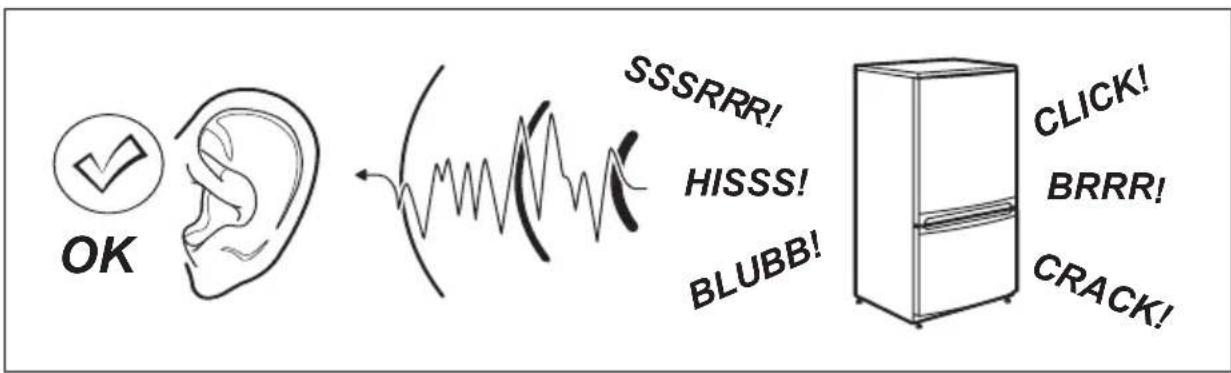
text_image
OK SSSRRR! HISSS! BLUBB! CLICK! BRRR! CRACK!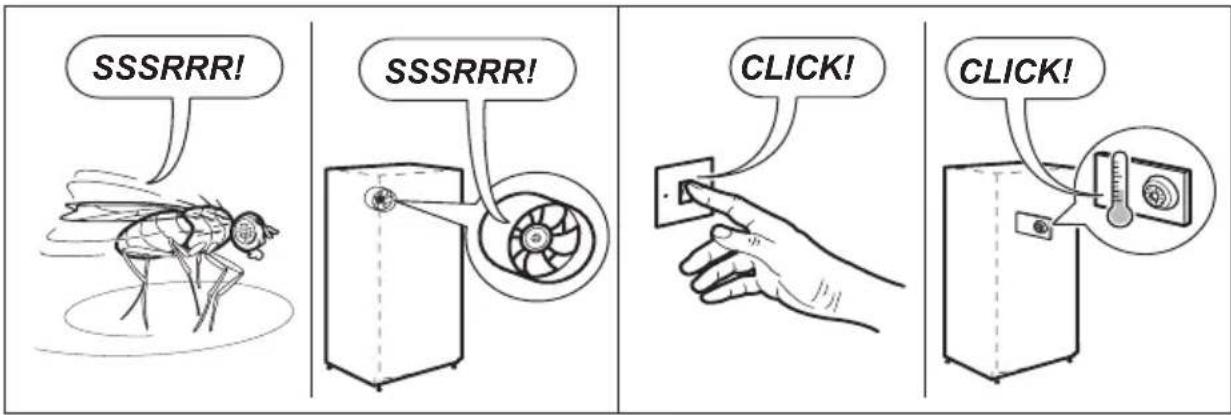
text_image
SSSRRR! SSSRRR! CLICK! CLICK!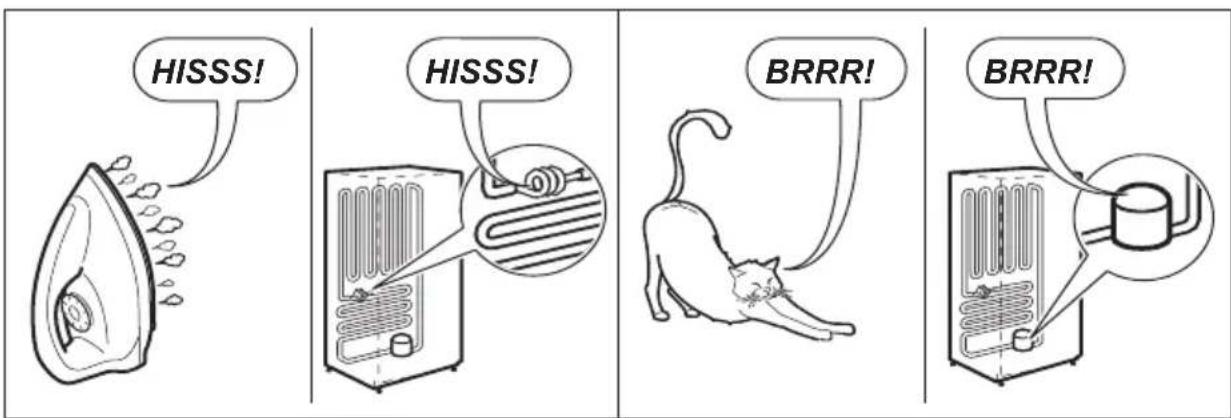
text_image
HISSS! HISSS! BRRR! BRRR!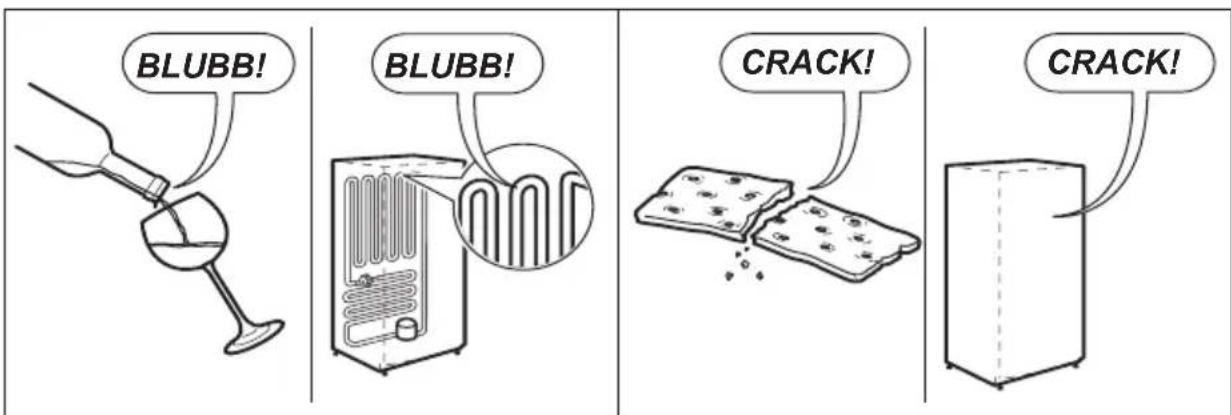
text_image
BLUBB! BLUBB! CRACK! CRACK!Notes
TABLE DES MATIÈRES
- INFORMATIONS RELATIVES À LA SÉCURITÉ....3
- INSTRUCTIONS DE SÉCURITÉ....4
- DESCRIPTION DE L'APPAREIL 6
- RÉGLAGE DE LA TEMPÉRATURE....9
- INSTALLATION DE VOTRE NOUVEAU RÉFRIGÉRATEUR....13
- UTILISATION DU RÉFRIGÉRATEUR....14
- NETTOYAGE DU RÉFRIGÉRATEUR....17
- GUIDE DE CONSERVATION DES ALIMENTS....18
- EN CAS D'ANOMALIE DE FONCTIONNEMENT....19
- BRUITS....22
POUR DES RÉSULTATS PARFAITS
text_image
Diagram of a refrigerator interior with numbered compartments and labeled bottles, likely for cooking or storage instructions.ATE5700 illustré
text_image
Diagram of a refrigerator interior with numbered compartments and bottles, likely for cooking or storage instructions.ABE5302 illustré
1 Désodorisant TasteGuard
text_image
Refrigerator Temp Colder Less Coldnatural_image
Line drawing of a refrigerator front with double doors and side outlets (no text or symbols)RETRAIT D'ÉLÉMENTS
natural_image
Architectural line drawing of a structural framework with beams and supports (no text or symbols)natural_image
Simple line drawing of a hand holding a pen, no text or symbols presentnatural_image
Diagram showing a hand holding a thin sheet of material with two arrows indicating direction (no text or symbols present)natural_image
Illustration of a hand pressing down on a mechanical component with a black arrow indicating direction (no text or symbols)natural_image
Illustration of a hand using a tool to adjust or install a mechanical component (no text or symbols visible)natural_image
Illustration of a hand holding three parallel sheets with arrows pointing to the bottom section (no text or symbols)natural_image
Hand holding a mechanical component with an arrow indicating direction (no text or symbols visible)natural_image
Hand holding a tool with a ruler and arrow, no visible text or symbolsnatural_image
Line drawing of a refrigerator front view showing two doors with ovens (no text or symbols)text_image
Refrigerator Temp Colder Less Coldnatural_image
Blank white square frame with black border, no text or symbols present7 درج البيض